ChatGPT Pro Codex Limits: Measure a Week of Burn, Then Pick Plus, Pro 100, Pro 200 or Pro 500
ChatGPT Pro Codex limits after the Oct 29 change: what OpenAI documents for Pro 100, 200 and 500, a 7-day /status and Usage drill, and a plan decision table.

Last month your Codex sessions ran into the weekly wall on a Thursday. This week your feed is full of new ChatGPT Pro Codex limits: one post says Pro 100 went from “5x” to “10x”, another says every tier doubled, and a third says Pro 200 “stays 20x”. You’re on Plus or one of the three Pro tiers, and you want to know whether to upgrade, downgrade or leave the plan alone. None of those posts has seen your usage.
This decision guide is for a developer who runs Codex in the CLI, the IDE extension or the app on a ChatGPT plan. You’ll need an active plan signed in to Codex, access to the Codex usage dashboard, the /status command in the CLI and one ordinary work week. By the end you’ll have:
- a filled seven-day burn worksheet built from your own dashboard readings;
- the two or three habits that drove most of your spend, named;
- a config that stops paying for speed you didn’t ask for;
- a tier choice that keeps your weekly peak below the limit with room to spare;
- a recheck date, and a way back if the choice turns out wrong.
One warning before any numbers: OpenAI does not publish exact limits for any Pro tier. What it documents is relative (“twice their previous Work and Codex allowance”) plus the rates at which certain modes drain the allowance. Every number in the worked example below is labelled Illustrative, and the thresholds in the decision table are this guide’s rule of thumb, not OpenAI’s.
Why the multipliers on X don’t settle the question
On Oct 29, 2026, Codex lead Thibault Sottiaux posted on X that OpenAI was “doubling all usage limits for all Pro 100/200/500 tiers and Business Premium, effective today.” In the same post he said OpenAI “won’t be reducing usage limits for Pro 200, so your Work and Codex usage will stay the same.” Within minutes, another X account turned that into a multiplier table: “100$: 5x->10x”, “200$: 20x stays 20x not 10x”, “500$: 25x->50x”.
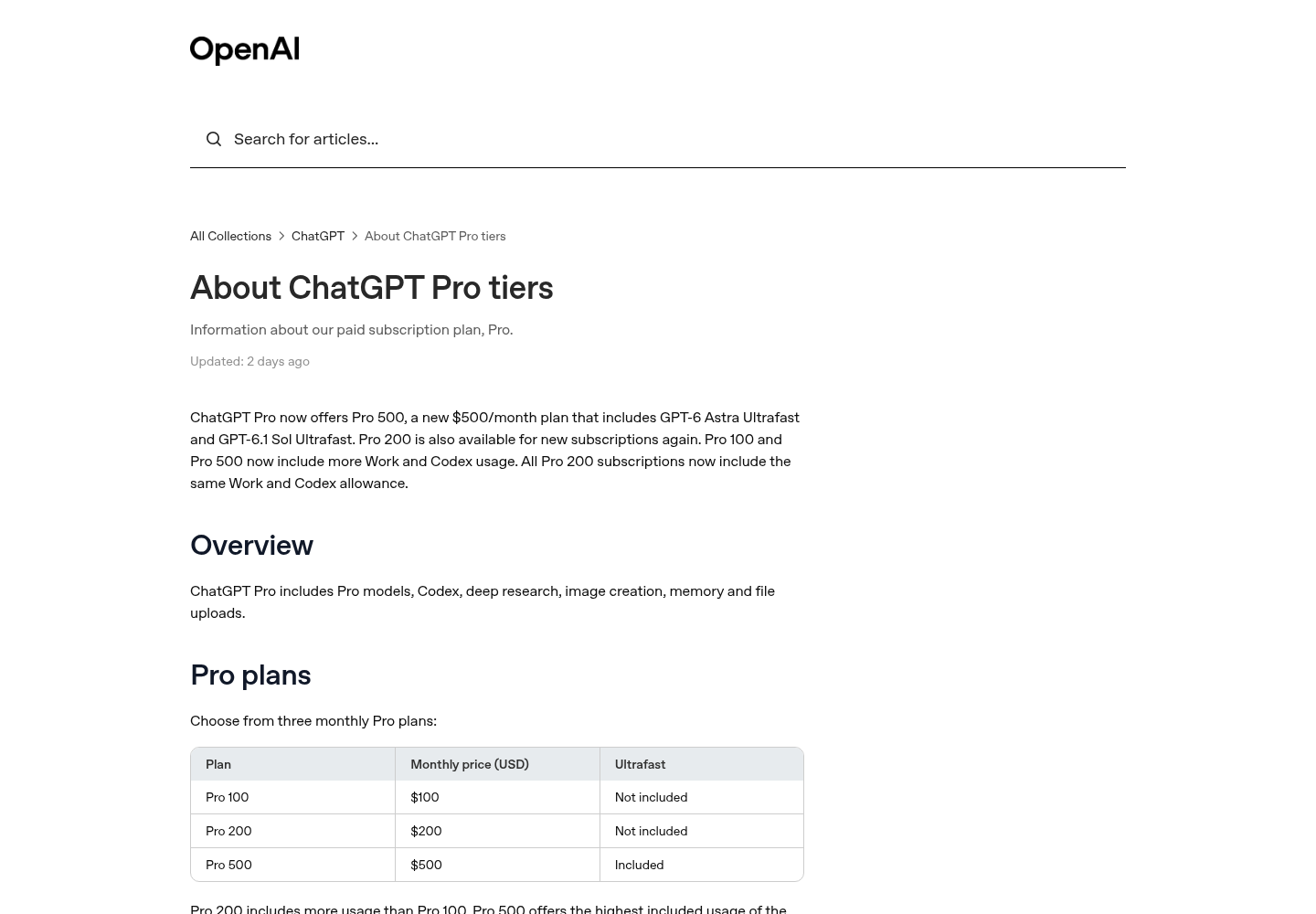
OpenAI’s help article About ChatGPT Pro tiers describes something narrower and more useful. Pro 100 and Pro 500 “now include twice their previous Work and Codex allowance.” On Pro 200, “only the lower allowance doubled”: the reduction announced in a September 29 email is cancelled, subscribers who already had the higher allowance keep it, and those on the lower one were raised to match. Existing subscribers get the change automatically, without waiting for renewal. Plus usage is unchanged.
Chat is a separate meter. The weekly GPT-6 Pro message limits in Chat stay as they were on Pro 100 and Pro 500, and on Pro 200 the lower Chat limit now matches the higher one. The help article says those message limits are separate from your Work and Codex allowance.
Three practical conclusions follow:
- The “5x” and “25x” baselines in the social table don’t appear on OpenAI’s pages. A multiple of an unpublished number is not something you can plan around.
- If you were already on the higher Pro 200 allowance, your Codex allowance did not change on Oct 29. “All limits doubled” is simply wrong for you.
- The help article itself warns that “a larger allowance does not guarantee twice as many completed tasks,” because what you get done depends on the model, the task and your settings.
That third point is why the rest of this guide measures instead of guessing.
What OpenAI documents for each tier
This table holds everything the selected OpenAI pages say per plan, read on Oct 31, 2026. Where a page gives no figure, the cell says “not published”. Read each row again on the day you change plans, because these pages are updated in place.
| Plan | Price per month | Work and Codex allowance after Oct 29 | Five-hour limit | Ultrafast | After you hit a limit | Source |
|---|---|---|---|---|---|---|
| Plus | $20 | Unchanged; exact limit not published | Yes; per-model estimates published, for example 15-160 local GPT-6.1 Sol messages per five hours | Not available | Buy credits | Codex pricing; Pro tiers help |
| Pro 100 | $100 | Twice the previous allowance; exact limit not published | None currently; weekly limits may apply | Not included; buying credits does not unlock it | Buy credits | Pro tiers help; Codex pricing |
| Pro 200 | $200 | The lower allowance doubled to match the higher one; the higher allowance is unchanged | None currently; weekly limits may apply | Not included | Buy credits | Pro tiers help |
| Pro 500 | $500 | Twice the previous allowance; the highest of the three; exact limit not published | None currently; weekly limits may apply | Included; uses included allowance at 8x the Standard rate, then credits at 6x | Buy credits | Pro tiers help; Codex pricing |
| API key | API token pricing | No plan allowance; you pay per use | Not applicable | Follows the API models available to your key | You keep paying API rates | Codex pricing |
A few rules sit under that table and apply to every tier:
- Local and cloud share one allowance. The Codex pricing page says local messages and cloud chats share your plan’s usage allowance, that cloud tasks may use more of it than local messages, and that “weekly limits may also apply.” ChatGPT Work uses the same pricing, credits and limits as Codex, so a heavy Work day counts against your Codex week.
- Speed modes cost allowance. Compared with Standard mode for the same model, Fast uses your included allowance at 2.5 times the rate, and Ultrafast on GPT-6 Astra or GPT-6.1 Sol at 8 times. With purchased credits the multiples are 2x and 6x.
- Credits come after the allowance. Included usage is spent first, then your credit balance. Where your account offers credits, you can see and buy them under Settings → Usage in ChatGPT, or Usage & Billing in Codex.
- Nobody can reset you. The help article says Support cannot reset ChatGPT or Codex limits; it can only investigate usage that was counted incorrectly.
- Pro is billed monthly. Annual billing isn’t offered, so any tier change is a one-month bet.
The opening of OpenAI’s “About ChatGPT Pro tiers” help article, which summarizes the Pro 500 plan and the change to Work and Codex allowances. The article, not social posts, is the reference for what changed on each tier. Source: OpenAI Help Center.
Before you start the measurement week
- [ ] Write down your exact tier. Open Settings → My Plan in ChatGPT and note Plus, Pro 100, Pro 200 or Pro 500. If you’re on Pro 200, also note whether you had the lower allowance before Oct 29, because your older readings won’t compare with new ones.
- [ ] Confirm Codex draws on your ChatGPT plan. Run
codex login statusin a terminal; OpenAI’s CLI command reference says it exits with 0 when credentials are present. Then make sure you signed in with ChatGPT, not an API key. An API-key session bills at API rates and never touches the allowance you’re trying to measure. Our Codex CLI install guide covers both sign-in modes. - [ ] Find the usage dashboard. The Codex pricing page answers “Where can I see my current usage limits?” with a link to it. Note the reset time the dashboard shows; that’s when your measurement week starts.
- [ ] Pick one reading time. Use the same hour every day, ideally at the end of your working day.
- [ ] Record your credit balance. If Usage & Billing shows a balance or an auto-reload setting, write both down so day 7 can tell you whether any credits were spent.
- [ ] Agree with yourself not to change tier this week. A mid-week plan change breaks the comparison.
- [ ] Open a spreadsheet or text file for the worksheet shown in the worked example below.
Run the seven-day measurement drill
The aim is one reading per day of how much of the weekly allowance is gone, plus a note of what you did to spend it. Seven readings show the shape of one week. Four weeks are better if you can wait, because one release week can look nothing like an ordinary one.
- Take the daily reading. At your chosen time, open the usage dashboard and write down the weekly figure as a percentage used, plus the reset time. If your dashboard shows remaining rather than used, record that consistently instead. On Plus, also note the five-hour window, because Plus has one and Pro currently doesn’t.
- Cross-check from inside the CLI. In an active session, type
/status. The slash-command reference says it displays the active model, approval policy, writable roots and token usage, and the pricing page says you can use it to see your remaining limits during a CLI session. Record the model it names; you’ll need it when you look for drivers. - Pull token activity. Type
/usage dailyto see the day’s token activity, and on day 7 type/usage weekly. This gives you a token view to set beside the dashboard’s percentage. Don’t convert tokens into allowance using API prices: the pricing page says API token prices are separate from subscription usage and shouldn’t be used to estimate included tasks. - Put limits in your footer. Run
/statuslineand add the rate-limits item, so a fast drain is visible while you work rather than the next evening. The reference says the choice persists inconfig.toml. - Log what you did. For each session note the surface (CLI, IDE, app, cloud task or GitHub review), the task, the model, the reasoning effort, whether Fast or Ultrafast was on, how many agents or subagents ran at once, and whether you generated images.
- Mark limit events. If you hit a limit, write down when and what you were doing. The pricing page says a turn already in progress can keep working, subject to fair use, so a hit often shows up as a refused next prompt rather than an interrupted task.
- Work normally. You’re measuring your real week. If you start rationing on day 3, the worksheet will recommend a tier that’s too small for the weeks when you don’t ration.
- Close the week. On day 7, compute each day’s change, the week’s total, and how many points came from your two heaviest days.
Worked example: one Pro 100 week, filled in
Everything in this section is Illustrative. It shows how a completed worksheet reads; the readings are not measurements from a real account, and the percentages don’t map to any number OpenAI publishes.
The case: a developer on Pro 100 whose dashboard week resets on Monday morning. They read the dashboard at 18:00 every day and log that day’s sessions.
| Day | Reading (weekly used) | Change | Sessions | Main work | Model and effort | Speed | Limit hit? |
|---|---|---|---|---|---|---|---|
| 1 Mon | 12% | +12 | 2 local CLI | Refactor | GPT-6.1 Sol, high | Standard | No |
| 2 Tue | 21% | +9 | 1 local CLI | Bug fixes | GPT-6.1 Sol, medium | Standard | No |
| 3 Wed | 47% | +26 | 3 cloud tasks, 1 local | Migration handed to cloud | GPT-6.1 Sol, high | Standard | No |
| 4 Thu | 58% | +11 | 2 IDE | Code review | GPT-6.1 Sol, medium | Standard | No |
| 5 Fri | 81% | +23 | 1 local, 2 subagents | Release prep | GPT-6.1 Sol, high | Fast for about 2 hours | No |
| 6 Sat | 83% | +2 | 1 app | One question | GPT-6 Luna, low | Standard | No |
| 7 Sun | 86% | +3 | 1 local | Docs tidy | GPT-6.1 Sol, medium | Standard | No |
If you prefer a file you can paste into a spreadsheet, here is the same week as CSV:
day,reading_used_pct,change_pts,sessions,main_work,model,effort,speed,parallel_agents,limit_hit
1-Mon,12,12,2 local CLI,refactor,gpt-6.1-sol,high,standard,1,no
2-Tue,21,9,1 local CLI,bug fixes,gpt-6.1-sol,medium,standard,1,no
3-Wed,47,26,3 cloud + 1 local,migration via cloud,gpt-6.1-sol,high,standard,1,no
4-Thu,58,11,2 IDE,code review,gpt-6.1-sol,medium,standard,1,no
5-Fri,81,23,1 local,release prep,gpt-6.1-sol,high,fast ~2h,3,no
6-Sat,83,2,1 app,one question,gpt-6-luna,low,standard,1,no
7-Sun,86,3,1 local,docs tidy,gpt-6.1-sol,medium,standard,1,no
How to read it:
- The peak is 86% with no limit hit. That leaves 14 points of headroom in a week that included a migration and a release. This tier is not too small.
- Two days did most of the damage. Wednesday and Friday account for 49 of the 86 points, more than half the week. Wednesday was the only day with cloud tasks; Friday was the only day with Fast mode and parallel subagents.
- The ordinary days are cheap. The other five days add up to 37 points, under 8 a day on average.
- The decision is to stay on Pro 100. Upgrading to Pro 200 would buy permanent headroom for two habits that can be changed. Dropping to Plus would bring back five-hour windows on an allowance that didn’t grow on Oct 29, and a week at 86% of a doubled Pro 100 allowance is no case for that.
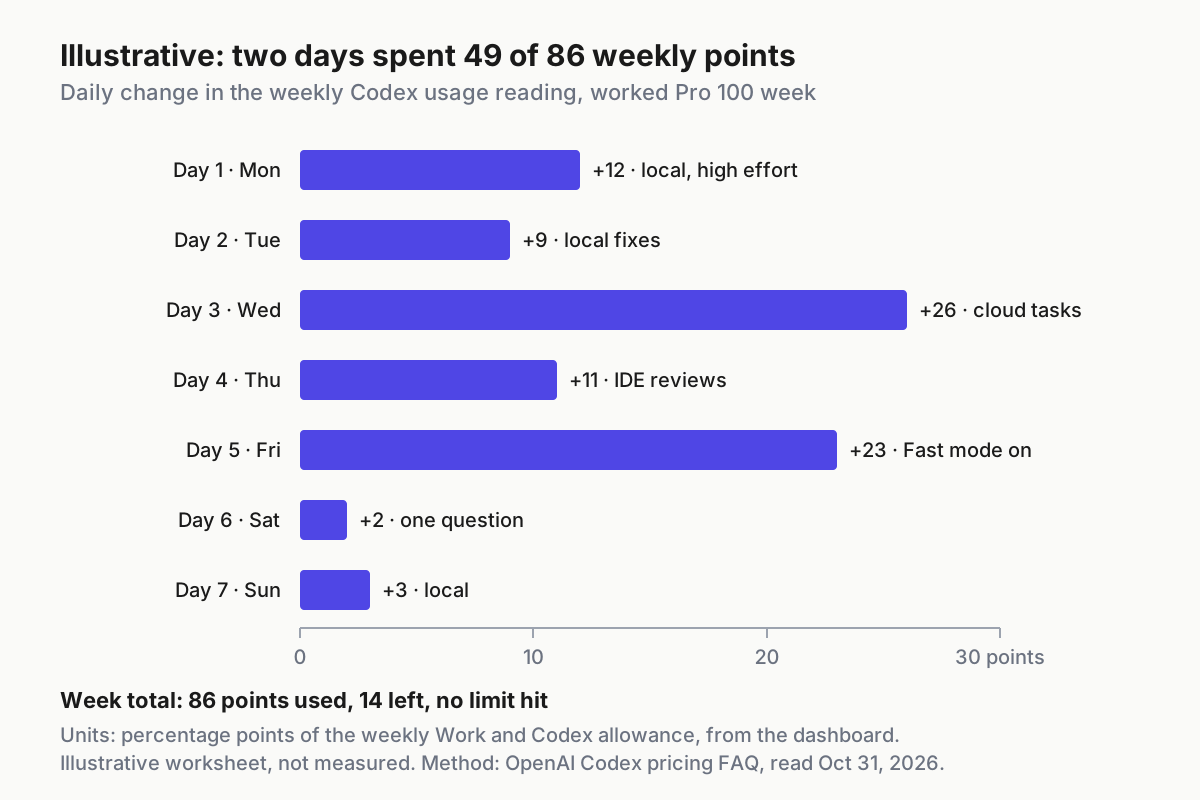
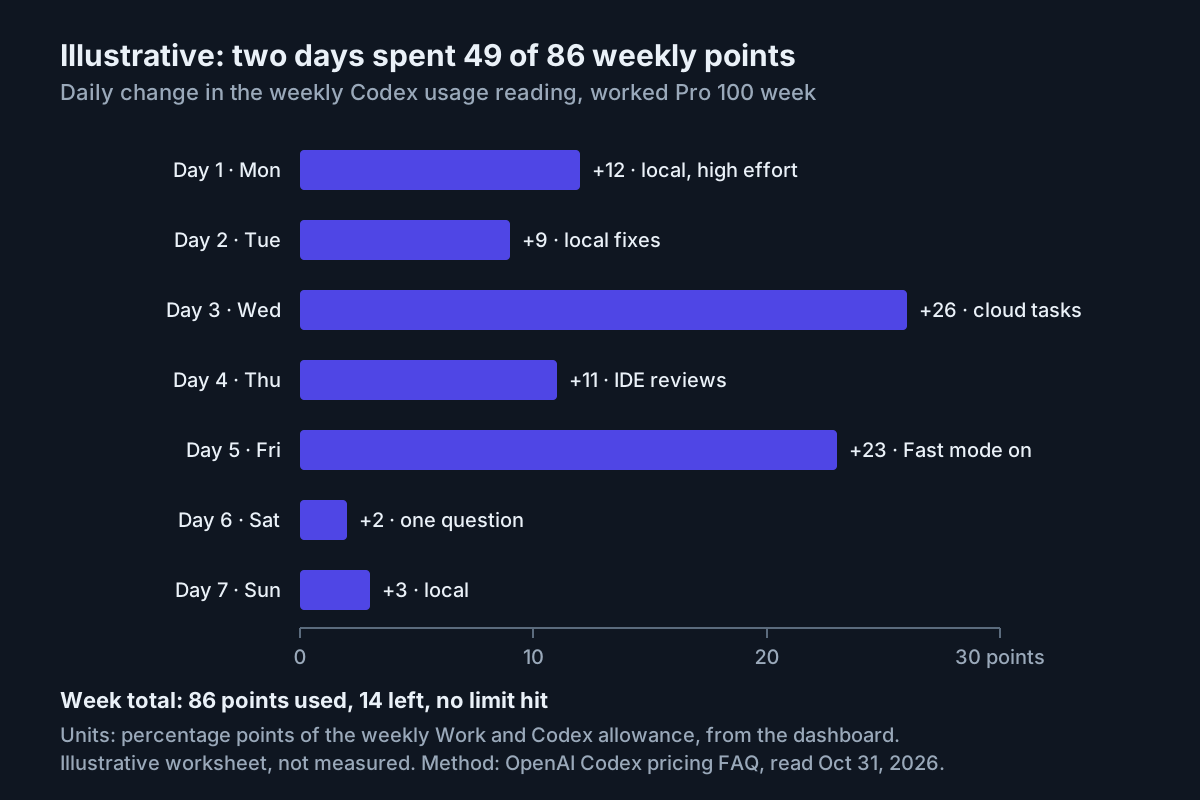
Illustrative: in this worked Pro 100 week, two days spent 49 of the 86 points used, one with cloud tasks and one with Fast mode on. The values come from this guide’s example worksheet, not from a real account; the method follows OpenAI’s Codex pricing FAQ, read Oct 31, 2026.
Find what drove the burn
Once the worksheet is full, match each heavy day against the drivers OpenAI documents. The table gives the documented effect, the pattern to look for in your log, and the first thing to try.
| Driver | What OpenAI documents | How it shows up in your log | First move |
|---|---|---|---|
| Cloud tasks | Cloud tasks may use more of your allowance than local messages | The big jumps fall on days with cloud tasks | Run one comparable task locally and compare the day’s change |
| Fast mode | Uses included allowance at 2.5x the Standard rate | Jumps on days when /fast was on |
Keep Fast off by default and turn it on only while you’re waiting on output |
| Ultrafast (Pro 500) | Uses included allowance at 8x the Standard rate, credits at 6x | Very large jumps on Ultrafast days | Keep it for moments when speed really matters |
| Image generation | Uses included limits about 3-5x faster on average | Jumps on days with generated images | Batch image work or move it to a quieter day |
| Model, context, reasoning, tools, caching | Usage depends on all of these and on speed mode | High-effort days cost more than medium ones for similar work | Lower the default effort; see the next section |
| MCP servers and AGENTS.md | Every MCP server adds context; large AGENTS.md files inject more | Costly sessions in repos with many tools enabled | Disable unused servers and nest AGENTS.md files |
| Parallel agents | OpenAI’s Business rate card lists concurrent Codex instances among the things that change usage | Jumps on subagent-heavy days | Cap concurrent threads |
| ChatGPT Work and Excel | Share the same allowance as Codex on Plus and Pro | Changes on days you barely used Codex | Count them as part of the week |
The parallel-agents row comes from the Business and Enterprise credit rate card, which states that actual credit usage depends on “the model used, task size, input and output mix, automations, fast mode, and the number of concurrent Codex instances.” It is written for credit-based workspaces, but the same factors explain plan burn. The same rule holds on the Claude side, as our guide to parallel sessions sharing one usage window shows.
If speed is your biggest driver, it deserves a written budget of its own; our speed budget guide treats Fast mode as a separate meter with per-lane caps. And if you are puzzled why a credit and a token never line up, the credit versus token meter explainer covers the two units.
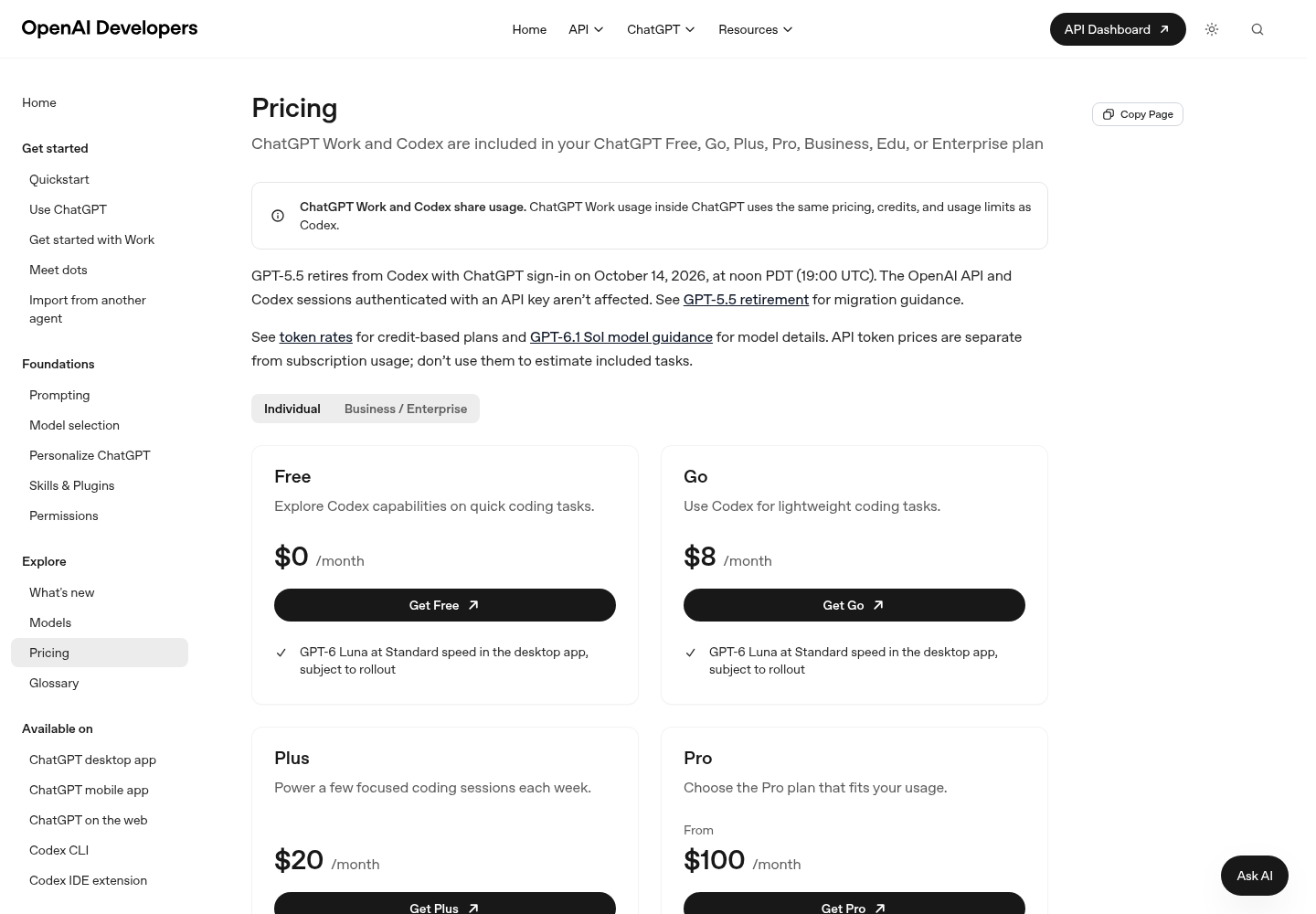
The top of OpenAI’s Codex pricing page, which opens with the note that ChatGPT Work and Codex share usage. Its FAQ is the documented source for the shared allowance, the Fast and Ultrafast multiples and the /status check. Source: OpenAI.
Cut the burn before you pay for a bigger tier
An upgrade is a fix for usage you can’t avoid. Before buying one, change the defaults that produced avoidable spikes, then measure one more week. Every key below comes from OpenAI’s Codex configuration reference; the values are illustrative choices for the worked example.
- Set a default model and effort you chose on purpose.
modelandmodel_reasoning_effortlive in~/.codex/config.toml. Pick a model that/modellists for your account; the reference warns the example value may not be available to everyone. The available effort levels depend on the model and client. - Remove a persistent Fast default.
service_tier = "fast"makes Fast the preferred tier for new turns. The slash-command reference adds that/fasttoggles the tier and saves the selection, so one forgotten toggle keeps billing at 2.5x for days. Delete the line, then turn Fast on per session when you really are waiting. - Hide Ultrafast during measurement.
features.ultrafast_modeenables the Ultrafast controls. On Pro 500, setting it tofalsefor the measurement week keeps the 8x mode from appearing by accident. - Cap parallel threads and give subagents a cheaper default.
agents.max_concurrent_threads_per_sessionlimits how many spawned agents run at once, andagents.default_subagent_modelandagents.default_subagent_reasoning_effortset what they use unless a spawn overrides them. - Turn off MCP servers you aren’t using.
mcp_servers.<id>.enabled = falsedisables a server without deleting its configuration. The pricing page says every MCP server adds context and uses more of your limit. - Keep the laptop on your plan.
forced_login_method = "chatgpt"stops Codex from quietly running on an API key in a personal environment. - Measure again. Run the seven-day drill once more. If the heavy days drop and the peak falls, you’ve bought headroom for free.
# ~/.codex/config.toml: measurement-week defaults (illustrative values)
model = "gpt-6.1-sol"            # use a model that /model lists for your account
model_reasoning_effort = "medium"  # raise per task when the work needs it
forced_login_method = "chatgpt"    # plan sign-in only on this machine
# service_tier = "fast"            # deleted: Fast is now opt-in per session with /fast

[features]
fast_mode = true                   # keep the /fast control available
ultrafast_mode = false             # Pro 500: hide Ultrafast controls this week

[agents]
max_concurrent_threads_per_session = 2
default_subagent_model = "gpt-6-luna"
default_subagent_reasoning_effort = "low"

# Example: a docs server you configured but rarely need
[mcp_servers.docs]
enabled = false
What to expect after the change: /status names the model you set, and a footer you configured with /statusline stops showing Fast unless you turned it on. If /status still reports a different model, a profile or project-level config is overriding the user file; /debug-config prints the config layers in order. In the worked example, these edits target exactly the Wednesday and Friday pattern: cloud work becomes a deliberate choice, and Fast stops being the default.
Choosing the right reasoning effort for each kind of task is its own subject. Here it only matters that a lower default is a lever you control before paying for a bigger plan.
Decision table: choose a tier from your measured peak
Use your peak after the cuts above, expressed as a share of your current tier’s weekly allowance. The thresholds are this guide’s illustrative rule, chosen to leave room for one hard week; OpenAI publishes no such thresholds.
| Your measured result | Decision | Why | Recheck |
|---|---|---|---|
| On Plus, the five-hour window stops you several times a week but the weekly reading stays well under 100% | Move to Pro 100 | Pro plans currently have no five-hour limit, so the window, not the week, was your constraint | After two weeks |
| On Plus, you hit a limit once or twice a month | Stay on Plus and buy credits on those days | Plus users can buy credits after a limit instead of upgrading | Monthly |
| On Pro, the peak stays under 40% for four weeks | Try one tier down: Pro 500 to Pro 200 if you don’t use Ultrafast, Pro 200 to Pro 100 | You’re paying for headroom you never touch | After two weeks |
| On Pro, the peak is 40-85% with no limit hits | Stay | There is room for a release week | Monthly |
| One week in four goes over the limit | Stay and buy credits for that week | Included usage is spent first, so credits only cover the overflow | Monthly |
| Most weeks go over the limit even after the cuts | Move up one tier | The usage is real and recurring | After two weeks |
| You need Ultrafast | Pro 500 | It’s the only Pro plan with Ultrafast, and buying credits on Pro 100 or Pro 200 does not unlock it | Monthly |
| The heavy spend is unattended scripts or CI | Run that lane on an API key | API-key usage is billed separately at API rates and leaves the plan for interactive work | Monthly |
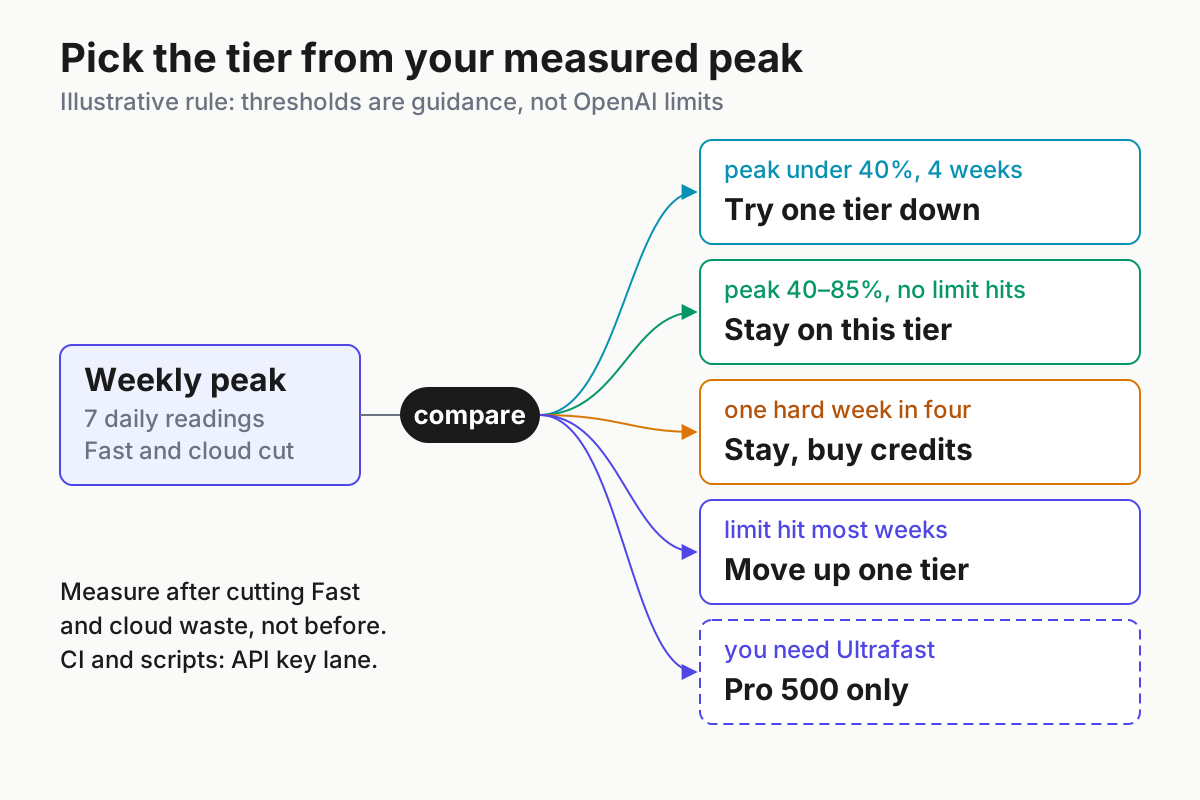
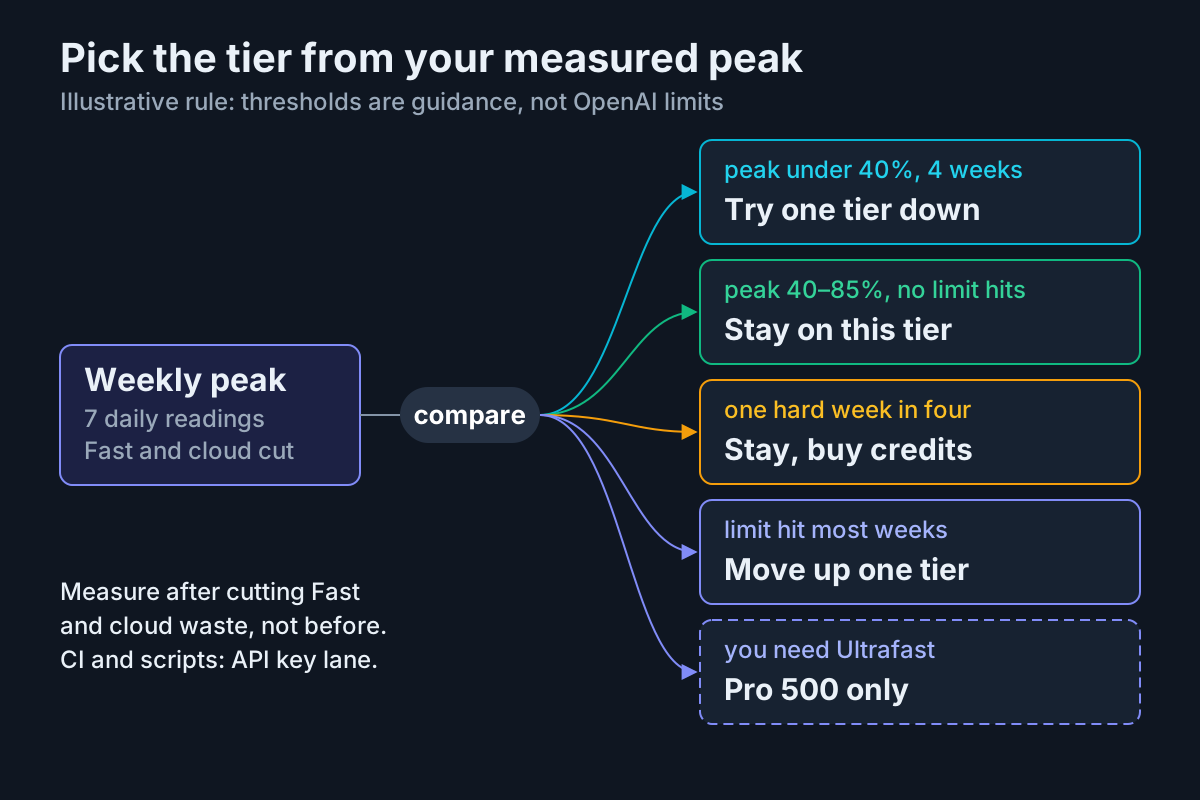
Measure first, then follow the branch your weekly peak selects; the thresholds are this guide’s illustrative rule, not OpenAI limits. Ultrafast is the only branch that forces a specific tier. Based on OpenAI’s About ChatGPT Pro tiers help article and Codex pricing page, read Oct 31, 2026.
The worked Pro 100 week lands on the “Stay” row: an 86% peak before any cuts, no limit hits, and two fixable drivers. Two things would move it. If the next three weeks each crossed 100% after the config changes, it would move up a tier. If the cuts brought ordinary weeks under 40% for a month, the developer could test Plus, accepting that Plus brings back the five-hour window.
Two branches are easy to misread. “Buy credits” is a spike strategy, not a monthly habit; if you buy credits every week, the “move up one tier” row applies. And Pro 500 is not “the biggest Pro 200”. Its allowance is the highest of the three, but Ultrafast draws that allowance at 8x, so an Ultrafast habit can exhaust it as fast as Fast mode exhausts a smaller tier.
Route workspace seats, CI lanes and cross-vendor spend
Some of your Codex usage may not belong on a personal Pro plan at all. Work through these in order; each step either applies to your setup or tells you where the answer lives.
- On a Business Premium seat, don’t assume a multiplier. Sottiaux’s post includes Business Premium in the doubling. None of the OpenAI help or Codex pages selected for this guide gives a Business Premium multiplier, so don’t assume one. The Business rate card says standard Business seats use included plan limits first and then the workspace’s shared credit pool if the workspace has bought credits. Ask your workspace admin what your seat includes, and run the same seven-day drill from the Usage settings in Codex.
- Move automation onto an API key. The pricing page describes the API-key option as “great for automation in shared environments like CI”, with Codex in the CLI, SDK or IDE extension, no cloud-based features such as GitHub code review or Slack, and usage billed at API pricing. It also says any user can run extra local chats on an API key at standard API rates. Scripted runs use
codex exec. Keep that lane on its own key so its cost shows up on the API bill, not as a mystery drain on your plan. - Keep credits on one ledger. Credits are a second unit layered on top of the allowance. If your team now has subscription allowances, credits and API tokens in play at once, our credit versus token meter guide explains how to keep one ledger.
- If you also pay for Claude, compare with the Claude guides. This guide doesn’t restate Anthropic prices. For the Claude side, see what Claude extra usage costs in Claude Code, and for a cross-vendor view of subscription mechanics, Token Plans Decoded and the subscription squeeze.
- If you run several agents at once, add one operating view. One person juggling Codex, Claude Code and others needs one view of who is burning what; running multiple coding agents without the chaos covers that operating layer.
Troubleshooting plan and limit surprises
| Symptom | Likely cause | Fix | What you should see |
|---|---|---|---|
| Your allowance didn’t change after Oct 29 | You were already on the higher Pro 200 allowance, or you’re on Plus | Check Settings → My Plan against the help article | A Pro 200 account that already had the higher allowance reads the same as before, which is expected |
| Usage drains much faster than last week | Cloud tasks, high effort, Fast or Ultrafast, image generation, parallel agents or many MCP servers | Match the heavy days in your worksheet against the driver table | The day’s change falls once the driver is removed |
| You bought credits and Ultrafast is still missing | Ultrafast is available only on Pro 500 | Don’t buy credits to get it; upgrade only if Ultrafast earns its cost | Ultrafast appears in the model picker only on Pro 500 |
| You hit a limit while signed in with an API key | That’s your API organization’s billing and limits, not the plan | Check codex login status and sign in with ChatGPT for plan work |
API-key sessions don’t move the plan’s usage dashboard |
| Chat says your GPT-6 Pro limit is reached but Codex still has room | Chat message limits are separate from the Work and Codex allowance | Keep working in Codex, or wait for the Chat reset | The Codex dashboard still shows remaining allowance |
| A model is temporarily unavailable | That model’s allowance is used up until it resets | Pick another available model or wait; ChatGPT shows the reset time when available | The model returns after the reset; contact Support if it doesn’t |
| The numbers look wrong | Possible miscount | Contact Support; it can investigate but cannot reset limits | An answer about the count, not a reset |
/usage asks you to sign in |
The session lacks Codex account authentication | Sign in with ChatGPT and run /usage again |
Token activity for the chosen view |
Downgrade, stop credits and set a recheck date
Every decision here can be undone within a month. These steps keep it that way.
- Decide from at least one full week. Use the worksheet, not a single painful afternoon.
- Change plans in Settings → My Plan. The help article says that’s where you see your subscription and available plan changes. It doesn’t spell out when a move between Pro tiers takes effect, so read the date the page shows before you confirm.
- If you cancel, know the timing. A scheduled cancellation doesn’t end the subscription immediately: you keep access until the end of the current billing period and can undo the cancellation before then. Cancel through the platform you bought on (ChatGPT, Apple or Google Play); uninstalling the app doesn’t cancel.
- Stop automatic credit spending. If Usage & Billing offers auto-reload, turn it off during the measurement month and buy credits by hand only on the days the decision table allows.
- Keep the config changes. The cheaper defaults are what made the smaller tier work. Reverting them quietly undoes the decision.
- Use earned resets deliberately.
/usagecan also redeem an available earned reset. Treat a reset as perishable spare capacity, as our reset ledger guide recommends, not as part of the plan. - Set a recheck in 30 days. The pricing page suggests checking the dashboard every week or two, and these limits have already changed twice in two months. Put a reminder in your calendar and rerun the drill.
Before you close the tab, check the outcome:
- [ ] A seven-day worksheet is filled, with the two heaviest days explained.
- [ ] Your chosen tier keeps the measured weekly peak below 100% with room for one hard week.
- [ ] No credits were bought that the decision table didn’t call for.
- [ ] A recheck date is in your calendar.
- [ ] You didn’t upgrade because of a social-media multiplier, and you aren’t quoting message counts OpenAI never published.
Sources
- Thibault Sottiaux (@thsottiaux), post on X announcing doubled limits for Pro 100/200/500 and Business Premium, Oct 29, 2026
- OpenAI Help Center, About ChatGPT Pro tiers
- OpenAI, Codex pricing
- OpenAI Help Center, ChatGPT Rate Card (Business, Enterprise/Edu credit-based pricing)
- OpenAI, Codex developer and slash commands
- OpenAI, Codex configuration reference
- Kerdo (@AbdoKerdawy), post on X with a social multiplier table, Oct 29, 2026