Claude Code Nuxt MCP Setup (and Codex): Add the Docs Server, Write Vue Rules, and Prove the Agent Uses Them
Claude Code Nuxt MCP setup for Vue 3 and Nuxt 4: add the docs server at the right scope, write Vue rules, log every docs call with a hook, then run Vitest.

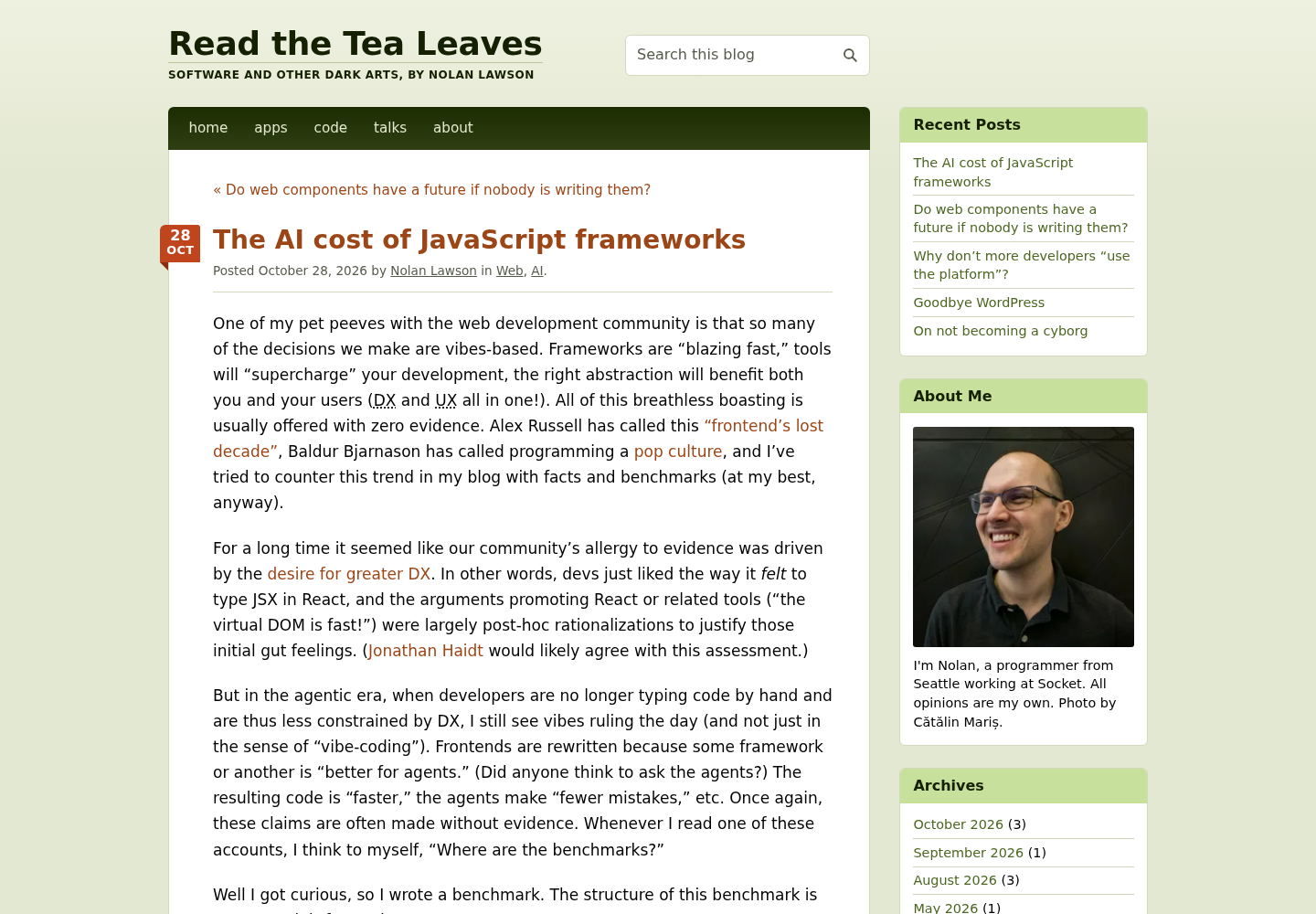
This Claude Code Nuxt MCP setup guide starts from an awkward result. Nolan Lawson had Claude Code build the same app in twelve JavaScript frameworks, five runs per framework, after installing each framework’s official MCP server or skill. For Nuxt, the agents never used the MCP server at all. Qiwei’s summary of the post on X put it plainly: “The extra help mostly went unused.”
That gap is the problem this tutorial solves. The reader is a developer building a Vue 3 or Nuxt 4 app with Claude Code, with a parallel path for Codex. The agent sometimes writes Options API components, reaches for APIs from an older Nuxt major, or ignores the docs tooling you installed last week. Adding a server takes one command. Knowing whether the agent reads it is the step most setups skip.
You will finish with five artifacts: a committed .mcp.json that connects Nuxt’s hosted MCP server, an AGENTS.md of Vue and Nuxt rules imported by CLAUDE.md, a hook that writes one line to .claude/nuxt-mcp.log for every docs call, a Codex config.toml entry, and a filled drill table that tells you whether the docs changed the code. A typecheck-and-Vitest loop runs after every change, because reading the right page is not the same as writing correct code.
What Lawson’s runs say about docs tooling
Lawson’s post has a small table titled “AI tool usage” that matters more to this guide than his cost charts. It lists what was installed for each framework and how often the agents touched it.
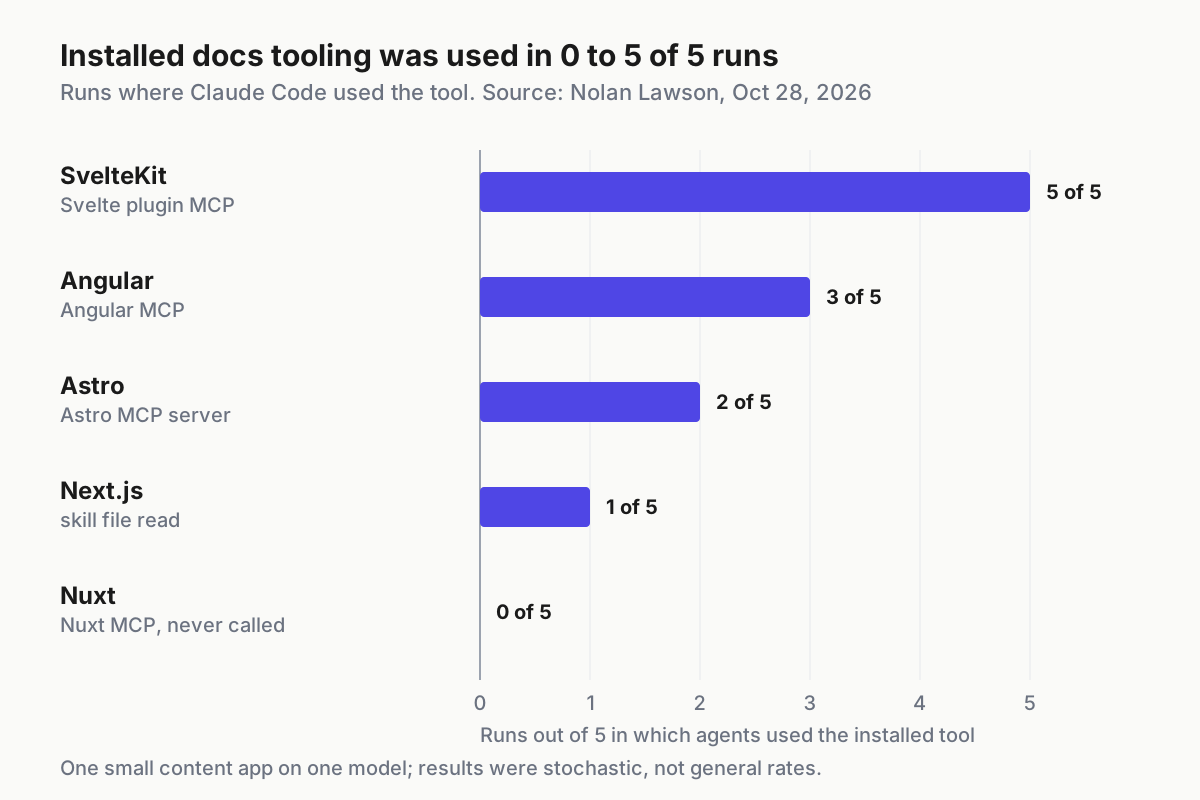
The spread is wide. SvelteKit agents used the Svelte plugin’s MCP in all five runs, Angular’s MCP appeared in three, Astro’s in two, and the Next.js agents read their skill file once. The Nuxt MCP was installed and never called.
Read it with Lawson’s own caveats attached. It was one small, content-heavy app, built by one model (Opus 5.5 at high effort), and he writes that “everything I’m measuring is very stochastic.” He also did not order the agents to use the tools: “I doubt many vibe-coders are shouting at their agents in all-caps to use the MCP.” His conclusion is cautious too: “I have a strong suspicion, for example, that the current crop of MCPs and skills may be doing more harm than good.”
One more detail keeps the story honest. The Nuxt runs were among the cheapest in his benchmark, with a median of $2.82 per run, so an unused docs server did not obviously hurt there. Lawson also noted that SvelteKit agents read a migration guide in every run because the framework version was newer than the model’s training data, and that reading cost tokens each time. Docs tooling helps only when it is used, and using it costs context. The drill below measures your own case instead of borrowing his.
What you need before you start
Work on a project where a bad agent run costs you nothing more than a git stash.
- [ ] A current Claude Code install. Reading
AGENTS.mddirectly needs Claude Code v2.1.277 or later, per the Claude Code memory documentation; the@AGENTS.mdimport used below works either way. - [ ] Optionally, the Codex CLI, desktop app or IDE extension. All three share one MCP configuration.
- [ ] Node and a Nuxt 4 project (or Vite plus Vue 3) under git, with a clean working tree. Lawson’s Nuxt runs used
nuxt 4.6.2andvue 3.5.44; the props-destructure rule below needs Vue 3.5 or later. - [ ]
jqon your PATH. The logging hook uses it to parse the JSON Claude Code sends on stdin. - [ ] A
typecheckscript inpackage.json. This guide calls it asnpm run typecheck; use whatever your project already defines. - [ ] Permission to edit
.mcp.json,.claude/settings.local.json,CLAUDE.md,AGENTS.mdand~/.codex/config.toml. - [ ] Network access from your machine to
https://nuxt.com/mcp.
If you have never added an MCP server to Claude Code, read the general Claude Code MCP setup and scopes guide first. This guide covers only what is specific to Nuxt.
Step 1: Add the Nuxt MCP server at a deliberate scope
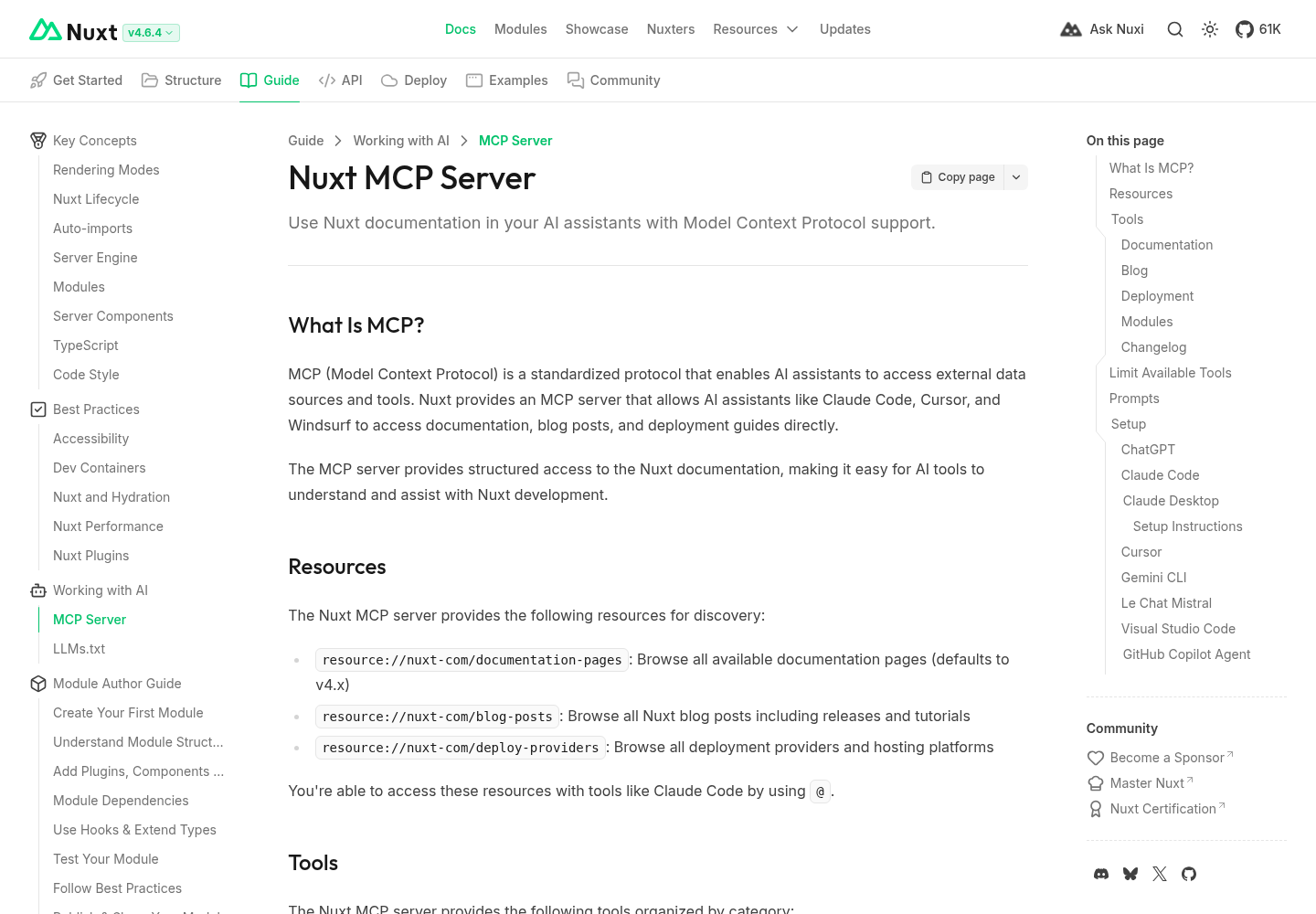
Nuxt’s MCP server documentation describes a hosted server at https://nuxt.com/mcp over HTTP transport, with no authentication. Its documentation tools are list-documentation-pages (which supports a 3.x, 4.x, 5.x or all version filter), get-documentation-page and get-getting-started-guide. It also offers blog, deployment, module and changelog tools, plus prompts such as migration-help.
You probably do not need all of them in every session. Nuxt documents an optional X-MCP-Tools HTTP header that exposes only the tools you name. With no header, every tool is exposed; an empty header exposes none; an unknown tool name returns a configuration error.
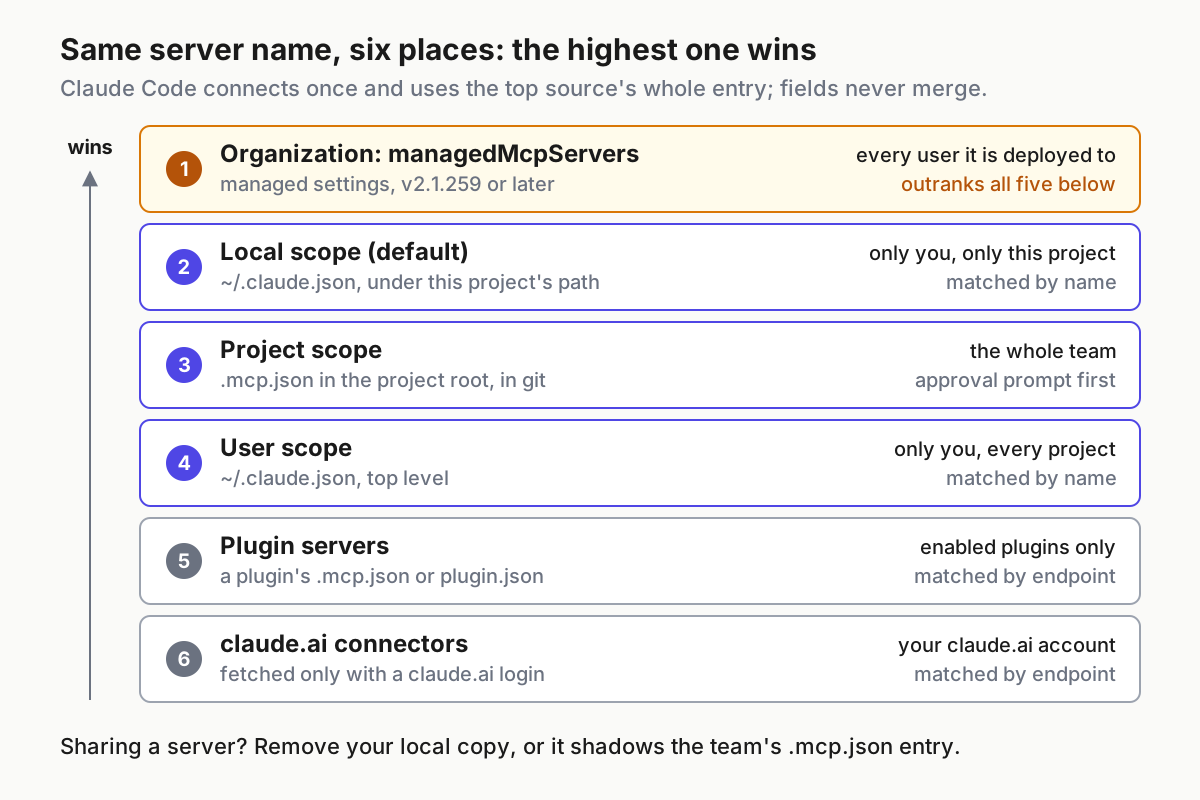
Choose the scope before you type the command. The scopes come from the Claude Code MCP reference:
| Scope | Stored in | Shared with team | Pick it when |
|---|---|---|---|
| local (default) | ~/.claude.json, under this project |
No | You are trying the server alone before proposing it |
| project | .mcp.json at the repo root |
Yes, via git | Everyone on the Nuxt repo should get the same docs tools |
| user | ~/.claude.json |
No | You work on several Nuxt projects and want it everywhere |
For a team Nuxt repo, project scope is the honest choice: the rule file in step 3 tells the agent to call these tools, so the tools should travel with the repo.
- From the repo root, add the server at project scope with the two documentation tools exposed:
claude mcp add --transport http nuxt --scope project https://nuxt.com/mcp \
  --header "X-MCP-Tools: list-documentation-pages,get-documentation-page"
- Expect an
Added ...line. That line means the configuration was written, not that a connection works. - Open
.mcp.jsonand check that it matches this shape, withtypepresent:
{
  "mcpServers": {
    "nuxt": {
      "type": "http",
      "url": "https://nuxt.com/mcp",
      "headers": {
        "X-MCP-Tools": "list-documentation-pages,get-documentation-page"
      }
    }
  }
}
- Run
claude mcp list. A fresh project server shows a Pending approval status that tells you to runclaudeto approve it. That is expected: Claude Code will not trust a server a repository declares until you approve it. - Start
claudein the repo, accept the workspace trust dialog and approve thenuxtserver. - Inside the session, run
/mcp. Thenuxtrow should show a connected state and a tool count of two.claude mcp get nuxtin a shell gives the same status plus anIssue:line if something failed. - Commit
.mcp.json.
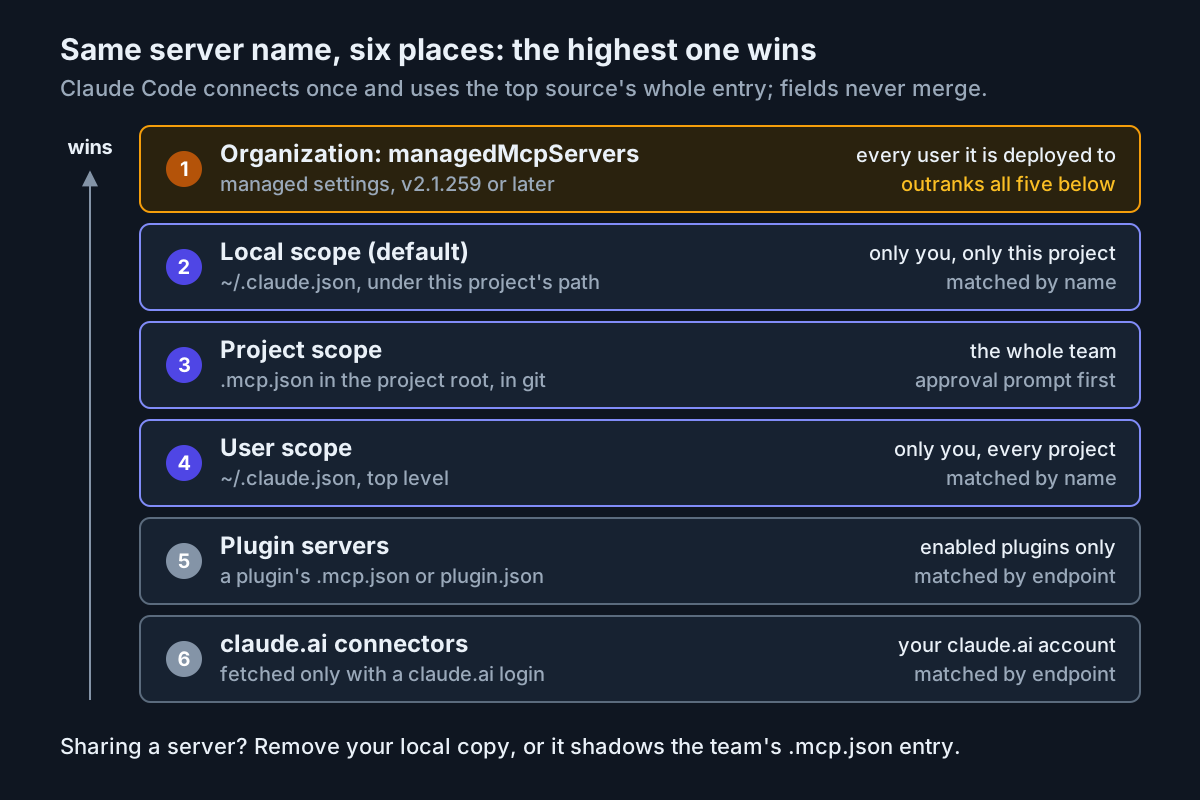
If you prefer a personal setup, run the same command with --scope user and nothing lands in the repo. Do not define the server in two scopes with different settings; Claude Code warns about the conflict and connects only the highest-precedence definition.
Two behaviours shape what happens next. First, tool search is on by default, so only tool names and server instructions load at session start; full definitions load when Claude searches for them. That keeps context small, and it also means nothing pushes the agent toward these tools unless a task or an instruction does. Second, Claude Code warns when one MCP tool result exceeds 10,000 tokens and caps output at 25,000 tokens by default. Single documentation pages are the right unit; whole-site dumps are not.
Shared project servers are also fleet policy. If several people or machines run agents on this repo, the reasoning in treating restricted mode as fleet policy applies to which servers you commit.
Step 2: Wire the same server into Codex
OpenAI’s Codex MCP documentation stores servers in config.toml: ~/.codex/config.toml by default, or a project .codex/config.toml, which Codex reads only in trusted projects. The Codex CLI, IDE extension and ChatGPT desktop app share this file, so one entry covers all three.
Codex has no equivalent of the Claude Code hook used in step 4, so this entry adds a different kind of proof: it makes Codex ask before each Nuxt tool call, and every request you see is one call.
- Add this table to
~/.codex/config.toml:
[mcp_servers.nuxt]
url = "https://nuxt.com/mcp"
http_headers = { "X-MCP-Tools" = "list-documentation-pages,get-documentation-page" }
enabled_tools = ["list-documentation-pages", "get-documentation-page"]
default_tools_approval_mode = "prompt"
startup_timeout_sec = 20
- Run
codex mcp listand confirmnuxtappears. No credentials are needed: when no credential source resolves, Codex connects without authentication. - Start
codexand run/mcpin the terminal UI to see the active servers. - During the drill in step 5, count the approval requests for
nuxttools. Each one is a docs call. - After the drill, change
default_tools_approval_modeto the value you normally run. The documented values areauto,prompt,writesandapprove.
The header limits what the server exposes; enabled_tools limits what Codex offers to the model. Keeping both means a later change on either side cannot silently widen the tool list. If you want the approval behaviour explained in more depth, the Codex approval modes and sandbox guide covers how approvals interact with the sandbox.
The CLI form codex mcp add nuxt --url https://nuxt.com/mcp also works for the basic entry, but you would still edit the file to add headers and tool lists.
Step 3: Write the Vue and Nuxt rules file
Rules decide when the agent should look something up and what shape its Vue code takes. Keep them in AGENTS.md, the shared instruction file other coding agents read, and import it into CLAUDE.md. The memory documentation says a CLAUDE.md containing @AGENTS.md never makes Claude read the file twice, and that files should stay under 200 lines because longer files cost context and reduce adherence.
Copy this AGENTS.md. The Docs before code section is the one the drill switches on and off.
# Project rules: Nuxt 4, Vue 3.5+, TypeScript

## Docs before code
- Before writing or changing Nuxt-specific code (pages, layouts, routing,
  data fetching, server routes, nuxt.config, modules, auto-imports), call the
  nuxt MCP tools: list-documentation-pages with version 4.x to find the page,
  then get-documentation-page for that page. Follow the fetched page over memory.
- In your final reply, list the docs pages you used.
- If the nuxt MCP server is unavailable, read https://nuxt.com/llms.txt and
  follow its link to the one relevant page.
- Never load https://nuxt.com/llms-full.txt.
- Plain Vue questions (reactivity, props, emits, templates) need no docs call.

## Vue components
- New single-file components use the Composition API in a script block with
  the setup attribute and lang="ts". Never write Options API components
  (data(), methods:, computed: objects) and never mix the two styles.
- Props: type-only defineProps<Props>(). Declare defaults by destructuring
  (const { size = 'md' } = defineProps<Props>()), not withDefaults.
- Emits: typed defineEmits, e.g. defineEmits<{ select: [name: string] }>().
- Two-way binding in a child: defineModel<T>().
- Never import defineProps, defineEmits or defineModel: they are compiler macros.

## Nuxt conventions
- This project is Nuxt 4.x. Check package.json before assuming a version.
- Use the 4.x docs for directory structure and auto-imports. Do not add an
  import for anything the fetched docs page says Nuxt provides automatically.

## Commands
- Typecheck: npm run typecheck
- Unit tests: npx vitest run
- Run both after every change and paste the last lines of each output.

## Tests
- Test files end in .test.ts and sit next to the code they test.
- Unit-test pure functions with explicit imports.
Then create CLAUDE.md next to it:
@AGENTS.md

## Claude Code only
- A hook logs nuxt MCP calls to .claude/nuxt-mcp.log. Do not edit or delete it.
Why these choices work:
- The docs rule names tools and triggers. The memory documentation recommends instructions concrete enough to verify. “Use the docs” is vague; “call
get-documentation-pagebefore changing server routes” can be checked against the log. - The rule asks for a list of pages used. That gives you a second, independent signal to compare with the hook log.
- The Vue rules follow the Vue docs. The Vue script setup reference recommends the setup syntax when you use single-file components with the Composition API, says
definePropsanddefineEmitsare compiler macros that need no import, documents reactive props destructure with native default values from Vue 3.5, and calls mixing setup-script variables with the Options API “strongly discouraged”. - Nuxt facts stay in the docs. The rules do not restate Nuxt’s directory layout or auto-import list from memory. They tell the agent where to read it, which is the point of the server.
Run /context in a new Claude Code session and confirm CLAUDE.md appears under Memory files. For keeping files like this from drifting over months, see why AGENTS.md files rot.
This is the reference shape the review checklist later expects for the body of a component’s setup script block. It is an illustrative example written against the Vue docs, not code the drill produced:
// FrameworkList.vue: contents of the setup script block (lang="ts")
interface Props {
  title: string
  items: { name: string; year: number }[]
  size?: 'sm' | 'md'
}
const { title, items, size = 'md' } = defineProps<Props>()
const emit = defineEmits<{ select: [name: string] }>()
// The template renders the title, loops over items with a key on item.name,
// and calls emit('select', item.name) when an item is clicked.
Step 4: Log every Nuxt docs call with a hook
The agent’s reply can claim it read the docs. A hook records what it actually called. The Claude Code hooks guide explains that MCP tools are named mcp__<server>__<tool>, that PostToolUse matchers filter by tool name, that a regex such as mcp__github__.* targets one server’s tools, and that each hook receives the event as JSON on stdin.
Your server is named nuxt, so the matcher is mcp__nuxt__.*, and a call appears as mcp__nuxt__get-documentation-page.
- Keep the drill hook private: put it in
.claude/settings.local.json, not the shared.claude/settings.json. - Add both files you are about to create to
.gitignore:
.claude/settings.local.json
.claude/nuxt-mcp.log
- Write this
.claude/settings.local.json:
{
  "hooks": {
    "PostToolUse": [
      {
        "matcher": "mcp__nuxt__.*",
        "hooks": [
          {
            "type": "command",
            "command": "jq -c '{ts: now | todate, session: .session_id, tool: .tool_name, input: .tool_input}' >> \"$CLAUDE_PROJECT_DIR\"/.claude/nuxt-mcp.log"
          }
        ]
      }
    ],
    "PostToolUseFailure": [
      {
        "matcher": "mcp__nuxt__.*",
        "hooks": [
          {
            "type": "command",
            "command": "jq -c '{ts: now | todate, tool: .tool_name, result: \"failed\"}' >> \"$CLAUDE_PROJECT_DIR\"/.claude/nuxt-mcp.log"
          }
        ]
      }
    ]
  }
}
- Test the logging command before any agent runs, using a hand-made event:
echo '{"session_id":"test","tool_name":"mcp__nuxt__list-documentation-pages","tool_input":{}}' \
  | jq -c '{ts: now | todate, session: .session_id, tool: .tool_name, input: .tool_input}'
- Expect one compact JSON line with a timestamp,
"session":"test"and the tool name. If you seejq: command not found, installjqbefore going further. - Start a session and run
/hooks. Both entries should appear underPostToolUseandPostToolUseFailure. - Ask a throwaway question such as “Use the nuxt MCP tools to list the 4.x documentation pages about data fetching.” Then run
tail -n 3 .claude/nuxt-mcp.log. A line namingmcp__nuxt__list-documentation-pagesproves the chain works end to end.
The second entry matters because PostToolUse fires only after a tool call succeeds. Without PostToolUseFailure, a timeout looks exactly like the agent never trying.
Step 5: Run the usage-proof drill
Now the measurement. One Nuxt-specific task is run with the Docs before code section removed and again with it present, starting fresh each time. Because agent runs vary, run each arm three times.
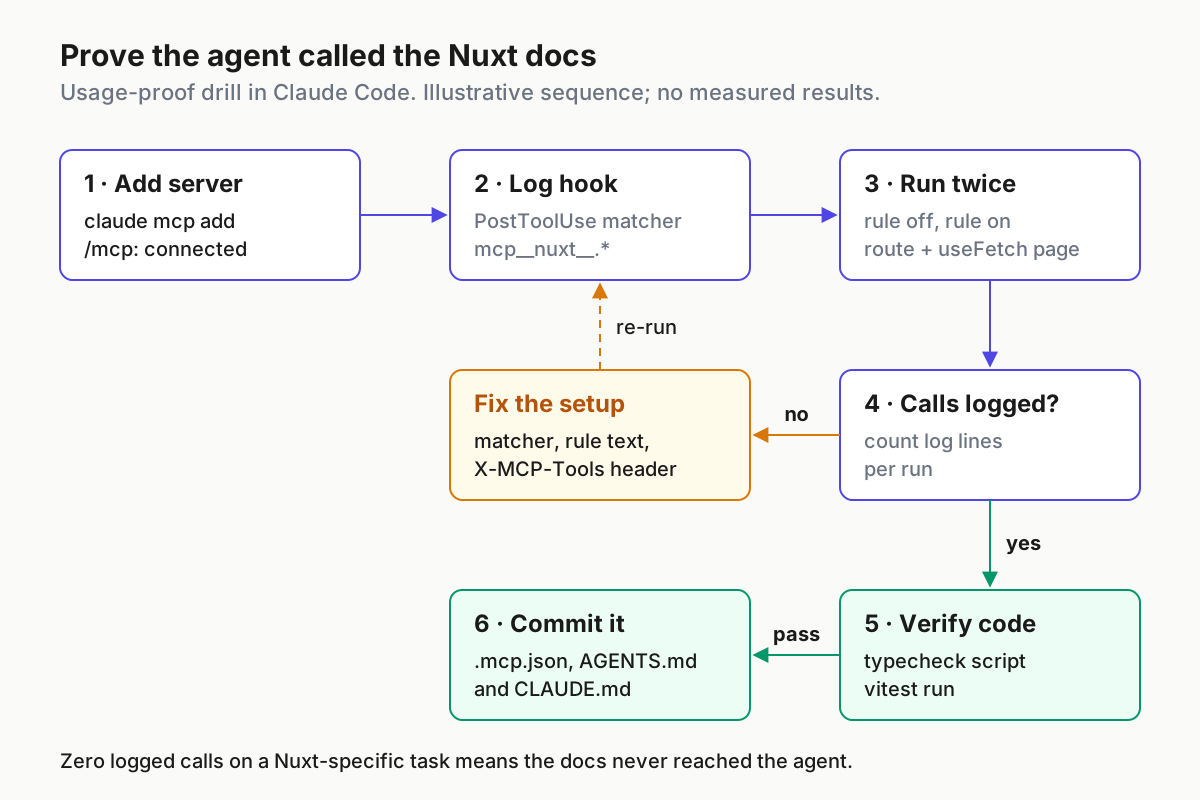
Use the same prompt every run. It follows the structure in the Claude Code prompting guide: the goal, the pieces, and the checks to run.
Add a /frameworks page to this Nuxt 4 app.
1. A server API route that returns this JSON array:
   [{"name":"beta","year":2020},{"name":"alpha","year":2018}]
2. A pure helper sortByYear(list) in a utils folder that matches the Nuxt 4
   directory structure, with a Vitest test next to it.
3. A FrameworkList component (script setup, typed props and emits) and a
   page that loads the route with useFetch, sorts the result with sortByYear
   and renders FrameworkList.
Run the typecheck and the tests. Tell me which Nuxt docs pages you used.
The task touches a server route, a page, data fetching and the directory layout: exactly the areas where a Nuxt major version change bites.
- Commit the setup from steps 1 to 4 on a branch:
git switch -c drill-rule-onand commitAGENTS.md,CLAUDE.md,.mcp.jsonand.gitignore. - Create the other arm:
git switch -c drill-rule-off, delete the wholeDocs before codesection fromAGENTS.md, and commit. - Start run A1: stay on
drill-rule-off, empty the log with: > .claude/nuxt-mcp.log, open a newclaudesession and paste the prompt. Do not nudge the agent mid-run. - When the agent finishes, count calls with
wc -l < .claude/nuxt-mcp.logand break them down withjq -r '.tool' .claude/nuxt-mcp.log | sort | uniq -c. - List what it read with
jq -c '.input' .claude/nuxt-mcp.log. - Run the checks yourself (step 6), whatever the agent claimed.
- Scan new components for Options API:
grep -rnE "data\(\)|methods:" --include=*.vue . - Shelve the agent’s work with
git stash push --include-untracked -m "A1". The ignored settings and log files stay put. - Switch to
drill-rule-onand repeat for run B1. Alternate A and B until you have three of each.
For Codex, run the same prompt with default_tools_approval_mode = "prompt" and count the nuxt approval requests instead of log lines.
Record each run in a table like the one below. These entries are illustrative, showing how a plausible set of results would be read; they are not measurements, and your numbers will differ.
| Run | Docs rule | Nuxt calls logged | Pages read (from log) | Typecheck | Vitest | Options API in new .vue |
|---|---|---|---|---|---|---|
| A1 (illustrative) | off | 0 | none | fail: unknown route type | pass | no |
| A2 (illustrative) | off | 0 | none | pass | pass | no |
| A3 (illustrative) | off | 1 | data fetching | pass | pass | no |
| B1 (illustrative) | on | 4 | directory structure, server, data fetching | pass | pass | no |
| B2 (illustrative) | on | 3 | server, data fetching | pass | pass | no |
| B3 (illustrative) | on | 0 | none | pass | pass | yes |
Then read the pattern, not a single row:
| Pattern across runs | What it means | Next action |
|---|---|---|
| B arm logs calls, A arm logs none, B checks pass at least as often | The rule makes the docs reach the agent | Keep the rule and the server; commit |
| Both arms log zero calls | The tools never surface | Work through the troubleshooting table, starting with the matcher and the rule wording |
| B logs calls but checks fail as often as A | The docs are read but not the bottleneck | Keep the verify loop; tighten the component rules |
| Neither arm needs docs and both pass | The model already knows this part of Nuxt | Consider llms.txt or nothing for this kind of task |
| Any run shows Options API in a new component | The Vue rules did not hold | Make the rule more specific and add it to review |
A zero-call row on a task that needed current Nuxt APIs is a failed run even if the code compiles. That is the case Lawson’s table describes.
Step 6: Verify every change with typecheck and Vitest
Reading the docs is the input. The verify loop is the output check, and it runs after every agent change, not only during the drill.
- If Vitest is not installed yet, add it with
npm install -D vitest. The Vitest getting-started guide lists the requirements: Vite 6.4.0 or later and Node 22.12.0 or later. - Add
.vitest/to.gitignore; Vitest and its integrations can store artifacts there. - Write the helper and its test (illustrative names matching the drill prompt):
// sortByYear.ts
export interface Framework {
  name: string
  year: number
}

export function sortByYear(list: Framework[]): Framework[] {
  return [...list].sort((a, b) => a.year - b.year)
}
// sortByYear.test.ts
import { expect, test } from 'vitest'
import { sortByYear } from './sortByYear'

test('sorts frameworks oldest first', () => {
  const sorted = sortByYear([
    { name: 'beta', year: 2020 },
    { name: 'alpha', year: 2018 },
  ])
  expect(sorted.map((f) => f.name).join(',')).toBe('alpha,beta')
})
- Run the typecheck:
npm run typecheck. Success is a zero exit code with no type errors. A failure names a file and line; paste it back to the agent rather than describing it. - Run tests once, without watch mode:
npx vitest run. Vitest’s guide shows success as a tick next to each test file and a summary line such asTest Files 1 passed (1). - Treat a test file that was never collected as a failure. Vitest only picks up files with
.test.or.spec.in the name. - If either check fails, give the agent the exact output and ask for the smallest fix, then run both checks again.
The helper test deliberately uses an explicit import. Vitest reads your vite.config.* by default, and a Nuxt app’s automatic imports come from Nuxt’s own build setup, so a unit test that leans on a name Nuxt injects can fail under plain Vitest even when the typecheck passes. Keep unit tests on pure functions and use Nuxt’s own testing documentation when you need a full Nuxt environment. For checks that need a real browser, Chrome DevTools MCP adds a runtime debugging loop on top of this one.
Review checklist for agent-written components
Run this on every new or changed .vue file before you merge, drill or no drill.
- [ ] The component’s script block has the
setupattribute andlang="ts". - [ ] No Options API: no
data(),methods:orcomputed:option objects, and no second, non-setup script block declaring props or emits. - [ ] Props use a type-only
defineProps<...>()declaration, not a runtime object and a type at the same time (the Vue docs call that a compile error). - [ ] Defaults come from destructuring the
definePropsresult, notwithDefaults, since the project is on Vue 3.5 or later. - [ ] Emits are typed with
defineEmits<...>(); event names in the template match the declared ones. - [ ]
defineProps,defineEmitsanddefineModelare not imported. - [ ] Nuxt-specific code matches a page listed in the hook log for that run. If the log is empty, review it as unverified.
- [ ] No import was added for something the fetched Nuxt docs page says is provided automatically.
- [ ] The agent’s final reply includes typecheck and test output, not a summary of it.
MCP server, llms.txt or nothing: a decision table
Nuxt offers two documented routes for AI tools. The MCP server fetches structured pages on demand. The Nuxt LLMs.txt page describes /llms.txt as a structured overview of all documentation pages and their links (about 5K tokens) and /llms-full.txt as the comprehensive version (about 1M+ tokens), recommended only when your tool supports contexts of 200K tokens or more. The Claude Code context window guide explains what that kind of load does to a session.
Pick per task type, not once per repo:
| Situation | Use | Why |
|---|---|---|
| Code touches features that changed between Nuxt majors (routing, data fetching, server routes, directory layout) | MCP: get-documentation-page |
One version-filtered page per question, fetched only when needed |
| Upgrading a project between Nuxt majors | MCP prompt migration-help, run as /mcp__nuxt__migration-help in Claude Code |
Nuxt documents migration help as a server prompt |
| The agent runs somewhere MCP servers are blocked or unavailable | https://nuxt.com/llms.txt, then the one linked page |
About 5K tokens for the index instead of a server |
| You want everything in context at once | Almost never llms-full.txt |
About 1M+ tokens, beyond most context windows and against the rule file |
| Plain Vue work: props, emits, reactivity, templates | Nothing | The rules and the Vue docs-backed checklist cover it |
| Your drill shows passing checks with zero calls for this kind of task | Nothing, or keep the server without forcing calls | Lawson’s Nuxt runs were among his cheapest with no MCP use; reading docs costs tokens |
The last row is the one people skip. A docs server you can prove the agent does not need is still worth keeping connected for the hard cases, but forcing a call on every trivial edit pays a context cost for no benefit.
Troubleshooting the Nuxt docs setup
| Symptom | Likely cause | Fix | Expected observation after the fix |
|---|---|---|---|
claude mcp list shows Pending approval |
Project .mcp.json server not yet approved |
Run claude in the repo and approve the server |
/mcp shows nuxt connected with two tools |
| Failed to connect | Network or proxy problem, or a tool name in X-MCP-Tools that the server rejects |
Run claude mcp get nuxt and read the Issue: line; fix the header to exact kebab-case names |
Connected status and a tool count in /mcp |
Error that the server has a url but no type |
Hand-edited .mcp.json without "type": "http" |
Add the type field |
Server loads and connects |
| Connected, never called | Tools are deferred behind tool search and nothing triggers them; vague rule | Make the rule name tools and triggers; if still unused, add "alwaysLoad": true to the nuxt entry, accepting that startup waits up to the 5-second connect timeout and tool definitions use context |
Log lines appear in run B |
| Agent says it read docs, log is empty | Matcher does not match the server name (matchers are case-sensitive), or it fetched llms.txt instead of calling MCP |
Confirm the server is named nuxt and the matcher is mcp__nuxt__.*; check /hooks |
Throwaway question in step 4 writes a line |
Hook error notice mentioning jq |
jq missing on PATH |
Install jq and re-run the step 4 test |
One JSON line printed |
/context shows a huge web fetch |
Agent loaded llms-full.txt |
Keep the “Never load” rule; start a new session | Context returns to normal; only page-sized fetches |
| Tool output warning about size | A result passed the 10,000-token warning threshold | Ask for one specific page instead of listings | No warning on page fetches |
Codex does not list nuxt |
Entry in an untrusted project’s .codex/config.toml, a misspelt table name, or enabled = false |
Move it to ~/.codex/config.toml or trust the project; check [mcp_servers.nuxt] |
codex mcp list shows nuxt |
| Typecheck passes, Vitest fails on an undefined name | The test relies on a Nuxt automatic import that plain Vitest does not provide | Import explicitly in tests of pure helpers; use Nuxt’s testing docs for components | npx vitest run passes |
Warning that nuxt is defined in more than one scope |
Same name added at user and project scope | claude mcp remove nuxt --scope user |
One definition, no warning |
Roll back cleanly
Everything above is reversible. Work through these in order and confirm each one.
- Remove the Claude Code server from the scope you used:
claude mcp remove nuxt --scope project(or--scope user, or--scope local). Thenclaude mcp listshould no longer show it. - If approvals were the problem rather than the server,
claude mcp reset-project-choicesresets your approval choices for project servers instead. - Delete the two hook entries from
.claude/settings.local.jsonand confirm with/hooksthat nothing remains underPostToolUseformcp__nuxt__.*. - Remove the
Docs before codesection fromAGENTS.md, or delete the@AGENTS.mdline fromCLAUDE.md, and confirm with/contextin a fresh session. - In Codex, delete the
[mcp_servers.nuxt]table or setenabled = falseto disable it without deleting it;codex mcp listconfirms. - Return the repo to its starting point:
git switch main, thengit stash listto review and drop the drill stashes, andgit branch -D drill-rule-on drill-rule-off. - Delete the evidence file last:
rm .claude/nuxt-mcp.log, once you have copied the drill table somewhere permanent.
If you run several agents on the same codebase, the drill table is worth keeping next to the setup it judged. The question it answers is the one Lawson’s benchmark raised: not whether a docs server is installed, but whether the agent ever reads it. For the wider practice of running many agents and knowing what each one did, see running a multi-agent command center.
Sources
- Qiwei on X: summary of Nolan Lawson’s framework benchmark (Nov 2, 2026)
- Nolan Lawson, “The AI cost of JavaScript frameworks”, Read the Tea Leaves (Oct 28, 2026)
- Nuxt: Working with AI, Nuxt MCP Server (4.x docs)
- Nuxt: Working with AI, LLMs.txt (4.x docs)
- Claude Code Docs: Connect Claude Code to tools via MCP
- Claude Code Docs: How Claude remembers your project
- Claude Code Docs: Automate actions with hooks
- OpenAI: Model Context Protocol for Codex
- Vue.js: script setup API reference
- Vitest: Getting Started