Claude Code Power BI Setup (and Codex): Connect the Power BI Modeling MCP Server, Edit a PBIP Model as TMDL and Fix a DAX Measure Safely
Claude Code Power BI setup with Codex: register Microsoft's modeling MCP server read-only, save as PBIP, fix a DAX divide-by-zero measure in TMDL and roll back.

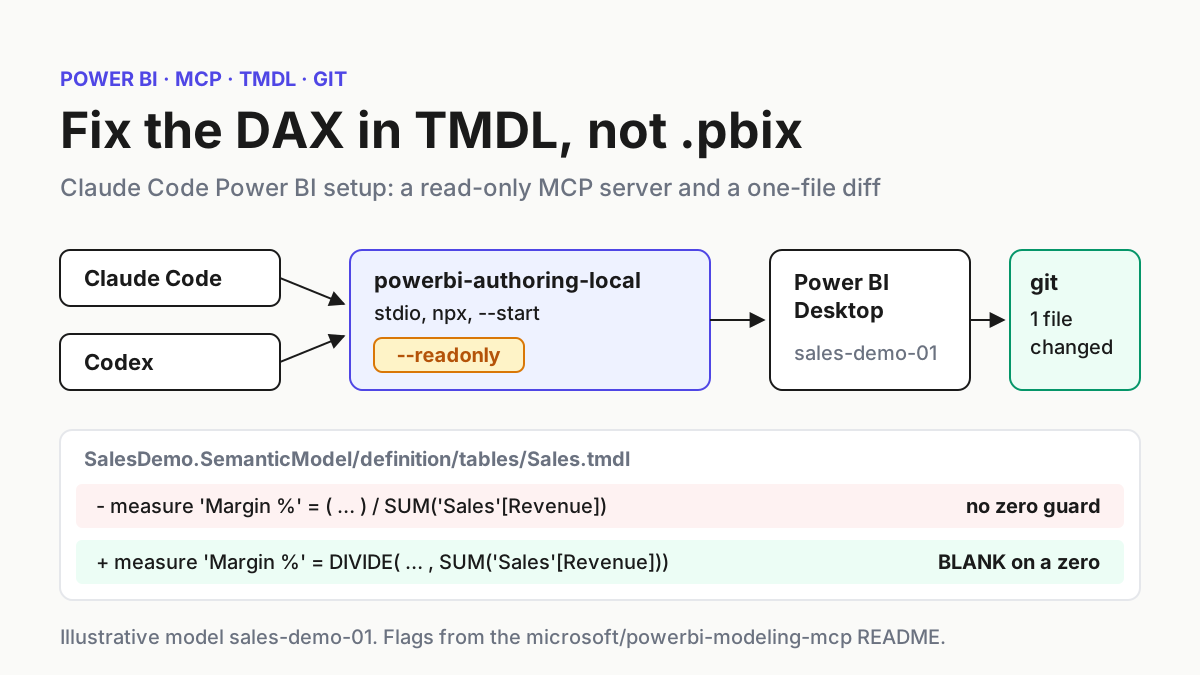
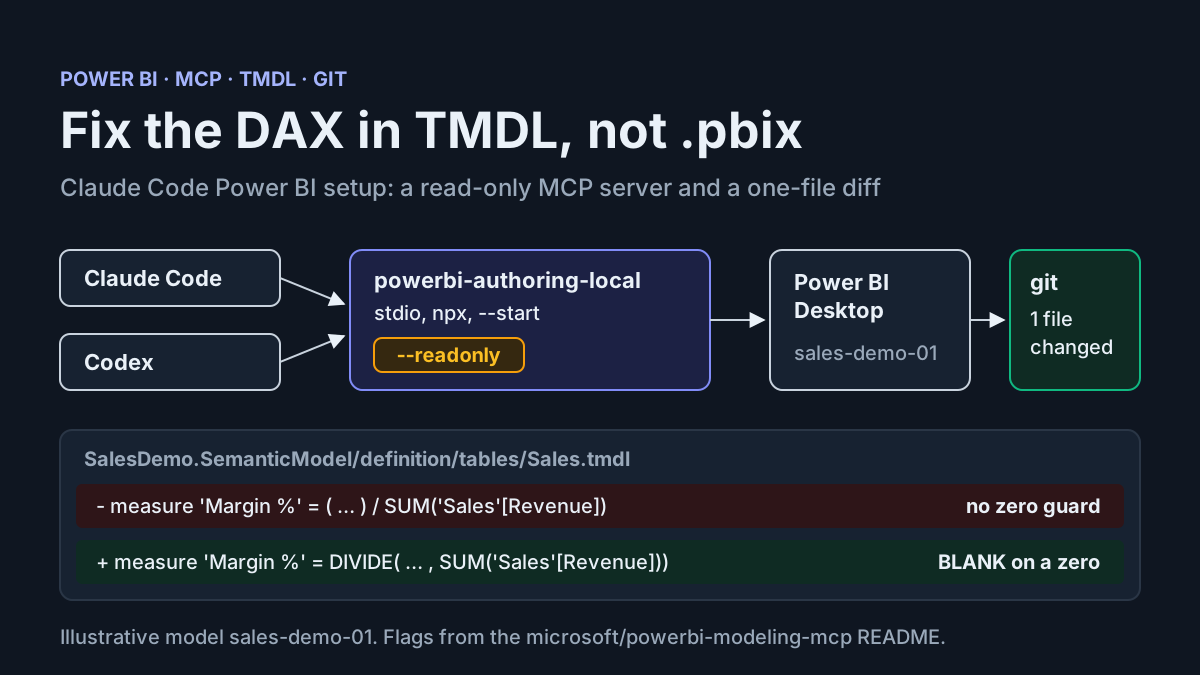
Your Claude Code Power BI workflow probably starts the same way every time. A report shows a strange number, you paste a measure into the chat, the agent suggests a rewrite, and you copy it back into Power BI Desktop. That holds up until the agent changes something you did not ask for, or until a colleague asks what exactly changed. A binary .pbix file gives you no diff to read. This guide replaces the copy-paste loop with one you can review: the model saved as a Power BI Project with TMDL text under git, Microsoft’s local modeling MCP server registered read-only in Claude Code and Codex, and one broken DAX measure fixed as a one-line file change.
The prompt for writing it was ordinary. On November 11, 2026, a builder posted on X that after hitting a Claude Code limit they were exploring Codex for debugging Power BI outputs. Switching agents halfway through a task is normal now, so every step below registers the same server, under the same name, with the same rules, in both clients.
Who this is for. A Power BI developer or analyst who already uses Claude Code or Codex and wants the agent to inspect a semantic model and fix DAX without risking a production model.
What you finish with. A sample model, model:sales-demo-01, saved as a project under git; the local server registered with --readonly in both clients; a Margin % measure that misbehaves on zero-revenue rows reproduced through a DAX query, fixed with DIVIDE, reviewed as a diff, reloaded in Desktop and, if needed, rolled back.
The example model, its numbers and every agent reply shown here are illustrative. The commands, flags and file formats come from the Microsoft, Anthropic and OpenAI documentation linked in each section.
What you need before the agent touches the model
The local server is a Windows-side tool. Microsoft’s Power BI Authoring MCP server page says plainly that the local server does not support macOS; on a Mac you would use the hosted server, which cannot see Power BI Desktop or files on disk. Everything in this guide assumes Windows.
- [ ] Windows with Power BI Desktop installed, and a copy of the model you can afford to break. Do not start on the file your finance team opens every morning.
- [ ] Node.js, so
npxcan download the@microsoft/powerbi-modeling-mcppackage, as the microsoft/powerbi-modeling-mcp README describes. - [ ] Claude Code or Codex installed and signed in. Both is better if you switch between them.
- [ ] git, configured for Windows line endings (covered in the PBIP section).
- [ ] Write permission on the semantic model if you will ever let the agent change it. Microsoft notes that with only Build permission the server can run DAX queries and nothing else. For this guide’s read-only path, Build is enough on a published model; for a local Desktop file you are the owner.
- [ ] Ten minutes to read the Power BI Authoring MCP Server EULA. The npm package blocks every tool except EULA acceptance until you accept it.
- [ ] A deep-reasoning model selected in your client. Microsoft’s page says model choice has a large effect on result quality.
If your team already runs database MCP servers under read-only logins, the posture is the same one described in the SQL Server MCP read-only guide and the Postgres read-only role guide. The difference with Power BI is that the read-only control is a server flag rather than a database role, so the second safety net is git.
Choose the connection path for your model
One authoring server ships in two forms. The hosted endpoint is in preview, needs nothing installed and signs you in with Microsoft Entra ID. The local server is generally available, runs on your machine over stdio and can reach things the hosted service cannot: a model open in Power BI Desktop and Power BI Project or TMDL files on disk. Microsoft also says not to register both at once, because the agent then sees two overlapping tool sets and routing becomes ambiguous.
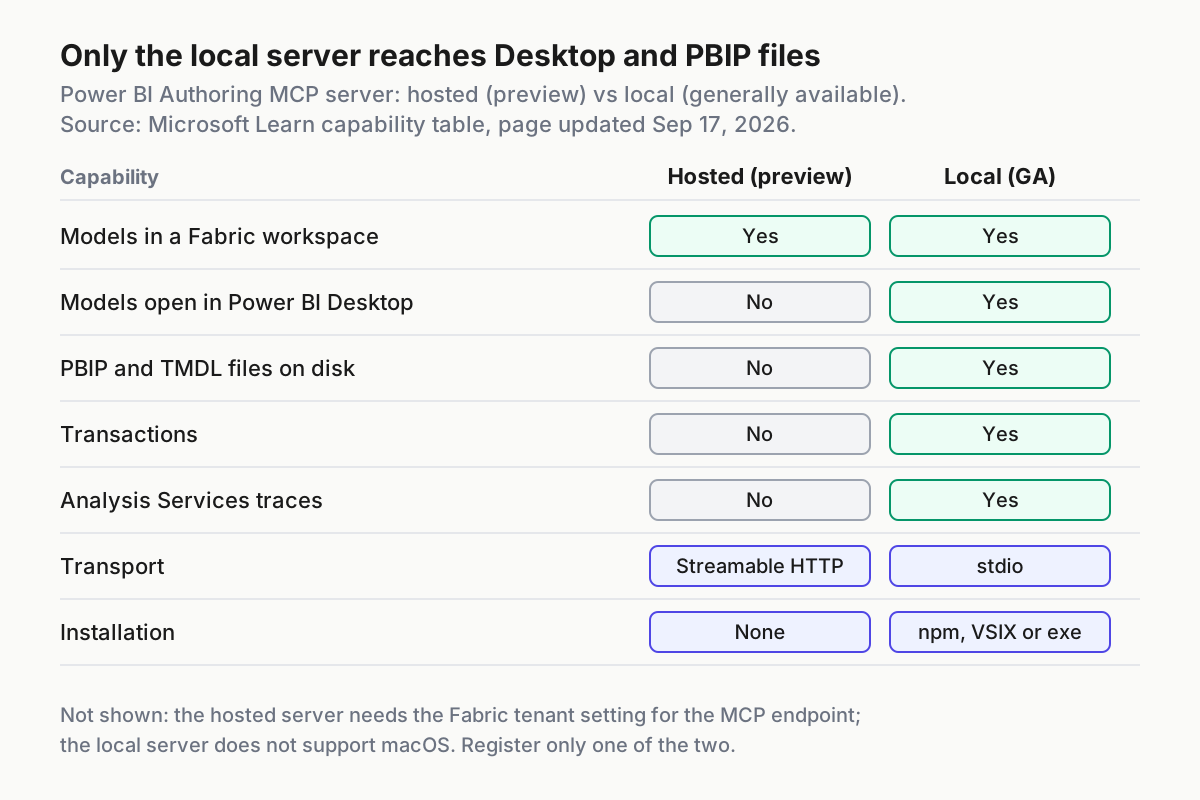
For a Desktop model under git, the decision is short. Use the table to confirm it for your own case.
| Path | Use it when | What the agent can do | Main caveat |
|---|---|---|---|
Local server against Power BI Desktop, --readonly (this guide) |
The model is open in Desktop with data loaded and you want real DAX results | List tables, columns, measures and relationships; run DAX queries against loaded data | Changes go through plain TMDL edits and git, not the server |
| Local server against the PBIP folder | You want metadata review or bulk refactoring without Desktop running | Load the TMDL definition from the definition folder |
The README describes loading the TMDL definition; it does not say a data cache is queried, so use the Desktop path when you need numbers |
| Hosted endpoint | The model lives in a Fabric workspace and your client supports Entra ID OAuth | Author workspace models as the signed-in user | Needs the tenant setting Users can use the Power BI Model Context Protocol server endpoint; no Desktop, no PBIP files, no transactions or traces |
| Plain TMDL file edits, no MCP | You cannot install the npm package, or you only need a text change | Edit .tmdl files like any other source file |
No way to run DAX; Desktop is your only validator |
The hosted route has one more trap worth knowing before you try it from a CLI. Microsoft’s page notes the hosted server is stateful and expects the client to return the mcp-Session-Id header on every request, and that clients relying on dynamic OAuth client registration cannot sign in because Microsoft Entra ID does not support it. If a hosted connection keeps reconnecting or refuses to sign in, the local server is the documented fallback.
Save sales-demo-01 as a PBIP project under git
The whole safety model depends on the agent’s changes landing in text files. Microsoft’s Power BI Desktop projects documentation explains that saving as a project writes the report and semantic model as plain text files in folders, and its content lifecycle guidance recommends .pbip over .pbix for source control and TMDL over a single .bim file, because TMDL is concise and easier to merge.
- Open your copy of the model in Power BI Desktop and choose File > Save as, then the Power BI project (
.pbip) type. Save to a short root such asC:\pbi\sales-demo-01. The projects page warns that Windows limits paths to 260 characters by default and long table names inside nested folders can break saves. - Do not save directly to OneDrive or SharePoint. Desktop cannot save a PBIP there, and a locally synced folder can cause failed saves. Also note that sensitivity labels are not supported with Power BI projects.
- Look at what Desktop wrote. The layout below is illustrative for this example; the folder names follow the project and TMDL documentation.
- Open a terminal in the project root and initialise git. Desktop only creates a
.gitignoreif none exists, so confirm it contains the two default entries shown below. - Set line-ending handling. Desktop writes CRLF line endings, and the projects page recommends enabling
autocrlfso diffs stay clean. - Commit the untouched baseline before any agent session starts. That commit is your rollback point.
C:\pbi\sales-demo-01\
├── SalesDemo.Report\
├── SalesDemo.SemanticModel\
│   └── definition\
│       ├── tables\
│       │   └── Sales.tmdl
│       ├── relationships.tmdl
│       ├── model.tmdl
│       └── database.tmdl
├── .gitignore
└── SalesDemo.pbip
cd C:\pbi\sales-demo-01
git init
Get-Content .gitignore
# expected lines:
# **/.pbi/localSettings.json
# **/.pbi/cache.abf
git config core.autocrlf true
git add .
git commit -m "Baseline sales-demo-01 before agent work"
Now open SalesDemo.SemanticModel\definition\tables\Sales.tmdl and find the broken measure. The TMDL language reference explains what you are looking at: each table gets its own file, the measure’s DAX expression is its default property after the equals sign, other properties follow on indented lines with a colon, and a name containing whitespace, such as Margin %, must be wrapped in single quotes. Your real file will also carry lineageTag lines and column definitions; leave those alone.
table Sales

	measure 'Margin %' = (SUM('Sales'[Revenue]) - SUM('Sales'[Cost])) / SUM('Sales'[Revenue])
		formatString: 0.0%
That bare / is the bug. When a region has no revenue in the selected period, the denominator is zero and the operator has no guard for it.
Register the local server in Claude Code
The registration JSON in the README runs npx -y @microsoft/powerbi-modeling-mcp@latest --start. The --start flag is required for registration with an MCP client. The settings table adds --readonly, described as safe mode that prevents any write operation, while the default --readwrite asks for confirmation before the first edit to each database. For an inspection-and-query role, read-only is the right default.
Claude Code turns a launch command into a server with claude mcp add. The Claude Code MCP documentation explains that everything after -- is passed to the server untouched, so -y, --start and --readonly reach npx rather than being parsed as Claude Code options.
- Read the EULA first. Then choose how to accept it. In an interactive session the agent can call the server’s
accept_eulatool after you explicitly authorise it, and the acceptance is saved locally. For unattended use, the README documents--accepteulain the args orPBI_MODELING_MCP_ACCEPT_EULA=truein the environment. Only use either after you have actually agreed. - From the project root, add the server. Local scope is the default, so the registration is private to you and attached to this project path.
- Check the result.
claude mcp addprints anAdded ...line when the configuration is written;claude mcp getthen shows whether Claude Code connected and, on failure, anIssue:line with the error detail. - Start a session with
claudeand run/mcp. The server’s row should show a connected status and a tool count.
cd C:\pbi\sales-demo-01
claude mcp add --env PBI_MODELING_MCP_ACCEPT_EULA=true --transport stdio powerbi-authoring-local -- npx -y @microsoft/powerbi-modeling-mcp@latest --start --readonly
claude mcp get powerbi-authoring-local
claude mcp list
The option order matters. Claude Code’s documentation warns that if the server name comes directly after --env, the CLI reads the name as another KEY=value pair and rejects it, so --transport stdio sits between them on purpose. If you prefer interactive EULA acceptance, drop the --env pair entirely.
Two choices are worth thinking about rather than copying. First, scope: --scope project would write the server into a .mcp.json file you commit, and Claude Code asks each teammate to approve project-scoped servers before use. That is useful once your team agrees on the rules below, but start with local scope. Second, @latest: the README uses it, which means each fresh start can pick up a newer package. If you want reproducible behaviour, replace it with a version you have reviewed on npm; the documentation does not recommend a specific version, so confirm the current release yourself. For a general refresher on scopes and connection failures, see the Claude Code MCP setup guide.
One honest gap: the selected documentation does not describe a Windows-specific wrapper for launching npx from Claude Code. If claude mcp get reports a failure, run the same npx -y @microsoft/powerbi-modeling-mcp@latest --start line in the same shell to see whether the package itself starts, and read the Issue: detail before changing anything else.
Register the same server in Codex
Codex keeps MCP servers in config.toml, by default ~/.codex/config.toml, and the Codex MCP documentation notes the CLI, IDE extension and ChatGPT desktop app share that configuration. Register it once and every Codex surface on the machine sees it.
- Add the server from the command line. The syntax mirrors Claude Code’s: environment variables with
--env, then--, then the stdio command. - Open
~/.codex/config.tomland tighten the generated entry. The block below is the full target state. - Run
codex mcp listand confirm the server appears. In thecodexTUI,/mcpshows active servers. - If you want the entry scoped to this repository instead, Codex reads a project
.codex/config.toml, but only for trusted projects.
codex mcp add powerbi-authoring-local --env PBI_MODELING_MCP_ACCEPT_EULA=true -- npx -y @microsoft/powerbi-modeling-mcp@latest --start --readonly
codex mcp list
[mcp_servers.powerbi-authoring-local]
command = "npx"
args = ["-y", "@microsoft/powerbi-modeling-mcp@latest", "--start", "--readonly"]
startup_timeout_sec = 60
tool_timeout_sec = 120
default_tools_approval_mode = "prompt"

[mcp_servers.powerbi-authoring-local.env]
PBI_MODELING_MCP_ACCEPT_EULA = "true"
Why these values. Codex’s default startup timeout is 10 seconds and its default tool timeout is 60. The first npx run downloads the package, which can take longer than 10 seconds on a slow connection, so 60 is an illustrative margin rather than a documented requirement. A DAX query over a large table can also exceed a minute. default_tools_approval_mode = "prompt" makes Codex ask before each tool call from this server; the documented alternatives are auto, writes and approve. With --readonly on the server, prompting is belt and braces, and you can relax it once you trust the loop. The Codex approval modes guide covers how these prompts interact with the sandbox.
Keep the server name identical in both clients. When you switch from Claude Code to Codex mid-task, the rules file below refers to powerbi-authoring-local, and both agents then read the same instruction.
Give the agent Power BI house rules
Server flags limit what the tools can do. A rules file limits what the agent tries. Claude Code reads CLAUDE.md and Codex reads AGENTS.md; put the same block in both at the project root.
## Power BI rules for this repository
- The semantic model is sales-demo-01, stored as TMDL under SalesDemo.SemanticModel/definition/.
- Use the powerbi-authoring-local MCP server only to read: list objects and run DAX queries. It is registered with --readonly.
- Make model changes by editing .tmdl files. Never edit diagramLayout.json, report.json, mobileState.json or anything under .pbi/.
- Change one measure per task. Keep existing lineageTag and formatString lines and the tab indentation.
- Save edited files as UTF-8 without a byte order mark.
- Never connect to a Fabric workspace or to any host other than the local Power BI Desktop instance.
- Do not paste more than 20 rows of query results into the conversation; summarise them.
- After an edit, stop and show `git diff --stat` and the full diff. Do not commit.
Each line has a reason you can defend in review:
- Naming the model and its folder stops the agent from guessing which project it is in when several are open.
- Keeping the server read-only means the only write channel is a file, and files go through git.
- The projects documentation lists
diagramLayout.json,report.json,mobileState.jsonandsemanticModelDiagramLayout.jsonas files whose schemas are undocumented and whose external edits are unsupported. - One measure per task keeps diffs small enough to read. TMDL’s indentation is structural; the reference says that breaking the rules causes a parsing error.
- The projects page states PBIP files edited outside Desktop should be saved as UTF-8 without BOM.
- The README warns that access tokens are sent to any allowed connection host, so the agent has no business proposing new ones.
- Query results reach the model provider, as the privacy section explains; 20 rows is a house choice, not a Microsoft limit.
- Stopping before commit keeps you as the reviewer of record.
Reproduce the Margin % bug through the MCP server
Open SalesDemo.pbip in Power BI Desktop so the model and its data are loaded, then start a Claude Code or Codex session in the project folder. The connection phrasing below comes from the README and Microsoft’s page; treat the agent’s replies as illustrative.
- Ask the agent to connect:
Connect to 'SalesDemo' in Power BI Desktop. The README’s built-inConnectToPowerBIDesktopprompt searches for the Analysis Services instance that matches the file name. - If the agent says tools are blocked pending the EULA, you skipped acceptance. Read it, then authorise
accept_eulaor add the environment variable and restart the server. - Confirm the connection with a read-only question, as Microsoft recommends:
List the tables and measures in this model. Expect the Sales table with Region, Revenue and Cost columns and theMargin %measure. - Ask for a reproduction:
Run a DAX query that returns Revenue, Cost and Margin % by Sales[Region]. The README listsdax_query_operationsfor executing and validating DAX queries, and aCreateDAXQueryprompt that builds one from a natural-language question. - Ask the agent to explain the odd row before it proposes anything. You want the diagnosis in the transcript.
The query an agent writes will look something like this. It is illustrative, and the DAX query language reference is not among this guide’s sources, so read it rather than trusting it.
EVALUATE
SUMMARIZECOLUMNS(
    'Sales'[Region],
    "Revenue", SUM('Sales'[Revenue]),
    "Cost", SUM('Sales'[Cost]),
    "Margin %", [Margin %]
)
Illustrative expected observation for model:sales-demo-01:
| Region | Revenue | Cost | Margin % (before fix) |
|---|---|---|---|
| North | 1,200 | 900 | 25.0% |
| South | 0 | 150 | a non-blank, non-numeric value from dividing by zero |
| West | 1,000 | 700 | 30.0% |
The exact symbol Desktop shows for the South row depends on the operands, so record what you see rather than predicting it. What matters is the shape: a real number for regions with revenue and garbage for the one without. The DAX DIVIDE reference is the fix: DIVIDE(numerator, denominator [, alternateresult]) performs the division and returns BLANK on division by zero unless you supply an alternate result, which must be a constant.
Microsoft’s page notes DAX query tools have a hard limit of 100,000 rows. A grouped query like this returns three rows; never ask the agent to dump a fact table to look for zeros.
Apply the DIVIDE fix in Sales.tmdl and review the diff
Now ask for the change in plain words: Fix Margin % in Sales.tmdl so a zero revenue returns blank. Change only that measure's expression, keep formatString, then show git diff. With the server read-only, the agent has to make this as a text edit.
The target state of the measure:
table Sales

	measure 'Margin %' = DIVIDE(SUM('Sales'[Revenue]) - SUM('Sales'[Cost]), SUM('Sales'[Revenue]))
		formatString: 0.0%
- Let the agent edit the file. Watch for it adding an alternate result.
DIVIDE(..., 0)would report a zero margin for a region that had costs and no sales, which is a business decision, not a bug fix. Blank is the honest answer here. - Run
git diff --stat. Illustrative expected output:1 file changed, 1 insertion(+), 1 deletion(-), naming onlytables/Sales.tmdl. - Run
git diffand read the one changed line. The-line has the/; the+line hasDIVIDE. Indentation must still be tabs, and nothing else in the file should move. - Switch to Power BI Desktop. The current projects documentation says Desktop detects changes made to project files and prompts you to apply them with a single click. The older TMDL view article says you must restart Desktop to reload edited PBIP TMDL files. If no prompt appears, save nothing, close Desktop and reopen
SalesDemo.pbip. - Ask the agent to rerun the same DAX query. Illustrative expected observation: South now shows blank for
Margin %, while North stays at 25.0% and West at 30.0%. - Commit it yourself with a message that names the measure and the reason.
If you would rather use the server’s own write path, re-register without --readonly. The default --readwrite mode asks for confirmation before applying an edit to the semantic model, once per database, and measure_operations can update the measure in the live Desktop model. You then save in Desktop so the TMDL files change, and review the same diff. It works, but the confirmation is per database rather than per edit, which is why this guide keeps writes in files.
TMDL view inside Desktop is a third option for a human making the same edit. It can preview the change as a TMDL diff before you click Apply, and it changes metadata without refreshing data.
The worked example, row by row
Every result in this table is an illustrative expected observation for model:sales-demo-01, not output from a test we ran. Use it as the checklist while you follow the steps.
| Input | Action | Expected result |
|---|---|---|
task:connect-01: SalesDemo.pbip open in Desktop; powerbi-authoring-local registered with --start --readonly |
Prompt: Connect to 'SalesDemo' in Power BI Desktop |
Agent reports a connection to the SalesDemo Desktop instance; without EULA acceptance, every tool except accept_eula is blocked |
task:list-02: connected session, read-only server |
Prompt: List the tables and measures in this model |
Sales table with Region, Revenue and Cost columns and the measure Margin %; no write confirmation appears |
task:repro-03: Sales rows North 1,200/900, South 0/150, West 1,000/700 |
Agent runs the grouped DAX query by 'Sales'[Region] |
North 25.0%, West 30.0%, South a non-blank, non-numeric value where Revenue is 0 |
task:fix-04: tables/Sales.tmdl with the / expression |
Agent replaces the expression with DIVIDE(SUM('Sales'[Revenue]) - SUM('Sales'[Cost]), SUM('Sales'[Revenue])) |
Only the Margin % expression line changes; formatString: 0.0% and lineageTag lines stay as they were |
task:diff-05: working tree after the edit |
Run git diff --stat then git diff |
1 file changed, 1 insertion(+), 1 deletion(-) for tables/Sales.tmdl; the diff shows / removed and DIVIDE added |
task:reopen-06: Desktop still open on the old model |
Accept Desktop’s apply prompt, or restart and reopen SalesDemo.pbip, then rerun the query | Desktop opens with no TMDL error; South Margin % is blank; North and West unchanged |
task:rollback-07: unwanted edit, uncommitted |
Run git restore on Sales.tmdl, then claude mcp remove powerbi-authoring-local |
git status reports a clean tree; claude mcp list no longer shows the server |
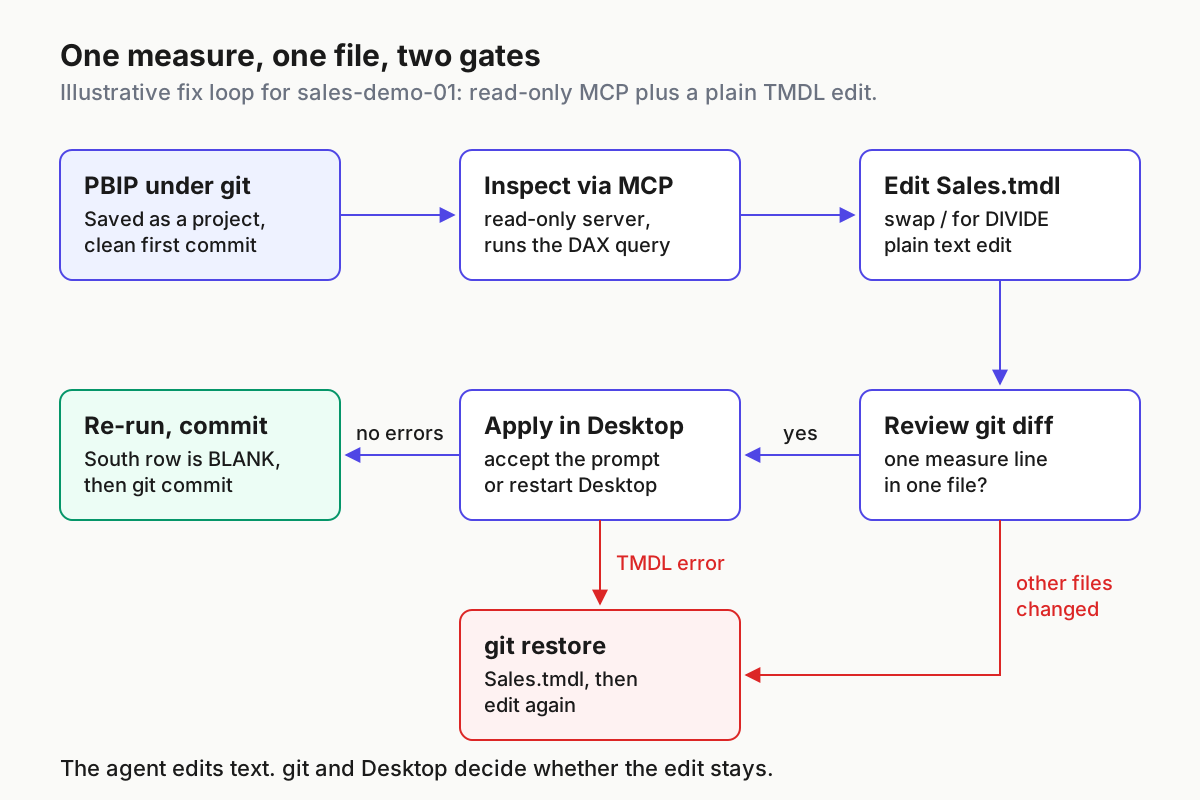
The diagram shows the same loop as two gates: git decides whether the change is the one you asked for, and Desktop decides whether it is valid TMDL.
When it fails: symptoms, causes and recovery
Most failures in this setup are boring and recoverable, because nothing irreversible happens before you commit. Match the symptom first, then act. For deeper protocol-level debugging of any MCP server, the MCP Inspector guide shows how to test the server outside the agent.
| Symptom | Likely cause | Recovery |
|---|---|---|
| Every tool call is refused and the agent mentions a licence | EULA not accepted; the server blocks all other tools until it is | Read the EULA, then authorise accept_eula in the session or set PBI_MODELING_MCP_ACCEPT_EULA=true and restart the server |
claude mcp get shows a failed status, or Codex reports a startup timeout |
Node.js missing, first npx download slow, or the command does not resolve in that shell |
Run the npx line by hand; raise startup_timeout_sec in Codex; read the Issue: line in Claude Code |
| Agent cannot find the Desktop file | Desktop not open, wrong file name in the prompt, or a hosted server registered instead | Open SalesDemo.pbip, repeat the connect prompt with the exact name, remove any hosted registration |
| Agent reads the model but every change fails | Working as designed with --readonly, or Build permission without Write on a published model |
Keep making changes as TMDL edits; for server writes, re-register without --readonly and check permission |
| Desktop still shows the old measure | Desktop has not reloaded the edited files | Accept the apply prompt; if none appears, close and reopen the project |
| Desktop refuses to open the project and names a file and location | Invalid TMDL, often broken indentation or an unquoted name | git restore the file, reopen, and redo the edit with tabs and single-quoted names |
| An edit to a Power Query expression vanished after applying | The project had pending changes in unappliedChanges.json; external expression edits are lost when those apply |
Apply pending changes in Desktop first, commit, then make the external edit |
| Agent proposes a Fabric workspace or a new connection host | It is reaching beyond the task | Stop the session; keep PBI_MODELING_MCP_ALLOWED_CONNECTION_HOSTS unset for this work |
git diff --stat lists many files |
The agent touched more than the measure, or Desktop rewrote files on save | Restore everything except Sales.tmdl, repeat the edit, and avoid saving in Desktop mid-review |
One Desktop behaviour deserves its own sentence: if you save in Desktop while reviewing, Desktop serialises its in-memory model back to disk, which can overwrite the agent’s uncommitted edit or produce unrelated diff noise. Review first, apply second, save last.
Roll back the change and the server
Rollback is two separate jobs: undo the model change, and remove the agent’s access. Do both when a session went wrong; do only the first when you just want another attempt.
- Restore the file before committing:
git restore SalesDemo.SemanticModel/definition/tables/Sales.tmdl. On older git,git checkout -- <path>does the same. - If you already committed, revert rather than rewriting history:
git revert <commit-sha>. - Reload Desktop through the apply prompt, or close and reopen the project, and rerun the DAX query to confirm the old behaviour is back.
- Remove the server from Claude Code with
claude mcp remove powerbi-authoring-local, then checkclaude mcp list. If you used project scope, also remove the entry from.mcp.json. - In Codex, set
enabled = falseunder[mcp_servers.powerbi-authoring-local]to disable without deleting, or delete the table. Runcodex mcp --helpto see the removal commands your version offers. - If you need a single file again, convert back with File > Save as and the
.pbixtype. The projects FAQ says conversion is only possible through Desktop’s Save as, not programmatically.
The README says interactive EULA acceptance is saved in a local configuration file on your machine. The selected documentation does not describe how to withdraw it, so check the repository’s troubleshooting guide if you need to reset that state.
If you also use Claude Code checkpoints, remember they are a second, session-level undo layer; the checkpoints and rewind guide explains what they do and do not track. For a model, git is the record that survives the session.
What the agent sees, and what to keep out of reach
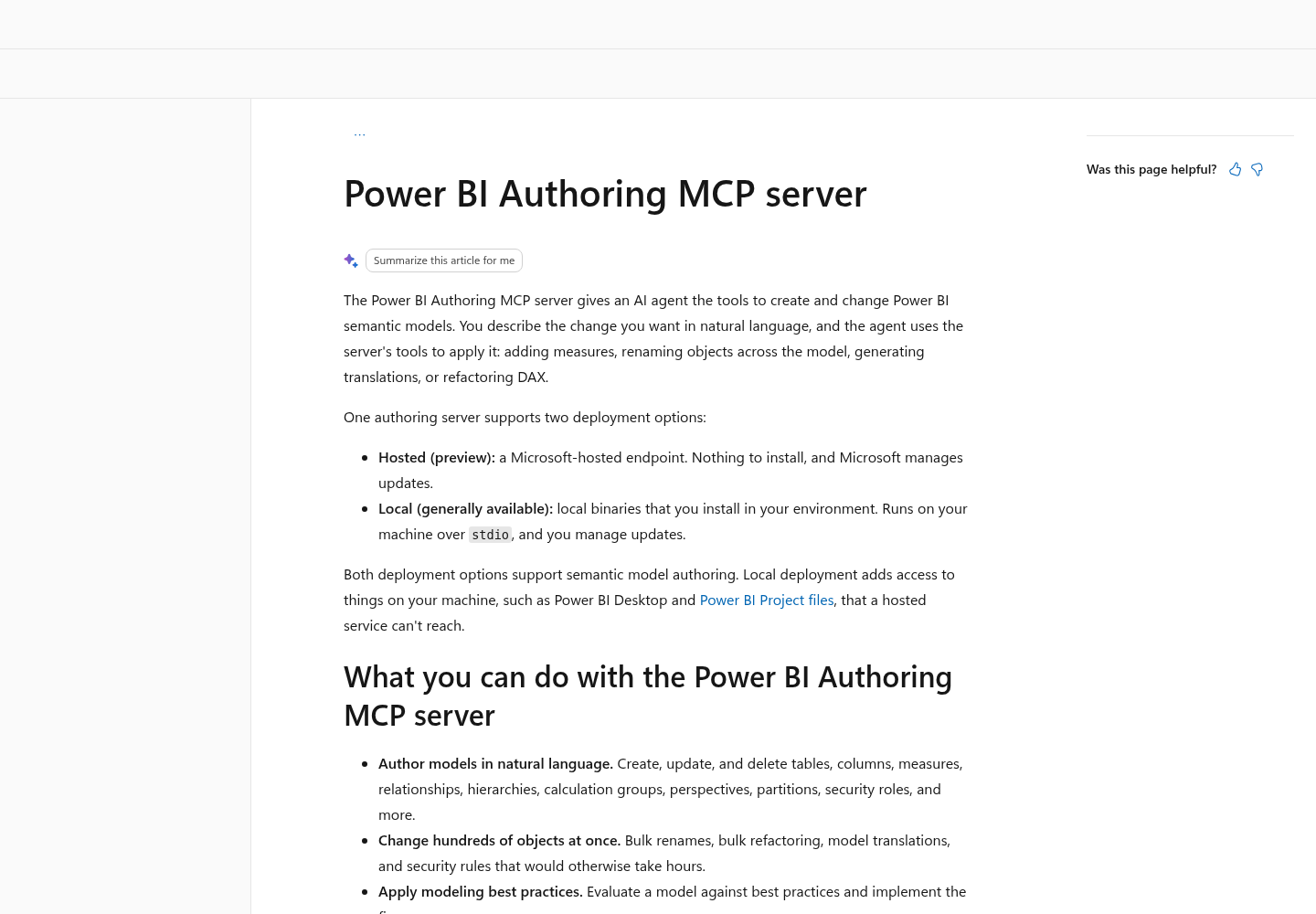
The README’s privacy section is direct: the server runs locally with your existing credentials and does not bypass Power BI security, but metadata, schemas and query results it retrieves go to the MCP client and may be forwarded to the configured model provider. AI assistance does not expand access; it may transmit what you can already access. Plan around that.
- [ ] Assume every table name, column name, measure expression and query result in the session leaves your machine. Use a copy with sample data where you can.
- [ ] Keep production workspaces out of the loop. Microsoft’s lifecycle guidance recommends separate development, test and production workspaces and warns against publishing local work straight to production.
- [ ] Do not set
PBI_MODELING_MCP_ALLOWED_CONNECTION_HOSTSfor Desktop work. The README says access tokens are sent to listed hosts and to add only endpoints your organisation trusts. - [ ] Never put service principal variables such as
AZURE_CLIENT_SECRETin a committed.mcp.jsonor.codex/config.toml. - [ ] Be careful sharing transcripts. The README warns that model data or metadata can appear in logs and responses.
- [ ] Know the admin reality: there is no tenant setting that blocks the local server. It connects through the XMLA endpoint, and disabling XMLA blocks every other tool that relies on it too.
- [ ] Read the README’s data collection notice; the software may send usage information to Microsoft.
If you run several agents across a team, write the read-only default down as policy rather than leaving it to each person’s command line. The restricted mode fleet policy guide is a useful template for turning one safe setup into a house rule.
The pattern that remains when you strip away this week’s tools is simple. Put the model in text, let the agent read through a narrow door, let it write only through files, and make git and Desktop the two judges of every change.
Sources
- faaris (@faarisrazi), post on X, November 11, 2026: x.com/faarisrazi/status/2120568144108617781
- Microsoft, microsoft/powerbi-modeling-mcp repository README: github.com/microsoft/powerbi-modeling-mcp
- Microsoft Learn, Power BI Authoring MCP server: learn.microsoft.com
- Microsoft Learn, Power BI Desktop projects (PBIP): learn.microsoft.com
- Microsoft Learn, Tabular Model Definition Language (TMDL): learn.microsoft.com
- Microsoft Learn, Work with TMDL view: learn.microsoft.com
- Microsoft Learn, DIVIDE function (DAX): learn.microsoft.com
- Microsoft Learn, Power BI implementation planning: develop content and manage changes: learn.microsoft.com
- Anthropic, Connect Claude Code to tools via MCP: code.claude.com/docs/en/mcp
- OpenAI, Codex Model Context Protocol documentation: developers.openai.com/codex/mcp