Claude Code Elixir Setup (and Codex): Connect Tidewave to a Phoenix App, Write LiveView Rules, and Run a mix format, compile and test Loop
Claude Code Elixir setup for Phoenix: connect Tidewave over HTTP, write a LiveView CLAUDE.md, and wire a mix format, compile and test loop into a hook.

Ask a coding agent to add a renew-loan button to a Phoenix app and you can get code written for a Phoenix that no longer exists: a helper renamed releases ago, a LiveView callback shaped by an old tutorial, a test that quietly reads your development database. For Claude Code Elixir work, the fix is not a longer prompt. It is three pieces of setup: a connection into the running application, written house rules, and a verification loop that runs after every edit.
This tutorial builds all three on an existing Phoenix 1.7+ app with LiveView and Ecto. You will add the Tidewave MCP server as a development-only dependency, connect Claude Code to it over HTTP, write one instruction file that Claude Code and Codex both read, and wire mix format, mix compile --warnings-as-errors and mix test into a loop backed by a PostToolUse hook. Every step ends with what you should observe when it works and what a failure looks like.
Why now: on October 30, 2026, José Valim posted on X that Tidewave can now run on CI, taking screenshots, recording captioned videos and producing framework diagnostics for Phoenix and Rails. CI gets a short section near the end. The local loop is what you will use every day, and the CI mode is built from the same pieces.
A note on evidence. Commands and configuration follow the documentation linked in each section. The example app, Shelf, a small library-lending app with Catalog, Accounts and Loans contexts, is illustrative. No command output in this guide is presented as observed, except the sample that the Mix documentation itself prints. Expected observations are what the documentation and the scripts’ own logic predict.
What you need before you start
- [ ] Elixir and Erlang/OTP at the versions your project expects, and the same versions in CI. The formatter’s output can differ between Elixir versions, so a mismatch turns a formatting check into noise.
- [ ] An existing Phoenix 1.7+ project under git, with a passing
mix testand a dev database thatmix phx.servercan reach. - [ ] A current Claude Code install, signed in. Codex CLI is optional; the instruction file and MCP notes below cover it too.
- [ ]
jqon your PATH. The hook script parses Claude Code’s JSON input with it, as the official hook examples do. - [ ] Permission to edit and commit
mix.exs,lib/shelf_web/endpoint.ex,config/dev.exs,AGENTS.md,CLAUDE.mdand.claude/settings.json. - [ ] A clean working tree, so each step lands as its own reviewable, revertible commit. Note which of
AGENTS.md,CLAUDE.mdand.claude/settings.jsonalready exist; rollback treats new and existing files differently.
The overall shape will be familiar if you followed our Vue and Nuxt setup or the Expo guide. The Elixir difference is where the MCP server lives. Tidewave runs inside your Phoenix app, so the agent is not reading a documentation mirror. It is querying the application you are developing, at the exact dependency versions in your mix.lock.
Step 1: Add Tidewave to the Phoenix app, for development only
The Tidewave Phoenix README describes it as an MCP server that gives coding agents runtime-level tools for Phoenix development. Those tools can execute code inside your app, so the whole setup is scoped to the :dev environment and to localhost.
- Add the dependency to
mix.exswithonly: :dev. - In
lib/shelf_web/endpoint.ex, add a guardedplug Tidewavedirectly above the existingif code_reloading? doblock. - If you run Phoenix LiveView 1.1 or later, enable the two debug options in
config/dev.exs. Phoenix 1.8+ apps have them on by default. - Run
mix deps.get, startmix phx.server, and note the port your endpoint reports. Shelf uses 4000.
# mix.exs
defp deps do
  [
    {:tidewave, "~> 0.9", only: :dev},
    # ...existing deps: phoenix, phoenix_live_view, ecto_sql and the rest
  ]
end
# lib/shelf_web/endpoint.ex (excerpt)
  if Mix.env() == :dev do
    plug Tidewave
  end

  if code_reloading? do
    # existing code-reloading plugs stay exactly as they were
  end
# config/dev.exs
config :phoenix_live_view,
  debug_heex_annotations: true,
  debug_attributes: true
Why each choice is there
only: :dev keeps the package out of test and production builds. The Mix.env() == :dev guard is the second fence: the endpoint only references Tidewave where the dependency exists. The README notes that Tidewave works best with LiveView 1.1 or later, and the two debug options give it HEEx annotations to work with.
The security defaults matter more than the install. According to the README, Tidewave only allows requests from localhost by default, even when your server listens on other interfaces. The :allow_remote_access option removes that restriction; the README says to use it with extreme care and only with an authentication proxy in front of the app. Leave it unset. The :allowed_origins option checks Origin and Host headers against cross-origin and DNS rebinding attacks and defaults to your endpoint’s host. If you use a Content-Security-Policy, Tidewave adds unsafe-eval to script-src and disables frame-ancestors wherever it is loaded, which is one more reason that place must be development only.
If you prefer a generator, the README documents an Igniter route: mix archive.install hex igniter_new, then mix igniter.install tidewave. Review its diff against the three blocks above before committing. In an umbrella project, make these edits in the app that defines the Phoenix endpoint, typically apps/your_app_web.
What you should observe
The dev server starts as before. The plug’s :toolbar option defaults to true, so expect a Tidewave toolbar injected into HTML pages in development; plug Tidewave, toolbar: false turns it off. Then prove the guard with MIX_ENV=test mix compile. It should succeed, because the guarded plug is skipped where the dependency is absent. If the test-environment compile fails with an error naming Tidewave, the plug sits outside the Mix.env() == :dev block. Move it back inside before going further.
Step 2: Connect Claude Code and confirm the runtime tools
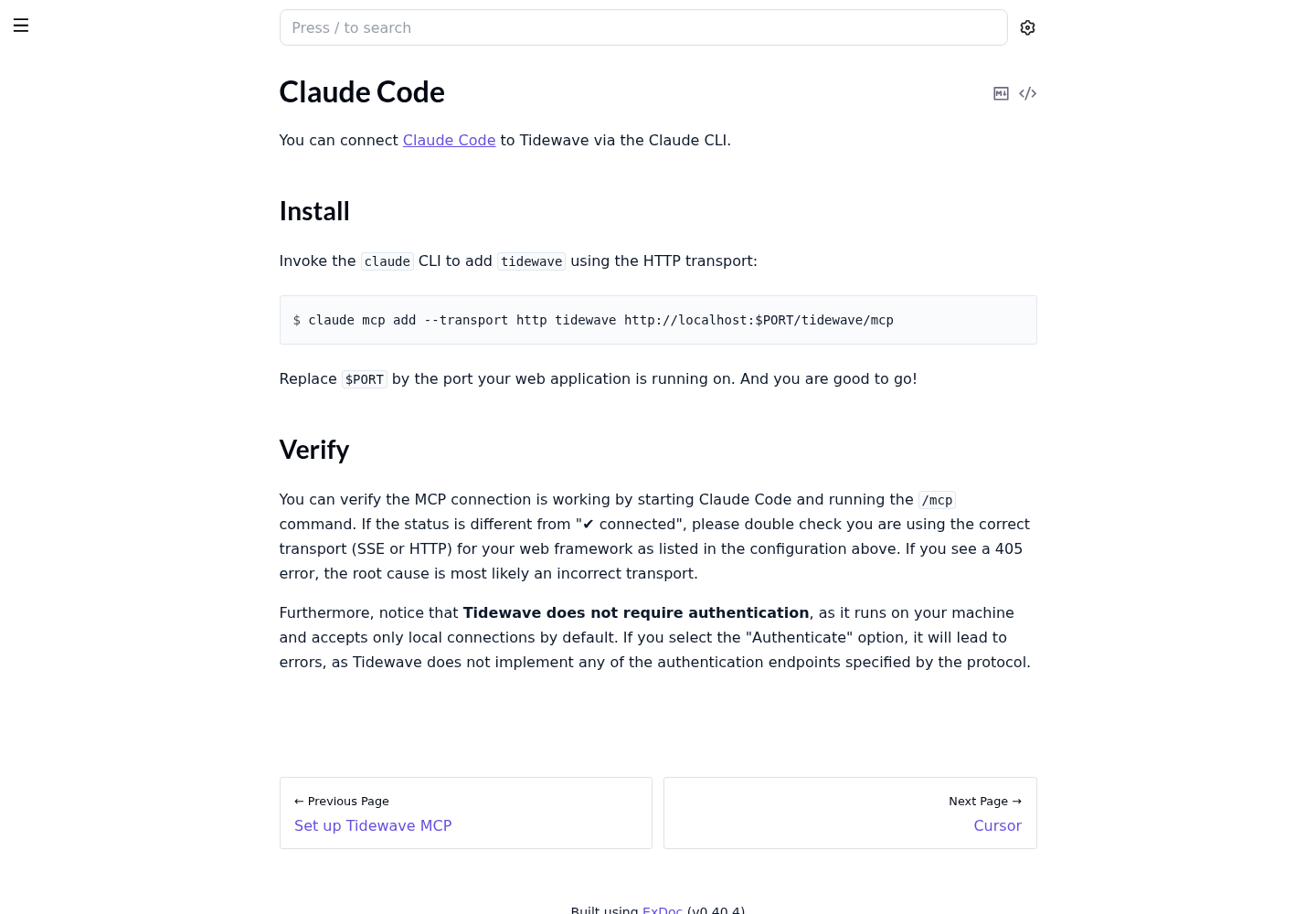
Tidewave’s Claude Code page on HexDocs documents a one-line connection over the HTTP transport.
- Keep
mix phx.serverrunning in its own terminal. The MCP endpoint exists only while the app is up. - From the project root, add the server, replacing 4000 with your endpoint’s port.
- Start
claudeand run/mcp. Look for the status ✔ connected next totidewave. - If the status is anything else, check the transport first. The page says a 405 error most likely means an incorrect transport, and Phoenix uses HTTP.
- Do not choose the Authenticate option. Tidewave runs on your machine, accepts only local connections by default and implements none of the protocol’s authentication endpoints, so selecting it leads to errors.
claude mcp add --transport http tidewave http://localhost:4000/tidewave/mcp
claude mcp add also accepts a scope that decides whether the entry is private to you or shared with the team. The URL embeds a port that can differ between developers, so a personal scope is usually the safer default. Our MCP scopes guide covers that choice and the generic connection failures in more depth.
What the agent can now do
The README lists five tools. The right column shows how each one earns its place in the Shelf example.
| Tool | What the README says it does | Use in the Shelf app |
|---|---|---|
project_eval |
Evaluates Elixir code inside the running app, like an IEx session for the agent | Call Shelf.Loans.renew/1 on a seeded loan and inspect the return value before writing the LiveView that uses it |
execute_sql_query |
Runs SQL against the development database | Confirm that a renewal changed the due date in dev data |
get_docs |
Returns documentation for a module or function at the versions locked in mix.lock |
Read Phoenix.LiveView and Ecto.Changeset docs for the versions Shelf actually uses |
get_logs |
Reads logs written by the server | Read the request log and backtrace after a button click misbehaves |
get_source_location |
Finds where a module or function is defined, in the app or a hex dependency | Jump to a component definition instead of grepping deps/ |
Test the connection with one request. Ask Claude to use the Tidewave get_docs tool to show the documentation for Ecto.Changeset.validate_required/3 and to say where the text came from. Success is a visible tidewave tool call in the transcript before the answer. If Claude answers from memory with no tool call, either the server is not connected or nothing told Claude when to reach for it. Recheck /mcp, then make Step 3’s instruction file explicit about it.
Codex
The README lists Codex among clients with dedicated setup instructions, so follow that page first. For reference, Tidewave’s CI guide configures Codex with a [mcp_servers.tidewave] table and a url key. The same table pointed at your local endpoint is the minimal form:
# ~/.codex/config.toml (adapted from the Codex block in Tidewave's CI guide)
[mcp_servers.tidewave]
url = "http://localhost:4000/tidewave/mcp"
The CI example adds required = true and pre-approves Tidewave’s tool calls because a CI runner cannot answer approval prompts. On your own machine, leave approvals interactive.
Worktrees
If you run several git worktrees, each dev server probably listens on its own port, so no single URL serves them all. The README suggests registering mix tidewave.proxy as a STDIO MCP server instead. It adds a port parameter to every tool and dispatches each call to the right application.
Step 3: Write one instruction file for Claude Code and Codex
An instruction file turns your team’s Phoenix habits into context the agent loads every session. Claude Code’s memory documentation says it reads a repository’s AGENTS.md when no CLAUDE.md exists, on v2.1.277 or later, and that a CLAUDE.md containing an @AGENTS.md import works in sessions where direct reading is unavailable. OpenAI’s AGENTS.md guide for Codex says Codex reads AGENTS.md files from the project root down to the working directory. So keep the shared rules in AGENTS.md, and put Claude-only notes in a short CLAUDE.md that imports it.
The file below is a complete, copyable example for the illustrative Shelf app. Replace the module names and paths with yours, but keep the structure: project map, look-up rules, hard rules, conventions, verification.
# AGENTS.md: Shelf (Phoenix 1.7+, LiveView, Ecto)

## Project map
- Contexts live in lib/shelf/: Shelf.Catalog (books, copies), Shelf.Accounts (members), Shelf.Loans (checkouts, renewals, due dates).
- The web layer lives in lib/shelf_web/. LiveViews and controllers call context functions; they never call Shelf.Repo directly.
- Tests mirror lib/ under test/. Shared fixtures are in test/support/fixtures/.

## Look things up before writing code
- Before using any Phoenix, Phoenix.LiveView, Ecto or other hex dependency function, read its docs with the Tidewave get_docs tool. Our versions are pinned in mix.lock; do not rely on memory of older releases.
- Use get_source_location to find a module definition instead of searching deps/.
- Use project_eval to check what a context function returns in the running dev app before relying on its shape.
- After reproducing a bug in the browser, read get_logs before changing code.

## Hard rules
- Do not add, remove or upgrade a dependency in mix.exs. Propose the change and wait for approval.
- Never edit a migration in priv/repo/migrations/ that already exists on main. Write a new migration.
- execute_sql_query is for reading the dev database only. No INSERT, UPDATE, DELETE or DDL through it.
- Do not silence warnings: no @compile directives and no underscore-renaming of variables you do not understand. Fix the cause or ask.
- Never set :allow_remote_access on the Tidewave plug and never move the plug outside the Mix.env() == :dev block.
- The dev server already runs on port 4000. Do not start another one.

## LiveView conventions in this app
- Socket assigns hold what the template renders. Load lists through a context function with a limit; never assign a whole table.
- handle_event callbacks call one context function and assign the result. Business rules live in contexts, where they are tested.
- Every new LiveView gets a test in test/shelf_web/live/ that mounts it and asserts on the rendered HTML.
- Shared function components live in lib/shelf_web/components/. Check for an existing component before adding one.

## Verify after every change, in this order
1. mix format --check-formatted
2. mix compile --warnings-as-errors   (fast dev check)
3. MIX_ENV=test mix do compile --warnings-as-errors + test --warnings-as-errors <the test file that covers your change>
4. After a fix: MIX_ENV=test mix do compile --warnings-as-errors + test --failed
5. Before reporting done: MIX_ENV=test mix do compile --warnings-as-errors + test --warnings-as-errors
Never use plain mix test as the check: it does not fail on compile warnings.
Paste the final lines of each command's output in your last message.
@AGENTS.md

## Claude Code
- Tidewave tools appear as mcp__tidewave__<tool>. If /mcp does not show tidewave as connected, stop and say so instead of guessing an API.
- A PostToolUse hook formats each edited Elixir file and returns format errors and compile warnings to you. Treat that feedback as a failing check.
Why each rule earns its line
| Rule | Why it is there | Sign it was ignored |
|---|---|---|
Read docs with get_docs first |
It reads the versions locked in mix.lock; memory of older releases is how outdated calls appear |
A compiler warning about an undefined or deprecated function |
| No new dependencies without approval | A new hex package changes mix.lock and your supply chain |
git diff main -- mix.exs mix.lock is not empty |
| Never edit a merged migration | Databases that already ran it never see the edit | git diff --name-status main -- priv/repo/migrations shows M instead of A |
execute_sql_query reads only |
The README says it can run any SQL against dev; writes bypass contexts and migrations | Dev data changes that no migration or context call explains |
| Do not silence warnings | --warnings-as-errors only helps when warnings are fixed, not hidden |
New underscore variables or @compile attributes in the diff |
| Verify in a fixed order, tests behind a test-env compile | Cheap checks first; tests run only after a MIX_ENV=test compile that fails on warnings |
A done message with no command output, or plain mix test as the last check |
The SQL rule is a request, not a control. Claude Code’s memory page is explicit that CLAUDE.md content is context rather than enforced configuration. For a database an agent must never write to, a database role is the stronger control, as our Postgres read-only guide shows. For a disposable dev database you can reseed, the written rule is usually enough.
Confirm both agents loaded it
- In Claude Code, run
/context alland check thatCLAUDE.mdappears under Memory files. Imported files load with the file that imports them. - Ask Claude what it must do before using a LiveView function. The answer should cite the
get_docsrule. - In Codex, from the project root, run the check from OpenAI’s guide shown below. The documented expectation is that Codex quotes items from the loaded instructions.
- Keep the files short. The memory page targets under 200 lines per file for adherence, and Codex stops adding instruction files once their combined size reaches 32 KiB by default.
codex --ask-for-approval never "Summarize the current instructions."
Step 4: Run format, compile and test after every change
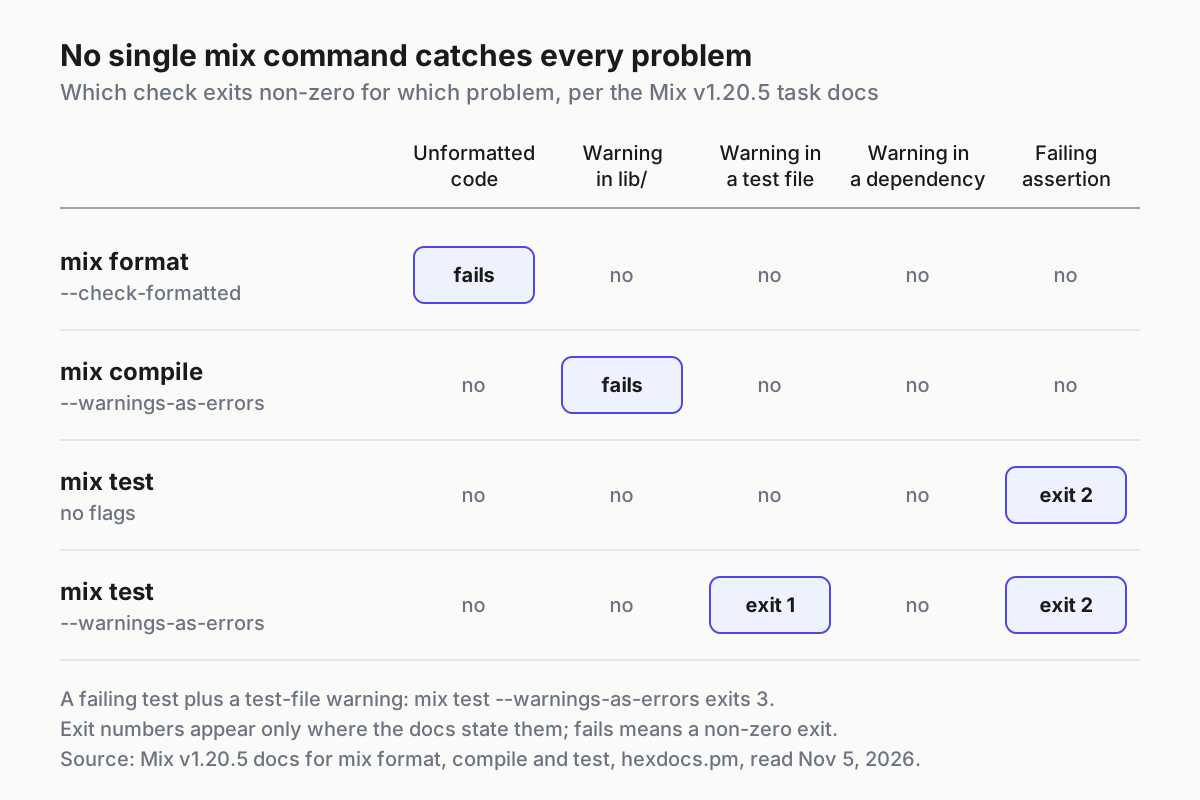
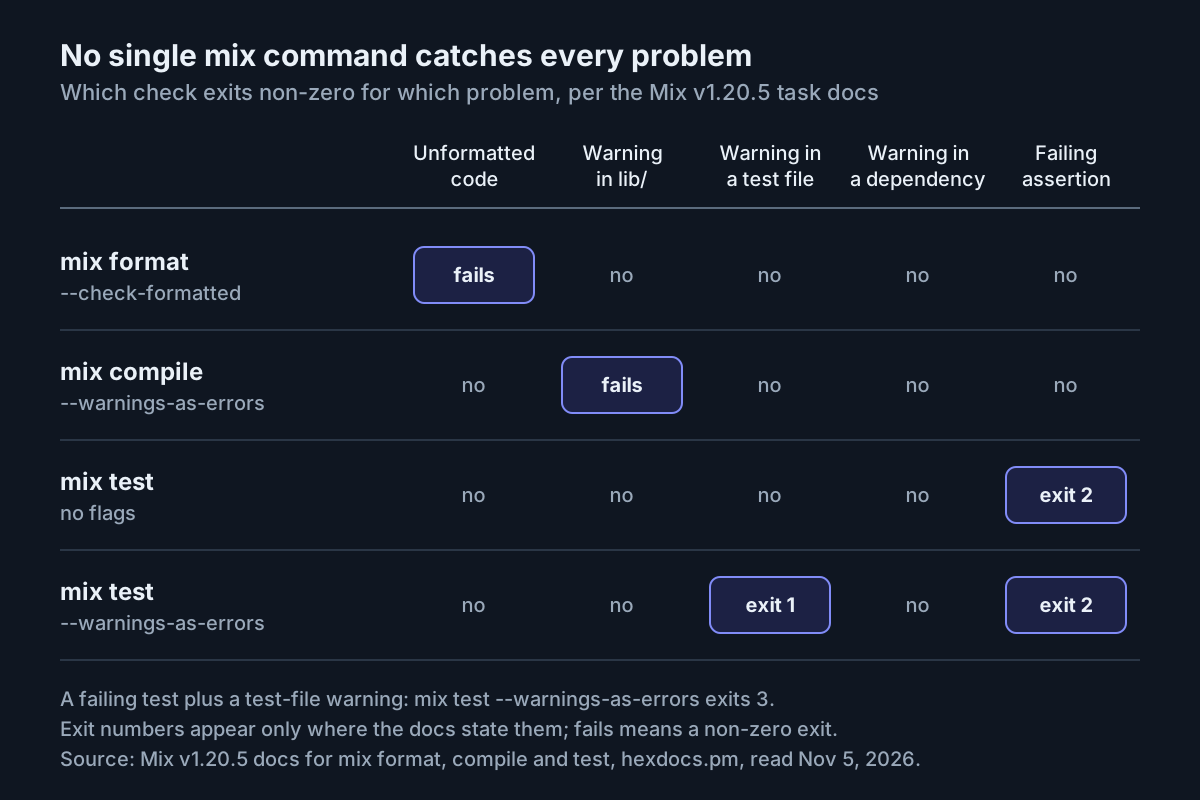
Instructions describe what good looks like. The loop proves it. Run these commands from the project root in this order. Their behaviour comes from the Mix v1.20.5 documentation for mix format, mix compile and mix test.
# 1. Formatting check: exits non-zero and writes nothing if a file is unformatted
mix format --check-formatted

# 2. Fast dev check while you iterate (the Step 5 hook runs it after lib edits)
mix compile --warnings-as-errors

# 3. The gate: compile in the test environment, then run the touched test file
MIX_ENV=test mix do compile --warnings-as-errors + test --warnings-as-errors test/shelf/loans_test.exs

# 4. After a fix: rerun only what failed last time, behind the same compile gate
MIX_ENV=test mix do compile --warnings-as-errors + test --failed

# 5. Before reporting done: the full documented form
MIX_ENV=test mix do compile --warnings-as-errors + test --warnings-as-errors
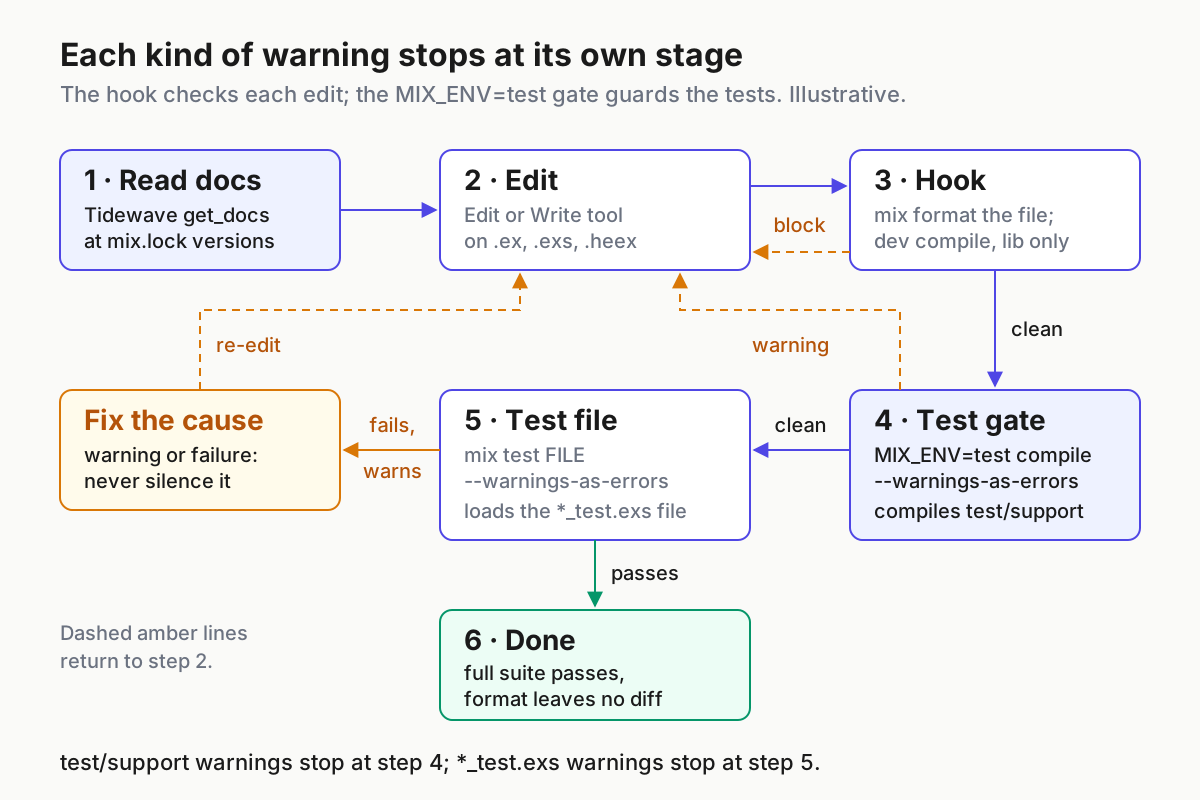
The order is deliberate. A formatting check is the cheapest and, in check mode, writes nothing. The dev compile in line 2 is a fast signal, not the gate. Plain mix test compiles the project again in the test environment, and that compile does not fail on warnings: the mix test documentation says its own --warnings-as-errors option only applies to test files and gives the combined MIX_ENV=test mix do compile --warnings-as-errors + test --warnings-as-errors form for compilation and tests together. Code that only compiles under test, such as shared modules under test/support/ in a typical generated Phoenix project or a branch guarded by Mix.env() == :test, never passes through the dev compile at all.
So every test run in this loop, including the scoped iterations, sits behind a test-environment compile with --warnings-as-errors. A warning anywhere in that compile stops the command before any test runs. Scoping to one file keeps each round fast, and --failed reruns only what broke.
The two halves of the gate catch different warnings. The compile --warnings-as-errors half covers modules the test environment compiles, such as test/support/ in a typical generated project. The *_test.exs files are not compiled by that step; mix test loads them, so a warning inside a test file is caught by the test --warnings-as-errors half, which exits 1 when the tests otherwise pass.
| Command | Passing run | Failing run | Agent’s next move |
|---|---|---|---|
mix format --check-formatted |
Exits 0 | Exits non-zero; formatted contents are not written to disk | Run mix format on the file, then check again |
mix compile --warnings-as-errors |
Exits 0 | Exits non-zero when the dev compile has one or more project warnings | Fix the warning at the reported file and line |
MIX_ENV=test mix do compile --warnings-as-errors + test --warnings-as-errors test/shelf/loans_test.exs |
Compile exits cleanly and the summary line reports no failures | The compile step exits non-zero on a test-env warning before any test runs; otherwise test exits 1 for test-file warnings only, 2 for failures, 3 for both | Fix the warning; for a failure rerun the reported FILE:LINE behind the same compile gate |
MIX_ENV=test mix do compile --warnings-as-errors + test --failed |
Previously failing tests now pass | The same failure repeats | Read the assertion’s left and right values before editing again |
Reading a failure
The mix test documentation prints this sample of a failing run. It is the documentation’s output, not a Shelf run:
$ mix test
Running ExUnit with seed: 646219, max_cases: 16
...

  1) test greets the world (FooTest)
     test/foo_test.exs:5
     Assertion with == failed
     code:  assert Foo.hello() == :world!
     left:  :world
     right: :world!
     stacktrace:
       test/foo_test.exs:6: (test)

........

Finished in 0.05 seconds (0.00s async, 0.05s sync)
1 doctest, 11 tests, 1 failure
Each part tells the agent something. The counter and name say which test failed. The test/foo_test.exs:5 line is a ready-made rerun target: pasting it after mix test runs only that test, so in this loop the agent runs MIX_ENV=test mix do compile --warnings-as-errors + test test/foo_test.exs:5. Left and right show the actual and expected values. Tell the agent to paste this block back verbatim instead of summarising it; the location line is the cheapest rerun you can get.
Three documented details save wasted rounds:
mix compile --warnings-as-errorsonly concerns compilation warnings from your project, not its dependencies. A noisy dependency will not fail the build, so the agent has no reason to touchdeps/.--all-warningsis on by default, so compile prints warnings from previous compilations too. A warning in a file nobody touched this session still fails the check.- Failures reported by
mix test --warnings-as-errorscannot be retried with--failed. After fixing a test-file warning, rerun the file itself.
mix test --stale is an alternative to naming a file. It runs only test files that reference modules changed since the last --stale run; the first run executes everything to build its manifest. Keep it behind the same gate: MIX_ENV=test mix do compile --warnings-as-errors + test --stale. Giving the agent a check it can run is the core habit in our Claude Code prompting guide. Elixir makes it unusually crisp: a handful of commands, each with a documented exit status.
Step 5: Enforce the loop with a PostToolUse hook
The memory documentation is direct about the limit of instruction files: anything that must happen at a fixed point, such as after each file edit, belongs in a hook, because hooks run regardless of what Claude decides. Claude Code’s hooks guide documents a PostToolUse hook with an Edit|Write matcher for exactly this case, formatting a file after Claude edits it. The version below checks the formatter’s result, adds a dev compile for application files and hands any failure back to Claude.
- Save the script below as
.claude/hooks/mix-check.sh. - Make it executable with
chmod +x .claude/hooks/mix-check.sh. - Register it in the project’s
.claude/settings.json, adding to anyPostToolUseentries that already exist rather than replacing them. - Test it outside Claude Code with the five inputs in the table below.
- Run
/hooksin Claude Code and confirm it appears under PostToolUse. - Ask Claude for a small edit to a context module and confirm the file comes back formatted.
#!/bin/bash
# .claude/hooks/mix-check.sh
# After Claude edits an Elixir file: format that file; for application files,
# compile the project in dev. Any failure goes back to Claude as one JSON
# object. Stdout carries JSON only.

INPUT=$(cat)
FILE_PATH=$(echo "$INPUT" | jq -r '.tool_input.file_path // empty')

case "$FILE_PATH" in
  *.ex|*.exs|*.heex) ;;
  *) exit 0 ;;   # not an Elixir file: no decision
esac

cd "$CLAUDE_PROJECT_DIR" || exit 0

block() {
  jq -n --arg reason "$1" '{decision: "block", reason: $reason}'
  exit 0
}

# 1. Format only the edited file. Capture its output and keep its exit status.
if ! FMT=$(mix format "$FILE_PATH" 2>&1); then
  block "mix format failed on $FILE_PATH; fix the file before anything else:
$(echo "$FMT" | tail -n 40)"
fi

# 2. Test files are loaded by mix test, not built by mix compile.
#    The MIX_ENV=test gate in Step 4 checks them.
case "$FILE_PATH" in
  *_test.exs|test/*|*/test/*) exit 0 ;;
esac

# 3. Application files: any project warning makes this exit non-zero.
if ! OUT=$(mix compile --warnings-as-errors 2>&1); then
  block "mix compile --warnings-as-errors failed after editing $FILE_PATH:
$(echo "$OUT" | tail -n 40)"
fi

exit 0
{
  "hooks": {
    "PostToolUse": [
      {
        "matcher": "Edit|Write",
        "hooks": [
          {
            "type": "command",
            "command": "\"$CLAUDE_PROJECT_DIR\"/.claude/hooks/mix-check.sh",
            "timeout": 180
          }
        ]
      }
    ]
  }
}
Test the script by piping sample hook input into it, as the hooks guide does. Run this from the project root, once per row of the table, setting FILE to that row’s input:
FILE=lib/shelf/loans.ex
jq -n --arg f "$FILE" '{tool_name: "Edit", tool_input: {file_path: $f}}' \
  | CLAUDE_PROJECT_DIR="$PWD" .claude/hooks/mix-check.sh
echo $?
The expected observations follow from the script and the Mix docs; they are not recorded output. Make the prepared change first, and undo it with git restore on that file before the next row.
FILE input |
Change you make first | Expected stdout | Expected echo $? |
|---|---|---|---|
lib/shelf/loans.ex |
None; the project compiles cleanly | Nothing | 0 |
lib/shelf/loans.ex |
Add an unused variable inside a function | One JSON object with "decision": "block"; its reason starts mix compile --warnings-as-errors failed after editing lib/shelf/loans.ex and quotes the warning |
0 |
lib/shelf/loans.ex |
Delete the module’s final end, so the file no longer parses |
One JSON object with "decision": "block"; its reason starts mix format failed on lib/shelf/loans.ex; the compile step never runs |
0 |
test/shelf/loans_test.exs |
Add an unused variable inside a test | Nothing; the file is formatted and the hook stops before compiling. The warning appears at the Step 4 gate, where test --warnings-as-errors exits 1 |
0 |
README.md |
Anything | Nothing; not an Elixir file | 0 |
The exit status stays 0 in every row because the JSON carries the decision, not the exit code.
Why the script is shaped this way
- The matcher is case-sensitive and fires only for the Edit and Write tools. The hooks guide warns that Claude can also change files through shell commands; if you need every change covered, add a Stop hook that checks the working tree once per turn.
- The formatter’s exit status is checked first. If
mix formatfails, the hook stops there and returns the formatter’s error as a block decision, so a file the formatter rejected, template or not, is never followed by a reassuring clean compile. - Test files get formatting only.
mix compiledoes not build them and a dev compile would not see their warnings, so the hook exits silently and leaves them to theMIX_ENV=testgate in Step 4, which the instruction file requires before any done message. - Success is silent. The guide notes that a successful hook shows nothing in the conversation, so you confirm it by its effect: a reformatted file.
- Every failure prints one JSON object built with
jq, using the top-leveldecision: "block"field the guide documents for PostToolUse. A PostToolUse hook cannot undo the edit; the point is to put the error in front of Claude before its next step, so it can fix the cause. - Formatter and compiler output are captured into variables rather than printed, because the guide warns that anything on stdout ahead of the JSON makes Claude Code read it as plain text and ignore the decision.
timeoutis in seconds. It caps how long a cold compile on a large app can hold up the session.
Template files need one more check, and it is about plugins, not inputs. The format docs define :inputs as the default files mix format uses when you pass none, which is what mix format --check-formatted in Step 4 relies on. The hook passes the edited file explicitly, so :inputs does not decide whether it gets formatted. What decides it for .heex is :plugins: the docs describe plugins that declare the extensions they format, and note that loading plugins compiles the project first. So check two separate things in your generated .formatter.exs. A plugin that handles .heex makes the hook able to format templates. A .heex pattern in :inputs makes the whole-project check include them. If no plugin is listed, drop *.heex from the hook’s first case pattern.
Hooks are the deterministic layer beside permission rules. If you also want to limit which commands the agent may run, treat that as written policy rather than a per-session choice, as our permission modes guide argues.
Step 6: Map common Phoenix agent mistakes to a rule and a check
Rules without checks drift, and checks without rules confuse the agent. This filled table pairs the mistakes agents commonly make in a Phoenix codebase with the line in AGENTS.md that prevents each one and the command that catches it when prevention fails.
| Mistake | What it looks like in Shelf | Rule that prevents it | Check that catches it |
|---|---|---|---|
| Outdated Phoenix or LiveView API | A LiveView calls a function shape from an older release | Read docs with get_docs first |
The hook’s dev compile, then the MIX_ENV=test compile gate |
| Warning left behind | An unused alias in Shelf.Loans after a refactor |
Do not silence warnings | mix compile --warnings-as-errors exits non-zero |
| Warning in test-only code | An unused variable in a module under test/support/ |
Tests run behind the MIX_ENV=test gate |
The gate’s compile step exits non-zero before any test runs |
| Test leans on dev data | A test asserts on rows the agent inserted while exploring | Tests run in MIX_ENV=test; the SQL tool only reads |
The test fails on CI, where no dev data exists |
Business logic in handle_event |
Renewal rules written inline in the LiveView | handle_event calls one context function |
No new test in test/shelf/loans_test.exs during review |
| Whole table in assigns | assign(socket, :loans, Repo.all(Loan)) in mount |
Lists load through a context function with a limit | git grep "Repo\." lib/shelf_web returns matches |
| Edited a merged migration | A column type changed inside an old file | New migration only | git diff --name-status main -- priv/repo/migrations shows M |
| Unapproved dependency | A date library added to fix a renewal bug | Propose and wait | git diff main -- mix.exs mix.lock is not empty |
Read the table from the right when something slips through. If a check fires, the rule beside it is the one to tighten. If a mistake reaches review with no check firing, add one: the git commands in the last column are cheap enough to run before every merge.
Troubleshoot Tidewave, the hook and the test loop
| Symptom | Likely cause | Fix | Expected after the fix |
|---|---|---|---|
/mcp shows tidewave as failed or not connected |
mix phx.server is not running, or the URL has the wrong port |
Start the server; if the port differs, remove the entry and add it again with the right port | ✔ connected |
| A 405 error | Wrong transport | Add the server again with --transport http |
✔ connected |
| Errors after choosing Authenticate | Tidewave implements no authentication endpoints | Do not authenticate; remove the entry and add it again | Connected with no auth step |
| Tidewave tools disappear mid-session | The app stopped or is restarting after a config or dependency change; the CI guide notes the tools are unavailable until it is back | Restart mix phx.server, wait a few seconds, run /mcp again |
Tools listed again |
Dozens of old warnings fail the compile after you adopt --warnings-as-errors |
--all-warnings is on by default and reprints warnings from earlier compilations |
Fix the existing warnings in one separate commit before enabling the hook | A clean mix compile --warnings-as-errors |
The hook returns mix format failed on ... |
The edited file no longer parses, or a template has no formatter plugin | Fix the syntax error the reason quotes; for templates, add a plugin or drop *.heex from the hook |
The next edit returns no JSON |
Tests pass locally but a warning in test/support/ surfaces later |
The agent ran plain mix test, which does not fail on compile warnings, and the dev compile never builds test-only code |
Run tests only through MIX_ENV=test mix do compile --warnings-as-errors + test ... |
The gate stops at the warning; clean once it is fixed |
| A test passes locally but fails on CI with missing records | The test depends on dev data created through Tidewave | Build the data inside the test with fixtures; keep tests in MIX_ENV=test |
The test passes on an empty database |
| The hook never fires | Matcher typo (matchers are case-sensitive), script not executable, or invalid settings JSON | Check /hooks, run chmod +x, remove trailing commas |
The hook is listed under PostToolUse |
| The hook’s JSON has no effect | A shell profile printed text before the JSON | Wrap profile echo lines in an interactive-shell check; inspect with claude --debug |
The decision reaches Claude |
| A worktree session talks to the wrong app | One fixed port in the MCP URL | Register mix tidewave.proxy as a STDIO server |
Tools accept a port parameter |
Work top to bottom. Most connection problems are the first two rows, and the documented /mcp status is the fastest signal you have.
Tidewave on CI: what the new guide documents
The Continuous Integration guide behind the October announcement reuses almost everything above. What it documents, in brief:
- Tidewave joins a CI run through Tidewave Connect and an existing harness, Anthropic’s claude-code-action or OpenAI’s codex-action. The worked examples target GitHub Actions; other CI systems follow a manual setup.
- Because Tidewave is a dev-only dependency, the workflow runs
mix setupand then the Phoenix server in the dev environment, against a PostgreSQL service, inside a loop that restarts the server whenever it exits. - A
tidewave-ai/connect-action@v1step needs aTIDEWAVE_CONNECT_KEYsecret and outputs the MCP URL. The Claude step passes it through--mcp-configas anhttpserver and allowsmcp__tidewave,Bash(mix:*),Bash(MIX_ENV=test mix:*). GITHUB_TOKENand GitHub App tokens cannot currently upload media attachments to comments, so posting screenshots or videos needs a personal access token from a bot user. Vision mode itself works without one.- On a publicly accessible repository, the guide recommends restricting who can trigger the jobs, for example with a job-level
ifongithub.event.sender.login. - The CI database starts empty, so keep seeds current and tell the agent how to sign in.
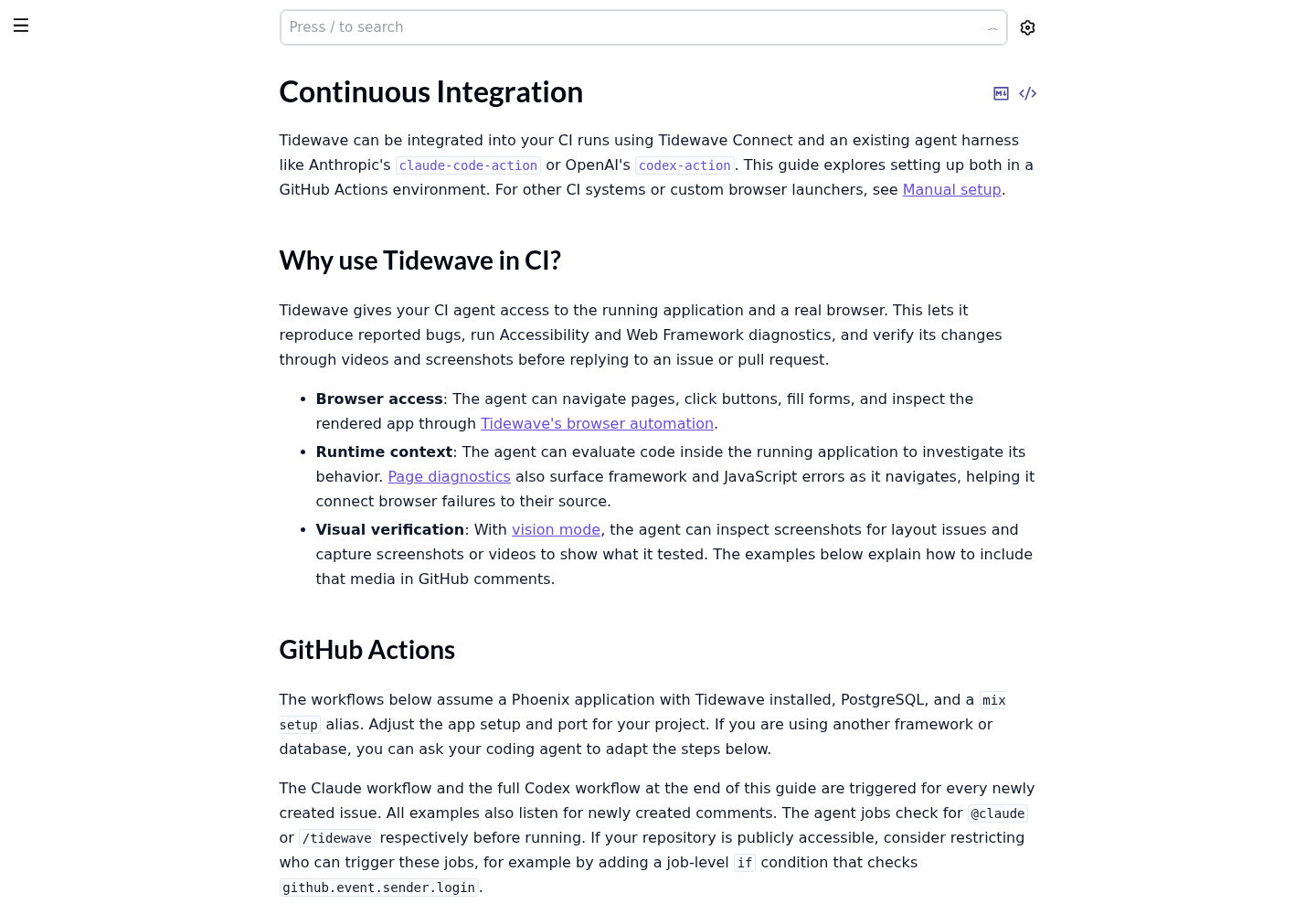
Notice what carries over: the dev-only plug, the HTTP transport and mix commands in the allowlist, including the MIX_ENV=test mix form the Step 4 gate uses. A local loop that already passes cleanly is the prerequisite for a CI agent worth reading.
Roll back the setup
Rollback depends on whether each file existed before Step 1 and whether you committed the setup. git restore only returns a tracked file to its last committed state: it does not delete files the setup created, and after a setup commit it restores the setup version.
- Remove the MCP entry with
claude mcp remove tidewave, and delete the[mcp_servers.tidewave]table from~/.codex/config.tomlif you added it./mcpshould no longer list tidewave. - Run
git status --shortand sort every setup file into one row of the table below. - Apply that row’s command, then run
mix deps.get. - Check the hook separately.
/hooksshould no longer listmix-check.sh, and any hooks you had before the setup should still be listed. To pause every hook temporarily instead, the hooks guide documents"disableAllHooks": true. - Prove the app is back where it started:
mix compile --warnings-as-errorsandMIX_ENV=test mix do compile --warnings-as-errors + testshould pass exactly as they did before Step 1.
| Situation | Files it usually covers | Command | Expected result |
|---|---|---|---|
| You committed the setup in its own commit or commits | Everything the setup touched | git revert <setup-commit> for each setup commit, newest first |
Files the commits created are deleted and files they modified return to their prior state, in a new commit |
| Uncommitted change to a file that existed before | mix.exs, mix.lock, lib/shelf_web/endpoint.ex, config/dev.exs, plus AGENTS.md, CLAUDE.md or .claude/settings.json if they already existed |
git restore <those files> |
git status no longer lists them |
| Uncommitted file the setup created | git status --short shows ??: often AGENTS.md, CLAUDE.md, .claude/hooks/mix-check.sh and possibly .claude/settings.json |
rm <those files>, after reading each one to confirm it holds only setup content |
git status no longer lists them |
| The hook landed in a settings file that also holds unrelated hooks, in a commit you cannot simply revert | .claude/settings.json |
Edit the file: delete only the PostToolUse object whose command ends in mix-check.sh, and the PostToolUse key only if it is then empty; delete the script |
Your other hooks still load; /hooks no longer shows mix-check.sh |
If one agent edit went wrong rather than the setup itself, Claude Code checkpoints are faster than git; our checkpoints and /rewind guide explains what they track and what still needs git.
Success and failure checks
Call the setup done when every box in the first list is ticked:
- [ ]
/mcpshows tidewave as ✔ connected whilemix phx.serverruns. - [ ] Before using an unfamiliar API, the transcript shows a Tidewave
get_docscall. - [ ] After each change,
MIX_ENV=test mix do compile --warnings-as-errors + test --warnings-as-errorspasses for the touched test file. - [ ]
mix format --check-formattedexits 0 and the diff contains no formatting-only churn. - [ ] The five manual hook inputs in Step 5 produce the expected stdout.
- [ ]
MIX_ENV=test mix compilesucceeds, proving the plug is guarded.
Stop and fix the setup if any of these appear:
- [ ] Tidewave answers requests from another machine, or
:allow_remote_accessappears anywhere in the codebase. - [ ]
mix.exsormix.lockchanged without an approval in the conversation. - [ ] A warning disappeared through suppression rather than a code change.
- [ ] The agent reported done after plain
mix test, or without pasting command output.
Sources
- José Valim on X: Tidewave can now run on CI (Oct 30, 2026)
- Tidewave documentation: Claude Code (HexDocs, v0.9.2)
- tidewave-ai/tidewave_phoenix README (GitHub)
- mix compile, Mix v1.20.5 (HexDocs)
- mix test, Mix v1.20.5 (HexDocs)
- mix format, Mix v1.20.5 (HexDocs)
- How Claude remembers your project (Claude Code Docs)
- Automate actions with hooks (Claude Code Docs)
- Custom instructions with AGENTS.md (OpenAI Codex)
- Tidewave documentation: Continuous Integration (HexDocs, v0.9.2)