Claude Code Expo Setup (and Codex): Install Expo's Official Skills and MCP Server, Write React Native Rules, and Verify on a Simulator or Phone
Claude Code Expo setup: install Expo's official plugin, sign in to the Expo MCP server, write an AGENTS.md for React Native, and verify edits on a simulator.

This Claude Code Expo setup guide starts from a familiar failure. You ask an agent to add a screen to your Expo app. It runs npm install and pulls a package version your SDK doesn’t support, edits a file under ios/ by hand, or copies an API from a two-year-old tutorial. Then it reports success, and nobody has looked at the screen.
On Oct 31, 2026, khelifi salmen pointed out on X that Expo had published official AI agent skills “for building, deploying, upgrading and debugging Expo apps”. The post added that an agent working on a React Native codebase “gets Expo’s own playbook instead of guessing from old blog posts.” That is the hook. The lesson is the setup around it, because skills on their own don’t stop native-folder edits, and they don’t prove that a screen renders.
This tutorial is for a developer who builds or maintains an Expo app with Claude Code, with shorter notes for Codex, Cursor and other agents. You will finish with:
- The official
expoplugin installed, its skills available, and the Expo MCP server signed in through/mcp. - Committed project context: an
AGENTS.mdwith React Native rules, and a.claude/settings.jsonthat enables the plugin for the whole team. - Optional local MCP capabilities, so the agent can read device logs and screenshot a running iOS Simulator or Android emulator.
- One real screen change taken through an edit, run and check loop, plus a build-type decision table, a troubleshooting table and a rollback.
How we checked: every command, plugin name, URL and environment variable below comes from Expo’s or Anthropic’s documentation, fetched on Nov 4, 2026. We did not run them for this article. “Expected” lines describe what those documents say should happen, not captured output. The habit-log app, its Settings screen and its rules are illustrative.
If you have already wired a framework docs server for a web app, our Vue and Nuxt MCP guide covers the general problem of proving an agent actually uses its docs. Expo’s setup adds two things a web framework doesn’t have: a device to verify on, and native folders to protect.
What the expo plugin installs, and what it leaves to you
Expo’s AI agents overview describes three pieces that give an agent Expo-specific context. For Claude Code and Codex, one plugin delivers the first two. The third lives in your repository.
| Piece | What it does | How it arrives | Who keeps it current |
|---|---|---|---|
| Expo Skills | Instruction files that teach the agent known-good Expo patterns: SDK upgrades, Expo Router, native UI, Expo Workflows | The expo plugin (Claude Code, Codex) or the skills CLI (other agents) |
Expo, through the plugin marketplace or npx skills@latest update |
| Expo MCP Server | A remote server at https://mcp.expo.dev/mcp with live docs, compatible installs via npx expo install, build and workflow logs, TestFlight data and simulator screenshots |
Registered by the plugin; you sign in with /mcp |
Hosted by Expo |
| Project context files | AGENTS.md points the agent at the docs for your SDK version; .claude/settings.json enables the plugin |
Written by create-expo-app for new projects; added by you for existing ones |
You, in git |
The expo/skills README splits the skills into groups so the free and paid boundary stays visible. expo-overview is the entry point to load first for any Expo or EAS task. Framework skills such as expo-router, expo-native-ui, expo-ui, expo-module, expo-dev-client and expo-upgrade are free and open source. Services skills such as eas-app-stores, eas-update and eas-simulator cover paid Expo Application Services, and each opens with a costs note. Experimental skills ship in a separate expo-experiments plugin. The README is also clear about authority: “Expo documentation, Expo CLI, and EAS CLI remain the source of truth; these skills help agents apply them correctly.”
The MCP server has two halves, and the difference matters for this guide. Server capabilities work over the remote connection alone: reading docs, listing builds, fetching workflow logs. Local capabilities need a running Expo development server on your machine and the expo-mcp package. Those are the tools that take screenshots, tap views and collect device logs, which means they are the ones that let the agent check its own work.
Before you start: prerequisites checklist
Work in a project where a bad agent run costs you a git restore and nothing more.
- [ ] Node.js LTS. Expo’s Create a project page lists it as the system requirement, on macOS, Windows (PowerShell and WSL 2) or Linux.
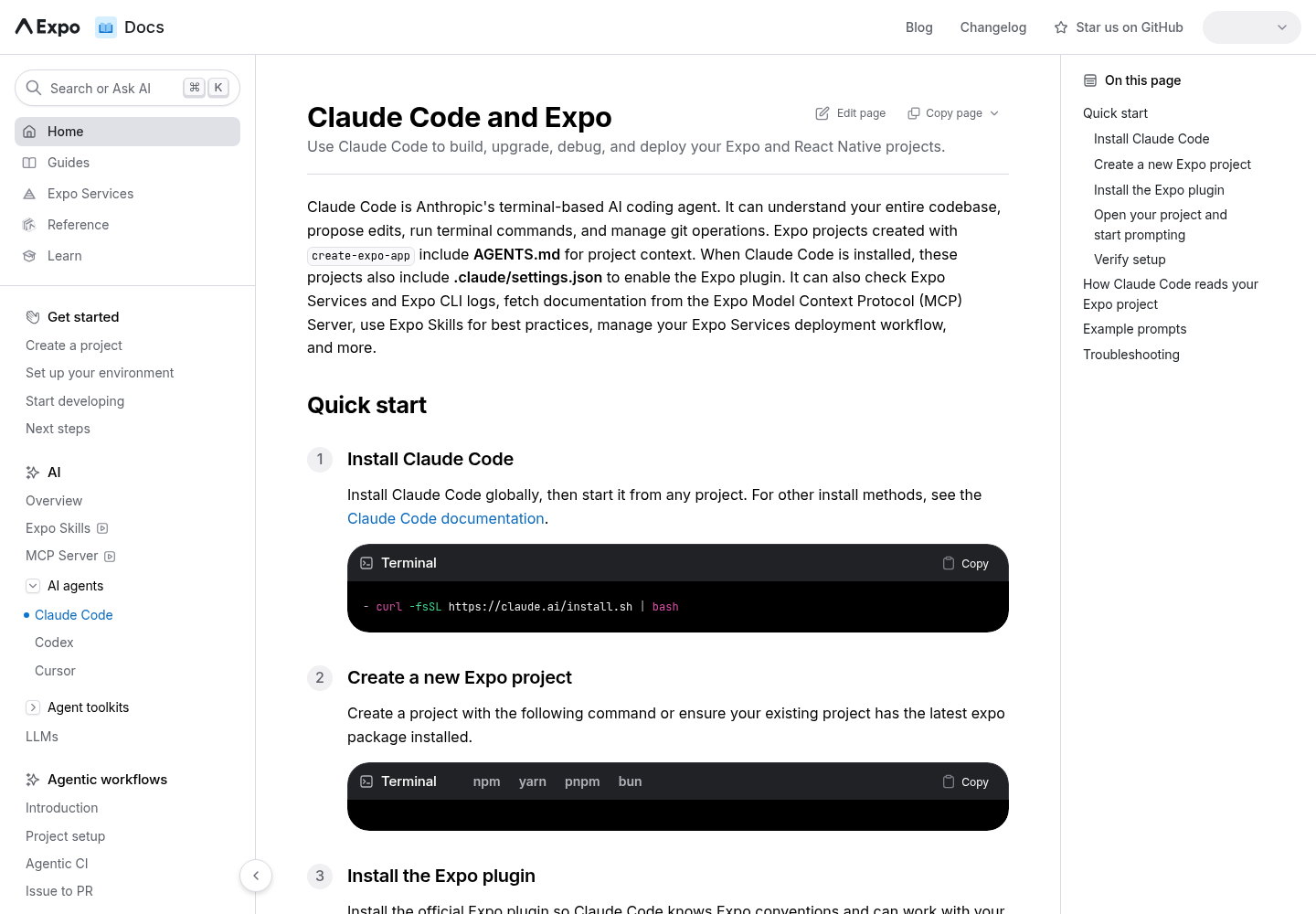
- [ ] Claude Code installed and signed in. Expo’s quick start uses
curl -fsSL https://claude.ai/install.sh | bash. Runclaude --version: readingAGENTS.mddirectly needs v2.1.277 or later. - [ ] An Expo project under git with a clean working tree. For a new one, Expo documents
npx create-expo-app@latest --template default@sdk-58. - [ ] An Expo account. The MCP server requires one.
- [ ] A target to run on: iOS Simulator (macOS only), Android emulator, or a physical phone with Expo Go or a development build.
- [ ] For local MCP capabilities, SDK 54 or later.
- [ ] Optional: Codex CLI or Cursor, if your team uses more than one agent.
One version trap to settle before you scaffold. Expo says that during the SDK 58 transition, create-expo-app@latest without the --template flag creates an SDK 57 project. If you plan to test in Expo Go on a physical device, Expo tells you to use an SDK 57 project; otherwise pass --template default@sdk-58. Decide now, because the SDK version goes into your rules file.
If you drive Claude Code from VS Code rather than a terminal, set that up first with the Claude Code VS Code extension guide. The plugin and settings files below are shared by both surfaces.
Install the expo plugin in Claude Code and sign in
Expo’s Claude Code page puts the whole install in one command: it “installs Expo Skills and registers the Expo MCP Server”. The steps below add the checks that prove each part landed.
# Install once per machine (global scope)
claude plugin install expo@claude-plugins-official

# Or install for this project only
claude plugin install expo@claude-plugins-official --scope project

# Start Claude Code from the project root
cd habit-log
claude
- Run the install in a terminal. Inside an open session,
/plugin install expo@claude-plugins-officialdoes the same thing. The plain command installs globally; Expo documents--scope projectwhen you want it for one project only. - Start
claudefrom the project root, not a subfolder, so it reads the rootAGENTS.md. - Type
/mcp, select theexposerver and sign in with your Expo account in the browser when prompted. Expo’s MCP page says the server generates an access token automatically. - Paste Expo’s verification prompt:
Open package.json and tell me which Expo SDK version this project targets. - Ask a docs question that should use the server:
Read the Expo Router docs page and summarize how tabs are declared. - Ask an Expo task in plan mode, such as
Add a tab navigator with Expo Router and a new settings screen, and read the plan before approving anything.
| Step | Expected observation | What it proves | If you see something else |
|---|---|---|---|
| 1 | The install command completes without an error | The plugin is on this machine | Retype the exact name expo@claude-plugins-official, or try /plugin install inside a session |
| 3 | expo appears in /mcp and, after browser sign-in, shows as connected |
The remote server is registered and authenticated | See the troubleshooting table; do not add a second manual entry |
| 4 | The reply names the SDK version from package.json |
Claude is reading your project | Check you started claude in the project root |
| 5 | The transcript shows a read_documentation call before the summary |
The agent can reach live Expo docs | Re-run /mcp and confirm the server is connected |
| 6 | The plan names Expo Router files and the agent loads an Expo skill before writing code | Skills are installed and matching tasks | Ask directly which Expo skill it would use; if none, reinstall the plugin |
The skill check in step 6 is a judgment call rather than a hard test. Expo’s expo-overview description tells agents to load it first whenever a request mentions Expo or the project has an expo dependency, so a plan that never touches an Expo skill is a warning sign.
There is a manual alternative for the MCP half only. If you do not want the plugin, Expo documents claude mcp add --transport http expo https://mcp.expo.dev/mcp, followed by /mcp to authenticate. Expo also says that if you installed the plugin, it already registers this server, so skip the command. Two definitions of one server is a common source of confusion; our Claude Code MCP setup and scopes guide explains how scopes interact if you do add it by hand.
Commit the project context: AGENTS.md and .claude/settings.json
A new project made with create-expo-app already contains AGENTS.md, and when Claude Code is installed it also gets .claude/settings.json. The overview page says both are committed “so everyone on your team starts from the same SDK version and project instructions”. For an existing project, add them yourself.
- Download Expo’s canonical
AGENTS.mdinto the project root. If you already have one, append instead of overwriting:
# New file
curl -o AGENTS.md https://raw.githubusercontent.com/expo/expo/main/packages/create-expo/template/agent-files/AGENTS.md

# Existing AGENTS.md: download elsewhere, then append
curl -o /tmp/expo-agents.md https://raw.githubusercontent.com/expo/expo/main/packages/create-expo/template/agent-files/AGENTS.md
cat /tmp/expo-agents.md >> AGENTS.md
- Create
.claude/settings.jsonwith the block Expo documents:
{
  "enabledPlugins": {
    "expo@claude-plugins-official": true
  }
}
- Commit both files. Codex and Cursor only need
AGENTS.md; the settings file is for Claude Code. - Tell each teammate to run the install command once. The settings file enables the plugin for the project, but Expo notes that each developer still installs it on their own machine.
A teammate who skips step 4 sees this in their session: Plugin 'expo' is enabled in project settings but isn't installed here. The fix is the install command plus a session restart.
The file-loading rules decide whether your rules are seen at all. Anthropic’s Claude Code memory documentation says Claude reads AGENTS.md only when there is no CLAUDE.md, .claude/CLAUDE.md or CLAUDE.local.md in the working directory or above it. The trap is easy to fall into: someone adds a personal CLAUDE.local.md, and Claude stops reading the Expo rules for that person. The documented fix is a CLAUDE.md that starts with @AGENTS.md, which never loads the file twice, or setting Project instructions to claude-md-and-agents-md in /config. Run /memory and look for the AGENTS.md path to confirm what loaded.
Codex, Cursor and other agents
The expo/skills README gives one rule: use the plugin for Claude Code or Codex so updates come through their marketplaces, and use the skills CLI for everything else. Expo’s Expo Skills page adds that the skills CLI “installs skills only”, so those agents need the MCP server added separately.
| Agent | Install skills | Connect MCP | Notes from Expo’s docs |
|---|---|---|---|
| Claude Code | claude plugin install expo@claude-plugins-official |
Bundled; run /mcp to sign in |
.claude/settings.json pre-enables the plugin for the team |
| Codex | codex plugin add expo@openai-curated, or /plugins in Codex |
Bundled; run codex mcp login expo |
Without the plugin: codex mcp add expo --url https://mcp.expo.dev/mcp |
| Cursor | Imported automatically if already installed for another agent; otherwise npx skills add expo/skills |
Command Palette, MCP: Add Server, HTTP, URL https://mcp.expo.dev/mcp, name expo |
Skills appear under Settings > Rules, Skills, Subagents > Skills, not in the slash menu |
| Others (OpenCode, Copilot, Windsurf, Gemini, Cline and more) | npx skills@latest add expo/skills --skill '*' from the project root |
Follow Expo’s MCP setup guide for that tool | Add --agent <agent> to target one agent; restart the session afterwards |
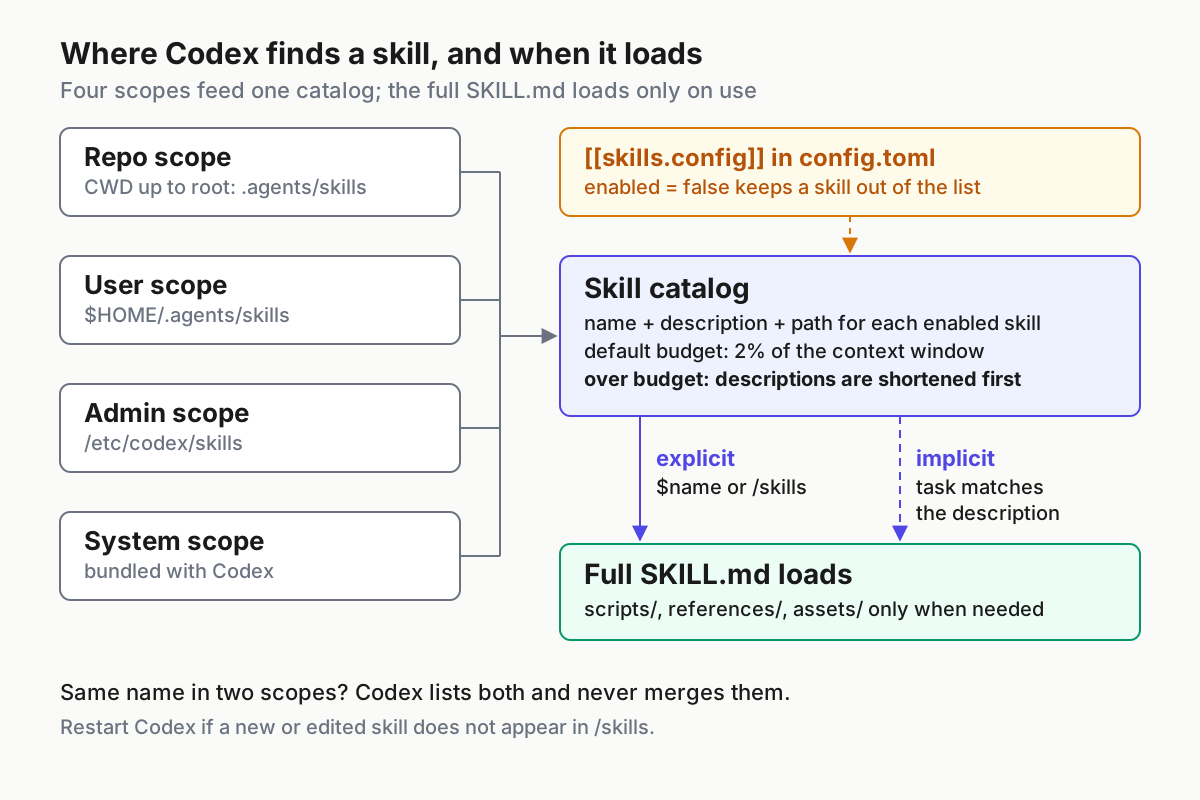
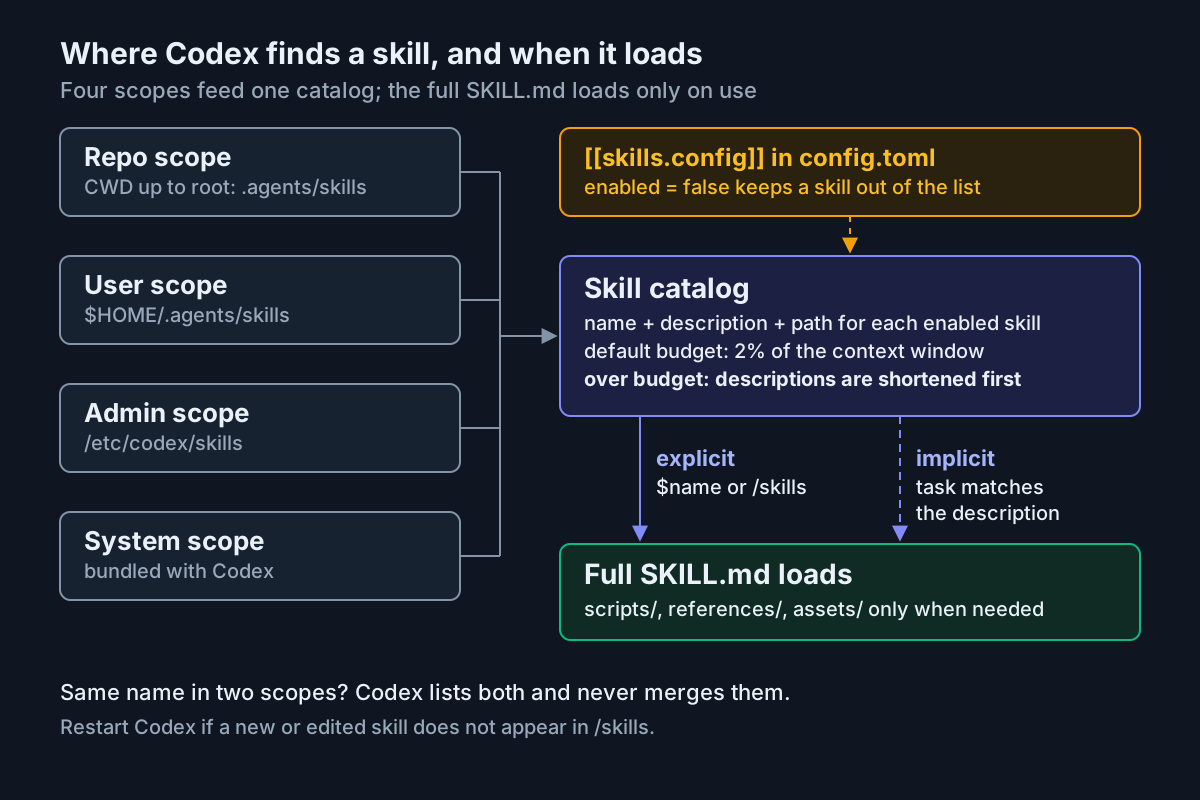
Codex’s own skills documentation explains why one Codex plugin can carry both halves: plugins can bundle skills together with MCP server configuration. It also explains how Codex chooses skills. Codex starts with each skill’s name and description and reads the full SKILL.md only when it decides to use one, so a vague task may not trigger an Expo skill. Name the skill (in Codex, $ mentions a skill) when you need certainty. If an installed skill doesn’t appear, OpenAI says to restart Codex. For a full tour of Codex skill locations and budgets, see our Codex skills setup guide.
Keep skills current the way you installed them. Plugin installs update through the marketplace. Skills CLI installs update with npx skills@latest update, or npx skills@latest update expo-router for a single skill.
Add local MCP capabilities for simulator checks
The remote server can read docs and build logs, but it cannot see your running app. Expo’s MCP page recommends setting up local capabilities, which are available in SDK 54 and later.
cd habit-log

# Install the expo-mcp package as a dev dependency
npx expo install expo-mcp --dev

# Log in to Expo CLI with the same account you used for /mcp
npx expo whoami || npx expo login

# Start the dev server with MCP capabilities
EXPO_UNSTABLE_MCP_SERVER=1 npx expo start
- Install
expo-mcpwithnpx expo install expo-mcp --dev, so the version matches your SDK. - Confirm Expo CLI is logged in with the same account as the MCP sign-in. A different account is a quiet failure.
- Start the dev server in your own terminal with
EXPO_UNSTABLE_MCP_SERVER=1. Running it yourself keeps a long-lived process out of the agent’s shell, and it means you see Metro output directly. - Back in Claude Code, run
/mcpand reconnectexpo. Expo is explicit: whenever you start or stop the development server, reconnect or restart the MCP connection so the agent gets refreshed capabilities. - Ask
What MCP tools do you have from the expo server?and look for the local tools in the chart below.
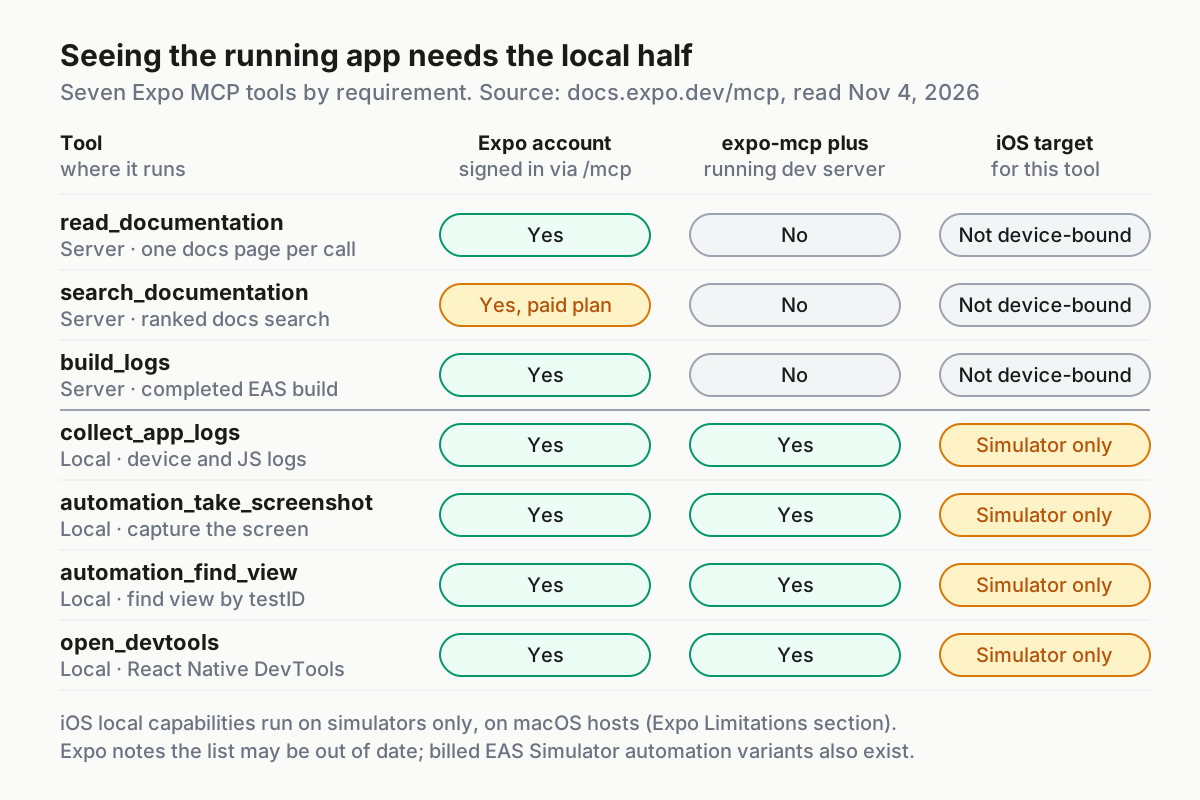
Read the limits before you build a workflow on these tools. Expo lists three: only one development server connection at a time; iOS local capabilities work on simulators only, not physical devices; and iOS local capabilities need a macOS host. So on an iPhone, you check by eye. On a Linux laptop, the iOS Simulator path is not available locally, which is the case the eas-simulator skill exists for (a billed cloud simulator).
There is a data question too. For local capabilities, Expo says data from your machine is proxied through Expo MCP Server: a simulator screenshot goes from your dev server to Expo’s server and back to your agent. Expo states it does not use that data to train models, but your agent’s model provider applies its own retention policy. Expo asks teams with regulated workloads to review those policies before enabling MCP access.
Write the React Native rules into AGENTS.md
Skills teach the agent how Expo work is done. Rules tell it how your project works. Append a section like this below Expo’s downloaded content. It is an illustrative rules block for an Expo Router app on SDK 58 whose native folders are generated and not committed; change every line that differs in your project.
## Project rules: habit-log

### Stack
- Expo SDK 58, Expo Router, TypeScript. Read package.json before assuming any version.
- ios/ and android/ are generated and not committed in this project.
  Never create or edit files in them. If a change seems to need native code,
  stop and ask. Prefer app config or a config plugin.

### Dependencies
- Add packages with `npx expo install <package>`, never `npm install <package>`.
- Dev-only tools: `npx expo install <package> --dev`.
- Do not change the expo version or start an SDK upgrade without asking.
  When asked, use the expo-upgrade skill on a separate branch.

### Expo knowledge
- Load the expo-overview skill first for any Expo task.
- For Expo APIs, use the expo MCP read_documentation tool, not memory.
  List the docs pages you used in your final reply.
- Never call billed or public-write tools without my approval in this
  conversation: build_run, build_submit, workflow_run, sandbox_create,
  simulator_start, appstore_reply_review, playstore_reply_review.

### Run and check
- I run the dev server myself: `EXPO_UNSTABLE_MCP_SERVER=1 npx expo start`.
  Ask me to restart it when needed, then ask me to reconnect /mcp.
- Give every new interactive view a testID.
- Check with collect_app_logs, automation_find_view and
  automation_take_screenshot before saying a screen works.
- Typecheck: `npx tsc --noEmit`.
- Before reporting done, run `git status --short`. It must list no path
  under ios/ or android/.
If your team also needs Claude-only notes, keep AGENTS.md as the shared file and add a small CLAUDE.md that imports it:
@AGENTS.md

## Claude Code only
- Use plan mode before changes that touch more than one route.
Why these choices work:
- Concrete, checkable lines. Anthropic’s memory docs recommend instructions specific enough to verify. “Never
npm install” can be checked in the transcript; “use good practices” cannot. - The native-folder rule describes this project, not Expo in general. Some teams commit and maintain
ios/andandroid/. If yours does, rewrite the rule, and ask the docs toolWhat is Expo CNG?(one of Expo’s own example prompts) before deciding. npx expo installeverywhere. Expo’s MCP page describes the server steering agents towardnpx expo installto get known compatible versions. The rule makes the same choice for the agent’s own shell commands.- Billed tools named explicitly. Expo’s tool table marks
sandbox_createas starting a billable environment andsimulator_startas a billed session, andappstore_reply_reviewposts a public response. Rules are guidance, so pair this with permission settings; our restricted mode as fleet policy guide covers that layer. - A short file. Anthropic suggests keeping each instruction file under 200 lines. It also states that
CLAUDE.mdis context, not enforced configuration; to block an action whatever Claude decides, it points to aPreToolUsehook. - Expo’s SDK pointer stays on top. Expo’s downloaded
AGENTS.mdpoints the agent to the docs for your SDK version, so your additions sit below it rather than replacing it.
Rules files drift as the app changes. The maintenance habits in Plugins, Gists, and Rotting AGENTS.md apply here, especially after each SDK upgrade.
Worked example: add a Settings tab and verify it on a simulator
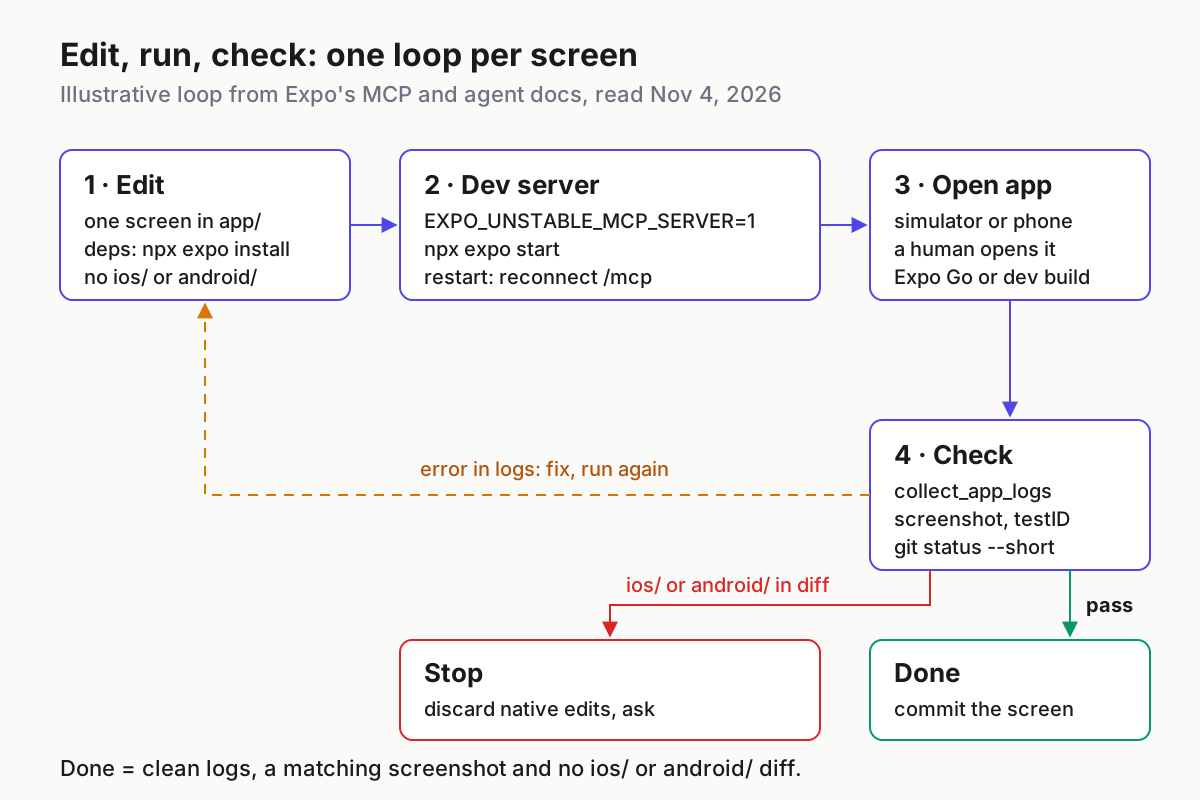
The scenario: habit-log is an Expo Router app on SDK 58, running on a Mac with the iOS Simulator. You want a Settings tab with one “Dark mode” switch, added by the agent and verified without any native-folder edits. The steps are a script built from the documented behaviour above, not a recorded session.
Start the dev server in a second terminal with EXPO_UNSTABLE_MCP_SERVER=1 npx expo start, reconnect /mcp, then send this prompt:
Add a Settings tab to this Expo Router app with one switch labelled "Dark mode".
Follow AGENTS.md and use Expo's skills and docs tools, not memory.
1. Plan first: list the files you will create or change.
2. Give the switch testID "settings-dark-mode".
3. Install anything new with npx expo install.
4. When the code is ready, tell me if the dev server needs a restart.
5. After I open the app, run collect_app_logs, find the view by testID
   and take a screenshot.
6. Finish with npx tsc --noEmit, git status --short and the docs pages you used.
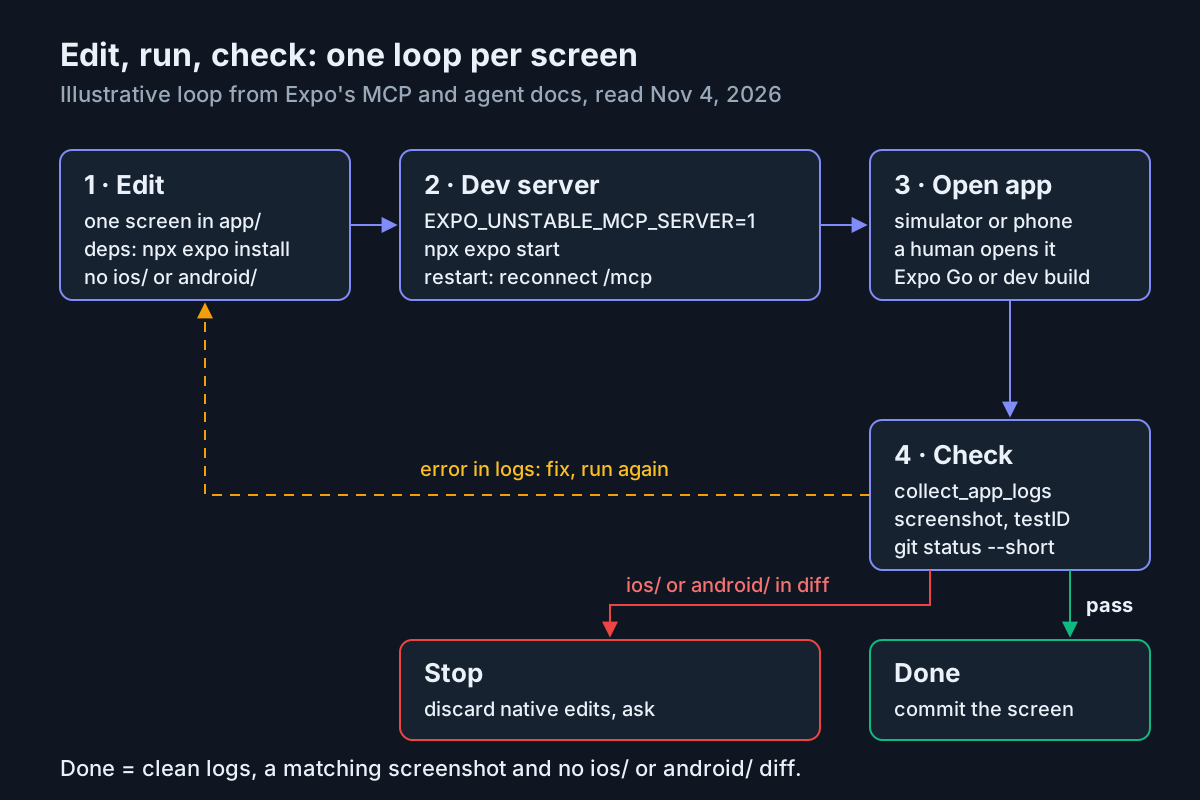
| # | Who | Action | Expected observation | If not |
|---|---|---|---|---|
| 1 | Agent | Plans the change | A file list under app/ (route and layout files, for example) and an Expo skill such as expo-router loaded |
Reject the plan and repeat step 1 of the prompt |
| 2 | Agent | Reads docs | A read_documentation call on an Expo Router page |
Remind it of the Expo knowledge rule |
| 3 | Agent | Adds dependencies, if any | npx expo install in the transcript. The expo-ui skill steers toggles toward @expo/ui, so a new package is plausible |
npm install means the rules were not read; check /memory |
| 4 | You | Restart the dev server if asked, then /mcp reconnect |
expo connected again with local tools listed |
Local tools missing: see troubleshooting |
| 5 | You | Open the app in the iOS Simulator | A Settings tab is visible | Red error screen: copy nothing; let the agent read the logs in step 7 |
| 6 | Agent | automation_find_view with settings-dark-mode |
View properties, including position, size and visibility | Not found: missing testID or wrong screen open |
| 7 | Agent | collect_app_logs |
No new JavaScript errors in the window it collected | Errors send the loop back to Edit |
| 8 | Agent | automation_take_screenshot |
A screenshot showing the switch on the Settings tab | Wrong screen: tap there with automation_tap, or open it yourself |
| 9 | Agent | npx tsc --noEmit and git status --short |
No type errors; changes only under app/ plus package.json and the lockfile if a package was added |
Any ios/ or android/ path: stop and discard those edits |
| 10 | You | Open the build on a physical phone | The switch renders and toggles | Local iOS tools don’t reach phones, so this check is yours |
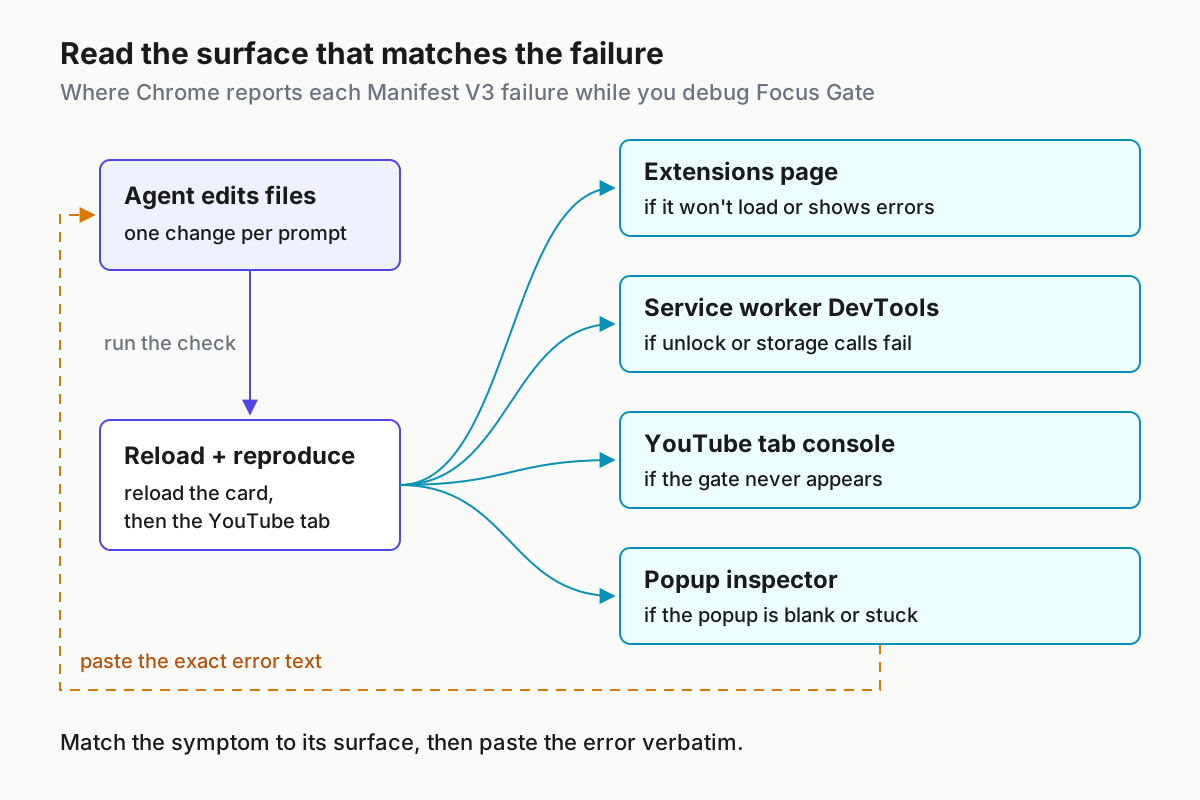
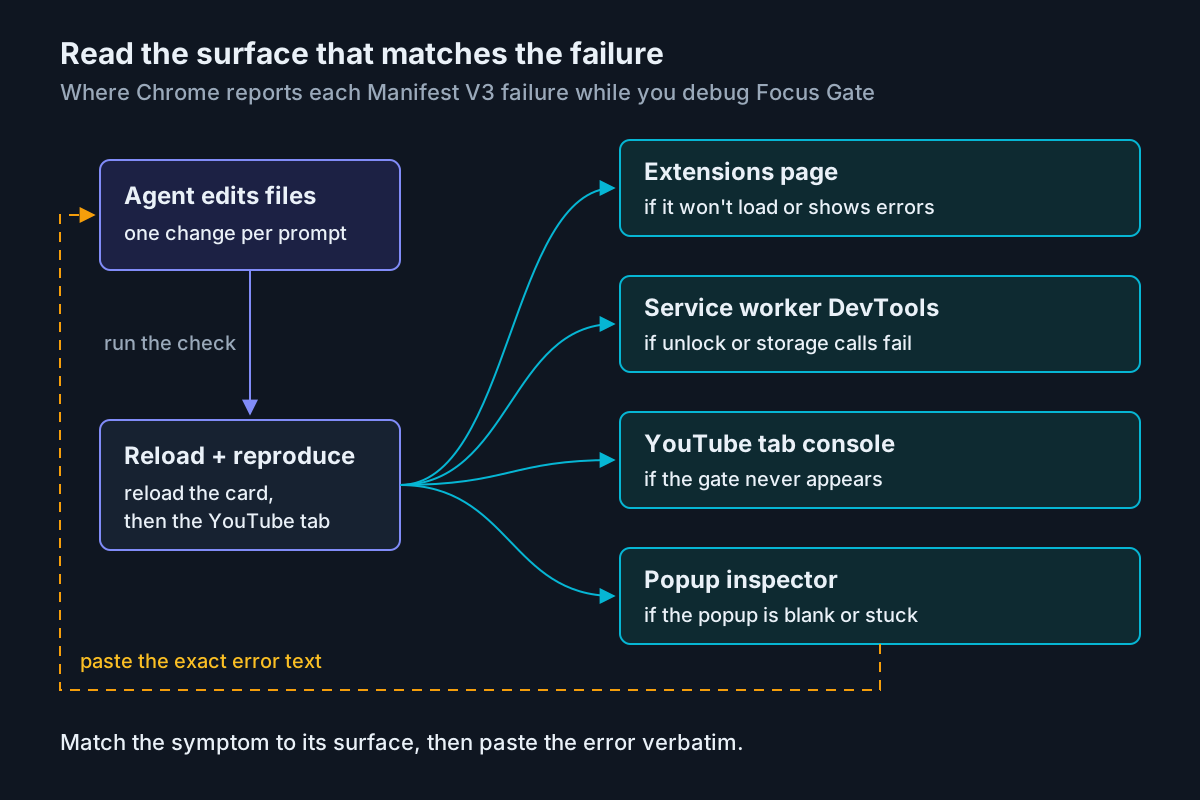
Each failure class looks different, which makes triage fast. A dependency failure shows up in the transcript before any code runs: the wrong install command. A runtime failure shows up in collect_app_logs, which Expo describes as reading Android logcat or iOS syslog and the JavaScript console over a short window. A render failure shows up as automation_find_view failing to find the testID. A policy failure shows up only in git status, which is why it is the last step and not optional.
The pass criteria, written down so nobody argues about them later:
- [ ] The plan was approved before code changed.
- [ ] Every new package arrived through
npx expo install. - [ ] Logs collected after opening the screen contain no new errors.
- [ ] The screenshot shows the switch, and
automation_find_viewfound its testID. - [ ]
git status --shortlists nothing underios/orandroid/. - [ ] A human toggled the switch on a phone.
If any box stays empty, the change is not done, whatever the final message says. To undo a half-finished attempt inside the session, use the techniques in our checkpoints and /rewind guide, then fall back to git.
Choose Expo Go, a development build or an EAS build
The right run target depends on the change, not on habit. This table uses only what Expo’s pages state; when a row depends on details Expo did not state, it says so.
| The change | Run it on | Why | Cost noted by Expo |
|---|---|---|---|
| JavaScript and styling only, no new native code, phone test wanted during the SDK 58 transition | Expo Go on an SDK 57 project | Expo’s Create a project page recommends SDK 57 for Expo Go on a physical device | Free |
| Same change, testing on SDK 58 | iOS Simulator or Android emulator, or a development build | Local MCP checks run against the simulator | Free locally |
| Adds a native module, native view or config plugin | Development build | expo-dev-client covers building dev clients; expo-module covers native modules and config plugins |
Local builds free; EAS Build and TestFlight paid |
| Needs outside testers or store submission | EAS Build through eas-app-stores |
Signing, versions and submission live there | Paid EAS step |
| No local simulator (Linux, CI, cloud sandbox) | EAS Simulator via eas-simulator |
A remote simulator an agent can drive | Billed sessions |
A second decision is how much of the toolkit to turn on.
| Situation | Skills only | Skills plus remote MCP | Plus local capabilities |
|---|---|---|---|
| Agent without MCP support, or MCP blocked by policy | Yes | No | No |
| You want current docs and build logs, no device checks | Yes | Yes | No |
| You want the agent to verify screens on a simulator, SDK 54+ | Yes | Yes | Yes |
| Regulated data you have not cleared for proxying | Yes | Only after review | Not until reviewed |
Troubleshooting: symptom, cause, fix
Work down this table in order; the early rows are the cheap ones.
| Symptom | Likely cause | Fix | Expected after the fix |
|---|---|---|---|
Plugin 'expo' is enabled in project settings but isn't installed here. |
Settings enable it, machine lacks it | claude plugin install expo@claude-plugins-official, then restart the session |
Session starts with no warning |
| Install says the plugin can’t be found | Wrong name, or the official marketplace isn’t available to your install | Retype expo@claude-plugins-official exactly; try /plugin install inside a session; check Claude Code’s plugin docs for your version |
The install completes |
expo in /mcp but tools fail with an authentication error |
Not signed in, or token expired | Run /mcp, select expo, sign in in the browser |
Tools return results |
| Local tools missing after you restarted the dev server | MCP connection still points at the old server | Reconnect or restart expo in /mcp after every start or stop |
collect_app_logs and automation_* listed again |
| Local tools never appear | expo-mcp missing, EXPO_UNSTABLE_MCP_SERVER=1 not set, SDK below 54, or a second dev server running |
Fix the missing piece; keep one dev server, since Expo supports one connection at a time | Local tools listed after reconnect |
| Local tools fail although the server is running | Expo CLI logged in to a different account | npx expo whoami, then npx expo login with the MCP account |
Tools respond |
| Screenshots work on the simulator but not the iPhone | iOS local capabilities are simulator-only | Verify phone builds by hand | Expected limit, not a bug |
search_documentation fails |
Expo lists it as requiring an Expo Services paid plan | Use read_documentation on a known page |
Docs content returns |
Agent runs npm install or uses APIs from another SDK |
Rules not loaded, often because a CLAUDE.md or CLAUDE.local.md hides AGENTS.md |
Add @AGENTS.md to the top of CLAUDE.md; confirm with /memory |
AGENTS.md listed; the next run uses npx expo install |
Agent edits ios/ or android/ |
Rule missing or ignored | Discard the edits, re-send the rule, and consider a PreToolUse hook for hard enforcement |
git status --short clean of native paths |
| An SDK upgrade breaks native modules | Upgrade done ad hoc on the main branch | Restore with git, then repeat on a branch using the expo-upgrade skill |
Main branch builds again |
| Codex doesn’t show a newly installed skill | Codex hasn’t rescanned | Restart Codex | Skill appears |
Expo also asks for feedback on the skills themselves. Every skill includes instructions to submit it with npx --yes @expo/agent-cli@latest feedback, which is the right channel when a skill steers the agent wrong.
Roll back cleanly
Each piece comes out separately, so you can drop the part that misbehaves and keep the rest.
- Undo project edits: run
git status --shortto see what changed,git restore <path>for tracked files, andgit clean -ndto preview untracked files before removing them withgit clean -fd. - Remove local capabilities: restore
package.jsonand your lockfile from git ifexpo-mcpwas the only change, or uninstall it with your package manager. Start the dev server withoutEXPO_UNSTABLE_MCP_SERVER=1, then reconnect/mcp. - Stop enabling the plugin for the team: delete the
expo@claude-plugins-officialentry from.claude/settings.jsonand commit that change. - Remove the plugin from your machine through Claude Code’s
/pluginmanagement. Expo’s pages document installing it, not removing it, so check Anthropic’s plugin docs for the exact subcommand on your version. - If you added the MCP server by hand, remove that entry at the scope where you created it.
- In Codex, disable a single skill without deleting it by adding a
[[skills.config]]entry with itspathandenabled = falseto~/.codex/config.toml, then restart Codex. - Re-run the verification prompt from the install section to confirm the agent behaves as it did before the change.
Sources
- khelifi salmen (@salmenkhelifi_), post on X about Expo’s official AI agent skills, Oct 31, 2026.
- Expo, expo/skills repository README, GitHub, read Nov 4, 2026.
- Expo, Claude Code and Expo, Expo documentation, read Nov 4, 2026.
- Expo, Expo Skills for AI agents, Expo documentation, read Nov 4, 2026.
- Expo, Using Model Context Protocol (MCP) with Expo, Expo documentation, read Nov 4, 2026.
- Expo, AI agents and Expo overview, Expo documentation, read Nov 4, 2026.
- Expo, Create a project, Expo documentation, read Nov 4, 2026.
- Anthropic, How Claude remembers your project, Claude Code Docs, read Nov 4, 2026.
- OpenAI, Build skills, Codex documentation, read Nov 4, 2026.