Build Chrome Extension With Claude Code (and Codex): Pin Manifest V3, Load Unpacked, Debug and Publish
Build Chrome extension with Claude Code or Codex: an AGENTS.md that pins Manifest V3, a full site-blocker example, load-unpacked debugging and a Web Store zip.

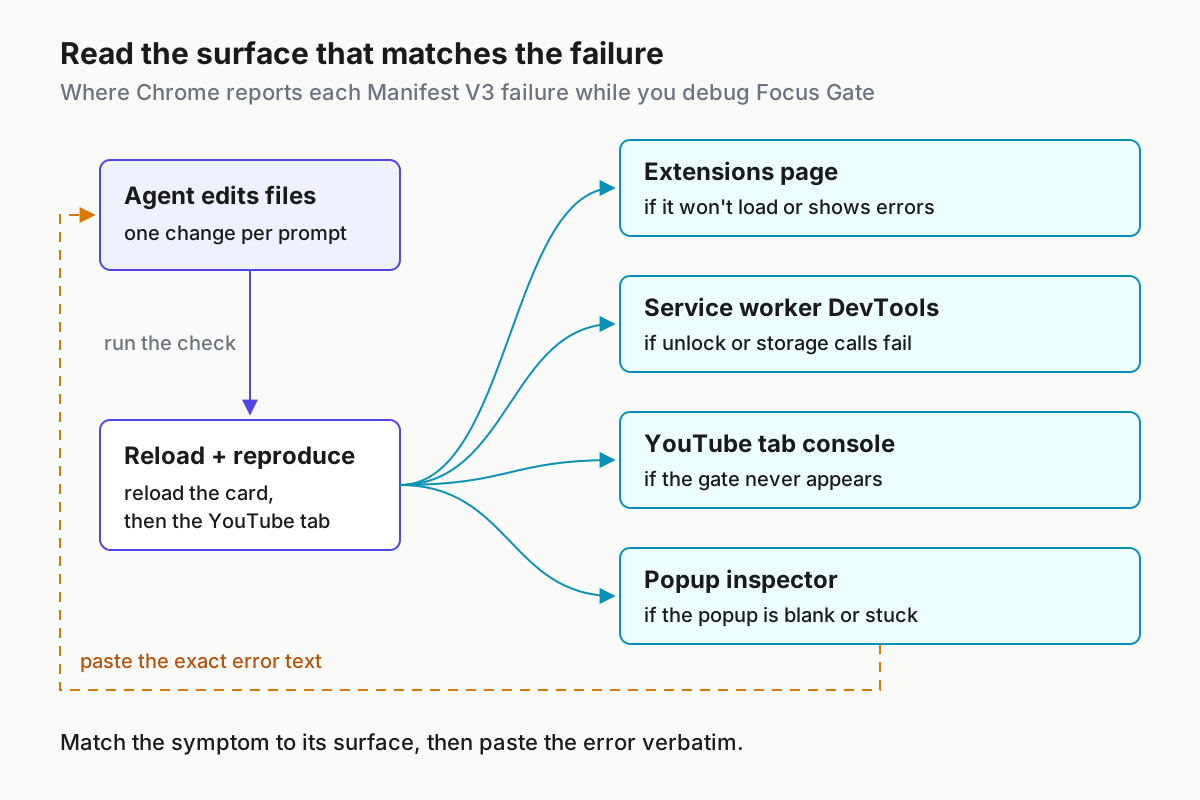
Here’s how to build Chrome extension with Claude Code without the agent drifting back to Manifest V2. Older Chrome extension tutorials are full of background.page, browser_action and blocking webRequest listeners. Those are Manifest V2 patterns, and an agent that learned from them can write them straight into a new project, even though Chrome’s manifest file format reference now says the only supported manifest_version is 3. You’ll pin Manifest V3 in a rules file, scaffold a small real extension, load it unpacked, read each error where Chrome reports it, check permissions against a filled table, and package a zip for the Chrome Web Store.
It’s written for developers who use Claude Code every day (Codex notes are included), can read plain JavaScript, and want to ship a small extension without hand-typing its boilerplate. You don’t need previous extension experience. By the end you’ll have:
- a Manifest V3 extension called Focus Gate running unpacked in Chrome
- a rules file that keeps future agent sessions on MV3
- a one-command manifest check
- a debugging routine that tells you where each kind of error appears
- a reviewed permission list
- a zip ready to upload
The example comes from a post. On October 31, 2026, developer Urban Gibon wrote on X that he built a Chrome extension with Claude Code that blocks YouTube between 6:00 and 19:00, tells him “back to work, lol”, and lifts the block for 60 minutes once he types an intention. He said his watch time “fell off a cliff” and that it “wasn’t really hard.” He didn’t publish his code. Focus Gate rebuilds the same behavior from Chrome’s public documentation, so you can see every decision.
A note on evidence: manifest keys, limits and dashboard steps come from the Chrome for Developers and Claude Code pages listed under Sources. The code is a complete illustrative example written for this guide. None of it was run for this article, so the expected observations below tell you what to look for. They aren’t output we recorded.
What you need before you start
The build needs no bundler, no framework and no npm packages. That’s deliberate: every file the agent writes is one Chrome loads directly, so nothing sits between the code and the error message.
- [ ] Claude Code, installed and signed in. Anthropic’s memory documentation says reading AGENTS.md directly needs Claude Code v2.1.277 or later. The CLAUDE.md import used below covers sessions that can’t read it directly.
- [ ] Or Codex. Use the ChatGPT desktop app with Codex selected, the Codex CLI or the Codex IDE extension. The Codex section below covers the differences.
- [ ] Google Chrome on desktop, where you can open
chrome://extensions. - [ ] Node.js, only to run the 30-line manifest check. It uses Node’s built-in
fsmodule and nothing else. - [ ] git and an empty folder. A baseline commit turns rollback into one command.
- [ ] zip and unzip, or your operating system’s compress tool, for packaging.
- [ ] For publishing only: a registered Chrome Web Store developer account and four PNG icons (16, 32, 48 and 128 pixels). Chrome’s publishing guide starts after registration, so check the registration requirements on that page before you plan a launch date.
One scope rule saves a lot of rework. Chrome’s Get started page asks that an extension fulfill “a single purpose that is narrowly defined and easy to understand.” Focus Gate does one thing: it puts a typed-intention gate in front of YouTube during work hours. When the agent proposes extra features, that sentence is your reason to say no.
Pin Manifest V3 in AGENTS.md before the first prompt
An agent builds for whatever platform you describe, so describe it before you ask for code. Anthropic’s memory docs make two points that shape this file. First, CLAUDE.md content is context, not enforced configuration. Second, “the more specific and concise your instructions, the more consistently Claude follows them.” The same page recommends keeping each file under 200 lines. Rules you can check against the code work. “Use modern APIs” doesn’t.
Keep the rules in AGENTS.md so other coding agents can read the same file, and import it from CLAUDE.md. The memory docs say a CLAUDE.md that contains @AGENTS.md pulls the file in through the import. When both files exist and there’s no import, Claude reads only CLAUDE.md.
- Create the project and a baseline commit you can return to:
mkdir focus-gate && cd focus-gate
git init
git commit --allow-empty -m "baseline: empty project"
git tag baseline
- Save this as
AGENTS.md:
# Focus Gate: Chrome extension rules

## Platform
- Chrome Manifest V3 only. manifest.json sets "manifest_version": 3.
- Background code is one service worker:
  "background": { "service_worker": "service-worker.js" }.
  Never write background.page, background.scripts or "persistent".
- Use the "action" key for the toolbar button. Never write browser_action or page_action.
- The service worker has no DOM and can be unloaded when idle. Keep no state in
  global variables; read and write chrome.storage.local instead.
- All code ships in the package. No remote scripts, no CDN tags, no eval(),
  no new Function(), no string arguments to setTimeout or setInterval.
- If a feature needs to block or modify network requests, use declarativeNetRequest.
  Do not add webRequest listeners.
- Extension pages (popup.html) load scripts from separate .js files. No inline scripts.

## Permissions
- Allowed permissions: storage.
- Allowed content script matches: https://www.youtube.com/* and https://m.youtube.com/*.
- No host_permissions, no all-URLs match pattern, no tabs, no scripting.
- To add anything else, stop and ask me first, naming the feature that needs it.

## Files
- manifest.json, service-worker.js, gate.js (content script), popup.html, popup.js.
- No build step and no npm dependencies.

## Checks
- After every change run: node check-manifest.mjs
- Then tell me exactly what to reload: the extension card, the YouTube tab, or both.
- Never claim the extension works. Name the observation I should make and wait for it.
- Save this as
CLAUDE.mdin the same folder:
@AGENTS.md

## Claude Code only
- When I paste an error, name the file and line you think caused it before editing.
- Save the manifest check from the “Run the manifest check before Chrome does” section below as
check-manifest.mjs, then commit all three files:git add -A && git commit -m "rules and manifest check". - Start
claudein the folder and run/context all. The memory docs say the files that loaded appear under Memory files. - Ask: “Which manifest_version and background key will you use, and which permissions are allowed?” The answer should repeat 3,
service_workerandstorage. If it doesn’t, the file isn’t loaded. Fix that before you scaffold anything.
Each rule maps to a documented fact:
- Service worker only. The manifest reference describes
backgroundas the file “containing the extension’s service worker.” Chrome’s service worker overview notes that Manifest V2 “included a feature called a background script”, and that’s the pattern this rule keeps out. - No state in variables. The same overview says a worker “is loaded when it is needed, and unloaded when it goes dormant” and “cannot access the DOM.” A variable that holds an unlock time disappears when the worker sleeps.
action, notbrowser_action. The manifest reference lists every supported key.actionis on the list.browser_actionandpage_actionaren’t.- No remote code. The Get started page says “no additional JavaScript code may be downloaded at runtime.” The content scripts guide adds that the extension CSP “prevents the use of eval() as well as loading external scripts”, and lists string-based
setTimeoutamong the patterns disallowed in Manifest V3. - declarativeNetRequest for network blocking. Get started lists it as the API to “intercept, block, or modify network requests.” Focus Gate doesn’t use it, but the rule stops the agent reaching for an old listener pattern if you extend the project.
This file guides the agent. It doesn’t enforce anything. When an action must be blocked whatever Claude decides, the memory docs point to a PreToolUse hook, and permission modes deserve the same thought: our note on treating permission modes as fleet policy covers that layer. Rules files also drift as projects grow, which is the subject of why AGENTS.md files rot.
Design Focus Gate before the agent writes a line
Deciding the architecture yourself takes five minutes, and it makes the agent’s output easy to review. Each requirement below maps to one Chrome building block, chosen from the documentation rather than out of habit.
| Requirement | Chrome piece | Why this piece |
|---|---|---|
| Gate YouTube from 06:00 to 19:00 local time | Content script gate.js, declared statically with matches for www.youtube.com and m.youtube.com, run_at: document_start |
Static declarations suit “a well known set of pages”; document_start runs before other page scripts |
| Show “Back to work.” and a text box | DOM elements built by the content script | Content scripts read and change pages through the DOM; the service worker can’t touch the DOM |
| Unlock for 60 minutes after a typed reason | chrome.runtime.sendMessage to the service worker, which writes unlockUntil |
Keeps the unlock rule in one place; content scripts can message the extension directly |
| Remember unlocks across restarts and worker shutdowns | storage permission and chrome.storage.local |
The worker is unloaded when dormant, so variables don’t survive |
| Show state and recent intentions | Toolbar action with default_popup |
The Action API shows a popup when you click the toolbar icon |
| Rejected: network-level blocking | declarativeNetRequest |
Good at blocking requests, but a blocked request can’t show a form asking why you need the site |
The last row matters most. A blocker built only on network rules is simpler, but the friction in Gibon’s design is the typed intention. That needs a page you control, and a content script gives you one. The content scripts guide says scripts run in an “isolated world”, so Focus Gate’s variables never collide with YouTube’s own JavaScript, while both still share the page’s DOM.
Be clear about what this is: friction, not security. Anyone can turn the extension off on the Extensions page. If you need enforcement on a managed device, that’s a different project.
Prompt the scaffold, then read every file
Give the agent one bounded task and a check it has to run. That’s the structure recommended in our Claude Code prompting guide. Then read the result file by file before Chrome sees it.
- Send the scaffold prompt:
Read AGENTS.md. Build the Focus Gate extension:
1. manifest.json (Manifest V3): content script gate.js on the two allowed YouTube
   matches at document_start, a service worker, and a toolbar popup.
2. gate.js: between 06:00 and 19:00 local time, unless chrome.storage.local
   unlockUntil is in the future, replace the page with "Back to work.", a textarea
   and an "Unlock for 60 minutes" button that messages the worker. Recheck every minute.
3. service-worker.js: handle {type:"unlock", intention} (require 10+ characters,
   set unlockUntil to now + 60 minutes, keep the last 20 intentions) and {type:"relock"}.
4. popup.html and popup.js: show the current state, the last 5 intentions and a
   "Relock now" button.
Then run node check-manifest.mjs and paste its output. Do not add permissions.
- Compare the agent’s files with the reference versions below. Differences in style are fine. Differences in keys, in permissions or in where state lives are not.
- Commit only after the manifest check passes:
git add -A && git commit -m "scaffold Focus Gate". - For every later change, send one prompt per fix and paste the exact error text, never a paraphrase.
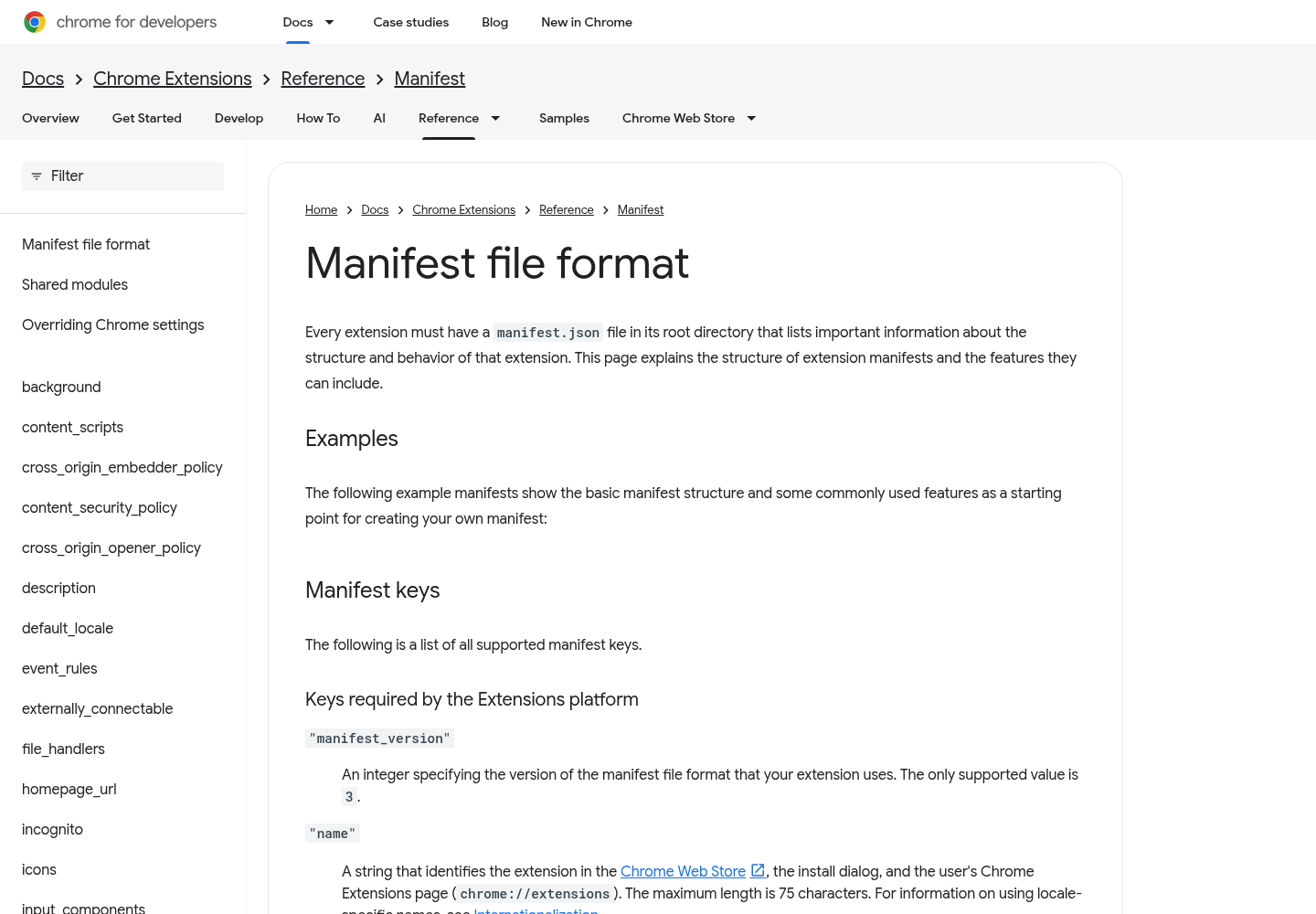
manifest.json. Every key here appears in Chrome’s manifest reference. There are no icons yet: the reference lists icons among the keys the Chrome Web Store requires, not the extensions platform, so they can wait until packaging.
{
  "manifest_version": 3,
  "name": "Focus Gate",
  "short_name": "FocusGate",
  "version": "1.0.0",
  "description": "Adds a typed-intention gate to YouTube during work hours and unlocks it for 60 minutes.",
  "background": {
    "service_worker": "service-worker.js"
  },
  "action": {
    "default_popup": "popup.html",
    "default_title": "Focus Gate"
  },
  "permissions": ["storage"],
  "content_scripts": [
    {
      "matches": ["https://www.youtube.com/*", "https://m.youtube.com/*"],
      "js": ["gate.js"],
      "run_at": "document_start"
    }
  ]
}
service-worker.js. The worker owns the unlock rule. It keeps nothing in variables between events, and return true holds the message channel open while the storage writes finish.
// Focus Gate service worker. Chrome unloads it when dormant,
// so all state lives in chrome.storage.local.
const UNLOCK_MINUTES = 60;
const LOG_LIMIT = 20;

chrome.runtime.onMessage.addListener((message, sender, sendResponse) => {
  if (message?.type === 'unlock') {
    unlock(message.intention).then(sendResponse);
    return true; // reply asynchronously
  }
  if (message?.type === 'relock') {
    chrome.storage.local.set({ unlockUntil: 0 }).then(() => sendResponse({ ok: true }));
    return true;
  }
  return false;
});

async function unlock(intention) {
  const text = String(intention ?? '').trim();
  if (text.length < 10) {
    return { ok: false, reason: 'Write at least 10 characters about why you need it.' };
  }
  const unlockUntil = Date.now() + UNLOCK_MINUTES * 60 * 1000;
  const { intentions = [] } = await chrome.storage.local.get('intentions');
  intentions.unshift({ at: new Date().toISOString(), text: text.slice(0, 200) });
  await chrome.storage.local.set({ unlockUntil, intentions: intentions.slice(0, LOG_LIMIT) });
  console.log('Focus Gate unlocked until', new Date(unlockUntil).toLocaleTimeString());
  return { ok: true, unlockUntil };
}
gate.js. The content script decides whether to gate, then builds the gate with DOM methods only. It never puts user text into innerHTML, never calls eval and never passes a string to a timer.
// Focus Gate content script, injected at document_start on the matched YouTube hosts.
const WORK_START_HOUR = 6;  // 06:00 local time
const WORK_END_HOUR = 19;   // 19:00 local time
let gated = false;

function inWorkHours(now = new Date()) {
  const hour = now.getHours();
  return hour >= WORK_START_HOUR && hour < WORK_END_HOUR;
}

async function checkGate() {
  if (gated || !inWorkHours()) return;
  const { unlockUntil = 0 } = await chrome.storage.local.get('unlockUntil');
  if (Date.now() < unlockUntil) return;
  showGate();
}

function showGate() {
  gated = true;
  window.stop();
  const root = document.documentElement ?? document.appendChild(document.createElement('html'));
  root.replaceChildren();

  const body = document.createElement('body');
  body.style.cssText = 'font-family:system-ui,sans-serif;max-width:32rem;margin:15vh auto;padding:0 1rem;';
  const heading = document.createElement('h1');
  heading.textContent = 'Back to work.';
  const note = document.createElement('p');
  note.textContent = 'YouTube is gated until 19:00. Need it for work? Say why and it opens for 60 minutes.';
  const input = document.createElement('textarea');
  input.rows = 3;
  input.style.width = '100%';
  const button = document.createElement('button');
  button.textContent = 'Unlock for 60 minutes';
  const status = document.createElement('p');

  button.addEventListener('click', async () => {
    const reply = await chrome.runtime.sendMessage({ type: 'unlock', intention: input.value });
    if (reply?.ok) {
      location.reload();
    } else {
      status.textContent = reply?.reason ?? 'Unlock failed. Check the service worker console.';
    }
  });

  body.append(heading, note, input, button, status);
  root.append(body);
}

checkGate();
setInterval(checkGate, 60 * 1000); // re-gate an open tab when the unlock expires
popup.html. This is a plain HTML page with no inline code. The agent writes it, and you check it against this list of required elements:
| Element | id | What it holds |
|---|---|---|
| Page title | none | The text Focus Gate |
| Paragraph | state |
Left empty; popup.js fills it with the current state |
| Button | relock |
The label Relock now |
| Heading | none | The text Recent intentions |
| Ordered list | log |
Left empty; popup.js fills it with up to five entries |
| Script element | none | src set to popup.js, placed last in the body, with no code between its tags |
The script lives in its own file because the extension’s default policy allows scripts from the package itself, not inline blocks. If the agent writes code inside the HTML file, the popup opens blank.
popup.js.
async function render() {
  const { unlockUntil = 0, intentions = [] } =
    await chrome.storage.local.get(['unlockUntil', 'intentions']);
  document.getElementById('state').textContent = Date.now() < unlockUntil
    ? `Unlocked until ${new Date(unlockUntil).toLocaleTimeString()}`
    : 'Gate armed during work hours (06:00 to 19:00).';
  document.getElementById('log').replaceChildren(...intentions.slice(0, 5).map((entry) => {
    const li = document.createElement('li');
    li.textContent = `${new Date(entry.at).toLocaleTimeString()}: ${entry.text}`;
    return li;
  }));
}

document.getElementById('relock').addEventListener('click', async () => {
  await chrome.runtime.sendMessage({ type: 'relock' });
  render();
});

render();
Three choices are worth explaining:
- The 10-character minimum is the friction. Typing a reason is cheap when you mean it and annoying when you don’t.
- The intention log keeps 20 entries at most, so storage never grows without limit.
- The one-minute recheck closes a gap. Without it, a tab you unlocked at 14:00 would stay open past 15:00, because the gate would only run when the page loads.
Some API details, such as chrome.storage.local.get returning a promise, follow Chrome’s Storage and runtime reference pages rather than the docs cited here. If your agent writes those calls differently, check the reference pages before you accept the change.
Run the manifest check before Chrome does
Chrome reports manifest problems only when you reload. A local check catches the Manifest V2 regressions and permission creep the rules file forbids, and it gives the agent a pass/fail signal it can run itself. Save this as check-manifest.mjs:
// Usage: node check-manifest.mjs   (run from the extension folder)
import { readFileSync } from 'node:fs';

const ALLOWED_PERMISSIONS = ['storage'];
const ALLOWED_MATCHES = ['https://www.youtube.com/*', 'https://m.youtube.com/*'];
const m = JSON.parse(readFileSync('manifest.json', 'utf8'));
const problems = [];

if (m.manifest_version !== 3) problems.push('manifest_version must be 3');
if (!m.background?.service_worker) problems.push('background.service_worker is missing');
for (const key of ['page', 'scripts', 'persistent']) {
  if (m.background && key in m.background) problems.push(`background.${key} is a Manifest V2 pattern`);
}
for (const key of ['browser_action', 'page_action']) {
  if (key in m) problems.push(`${key} is not a supported key; use action`);
}
for (const p of m.permissions ?? []) {
  if (!ALLOWED_PERMISSIONS.includes(p)) problems.push(`permission not in the table: ${p}`);
}
if ((m.host_permissions ?? []).length) problems.push('host_permissions must stay empty for Focus Gate');
for (const cs of m.content_scripts ?? []) {
  for (const pattern of cs.matches ?? []) {
    if (!ALLOWED_MATCHES.includes(pattern)) problems.push(`content script match not in the table: ${pattern}`);
  }
}
if ((m.name ?? '').length > 75) problems.push('name is over 75 characters');
if ((m.short_name ?? '').length > 12) problems.push('short_name is over 12 characters');
if ((m.description ?? '').length > 132) problems.push('description is over 132 characters');

if (problems.length) {
  console.error('manifest FAILED:\n- ' + problems.join('\n- '));
  process.exit(1);
}
console.log('manifest OK: MV3, service worker, storage only, YouTube matches only');
The character limits come straight from the manifest reference: 75 for name, 12 for short_name and 132 for description. To use the check:
- Run
node check-manifest.mjsfrom the extension folder. - On success, expect one line,
manifest OK: ..., and exit code 0. The script prints that line itself, so it only means the checks in this file passed. - On failure, expect
manifest FAILED:followed by one bullet per problem, and exit code 1. - Paste failures to the agent verbatim. Each bullet already names the field to fix.
- When you deliberately widen permissions later, update the allowlists in the script in the same commit as the manifest, so the change shows up in review.
This isn’t a validator for every manifest rule. It enforces this project’s contract, and Chrome stays the authority on everything else.
Load it unpacked and read the right error surface
Now it’s Chrome’s turn. The labels below are what Chrome’s Extensions page shows today, and they can change between versions. The order of the steps is what matters.
- Open
chrome://extensions. The manifest reference names this as the page where your extension’snameappears. - Turn on Developer mode, choose Load unpacked, and select the
focus-gatefolder. Pick the folder that hasmanifest.jsonat its top level: Get started notes the manifest must sit in the extension’s root directory. - Expected: a Focus Gate card, version 1.0.0, with no error indicator. If Chrome refuses the load, you have a manifest or file problem; go to the debugging table below.
- Click the service worker link on the card. Expected: a DevTools window for the worker with an empty console. If the card shows the worker as inactive, that’s normal. The service worker overview says workers unload when dormant and wake for events.
- If it’s currently outside 06:00 to 19:00 where you are, temporarily set
WORK_END_HOUR = 24ingate.js, then reload the card. Change it back before you commit. - Open
https://www.youtube.com/in a new tab. Expected: loading stops and the page is replaced by “Back to work.” with a text box. You may see YouTube flash briefly first, because the storage read finishes after the script is injected. - Type
okand click the button. Expected: “Write at least 10 characters about why you need it.” - Type a real reason, such as
Watching the Chrome extension debugging talk for this project, and click again. Expected: the tab reloads into YouTube, and the worker console logsFocus Gate unlocked untilwith a time 60 minutes ahead. - Click the toolbar icon. Expected: “Unlocked until” with that time, and your intention in the list.
- Click Relock now and reload the YouTube tab. Expected: the gate comes back.
After any code change, reload the extension card. After a change to gate.js, reload the YouTube tab as well, because a content script declared in the manifest is injected when the page loads.
When something fails, first work out where Chrome wrote the error. Each part of the extension reports to a different place, and an agent handed output from the wrong place will guess.
| Symptom | Surface to open | How to get there | What to paste to the agent |
|---|---|---|---|
| Load unpacked refused, or the card shows errors | Extensions page | chrome://extensions, the Focus Gate card |
The full error text and the file it names |
| Unlock button does nothing, or Relock fails | Service worker DevTools | The service worker link on the card | Console errors plus the message type you sent |
| No gate on youtube.com during work hours | The YouTube tab’s DevTools console | Right-click the page, Inspect, Console | Errors mentioning gate.js, and the tab’s URL |
| Popup blank or shows no state | Popup inspector | Right-click inside the open popup, Inspect | Console errors from popup.js |
Work the loop strictly: paste one error, get one fix, rerun the check, reload, reproduce. Chrome’s Get started page links a Debug your extension tutorial for finding “logs and error messages”. Read it once and the table above will make more sense.
If you’d rather the agent read the page console itself, Chrome DevTools MCP can attach to a browser you start and expose its console to the agent. Our Chrome DevTools MCP setup guide explains the connection modes. For this extension, use a Chrome profile where you’ve loaded Focus Gate unpacked, and keep copying Extensions page errors by hand.
Fill the permissions table before you accept a diff
Users see permissions as install warnings, so decide them on paper first. Chrome’s Declare permissions page makes three relevant points:
- Permissions “help to limit damage if your extension is compromised.”
- Changes to
host_permissionsorcontent_scripts.matchesmay trigger a warning. - Injecting a content script declared in the manifest is one of the special cases that needs no host permission.
Here is Focus Gate’s table, filled in.
| Capability | Declared in manifest | Narrower alternative chosen, or why rejected |
|---|---|---|
| Run the gate on YouTube | content_scripts.matches: https://www.youtube.com/*, https://m.youtube.com/* |
Rejected the all-URLs pattern and host_permissions; manifest-declared scripts need neither |
| Persist the unlock time and intentions | permissions: storage |
Nothing narrower; worker variables don’t survive dormancy |
| Toolbar popup | action.default_popup |
No permission required |
| Gate-to-worker messages | Nothing | Content scripts can call runtime.sendMessage directly |
| Read tab URLs | Not declared | tabs rejected; the gate runs inside the page and knows its own URL |
| Inject on click | Not declared | activeTab plus scripting rejected; the gate must run without a click |
| Let users gate more sites later | Not yet | Future: optional_host_permissions granted at runtime, plus scripting.registerContentScripts |
| Network-level blocking | Not declared | declarativeNetRequest rejected for this example; it can’t show the intention form |
Use the table as a review gate on every diff:
- Ask the agent: “List every permission and match pattern in manifest.json and the feature that needs each. Compare with AGENTS.md. Change nothing.”
- Compare its answer with the table. Any extra entry is a finding, even if the agent calls it harmless.
- Run
git diff -- manifest.jsonand confirm thatpermissions,host_permissionsandmatcheschanged only where you meant them to. - If you genuinely need a new capability, add a row to the table first, then update the allowlists in
check-manifest.mjs, then let the agent edit the manifest. - Prefer optional permissions where you can. The Declare permissions page recommends them “wherever the functionality of your extension permits.”
One trap to watch for: an agent fixing “the gate doesn’t appear on youtu.be links” may add a broad pattern. Short links redirect to www.youtube.com, so the right fix is usually to change nothing. Adding a match pattern is a permission change, not a bug fix.
Package the zip and submit it to the Chrome Web Store
Publishing is optional, and many people keep a tool like this unpacked. If you do publish, the work is icons, a zip, a dashboard listing and a review.
- Create
images/icon-16.png,icon-32.png,icon-48.pngandicon-128.png. The manifest reference listsiconsas required by the Chrome Web Store. - Add the icons to
manifest.json:
"icons": {
  "16": "images/icon-16.png",
  "32": "images/icon-32.png",
  "48": "images/icon-48.png",
  "128": "images/icon-128.png"
}
- Put
WORK_END_HOURback to 19 if you changed it, run the check, reload the card and repeat the load-unpacked test. - Build the zip from the shipping files only, so AGENTS.md, CLAUDE.md and the check script stay out of the package:
node check-manifest.mjs
zip -r ../focus-gate-1.0.0.zip manifest.json service-worker.js gate.js popup.html popup.js images
unzip -l ../focus-gate-1.0.0.zip
- Expected from
unzip -l:manifest.jsonlisted with no folder prefix, plus the three scripts,popup.htmland theimages/files. Afocus-gate/prefix means you zipped the parent folder. - Follow the publishing guide: open the Chrome Developer Dashboard, sign in, click Add new item, then Choose file, select your zip and click Upload. The guide says that if the manifest and zip are valid, you can edit the item on the next page. Packages larger than 2GB are rejected.
- Fill in each tab using the worksheet below, then click Submit for Review.
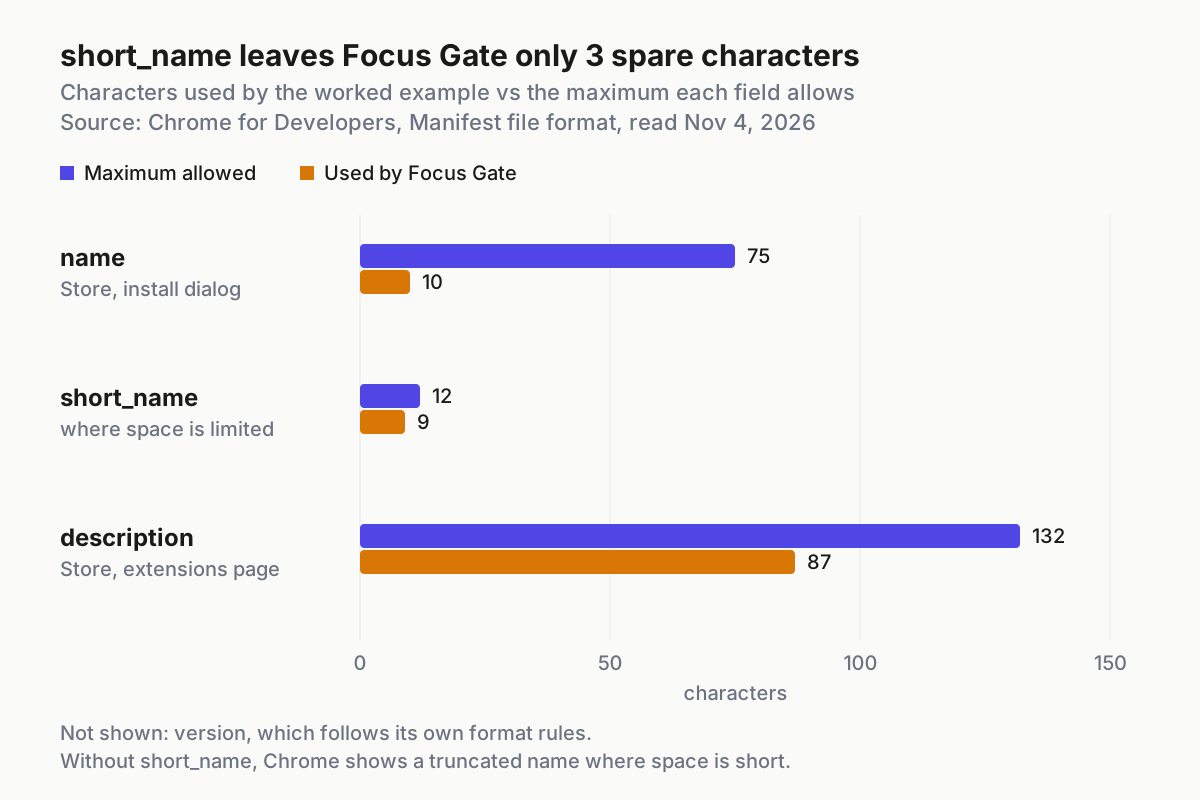
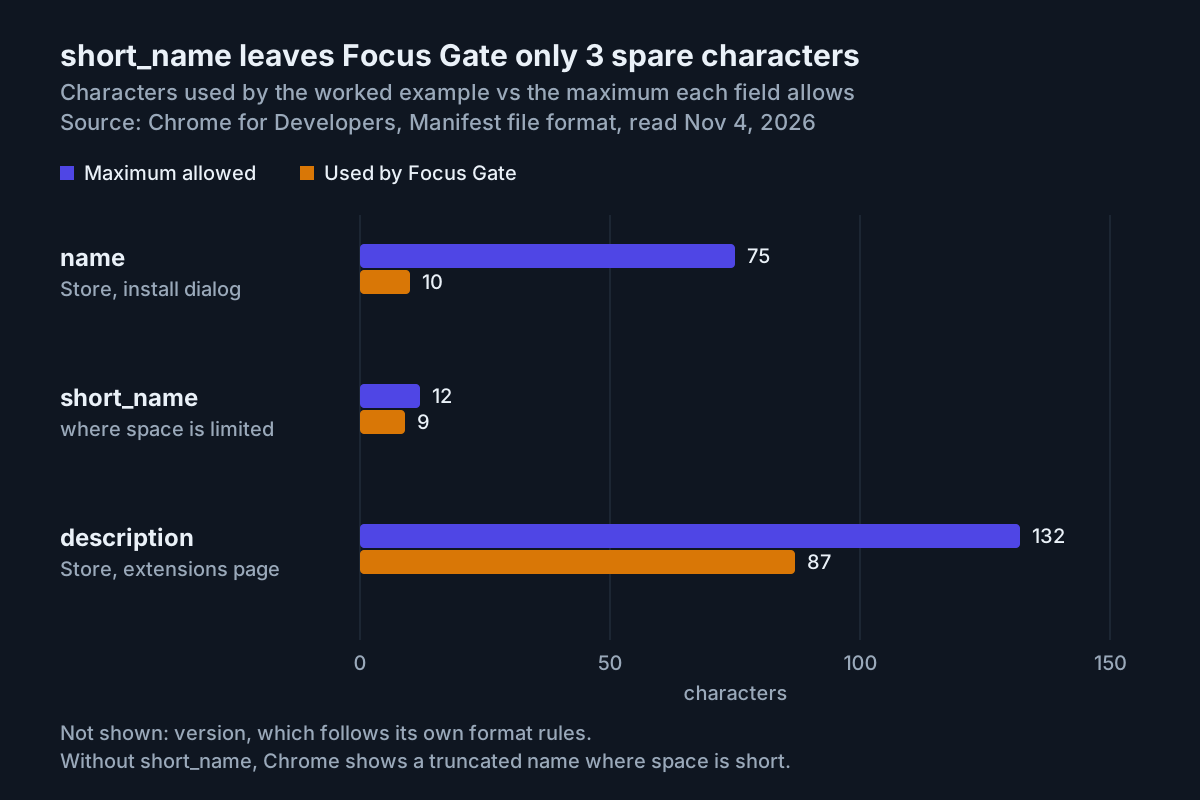
The chart shows how much room each manifest string has left, which agents often get wrong when they “improve” a listing. Focus Gate’s description uses 87 of 132 characters, but short_name uses 9 of 12, so check any rename against its limit. The manifest check enforces all three.
The dashboard has five tabs. Here they are, filled in for Focus Gate:
| Dashboard tab | What to enter for Focus Gate | Why |
|---|---|---|
| Package | Nothing; it shows the uploaded zip | Not editable when you first create an item |
| Store Listing | Name and description from the manifest; screenshots of the gate and the popup | This is how the item appears in the store |
| Privacy | Single purpose: “Adds a typed-intention gate to YouTube during work hours.” Data: typed intentions and the unlock time stay in chrome.storage.local; nothing is sent off the device; no remote code |
The guide says this tab declares the single purpose and how user data is handled |
| Distribution | Free; your chosen countries; public or a limited audience | Sets payment, regions and who can see the item |
| Test instructions | “Open https://www.youtube.com/ between 06:00 and 19:00 local time. Type a reason of 10 or more characters to unlock for 60 minutes.” | Fill it in only if reviewers need guidance |
Three points from the publishing guide affect planning:
- A new publisher can have at most two published extensions at first, and can request an increase.
- The submit dialog lets you defer publishing, so the item doesn’t go live the moment review finishes.
- Once review completes, you have up to 30 days to publish before the staged submission reverts to a draft.
Review time depends on the item, so don’t promise a launch date.
Run the same loop in Codex
The extension, the rules file, the check and the Chrome loop don’t depend on the agent. Only the session setup differs. OpenAI’s quickstart describes the ChatGPT desktop app for macOS, Windows and Linux, where you select Codex for software development and open a folder it can read and modify. It also points to the Codex CLI and IDE extension for terminal and editor work.
- Keep AGENTS.md exactly as written. Anthropic’s docs describe it as the file repositories use “for other coding agents”, so it’s the natural shared copy. CLAUDE.md only matters to Claude Code.
- In the desktop app, choose Codex from the dropdown and open the
focus-gatefolder. For the CLI, our Codex CLI install guide covers installation and sign-in. - Start the first task with “Read AGENTS.md and follow it for every change.” Check Codex’s own documentation for how it loads instruction files. If it already loads them, the extra sentence costs nothing.
- Ask the same verification question as before: manifest version, background key, allowed permissions. Don’t scaffold until the answer matches.
- Use the same scaffold prompt, the same
node check-manifest.mjsgate and the same debugging table. The errors come from Chrome, so they don’t depend on which agent wrote the code.
If you switch agents mid-project, commit first. A clean git log shows which agent wrote which change, which helps when a regression appears later.
Troubleshooting: symptom, cause, fix, expected observation
These are the failures this build is most likely to hit, each with the observation that tells you the fix worked.
| Symptom | Likely cause | Fix | Expected observation after the fix |
|---|---|---|---|
Agent writes "background": {"page": ...} or "persistent" |
Rules file not loaded, or the prompt overrode it | Run /context all, confirm the rules appear under Memory files, ask for a rewrite |
Check prints manifest OK; background holds only service_worker |
manifest_version is 2 |
Outdated tutorial pattern | Set it to 3; the reference says that’s the only supported value | Card loads |
browser_action or page_action in the manifest |
MV2 key missing from the supported-key list | Rename to action |
Toolbar icon opens the popup |
| Service worker looks inactive | Normal dormancy | Click the worker link to inspect; keep no state in variables | Unlock still works after the browser sits idle |
| Unlock forgotten after a few minutes | State held in a worker variable | Move it to chrome.storage.local |
Popup shows the unlock time after a browser restart |
| Load refused, naming an icon file | icons points at files that don’t exist |
Add the PNGs, or drop icons until packaging |
Card loads with no errors |
Error mentions Content Security Policy, eval or a CDN script |
Remote code or string evaluation | Bundle code in the package; use JSON.parse and closure timers |
Error gone after reload |
| Gate never appears | Match pattern misses the URL, tab not reloaded, or outside work hours | Reload card and tab; check the hours; change matches only through the permissions table | “Back to work.” appears |
| Popup blank | Inline script in popup.html |
Move code to popup.js |
Popup shows the current state |
If the same fix fails twice, stop the agent and read the file yourself. Two failed corrections usually mean the agent is working from the wrong surface’s error, or from no error at all.
Roll back the scaffold, the browser and the submission
Every step in this guide can be undone. Work in reverse order of what you changed.
- Remove the extension. On
chrome://extensions, find the Focus Gate card and click Remove. Expected: the card disappears and YouTube loads normally. - Turn off Developer mode if you don’t load other unpacked extensions.
- Undo one bad agent change:
git revert --no-edit HEADadds a new commit that reverses the last one and keeps history. - Return to the empty project:
git reset --hard baseline && git clean -fd. This deletes every file created after the baseline, untracked ones included, so look atgit statusfirst. Claude Code’s own checkpoints cover edits inside a session; our checkpoints and /rewind guide explains what they track and what they don’t. - Pull back a submission. The publishing guide describes cancel review for an item that’s still in review, and deferred publishing for an approved one. If you never publish an approved staged item, it reverts to a draft after 30 days.
This is why you tagged a baseline at the start. Undoing everything the agent did becomes one command you can read before you run it, not an afternoon of guessing.
Sources
- Urban Gibon, post on X about a Claude Code-built YouTube blocker, Oct 31, 2026
- Chrome for Developers, Extensions: Get started
- Chrome for Developers, Manifest file format
- Chrome for Developers, About extension service workers
- Chrome for Developers, Content scripts
- Chrome for Developers, Declare permissions
- Chrome for Developers, Publish in the Chrome Web Store
- Anthropic, How Claude remembers your project (Claude Code memory)
- OpenAI, Quickstart (Codex and the ChatGPT desktop app)