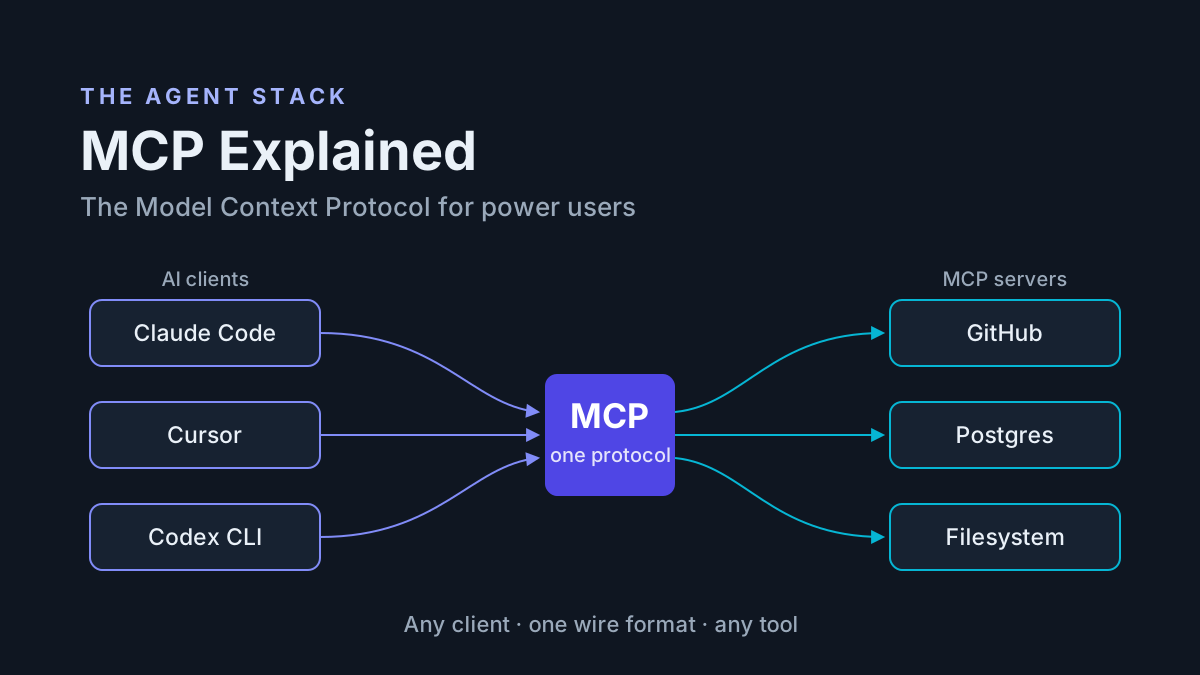
Claude Code SQL Server Setup (and Codex): Run Microsoft's SQL MCP Server on a Dev Copy Under a Read-Only Login
Claude Code SQL Server setup with Codex: a db_datareader login, Data API builder's SQL MCP Server with read-only entities, a refused-write test and rollback.

A Claude Code SQL Server setup usually fails in the same place. Someone copies a quickstart connection string that logs in as sa, wires it into an MCP config to see what happens, and the agent now holds every permission that login has, on a database that turns out to be shared. This guide builds the opposite arrangement. You will give Claude Code, plus Codex if your team uses it, a read path into a restored dev copy of your database through Microsoft’s SQL MCP Server, under a SQL login that can only read. The agent answers schema and data questions with tool calls and drafts T-SQL. You review that T-SQL and run it yourself in SSMS.
The prompt for this guide came from the SQL Server community. On Nov. 2, 2026, Rebecca Lewis (@sqlfingers on X) posted “Build the Fence Before Letting in the AI: The Complete sp_Blitz Series”, writing that she had spent a couple of weeks experimenting with Claude Code and SQL Server while building a small application around Brent Ozar’s sp_Blitz. The title is the right instinct. What follows is a fence you can build in an afternoon and test from both sides.
This is written for a SQL Server developer or DBA who wants an agent’s help reading a schema, finding rows and drafting queries, without the agent ever holding sa or touching production. If you run Postgres, the same pattern lives in our Postgres MCP read-only role guide; this one covers what is specific to SQL Server and Data API builder. Every command below is documented syntax from the linked Microsoft, Anthropic and OpenAI pages. Nothing here was captured from a live run, so each “expect” line describes what the documentation and the SQL Server permission model predict, not output we observed.
Why two fences instead of one
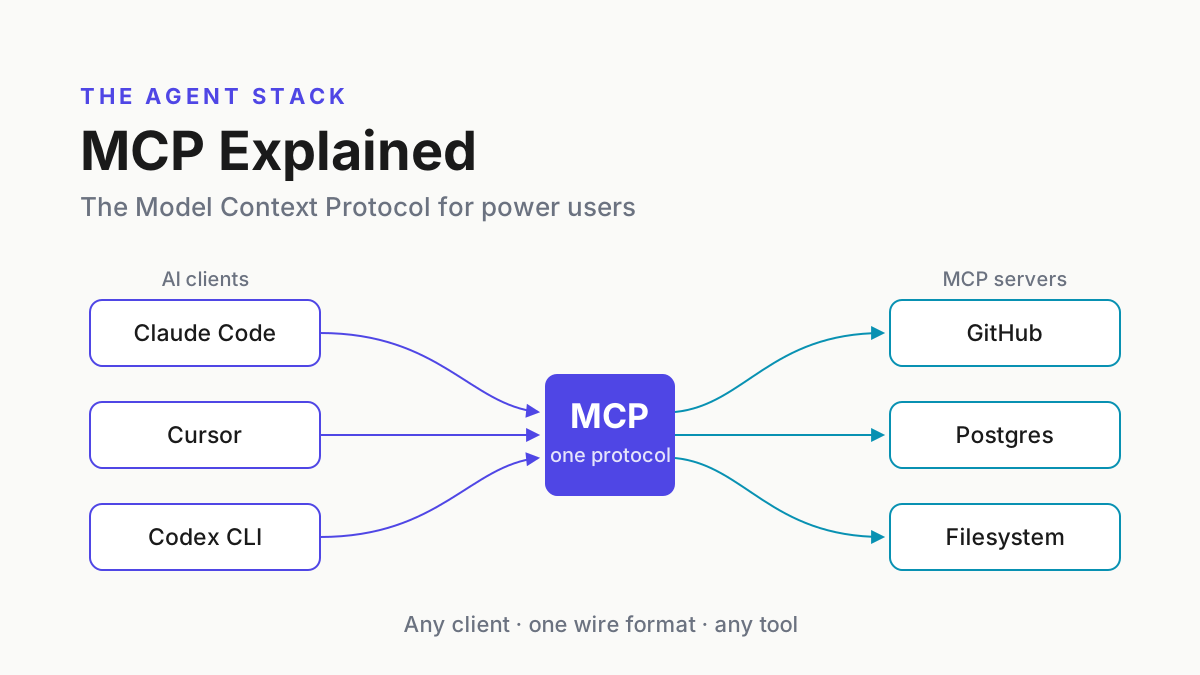
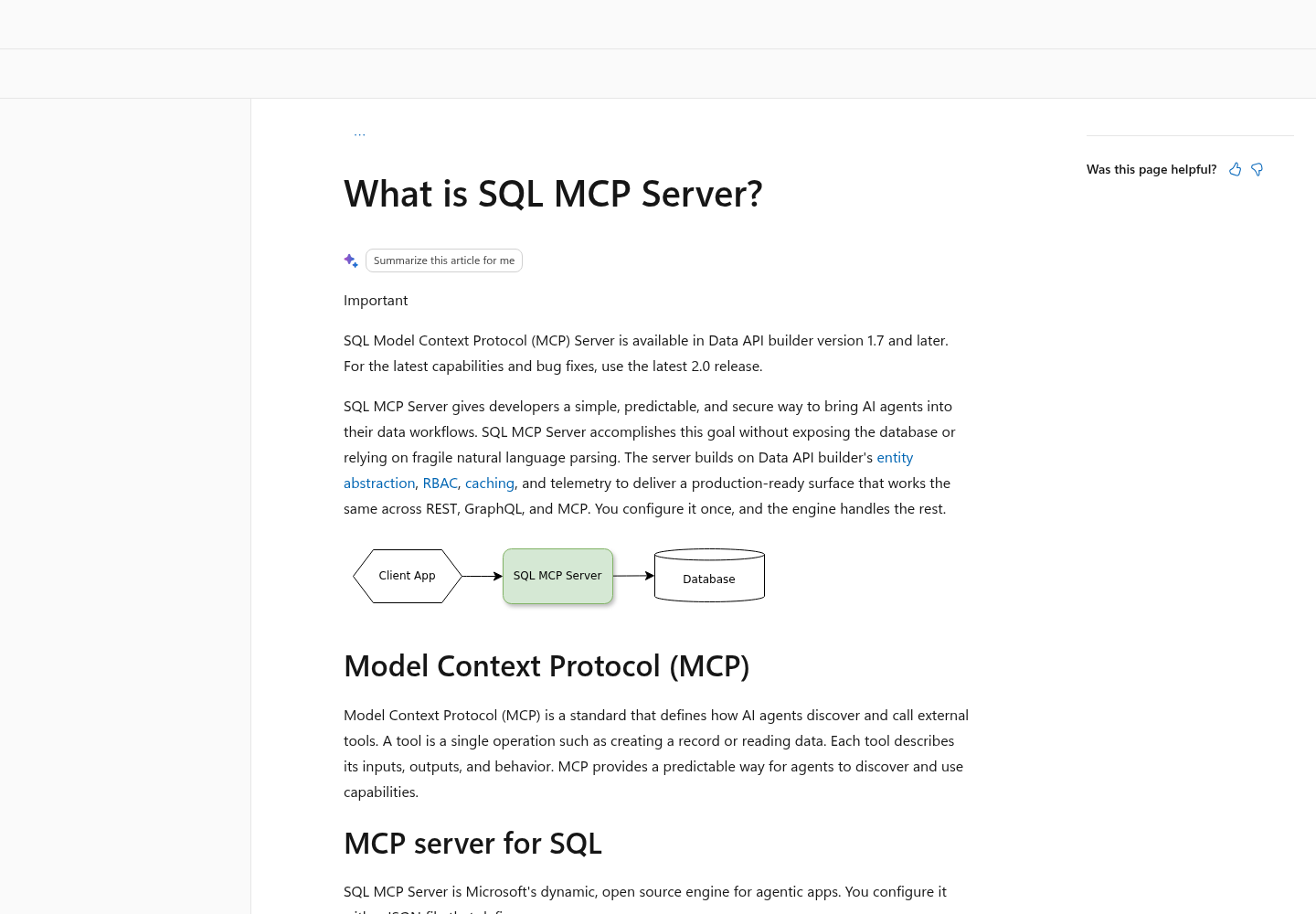
SQL MCP Server is not a separate download. Microsoft’s SQL MCP Server overview describes it as part of Data API builder (DAB) from version 1.7, recommends the latest 2.0 release, and says it is configured with one JSON file that defines how to connect, which tables, views or stored procedures to expose, and the permissions on each object. Two of its design choices make it a sensible first agent connection for a cautious DBA.
First, it deliberately does not do NL2SQL. Microsoft states that the server exposes a small family of DML tools (describe_entities, create_record, read_records, update_record, delete_record, execute_entity and aggregate_records) and that DAB’s query builder produces the T-SQL deterministically. The agent cannot hand the server free-form SQL, and DDL is outside the server’s design entirely. That is why the agent in this guide drafts T-SQL for you instead of running it.
Second, it is role-aware. Each entity in the config declares which roles may read, create, update or delete, and Microsoft says DAB only exposes the entities and operations the current role is permitted to access, applying those rules to every MCP tool. That is fence one: the API layer refuses writes for the role the agent runs as.
Fence two lives in SQL Server. DAB connects with a connection string, and the login in that string bounds everything DAB can ever do. If the login can only SELECT, a mistake in the DAB config, a teammate’s later edit, or a different MCP server pointed at the same string still cannot change a row. Each fence holds on its own, which is the point: you test each one separately, and either one failing alone does not expose your data.
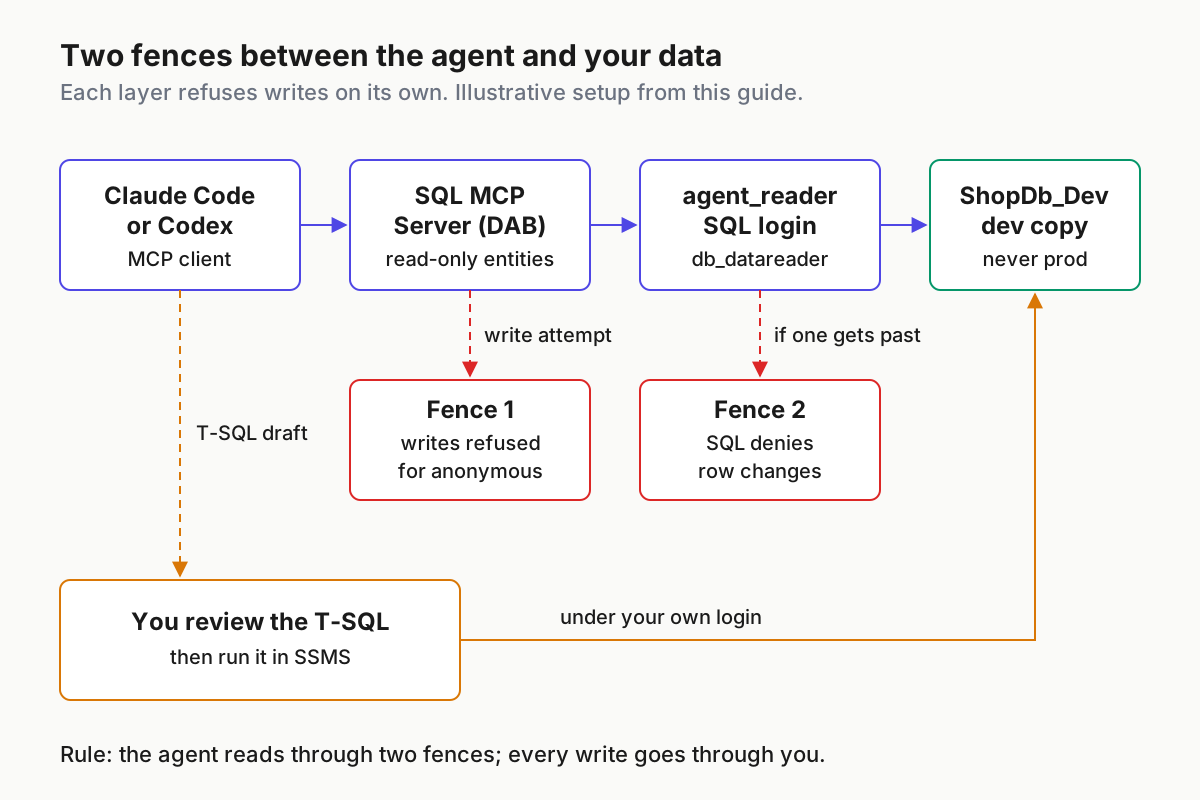
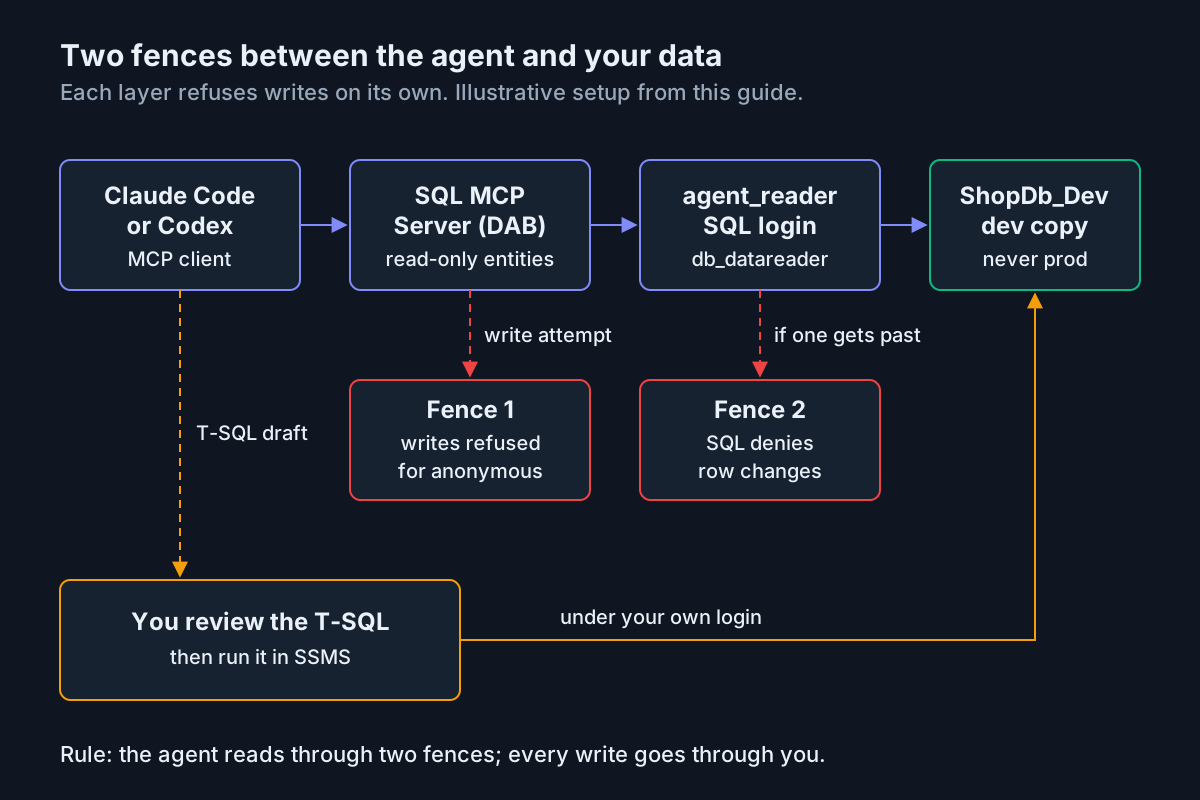
The operating idea behind this is old: treat the agent like any other privileged principal and give it the narrowest identity that does the job, as argued in our guide to treating agents as privileged users.
What you build and what you need first
Gather these before you touch a config file. The checklist doubles as the scope statement for the whole exercise.
- [ ] A SQL Server 2016 or later instance you control. Microsoft’s VS Code quickstart lists Developer, Express, LocalDB and SQL Server in Docker as working options.
- [ ] A restored dev copy of the database, never the production database. This guide calls it
ShopDb_Devand assumes adbo.Productstable shaped like the quickstart’s sample (Id, Name, Inventory, Price, Cost) with its ten seed rows. If you have no copy handy, run the quickstart’s create-and-seed script and name the databaseShopDb_Dev. - [ ] sysadmin, or the right to create logins, on that dev instance only.
- [ ] .NET 9 or later;
dotnet --versionshould report 9.0 or higher. - [ ] The DAB CLI at version 1.7 or later, preferably the current 2.0 release.
- [ ] Claude Code, Codex CLI, or both, installed and signed in.
- [ ] SSMS or another SQL client where you run T-SQL under your own login.
The quickstart installs DAB as a .NET tool in a local tool manifest. Run this in the folder that will hold your config:
dotnet new tool-manifest
dotnet tool install microsoft.dataapibuilder
dotnet tool restore
By the end you will have five things:
- A SQL login
agent_readerand matching database user indb_datareader, withdb_denydatawriteras a belt, onShopDb_Devonly. - A
dab-config.jsonwhose connection string comes from an environment variable and whose single entity grants read. - SQL MCP Server registered in Claude Code and in Codex, with its tools visible in each.
- A database rules block in CLAUDE.md and AGENTS.md.
- A review loop in which the agent drafts T-SQL into a file and you decide whether it runs.
Choose the login before the connection string
The connection string decides which identity DAB uses, and that identity is fence two. Picking the authentication method is therefore a security decision, not a convenience setting.
The quickstart’s example .env uses Trusted_Connection=True, which works on Windows. Integrated authentication connects as the Windows account running dab, and on your own workstation that is almost certainly you, a sysadmin on your own dev instance. That quietly removes fence two. The quickstart’s SQL authentication example logs in as sa, which removes it loudly. Both are fine for a five-minute demo and wrong for an agent you plan to keep.
Where dab runs |
Login to use | Connection string shape | Why |
|---|---|---|---|
| Windows, same machine as the instance | SQL login agent_reader |
Server=localhost;Database=ShopDb_Dev;User Id=agent_reader;Password=<secret>;TrustServerCertificate=True |
Trusted_Connection would run as your own Windows account |
| Docker container on Mac, Linux or Windows | SQL login agent_reader |
Server=localhost,1433;Database=ShopDb_Dev;User Id=agent_reader;Password=<secret>;TrustServerCertificate=True |
The quickstart assumes the container maps port 1433 to localhost |
| WSL or a Mac reaching an instance on another host | SQL login agent_reader |
Server=<address-that-reaches-the-host>,1433;Database=ShopDb_Dev;User Id=agent_reader;Password=<secret>;TrustServerCertificate=True |
Integrated authentication is the Windows path; prove the address works from the same shell first |
| A dedicated Windows account, advanced | Windows login created FROM WINDOWS |
Server=<host>;Database=ShopDb_Dev;Trusted_Connection=True;TrustServerCertificate=True |
Only works if dab actually runs as that account, not as you |
Two cautions apply to every row. SQL authentication only works if the instance allows it: the CREATE LOGIN reference says the server’s authentication mode must match the login type. And TrustServerCertificate=True, which the quickstart uses for local instances, tells the client not to validate the server certificate. Keep it on a dev box with a self-signed certificate; do not carry it into a connection string for a shared server.
Step 1. Create the read-only login on the dev copy
This script creates the only identity the agent will ever use. Run it in SSMS, as sysadmin, against the dev instance.
- Connect to the dev instance and run
SELECT @@SERVERNAME AS server_name;. Read the result before going further. If it names anything other than your dev instance, stop. - Generate a long, unique password and store it in your password manager. Microsoft’s reference says SQL login passwords are case-sensitive, 8 to 128 characters, and cannot contain single quotes or the login name.
- Run the script below, replacing the placeholder password.
- Run the verification query that follows it.
-- Run on the DEV instance only, as sysadmin.
USE master;
GO
CREATE LOGIN agent_reader
    WITH PASSWORD = N'<long-unique-password>',
    DEFAULT_DATABASE = ShopDb_Dev,
    CHECK_POLICY = ON;
GO

USE ShopDb_Dev;
GO
CREATE USER agent_reader FOR LOGIN agent_reader;
GO
ALTER ROLE db_datareader ADD MEMBER agent_reader;
GO
-- Optional belt: an explicit deny on row changes.
ALTER ROLE db_denydatawriter ADD MEMBER agent_reader;
GO
Each line is there for a reason. Microsoft’s reference says a new login is enabled with server-level CONNECT SQL and otherwise only the permissions of the public role; it cannot reach a database until you create a database user for it. Without DEFAULT_DATABASE, the login defaults to master. CHECK_POLICY = ON is already the default and applies the host’s Windows password policy; it is spelled out so a reviewer sees it. There is no MUST_CHANGE, because a service login has nobody to change the password at first sign-in.
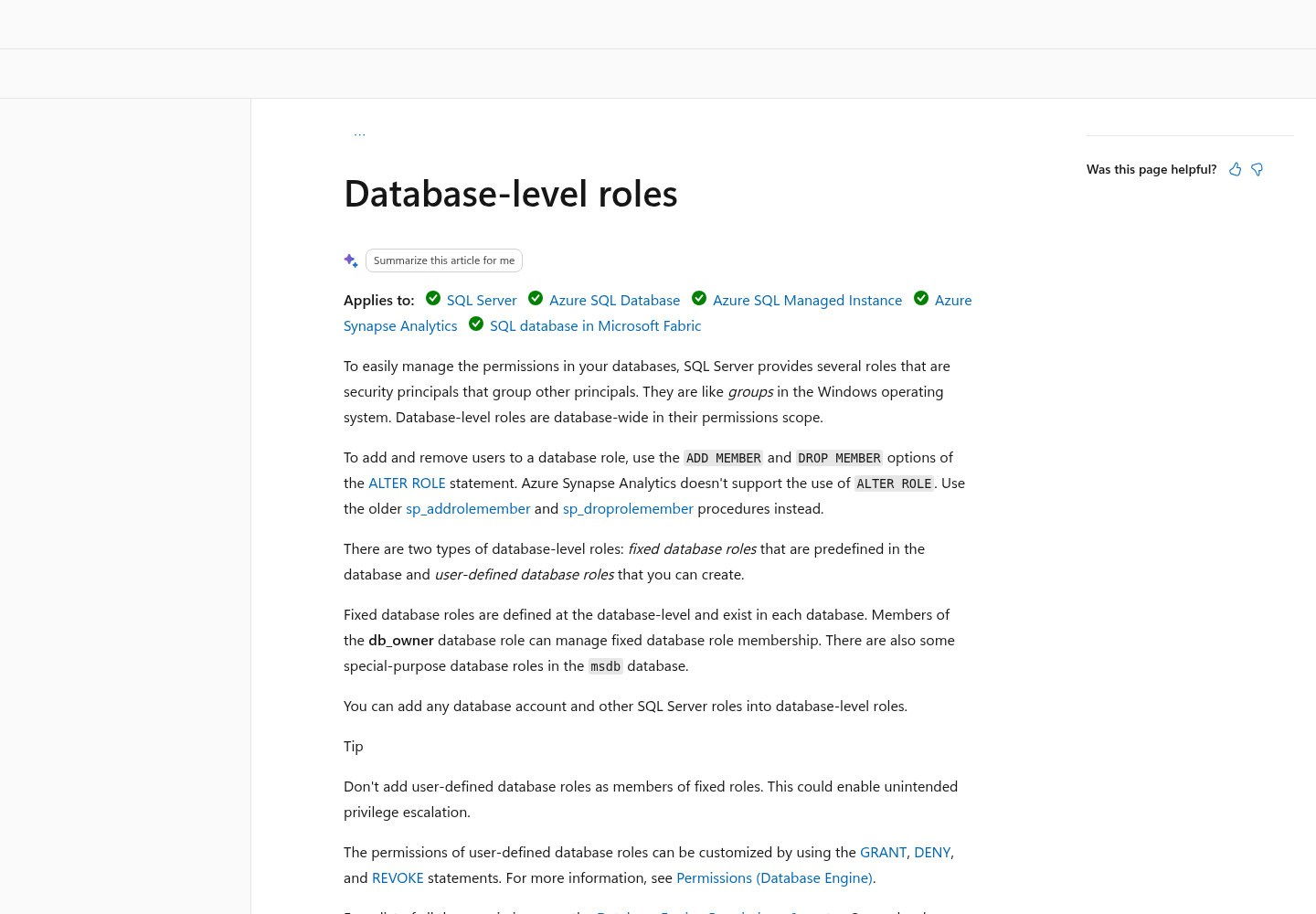
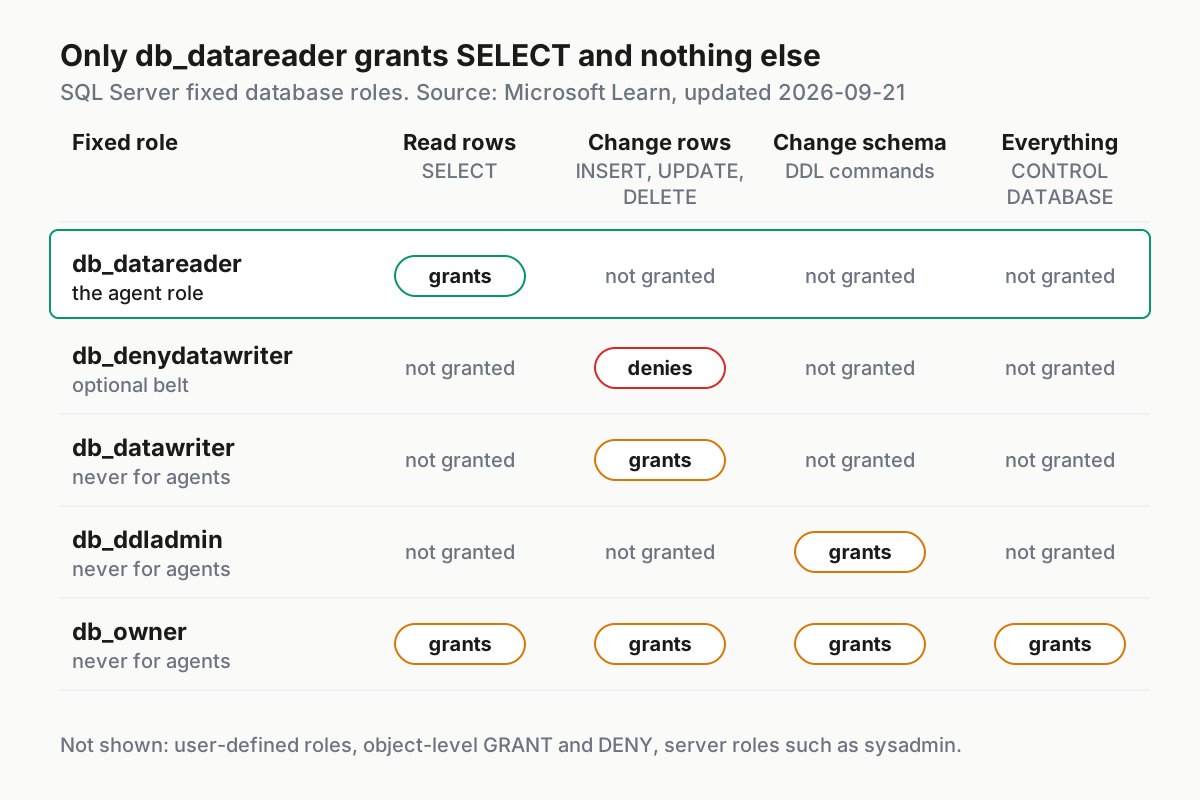
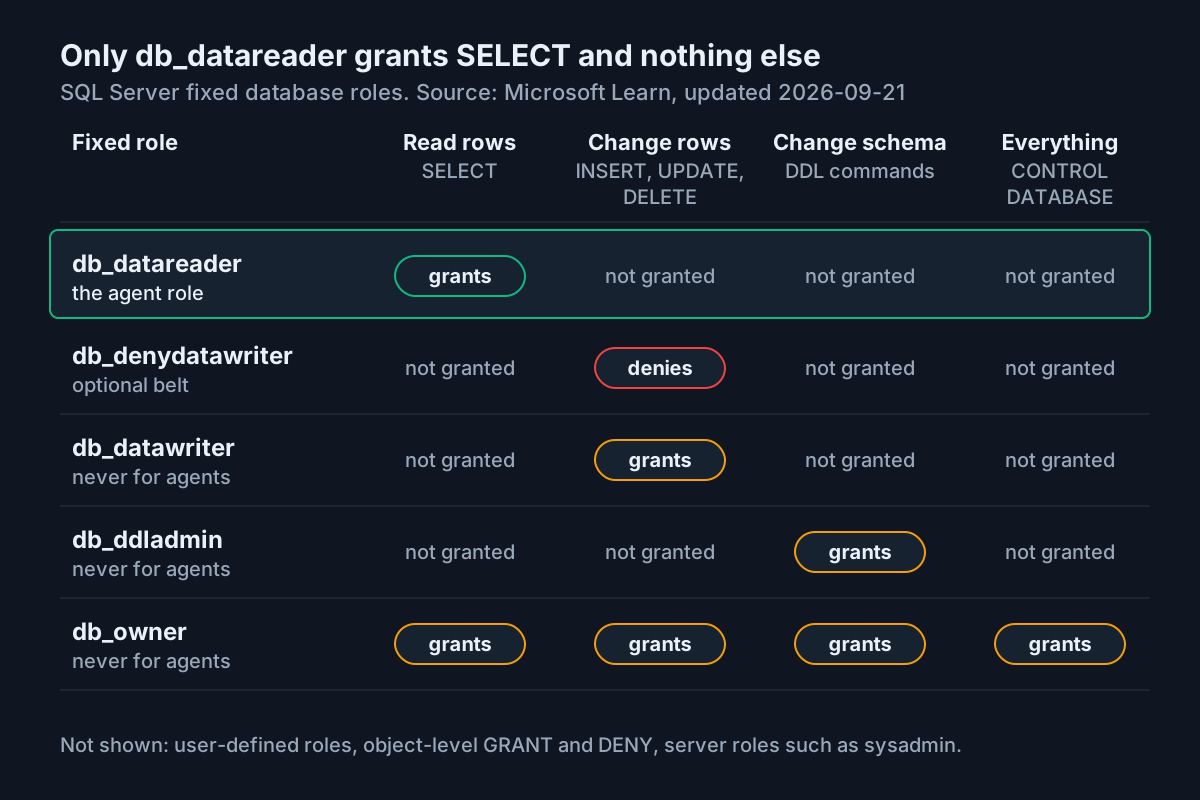
The database-level roles reference defines db_datareader as GRANT SELECT ON DATABASE, which reads all user tables and views. db_denydatawriter is DENY INSERT, DENY UPDATE and DENY DELETE on the database; its members cannot add, modify or delete data. Adding it costs nothing and turns a future accidental db_datawriter membership into a non-event.
Note that db_datareader is database-wide. If the dev copy holds tables the agent should never see even through SQL, the same reference says user-defined roles can be shaped with GRANT, DENY and REVOKE; it also warns against adding user-defined roles as members of fixed roles, because that can enable privilege escalation. For most dev copies, the narrowing happens in DAB, where you list the entities the agent may reach.
Now confirm the membership, using a filtered version of Microsoft’s role-membership example:
USE ShopDb_Dev;
GO
SELECT roles.name AS role_name,
       members.name AS member_name
FROM sys.database_role_members AS drm
INNER JOIN sys.database_principals AS roles
    ON drm.role_principal_id = roles.principal_id
INNER JOIN sys.database_principals AS members
    ON drm.member_principal_id = members.principal_id
WHERE members.name = N'agent_reader';
GO
Expect exactly two rows: db_datareader and db_denydatawriter. If db_datawriter, db_ddladmin or db_owner appears, remove that membership before going further. The chart below shows why each of those three is wrong for an agent.
Step 2. Prove the SQL fence by hand
Test fence two before any agent or MCP server exists. If it fails here, nothing later in this guide is safe.
- Open a new SSMS connection with SQL Server Authentication as
agent_reader. Expect the connection to land inShopDb_Dev. - Run the positive test:
SELECT TOP (5) Id, Name, Inventory FROM dbo.Products ORDER BY Id;. Expect five rows, starting with Action Figure if you used the quickstart seed data. - Run the negative test below. Expect a permission-denied error that names the INSERT permission on
dbo.Products. - Repeat with
UPDATE dbo.Products SET Inventory = Inventory WHERE Id = 1;and expect a permission-denied error naming UPDATE. - Try
CREATE TABLE dbo.FenceTest (Id INT);and expect a denial, because the login holds no DDL permission. - Write the three refusals into your change note with the date. They are your evidence that fence two exists.
-- Run while connected as agent_reader.
BEGIN TRANSACTION;
INSERT INTO dbo.Products (Id, Name, Inventory, Price, Cost)
VALUES (999, N'Fence test', 1, 1.00, 1.00);
ROLLBACK TRANSACTION;
The transaction wrapper is a safety net for the test itself: if the insert unexpectedly succeeds, the rollback removes the row. A success is still a failed test. Go back to Step 1 and look for an extra role membership or a direct grant.
Step 3. Write the DAB config with read-only entities
With the identity proven, build the config that defines fence one. Set the connection string in your shell first so the password never lands in the file.
mkdir -p ~/sql-agent && cd ~/sql-agent
export MSSQL_CONNECTION_STRING='Server=localhost,1433;Database=ShopDb_Dev;User Id=agent_reader;Password=<long-unique-password>;TrustServerCertificate=True'

dab init --database-type mssql \
  --connection-string "@env('MSSQL_CONNECTION_STRING')" \
  --host-mode development \
  --mcp.enabled true \
  --config dab-config.json

dab add Products \
  --source dbo.Products \
  --source.type table \
  --permissions "anonymous:read" \
  --description "Toy store products with inventory, price, and cost."

dab update Products --fields.name Id --fields.primary-key true --fields.description "Product Id"
dab update Products --fields.name Name --fields.description "Product name"
dab update Products --fields.name Inventory --fields.description "Units in stock"
dab update Products --fields.name Price --fields.description "Retail price"
dab update Products --fields.name Cost --fields.description "Store cost"
On Windows PowerShell, set the variable with $env:MSSQL_CONNECTION_STRING = '<same string>', and in Command Prompt replace the trailing backslashes with ^, as the dab init reference shows.
Why these choices work:
--connection-string "@env('MSSQL_CONNECTION_STRING')": the init reference says this option supports@env(), so the file records a reference, not the secret.dab initoverwrites an existing config with no merge, according to the same reference. Keepdab-config.jsonin version control so a secondinitcannot silently erase your permissions.--host-mode developmentmatches the quickstart and suits a dev copy; the default is Production.--mcp.enabled trueis already the default. Stating it matters because the quickstart notes that the stdio transport requires"mcp": { "enabled": true }in the runtime section.--permissions "anonymous:read"is fence one. Microsoft’s overview says stdio defaults to the anonymous role when none is given, and the init reference says that under the default Unauthenticated provider all HTTP requests run as anonymous. Granting anonymous only read means writes are refused in both transports.- The field descriptions come straight from the quickstart, which warns that without them agents see only entity names and may guess column names incorrectly.
Open the file and tick through it before starting anything:
- [ ]
data-sourceshows"connection-string": "@env('MSSQL_CONNECTION_STRING')", with no password anywhere in the file. - [ ] The runtime section has MCP enabled.
- [ ] Host mode is development.
- [ ]
Productslists one role,anonymous, with the single actionread. - [ ] No other entities exist. An entity you never add is an entity the agent never sees.
If you later add an entity for REST or GraphQL that agents should not reach, the overview documents an entity-level switch that removes it from MCP while leaving the other surfaces alone:
"entities": {
  "SensitiveData": {
    "mcp": {
      "dml-tools": false
    }
  }
}
Step 4. Start SQL MCP Server and inspect its tools
SQL MCP Server speaks two transports, streamable HTTP and stdio, according to Microsoft’s overview. Pick one per client; you can use different ones for Claude Code and Codex.
| Question | stdio | HTTP |
|---|---|---|
Who starts dab |
The agent CLI starts it as a child process | You start dab start --config dab-config.json in a terminal |
| Which role applies | The role:anonymous argument; anonymous is also the default |
anonymous, under the default Unauthenticated provider |
| Documented limits | Simulator authentication; requests limited to 1 MB | Endpoint printed at startup; the quickstart assumes http://localhost:5000/mcp |
| Where the env var must exist | In the environment the agent passes to the child process | In the terminal where you run dab start |
| Best fit | One developer, one client, nothing to keep running | Two clients sharing one server, or inspecting tools by hand |
Before any model sees the tools, inspect them yourself over HTTP:
- In a terminal where
MSSQL_CONNECTION_STRINGis set, rundab start --config dab-config.json. Expect the terminal to print its listening URLs. - In a second terminal, run
npx -y @modelcontextprotocol/inspector http://localhost:5000/mcp. Microsoft recommends this proxy mode because it avoids browser CORS andMcp-Session-Idheader problems. - List the tools. Expect tools such as describe_entities and read_records; the quickstart notes that names can vary with configuration.
- Call describe_entities. Expect
Productsas the only entity, with your field descriptions. - Call read_records against
Products. Expect the ten seed rows if you used the quickstart data. - If a write tool such as create_record is listed, call it against
Products. Expect DAB to refuse it for the anonymous role. That is fence one, tested without a model in the loop. - Stop the server with Ctrl+C, or leave it running if you will register clients over HTTP.
Step 5. Register the server in Claude Code
Anthropic’s Claude Code MCP reference documents both shapes. For stdio, Claude Code starts dab itself:
claude mcp add --env MSSQL_CONNECTION_STRING="$MSSQL_CONNECTION_STRING" --transport stdio sqldev \
  -- dab start --mcp-stdio role:anonymous --loglevel error --config /home/you/sql-agent/dab-config.json
The order is deliberate. The reference says --env accepts several KEY=value pairs and will read a server name placed directly after it as another pair, so put another option such as --transport stdio between them. Everything after -- goes to dab untouched. Use an absolute --config path so the server starts correctly whatever directory Claude Code launches it from. The arguments mirror Microsoft’s stdio client definition.
Without --scope, the server is local scope: stored in ~/.claude.json under this project and private to you. With --env, the reader password sits in that file too. For a dev-only login that can only SELECT, that is a reasonable trade; never move this entry to project scope, because .mcp.json is meant to be committed.
For HTTP, with dab start already running in a terminal:
claude mcp add --transport http sqldev http://localhost:5000/mcp
Then verify, in this order:
claude mcp list. Expectsqldevwith✔ Connected. A✘ Failed to connectstatus carries the failure detail on the same line.claude mcp get sqldev. On failure, read theIssue:line.- Inside a session, run
/mcp. Expect a tool count next tosqldev. - Ask: “Using the sqldev tools, which products have an inventory under 30?” Expect a read_records call. With the seed data the answer is Building Blocks (25), Board Game (20), Doll House (10), Art Kit (28) and RC Helicopter (12).
- Run the negative test: “Using sqldev, set the inventory of product 4 to 0.” Expect the agent to report that the write was refused or unavailable. Then check in SSMS that Toy Car still shows 50.
If you want the general mechanics of scopes and approvals, our Claude Code MCP setup guide covers them in depth.
Step 6. Register the same server in Codex
OpenAI’s Codex MCP documentation stores servers in ~/.codex/config.toml, shared by the Codex CLI, the IDE extension and the ChatGPT desktop app on the same host. Codex adds two controls Claude Code’s CLI command does not: an environment forwarding list and per-server tool filters.
[mcp_servers.sqldev]
command = "dab"
args = ["start", "--mcp-stdio", "role:anonymous", "--loglevel", "error",
        "--config", "/home/you/sql-agent/dab-config.json"]
env_vars = ["MSSQL_CONNECTION_STRING"]
startup_timeout_sec = 30
disabled_tools = ["create_record", "update_record", "delete_record", "execute_entity"]
default_tools_approval_mode = "prompt"
env_vars forwards the variable from the environment Codex runs in, so the password stays out of config.toml. startup_timeout_sec raises the 10-second default to give .NET room to start. disabled_tools is a deny list; it is a third, client-side layer, not a replacement for the two fences. default_tools_approval_mode = "prompt" asks before every call during your first week; the documented writes mode later prompts only for tools not marked read-only.
For the HTTP transport, replace command, args and env_vars with url = "http://localhost:5000/mcp" and keep the filters.
- [ ] Export
MSSQL_CONNECTION_STRINGin the shell that launchescodex. - [ ] Run
codex mcp listand expectsqldevin the list. - [ ] In the
codexTUI, run/mcpand expectsqldevamong the active servers. - [ ] Compare the tool names
/mcpshows withdisabled_tools; if your DAB version names them differently, update the list. - [ ] Repeat the inventory question and the product 4 negative test from Step 5.
The approval modes and sandbox settings that sit around MCP calls are covered in our Codex approval modes guide.
Put the database rules where both agents read them
Fences enforce; instructions shape behavior inside them. Put the same block in CLAUDE.md for Claude Code and AGENTS.md for Codex, at the repository root.
## Database rules (SQL Server)
- The only database you may query is ShopDb_Dev, through the sqldev MCP server. It is a dev copy, never production.
- Call describe_entities before guessing table or column names.
- Never ask for, suggest or configure a login with write, DDL or sysadmin rights.
- Never edit dab-config.json, its permissions or any connection string.
- Never run T-SQL through any other route: no sqlcmd, scripts or shell commands.
- Write proposed T-SQL to sql/drafts/<yyyy-mm-dd>-<topic>.sql and stop.
- Wrap every proposed data change in BEGIN TRANSACTION ... ROLLBACK TRANSACTION,
  state the expected @@ROWCOUNT, and include SELECTs showing the rows before and after.
- Propose DDL only when explicitly asked, and only for ShopDb_Dev.
- If a tool call is refused, report the refusal. Do not look for a workaround.
How the rules earn their place:
- The sqlcmd rule closes the gap the fences do not cover. A coding agent can run shell commands, and a shell can reach SQL Server with whatever credentials your machine holds. Pair the rule with permission settings, as described in our restricted-mode fleet policy guide.
- The drafts folder turns every proposal into a file with a name, a date and a diff in version control, which is what you review.
- The transaction and row-count requirements make the agent state its own expected result, so a mismatch is visible before anything commits.
- “Report the refusal” keeps a blocked agent from spending a session probing for another way in, which is the behavior you would most want to see in a log.
Worked example from question to reviewed T-SQL
Here is the whole loop on the sample data. The scenario: you want every product under 30 units restocked to 30, and you want the agent to do the analysis and drafting, not the writing.
- Ask: “Using sqldev, list products with inventory under 30, with their cost.” Expect a read_records call returning the five products above. Cost comes back because
Productsexposes every column; if Cost should be private, you would narrow fields in DAB. - Ask: “Draft the T-SQL to restock those products to 30 units. Follow the database rules.” Expect a new file in
sql/drafts/and no tool call that writes. - Open the draft. A rules-following draft looks like this:
-- sql/drafts/2026-11-04-restock-under-30.sql
-- Expected rows updated: 5
USE ShopDb_Dev;
BEGIN TRANSACTION;

SELECT Id, Name, Inventory FROM dbo.Products WHERE Inventory < 30 ORDER BY Id;

UPDATE dbo.Products
SET Inventory = 30
WHERE Inventory < 30;

SELECT @@ROWCOUNT AS rows_updated;

SELECT Id, Name, Inventory FROM dbo.Products WHERE Inventory = 30 ORDER BY Id;

ROLLBACK TRANSACTION;  -- change to COMMIT only after the checks match
- Review before running. The
@@ROWCOUNTline should read 5. The finalSELECTwill show six rows, not five, because Puzzle 500 pcs already had exactly 30 units. That is the kind of detail a reviewer catches and a hurried commit does not: the after-check filters on the new value, so it includes a row the update never touched. - Run the file in SSMS under your own login, on the dev instance, as written with
ROLLBACK. Compare the results with the expectations in the header. - Only if everything matches, change
ROLLBACKtoCOMMITand run it again. The agent never executes the statement, and the login it uses could not if it tried. - Ask the agent to re-read the table through sqldev and confirm the five products now show 30. The read confirms your change through the same fence the agent uses.
DAB, a community server or no MCP at all
SQL MCP Server is not the only way to give an agent SQL Server context. This table compares the three realistic options for a dev copy, from the evidence above and the documented behavior of each approach.
| Option | What the agent can see | Write risk | Setup cost | Choose it when |
|---|---|---|---|---|
| SQL MCP Server via DAB | Only entities you add, with descriptions you write | Two fences: DAB role permissions and the SQL login | Moderate: .NET, DAB CLI, a config per database | You want live reads with no free-form SQL from the agent |
| A community SQL MCP server that executes queries | Whatever the login can read, usually the whole catalog | One fence: the login; the agent writes the SQL that runs | Low: one package and a connection string | You need ad hoc analytical SQL and accept that the login is the only control |
| No MCP: the agent writes scripts, you run them | Only what you paste or export, such as a schema script | None from the agent; you execute everything | Lowest | Tight data rules, or a schema where reading rows is not needed |
The second row is where Anthropic’s own reference points for Postgres, where it advises using a read-only database user in the connection string so the queries Claude runs cannot modify data. That advice carries over to SQL Server: if you choose a query-executing server, agent_reader from Step 1 is still the login to give it. For broader MCP hardening across a team, see our MCP security hardening guide.
Troubleshooting the connection and the fences
Most failures land in one of these rows. Work through the cause before changing permissions; widening access is never the first fix.
| Symptom | Likely cause | Fix | Expect after the fix |
|---|---|---|---|
Login failed for agent_reader |
Wrong password, the instance does not allow SQL authentication, or the login was created in a rolled-back transaction | Reset the password; confirm the authentication mode matches the login type; rerun Step 1 outside any open transaction | Step 2 connects |
| Certificate or encryption error on connect | The client rejects the dev instance’s self-signed certificate | On a dev box only, keep TrustServerCertificate=True in the string |
Connection succeeds; never copy this to a shared server |
✘ Failed to connect in claude mcp list |
dab not found by Claude Code, a bad --config path, or the env var missing from the child process |
Run the exact stdio command in a terminal first; use absolute paths; re-add with --env |
✔ Connected and a tool count in /mcp |
Codex lists no sqldev tools |
Startup timeout, or MSSQL_CONNECTION_STRING not exported in the shell that launched Codex |
Raise startup_timeout_sec; export the variable and restart Codex |
sqldev active in /mcp |
Products missing from describe_entities |
Entity not added, or the role in the client args differs from the entity’s role | Check entities in the config and role:anonymous in the args |
Products listed with field descriptions |
| Agent guesses wrong column names | No field descriptions | Run the dab update --fields.* commands |
Queries use real column names |
| A write succeeds anywhere | The entity grants more than read, or the login has db_datawriter, db_owner or a direct grant |
Stop the server; fix the entity permission; rerun the Step 1 membership query and Step 2 tests | Both negative tests refused again |
| WSL cannot reach an instance on Windows | The address you used from WSL does not reach the Windows host’s SQL listener | Prove connectivity from the WSL shell with a SQL client first, or run the agent CLI and dab on the Windows side with the instance |
A SQL client in the same shell connects before DAB does |
Roll it back
Removal should be as deliberate as setup. Do it in this order so nothing is left holding a connection when you drop the login.
- Remove the server from Claude Code:
claude mcp remove sqldev. If you added it at another scope, include--scopewith that scope. - Remove the
[mcp_servers.sqldev]table from~/.codex/config.toml, or setenabled = falseto keep it for later. - Stop any running
dab startprocess with Ctrl+C. Stdio servers stop when their client session ends. - Drop the user and login on the dev instance:
USE ShopDb_Dev;
GO
DROP USER agent_reader;
GO
USE master;
GO
DROP LOGIN agent_reader;
GO
- Unset
MSSQL_CONNECTION_STRINGand delete it from any shell profile where you saved it. - Keep
dab-config.jsonin version control if you may come back; it holds no secret. - Confirm: the Step 1 membership query returns zero rows,
claude mcp listno longer showssqldev, andcodex mcp listno longer shows it either.
The setup is done when three things are true: a schema question was answered through a tool call, the product 4 write was refused through the agent, and the INSERT was refused in SSMS under agent_reader. It has failed if any connection string in the chain names sa, your own login or a production server, or if any row changed without you running the statement.
Sources
- Rebecca Lewis (@sqlfingers) on X, “Build the Fence Before Letting in the AI: The Complete sp_Blitz Series”, Nov. 2, 2026
- Microsoft Learn, What is SQL MCP Server?
- Microsoft Learn, Quickstart: Use SQL MCP Server with Visual Studio Code locally
- Microsoft Learn, Initialize a config with the DAB CLI (dab init)
- Microsoft Learn, Database-level roles
- Microsoft Learn, CREATE LOGIN (Transact-SQL)
- Anthropic, Connect Claude Code to tools via MCP
- OpenAI, Model Context Protocol (Codex)