Claude Code Python Setup (and Codex): uv Project Rules, a Ruff and pytest Stop Hook, and the Pyright LSP Plugin
Claude Code Python setup with uv: project rules, an AGENTS.md for Codex, the Pyright LSP plugin and a Stop hook that holds the turn until Ruff and pytest pass.

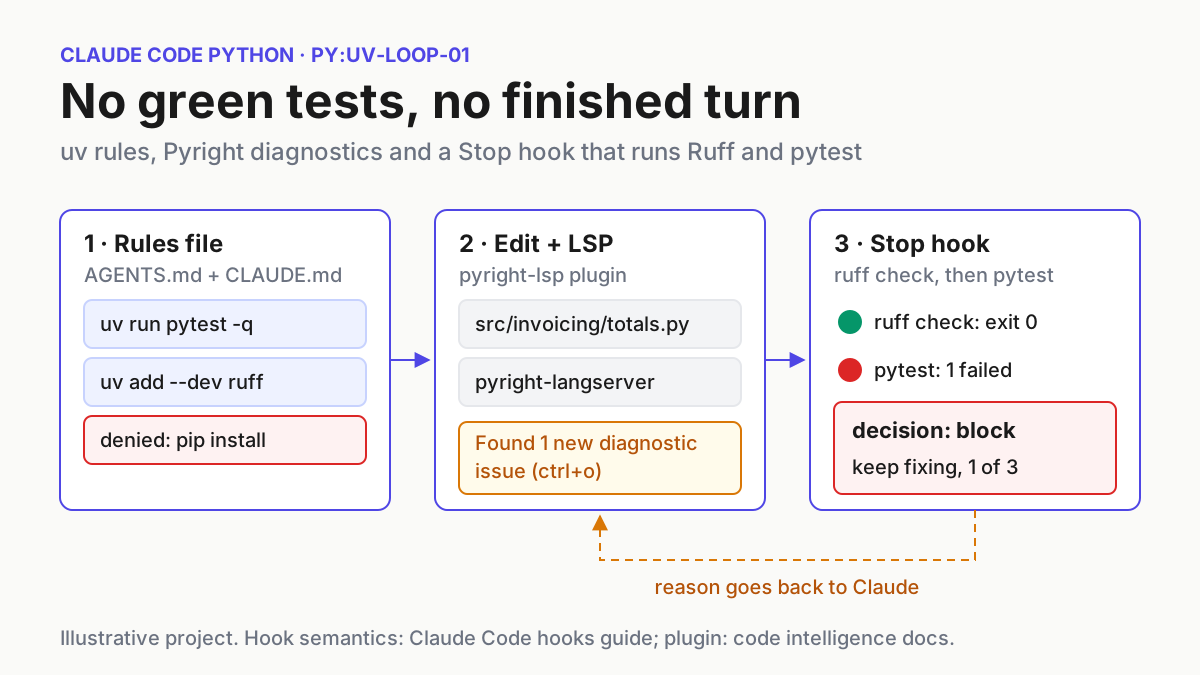
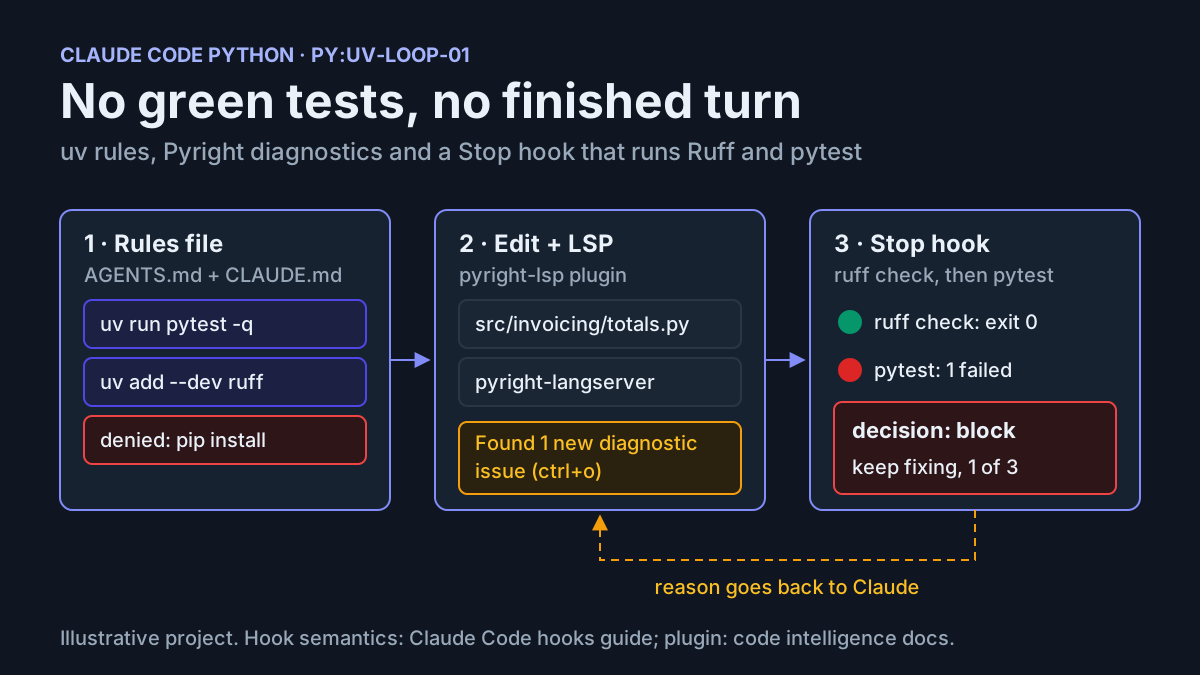
You ask Claude Code to fix a failing test in a Python project. It runs python -m pytest with whatever interpreter is first on PATH, or runs pip install into an environment the project never uses. Then it says the suite is green without showing a single pytest summary line. This Claude Code Python guide fixes those three habits on one small project. At the end you have a uv-managed package where the agent runs code only through uv run and adds dependencies only through uv add. It also gets Pyright type diagnostics after each edit and cannot end a turn while uv run ruff check or uv run pytest fails. Codex reads the same rules from AGENTS.md.
The default is already common. On November 8, 2026, samir sawarkar wrote on X that across 30 Python production backends scaffolded with Claude Code and Cursor that month, no agent suggested Docker for local development: “It runs everything directly in a single virtualenv with uv.” This guide takes that default, writes it down and enforces it. A later section covers when Docker is worth adding.
The setup has three layers, because each one fails differently. A rules file tells the agent what to do. Permission rules decide which commands run without asking and which never run. A hook runs the real checks whatever the agent decides. Anthropic’s memory documentation states the reason for the third layer: Claude treats CLAUDE.md files “as context, not enforced configuration.” Our Elixir and Phoenix and Vue and Nuxt guides use the same structure. This one covers a plain Python package with no framework.
Before you start: tools and the sample project
The example is labelled py:uv-loop-01: a package called invoicing with one function and one deliberately failing test. All terminal output and agent behaviour described below are illustrative expected observations. They were not recorded from a real run. Your wording and counts will differ.
- [ ] Claude Code installed and signed in, started from a terminal. The code intelligence plugin runs in terminal sessions only. Anthropic’s code intelligence page says cloud sessions don’t start plugin language servers.
- [ ] uv installed and on your
PATH. - [ ] Node.js with npm, or pip or pipx, so you can install Pyright’s language server globally.
- [ ]
jqinstalled. The hook script parses its JSON input with it, as the examples in the Claude Code hooks guide do. - [ ] Git.
uv initcreates a.git/directory for a new project. - [ ] Optional: the Codex CLI, if you want the same rules in Codex.
- [ ] On Windows, Git Bash, because the hook script is written for bash. The hooks guide has a troubleshooting entry for hooks that fail when Git Bash is missing.
You don’t need an existing codebase. Every file in the example is shown in full below, so you can rebuild it in a scratch directory before changing a real repository.
Step 1: Create the uv project and the failing test
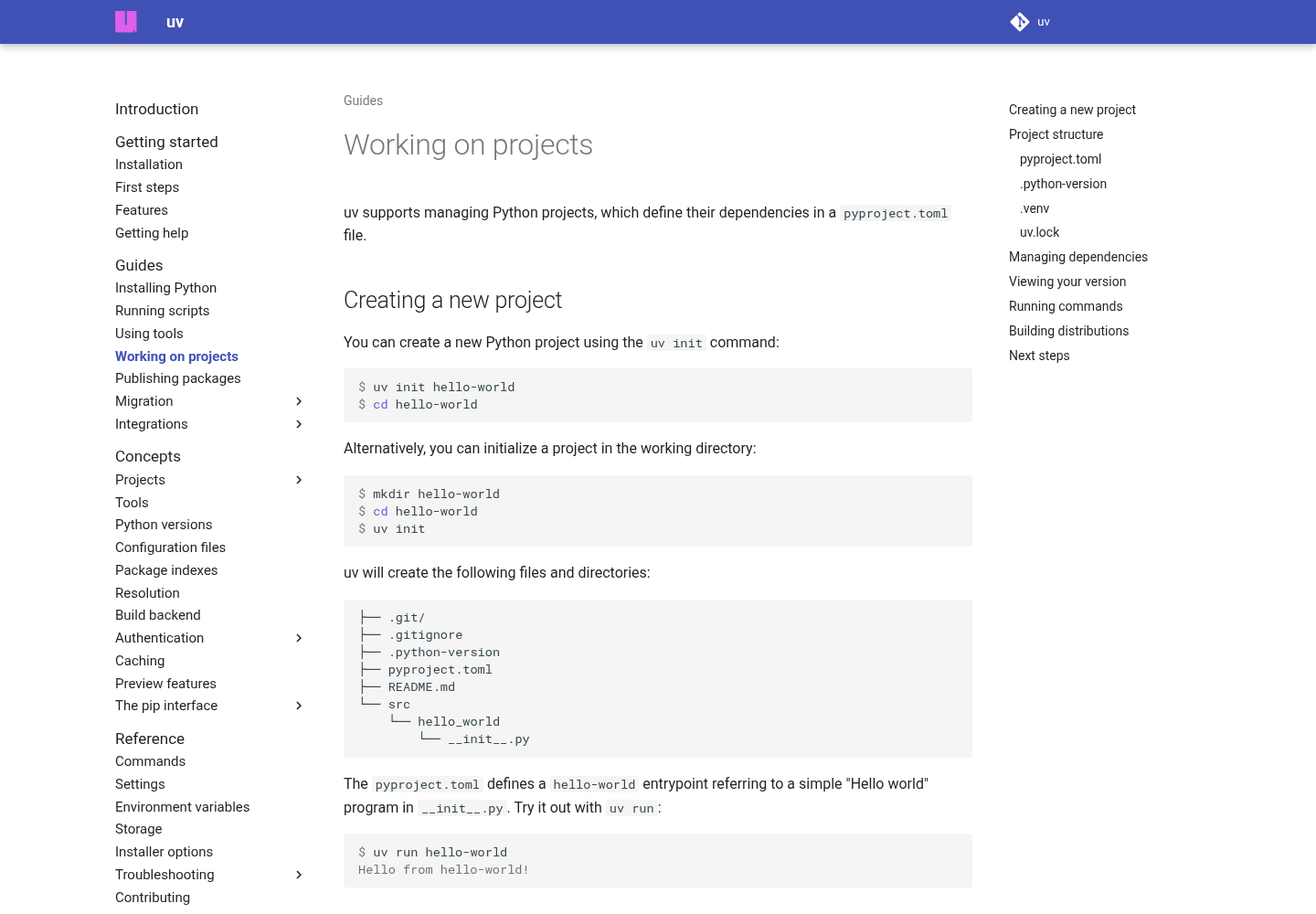
uv’s projects guide says uv init creates .gitignore, .python-version, pyproject.toml, a README and a src/<package>/__init__.py. It creates .venv and uv.lock the first time you run a project command such as uv run, uv sync or uv lock. It also says uv run checks that the lockfile matches pyproject.toml and the environment matches the lockfile before every invocation. This is why the rules below require uv run.
- Create the project and add the development tools:
uv init invoicing
cd invoicing
uv add --dev pytest ruff pyright
mkdir -p tests
- Add a Ruff rule selection to
pyproject.toml. This set comes from the Ruff linter documentation, which presents it as a popular set of rules that isn’t too pedantic:
[tool.ruff.lint]
select = ["E", "F", "UP", "B", "SIM", "I"]
- Create
src/invoicing/totals.pywith the bug:
from decimal import Decimal


def line_total(quantity: int, unit_price: Decimal, discount_pct: Decimal = Decimal("0")) -> Decimal:
    """Return the line total after a percentage discount (10 means 10%)."""
    gross = unit_price * quantity
    return gross - gross * discount_pct
- Create
tests/test_totals.py:
from decimal import Decimal

from invoicing.totals import line_total


def test_discount_is_a_percentage():
    assert line_total(3, Decimal("20.00"), Decimal("10")) == Decimal("54.00")
- Run both checks once by hand:
uv run ruff check
uv run pytest -q
Illustrative expected observation: Ruff exits 0, because the code has no lint violations. pytest reports one failure in test_discount_is_a_percentage, because the function treats 10 as a fraction rather than a percentage and returns -540 instead of 54.00. Keep this failing project. It is the input for every later step.
The pytest run uses default discovery. The pytest usage page says plain pytest runs every test_*.py or *_test.py file in the current directory and its subdirectories, so tests/test_totals.py is collected without configuration. If collection fails with an import error for invoicing, run uv sync and check that pyproject.toml still has the [build-system] table uv init wrote. The test imports the package from the project environment.
Step 2: Write one rules file for Claude Code and Codex
The rules need to be in one place, and both agents need to read them. Codex reads AGENTS.md. OpenAI’s AGENTS.md guide says Codex walks from the project root (typically the Git root) down to the current directory and includes at most one instruction file per directory. Claude Code can also read AGENTS.md, with one condition in the memory documentation: by default Claude reads it only when no CLAUDE.md or CLAUDE.local.md exists in the working directory or above it. The documented way to keep both is a CLAUDE.md that imports AGENTS.md with @AGENTS.md and adds Claude-specific lines below the import. The docs say Claude Code never reads an imported AGENTS.md twice, whichever setting you use.
- Save this as
AGENTS.mdin the project root:
# AGENTS.md: invoicing (py:uv-loop-01)

## Python environment
- This is a uv project. The interpreter is the project's .venv, managed by uv.
- Run every Python command through uv: `uv run pytest -q`, `uv run ruff check`,
  `uv run pyright`, `uv run python path/to/script.py`.
- Never call bare `python`, `python3`, `pip` or `pytest`. They can resolve to the
  system interpreter instead of the project environment.
- Do not activate .venv inside a shell command. `uv run` checks the lockfile and
  environment first; activation does not.

## Dependencies
- Add runtime packages with `uv add <package>` and tools with `uv add --dev <tool>`.
- Remove packages with `uv remove <package>`. Never edit uv.lock by hand.
- Never run `pip install`. Ask before adding any new runtime dependency and name
  the exact package and why it is needed.

## Checks (definition of done)
- Lint: `uv run ruff check`
- Tests: `uv run pytest -q`
- Types: `uv run pyright`
- Before saying a task is done, run lint, then tests, and quote the final summary
  line of each.
- If a check still fails and you cannot fix it, say which check failed and why.
  Never describe failing tests as passing.

## Layout
- Package code lives in src/invoicing/. Tests live in tests/ as test_*.py.
- Money is decimal.Decimal, never float. Percentages are whole numbers (10 = 10%).
- Save this as
CLAUDE.mdnext to it:
@AGENTS.md

## Claude Code
- A Stop hook (.claude/hooks/python-gate.sh) runs `uv run ruff check` and
  `uv run pytest -q` each time you finish responding. If it blocks, read its
  reason, fix the failure, and finish again.
- Pyright diagnostics arrive after edits through the pyright-lsp plugin. Fix new
  diagnostics in files you touched before ending the turn.
-
Confirm Claude Code loaded both. Start
claudein the project root and run/context all. The memory docs say to check the list under Memory files. Illustrative expected observation:CLAUDE.mdis listed. Ask Claude what the dependency rule is, and it should repeat theuv addline fromAGENTS.md. -
Confirm Codex loaded the file. The AGENTS.md guide gives this check, run from the repository root:
codex --ask-for-approval never "Summarize the current instructions."
Illustrative expected observation: Codex repeats the uv, dependency and checks sections.
Write each rule so it can be checked. The memory documentation recommends concrete instructions such as “Run npm test before committing” over vague ones such as “Test your changes”, and recommends keeping each file under 200 lines. Every line above names a command or a path. “Quote the final summary line” is the rule that makes false green reports easy to spot: an answer without pytest’s own summary line is incomplete.
Codex also has a documented override file, AGENTS.override.md, which replaces AGENTS.md in the same directory. If Codex starts ignoring your Python rules, look for a stray override in the repository or under ~/.codex first. Claude Code doesn’t read AGENTS.override.md or AGENTS.local.md at all, according to its memory page. Approval behaviour in Codex is controlled separately from these rules. Our Codex approval modes guide covers it.
Step 3: Allow the checks, deny bare pip
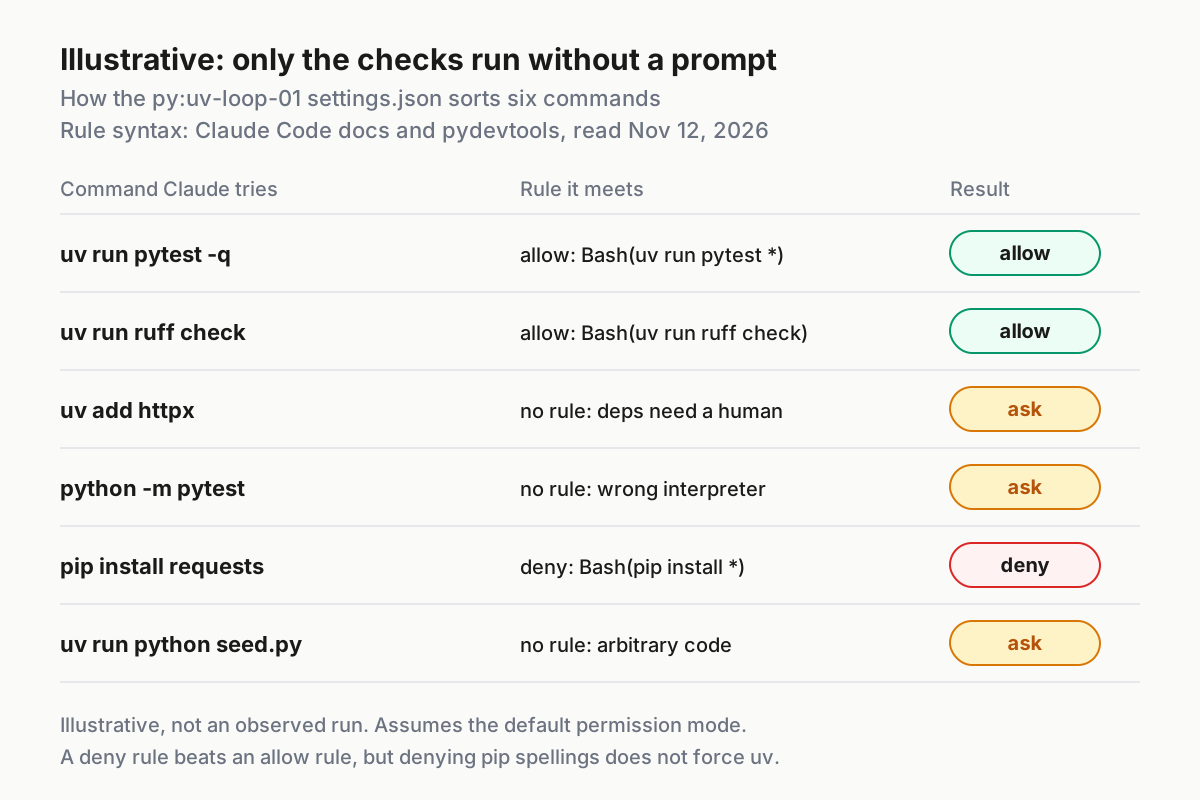
Instructions guide the model. Permission rules decide what runs. The pydevtools guide to configuring Claude Code for uv makes the same split. It recommends pre-approving specific check commands rather than a broad Bash(uv run *) rule, because uv run can run arbitrary Python. It also notes that a project allow rule doesn’t override a deny rule.
- Create
.claude/settings.jsonwith the permissions block. You will add the hooks block in Step 5. The complete file is shown here so you can copy it once:
{
  "permissions": {
    "allow": [
      "Bash(uv run pytest)",
      "Bash(uv run pytest *)",
      "Bash(uv run ruff check)",
      "Bash(uv run ruff check *)",
      "Bash(uv run ruff format --check .)",
      "Bash(uv run pyright)"
    ],
    "deny": [
      "Bash(pip install *)",
      "Bash(pip3 install *)",
      "Bash(python -m pip install *)",
      "Bash(python3 -m pip install *)"
    ]
  },
  "hooks": {
    "Stop": [
      {
        "hooks": [
          {
            "type": "command",
            "command": "\"$CLAUDE_PROJECT_DIR\"/.claude/hooks/python-gate.sh",
            "timeout": 300
          }
        ]
      }
    ]
  }
}
- On Windows with PowerShell, add
PowerShell(...)versions of the allow entries, as the pydevtools example does for each check. - Restart the session, or open
/permissionsto inspect the active rules. pydevtools suggests this check, and also suggests/memoryfor the instruction files. - Commit
.claude/settings.jsonso teammates get the same rules. The hooks guide lists.claude/settings.jsonas the project scope that can be committed, and.claude/settings.local.jsonfor personal settings.
Each entry has a reason. The allow list contains only the checks: lint, tests, the format check and the type check. They run often, so an approval prompt for each one adds friction without adding safety. The pydevtools page notes that a test command still runs project code, so allow it only in a project you trust. uv add is not on the allow list on purpose. A new dependency is a supply-chain decision, and a human should see the package name before it lands in uv.lock. Our slopsquatting guide covers the registry check you can add to that prompt.
The deny list blocks the common pip spellings. It doesn’t prevent every way of installing a package. pydevtools says plainly: “Denying a few pip spellings does not force every possible shell program to use uv.” A shell script that calls pip, or a wrapper with a different name, still gets through. Treat the deny rules as a guard against the common mistake, not a sandbox. For policy across many machines, see our guide to restricted mode as fleet policy.
Step 4: Install pyright-langserver and the pyright-lsp plugin
With a language server, Claude sees type errors immediately after an edit instead of after a test run. Anthropic’s code intelligence page describes the result: after each edit Claude gets the server’s errors and warnings, “a type error, missing import, or syntax error it introduced without running a compiler.” Claude also gets a read-only LSP tool that looks up symbols through the server instead of searching text. For Python, the page’s table pairs the plugin pyright-lsp with the binary pyright-langserver. It notes that the plugin doesn’t include the server: “Install the language server binary first, then the plugin, then confirm the server starts.”
The pyright package you added with uv add --dev is installed in .venv. It doesn’t put pyright-langserver on the PATH of the shell you launch claude from unless that environment is activated. The plugin needs the binary on that PATH, so install it globally as well. Keep the dev dependency for uv run pyright in CI and in the Stop hook if you choose to add it there.
- Install Pyright globally using one of the routes in the pyright-lsp plugin README:
# pick one
npm install -g pyright
pipx install pyright
pip install pyright
The README recommends pipx for CLI tools. Plain pip install is listed too, but in this project it would be a global install outside uv, which goes against the spirit of the rules file. Use pipx or npm.
- Confirm the binary is on the
PATHof the shell you start Claude from:
which pyright-langserver
In PowerShell the documented equivalent is Get-Command.
- Start
claudeand install the plugin from Anthropic’s official marketplace:
/plugin install pyright-lsp@claude-plugins-official
A confirmation message says whether the plugin is active now or needs /reload-plugins.
- Confirm the server starts. The code intelligence page says to ask Claude to introduce a type error and then fix it. For py:uv-loop-01, ask: “In src/invoicing/totals.py, temporarily pass the string ‘3’ as quantity in a new helper, then remove it.” The documented success signal is a line under the edit:
Found N new diagnostic issues in M files (ctrl+o to expand). Press Ctrl+O to read the issues. - If no diagnostics line appears, run
/pluginand open the Errors tab. A row readingExecutable not found in $PATH: "pyright-langserver"means step 1 or 2 didn’t work. The docs say Claude Code retries on the next edit to a matching file. If you installed the binary into a directory that wasn’t onPATHwhen the session started, start a new session from a shell where it is.
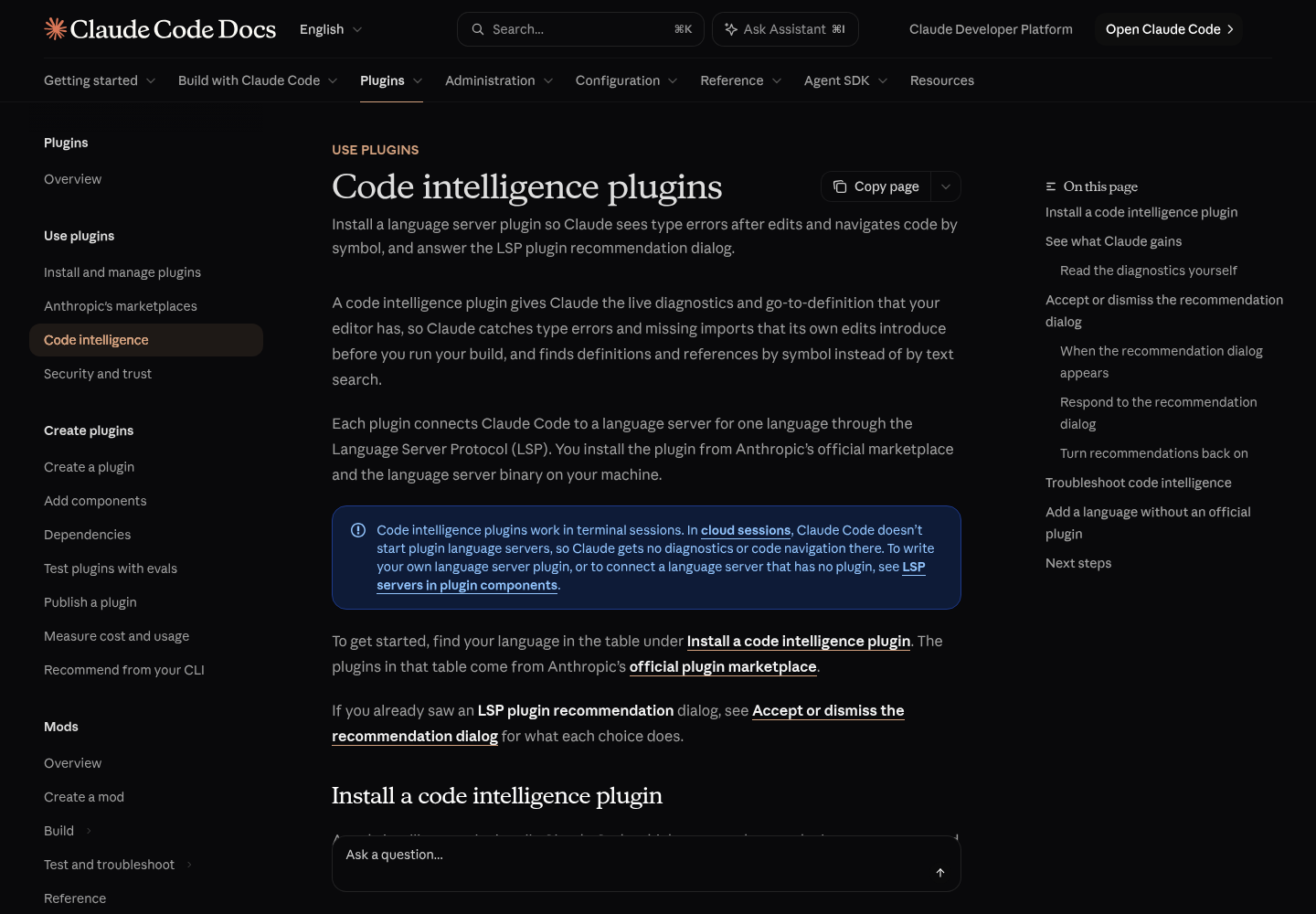
The plugin README lists .py and .pyi as supported extensions. The sources used here don’t settle one question: how the language server picks the interpreter whose site-packages it uses to resolve imports. If Pyright reports a package as unresolved even though uv run python -c "import <pkg>" works, first confirm the package is in uv.lock. Then check Pyright’s own configuration documentation for how to point it at the project’s .venv. The code intelligence troubleshooting section lists unresolved-import false positives under its monorepo entry, a related symptom.
If pyright-langserver was already on your PATH before you installed the plugin, Claude Code may offer it through the LSP plugin recommendation dialog. Choosing Yes, install installs it for your user account and asks you to start a new session. Either route results in the same plugin.
Step 5: Add the Stop hook that runs Ruff and pytest
This step enforces the definition of done. The hooks guide describes hooks as user-defined shell commands that provide “deterministic control: certain actions always happen rather than relying on the LLM to choose to run them.” The Stop event fires “when Claude finishes responding”. It has no matcher support, so it fires every time. The same guide says Stop hooks use a top-level decision: "block" field, and its troubleshooting entry describes the result of a block: Claude keeps working instead of stopping.
- Save this as
.claude/hooks/python-gate.sh:
#!/bin/bash
# Stop hook for py:uv-loop-01: block the end of a turn while Ruff or pytest fails.
INPUT=$(cat)
SESSION_ID=$(echo "$INPUT" | jq -r '.session_id // "unknown"')
PROJECT_DIR="${CLAUDE_PROJECT_DIR:-$(echo "$INPUT" | jq -r '.cwd')}"
STATE_FILE="${TMPDIR:-/tmp}/python-gate-${SESSION_ID}.count"
MAX_BLOCKS=3

cd "$PROJECT_DIR" || exit 0

RUFF_OUT=$(uv run ruff check 2>&1)
RUFF_RC=$?
PYTEST_OUT=$(uv run pytest -q 2>&1)
PYTEST_RC=$?

if [ "$RUFF_RC" -eq 0 ] && [ "$PYTEST_RC" -eq 0 ]; then
  rm -f "$STATE_FILE"
  exit 0   # green: let Claude stop
fi

BLOCKS=$(cat "$STATE_FILE" 2>/dev/null || echo 0)
BLOCKS=$((BLOCKS + 1))

if [ "$BLOCKS" -gt "$MAX_BLOCKS" ]; then
  rm -f "$STATE_FILE"
  exit 0   # budget spent: allow the stop; the last reason told Claude to report red
fi
echo "$BLOCKS" > "$STATE_FILE"

REASON="Python gate, attempt $BLOCKS of $MAX_BLOCKS.
uv run ruff check exited $RUFF_RC:
$(echo "$RUFF_OUT" | tail -n 20)

uv run pytest -q exited $PYTEST_RC:
$(echo "$PYTEST_OUT" | tail -n 30)

Fix the failures, then finish. If this is attempt $MAX_BLOCKS and you cannot fix them,
end your reply by naming the check that still fails. Do not claim the tests pass."

jq -n --arg reason "$REASON" '{decision: "block", reason: $reason}'
exit 0
- Make it executable. The hooks guide says hook scripts must be executable on macOS and Linux:
chmod +x .claude/hooks/python-gate.sh
- Register it. The
hooks.Stopblock is already in thesettings.jsonfrom Step 3. It has nomatcher, because Stop doesn’t support one, and a 300-secondtimeoutthat overrides the 10-minute default for command hooks. - Test it outside Claude by piping sample JSON into it, as the hooks guide’s troubleshooting section recommends:
echo '{"session_id":"manual-test","stop_hook_active":false}' | .claude/hooks/python-gate.sh
echo $?
rm -f "${TMPDIR:-/tmp}/python-gate-manual-test.count"
Illustrative expected observation while the test still fails: one JSON object with "decision": "block" and a reason starting Python gate, attempt 1 of 3, followed by the pytest failure tail, and exit status 0.
- In Claude Code, type
/hooks. The Python gate should appear under Stop.
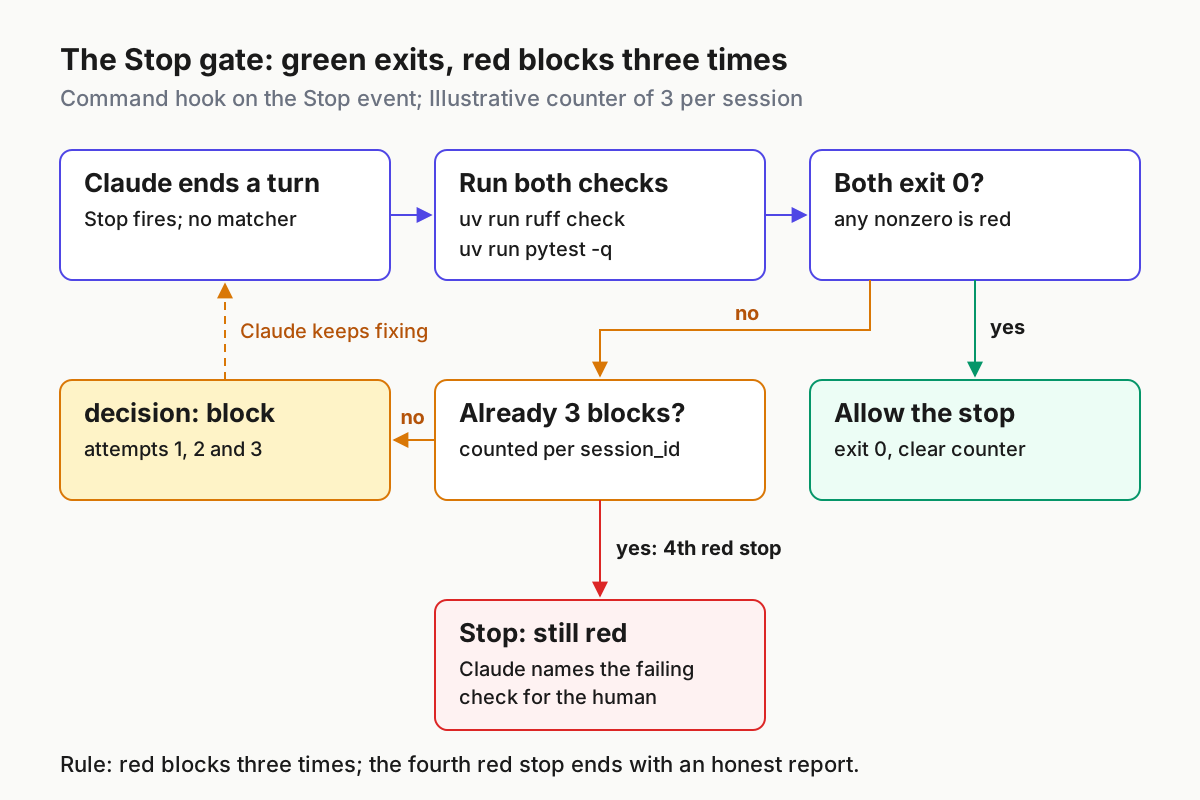
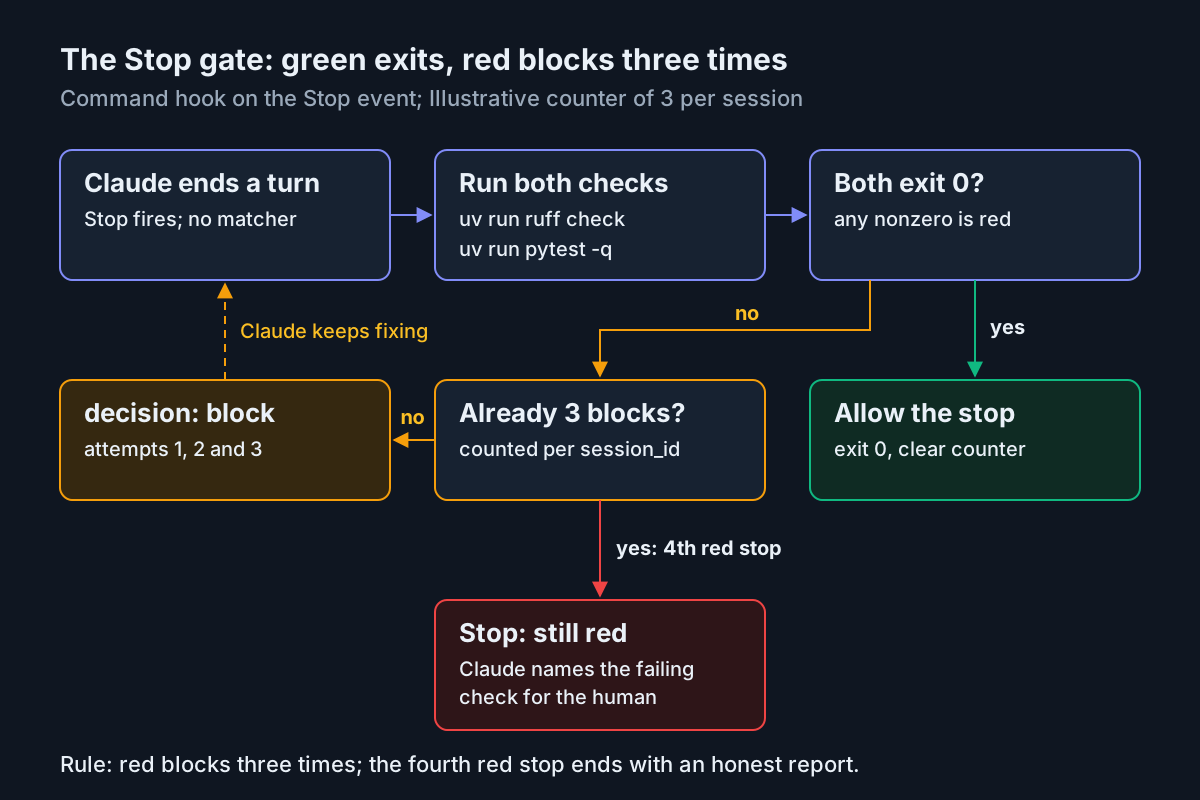
The script uses JSON output and exits 0 instead of exiting 2. The hooks guide says to choose one approach per hook: exit 2 with a stderr message, or exit 0 with JSON. JSON keeps the block decision and the reason in one place, and jq -n --arg escapes the quotes and newlines in pytest output. The guide warns that string concatenation can produce invalid JSON, which Claude Code then reports as a non-blocking error.
The counter is the safeguard against a loop that never ends. The guide’s own pattern exits early when the input field stop_hook_active is true, meaning the stop already follows a hook-triggered continuation. That pattern would allow the second stop even with tests still red, which defeats the gate. This script counts blocks per session_id instead, allows three, and resets on any green run. The third reason asks Claude to name the failing check, so the fourth stop ends with an honest report rather than a false green. Claude Code also has its own backstop: it overrides a Stop hook after eight consecutive blocks with no tool call in between. You can change that cap with CLAUDE_CODE_STOP_HOOK_BLOCK_CAP. Our Ralph loop guide covers stop conditions for longer unattended runs.
Two costs come with this design. Stop hooks fire whenever Claude finishes responding, not only when a task is complete, so a turn that only answers a question also runs the suite. With one test this costs almost nothing. With a ten-minute suite it is too slow, and you should narrow the hook to a fast marker set or a single directory. Second, Stop hooks don’t fire on user interrupts, and API errors fire StopFailure instead. Pressing Esc in the middle of a turn skips the gate.
The worked run: py:uv-loop-01 from first prompt to green
This is the full loop with every layer in place. Each row is an illustrative expected observation, based on the documented behaviour cited above, not a transcript of a recorded session.
| Input | Action | Expected result |
|---|---|---|
| py:uv-loop-01, first prompt: “Fix the failing discount test in invoicing and show me the evidence.” | Claude reads CLAUDE.md and the imported AGENTS.md, then runs uv run pytest -q |
Runs with no permission dialog, because it matches Bash(uv run pytest *); one failure in test_discount_is_a_percentage: -540 returned, 54.00 expected |
py:uv-loop-01, Claude proposes python -m pytest instead |
Command matches no allow rule, so Claude Code prompts; you decline and point to AGENTS.md | The system interpreter may lack pytest or have different packages; after the decline Claude reruns uv run pytest -q |
py:uv-loop-01, pyright-langserver not yet installed globally; Claude edits src/invoicing/totals.py |
Run /plugin and open the Errors tab |
Row reads Executable not found in $PATH: "pyright-langserver" and no diagnostics line appears; fix with pipx install pyright and start a new session |
| py:uv-loop-01, Claude edits totals.py and replies “fixed” while the test still fails | Stop hook runs uv run ruff check then uv run pytest -q |
Ruff exits 0, pytest exits nonzero; the hook returns decision: block with “attempt 1 of 3” and the failure tail; Claude keeps working |
py:uv-loop-01, Claude changes the return to gross - gross * discount_pct / 100 |
Stop hook reruns both checks | Both exit 0, the counter file is deleted, the turn ends; a successful hook shows nothing in the transcript |
py:uv-loop-01, Claude tries pip install requests to add an HTTP client |
The deny rule Bash(pip install *) matches |
The command is blocked without a prompt; Claude should propose uv add requests and ask, since uv add is not pre-approved |
| py:uv-loop-01, a test that needs a database you haven’t started stays red after three blocks | Fourth Stop event | The hook allows the stop; Claude’s final message names uv run pytest -q as still failing instead of reporting green |
Row four is the case that motivated this guide. Without the hook, the turn ends on the agent’s own claim. With the hook, the turn can only end after a green run or after an explicit statement of what is still red. Check the final message for pytest’s own summary line, which AGENTS.md requires.
To check the result yourself, run the two commands in a terminal after the session: uv run ruff check and uv run pytest -q. They run in the same environment the hook used, so they should agree with it. If they don’t, see the troubleshooting table.
Choices that matter: uv run, Stop vs PostToolUse, and when Docker earns its place
Several defaults in this setup were chosen deliberately. Here is the reasoning for each and when to choose the other option.
| Decision | This guide picks | Why | Pick the other when |
|---|---|---|---|
uv run vs activating .venv |
uv run |
The uv guide says uv run checks the lockfile and environment before every command; activation depends on per-shell state the agent’s Bash tool may not keep |
You work by hand in one long-lived terminal and run uv sync yourself first |
| Stop hook vs PostToolUse hook | Stop | It runs once per turn and catches files changed by Bash as well as by Edit and Write; the hooks guide recommends a Stop hook when you need to see every change | You want fast per-file lint feedback; add a PostToolUse hook on Edit|Write for Ruff only, and keep tests in Stop |
| Command hook vs agent hook | Command | The guide calls agent hooks experimental and recommends command hooks for production | You need judgement, such as deciding which subset of a large suite matters for this change |
| Pyright as plugin vs in the hook | Plugin | Diagnostics arrive after each edit, while the error is fresh | You want types to block the turn too; add uv run pyright to the script |
| One uv venv vs Docker or a devcontainer | One uv venv | It isolates Python packages and is what agents already default to | The project needs Postgres, Redis or OS libraries, or you want the agent’s commands to run outside your user account |
The PostToolUse alternative has one caveat. The hooks guide says PostToolUse hooks can’t undo actions, because the tool has already run, and that matching Edit or Write alone misses files changed by shell commands. A per-edit Ruff hook is useful as fast feedback, but it can’t replace the turn-level gate. A per-edit pytest hook usually costs too much: every edit pays for the whole suite.
The X post asked why agents don’t suggest Docker. A uv virtualenv answers the Python-dependency question and nothing more. It doesn’t start the database your integration tests need, it doesn’t install system libraries your wheels link against, and it doesn’t limit what the agent’s shell commands can reach. If any of those apply, a container is worth adding. Keep the same AGENTS.md and the same Stop hook inside it, and run uv run in the container. Our Docker Sandboxes guide covers running the agent itself in an isolated workspace. For a single package with unit tests, as here, the venv is enough and the container is overhead.
A note on python -m pytest. The pytest docs say it is almost equivalent to running pytest, except that it also adds the current directory to sys.path. Under uv run that difference rarely matters. Outside uv run, the real problem is which interpreter python resolves to. The rules file bans bare python for that reason, not because of the sys.path detail.
Troubleshooting
Most failures in this setup show up as a specific symptom. Find yours in the table, apply the fix, then rerun the matching row of the worked run.
| Symptom | Likely cause | Fix |
|---|---|---|
Claude still types python or pytest without uv run |
CLAUDE.md is context, not enforcement, or the file didn’t load | Run /context all and confirm CLAUDE.md is under Memory files; the prompt on unlisted commands and the Stop hook still catch the result |
| Claude ignores AGENTS.md | A CLAUDE.md or CLAUDE.local.md exists without the @AGENTS.md import |
Add @AGENTS.md as the first line of CLAUDE.md; on versions before v2.1.277, Claude Code can’t read AGENTS.md directly |
| Codex ignores AGENTS.md | Wrong root, an empty file, or an AGENTS.override.md higher up |
Check that codex status reports the expected workspace root, remove stray overrides, and remember Codex skips empty files |
No Found N new diagnostic issues line |
Language server binary missing from PATH |
/plugin Errors tab; install with npm or pipx; start a new session from a shell where which pyright-langserver succeeds |
| Pyright flags installed packages as unresolved | Server not resolving the project’s .venv |
Confirm the package is in uv.lock; consult Pyright’s configuration docs, since the plugin docs don’t cover interpreter selection |
/hooks shows no Stop entry |
Invalid JSON in settings.json or wrong file location | Remove trailing commas; the file must be .claude/settings.json in the project root; restart if the watcher missed the change |
Stop hook error notice in the transcript |
Script not executable, jq missing, or a nonzero exit |
chmod +x; install jq; pipe the sample JSON from Step 5 and read echo $? |
| Hook JSON has no effect, no error | Shell profile prints text before the JSON | Run claude --debug and search for Hook output does not start with {; wrap profile echo lines in an interactive-shell check |
| Warning that the Stop hook blocked too many consecutive times | Claude Code’s eight-block cap fired before the script’s own limit | Check that the counter file is writable in $TMPDIR; lower MAX_BLOCKS if needed |
ImportError for invoicing during collection |
The project isn’t installed in .venv |
Run uv sync; check that [build-system] is still in pyproject.toml |
| Every turn is slow | The full suite runs on every Stop | Narrow the pytest command in the script to a fast subset; run the full suite in CI |
When a hook misbehaves, read the debug log before changing the script. The hooks guide suggests starting with claude --debug-file /tmp/claude.log and following the file with tail -f, or running /debug in the middle of a session. The log records each hook’s exit code, stdout and stderr, which tells you whether the problem is the script, the JSON or the settings file.
The Ruff exit codes matter here. The Ruff linter page defines 0 as no violations, 1 as violations found and 2 as abnormal termination from invalid configuration, invalid options or an internal error. The script treats any nonzero code as red, so a typo in [tool.ruff.lint] blocks the turn just as a real lint error would. When the reason shows ruff check exited 2, fix the configuration, not the code. Don’t add --exit-zero to make the hook quiet. Ruff documents that flag as forcing exit 0 even when violations exist, which would disable this half of the gate.
Rollback
Each layer comes out independently, so you can remove the one causing trouble and keep the others. Commit the setup in its own commit before you start, so git revert is always available.
- Turn off the Stop gate: delete the
"hooks"block from.claude/settings.json. For a quick pause, set"disableAllHooks": trueinstead, which the hooks guide documents, but note that it turns off every hook at that settings level. Run/hooksand confirm Stop is empty. - Delete
.claude/hooks/python-gate.shand anypython-gate-*.countfiles in your temp directory. - Remove the permission rules: delete the
allowanddenyarrays, or the whole.claude/settings.jsonif it contains nothing else. Check/permissions. - Remove the plugin: run
/plugin, findpyright-lspand remove or disable it there. Anthropic’s Install plugins page covers scopes and uninstalling. Remove the globalpyright-langserverwith the tool you installed it with, npm or pipx. - Remove the rules: delete
CLAUDE.md, or remove only its@AGENTS.mdline if you want Codex to keep the rules. DeleteAGENTS.mdif neither agent should read them. - Leave the uv project as it is.
pyproject.toml,uv.lockand the dev dependencies are a normal Python project with or without an agent, anduv run pytest -qkeeps working in CI.
After rollback, start a new Claude Code session and run /context all and /hooks. Both should show the state you expect. Codex rebuilds its instruction chain on every run, according to its AGENTS.md guide, so there is no cache to clear.
Once py:uv-loop-01 behaves, apply the same files to a real repository one layer at a time: rules file first, then permissions, then the plugin, then the hook. Rerun the worked-run table after each layer. For the wider set of Claude Code habits this builds on, including memory files, hooks and permission modes in one place, see the Claude Code power user’s field guide.
Sources
- samir sawarkar on X: Claude Code and Cursor scaffolding 30 Python backends in a single uv virtualenv (Nov 8, 2026)
- Anthropic: Code intelligence plugins, Claude Code Docs
- Anthropic: Automate actions with hooks, Claude Code Docs
- Astral: Working on projects, uv documentation
- Astral: The Ruff Linter
- pytest: How to invoke pytest
- Anthropic: pyright-lsp plugin README, claude-plugins-official
- Anthropic: How Claude remembers your project, Claude Code Docs
- OpenAI: Custom instructions with AGENTS.md
- pydevtools: How to configure Claude Code to use uv