Ralph Loop Claude Code Plugin: Install It, Write a Checkable Completion Promise and Cap Iterations Before a Long Run
Set up the ralph loop Claude Code plugin: install it, write an exact promise stop line, cap --max-iterations, run in a worktree, stop with /cancel-ralph.

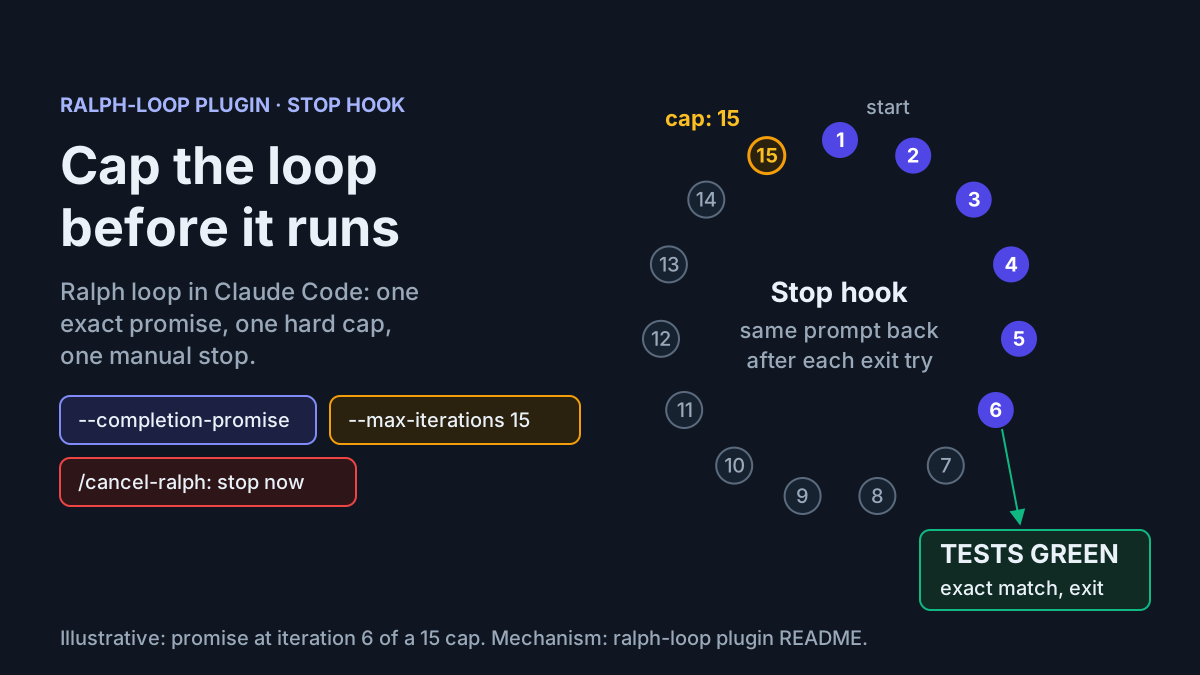
You have a repository with three failing tests and a definition of done that a machine can check: npm test exits 0. You want Claude Code to keep working until that is true. You don’t want to type “keep going” every few minutes, and you don’t want the run to quietly use up your usage window. The Ralph loop Claude Code plugin was built for exactly this job, and it’s also the job where a careless setup costs the most.
This tutorial installs Anthropic’s official ralph-loop plugin from the claude-plugins-official marketplace. It then walks through one complete case, task:ralph-tests-green-01, from install to a test suite you have checked yourself. You’ll write a prompt whose completion promise can only be true when the tests pass, set a hard limit of 15 iterations and isolate the run in a git worktree. You’ll also learn the three ways a run ends: the promise, the cap or /cancel-ralph.
The case for being precise comes from a test report posted on X on November 8, 2026. The tester installed the plugin with /plugin install ralph-loop@claude-plugins-official and started it as /ralph-loop:ralph-loop. They asked Claude to make three failing tests in test_calc.py pass, with --completion-promise ALLPASS and --max-iterations 2. By their account, round one fixed the code and printed the stop word, but the hook sent the prompt back anyway. With a cap of 2, they couldn’t tell whether the stop word or the cap ended the run. The post doesn’t show the transcript, so we can’t say why the promise didn’t register. The lesson still holds: you need a promise the plugin will match, and a cap high enough that hitting it means something different from success.
Results marked illustrative in this guide are the observations you should expect for the example case. They aren’t output from a run we recorded.
How the Stop hook turns one prompt into a loop
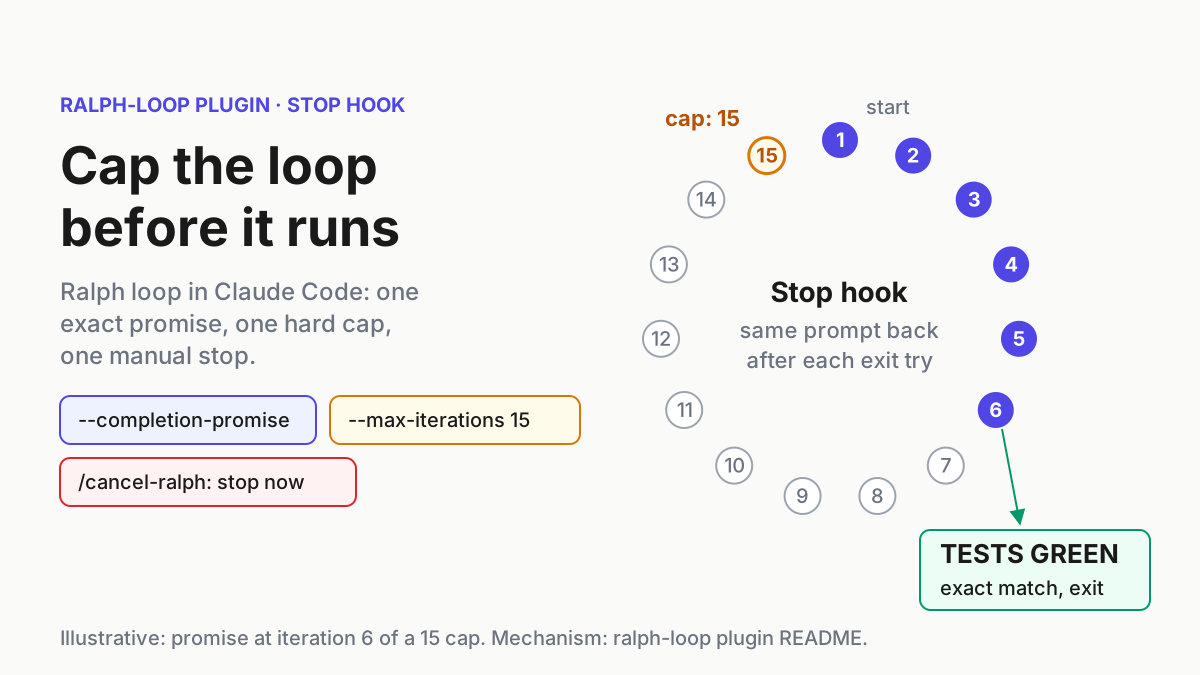
The ralph-loop README is short and worth reading in full. The plugin implements the Ralph technique, which Geoffrey Huntley sums up as “Ralph is a Bash loop”: a while true loop that feeds an agent the same prompt file over and over until the work is done. The plugin moves that loop inside Claude Code by registering a Stop hook, hooks/stop-hook.sh, that catches Claude’s attempt to finish. You run the command once. Claude works and tries to exit. The hook blocks the exit and feeds the same prompt back, and the cycle repeats in your current session. You don’t need an outer shell loop. The README mentions the plain bash version only as where the idea came from.
Four documented properties drive every decision below:
- The prompt never changes between iterations. The definition of done you write in the first call is the only instruction Claude gets for the whole run.
- Earlier work stays in files. Each iteration sees the changed files and the git history, so progress lives in the repository, not in new instructions from you.
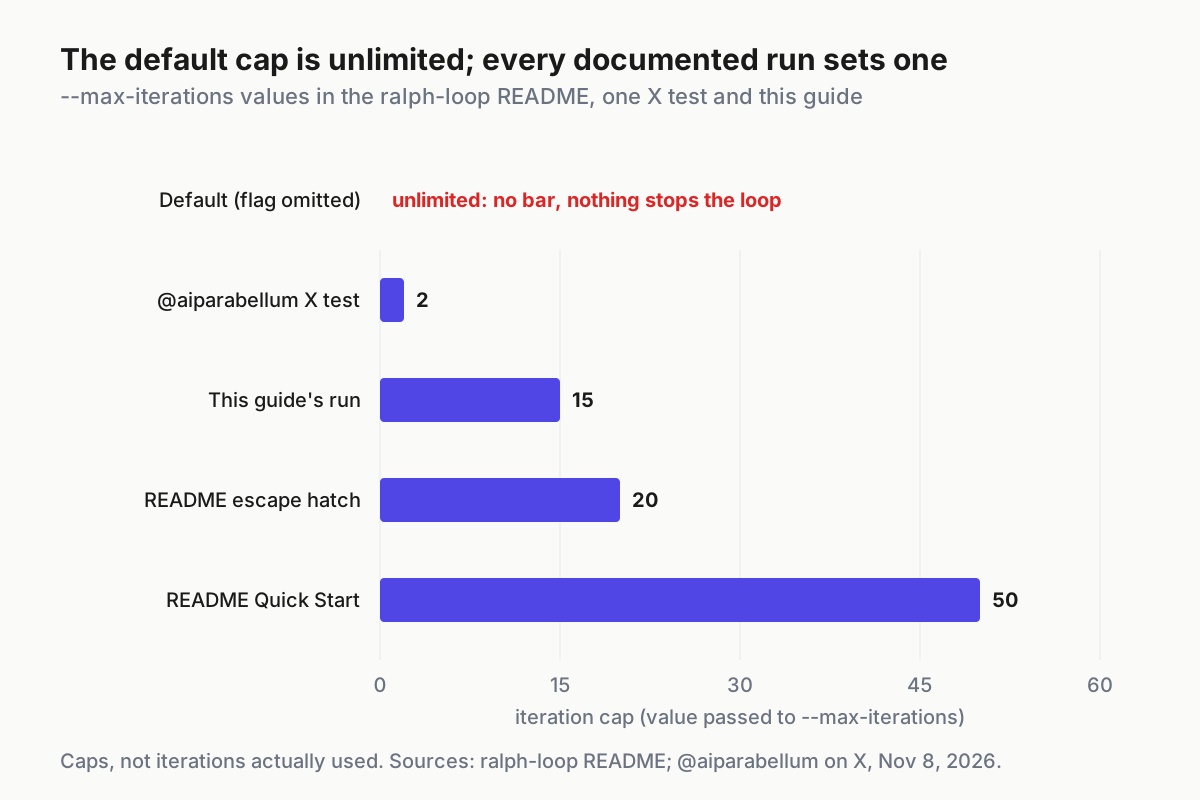
--max-iterations <n>stops the loop after N iterations, and the default is unlimited. If you leave the flag off, nothing in the plugin limits the run.--completion-promise <text>uses exact string matching. The README warns that a single promise can’t express two outcomes, such as SUCCESS versus BLOCKED. It tells you to treat--max-iterationsas your main safety mechanism.
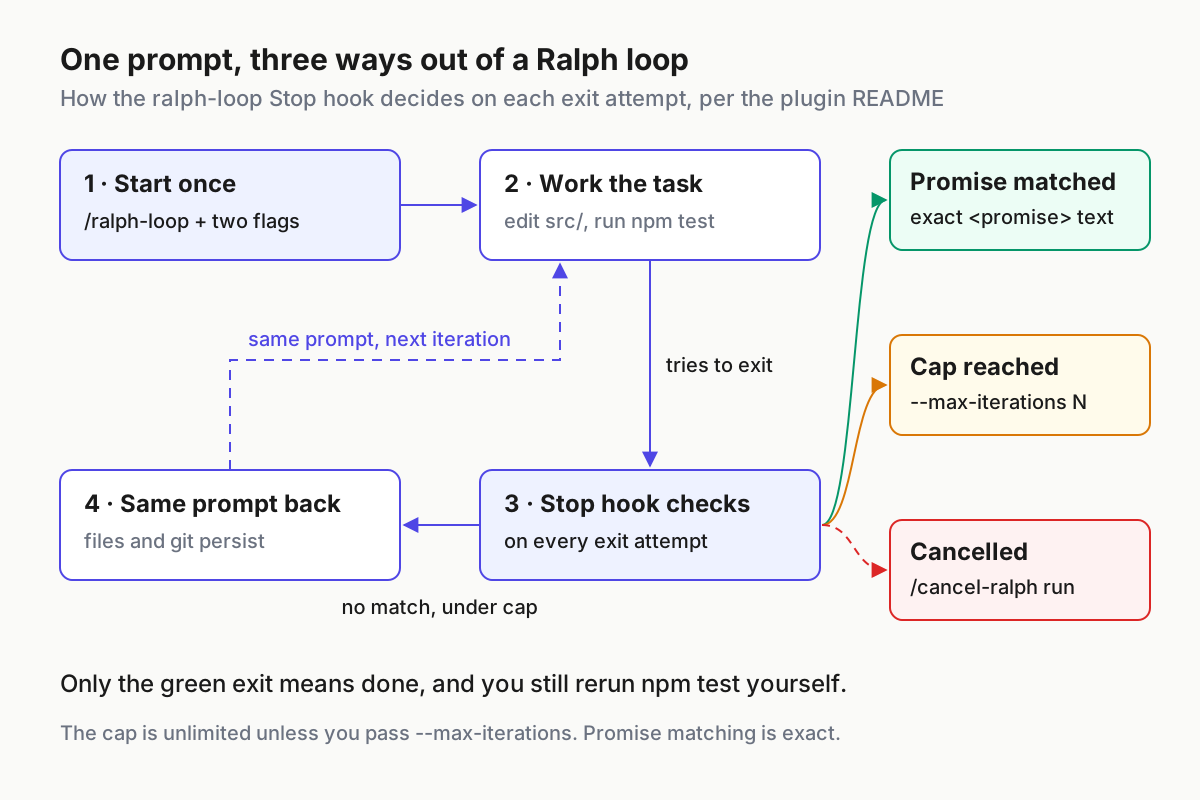
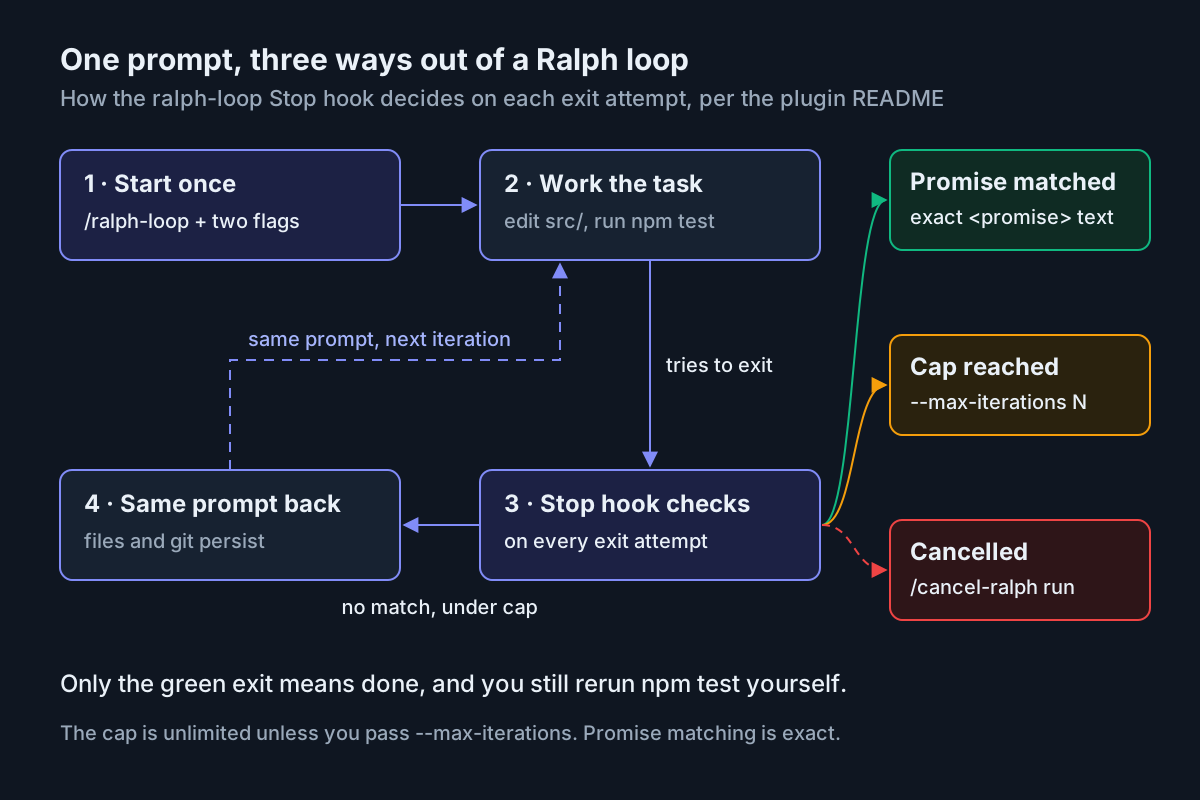
Read the diagram as a contract. Only one exit means success. The other two, the cap and a manual cancel, mean “stop and look”, and neither tells you whether the tests pass. That’s why the last step of this guide is always a test run you do yourself, outside the loop.
Prerequisites for task:ralph-tests-green-01
The example case is deliberately small so you can see every moving part. It uses an illustrative Node project called calc-service. Its tests/calc.test.js has three failing tests: add() handles negative numbers, divide() throws on zero and round() keeps two decimals. Swap in your own failing suite and the procedure stays the same.
- [ ] Claude Code running in an interactive terminal session. According to the plugin troubleshooting guide,
/pluginreplies “/plugin isn’t available in this environment” inclaude -p, the Agent SDK, the desktop app’s Code tab and the VS Code extension panel. Do the install from a terminal. - [ ] A git repository with at least one commit, because the worktree in Step 2 is created from an existing commit.
- [ ] A deterministic test command. Run
npm testtwice and check that the same three tests fail both times. - [ ] A clean working tree, so the only changes you review later come from the loop.
- [ ] A record of your current usage, taken with
/usagebefore you start. - [ ] On Windows, Git for Windows installed. The README says the stop hook is a bash script that needs it.
Determinism matters more than it looks. A flaky test can pass once by luck, and a loop told to print its promise when npm test exits 0 will take that lucky pass at face value. Stabilize flaky tests first, or keep them out of the loop’s scope.
Step 1: Install ralph-loop and confirm it loaded
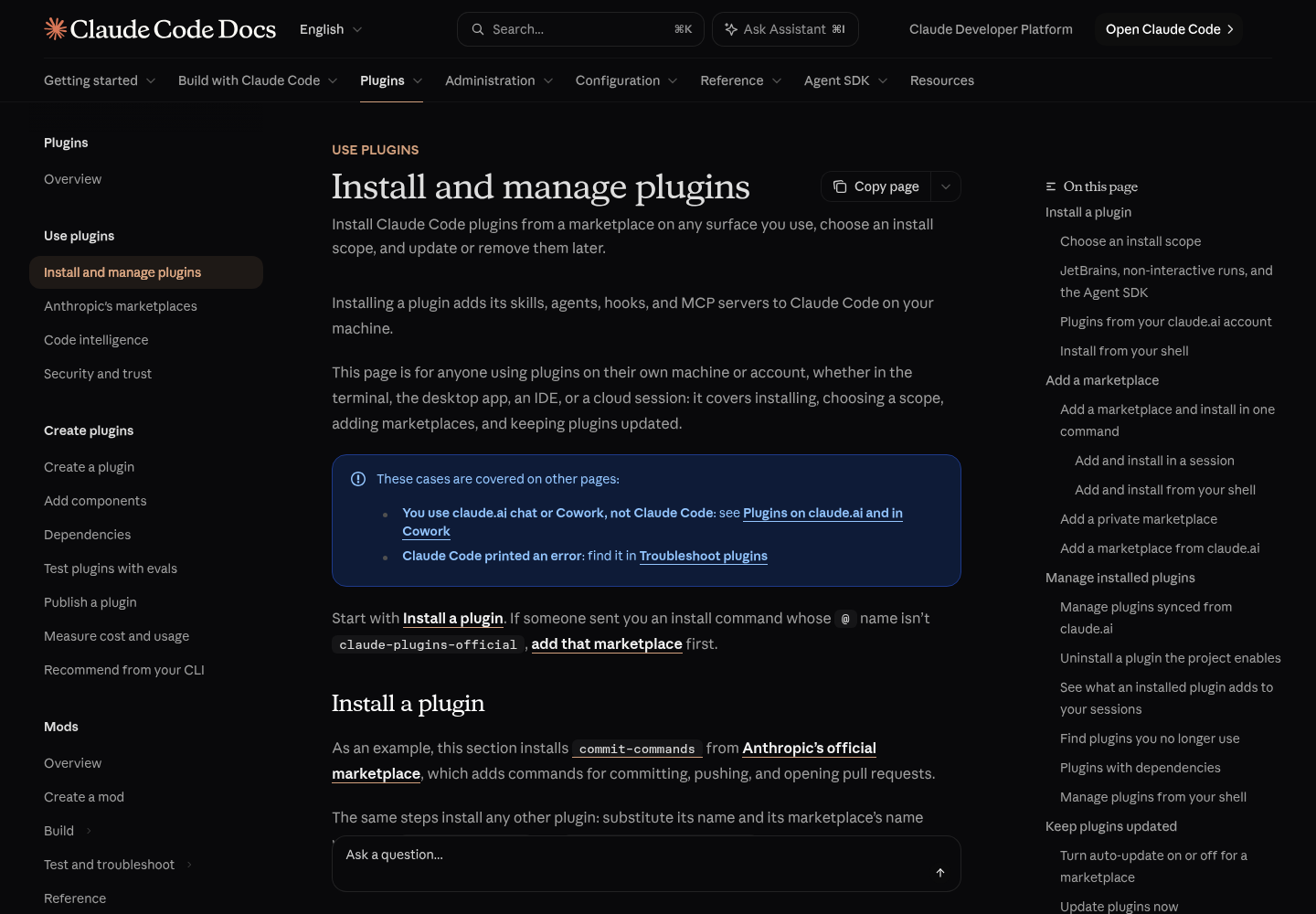
The install guide notes that running /plugin install inside a session doesn’t install the plugin right away. It opens the plugin’s details so you can review what it adds and choose a scope first.
/plugin install ralph-loop@claude-plugins-official
- Start Claude Code with
claudein your main checkout and run the install command above. - Read the details pane. Will install lists the commands, hooks and other parts the plugin adds. For plugins in Anthropic’s official marketplace, Context cost shows two token estimates: one for every turn and one for when the plugin’s skills are invoked. A plugin can run hooks, so read this before you accept.
- Choose a scope. User scope turns the plugin on in every project on the machine and records it in
~/.claude/settings.json. Local scope turns it on for this repository only, through.claude/settings.local.json. The docs don’t say how a local-scope entry carries over to a separate worktree checkout. For a first run, pick user scope and disable the plugin afterwards, or pick local scope and check it in Step 2. - Read the last sentence of the install summary. “Plugin is now active.” means you can use it now. “Run /reload-plugins to apply.” means Claude Code will run the reload when the panel closes. If it warns that the reload would invalidate the prompt cache, run
/reload-plugins --force. That activates the plugin at the cost of one uncached request. - Type
/ralphand look at the menu. The README calls the command/ralph-loop. The install guide says plugin skills appear in the form/<plugin>:<skill>, and the X tester used/ralph-loop:ralph-loop. Use whichever form your menu shows./cancel-ralphshould appear too. - In a separate shell, run the two commands below and check the entry.
claude plugin list
claude plugin details ralph-loop
claude plugin list prints the plugin with Version, Scope and Status lines. You want to see Status: ✔ enabled. claude plugin details prints an Always-on line: the number of tokens the plugin adds to every session where it’s enabled. Write that number down. It’s part of the run’s cost before the loop even starts.
If the install reports Marketplace "claude-plugins-official" not found, the official marketplace was never registered on this machine. That happens if you’ve only used the VS Code extension, if a policy blocks the source, or if CLAUDE_CODE_DISABLE_OFFICIAL_MARKETPLACE_AUTOINSTALL is set. Add it with /plugin marketplace add anthropics/claude-plugins-official, wait for Successfully added marketplace: claude-plugins-official, then run the install again.
Step 2: Open a disposable worktree
A Ralph loop edits files without asking you between iterations, so give it a checkout you can throw away. The common workflows page describes worktrees as separate checkouts, each on its own branch and created from an existing commit, so parallel edits don’t collide.
- From the repository root in your shell, start a worktree session with
claude --worktree ralph-tests-green-01. Expected result: a new Claude Code session opens in an isolated checkout on its own branch. - If it fails with
Failed to resolve base branch "HEAD": git rev-parse failed, the repository has no commits yet. Make a commit, then try again. - In the new session, type
/ralphagain. If the loop command is missing, the plugin was installed at a scope this checkout doesn’t see. Runclaude plugin listfrom the worktree directory, and reinstall at user scope if needed. - Record the baseline. Run
npm testin a terminal at the worktree path, and write down the three failing test names and the non-zero exit code. You’ll compare against this list in Step 6.
The worktree is also your cheapest rollback. If the loop does something you don’t like, you discard the checkout and your main branch never sees the change.
Step 3: Write a prompt whose promise can only be true once
Because the prompt never changes, it has to carry the task, the boundaries, the definition of done and the way out when Claude gets stuck. Here’s the prompt for task:ralph-tests-green-01, laid out for reading:
Make the failing tests in this repository pass.
Test command: npm test
Do not edit, delete, skip or rename anything under tests/. Change source files only.
After each change, run npm test and read the full output.
When npm test exits 0 with no failing tests, output exactly
<promise>TESTS GREEN</promise>
on its own line and write nothing after it.
Never output that line for any other reason.
If you fail on the same test several times in a row, write BLOCKED.md listing
the failing test, what you tried and what you suspect, and do not output the promise.
Each line has a job:
- Name the command exactly. “Run the tests” invites Claude to pick a subset.
npm testis the same check you’ll run in Step 6. - Fence off the tests folder. The fastest way to make a suite green is to weaken it. Saying so in the prompt lowers the risk, and the diff check in Step 6 catches it if it happens anyway. If your team already maintains permission deny rules, a rule for
tests/is stronger than a sentence, but this guide doesn’t reproduce that syntax. - Use the tag form from the README. Every README example asks for
<promise>COMPLETE</promise>and passesCOMPLETEas the flag value. Copy that shape exactly, withTESTS GREENin place ofCOMPLETE. - Forbid the promise everywhere else. Exact matching can’t tell a real promise from a quoted one. If Claude explains its plan and quotes the promise text, it shouldn’t print the tagged line.
- Give the stuck path a file to write, not a promise to print. The README’s escape-hatch advice is to have the agent write down what’s blocking progress, what it tried and what to try next. Since the promise can only mean one thing, the blocked path must not print it. The cost is that a blocked run keeps going until it hits the cap, which is exactly why the cap exists.
- Ask for the full output. Claude needs the failure messages to fix the failures. If the output is huge, the cost page shows a hook that trims test output. Consider adding it once the basic loop works.
The README’s sample prompt also suggests telling the agent what to do “after 15 iterations”. Treat that kind of hint as guidance only. The prompt is identical every time, so the plugin’s iteration counter actually stops the run, not the model’s sense of how long it has been working. For more on writing finish lines a machine can prove, see the finish-line guide.
Step 4: Start the loop with a hard cap of 15
Send the prompt as one quoted argument, followed by both flags. The README’s usage line is /ralph-loop "<prompt>" --max-iterations <n> --completion-promise "<text>". Avoid double quotes inside the prompt so the argument stays in one piece.
/ralph-loop "Make the failing tests in this repository pass. Test command: npm test. Do not edit, delete, skip or rename anything under tests/. Change source files only. After each change, run npm test and read the full output. When npm test exits 0 with no failing tests, output exactly <promise>TESTS GREEN</promise> on its own line and write nothing after it. Never output that line for any other reason. If you fail on the same test several times in a row, write BLOCKED.md listing the failing test, what you tried and what you suspect, and do not output the promise." --max-iterations 15 --completion-promise "TESTS GREEN"
If your menu showed the namespaced form, start the line with /ralph-loop:ralph-loop instead.
Why 15? The README’s own examples use 20 for a feature attempt and 50 for building a REST API with tests. Three failing tests in one module is a smaller job. A reasonable illustrative estimate is one or two iterations per test plus room for a wrong turn or two. That comes in under 10, so 15 leaves headroom without leaving the run open-ended. At the other extreme, a cap of 2 is too tight to tell you anything. When the run stops, you can’t tell success from running out of iterations, which is exactly what happened to the X tester.
- Paste the command and send it. Illustrative expected result: Claude reads
tests/calc.test.js, runsnpm test, sees three failures and edits files undersrc/. - Watch the first exit attempt. When Claude tries to end its turn without printing the promise, the work picks up again on the same task with no input from you. That’s the hook doing its job.
- Stop typing in this session. Anything you add becomes context for later iterations, and the loop is designed to run on the original prompt alone.
Step 5: Watch the run and your usage
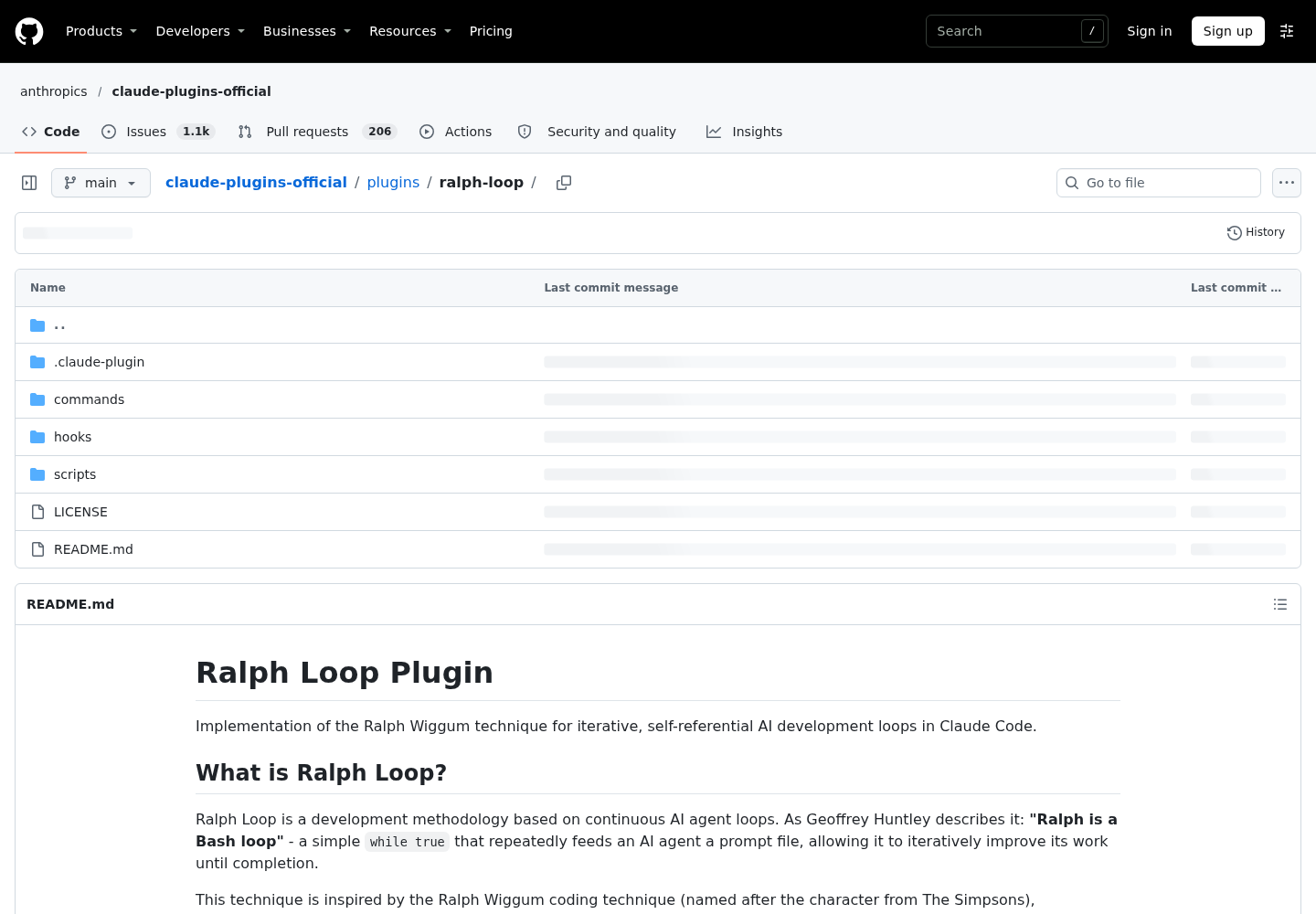
The README documents the commands and flags. It doesn’t say where the hook stores its iteration count or which helper tools the script calls. The plugin folder on GitHub has .claude-plugin, commands, hooks and scripts directories. When you need those internals, read hooks/stop-hook.sh in your installed copy rather than guessing.
What you can watch reliably is the transcript and your usage. The cost guide explains why a loop like this gets more expensive as it runs. Claude Code sends your full conversation with every request, and each tool use sends another request that carries the results. A Ralph loop piles up every iteration’s test output and edits in one session, so iteration 12 costs more than iteration 2 even when it does the same amount of work.
- [ ] Before you start, run
/usageand note where your plan usage bars sit. If you pay per API token, note the Total cost line in the Session block instead. - [ ] During the run, glance at the line beside the spinner. Its token count is a live, rough count of the output the current turn is producing, and it resets each turn.
- [ ] Check the test counts in each iteration. Three failures dropping to two, then one, is healthy. The same failure three iterations in a row with no file changes is a stall.
- [ ] If
BLOCKED.mdappears, stop the run with/cancel-ralphand read the file. The remaining iterations won’t change the outcome. - [ ] After the run, run
/usageagain. On Pro, Max, Ultra, Team and Enterprise plans, its breakdown attributes recent usage to skills, subagents, plugins and MCP servers, so you can see the plugin’s share.
For a sense of scale, Anthropic’s cost page reports that enterprise deployments average around $13 per developer per active day, and 90% of users stay under $30. A long loop can take a large slice of a day like that on its own. Other sessions you run in parallel on the same login draw on the same window. The shared usage window guide covers how to keep those sessions from starving each other, and the context window explainer covers why long sessions fill up.
Set your stop rule before you start, not when the bars look alarming. An illustrative rule for this case: cancel if usage moves by more than a quarter of what’s left in your current usage window, or if two iterations in a row change no files.
Step 6: Verify green yourself before anything merges
A promise is a claim, and your own test run is the evidence. Run these commands from a terminal at the worktree path:
npm test
echo $?
git status --short
git diff --stat
git diff --stat -- tests/
npm testshould report the three tests from your baseline list as passing, andecho $?should print0.git status --shortshould show only the source files you expect, and noBLOCKED.md.git diff --stat -- tests/must print nothing. Any output here means the tests changed. Treat the run as failed even if they pass.- Read the full source diff. Look for code that special-cases the exact inputs your tests use, swallowed exceptions or commented-out logic. Green tests prove the tests pass, not that the fix is right.
- Commit on the worktree branch and open a pull request through your normal review process. The merge gates guide covers what an unattended change should pass before it lands.
The worked run, row by row
This table is the complete illustrative run for one case. Each row gives the input, the exact action and what you should see. None of these rows was captured from a real session. Use them as the observations to compare your own run against.
| Input | Action | Expected result (illustrative) |
|---|---|---|
| task:ralph-tests-green-01, main checkout of calc-service, interactive Claude Code session | /plugin install ralph-loop@claude-plugins-official, then choose user scope |
Details pane lists the plugin’s commands and hook; the summary ends with Plugin is now active. or Run /reload-plugins to apply. |
| task:ralph-tests-green-01, shell at the calc-service repository root | claude plugin list |
An entry for ralph-loop@claude-plugins-official with Version, Scope: user and Status: ✔ enabled |
| task:ralph-tests-green-01, repository with at least one commit | claude --worktree ralph-tests-green-01 |
New session in its own checkout and branch; typing /ralph offers the loop command and /cancel-ralph |
| task:ralph-tests-green-01 baseline in the worktree | npm test |
Three failures: add() handles negative numbers, divide() throws on zero, round() keeps two decimals; non-zero exit |
| task:ralph-tests-green-01 prompt from Step 3 | /ralph-loop "..." --max-iterations 15 --completion-promise "TESTS GREEN" |
Iteration 1 starts with no further input; Claude runs npm test and edits files under src/ only |
| task:ralph-tests-green-01 at iteration 4 of 15 | No action; watch the spinner line and test counts | Failing count falls from 3 toward 0; tests/ untouched; work resumes after each exit attempt |
| task:ralph-tests-green-01 at iteration 6, npm test exits 0 | Claude prints <promise>TESTS GREEN</promise> |
The hook lets the session end; no iteration 7 starts |
| task:ralph-tests-green-01 after the loop ends | npm test, echo $?, git diff --stat -- tests/ |
Three passing tests, exit code 0, empty diff for tests/ |
| task:ralph-tests-green-01 failure branch at iteration 15 | None; the cap ends the loop without the promise | BLOCKED.md present or tests still failing; read it before starting a new run |
| task:ralph-tests-green-01 failure branch, stall at iteration 9 | /cancel-ralph |
The active loop is cancelled; the next exit attempt ends the turn normally |
If your run departs from a row, the next section maps the most common problems to a fix.
When the loop will not stop, or stops too early
| Symptom | Likely cause | Fix |
|---|---|---|
| Tests are green but iterations keep coming | The printed promise didn’t match exactly: missing tags, different wording or extra text | Scroll back to the exact line Claude printed, cancel with /cancel-ralph, check with Step 6, then tighten the promise wording |
| Loop ends on iteration 1 and tests still fail | The prompt let Claude print the promise before npm test exited 0 |
Rerun Step 6 to confirm, then rewrite the promise line so it depends only on the exit code |
Run hits 15 with BLOCKED.md present |
Claude is stuck, and the blocked path deliberately holds back the promise | Read BLOCKED.md, fix the blocker or narrow the task, then start a new loop |
Stop hook error: Failed with non-blocking status code: ... |
The hook’s command ran and failed, often because a tool is missing from PATH | Read the stderr in the notice, install the missing tool, then restart claude from a terminal where that tool is on PATH |
| The error shows the plugin path cut off at a space | ${CLAUDE_PLUGIN_ROOT} is unquoted in a path that contains a space |
Wrap the variable in double quotes in the hook command |
Failed to run: Plugin directory does not exist |
The session loaded the hooks from a folder that’s gone, for example after an update | Run /reload-plugins and read its output |
| The loop never repeats; Claude just stops | The hook isn’t firing | Open the plugin’s details in /plugin. A note that begins Its hooks.json hooks do not run means another plugin with the same name registered its hooks instead |
Files under tests/ changed |
The agent weakened the suite to make it pass | Discard the worktree, restate the boundary in the prompt and consider a permission deny rule |
| Usage is climbing fast and later iterations are slow | Context from every iteration piles up in one session | Cancel, review progress, then start a new loop with the same prompt in a fresh session |
Two of these deserve a closer look. A Stop hook error notice means the hook’s command ran and failed. The troubleshooting page’s example is /bin/sh: node: command not found, and its fix applies to any helper the script needs: install the helper and make sure it’s on the PATH of the terminal you start claude from. The second is the run that never ends. Without the flag, the default cap is unlimited, and /cancel-ralph is the only way out the README documents.
Windows: point the Stop hook at Git Bash
The README flags one Windows-specific failure. The hook is a bash script, and on Windows the bash command can resolve to WSL bash instead of Git Bash. The hook then fails with errors like wsl: Unknown key 'automount.crossDistro' or execvpe(/bin/bash) failed: No such file or directory.
"command": "\"C:/Program Files/Git/bin/bash.exe\" ${CLAUDE_PLUGIN_ROOT}/hooks/stop-hook.sh"
- Install Git for Windows if it’s missing.
- Find the cached plugin’s
hooks/hooks.json. The README gives the location as~/.claude/plugins/cache/claude-plugins-official/ralph-wiggum/<hash>/hooks/hooks.json. That folder name doesn’t match the current plugin name, so ifralph-wiggumisn’t there, look for aralph-loopfolder in the same cache directory. - Change the hook’s command to call Git Bash explicitly, using the README’s line above.
- Point it at
Git/bin/bash.exe, the wrapper that sets up PATH correctly. Don’t useGit/usr/bin/bash.exe, which is raw MinGW bash without those utilities on PATH. - If your user profile path contains a space, also wrap
${CLAUDE_PLUGIN_ROOT}/hooks/stop-hook.shin escaped double quotes. The troubleshooting page warns that an unquoted${CLAUDE_PLUGIN_ROOT}breaks at the first space. - Run
/reload-plugins, then start a short test loop with--max-iterations 3to confirm the hook fires.
Two caveats apply. First, the troubleshooting page says that when Git Bash is installed, a shell-form hook runs through Git Bash by default. Claude Code also passes ${CLAUDE_PLUGIN_ROOT} with forward slashes so bash doesn’t read backslashes as escapes. You may not need the edit at all. Second, the install guide says auto-update is on by default for claude-plugins-official, which refreshes the on-disk copies of plugins you installed from it. An update can replace your edited hooks.json, so check the file again after a Plugin updated notice.
Roll back cleanly
How you recover depends on how far the run got. Work down this list and stop at the first step that leaves you where you want to be.
- Stop the loop. Run
/cancel-ralphin the looping session. The README documents it as cancelling the active Ralph loop. - Undo edits inside the session if you want to keep the worktree. The cost page notes that
/rewind, or pressing Escape twice, restores the conversation and code to an earlier checkpoint. The checkpoints guide explains what checkpoints do and don’t track. - Discard the worktree. Exit the session and remove the checkout using the cleanup steps on Claude Code’s Worktrees page. Your main branch never received the changes.
- Turn the plugin off without removing it. Run the first command below from your shell. You can turn it back on later with
claude plugin enable. - Remove the plugin entirely with the uninstall command below. Uninstall acts on user scope by default. Add
--scope localif you installed it for this repository only.
claude plugin disable ralph-loop@claude-plugins-official
claude plugin uninstall ralph-loop@claude-plugins-official
After step 5, claude plugin list should no longer show the entry, and /ralph should offer nothing in a new session.
When a Ralph loop helps and when it burns tokens
The README’s own guidance is blunt. Ralph suits well-defined tasks with clear success criteria and automatic verification. It doesn’t suit judgment calls, one-shot operations, unclear criteria or production debugging. This table applies that guidance to common requests.
| Request | Use a Ralph loop? | Reason |
|---|---|---|
Make a failing suite pass with a deterministic npm test |
Yes, with a cap of 10 to 20 | Checked automatically: the exit code is the promise condition |
| Clear linter errors in one package | Yes, with a cap of about 10 | Linters are automatic verification, which the README lists as a good fit |
| Greenfield prototype with tests written first | Yes, with phases in the prompt | The README suits greenfield work you can walk away from |
| Choose an API shape or a UI direction | No | Needs human judgment and design decisions |
| Rename one function across the repo | No | A one-shot operation that a single turn handles |
| “Make the codebase better” | No | No checkable criteria, so no honest promise |
| A production incident | No | The README recommends targeted debugging instead |
| A suite with flaky tests | Not yet | A lucky pass can satisfy the promise, so stabilize the tests first |
The common thread is the check. If you can’t name the command whose exit code proves the work is done, you can’t write a promise that means anything. The loop will then run to its cap, or forever if you didn’t set one. For loops triggered by CI rather than by you, the CI fix loop guards guide covers retry caps at the pipeline level. The AgentOps guide places runs like this one in the wider context of operating several agents at once.
Sources
- aiparabellum on X: Ralph Loop plugin test report, November 8, 2026
- Ralph Loop Plugin README, anthropics/claude-plugins-official
- ralph-loop plugin directory, anthropics/claude-plugins-official
- Install and manage plugins, Claude Code Docs
- Troubleshoot plugins, Claude Code Docs
- Manage costs effectively, Claude Code Docs
- Common workflows, Claude Code Docs