Claude Code GraphQL Setup (and Codex): Install Apollo Skills, Run Apollo MCP Server Read-Only, and Gate Mutations
Claude Code GraphQL: install Apollo's skills plugin, run Apollo MCP Server with mutation_mode none, validate a named query, and gate one reviewed mutation.

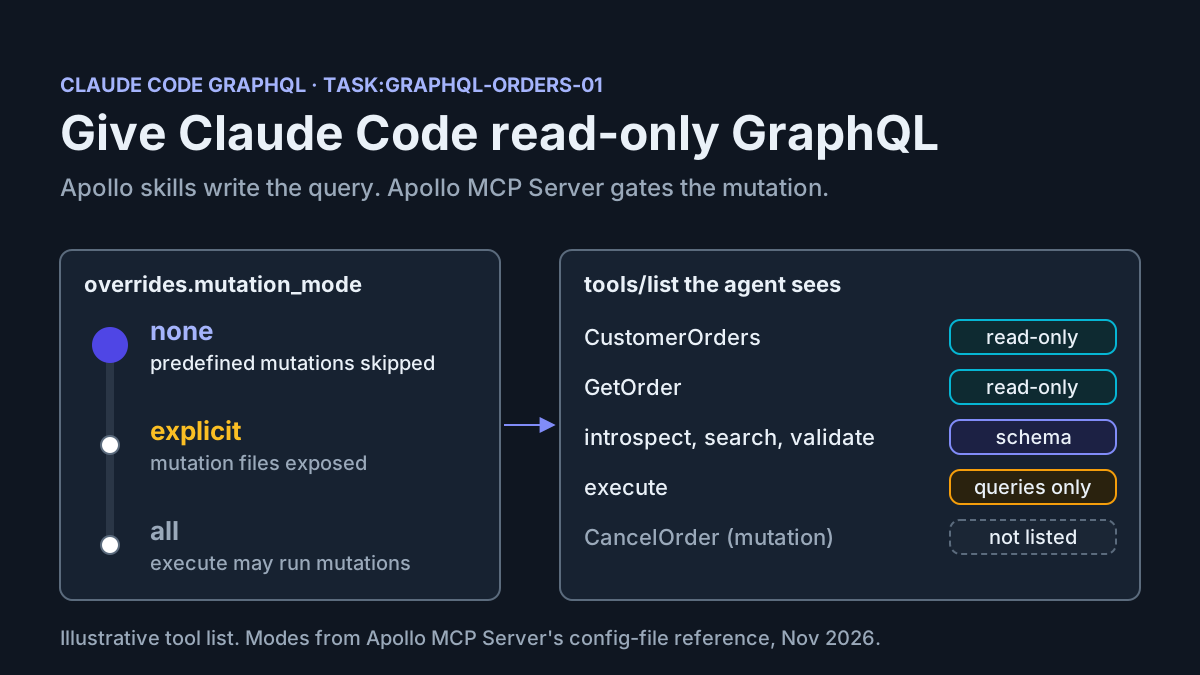
Claude Code GraphQL sessions usually fail in one of three ways. The agent writes an anonymous query with an ID pasted into the string. It invents a field your schema never had. Or you ask it to look at an order and it reaches for a mutation. A read-only database role fixes the equivalent problem for SQL agents, but it doesn’t help here. In GraphQL, writes happen inside resolvers, and at the agent boundary you control one thing: which operation documents the agent may send.
This tutorial is for a developer who maintains a small GraphQL API, whether on Apollo Server or any spec-compliant endpoint, and wants Claude Code (plus a short note for Codex) to write operations against it without being able to change data by accident. By the end you will have:
- Apollo’s agent skills installed as the
apollo-skillsClaude Code plugin and invoked through its namespaced slash commands. - Apollo MCP Server running locally with
mutation_mode: none. It exposes two reviewed query operations plus theintrospect,searchandvalidatetools. - A named query that uses variables, written by the agent and accepted by
validate. - One refused ad hoc mutation, followed by exactly one reviewed mutation exposed with
mutation_mode: explicit.
Everything runs against one illustrative case, task:graphql-orders-01: a two-type Order and Customer schema served at http://localhost:4000/. Commands and configuration keys come from Apollo’s and Anthropic’s documentation. Outputs described as expected observations are illustrative. None of them was captured from a test run.
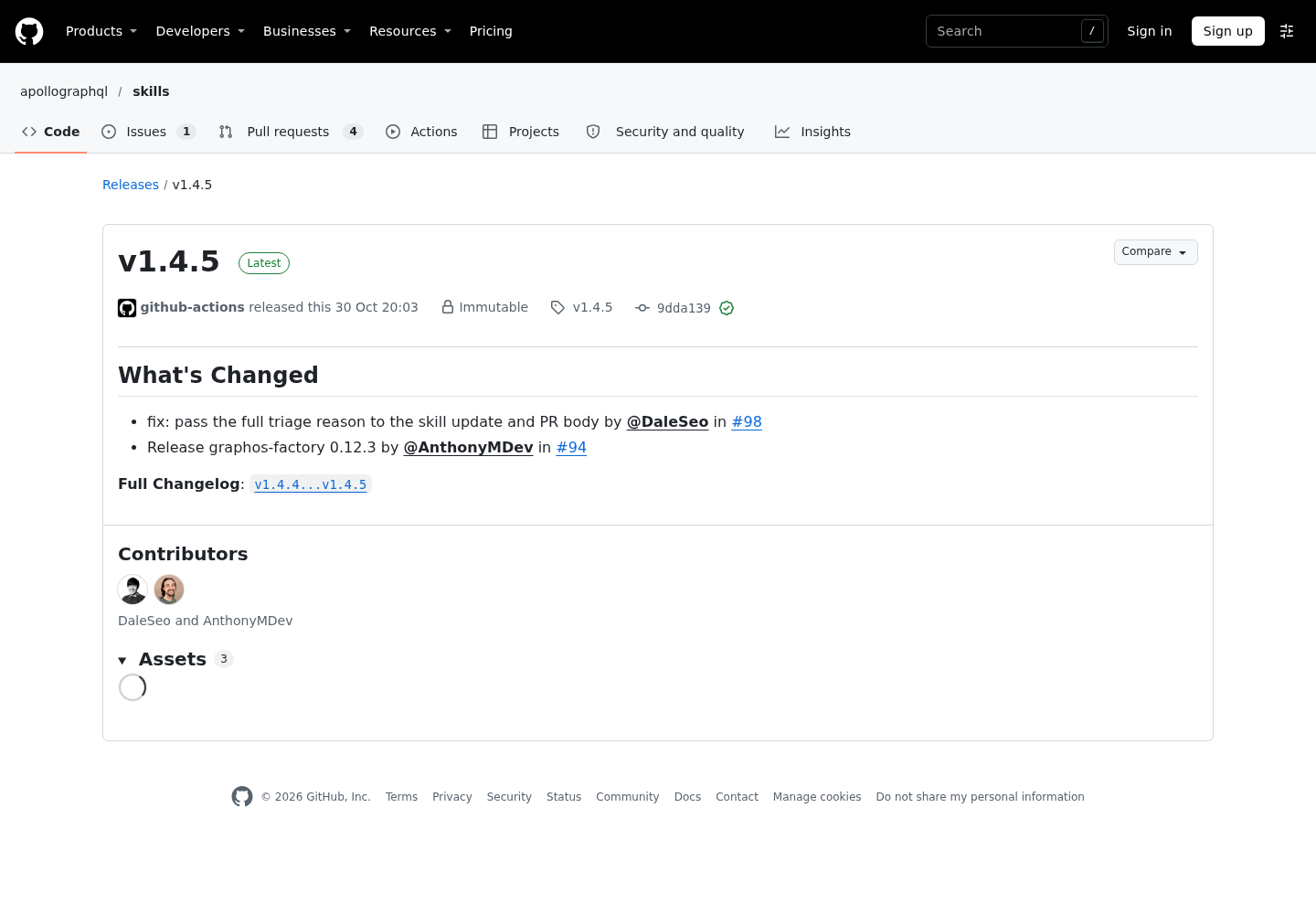
The news hook is small. Apollo’s apollographql/skills repository published release v1.4.5 on October 30, 2026, shipping graphos-factory 0.12.3 and a fix that passes the full triage reason into automated skill-update pull requests. It changes nothing in this guide. What it does show is how often the skills line moves, so the steps below treat the plugin as something you install deliberately, inspect, and can remove.
Why skills and an MCP server, not one or the other
Apollo describes the split in its February 2026 post introducing Apollo Skills: skills provide knowledge, and MCP provides capabilities. The graphql-operations skill teaches the agent to write query GetUser($id: ID!) rather than { user(id: "123") }. Named operations show up in server logs and traces, variables make an operation reusable and keep values out of the document text, and selecting id lets client caches update the result. Apollo MCP Server gives the agent tools that touch your real schema: search to find types, validate to check an operation, and operation tools that run against the endpoint.
You need both for a safe loop. Skills on their own produce well-shaped queries against a schema the agent is guessing at. The server on its own gives the agent live tools but no conventions. And keep the order of authority straight: the server’s controls decide what may run, not the skills. A skill is guidance the model reads. mutation_mode is a gate the server enforces whatever the model decides.
That difference shapes the rest of this guide. Every safety property you rely on is set in a file the agent cannot edit: the server config and the operation documents. The skills improve the quality of what the agent proposes. The server decides what gets through.
Prerequisites and the example API
Check these before you start:
- [ ] Claude Code with plugin support, meaning
/pluginopens a panel. According to Anthropic’s plugin documentation, the one-step--marketplaceinstall shortcut needs v2.1.275 in a session or v2.1.292 from the shell. The two-step path below works on earlier versions. - [ ] Node.js, so
npxcan runmcp-remote, the bridge Apollo’s skill uses to register a Streamable HTTP server with Claude Code. - [ ] A GraphQL endpoint on your machine or a staging host whose data you can reset. Never point this exercise at production writes.
- [ ] Your schema as a file, or introspection access to export one.
- [ ] A machine that can run the Apollo MCP Server binary (macOS, Linux or Windows), or Docker.
The schema for task:graphql-orders-01 is deliberately tiny. Save it as schema.graphql in a new folder named graphql-agent/:
# schema.graphql — illustrative schema for task:graphql-orders-01
enum OrderStatus {
  PENDING
  SHIPPED
  CANCELLED
}

type Customer {
  id: ID!
  name: String!
  email: String
  orders: [Order!]!
}

type Order {
  id: ID!
  status: OrderStatus!
  totalCents: Int!
  customer: Customer!
}

type Query {
  order(id: ID!): Order
  ordersByCustomer(customerId: ID!, limit: Int! = 10): [Order!]!
}

type Mutation {
  cancelOrder(id: ID!): Order
}
The cancelOrder mutation is there so you have something to refuse and then, later, something to allow on purpose. Seed your test API with a customer c-1001 and a pending order o-2002. If your real API is larger, keep the same folder layout and swap in your schema file. None of the steps depend on the domain.
Step 1: Install the Apollo skills plugin in Claude Code
The apollographql/skills README documents a two-command install from Apollo’s own marketplace. Start Claude Code in the project folder, then:
- Add the marketplace with
/plugin marketplace add apollographql/skills. Claude Code printsSuccessfully added marketplace:followed by the name it registered. - Open the install with
/plugin install apollo-skills@apollo-marketplace. Inside a session this doesn’t install straight away. It opens the plugin’s details so you can review them and pick a scope. - Read the details pane. Its Will install list shows the commands, skills, hooks, and MCP or LSP servers the plugin adds. The repository root includes
.mcp.jsonand.lsp.jsonfiles, so check what this version declares before you accept. Anthropic’s docs point out that a plugin can run hooks and MCP servers. - Choose a scope. For this exercise, pick Install for you, in this repo only, which is local scope and writes to
.claude/settings.local.json. Project scope would turn the plugin on for everyone who works in the repository. - Read the last sentence of the install summary.
Plugin is now active.means you’re done.Run /reload-plugins to apply.means Claude Code will reload for you when the panel closes. - Type
/apollo-skills:and check that the list includes/apollo-skills:apollo-mcp-server,/apollo-skills:graphql-operationsand/apollo-skills:graphql-schema. From your shell,claude plugin listshould showapollo-skillswith Version, Scope and Status lines.
# Inside a Claude Code session (task:graphql-orders-01)
/plugin marketplace add apollographql/skills
/plugin install apollo-skills@apollo-marketplace

# Or both steps at once (Claude Code v2.1.275 or later in a session)
/plugin install apollo-skills --marketplace apollographql/skills

# From your shell, to confirm
claude plugin list
Three caveats before you continue. First, the Apollo marketplace is a third-party marketplace. Anthropic’s docs say auto-update is off by default for marketplaces other than the official ones, so update deliberately with claude plugin update apollo-skills@apollo-marketplace. Second, Apollo’s README states that the code in the repository is experimental and for reference purposes only, and isn’t supported in the same way as Apollo’s other official repositories. Treat the skills as good defaults that you review, not as policy. Third, read our plugin and MCP marketplace hygiene guide before you make any marketplace a team default.
The same plugin is also listed in Anthropic’s marketplace as Apollo Skills, which describes it as covering Apollo Client, Server, Federation, Connectors, Router, Rover CLI, iOS, Kotlin and the Apollo MCP server. Anthropic’s plugin docs say the Claude Code button on a marketplace listing copies a command of the form claude plugin install <name>@claude-plugins-official. Copy that command from the button rather than typing it, and install from one route only. Two routes give you two copies of the same skills under different marketplace suffixes, and you won’t know which copy answered.
Step 2: Write two named query operations
Apollo MCP Server turns each operation file into an MCP tool. According to Apollo’s Define MCP Tools page, an operation file holds a single named operation. The server stores that document apart from the model-facing tool metadata, and when the tool is called it sends the stored document upstream. Changing only the tool description doesn’t change what runs. These stored documents are the reviewed half of this setup.
- Create
operations/next toschema.graphql. - Save
operations/GetOrder.graphqlwith the content below. - Save
operations/CustomerOrders.graphqlwith the content below. - Create an empty
mutations-reviewed/folder. It stays out of the config until Step 6. - Review both files the way you’d review code. Each selection set is exactly what the agent will be able to read.
- Run both operations once yourself against the endpoint with
c-1001ando-2002, and confirm they return data.
# operations/GetOrder.graphql
"""
Get one order with its status, total and customer
"""
query GetOrder($id: ID!) {
  order(id: $id) {
    id
    status
    totalCents
    customer {
      id
      name
    }
  }
}
# operations/CustomerOrders.graphql
# List a customer's most recent orders
query CustomerOrders(
  # Customer ID, for example c-1001
  $customerId: ID!
  $limit: Int! = 10
) {
  ordersByCustomer(customerId: $customerId, limit: $limit) {
    id
    status
    totalCents
  }
}
A few details matter here. The triple-quoted description before GetOrder becomes the tool description. Apollo supports operation descriptions from the GraphQL September 2025 specification and strips them before sending, so your endpoint doesn’t need to understand that syntax. The # comment above $customerId sets that input property’s description, and it takes precedence over a description derived from the schema argument. Because $limit: Int! = 10 is non-null with a default, the generated input schema leaves it out of required, and omitting it applies the GraphQL default.
Step 6 in the list above is the one people skip. Apollo’s docs say the server doesn’t validate a predefined operation against the configured schema before exposing it as a tool, and the generated input schema guides clients without being enforced for predefined calls. A typo in a selection set still becomes a tool and only fails when someone calls it, at the upstream endpoint. Catch it now, not halfway through an agent session.
Step 3: Configure Apollo MCP Server with mutation_mode none
Install a pinned binary. Apollo’s run guide recommends installing a specific version for predictable behavior, and v2.1.0 is the current release in that guide.
- On macOS or Linux, run
curl -sSL https://mcp.apollo.dev/download/nix/v2.1.0 | sh. On Windows, runiwr 'https://mcp.apollo.dev/download/win/v2.1.0' | iex. If you prefer Docker, pullghcr.io/apollographql/apollo-mcp-server:v2.1.0instead. - Run
./apollo-mcp-server -Vand check that it reports the version you pinned. - Save the configuration below as
config.yamlingraphql-agent/. - Read it against the explanation that follows before you start anything.
# config.yaml — Apollo MCP Server for task:graphql-orders-01
endpoint: http://localhost:4000/
transport:
  type: streamable_http
  address: 127.0.0.1
  port: 8000
  path: /mcp
schema:
  source: local
  path: ./schema.graphql
operations:
  source: local
  paths:
    - ./operations/
introspection:
  introspect:
    enabled: true
    minify: true
  search:
    enabled: true
    minify: true
  validate:
    enabled: true
  execute:
    enabled: true   # temporary: only for the refusal test in Step 5
overrides:
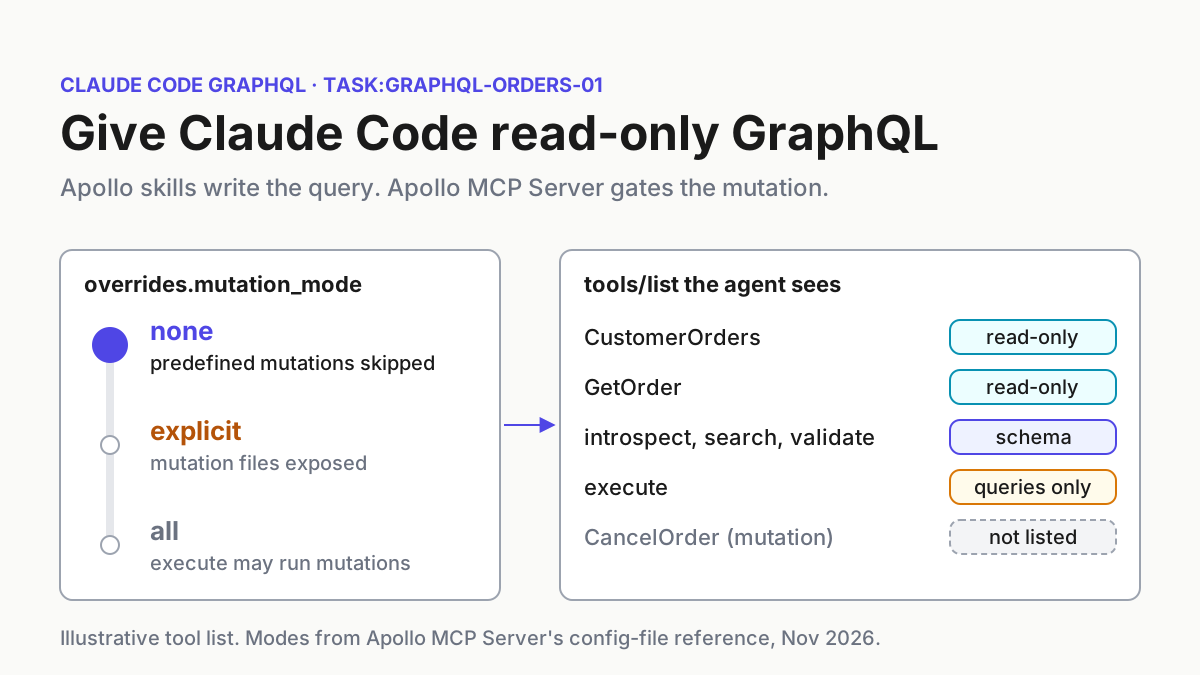
  mutation_mode: none
Here’s why each key is there, checked against the config-file reference:
endpointdefaults tohttp://localhost:4000/. Writing it out means a wrong port shows up in review.transportdefaults tostdio. Streamable HTTP on127.0.0.1:8000/mcpmatches the defaults in Apollo’s apollo-mcp-server skill and lets several clients share one server process.schema.sourcedefaults touplink, which needs a GraphOS key and graph reference. Withoutsource: local, a plain local setup gets no schema.operations.source: localwith a directory path loads every.graphqlfile in it and reloads when files are added, changed or removed.- Every introspection tool defaults to
false. Enablingintrospect,searchandvalidatelets the agent read the schema, andminify: truereturns Apollo’s compact notation to save context. execute.enabled: trueis temporary. You need it for the refusal test in Step 5. The decision section explains why you turn it off afterwards.overrides.mutation_mode: noneis already the default. Write it anyway, so the intent survives the next person who copies this file.
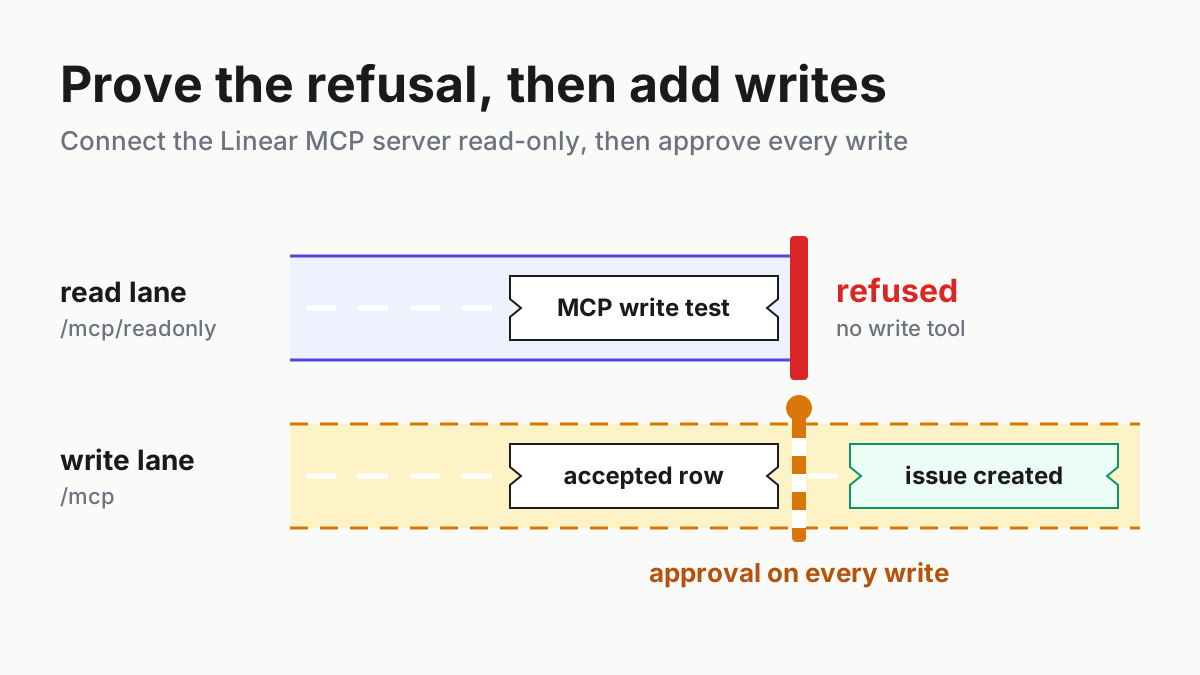
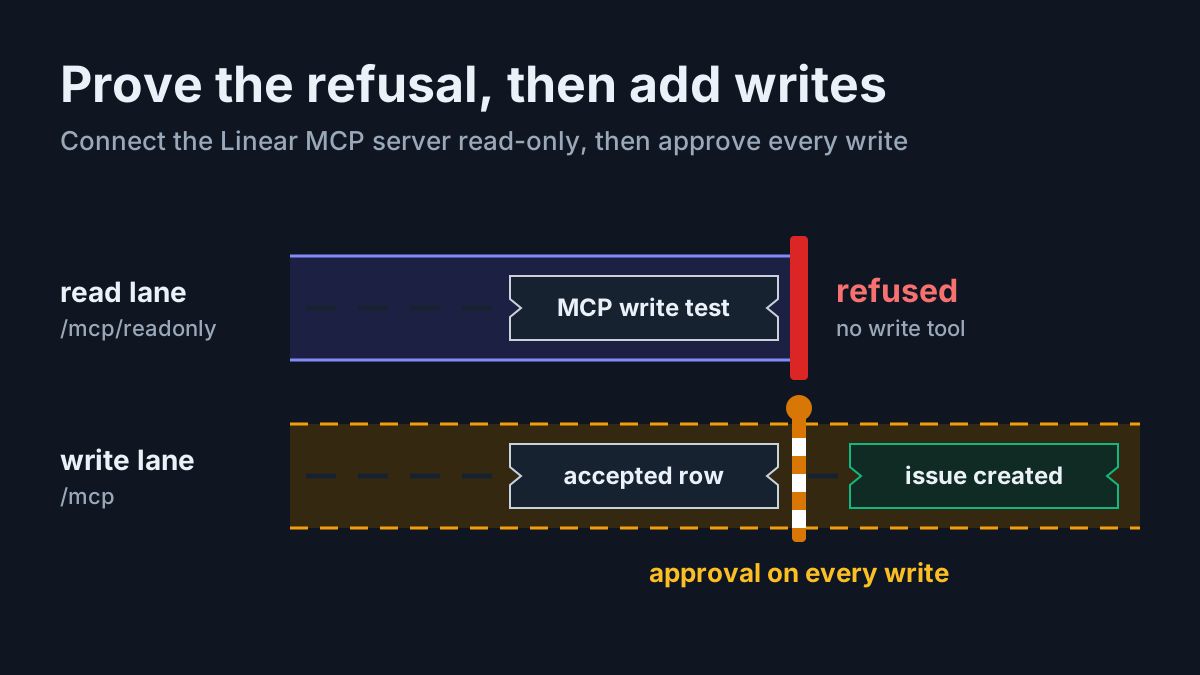
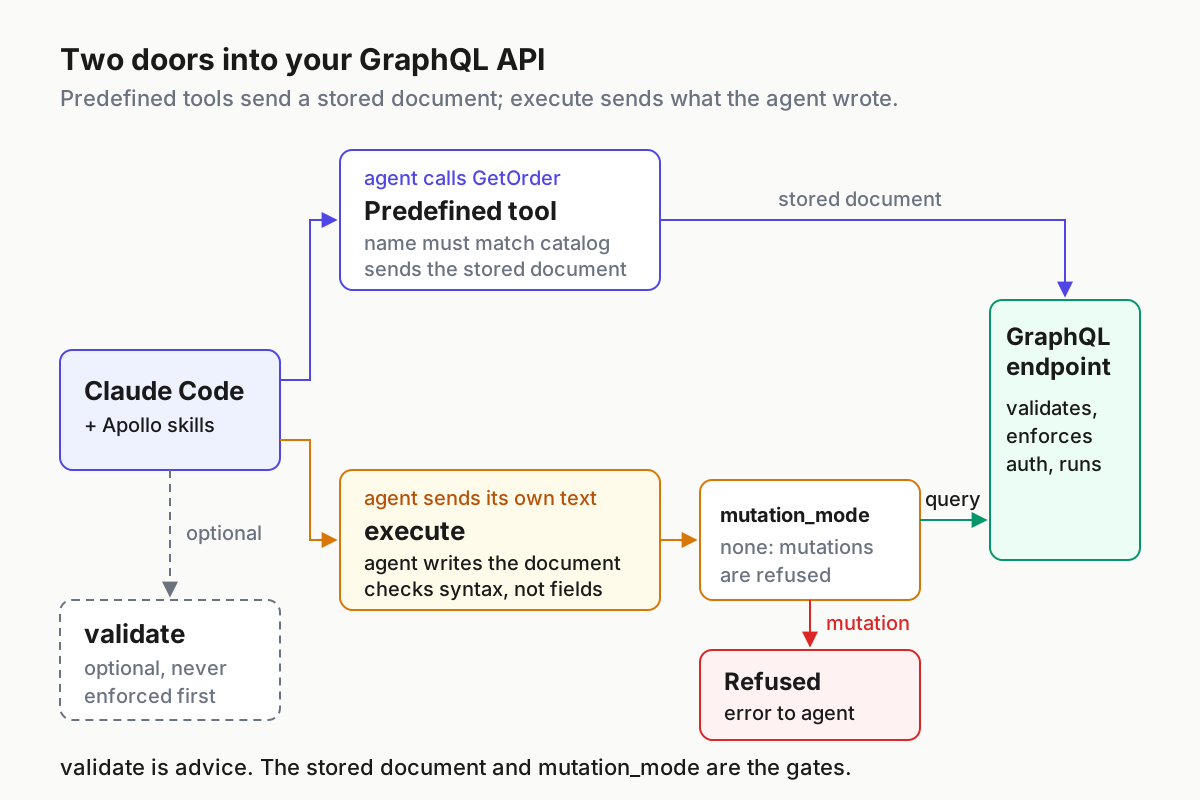
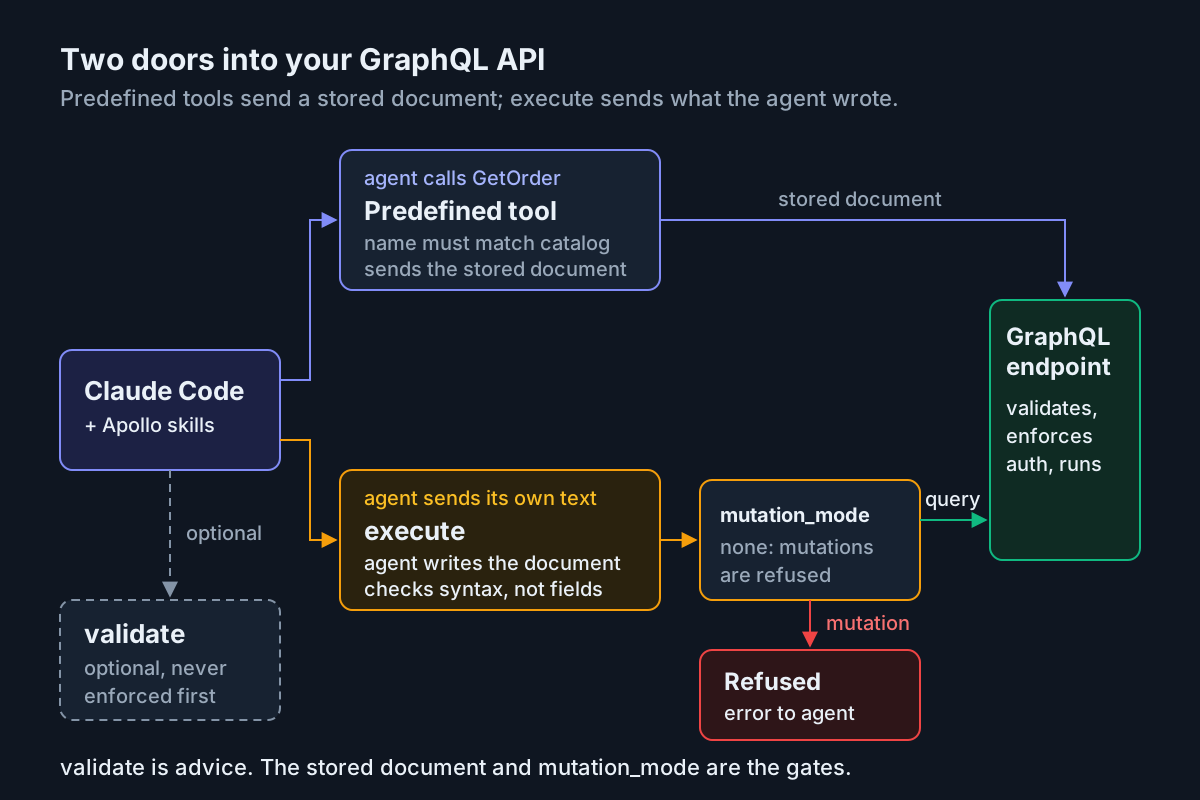
Under none, predefined queries are exposed, predefined mutations are skipped, ad hoc queries through execute are allowed, and ad hoc mutations are rejected. Subscriptions never become tools, and execute rejects them in every mode. The chart sets out the whole matrix.
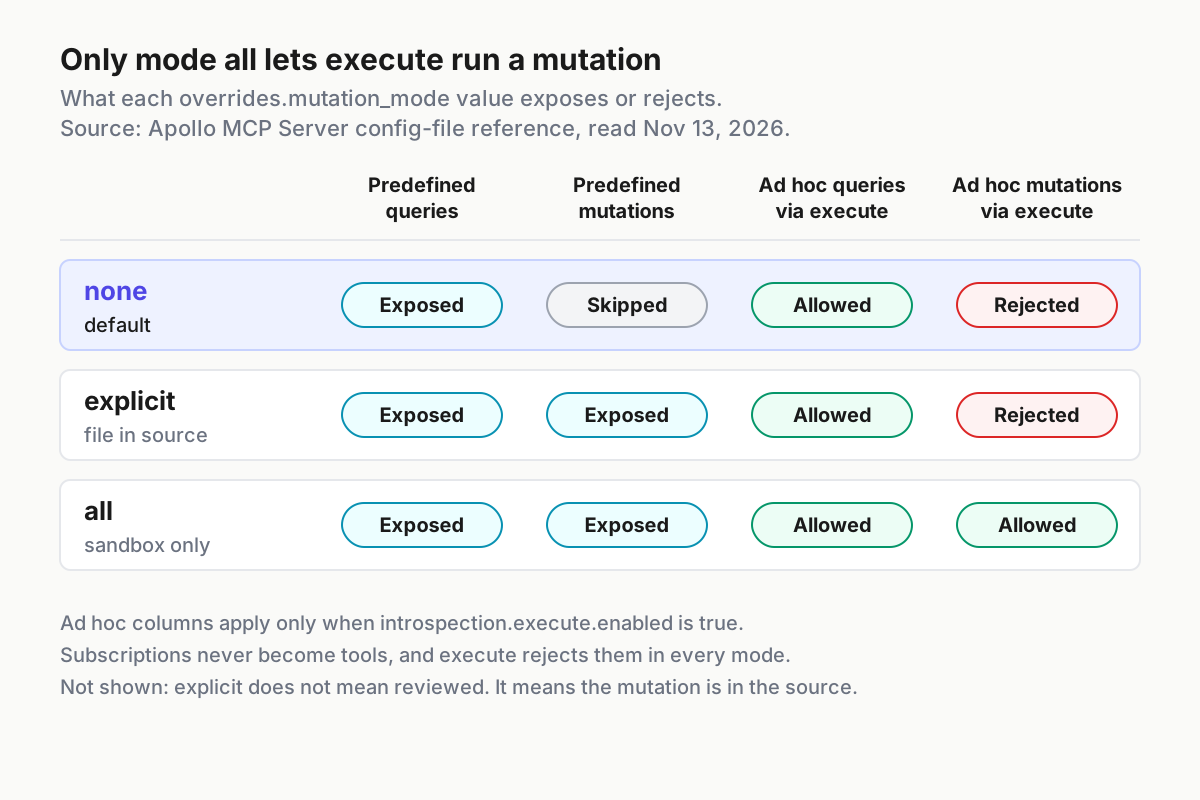
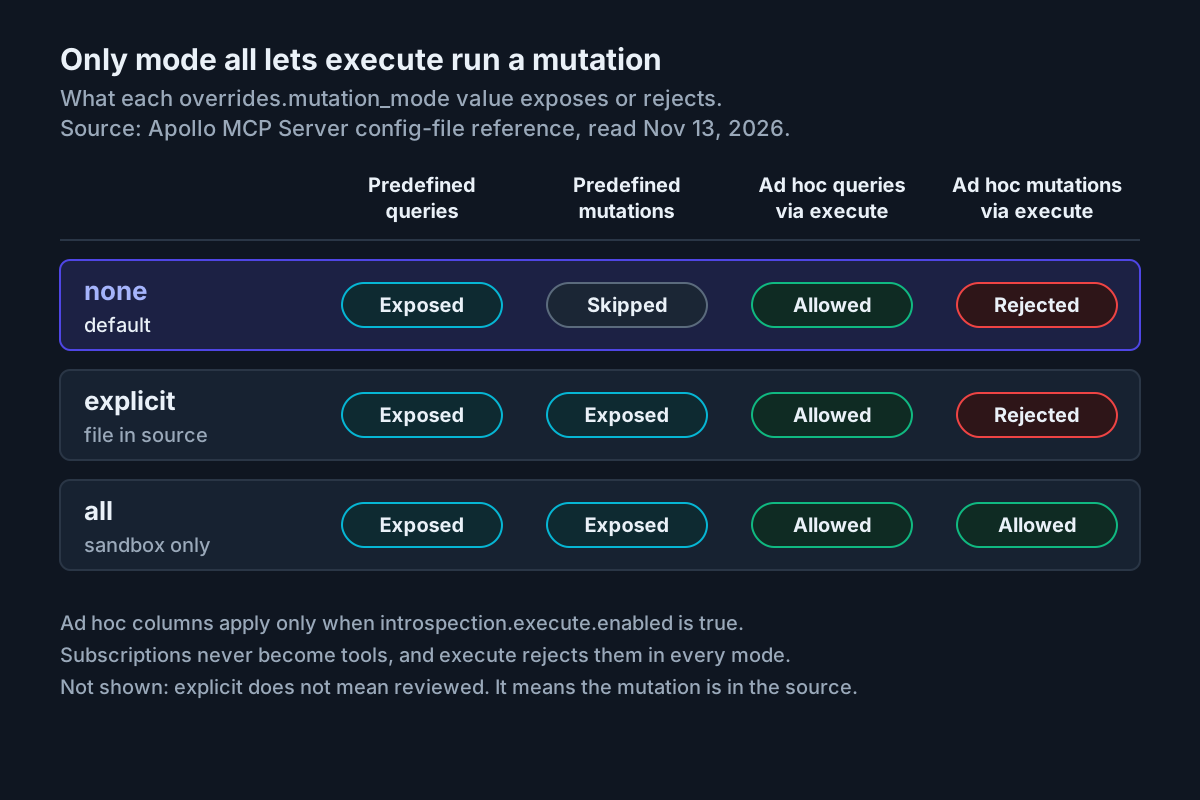
If your API needs a token, keep it out of the YAML. The config file supports ${env.VAR} expansion, as in headers: with Authorization: "Bearer ${env.API_TOKEN}", which is the pattern Apollo’s skill shows. The reference also warns that static header values aren’t redacted from debug configuration output, so leave logging at its default info level.
Step 4: Start the server and register it in Claude Code
- Check that your GraphQL API is running at the configured
endpoint. - Start the server with
./apollo-mcp-server ./config.yaml. With nologging.pathset, the Streamable HTTP transport logs to stdout. - Leave it running. The server watches
config.yaml, and under Streamable HTTP it restarts in place when you save a change. - In another terminal, register the server with the command Apollo’s skill documents for Claude Code:
claude mcp add graphql-orders -- npx mcp-remote http://127.0.0.1:8000/mcp. - Start a fresh Claude Code session and ask it to list the tools from
graphql-orders. For an independent view, inspecttools/listwith the method in our MCP Inspector guide.
# Terminal 1: run the server (task:graphql-orders-01)
cd graphql-agent
./apollo-mcp-server ./config.yaml

# Terminal 2: register it with Claude Code
claude mcp add graphql-orders -- npx mcp-remote http://127.0.0.1:8000/mcp
Expected observation (illustrative): the predefined tools come first, in alphabetical order: CustomerOrders, then GetOrder. Apollo documents this ordering as deterministic across repeated calls and reloads. The built-in execute, introspect, search and validate tools follow them. CancelOrder isn’t there, because no mutation file is in the operation source and none would skip one anyway. Look at each tool’s annotations: per Apollo’s docs, query tools default to read_only_hint: true, destructive_hint: false, idempotent_hint: true and open_world_hint: true.
If the server won’t start, read the error before you change anything. Apollo validates the configuration at startup and rejects unknown options. It names the field it didn’t expect and lists the valid ones, so a misplaced key, such as auth at the top level instead of under transport, stops startup rather than being silently ignored. An undefined ${env.VAR} reference also stops startup, with an error naming the missing variable.
Where the registration lives depends on its scope. Our Claude Code MCP setup guide covers which settings file each scope writes to. For this exercise, keep the registration private to you and to this project.
Step 5: Ask for a query, validate it, and watch execute refuse a mutation
Now run the loop Apollo’s blog describes: a skill for structure, search for types, and validate for conformance.
- Prompt: “Using /apollo-skills:graphql-operations, write a query that returns the three most recent orders for customer c-1001 with status and total. Search the schema first, then validate the query. Do not execute anything.”
- Watch for a
searchcall on terms likeCustomerandOrder. Apollo’s docs say search results include all the parent type information needed to build an operation, which usually takes fewer calls than walkingintrospectfromQuery. - Check the draft. It should be named, take
$customerId: ID!and$limit: Int!as variables, and selectid. - Watch the
validatecall. Expected observation (illustrative): the operation is reported valid. - Negative check: ask the agent to add
trackingNumberto the selection and validate again. Expected observation (illustrative):validatereturns an error saying that field doesn’t exist onOrder.validatesends nothing to your API. - Refusal check: tell the agent to call
executewithmutation { cancelOrder(id: "o-2002") { id status } }. Expected observation (illustrative): the tool call fails because ad hoc mutations are rejected undernone. Check your API’s request log. The mutation never arrives. - Ask the agent to fetch the data through the predefined
CustomerOrderstool withcustomerId: "c-1001"andlimit: 3. That call sends the stored document you reviewed in Step 2.
A good draft from step 3 looks like this (illustrative):
query RecentCustomerOrders($customerId: ID!, $limit: Int!) {
  ordersByCustomer(customerId: $customerId, limit: $limit) {
    id
    status
    totalCents
  }
}
Read the results of this step with the server’s limits in mind. Apollo states plainly that validate checks schema conformance, not whether the operation matches the user’s intent or is safe to run. It also isn’t an automatic prerequisite for execute. Telling the agent to validate first asks for a habit; the server doesn’t enforce it. execute itself checks GraphQL syntax, rejects subscriptions and applies mutation_mode. It doesn’t validate fields, arguments or variable types against the schema. Your upstream endpoint does that when the operation arrives.
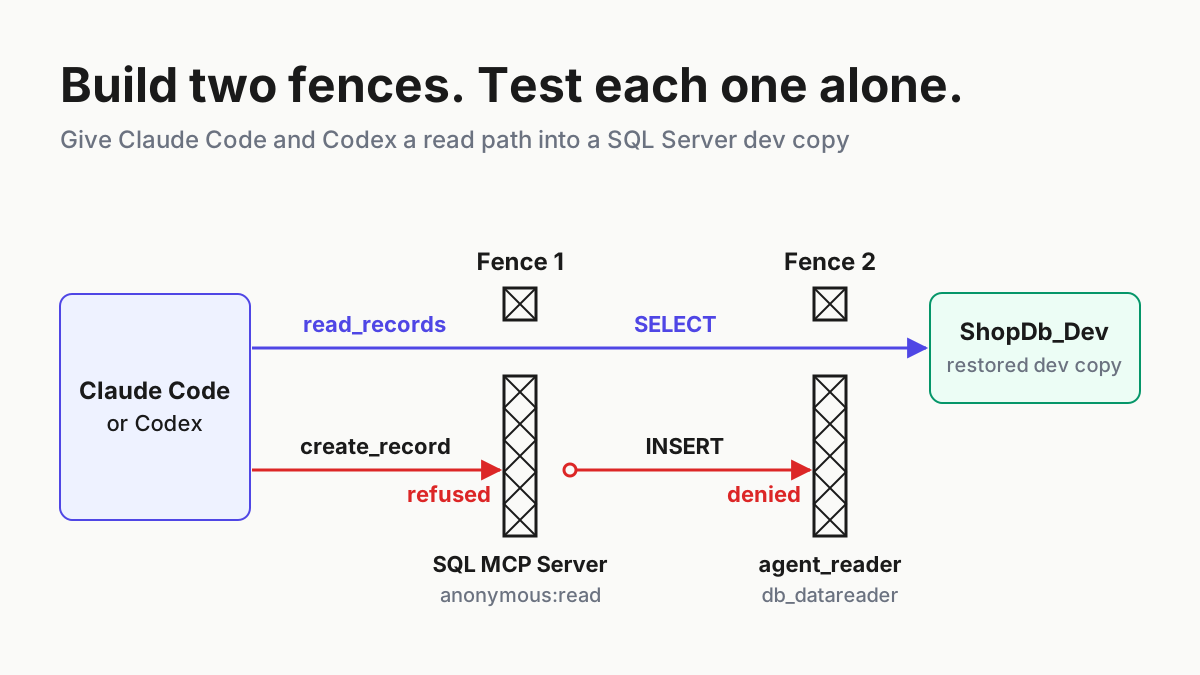
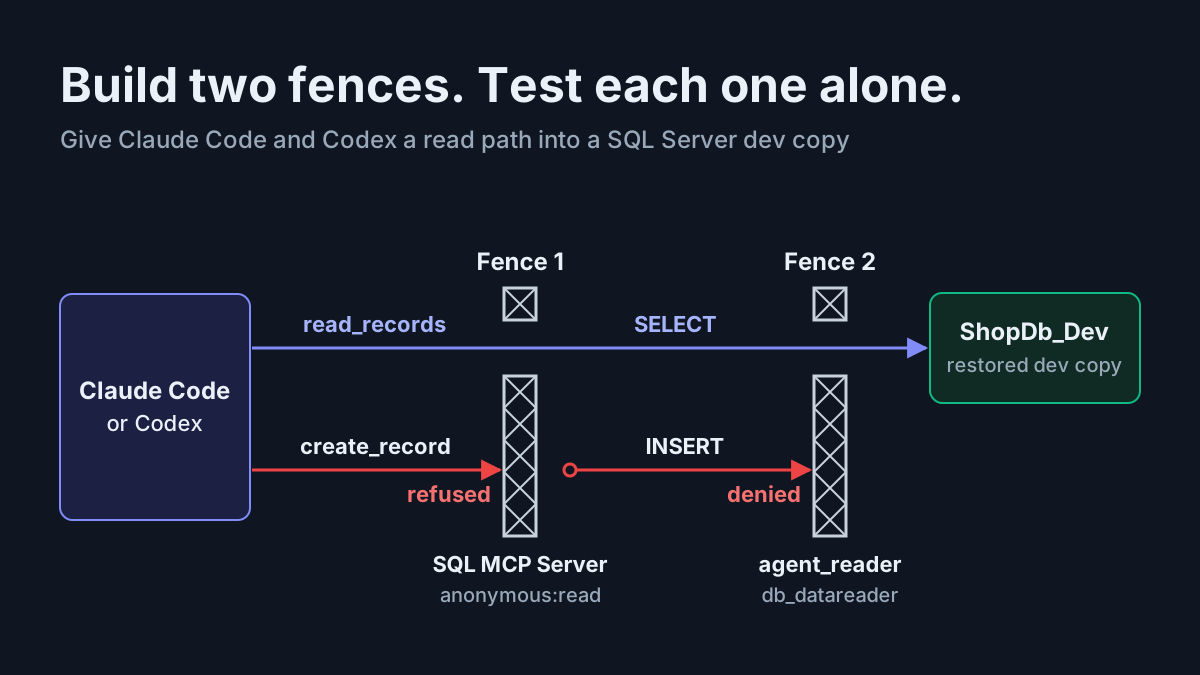
That makes execute open-world in a way predefined tools are not. A predefined call must match an operation in the server’s current catalog by name, and the server rejects unknown tool names. execute accepts a new document on every call, so nothing ties it to text a human reviewed. The diagram below shows the two paths into your API.
The worked example in one table
Every row belongs to the same case. All results are illustrative expected observations based on the cited documentation, not output captured from a run.
| Input | Action | Expected result |
|---|---|---|
task:graphql-orders-01, Claude Code session in graphql-agent/ |
/plugin marketplace add apollographql/skills, then /plugin install apollo-skills@apollo-marketplace, local scope |
Details pane lists the plugin’s components; typing /apollo-skills: shows apollo-mcp-server, graphql-operations and graphql-schema |
task:graphql-orders-01, config.yaml with schema.source: local and mutation_mode: none |
./apollo-mcp-server ./config.yaml |
Server listens at http://127.0.0.1:8000/mcp; a misspelled top-level key would stop startup and name the field |
| task:graphql-orders-01, server running on port 8000 | claude mcp add graphql-orders -- npx mcp-remote http://127.0.0.1:8000/mcp |
tools/list shows CustomerOrders, GetOrder, then built-ins; no CancelOrder |
task:graphql-orders-01, prompt for three recent orders of c-1001 |
Agent calls search, drafts RecentCustomerOrders($customerId: ID!, $limit: Int!), calls validate |
validate reports the operation valid; nothing is sent to the API |
task:graphql-orders-01, same query plus trackingNumber |
Agent calls validate |
Validation error naming the unknown field on Order |
task:graphql-orders-01, mutation { cancelOrder(id: "o-2002") { id status } } |
Agent calls execute under mutation_mode: none |
Tool call rejected; the API request log shows no mutation |
task:graphql-orders-01, mutations-reviewed/CancelOrder.graphql listed by file, mutation_mode: explicit, execute.enabled: false |
Save config.yaml; server restarts in place |
CancelOrder appears with destructive_hint: true; execute is no longer listed |
Choosing none, explicit or all
The three modes aren’t steps up a ladder of trust. Each one answers a different question about where mutations may come from. Use this table to pick one per environment:
| Situation | mutation_mode |
execute |
Why |
|---|---|---|---|
| Exploring a schema and drafting queries on a laptop | none |
enabled while drafting, then off | Ad hoc reads help exploration; writes stay impossible |
| Shared staging used by several agents or people | none |
disabled | Only reviewed predefined queries run |
| One write the agent genuinely has to perform | explicit |
disabled | Exactly the mutation documents you put in the source become tools |
| Throwaway sandbox with seed data you rebuild | all |
enabled | Only where losing data costs nothing |
Apollo’s own skill reflects the same split. Its local development pattern sets mutation_mode: all, while its ground rules tell agents to always use explicit or none in shared environments and never to assume mutation_mode provides per-invocation approval. The config reference says the same thing: mutation_mode is a configuration gate, not an approval step. explicit only means the mutation is present in the active operation source. It doesn’t mean the operation came from a local file, was committed to version control, or passed a review that Apollo MCP Server enforces. Hot-reloaded sources can add or change mutations with no approval step at all.
Tool annotations are hints, not gates. By default, mutation tools get read_only_hint: false, destructive_hint: true and open_world_hint: true. You can override annotations for your own operation tools under overrides.annotations, but the built-in tools (introspect, search, validate, execute and explorer) carry annotations you can’t configure. Use overrides to make titles clearer, never to make a destructive tool look harmless.
One gap no mode closes: mutation_mode classifies documents by their declared operation type. If a resolver behind a query field writes an audit row or sends an email, Apollo treats it as a query. Make sure your API keeps read-only semantics for queries, and back the endpoint with a read-only data role where you can, as our Postgres MCP read-only guide and MongoDB read-only guide do for database servers. Apollo’s docs add that your API’s own authentication, authorization and demand controls still apply to anything forwarded.
Step 6: Expose one reviewed mutation with explicit
In this step the agent gets one write, and only the one you reviewed.
- Save the mutation below as
mutations-reviewed/CancelOrder.graphql. - Review it like a migration: what does it change, can it run twice safely, and is
o-2002disposable test data? - Restrict who can write to
mutations-reviewed/. Apollo warns that hot-reloaded operation sources can change tool names, descriptions and executable documents without a security diff or approval step. - Edit
config.yamlas shown below: list the file itself rather than its folder, switch toexplicit, add a clear title, and turnexecuteoff. - Save. The server restarts in place.
- If the tool list in Claude Code doesn’t change, reconnect or restart the client. Apollo notes that some MCP clients cache the tool list independently.
- Check
tools/list.CancelOrdershould appear withdestructive_hint: true, andGetOrderandCustomerOrdersshould still be read-only.executeshould be gone. - Call
CancelOrderonce withid: "o-2002"on staging, then callGetOrderto confirm the status isCANCELLED.
# mutations-reviewed/CancelOrder.graphql
"""
Cancel one pending order. Reviewed for task:graphql-orders-01.
"""
mutation CancelOrder($id: ID!) {
  cancelOrder(id: $id) {
    id
    status
  }
}
# config.yaml changes for Step 6
operations:
  source: local
  paths:
    - ./operations/
    - ./mutations-reviewed/CancelOrder.graphql
introspection:
  introspect:
    enabled: true
    minify: true
  search:
    enabled: true
    minify: true
  validate:
    enabled: true
  execute:
    enabled: false
overrides:
  mutation_mode: explicit
  annotations:
    CancelOrder:
      title: "Cancel a pending order (reviewed)"
Listing the file instead of the folder is the decision that matters most in this step. With a directory path, any .graphql file someone later drops into mutations-reviewed/ becomes a live tool on the next reload. With a file path, a new mutation needs a config change, and that change is visible in review.
Turning execute off is the second decision. Under explicit, execute would still reject ad hoc mutations, but it would keep accepting any query the agent writes. On shared staging, two reviewed reads and one reviewed write make a smaller, more predictable surface than an open query channel. Apollo’s skill says the same thing as a rule: prefer operation files over ad hoc execute.
Codex and other agents
The server-side gate doesn’t care which client connects. mutation_mode applies to every agent that reaches the same server. What changes is how each agent gets the skills and the connection.
- Install the skills for Codex with
npx skills add apollographql/skillsand select Codex at the agent step. The interactive installer also asks for scope (project or global) and method (symlink or copy). - Alternatively, use GitHub CLI’s
gh skill(in preview):gh skill install apollographql/skills --agent codex. The README says--agentsupports Codex along with other hosts. - Pin when you need stability:
gh skill install apollographql/skills --pin v1.4.5 --agent codex. Pinned skills are skipped bygh skill upgrade, while thenpx skillsand plugin paths track the latest content. - Point Codex at the same
http://127.0.0.1:8000/mcpserver through its own MCP configuration. The Apollo pages used here document registration for Claude Code and Claude Desktop only, so check Codex’s MCP documentation for the exact syntax, and confirm the tool list matches Step 4. - Keep Codex’s own skills folder tidy. Our Codex skills setup guide covers where Codex looks for
SKILL.mdfiles.
If several agents share one staging API, register this one server for all of them rather than running a copy per agent. Then there’s one config to review, one mode to check, and one log to read. Our multi-agent command center guide covers running parallel assistants, and the restricted mode fleet policy explains why permission settings belong in a shared policy rather than in each session.
Troubleshooting
Work down this table in order. Most failures in this setup come from naming, the schema source, or the client’s cached tool list.
| Symptom | Likely cause | Fix |
|---|---|---|
/plugin install apollo-skills@apollo-marketplace can’t find the marketplace |
Marketplace not added, or registered under a different name | Run /plugin marketplace add apollographql/skills and use the name it prints, or install with --marketplace apollographql/skills |
Duplicate Apollo skills, such as /graphql-schema and /apollo-skills:graphql-schema together |
Installed through the plugin and through npx skills add, or from two marketplaces |
Keep one route and uninstall the other |
| Plugin installed but commands missing | Reload pending or load failed | Run /reload-plugins, then check the Errors tab in /plugin |
| Server fails: unknown field | Misplaced or misspelled key | The error lists the valid fields; nest auth under transport |
| Server fails: undefined environment variable | ${env.VAR} not set |
Export it, or use ${env.VAR:-default} |
| No schema, or a demand for GraphOS credentials | schema.source defaults to uplink |
Set schema.source: local and path |
| Tools fail to reach the API | Wrong endpoint, API down, or Docker networking |
Fix endpoint; Apollo’s Docker pattern binds address: 0.0.0.0 and reads ${env.GRAPHQL_ENDPOINT} |
| Port 8000 already in use | Default Streamable HTTP port | Set transport.port and update the claude mcp add URL |
| Tool list unchanged after an edit | Client caches tool lists | Reconnect or restart the client |
introspect returns nothing for a type |
Wrong name or letter case | Since v2.1.0 it returns an error naming the type and suggests the correct case |
| Context fills during schema exploration | Large schema walked with deep introspection | Prefer search with minify: true; keep leaf_depth: 1; give introspect a specific type and low depth |
| Predefined tool listed but fails when called | Server doesn’t validate predefined documents | Run the operation directly and fix the document |
Two notes on versions. The v2.1.0 release notes record the introspect fix above. Before that release, an unknown type came back as an empty successful result, so on an older pin an empty answer may simply mean a typo. The same release also publishes the server to crates.io, so cargo install --locked apollo-mcp-server is a build-from-source option. If you later add graphos.apollo_graph_ref alongside the introspection tools, the sources used here don’t document version-specific behavior for that combination. Read the release notes for your pinned version before relying on it.
Rollback and recovery
Rollback should take minutes, and you should practise it once while nothing is wrong.
- Close the write path first: set
overrides.mutation_mode: noneand save. Under Streamable HTTP the server restarts in place. To stop everything, stop the server process. - Remove the
graphql-ordersregistration from the scope you added it to. The command and scope files are covered in the Claude Code MCP setup guide. - Turn the plugin off without removing it:
claude plugin disable apollo-skills@apollo-marketplace. - Uninstall it:
claude plugin uninstall apollo-skills@apollo-marketplace --scope local, matching the scope you chose in Step 1. - Remove the marketplace if you’re finished with it:
claude plugin marketplace remove apollo-marketplace. Anthropic’s docs say this uninstalls every plugin you installed from that marketplace and removes theirenabledPluginsentries. - If a teammate enabled the plugin at project scope, choose Disable for me (press
y) when uninstalling, rather than removing it for everyone (pressu). - Recover data separately. No MCP setting undoes a mutation that already ran, and Apollo notes that even
tasks/cancelcan’t undo side effects the API has already performed. Restore staging from your seed data.
After rollback, run Step 4 again against the reverted config. The tool list should show the two queries and no CancelOrder. That check confirms the rollback worked; an absence of errors doesn’t.
Sources
- apollographql/skills release v1.4.5, Oct 30, 2026 (GitHub)
- apollographql/skills README: installation, Claude Code plugin and slash commands (GitHub)
- Apollo Skills: Teaching AI Agents How to Use Apollo and GraphQL, Feb 3, 2026 (Apollo GraphQL blog)
- Apollo Skills plugin listing (Claude marketplace)
- Define MCP Tools (Apollo MCP Server docs)
- Config File Reference (apollo-mcp-server on GitHub)
- Apollo MCP Server release 2.1.0 (GitHub)
- Running the Apollo MCP Server (Apollo docs)
- apollo-mcp-server SKILL.md (apollographql/skills on GitHub)
- Install and manage plugins (Claude Code docs)