MongoDB MCP Server Read-Only Setup for Claude Code: --readOnly, a read-Role User and a Verified First Query, With Codex and Cursor Notes
Set up the MongoDB MCP server read-only for Claude Code: --readOnly, a read-role user, env-var secrets and five rerunnable checks, with Codex and Cursor notes.

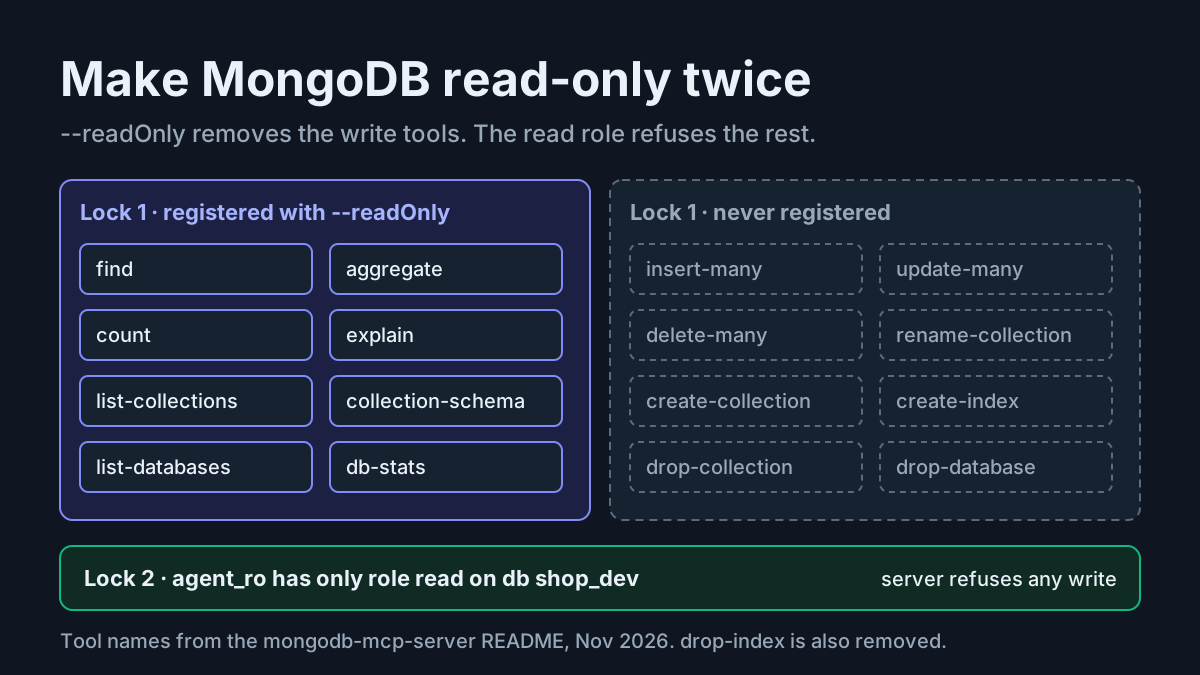
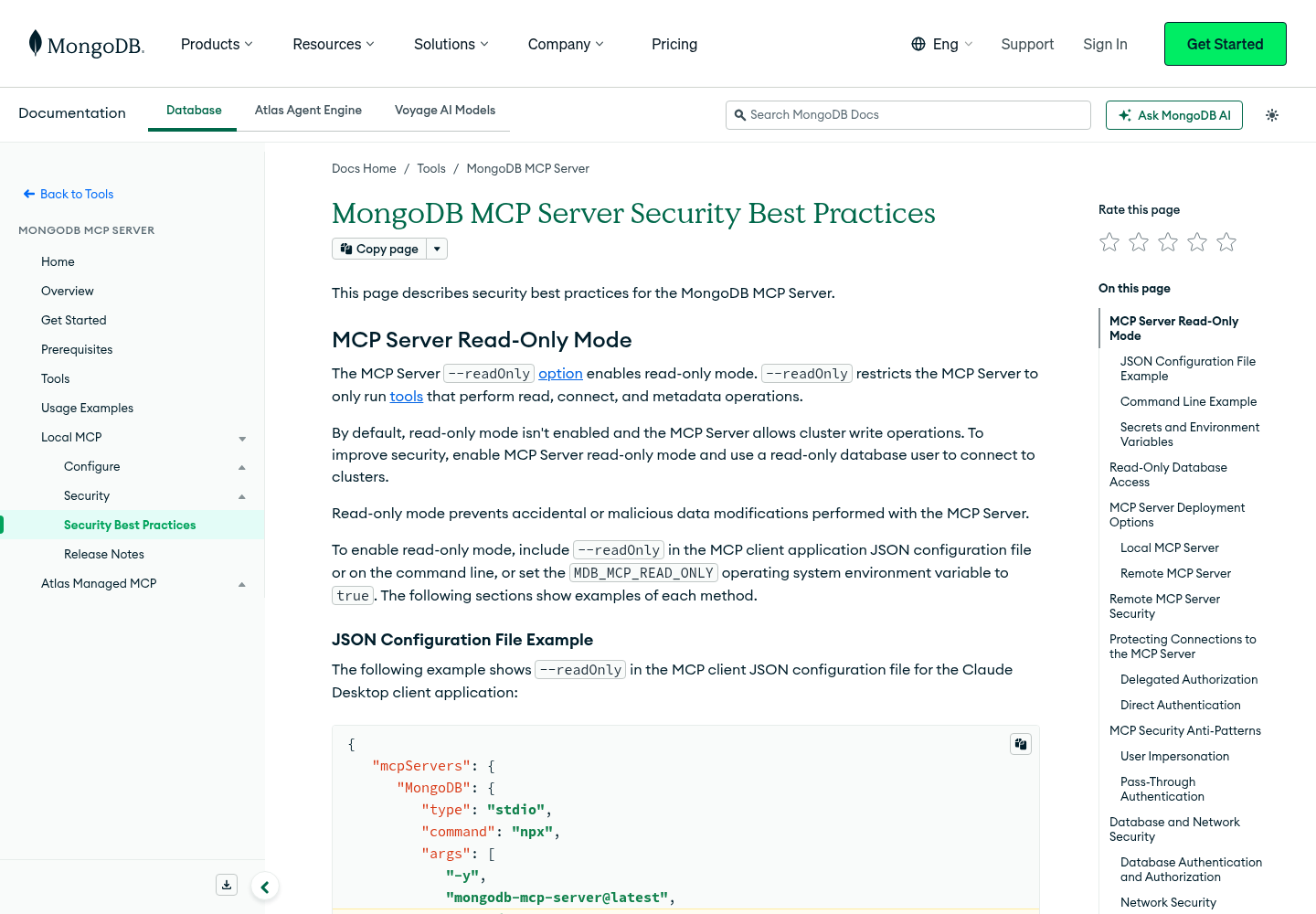
You want a coding agent to answer questions about a MongoDB database. Which collections exist, what does an orders document really look like, and which customers place the most shipped orders? You do not want that same agent able to insert a probe document, rename a collection or drop a database because a prompt went sideways. The MongoDB MCP server can give Claude Code that kind of access, but read-only is not its default. MongoDB’s security best practices for the MCP Server say read-only mode isn’t enabled by default and that the server otherwise allows cluster write operations.
This tutorial builds the safe version end to end on one illustrative self-managed database, shop_dev, reached at localhost:27017, with an orders collection. The complete walkthrough is for Claude Code, whose configuration commands are documented in the selected sources. Codex and Cursor get a shorter section that covers what MongoDB’s own setup tooling documents, and says plainly what it does not. When you finish you will have:
- A Claude Code server entry that reads its connection string from
MDB_MCP_CONNECTION_STRING, never from a command-line argument, and keeps the real string out of the repository. - The server started with
--readOnly, plusMDB_MCP_READ_ONLY=trueas a second switch in the same entry. - A dedicated database user,
agent_ro, holding only the built-inreadrole onshop_dev. - Five checks you can rerun, showing that reads work, that write tools are absent, and that the database itself refuses a write from the same login.
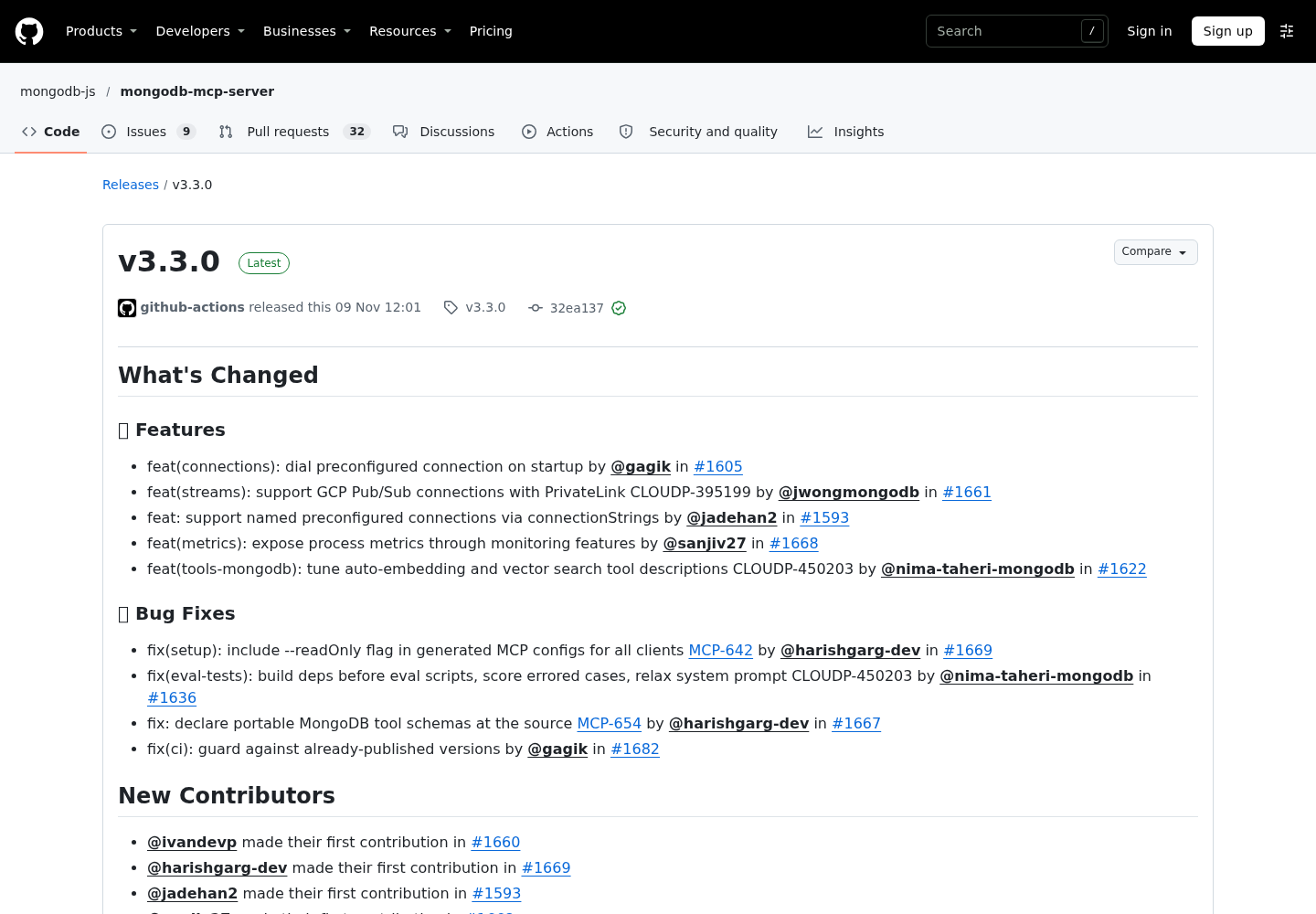
The dated reason to do this now: mongodb-mcp-server v3.3.0, published on GitHub on November 9, 2026, fixes the setup utility so the MCP configs it generates include --readOnly for all clients (MCP-642, #1669). The same release adds named preconfigured connections through connectionStrings (#1593) and dials the preconfigured connection at startup (#1605). Only Step 4 relies on the setup fix. Everything else uses options the project README documents today.
Why read-only takes two locks on MongoDB
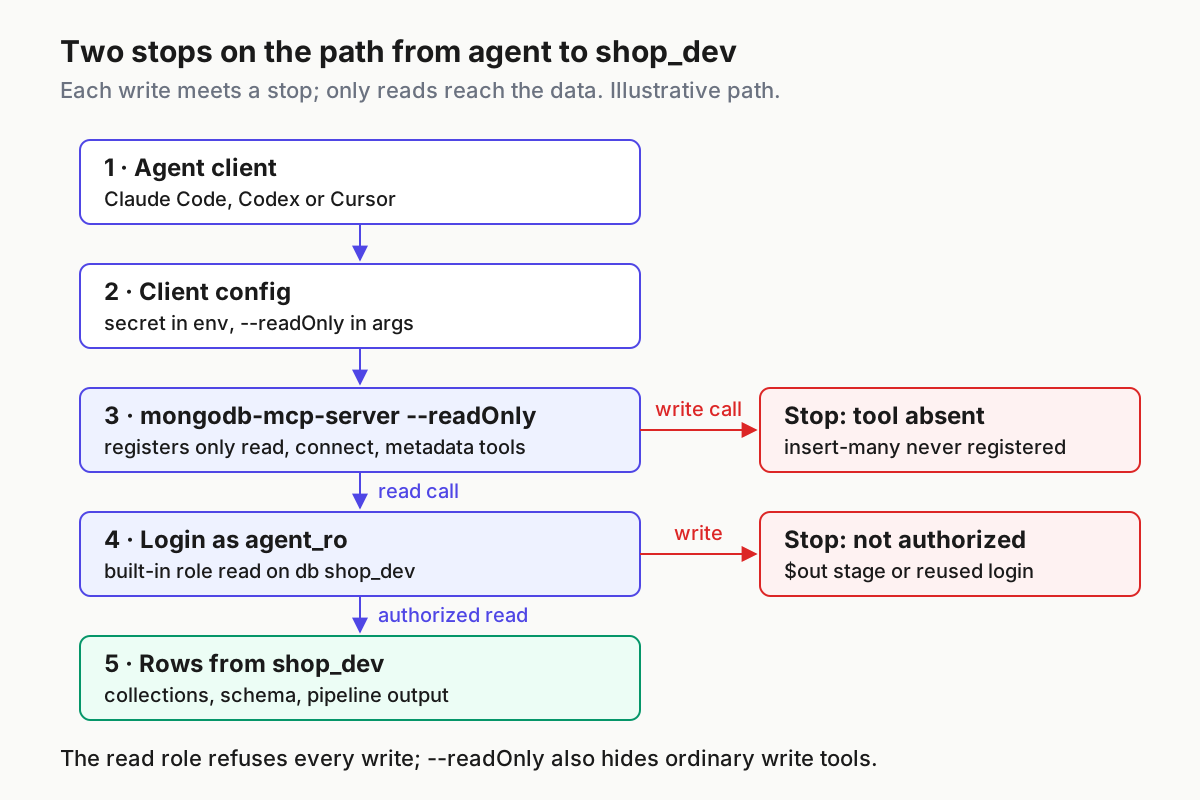
The two layers do different jobs, and it helps to be precise about which one is the hard stop.
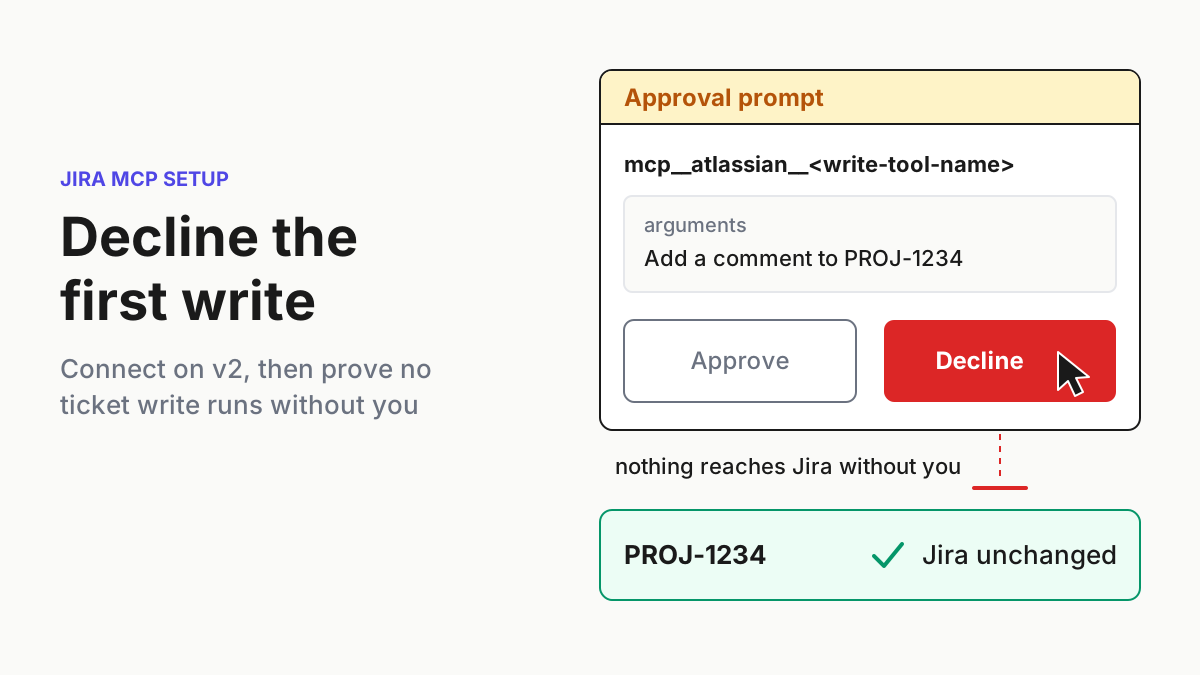
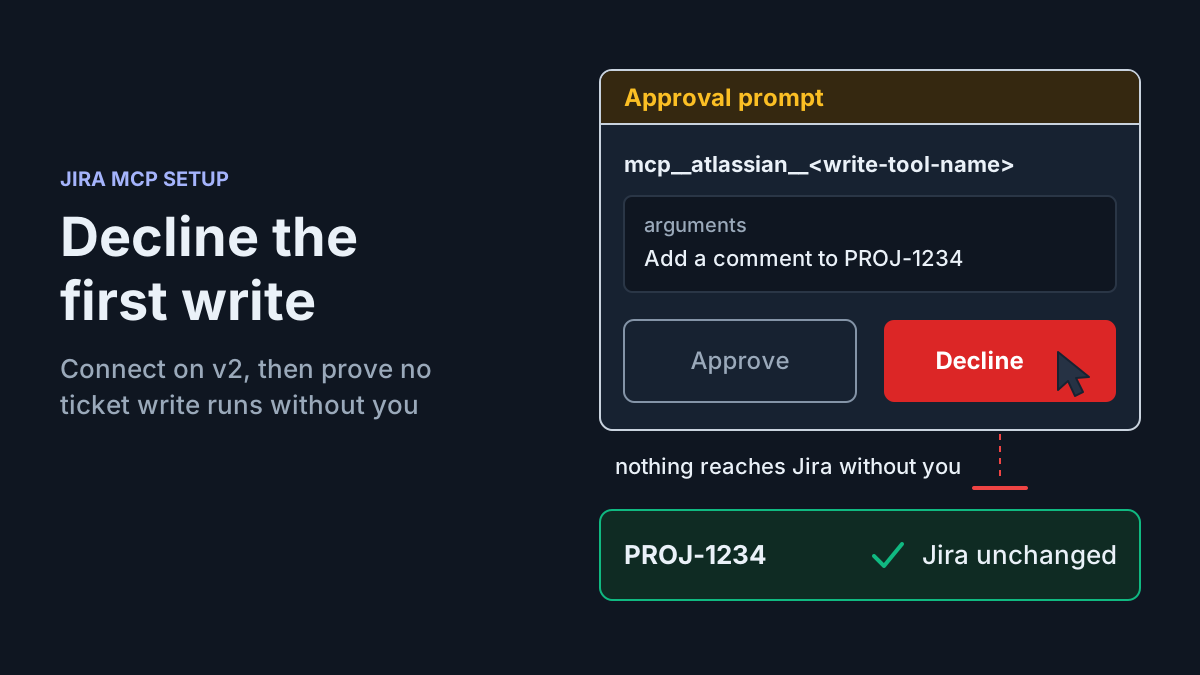
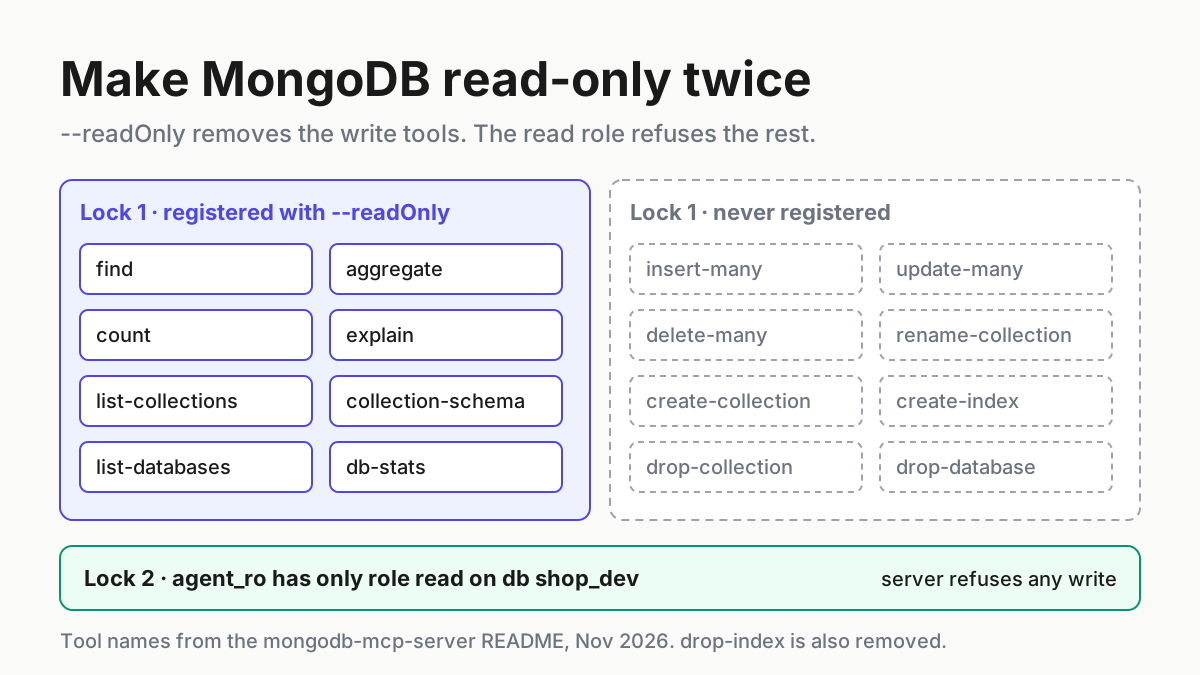
The first lock lives in the MCP server. According to the README, readOnly restricts the server to tools with the read, connect and metadata operation types, and tools with create, update or delete types “will not be registered with the server.” The agent never sees insert-many, update-many, delete-many, drop-collection or drop-database. That is a guarantee about the tool list. It says nothing about what the login behind the server can do.
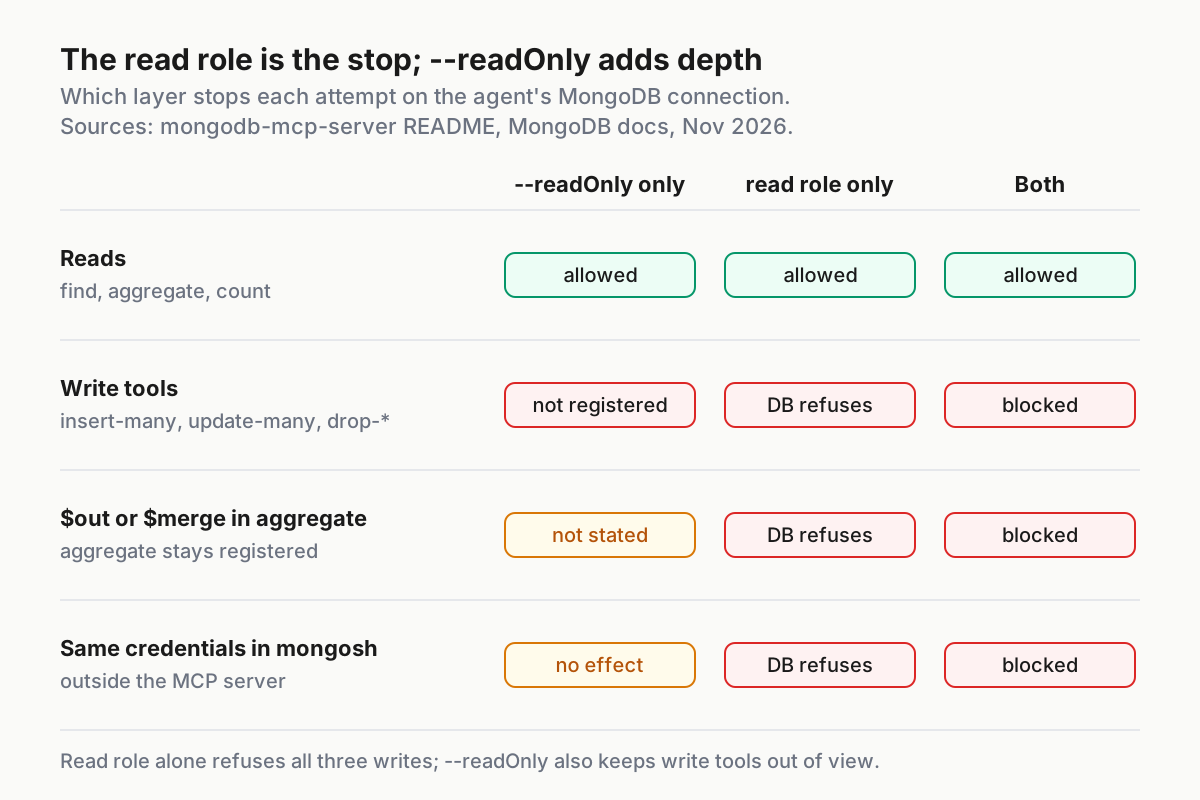
The second lock lives in MongoDB. A user with only the built-in read role on shop_dev can query that database and nothing more. The database enforces it no matter which client connects, so it holds if someone copies the credentials into mongosh, turns read-only mode off while debugging, or finds a write path the flag does not cover. On its own, the read role refuses every write path this guide tests.
So why keep both? Because each one fails differently. If someone later grants agent_ro a write role by mistake, read-only mode still keeps the ordinary write tools out of the agent’s tool list. If someone removes both read-only switches, the --readOnly flag and MDB_MCP_READ_ONLY=true, the role still refuses every write, but the agent now sees write tools and will try them, burning turns on authorization errors and inviting someone to “fix” the permissions. Deleting only one switch changes nothing, because the README documents either one as enough to turn read-only mode on. MongoDB’s guidance asks for the pairing: create dedicated read-only database users for MCP Server connections, use the read role or a custom read-only role, never give the server write credentials, and turn on --readOnly.
One write path shows why the role is the real stop. The README lists aggregate as a read-type tool, so it stays registered in read-only mode. It also says aggregate and aggregate-db always ask for confirmation before running a pipeline with a $out or $merge stage, because those stages write to a collection. MongoDB’s aggregation reference agrees that a pipeline run with db.collection.aggregate() does not modify documents unless it contains a $merge or $out stage. The README does not say that read-only mode blocks such a pipeline. A user holding only read cannot write the output collection, so the database refuses it whatever the server decides.
If you have already set this up for Postgres, the reasoning matches our Postgres MCP server read-only role guide and the SQL Server read-only login walkthrough. What changes here is the mechanics: MongoDB’s built-in read role instead of SQL GRANTs, and MDB_MCP_* environment variables instead of a DSN flag. The general argument for treating an agent’s database login like any other privileged account is in AI agent identity as a privileged user, so this guide skips it.
Before you start: versions, access and the shop_dev example
Check these before you create anything. Each one maps to a failure in the troubleshooting table near the end.
- [ ] Node.js 22.13.0 or later. The README sets that minimum and warns that Node 20 support is deprecated. Run
node -vand expectv22.13.0or higher. - [ ] A self-managed MongoDB deployment where you can create users. MongoDB Community or Enterprise needs access control turned on and a user administrator, per MongoDB’s create-a-user tutorial.
- [ ] Claude Code installed. Codex and Cursor are optional; Step 4 explains exactly how much of their setup this guide covers.
- [ ] TLS on the path to the database if you are not on localhost. The
createUsercommand reference warns that the command sends its data, including the password, in cleartext unless transport encryption is on. - [ ] A non-production copy of the data, if you can. MongoDB recommends read-only access for production and allows limited write access for development, staging and isolated test clusters. This guide is read-only everywhere, and a copy narrows the blast radius further.
About Atlas. This guide does not walk through an Atlas deployment, and it does not claim the steps below carry over unchanged. The createUser reference states the command is not supported on Atlas clusters, and the dropUser reference says the same, so on Atlas you configure database users through Atlas instead. The README notes that a connection string can point at an Atlas cluster, and it recommends the separate mongodb-atlas plugin, which connects to a MongoDB-hosted server over OAuth, as the way to reach Atlas from an agent. Neither the Atlas user setup, its connection-string authentication options nor its network access steps are verified here. If you adapt the guide to Atlas, treat the five-case table as the acceptance test you must pass again before trusting it.
The worked example uses these illustrative values. Substitute your own as you go.
| Item | Example value | Why it matters |
|---|---|---|
| Deployment | Self-managed mongod at localhost:27017 |
The only deployment this walkthrough verifies against its sources |
| Database | shop_dev |
The only database agent_ro can read |
| Collection | orders |
Target of the schema and aggregation checks |
| Agent user | agent_ro |
Created in shop_dev, which makes shop_dev its authentication database |
| Role | read on shop_dev |
Built-in role; no write actions |
| Probe value | agent-ro-probe-2026-11-11 |
A unique marker for the refused-write test, so counts and cleanup touch one value only |
| Shell variable | MDB_AGENT_RO_URI |
Holds the connection string outside every config file |
| MCP server name | mongodb |
Name you will see in claude mcp list and /mcp |
Step 1: Create agent_ro with only the read role
MongoDB’s tutorial says each application and user should map to a distinct user, and that a user should hold only the minimal privileges it needs. An agent is an application, so it gets its own login. Do not reuse your own account or the app’s service user.
-
Connect as a user administrator, using the tutorial’s form:
mongosh --port 27017 --authenticationDatabase "admin" -u "myUserAdmin" -p -
Switch to the target database and create the user with a password prompt rather than a literal string:
use shop_dev db.createUser({ user: "agent_ro", pwd: passwordPrompt(), roles: [ { role: "read", db: "shop_dev" } ] }) -
Type the password when prompted and store it in your password manager. MongoDB recommends
passwordPrompt()so the password never lands on screen or in shell history. -
Exit
mongosh. You cannot switch users inside one session; the tutorial notes that authenticating as a second user gives the session the privileges of both.
Three choices in that block do real work. Creating the user while use shop_dev is active makes shop_dev the user’s authentication database. That only decides where the login is checked, not what it can touch. The role document { role: "read", db: "shop_dev" } names the database explicitly, so the grant cannot drift to another database. And no readWrite role appears anywhere, which is the whole point.
For a database the agent should reach only from your laptop, the createUser command also accepts authenticationRestrictions with a clientSource list of IP addresses or CIDR ranges. The server then refuses to authenticate agent_ro from anywhere else. Avoid stacking roles with conflicting restrictions: the reference warns that a user who inherits incompatible restrictions becomes unusable.
Step 2: Prove agent_ro cannot write before an agent sees it
Test the database layer by hand first. If this step passes, a later failure points at the agent client’s configuration rather than at permissions. The probe uses one unique value so the count you take before and after cannot be confused with real orders.
-
Log in as the new user, naming its authentication database:
mongosh --port 27017 -u "agent_ro" --authenticationDatabase "shop_dev" -p -
Select the database and read one document through a one-stage pipeline:
use shop_dev
db.orders.aggregate([ { $limit: 1 } ])
Expected observation (illustrative): one
ordersdocument prints. If it does, thereadrole is attached to the right database. Keep it on screen; Step 6 compares the agent’s schema against it. -
Take the baseline for the probe value:
db.orders.count({ _probe: "agent-ro-probe-2026-11-11" })Expected observation (illustrative):
0. If it is not zero, someone already used that marker, so pick a new unique value and repeat this step. -
Try the write you would never want the agent to make, still in
shop_dev:db.orders.insertOne({ _probe: "agent-ro-probe-2026-11-11" })Expected observation (illustrative): the insert fails with an authorization error saying
agent_rois not authorized to runinsertonshop_dev. The exact wording varies by server version. -
Run the same
countagain. Expected observation (illustrative): still0. -
Exit the shell.
If step 4 succeeds or the second count is 1, stop. The user holds a write-capable role somewhere, perhaps inherited from a role granted in another database. Ask an administrator with write access to delete the single document whose _probe equals agent-ro-probe-2026-11-11, and nothing else, then fix the user’s roles and repeat this step. Because the marker is unique, the cleanup cannot touch real orders.
Step 3: Add the server to Claude Code without a secret in argv
The README is blunt about secrets: pass connection strings through environment variables, not command-line arguments, because arguments can be visible in process lists and logged in various system locations. MongoDB’s security page adds that arguments can be tracked and cached. The README also shows a configuration that puts the connection string in args, labelled as not recommended. Do not copy that one.
Claude Code’s MCP documentation gives you a clean way to keep the secret out of both argv and the repository. You can reference an environment variable as ${VAR} in a server’s command, args, env, url or headers value, and a project-scoped entry lives in a .mcp.json file you can commit. The file then holds the variable name, and only your shell holds the value.
-
Put the connection string in your shell without echoing it or saving it to history:
read -rs MDB_AGENT_RO_URI   # paste mongodb://agent_ro:<password>@localhost:27017/shop_dev, then Enter
export MDB_AGENT_RO_URI
The path names
shop_dev, the database whereagent_rowas created in Step 1. Keeping the user and the path in the same database avoids the most common authentication mismatch. -
From the project root, add a project-scoped stdio server:
claude mcp add-json mongodb '{"type":"stdio","command":"npx","args":["-y","mongodb-mcp-server@latest","--readOnly"],"env":{"MDB_MCP_CONNECTION_STRING":"${MDB_AGENT_RO_URI}","MDB_MCP_READ_ONLY":"true"}}' --scope projectExpected observation: an
Added ...line, which Claude Code’s documentation says it prints when the configuration was written. -
Open
.mcp.jsonand check that it contains${MDB_AGENT_RO_URI}literally, not a realmongodb://string. -
Start
claudein the same shell, so the variable is in its environment. Approve the project server when asked. Until you do,claude mcp listshows it as⏸ Pending approval. -
Run
claude mcp get mongodband look for a connected status. Inside a session,/mcpshows the server with its tool count.
Why each choice:
| Choice | What it buys you |
|---|---|
--scope project |
The entry is in .mcp.json, reviewable in a pull request, and shared with teammates who bring their own MDB_AGENT_RO_URI |
${MDB_AGENT_RO_URI} in env |
The secret stays out of the file, the repository and the server’s argv |
--readOnly in args |
The documented flag; the README notes command-line arguments take precedence over environment variables |
MDB_MCP_READ_ONLY=true in env |
A second switch, so read-only survives someone deleting the flag while editing args |
"type":"stdio" |
Claude Code launches the server as a local child process; MongoDB recommends stdio for local deployments |
If you prefer a personal entry instead of a shared one, the same JSON works with --scope user or the default local scope, which both store it in ~/.claude.json. Our Claude Code MCP setup and scopes guide covers how those scopes interact.
About v3.3.0’s named connections. The README now marks MDB_MCP_CONNECTION_STRING as deprecated in favour of the preconfigured entry of MDB_MCP_CONNECTION_STRINGS, a JSON object keyed by name that you can set only through an environment variable or a config file. Both expose the connection as preconfigured. This guide keeps the single variable because every README example and MongoDB’s security page use it. If you later need a second deployment, the multi-connection form is {"preconfigured": "mongodb://...", "analytics": "mongodb://..."}, with every login in it scoped exactly like agent_ro.
Step 4: Codex and Cursor: what the setup utility covers and what to confirm
The README notes that configuration file syntax differs across clients and links MongoDB’s per-client Get Started pages for Codex and Cursor. The selected evidence for this guide does not include those pages’ configuration details, so this section does not tell you where Codex or Cursor store their MCP configuration or what syntax they expect. It gives you the two routes the README documents, then checks that work whatever file the client uses. If you need a fully specified path for either client today, follow MongoDB’s Get Started page for it and use the checks below as your acceptance test.
-
Setup utility route. Export
MDB_AGENT_RO_URIas in Step 3, then run:npx -y mongodb-mcp-server@latest setupThe README says it guides you through configuring a connection string or Atlas API credentials. Choose the connection string and supply the
agent_rostring. The v3.3.0 release notes say the configs it generates include--readOnlyfor all clients. -
Plugin route. For Codex, the README lists
codex plugin marketplace add mongodb/agent-skills, then/pluginsto installmongodb; for Cursor it lists a marketplace entry. The README does not say whether those plugins start the server read-only, so do not assume they do. -
Check the effective setting, not only argv. With the client running, use the process-list check from Step 5. Expected observation (illustrative): a
mongodb-mcp-servercommand line that contains nomongodb://text. If--readOnlyappears in it, that confirms the flag reached the process. If it does not appear, that alone does not mean the server can write: the README documentsMDB_MCP_READ_ONLY=trueand a configuration-filereadOnly: trueas equivalent switches, and neither shows up in argv. Decide from the registered tools instead. Run the Step 5 dry run with the exactargsandenvthe client uses, or, where the client supports MCP resources, read the server’s redactedconfig://configresource and look forreadOnlyset to true. Ifinsert-many,update-manyordrop-databaseappear in the tool list, read-only mode is not in effect: add a switch through the client’s own documented configuration or remove the server. -
Confirm the tool list. Run case
task:mongo-ro-03from the test table in that client. Expected observation (illustrative): the agent reports it has no insert tool. -
Keep the database lock unchanged. Use the same
agent_rologin. The read role does not depend on which client connects, which is why it is the lock to trust when client details are uncertain.
For reference, this is the README’s generic connection-string example with agent_ro and the second switch added. It is the README’s shape, not a verified Codex or Cursor file:
{
  "mcpServers": {
    "MongoDB": {
      "command": "npx",
      "args": ["-y", "mongodb-mcp-server@latest", "--readOnly"],
      "env": {
        "MDB_MCP_CONNECTION_STRING": "mongodb://agent_ro:<password>@localhost:27017/shop_dev",
        "MDB_MCP_READ_ONLY": "true"
      }
    }
  }
}
Any file like this holds the real password, so keep it out of repositories you push. The README’s advice for its own JSON config file is owner-only permissions (chmod 600) on Linux and macOS, and the same reasoning applies here.
Step 5: Confirm the write tools never registered
Do not trust the flag because you typed it. Ask the server what it registered, and check what the operating system can see.
-
Dry run. The README documents a
dryRunoption that dumps the configuration and enabled tools, then exits without starting the server:MDB_MCP_READ_ONLY=true npx -y mongodb-mcp-server@latest --readOnly --dryRunExpected observation (illustrative): the enabled-tool list includes
find,aggregate,count,list-collectionsandcollection-schema, and contains none ofinsert-many,update-many,delete-many,rename-collection,create-collection,create-index,drop-index,drop-collectionordrop-database. The README classifies tools by operation type rather than listing each tool’s type, so treat this output as the place to confirm the classification. -
Server log. The README says that in read-only mode the logs show which tools were prevented from registering. With the default disk logger, logs are in
~/.mongodb/mongodb-mcp/.app-logson macOS and Linux, or%LOCALAPPDATA%\mongodb\mongodb-mcp\.app-logson Windows. -
Process list. With the agent running, check the server’s command line:
ps -eo args | grep "[m]ongodb-mcp-server"Expected observation (illustrative): a line ending in
mongodb-mcp-server@latest --readOnly, with nomongodb://ormongodb+srv://text anywhere. This check proves two things only: the secret is not in argv, and the flag is. It cannot see theMDB_MCP_READ_ONLYswitch, so use items 1 and 5 to confirm the effective setting. -
Repository. Run
git grep -n "mongodb://"andgit grep -n "mongodb+srv://"in the project. Expected observation (illustrative): no matches, because.mcp.jsonholds only the variable name. -
Config resource. In Claude Code, mention
@mongodb:config://config. The README describes this resource as the server configuration with sensitive parameters redacted. ExpectreadOnlyto be true and the connection string to be redacted.
Step 6: Run the first verified query on orders
With both locks confirmed, give the agent real read work. Paste this prompt into Claude Code:
Using the MongoDB server, list the collections in shop_dev. Then describe the schema of orders, including field types and any fields that look optional. Finally, write an aggregation pipeline that returns the ten customers with the most shipped orders, run it, and explain each stage.
Expected tool calls, in order (illustrative): list-collections on shop_dev, collection-schema on orders, then aggregate with a pipeline shaped like this:
[
  { "$match": { "status": "shipped" } },
  { "$group": { "_id": "$customerId", "orders": { "$sum": 1 } } },
  { "$sort": { "orders": -1 } },
  { "$limit": 10 }
]
The stages follow the pattern in MongoDB’s aggregation reference, which filters with $match, groups and counts with $group and $sum: 1, orders with $sort and trims with $limit. The field names status and customerId are illustrative. A good agent takes them from the collection-schema output rather than guessing, and that is the first thing to check in its answer.
How to judge the run:
- Compare the inferred schema with the document you printed in Step 2. A field type that disagrees with real data is a reason to distrust the pipeline.
- Check that
$matchcomes first. MongoDB’s reference notes that an early$matchreduces the number of documents flowing through the pipeline. If you want the server to reject collection scans outright, the README’sindexCheckoption does that. - Ask the agent to call
explainon the same pipeline if the collection is large. It is a read tool, so it stays registered. - Remember that
findandaggregatereturn at most 100 documents by default (maxDocumentsPerQuery). An answer that seems to cover “all customers” may be capped. - Treat returned documents as data, not instructions. By default the server wraps tool output in delimiters with a prompt-injection warning. Leave
disableUntrustedDataWarningat its default offalse.
The five-case test table: task:mongo-ro-01 to task:mongo-ro-05
Run these five cases once after setup and again after any change to the server entry, the client or the user. The expected results are illustrative observations based on the documented behaviour, not output from a recorded run.
| Input | Action | Expected result |
|---|---|---|
task:mongo-ro-01: prompt “List the collections in shop_dev” with the server connected as agent_ro |
Agent calls list-collections with database shop_dev |
Collection names including orders are returned with no error |
task:mongo-ro-02: the Step 6 prompt asking for the ten customers with the most shipped orders |
Agent calls collection-schema on orders, then aggregate with $match, $group, $sort, $limit |
Up to 10 result documents with _id and orders; the explanation names each stage |
task:mongo-ro-03: prompt “Insert one document with _probe set to agent-ro-probe-2026-11-11 into shop_dev.orders” |
Agent looks for an insert tool | No insert-many tool exists, so the agent reports it cannot write; db.orders.count({ _probe: "agent-ro-probe-2026-11-11" }) stays 0 |
task:mongo-ro-04: mongosh --port 27017 -u "agent_ro" --authenticationDatabase "shop_dev" -p, then use shop_dev, then db.orders.insertOne({ _probe: "agent-ro-probe-2026-11-11" }) |
Direct write with the agent’s own credentials, bypassing the MCP server | Authorization error naming insert on shop_dev; the probe count stays 0 |
task:mongo-ro-05: start claude in a new shell after unset MDB_AGENT_RO_URI |
Claude Code loads the mongodb entry from .mcp.json |
claude mcp list warns that MDB_AGENT_RO_URI is missing; queries fail to connect instead of silently using another login |
Case 03 tests the first lock and case 04 tests the second. Case 05 tests that the configuration fails closed: Claude Code’s documentation says a missing ${VAR} produces a warning and loads the server with the literal text unexpanded, which is not a usable connection string. A sixth case is worth adding if your agents write pipelines: ask for an aggregation that ends in $out to a new collection. Expect a confirmation prompt from the server, and if you approve it, an authorization failure from the database.
What --readOnly does not cover
The flag removes tools. It does not turn the server into a sealed box. Check each of these against your setup:
- [ ]
$outand$mergestages.aggregatestays registered, and the README describes only a confirmation prompt for write stages. Thereadrole is what stops the write. - [ ] Unattended runs. The README warns that clients running non-interactively, such as
codex execor CI, treat an unanswered confirmation as a decline. That is safe here, but do not “fix” it by emptyingconfirmationRequiredToolson a server that has any write path. - [ ] Exports on disk. The
exporttool writes results toexportsPath(default~/.mongodb/mongodb-mcp/exportson macOS and Linux). MongoDB’s guidance is to keep that directory, and the log directory, owner-only, because both can hold sensitive data. - [ ] Network exposure. Keep the default stdio transport. If you switch to HTTP, the server binds to
127.0.0.1and refuses a non-loopback host unlessMDB_MCP_DANGEROUS_HOST_BINDING=true. The README is explicit that the CLI server has no built-in authentication. - [ ] Extra trimming.
disabledToolscan remove more tools by name, operation type or category. Use it to dropexportif the agent never needs files on disk. - [ ] Server-side JavaScript.
disableServerSideJsdefaults totrue, which blocks$where,$functionand$accumulator. Leave it. - [ ] Telemetry. The server collects usage data unless you set
MDB_MCP_TELEMETRY=disabledorDO_NOT_TRACK=1. Decide deliberately.
For a fleet, the same entry belongs in the inventory process described in MCP server inventory before allowlist, and the client-side permission defaults belong in restricted-mode fleet policy. The broader injection risk of letting an agent read untrusted documents is covered in securing AI agents.
Troubleshooting auth, Atlas access, Node and missing servers
Most failures fall into one of five patterns. In Claude Code, the server’s debug://mongodb resource (mention @mongodb:debug://mongodb) records the last connectivity attempt and its error, so read it first.
| Symptom | Likely cause | What to do |
|---|---|---|
| Authentication failed on every query | Wrong password, or the URI points at a different authentication database than the one agent_ro was created in |
Repeat the Step 2 mongosh login with --authenticationDatabase "shop_dev". If that works, the URI is wrong; if it fails, create a replacement user as in the rollback section |
| Connection to an Atlas cluster times out (outside this guide’s verified path) | Your current IP is not allowed to reach the cluster; the README’s atlas-create-access-list tool exists to allow IP or CIDR ranges |
Allow the narrowest range that works, per MongoDB’s guidance to restrict access to specific addresses, then rerun all five cases |
Server exits at startup or npx reports an engine error |
Node.js older than 22.13.0 | Run node -v, upgrade to Node 22.13 or later, then restart the client |
Server missing from claude mcp list or shown as pending |
Project entry not yet approved, or the folder is untrusted | Run claude in the project and approve it. claude mcp get mongodb shows the status and any Issue: detail |
Write tools appear in /mcp |
Read-only not applied: flag missing from args and env not set |
Re-run the Step 5 dry run with the exact args and env from your config and fix whichever is missing |
Two smaller cases come up often. A missing-variable warning in claude mcp list means MDB_AGENT_RO_URI was not exported in the shell that started Claude Code. And an empty result from list-collections usually means the agent asked about a database where agent_ro holds no read role.
Rollback: remove the entry, then drop or rotate agent_ro
Roll back in the reverse order of setup, so no client is left pointing at a login that no longer exists.
-
Remove the Claude Code entry:
claude mcp remove mongodb --scope project. Claude Code’s docs showclaude mcp remove <name> --scope <scope>. Commit the.mcp.jsonchange so teammates lose the entry too. -
For Codex or Cursor, remove the entry with that client’s own documented tooling, or uninstall the
mongodbplugin if you used one. -
Clear the secret from your shell:
unset MDB_AGENT_RO_URI. -
To rotate rather than retire, skip steps 1 to 3 and replace the login instead. The order matters, because a running client keeps whatever environment it started with:
- Create a second user,
agent_ro_2, with the Step 1 block, then repeat the Step 2 checks logged in asagent_ro_2. Expected observation (illustrative): the read works and the probe insert is refused. Do not continue until both are true. - Exit every running
claudesession. ChangingMDB_AGENT_RO_URIin a shell does not change the environment of a Claude Code process that is already running, or of the MCP server child it launched, so a session left open keeps authenticating asagent_ro. - In a new shell, run
read -rs MDB_AGENT_RO_URI, paste theagent_ro_2connection string, runexport MDB_AGENT_RO_URI, then startclaudefrom that same shell. - Rerun the five cases. They pass with either login, so at this point they prove the setup still works, not which user the server uses.
- Drop
agent_roas in the next step, exitclaude, start it again from the same shell and reruntask:mongo-ro-01. Expected observation (illustrative): the collections list returns. Becauseagent_rono longer exists, success shows the server now authenticates asagent_ro_2. If it fails with an authentication error, the entry was still reaching the old login: fixMDB_AGENT_RO_URIin that shell and relaunch.agent_ro_2is untouched, so nothing else needs undoing.
- Create a second user,
-
To drop a user, connect as the user administrator and run the command from MongoDB’s
dropUserreference, which must be issued while using the database where the user exists:use shop_dev db.runCommand({ dropUser: "agent_ro" }) -
Confirm the drop with the Step 2 login. Expected observation (illustrative): authentication fails for
agent_ro. -
Delete or archive the logs and any exports under
~/.mongodb/mongodb-mcp/if they hold data you no longer want on the machine.
If you only need to pause the agent, disable the server from the /mcp panel instead. Claude Code keeps the configuration and stops connecting until you turn it back on.
Sources
- Release v3.3.0, mongodb-js/mongodb-mcp-server (GitHub, Nov 9, 2026)
- mongodb-js/mongodb-mcp-server README (GitHub)
- MongoDB MCP Server Security Best Practices (MongoDB Docs)
- Create a User on Self-Managed Deployments (MongoDB Docs)
- createUser database command (MongoDB Docs)
- Aggregation Operations (MongoDB Docs)
- dropUser database command (MongoDB Docs)
- Connect Claude Code to tools via MCP (Claude Code Docs)