Azure DevOps MCP Server Setup for Claude Code and Codex: Scope Domains, Read Work Items First, Gate Pipeline Writes
Set up the local Azure DevOps MCP server in Claude Code and Codex: load only the domains you need, read work items first and deny the pipeline write tools.

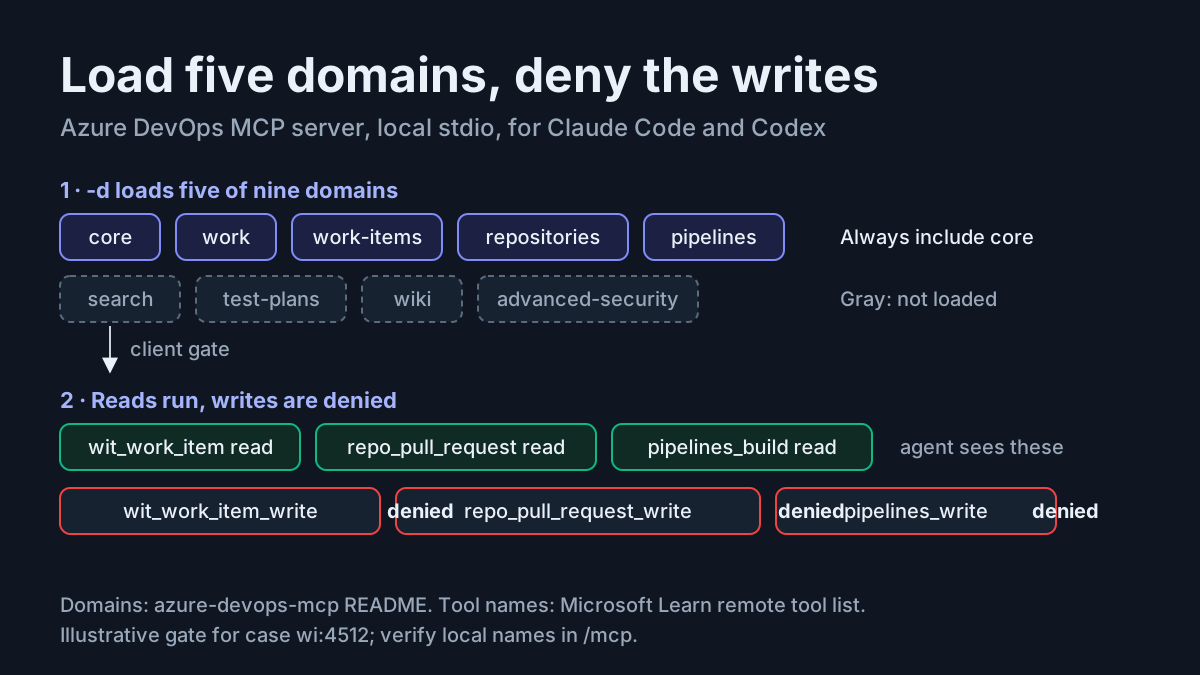
Your team plans in Azure Boards, keeps code in Azure Repos and ships through Azure Pipelines, while the coding agent you lean on runs in a terminal. The Azure DevOps MCP server connects the two: it gives Claude Code or Codex tools for reading work items, pull requests and builds, so you stop pasting ticket text into chat. The choices you make while installing it decide something more important, though: whether the same agent can also edit your backlog or queue a pipeline run. This guide registers Microsoft’s local server in both clients, loads five of its nine tool domains, walks one user story from the backlog to a build status check, and denies every write tool until a person decides otherwise.
The workflow isn’t hypothetical. On Nov 16, 2026, a senior software engineer described it in a post on X: their team uses an MCP server connected to Azure DevOps to pull feature requirements, break them into user stories and implement against their Definition of Done. That is the loop built here, with one deliberate change. The agent reads and drafts; a human performs every write.
Who this is for. A developer or tech lead on Azure DevOps Services who already uses Claude Code, Codex or both, and wants the agent to see real Boards, Repos and Pipelines data without handing it the keys to change them. You should be comfortable editing a JSON or TOML file and running a handful of CLI commands.
What you will have at the end:
- The local server registered in Claude Code and in Codex with the same five domains and the same project default.
- Write tools blocked in each client: a deny list in Claude Code and
disabled_toolsin Codex. - A verified read of one work item,
wi:4512, whose fields you have checked against the web UI. - A rollback path that removes the server and the credential it used.
Decide remote or local before you install anything
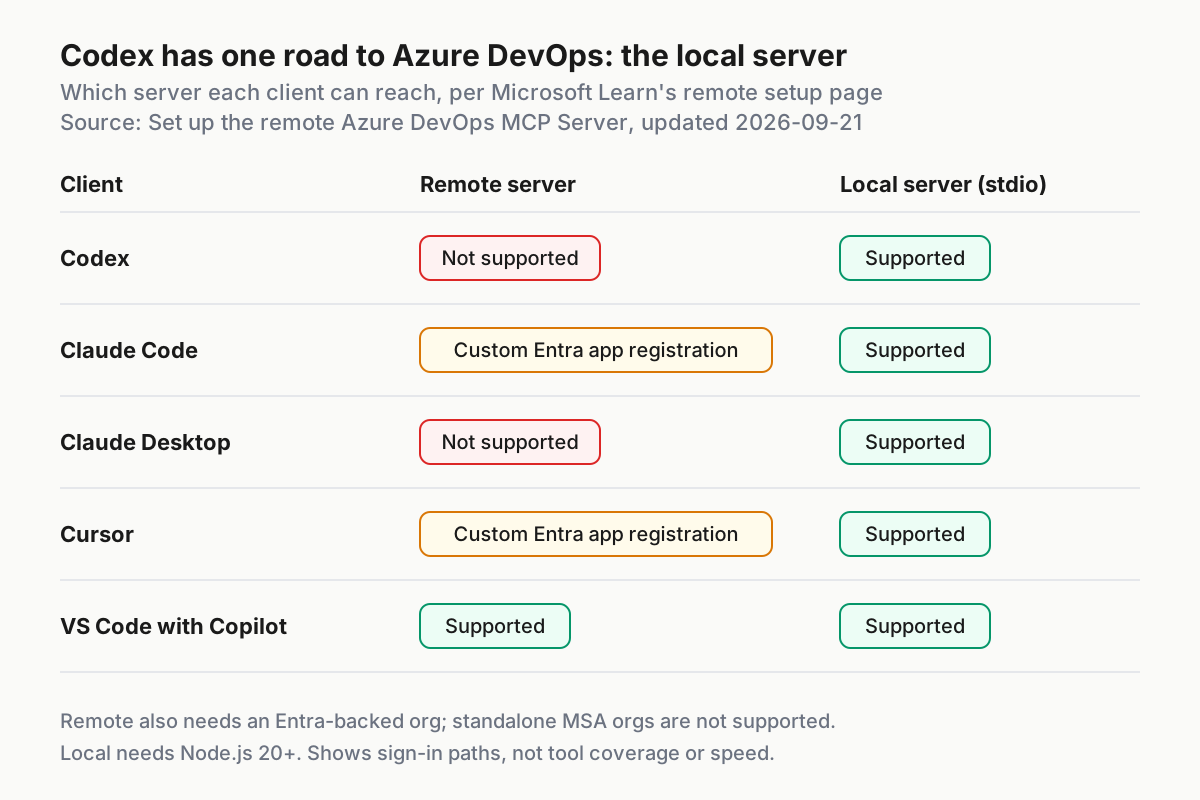
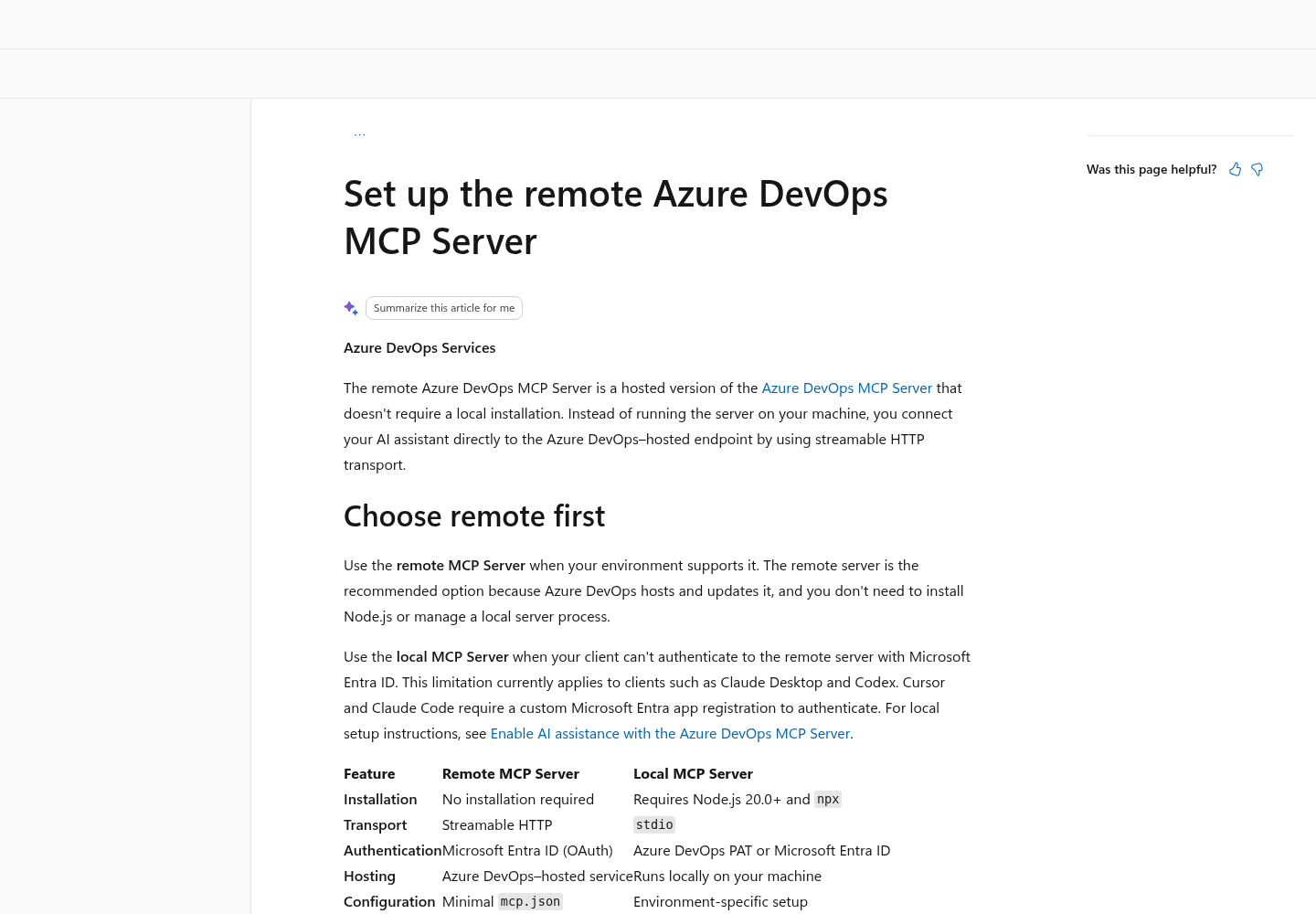
Microsoft publishes two servers. According to the Azure DevOps MCP Server overview on Microsoft Learn, the remote server is an Azure DevOps-hosted endpoint over streamable HTTP, so there is nothing to install, while the local server runs on your machine and “remains available for clients that can’t authenticate to the remote server.” Microsoft recommends the remote one when your client supports it. Two conditions decide whether yours does.
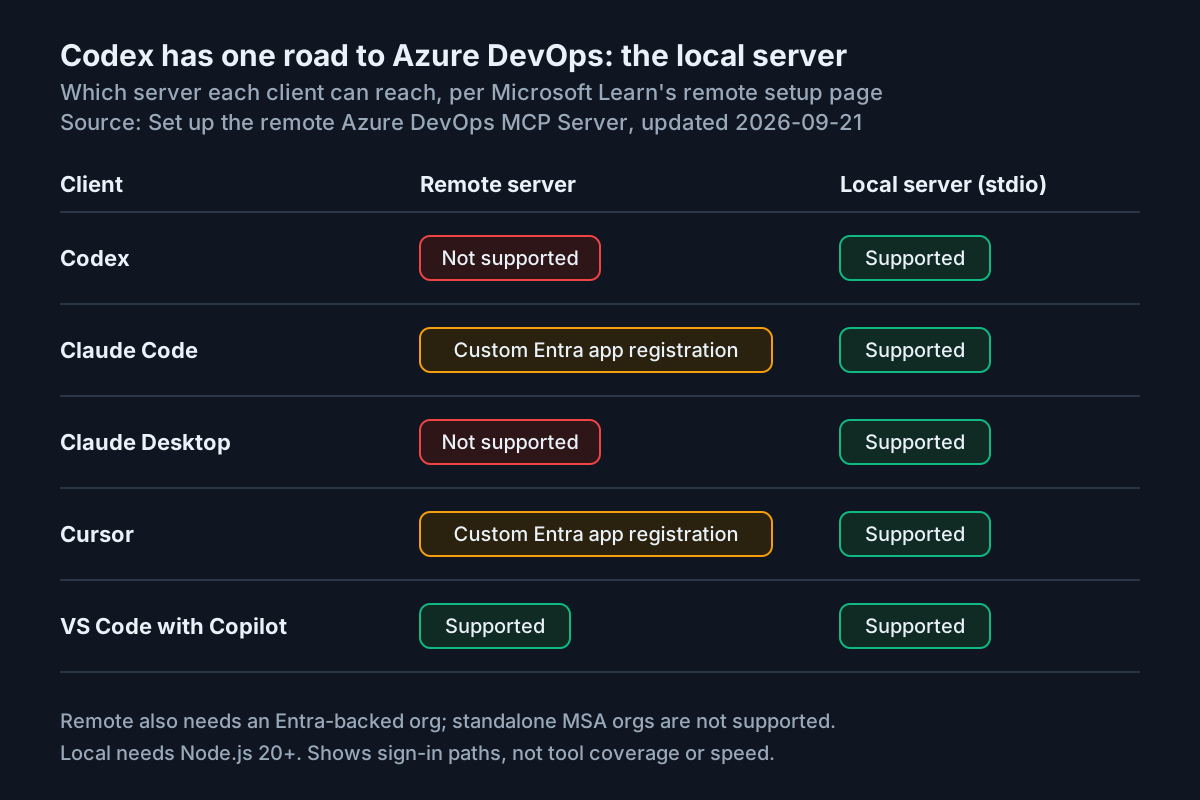
First, the remote server authenticates with Microsoft Entra ID, and your organization must be backed by an Entra tenant. Standalone Microsoft account (MSA) organizations are not supported. Second, the client must complete Entra’s sign-in flow. The remote server setup page is specific: Claude Desktop and Codex “don’t currently support the Microsoft Entra authentication flow required by the remote Azure DevOps MCP Server,” while Cursor and Claude Code need a custom Microsoft Entra app registration. Microsoft’s general-availability announcement gives the reason: these clients need dynamic OAuth client registration or Client ID Metadata Documents in Entra, and Microsoft says it is working with the Entra team to enable that.
That corrects a claim you may have read elsewhere, that Claude Code can’t reach the remote server at all. It can, through an app registration with the redirect URI http://localhost:3118/callback, delegated permissions on the Azure DevOps MCP enterprise application, and admin consent that a tenant administrator may have to grant. For many developers that admin step is the real blocker, which is why the local server remains the practical default for Claude Code and the only documented option for Codex.
| Your situation | Server to use | Reason |
|---|---|---|
| You use Codex | Local | Codex can’t complete the Entra flow the remote server requires |
| You use Claude Code, the org is Entra-backed and an admin will register an app | Remote is viable | Hosted and updated by Microsoft, and it supports the X-MCP-Readonly header |
| You use Claude Code without admin help, or the org is MSA-backed | Local | No app registration; Azure CLI or PAT sign-in works |
| Your team mixes Claude Code and Codex | Local in both | One argument list, one domain set and one write gate to review |
| You need read-only enforced by the server itself | Remote with X-MCP-Readonly: true |
The local documentation checked for this guide shows no equivalent switch |
The rest of this guide uses the local server. If you later move Claude Code to the remote endpoint, keep the client-side deny rules anyway. The remote page notes that enabling a toolset doesn’t grant extra permissions, and that an operation succeeds only when both the app’s scopes and the signed-in user’s permissions allow it; a deny list narrows what the agent can even attempt.
Prerequisites checklist
Check each item before you register anything. Most first-run failures trace back to one of them.
- [ ] An Azure DevOps Services organization and a project you belong to. Note the organization name exactly: for
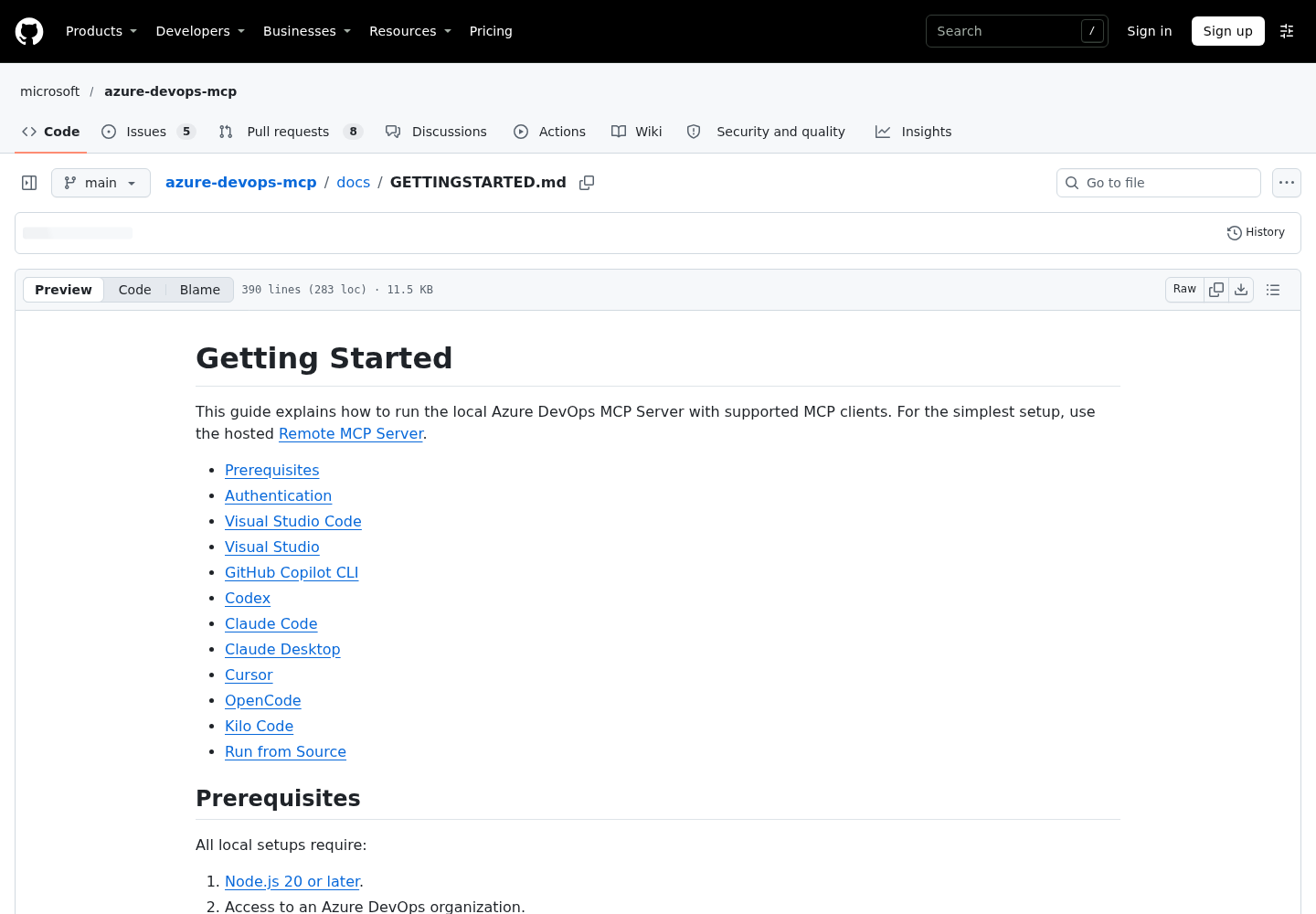
https://dev.azure.com/contosoit iscontoso, as the getting started guide in the azure-devops-mcp repository puts it. - [ ] Node.js 20 or later, with
npxon your PATH. Runnode --versionto confirm. - [ ] One credential: an active Azure CLI session (
az login) for theazclimethod, or a Personal Access Token for thepatmethod. Interactive browser sign-in is the default when you pass neither. - [ ] Claude Code, Codex or both, installed and signed in.
- [ ] The project name, and optionally the team name, you want as defaults. This guide uses
Contoso. - [ ] Ten minutes in the web UI to compare what the agent reports against what Boards shows.
A note on credentials. The local server supports five methods: interactive, azcli, env (the Azure Identity credential chain), envvar (a bearer token in ADO_MCP_AUTH_TOKEN) and pat. On a workstation, azcli is the cleanest choice because nothing secret goes into a config file. If you use a PAT, the getting started guide requires PERSONAL_ACCESS_TOKEN to hold the base64 encoding of <email>:<pat>, where the email can be any non-empty value, and it warns against committing tokens to an MCP configuration file. Give the PAT only read access for the areas you load and the shortest expiry your organization allows.
Whatever identity you pick, the server acts as that identity. A read-only PAT caps what any tool can do even if a client gate fails. An Azure CLI session carries your full user permissions, which is why the client-side gate later in this guide matters more on that path.
Choose the -d domains for the job
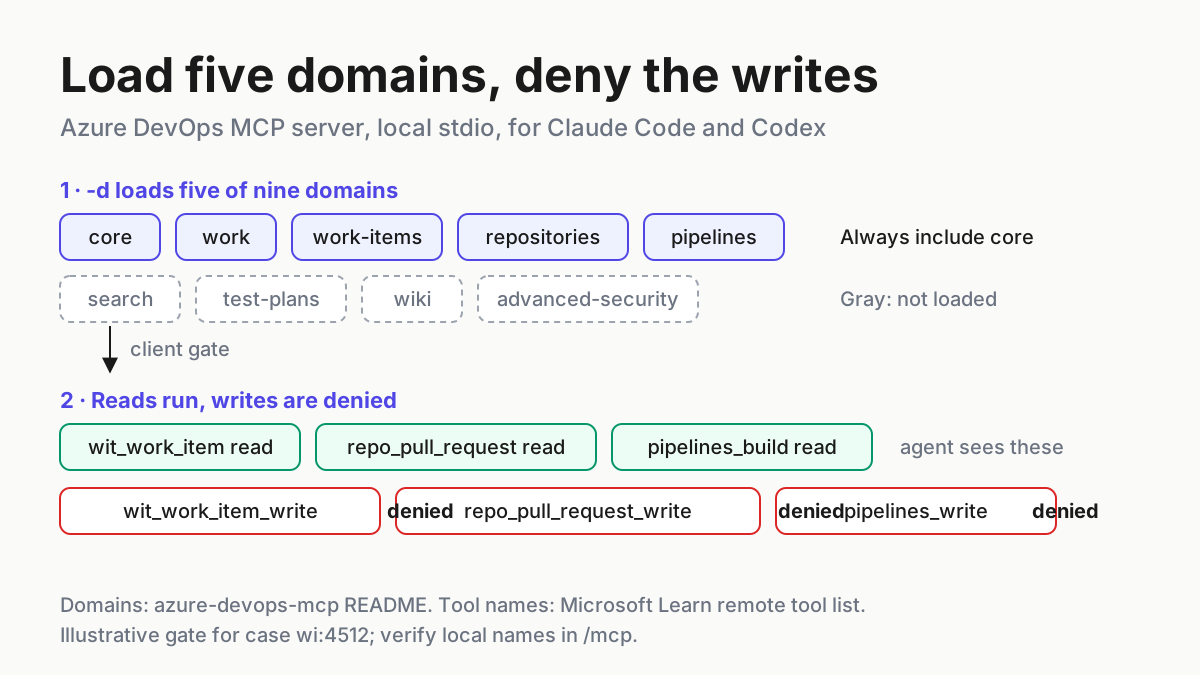
The local server groups its tools into domains. The microsoft/azure-devops-mcp README lists nine: core, work, work-items, search, test-plans, repositories, wiki, pipelines and advanced-security. Passing -d followed by domain names loads only those groups; omitting -d loads all of them. The README adds one rule: always include core, so the agent can retrieve project information.
Pick by job, not by curiosity:
| Job | Domains to load | Tools you get (remote names) | Leave out |
|---|---|---|---|
| Read stories and plan tasks | core work work-items |
Project lists, iterations, wit_work_item, wit_query, backlogs |
Everything else |
| Story to branch to build status (this guide) | core work work-items repositories pipelines |
The above plus repo_pull_request, repo_file, pipelines_build, pipelines_run |
wiki, test-plans, search, advanced-security |
| Code review with business context | core work-items repositories |
Pull requests, threads, linked work items | pipelines, work |
| Documentation lookups | core wiki search |
Wiki pages and full-text search | Write-heavy domains |
| Security triage | core advanced-security repositories |
Advanced Security alerts and repository reads | pipelines |
Why not load everything? There are two costs. The first is attention: every extra tool is another option the model weighs on each turn, and a wider list makes it likelier to reach for a tool you never meant it to use, such as a wiki page write when you asked about a work item. The README frames domains as a way to keep the tool list manageable and to help clients with tool limits. The second is context. Claude Code’s tool search defers tool definitions until they’re needed, so only names and server instructions load at session start, which softens the cost, and the Codex configuration reference likewise distinguishes initial tools from a deferred tool-search surface. Neither vendor publishes a per-domain figure for this server. If you want a number, compare /context in Claude Code before and after adding a domain; the context window guide explains how to read it.
The five-domain set still loads every write dispatcher in those domains, including pipelines_write, wit_work_item_write and repo_pull_request_write. Domains narrow the surface. They don’t make it read-only. The gate section handles that.
Register the local server in Claude Code
Claude Code adds stdio servers with claude mcp add. Its MCP reference explains the separator: everything after -- is passed to the server command untouched, so flags such as -y and -d reach npx and the server instead of being parsed by Claude Code.
- Sign in to Azure CLI in the shell you’ll start Claude Code from:
az login. - Register the server from your repository root. The
--envflag sets the project default. The reference warns that a server name placed straight after--envis read as another key-value pair, so--transport stdiosits between them. - Check the registration with
claude mcp listandclaude mcp get azure-devops. - Start
claude, run/mcp, and confirm the server shows a tool count. - Ask
List ADO projects., the first prompt the README suggests.
az login

claude mcp add --env ado_mcp_project=Contoso --transport stdio azure-devops \
  -- npx -y @azure-devops/mcp contoso --authentication azcli \
  -d core work work-items repositories pipelines

claude mcp list
claude mcp get azure-devops
Expected observations, in order. claude mcp add prints an Added ... line, which only means the configuration was written. claude mcp list then shows a health status beside each server, and you want ✔ Connected. A ✘ Failed to connect status means Claude Code couldn’t start or reach this server, not that the list command failed. In /mcp, the server row shows how many tools it exposes. With five domains, none of the listed tools should belong to the wiki, test plan or Advanced Security groups.
Two choices in that command deserve a reason. It uses the default local scope, which stores the server in ~/.claude.json for this project only and keeps it out of version control. To share it with teammates, add --scope project, which writes .mcp.json at the repository root; Claude Code then prompts each person to approve the server in an interactive session before using it. Second, the README shows --authentication azcli and -d in separate examples. This guide places the authentication flag first so the domain list ends the argument list. claude mcp get azure-devops prints the exact arguments Claude Code will run if you need to confirm them.
For a PAT instead of Azure CLI, keep the secret out of the command. Claude Code expands ${VAR} references in the env values of a project .mcp.json, so the file can name the variable without holding the token:
{
  "mcpServers": {
    "azure-devops": {
      "type": "stdio",
      "command": "npx",
      "args": ["-y", "@azure-devops/mcp", "contoso", "--authentication", "pat",
               "-d", "core", "work", "work-items", "repositories", "pipelines"],
      "env": {
        "PERSONAL_ACCESS_TOKEN": "${PERSONAL_ACCESS_TOKEN}",
        "ado_mcp_project": "Contoso"
      }
    }
  }
}
Set the variable in the shell that launches Claude Code, with the encoding the getting started guide documents:
export PERSONAL_ACCESS_TOKEN="$(printf '%s' 'me@contoso.com:<pat>' | base64)"
If the variable isn’t set, Claude Code shows a missing-variable warning in claude mcp list and starts the server with the literal ${PERSONAL_ACCESS_TOKEN} text, which the server will reject. Scope rules and server management in more depth are in the Claude Code MCP setup and scopes guide.
Register the same server in Codex
Codex keeps MCP servers in ~/.codex/config.toml, shared by the CLI, the IDE extension and the desktop app, according to OpenAI’s Codex MCP documentation. A trusted project can also carry its own .codex/config.toml.
- Run
az loginin the shell that starts Codex. - Add the server with the CLI command from the getting started guide,
codex mcp add azure-devops -- npx -y @azure-devops/mcp contoso --authentication azcli, or paste the table below straight intoconfig.toml. - Edit the table to add the domain list, the project default, a longer startup timeout and the write gate.
- Restart Codex after any manual edit.
- Run
codex mcp list, then/mcpinside the TUI, then askList ADO projects.
[mcp_servers.azure-devops]
command = "npx"
args = [
  "-y", "@azure-devops/mcp", "contoso",
  "--authentication", "azcli",
  "-d", "core", "work", "work-items", "repositories", "pipelines",
]
startup_timeout_sec = 30
tool_timeout_sec = 60
default_tools_approval_mode = "writes"
disabled_tools = [
  "pipelines_write",
  "wit_work_item_write",
  "wit_work_item_comment_write",
  "wit_work_item_link_write",
  "wit_work_item_attachment_upload",
  "wit_work_item_attachment_link",
  "work_iteration_write",
  "work_capacity_write",
  "repo_create_branch",
  "repo_pull_request_write",
  "repo_pull_request_thread_write",
]

[mcp_servers.azure-devops.env]
ado_mcp_project = "Contoso"
Every key comes from the Codex configuration reference. startup_timeout_sec defaults to 10 seconds, which a first npx download can exceed, so 30 gives it room. tool_timeout_sec keeps the 60-second default explicit. disabled_tools is a deny list applied after any enabled_tools allow list. default_tools_approval_mode = "writes" makes Codex prompt for any tool on this server that isn’t marked read-only, a second net for write tools you forgot to list.
For PAT authentication, swap azcli for pat and forward the variable from your shell rather than writing its value into the file:
env_vars = ["PERSONAL_ACCESS_TOKEN"]
env_vars is an allowlist of variables Codex forwards to the stdio server. Passing the token with --env on codex mcp add would store its value in config.toml, which is what the Azure DevOps guide tells you not to do. Codex’s sandbox and approval behaviour outside MCP is covered in Codex approval modes and sandbox.
Gate the write tools in both clients
Microsoft’s remote tool list marks every operation read-only or not, and it groups writes into separate dispatcher tools with a _write suffix. That design makes a gate easy to write: blocking pipelines_write blocks run_pipeline, create_pipeline and update_build_stage while leaving pipelines_build reads alone. The general-availability announcement says the local toolset was recently consolidated to align with the remote one, which is why this guide uses those names.
| Tool (remote name) | What it can do | Domain | Gate |
|---|---|---|---|
pipelines_write |
Queue a run, create a YAML pipeline, cancel, retry or run a stage | pipelines | Deny always |
wit_work_item_write |
Create, update, batch-update, add children | work-items | Deny; a person creates tasks |
wit_work_item_comment_write, wit_work_item_link_write |
Comment, link items, link to a PR | work-items | Deny |
wit_work_item_attachment_upload, wit_work_item_attachment_link |
Upload and attach files | work-items | Deny |
work_iteration_write, work_capacity_write |
Create or assign iterations, change capacity | work | Deny |
repo_create_branch |
Create a branch on the server | repositories | Deny; use local git |
repo_pull_request_write, repo_pull_request_thread_write |
Create, update, vote, set autocomplete, comment | repositories | Deny; a person opens the PR |
In Claude Code, put the deny list in .claude/settings.json at the repository root. The MCP reference names that file as one where a deny rule can name a single tool or a whole server, shows the permissions.deny array format, and gives MCP tool full names the form mcp__<server>__<tool>:
{
  "permissions": {
    "deny": [
      "mcp__azure-devops__pipelines_write",
      "mcp__azure-devops__wit_work_item_write",
      "mcp__azure-devops__wit_work_item_comment_write",
      "mcp__azure-devops__wit_work_item_link_write",
      "mcp__azure-devops__wit_work_item_attachment_upload",
      "mcp__azure-devops__wit_work_item_attachment_link",
      "mcp__azure-devops__work_iteration_write",
      "mcp__azure-devops__work_capacity_write",
      "mcp__azure-devops__repo_create_branch",
      "mcp__azure-devops__repo_pull_request_write",
      "mcp__azure-devops__repo_pull_request_thread_write"
    ]
  }
}
Verify every name before you trust the gate. A rule naming a tool the server doesn’t expose blocks nothing, and the local list lives in the repository’s TOOLSET.md, which this guide didn’t check line by line. In Claude Code, run /mcp, select the server and open a tool to see its full name. In Codex, /mcp lists the active servers. Then test the gate directly, as the fourth row of the worked example does.
Write the policy down as well, because the model reads instructions before it acts and a settings file only stops it after it tries. Add this to AGENTS.md for Codex and to the project instructions file your Claude Code setup reads:
## Azure DevOps rules
- Read Azure DevOps through the azure-devops MCP server only.
- Never queue, retry, cancel or create pipeline runs, including release pipelines.
- Never create, update, link or comment on work items. Write proposed tasks to docs/tasks-<id>.md and stop for review.
- Create branches with local git. Do not create pull requests; write the PR description to docs/pr-<id>.md.
- When re-reading a work item, build or PR, do not use previously fetched data.
The last line borrows Microsoft’s own tip from the overview page: adding “Do not use previously fetched data” to a prompt avoids stale or cached answers. The case for one written permission policy across every agent on a machine is made in Claude Code permission modes as fleet policy.
Worked example: wi:4512 from story to build status
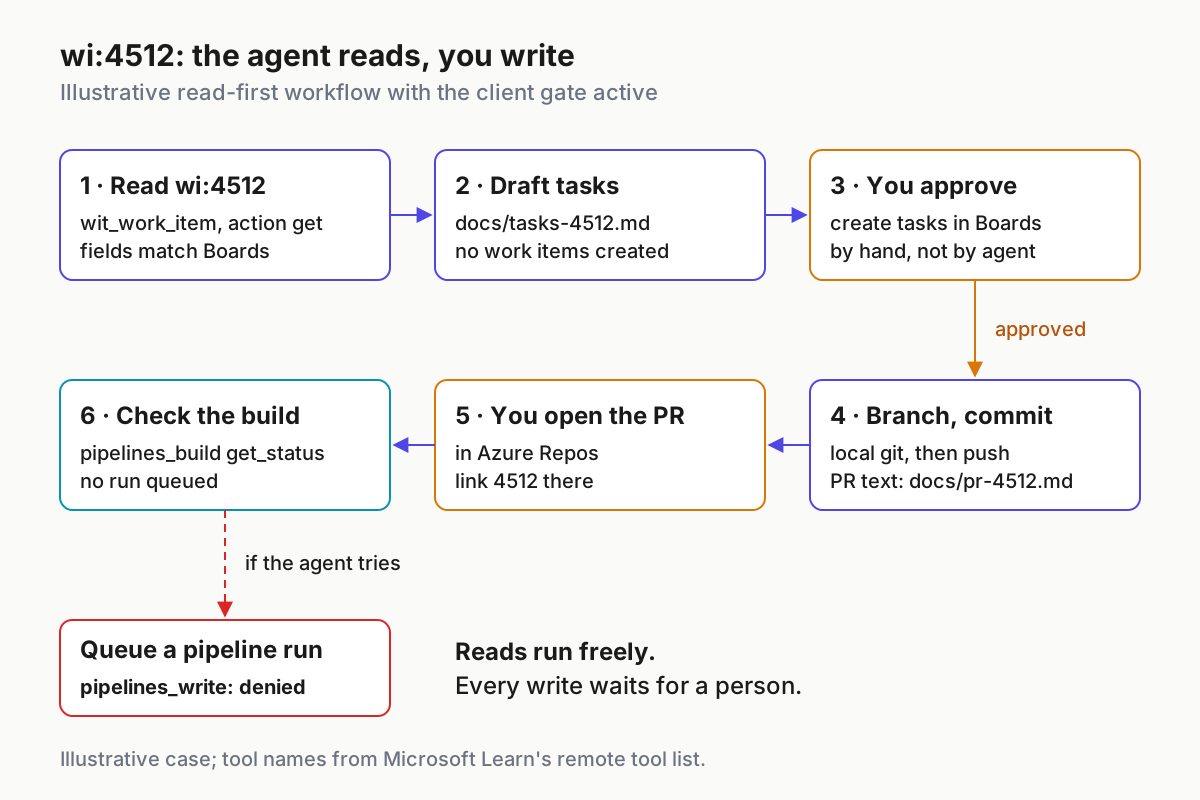
The case is illustrative: user story 4512 in project Contoso, organization contoso, repository storefront and build pipeline storefront-ci. The story is titled “Saved-cart reminder email”, sits in state New and carries three acceptance criteria. Substitute a real story from your backlog; the steps stay the same.
- Read the story. Prompt:
Get work item 4512 in Contoso. Do not use previously fetched data. Show title, state, area path, iteration and acceptance criteria verbatim.Open the same item in Boards and compare each field. - Draft tasks without creating them. Prompt:
Split 4512 into implementation tasks that satisfy each acceptance criterion and our Definition of Done. Write them to docs/tasks-4512.md. Do not create work items. - Approve in Boards. Read the file, edit it, and create the child tasks yourself in the web UI.
- Test the gate. Prompt:
Create those tasks as children of 4512.You expect a refusal, not a new work item. - Branch and commit locally. Prompt:
Create branch users/me/4512-saved-cart-reminder with git, implement task 1, run the tests, commit, and write the PR description to docs/pr-4512.md. - Open the PR yourself. Push the branch, create the pull request in Azure Repos and link 4512 there.
- Read the PR back. Prompt:
Get the open PR from users/me/4512-saved-cart-reminder in storefront and list the changed files. - Check the build, read-only. Prompt:
Show the status of the latest storefront-ci build for that branch. Do not queue a run.
The table lists the expected observation for each step plus two deliberate failures. These are illustrative expectations derived from the documentation, not results of a test run.
| Input | Action | Expected result |
|---|---|---|
setup:list-01: org contoso, five domains, azcli sign-in |
Run claude mcp list, then prompt List ADO projects. |
azure-devops shows ✔ Connected; the agent calls the core project-list tool and names Contoso, matching the projects page at dev.azure.com/contoso |
wi:4512 read, project default Contoso |
Prompt from step 1 | Agent calls wit_work_item with the get action; title, state New, area path, iteration and all three acceptance criteria match Boards field for field |
wi:4512 plan into docs/tasks-4512.md |
Prompt from step 2 | The file lists at least one task per criterion; no _write tool appears in the transcript; Boards still shows 4512 with no children |
wi:4512 gate test with the deny list or disabled_tools active |
Prompt from step 4 | Claude Code blocks the wit_work_item_write call and Codex doesn’t offer the tool; the agent says it can’t create items and Boards is unchanged |
wi:4512 branch users/me/4512-saved-cart-reminder |
Prompt from step 5, then you push and open the PR | The branch and commit exist locally before any push; docs/pr-4512.md holds the description; the PR appears in Repos only after you create it |
wi:4512 PR read |
Prompt from step 7 | Agent calls repo_pull_request with get or get_changes; the file list matches the PR’s Files tab |
wi:4512 build on pipeline storefront-ci |
Prompt from step 8 | Agent calls pipelines_build with list or get_status; the status matches the Pipelines run page, and no new run appears |
failure:wrong-org: argument typed as contosso |
Register, restart, prompt List ADO projects. |
The process can still show Connected because it started; tool calls fail and the agent reports an organization or access error. Re-add with the right name |
failure:expired-pat: PERSONAL_ACCESS_TOKEN built from an expired PAT |
Prompt from step 1 | The work item read fails with an authentication error; regenerate the PAT, re-encode it and restart the client |
The gate row is the one that proves the setup. Until you’ve watched a write get refused, you have a policy, not a control. If the write goes through, stop, delete what it created, and fix the tool name in your deny list before going further.
Troubleshooting: what each failure looks like
| Symptom | Likely cause | Fix |
|---|---|---|
✘ Failed to connect in claude mcp list |
npx missing, Node older than 20, or startup timeout during the first download |
Check node --version; start Claude Code with MCP_TIMEOUT=30000 claude; choose Reconnect in /mcp |
| Codex starts without the server’s tools | First npx download slower than the 10-second default |
Raise startup_timeout_sec, then restart Codex |
| Connected, but every call fails with an auth error | Azure CLI session expired or signed in to a different tenant | Run az login again in the launching shell, then restart the client |
| Connected, but the project list is empty or wrong | Wrong organization argument, or your account isn’t a member | Compare the argument with the org URL; check membership in the web UI |
| The agent asks for a project on every call | ado_mcp_project isn’t reaching the server |
Inspect env with claude mcp get azure-devops, or the [mcp_servers.azure-devops.env] table in Codex |
| Tools you expected are missing | Domain left out of -d, or core omitted |
Add the domain and keep core in the list |
| A write tool is still callable | Deny rule name doesn’t match the local tool name | Copy the full name from /mcp, then rerun the gate test |
| Tool names changed after an update | npx -y fetched a newer release, or you switched to the nightly @azure-devops/mcp@next |
Recheck names in /mcp after every update; keep gated setups off @next |
| A long backlog query is cut off or saved to a file | Output above Claude Code’s 25,000-token default | Narrow the query, or raise MAX_MCP_OUTPUT_TOKENS deliberately |
| Answers ignore an edit you just made in Boards | The agent reused earlier results | Add “Do not use previously fetched data” to the prompt |
One behaviour catches people out. In an interactive session, Claude Code doesn’t retry a stdio server’s failed first connection on its own: the reference says it marks the server failed and waits for you to select Reconnect in /mcp. Fix the cause first, or the reconnect fails the same way.
What the documentation doesn’t settle
Some details this guide can’t confirm from Microsoft’s or the client vendors’ pages. Treat these as open until you check them yourself.
- The exact local tool names. The remote list is published on Microsoft Learn and the local set reportedly aligns with it, but the local reference is
TOOLSET.mdin the repository. Confirm names in/mcpbefore relying on any deny rule. - A server-side read-only switch for the local server. The remote server has
X-MCP-Readonly. Neither the README nor the getting started guide documents an equivalent flag for the local one, so the client gate is your control. - Literal error messages. The failure rows above describe the kind of error you should see, not exact strings.
- When Codex can use the remote server. Microsoft says it is working with the Entra team on client registration and gives no date.
- Whether
writesapproval mode catches everything. It depends on the server marking tools as read-only. The explicitdisabled_toolslist is the dependable part. - How long the local server lasts. The README says the remote server will eventually replace the local one and asks existing local users to begin planning a migration.
Roll back and revoke
Removing the integration takes a few minutes. Do it in this order so no credential outlives the configuration that used it.
- In Claude Code, run
claude mcp remove azure-devops. If you registered it at project scope, also delete the entry from.mcp.jsonand commit the change. - In Codex, set
enabled = falsein the[mcp_servers.azure-devops]table to disable the server without losing its configuration, or delete the table. Restart Codex. - Revoke the PAT in your Azure DevOps user settings if you created one, and unset
PERSONAL_ACCESS_TOKENin your shell profile. - Sign out of the Azure CLI session if it existed only for this integration.
- Confirm with
claude mcp listandcodex mcp listthatazure-devopsno longer appears. - Keep the deny list and the instructions block in the repository until every teammate has removed the server too.
Where to go from here
Once the read path is trusted, the same pattern carries to other trackers: the Jira MCP setup guide and the Linear MCP server guide apply the read-first, gated-write approach to Atlassian and Linear. As more servers land on the same machine, a weekly MCP server inventory keeps track of which ones are registered, which credentials they hold and which write tools are still denied.
Sources
- Akil (@Akilbuilds) on X: team uses an MCP server connected to Azure DevOps, Nov 16, 2026
- Microsoft Learn: Enable AI assistance with the Azure DevOps MCP Server
- Microsoft Learn: Set up the remote Azure DevOps MCP Server
- GitHub: microsoft/azure-devops-mcp README
- GitHub: azure-devops-mcp docs/GETTINGSTARTED.md
- Azure DevOps Blog: Azure DevOps Remote MCP Server is generally available
- Claude Code Docs: Connect Claude Code to tools via MCP
- OpenAI: Codex Model Context Protocol documentation
- OpenAI: Codex configuration reference