Claude setup-token for Headless Claude Code: Create the Token, Run It in CI, and Replace Missing MCP Connectors
Use claude setup-token to run Claude Code in CI or containers, verify it with claude auth status, and swap missing claude.ai connectors for a local .mcp.json.

A developer replied to @ClaudeDevs on X on November 25, 2026 with a problem many teams hit the week they move agents off their laptops with claude setup-token. After switching Claude Code agents to claude setup-token, they had “lost all mcp access” configured in their account, and they wanted to know how to give those agents their account connectors and plugins back. The token itself worked. Model calls went through, the lane looked healthy, and the tools the agent depended on had quietly disappeared.
That is documented behavior, not a misconfiguration you can flag your way out of. This guide takes one unattended lane from a fresh token to a verified run, shows how to prove which credential the runner is actually using, and rebuilds the tool access the agent needs with a project .mcp.json that a headless run loads on its own.
Who this is for. You are a developer or platform engineer on a Pro, Max, Ultra, Team or Enterprise plan, and you want Claude Code to run without a browser on a server, in a container or on a GitHub Actions runner, billed to that subscription. You need Claude Code installed on your workstation and on the target host, shell access to that host, and admin access to a repository if you follow the Actions section. Every terminal output described below is an illustrative expected observation written from the documentation. None of it is a transcript of a run we performed.
What the token can and cannot do
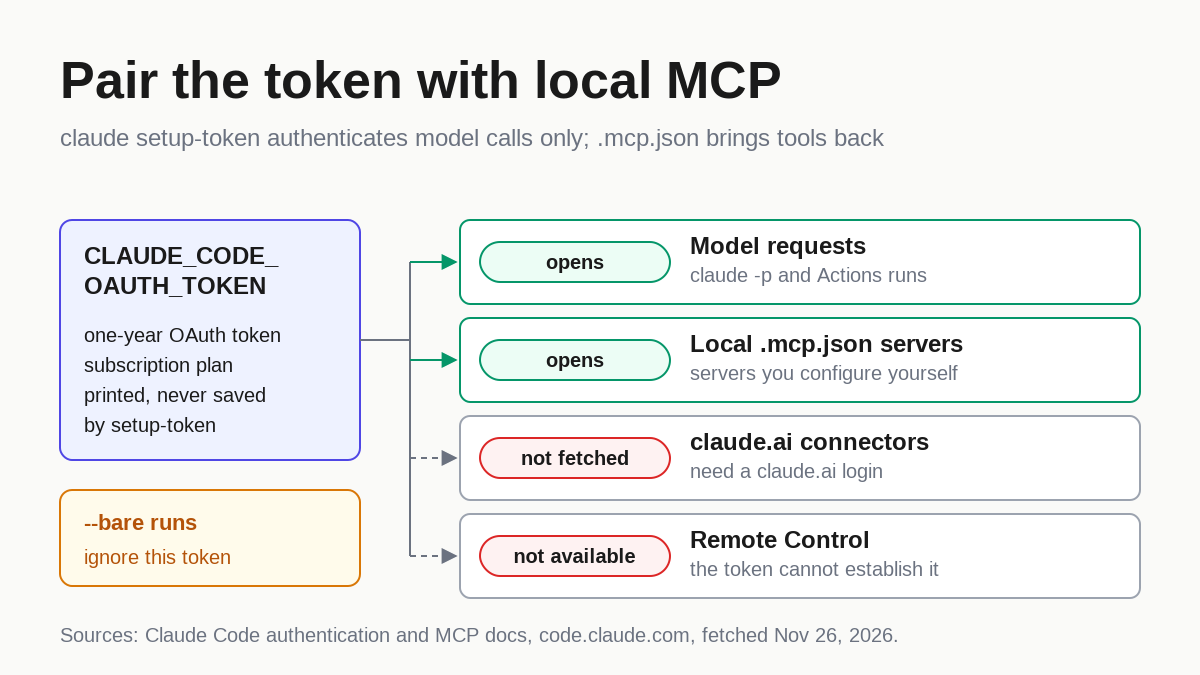
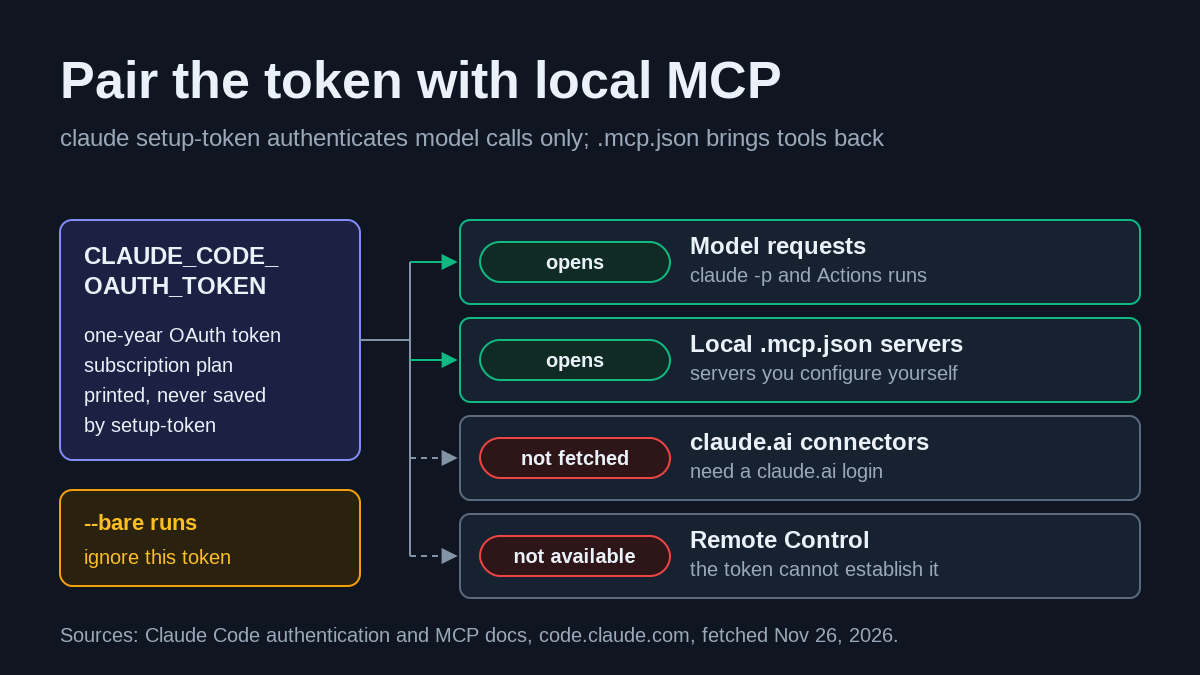
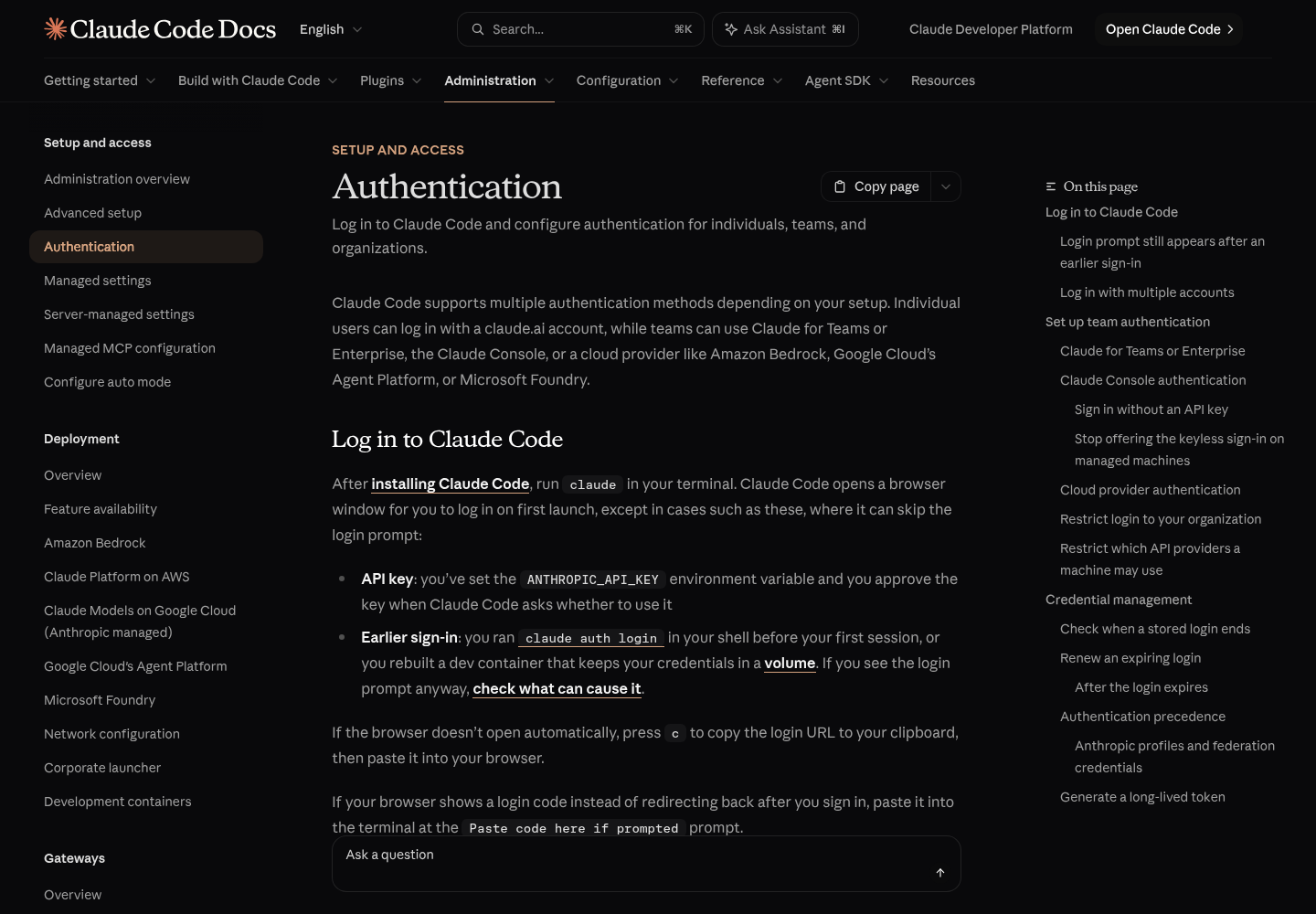
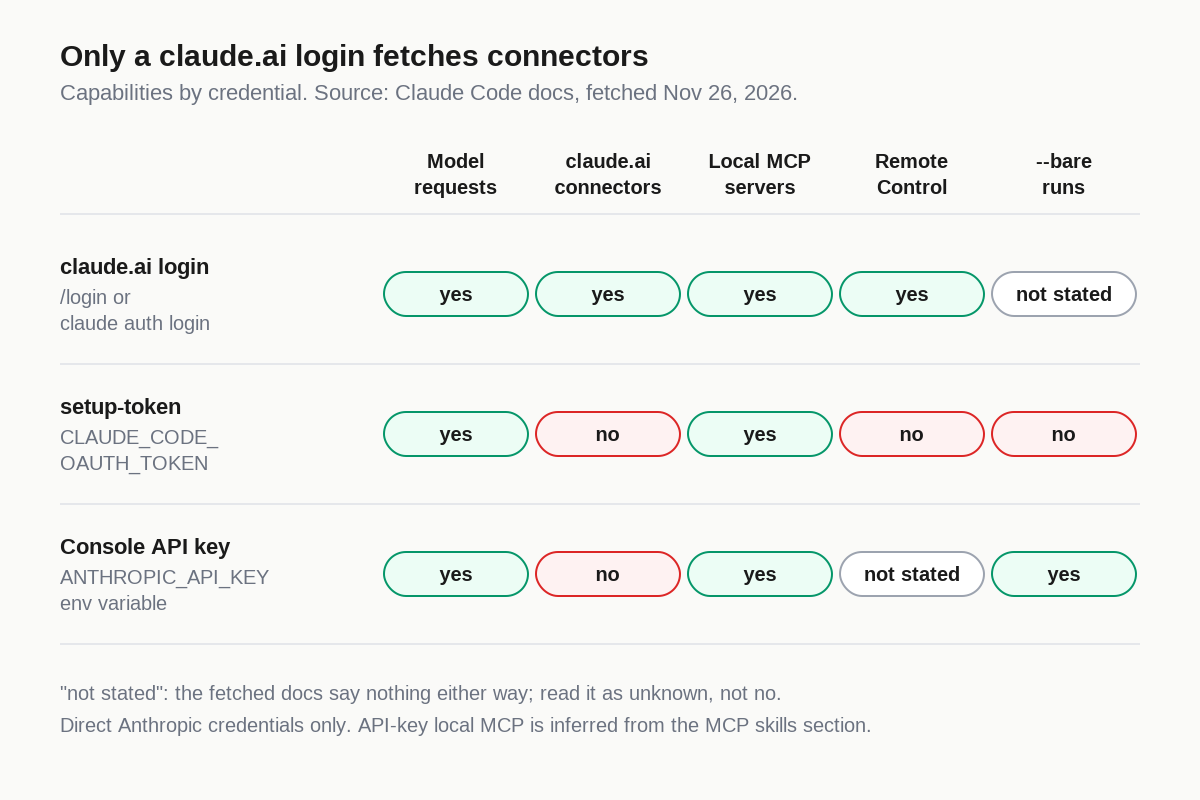
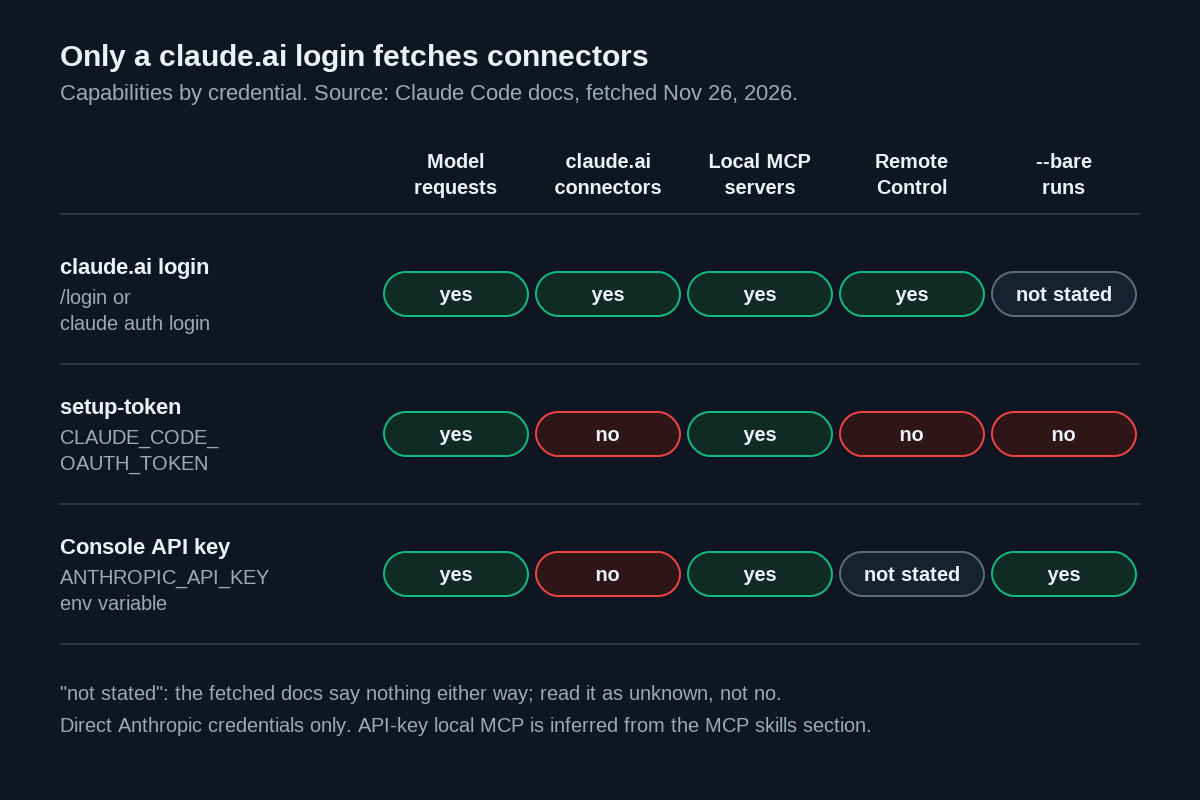
Running claude setup-token opens the same browser authorization flow as /login. After you approve access, a one-year OAuth token prints to the terminal. Claude Code does not save it anywhere; you copy it and set it as the CLAUDE_CODE_OAUTH_TOKEN environment variable wherever you want to authenticate. That is the whole credential story on Anthropic’s Claude Code authentication page, and the same page draws the boundary: the token authenticates with your Claude subscription, “can only make model requests,” and therefore can’t establish Remote Control sessions or fetch claude.ai connectors. MCP servers you configure locally still work.
The Claude Code MCP documentation states the rule from the other side. Connectors you add at claude.ai are fetched only when the active authentication method is a claude.ai subscription login. They are not loaded, even if you ran /login on that machine earlier, when an API key, ANTHROPIC_AUTH_TOKEN, an apiKeyHelper, a third-party provider, an Anthropic profile or a CLAUDE_CODE_OAUTH_TOKEN from claude setup-token supplies the credential.
Two more limits matter for unattended work. Bare mode, the --bare flag that skips auto-discovery of hooks, plugins, MCP servers and CLAUDE.md so scripted calls start faster, does not read CLAUDE_CODE_OAUTH_TOKEN at all; the docs send --bare scripts to ANTHROPIC_API_KEY or an apiKeyHelper. And the token does not open Remote Control, so a lane you hoped to steer from your phone needs a different credential. If that is your goal, the Remote Control setup guide covers the login it needs.
People have asked for the gap to close. GitHub issue #34575 in anthropics/claude-code, opened on March 15, 2026, requested that connector sync work with tokens from setup-token. The reporter believed the token carried a connector scope; that is their reading, while the documentation describes the restriction plainly. A commenter on April 8 reported that removing the environment variable and falling back to stored OAuth credentials restored connector access, and another on May 14 noted that /schedule does not work with the long-lived token either. The issue was closed as not planned on June 13, 2026 after a period of inactivity.
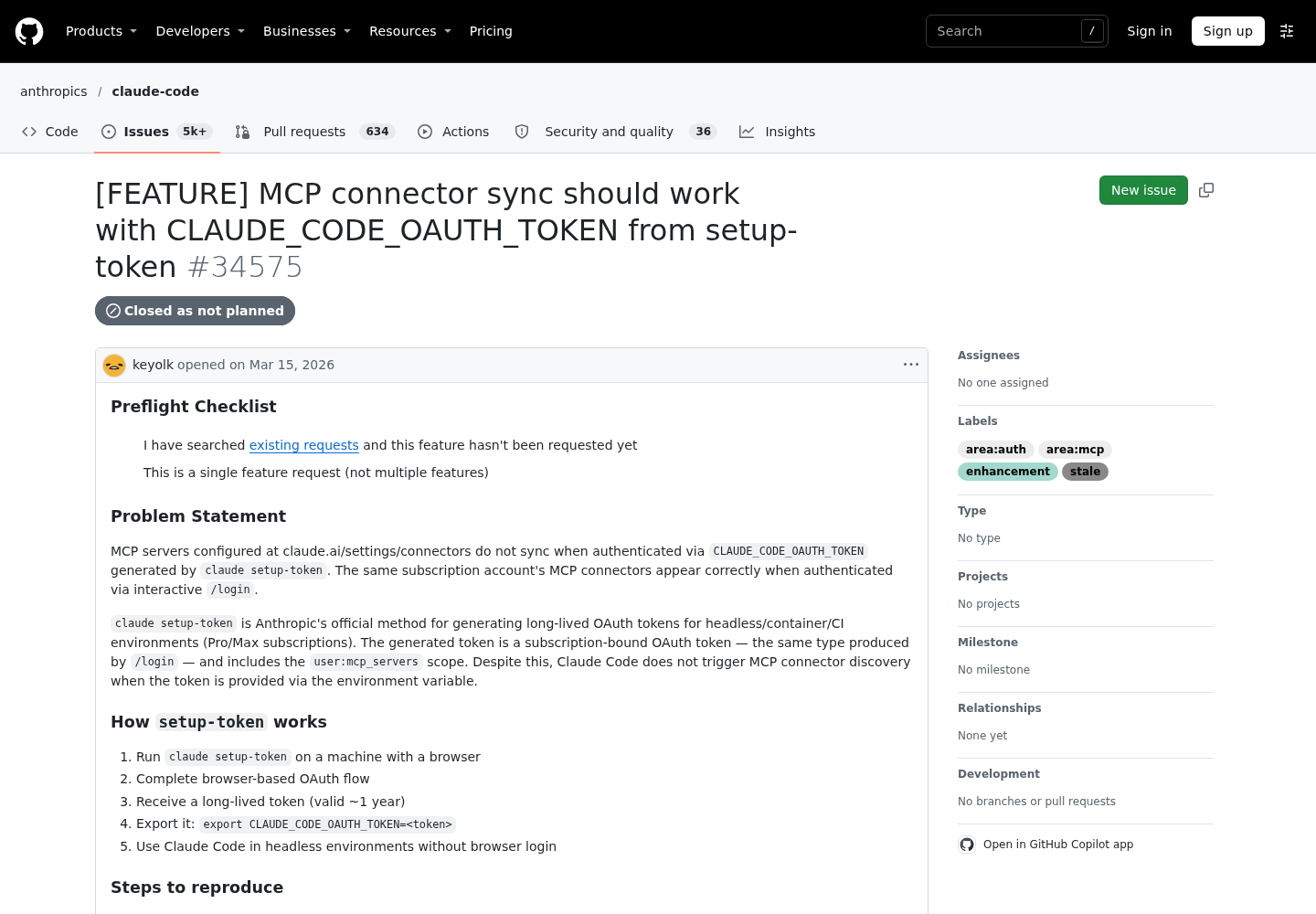
The practical conclusion: treat claude.ai connectors as unavailable on every token lane, and design the lane’s tools as local configuration from the start. Nothing in the evidence suggests a setting that changes this.
Pick the credential that matches the lane
Choose before you mint anything. Three credentials cover most headless work, and they differ in who pays, who owns the secret and what loads alongside the model.
| Question | claude setup-token |
claude auth login (claude.ai) |
Console API key |
|---|---|---|---|
| Billing | Your subscription | Your subscription | API billing in the Console |
| Where the secret lives | Wherever you store the printed token | ~/.claude/.credentials.json on Linux, Keychain on macOS |
ANTHROPIC_API_KEY or a stored key |
| Needs a browser on the lane host | No, mint it elsewhere | Yes, or a pasted login code | No |
| claude.ai connectors | Not fetched | Fetched | Not fetched |
| Locally configured MCP servers | Work | Work | Work |
| Remote Control | Not available | Available | Not stated in the docs |
--bare runs |
Token ignored | Not stated | Supported |
| Shared secret across many repositories | Avoid: tied to one person’s subscription | Not suited | Recommended by the docs |
| Lifetime | One year | Ends on the dates claude auth status --text reports |
Until you delete the key |
Read the table as a decision procedure:
- If the lane must use claude.ai connectors,
/scheduleor Remote Control, it needs a claude.ai login on that host. Plan for renewal: the authentication page warns that a background session stops making progress once its login expires if no other credential is saved. - If one person’s repository or server runs the lane and that person’s subscription should pay, use
claude setup-token. This is the case the rest of the guide builds. - If several repositories share one organization-level secret, use a Console API key. The Claude Code GitHub Actions documentation says so directly, because an OAuth token is tied to the subscription of the person who ran
claude setup-token. The same page describes workload identity federation for Actions when you would rather store no long-lived secret at all. Treating the lane as its own identity, as argued in agent identity as a service principal, points the same way. - If your script passes
--bare, the token is not an option. Use an API key or anapiKeyHelper.
Administrators should know one more detail. The authentication page notes that claude setup-token and /install-github-app enforce only forceLoginMethod, not forceLoginOrgUUID, so they can mint a token in a different organization than the one managed settings require. Confirm which account you are signed in to before you approve the browser prompt.
The worked lane at a glance: lane:ci-review-01
The example lane, lane:ci-review-01, runs Claude Code headless in a Linux container that checks out a repository and reviews changes. It needs two things: model calls billed to one Max subscription, and read access to GitHub through an MCP server, which on the owner’s laptop came from a claude.ai connector. The table summarizes the run, and each row is expanded in the sections that follow. The expected results are illustrative observations derived from documented behavior, not captured output.
| Input | Action | Expected result |
|---|---|---|
| lane:ci-review-01 owner’s laptop, signed in to the Max account, browser available | Run claude setup-token and approve access in the browser |
A long token prints in the terminal; Claude Code does not store it |
lane:ci-review-01 token, stored as the secret CLAUDE_CODE_OAUTH_TOKEN |
Inject it into the container environment; unset ANTHROPIC_API_KEY and ANTHROPIC_AUTH_TOKEN |
The variable is non-empty in the job shell and neither key variable exists |
| lane:ci-review-01 container shell after injection | Run claude auth status |
JSON with "authMethod": "oauth_token" and exit code 0 |
| lane:ci-review-01 prompt “Reply with the single word ready.” | Run claude -p with --output-format json --max-turns 1 |
A JSON result containing ready; usage counts against the Max subscription |
lane:ci-review-01 container with no project .mcp.json yet |
Run claude mcp list |
No claude.ai entries; the GitHub connector the laptop showed is absent |
lane:ci-review-01 server github-mcp at https://api.githubcopilot.com/mcp/, header from REVIEW_GH_PAT |
Run claude mcp add-json github-mcp '<json>' --scope project |
An Added ... line and a new .mcp.json at the repository root |
lane:ci-review-01 fresh checkout containing .mcp.json |
Run claude mcp get github-mcp, then a stream-json claude -p with --mcp-config |
get may show Pending approval; the run’s system/init event reports no mcp_server_errors for github-mcp |
Mint the token on a machine with a browser
The token is minted interactively once and used non-interactively for up to a year. Do it on your workstation, not on the lane host.
- Confirm you are signed in to the account whose subscription should pay. On a machine with several accounts, the authentication page’s
CLAUDE_CONFIG_DIRpattern keeps each login in its own configuration directory, so you can mint from the right one. - Run the command:
claude setup-token
- Approve access in the browser window it opens. Because this is the same authorization flow as
/login, the familiar fallback of copying a login code back into the terminal should apply if the redirect does not complete. - Copy the token from the terminal immediately. It prints once and is not saved, so closing the terminal loses it.
- Paste it straight into your secret store, and write down the date you minted it. You will need that date later, because
claude auth status --textshows a sign-in end date only for stored claude.ai logins; the documentation says the line is absent for other credentials.
Expected observation (illustrative): the terminal prints the token after browser approval, and claude auth status on the laptop still reports your normal login, because minting a token does not change the credential your own sessions use.
Hand the token to the runner without leaking it
The variable has to reach the exact process that runs claude, and nothing with higher precedence may be present.
- Store the token as a secret named
CLAUDE_CODE_OAUTH_TOKEN. That is the name GitHub quick setup uses, and keeping it avoids a mapping step. For a container or server, use the secret store your platform already has and inject the value as an environment variable at start-up. Never commit it, and never bake it into an image layer. - Export it in the shell that launches Claude Code. The authentication page gives the syntax for each shell:
# macOS, Linux, WSL
export CLAUDE_CODE_OAUTH_TOKEN=your-token
# Windows PowerShell
$env:CLAUDE_CODE_OAUTH_TOKEN = "your-token"
:: Windows CMD
set CLAUDE_CODE_OAUTH_TOKEN=your-token
- Remove every credential that outranks the token. Claude Code checks, in order: cloud provider credentials when
CLAUDE_CODE_USE_BEDROCK,CLAUDE_CODE_USE_VERTEXorCLAUDE_CODE_USE_FOUNDRYis set;ANTHROPIC_AUTH_TOKEN;ANTHROPIC_API_KEY; the output of anapiKeyHelperscript; and only thenCLAUDE_CODE_OAUTH_TOKEN. In non-interactive-pmode an API key is always used when present, with no prompt to decline it. - Check settings files on the host for an
apiKeyHelperentry. Unsetting environment variables does not remove a helper configured in settings. - On a shared host, give the lane its own
CLAUDE_CONFIG_DIRso it does not inherit another user’s settings or stored login. The environment variables guide covers where each kind of variable can be set and how to see which one is active.
Prove the runner is using the token
Do not let the first real prompt be your authentication test. The Claude Code CLI reference documents claude auth status: it prints JSON, exits 0 when logged in and 1 when not, and its authMethod field is one of none, claude.ai, oauth_token, api_key, api_key_helper or third_party. On v2.1.268 and later the JSON also names the configDirectory the CLI is using, which helps when several lanes share a host. A token lane should report oauth_token and nothing else.
Save this as lane-preflight.sh and run it before every job:
#!/usr/bin/env bash
# lane-preflight.sh: fail fast unless this process authenticates with the setup-token
set -euo pipefail

: "${CLAUDE_CODE_OAUTH_TOKEN:?CLAUDE_CODE_OAUTH_TOKEN is not set for this process}"

# Credentials that outrank the token must not be present
unset ANTHROPIC_API_KEY ANTHROPIC_AUTH_TOKEN
unset CLAUDE_CODE_USE_BEDROCK CLAUDE_CODE_USE_VERTEX CLAUDE_CODE_USE_FOUNDRY

# Exits 1, and stops this script, when no credential is found
status_json="$(claude auth status)"
printf '%s\n' "$status_json"

if ! printf '%s' "$status_json" | grep -Eq '"authMethod"[[:space:]]*:[[:space:]]*"oauth_token"'; then
  echo "lane:ci-review-01: expected authMethod oauth_token" >&2
  exit 1
fi
Because unset only affects the script’s own process, either source the script or run claude from the same shell, so the cleaned environment carries through to the real job.
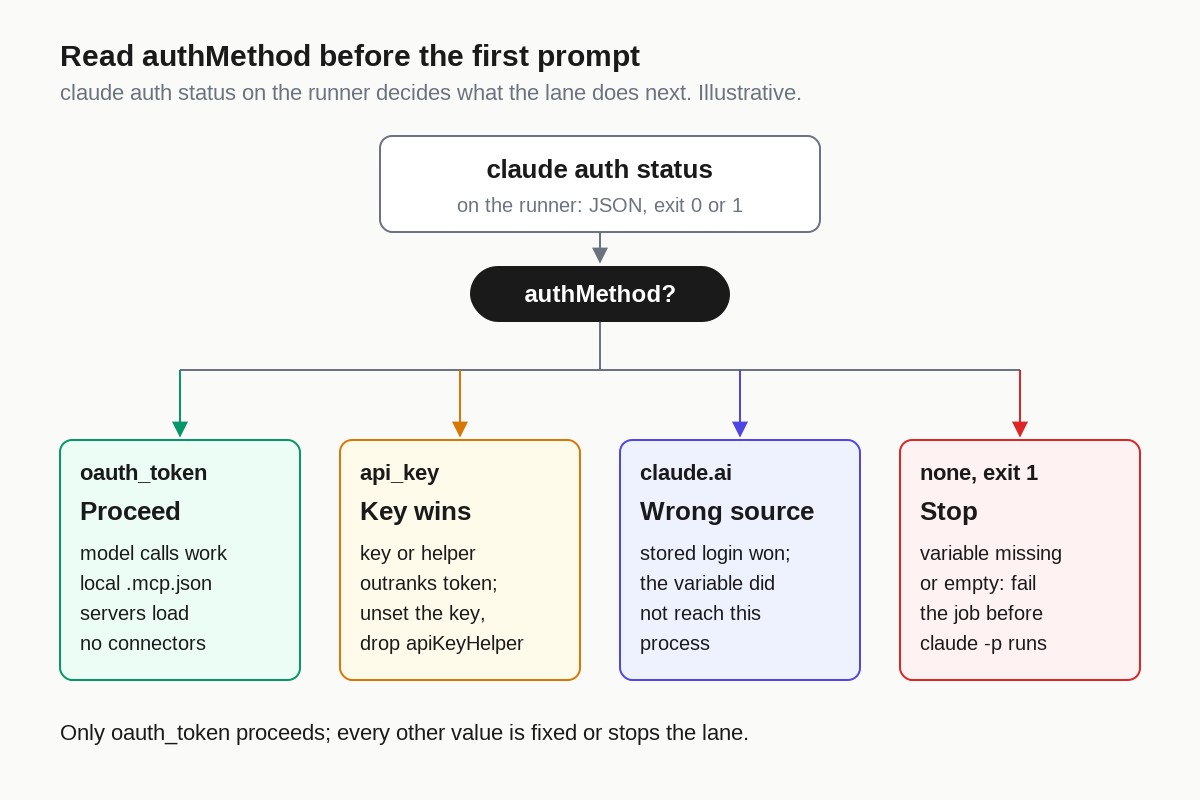
Interpret the result with the diagram above:
oauth_token: proceed. The lane will make model calls on your subscription and load local MCP servers, and it will not fetch connectors.api_keyorapi_key_helper: a key outranks the token. Find where it comes from, environment or settings, and remove it.claude.ai: a stored login on the host won, which means the variable never reached this process. Check the step or shell that exports it.third_party: a cloud provider variable is set and wins over everything else in the list.nonewith exit code 1: the variable is missing or empty. In GitHub Actions, check whether the run came from a fork, since GitHub withholds secrets from runs triggered by fork pull requests on public repositories.
Run one model call, then look for the missing connectors
With authentication proven, make the cheapest possible model call and confirm the tool picture matches what the documentation predicts.
- Run a one-turn prompt with JSON output:
claude -p "Reply with the single word ready." --output-format json --max-turns 1
- Expect a JSON object containing the reply. If you need output parsing, session resumption or spend caps for longer scripts, the headless mode guide covers
claude -pin depth; this step only proves the credential can reach the model. - List MCP servers on the runner:
claude mcp list
- Expected observation (illustrative): the list is empty or shows only servers configured on this host, with nothing from the claude.ai section your laptop’s
/mcppanel displays. On a laptop signed in with claude.ai, connectors appear in/mcpwith indicators showing where they came from; on the token lane they are never fetched. - Write down which connectors the lane actually used on your laptop. For
lane:ci-review-01it is one, GitHub, for reading repository and pull request data. Each connector on that list becomes one local server in the next section.
Rebuild the tools you need in a project .mcp.json
Local configuration is the documented way back. A project-scoped server lives in .mcp.json at the repository root, travels with the checkout, and is loaded by claude -p runs without the interactive approval prompt.
- Decide how the server authenticates. A
claude -prun has no/mcppanel, so the MCP page notes it cannot complete an OAuth sign-in. For a headless lane, prefer a server that accepts a token in a header. GitHub’s remote MCP server does: the documentation shows it authenticating with a fine-grained personal access token passed as anAuthorizationheader. - Create a fine-grained token with read access to the repositories the lane reviews, and store it as a second secret. This guide calls it
REVIEW_GH_PAT. Pick a name of your own rather than reusing a credential variable Claude Code already knows about: the MCP page explains that Claude Code’s own credentials, such asANTHROPIC_API_KEYandANTHROPIC_AUTH_TOKEN, along with other credentials the environment carries, read as empty when referenced in a remote server’surlorheaders. - Add the server at project scope, keeping the variable reference unexpanded. Single quotes stop your shell from substituting the secret into the file:
claude mcp add-json github-mcp \
  '{"type":"http","url":"https://api.githubcopilot.com/mcp/","headers":{"Authorization":"Bearer ${REVIEW_GH_PAT}"}}' \
  --scope project
- Expect an
Added ...line. The resulting.mcp.jsonshould follow the standard project format below, and you can also write and commit it by hand:
{
  "mcpServers": {
    "github-mcp": {
      "type": "http",
      "url": "https://api.githubcopilot.com/mcp/",
      "headers": {
        "Authorization": "Bearer ${REVIEW_GH_PAT}"
      }
    }
  }
}
- Commit
.mcp.json. It contains a variable reference, not the secret, so it is safe to share with the team. Claude Code expands${VAR}and${VAR:-default}in a server’scommand,args,env,urlandheadersvalues when it loads the file. - Check the entry on the runner:
claude mcp get github-mcp
- Read the status correctly. On a fresh checkout in a folder nobody has trusted,
claude mcp listandclaude mcp getshow Pending approval for project servers, because approvals committed to the repository are ignored until the workspace is trusted. That status reports a configuration decision, not a connection failure, and it does not stopclaude -p, which loads project-scoped servers without asking. - Prove the connection from a real run. Pass the file explicitly so the run waits for the server and reports any problem in its first event:
claude -p "Name the tools you can call from the github-mcp server." \
  --mcp-config ./.mcp.json --strict-mcp-config \
  --output-format stream-json --verbose --max-turns 2
- Expected observation (illustrative): the
system/initevent’smcp_server_errorsfield does not mentiongithub-mcp, and the reply names GitHub tools. The CLI reference notes that with--mcp-configand-p, Claude Code waits for pending servers up to theMCP_TIMEOUTstartup timeout, 30 seconds by default, before running the first turn.--strict-mcp-configskips other configured sources so the test checks only this file. - Grant the tools the lane may call by full name, in the form
mcp__github-mcp__<tool>, through--allowedTools, and on v2.1.259 or later add--permission-prompts noneso an unanswerable permission prompt is denied instead of waiting. The restricted-mode fleet policy guide explains how to keep that allowlist consistent across lanes.
For scopes beyond this one server, including user and local scope and which definition wins when the same name appears twice, see the Claude Code MCP setup guide.
Run the same lane in GitHub Actions
The Claude Code GitHub Action accepts the token directly, so the Actions version of lane:ci-review-01 is mostly a one-line change to the documented workflows.
- Install the Claude GitHub App on the repository, or run
/install-github-appfrom Claude Code and choose the subscription token when asked. Quick setup saves it as theCLAUDE_CODE_OAUTH_TOKENrepository secret. - For manual setup, add the secret yourself and use the
claude_code_oauth_tokeninput wherever the docs’ examples useanthropic_api_key. - Use this workflow, the documentation’s code review example with the authentication line swapped:
name: Code Review
on:
  pull_request:
    types: [opened, synchronize, ready_for_review, reopened]
jobs:
  review:
    runs-on: ubuntu-latest
    permissions:
      contents: read
      pull-requests: read
      issues: read
      id-token: write
    steps:
      - uses: actions/checkout@v6
        with:
          fetch-depth: 1
      - uses: anthropics/claude-code-action@v1
        with:
          claude_code_oauth_token: ${{ secrets.CLAUDE_CODE_OAUTH_TOKEN }}
          plugin_marketplaces: "https://github.com/anthropics/claude-plugins-official.git"
          plugins: "code-review@claude-plugins-official"
          prompt: "/code-review:code-review --comment ${{ github.repository }}/pull/${{ github.event.pull_request.number }}"
          claude_args: '--allowedTools "mcp__github_inline_comment__create_inline_comment"'
- Keep the
claude_argsline. The docs explain that the action starts the MCP server that posts inline comments only when--allowedToolsnames it. GitHub access inside the action comes from the Claude GitHub App when nogithub_tokenis passed, so this variant oflane:ci-review-01does not needgithub-mcp. - For a non-GitHub server the lane needs, commit it in
.mcp.jsonand pass its path with--mcp-configinclaude_args, which the docs list among common arguments. How the action forwards environment variables to a server’s header expansion is not covered on that page; confirm it in the action’s configuration reference before relying on a secret inside a header. - Expected observation (illustrative): on the next pull request from a branch in the same repository, the run authenticates without an API key and Claude posts inline comments, or one summary comment when it finds nothing. With an OAuth token, runs use your Claude subscription instead of API billing.
- If authentication fails, the docs’ first troubleshooting step applies: test the token locally with
claudebefore debugging the workflow. Runninglane-preflight.shwith the same token on your workstation does exactly that.
If the lane should run on a timer rather than per pull request, the scheduling guide compares the available options and what each costs.
Symptoms, causes and fixes
| Symptom | Likely cause | Fix |
|---|---|---|
authMethod is api_key |
ANTHROPIC_API_KEY is set, and in -p mode it is always used |
Unset it in the job environment and rerun the preflight |
authMethod is api_key_helper |
An apiKeyHelper is configured in a settings file |
Remove the setting, or isolate the lane with its own CLAUDE_CONFIG_DIR |
authMethod is claude.ai |
A stored login won; the variable never reached the process | Export the token in the same shell or step that runs claude |
authMethod is none, exit code 1 |
Variable missing or empty, or a fork run without secrets | Check secret name and injection; run only on same-repository branches |
Works locally, fails in a script that passes --bare |
Bare mode does not read CLAUDE_CODE_OAUTH_TOKEN |
Drop --bare, or switch that script to an API key or apiKeyHelper |
/mcp shows no claude.ai connectors |
Expected on a token lane | Rebuild the needed servers in .mcp.json, or use a claude.ai login |
/schedule or Remote Control unavailable |
The token only makes model requests | Use a claude.ai login for those features |
| Session switched to your personal account | /login was run while the variable was set |
Avoid /login on lane hosts; to keep a login, remove the variable from shell profiles and settings |
github-mcp shows Failed to connect with a 401 |
The header arrived empty: variable unset, or a covered credential name | Use your own variable name; run with --debug-file and search the log for never expanded toward a remote server |
claude mcp list warns about a missing environment variable |
${REVIEW_GH_PAT} is unset and has no default |
Inject the secret into the job, or add a ${VAR:-default} fallback |
| Pending approval on the runner | Untrusted folder, so committed approvals are ignored | Not a failure for claude -p; verify with the --mcp-config run |
| Usage lands on the wrong account | Token minted while signed in elsewhere; setup-token ignores forceLoginOrgUUID |
Mint a new token from the correct account and replace the secret |
Two rows deserve a sentence more. The /login switch is easy to trigger on a shared development box: the authentication page says running /login while the variable is set switches the current session to the new login, and to keep that login in new sessions you must remove the variable from your shell profile and from settings files that can set it, such as your user settings. And the 401 case often hides behind a successful Added ... line, because the MCP page notes that claude mcp add saves configuration without validating credentials. A placeholder or empty value is accepted at add time and fails only when the server is contacted.
Rotate, recover or retire the token
A one-year credential needs a written lifecycle, because nothing in Claude Code will remind you before it lapses.
- Record the mint date alongside the secret and set a renewal reminder well before the year is up.
claude auth status --textwill not show an end date for this credential, so the record is your only clock. - To rotate, run
claude setup-tokenagain on your workstation, replace the secret value, and rerunlane-preflight.shand the one-turn model call. The--mcp-configverification run then confirms the tools still load. - Know what deleting a secret does and does not do. The GitHub Actions page states that deleting a repository secret leaves the credential it held valid, and for API keys it tells you to delete the key in the Claude Console as well. The documentation we checked does not describe a command to list or revoke setup-token tokens. Confirm revocation in your Claude account settings rather than assuming a deleted secret means a dead token.
- To recover connector access on a host that can sign in, unset
CLAUDE_CODE_OAUTH_TOKEN, remove it from shell profiles and settings, runclaude auth login, and check thatclaude auth statusnow reportsclaude.ai. The issue thread’s April 8 comment describes exactly this step restoring connectors. Run/mcpto see them listed again. - If the person who minted the token leaves the team or changes plans, the lane loses its billing identity with them. Move shared lanes to a Console API key or, in Actions, to workload identity federation before that happens.
- Retire a lane by deleting its secret, removing the token from every host environment and profile, confirming revocation in the account, and deleting any
.mcp.jsonserver whose header token you also revoke.
The habit that prevents most incidents is the preflight. A lane that refuses to start unless authMethod reads oauth_token, and that proves its MCP servers from the first stream-json event, fails loudly at minute zero instead of quietly reviewing code without the tools you thought it had.
Sources
- Purrly on X, reply to @ClaudeDevs about setup-token agents losing MCP access, November 25, 2026
- Anthropic, Authentication, Claude Code Docs
- Anthropic, CLI reference, Claude Code Docs
- Anthropic, Claude Code GitHub Actions, Claude Code Docs
- Anthropic, Connect Claude Code to tools via MCP, Claude Code Docs
- GitHub, anthropics/claude-code issue #34575: MCP connector sync should work with CLAUDE_CODE_OAUTH_TOKEN from setup-token