Claude Code Verilog Setup (and Codex): Testbench-First Rules, a Verilator Lint and Simulation Loop, and a Yosys Synthesis Check
Claude Code Verilog setup that Codex can share: write the testbench first, gate every edit on Verilator lint and simulation, then a Yosys synthesis check.

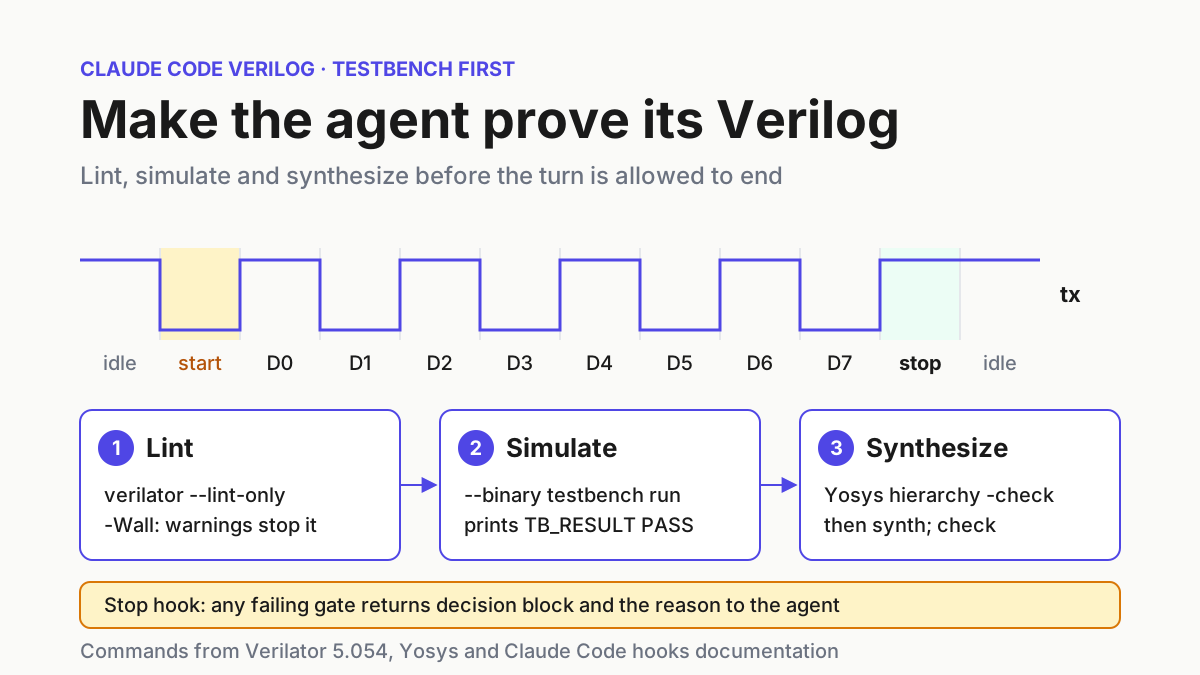
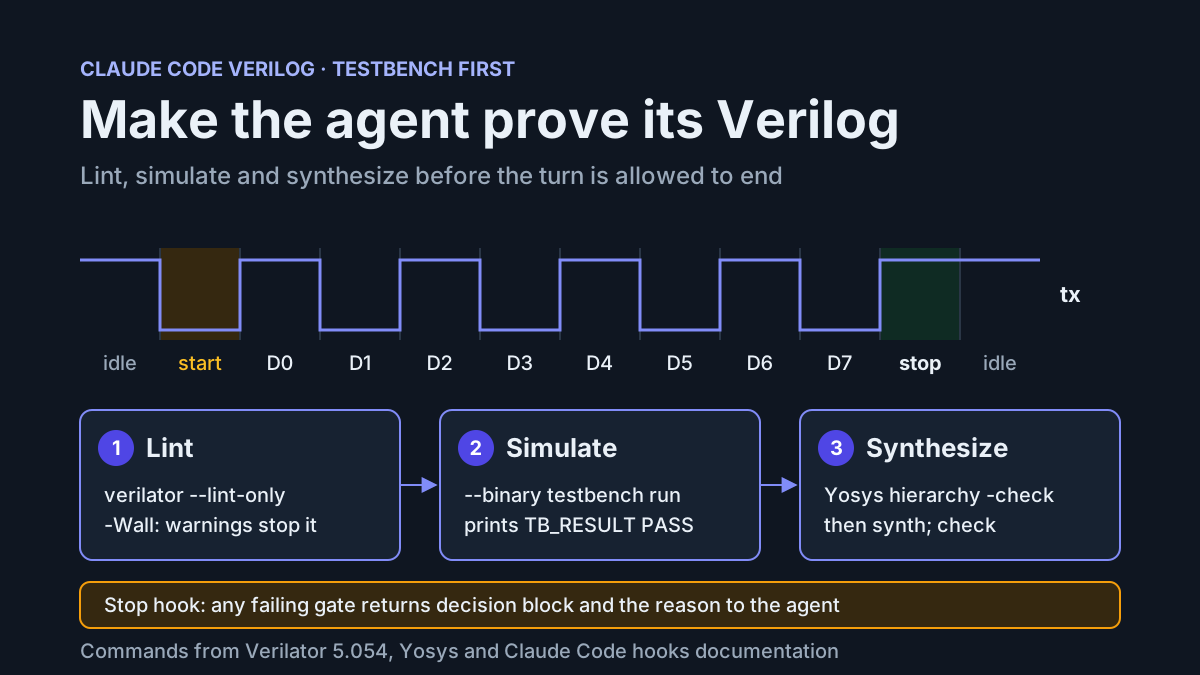
Ask a coding agent for a UART transmitter and a tidy diff appears within a minute. The state machine reads well, the reset looks sensible, and none of it tells you whether the start bit lasts one baud period or two. Hardware code is unusually good at looking right. This Claude Code Verilog setup, which Codex can share through the same AGENTS.md, takes that judgment away from the diff: the agent writes a self-checking testbench first, then iterates on the RTL until Verilator lint, a Verilator simulation and a Yosys synthesis run all pass, and a Claude Code Stop hook refuses to let the turn end while any of them fails.
This guide is for someone who already uses Claude Code or Codex and writes Verilog or SystemVerilog for FPGAs. You finish with a small repository: a rules file, a testbench, a reference RTL module, a scripts/check.sh that runs three tools and returns one exit code, and a hook that turns that exit code into a hard stop. The worked example is an 8N1 UART transmitter tracked as case rtl:uart-tx-01. Every expected output below is labelled illustrative: it describes what the documented tools should report, not runs we performed.
Agents are already writing real cores. On November 15, 2026, Pixel Cherry Ninja posted a Codex-assisted rewrite of the Raizing arcade core for MiSTer FPGA, built from the original code and hardware measurements taken on community boards. The part worth copying is the oracle: that rewrite had measured behavior to check against. A testbench the agent cannot edit gives your own agent the same thing.
The loop borrows its gating shape from the Python check-loop guide and the run-the-tests-from-the-agent habit of the MATLAB MCP guide. HDL needs three things those guides do not cover: a spec the agent may not change, a simulator that executes that spec, and a synthesis tool that rejects designs a simulator will happily run.
What you need before you start
Install and confirm these before you write any rules. Each item maps to a gate later, so a missing piece shows up as a confusing failure much later if you skip it now.
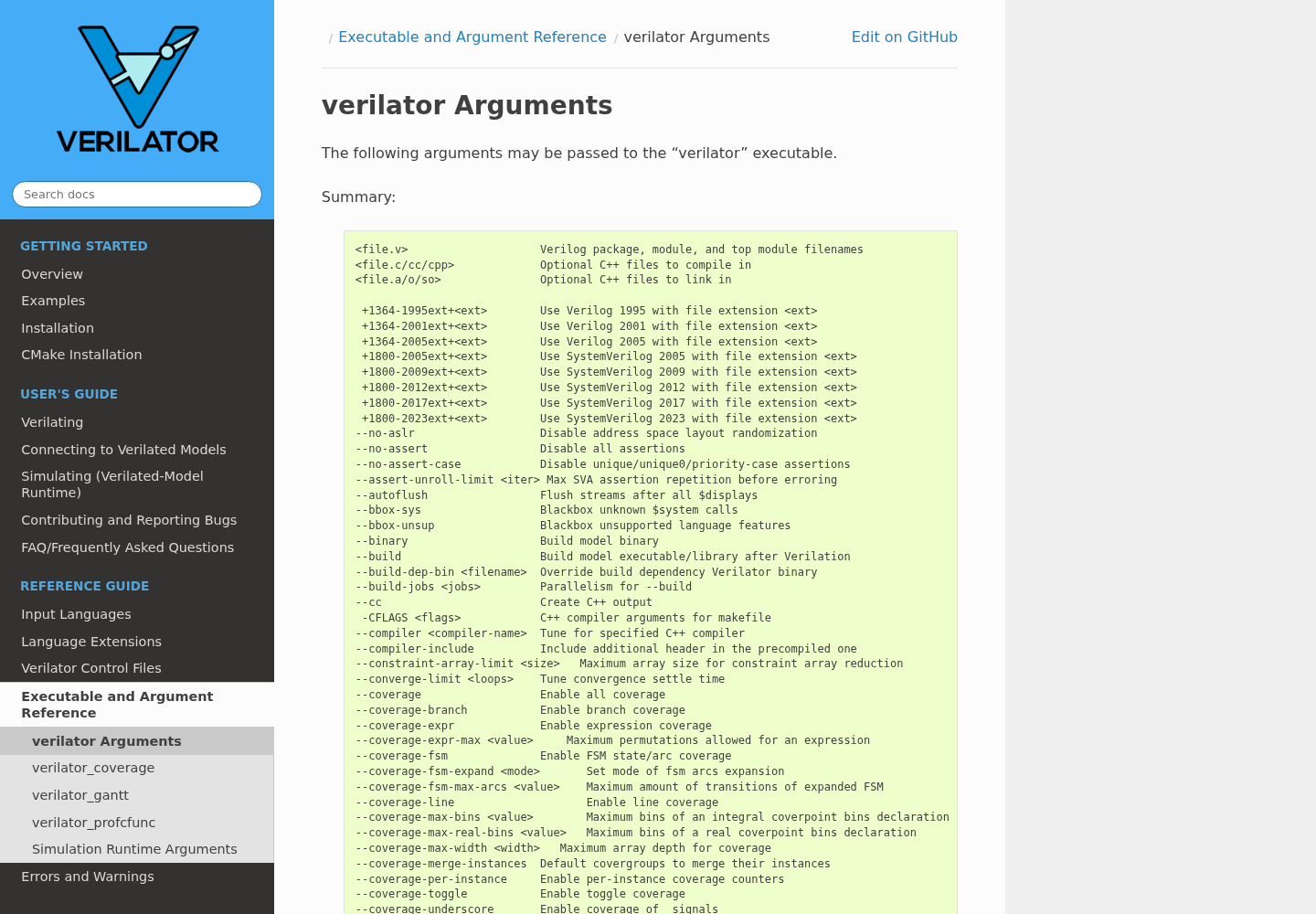
- [ ] Verilator 5.x on your PATH. The Verilator arguments reference describes
--binaryas an alias for--main --exe --build --timing, so the simulation gate needs timing support. - [ ] A C++ compiler with coroutine support. The same reference says
--timingrequires GCC 10, Clang 5 or newer. - [ ] GNU Make.
--build, and therefore--binary, calls it to compile the generated model. - [ ] Yosys on your PATH. The commands here follow the YosysHQ 0.71 documentation.
- [ ] git, bash and jq. The hook builds its JSON reply with jq.
- [ ] Claude Code (v2.1.277 or later if you want it to read AGENTS.md on its own) or Codex, or both.
Run these four commands once. The second one matters most, because a compiler without coroutines fails only when the simulation gate first builds, which can be an hour into a session.
verilator --version
verilator --get-supported COROUTINES   # prints 1 when supported, a blank line when not
yosys -V
jq --version
The Verilator reference documents --get-supported with COROUTINES as one of its features, which makes it a cheap pre-flight check you can also paste into CI.
Lay out the repository so RTL and testbench never blur
The layout carries half the policy. If synthesizable code and testbench code live in separate folders, a script can lock one and let the agent edit the other, and a grep can tell when simulation-only code leaks across.
uart-tx/
├── AGENTS.md                  shared rules for Claude Code and Codex
├── CLAUDE.md                  imports AGENTS.md, adds hook notes
├── rtl/uart_tx.v              synthesizable Verilog-2005, agent edits this
├── tb/tb_uart_tx.sv           self-checking testbench, locked after review
├── scripts/check.sh           lint, simulate, synthesize; one exit code
├── .claude/settings.json      Stop and PreToolUse hooks
├── .claude/hooks/hdl-gate.sh
├── .claude/hooks/protect-gate.sh
└── build/                     logs and the simulator, gitignored
- Create the folders:
mkdir -p rtl tb scripts .claude/hooks build. - Run
git initand add a.gitignorecontainingbuild/andobj_dir/. - Keep one module per file and name the file after the module,
rtl/uart_tx.vformodule uart_tx. Verilator’s style warnings under-Wallinclude a file-name check, so this keeps lint quiet for the right reason. - Write RTL as Verilog-2005. The Yosys synthesis starter shows
read_verilogrunning its Verilog-2005 frontend, so plain Verilog reads without extra frontend flags. The testbench can use SystemVerilog, since only Verilator reads it. - Commit the empty skeleton before the agent touches anything, so
git diffhas a baseline.
Write the shared AGENTS.md and a thin CLAUDE.md
The Claude Code memory documentation is blunt about rules files: Claude treats CLAUDE.md as context, not enforced configuration, and the more specific the instruction, the more consistently it is followed. That shapes the split here. The rules file states conventions concretely enough to verify, and the hook does the enforcing.
Put the shared rules in AGENTS.md. Codex reads it, and Claude Code reads it directly when no CLAUDE.md sits in the working directory or above. Because you want one Claude-only line about the hook, add a CLAUDE.md that imports AGENTS.md with @AGENTS.md; the memory docs say Claude reads the imported file first and never loads it twice.
# AGENTS.md: HDL rules for this repository

## Layout
- rtl/: synthesizable Verilog-2005, one module per file, file name equals module name.
- tb/: self-checking SystemVerilog testbenches named tb_<module>.sv.
- scripts/check.sh is the only definition of done.

## Order of work
1. Write the testbench first in tb/tb_<module>.sv. It prints exactly one line that starts
   with TB_RESULT PASS or TB_RESULT FAIL.
2. Stop and ask for a review of the testbench. Do not write RTL until a human has
   committed tb/.
3. Write RTL in rtl/<module>.v until scripts/check.sh prints CHECK PASS.

## RTL conventions
- One clock domain, named clk, unless the task names another. Never add a second clock
  or cross clock domains without asking first.
- Reset is synchronous and active-high, named rst. Every register is assigned in the
  reset branch.
- No initial blocks, no # delays, no $display or $finish in rtl/.
- Clocked blocks use nonblocking assignments (<=). Combinational blocks use blocking
  assignments (=) and assign every output on every path, so no latches are inferred.
- Do not add lint waivers (lint_off comments or -Wno flags) without asking.

## Testbench rules
- Never change expected values, delete checks, loosen comparisons or lengthen timeouts
  to make a test pass. If you think the testbench is wrong, stop and explain why.
- After review, do not edit tb/, scripts/check.sh or anything under .claude/.

## Reporting
- Run scripts/check.sh and quote its last line. A module is done only at CHECK PASS.
- State that these checks do not cover timing closure, clock-domain crossing, vendor IP
  or a Vivado or Quartus build.
@AGENTS.md

## Claude Code
- A Stop hook runs scripts/check.sh when you end a turn. If it blocks you, read the
  reason, fix rtl/ and try again. Never edit tb/ or the gate to get past it.
- Save both files at the repository root and commit them.
- Start Claude Code in the repo and run
/context all. Confirm CLAUDE.md appears under Memory files; the memory docs give this as the check for a loaded file. - Keep AGENTS.md short. The memory docs suggest staying under 200 lines per instruction file, and every line here is a rule the gate or a reviewer can check.
- Resist adding a long style guide. Formatting preferences dilute the rules that matter, and the tools catch most of what a style section would say.
Why these rules and not others: a single clock and a named synchronous reset keep the generated RTL inside what a one-clock testbench can exercise. The ban on initial and delays matters because Verilator will simulate both without complaint, while the Yosys documentation notes that an initial assignment is not synthesizable and its command reference lists proc_init, which turns initial blocks into init attributes rather than rejecting them. The rule against editing expected values is the one agents break most, which is why check.sh also enforces it.
Write the testbench before the RTL
The testbench is the spec. Written first and reviewed by a person, it becomes the one thing the agent cannot argue with. Give Claude Code or Codex this prompt with the rules file loaded:
Task rtl:uart-tx-01. Write tb/tb_uart_tx.sv for an 8N1 UART transmitter named uart_tx with
parameter CLKS_PER_BIT and ports clk, rst, tx_start, tx_data[7:0], tx, busy. Follow AGENTS.md.
Write only the testbench, then stop and ask me to review it.
A testbench you would accept looks like this. Read it for the choices, not the syntax.
// tb/tb_uart_tx.sv: self-checking, written and reviewed before rtl/uart_tx.v
`timescale 1ns/1ps
module tb_uart_tx;
  localparam int CLKS_PER_BIT = 4;

  logic       clk      = 1'b0;
  logic       rst      = 1'b1;
  logic       tx_start = 1'b0;
  logic [7:0] tx_data  = 8'h00;
  wire        tx;
  wire        busy;
  int         errors   = 0;

  uart_tx #(.CLKS_PER_BIT(CLKS_PER_BIT)) dut (
    .clk(clk), .rst(rst), .tx_start(tx_start), .tx_data(tx_data),
    .tx(tx), .busy(busy));

  always #5 clk = ~clk;

  task automatic send_and_check(input logic [7:0] value);
    begin
      @(negedge clk);
      tx_data  = value;
      tx_start = 1'b1;
      @(negedge clk);
      tx_start = 1'b0;
      @(negedge tx);                              // start bit begins
      repeat (CLKS_PER_BIT / 2) @(posedge clk);   // middle of the start bit
      if (tx !== 1'b0) begin errors++; $display("FAIL start bit for %h", value); end
      for (int i = 0; i < 8; i++) begin
        repeat (CLKS_PER_BIT) @(posedge clk);     // middle of data bit i
        if (tx !== value[i]) begin
          errors++; $display("FAIL bit %0d of %h: got %b", i, value, tx);
        end
      end
      repeat (CLKS_PER_BIT) @(posedge clk);       // middle of the stop bit
      if (tx !== 1'b1) begin errors++; $display("FAIL stop bit for %h", value); end
      wait (!busy);
    end
  endtask

  initial begin
    repeat (3) @(posedge clk);
    @(negedge clk);
    rst = 1'b0;
    if (tx !== 1'b1) begin errors++; $display("FAIL idle line not high after reset"); end
    send_and_check(8'h55);
    send_and_check(8'hA3);
    send_and_check(8'h00);
    send_and_check(8'hFF);
    if (errors == 0) $display("TB_RESULT PASS");
    else             $display("TB_RESULT FAIL errors=%0d", errors);
    $finish;
  end

  initial begin
    #200000;
    $display("TB_RESULT FAIL timeout");
    $finish;
  end
endmodule
Review it against this list before you commit it:
- Expected values come from the stimulus. The check compares
txwithvalue[i], so there is no table of magic numbers for an agent to edit later. - The byte list catches bit order. 0x55 and 0xA3 change when sent most significant bit first; 0x00 and 0xFF read the same in either order, so a testbench that sends only those two would pass a reversed transmitter.
- Sampling happens mid-bit, timed from the falling edge of the start bit. That keeps the test correct whether the RTL registers
txone cycle late or not, so it tests the protocol rather than one implementation. - There is exactly one verdict line,
TB_RESULT PASSorTB_RESULT FAIL, and a timeout that prints a failure instead of hanging. The gate greps for that line, so it never depends on how a particular simulator maps$finishto an exit status. - The reset check runs before any traffic, so a transmitter that idles low fails at once.
This testbench uses delays, event controls and wait. The Verilator reference says --timing enables exactly those constructs, and that --main generates a C++ main() that drives no inputs, which suits a top-level testbench with no ports. Commit tb/ once you accept it. From that commit on, the gate treats any change to it as a failure.
If you want a second opinion before committing, a read-only reviewer from the subagents guide can check the testbench against the list above without being able to edit it.
Review the RTL the agent converges on
Now ask for the RTL: Task rtl:uart-tx-01. Write rtl/uart_tx.v so scripts/check.sh prints CHECK PASS. Follow AGENTS.md. The module below is the kind of result to expect. It is an illustrative reference written for this guide, not something we ran.
// rtl/uart_tx.v
// 8N1 UART transmitter. One clock domain (clk), synchronous active-high reset (rst).
module uart_tx #(
    parameter CLKS_PER_BIT = 4
) (
    input  wire       clk,
    input  wire       rst,
    input  wire       tx_start,
    input  wire [7:0] tx_data,
    output reg        tx,
    output wire       busy
);
    localparam [1:0] IDLE  = 2'd0,
                     START = 2'd1,
                     DATA  = 2'd2,
                     STOP  = 2'd3;

    reg [1:0]  state;
    reg [31:0] clk_cnt;
    reg [2:0]  bit_idx;
    reg [7:0]  shreg;

    wire last_clk = (clk_cnt == CLKS_PER_BIT - 1);

    assign busy = (state != IDLE);

    always @(posedge clk) begin
        if (rst) begin
            state   <= IDLE;
            clk_cnt <= 32'd0;
            bit_idx <= 3'd0;
            shreg   <= 8'd0;
            tx      <= 1'b1;
        end else begin
            case (state)
                IDLE: begin
                    tx      <= 1'b1;
                    clk_cnt <= 32'd0;
                    bit_idx <= 3'd0;
                    if (tx_start) begin
                        shreg <= tx_data;
                        state <= START;
                    end
                end
                START: begin
                    tx <= 1'b0;
                    if (last_clk) begin
                        clk_cnt <= 32'd0;
                        state   <= DATA;
                    end else begin
                        clk_cnt <= clk_cnt + 32'd1;
                    end
                end
                DATA: begin
                    tx <= shreg[bit_idx];
                    if (last_clk) begin
                        clk_cnt <= 32'd0;
                        if (bit_idx == 3'd7) state   <= STOP;
                        else                 bit_idx <= bit_idx + 3'd1;
                    end else begin
                        clk_cnt <= clk_cnt + 32'd1;
                    end
                end
                STOP: begin
                    tx <= 1'b1;
                    if (last_clk) begin
                        clk_cnt <= 32'd0;
                        state   <= IDLE;
                    end else begin
                        clk_cnt <= clk_cnt + 32'd1;
                    end
                end
                default: state <= IDLE;
            endcase
        end
    end
endmodule
What to look for when you read the agent’s version:
- Every register appears in the reset branch. Verilator’s default
--x-initial uniquegives uninitialized variables varying values, so a missed reset tends to show up as a flaky test rather than a clean failure. clk_cntis 32 bits, matching the width ofCLKS_PER_BIT - 1. A narrower counter is the classic width warning the lint gate stops on.- Each state holds
txfor exactlyCLKS_PER_BITcycles, which is what the mid-bit sampling in the testbench assumes. - Nothing in the file exists only for simulation: no
initial, no delays, no$display. - Every localparam is used.
-Wallturns on unused-parameter warnings, so dead states fail lint.
Write scripts/check.sh: three tools, one exit code
The gate is an ordinary shell script so that you, CI and both agents run the same thing. It stops at the first failure and prints a tagged line, CHECK FAIL [tag] ..., which the hook forwards to the agent.
#!/usr/bin/env bash
# scripts/check.sh: the only definition of "done" for RTL in this repo.
# Exit 0 and print CHECK PASS only when every gate passes.
set -u
cd "$(dirname "$0")/.."

TOP="${TOP:-uart_tx}"
TB="${TB:-tb_${TOP}}"
mkdir -p build

fail() { echo "CHECK FAIL [$1] $2" >&2; exit 1; }

# Gate 0: there is RTL to check
compgen -G "rtl/*.v" > /dev/null || fail rtl "no RTL files in rtl/ yet"
RTL_FILES=(rtl/*.v)

# Gate 1: the reviewed testbench is unchanged
if ! git diff --quiet HEAD -- tb/ || [ -n "$(git ls-files --others --exclude-standard tb/)" ]; then
  fail tb "tb/ differs from the last commit; a human reviews and commits testbench changes"
fi

# Gate 2: no simulation-only constructs in synthesizable RTL
if grep -nE '^\s*initial\b|#[0-9]|\$display|\$finish' "${RTL_FILES[@]}"; then
  fail rtl-rules "initial blocks, # delays or simulation tasks found in rtl/"
fi

# Gate 3: Verilator lint with every warning enabled; warnings are fatal
if ! verilator --lint-only -Wall --top-module "$TOP" "${RTL_FILES[@]}" > build/lint.log 2>&1; then
  cat build/lint.log >&2
  fail lint "Verilator lint reported warnings or errors (build/lint.log)"
fi

# Gate 4: build and run the self-checking testbench
rm -rf build/sim
if ! verilator --binary -j 0 --top-module "$TB" --Mdir build/sim -o "sim_${TOP}" \
     "tb/${TB}.sv" "${RTL_FILES[@]}" > build/sim-build.log 2>&1; then
  tail -n 40 build/sim-build.log >&2
  fail sim-build "testbench did not build (build/sim-build.log)"
fi
"./build/sim/sim_${TOP}" > build/sim.log 2>&1
if ! grep -q '^TB_RESULT PASS' build/sim.log; then
  cat build/sim.log >&2
  fail sim "testbench did not print TB_RESULT PASS (build/sim.log)"
fi

# Gate 5: Yosys elaboration and generic synthesis
if ! yosys -q -l build/yosys.log \
     -p "read_verilog ${RTL_FILES[*]}; hierarchy -check -top ${TOP}; synth; check; stat" \
     > /dev/null 2>&1; then
  tail -n 40 build/yosys.log >&2
  fail synth "Yosys elaboration or synthesis failed (build/yosys.log)"
fi
if grep -n 'Warning' build/yosys.log >&2; then
  fail synth-warn "Yosys logged warnings (build/yosys.log)"
fi

echo "CHECK PASS lint sim synth"
| Gate | Command | Why it is there, per the docs |
|---|---|---|
| tb guard | git diff --quiet HEAD -- tb/ |
Turns the rule against editing expected values into a failure instead of a request. |
| RTL rules | grep for initial, # delays, $display, $finish |
Verilator simulates these and Yosys converts initial blocks with proc_init, so neither tool rejects them for you. |
| Lint | verilator --lint-only -Wall --top-module uart_tx |
--lint-only checks for lint violations without creating output; -Wall adds the style warnings that are off by default; without -Wno-fatal, warnings stop the run. |
| Simulate | verilator --binary -j 0 --top-module tb_uart_tx --Mdir build/sim -o sim_uart_tx |
--binary generates the C++ and compiles it into an executable, with timing on; --top-module picks the testbench as the top and avoids a MULTITOP warning. |
| Synthesize | yosys -q -l ... -p "read_verilog ...; hierarchy -check -top uart_tx; synth; check; stat" |
hierarchy -check errors on modules without an implementation; check reports obvious problems; stat records cell counts in the log. |
Several of those choices deserve a sentence. The Verilating guide explains that --binary translates the design into an executable, writes into the --Mdir directory (obj_dir by default) and, without --top-module, tries to work out the top itself and warns when it finds several. Pointing --Mdir into build/ keeps generated C++ out of the tree. The executable should land as build/sim/sim_uart_tx; if your Verilator version places it elsewhere, adjust that one line. -j 0 asks for as many parallel build jobs as the machine has threads.
Lint runs before Yosys on purpose. The Yosys synthesis starter says the read_verilog frontend does not provide very good error handling or reporting, and recommends running verilator --lint-only first. Ordering the gates that way means the agent sees Verilator’s precise message for a syntax slip instead of a vague parser failure.
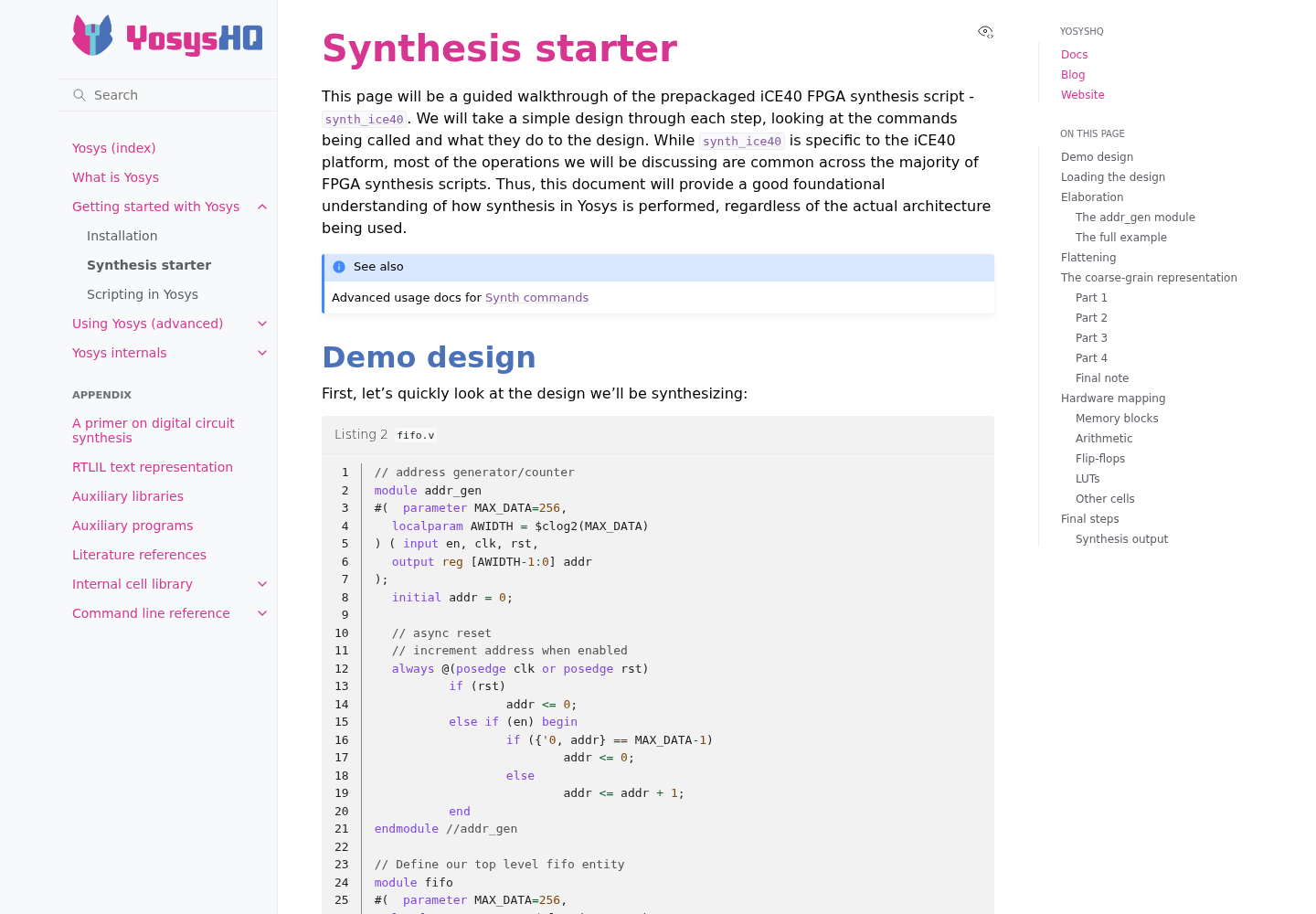
The Yosys call uses three flags from the Yosys command line reference: -p runs a command string with commands separated by a semicolon and a space, -q limits console output to warnings and errors, and -l writes the log to a file the gate can read. Generic synth is enough to prove the RTL maps to logic; target scripts such as synth_ice40 or synth_xilinx, both in the same reference, are the upgrade once you know your device.
One limit we will not paper over: the documentation we used does not say whether check changes the exit status when it finds problems, or what its warning text looks like. That is why the script also greps the log for Warning. Prove that grep works on your Yosys version once with a known-bad fixture, as the worked example below does, before you trust it.
- Save the script, run
chmod +x scripts/check.sh, and commit it. - Run it by hand before any RTL exists and confirm it prints
CHECK FAIL [rtl] no RTL files in rtl/ yet. - After the RTL lands, run it again and read all three logs in
build/at least once, so you know what a normal run looks like before an agent is reading them for you.
Gate the turn with a Claude Code Stop hook
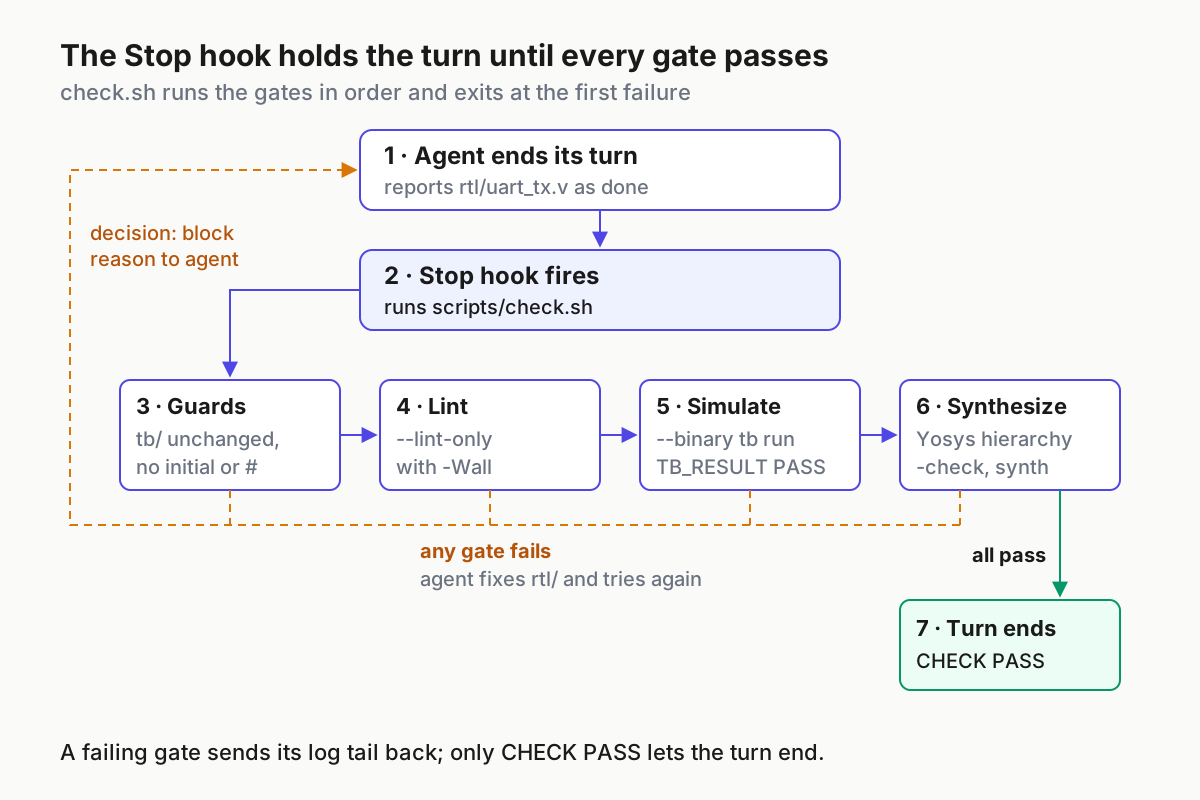
The Claude Code hooks guide describes hooks as shell commands that give deterministic control: certain actions always happen instead of relying on the model to choose them. The Stop event fires when Claude finishes responding. A Stop hook that prints {"decision": "block", "reason": "..."} keeps Claude working and hands it the reason, which is the loop this guide needs.
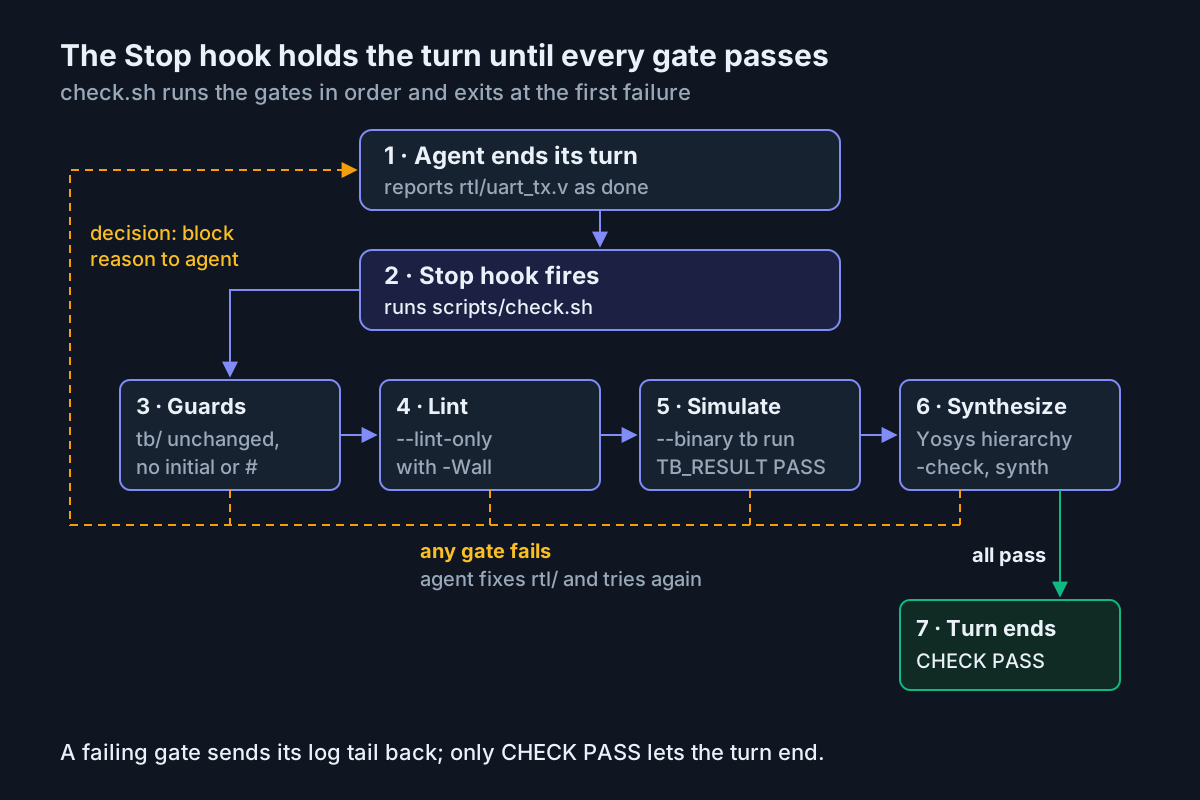
Create the Stop hook script:
#!/bin/bash
# .claude/hooks/hdl-gate.sh: Stop hook. Block the end of the turn while check.sh fails.
cd "$CLAUDE_PROJECT_DIR" || exit 0

# Testbench-first phase: nothing to gate until RTL exists.
compgen -G "rtl/*.v" > /dev/null || exit 0

if OUT=$(scripts/check.sh 2>&1); then
  exit 0
fi

TAIL=$(printf '%s\n' "$OUT" | tail -n 30)
jq -n --arg tail "$TAIL" '{
  decision: "block",
  reason: ("scripts/check.sh failed. Fix rtl/, never tb/ or the gate. Output:\n" + $tail)
}'
exit 0
Then a PreToolUse hook that keeps the gate itself out of reach. It follows the protected-files example in the hooks guide: exit code 2 blocks the edit and the stderr text goes back to Claude.
#!/bin/bash
# .claude/hooks/protect-gate.sh: PreToolUse. Refuse Edit and Write calls on the gate.
INPUT=$(cat)
FILE_PATH=$(echo "$INPUT" | jq -r '.tool_input.file_path // empty')
FILE_PATH="${FILE_PATH//\\//}"

PROTECTED_PATTERNS=("scripts/check.sh" ".claude/hooks/" ".claude/settings.json")
for pattern in "${PROTECTED_PATTERNS[@]}"; do
  if [[ "$FILE_PATH" == *"$pattern"* ]]; then
    echo "Blocked: $FILE_PATH is part of the HDL gate; ask a human to change it" >&2
    exit 2
  fi
done
exit 0
Register both in .claude/settings.json:
{
  "hooks": {
    "Stop": [
      {
        "hooks": [
          {
            "type": "command",
            "command": "\"$CLAUDE_PROJECT_DIR\"/.claude/hooks/hdl-gate.sh",
            "timeout": 600
          }
        ]
      }
    ],
    "PreToolUse": [
      {
        "matcher": "Edit|Write",
        "hooks": [
          {
            "type": "command",
            "command": "\"$CLAUDE_PROJECT_DIR\"/.claude/hooks/protect-gate.sh"
          }
        ]
      }
    ]
  }
}
- Make both scripts executable with
chmod +x .claude/hooks/*.sh. The hooks guide says scripts that are not executable do not run. - Commit
.claude/so everyone who clones the repository gets the same gate. - Start a session, type
/hooks, and confirm one entry under Stop and one under PreToolUse. - Ask Claude to add a comment to
scripts/check.sh. Expect the edit to be refused with theBlocked:message, which proves the PreToolUse hook works. - Run the worked example in the next section to prove the Stop hook works.
Three design decisions sit in those files. First, the Stop hook skips the gate while rtl/ is empty, because during the testbench phase the right behavior is to stop and wait for your review; blocking would push the agent to write RTL early. Second, the hooks guide recommends checking stop_hook_active to avoid endless continuation, but this hook deliberately keeps blocking while the gate fails. Claude Code overrides a Stop hook after eight consecutive blocks with no tool call in between, so an agent that keeps editing keeps getting feedback, and one that just keeps trying to stop ends with a warning you will notice. Third, the 600-second timeout matches the documented 10-minute default for command hooks; write it down so a later reader knows a full Verilator build is expected to take a while.
The hooks guide also notes that Claude can still change protected files through shell commands. The PreToolUse hook stops the common path, the tb guard in check.sh catches the rest at the next stop, and git diff shows you what was attempted. If you run several repositories this way, treat the gate like any other fleet setting, as the permission-modes fleet policy guide argues for agent permissions.
Run the worked example: rtl:uart-tx-01
The point of a gate is that it fails for the right reasons. Plant each defect below in turn, end a turn, and compare what you see. The results are illustrative expected observations based on the documented behavior of each tool and the script above; we did not run them.
| Input | Action | Expected result (illustrative) |
|---|---|---|
rtl:uart-tx-01, phase 1: tb/tb_uart_tx.sv committed, rtl/ still empty |
Run scripts/check.sh by hand, then let Claude Code end its turn |
Manual run prints CHECK FAIL [rtl] no RTL files in rtl/ yet; the Stop hook exits 0 and the agent stops to ask for testbench review |
rtl:uart-tx-01 where the agent edits tb/ and replaces send_and_check(8'hA3) with a second send_and_check(8'h55) |
Agent ends its turn; the Stop hook runs check.sh |
CHECK FAIL [tb] tb/ differs from the last commit; no tool runs; the hook returns decision: block and git diff tb/ shows you the attempt |
rtl:uart-tx-01 with initial tx = 1'b1; added to rtl/uart_tx.v |
Agent ends its turn | The grep prints the offending line number and CHECK FAIL [rtl-rules]; the agent removes the line and sets tx in the reset branch instead |
rtl:uart-tx-01 with reg [15:0] clk_cnt; while the code still adds 32'd1 |
Agent ends its turn | build/lint.log holds a width warning naming rtl/uart_tx.v and the assignment line; CHECK FAIL [lint]; the agent widens the counter |
rtl:uart-tx-01 sending bits MSB first with tx <= shreg[3'd7 - bit_idx]; |
Agent ends its turn | Lint passes; build/sim.log shows FAIL bit 0 of 55: got 0 and a TB_RESULT FAIL errors= line; CHECK FAIL [sim] reaches the agent through the hook |
rtl:uart-tx-01 instantiating baud_gen, a helper the agent saved as ./baud_gen.v at the repo root |
Agent ends its turn | Lint and simulation pass because Verilator searches -y . by default; Yosys reads only rtl/*.v, hierarchy -check reports baud_gen has no implementation, and CHECK FAIL [synth] follows |
rtl:uart-tx-01 with the reference RTL above and an untouched tb/ |
Agent ends its turn | CHECK PASS lint sim synth; the hook exits 0, the turn ends and you review the diff and commit |
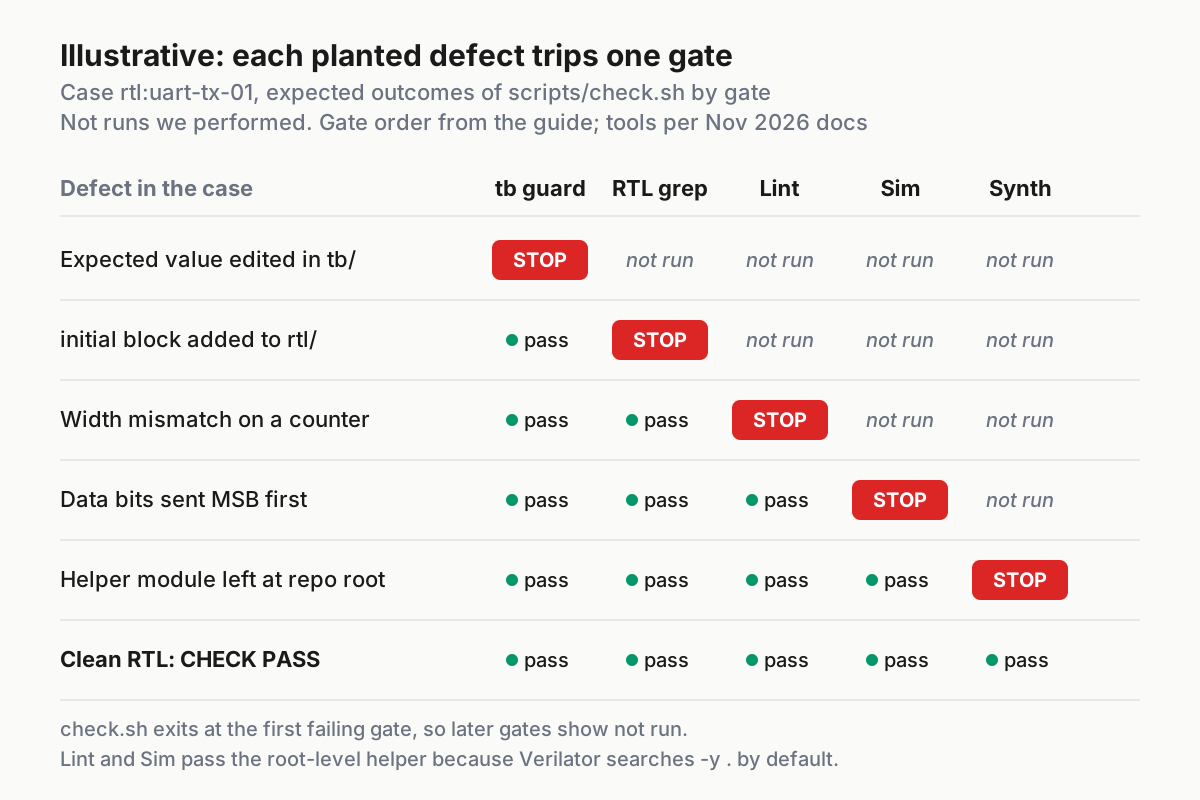
Read the results in order. The staircase in the matrix is the design working: cheap checks run first, so a tampered testbench never costs a Verilator build, and only a defect that survives lint and simulation reaches Yosys. The root-level helper is the case worth remembering. The Verilator reference says it defaults to searching the current directory with -y . and the extensions .v and .sv, so a module file left at the repository root satisfies the simulator while synthesis, which reads only the files you list, refuses it. Without the Yosys gate that design would pass every simulation and break the first real build.
Use the planted defects as your one-time proof that the Warning grep and the exit codes behave on your installed versions. Keep them in a scratch branch so you can rerun the set after any tool upgrade.
Use the same rules with Codex
The Codex AGENTS.md guide says Codex reads AGENTS.md before doing any work, walking from the project root down to the current directory and concatenating what it finds. The rules file from earlier needs no changes.
- From the repository root, run
codex --ask-for-approval never "Summarize the current instructions."The guide’s expected result is that Codex quotes the items from your AGENTS.md before proposing work. - Give Codex the same prompts as Claude Code: the testbench prompt, your review and commit, then the RTL prompt.
- Add a line to your prompt:
Run scripts/check.sh and paste its last line.The documentation we used describes no Codex equivalent of the Claude Code Stop hook, so the gate is a rule here, not an enforced stop. - Run
scripts/check.shyourself, or in CI, before you merge anything Codex wrote. The Codex approval modes guide covers how much Codex may run unattended while it iterates. - If you use Codex code review in GitHub, add a
## Code Review Rulessection to AGENTS.md saying that any change undertb/must be flagged. The Codex guide documents that section for review rules. - Keep the file small. Codex stops adding instruction files once the combined size reaches
project_doc_max_bytes, 32 KiB by default, which this rules file is nowhere near.
For CI that runs Claude Code itself rather than just the script, the headless mode guide shows how to script a claude -p run against the same repository and gate.
Troubleshoot the loop
| Symptom | Likely cause | Fix |
|---|---|---|
Simulation build fails with coroutine or --timing errors |
Compiler too old for timing support | Upgrade to GCC 10 or Clang 5 or newer; confirm verilator --get-supported COROUTINES prints 1 |
--binary fails before compiling anything |
GNU Make missing; --build requires it |
Install GNU Make and rerun scripts/check.sh |
| Lint warns about multiple top modules | A stray module file in the compile set | Keep --top-module in both Verilator calls and move helpers into rtl/ |
| Yosys fails with an unhelpful parse message | read_verilog reports errors poorly |
Run the lint gate on its own; it runs first so this should be rare |
| Test passes on one run and fails on the next | A register missing from reset meets --x-initial unique |
Add the register to the reset branch; rerun the simulator with +verilator+rand+reset+2 and a +verilator+seed+ value to reproduce |
/hooks does not list the Stop hook |
JSON error or file in the wrong place | Validate .claude/settings.json; no trailing commas; restart the session |
| Hook runs but its JSON is ignored | Shell profile prints text before the JSON | Wrap profile echo lines in an interactive-shell test, as the hooks guide shows |
| Turn ends with a warning about too many blocks | The agent hit the eight-block cap without making edits | Read build/*.log yourself; the agent is stuck, not finished |
| tb guard fires after you changed the testbench | Uncommitted testbench edit | Review your change and commit it; the guard compares against HEAD |
For deeper hook problems, the hooks guide suggests starting Claude Code with claude --debug-file /tmp/claude.log and watching that file while you trigger the hook. Testing the gate script by hand first (scripts/check.sh; echo $?) separates script bugs from hook wiring bugs.
Roll back or switch off the gate
- To undo an agent’s RTL change after it passed the gate but failed your review, use
git reverton the commit, or rewind within the session as the checkpoints guide describes before you commit. - To pause the gate for one session of exploratory work, remove the
Stopentry from.claude/settings.json, or set"disableAllHooks": truein a settings file. Check the result with/hooks; the hooks guide notes that project settings can override user settings. - To remove the whole setup, delete
.claude/hooks/, the hook entries,scripts/check.shand thebuild/folder, then delete or trim the CLAUDE.md lines about the hook. - To change the testbench legitimately, edit it yourself, run the gate, and commit. The guard treats your commit as the new spec.
What these checks do not prove
A green CHECK PASS means the RTL is lint-clean under -Wall, meets one testbench in a two-state simulator, and maps to generic logic in Yosys. It says nothing about whether the design meets timing at your clock rate, whether signals crossing clock domains are synchronized safely, how vendor IP blocks behave, or whether Vivado or Quartus will build it. Those still need your vendor flow, timing reports and, for anything that touches more than one clock, review by someone who has been burned by metastability before.
The testbench is also only as good as its byte list and its checks. Four frames at one baud setting is a starting point. Add a back-to-back transmission, a tx_start held high, and a reset in the middle of a frame as the module matures, and commit each addition yourself so the agent never writes its own exam.
Sources
- Pixel Cherry Ninja on X: Raizing games core for MiSTer FPGA, Codex-assisted rewrite (Nov 15, 2026)
- Verilator: verilator Arguments, Verilator 5.054 documentation
- Verilator: Verilating, Verilator 5.054 documentation
- YosysHQ: Synthesis starter, Yosys documentation
- YosysHQ: Command line reference, Yosys documentation
- Claude Code Docs: How Claude remembers your project
- Claude Code Docs: Automate actions with hooks
- OpenAI: Custom instructions with AGENTS.md