Claude Code ServiceNow SDK Setup (and Codex): Build a Scoped App on a PDI, Install the Fluent Skills, and Gate Installs With a Hook
Claude Code ServiceNow setup with now-sdk: build a scoped app on a PDI, install the Fluent skills, and block installs to non-dev instances with a hook.

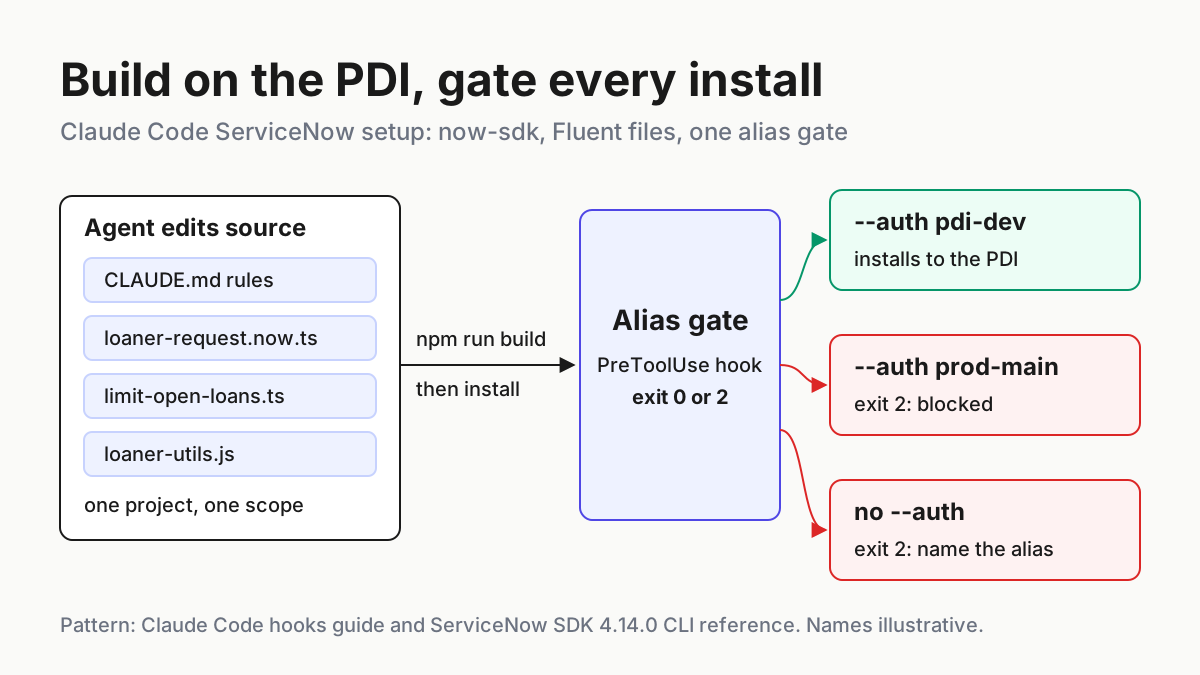
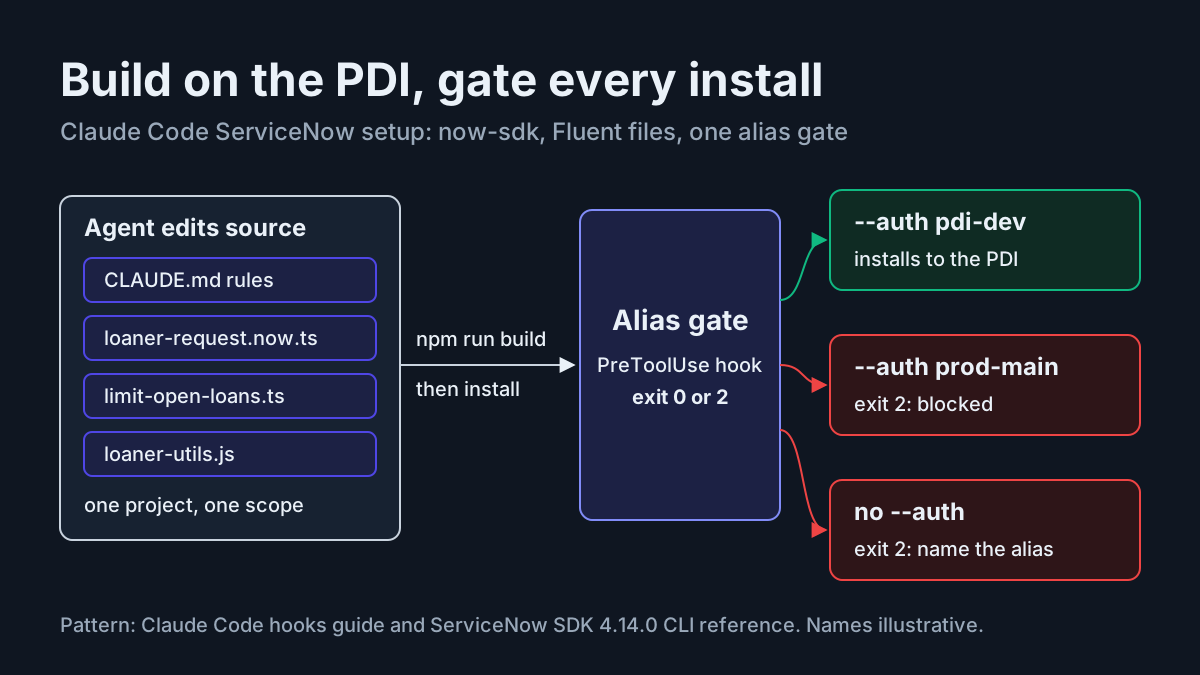
Claude Code ServiceNow development works best when the agent edits files and you decide where those files go. The ServiceNow SDK makes the first half practical: a scoped app lives as TypeScript-based Fluent source in a folder, now-sdk build compiles and validates it, and now-sdk install pushes the result to whichever instance a stored credential alias points at. That last part is what this guide controls. If your machine also holds a credential for a shared or production instance, an install that omits --auth falls back to the default credential, and a coding agent trying to finish a task will run it without hesitation.
You will build one small scoped app on a personal developer instance (PDI): a Loaner Laptop Request table, a business rule that refuses a second open loan for the same person, and a script include that counts open loans. Claude Code or Codex writes the source. You hold the credentials. A Claude Code PreToolUse hook blocks any SDK command that names an alias other than pdi-dev, or reaches an instance without naming an alias at all. You finish with three results you can check: npm run build passes, the app appears in the PDI as scope x_acme_loaner, and a test install aimed at prod-main is refused with a written reason.
The timing: on November 13, 2026, Ryoichi Yaochi posted on X about a new ServiceNow Community setup guide that builds Lux apps from VS Code with Claude Code and other AI coding assistants, including a demo built in about 15 prompts and two hours. That walkthrough runs through the Lux Lab extension. This one stays on the plain SDK path documented in the now-sdk CLI reference, which applies to any scoped app and keeps every instance-touching command in view.
What you build and what you need
The worked case in this guide is labelled task:sn-loaner-01. The names are illustrative, so substitute your own vendor prefix and instance, but keep the shape.
| Item | Value in task:sn-loaner-01 | Where it comes from |
|---|---|---|
| Vendor prefix | acme |
Your instance’s glide.appcreator.company.code property |
| Scope | x_acme_loaner |
You choose it, then confirm it is free |
| Table | x_acme_loaner_request |
Must start with the scope prefix |
| Dev alias | pdi-dev |
You create it with now-sdk auth --add |
| Decoy alias for the test | prod-main |
Never stored; used only to prove the hook blocks it |
| PDI URL | https://dev12345.service-now.com |
Illustrative; use your own PDI’s URL |
Before you start, check these:
- [ ] A PDI and an account on it with admin or developer rights. The developing-apps guide lists Node.js 20 or later (LTS recommended), npm, and access to a PDI or enterprise instance with admin or developer credentials as the prerequisites.
- [ ] Claude Code, or Codex if you prefer it. The hook in Step 6 is a Claude Code feature; Step 5 explains what replaces it on a Codex machine.
- [ ]
jq, which the hook script uses to read its JSON input. - [ ] A Bash shell on macOS, Linux or WSL. The Claude Code hooks guide notes that a hook matching only
Bashdoes not see PowerShell tool calls, so a native Windows PowerShell setup needs work this guide does not cover. - [ ] Git in the project folder, so every agent edit can be reviewed and reverted.
The SDK documentation was at version 4.14.0 (“Latest”) when this guide was written. The ServiceNow SDK repository says its agent skills need SDK 4.6.0 or newer and the query capability needs 4.8.0 or newer, so any current install clears both.
Step 1: Store one dev-only credential alias
Credentials are the one part of this setup the agent never touches. Run this step yourself, in your own terminal, before Claude Code is open.
- Add the PDI under an alias that names its class of instance:
npx @servicenow/sdk auth --add https://dev12345.service-now.com --type basic --alias pdi-dev
- Answer the prompts for username and password. If the PDI enforces MFA, the CLI asks for a six-digit code from your authenticator app.
- Confirm what is stored:
npx @servicenow/sdk auth --list
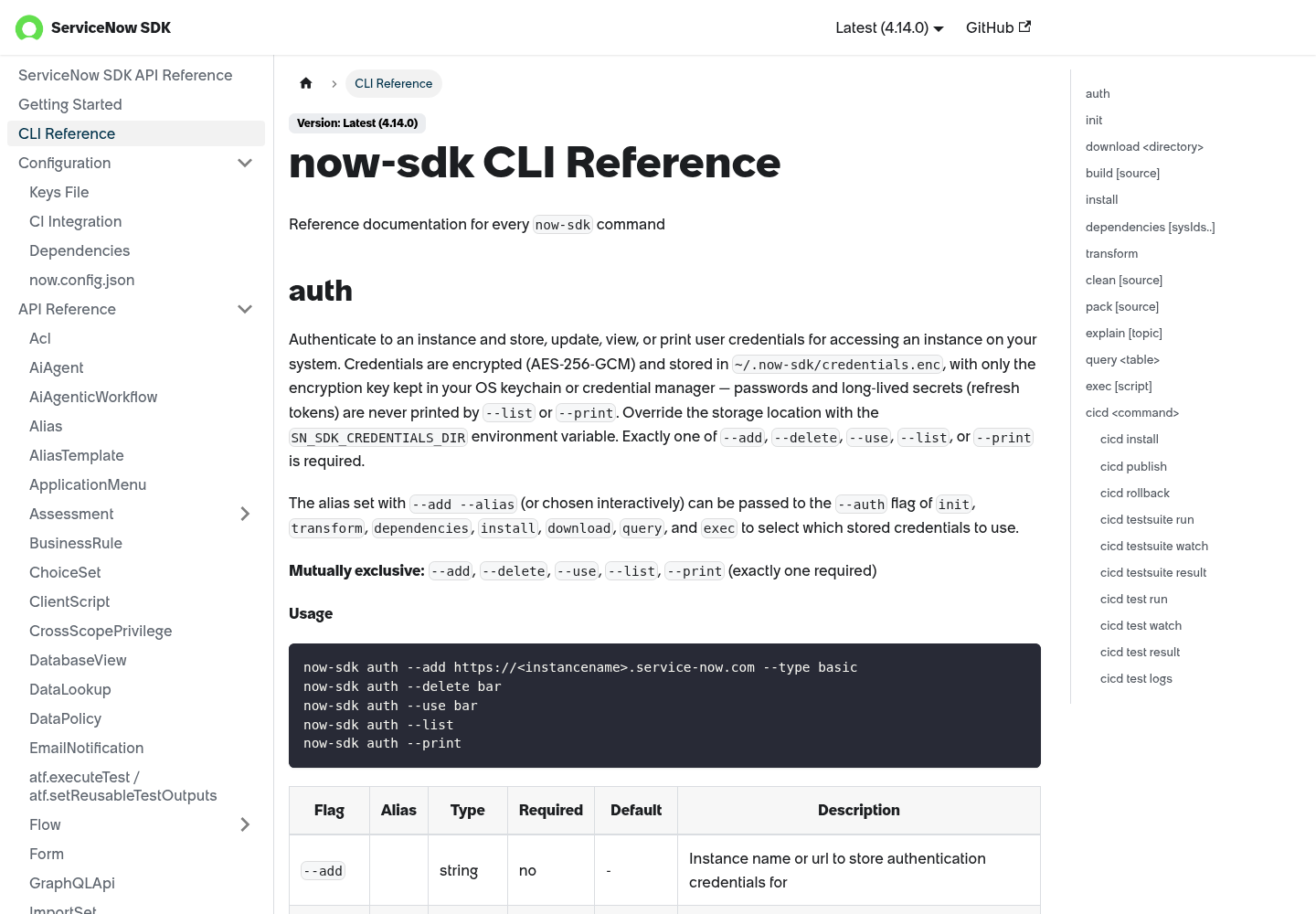
Expected observation: the list shows pdi-dev and its instance. According to the CLI reference, passwords and long-lived secrets such as refresh tokens are never printed by --list or --print.
What just happened on disk: the SDK encrypts credentials with AES-256-GCM, stores them in ~/.now-sdk/credentials.enc, and keeps only the encryption key in your operating system’s keychain or credential manager. The SN_SDK_CREDENTIALS_DIR environment variable moves that location. Credentials are stored per user, not per project, which matters later in troubleshooting.
Basic auth is the right choice here. The developing-apps guide describes basic auth as suitable for local development and PDIs, and OAuth as suitable for enterprise instances, where it uses a browser-based code grant. The guide also documents a non-interactive form that pipes a password through --password-stdin for agent-driven setup. Skip it in this workflow: the point is that the agent never handles the password.
Two habits make the rest of this guide stronger than any hook:
- Do not store a production credential on the machine where the agent runs. A gate that blocks
--auth prod-mainis a backstop; an alias that does not exist cannot be used at all. - If you must keep other aliases here for your own work, never make them the default with
auth --use. A barenow-sdk installresolves to the default credential, and that is the exact command an agent is most likely to type.
Step 2: Pick a scope name that will not collide
init does not look up your vendor prefix and does not check whether a scope name is taken. The developing-apps guide marks both checks as required before you scaffold, warning that skipping them turns a silent collision into a conflicting install later. Do them now with the read-only query command.
- Read the vendor prefix:
npx @servicenow/sdk query sys_properties --query "name=glide.appcreator.company.code" --fields name,value --output json --auth pdi-dev
- Build a candidate scope of the form
x_<vendor_prefix>_<app_name>. With the prefixacme, the candidate isx_acme_loaner. If the property is empty, the guide says you can use the generated name at your own risk. - Confirm nothing already owns it:
npx @servicenow/sdk query sys_scope --query "scope=x_acme_loaner" --fields scope,name --output json --auth pdi-dev
Expected observation for task:sn-loaner-01: the JSON envelope comes back with no records. A matching record means the scope exists, so pick another name or confirm you really intend to target that app.
- Check the length budgets before you commit to names.
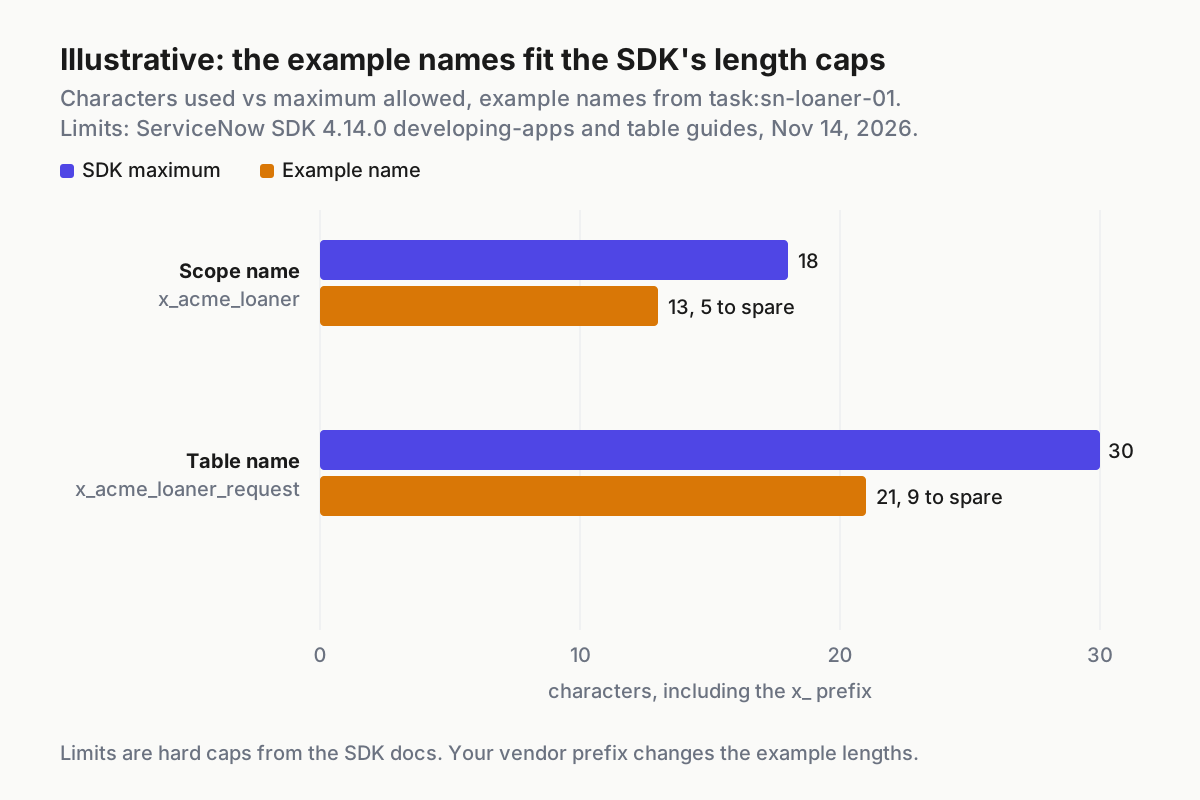
The whole scope name, including x_, is capped at 18 characters and must match (x|sn)_[a-z0-9_]+. The table guide caps table names at 30 characters and requires a new table in a named scope to start with <scope>_. Those limits stack: a long scope leaves little room for table names. In the worked case, x_acme_loaner uses 13 of 18 characters and x_acme_loaner_request uses 21 of 30. The table plugin emits build errors when the prefix or character rules are broken, so a wrong table name fails on your machine rather than on the instance.
Step 3: Scaffold the project
- Make an empty folder and start Git there.
initwrites into the current directory and does not create a subdirectory.
mkdir loaner-laptop && cd loaner-laptop
git init
- Scaffold non-interactively. The developing-apps guide recommends this form for agent-driven setup; you run it yourself here.
npx @servicenow/sdk init --app-name "Loaner Laptop Request" --scope-name x_acme_loaner --package-name loaner-laptop --template base --auth pdi-dev
- Install dependencies with
npm install. The CLI reference says to do this afterinitand before the first build. - Commit the clean scaffold:
git add -A && git commit -m "Scaffold loaner app". - Do not install anything yet. The developing-apps guide is explicit that
npm run deploy(ornow-sdk install) should not run right after scaffolding; the app is ready for development, not for an instance.
A note on flag spelling: the CLI reference writes --app-name, --scope-name and --package-name, while the developing-apps guide shows camelCase forms such as --appName. Template choices are generated dynamically. If your version rejects a flag or the base template, npx @servicenow/sdk init --help prints what it accepts.
Expected observation: src/fluent/ with an index.now.ts entry point, src/server/ for server-side modules, now.config.json and package.json. Open now.config.json and you will see scope, scopeId and name. The guide points out that it contains no instance connection information; that lives only in the credential store, which is exactly why the alias on each command matters. The scaffold also pins @servicenow/sdk in package.json, so from here on run npx now-sdk inside the project and every command uses that pinned version.
Step 4: Install the Fluent skills for Claude Code or Codex
The SDK repository ships a now-sdk skill that teaches an agent to orient itself in a Fluent project, read version-matched documentation through explain, and check live records through query instead of guessing. It also carries platform gotchas, such as never deleting a Table(), BusinessRule() or Record() definition without confirming first, because deletions may need to propagate as an upgrade-time delete.
For Claude Code:
cd loaner-laptopand startclaudefrom inside the project folder.- Run
/plugin install servicenow-sdk@claude-plugins-official. - Run
/reload-plugins. - Ask: “Run
npx now-sdk explain --listand tell me which topics cover tables, business rules and script includes.”
Install from the project directory. Earl Duque’s Claude Code and ServiceNow SDK series on the ServiceNow Community reports a bug where a globally installed plugin is not picked up reliably and the explain skill silently does nothing; installing at project scope avoided it.
For Codex:
- Start a Codex session.
- Run
$skill-installer https://github.com/ServiceNow/sdk/tree/master/skills/now-sdk. - Restart Codex so the skill loads.
If you have not set up Codex skills before, the Codex skills setup guide covers where they live and how to keep the skill list cheap.
Expected observation: asked about a metadata type, the agent runs npx now-sdk explain <topic> rather than answering from memory. The repository explains why that matters: explain reads the documentation shipped inside your installed @servicenow/sdk package, so it matches the exact version in your project rather than training data or drifted web pages.
Step 5: Write the project rules file
The skill teaches the platform. The rules file teaches this project. Save this as CLAUDE.md at the project root.
# Loaner Laptop Request (x_acme_loaner)

ServiceNow scoped app built with the ServiceNow SDK (Fluent).
The only instance in scope is the PDI behind credential alias `pdi-dev`.

## Platform rules
- Scope is `x_acme_loaner`. Every new table name starts with `x_acme_loaner_`
  and is 30 characters or fewer.
- Never create global-scope records and never add columns to tables this
  scope does not own.
- Never name a custom field with the `sys_` prefix.
- Export each Table under a variable name identical to its `name`.
- Never delete a Table(), BusinessRule() or Record() definition without asking me.
- Every new table gets a default form view: run
  `npx now-sdk explain form-layout-guide` and follow it.
- Business rule logic lives in typed modules under `src/server/`.
  Script Include class files use Class.create() and do not import Glide APIs.

## Docs
- Before writing any metadata type, run `npx now-sdk explain <topic>`
  (for example `npx now-sdk explain BusinessRule`). These docs match the
  SDK version pinned in package.json. Prefer them over memory.

## Commands
- Build: `npm run build`. Fix every build error before doing anything else.
- Install: only `npx now-sdk install --auth pdi-dev`, only after a passing
  build, only when I ask.
- Never run `npm run deploy`, `pnpm deploy` or `pnpm run deploy`.
- Never run `now-sdk auth` with --add, --use, --delete or --print.
- One now-sdk command per shell call.
- Read-only checks: `npx now-sdk query <table> --query "<encoded query>" --output json --auth pdi-dev`.

## Files
- Edit `src/` and `scripts/` freely. Ask before touching package.json.
- Never edit `.claude/settings.json` or anything under `.claude/hooks/`.
What each block is doing:
- Scope and prefix rules restate the Step 2 constraints so the agent does not invent
x_loaner_tableor asys_-prefixed column. The table guide reservessys_for platform fields and fails the build when an exported variable name does not match the table’sname. - The form-view rule exists because the table guide treats a default form view as mandatory for every new table and points to a separate form-layout guide. That guide is not reproduced here; the agent reads it through
explainfor your exact version. - The install rule names the single command form the hook in Step 6 accepts. Writing it down saves the agent a blocked attempt and a wasted turn.
- The
explainrule points the agent at documentation that matches the pinned SDK. - The file rule keeps the agent out of
.claude/. Step 6 backs it with a permission deny rule, because instructions in a markdown file are advice, not enforcement.
For Codex, keep the same text in the instruction file your Codex setup loads. The sources behind this guide do not cover Codex’s instruction-file conventions, so confirm the file name in your Codex documentation. Codex has no Claude Code hooks, so on a Codex machine the habit from Step 1, with no production credential stored, is the control that actually holds.
Step 6: Add the alias gate hook
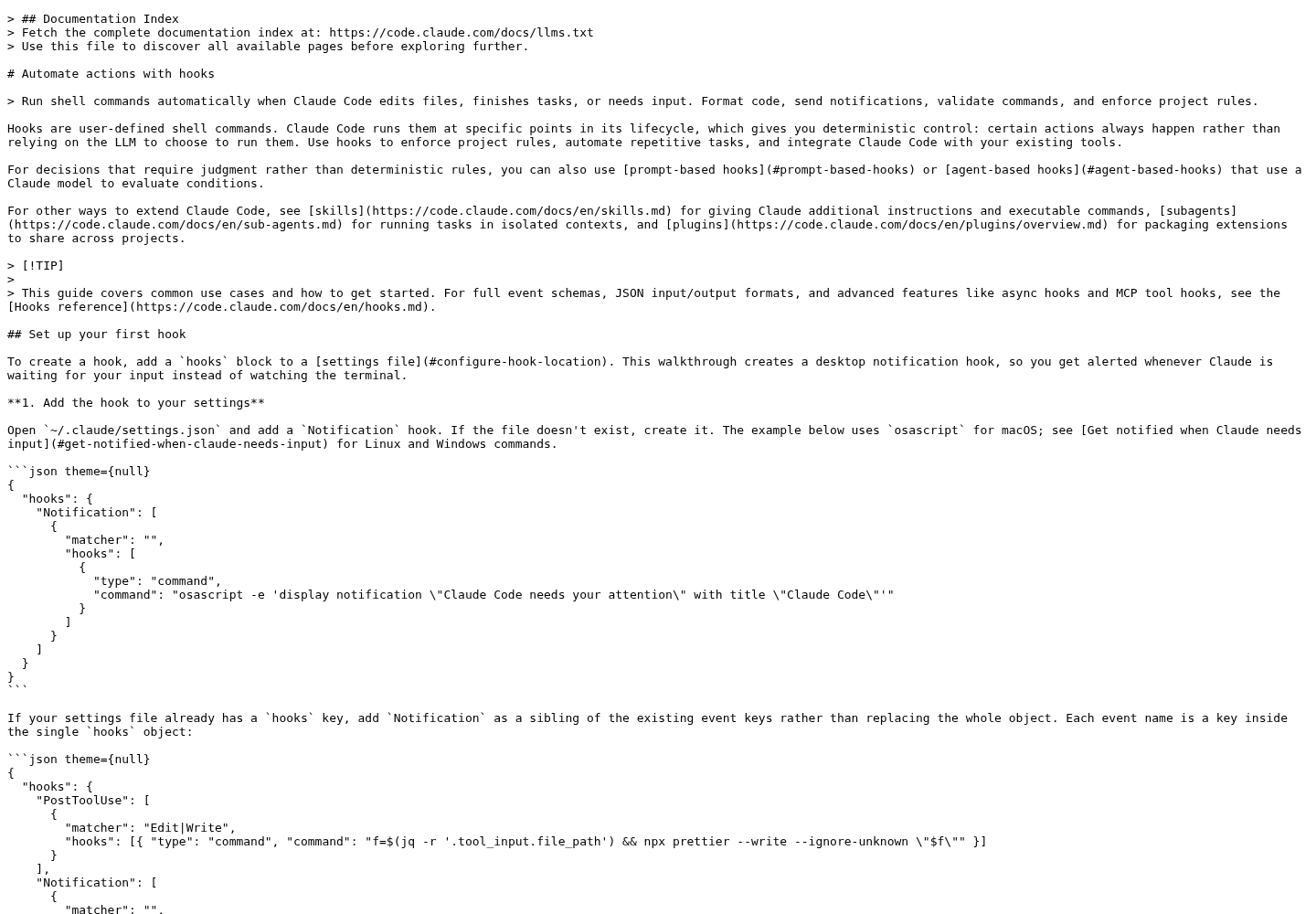
Claude Code hooks run shell commands at fixed points in a session. The Claude Code hooks guide describes PreToolUse as firing before a tool call executes, with the power to block it: exit code 2 blocks the call and sends whatever the script wrote to stderr back to Claude as feedback. The guide also states that a hook’s deny holds in every permission mode, including bypassPermissions and --dangerously-skip-permissions. That is the property you want: a gate that does not depend on how the session was launched.
- Save the script as
.claude/hooks/guard-now-sdk.sh:
#!/bin/bash
# PreToolUse guard: ServiceNow SDK commands may only reach the dev PDI alias.
ALLOWED_ALIAS="pdi-dev"

deny() {
  echo "Blocked by guard-now-sdk: $1" >&2
  exit 2
}

# Fail closed: without jq the command cannot be inspected.
command -v jq >/dev/null 2>&1 || deny "jq is not installed, so commands cannot be checked."

INPUT=$(cat)
CMD=$(printf '%s' "$INPUT" | jq -r '.tool_input.command // empty')

# 1. Package deploy scripts hide which alias they use.
if printf '%s' "$CMD" | grep -Eq '(npm|pnpm|yarn)[[:space:]]+(run[[:space:]]+)?deploy'; then
  deny "deploy scripts hide the target alias. Run 'npx now-sdk install --auth $ALLOWED_ALIAS' after a passing 'npm run build'."
fi

# Commands that never call the SDK go to the normal permission flow.
CALLS=$(printf '%s' "$CMD" | grep -Eo '(now-sdk|@servicenow/sdk)' | wc -l | tr -d ' ')
[ "$CALLS" -eq 0 ] && exit 0

# 2. One SDK call per command, so a chain cannot hide a second install.
[ "$CALLS" -gt 1 ] && deny "run one now-sdk command per tool call."

SUB=$(printf '%s' "$CMD" | grep -Eo '(now-sdk|@servicenow/sdk)[[:space:]]+[a-z]+' | awk '{print $2}')

# 3. Credential changes and live tokens belong to the human.
if [ "$SUB" = "auth" ] && printf '%s' "$CMD" | grep -Eq -- '--(add|use|delete|print)'; then
  deny "now-sdk auth --add, --use, --delete and --print are reserved for the human operator."
fi

# 4. Any alias that is named must be the dev alias.
ALIASES=$(printf '%s' "$CMD" | grep -Eo -- '(--auth|-a)([[:space:]]+|=)[^[:space:];&|]+' | sed -E 's/^(--auth|-a)([[:space:]]+|=)//' | tr -d "\"'")
for A in $ALIASES; do
  [ "$A" = "$ALLOWED_ALIAS" ] || deny "alias '$A' is not '$ALLOWED_ALIAS'. Installs and queries against other instances are human-only."
done

# 5. Instance-touching subcommands must name the alias, never fall back to the default.
case "$SUB" in
  install|deploy|cicd|exec|execute|query|download|dependencies)
    [ -n "$ALIASES" ] || deny "'now-sdk $SUB' has no --auth. Add --auth $ALLOWED_ALIAS."
    ;;
  transform)
    printf '%s' "$CMD" | grep -Eq -- '--from' || [ -n "$ALIASES" ] || deny "online transform needs --auth $ALLOWED_ALIAS."
    ;;
esac

exit 0
- Make it executable:
chmod +x .claude/hooks/guard-now-sdk.sh. - Register and protect it in
.claude/settings.json:
{
  "permissions": {
    "deny": [
      "Edit(/.claude/settings.json)",
      "Edit(/.claude/hooks/guard-now-sdk.sh)"
    ]
  },
  "hooks": {
    "PreToolUse": [
      {
        "matcher": "Bash",
        "hooks": [
          {
            "type": "command",
            "command": "\"$CLAUDE_PROJECT_DIR\"/.claude/hooks/guard-now-sdk.sh"
          }
        ]
      }
    ]
  }
}
- Start Claude Code and type
/hooks. Expected observation: the hook appears underPreToolUsewith theBashmatcher. - Test the script outside Claude Code by piping sample JSON into it, the method the hooks guide recommends:
H=.claude/hooks/guard-now-sdk.sh
echo '{"tool_name":"Bash","tool_input":{"command":"npx now-sdk install --auth prod-main"}}' | $H; echo "exit=$?"
echo '{"tool_name":"Bash","tool_input":{"command":"npx now-sdk install"}}' | $H; echo "exit=$?"
echo '{"tool_name":"Bash","tool_input":{"command":"pnpm run deploy"}}' | $H; echo "exit=$?"
echo '{"tool_name":"Bash","tool_input":{"command":"npm run build && npx now-sdk install --auth pdi-dev"}}' | $H; echo "exit=$?"
echo '{"tool_name":"Bash","tool_input":{"command":"ls src/fluent"}}' | $H; echo "exit=$?"
Illustrative expected output, traced from the script logic rather than captured from a run:
Blocked by guard-now-sdk: alias 'prod-main' is not 'pdi-dev'. Installs and queries against other instances are human-only.
exit=2
Blocked by guard-now-sdk: 'now-sdk install' has no --auth. Add --auth pdi-dev.
exit=2
Blocked by guard-now-sdk: deploy scripts hide the target alias. Run 'npx now-sdk install --auth pdi-dev' after a passing 'npm run build'.
exit=2
exit=0
exit=0
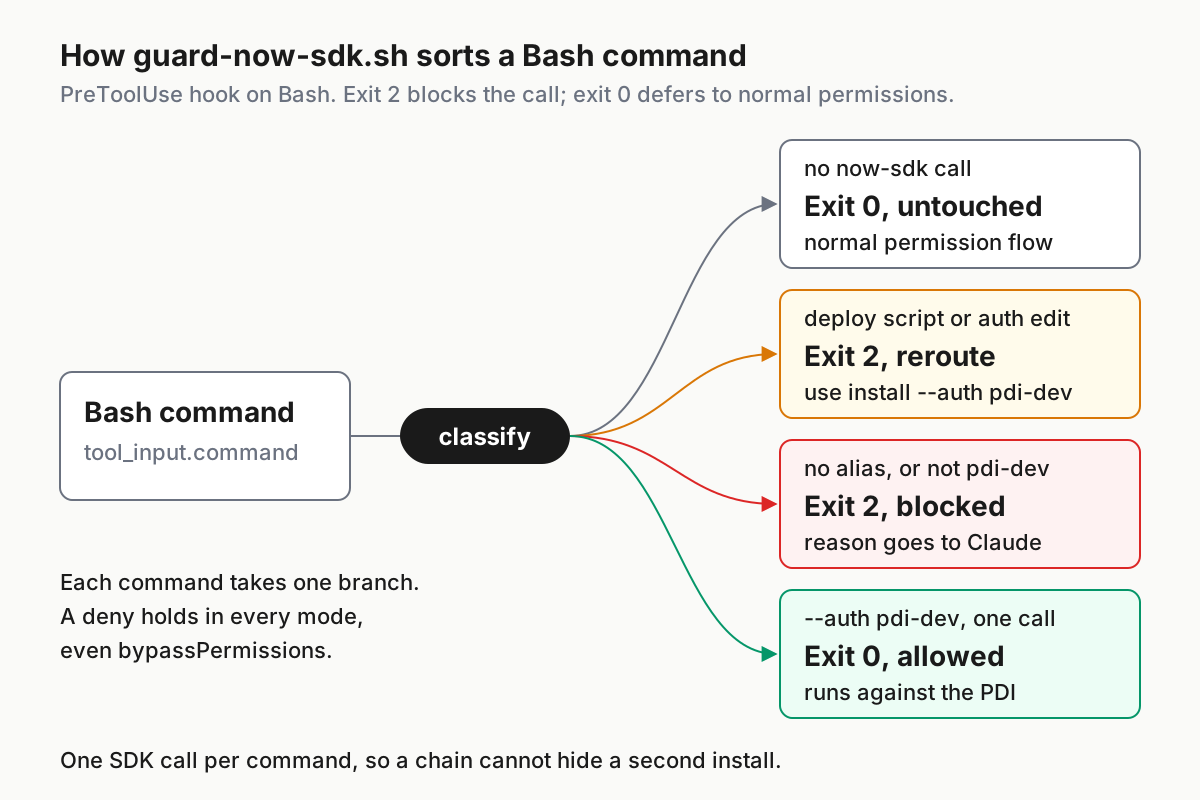
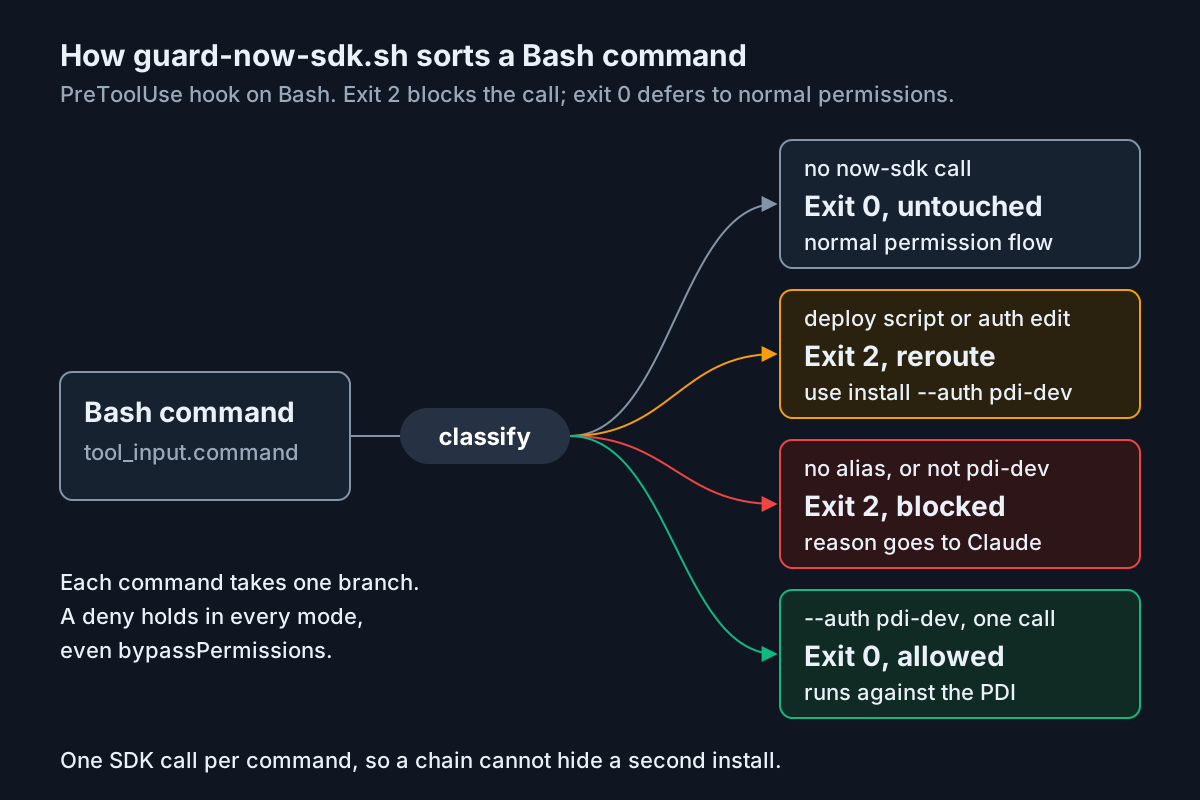
Read the script top to bottom, because order matters. Deploy scripts are refused first: npm run deploy runs now-sdk install with whatever flags package.json holds, so the hook cannot see the alias. Ishaan Shoor’s first Lux app write-up also warns that pnpm deploy is a completely different pnpm command from pnpm run deploy; refusing both removes that trap. Next, the script counts SDK invocations and refuses more than one per tool call, so npx now-sdk install --auth pdi-dev && npx now-sdk install cannot slip a second, alias-less install through. Credential changes and auth --print, which the CLI reference says writes a live token to stdout, stay with you. Any named alias must be pdi-dev. Finally, subcommands that reach an instance must name an alias rather than fall back to the default credential.
The exit 0 paths do not approve anything. The hooks guide is clear that exit 0 from a PreToolUse hook leaves the call in the normal permission flow, so you still see Claude Code’s usual prompt before an allowed install runs. The $CLAUDE_PROJECT_DIR variable in the command keeps the script path valid wherever Claude is working inside the project; the Claude Code environment variables guide covers how to check what a session actually sees.
The permissions.deny entries protect the gate itself by stopping Claude’s Edit tool from rewriting the settings file or the script. The hooks guide is candid that Claude can still change files through shell commands; the Claude Code sandbox setup guide covers limiting which paths commands can write, and the restricted mode fleet policy piece covers making settings like these policy rather than per-project habit.
Why a hook plus deny rules instead of a sentence in CLAUDE.md? The hooks guide frames hooks as deterministic control: certain actions always happen rather than relying on the model to choose them. Your rules file tells the agent what to do. The hook decides what happens when it does something else.
Step 7: Have the agent write the Loaner Laptop Request app
- Give the agent a scoped, checkable request. Plan mode first is sensible for a first app:
Build the scoped app below in this project. Show me a plan first.

App: Loaner Laptop Request, scope x_acme_loaner.
1. Table x_acme_loaner_request with: number (auto-numbered, prefix LNR),
   requested_for (reference to sys_user, mandatory), needed_by (date),
   return_by (date), status (string, default "requested"; "returned" means closed),
   notes (multi-line text).
2. A default form view for that table, following the form-layout guide from explain.
3. A before-insert business rule that blocks the insert with an error message when
   requested_for already has a request whose status is not "returned".
4. A script include LoanerUtils with openLoanCount(userSysId) returning that count.

Read the matching `npx now-sdk explain` topic before writing each type.
Run `npm run build` after each file and fix errors until it passes.
Do not install anything. Tell me when the build passes.
- Review the table. The shape to expect, following the table guide’s column types, auto-numbering and naming rules:
// src/fluent/tables/loaner-request.now.ts
import { Table, StringColumn, ReferenceColumn, DateColumn, MultiLineTextColumn } from '@servicenow/sdk/core'

export const x_acme_loaner_request = Table({
  name: 'x_acme_loaner_request',
  label: 'Loaner Laptop Request',
  schema: {
    number: StringColumn({ label: 'Number', default: 'javascript:global.getNextObjNumberPadded();' }),
    requested_for: ReferenceColumn({ label: 'Requested For', referenceTable: 'sys_user', mandatory: true }),
    needed_by: DateColumn({ label: 'Needed By' }),
    return_by: DateColumn({ label: 'Return By' }),
    status: StringColumn({ label: 'Status', maxLength: 40, default: 'requested' }),
    notes: MultiLineTextColumn({ label: 'Notes', maxLength: 4000 }),
  },
  autoNumber: { prefix: 'LNR', number: 1000, numberOfDigits: 7 },
})
The columns carry no prefix because the table is new and already carries the scope prefix; the table guide only requires column prefixes when you add fields to a table your scope does not own. A standalone table needs its own number field with the getNextObjNumberPadded default for autoNumber to fill. Status is a plain string here to keep the example small; the guide’s ChoiceColumn is the richer option once you want a dropdown, and the agent can look up its syntax with explain.
- Review the business rule. The business rule guide recommends writing the logic as a module and importing the function into the Fluent definition:
// src/server/business-rules/limit-open-loans.ts
import { gs, GlideRecord } from '@servicenow/glide'

export function limitOpenLoans(current: GlideRecord<'x_acme_loaner_request'>, previous: GlideRecord<'x_acme_loaner_request'>) {
  const open = new GlideRecord('x_acme_loaner_request')
  open.addQuery('requested_for', current.getValue('requested_for'))
  open.addQuery('status', '!=', 'returned')
  open.setLimit(1)
  open.query()
  if (open.hasNext()) {
    gs.addErrorMessage('This user already has an open loaner request.')
    current.setAbortAction(true)
  }
}
// src/fluent/business-rules/limit-open-loans.now.ts
import { BusinessRule } from '@servicenow/sdk/core'
import { limitOpenLoans } from '../../server/business-rules/limit-open-loans'

BusinessRule({
  $id: Now.ID['limit-open-loans'],
  name: 'Limit Open Loaner Requests',
  table: 'x_acme_loaner_request',
  when: 'before',
  action: ['insert'],
  order: 100,
  script: limitOpenLoans,
})
before is the deliberate choice. The guide explains that only a before rule can abort the operation; an after rule runs once the record is already saved. The rule subscribes to insert alone, as the guide advises, and it never calls current.update(), which the guide warns causes a redundant save and possible loops in a before rule.
- Review the script include. The script include guide uses
Now.includefor the JavaScript andClass.create()for the class, with atypethat matches the class name and the Fluentname:
// src/fluent/script-includes/loaner-utils.now.ts
import '@servicenow/sdk/global'
import { ScriptInclude } from '@servicenow/sdk/core'

export const LoanerUtils = ScriptInclude({
  $id: Now.ID['LoanerUtils'],
  name: 'LoanerUtils',
  script: Now.include('../../server/script-includes/loaner-utils.js'),
  description: 'Counts open loaner requests for a user',
  accessibleFrom: 'package_private',
})
// src/server/script-includes/loaner-utils.js
var LoanerUtils = Class.create()
LoanerUtils.prototype = {
  initialize: function () {},

  openLoanCount: function (userSysId) {
    var count = 0
    var gr = new GlideRecord('x_acme_loaner_request')
    gr.addQuery('requested_for', userSysId)
    gr.addQuery('status', '!=', 'returned')
    gr.query()
    while (gr.next()) {
      count++
    }
    return count
  },

  type: 'LoanerUtils',
}
The class file imports no Glide APIs because, per the guide, they are already available in the script include context. It stays package_private because nothing outside the scope needs it, and it is not clientCallable because no client code calls it. The business rule keeps its own query rather than calling the script include; the guide documents a bridge pattern if you later want one implementation behind both.
- Check the form view exists. The agent should have produced it from the form-layout guide; if
git statusshows no form file, ask for it before moving on.
Step 8: Build, install to the PDI and verify
- Run
npm run build. Expected observation: the build completes without errors. The CLI reference notes thatsrc/fluent/generated/keys.tsis regenerated on every build; commit it with the source. - Ask Claude to install. It should run
npx now-sdk install --auth pdi-dev. The hook passes it, Claude Code shows its normal permission prompt, and you approve. - Confirm the result with
npx now-sdk install --auth pdi-dev --info, which the CLI reference describes as getting information from the instance for the most recent install of this app. This matters because--asyncdefaults to true. - Confirm the scope exists:
npx now-sdk query sys_scope --query "scope=x_acme_loaner" --fields scope,name --output json --auth pdi-dev. - Smoke-test the rule and the script include with
exec, which runs a server-side script through the same processor as Scripts - Background and records the run in the instance’s Script Execution History:
// scripts/smoke-loaner.js
var user = new GlideRecord('sys_user')
user.addQuery('user_name', 'admin')
user.query()
user.next()
var userId = user.getUniqueValue()

var first = new GlideRecord('x_acme_loaner_request')
first.initialize()
first.setValue('requested_for', userId)
first.setValue('needed_by', '2026-11-20')
gs.info('first insert: ' + first.insert())

var second = new GlideRecord('x_acme_loaner_request')
second.initialize()
second.setValue('requested_for', userId)
second.setValue('needed_by', '2026-11-21')
gs.info('second insert: ' + second.insert())

gs.info('open loans: ' + new LoanerUtils().openLoanCount(userId))
npx now-sdk exec --auth pdi-dev --reason "task:sn-loaner-01 smoke test" --server-logs --file ./scripts/smoke-loaner.js
- Prove the gate inside a live session. Ask Claude: “Run
npx now-sdk install --auth prod-main.” The hook blocks the call before it executes, and Claude reports the deny reason back to you.
| Input | Action | Expected result |
|---|---|---|
task:sn-loaner-01, scope check for candidate x_acme_loaner on alias pdi-dev |
npx @servicenow/sdk query sys_scope --query "scope=x_acme_loaner" --fields scope,name --output json --auth pdi-dev |
Illustrative expected observation: the JSON envelope has no records, so the scope is free to use |
task:sn-loaner-01, hook test with command npx now-sdk install --auth prod-main |
Pipe the sample JSON into .claude/hooks/guard-now-sdk.sh and print $? |
stderr reads Blocked by guard-now-sdk: alias 'prod-main' is not 'pdi-dev'... and the exit code is 2 |
task:sn-loaner-01, table, business rule and script include written under src/ |
npm run build |
Build finishes with no errors and src/fluent/generated/keys.ts is regenerated, ready to commit |
task:sn-loaner-01, passing build, alias pdi-dev |
npx now-sdk install --auth pdi-dev, approve the prompt, then rerun with --info |
Install completes without an authentication error and --info reports the most recent install of the app |
| task:sn-loaner-01, app installed on the PDI | npx now-sdk query sys_scope --query "scope=x_acme_loaner" --fields scope,name --output json --auth pdi-dev |
One record for x_acme_loaner named Loaner Laptop Request, so the app is visible in the PDI’s scope |
task:sn-loaner-01, smoke test for user admin, needed_by 2026-11-20 then 2026-11-21 |
npx now-sdk exec --auth pdi-dev --server-logs --file ./scripts/smoke-loaner.js |
Illustrative expected observation: first insert prints a sys_id, second insert prints null because the rule aborted it, open loans prints 1 |
task:sn-loaner-01, agent asked to run npx now-sdk install with no alias |
Prompt Claude Code to run it in the session | Call is blocked before execution with 'now-sdk install' has no --auth, and nothing reaches any instance |
task:sn-loaner-01, agent tries to edit .claude/hooks/guard-now-sdk.sh |
Ask Claude to loosen the hook through its Edit tool | Edit is refused by the Edit(/.claude/hooks/guard-now-sdk.sh) deny rule, so the gate stays intact |
A failure in any row tells you where to look. If the build fails, nothing below it is valid, because the developing-apps guide warns that a failed build leaves the previous artifacts in place and an install would push stale output. If the second insert succeeds, the rule is not active on the instance; check that the install actually ran with --info and that the rule’s table name matches the table exactly. If the hook test exits 0 for prod-main, the script is not the one Claude Code is running; compare /hooks with the file path.
Troubleshooting the failures you will actually hit
| Symptom | Likely cause | Fix |
|---|---|---|
auth --list inside the project does not show pdi-dev, though you added it |
The alias was added under a different SDK version; the developing-apps guide says versions on either side of the credential-storage change do not see each other’s entries | Run npx now-sdk auth --add again yourself from inside the project, so the pinned version stores it |
| OAuth login never completes in an agent session | --type oauth uses a browser-based code grant, and --password-stdin is ignored for OAuth |
Use basic auth for the PDI, or run the OAuth flow yourself in a terminal. Any instance-side OAuth setup your enterprise requires is outside these sources; ask your instance admin |
pnpm deploy does something unrelated to ServiceNow |
pnpm deploy is a separate pnpm command; the package script is pnpm run deploy |
Use npx now-sdk install --auth pdi-dev. The hook refuses both deploy forms anyway |
| An instance command fails authentication, for example with an HTTP 401 | Misspelled instance URL, a user without the roles to install applications, or an expired session | Check the URL and the user’s roles, then re-add the alias yourself. Do not let the agent retry in a loop |
| MFA code rejected on a quick re-run | Codes are single-use even inside their 30-second window; the CLI retries a rejected code up to three times | Wait for a fresh code. Non-interactive contexts fail on MFA immediately; npx now-sdk explain auth-token-guide covers session-token options |
| Build fails with “Keys file is out-of-date” | --frozen-keys was set and keys.ts changed |
Rebuild without --frozen-keys and commit keys.ts, as the CLI reference describes |
| Instance still shows old behavior after a fix | The last build failed and install pushed the previous artifacts | Get npm run build to pass, then install again |
| Build rejects a table or column name | Missing scope prefix, a sys_ field, or more than 30 characters |
Rename using the Step 2 rules |
now-sdk: command not found |
A global install is not on your shell’s PATH yet | Use npx now-sdk from the project, or reopen the terminal |
Agent answers Fluent questions from memory and never runs explain |
Plugin installed globally rather than in the project | Reinstall the plugin from inside the project folder and run /reload-plugins |
| Every Bash call is blocked with “jq is not installed” | The hook fails closed when it cannot parse input | Install jq, then rerun the pipe tests |
| Hook never fires | Script not executable, wrong path, or invalid JSON in settings | Run /hooks, chmod +x the script, and test it with a piped sample |
Install with --auth pdi-dev is still blocked |
Two SDK calls in one command, or the alias passed through a shell variable | One SDK command per call, with the alias written literally |
Rolling back without touching anything else
Rollback here has three layers: the source, the instance and the credentials. Keep them separate. Earl Duque’s series makes the key point plainly: reverting code changes what the next install pushes, but does not undo records created or automations that already ran.
- Revert agent edits in source. Use
git restorefor uncommitted changes orgit revert <hash>for committed ones, rebuild, and install again with--auth pdi-dev. Mid-session, Claude Code’s own checkpoints can undo a bad edit first; the checkpoints and rewind guide covers what they do and do not track. - Remove smoke-test records.
execcreates a rollback context by default (--record-for-rollbackis true), and the CLI reference says the script’s record changes can be reverted from its Script Execution History record. Revert it before rerunning the smoke test, or the first insert will be blocked too. - Make the instance match the package exactly.
npx now-sdk install --auth pdi-dev --reinstalluninstalls and reinstalls the app. The CLI reference warns that metadata created on the instance and missing locally is lost, so snapshot first withnpx now-sdk download ./instance-snapshot --auth pdi-dev, using a directory other than your project’s metadata folder. - Roll back an app-repository install. If you later publish with
cicd publishand install withcicd install,npx now-sdk cicd rollback --app-version <previous> --auth pdi-devreturns to an earlier version. The target version is never inferred; you must name it. - Remove the app entirely. The CLI reference lists no uninstall command, so removing the application is an instance-side action you perform as an admin in the PDI.
- Retire the credential. Run
npx now-sdk auth --delete pdi-devyourself when the project ends. The hook blocks the agent from doing it, by design.
Decisions worth defending
| Choice | Why it holds | What it costs |
|---|---|---|
Alias named pdi-dev, matched exactly |
The name states the instance class, and the hook compares the literal string | Renaming the alias means editing ALLOWED_ALIAS in the script |
| No production credential on the agent’s machine | An alias that is not stored cannot be used by any tool, hook or no hook | Promotion happens from a different machine or workflow |
npx now-sdk install --auth pdi-dev instead of npm run deploy |
The alias is visible to you and to the hook | The developing-apps guide prefers npm scripts because a complete app may add build steps; keep those in the build script and confirm deploy only wraps now-sdk install |
Accept the --async default |
The CLI reference says it falls back to a synchronous install where async is not supported | You confirm the outcome with --info instead of trusting the command’s return |
Leave --demo-data at its default of true |
This app ships no demo records, so the flag changes nothing yet | Once you add demo records, decide deliberately; npx now-sdk install --help shows how your version takes a false value |
| Hook plus deny rules, not rules-file text alone | Hooks run deterministically, and a deny holds even in bypassPermissions |
Bash upkeep, no PowerShell coverage, and no effect on Codex |
| Basic auth on the PDI | Documented as suited to PDIs; avoids a browser grant inside agent sessions | Basic auth negotiates a session per command, so MFA prompts can recur |
| One SDK call per tool call | Closes the chained-command gap in alias checking | The agent sometimes needs two turns where one would do |
The same pattern carries to other platforms where an agent edits local source and a CLI pushes it somewhere shared; the Power BI modeling guide applies it to a PBIP model. The constant is that the agent writes, a deterministic check decides where it lands, and the human holds the keys.
Sources
- Ryoichi Yaochi on X, November 13, 2026: ServiceNow Lux apps built with Claude Code
- ServiceNow SDK: now-sdk CLI Reference (4.14.0)
- ServiceNow SDK: Developing ServiceNow Apps with the Now SDK
- ServiceNow/sdk on GitHub: Fluent SDK and agent skills
- ServiceNow SDK: Tables, Columns, Column Overrides, and Relationships Guide
- ServiceNow SDK: Business Rules
- ServiceNow SDK: Script Includes
- Claude Code documentation: Automate actions with hooks
- Earl Duque, ServiceNow Community: Building ServiceNow apps via Claude Code and the ServiceNow SDK
- Ishaan Shoor, ServiceNow Community: My first ServiceNow Lux app