Claude Code Background Agents: Run Three Tasks With claude --bg, Triage Them in Agent View and Clean Up Safely
Run Claude Code background agents with claude --bg, read agent view states, attach and reply, set dispatch defaults and clean up without losing any work.

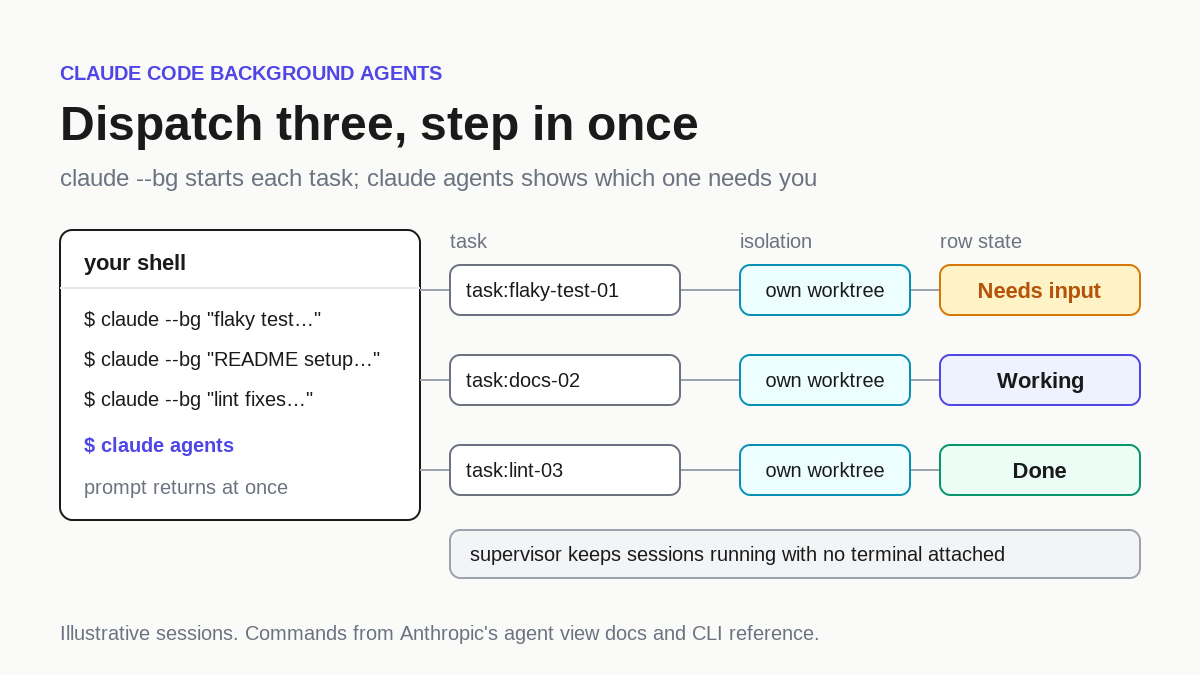
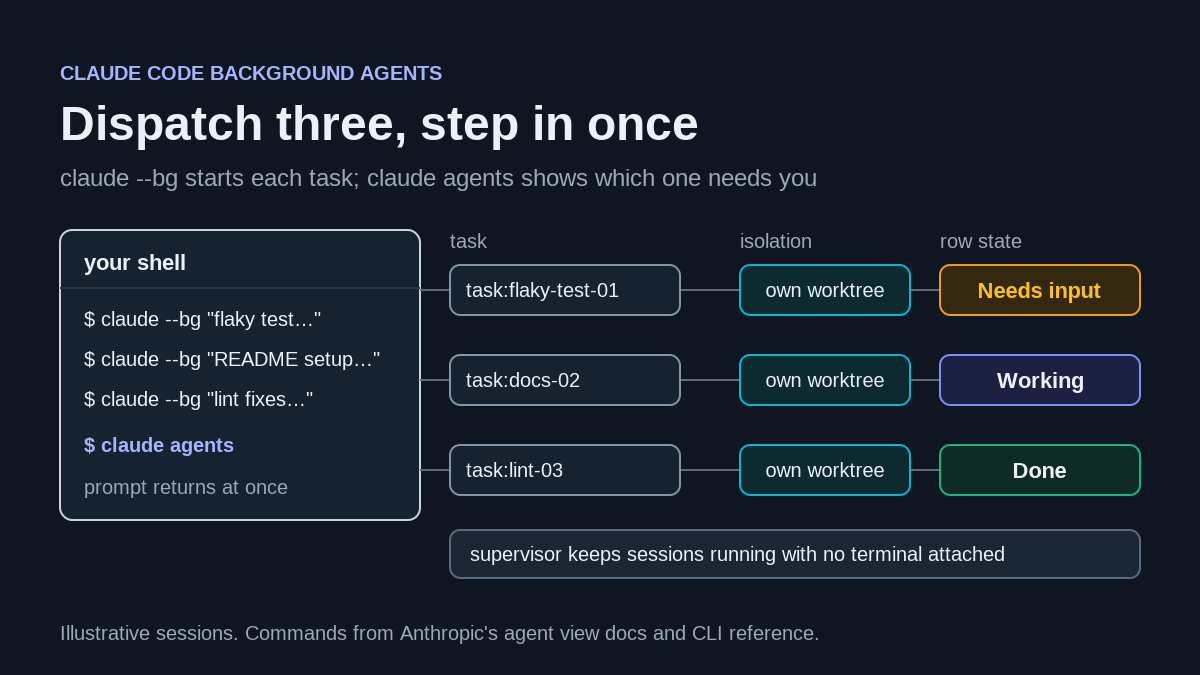
Claude Code background agents fix a problem that every heavy CLI user hits by mid-morning. You have three independent jobs in one repository, each worth a few minutes of Claude’s time, and you do not want to babysit three terminal tabs. A recent developer post on X boiled the trick down to two commands, claude --bg and claude agents, and said it felt like having a second self working through the other half of the to-do list. The commands are right. The post skips the parts that decide how the afternoon goes: which session is waiting on you, how to answer it without reading its whole transcript, what each session does to your git checkout, and how to delete a finished session without deleting its work.
This guide is for a Claude Code CLI user on a Claude subscription who already runs several tasks a day and wants them running side by side. By the end you will have started three sessions against one repository, read their rows in agent view, answered the one that asked for input, set dispatch defaults, checked state from a script and cleaned everything up with the work committed. Every command comes from Anthropic’s agent view documentation and the Claude Code CLI reference. Agent view arrived as a research preview in the Week 20 release notes, which cover v2.1.139 to v2.1.142 (May 11–15, 2026). Anthropic still warns that the interface and keyboard shortcuts may change, so treat the exact keystrokes as how things work today, not as a promise.
The worked example uses an illustrative Node repository at ~/projects/shop-api with three tasks. task:flaky-test-01 investigates a flaky checkout test, task:docs-02 updates the README setup section, and task:lint-03 fixes lint errors. The session IDs and outputs below are illustrative expected observations, not output captured from real runs. Your IDs and wording will differ.
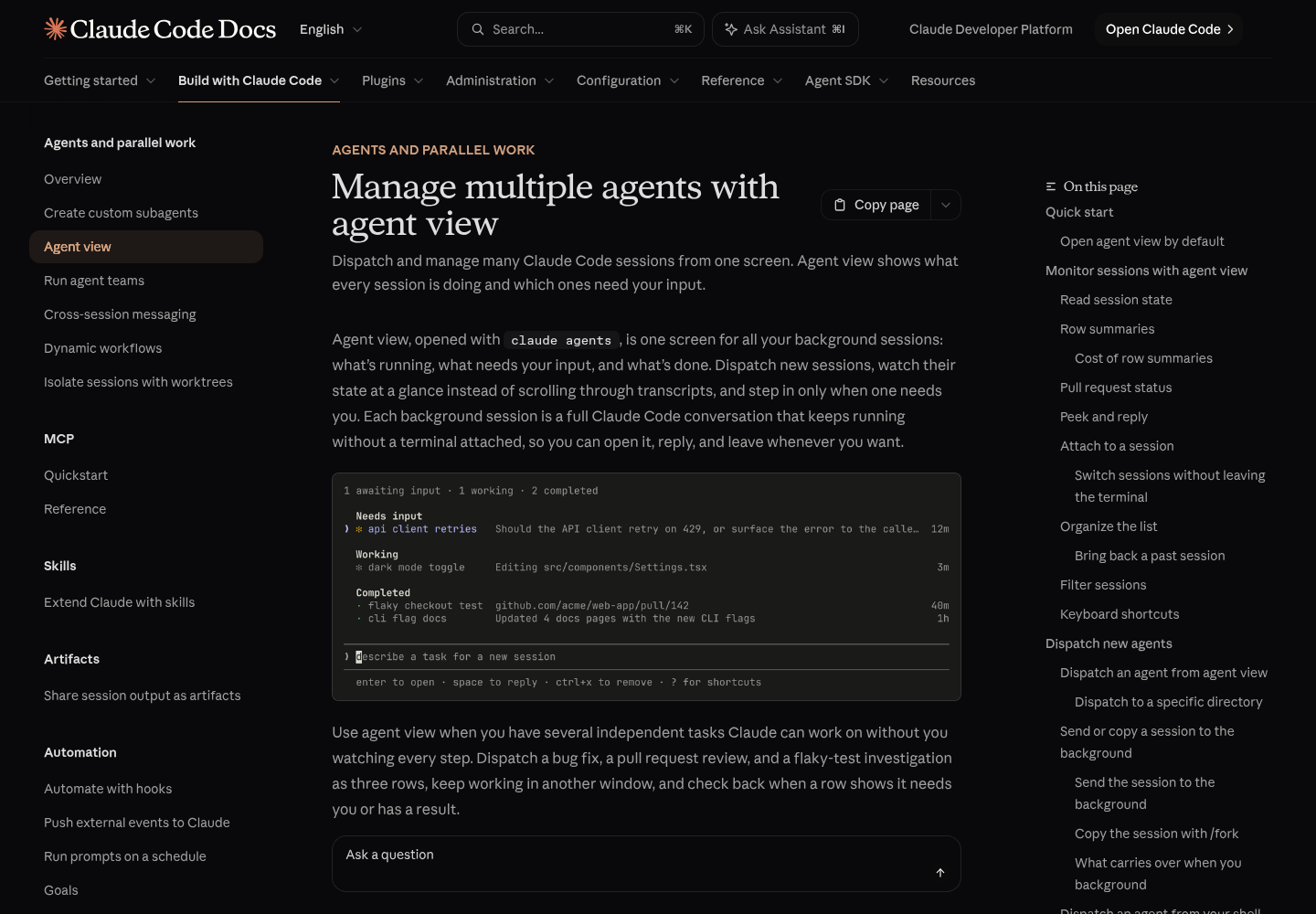
What a background session is, and what it is not
A background session is a full Claude Code conversation that keeps running with no terminal attached. A separate supervisor process hosts all of them. It starts the first time you background a session or open agent view, and it keeps your work going after you close agent view, close your shell or start something else, according to the agent view docs. Each session runs as its own Claude Code process under that supervisor, and you can open it, reply and leave whenever you like.
Three consequences matter before you start anything. The first is isolation. When a session started with claude --bg or from agent view is about to edit files in a git repository, Claude moves it into its own worktree under .claude/worktrees/. Parallel sessions all read the same checkout, but each one writes to its own copy. The second is cost. Each session draws on your subscription usage separately, and Anthropic’s own limitation note says ten agents in parallel use quota roughly ten times as fast as one. The third is location. Sessions run on your machine. They survive sleep, but a shutdown stops them.
A background session is not a subagent. Subagents are workers inside one conversation that report a summary back to it. Anthropic’s comparison of parallel approaches puts agent view in a separate row: you hand off independent tasks, check back later, and the sessions report results only to you. If you are still deciding which pattern fits your work, the decision table near the end of this guide covers it. Our earlier piece on subagent orchestration patterns goes deeper on running many workers inside one session.
Before you dispatch: prerequisites and a clean tree
Ten minutes of preparation prevents most of the problems in the troubleshooting table later. Work through this checklist in the repository you plan to use.
- [ ] Current CLI. Run
claude -v. Agent view needs v2.1.139 or later, and some behavior in this guide needs newer builds, such as looking sessions up by name (v2.1.290). Ifclaude agentsprints a count followed by your subagents and then exits, agent view isn’t available in your build, so runclaude update. Our guide to updating, pinning and rolling back Claude Code covers the quirks of each install method. - [ ] Signed in.
claude auth statusexits with code 0 when you are logged in. Background sessions use the same stored credentials as interactive ones. - [ ] A git repository with a committed tree. Run
git statusand commit or stash anything in progress. You want each session’s diff to contain only its own work. - [ ] Trust accepted. Open
claudeonce in the directory and accept the workspace trust dialog. If you runclaude --bgfrom a script in an untrusted directory, it exits withWorkspace not trustedinstead of asking. - [ ] A quota decision. Three sessions use your quota about three times as fast as one. If you are close to your limit, read our guide to keeping parallel sessions inside the shared usage limit before you run several at once.
- [ ] A git ownership decision. By default, a session that edited files in its own worktree commits without asking. It pushes its branch when the repository has a remote, and it opens a draft pull request when the task calls for one. It never pushes to
mainormaster, force-pushes or merges. If you want to handle commits yourself, say so in the task or inCLAUDE.md. Anthropic’s docs state that your git instructions take precedence.
cd ~/projects/shop-api
claude -v                 # confirm the installed version
claude auth status        # exit code 0 means signed in
git status --short        # expect no output on a clean tree
Step 1: Start three background sessions from the shell
claude --bg takes the prompt as a positional argument, not as a -p value. Claude Code rejects --bg combined with -p or --print before it creates any session, because print mode never starts the interactive session that agent view attaches to. Put the flag first so the parser can’t mistake it for prompt text.
- Start the investigation with a name you will recognize later.
--namereplaces the name Claude would otherwise generate for the row. - Start the documentation task the same way.
- Start the lint task on a different model with
--model. Mechanical lint fixes rarely need your strongest model. - Read the confirmation block each command prints before you go on.
claude --bg --name "flaky-test-01" "investigate the flaky CheckoutTotals test in tests/checkout; report the root cause and ask me before changing test timing"
claude --bg --name "docs-02" "update the Setup section of README.md so every command matches the scripts in package.json"
claude --bg --model sonnet --name "lint-03" "fix the errors reported by npm run lint without changing runtime behavior"
Each command gives you your prompt back right away. If the supervisor isn’t running yet, the first command may print Starting background service… first. After that you should see a block like the documented example, with your own short ID:
backgrounded · 3f9e21ab · flaky-test-01
  claude agents             list sessions
  claude attach 3f9e21ab    open in this terminal
  claude logs 3f9e21ab      show recent output
  claude stop 3f9e21ab      stop this session
Note the three short IDs. Each one is also the session’s directory name under ~/.claude/jobs/, which gives you a quick check later.
Two other ways to create a row are worth knowing. If you already have a claude conversation going and want it to keep working while you do something else, run /bg inside it. You can add one more instruction, such as /bg run the test suite and fix any failures. In a new session with no messages yet, /bg asks you to send a message first. Pressing ← on an empty prompt does the same thing and opens agent view in one step. A session moved this way keeps its permission mode and keeps editing files where it already was, so it doesn’t get a worktree of its own. That suits continuing a change already in progress, but it is risky for starting new work in a shared checkout. Our piece on single-owner worktrees explains why each checkout should have only one writer.
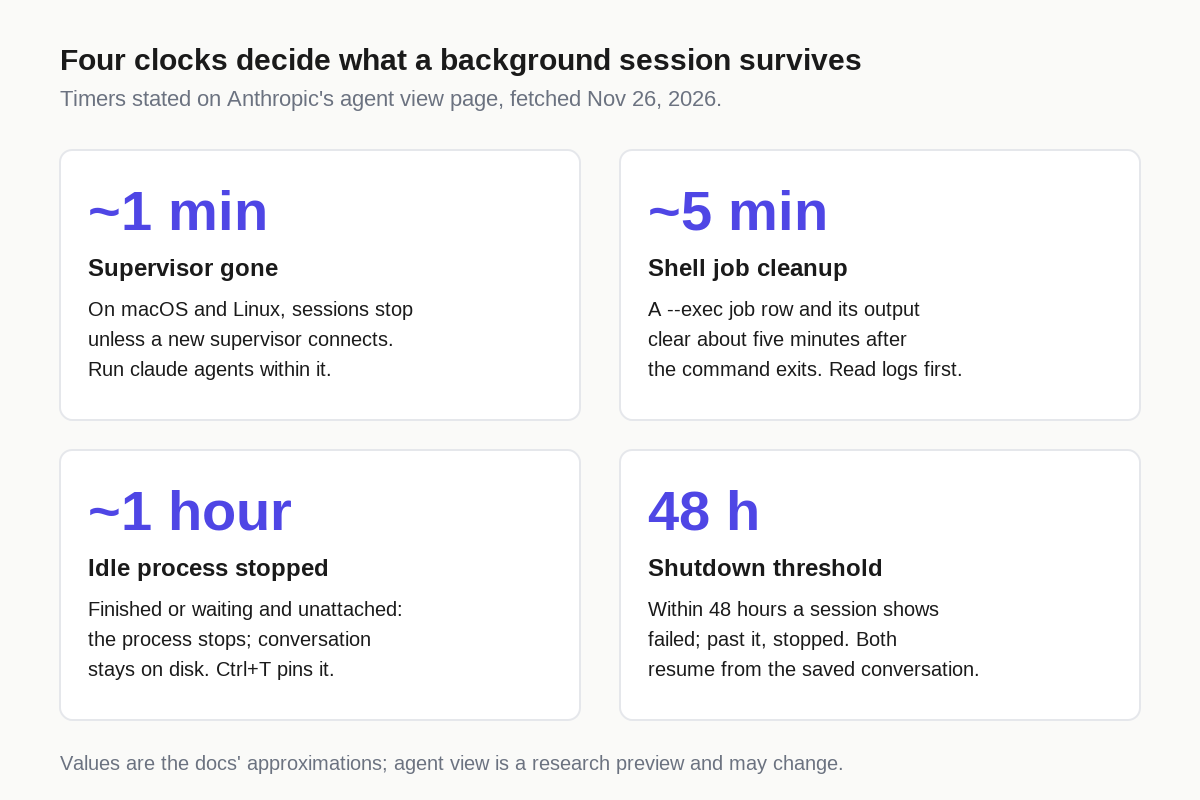
If a job is only a shell command, such as a long test run, claude --bg --exec 'npm test' runs it as a background job with no model involved. The output is kept in memory only, and the row disappears about five minutes after the command exits, so read it with claude logs <id> before then.
Step 2: Read agent view rows and states
Run claude agents. It needs an interactive terminal. Agent view takes over the screen and lists every background session you have started, across all your projects. It groups them so the sessions that need you sit at the top: Pinned, Ready for review, Needs input, Working and Completed. Pass --cwd ~/projects/shop-api to see only the sessions started under that directory, including any that moved into its .claude/worktrees/. Interactive sessions open in other terminals don’t appear until you background them, and the subagents a session starts don’t get rows of their own.
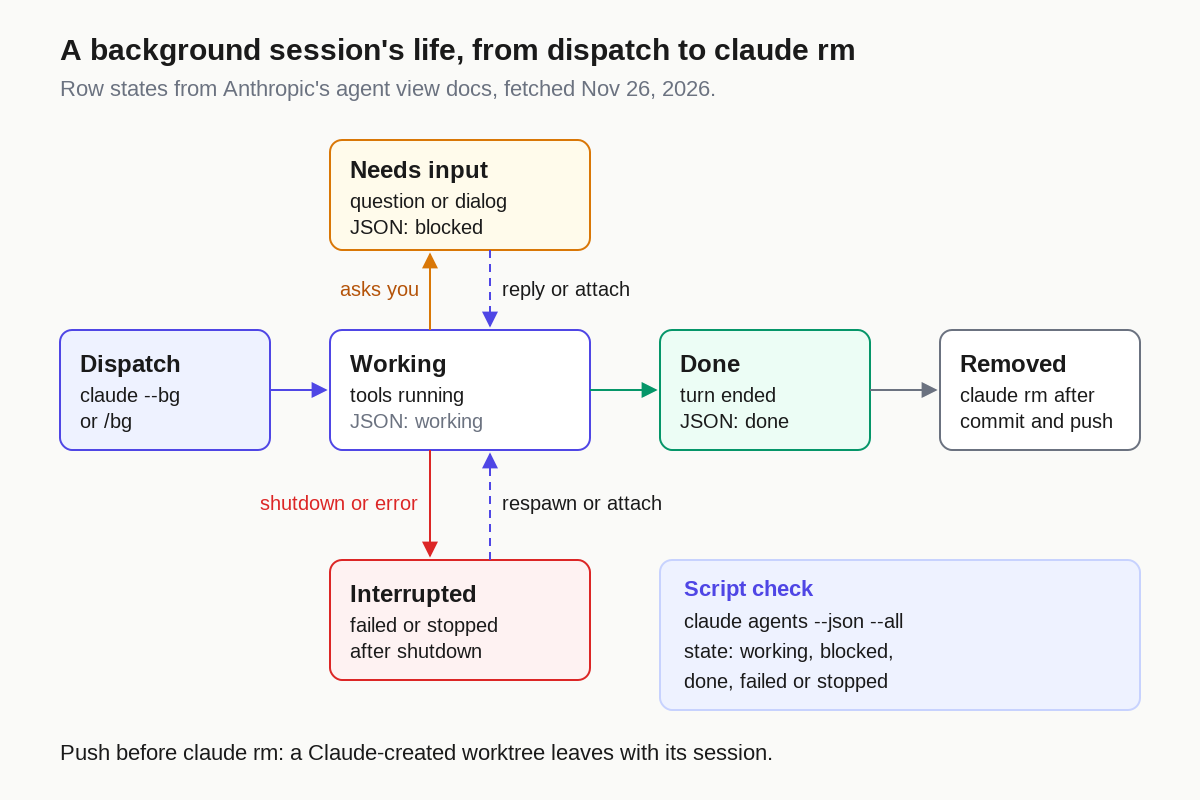
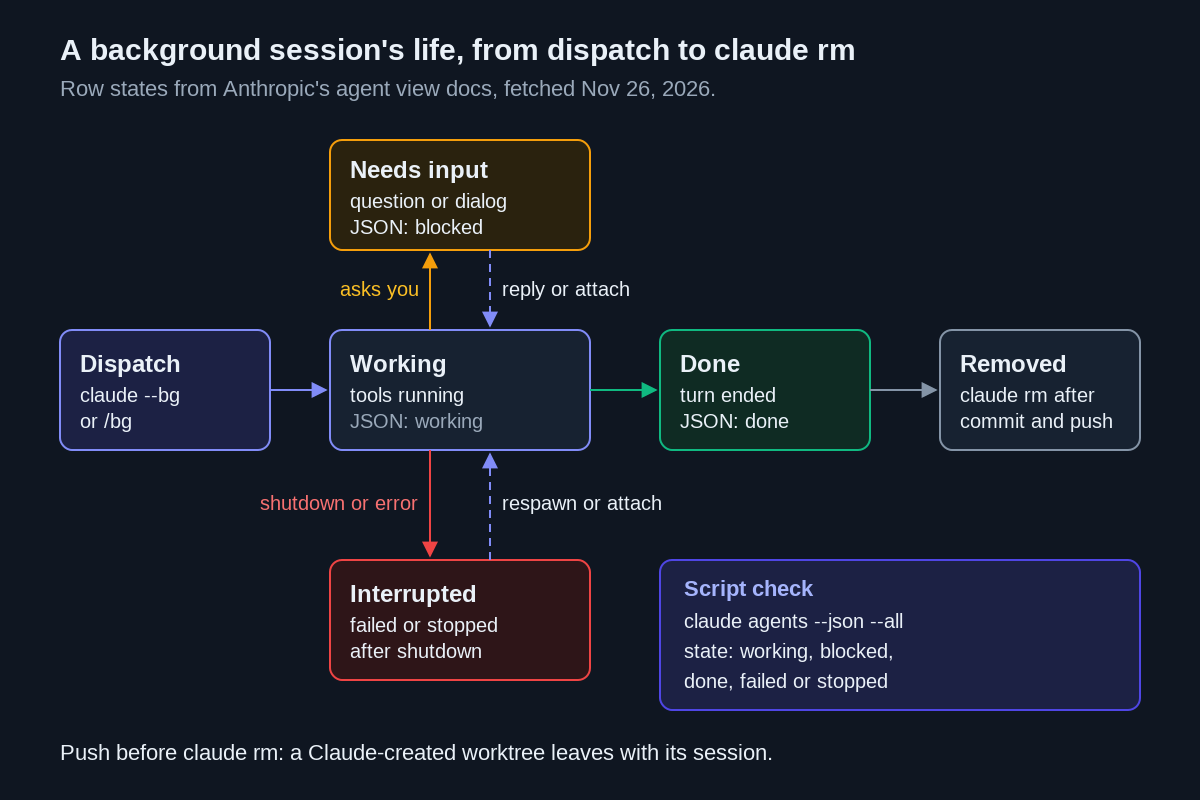
Each row shows a name, a one-line summary and an age. The icon’s color and animation show the state:
| State | Icon | What it means | What you do |
|---|---|---|---|
| Working | Animated | Running tools or writing a response | Leave it alone |
| Needs input | Yellow | Waiting for an answer, a permission decision or a dialog only you can complete | Peek or attach |
| Idle | Dimmed | Nothing to do, ready for a prompt | Send it work or remove it |
| Completed | Green | Finished successfully | Review the result, then clean up |
| Failed | Red | Ended with an error | Read the logs, then reply or respawn |
| Stopped | Grey | Stopped by you, ended from outside Claude Code, or ended while the background service was off | Resume it or remove it |
The icon’s shape tells you one more thing. A ✻ or an animated ✽ means the process is running. A ∙ means the process has exited. You can still peek at that row, and replying or pressing Enter restarts the session from its saved conversation. A #1234 label at the right edge links to a pull request the session opened. It is yellow while checks or review are pending, green when checks pass and no review is blocking, and purple once merged.
Groups and states don’t match one to one. Ready for review holds sessions with an open pull request that needs review or has failing checks. Completed holds finished, failed and stopped sessions together. Scripts see a third set of names, covered in Step 5.
Step 3: Peek, reply and attach to the session that needs you
In the example, flaky-test-01 is the session most likely to land under Needs input, because its prompt told it to ask before changing test timing. Handle it like this.
- Select the row with the arrow keys and press Space. The peek panel shows the exact question, or the latest output if the session is still working. A waiting session also shows a line such as
waiting 3m. - If the question offers numbered choices, press the number with the reply box empty, then press Enter. For a free-text question, type your answer and press Enter. The reply goes to that session and you stay in agent view.
- If the row is waiting on a permission prompt, a sandbox prompt or an MCP server’s dialog, a typed reply doesn’t answer it. Press → with the reply box empty to attach.
- Once attached, the session fills the terminal as a normal interactive Claude Code session. It starts with a short recap of what happened while you were away, and all commands and shortcuts work. Answer the prompt.
- Press ← on an empty prompt, or run
/exit, to go back to the list. Detaching never stops a session. - From a plain shell,
claude attach <id>does the same without opening the list.claude logs <id>prints recent output when you only want to look.
Two details catch people out. A reply sent to a working session waits until its current turn ends instead of interrupting it. The exceptions are /model, /effort, /rename and /usage, which take effect right away. A reply that is exactly /stop ends the session immediately. Attaching happens in a terminal. If you want to steer a session from your phone or another machine, our Remote Control setup guide covers that separate route.
Worked example: three sessions from dispatch to cleanup
The table follows the three illustrative tasks from start to removal. Expected results are illustrative observations based on the documented behavior, not output captured from a real run.
| Input | Action | Expected result |
|---|---|---|
| task:flaky-test-01 in ~/projects/shop-api, clean tree, prompt asks for the root cause before any timing change | claude --bg --name "flaky-test-01" "investigate the flaky CheckoutTotals test…" |
Prints backgrounded · 3f9e21ab · flaky-test-01; the shell prompt comes back at once; ls ~/.claude/jobs/ lists 3f9e21ab |
| task:flaky-test-01 after a few minutes of work | Open claude agents, select the row, press Space |
Row sits under Needs input; the peek panel shows the question, for example whether to replace a fixed sleep with an await on the totals event, plus waiting 2m |
| task:flaky-test-01 waiting on a permission prompt to edit tests/checkout/totals.test.ts | Press → with the reply box empty, approve the edit, then press ← on an empty prompt | Session attaches with a recap, the edit goes ahead, the row goes back to Working and you return to the list |
| task:docs-02, README Setup section out of date with package.json | claude --bg --name "docs-02" "update the Setup section of README.md…" |
Moves into a worktree under .claude/worktrees/ before editing; ends Completed (green) with a report naming its branch, which holds the commit |
| task:lint-03 on Sonnet, 14 lint errors in src/ | claude --bg --model sonnet --name "lint-03" "fix the errors reported by npm run lint…" |
Runs on Sonnet, as passed with --model; ends Completed and pushes its own branch if the repo has a remote, possibly with a #N label |
| All three sessions, mid-afternoon | claude agents --json --all --cwd ~/projects/shop-api |
JSON array with three background entries whose id values match the three ~/.claude/jobs directories; states read blocked, done and done |
| task:docs-02 completed, work committed and pushed | claude rm <docs-02 id> |
Row disappears and the worktree Claude created is removed; the transcript stays available through claude --resume |
| task:lint-03 completed, commit never pushed because the repo has no remote | claude rm <lint-03 id> |
Refused, with a message naming the branch and how many commits are unpushed; get the commits somewhere safe, then repeat |
The first three rows show the core loop: start the work, ignore it, and step in only when the row turns yellow. The last two show the rule that protects your work. claude rm is deliberately cautious. It keeps a worktree that has uncommitted changes, along with its row, and it refuses to delete a session whose worktree holds commits that aren’t pushed anywhere.
Step 4: Set dispatch defaults for model, effort, permissions and agent
A background session takes its permission mode, model and effort from how you started it. Those choices persist when the supervisor restarts the session’s process. You can set them in three places.
| Where | How | Applies to |
|---|---|---|
| One shell command | claude --bg --model sonnet "…"; claude --agent code-reviewer --bg "…" |
That session only |
| Agent view launch flags | claude agents --permission-mode plan --model opus --effort high |
Every session started from that view |
| Agent view dispatch input | Type /model sonnet, /effort high or /fast on, then start sessions |
Sessions you start next from that window; not saved to a settings file |
- Choose a permission mode for unattended work. A session started with
claude --bgbegins the same way a newclaudesession in that directory would. If you open agent view with--permission-mode plan, every session you start from it begins in plan mode, which suits investigations likeflaky-test-01. - Choose a model and effort for the batch.
--efforthere takes the same values as the top-level flag, includingultracode. Typing/effortor/fastin the dispatch input needs v2.1.299 or later, and/effort defaultundoes a choice. - Optionally choose a default subagent with
--agent. It applies when a dispatch prompt doesn’t name a subagent, either with@nameor as its first word. If the name doesn’t match one of your subagents, the launch fails and the session exits with an--agent '<name>' not founderror. Our guide to writing custom subagents covers defining one. - Avoid bypass mode for unattended rows unless you really mean it. Passing
--dangerously-skip-permissionstoclaude agentsis shorthand forbypassPermissions. If you haven’t accepted the bypass disclaimer before, it shows it first, because this mode lets a session you aren’t watching act without approval.
# An investigation batch: plan mode, Opus, high effort for every session started from this view
claude agents --cwd ~/projects/shop-api --permission-mode plan --model opus --effort high
One trap: Claude Code checks the first word of a prompt typed into agent view’s dispatch input against your subagent names. A prompt that happens to start with reviewer runs your reviewer subagent. Start the prompt with a different word, or use the explicit @name form.
To have plain claude, with no arguments, open agent view instead of a new conversation, run /config defaultToAgentsView=true in a regular session. With that setting on, claude "fix the login test" still starts a regular session.
Step 5: Script a status check with claude agents --json
Anthropic calls claude agents --json the supported way to read session state from outside Claude Code. It also says plainly that the files under ~/.claude/jobs/<id>/ are not a stable interface. Use the JSON for status bars, scheduled checks or another session that supervises the work. Use the jobs directory only to confirm IDs.
- Print the active sessions. Add
--allto also include completed ones. - Read
state. It is one ofworking,blocked,done,failedorstopped. - When
stateisblockedand the process is still alive, readwaitingFor. It names what the session is waiting for:permission prompt,input needed,sandbox request,worker requestordialog open. - Check that every background
idhas a matching directory under~/.claude/jobs/.
claude agents --json --all --cwd ~/projects/shop-api \
  | jq -r '.[] | select(.kind == "background") | "\(.id)\t\(.state)\t\(.waitingFor // "-")\t\(.name // "-")"'
ls ~/.claude/jobs/
An illustrative result for the example, mid-afternoon:
3f9e21ab	blocked	permission prompt	flaky-test-01
8c04d7e2	done	-	docs-02
b51a0f96	done	-	lint-03
Read done carefully. It means the last turn finished what you asked and the session is ready for your next prompt, whether or not its process is still alive. blocked always means the session needs something from you, and a session that has simply finished never reads blocked. Some fields are always present: cwd, kind and startedAt, which is in Unix milliseconds. pid and status (busy, waiting or idle) appear only while the process is alive. sessionId is the full UUID that claude --resume accepts. The jq filter is ordinary JSON tooling, not part of Claude Code. If you want a session to report progress in its own words, ask it to write to $CLAUDE_JOB_DIR/tmp instead of editing state.json.
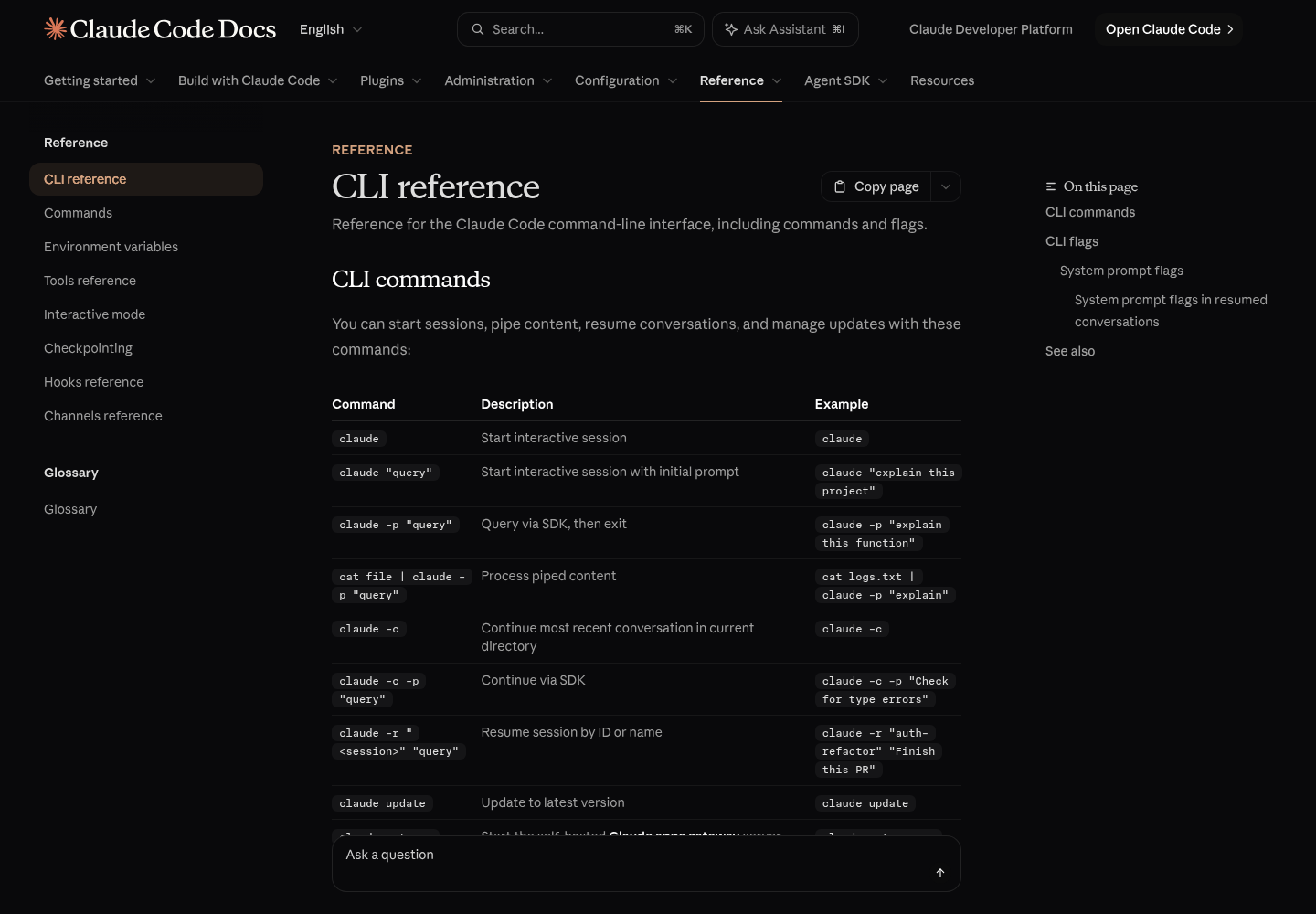
The CLI reference lists the same commands, along with headless print mode, which agent view deliberately doesn’t use. If you need one-off scripted runs rather than long-running rows, see our headless mode guide.
Step 6: Finish, commit and remove sessions without losing work
Deleting a session is where work gets lost, because the two ways to delete behave differently. Pressing Ctrl+X twice in agent view removes the worktree Claude created for the session, uncommitted changes included. claude rm <id> keeps that worktree, and the row with it, when it has uncommitted changes. Both refuse when the worktree holds commits that aren’t pushed anywhere.
- [ ] Read the session’s final report. Anthropic says every job ends with a report on what it did and where the work is: a path, a branch, a pull request or the answer itself.
- [ ] For a session that edited files, confirm its commit exists on its branch. If you need the worktree path, attach and check the working directory.
- [ ] Push the branch. Without a remote, deleting succeeds once the commits are on your local copy of the origin default branch and your main checkout has that branch checked out.
- [ ] Use
claude rm <id>rather than Ctrl+X for any session you haven’t checked. - [ ] If
claude rmrefuses because of unpushed commits and you really want to throw them away, copy the--discard-unpushedcommand from its message (v2.1.260 or later). Never type that command out yourself. - [ ] Afterwards, run
git worktree listin the repository and remove any leftover entry under.claude/worktrees/withgit worktree remove <path>. Directories that git no longer recognizes have to be deleted by hand.
git -C ~/projects/shop-api branch --list    # find the session branches
claude rm 8c04d7e2                          # docs-02: committed and pushed
git -C ~/projects/shop-api worktree list    # confirm no stray entries remain
Transcripts survive deletion. A deleted session stays available through claude --resume. Typing /resume on its own in agent view’s dispatch input brings a past session from the current repository back as a background row.
Troubleshooting and recovery
Most failures fall into a short list, and the documentation gives a specific fix for each.
| Symptom | Likely cause | Fix |
|---|---|---|
| Rows show failed after a reboot | Shutdown stopped the running sessions; any whose last progress was within 48 hours show failed | Attach or reply and the session restarts from its saved conversation; ask it to continue the interrupted work |
| Row shows stopped, ended while the background service was off | The machine was off for more than 48 hours | Press Enter, then Enter again when the footer asks, or run claude attach <id> |
| Opening a stopped row says there is nothing to resume | Transcript cleanup deleted the saved conversation | claude respawn <id> runs the original prompt again; claude rm <id> deletes the row |
Peeking, attaching or claude logs says the background service did not respond |
The supervisor has stalled | claude daemon stop --any --keep-workers, then claude agents within about a minute |
| Agent view exits with a notice that sessions will stop in about a minute | No supervisor is running | Run claude agents within that minute |
| A session shows Not logged in | The supervisor can’t use your credentials | /login, then claude daemon stop --any --keep-workers, claude agents and claude respawn <id> |
claude daemon status warns that the versions differ |
The supervisor hasn’t restarted onto an update yet | claude daemon stop --any; claude respawn --all restarts every running session on the new binary |
| Usage runs out much faster than usual | N sessions use quota roughly N times as fast | Stop or remove idle rows and run fewer sessions at once |
| Slow response after attaching | The session sat idle and unattached for about an hour, so its process was stopped | Wait for the restart, or pin the row with Ctrl+T to keep it responsive |
Start any investigation with claude daemon status. It reports whether the supervisor is reachable, its process ID and version, the socket directory and how many sessions are live, and it exits with code 1 when no supervisor is running. claude daemon logs follows ~/.claude/daemon.log until you press Ctrl+C. The --keep-workers flag matters: without it, stopping the supervisor also stops every background session it hosts. If the same stall keeps coming back on macOS or Linux and you are on a build older than v2.1.300, run claude update and then run both commands again.
Quota needs its own note, because nothing in agent view rations it for you. Each session uses your subscription quota on its own, and the docs’ rule of thumb is linear: ten sessions in parallel burn quota about ten times as fast. A three-task batch costs about what three conversations running at the same time would cost in the same usage window. That is fine for one morning and expensive as a daily habit.
Rollback: turn agent view off
If background sessions don’t suit your team, or you want a known-good baseline while you debug, you can turn the whole feature off. Anthropic documents two switches and notes that administrators can enforce the setting through managed settings.
- Finish or remove your existing sessions first, following Step 6, so no worktree is left behind.
- Stop the supervisor with
claude daemon stop --any. - Set
disableAgentViewtotruein a settings file such as~/.claude/settings.json, or set theCLAUDE_CODE_DISABLE_AGENT_VIEWenvironment variable. The docs don’t say what value the variable needs.1is a reasonable choice, but check the settings reference for your build. - Verify the change.
claude agentsshould no longer open agent view. Expect it to print your configured subagents and exit, which is the symptom the troubleshooting docs describe when agent view is turned off. - Know what else changes. With agent view off,
/forkstarts a forked subagent instead of copying the session, and the exit dialog no longer offers to move work to the background. - To undo the rollback, remove the setting or the variable and run
claude agentsagain.
{
  "disableAgentView": true
}
If only worktree isolation is the problem, for example in a repository where git worktrees are impractical, there is a narrower switch. Setting worktree.bgIsolation to "none" in the project’s .claude/settings.json makes background sessions edit your working copy directly. If you do this, don’t run parallel sessions that touch the same files.
Agent view, subagents, agent teams or cloud projects
Agent view is one of five ways Anthropic documents to run work in parallel. Choose by who coordinates the work and where it should run.
| If your situation is… | Use | Why |
|---|---|---|
| Several independent tasks you hand off and check later, on your own machine | Agent view | One screen of rows; you start each session and step in when one needs you |
| A side task that would flood the current conversation with logs or search results | Subagents | Runs in its own context inside one session and returns a summary |
| Claude should split one project, assign the pieces and keep the workers in sync | Agent teams | A lead with teammates that message each other; experimental and off by default |
| Work that spans days and must keep running when your machine is off | Projects (cloud) | Claude starts and tracks parallel threads in the cloud; public beta on Pro, Max and Ultra |
| One job too big for a handful of subagents, such as a large migration | Dynamic workflows | A script runs many subagents and cross-checks their results |
The Run agents in parallel page frames the choice as three questions: who coordinates, whether the workers need to talk to each other, and whether they touch the same files. For agent view, the answers are that you coordinate, the sessions don’t talk, and worktrees keep their files apart. Sessions started from agent view can still pass findings to each other through cross-session messaging if you enable it. The subagent documentation also notes that subagent requests count toward the same usage limits as your main conversation, so parallel work costs quota whichever approach you pick. For how one person keeps many sessions in view without losing track, see our operating-layer piece on running ten assistants with one boss. The desktop app has its own way to run parallel sessions, covered in our report on Claude Code Desktop parallel sessions.
The core habits will hold whatever the next release changes. Give independent tasks names you will recognize. Let the rows tell you when you are needed. Read state from --json, not from private files. Never remove a session until its work is on a pushed branch.
Sources
- ESHA | AI on X: claude --bg and claude agents tip, the developer post that shared the two-command workflow.
- Manage multiple agents with agent view, Claude Code Docs, Anthropic’s reference for background sessions, states, dispatch defaults, deletion, troubleshooting and disableAgentView.
- Run agents in parallel, Claude Code Docs, Anthropic’s comparison of subagents, agent view, agent teams, dynamic workflows and projects.
- CLI reference, Claude Code Docs, the commands and flags, including claude agents, attach, logs, respawn, rm, stop and daemon.
- Week 20, May 11–15, 2026, Claude Code Docs, the release notes that introduced agent view as a research preview.
- Create custom subagents, Claude Code Docs, subagent behavior, usage limits and the --agent flag.