Microsoft Publishes the Five Checks for Hosted Agents That Time Out Inside Private VNets
Microsoft Foundry's Muzz Imam published the exact commands that resolve the most common hosted-agent failure in bring-your-own-VNet deployments: an Agents page timeout caused by an unreachable data proxy, private DNS gaps or TLS inspection of Entra traffic.
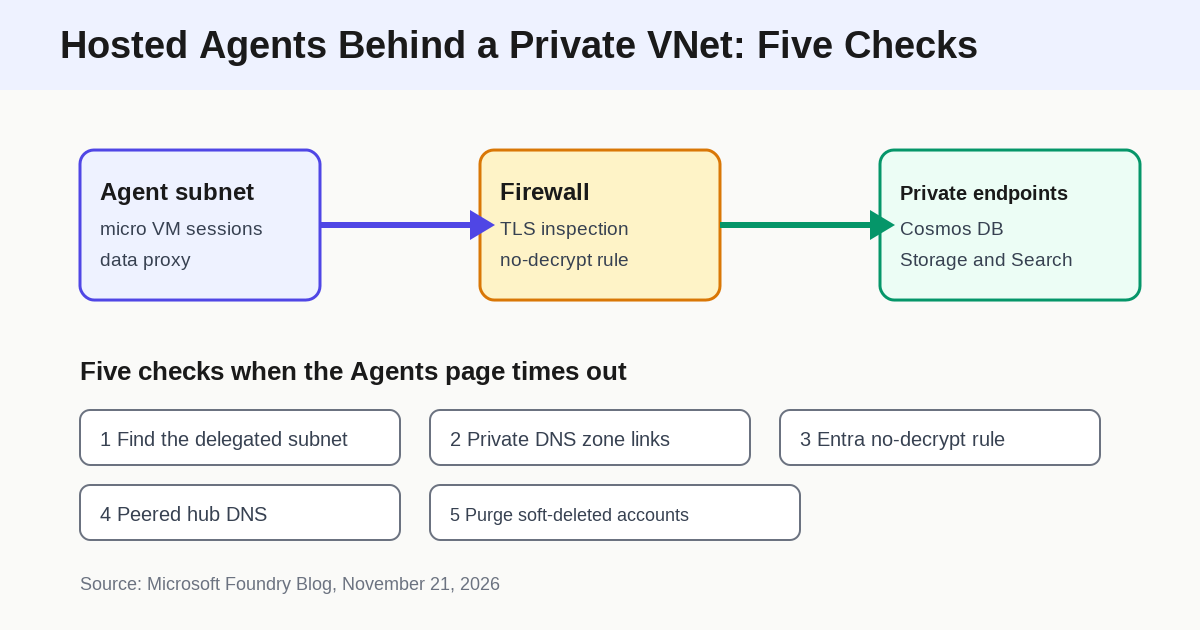
Deploying Microsoft Foundry hosted agents into a locked-down enterprise VNet now fails in a predictable way, and Microsoft has finally documented the fix path. On November 21, 2026, Muzz Imam, Principal Product Manager on Microsoft Foundry, published Hosted agents in your own virtual network: five checks when the Agents page times out, answering five questions he says he has heard from the several teams he worked with moving hosted agents into their own virtual network over the past few weeks.
The scenario he opens with is the one enterprise platform teams actually hit: public access on the Foundry resource is off, the agent subnet sits in a spoke VNet, Cosmos DB, Storage and Azure AI Search sit behind private endpoints, and a firewall inspects TLS. The deployment succeeds. Then the Agents page spins and fails with a timeout. Nothing is wrong with the agent; the network around it is missing one piece.
What actually runs in the agent subnet
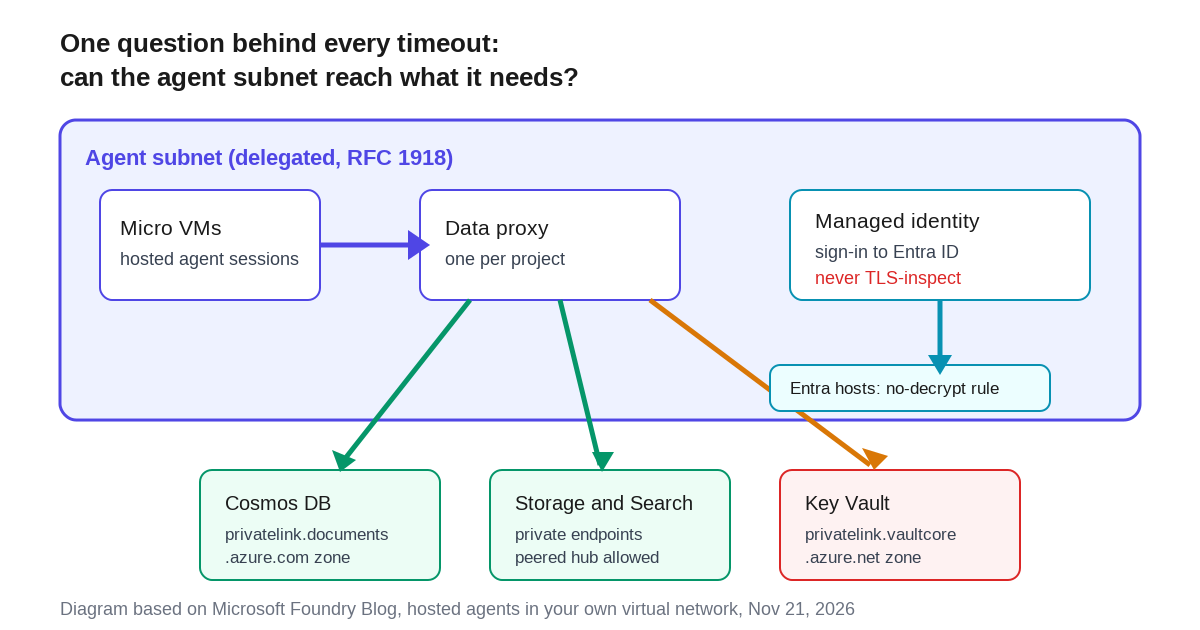
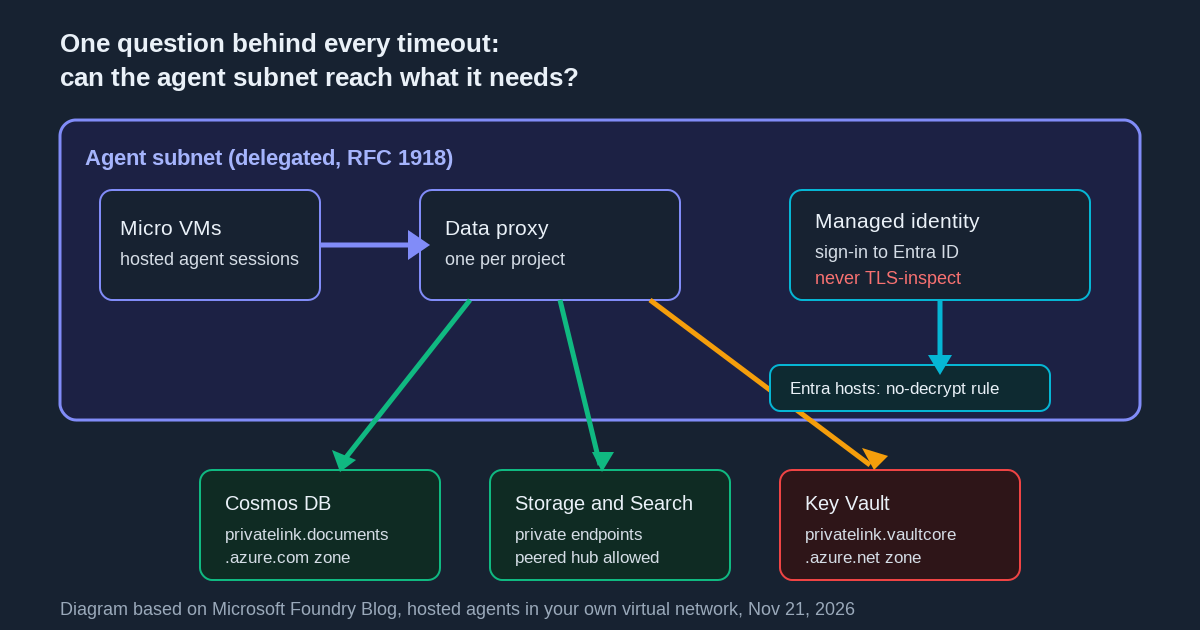
The post’s organizing insight is that every one of the five checks reduces to a single question: can the agent subnet resolve and reach what it needs? When you bring your own VNet, the delegated agent subnet is where the agent infrastructure lives — the micro VMs that run hosted agent sessions and a single-tenant data proxy per project. Tool calls go through that data proxy, its outbound traffic reaches your storage, databases and Key Vault through private endpoints, and the platform signs in to Microsoft Entra ID with managed identity from that subnet before calling your resources (source).
The five checks, condensed
1. Find the subnet that matters. Portal-built networks often leave teams unsure which subnet became the agent subnet. az cognitiveservices account show --query "properties.networkInjections" returns the scenario and subnet ARM ID. A healthy subnet is delegated to Microsoft.App/environments, carries the legionservicelink service association link, is /27 or larger (/24 for production), uses an RFC 1918 range that does not overlap peered VNets, and belongs to one Foundry resource only. Critically, network injection must be part of the Foundry account at creation — it cannot be added to an existing account later.
2. “Listing agents timed out” means the data proxy cannot read your Cosmos DB. This is the failure Imam sees most, returned as 400 invalid_configuration (or as Timeout of 60000ms exceeded in the portal). The three-step drill: confirm the Cosmos DB private endpoint exists and is approved (look for the Sql group), check that the privatelink.documents.azure.com private DNS zone is linked to the VNet containing the agent subnet, and verify the A records return the private endpoint IP, not just any private IP. Custom DNS servers must forward these zones to 168.63.129.16 from a linked VNet — on-premises DNS servers cannot reach that address directly.
3. Your private CA does not cover the platform’s Entra sign-in. This is the subtlest finding. Teams whose firewalls decrypt TLS register the firewall CA with private CA trust (public preview) and expect timeouts to stop. They do not, and that is expected: private CA trust does not apply to the platform’s own Entra ID and managed identity traffic from the agent subnet. Imam reproduced this in a test subscription — routing the agent subnet’s Entra traffic through a decrypting proxy and registering the proxy’s CA made no difference; a no-decrypt rule for the Entra hosts fixed it. The fix: exclude login.microsoftonline.com, {region}.login.microsoft.com and control-{region}.identity.azure.net from TLS inspection, and allow the AzureActiveDirectory service tag on the firewall and any NSG on the agent subnet.
4. Peered hub VNets work, but DNS follows the agent subnet. Cosmos DB, Storage or Search can sit in a peered VNet, and no route table is needed for peering itself — Azure adds system routes. What trips teams is DNS: a zone linked only to the hub does not resolve in the spoke. Link each private DNS zone to the VNet holding the agent subnet.
5. DelegatedSubnetInUse after you deleted an account. Deleting a Foundry account soft-deletes it, and its agent environment holds the subnet until purge. az cognitiveservices account list-deleted -o table finds the stale account; purge (permanent) frees the subnet. For dev loops, the simpler habit is one agent subnet per account.
Why this matters for operators
The failures this checklist resolves sit exactly where enterprise agent adoption is now happening. Automater covered Microsoft’s Ignite 2026 announcement of BYO-AKS hosted agents on November 18 — the vendor’s answer for organizations that need agent compute inside infrastructure they already audit. But running hosted agents on your own cluster or VNet moves the most common outage from the vendor’s responsibility into your routing tables, DNS zones and firewall policy, and the error (Listing agents timed out after 8s) does not say which of the three it is.
The companion November 19 post on trusted autonomous agents explains the demand side: Foundry agents now get their own Entra agent identity, agent user account, Microsoft 365 resources and org-chart manager, so they can act as named members of a team rather than borrowing a user’s credentials. Enterprises putting agents that consequential inside their own networks have zero tolerance for opaque outages — and Imam’s post turns the dominant one into a diagnosable sequence of az commands.
A few operational traps worth flagging from the same post: keep private endpoint addresses out of 192.168.0.0/24, which overlaps an internal sandbox network and fails with “No route to host” even when DNS is correct; the Foundry resource and VNet must share a region (Cosmos DB, Storage and Search can be elsewhere); and the portal does not show IP usage for the delegated subnet, so watch for 429 subnet_exhausted on session create or resume. For hands-on DNS, TCP and TLS checks from inside the network, Microsoft’s Troubleshoot hosted agent virtual network connectivity doc walks through them from a jump box.
Related reading: our walkthrough of Foundry agent local testing with azd and the inspector covers the deploy-side counterpart, and our analysis of evidence when the harness is vendor-hosted covers the audit trail question for agents that run in vendor infrastructure.
Sources
- Hosted agents in your own virtual network: five checks when the Agents page times out | Microsoft Foundry Blog
- Build trusted autonomous agents for your team with Microsoft Foundry | Microsoft Foundry Blog
- Microsoft Foundry Lets Enterprises Run Hosted Agents on Their Own AKS Clusters at Ignite 2026 | Automater News