Kimi Code CLI Amazon Bedrock Setup: Use Your AWS Profile, Scope IAM to One Inference Profile and Verify the First Run
Kimi Code CLI Amazon Bedrock setup: configure the native bedrock provider with your AWS profile, scope IAM to one inference profile and verify the first run.

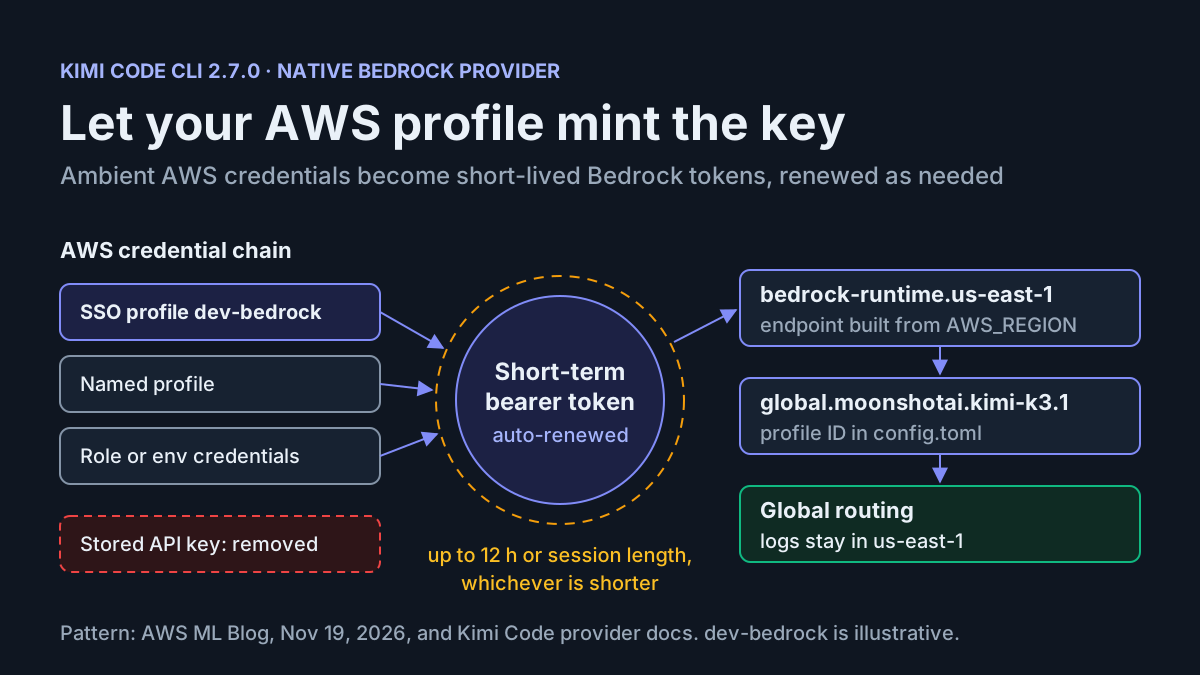
You already sign in to AWS every morning, through IAM Identity Center or a named profile, and you want Kimi Code CLI to send its coding work to Kimi K3.1 on Amazon Bedrock under that same identity. Until now the path ran through a generic OpenAI-compatible provider and a separate Bedrock API key: one more secret to mint, paste into a config file and remember to revoke. This Kimi Code CLI Amazon Bedrock setup removes that secret. You will point the native bedrock provider at your AWS profile, attach an IAM policy that allows exactly one global inference profile, and prove the whole path with a headless prompt before the agent touches a real repository.
This guide is for a developer or platform engineer who already has a working AWS CLI profile, can get a policy attached to the role behind it, and wants a coding agent that leaves no long-lived Bedrock credential on disk. You finish with four artifacts you can copy: a complete ~/.kimi-code/config.toml, a five-statement IAM policy, a login-and-run command sequence, and a filled test table for one case, run:kimi-bedrock-01, that walks a success path and several deliberate failures.
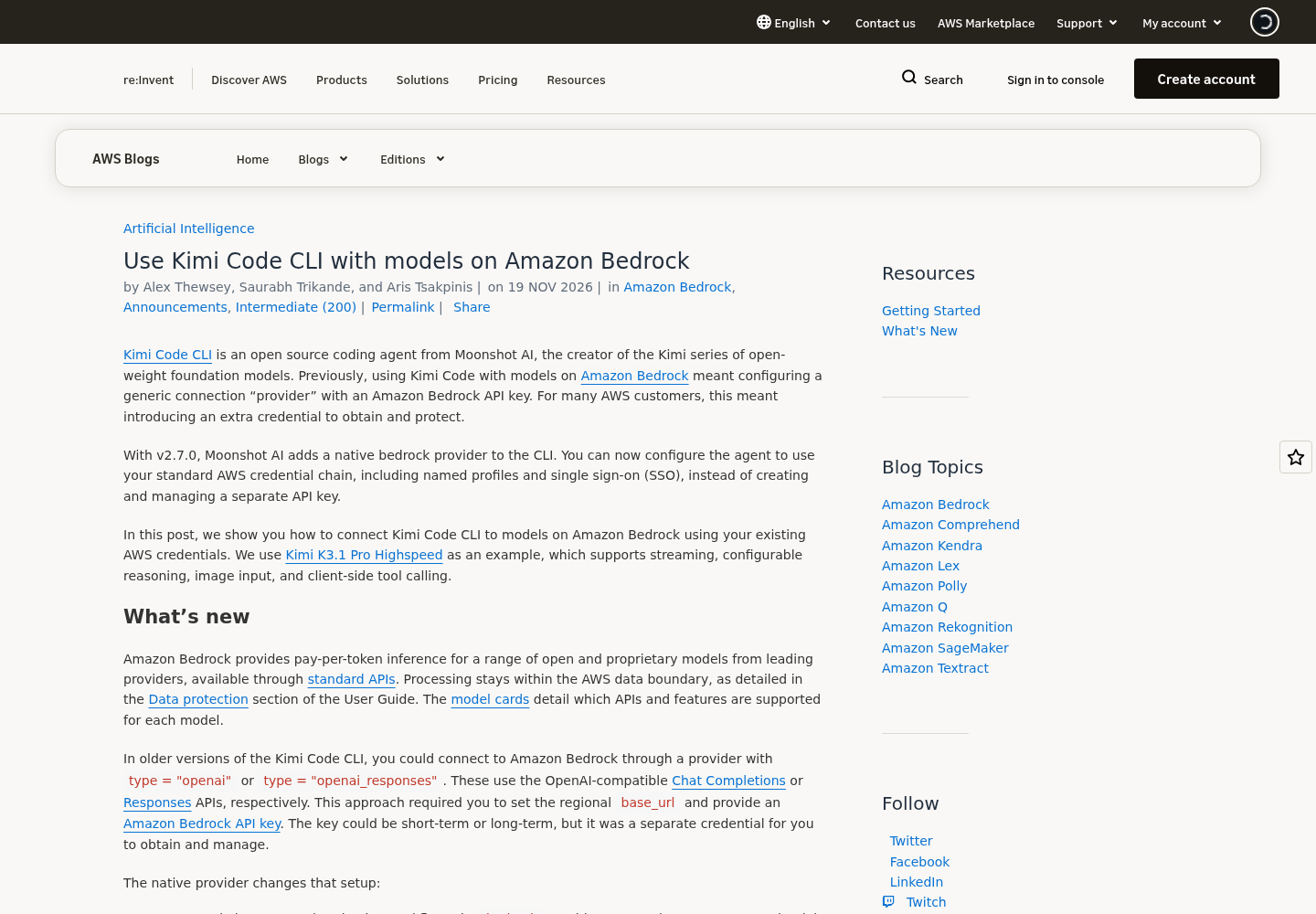
The news itself is short. Moonshot AI’s Kimi Code CLI 2.7.0 release on November 19, 2026 adds Amazon Bedrock providers, configured with type = "bedrock" and AWS_REGION. The same day, the AWS Machine Learning Blog published a walkthrough of that provider, using Kimi K3.1 Pro Highspeed through the global inference profile global.moonshotai.kimi-k3.1. If you also run Claude Code on Bedrock, the Claude Code Bedrock and Vertex AI setup guide covers that CLI’s different variables and credential model; for where Kimi Code sits among other Chinese coding agents, see our survey of Qwen Code, Kimi Code CLI and coding plans. Everything below is grounded in the AWS post, the Kimi Code providers reference and four Amazon Bedrock User Guide pages. Where those documents stop, this guide says so.
How the native provider gets a key you never stored
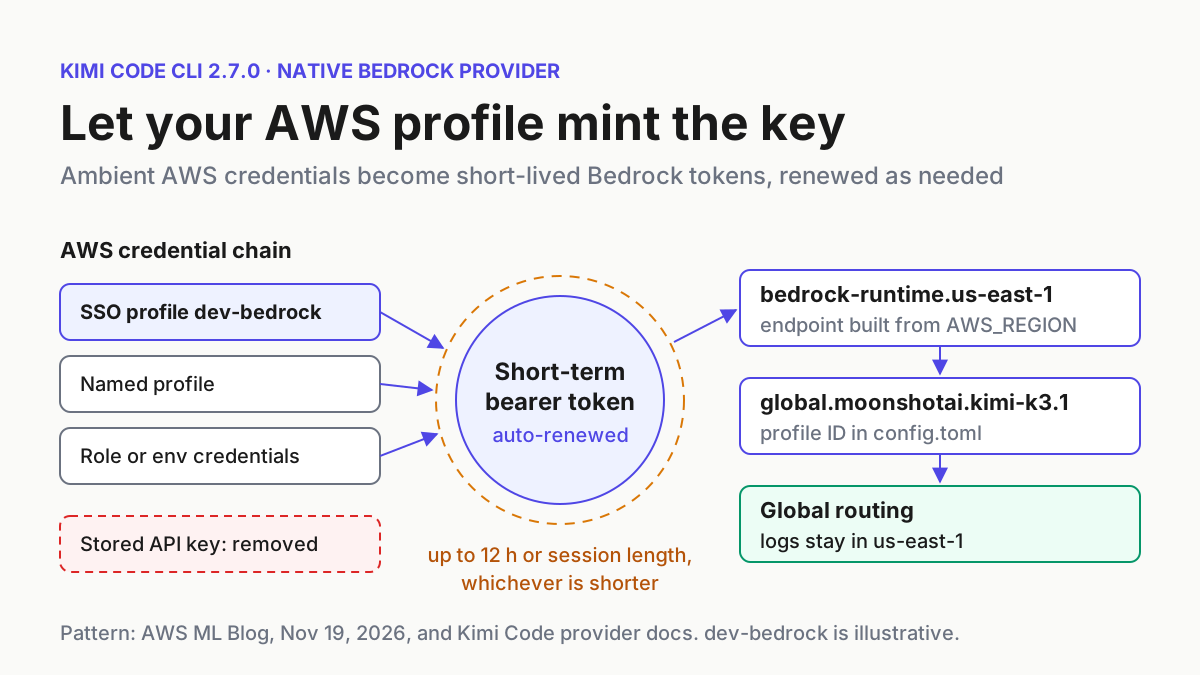
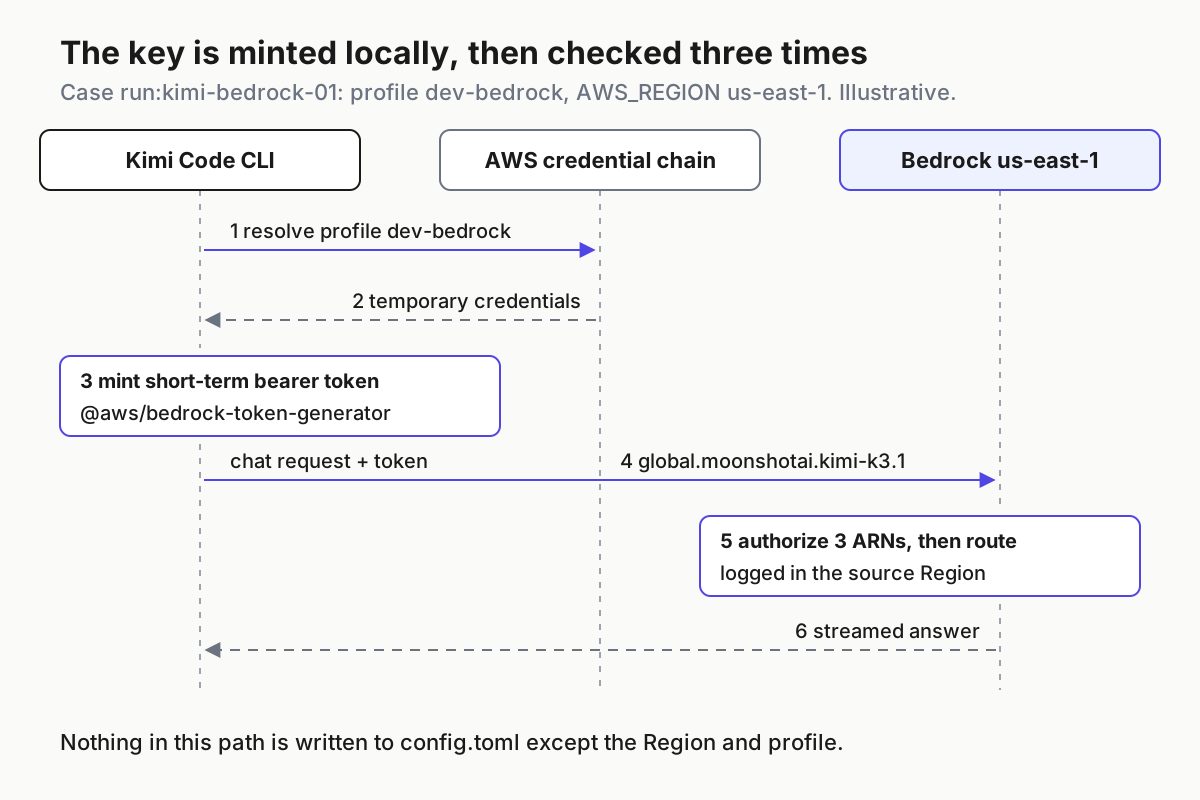
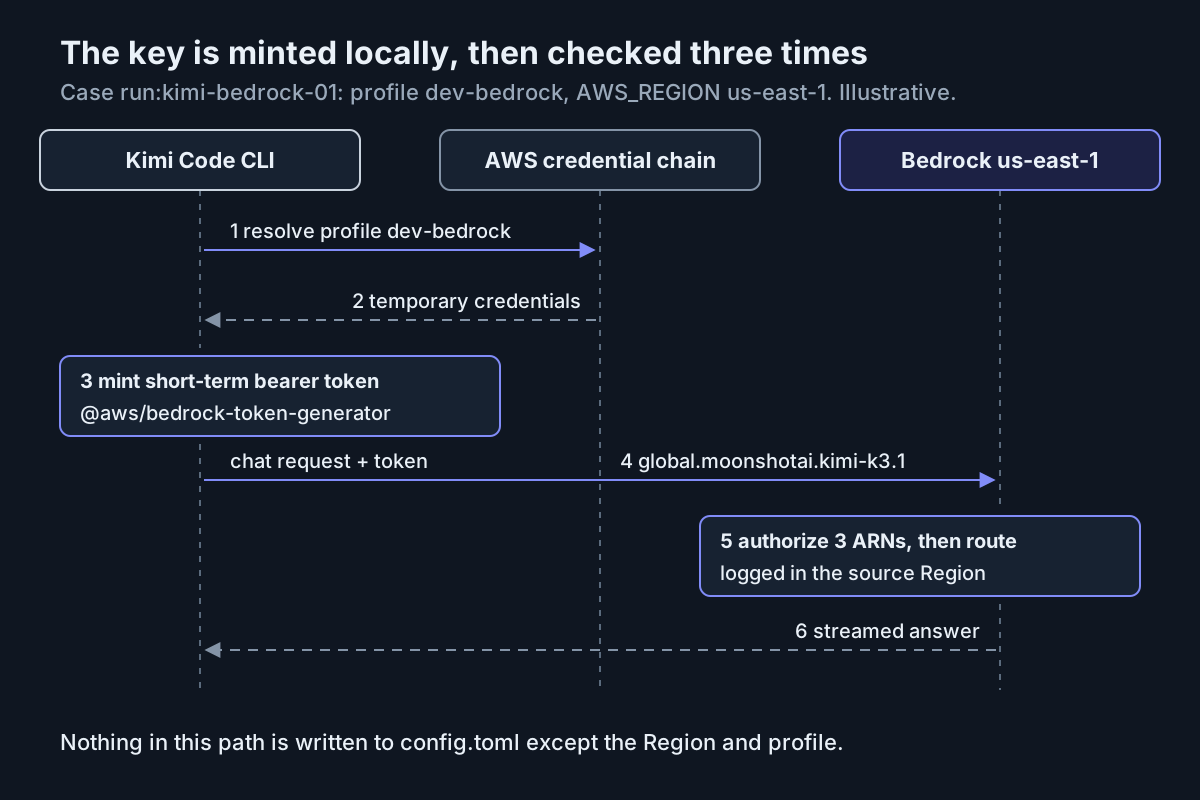
The bedrock provider still authenticates to Bedrock with a bearer token, the same kind of credential an Amazon Bedrock API key is. What changes is who creates the token and how long it lives. The AWS post describes four steps:
- Resolve credentials. Unless you configure a Bedrock API key, the provider uses the standard AWS credential chain.
AWS_PROFILEselects a named profile, including one backed by single sign-on. - Mint a short-term token. The provider uses
@aws/bedrock-token-generatorto create a short-term Amazon Bedrock API key and renews it when needed. - Build the endpoint. It reads
AWS_REGIONorAWS_DEFAULT_REGIONand constructs the regionalbedrock-runtimeendpoint for the model’s API. For Kimi models that is the OpenAI-compatible Chat Completions path. - Call the profile. The alias maps to a Bedrock model or inference profile ID. The
global.prefix picks the global profile, whileAWS_REGIONpicks the regional endpoint that receives the request.
The token’s limits come from Amazon Bedrock, not from Kimi. The Bedrock API keys page says a short-term key lasts up to 12 hours or the length of the session that produced it, whichever is shorter, and inherits the permissions of the IAM principal that generated it. AWS recommends short-term keys for production and describes long-term keys, which create an IAM user, as suitable only for exploration. The token Kimi holds can therefore never do more than your role and never outlive your sign-in.
Two consequences shape the rest of the setup. First, because the request still carries a bearer token, your identity needs bedrock:CallWithBearerToken as well as the invoke actions. The Bedrock API key permissions page defines that action and its bedrock:bearerTokenType condition key, which takes SHORT_TERM or LONG_TERM. Second, an explicit key always wins. The Kimi Code providers reference says a key set through api_key, api_key_env or the AWS_BEARER_TOKEN_BEDROCK key in [providers.bedrock.env] takes precedence over the ambient credential chain. One forgotten line quietly turns a keyless setup back into a keyed one, which is why the verification in Step 4 starts by searching for those names.
The providers reference also explains how one provider serves several model families. Kimi strips any cross-Region prefix such as global. or us. from the model ID and picks the wire protocol from what remains: anthropic.* uses the Anthropic Messages API, openai.gpt-oss* uses Chat Completions, other openai.* models use the Responses API, and moonshotai.* or moonshot.* use Chat Completions, as the Kimi model cards recommend. Any other prefix defaults to Chat Completions. Adding a Claude alias later is a new [models.*] table under the same provider, not a second provider. If you are wiring your own application to Bedrock rather than using a CLI, the Spring AI Bedrock agent guide covers that route.
Before you start: what this setup needs
Work through this list before you edit any file. Each line is a place where the first run can fail for a reason that has nothing to do with Kimi.
- [ ] Kimi Code CLI 2.7.0 or later. Run
kimi --version. The native provider does not exist in earlier versions. - [ ] AWS CLI v2 with a working profile. The SSO commands below are AWS CLI v2 commands. The optional
aws loginconsole-credential flow needs v2.32.0 or later. - [ ] Model access in your source Region. The inference profile prerequisites page requires access to the model defined in the profile, in the Region you call from. Check the Kimi K3.1 Pro Highspeed model card for current Region and inference-profile support.
- [ ] Someone who can attach IAM policy to the role behind your profile. The AWS post suggests a dedicated IAM role for Kimi Code CLI, separate from your regular AWS activity.
- [ ] A data-residency decision. Global cross-Region inference can process requests in any supported commercial AWS Region. If your organization requires geographic containment, settle which profile you may use before continuing. If no hosted profile fits, self-hosting is the other route; Moonshot has published Kimi K3.1 Pro open weights.
- [ ] A cost check. The global cross-Region inference page says global profiles cost about 10% less than geographic ones on both input and output tokens, priced by the Region you call from. Review Amazon Bedrock pricing before you hand an agent a large repository.
The worked case uses fixed, illustrative values so that every command and expected result lines up:
| Field | Value in run:kimi-bedrock-01 | Note |
|---|---|---|
| AWS account | 111122223333 |
The placeholder account AWS documentation uses; substitute your own |
| AWS profile | dev-bedrock |
SSO-backed profile for a dedicated Kimi role |
| Source Region | us-east-1 |
Illustrative; confirm on the model card that it is a supported source Region |
| Kimi alias | bedrock-kimi-k3-1 |
Local name Kimi Code CLI uses to select the model |
| Bedrock model value | global.moonshotai.kimi-k3.1 |
Global inference profile ID from the AWS post |
A dedicated role pays off beyond this guide. When several agents share one laptop, separate identities are what let you tell their calls apart afterwards; the argument is made at length in AI agent identity as a service principal and, for running many CLIs side by side, in Ten assistants, one boss.
Step 1: Sign in with the AWS profile Kimi will use
The short-term token inherits whatever the signed-in principal can do, so the identity you confirm in this step is the ceiling on everything Kimi does later.
-
Create the profile once. With IAM Identity Center:
aws configure sso --profile dev-bedrockChoose account
111122223333and the role or permission set your administrator created for Kimi Code. -
Sign in for today’s session:
aws sso login --profile dev-bedrockIf your organization uses console credentials instead, AWS CLI v2.32.0 or later supports
aws login --profile dev-bedrock. The AWS post points to a console-credential login guide that also documents acredential_processconfiguration for tools that cannot read the cached login session directly. Omit--profileeverywhere only if you deliberately use the default profile. -
Confirm which identity resolved:
aws sts get-caller-identity --profile dev-bedrockExpected observation: the output names account
111122223333and the role you intended for Kimi. If it shows your administrator role or a different account, fix the profile now. Everything downstream inherits this answer. -
Note the Region trap. A Region stored in the AWS profile applies to AWS CLI commands only. Both the AWS post and the Kimi providers page say Kimi Code needs
AWS_REGIONorAWS_DEFAULT_REGIONset explicitly, in its own config or the shell, because it cannot infer a Region from~/.aws/config. You set it in Step 3.
Why SSO rather than access keys in ~/.aws/credentials: AWS recommends short-term credentials over long-term ones, and the provider’s token lifetime is capped by the session. An SSO session that ends at the close of the workday takes Kimi’s Bedrock access with it, which is the property you want from an agent that can run shell commands.
Step 2: Attach an IAM policy scoped to one inference profile
A global cross-Region request is not authorized once. The global cross-Region inference page says Bedrock evaluates three resources: the inference profile in your source Region, the foundation model in your source Region, and a Region-agnostic global foundation model ARN, arn:aws:bedrock:::foundation-model/..., for which aws:RequestedRegion is unspecified. The bedrock:InferenceProfileArn condition key is populated for both foundation-model evaluations but not for the profile evaluation. Leave any of the three out of the policy and the request is denied.
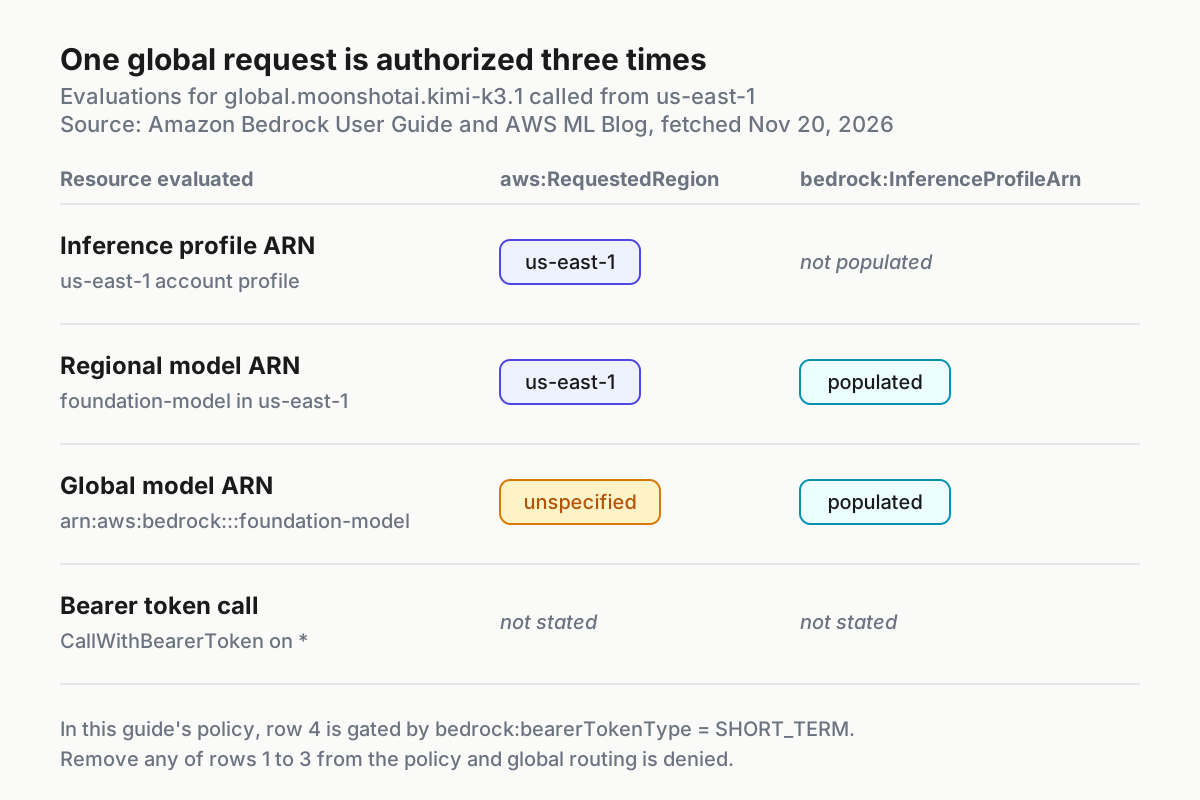
The policy below is the AWS post’s Kimi policy reshaped into the three-part form that the global cross-Region inference page publishes, filled in for run:kimi-bedrock-01. It keeps the AWS post’s statement for short-term bearer tokens, its read permission on the profile and its two invoke actions, and it adds the aws:RequestedRegion conditions from the global page. If you prefer the AWS post’s policy exactly as published, it grants the same actions on the same ARNs without the Region conditions; replace ${AWS_REGION} and ${AWS_ACCOUNT_ID} in it with your values.
{
  "Version": "2012-10-17",
  "Statement": [
    {
      "Sid": "BedrockShortTermBearerToken",
      "Effect": "Allow",
      "Action": "bedrock:CallWithBearerToken",
      "Resource": "*",
      "Condition": {
        "StringEquals": {
          "bedrock:bearerTokenType": "SHORT_TERM"
        }
      }
    },
    {
      "Sid": "BedrockReadKimiK31InferenceProfile",
      "Effect": "Allow",
      "Action": "bedrock:GetInferenceProfile",
      "Resource": "arn:aws:bedrock:us-east-1:111122223333:inference-profile/global.moonshotai.kimi-k3.1"
    },
    {
      "Sid": "InvokeKimiGlobalProfileInSourceRegion",
      "Effect": "Allow",
      "Action": [
        "bedrock:InvokeModel",
        "bedrock:InvokeModelWithResponseStream"
      ],
      "Resource": "arn:aws:bedrock:us-east-1:111122223333:inference-profile/global.moonshotai.kimi-k3.1",
      "Condition": {
        "StringEquals": {
          "aws:RequestedRegion": "us-east-1"
        }
      }
    },
    {
      "Sid": "InvokeKimiRegionalModelThroughProfile",
      "Effect": "Allow",
      "Action": [
        "bedrock:InvokeModel",
        "bedrock:InvokeModelWithResponseStream"
      ],
      "Resource": "arn:aws:bedrock:us-east-1::foundation-model/moonshotai.kimi-k3.1",
      "Condition": {
        "StringEquals": {
          "aws:RequestedRegion": "us-east-1",
          "bedrock:InferenceProfileArn": "arn:aws:bedrock:us-east-1:111122223333:inference-profile/global.moonshotai.kimi-k3.1"
        }
      }
    },
    {
      "Sid": "InvokeKimiGlobalModelThroughProfile",
      "Effect": "Allow",
      "Action": [
        "bedrock:InvokeModel",
        "bedrock:InvokeModelWithResponseStream"
      ],
      "Resource": "arn:aws:bedrock:::foundation-model/moonshotai.kimi-k3.1",
      "Condition": {
        "StringEquals": {
          "aws:RequestedRegion": "unspecified",
          "bedrock:InferenceProfileArn": "arn:aws:bedrock:us-east-1:111122223333:inference-profile/global.moonshotai.kimi-k3.1"
        }
      }
    }
  ]
}
What each statement buys you:
| Sid | Resource | Why the first run needs it |
|---|---|---|
BedrockShortTermBearerToken |
* |
The provider authenticates with a short-term bearer token; the condition refuses long-term keys |
BedrockReadKimiK31InferenceProfile |
The profile in us-east-1 |
Included in the AWS post’s policy for reading the profile definition |
InvokeKimiGlobalProfileInSourceRegion |
The profile in us-east-1 |
First of the three evaluations; carries the source Region |
InvokeKimiRegionalModelThroughProfile |
The model in us-east-1 |
Second evaluation; only reachable through this one profile |
InvokeKimiGlobalModelThroughProfile |
arn:aws:bedrock:::foundation-model/moonshotai.kimi-k3.1 |
Third evaluation; the ARN with no Region or account is intentional and required for global routing |
The bedrock:InferenceProfileArn condition is what makes the two foundation-model statements narrow: the prerequisites page describes it as the way to let a role invoke a model only through a named inference profile. Without it, the same role could call the model directly. The AWS post’s policy also contains a statement this guide leaves out, BedrockInvokeKimiK31DefaultProject. Added here it would be a sixth statement alongside the five above; in the AWS post’s published policy it is the fifth, because the post puts both foundation-model ARNs in a single statement. It allows bedrock:InvokeModel on arn:aws:bedrock:REGION:ACCOUNT:project/default with a bedrock:ModelArn condition. It is required only when a model uses the openai_responses protocol. Kimi’s default for moonshotai.* is Chat Completions, so leave it out unless you add protocol = "openai_responses" later.
Attach the policy:
- Save the JSON as
kimi-bedrock-k31.json, replacing the account and Region if yours differ. Keep the Region identical in all four ARNs and bothaws:RequestedRegionconditions that name it. - Create a customer-managed policy from the file and attach it to the role behind
dev-bedrock, following the AWS steps for adding IAM identity permissions that the prerequisites page links to. Ifdev-bedrockmaps to an IAM Identity Center permission set, the administrator who owns that permission set adds the policy there. - Remove broader Bedrock grants from the role if it was copied from a general-purpose one. The prerequisites page notes that the
AmazonBedrockFullAccessmanaged policy already covers inference profiles, which means it would also hide whether your scoped policy is correct. - Ask whoever owns your organization’s service control policies whether a Region-deny SCP applies to the account. Per the global page, an SCP that blocks unused Regions must either allow
"aws:RequestedRegion": "unspecified"or exempt calls bybedrock:InferenceProfileArn; otherwise the third evaluation fails even though your IAM policy is correct. An SCP that explicitly denies global inference, which the same page documents for data-residency needs, cannot be fixed from your side.
Step 3: Write the bedrock provider into config.toml
The AWS post notes that Kimi Code’s desktop and web provider-creation screens do not expose every environment field this credential-chain setup uses, and the providers reference says the interactive /provider manager refuses proprietary protocols such as Amazon Bedrock when importing known third-party providers. Edit the file directly.
-
Find the file. It is
~/.kimi-code/config.toml, or$KIMI_CODE_HOME/config.tomlif you setKIMI_CODE_HOME. -
Back it up before changing anything:
cp ~/.kimi-code/config.toml ~/.kimi-code/config.toml.bak -
Merge the block below into the file. Do not overwrite unrelated providers or models.
-
Save the file, then continue to Step 4 before trusting it.
default_model = "bedrock-kimi-k3-1"

[providers.bedrock]
type = "bedrock"

[providers.bedrock.env]
AWS_REGION = "us-east-1"
AWS_PROFILE = "dev-bedrock"

[models.bedrock-kimi-k3-1]
provider = "bedrock"
model = "global.moonshotai.kimi-k3.1"
max_context_size = 1000000
capabilities = ["always_thinking", "thinking", "image_in", "tool_use"]
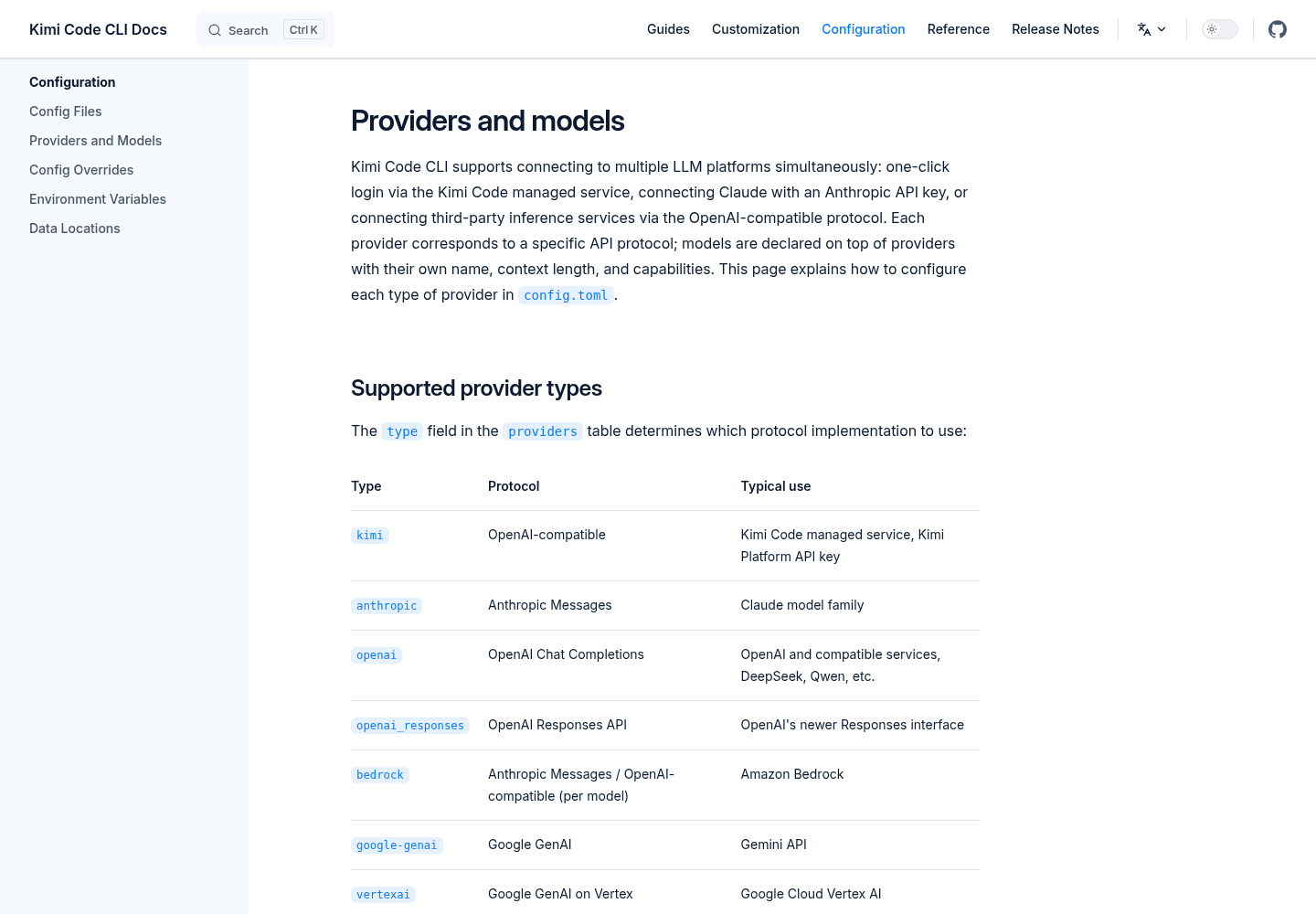
Every line is a decision:
| Line | What it does | Why this value |
|---|---|---|
default_model = "bedrock-kimi-k3-1" |
Interactive kimi sessions start on this alias |
Saves passing --model each time; omit it if another provider should stay default |
type = "bedrock" |
Selects the native provider from 2.7.0 | The only type that mints tokens from the AWS credential chain |
AWS_REGION = "us-east-1" |
Source Region and endpoint host | Must match the Region in your IAM policy; the provider cannot read it from ~/.aws/config |
AWS_PROFILE = "dev-bedrock" |
Picks the named profile from Step 1 | Without it the provider uses the default chain, which may resolve a different identity |
model = "global.moonshotai.kimi-k3.1" |
The Bedrock global inference profile ID | Most current Bedrock models need a profile ID rather than the base model ID |
max_context_size = 1000000 |
Declares a 1-million-token window | Value from the AWS post’s example for this model |
capabilities = [...] |
Tells Kimi what the model can do | The AWS post says Kimi Code does not auto-detect capabilities for most Bedrock models, including Kimi |
Three notes on this block. The [providers.bedrock.env] table supplies configuration to the provider only; the AWS post states it does not export variables into your shell, so aws commands in the same terminal still need --profile. The block deliberately contains no api_key, api_key_env or AWS_BEARER_TOKEN_BEDROCK, which is what makes the provider fall back to ambient credentials. And the capability list is a client-side declaration: the AWS post lists always_thinking, thinking, image_in and tool_use as supported for Kimi K3.1 Pro Highspeed and audio_in and video_in as unsupported. Declare only what the model card supports, and test tool and image workflows yourself rather than trusting the labels.
If your network forces Bedrock traffic through a VPC endpoint or another custom host, add base_url to the model table. Kimi uses a custom base_url verbatim, so it must include the wire path, /openai/v1 for Kimi’s Chat Completions route; the AWS post’s example uses a host of the form https://vpce-EXAMPLE-VPCEID.bedrock-runtime.us-west-2.vpce.amazonaws.com/openai/v1. Keep that host’s Region equal to AWS_REGION. For proxies and custom certificate authorities in front of coding agents, see the corporate proxy and CA certificate guide.
Step 4: Run the first headless prompt and check what it proves
A status light is not a test. The AWS post warns that the desktop and web apps can show a bedrock provider as connected without validating credentials, IAM permissions, Region, model access or the network path. Only a real request exercises all five.
-
Prove that no key is configured. Both commands should print nothing:
grep -nE 'api_key|AWS_BEARER_TOKEN_BEDROCK' ~/.kimi-code/config.toml
env | grep -E '^AWS_BEARER_TOKEN_BEDROCK='
The first command catches
api_key,api_key_envand the env sub-table key anywhere in the file. The second is a hygiene check on the shell; see the section on undocumented behavior for why it is worth running. -
Send the AWS post’s test prompt in headless mode:
kimi --model bedrock-kimi-k3-1 --prompt "Write a Python function that checks whether a string is a palindrome. Include a short usage example."Expected observation: the CLI streams a short function and a usage example, with no authentication, authorization, Region, model-access or network error.
-
Start an interactive session in a project:
cd /path/to/your/project
kimi
Because
default_modelis set, the session usesbedrock-kimi-k3-1. Ask it to explain the repository first. Review every proposed file change and shell command before approving it. -
Check the audit trail in the source Region. The global page says CloudTrail and CloudWatch keep recording in the Region you called from even when inference runs elsewhere. Open CloudTrail in
us-east-1and confirm the Bedrock calls carry the role ARN you saw in Step 1. The API keys page notes that keys travel in authorization headers and are not logged, so the identity on the event is your evidence of which principal made the call.
The setup is done when every box is checked:
- [ ] The headless prompt streamed an answer through
bedrock-kimi-k3-1. - [ ] The key search found no
api_key,api_key_envorAWS_BEARER_TOKEN_BEDROCKin config, and none in the shell. - [ ] CloudTrail in
us-east-1shows the dedicated Kimi role, and no IAM user of the kind a long-term key creates. - [ ] The role holds only the five statements above, with no broad Bedrock managed policy beside them.
Worked example: run:kimi-bedrock-01 from login to failure drills
Running the failure cases on purpose, once, is cheaper than meeting them during a deadline. The table lists illustrative expected observations derived from the documentation, not a transcript of an executed run. Kimi and AWS do not publish exact error wording for these cases, so the expected result names the category of failure and what restores the run.
| Input | Action | Expected result |
|---|---|---|
run:kimi-bedrock-01 / login: profile dev-bedrock, SSO, account 111122223333 |
aws sso login --profile dev-bedrock, then aws sts get-caller-identity --profile dev-bedrock |
Browser sign-in completes; the identity output shows account 111122223333 and the dedicated Kimi role, not an administrator role |
run:kimi-bedrock-01 / key check: config.toml from Step 3, clean shell |
Run the two key-search commands from Step 4 | Both print nothing, so the provider must use the ambient credential chain for profile dev-bedrock |
run:kimi-bedrock-01 / first prompt: alias bedrock-kimi-k3-1, AWS_REGION = "us-east-1" |
kimi --model bedrock-kimi-k3-1 --prompt "Write a Python function that checks whether a string is a palindrome. Include a short usage example." |
A palindrome function and usage example stream back with no authentication, Region, model-access or network error |
run:kimi-bedrock-01 / drill A: InvokeKimiGlobalModelThroughProfile removed from the policy |
Rerun the same headless prompt after the policy change takes effect | The request fails with an access-denied authorization error, because global routing needs all three parts; restoring the statement makes the prompt succeed again |
run:kimi-bedrock-01 / drill B: AWS_REGION line commented out, no AWS_REGION or AWS_DEFAULT_REGION exported |
Rerun the same headless prompt | The provider cannot resolve a Region and the run fails before any model call; the Region in ~/.aws/config does not help; uncommenting the line fixes it |
run:kimi-bedrock-01 / drill C: AWS_REGION = "us-west-2" while the policy names us-east-1 |
Rerun the same headless prompt | The request goes to the us-west-2 endpoint and is refused, since every policy ARN and the aws:RequestedRegion conditions name us-east-1; set the Region back |
run:kimi-bedrock-01 / drill D: SSO session for dev-bedrock has expired |
Rerun the prompt, then aws sts get-caller-identity --profile dev-bedrock |
Both fail on credentials, because the provider cannot mint a token without a session; aws sso login --profile dev-bedrock restores both |
| run:kimi-bedrock-01 / drill E: drill A still applied, desktop app open on the same config | Compare the provider list status with the headless prompt result | The provider can still read connected while the prompt fails; only the prompt result counts as proof |
Read the drills as a map of where responsibility sits. Drill A is pure IAM: the CLI, the token and the Region are all fine, and only the policy changed. Drill B never reaches AWS at all, which is why the error appears quickly and why no CloudTrail event records it. Drill C is the case people misdiagnose most, because the configuration looks valid and the profile is correct; the mismatch is between two files owned by different people, the TOML on the laptop and the policy in IAM. Drill D is the normal end of a workday, and the fix belongs to the person at the keyboard, not to an administrator.
Run the drills in a scratch directory, one at a time, and restore each change before starting the next. Write down what your terminal actually printed for each one next to this table; those lines become your team’s real troubleshooting reference, replacing the categories above.
Troubleshooting the failures you will actually hit
Start from the symptom, confirm the cause with one check, then change one thing.
| Symptom | Likely cause | Confirm | Fix |
|---|---|---|---|
| Access denied on every call | Policy not attached to the role the profile resolves to | Compare aws sts get-caller-identity --profile dev-bedrock with the role holding the policy |
Attach the policy to that role, or fix AWS_PROFILE |
| Access denied only through the global profile | Global foundation-model statement missing, or its bedrock:InferenceProfileArn string differs from the profile ARN |
Diff the ARN strings character by character | Restore the third statement with the exact profile ARN |
| Access denied although IAM looks right | A Region-deny SCP blocks the unspecified evaluation |
Ask the SCP owner whether unspecified or an inference-profile exemption is allowed |
Update the SCP as the global page describes, or use a permitted profile |
| Denied in one Region, works in another | AWS_REGION, a custom base_url host and the policy ARNs disagree |
Read all three values side by side | Make all three name the same Region |
| Run fails before contacting AWS | No Region resolvable | Search the config for AWS_REGION; check the shell for AWS_REGION or AWS_DEFAULT_REGION |
Set AWS_REGION in [providers.bedrock.env] |
| Worked yesterday, fails today | Session expired; the token cannot outlive it | aws sts get-caller-identity --profile dev-bedrock fails too |
aws sso login --profile dev-bedrock |
| CloudTrail shows an unexpected identity | A configured key overrides the credential chain | The Step 4 key search finds a match | Remove the key line, or move it into a deliberate rollback block |
| Model never uses thinking, images or tools | Capabilities not declared | Inspect the capabilities line |
Declare only what the model card supports |
Works on Chat Completions, denied after switching to openai_responses |
Default-project permission missing | Check for the project/default statement |
Add the AWS post’s default-project statement |
| Desktop says connected, prompts fail | Status is a configuration indicator | Run the headless prompt | Diagnose from the prompt’s actual error |
Two of these deserve a longer word. The SCP case is invisible from the laptop: your IAM simulator and your policy JSON both look correct, and the deny happens one layer up in AWS Organizations. If your organization explicitly denies global inference for data-residency reasons, the global page’s example matches "aws:RequestedRegion": "unspecified" together with an ArnLike on inference-profile/global.*, and no change on your side will get past it. The fix is a different profile that the model card lists, approved by whoever owns that policy.
The silent-key case matters because nothing fails. If someone adds api_key_env while testing and forgets it, Kimi keeps working, only now under whatever principal minted that key. That is why the done checklist pairs the config search with CloudTrail: one proves intent, the other proves what happened.
Rollback and kill switches
Plan the exits before you need them. Work down this list from least to most disruptive.
-
Restore the previous configuration. If anything in Step 3 broke an existing setup, put the backup back:
cp ~/.kimi-code/config.toml.bak ~/.kimi-code/config.toml -
Fall back to an explicit short-term key, same provider. If the credential chain is broken on one machine but Bedrock access is fine, add
api_key_env = "KIMI_BEDROCK_KEY"under[providers.bedrock]and export a short-term key generated from the Bedrock console’s API keys page inus-east-1. The API keys page says a console-generated short-term key works only in the Region where it was generated and expires with the console session, at most 12 hours. Your policy’sSHORT_TERMcondition already permits it. Remove the line when the chain works again. -
Return to the pre-2.7.0 provider type. The AWS post describes the older path as a
type = "openai"provider with the regionalbase_urland a Bedrock API key. The post does not print that configuration, so the block below is assembled from fields the Kimi providers page documents: the regionalbedrock-runtimehost plus the/openai/v1wire path, andapi_key_envnaming the variable that holds the key. Confirm the model ID on the model card before relying on it.[providers.bedrock-legacy] type = "openai" base_url = "https://bedrock-runtime.us-east-1.amazonaws.com/openai/v1" api_key_env = "KIMI_BEDROCK_KEY" [models.bedrock-legacy-kimi] provider = "bedrock-legacy" model = "global.moonshotai.kimi-k3.1" max_context_size = 1000000 capabilities = ["always_thinking", "thinking", "image_in", "tool_use"]A long-term key would also need the
LONG_TERMtoken type allowed, which the policy above refuses on purpose. Prefer a short-term key here too. -
Stop all bearer-token use by the role. The API key permissions page documents a deny for short-term keys on both the Bedrock and Bedrock Mantle endpoints. Because the native provider authenticates with short-term bearer tokens, attaching this to the Kimi role stops it at once, whatever the laptop’s configuration says:
{
  "Version": "2012-10-17",
  "Statement": [
    {
      "Effect": "Deny",
      "Action": "bedrock:CallWithBearerToken",
      "Resource": "*",
      "Condition": {
        "StringEquals": {
          "bedrock:bearerTokenType": "SHORT_TERM"
        }
      }
    },
    {
      "Effect": "Deny",
      "Action": "bedrock-mantle:CallWithBearerToken",
      "Resource": "*",
      "Condition": {
        "StringEquals": {
          "bedrock-mantle:bearerTokenType": "SHORT_TERM"
        }
      }
    }
  ]
}
The same page warns that you cannot prevent generation of short-term keys, only their use. For a suspected leak, the API keys page lists two responses for short-term keys: invalidate the session that generated the key, or attach a policy denying
CallWithBearerToken. -
Harden instead of stopping. To keep the native provider working while making sure nobody slips a long-lived key into the loop, attach the page’s deny for
LONG_TERMon both actions instead. The allow statement in Step 2 already conditions onSHORT_TERM; the explicit deny survives someone later adding a broad allow. -
Clean up after a trial. The AWS post reminds you to delete any IAM identity or permissions created for testing. Deleting
config.toml, the AWS CLI profile or the CLIs themselves does not revoke IAM permissions or an active AWS session. If you are retiring older Bedrock API keys across a team at the same time, the API key migration drill describes a rehearsal pattern you can adapt.
What the official documentation does not settle
The steps above follow documented behavior. These points are not settled by the selected sources, so treat them as open and verify them on your own machine.
- Shell-exported bearer tokens. The Kimi providers page lists
api_key,api_key_envandAWS_BEARER_TOKEN_BEDROCKin the env sub-table as key sources, and says the CLI generally does not fall back to shell variables for credentials except throughapi_key_env. It does not say whether the AWS token library inside the provider would read anAWS_BEARER_TOKEN_BEDROCKalready exported in your shell. That is why Step 4 checks the shell as well as the file. - Token Region with a custom endpoint. Short-term keys are Region-bound. The documents do not say which Region the provider generates its token for when
base_urlnames a different Region fromAWS_REGION. Keep them equal and the question never arises. - Error text. Neither Kimi nor AWS publishes the exact messages for the drills, so the table describes categories. Record your own.
- Source Region support.
us-east-1is this guide’s illustrative choice. Whether it is a supported source Region for Kimi K3.1 Pro Highspeed is a model-card question that changes over time. - Which credential won. No documented CLI command reports whether a given request used the ambient chain or a configured key. The config search plus the CloudTrail identity is the practical substitute.
Sources
- AWS Machine Learning Blog: Use Kimi Code CLI with models on Amazon Bedrock (byline dated November 19, 2026)
- MoonshotAI/kimi-code: Kimi Code CLI 2.7.0 release (November 19, 2026)
- Kimi Code CLI Docs: Providers and models
- Amazon Bedrock User Guide: Global cross-Region inference
- Amazon Bedrock User Guide: Prerequisites for inference profiles
- Amazon Bedrock User Guide: API keys
- Amazon Bedrock User Guide: Control permissions for generating and using Amazon Bedrock API keys