OpenAI Legacy User API Keys Shut Off Oct 22: A Key-Migration Drill for Agent Fleets
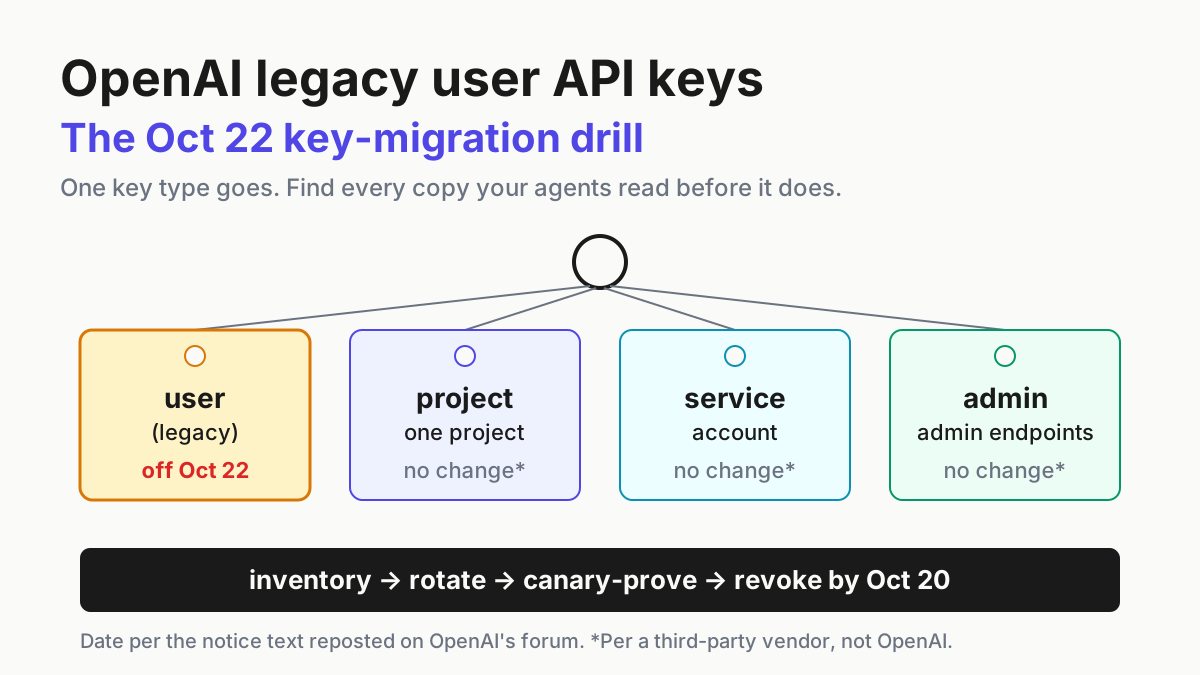
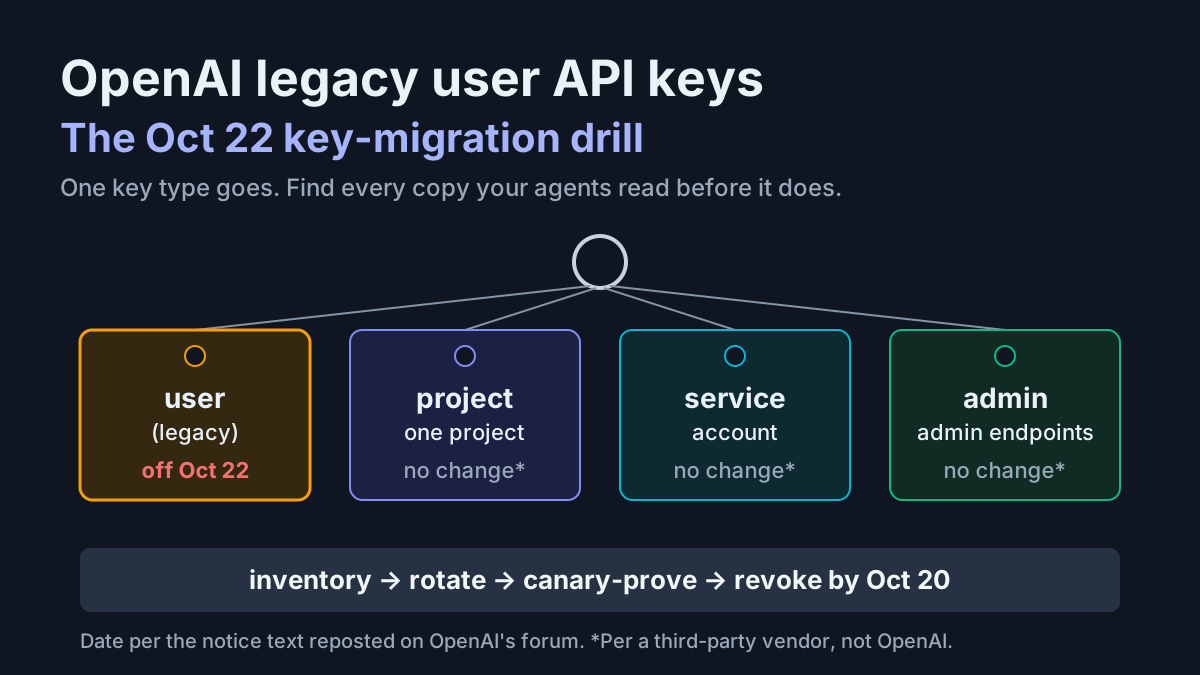
OpenAI legacy user API keys are reported to stop working Oct 22. Inventory every key your agents read, rotate, canary-prove and revoke by Oct 20, with dates.

Go deeper. Build your own.
Any agent still sending an OpenAI legacy user API key is due to stop authenticating on Thursday, Oct 22, per the notice text reposted on OpenAI’s developer forum. The notice behind that date names no hour, no time zone and no grace period, and the key type it targets has no published prefix to grep for. Whatever cron job, MCP server or CI runner still holds one will find out by failing.
OpenAI legacy user API keys are the person-owned keys not bound to a project, and agent fleets are where they hide. Someone pasted one into a .env file in 2023, an agent framework picked it up, and three re-platformings later it still pays for a weekly report nobody remembers scheduling. People change jobs. Their keys keep working until somebody turns them off.
This piece gives you the key-type retirement drill: inventory, rotate, canary-prove, revoke, then lock the door. It comes with a key register you can copy, a dated two-week plan that finishes two days early, and a failure table with a first move for each row. Run it for Oct 22, then keep it on the calendar for the next provider that retires a credential class.
What the Oct 22 notice says, and where it is posted
Per the notice text posted on OpenAI’s developer forum, OpenAI told organizations still using legacy user API keys that it “will deactivate these keys on October 22, 2026”. The public copy is a non-staff repost on the OpenAI Developer Community forum dated Sep 24, with no staff reply, and one vendor changelog, Quriobot’s, corroborates it. That is the whole public trail.
As of Oct 8, OpenAI’s deprecations page and API changelog carry no entry for it, so the date is reported rather than announced. Check both pages again before your revoke window.
The notice defines its target by key type, not by age: keys owned by a person and not bound to a project. It sends customers to the “User API Keys” lists, one on the organization’s API keys page and one under the user’s profile, to view and revoke them, and to platform.openai.com/api-keys to create replacements. Those dashboard lists are the authority.
OpenAI publishes no prefix rule. Quriobot says project (sk-proj-), service-account (sk-svcacct-) and admin (sk-admin-) keys need no action and that the key string is not a reliable indicator; OpenAI’s own text neither confirms nor denies the first part.
What the notice leaves out matters as much. It states no time of day, no time zone, no grace period, no error code and no way to re-enable a deactivated key, so plan for the worst version of each.
Treat Wednesday, Oct 21 as the last safe day: midnight UTC on the 22nd is still the afternoon of the 21st in US Pacific time. And keep this apart from the Oct 23 shutdown of legacy GPT model snapshots listed on the deprecations page. That one retires models, not credentials, and an error on the 23rd needs a different fix.
The controls a clean migration needs shipped first, all dated on OpenAI’s changelog: workload identity federation on May 26; usage and cost views filtered and grouped by API key on Aug 4; mTLS and X.509 federation generally available on Aug 29; expiry dates on new project keys and an enforceable maximum key lifetime on Sep 10; and key-creation governance on Sep 15, which lets administrators allow only service-account keys.
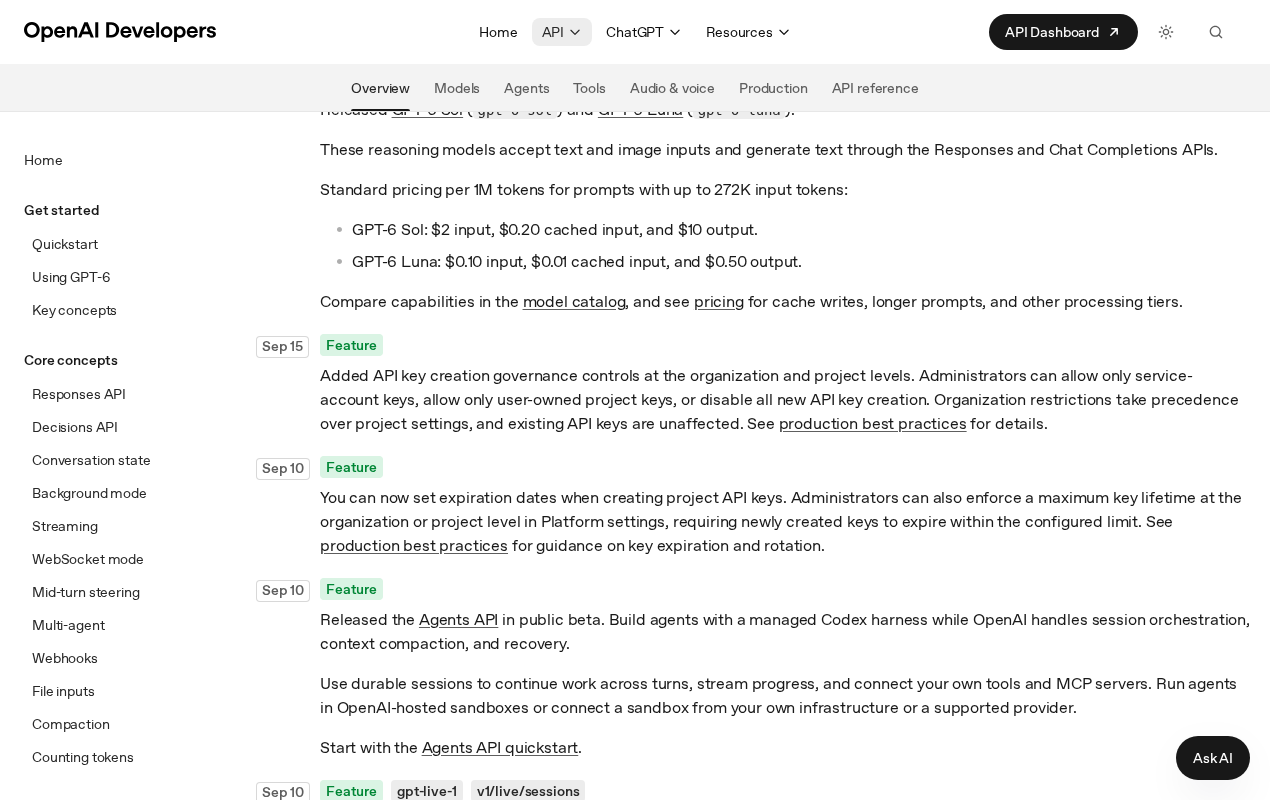 Screenshot: OpenAI Developers, “Changelog | OpenAI API” (Sep 10 and Sep 15, 2026 entries), captured Oct 7, 2026.
OpenAI’s production best practices add the two details this drill leans on. Rotation runs create, deploy, verify, then revoke. And keys generated before Dec 20, 2023 don’t track usage by default: their history shows as Untracked until someone switches tracking on, which is exactly where the oldest user keys sit.
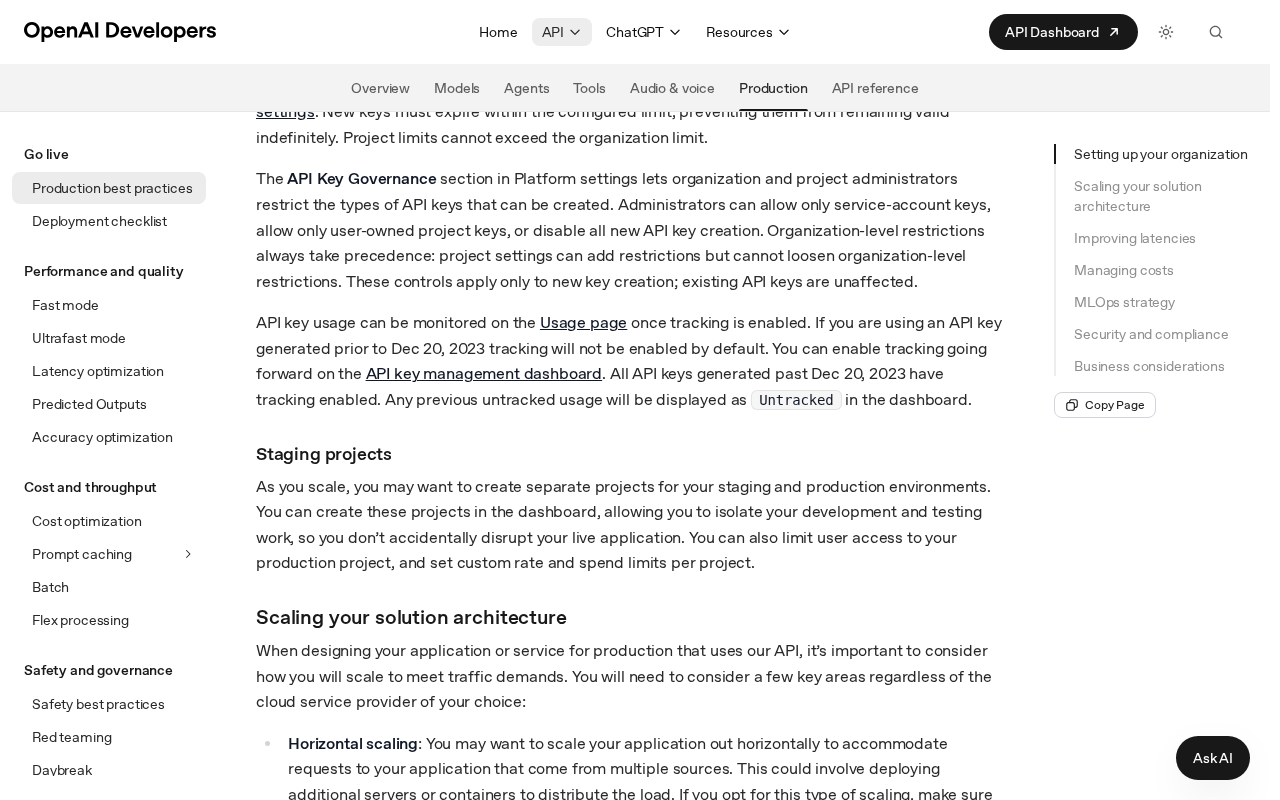 Screenshot: OpenAI Developers, “Production best practices | OpenAI API” (undated docs page), captured Oct 7, 2026.
The same Thursday is the deadline for a set of admin toggles covered in the default-on agent features sweep. Book both reviews into the same week and give them the same owner.
Why the key nobody can name belongs to an agent
A person who uses an API key notices the day it breaks. An agent that uses one on a schedule fails at 3 a.m. into a log nobody reads. Fleets also copy secrets: the same key lands in a CLI config, an MCP server definition and a CI variable because each was the fastest way to get a demo working. A user key adds one more risk, since it belongs to a person who may no longer work for you, and the oldest key type tends to sit in the job with the least supervision.
The key-type retirement drill, dated to Oct 22
Four steps and a closing lock, on a two-week clock. The dates assume you start Thursday, Oct 8 and work weekdays. They are illustrative; the only fixed point is the notice date. If you start later, compress inventory and rotation, never the canary window, because the canary window is set by your slowest job, not by you.
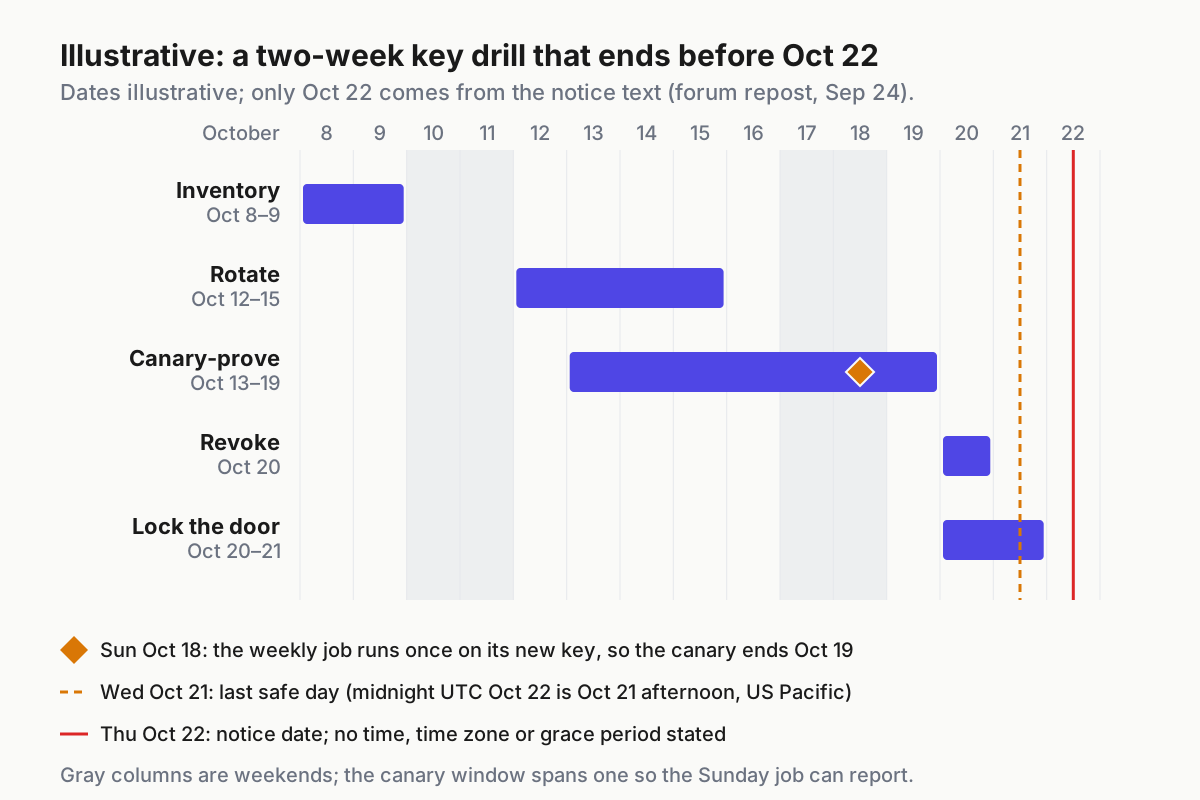
 Illustrative dates. The canary bar stretches to Oct 19 because the slowest scheduled job in the example runs on Sundays.
| Working day | Dates (illustrative) | Step | Done when |
|---|---|---|---|
| 1–2 | Thu Oct 8 – Fri Oct 9 | Inventory | Every secret has a register row and a named owner |
| 3–6 | Mon Oct 12 – Thu Oct 15 | Rotate | Each workload reads its own replacement key; old keys still live |
| 4–8 | Tue Oct 13 – Mon Oct 19 | Canary-prove | Old-key usage reads zero across one run of the slowest job |
| 9 | Tue Oct 20 | Revoke | Old keys revoked in a staffed window, alerts on |
| 9–10 | Tue Oct 20 – Wed Oct 21 | Lock the door | Service-account-only creation and a maximum lifetime set |
| — | Thu Oct 22 | Notice date | Nothing of yours notices |
Step 1: Inventory every secret an agent reads (days 1–2)
Start from where keys are read, not where they are stored. A vault lists what someone put there on purpose. Agents read keys from shell profiles, CLI config files, MCP server definitions, CI secrets, container environments, .env files in repos and crontabs on a machine under someone’s desk. Search for variable names, never values.
A first pass, illustrative; adjust paths and repo names to your own:
rg -l --hidden -g '!.git' 'OPENAI_API_KEY|OPENAI_KEY|openai_api_key' ~ /srv /etc 2>/dev/null
crontab -l 2>/dev/null | grep -n -i 'openai'
gh secret list --repo your-org/agent-jobs | grep -i openai
Then reconcile against the provider, because a search only finds what it can reach. In OpenAI’s dashboard, read both User API Keys lists and pull usage grouped by API key for the last 30 days. Any key showing Untracked gets tracking switched on today, so the canary step has data to read next week. A key with traffic that maps to no register row is the first fire: something you didn’t find is spending on it.
Bare sk- strings without a proj, svcacct or admin segment deserve a second look as you go, but only as a hint. That pattern comes from forum and vendor reports, not from OpenAI, and the dashboard wins every disagreement.
Write each hit into the register. The rows below are illustrative, built for one mid-size team with eight OpenAI secrets spread across agents, CLIs and CI. Values never appear in the register; where a key has to be shown anywhere, it is sk-…REDACTED.
| Secret name and path (never the value) | Key type | Owner | Where it lives | Created | Expiry | Last use | Replacement | Canary result | Revoke date |
|---|---|---|---|---|---|---|---|---|---|
OPENAI_API_KEY · vault secret/agents/support-triage |
user (legacy) | Support engineering lead | Support-triage agent, container deployment | Jun 2023 | none | Untracked; tracking on Oct 8 |
Service account sa-support-triage, 90-day expiry |
Pass, Oct 13 | Oct 20 |
OPENAI_API_KEY · ~/.config/coding-cli/config.toml on build host bh-02 |
user (legacy) | Platform lead | Coding CLI on a shared build host | Feb 2024 | none | Oct 7 | Service account sa-build-cli, 90-day expiry |
Pass, Oct 13 | Oct 20 |
env.OPENAI_API_KEY · mcp.json on workstation ws-114 |
user (legacy) | Research analyst | MCP summarizer server | Nov 2023 | none | Untracked; tracking on Oct 8 |
Service account sa-research-mcp, 60-day expiry |
Fail Oct 13 (model access); pass Oct 14 | Oct 20 |
OPENAI_API_KEY · ops-scripts/.env on cron-01 |
user (legacy) | Owner left in spring; reassigned to Ops | Forgotten cron: weekly report, Sundays 03:00 | Feb 2024 | none | Sun Oct 4 | Service account sa-weekly-report, 90-day expiry |
Pass after the Oct 18 run | Oct 20 |
OPENAI_KEY_EVALS · CI repository secret |
project | QA lead | CI eval job | Mar 2025 | none | Oct 6 | Keep; add an expiry at next rotation | Not in scope | — |
OPENAI_API_KEY · secret manager batch/summarizer |
service account | Data team | Nightly batch summarizer | Sep 2026 | Dec 2026 | Oct 7 | None needed | Not in scope | — |
OPENAI_API_KEY · docker-compose.override.yml on dev-07 |
project | App team | Local agent sandbox | Jan 2026 | none | Sep 30 | Read the team’s project key from the vault instead | Not in scope | Delete file copy Oct 9 |
OPENAI_ADMIN_KEY · vault secret/admin/openai |
admin | Organization owner | Usage-export script, Administration endpoints only | May 2025 | none | Oct 5 | Not a workload key; keep and set a review date | Not in scope | — |
Read the illustrative register the way you would read your own. Eight secrets, four of them legacy user keys.
Two of the four are Untracked, so their real last use stays unknown until tracking catches a run. One belongs to someone who left in the spring, and it sits in a .env file read by a cron job that fires once a week, Sundays at 03:00. That row sets the schedule for everything else: you can’t prove a weekly job has moved until it has run once on the new key.
Step 2: Rotate to one service-account key per workload (days 3–6)
Mint one replacement per workload, not one per team. Use a project service account where the job is automation, give it the narrowest role that works, and set an expiry, which new project keys can carry since Sep 10. Store the replacement as a new version of the existing secret. Rollback then means pointing the reader back at the previous version, which still works because nothing has been revoked yet.
vault kv put secret/agents/support-triage OPENAI_API_KEY=@/tmp/new-key.txt && shred -u /tmp/new-key.txt
vault kv metadata get secret/agents/support-triage   # expect two versions before you move on
Roll a canary slice first: one agent, one CI job, one MCP server. Then the rest. Never revoke first. An old key revoked before its replacement is deployed is an outage you scheduled yourself, and nothing in the notice suggests a way back.
Do the departed owner’s row first, not last. It is the row where nobody will notice a failure, and the key can reach whatever that person’s account still can.
Step 3: Canary-prove from the agent’s real runtime (days 4–8)
A key that works on your laptop proves nothing about the agent. Run the proof from the same host, network egress, proxy and secret path the agent uses, with two checks per workload: one cheap authenticated call and one end-to-end task the agent normally performs.
curl -sS -o /dev/null -w '%{http_code}\n' https://api.openai.com/v1/models \
  -H "Authorization: Bearer $OPENAI_API_KEY"
A 200 there plus a completed task in the agent’s own logs is a pass. Then confirm the money moved: usage grouped by key should show the new key’s line rising and the old key’s line falling.
The step ends when the old key reads zero across one full cycle of your slowest scheduled job. For a nightly job that is one night. For the Sunday cron in the register it is the Oct 18 run, which is why the canary bar runs to the 19th.
Record each result in the register’s canary column with a date. “Pass, Oct 14” is evidence. “Should be fine” is a guess with a timestamp missing.
Rehearse the cutoff yourself before the notice date
If a provider offers a switch that disables a whole legacy key class, flip it yourself first, one project at a time, while people are watching. OpenAI forum users described a “Disable user API keys” setting in organization settings in a February 2025 thread; one reported that an existing user key kept working right after enabling it, and no OpenAI answer resolved the question. Treat the switch as unverified.
If it exists in your settings, use it as a rehearsal and confirm with a real call that a user key is refused. If it doesn’t, the rehearsal is revoking one low-stakes user key a few days early and watching what complains.
Step 4: Revoke in a staffed window by Oct 20 (day 9)
Pick a Tuesday morning, not a Friday evening. Revoke the remaining user keys with an engineer on each affected workload and error-rate alerts routed to the people in the room. Assume revocation is immediate and permanent. After this point your only rollback is the replacement already deployed, and your kill switch is pausing the agent’s schedule, not restoring the old key.
Revoking on Oct 20 instead of letting Oct 22 do it buys a day and a half to find the job you missed, on your own clock, with the notice date still ahead.
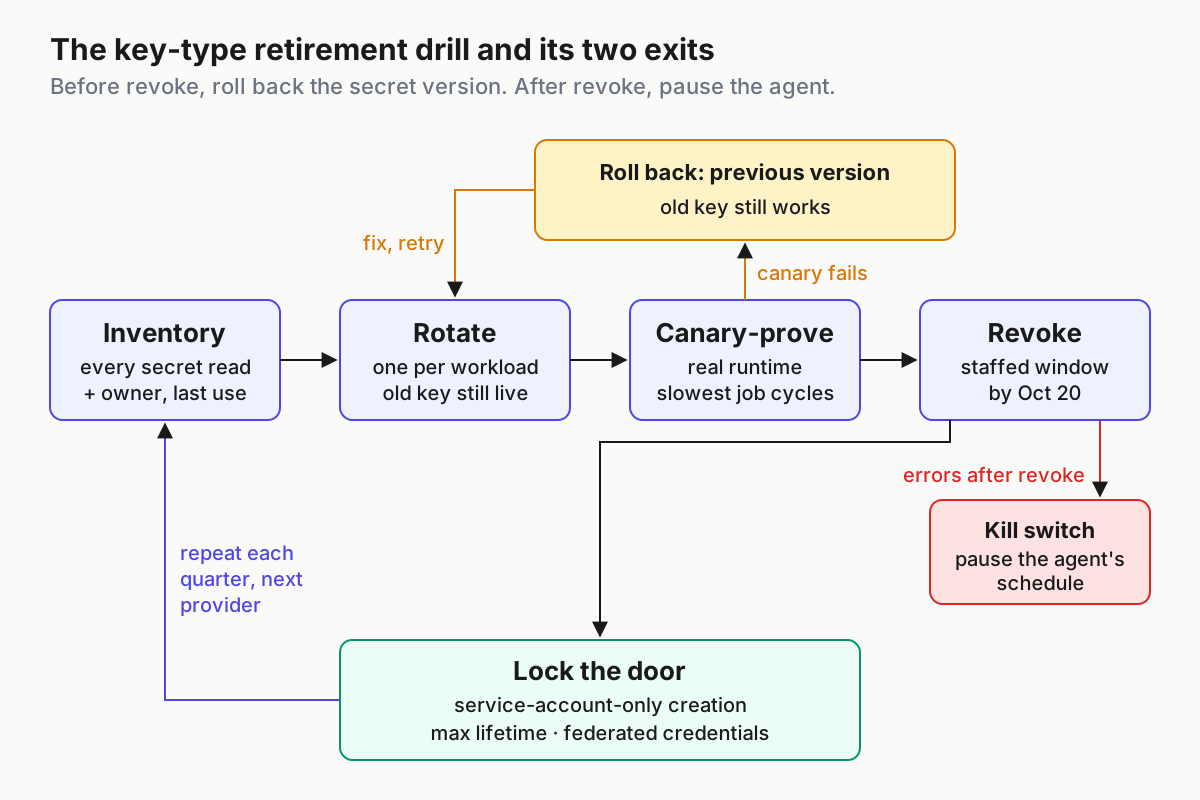
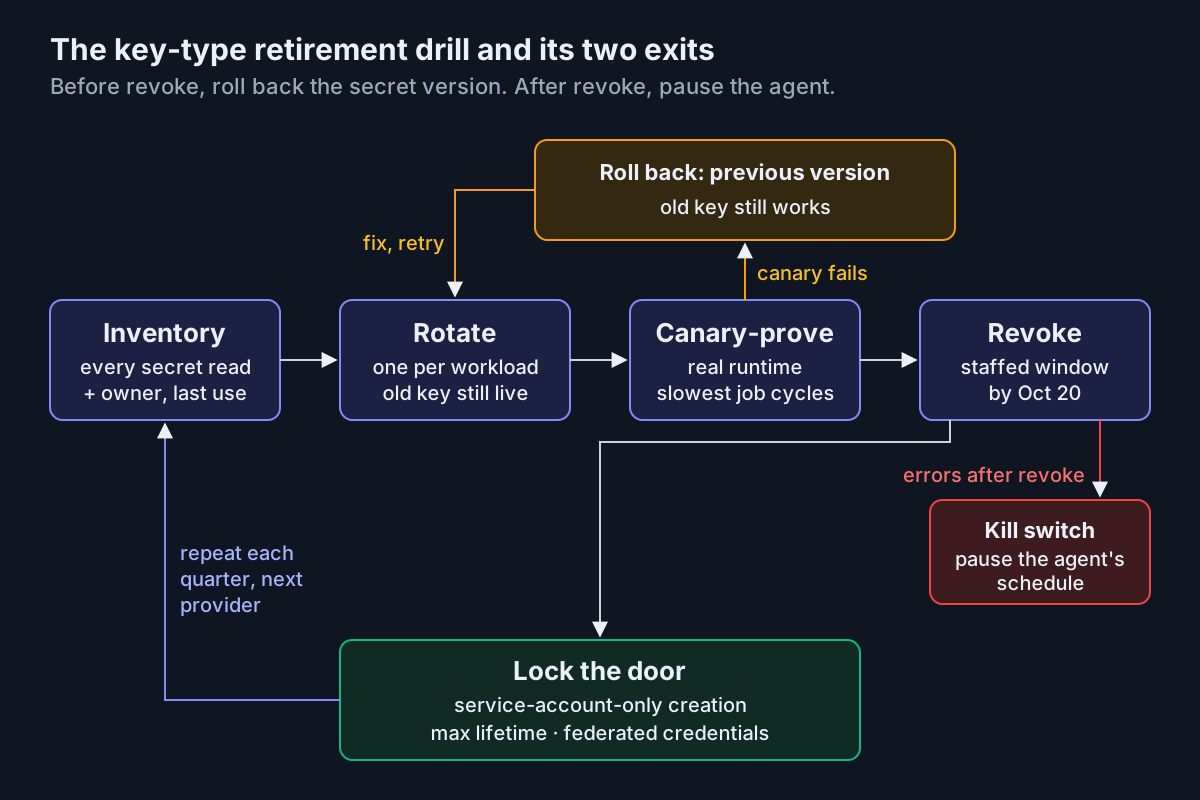 Two exits, one per phase: before revoke you roll back the secret version; after revoke you pause the agent.
Lock the door so person-owned keys can’t pile up again (days 9–10)
Cleanup is half the job. Since Sep 15, organization administrators can restrict new key creation to service-account keys only. Turn that on, so nobody mints a fresh person-owned key next week to get a demo running.
Set a maximum key lifetime at the organization level; since Sep 10 that forces new keys to expire within the limit. Where your runtime supports it, move workloads to short-lived federated credentials, available through workload identity federation since May 26 and over mTLS and X.509 since Aug 29, and stop storing long-lived keys at all.
Then put the drill on the calendar every quarter, for every provider whose keys your agents hold. Publish and deploy tokens deserve the same register; the npm side is covered in stage-only publish tokens.
Run the same drill on the next provider’s key class
OpenAI isn’t the only provider retiring a credential type this year, and each of these fits the same four steps:
- Cloudflare’s Service Key authentication, deprecated on Mar 19, stopped working on Sep 30, 2026.
- Azure DevOps retires global personal access tokens on Dec 1, 2026.
- Atlassian expired API tokens created before Dec 15, 2024 between Mar 14 and May 12, 2026, and new tokens now default to a one-year expiry.
- npm cut existing write-enabled granular tokens to a Feb 3, 2026 expiry, per GitHub’s Nov 5, 2025 changelog; classic npm tokens were a 2025 event.
The register columns don’t change between them. Only the key-type column’s vocabulary does.
Where the key migration breaks, and the first move for each
| What breaks | Signal you would see | First action |
|---|---|---|
| A weekly or monthly job you never found | The old key’s usage line ticks up on a Sunday after you thought it was idle | Find the host from the usage timestamp, add a register row, rotate before Oct 20 |
A key stays Untracked with no last use |
Tracking is on but the usage view shows no data for the key yet | Leave it live until your slowest job has cycled; never revoke on silence alone |
| The replacement lacks a permission the old key had | Canary task fails with an auth or model-access error while the cheap call passes | Add the one missing permission to the service account’s role and write down why |
| A user key belongs to someone who left | The owner column names a deactivated person and nobody can explain the workload | Rotate that row first and reassign ownership to a team, not a person |
A local .env shadows the new secret |
The canary passes from CI but usage still lands on the old key | Search the agent’s working directory for the variable and delete the override |
| An MCP server keeps its own copy | The agent is rotated, yet the MCP server’s config still sends the old key | Add MCP configs to the inventory search and rotate each server separately |
| Revoked before the replacement deployed | Auth failures from one workload in the minutes after the revoke window | Pause the agent’s schedule, deploy the replacement, resume, then log the miss |
| The Oct 23 model shutdown read as a key failure | Errors on Oct 23 name a model, not authentication | Check the model ID against the deprecations page; the key drill is already done |
Agent keys outnumber the people who made them
A fleet’s credential surface grows with every agent, CLI and MCP server you add, and nobody reviews it until a provider forces the issue. The register makes it reviewable: one row per secret, an owner, an expiry, a canary date. It belongs next to the session view in a multi-agent command center, because the first sign of a missed key is an agent that stopped on a Thursday and is still waiting on you Friday morning.
Keep the scope of this drill narrow. Provider cutoff continuity rehearses a whole provider going away; here the provider stays and one key class goes. Third-party tool keys held by a gateway belong to pay-per-call tool key custody.
The reverse direction, the scopes a business grants to its customers’ agents, lives in the personal agent front-door register. And any key that has appeared in a screenshot an agent published gets rotated on sight, whatever its type; the screenshot egress audit is where you find out whether one has.
FAQ
Will OpenAI project API keys stop working on October 22?
The notice targets legacy user API keys only, meaning person-owned keys not bound to a project. A third-party vendor says project, service-account and admin keys need no action; OpenAI’s text neither confirms nor denies that. The dashboard’s User API Keys lists decide it: a key listed there is in scope.
How do I find legacy user API keys in my OpenAI organization?
Open the User API Keys list on your organization’s API keys page and the one under each user’s profile; those lists are the authority. Then group usage by API key over 30 days, switch on tracking for anything Untracked, and match every active key to the agent, CLI or job reading it.
What time on October 22 do OpenAI legacy user keys stop working?
Nobody outside OpenAI can say. The notice text gives a date, with no time, time zone, grace period or error code. Midnight UTC on Oct 22 is still the afternoon of Oct 21 in US Pacific time, so revoke and verify by Oct 20 and treat Oct 21 as the last safe day.
Sources
- OpenAI Developer Community: “API Organization (legacy/user) API keys to be shut off October 22” (non-staff repost of the notice, Sep 24, 2026)
- OpenAI API changelog (May 26, Aug 4, Aug 29, Sep 10, Sep 15, 2026 entries; no key-deactivation entry as of Oct 8)
- OpenAI deprecations (no key entry as of Oct 8; Oct 23, 2026 model-snapshot shutdown)
- OpenAI: Production best practices (key expiry, rotation, governance, Untracked usage)
- Quriobot changelog: “Action needed: OpenAI is retiring legacy API keys on 22 October”
- OpenAI Developer Community: “Clarification on ‘Disable user API keys’” (Feb 2025)
- Cloudflare changelog: Service Key authentication deprecated (Mar 19, 2026)
- Azure DevOps Blog: Retirement of global personal access tokens
- Atlassian Support: Manage API tokens for your Atlassian account
- GitHub changelog: npm classic token creation disabled and granular token changes (Nov 5, 2025)