Foundry Agent Local Testing: Run and Inspect Before Deploying
Foundry agent local testing with azd: scaffold the official Python sample, review configuration, send a haiku prompt, inspect responses, and recover safely.

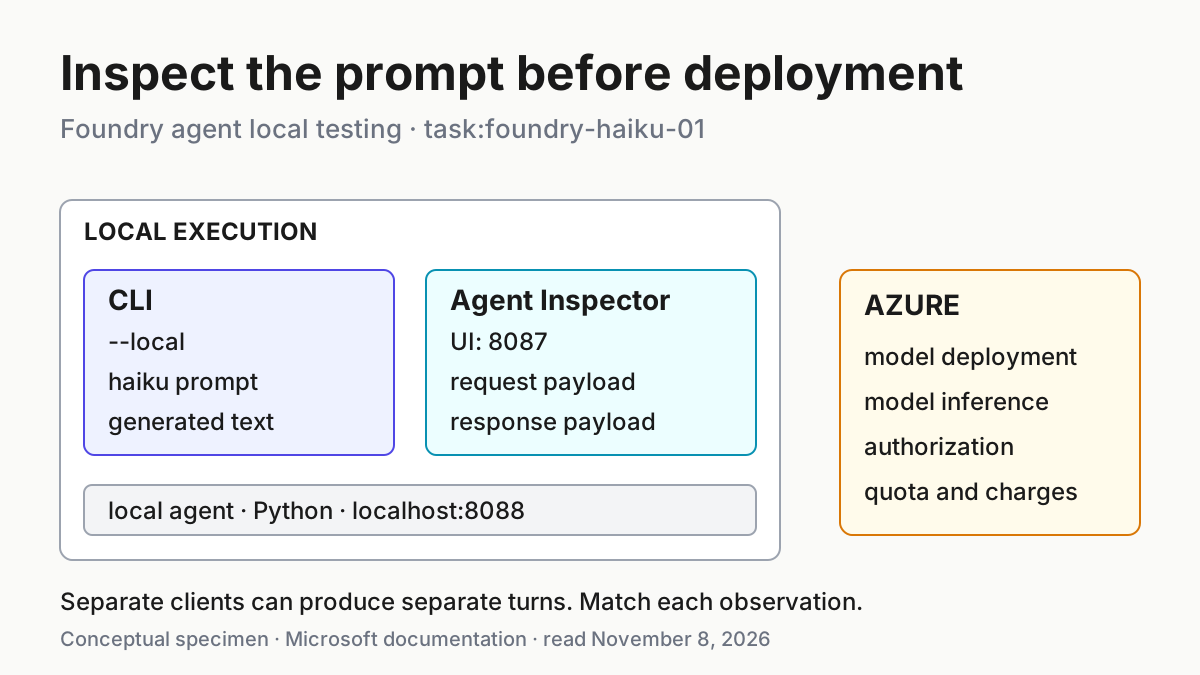
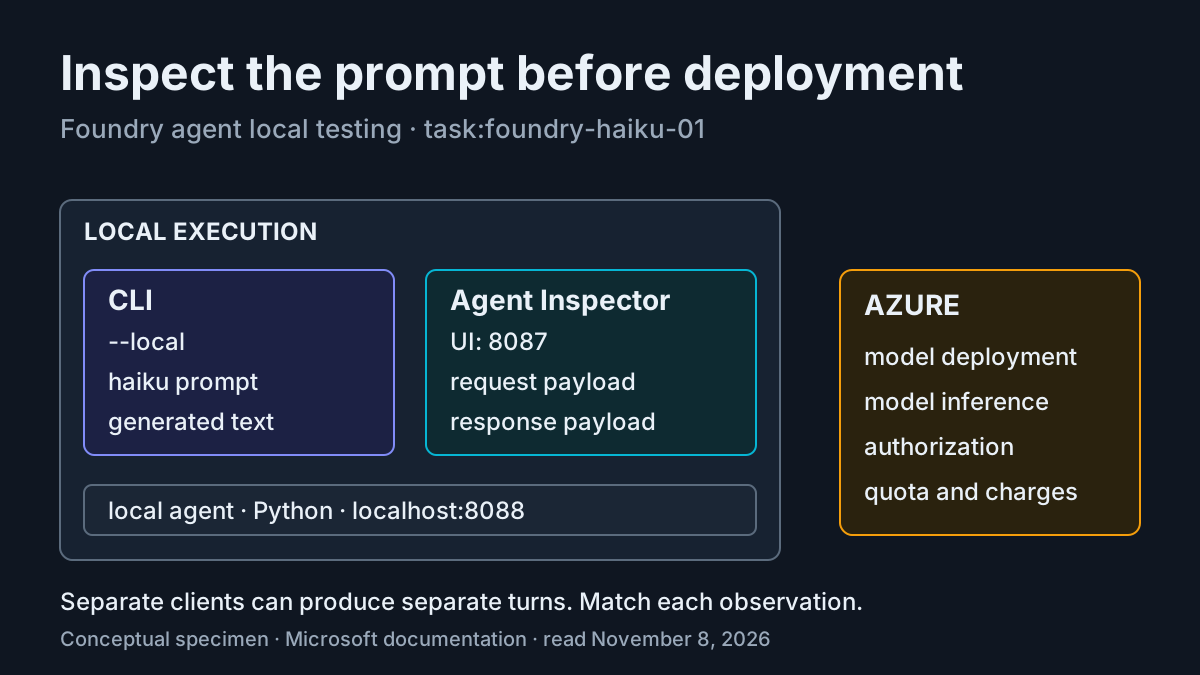
You have a Python agent that needs an Azure model, but you want to understand its first request before uploading the application. Foundry agent local testing gives you that development loop: run the agent on your machine, invoke it from another terminal, and examine requests and responses with Agent Inspector. The model remains in Azure, so local execution still needs authorization, an available deployment and quota.
This tutorial is for a Python developer with an authorized Azure development subscription. You will initialize Microsoft’s basic Agent Framework Responses sample, review its configuration, provision the intended resources and send one concrete prompt. The finished artifact is a working local test procedure with a filled case, configuration and recovery branches. All observations below are illustrative expectations based on documentation; this article does not report an executed test.
Microsoft’s November 5 announcement supplies the timely background: the microsoft.foundry extension bundle reached version 1.0 and general availability. The useful lesson is independent of that announcement. Keep application startup, model access and client inspection separate enough that a failure tells you which connection needs attention.
Prepare the Python sample path
- Use an empty development directory and open two terminals in it. Keep every subsequent azd command in the directory containing azure.yaml.
- Have Python 3.13 or later, a current uv release and Azure Developer CLI 1.37.0 or later available.
- Confirm that your existing authorized development identity can use the intended subscription, Foundry project and model deployment.
The version choice is deliberate. The sample configuration declares azd 1.27.1 as its minimum; the hosted-agent quickstart also contains that older prerequisite, while its troubleshooting guidance names 1.36.0. The announcement asks for 1.37.0 or later. Using the announcement’s higher floor avoids presenting those different minimums as interchangeable promises. Python 3.13 is the sample-specific requirement even though the general local-run guide describes broader language support.
The hosted-agent quickstart distinguishes new and existing projects. Its prerequisites name Foundry Project Manager at project scope for an existing project, and Owner at resource-group scope when creating a new project. These are workflow prerequisites, not a reason to grant yourself broad access automatically. Have the resource owner confirm the appropriate assignments before provisioning.
The detailed permissions reference explains why successful resource management does not establish model or agent access: ARM control-plane roles and Foundry data-plane roles differ. Owner or Contributor alone does not include the data-plane permissions used to create or interact with agents. A provisioning success followed by an authorization error therefore has a plausible permissions explanation.
For this example, choose a dedicated new development project if your organization permits one. That keeps the sample’s declared resources and eventual cleanup easier to understand. If you must reuse a project, first identify its existing deployment name and resource owner. Reuse changes what provisioning and deletion mean; it does not remove those decisions.
Initialize once and review what it creates
- Check the installed CLI version.
- Install the documented Foundry extension bundle if your development installation lacks it.
- Initialize the official basic sample in the empty directory, selecting the intended tenant, subscription and project when prompted.
azd version
azd ext install microsoft.foundry
azd ai agent init \
  --template https://github.com/microsoft-foundry/foundry-samples/blob/main/samples/python/hosted-agents/agent-framework/responses/01-basic/azure.yaml \
  --deploy-mode code \
  --src .
Use your organization’s existing authentication procedure before this sequence. The official workflow requires an authenticated azd session; local model calls can also use an already authenticated Azure CLI through the sample’s DefaultAzureCredential. If both tools are signed in, the announcement says they should use the same account and tenant. Resolve a mismatch with your administrator rather than treating repeated resource creation as an authentication fix.
The template URL is an actual command input, not a suggestion to invent an application. Initialization retrieves the sample and sets up an azd-backed project. The --src . argument puts it in the current directory; --deploy-mode code selects source-code deployment configuration. This walkthrough stops at local validation, but retaining that configuration lets you make a separate deployment decision later.
When reusing an existing project and deployment, use the documented alternative initialization command instead of the preceding initialization command:
azd ai agent init \
  --template https://github.com/microsoft-foundry/foundry-samples/blob/main/samples/python/hosted-agents/agent-framework/responses/01-basic/azure.yaml \
  --deploy-mode code \
  --src . \
  --model-deployment <existing-deployment-name>
Replace the angle-bracket value with the deployment’s actual name. The quickstart warns that template adoption does not currently provide an existing-model-deployment picker and can retain template model settings. Selecting an existing project without resolving that declaration can still lead to a new model deployment during provisioning.
Before continuing, open the generated azure.yaml in your editor. Review the agent service name, source directory, runtime, model declaration and resource allocation. Preserve a copy of the generated configuration through your normal editor or version-control workflow before experimenting. That gives you a specific recovery point instead of relying on recollection of which fields changed.
Read the configuration before provisioning
- Compare the generated services with the documented sample below.
- Preserve any environment-specific changes initialization made, especially when selecting an existing deployment.
- Confirm that the agent’s env map contains
PYTHONNOUSERSITE: "1"before starting Python.
This is the complete configuration from the selected official azure.yaml sample, presented as a review reference. It is suitable for understanding the new-project example; do not overwrite an existing-project adaptation with it without reviewing the resource differences.
requiredVersions:
  azd: '>=1.27.1'
  extensions:
    azure.ai.agents: '>=1.0.0-beta.9'
name: agent-framework-agent-basic-responses
services:
  ai-project:
    host: azure.ai.project
    deployments:
      - name: gpt-5.4-mini
        model:
          format: OpenAI
          name: gpt-5.4-mini
          version: '2026-03-17'
        sku:
          name: GlobalStandard
          capacity: 10
  agent-framework-agent-basic-responses:
    host: azure.ai.agent
    metadata:
      tags:
        - Agent Framework
        - AI Agent Hosting
        - Azure AI AgentServer
        - Responses Protocol
        - Streaming
    project: src/agent-framework-agent-basic-responses
    language: python
    codeConfiguration:
      runtime: python_3_13
      entryPoint: main.py
    uses:
      - ai-project
    kind: hosted
    name: agent-framework-agent-basic-responses
    description: A basic Agent Framework agent hosted by Foundry.
    protocols:
      - protocol: responses
        version: 2.0.0
    env:
      PYTHONNOUSERSITE: "1"
      AZURE_AI_MODEL_DEPLOYMENT_NAME: ${AZURE_AI_MODEL_DEPLOYMENT_NAME}
    container:
      resources:
        cpu: '0.5'
        memory: 1Gi
infra:
  provider: microsoft.foundry
The two services describe different responsibilities. ai-project declares the model deployment. The agent service points to the sample source and uses that project. Its Responses protocol declaration tells the invocation client which request format to use. The CPU and memory values describe hosted allocation; they are not measurements of your laptop or a benchmark of this prompt.
The model SKU capacity of 10 is a sample declaration, not a guarantee of quota or throughput. Review the model configuration prompts against your subscription and region. If the declared model or deployment type is unavailable, resolve that resource choice before interpreting any later client error as a code defect.
The environment-variable guide explains two consequential details. First, azd resolves ${AZURE_AI_MODEL_DEPLOYMENT_NAME} through the active environment. Second, you should not explicitly declare FOUNDRY_PROJECT_ENDPOINT in the service’s env map: azd sets it for local development, while the platform injects it for hosted execution. An extra manually copied endpoint can shadow the managed value.
PYTHONNOUSERSITE disables Python’s user-site package loading at interpreter startup. Setting it inside main.py would be too late. Keep dependencies in the agent’s virtual environment, rather than compensating for a failed installation with user-site packages. This setting is a dependency-loading precaution, not a complete execution boundary.
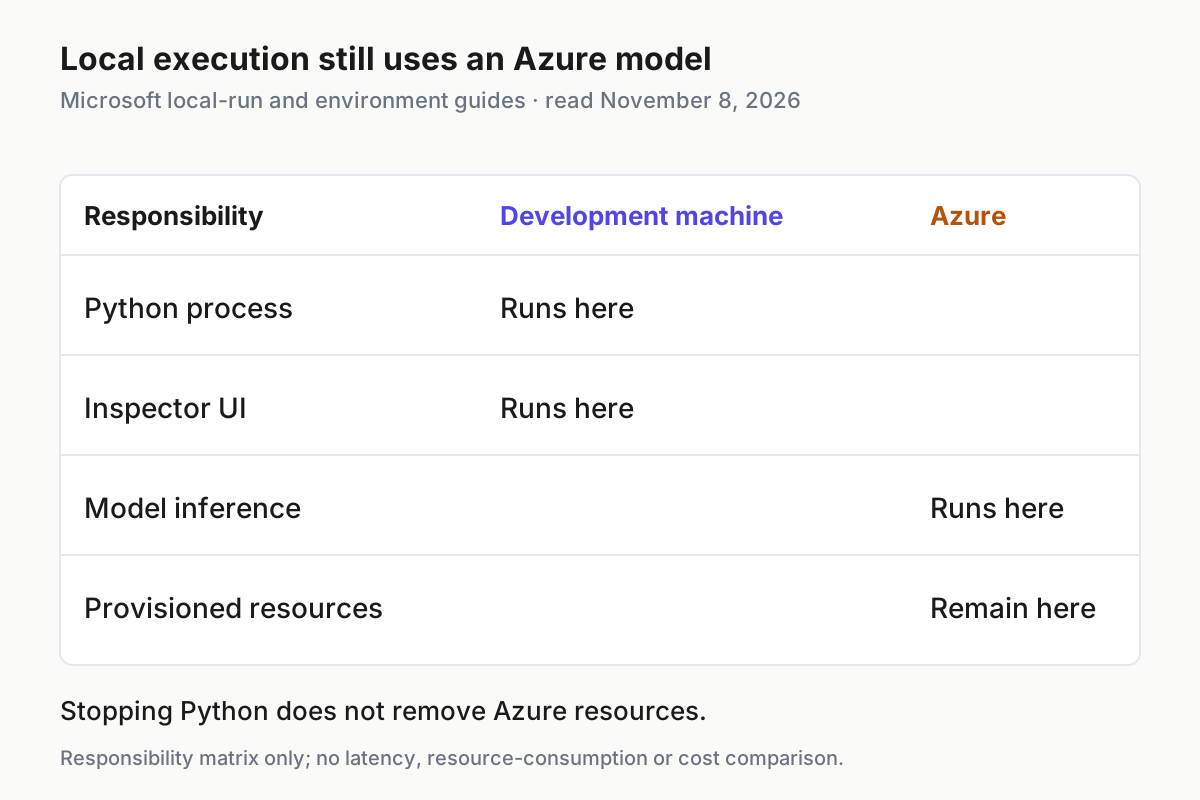
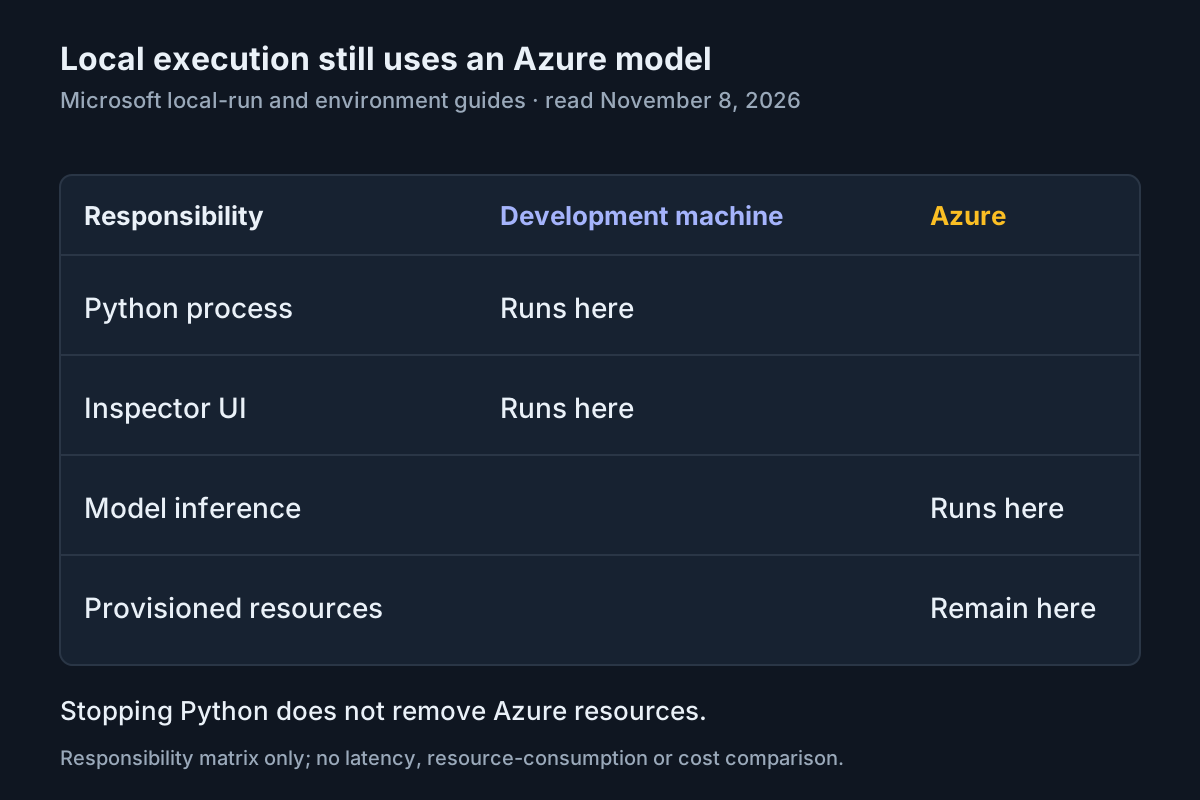
The local process and Inspector stay on the development machine; model inference still uses Azure. Source: Microsoft local-run and environment-variable guides, read November 8, 2026.
Provision the intended resources, then start locally
- Review the selected subscription, region, project choice and model declaration.
- Provision the configuration only after those resource choices are authorized.
- Start the local agent and leave its terminal running.
azd provision
azd ai agent run
Provisioning creates the declared resources and can add missing model deployments even when the project already exists. Model use and provisioned resources can incur Azure charges. A local application process does not turn the Azure deployment into an offline model. Make that boundary explicit before sending proprietary prompts or assuming repeated tests are free.
According to the infrastructure guide, the default workflow need not eject Bicep or Terraform files. Deployment outputs, including the project endpoint, flow back into the azd environment for local execution. You do not need to introduce an infrastructure migration to complete this sample.
That same focused infrastructure reference says current templates do not automatically provision Application Insights or a Log Analytics workspace. Do not infer that a successful provision command has prepared stored cloud traces. The hosted-agent quickstart separately requires configuring Application Insights and trace-reading access before remote invocation. Live local Inspector events solve a different inspection problem.
The local-run guide documents dependency installation, project-type detection and a default agent listener on localhost:8088. The quickstart describes creation of a Python virtual environment. Startup may take longer on the first run because the dependencies must be installed; wait for the server to be listening before using the second terminal.
For this Responses sample, run opens Agent Inspector by default. Inspector normally serves its UI on localhost:8087 and connects to the agent on localhost:8088. Those are separate listeners. An open browser tab establishes neither successful Python startup nor successful Azure inference, so keep the startup terminal visible while making the first request.
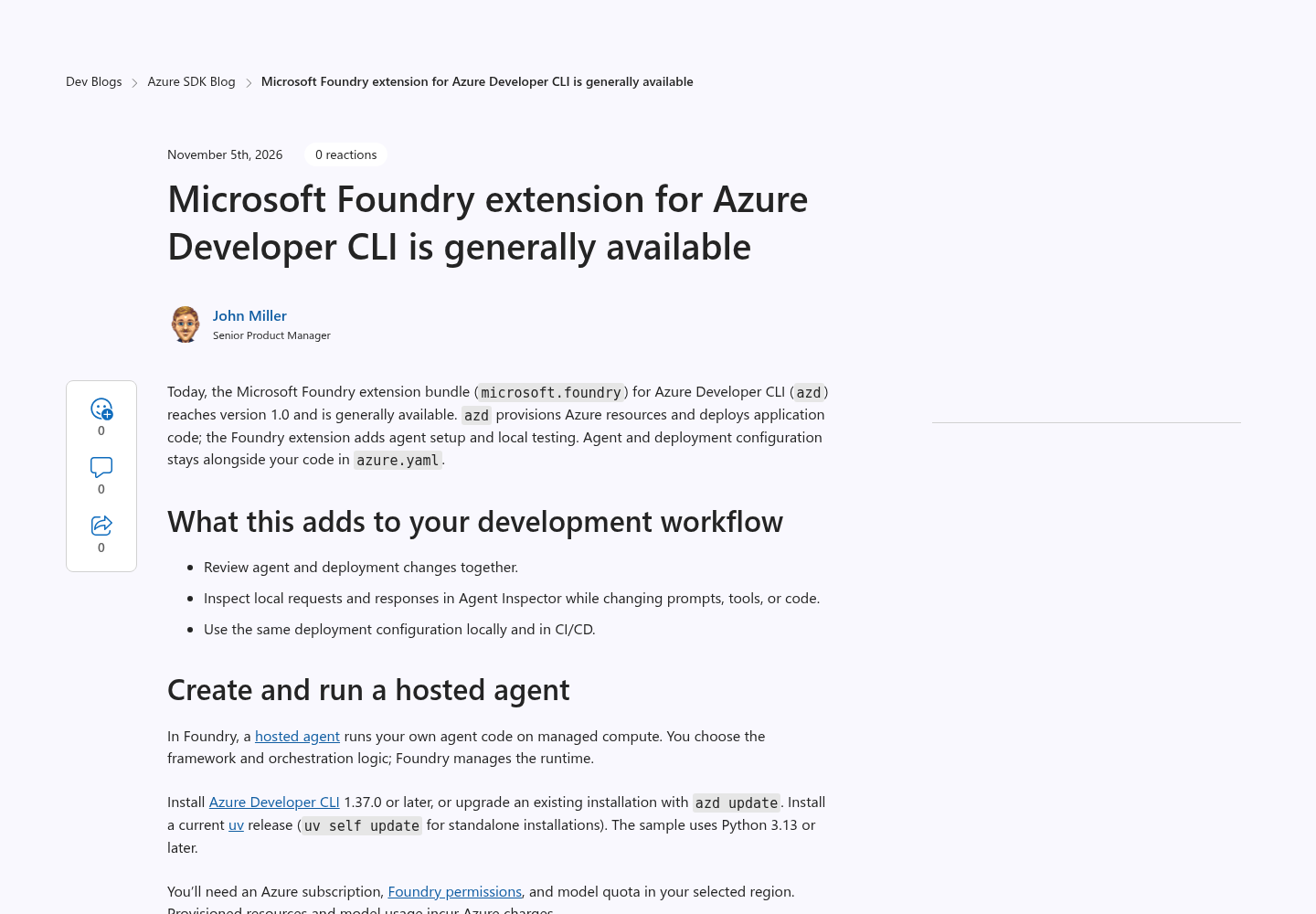
Source: Microsoft Azure SDK Blog. The capture is the publisher’s announcement page, not evidence that this tutorial’s commands were executed.
Send task:foundry-haiku-01 and inspect its payload
- In the second terminal, stay in the same project directory.
- Send the exact prompt below with the local flag.
- Read the returned text, then inspect the request and response for the corresponding turn in Inspector.
azd ai agent invoke --local "Write a haiku about deploying cloud applications."
The invocation reference documents that Responses invocation sends a standard request with an input field. The local flag selects the local agent rather than the deployed endpoint. Omitting it changes the target, so retain it throughout this exercise. No hosted-agent deployment is needed for this local request.
| Input | Action | Expected result |
|---|---|---|
| task:foundry-haiku-01; Python Responses sample on localhost:8088; prompt: Write a haiku about deploying cloud applications. | Run azd ai agent invoke --local "Write a haiku about deploying cloud applications." from the project directory while azd ai agent run remains active; inspect the same prompt in Agent Inspector. |
Illustrative expected observation: the CLI returns generated verse; inspection of the corresponding turn shows the exact prompt in the request and generated text in the response. Actual wording varies, and a missing Inspector turn requires the client check below. |
Do not use a particular poem as the transport test. A model can return different words on successive calls, and even a completed response can miss a strict syllable count. First establish that your exact prompt reached the intended local application and that the response contains generated text. Evaluate poetic quality separately from whether the integration works.
The Inspector guide documents a runtime view of full request and response payloads, streamed responses and conversation/session reuse. It does not document a guarantee that every request from an independent CLI client will appear in an already open Inspector session. Do not manufacture that guarantee from the presence of two windows.
If the CLI turn is visible, compare its exact prompt and returned content with the payload view. If it is absent, submit the same prompt directly through Inspector and inspect that browser-originated turn. Record these as two invocations with potentially different generated text. This narrower check still establishes a CLI response and an inspectable request/response loop, without pretending they are the same captured transaction.
For a clean browser comparison, reset Inspector to a fresh session before sending the prompt. Inspect the full input rather than relying only on a chat bubble. Then read the response payload and compare its generated text with the visible browser answer. Inspector is a runtime view and does not modify agent code or azure.yaml.
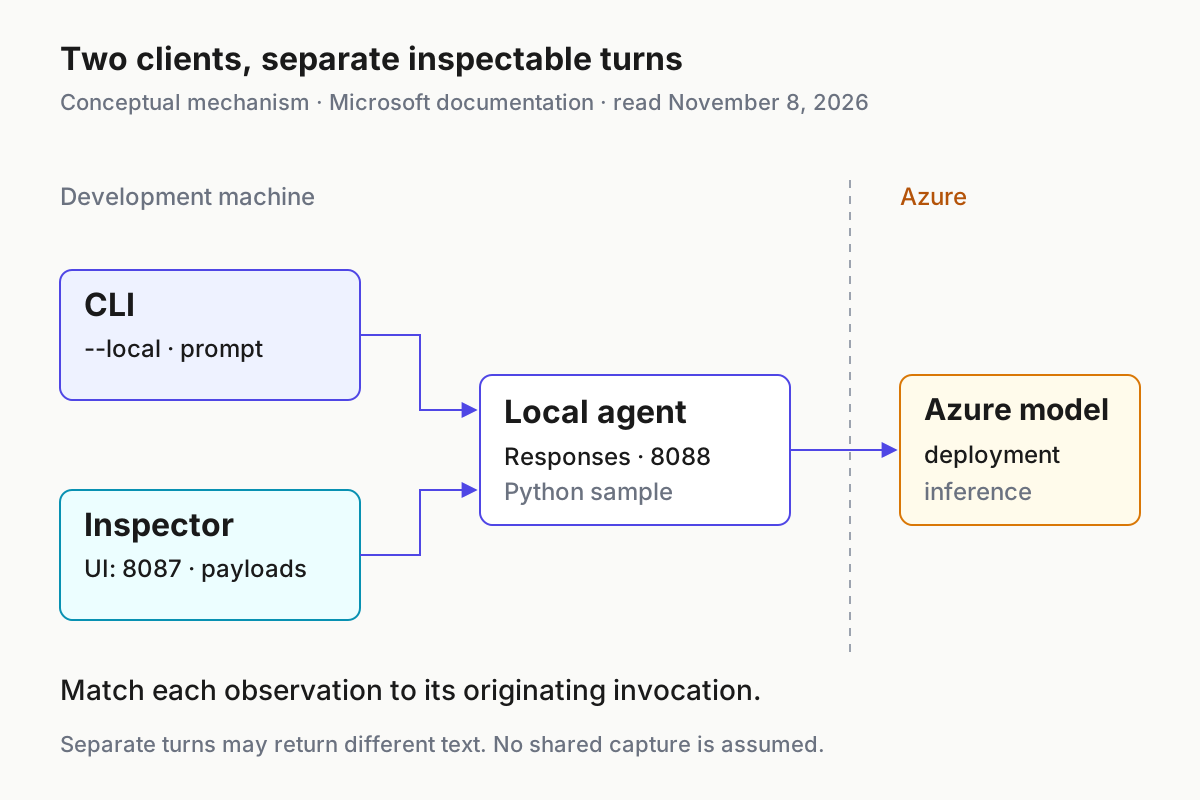
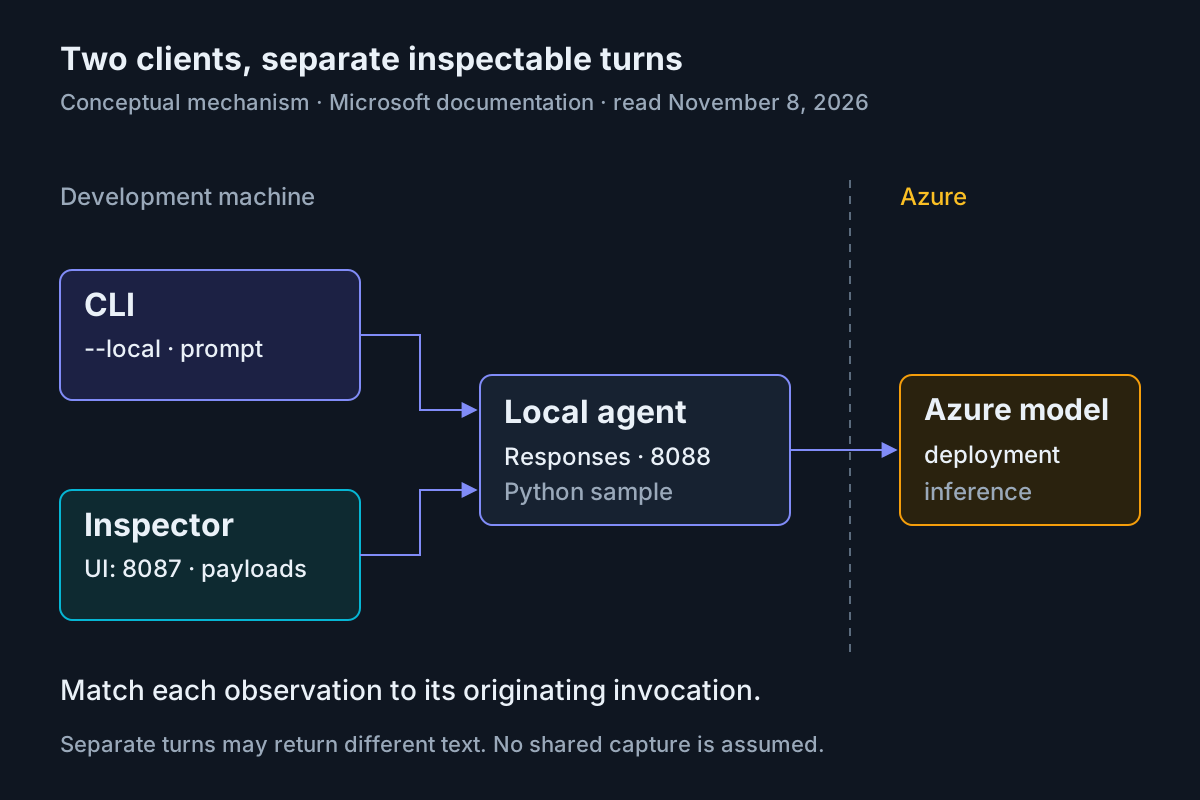
Conceptual mechanism, not an observed trace: CLI and Inspector are separate clients of the local agent, which still calls the Azure model. Source: Microsoft local-run, invocation and Inspector guides, read November 8, 2026.
This distinction also helps when choosing observability tools later. Trace capture boundaries deserve explicit attention, while fleet replay addresses retaining a wider operating history. Neither concept makes a live Inspector view equivalent to stored cloud spans.
Repair the failing connection
Use the earliest failing observation to choose a repair. Avoid changing the model, port and environment simultaneously: doing so removes the comparison that makes a second attempt informative.
| Observation | Next supported action | Interpretation before retry |
|---|---|---|
| FOUNDRY_PROJECT_ENDPOINT is missing | Start through azd ai agent run in the initialized project and verify the active environment’s provisioning state. |
Direct application startup can omit the endpoint that azd supplies; adding a hard-coded service env value risks shadowing it. |
| Connection refused on 8088 | Check that the startup terminal is still running and that another process is not occupying the port; use the paired custom-port commands below if necessary. | The local listener must work before model authorization can be assessed. |
| Dependencies fail during startup | Confirm Python 3.13+ for this sample, current uv and the installed sample dependencies; retain PYTHONNOUSERSITE. | A failed installation is not evidence that the Azure model endpoint is broken. |
| AuthenticationError | Have the authorized developer refresh the documented azd authentication session and check the existing Azure CLI identity used by DefaultAzureCredential. | Authentication freshness and matching tenant selection are separate from resource permissions. |
| ResourceNotFound or DeploymentNotFound | Compare endpoint values with the portal and check the actual deployment name against azure.yaml. | A project can exist while the requested deployment does not. |
| AuthorizationFailed | Identify the failed operation and ask the resource owner to check the relevant role and scope in the permissions reference. | Successful ARM access does not prove Foundry data-plane authorization. |
For a port conflict, stop the previous local run before restarting it. These are documented commands for matching the server and client on 9090:
# Terminal one
azd ai agent run --port 9090 --inspector-port 9091

# Terminal two, same project directory
azd ai agent invoke --local --port 9090 "Write a haiku about deploying cloud applications."
Changing only the server port leaves the default invocation client pointing at 8088. The explicit client port prevents that mismatch. If Inspector needs reopening, its documented manual launch supports the same pair:
azd ai inspector launch --port 9090 --inspector-port 9091
Close or stop the earlier Inspector instance before launching a replacement on the same UI port. A browser tab left over from another run can be misleading even when the current server is healthy. Confirm the target listener and prompt again before attributing an empty payload view to the application.
For dependency trouble, preserve the first concrete installation error. The quickstart notes Windows ARM64 wheel/build limitations for several dependencies. Its alternative is remote validation, but that would change this exercise’s execution boundary. You can pause local validation and resolve build prerequisites without claiming that a remote response proves the local loop.
The broader environment readiness guide provides context for separating setup failures from task failures. For this sample, keep the diagnosis concrete: interpreter and dependencies first, listener second, project/deployment resolution third, then authorization and generated output.
Stop, restore and decide what to retain
- Interrupt the foreground local run in terminal one with Ctrl+C, then confirm it has returned control to the terminal.
- Close the Inspector tab and stop any separately launched Inspector process.
- Restore experimental azure.yaml edits from the configuration copy you saved before changing them.
- Decide whether the development resources should remain available or be removed according to project ownership.
Stopping the local process ends this test’s application execution; it does not delete Azure resources. Restoring a file also does not reverse provisioning. If an experiment changed a model declaration and provisioning created a deployment, review that resource separately rather than assuming the editor’s undo operation removes it.
For a dedicated project created by the current azd environment, the documented cleanup command is:
azd down
Review its listed resources before confirming. The quickstart states that this path permanently deletes the project’s resource group and everything in it. Use it only when the group is appropriate to remove, not as a universal way to stop local testing.
For a reused project, azd down leaves the project, resource group, hosted agent and other quickstart resources in place. Have the resource owner identify and delete unwanted resources separately. This walkthrough does not deploy a hosted-agent version, but provisioning may still have created a model deployment that remains billable or consumes quota.
Before deciding to deploy, retain the reviewed configuration, actual startup errors if any, and the prompt/response observations from task:foundry-haiku-01. Local success establishes this development integration; it does not establish remote tracing, production permissions, workload quality or operational continuity. The LangGraph deployment guide covers a different deployment boundary, and the AgentOps guide supplies the operating-layer context beyond a single local run.
You have completed this tutorial when the sample starts locally, the CLI receives generated text, Inspector exposes a request and response for the concrete haiku prompt, and you can explain which invocation each observation belongs to. Finish by stopping the local process and making an explicit resource-retention decision. That is a usable development result before any deployment is chosen.
Sources
- Microsoft Azure SDK Blog: Foundry extension general availability.
- Microsoft Learn: Deploy your first hosted agent.
- Microsoft Learn: Hosted agent permissions.
- Microsoft Foundry samples: basic Responses azure.yaml.
- Microsoft Learn: Configure environment variables.
- Microsoft Learn: Hosted agent infrastructure.
- Microsoft Learn: Run a hosted agent locally.
- Microsoft Learn: Invoke a hosted agent.
- Microsoft Learn: Inspect a local agent.