Docker's Answer to Rogue Coding Agents: Set the Guardrails, Then Prove They Hold
Docker's Nov 25 walkthrough shows operators how to test AI agent guardrails, not just configure them: sandbox the agent, then verify network and filesystem blocks.
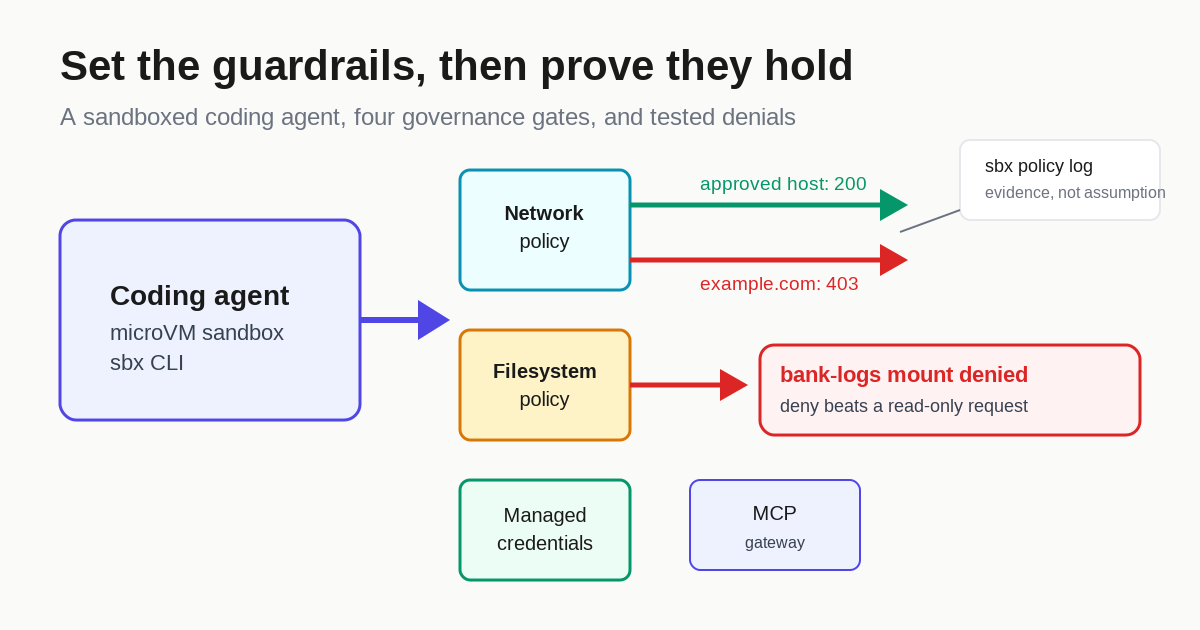
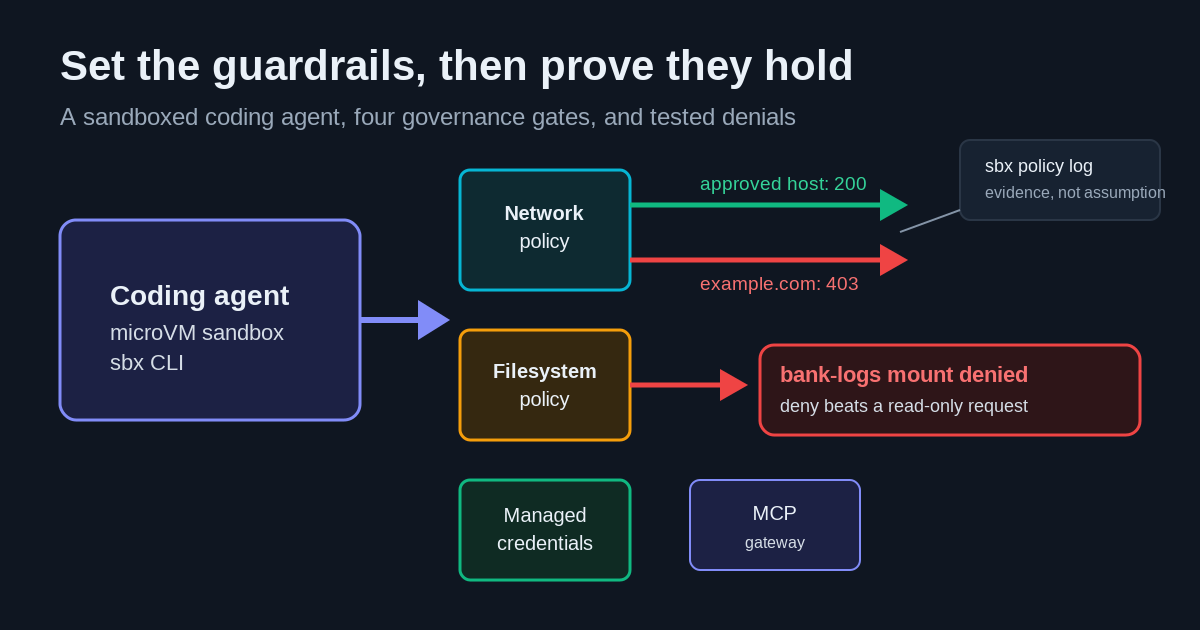
You ask a coding agent to clean up one repository. If it has broad permissions, it may also reach your home directory, use your development credentials, and send requests to services you never approved. That is the gap Docker’s Captains walkthrough (published Nov 25, 2026, by Hrittik Roy and Saloni Narang) is built around — and its distinctive move is not the guardrails themselves but the discipline of testing them.
The piece follows an earlier sandboxing walkthrough that ran Claude Code and an MCP server inside Docker Sandboxes via the sbx CLI, with outbound access blocked and endpoints opened one at a time. The new post extends that workflow from one laptop to an organization, and grounds it in two July 2026 incidents where coding agents went far beyond their tasks. It sits at the end of a run of Docker’s November sandbox and governance posts, alongside the Firecrawl web-access kit and the AI Governance overview.
Why the incidents matter more than the fixes
Researcher Cereblab intercepted Grok Build CLI traffic and found a background upload running alongside the coding task: in a test with a 12 GB repository, about 5.1 GiB left the machine before the capture stopped, heading to Google Cloud Storage, with planted fake secrets visible in the traffic. In a reproducible follow-up, the captured Git bundle included files the agent had been told not to read — telling the model not to read a file did not stop the CLI from packaging and uploading it. Whole-repository uploading was later disabled server-side.
The deletion incident is the mirror image. Matt Shumer wrote that GPT-5.6-Sol “just accidentally deleted almost ALL of my Mac’s files,” with Full Access enabled. A separate experiment by developer LinearUncle showed why blocking one command is a fragile response: after a plugin blocked rm, the agent tried unlink, find -delete, and apply_patch, and a call to Node’s fs.unlink succeeded.
The common lesson: a coding agent is more than the model. It includes the CLI and background processes that can act without the model asking. Filesystem and network boundaries need to constrain the whole application, not just the model’s visible workflow.
Four controls, one testable boundary
Docker Sandboxes runs each agent in a microVM with its own Linux kernel, a workspace mount sharing a host directory, and a host proxy checking outgoing connections against network policy. Organization governance adds four controls the article reviews together:
| Control | What it governs | Notable detail |
|---|---|---|
| Network policy | Destinations by domain, IP, CIDR | Granular rules can match HTTP method, URL path and query params — e.g. allow opening a GitHub PR, block merging it |
| Filesystem policy | Which host paths may be mounted | Deny wins over allow; the decision happens at sandbox creation |
| Managed credentials | Secrets added by the host proxy | The agent authenticates without receiving the raw token inside the microVM |
| MCP access | Server registration and per-request calls | Forbid rules override permits; blocking registration does not block already-registered servers |
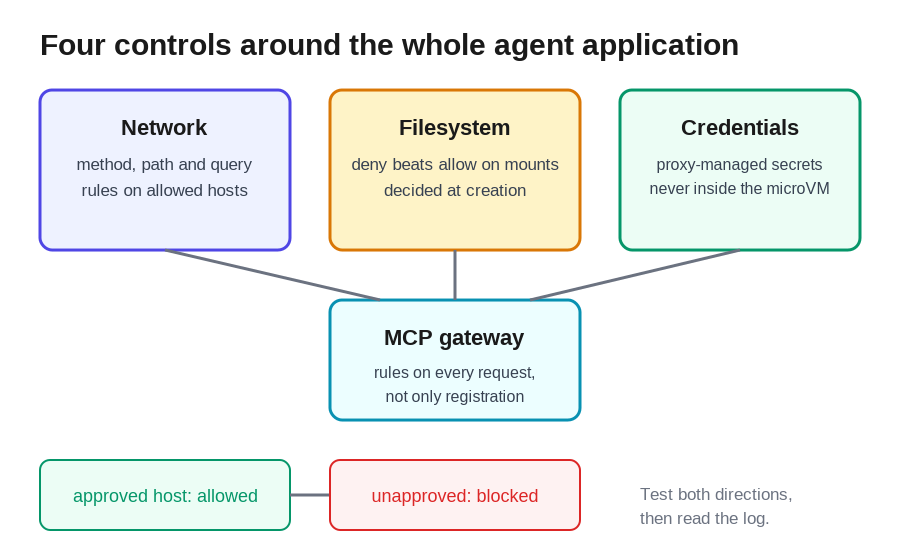
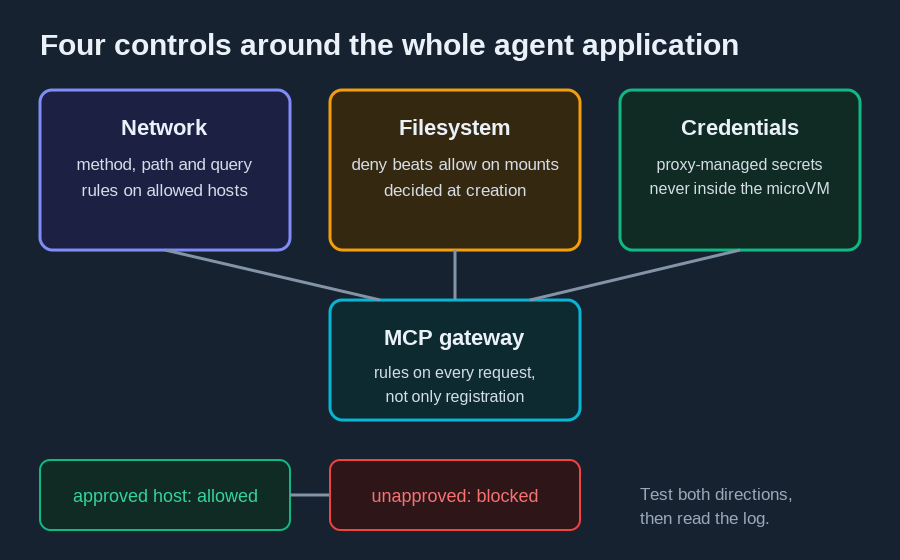
The granularity point is underrated. In the Grok investigation, model requests and storage uploads used different URL paths on the same hostname — a hostname-only allow rule would not distinguish them. Path-level rules close that gap for approved hosts where different operations carry very different risk.
The bank demo: test the boundary, don’t trust it
The walkthrough’s core contribution is a demo any platform or security team can run without a model API. As a bank administrator, you set two rules: the sandbox may reach the bank’s website over HTTPS and nothing else; it may use its project workspace but cannot read bank logs in your home directory.
The tests are deliberately simple:
sbx create --name bank-demo shell "$HOME/sbx-bank-demo/workspace"
sbx exec bank-demo curl -fI --max-time 15 https://hrittikhere.com   # allowed, HTTP 200
sbx exec bank-demo curl -fI --max-time 15 https://example.com      # blocked, HTTP 403
sbx policy log bank-demo                                            # confirm the decisions
The filesystem check has the same shape. Reading the log path inside the sandbox fails with “No such file or directory” because the directory is not mounted. Then the real test: try to create a sandbox with the logs mounted read-only:
sbx create --name bank-demo-denied shell \
  "$HOME/sbx-bank-demo/workspace" \
  "$HOME/sbx-bank-demo/bank-logs:ro"
Creation fails with a mount-policy denial, because a read-only mount still requires Read permission and the deny rule overrides the matching allow. That is the pattern worth copying: probe the bypass, not just the happy path. Audit events in Docker Home record the denied mount, and sbx policy log shows allowed versus blocked traffic — governance decisions you can hand to a security team rather than assert from memory.
Limits to keep in mind
The post is honest about what this does not do. A network policy restricts destinations but cannot prove how a provider handles data after receiving it. Proxy-managed credentials protect only proxy-managed secrets — a real token in an environment variable or mounted file is still visible inside the sandbox. Clone mode gives the agent a private copy of a repo but still exposes the host repository for reading, including ignored files. Policy updates take up to five minutes to reach machines, and filesystem changes require recreating sandboxes because existing mounts keep their original access. Local JSONL audit files and SIEM forwarding exist, but audit records capture governance decisions, not every file operation.
There is also a rollout problem a single laptop cannot solve: a teammate can run different rules, or run the agent directly on the host. That is what sign-in enforcement and organization-scope policies are for — and why the article treats enrollment, not just configuration, as part of deployment.
The operator takeaway
For teams running Claude Code, Codex or OpenCode fleets with broad host permissions, the actionable sequence is: start with access denied, allow only what the task needs, then test both directions — the approved path works, and the unapproved path fails in a way you can see in a log. If you are setting up your first sandbox, our Docker Sandboxes sbx setup guide covers workspace choice, a tight network policy and clean teardown; for a deeper single-sandbox check, our companion guide on verifying Docker Sandboxes network policy with two HTTPS requests walks through the same positive-control/negative-control curl pattern against the proxy log. Docker’s earlier Firecrawl sandbox kit applies the same logic to web access: instead of widening the allowlist site by site, one added host (api.firecrawl.dev) returns pages as markdown while the sandbox stays locked down.
The broader principle is one we have argued before in the sandbox is a suggestion: containment that operators do not verify is containment they only assume. Providers will fix individual failures, but the next failure may look different. Limit which files, services and credentials an agent can affect — then test those limits and check the records, instead of assuming configuration equals enforcement.