Claude Code Skills Over MCP: Ship a Skill From Your Own MCP Server, Confirm It Loads and Lock It Down
Set up skills over MCP: serve a SKILL.md from a TypeScript MCP server, see it as docs:release-notes in Claude Code, then deny, prompt or disable it safely.

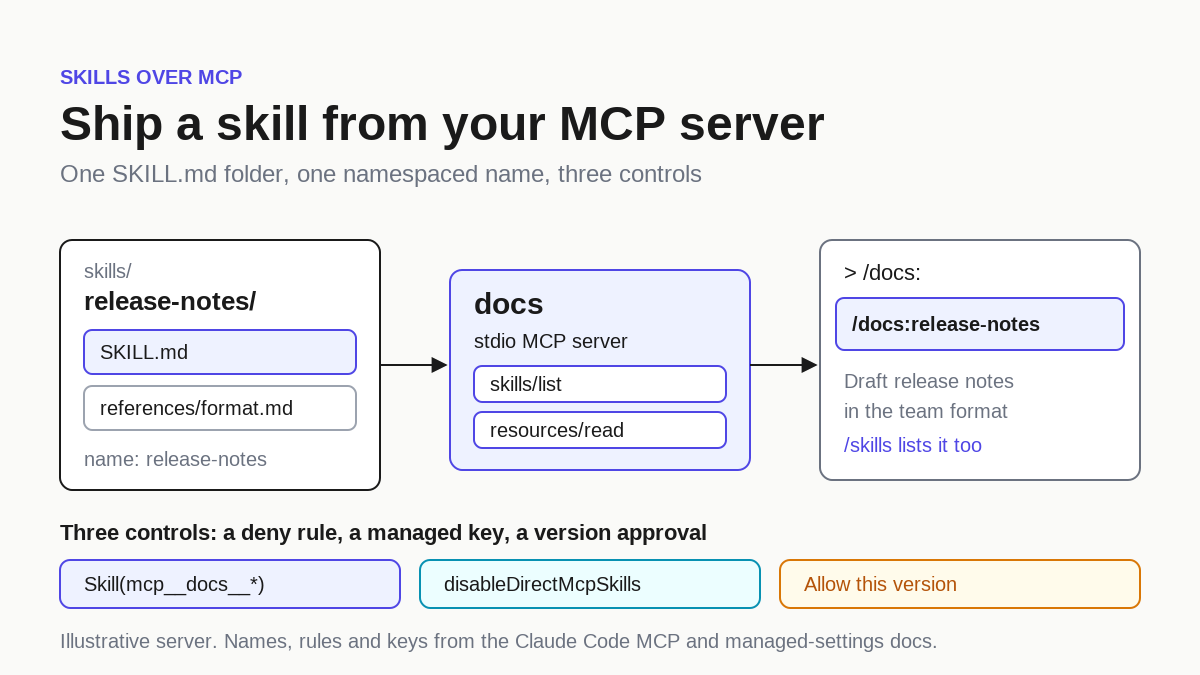
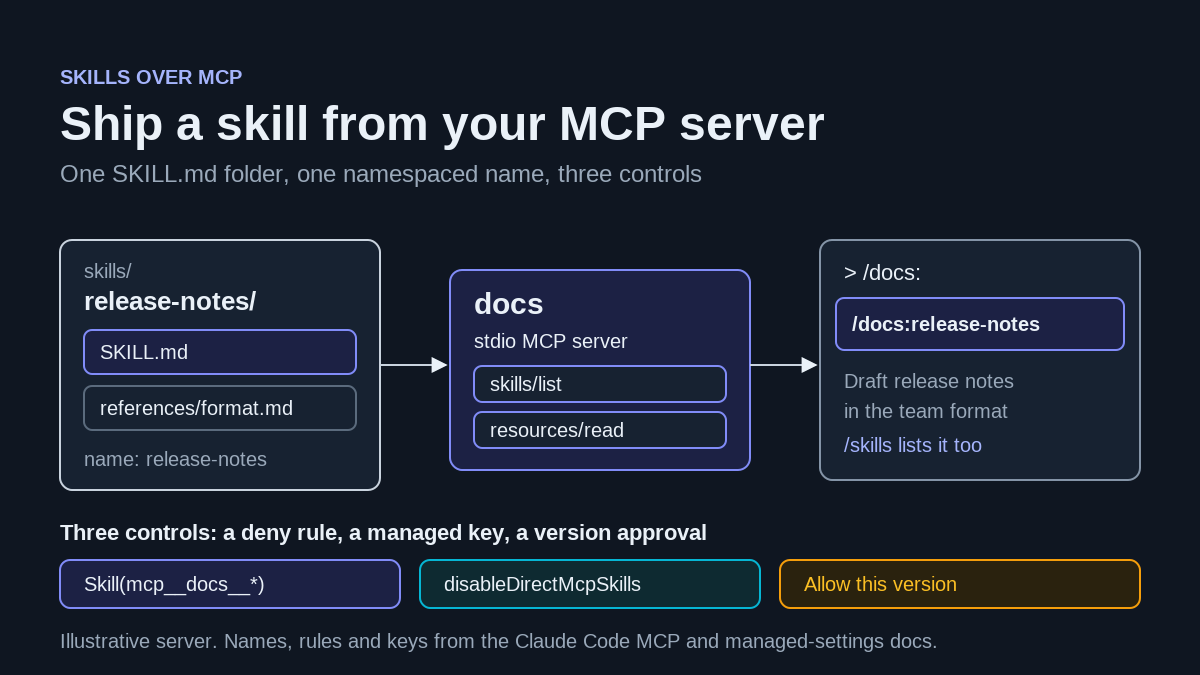
You maintain an internal MCP server called docs. Its tools work, but every teammate still has to be told how to use them: which tool to call first, what shape the release notes take, which template wins. That guidance usually lives in a wiki page nobody opens. Skills over MCP lets the server carry the guidance itself. The server publishes a skill folder next to its tools, Claude Code lists it under the server’s name, and Claude reads the instructions only when a task calls for them.
This tutorial is for two people who often sit side by side: the developer who maintains that server and runs Claude Code, and the admin who decides what a server may deliver into everyone else’s sessions. By the end you will have one stdio server named docs publishing one skill, release-notes. Claude Code will show it as docs:release-notes, you will have approved one version of it, and you will have a permission block that shuts it off again. You will also know which managed setting turns server skills off across a fleet, and what to check when a skill never appears.
The news is the reason to do this now. In MCP servers can now ship skills, run tasks, and more with Claude, published November 24, 2026, Anthropic put Skills over MCP into public beta in Claude and Claude Code. It is on by default for Pro, Max and Ultra plans, available to Team plans once an admin enables it, and coming soon to Enterprise. The feature uses the official io.modelcontextprotocol/skills extension, and its overview page says SEP-2640 is Final while SDK and host support is still being implemented. A community recap on X puts it in one line: MCP servers can now give Claude instructions, workflows and domain knowledge alongside their tools.
A word on what was run. Commands, flags, settings keys and rule strings below come from the documents linked in each section. Outputs are expected observations taken from those documents; nothing was executed for this article. Two SDK details the published material leaves open are flagged where they come up, and the last section collects every open question in one place.
Three existing guides cover neighbouring ground. Claude Code MCP setup explains claude mcp add and scopes, Codex skills setup covers local SKILL.md folders, and MCP explained covers the protocol. None of them covers a skill that arrives over the wire from a server, and that is what changes the trust model. The instructions now come from a process you connect to, and they can change whenever that process changes.
What you need before you start
Check each item before writing code. Most failures in this setup come from the client side, not from the server.
- [ ] Claude Code v2.1.331 or later. The Claude Code MCP reference gives that as the minimum for MCP skills, and
Skill(mcp__...)permission rules need the same version. Runclaude --version. - [ ] A login that has MCP skills on. With
/loginon a Pro, Max or Ultra plan they are on. On Team or Enterprise they stay off until your organization turns them on. A long-lived token from those plans works. With an API key or a Console login they are still rolling out and are off for now. - [ ] A supported session. A terminal session, including JetBrains IDEs, or a local session started in the Desktop app. The reference lists
claude -p, cloud sessions, the Agent SDK, GitHub Actions, a customANTHROPIC_BASE_URL,apiKeyHelperandANTHROPIC_AUTH_TOKENas unsupported. - [ ] A supported model and connection. A Fable model, or Claude Opus 4.8, Sonnet 5, Haiku 5.5 or later, over a direct connection to Anthropic with feature-flag fetching on.
- [ ] Node.js and npm. The pull request that added the Skills extension reports its tests passing on Node 20, 22 and 24.
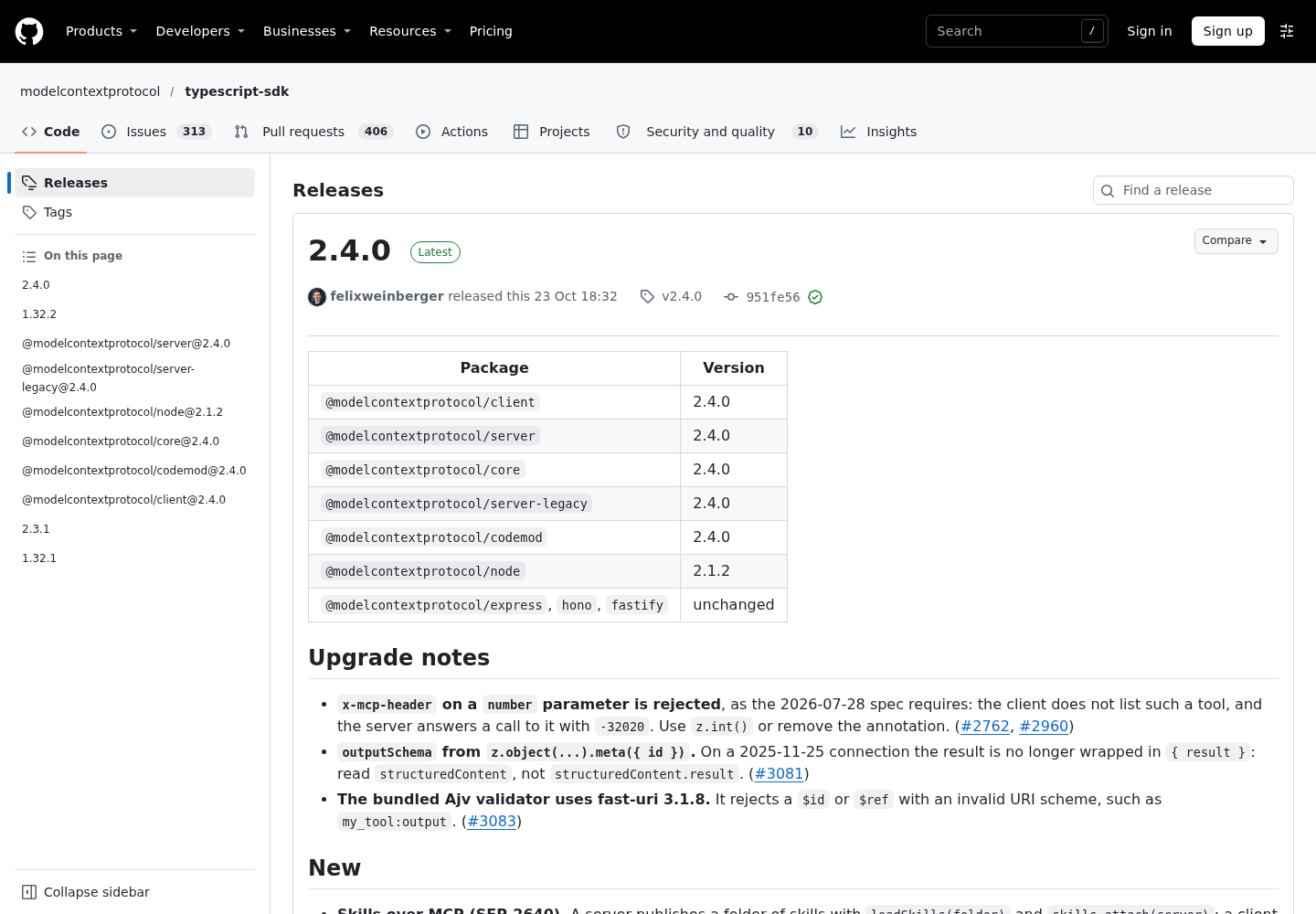
- [ ] MCP TypeScript SDK 2.4.0 or later. The SDK release notes for 2.4.0, dated October 23, add the Skills extension to
@modelcontextprotocol/serverand@modelcontextprotocol/client. - [ ] An absolute project path. This guide uses
/home/dev/docs-mcp. Replace it everywhere with your own.
The protocol revision matters too. The SDK v2 documentation describes v2 as the stable release line that implements the 2026-07-28 specification. Claude Code’s v2 client runtime is built on SDK 2.0 and adds that revision, and the reference’s skills troubleshooting table asks you to confirm the server supports revision 2026-07-28 or later over HTTP or stdio. A server on the v2 SDK and a current Claude Code meet that bar without extra configuration.
How Claude Code finds, names and loads a server skill
A skill is a directory with a SKILL.md file and optional supporting files. The Skills extension specification exposes each file as an MCP resource, conventionally under the skill:// scheme, and adds two required methods, skills/list and skills/get. A server that supports the extension declares both the resources capability and io.modelcontextprotocol/skills. Each listing entry carries the skill’s frontmatter verbatim plus a complete manifest: every file’s URI, SHA-256 digest and byte size. File contents travel through ordinary resources/read. The ext-skills repository holds that specification, marks it as the Beta stage of the extension lifecycle, and ships changes as new releases rather than edits in place.
Claude Code adds its own naming on top. A skill’s name is <server>:<skill>, so a release-notes skill on a server you registered as docs becomes docs:release-notes. Connector and plugin servers get a prefix, such as claude_ai_Docs:pdf for a connector named Docs, and spaces and punctuation other than - in the server part become _.
Three consequences shape everything that follows:
- The folder name is part of the contract. The spec requires the final segment of the skill’s path to equal the
namein its frontmatter. A folder calledrelease_notesthat holdsname: release-notesis invalid. - Only metadata is visible up front. Anthropic’s article says Claude loads a skill only when it is needed, keeping context use low. The spec forbids hosts from fetching skill files on connection, on listing or at approval. Until the skill loads, Claude works from its name and description.
- Every edit is a new version. The spec binds a persisted approval to the full set of file URIs and digests. A changed, added or removed file revokes that approval, and the host must ask again before loading.
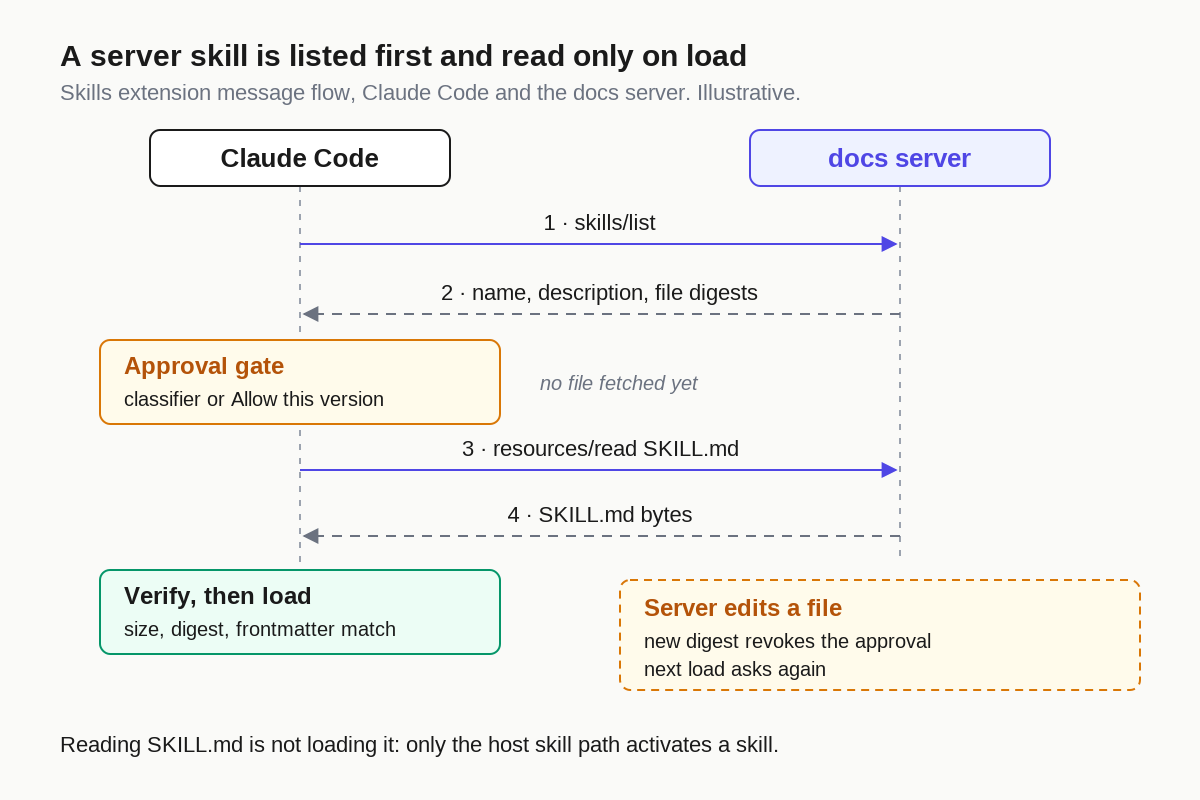
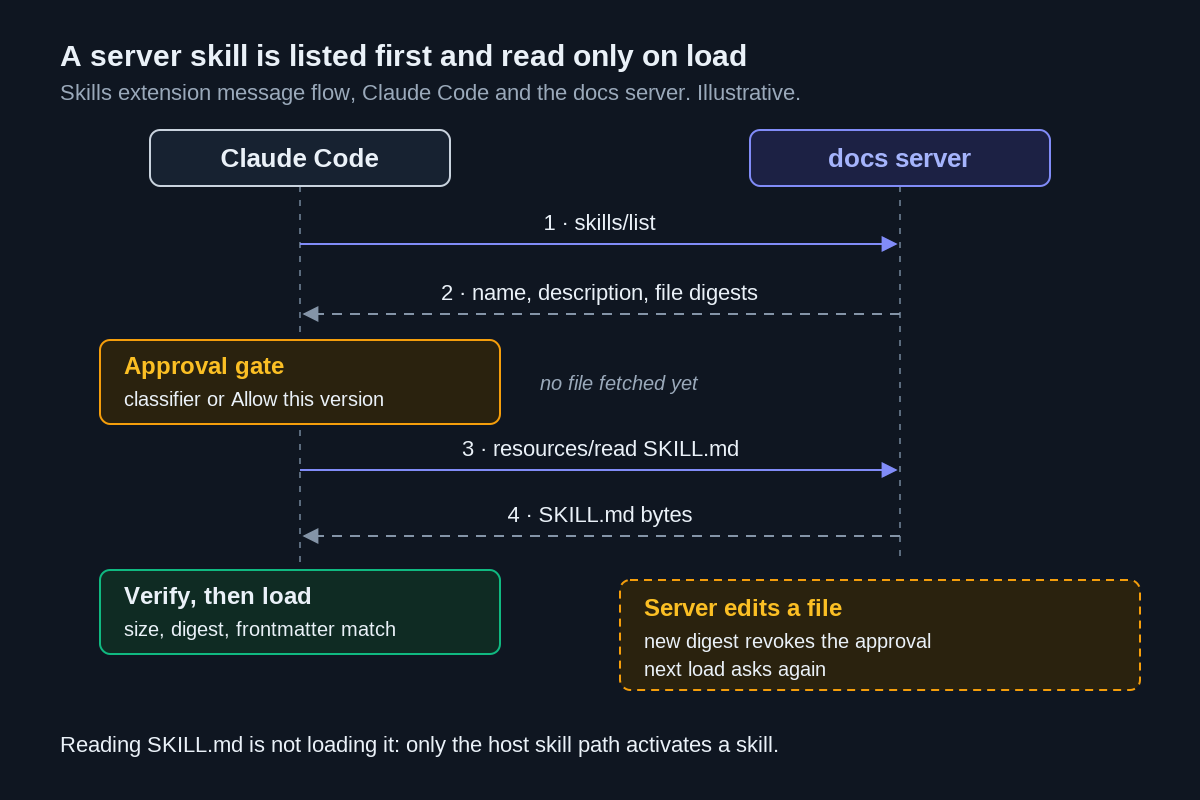
The overview page adds one more rule worth remembering when you debug: reading SKILL.md through resources/read does not by itself activate a skill. The host routes loading through its own skill path, which verifies the content and applies any approval first. A plain resource read is just a read.
Step 1: Write the release-notes skill folder
Create the project and the skill folder in this order:
- Make the directory tree shown below, with
skills/at the project root. - Save
SKILL.mdwith the frontmatter and body below. - Save
references/format.md, the one supporting file. - Check that the folder name and the
name:line match exactly, character for character.
mkdir -p /home/dev/docs-mcp/skills/release-notes/references
/home/dev/docs-mcp/
├── package.json
├── server.mjs
└── skills/
    └── release-notes/
        ├── SKILL.md
        └── references/
            └── format.md
skills/release-notes/SKILL.md:
---
name: release-notes
description: Draft release notes for this repository in the team's format. Use when asked to write, update or review release notes or a changelog entry.
---

# Release notes

1. Ask which version range to cover if the request does not name one.
2. Read `references/format.md` and follow its section order exactly.
3. Group changes under Added, Changed, Fixed and Removed.
4. Write one line per change, in the past tense, with the pull request number when you have it.
5. Show the draft for review. Do not commit, tag or publish anything.
skills/release-notes/references/format.md:
# Release notes format

Title: `## vX.Y.Z - YYYY-MM-DD`
Sections, in this order: Added, Changed, Fixed, Removed.
Omit a section that has no entries.
Why each choice is there:
- The description is the trigger. It says what the skill does and when to use it, because that sentence is most of what Claude has before the skill loads.
- The reference is relative. The spec resolves
references/format.mdagainst the skill’s root, so it becomesskill://release-notes/references/format.mdon the same server. Do not write absolute paths or point at another server. - The last step forbids side effects. Anthropic’s reference warns that skills can direct Claude to run code and that servers can change skills at any time. A skill that drafts text should say plainly that it does not commit or publish.
- It stays small. Claude Code shows at most 100 skills per server. For skills Anthropic scans, it caps text files at 100 KB and a whole skill at 400 KB, and skills containing archives or binaries such as WebP do not load. The spec’s own guidance is no more than 512 files or 16 MiB per skill. Two short Markdown files sit far inside all of these limits.
Step 2: Serve the folder from a stdio MCP server
Install the SDK, write one file, and check that it starts:
- Initialize the package, switch it to ES modules and install the server SDK.
- Save
server.mjswith the code below. - Run
node server.mjsonce by hand as a smoke test. - Stop it with Ctrl+C.
cd /home/dev/docs-mcp
npm init -y
npm pkg set type=module
npm install @modelcontextprotocol/server@^2.4.0
// server.mjs: stdio MCP server "docs" that publishes the skills/ folder
import { fileURLToPath } from 'node:url';
import { McpServer } from '@modelcontextprotocol/server';
import { serveStdio } from '@modelcontextprotocol/server/stdio';
import { loadSkills } from '@modelcontextprotocol/server/ext/skills/node';

// Resolve skills/ next to this file, not against the launch directory.
const skillsDir = fileURLToPath(new URL('./skills', import.meta.url));

// Read, hash and check every skill once at startup.
// `await` is harmless if your SDK version returns synchronously.
const skills = await loadSkills(skillsDir);

serveStdio(() => {
  const server = new McpServer({ name: 'docs', version: '1.0.0' });
  // attach() is marked @experimental in 2.4.0 and may change in a minor release.
  skills.attach(server);
  return server;
});
The import paths come from the 2.4.0 release notes. loadSkills(folder) lives in @modelcontextprotocol/server/ext/skills/node, and the extension’s attach(server) serves skills/list, skills/get, resources/directory/read and a skill://{+path} resource template. The McpServer plus serveStdio shape follows the SDK v2 front page, which builds a complete server inside a serveStdio factory. The pull request summarizes the same server-side path in one line: a server publishes a folder of skills with loadSkills('./skills') and attach(server).
Why it is written this way:
- The skills path is absolute. Claude Code launches stdio servers itself, so the working directory is not guaranteed. Resolving against
import.meta.urlkeeps the path tied to the file. - Loading happens outside the factory. The file walk and hashing run once, before the server accepts a connection, and the factory only wires the catalog onto a fresh
McpServer. - There are no tools. This server exists to carry a skill. Add tools later with
registerTool, as the SDK front page shows, and they will sit beside the skill under the same server name. - Stdout stays clean. A stdio MCP server talks over stdin and stdout, so any diagnostics you add should go to stderr with
console.error.
Expected observation for the smoke test: the process prints nothing and waits, which is how a stdio server behaves with no client attached. An import error that names ext/skills/node means the installed SDK is older than 2.4.0. A syntax error at await means npm pkg set type=module did not run.
The SDK checks each skill as it builds the catalog. According to the release notes, invalid skills are skipped with a warning, or fail the load under a strict option. A mismatched name therefore leaves a running server with zero skills rather than a crash, which is why Step 1 ends with a name check.
One honest gap: the published notes describe the call shape loadSkills(folder) plus skills.attach(server), but they do not show whether loadSkills returns a promise or exactly which type it returns. If your editor’s types disagree with this file, follow the Skills page under Servers in the SDK v2 documentation for your installed version rather than guessing.
Step 3: Register the server as docs and confirm the skill appears
Register the server under the name that will prefix the skill, then check both the connection and the listing:
- Add the server with the
--transport stdioform and an absolute command. - Run
claude mcp get docsand read the status line. - Start
claudein the project and open/mcp, then selectdocs. - Type
/at the prompt, or run/skills, and look fordocs:release-notes.
claude mcp add --transport stdio docs -- node /home/dev/docs-mcp/server.mjs
claude mcp get docs
Expected observations, from the Claude Code reference: claude mcp add prints an Added ... line, which means the configuration was written, not that it connected. claude mcp get docs should show ✔ Connected; a ✘ Failed to connect comes with an Issue: line carrying the detail. On the server’s /mcp page you should see a Protocol row, because the troubleshooting table treats a missing Protocol row as the sign the server did not connect on the newer revision. Under / you should find docs:release-notes with the description from your frontmatter.
Why these choices:
nodeplus a path, notnpx. The reference says that if a stdio server takes over three seconds to start, you should change its command fromnpxto the installed program and select Reconnect.- The name
docs. It becomes part of every skill name and every permission rule. Names added throughclaude mcpmay contain only letters, numbers, hyphens and underscores. - Local scope. The default stores the entry in
~/.claude.jsonfor this project only. Project scope would write.mcp.jsonfor the team, which each person must approve, and the allow-all-versions rule in the next sections does not apply to.mcp.jsonservers.
If you want to watch the raw skills/list exchange instead of trusting the menu, the method in our MCP Inspector guide works against this server too.
Step 4: Load the skill and approve one version
There are two ways to use the skill, and they behave differently at the approval step. Work through both:
- Switch the session’s permission mode to Manual or acceptEdits, so approval prompts are visible.
- Ask in plain words: Draft release notes for v1.4.0.
- When Claude Code asks to load
docs:release-notes, choose Allow this version. - Repeat the request and confirm no prompt appears.
- Type
/docs:release-notes v1.4.0as a command and confirm it runs.
What the reference says happens at each point. In auto mode, the default, you see no prompt at all: a classifier decides whether the skill loads, without reading it. In Manual or acceptEdits mode you see a prompt, and Allow this version skips the prompt and the classifier until the server changes the skill’s files. Typing a skill’s command at the prompt does not need approval. In plan mode you see the prompt even for a version you allowed, unless your terminal session has bypass available. To remove a stored approval in the terminal, delete its rule in /permissions.
The loaded result should follow format.md: a ## vX.Y.Z - YYYY-MM-DD title and only the sections that have entries, in the order Added, Changed, Fixed, Removed. That ordering is your proof that the supporting file was read after the skill loaded, not before.
Now test what happens when the server changes the skill:
- Append a sixth step to
SKILL.mdwith the command below. - In
/mcp, selectdocsand choose Reconnect, which restarts the stdio process soloadSkillsreads the new bytes. - Ask for release notes again in Manual mode.
printf '6. End with a one-line summary of breaking changes, or the word None.\n' >> /home/dev/docs-mcp/skills/release-notes/SKILL.md
Expected observation: the prompt returns. The file’s digest changed, so under the spec the earlier approval no longer covers this version. The SDK catalog has a reload() method, but this guide does not depend on file watching; a reconnect is the predictable way to publish an edit.
Worked example: skill:docs-release-notes-01 from listing to lockdown
This table runs the same skill through every state the guide covers. Inputs are the files and settings from Steps 1 to 4. Expected results are illustrative observations drawn from the Claude Code reference and the Skills specification; they were not captured from a test run.
| Input | Action | Expected result |
|---|---|---|
skill:docs-release-notes-01 (visible): server docs, folder skills/release-notes/, frontmatter name: release-notes |
Start a new session in /home/dev/docs-mcp, type /, then run /skills |
docs:release-notes is listed with its description; the skill is not loaded yet and references/format.md has not been read |
skill:docs-release-notes-02 (typed command): same server, prompt /docs:release-notes v1.4.0 in Manual mode |
Send the command | The skill runs without an approval prompt, because typing a skill’s command does not need approval; the draft uses Added, Changed, Fixed, Removed |
skill:docs-release-notes-03 (approved): Manual mode, request Draft release notes for v1.4.0 |
Answer the prompt with Allow this version, then repeat the request | The first request prompts once; the repeat loads with no prompt, because the server has not changed the skill’s files |
skill:docs-release-notes-04 (changed on server): step 6 appended to SKILL.md |
Reconnect docs from /mcp, then ask for release notes again |
The prompt returns: the file digest changed, so the earlier approval no longer covers this version |
skill:docs-release-notes-05 (denied): Skill(mcp__docs__*) added to permissions.deny in .claude/settings.json |
Restart Claude Code and run /docs:release-notes v1.4.0 |
The skill is blocked, typed command included; the server stays configured, and only an mcp__docs rule would also block its tools |
skill:docs-release-notes-06 (resource read path): deny rule from case 05 still in place |
Ask Claude to read skill://release-notes/references/format.md from docs |
The read is still allowed, because deny rules leave normal resource reads alone; adding ReadMcpResourceTool to deny stops it |
skill:docs-release-notes-07 (fleet off): managed-settings.json containing "disableDirectMcpSkills": true |
Restart Claude Code and run /status |
Setting sources lists Enterprise managed settings (file), and skills from docs are off; normal resource reads stay allowed |
Read cases 05 and 06 together. They are the most common surprise in this setup: a deny rule on skills does not make the server’s files unreadable. If the supporting files themselves are sensitive, the skill rule alone is not enough.
Lock it down with permission rules
The Claude Code reference gives a small set of rules for a server’s skills. Here they are for a server named docs:
| To | Add to | Rule |
|---|---|---|
| Block its skills, including typed commands | deny | Skill(mcp__docs__*) |
| Block only the release-notes skill | deny | Skill(docs:release-notes) |
| Block its skills and tools | deny | mcp__docs |
| See a prompt each time Claude loads one | ask | Skill(mcp__docs__*) |
| Approve all versions of its skills | allow | Skill(mcp__docs__*) |
| Stop reads of every server’s resources | deny | ReadMcpResourceTool |
Full lockdown for this project, in .claude/settings.json:
{
  "permissions": {
    "deny": [
      "Skill(mcp__docs__*)",
      "ReadMcpResourceTool"
    ]
  }
}
Review-every-load instead of blocking:
{
  "permissions": {
    "ask": [
      "Skill(mcp__docs__*)"
    ]
  }
}
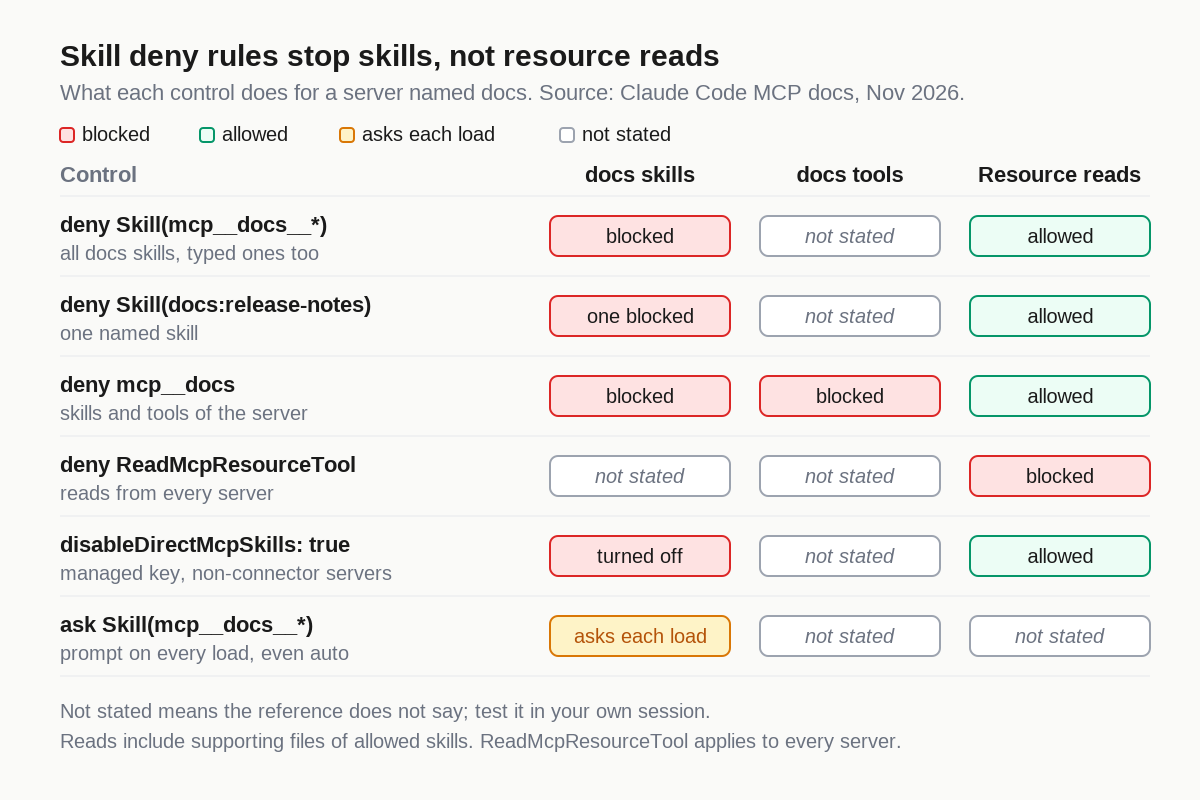
Pick the rule with this decision order:
- You trust the server but want to see each load: use the
askrule. With an ask rule, Claude needs your approval each time, including in auto and bypassPermissions modes. - One skill is a problem, the rest are fine: deny
Skill(docs:release-notes)only. - No skills from this server at all: deny
Skill(mcp__docs__*), which also blocks typed commands. - You do not want the server acting either: deny
mcp__docs, which blocks its skills and tools. - The supporting files themselves must not be read: add
ReadMcpResourceTool, knowing it applies to every server’s resources, not justdocs.
The allow rule has limits. Put it in user or managed settings; it works for servers added at user or local scope and for managed servers, but not for connectors, .mcp.json servers or plugin servers. If you are deciding which mode should be the default for a whole team, our fleet permission policy guide covers that wider question, and the MCP server inventory ritual is a good weekly place to list which servers now ship skills.
Turn server skills off or on for a fleet
One managed key controls skills from servers other than claude.ai connectors. The managed settings documentation describes how to deploy it:
- Choose a direction. Set
disableDirectMcpSkillstotrueto turn server skills off, or tofalseto turn them on for Team and Enterprise members who sign in with/login. - Write the file. Save the JSON below as
managed-settings.json. - Place it on each machine. Use
/Library/Application Support/ClaudeCode/managed-settings.jsonon macOS,/etc/claude-code/managed-settings.jsonon Linux and WSL, orC:\Program Files\ClaudeCode\managed-settings.jsonon Windows. - Confirm on one machine. Run
/statusand read theSetting sourcesline; it should list Enterprise managed settings (file). Then repeat case 07 from the worked example. - Handle connectors separately. A connector’s skills follow organization settings: an Owner turns on Skills over MCP in Organization settings > Connectors, and the organization’s Skills setting must also be on. To restrict one connector, change its Default restriction for unconfigured tools to Restrict to Ask or Restrict to Blocked.
- Close the personal-plan gap. On managed devices people can sign in with a personal plan, an API key or a long-lived token, where organization defaults do not apply. Set
disableDirectMcpSkillsanddisableClaudeAiConnectorstotruein managed settings to turn skills off there.
{
  "disableDirectMcpSkills": true
}
The key is read across every admin source. A true in any admin source turns skills off. To turn them on, set false in the highest-ranked admin source you use, and remember that Claude Code ignores a false in the user-writable HKCU registry. Normal resource reads from MCP servers stay allowed when skills are off.
Scanning is the other half of the fleet decision. Anthropic scans skills from third-party Directory connectors added on claude.ai, and from custom connectors while an Enterprise organization keeps skill scanning on. It does not scan skills from servers added with claude mcp add, including Directory servers added that way. The docs server in this guide is unscanned by design, so the approval and permission controls above are what stand between its files and your sessions. Our plugin and MCP marketplace hygiene guide covers how to vet third-party servers before they ever reach that point.
Troubleshooting: the skill never shows up
Start with claude --debug=mcp, which the reference names as the log to read for missing MCP skills, then match what you see:
| What you see | Likely cause | What to do |
|---|---|---|
claude mcp get docs shows ✘ Failed to connect |
The server exits at start: SDK older than 2.4.0, missing "type": "module", or a wrong path |
Run node /home/dev/docs-mcp/server.mjs yourself, read the error, and check the Issue: line |
Connected and listed, but no skills and no Protocol row on the server’s /mcp page |
The connection used the earlier protocol path | Confirm the server is on the v2 SDK; remove MCP_SDK_GENERATION=v1 or MCP_PROTOCOL_NEGOTIATION=legacy if set; set MCP_PROTOCOL_NEGOTIATION=auto, then Reconnect |
| The stdio server takes over three seconds to start | npx or a build step in the command |
Point the command at the installed program, as in Step 3, then select Reconnect |
/status has a Features row naming a variable such as DISABLE_TELEMETRY |
Feature-flag fetching is off | Unset the variable and restart Claude Code |
Other skills appear, release-notes does not |
Folder name and frontmatter name differ, so the SDK skipped the skill with a warning |
Rename to match, Reconnect, and read the server’s stderr and the debug log |
| No MCP skills at all on a Team or Enterprise login | The organization default is off | Ask an admin to set disableDirectMcpSkills to false in the highest-ranked admin source |
| No MCP skills with an API key, Console login or custom base URL | Still rolling out, or an unsupported connection | Use /login with a Pro, Max or Ultra account over a direct connection |
Unknown command, or Claude treats /docs:release-notes as text |
A transient case the reference lists | Send the command again |
Two details explain the protocol row. Claude Code’s v2 runtime asks HTTP and stdio servers whether they support the newer revision and uses it with those that do. With MCP_PROTOCOL_NEGOTIATION unset, it can skip asking a stdio server for seven days, for example after the server exited when asked. If you fixed a server that crashed during an earlier attempt, setting the variable to auto gets it asked again sooner.
Rollback and cleanup
Undo the setup in reverse order, so each step leaves a working session:
- Remove permission rules. Delete the
denyoraskentries from.claude/settings.json, or remove them in/permissions. - Clear the stored approval. Delete the Allow this version rule for
docs:release-notesin/permissions. - Disable without deleting, if you may return. Toggle
docsoff in/mcp; Claude Code records the choice indisabledMcpServersand keeps the configuration. - Remove the server. Run
claude mcp remove docs. - Revert the managed key. Delete
disableDirectMcpSkillsfrommanaged-settings.json, or restore the previous value, then confirm theSetting sourcesline in/status. - Delete the project folder once nothing references it.
claude mcp remove docs
claude mcp list
Expected observation: docs no longer appears in claude mcp list, and docs:release-notes is gone from the / menu in a new session. For a stdio server there are no OAuth tokens to revoke, so removal is the whole cleanup on the client side.
What the documentation does not settle yet
Skills over MCP is a beta on both sides of the wire, and a few details are still moving. Check these against your installed versions before you rely on them:
- The exact
loadSkillssignature. The release notes give the call shape but not whether it is asynchronous or what it returns. The server file above usesawaitso it works either way. - How the extension attaches.
attachis marked experimental and may change in a minor release. The pull request says the API is shaped to move onto a genericextensions: [skills]registration, and a follow-up pull request for that was still open when it was referenced. - The older protocol revision. The SDK serves skills on both 2025-11-25 and 2026-07-28. The pull request calls 2025-11-25 support a backport pending a working-group decision, and says the SDK would hide the extension on those connections if the group decides on 2026-only.
- The minimum Claude Code version. The MCP reference says v2.1.331. Treat later release notes as the authority if they raise it.
- A shell-command hook for skills. Release coverage of Claude Code 2.1.332 mentions a PreSkillShellCommand hook event. None of the references used here document its input or matching rules, so no hook configuration is shown; read the hooks reference for your version before writing one.
- VS Code and Remote Control. MCP skills are still rolling out in the VS Code extension, and over Remote Control you ask Claude to use a skill rather than sending its command.
The safe pattern does not depend on any of these. Keep skills small and side-effect free, register servers by an installed command, use an ask rule while you learn what a server ships, and treat every server-side edit as a new version that someone approves.
Sources
- Anthropic: MCP servers can now ship skills, run tasks, and more with Claude (Nov 24, 2026)
- Claude Code Docs: Connect Claude Code to tools via MCP
- Model Context Protocol: Skills extension overview
- MCP Skills Extension specification (beta)
- modelcontextprotocol/typescript-sdk releases (2.4.0, Oct 23, 2026)
- Claude Code Docs: Deploy managed settings
- modelcontextprotocol/typescript-sdk pull request #3047: Skills extension (SEP-2640)
- MCP TypeScript SDK v2 documentation
- modelcontextprotocol/ext-skills repository
- OTW Ai Community on X: Skills over MCP recap