Docker Sandboxes Firecrawl Kit: Give a Sandboxed Agent Live Web Search Without Widening Its Allowlist
Set up Docker Sandboxes Firecrawl kit: store the key once, pick v3 or v2, approve the binding, and prove in sbx policy log that only api.firecrawl.dev opened.

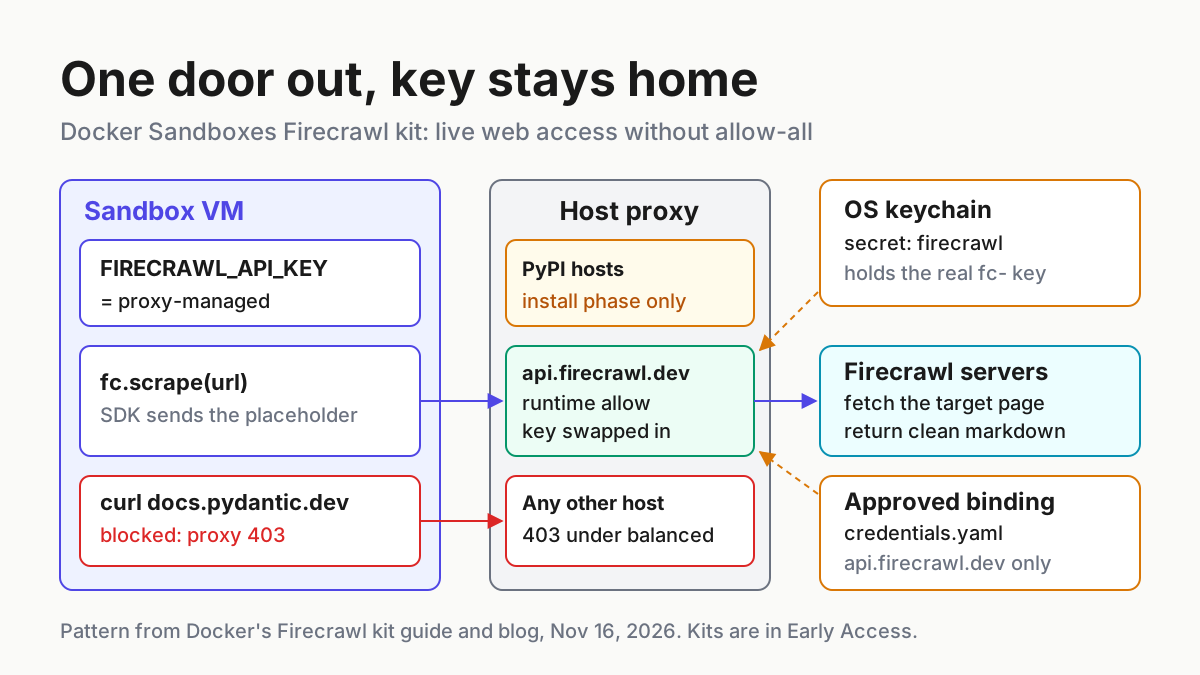
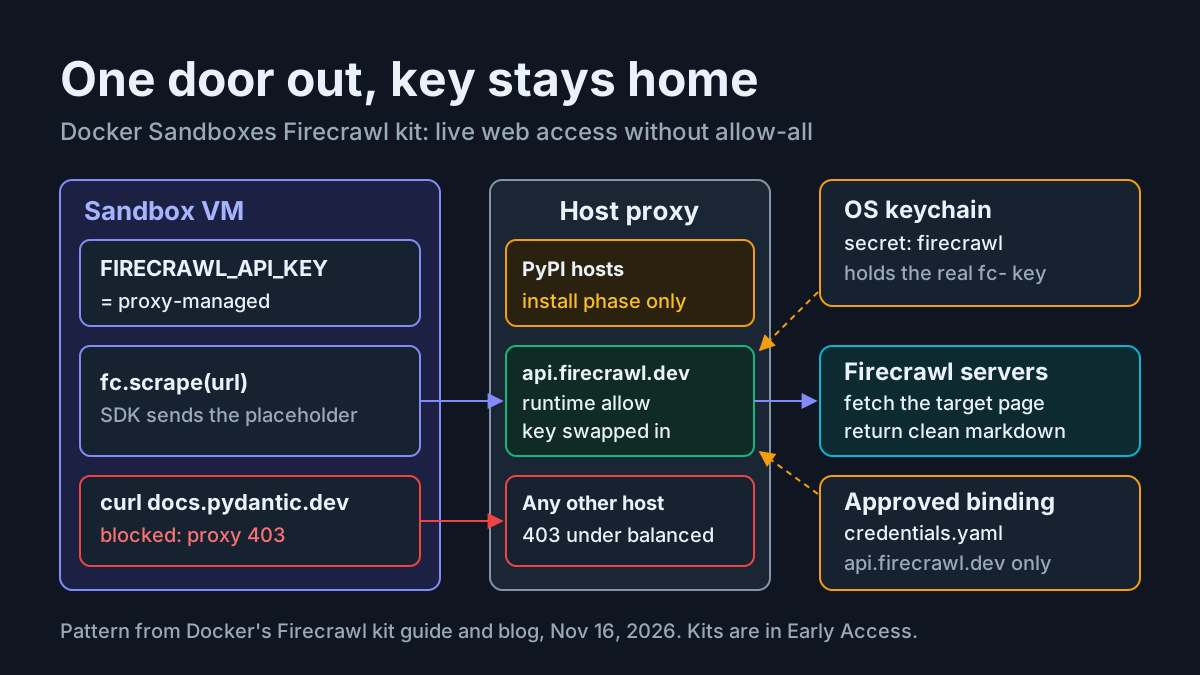
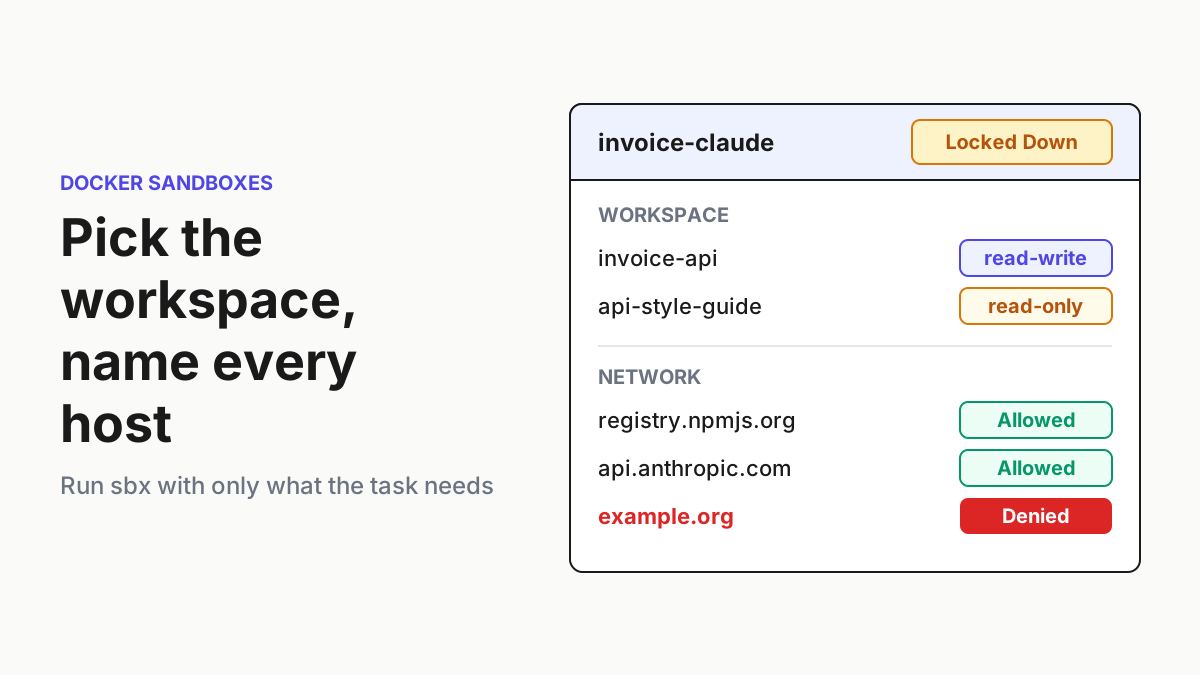
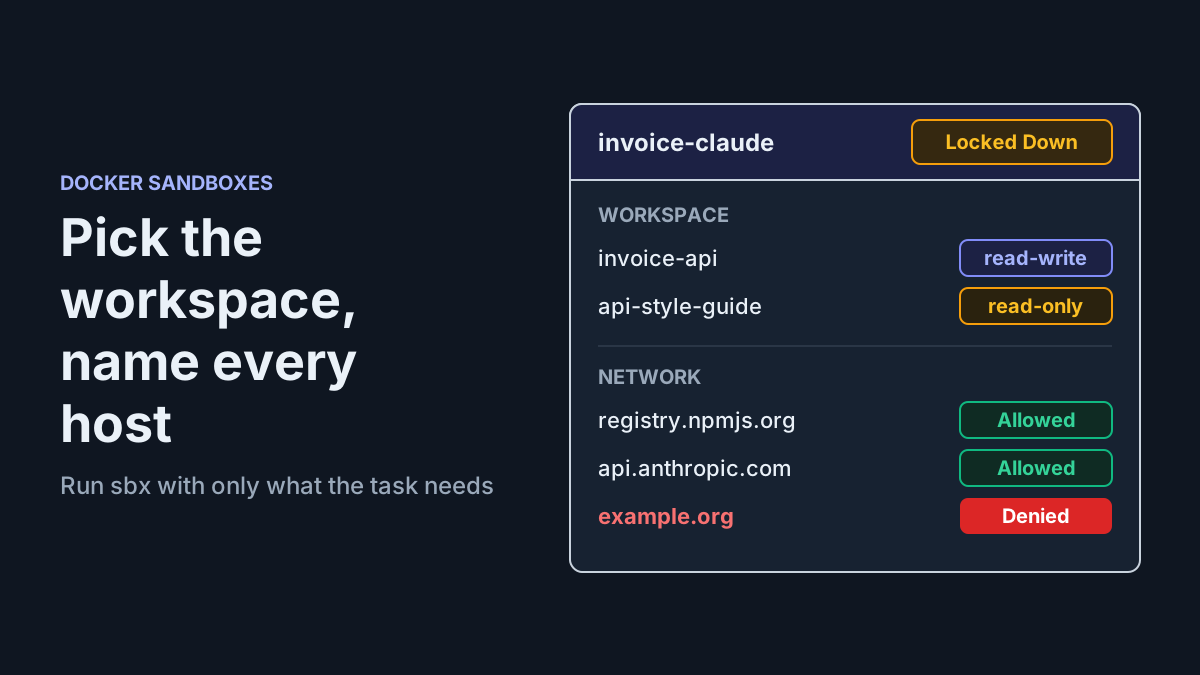
Your coding agent runs inside a Docker sandbox, the global network policy is set to balanced, and the first time it tries to read a library changelog it gets a proxy 403. The Docker Sandboxes Firecrawl kit fixes that problem without the usual escape hatch of switching the sandbox to allow-all. It adds one runtime host, api.firecrawl.dev, installs the Firecrawl Python SDK, and has the host-side proxy attach your API key on the way out, so the real key never enters the VM. Docker announced the kit on its blog on November 16, 2026, alongside a matching Docker Docs guide.
This tutorial is for a developer who already runs Claude Code, Codex or a plain shell workload under sbx and wants the agent to search, scrape and crawl current pages. It builds one worked sandbox, sandbox:firecrawl-shell-01, from an empty secret store to a scrape you can account for in sbx policy log, and then returns the host to where it started. If you have never run sbx, read our Docker Sandboxes setup guide first. It covers workspaces, the base network policy and teardown. This article starts where that one stops: adding a third-party capability to an isolated agent without loosening the isolation.
By the end you should be able to show four things on your own machine:
- the sandbox reaches pypi.org and files.pythonhosted.org while the kit installs, and api.firecrawl.dev at runtime;
FIRECRAWL_API_KEYinside the VM readsproxy-managed, never a realfc-value;- a direct
curlto a documentation site from inside the sandbox still fails with a proxy 403; - after rollback, no secret, binding, sandbox or rule for Firecrawl remains.
What the kit adds to a sandbox you already run
The Firecrawl kit is a mixin. It does not define a new sandbox. It extends whichever workload you already run. Docker’s blog lists the four typed capabilities its descriptor declares, and the kit repository README explains how each one can be checked independently:
lifecycle@1installsfirecrawl-pypinned to 4.44.0 as the agent user (uid 1000). If the install or the post-install import check fails, sandbox creation fails.credential@1requests the key stored under thefirecrawlservice. Inside the sandbox the variable holds the literal placeholderproxy-managed, and the proxy writesAuthorization: Bearer <key>only on requests to api.firecrawl.dev.network-policy@1is split by phase: PyPI hosts during install, api.firecrawl.dev at runtime.agent-context@1ships a context file that tells the agent the SDK exists, how to call it and which sandbox limits apply. The workload indexes it from its ownAGENTS.md.
The Kit v3 specification explains why this is reviewable. A kit is one ordinary OCI image whose manifest annotation carries the declarations, so pinning a version or digest pins the content and the authority it asks for together. The spec also says unknown fields are errors and a required capability the host cannot grant refuses the launch. A permission is never dropped silently.
Below is the shape of those declarations. It is an illustrative reconstruction, built from the credential@1 and network-policy@1 schema in Docker’s credentials documentation and the hosts the blog names. It is not a copy of firecrawl/firecrawl.yaml. Read the real descriptor inside the sandbox, as shown later.
# syntax=docker/sandbox-kit:3
# Illustrative shape only. The published descriptor is printed by:
#   cat /usr/share/sandbox/kit/firecrawl/kit.yaml
schemaVersion: "3"
kind: mixin
capabilities:
  - type: com.docker.sandbox/network-policy@1
    config:
      install:
        allow: [pypi.org, files.pythonhosted.org]   # only while the hook runs
      runtime:
        allow: [api.firecrawl.dev]                  # the one host the agent keeps
  - type: com.docker.sandbox/credential@1
    config:
      service: firecrawl            # must match: sbx secret set firecrawl
      phase: runtime
      apiKey:
        name: FIRECRAWL_API_KEY     # what the SDK reads inside the VM
        proxyManaged: true          # VM sees the sentinel proxy-managed
        inject:
          - domain: api.firecrawl.dev
            header: Authorization
            format: "Bearer %s"
  # lifecycle@1 (pip install firecrawl-py==4.44.0) and
  # agent-context@1 (firecrawl-context.md) omitted here
Three choices in that shape do the security work. The install and runtime allow lists are separate, so PyPI access is meant for the install hook, not for the agent afterwards. The service name is the join key between the kit’s request and your stored secret, which is why you store the key as firecrawl and nothing else. And proxyManaged: true with an explicit inject domain means the key can only be written into a header on requests to api.firecrawl.dev. Requests to other hosts never carry it, according to the Docker guide.
One more property matters for planning: kit network rules add to your sandbox policy and never narrow it. Under Docker’s balanced preset, general websites, including most documentation sites, return a proxy 403, so Firecrawl becomes the agent’s route to them. Under deny-all, api.firecrawl.dev is the only web host the agent can reach.
Before you start: what the kit needs on your host
Work through this checklist on the host, not inside a sandbox. Each item maps to a failure you will otherwise meet later.
- [ ] sbx 0.46 or later for the v3 kit. Run
sbx version. The README says the v2 kit works from 0.45, but the worked example uses v3. The sbx CLI reference listsversion,secret,policy,runandrm, which are the only verbs this guide needs. - [ ] Signed in. Run
sbx loginonce. Docker Desktop is not required. - [ ] A global network policy. Run
sbx policy init balancedif you have never set one. Thesbx policy initreference describes this as one-time setup that fails once a preset exists; until it runs, everysbx runfails withglobal network policy has not been initialized. - [ ] A Firecrawl API key. Keys start with
fc-. Scrapes, searches and crawls use Firecrawl credits. - [ ] A project directory that is not your home directory.
sbx runmounts the current directory, and the README notes that mounting your whole home directory fails withmount policy denied. - [ ] To use the v2 path from the published image: the Docker CLI with Buildx on the host, because that path resolves
:latestto a digest withdocker buildx imagetools inspect.
Check the active preset before you change anything. Docker’s getting-started page shows sbx policy ls as the command that lists the rules in effect, and notes that with Balanced common development services are permitted while other destinations are blocked unless you approve them.
Choose the kit line: v3 mixin or v2 for built-in agents
The kit ships in two formats with the same declarations, and you cannot mix them. The README is blunt about it: a v3 mixin only composes onto a v3 workload, and the v2 mixin only onto the built-in agents. The spec repository adds the naming rule that makes this easy to spot: the docker organization publishes v3 kits and the sbx organization still carries the older v2 line.
| You run | Kit line | Kit reference | Base you compose onto | Pinning rule |
|---|---|---|---|---|
A v3 workload such as docker/sbx-kit-shell |
v3 | docker.io/firecrawl/sbx-kit-firecrawl:1.0.0 |
docker/sbx-kit-shell:1.0.0, optionally --kit docker/sbx-kit-claude-mixin:2.1.285 |
A version tag is fine; a digest is stricter |
A built-in agent: sbx run claude, codex, copilot, gemini, opencode, shell and others |
v2 | docker.io/firecrawl/firecrawl-docker-sandbox |
The agent name as the trailing argument | :latest is rejected; resolve it to a digest, or pin a 40-hex git commit |
| You want to read or modify the kit first | Either, from source | ./firecrawl-docker-sandbox/firecrawl (v3) or ./firecrawl-docker-sandbox/ (v2) |
Same as the matching row | Your local clone is the pin |
Pick v3 when you are starting fresh. The descriptor travels in the image, so a version tag works, the kit describes itself inside the sandbox, and v3 refuses to create the sandbox when the required credential has no secret, instead of letting the agent hit a 401 mid-task.
Pick v2 when your team already launches built-in agents with sbx run claude or sbx run codex and you do not want to change the base. The trade-off is pinning. Kit references must pin a commit SHA or a digest; branches, tags and :latest are rejected. The README’s two documented forms are:
# Published image: resolve :latest to a digest first (plain inspect output;
# the README warns that the --format path fails on the kit's YAML config)
digest=$(docker buildx imagetools inspect docker.io/firecrawl/firecrawl-docker-sandbox:latest | awk '/^Digest:/ {print $2}')
sbx run --kit "oci://docker.io/firecrawl/firecrawl-docker-sandbox@$digest" claude

# Straight from git, pinned to a commit
git ls-remote https://github.com/firecrawl/firecrawl-docker-sandbox.git main
sbx run --kit "git+https://github.com/firecrawl/firecrawl-docker-sandbox.git#ref=<commit-sha>" codex
What happens if you get the line wrong is not documented as a specific error message. The README states the composition is unsupported, and the spec says resolution fails closed. If a launch fails right after you add the kit, check the organization in each reference before you debug anything else.
Store the Firecrawl key without putting it in the VM
Providing a value and approving its use are separate steps in sbx. This section does the first one.
-
Store the key under the service name the kit declares:
sbx secret set firecrawlsbxprompts for the value. Prefer the prompt to the README’s piped form (echo "$FIRECRAWL_API_KEY" | sbx secret set firecrawl) on shared machines, because it keeps the key out of your shell’s environment and history. -
Decide the scope. Service secrets are global by default, so every sandbox that requests the
firecrawlservice can use the key once you approve it. To limit it to the worked example, add--sandbox firecrawl-shell-01. The credentials documentation says sandbox-scoped secrets take precedence over global ones, and that adding, updating or removing a service secret takes effect in existing local sandboxes without a restart. Note that sbx before 0.46 needed-gfor global scope. -
Confirm the store:
sbx secret lsExpect a row with
SCOPE (global)or your sandbox name,SERVICE firecrawland a masked value. -
Know where it lives. On macOS it is the system Keychain, on Windows the Credential Manager, and on Linux the desktop Secret Service. On headless Linux without a Secret Service, sbx falls back to a file under
~/.config/com.docker.sandboxesprotected by file permissions, and prints a notice saying so. Treat that directory as sensitive.
The secret is now on the host and nowhere else. Nothing has been approved yet, so no sandbox can use it.
Launch sandbox:firecrawl-shell-01 and approve the binding
The worked example uses Docker’s plain shell workload, so you can test the SDK directly before any agent touches it.
-
From your project directory, start the sandbox with the v3 kit:
sbx run docker/sbx-kit-shell:1.0.0 --name firecrawl-shell-01 \
  --kit docker.io/firecrawl/sbx-kit-firecrawl:1.0.0 .
The trailing
.mounts the current directory. The--nameflag comes from the Docker Docs guide, which names its sandboxfirecrawl-shell; the blog and README forms omit it. Combining the two documented forms is our choice, so if your sbx version rejects the flag in this position, drop it and read the generated name fromsbx ls. -
Approve the credential request. On first run sbx asks you to approve sending the
firecrawlcredential to api.firecrawl.dev. The blog and README both say to accept the defaults, since the value already lives in the secret store. sbx writes the approval to~/.config/sbx/credentials.yaml(%APPDATA%\sbx\credentials.yamlon Windows). -
Watch the install. sbx pulls both images, runs the install hook as the agent user and opens a shell. If the hook cannot install or import the SDK, creation stops. The README says a custom base without
python3andpython3-pipfails with a message saying so. -
Add the agent when the plumbing works. For Claude Code on the same workload, add its mixin alongside the Firecrawl kit:
sbx run docker/sbx-kit-shell:1.0.0 \
  --kit docker/sbx-kit-claude-mixin:2.1.285 \
  --kit docker.io/firecrawl/sbx-kit-firecrawl:1.0.0 .
The binding sbx records looks like this, per the README:
bindings:
  firecrawl:
    apiKey:
      domains: [api.firecrawl.dev]
That file is only an approval record. It does not hold the key. The credentials documentation says third-party kits need an approved binding for each credential regardless of schema version, while the built-in kits shipped with sbx do not. Declining writes no entry at all.
The Docker Docs guide uses a shorter launch, sbx run shell --name firecrawl-shell --kit docker.io/firecrawl/sbx-kit-firecrawl:1.0.0, and says sbx pulls both kits. That reads as the shell name resolving to a kit workload in current sbx, while the README pairs the built-in shell agent with the v2 line. The documentation does not reconcile the two forms, so the worked example uses the explicit docker/sbx-kit-shell:1.0.0 reference that the blog, README and spec all show.
Prove each layer from inside the sandbox
Each check below covers a separate layer, from a cheap import to a full scrape. Run them in the shell that sbx run opened. In a Claude Code session, prefix each command with ! to run it inside the sandbox. The expected results are the ones the Docker guide and README document; they are illustrative expected observations for sandbox:firecrawl-shell-01, not output we captured.
| Input | Action | Expected result (illustrative) |
|---|---|---|
sandbox:firecrawl-shell-01, host terminal, key stored as service firecrawl |
sbx secret ls |
A row for service firecrawl with scope (global) or firecrawl-shell-01 and a masked secret; no row means step 1 of the store section did not run |
sandbox:firecrawl-shell-01, shell inside the VM, kit 1.0.0 installed |
python3 -c "import firecrawl, importlib.metadata as m; print(m.version('firecrawl-py'), firecrawl.__file__)" |
4.44.0 /home/agent/.local/lib/python3.14/site-packages/firecrawl/__init__.py, the user-site path that matches an install as uid 1000 |
sandbox:firecrawl-shell-01, shell inside the VM |
echo "$FIRECRAWL_API_KEY" |
proxy-managed; a real fc- value means the key came from somewhere other than the kit; an empty line means sbx predates per-credential proxyManaged, so update the CLI |
sandbox:firecrawl-shell-01, binding approved, credits available |
Run the scrape script below against https://docs.docker.com/ai/sandboxes/ |
The first 300 characters of that page as Markdown; Unauthorized means the proxy added no key; PaymentRequiredError means the key worked and credits ran out |
sandbox:firecrawl-shell-01, balanced preset, no extra allow rules |
curl https://docs.pydantic.dev/latest/changelog/ |
A proxy 403: the sandbox itself still cannot reach general documentation sites |
sandbox:firecrawl-shell-01, v3 kit |
cat /usr/share/sandbox/kit/firecrawl/kit.yaml |
The published descriptor, with firecrawl-context.md alongside it in the same directory |
The end-to-end scrape is the one to run if you run only one, because it exercises the package, the network rule and credential injection at once:
python3 - <<'EOF'
from firecrawl import Firecrawl

fc = Firecrawl()
doc = fc.scrape("https://docs.docker.com/ai/sandboxes/", formats=["markdown"])
print(doc.markdown[:300])
EOF
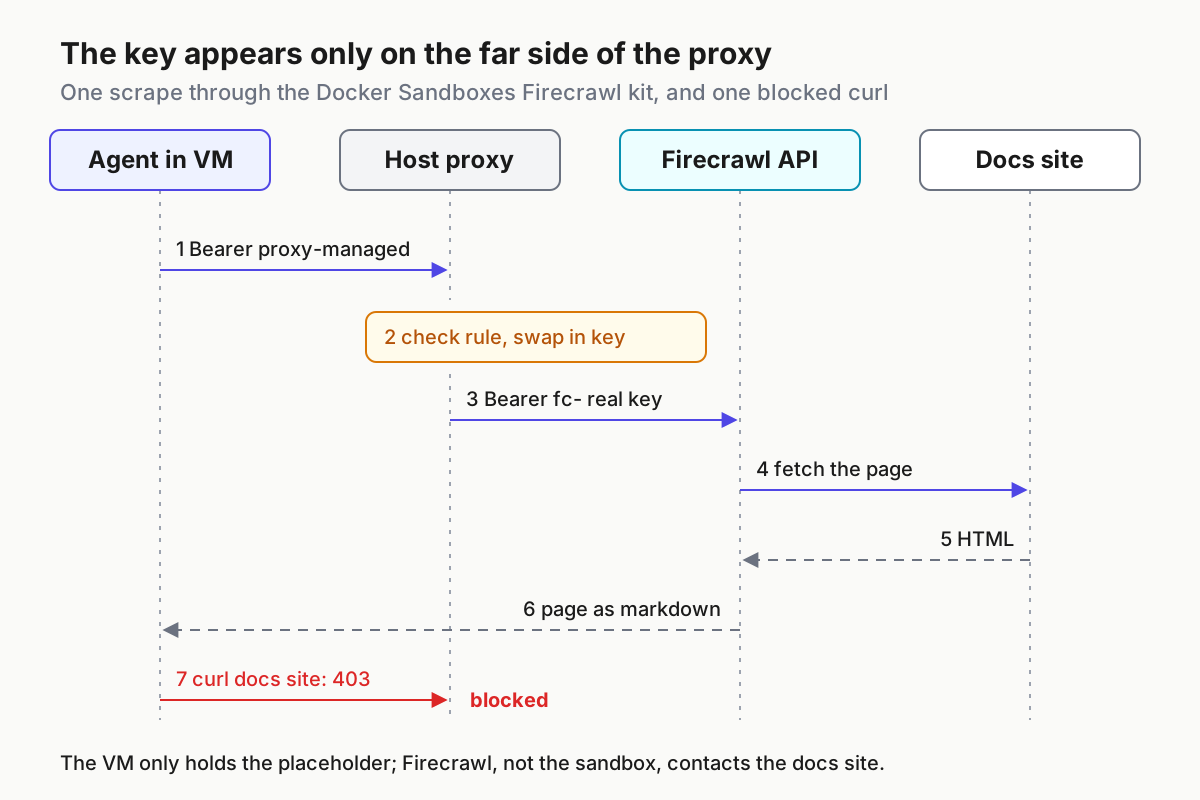
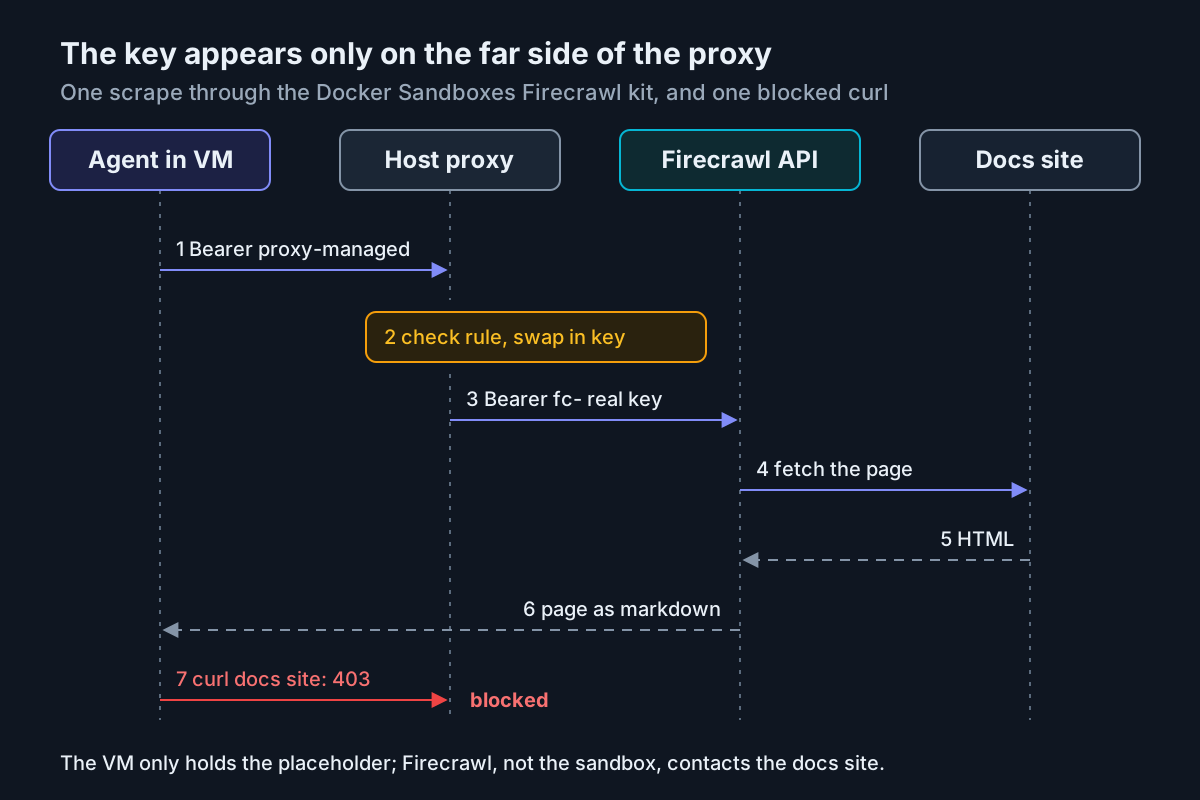
Read the pair of results together. The scrape returns Markdown while the variable says proxy-managed, and the direct curl to a docs site fails. Those three facts together are your evidence that the key was injected outside the VM and that the agent’s web access runs through one host. The blog makes the same argument: the same URL that returns a 403 to curl comes back as Markdown through the SDK.
Read sbx policy log: forwarded, blocked and absent hosts
The policy log is the host-side record of what the sandbox actually contacted. Run it on the host, not in the VM.
-
Print the log for the worked sandbox:
sbx policy log firecrawl-shell-01 -
Compare it with Docker’s sample, which the guide prints for its
firecrawl-shellsandbox:ALLOWED REQUESTS SANDBOX TYPE HOST PROXY RULE REASON LAST SEEN COUNT firecrawl-shell network api.firecrawl.dev forward domain-allowed 10:16:02 15-Oct 1 firecrawl-shell network files.pythonhosted.org forward domain-allowed 10:15:41 15-Oct 6 firecrawl-shell network pypi.org forward domain-allowed 10:15:40 15-Oct 4 -
Check each row against the decision table below.
| What you see | Meaning | Action |
|---|---|---|
| pypi.org and files.pythonhosted.org forwarded, timestamps before the first scrape | The install hook fetched the pinned SDK | None; this is the install phase |
api.firecrawl.dev forwarded with domain-allowed |
The runtime rule matched and the request left the host | Confirm a scrape succeeded; that success is what shows the key was added |
| No row for the page you scraped | Firecrawl fetched that page on its servers | None; this is the point of the kit |
| A row for a docs host you did not expect | Something in the VM tried to reach it directly | Find the process; under balanced it should have been refused |
| PyPI rows appearing after the agent started working | Runtime traffic to PyPI from another source, such as the agent running pip | Decide whether your preset should allow it; the kit’s install rule is not meant for this |
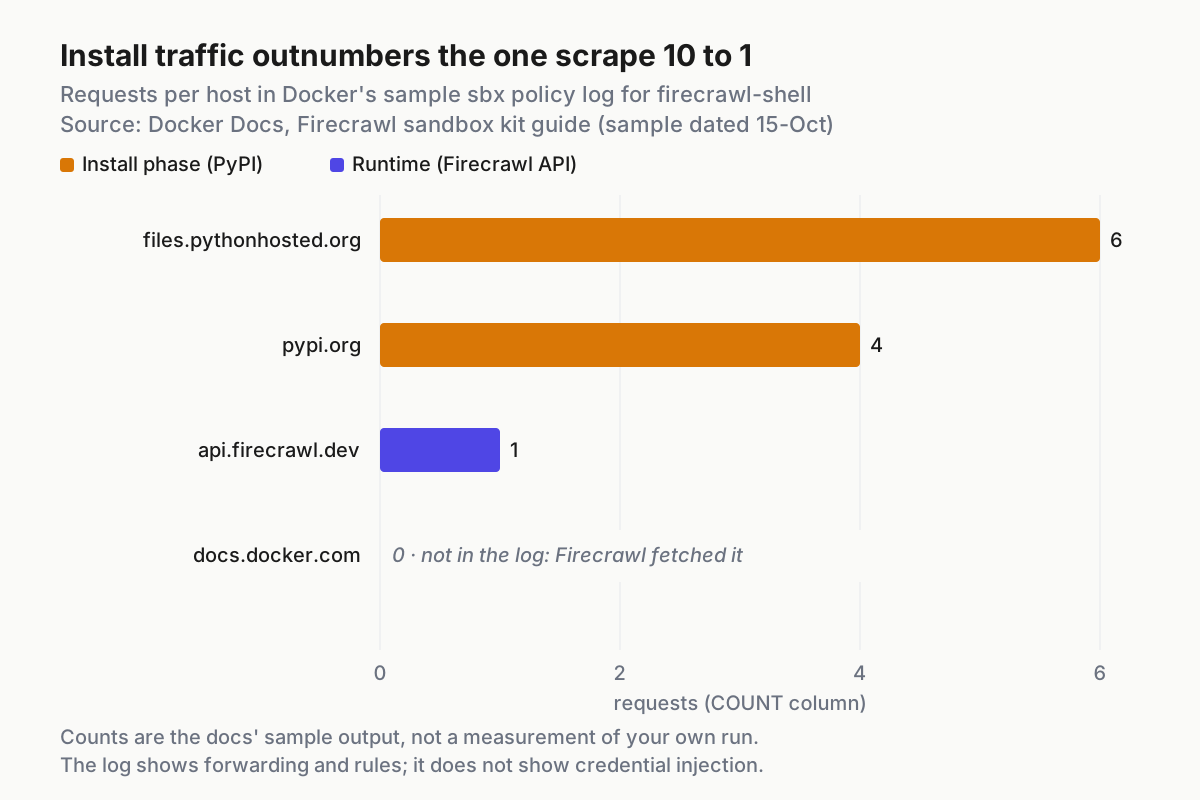
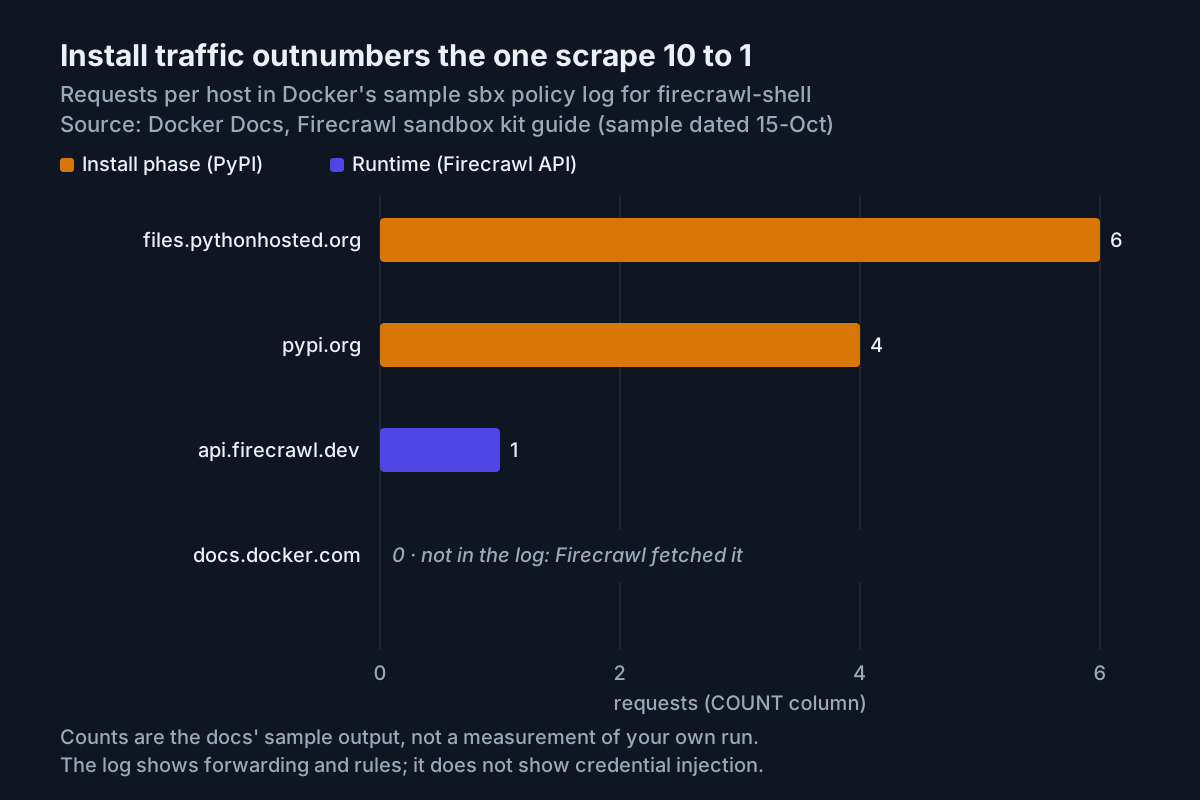
Two limits on what this log proves. First, the documented sample prints only the allowed section; the docs page does not show what a blocked entry looks like, so treat the absence of a blocked section in your own output as unverified rather than as a clean bill. Second, the log columns show forwarding and the matching rule, not whether a credential was injected. Injection is proven by the combination in the previous section: a successful scrape while the VM holds only the placeholder. If you need a stricter record, the getting-started page points to sbx policy ls for rules in effect, and the network rules page documents sbx policy ls --wide for rule IDs.
The network rules page also lists hostname-matching limits worth knowing before you rely on a log: a denied host that shares an IP address with an allowed host can still be reached, and on connections the proxy does not decrypt, the HTTP Host inside the encrypted stream is not checked. We covered why sandbox boundaries need this kind of skepticism in The Sandbox Is a Suggestion.
Give the agent a dated, live-web task
With the plumbing proven, give the agent work that cannot be answered from training data. The kit’s context file tells the agent to scrape blocked hosts through Firecrawl, so it should call the SDK without being told how.
-
Start the Claude Code variant from the launch section, or attach to an agent workload that composes the kit.
-
Ask for something dated and checkable. The blog uses this prompt:
Read <https://docs.pydantic.dev/latest/changelog/> and list what changed in the latest Pydantic release. Quote the page, don't answer from memory. -
Check the answer for a quoted heading with a version and date. In Docker’s own run, the agent reported v2.13.4 (2026-05-06) and quoted the changelog lines. That is Docker’s observation from its post, not one we reproduced.
-
Keep requests cheap. The Docker guide’s calls are
fc.scrape(url, formats=["markdown"])for one page,fc.search("docker sandboxes kits", limit=5)for search results andfc.crawl("https://docs.example.com", limit=20)for a site section. Each crawled page uses credits, so keeplimitlow and prefer a search followed by one targeted scrape when the agent needs a single fact. -
Tell the agent what not to do. URLs found in a scrape result must also be scraped through Firecrawl, because
curlto them still returns 403. Screenshot and other media formats return links on Firecrawl’s storage host, which the allowlist does not include, so those files cannot be downloaded inside the sandbox.
If you are deciding whether a Markdown fetch is enough or a task really needs browser automation, our comparison of web-to-Markdown pipes versus computer use lays out the trade. For a different search API wired straight into an agent rather than through a sandbox kit, see the DeepSeek Search API tool guide.
Run it unattended without a silent 401
The approval prompt is the part that breaks CI. A detached run cannot answer it, and the docs describe two different outcomes depending on what is missing.
- No secret stored at all. The v3 kit refuses to create the sandbox. The blog says this is deliberate, so the agent does not hit a 401 mid-task. Store the key first.
- Secret stored, no binding. The credentials documentation says that in non-interactive contexts the sandbox starts with the credential withheld and, for a required credential, sbx prints a warning rather than failing creation. The README quotes it:
WARN: credential not sent: no binding authorizes this service. Scrapes then fail with 401 because the literalproxy-managedreaches Firecrawl. - Pre-create the binding by running the kit interactively once, or by writing the
bindingsblock shown earlier into~/.config/sbx/credentials.yamlbefore the unattended run. - Make the run fail loudly. The sbx CLI has a global
--no-inputoption: commands that need an answer fail with the command to run instead of prompting. Add the scrape check from the proof section as the first job step, so a withheld credential fails the job before the agent starts. - Mind the flag spelling. The credentials page writes
--detachand the README writes--detached. Confirm the spelling withsbx run --helpon your version before you script it.
For fleets, this is the same principle as treating permission modes as policy rather than per-session choices, which we argued in restricted mode as fleet policy: the binding file is a reviewed artifact, not something a prompt approves at 2 a.m.
Troubleshooting: match the symptom to the layer
Find the symptom, then fix the layer it points to. Do not widen the network policy to make a symptom go away.
| Symptom | Layer | Fix |
|---|---|---|
global network policy has not been initialized |
Host policy | sbx policy init balanced (or deny-all) once |
| Launch fails right after adding the kit | Kit line or pin | Check that v3 kits pair with docker/* workloads and v2 with built-in agents; replace :latest with a version, digest or commit |
| v3 create refused, credential required | Secret store | sbx secret set firecrawl, then rerun |
Scrape raises Unauthorized / HTTP 401 |
Binding | Confirm the secret is under firecrawl and that the binding for api.firecrawl.dev exists; rerun interactively to approve |
Scrape raises PaymentRequiredError / HTTP 402 |
Firecrawl account | Authentication worked; add credits or lower limit. The agent instructions tell it to stop, not retry |
WebsiteNotSupportedError ... Blocked by network policy: domain api.firecrawl.dev:443 |
Organization governance | sbx policy ls firecrawl-shell-01 and look for Managed by <org>; only the organization can add an api.firecrawl.dev allow rule |
| Scrape blocked after you added a deny rule | Local deny | Intended: a sandbox deny beats the kit’s allow. Remove it with sbx policy rm network --sandbox firecrawl-shell-01 --resource api.firecrawl.dev |
FIRECRAWL_API_KEY is empty |
sbx version | Update the sbx CLI; per-credential proxyManaged is missing |
mount policy denied: /Users/<you> |
Workspace | Run from a project directory, not your home directory |
The governance row deserves a note. Docker’s guide says that under organization governance, local and kit-defined allow rules are inactive while deny rules still restrict access. The README adds that the SDK install and the proxy-injected credential still work in that state; only the outbound scrape is gated. Ask the governance owner for one api.firecrawl.dev rule rather than trying to work around it locally.
You can rehearse the deny override on purpose. The network rules page shows the pattern for a kit-allowed host, and changes take effect immediately:
sbx policy deny network --sandbox firecrawl-shell-01 api.firecrawl.dev
# rerun the scrape: illustrative expectation is a proxy-side block, not Markdown
sbx policy rm network --sandbox firecrawl-shell-01 --resource api.firecrawl.dev
That drill is also your emergency stop: one command cuts the agent’s web access without touching the secret or the kit. If you are also using Claude Code’s own command sandbox inside the VM, keep the two apart when debugging; our Claude Code sandbox troubleshooting guide covers failures that happen only inside that layer.
Roll back: secret, binding, sandbox and rules
Roll back in this order so nothing is left half-removed.
- Exit the sandbox. Sandboxes persist after you exit.
- If you scoped the secret to the sandbox, remove it while the sandbox still exists:
sbx secret rm firecrawl --sandbox firecrawl-shell-01. The credentials page notes that removing a sandbox-scoped secret restores the global secret for that service if one exists, so also remove the global one if you want Firecrawl gone entirely. - Remove the global secret:
sbx secret rm firecrawl. - Remove the sandbox:
sbx rm firecrawl-shell-01. Files in your workspace are unaffected; packages and state inside the VM are deleted. The network rules page says removing a sandbox also removes the rules scoped to it. - Delete the
firecrawlentry from~/.config/sbx/credentials.yaml. The docs say you can write entries by hand; the binding holds no key, but leaving it pre-approves the next kit that requests the same service for the same domain. - Verify: run
sbx secret lsandsbx policy ls, and confirm there is no Firecrawl secret and no allow rule for api.firecrawl.dev that you added. The docs state that sandbox-scoped rules go with the sandbox; they do not explicitly say how kit-declared rules are listed after removal, so this check is the evidence. - Avoid the sledgehammers.
sbx policy resetdeletes all local rules, restarts the daemon and stops running sandboxes.sbx resetdeletes every stored secret along with all sandbox state. Neither is needed to remove one kit.
What the documentation leaves open
Kits are experimental and in Early Access, the v3 specification is targeted for a final release in Q4 2026, and the blog says its steps were current for October 2026. Keep these gaps in mind:
- The Docker Docs guide launches with
sbx run shellwhile the README and blog usedocker/sbx-kit-shell:1.0.0. Confirm which form your sbx version resolves; the kit repository README carries the latest. - The documented
sbx policy logsample shows no blocked section and no injection column. Confirm on the sbx CLI reference forpolicy log. - The non-interactive flag is spelled two ways. Check
sbx run --help. - How credential injection behaves on connections the proxy does not decrypt is not described for kit credentials. The credentials page and network rules page are where to confirm.
If you run several sandboxes with different kits, record which kit versions and bindings each one carries. The broader habit of keeping that inventory visible is the subject of our AgentOps guide.
Sources
- Give sandboxed agents live web access with the Firecrawl kit for Docker Sandboxes, Docker blog, November 16, 2026.
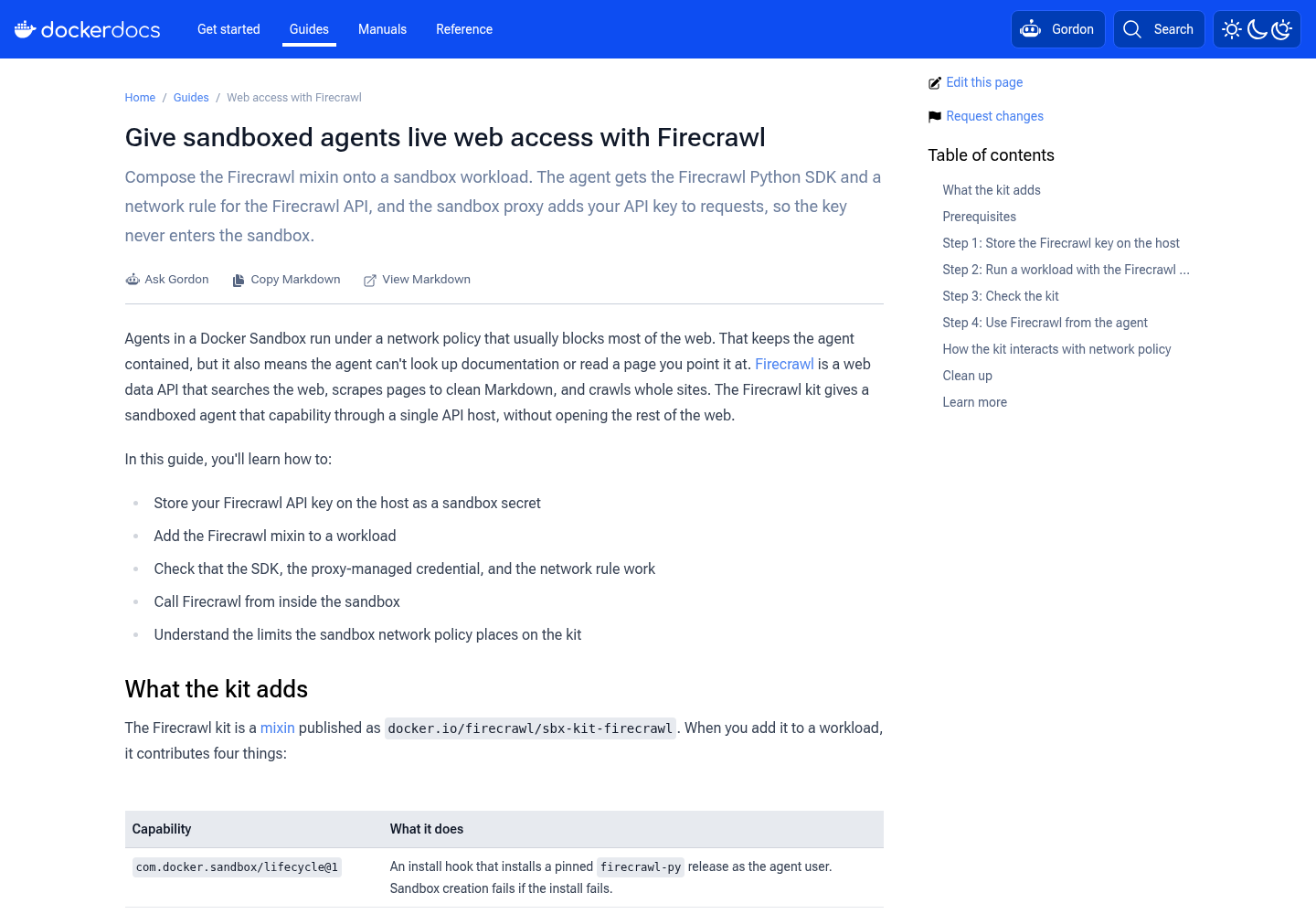
- Give sandboxed agents live web access with Firecrawl, Docker Docs guide.
- firecrawl/firecrawl-docker-sandbox, kit source and README, GitHub.
- docker/sandbox-kit-spec, Docker Sandbox Kit Specification v3, GitHub.
- Manage credentials, Docker Docs.
- Manage local network rules, Docker Docs.
- sbx policy init, Docker CLI reference.
- sbx, Docker CLI reference.
- Get started with local Docker Sandboxes, Docker Docs.