Fetch Before You Drive: Web to Markdown for AI Agents on Research Jobs
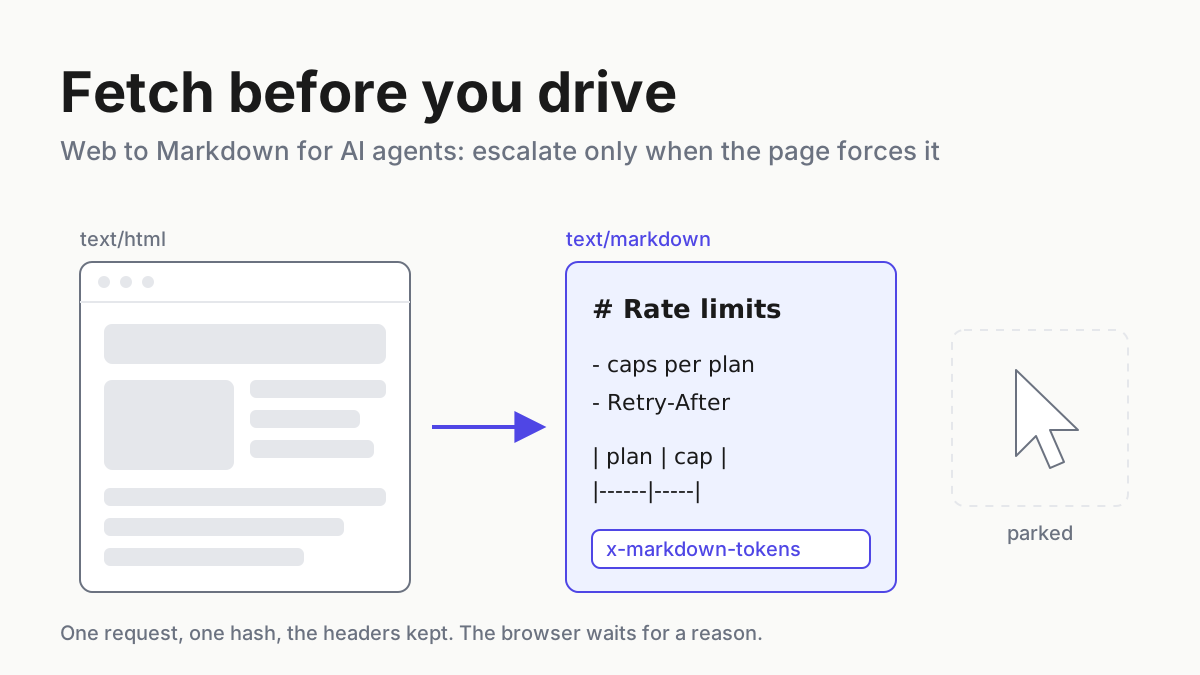
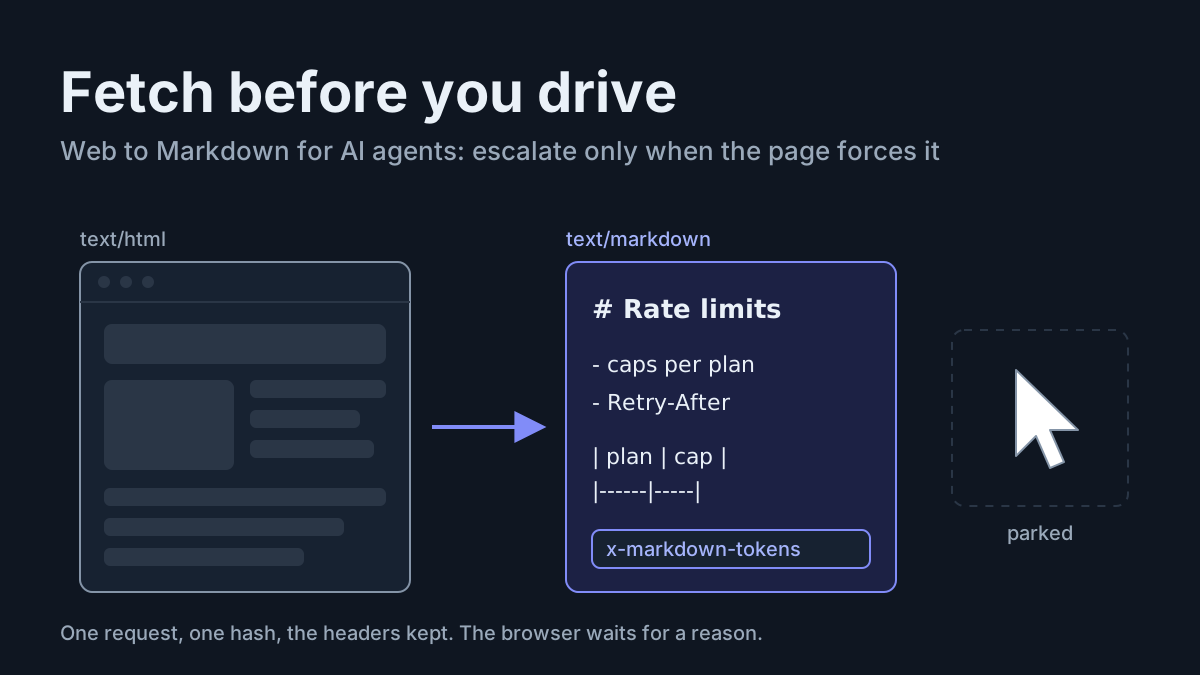
Most agent research never needs a browser. Use this decision table to fetch pages as Markdown, log token headers, and escalate to computer use only when forced.

Go deeper. Build your own.
Most research jobs you hand an agent never needed a browser, let alone a mouse. A vendor changelog, a docs page, a standards draft or a competitor’s FAQ arrives intact as Markdown over one HTTP request, and the model reads a fraction of what the raw page would cost. Driving a desktop to read the same page buys you screenshots, scroll loops and a session nobody can replay.
So make web to Markdown for AI agents the default rung of every read-only research job, and climb only when the page forces you: a headless render when JavaScript draws the content, a full browser when it hides behind clicks, computer use when a login or a form stands in the way and a person is watching. Every read keeps its URL, fetch time, content hash and response headers, so you can prove later what the agent saw.
The decision table below writes that rule down, one row per kind of page. It takes an afternoon to adopt, and it turns “the agent looked it up” into a log you can diff.
Cloudflare sorted agent reads in September, and the fetch tools agree
Three Cloudflare launches in three weeks changed how the web answers an agent. On September 15, Cloudflare’s crawler-control post said “Block AI Bots” will be deprecated, extended “Block” and “Block on pages with ads” to mixed-use crawlers such as Googlebot, Bingbot and Applebot, and added a “Disallow AI Training” setting that writes a robots.txt preference while “Accountable mixed-use crawlers remain allowed for search.” The same post files “user-directed agents visiting a page on behalf of a human, such as chat fetch bots and browser-use agents” as a category of their own, and says plainly “we’re not including a Disallow setting for Agents” for now.
On September 30, Cloudflare put Pay Per Use into beta as the successor to the Pay Per Crawl private beta of July 2025. Buyers of AI access define the uses and prices, publishers accept or reject them, the buyer reports each use through an API, and Cloudflare settles both sides monthly. The post’s thesis line: “Publishers shouldn’t have to choose between blocking every agent and giving their work away.” On October 2 came a Web Search API through AI Gateway with Exa, Ceramic and Linkup as partners, each held to Verified Bots standards: “Crawlers should be honest, transparent, and respect all bot rules and preferences.”
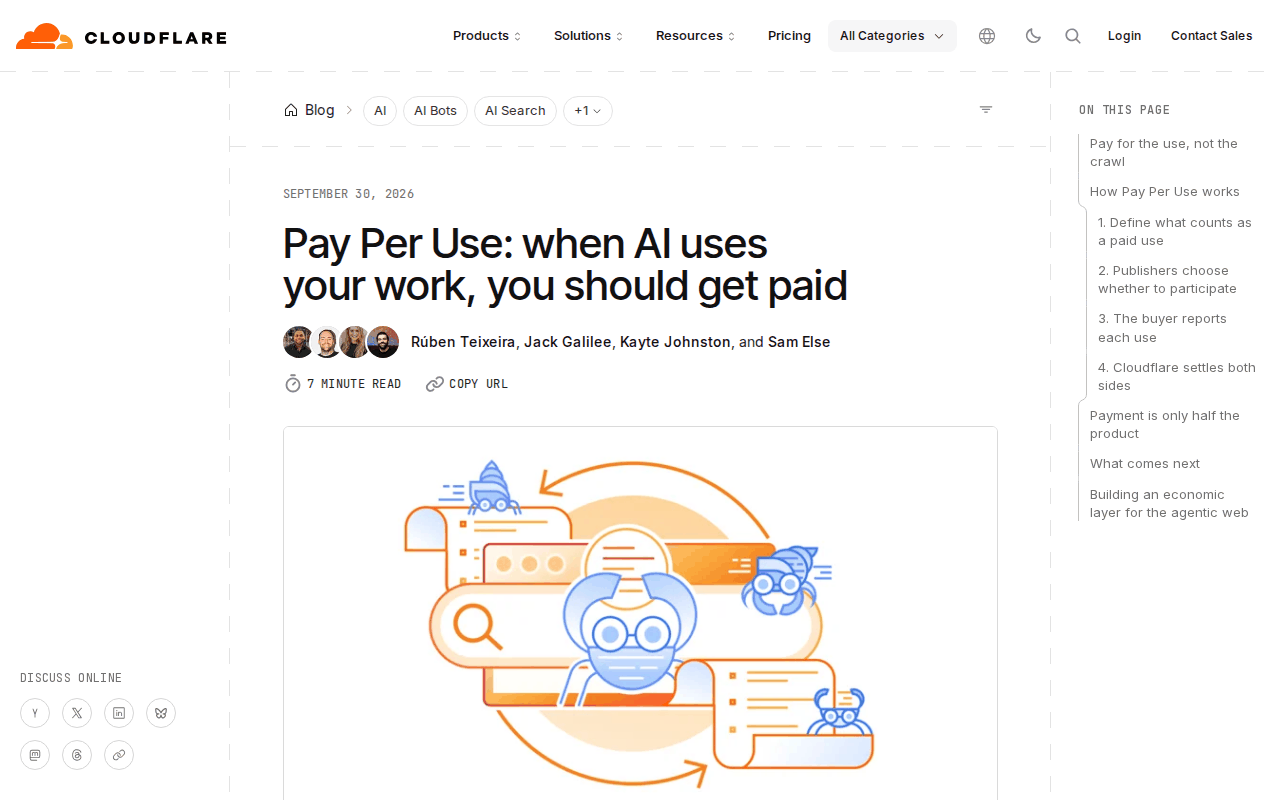 Screenshot: Cloudflare Blog, “Pay Per Use: when AI uses your work, you should get paid” (Sep 30, 2026), captured Oct 5, 2026.
Paid retrieval moved too. On September 22 Firecrawl announced a $75M Series B and Alexandria, a knowledge library for agents (press release); its changelog shows Alexandria inside Claude and Claude Code by September 24. CEO Caleb Peffer’s line: “almost no one gets paid when an AI agent actually uses what they know.”
The rung you will use most is older. Cloudflare’s Markdown for Agents shipped February 12, 2026: send Accept: text/markdown to a site that offers it and the edge returns Markdown with x-markdown-tokens and x-original-tokens headers. On the harness side, Anthropic’s web fetch tool documentation draws the same line this ladder does.
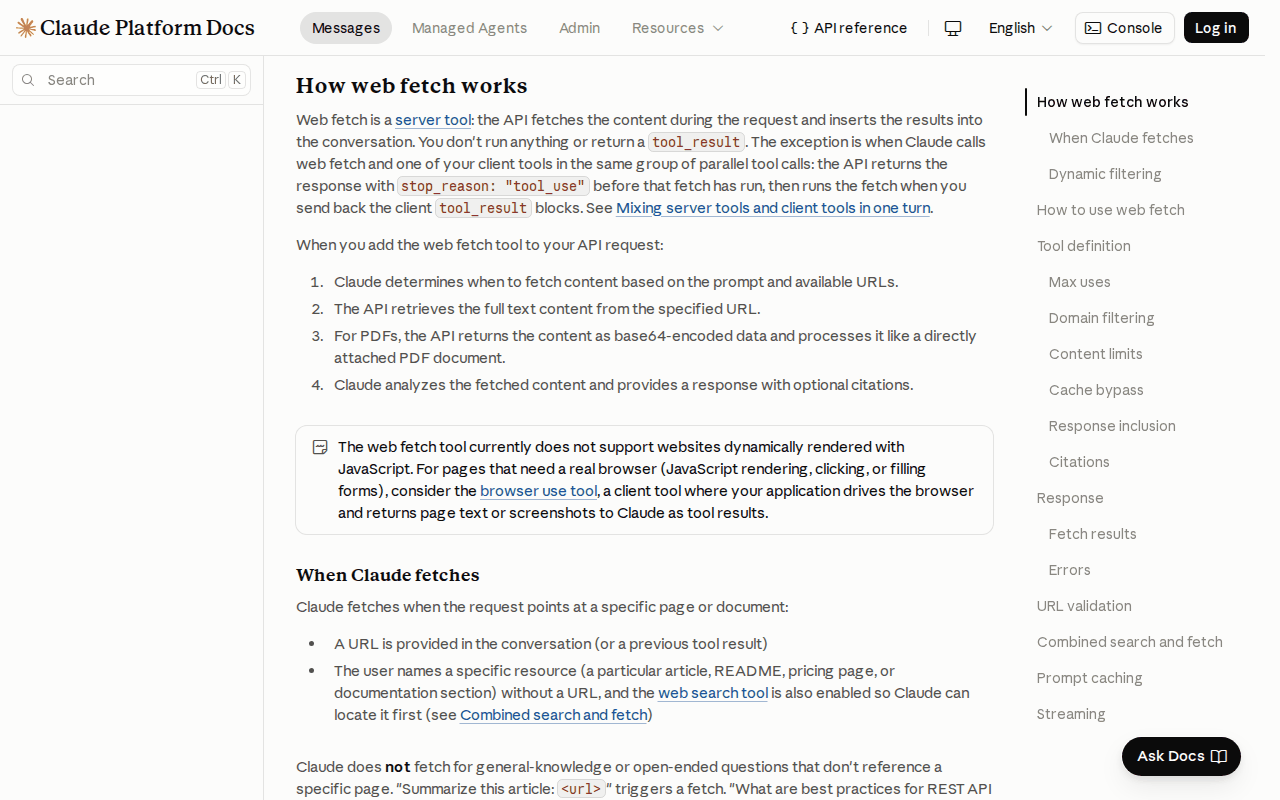 Screenshot: Claude Platform Docs, “Web fetch tool” (undated docs page), captured Oct 5, 2026.
The web fetch docs say the tool “currently does not support websites dynamically rendered with JavaScript” and send pages that need “JavaScript rendering, clicking, or filling forms” to the browser use tool. It fetches URLs that already appeared in the conversation or a previous tool result, a guard Anthropic built against exfiltration, and a robots.txt block comes back as url_not_allowed.
Why acting agents made fetch the default again
Once an agent can drive a browser or a whole desktop, every lookup starts to look like a job for the most capable tool. For reads that is backwards. A computer-use step costs a screenshot, a model turn and wall-clock time, while a fetch costs one request; a screenshot trajectory resists diffing, while a Markdown body has a hash.
The policy picture moved as well. Sites now answer agents by purpose and by price, so the status code carries information your pipeline has to keep. A browser session that “gets through” a 403 has not solved a rendering problem. It has overridden a site’s answer with your agent’s credentials.
The research-job decision table for web to Markdown pipes
This table covers read-only research. Jobs that change state in an app (filing, booking, submitting, buying) belong in the computer-use desk-job inventory, which owns the write side of the same ladder.
| Research job | Cheapest tool that works | Token meter | Determinism | Evidence | Policy gate |
|---|---|---|---|---|---|
| Static public page or docs | Fetch with Accept: text/markdown, or a reader API |
x-markdown-tokens vs x-original-tokens |
URL + fetch time + SHA-256 of body | Raw headers incl. content-signal; citations on |
robots.txt and Content Signals |
| JS-rendered app page | Headless /markdown render |
Token count of the rendered Markdown | Same, plus render timestamp | Headers + render note | Same; no login |
| PDF or report | Web fetch (PDFs supported) or a document converter | Converter output tokens | Hash of source file and output | Source URL + file hash | Document license |
| Behind a login | Official API or connector; else computer use, attended | Steps × screenshots | Weak; keep the trajectory | Recording + account used | ToS; whose account |
| Needs a form submit | Computer use, attended, or drop the job | Steps × screenshots | Weak | Recording + typed values | ToS; a human confirms |
| Site answers 402, 403 or robots disallow | None: stop | None | Log the response | Status + headers | An answer, not a retry trigger |
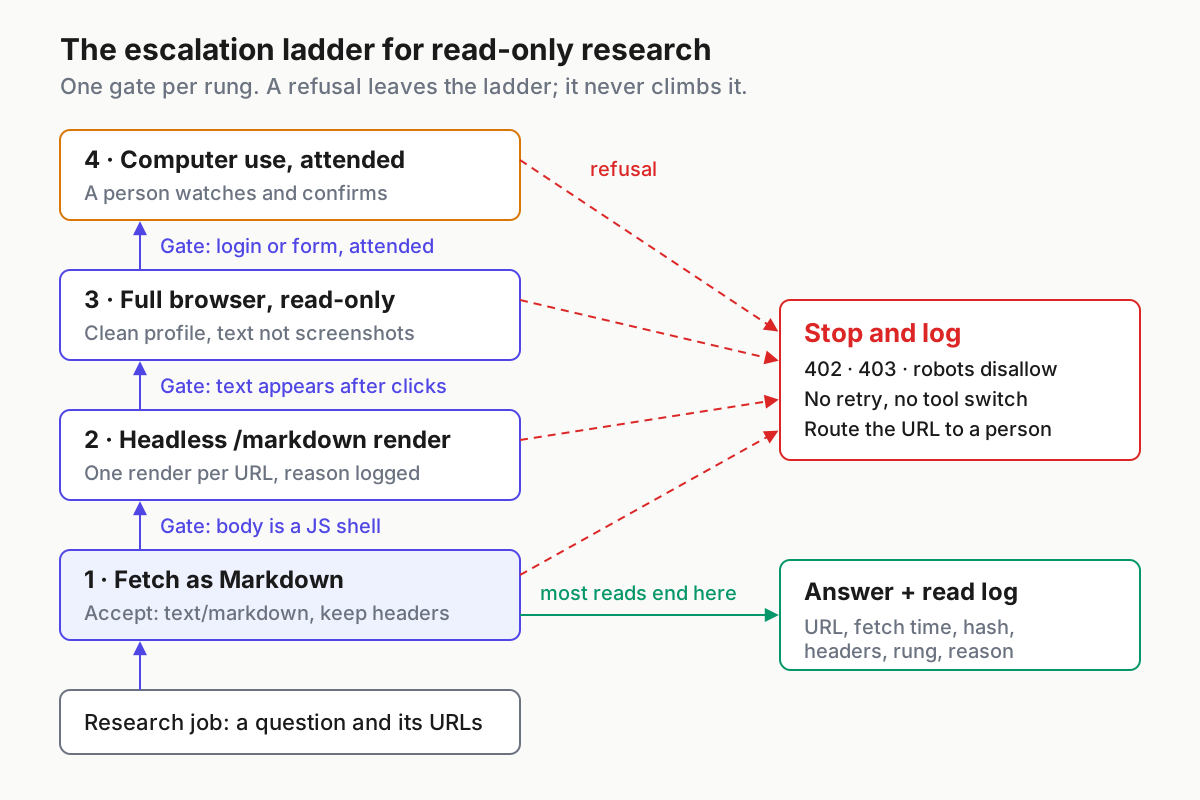
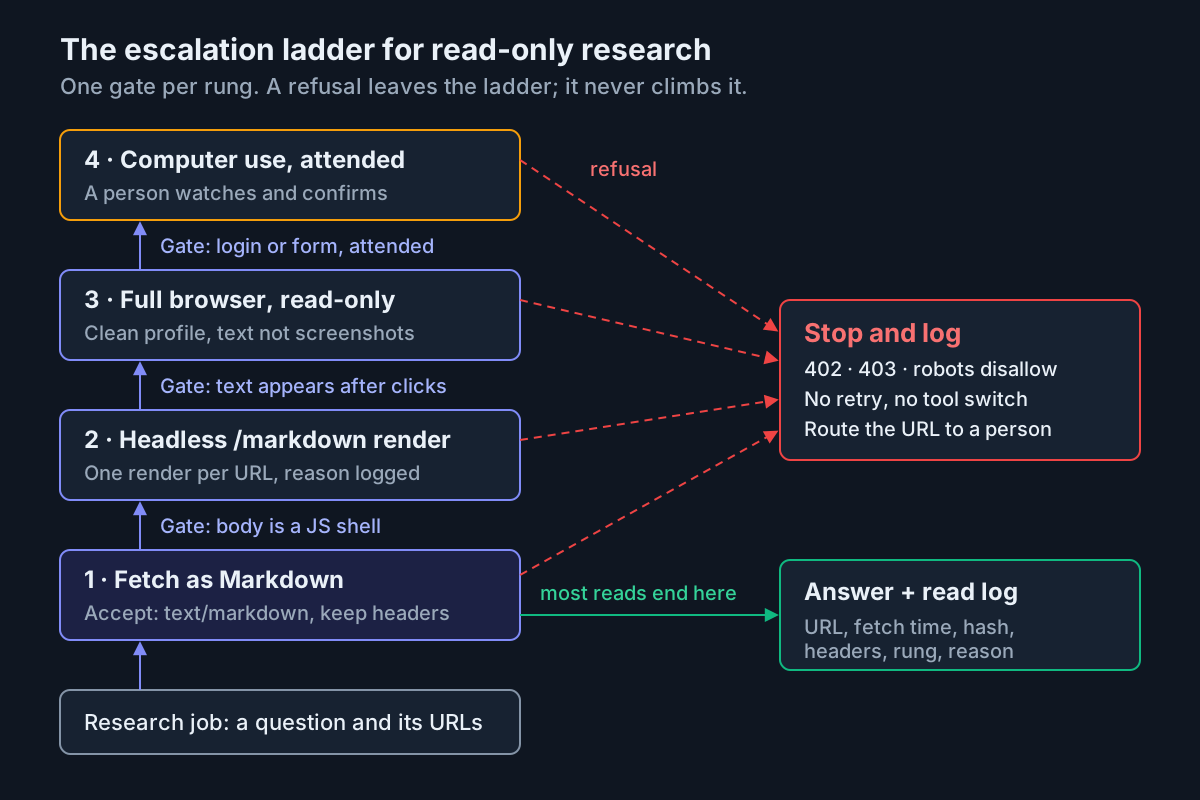 The escalation ladder: each rung has one gate, and a refusal exits the ladder instead of climbing it.
Step 1: Sort the job list into rows before you pick a tool
Write each research task as a question plus the URLs it needs, then assign it a row. When the agent has to find URLs first, a search step runs before any fetch: a web search tool, or a search API such as Cloudflare’s new one. Browserbase’s description of the split is the cleanest one in print: “Search helps the agent discover where to go, Fetch retrieves the page content, and browsers handle deeper interaction.”
- Every job names its question, its URL list or search query, and its row.
- PDFs and reports go to your document intake path; the Docling vs MarkItDown bake-off covers picking a converter.
- Login rows check for an official API or connector before anyone mentions a browser; session wrapping vs an official connector lays out that access ladder.
- Any job that writes, submits or buys leaves this table.
Step 2: Fetch as Markdown first and keep the response headers
Ask for Markdown on every request. Publishers who serve it answer with text/markdown and the token headers; everyone else sends HTML, and your pipeline converts it locally or through a reader API such as Jina Reader. Cloudflare’s Markdown for Agents reference notes that it converts HTML only, for origin responses up to 2 MB, and adds a content-signal header of ai-train=yes, search=yes, ai-input=yes when the origin sets none; a July 13 update honors origin Content Signals instead. An illustrative rung-1 read that keeps every header:
curl -sS -D headers.txt -H "Accept: text/markdown" \
  "https://docs.example.com/limits" -o page.md
grep -iE "^(content-type|x-markdown-tokens|x-original-tokens|content-signal):" headers.txt
sha256sum page.md
When HTML comes back, convert it once, in one place, with one pinned converter version, so two agents reading the same page get the same Markdown. Record the converter and its version in the log line. A converter upgrade changes every hash, and you want the log to say that was the cause.
If the read runs through Anthropic’s web fetch tool, scope it in the tool definition rather than in the prompt. The shape below is illustrative; the parameters and the web_fetch_20260318 version string are the ones the docs listed on Oct 5, and citations stay off unless you turn them on.
{
  "type": "web_fetch_20260318",
  "name": "web_fetch",
  "allowed_domains": ["docs.example.com", "status.example.com"],
  "max_uses": 5,
  "max_content_tokens": 20000,
  "citations": { "enabled": true }
}
Decide now what your pipeline does with a content-signal that says ai-input=no. The conservative rule treats it like a robots disallow for answer-time use and logs it, and that is the rule to start with.
Step 3: Make every read reproducible with a hash and a re-fetch diff
A research answer is only as good as your ability to show which bytes the agent read. Write one log line per read, and keep the Markdown body next to it under its hash. The values below are invented to show the shape.
{"job": "vendor-limits-scan", "rung": 1, "url": "https://docs.example.com/limits",
 "fetched_at": "2026-10-05T14:02:11Z", "status": 200, "content_type": "text/markdown",
 "x_markdown_tokens": 3150, "x_original_tokens": 11800,
 "content_signal": "ai-train=yes, search=yes, ai-input=yes",
 "converter": null, "sha256": "9f2c...e41a", "citations": true,
"escalated_from": null, "reason": null}- Re-fetch every source the answer cites before it ships, and diff the hash.
- When the hash changed, re-run the question against the new body instead of patching the old answer.
- Keep raw headers for as long as you keep the answer.
Step 4: Escalate to a headless /markdown render only for JavaScript
The gate for rung 2 is narrow: the Markdown came back as an app shell. Typical signals are a body of a few dozen words, a “please enable JavaScript” line, or an empty root element where the content should be. Pick a word threshold (150 is a reasonable start) and make the escalation automatic for it and for nothing else.
Cloudflare’s Browser Run, formerly Browser Rendering, exposes REST quick actions for exactly this rung: /markdown, /scrape, /json, /links, /crawl, /screenshot, /pdf and /snapshot. A headless Chromium you run yourself does the same job. The call below follows the shape in the Browser Run docs on Oct 5 (the Markdown comes back in the JSON result field); the URL and token are illustrative.
curl -sS -X POST "https://api.cloudflare.com/client/v4/accounts/$CF_ACCOUNT_ID/browser-run/markdown" \
  -H "Authorization: Bearer $CF_API_TOKEN" \
  -H "Content-Type: application/json" \
  -d '{"url": "https://app.example.com/status"}' -o rendered.json
Log the escalation with its reason (escalated_from: 1, reason: "js_shell"). A rung-2 read with no recorded reason should fail review. Cap the rung at one render per URL per job; a second render of the same URL is a loop.
Step 5: Open a full browser only when content hides behind interaction
Rung 3 is for pages where the text exists only after a click: tabs, “load more” buttons, expandable tables, infinite scroll. The agent still only reads.
- Use a clean browser profile with no stored logins, so a read-only job cannot act as anyone.
- Allowlist the domains for the job, the same list the fetch rung used.
- Extract text or an accessibility snapshot, not screenshots, whenever the tool allows it.
- Close the browser when the job ends, so the next job does not inherit its cookies and state.
- Treat fetched page text as untrusted input. Agentic browsers in 2026 covers why injection in page content is still open.
Step 6: Reserve computer use for login and form rows, attended
Computer use earns its cost when the page cannot be reached any other way: a vendor portal with no export, a form that returns the answer you need. Keep it attended. A person watches the run, confirms any submit, and owns the account it used.
- Use a secondary account built for agent work, never a personal session; cookie custody explains why.
- Write down the question the run must answer before it starts, and stop the run once it is answered.
- Record the trajectory and the typed values, since there is no content hash to fall back on.
- If the job turns out to change state, move it to the desk-job inventory and its review gate.
Step 7: Treat 402, 403 and robots disallow as answers
Escalate for rendering, never for refusal. The ladder exists to get past JavaScript and interaction, not past a site that declined your request. Switching from fetch to a browser to read a page that answered 403 is the same request wearing a different user agent.
| Response | What the agent does | What you log |
|---|---|---|
| 200 with Markdown or HTML | Read; hash; continue | Headers, hash, rung |
| 200 with an app shell | Escalate once to rung 2 | Reason js_shell |
| 401 or a login redirect | Stop; route to the login row | URL, redirect target |
| 402 Payment Required | Stop; no retry; flag for a human | Status, all headers |
| 403 Forbidden | Stop; no retry, no tool switch | Status, all headers |
| 429 Too Many Requests | Wait for Retry-After, then one retry |
Status, wait time |
url_not_allowed or robots disallow |
Stop; mark the source unavailable | Tool error, robots line |
A 402 means someone has to decide whether the content is worth paying for, and that someone is not the agent mid-run. Route it to whoever owns data spend, with the URL and headers attached.
Step 8: Meter each rung and watch the escalation share
Count reads per rung each week and divide rungs 2 to 4 by the total. That escalation share is the number that tells you whether the ladder is holding. The chart below shows why it matters, using illustrative numbers rather than measurements.
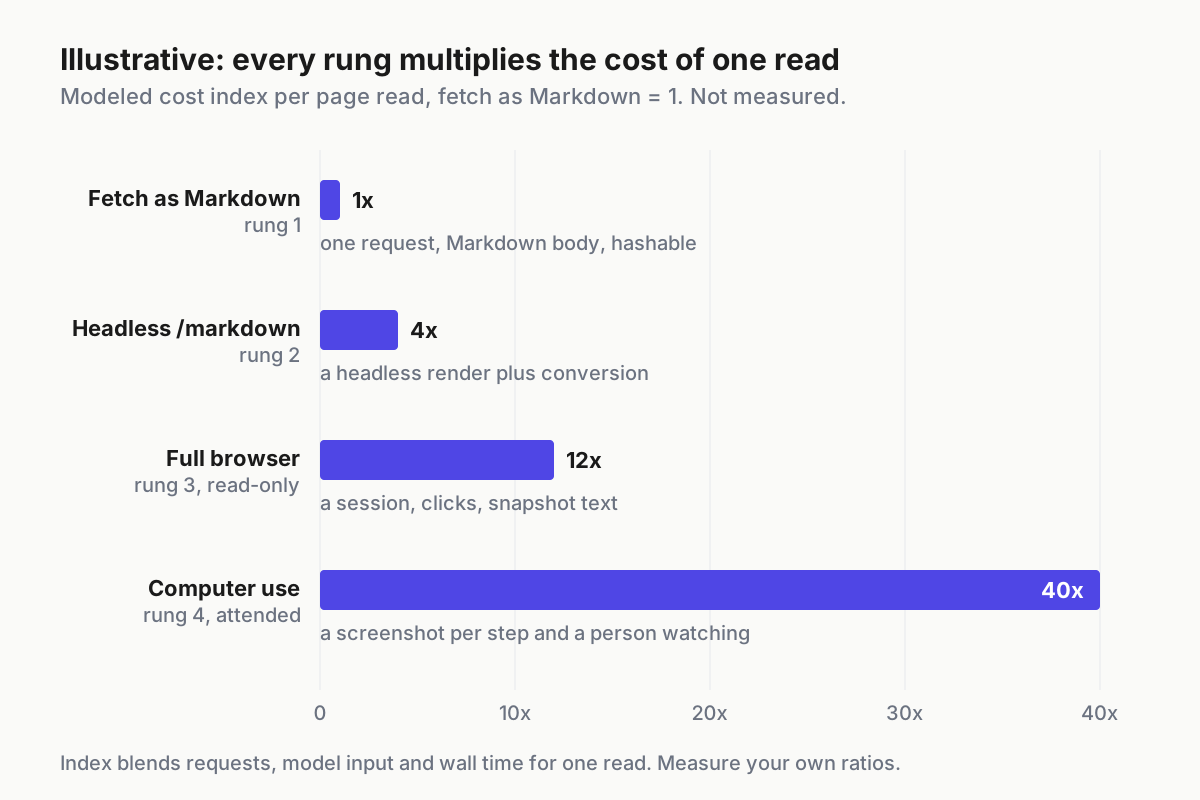
 Illustrative: a modeled cost index per page read, fetch as Markdown = 1. Measure your own ratios before you set a budget.
Price the finished research answer, not the single read; cost per completed task shows how to fold retries and escalations into one number. Where a publisher sends both token headers, log the ratio of x-original-tokens to x-markdown-tokens per domain, and you will know which sources are cheap to read before the agent touches them.
Run the same short review every week:
- Escalation share for the week, with the five domains that escalated most and their recorded reasons.
- Every 402 and 403 from the week, each with the person who decided what happens next.
- Cited sources re-fetched and diffed, with the count of changed hashes.
- Every rung-4 run, with its recording and the name of whoever attended it.
Fetch-pipe failure modes and the signal for each
- A JS shell read as an empty page. The agent reports “no information found” on a page that plainly has some. Signal: rung-1 bodies under your word threshold with no escalation logged.
- Silent truncation. A long page gets cut at
max_content_tokensand the answer misses the last section. Signal: output token count equal to the cap; the final line ends mid-sentence. - A stale answer from a changed page. The source updated after the read and nobody re-fetched. Signal: the pre-ship re-fetch shows a new hash on a cited source.
- A retry storm on a refusal. A loop retries a 403 or 402 with new headers or a new tool. Signal: more than one refusal per URL per job, or a rung change logged right after a refusal.
- Escalation creep. Rung 3 and 4 reads grow week over week with no new JS-heavy sources. Signal: the escalation share rising while the reasons field reads empty or “default”.
- Uncited claims. Citations are off, so nobody can match a sentence to a source span. Signal: answers that ship with a citation count of zero.
Put research reads on the fleet ledger
Research agents rarely run alone. The same fleet that writes code and files tickets also reads docs, watches changelogs and checks status pages, and those reads end up in decisions. If a read is not on the record, it cannot be reviewed when a decision goes wrong.
Treat the read log from step 3 as part of the session record you already keep for the fleet, so fleet replay can show which source, at which hash, fed which answer. The weekly escalation share belongs next to the other run health numbers in your agentic ops review, because a fleet that drifts from fetch to browser to desktop gets slower, costlier and harder to audit at the same time.
FAQ
How do I convert a URL to Markdown for an LLM?
Request the page with an Accept: text/markdown header first; publishers using Cloudflare’s Markdown for Agents answer with Markdown and token-count headers. Otherwise convert the HTML locally or through a reader API, hash the output, and keep the response headers so the read can be reproduced later.
Does Anthropic’s web fetch tool render JavaScript?
No. Anthropic’s docs say web fetch does not support websites dynamically rendered with JavaScript and point those pages to the browser use tool. Web fetch also only retrieves URLs that already appeared in the conversation or a prior tool result, and it supports PDFs, which covers most report reads.
Should an AI agent retry when a site returns 402 or 403?
No. Treat both as the site’s answer: stop, log the status and headers, and route the URL to a person. A 402 is a buying decision and a 403 is a refusal. Switching to a headless browser or computer use to reach the same page overrides that answer.
Sources
- Cloudflare, “Have it both ways: stay discoverable in search while disallowing AI training” (Sep 15, 2026): https://blog.cloudflare.com/accountable-mixed-use-ai-crawlers/
- Cloudflare, “Pay Per Use: when AI uses your work, you should get paid” (Sep 30, 2026): https://blog.cloudflare.com/pay-per-use/
- Cloudflare, “Introducing Web Search API via AI Gateway” (Oct 2, 2026): https://blog.cloudflare.com/introducing-web-search-api/
- Cloudflare changelog, “Introducing Markdown for Agents” (Feb 12, 2026): https://developers.cloudflare.com/changelog/post/2026-02-12-markdown-for-agents/
- Cloudflare docs, Markdown for Agents (accessed Oct 5, 2026): https://developers.cloudflare.com/fundamentals/reference/markdown-for-agents/
- Cloudflare docs, Browser Run (accessed Oct 5, 2026): https://developers.cloudflare.com/browser-rendering/
- Anthropic, Web fetch tool, Claude Platform Docs (accessed Oct 5, 2026): https://platform.claude.com/docs/agents-and-tools/tool-use/web-fetch-tool
- Firecrawl Series B and Alexandria, PR.com (Sep 22, 2026): https://www.pr.com/press-release/979737
- Firecrawl changelog (Sep 22 to Oct 1, 2026 entries): https://www.firecrawl.dev/changelog
- Browserbase, “Search” (Mar 17, 2026): https://www.browserbase.com/blog/search