Perplexity Personal Computer vs a Windows Tray Companion
Compare Perplexity Personal Computer for Windows with a local tray companion across role, price, data boundary, platform, and vendor risk.

Go deeper. Build your own.
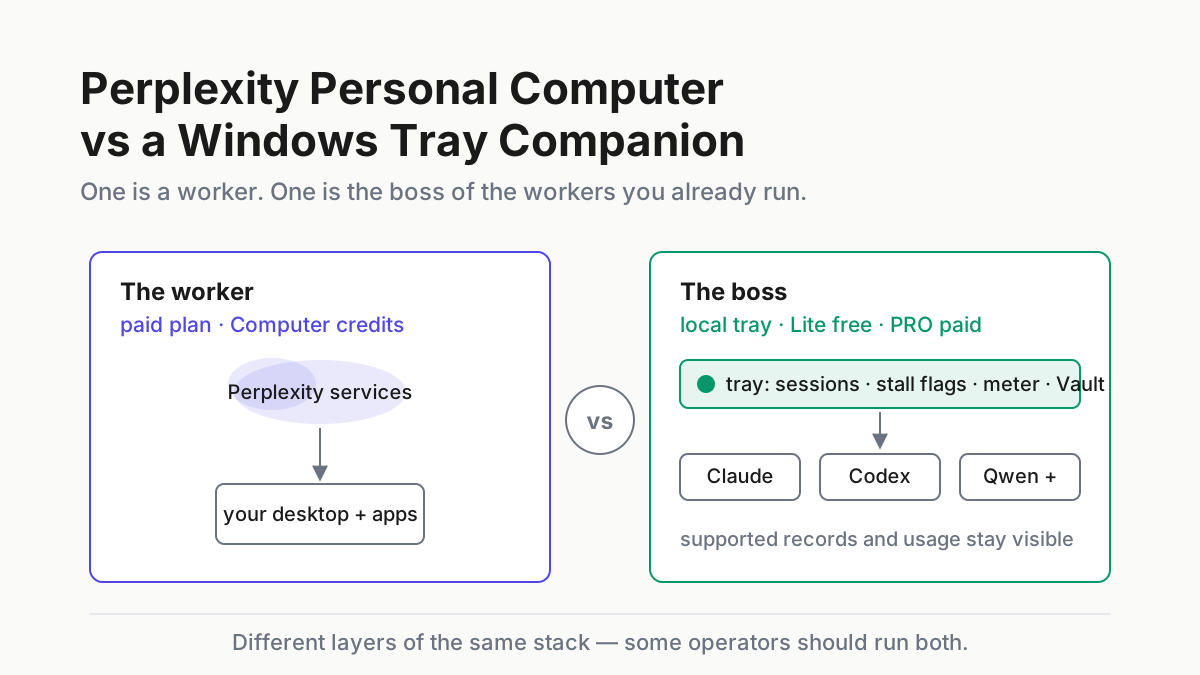
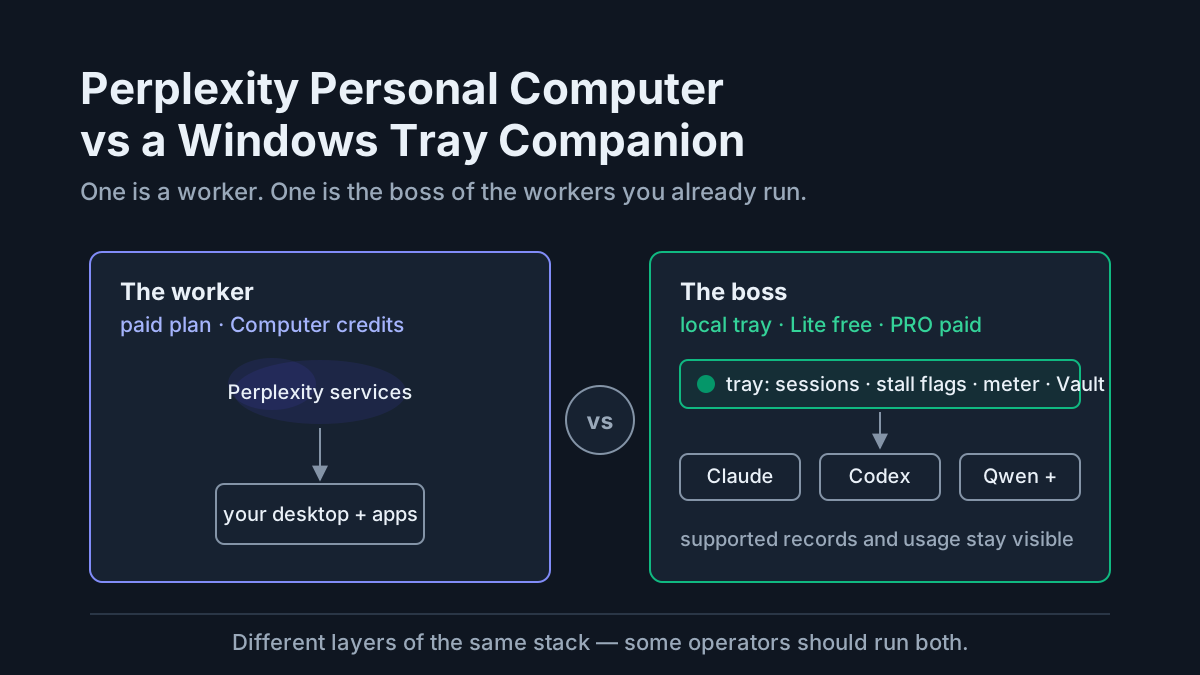
Perplexity Personal Computer and a Windows tray companion both live close to the desktop, but they solve different problems. Personal Computer is a hybrid computer-use worker: it can act across local Windows files, Microsoft 365, connected apps, and the web. A tray companion such as Automater Lite manages supported coding-assistant records and usage already on the machine. One performs tasks. The other helps an operator keep track of the workers performing them.
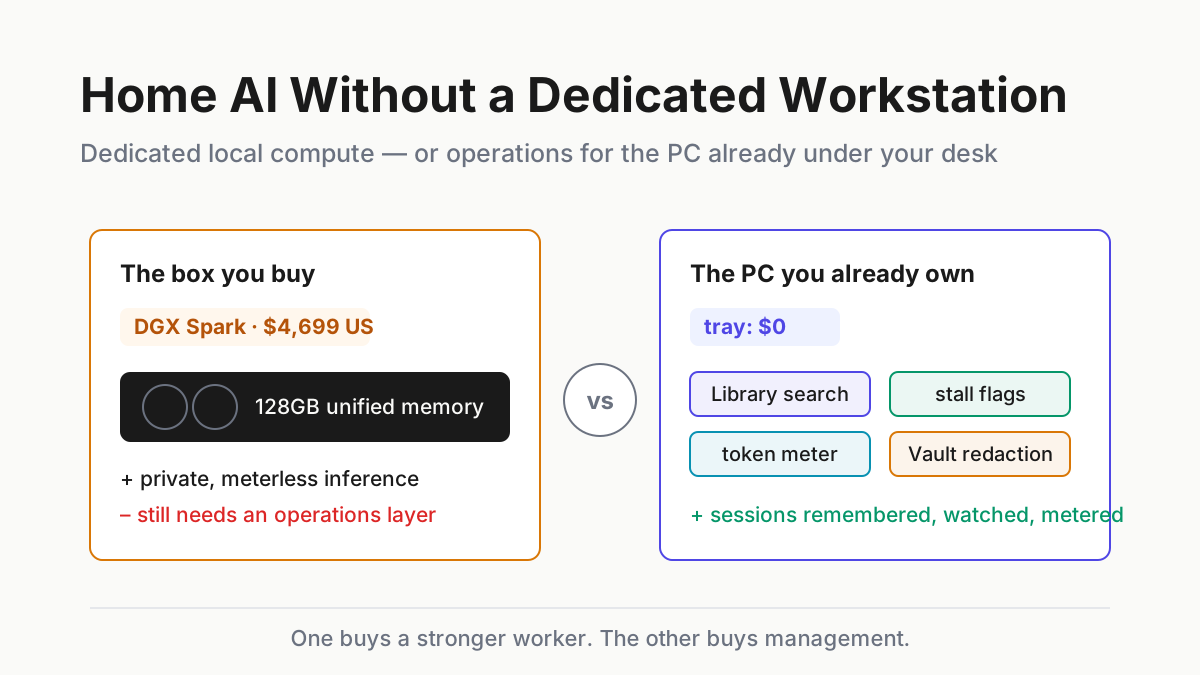
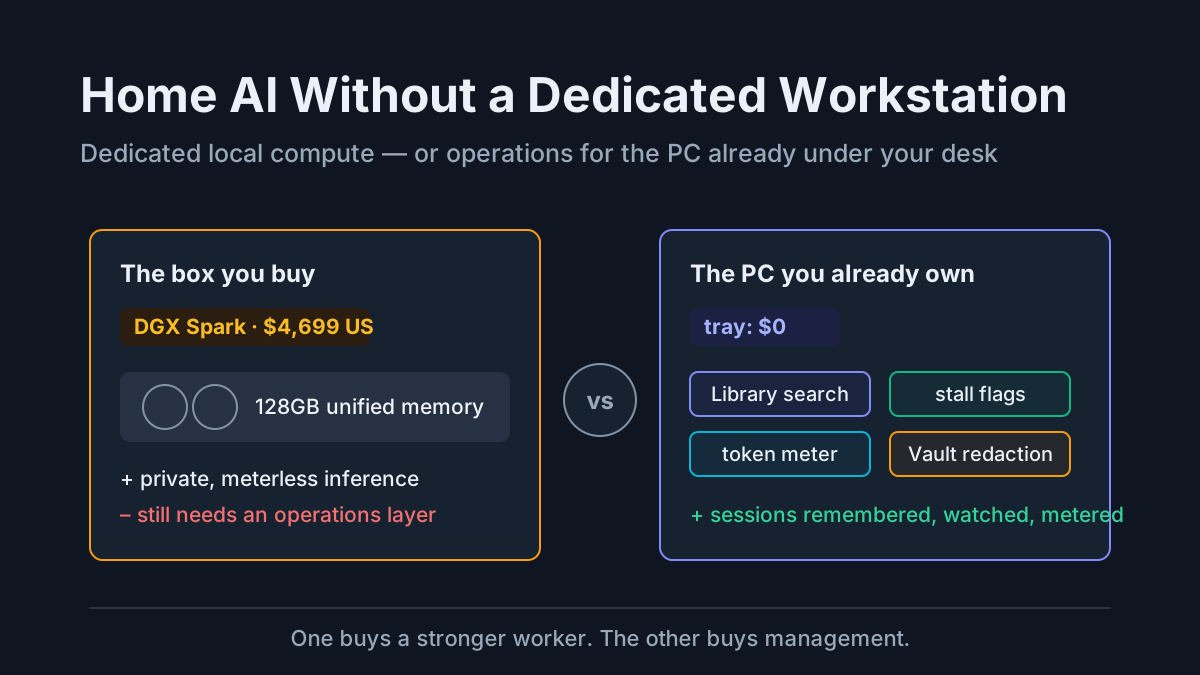
That layer distinction matters more than a feature-count contest. Perplexity made Personal Computer available on Windows 10 and 11 for Pro, Max, and Enterprise subscribers in July 2026. Automater Lite starts free, and PRO is the paid tier. Perplexity also now offers Portable Computer, a local-first runtime for NVIDIA DGX Spark. Put all three in one frame and the buying question becomes clearer: do you need another worker, management for an existing CLI fleet, or local inference hardware?
What Perplexity Personal Computer for Windows is
Personal Computer extends Perplexity Computer into a native Windows surface. Perplexity says it can open local Word, Excel, and PowerPoint files, work with Outlook and connected services, research on the web, save results back to disk, accept voice instructions, and continue tasks that were started from a phone. It also alerts the user before sensitive actions such as sending email or deleting a file, and creates files in a secure sandbox.
That makes it useful for the awkward glue between desktop applications and web services. A finance workflow might reconcile a local spreadsheet with current web data and update a presentation. A sales workflow might combine a local quote, CRM context, and an Outlook draft. Those are computer-use jobs: the agent is hired to cross application boundaries and produce an artifact.
Personal Computer should still be categorized as a worker. It does not become the management plane for Claude Code, Codex, Muse Code, or another terminal agent merely because they share a PC. Perplexity’s public Windows launch materials describe its own agent platform, files, connected apps, and audit controls; they do not describe importing other vendors’ local CLI transcripts or metering those subscriptions.
What a Windows tray companion is
A tray companion begins with a different premise: the operator already has capable coding workers, but their sessions and usage are fragmented across providers. Automater Lite imports supported local assistant archives into a searchable Library, exposes provider usage signals it recognizes, and keeps those records on the machine by default. Vault can redact sensitive values before an operator deliberately sends text elsewhere. PRO, in the site’s own words, adds “the controls that operate this machine and the rest of your fleet.”
The boundary is important. A local archive does not make a cloud model local, and a usage card is only as complete as the signals a provider exposes. The tray does not drive Excel, click through a browser workflow, or replace a coding agent. It organizes and monitors the supported records around those agents.
Automater Lite is a free download for Windows, macOS and Linux at automater.ai/downloads.
The comparison: worker, manager, and local runtime
Perplexity’s Portable Computer belongs in the same comparison because it changes the execution boundary again. The August 2026 launch puts the orchestrator, planner, tool router, scheduler, durable queue, search index, and a supported local model on an NVIDIA DGX Spark. The core stack runs on the device; a user can authorize cloud escalation for web access, connected apps, or stronger remote models. The first release is for Linux, with Windows support described only as “coming soon.”
| Perplexity Personal Computer | Windows tray companion (Automater Lite/PRO) | Perplexity Portable Computer | |
|---|---|---|---|
| Primary role | Worker that acts across files, apps, and the web | Manager for supported local coding-assistant records | Local-first runtime for Perplexity Computer |
| Work performed | Research, documents, app actions, and multi-step workflows | Archive, search, usage visibility, and session tooling | Local agent workflows, with optional cloud escalation |
| Price model | Paid Perplexity plan plus Computer-credit economics | Lite free; PRO a paid tier | Perplexity plan plus separately purchased NVIDIA hardware |
| Execution boundary | Native Windows access combined with Perplexity services | Local app; each CLI keeps its own provider boundary | Core stack and local model on device |
| Data boundary | Local files and apps are within the agent’s authorized task scope | Imported records stay local unless the user opts in | Sensitive work can remain local; external work requires consent |
| Microsoft apps | Direct Windows and Microsoft 365 workflows | Does not drive desktop apps | Whatever the supported local stack and connectors can reach |
| Platform | Windows 10/11 | Windows x64, Apple-silicon macOS, Linux x86_64 | Linux first on DGX Spark; Windows support coming soon |
| Best fit | Operators missing GUI and cross-app execution | Operators missing visibility across existing CLIs | Operators who need local inference and own suitable hardware |
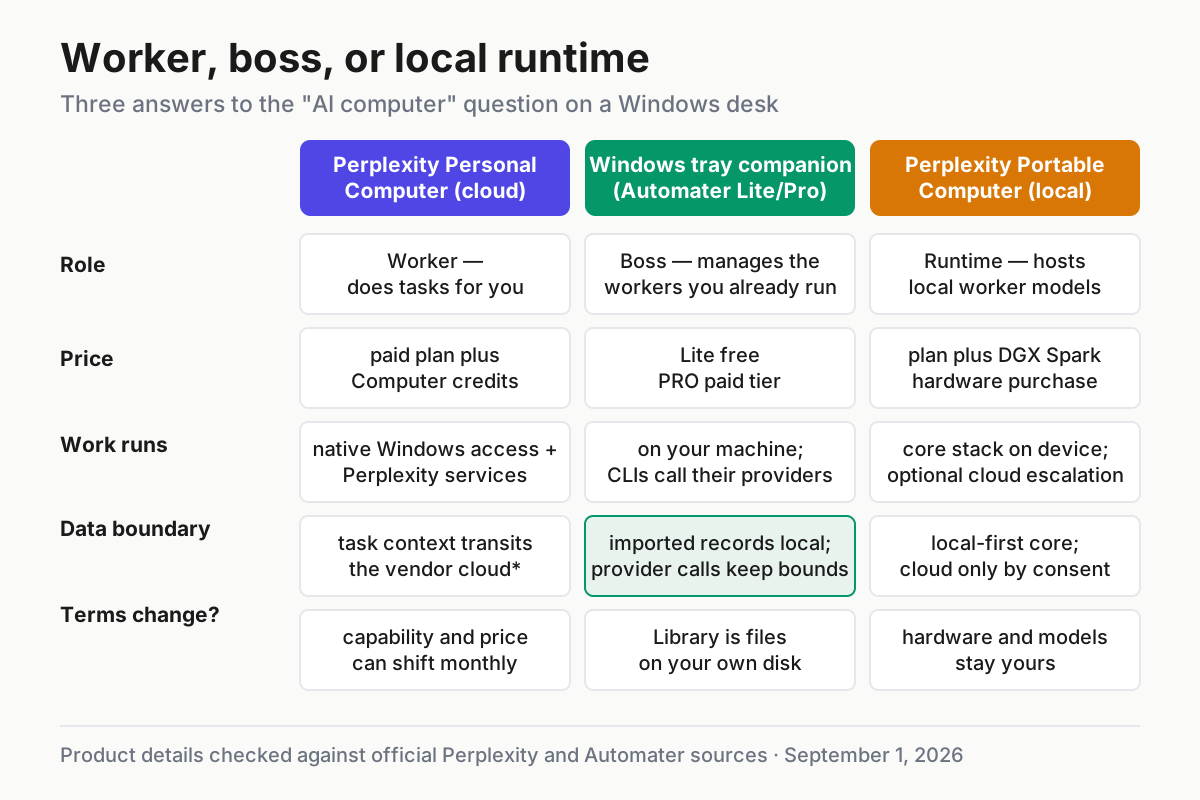
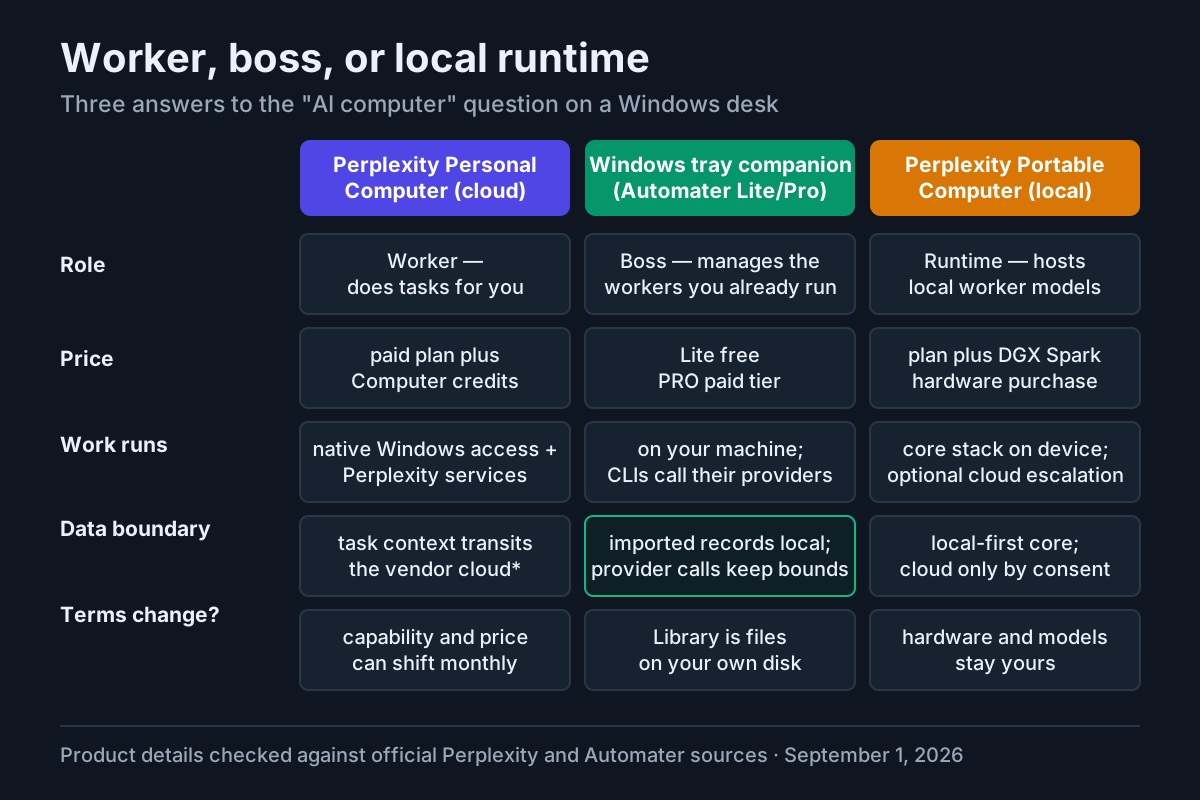 Three products near the desktop, but at different layers: worker, management surface, and local runtime.
Price: subscription is only the first line
The old shorthand that Personal Computer simply “costs $200 a month” is no longer accurate. Perplexity’s current individual pricing lists Pro at $20 per month and Max at $200 per month. Its Windows announcement says Personal Computer is available on Pro, Max, and Enterprise plans.
Computer usage has a second meter. Perplexity’s credit documentation, updated August 6, says consumer Pro has no recurring monthly Computer allocation after any one-time promotional credits; users purchase more credits as needed. Consumer Max starts with 10,000 Computer credits per month. Task cost varies with complexity, and active tasks pause when available credits run out. A fair evaluation therefore uses the subscription price, included credits, purchased credits, and the actual tasks completed — not the plan sticker alone.
The tray has a much simpler price, but it buys a narrower product. Lite is free and PRO is a paid tier; neither performs the labor that consumes Perplexity Computer credits. Compare cost per useful task for the worker and cost of management for the tray. They are different budget lines.
A practical baseline is one week of evidence:
- List the GUI or cross-app tasks that existing CLIs cannot complete.
- Record the Perplexity credits those tasks consume and the review time they still require.
- Record how often existing CLI work becomes hard to find, stalls, or crosses provider limits.
- Price the missing layer from those two sets of observations.
That produces a buying case grounded in work rather than launch positioning.
Data boundary: ask which part runs where
“Cloud” and “local” are too blunt for this comparison. Personal Computer is a native Windows app with explicit access to selected local files and applications, backed by Perplexity’s agent platform and multi-model orchestration. Its launch post says users are alerted before sensitive actions, generated files use a secure sandbox, and actions are auditable. Enterprise customers also receive a stated no-training commitment for company data.
Those controls do not answer every deployment question. A security review should still establish which file contents, prompts, screenshots, app data, and derived artifacts reach Perplexity services; how long each class is retained; what administrators can audit; and which actions require confirmation. Use the current product terms and organization settings for those answers instead of assuming that “native” means offline.
Automater’s local archive has a different boundary. Imported records and usage processing stay on the device by default, and optional sharing or cloud features require deliberate configuration. That reduces one transfer path, but it does not change the boundary of an underlying Claude, OpenAI, Google, or other provider call. Local records can also contain source code and secrets, so disk encryption, access control, retention, and redaction still matter.
Portable Computer is the strongest local-first option in this set. Perplexity says its core agent stack and local model run on device, on-device work does not consume Computer credits, and sensitive data can remain local. It is not an absolute no-network appliance by default: the product can request permission to escalate for web research, connected apps, or frontier reasoning. An offline requirement should be tested with the network disconnected and cloud escalation disabled.
Who manages whom
Personal Computer can coordinate its own multi-model work, but that is not the same as supervising an external CLI fleet. A Perplexity task belongs to Perplexity’s own agent surface. A Claude Code or Codex session belongs to its CLI and whatever local records it writes. Unless a management tool has a supported importer or documented event interface for a product, the sessions remain separate.
That gives each product a clear limit:
- Personal Computer can execute Windows and web workflows, but its public materials do not promise a unified archive or quota view for third-party coding CLIs.
- Automater can organize supported assistant records and usage signals, but it cannot infer a complete Perplexity task history from an undocumented local store.
- Portable Computer changes where Perplexity work executes; it does not automatically unify unrelated agent histories.
Running both can be coherent. Personal Computer can handle GUI-heavy workflows, coding CLIs can handle repository work, and the tray can manage the CLI records it supports. The Perplexity specialist remains outside that unified local Library unless Perplexity exposes a durable record and Automater adds a compatible importer.
Vendor risk cuts across every column
Cloud access can change when contracts between vendors change. OpenAI said on August 28 that it had proposed ending Cursor’s access to OpenAI models on November 12 following SpaceX’s acquisition, while also saying the cutoff would be canceled if the companies reached a new agreement. That is a conditional proposal, not a completed cutoff, but it is a useful example of dependency risk.
Usage programs can change too. The official Claude developer account announced a temporary usage increase that expires September 14. A capacity model based on a temporary allowance needs an end date and a fallback.
Local software has vendor risk as well. Importers can drift when transcript formats change. Usage probes can break. A discontinued app can leave archives readable while its live integrations stop working. Hardware ownership reduces subscription exposure but introduces driver, model, and platform-support risk. The right mitigation is portability: exportable records, explicit data paths, documented dependencies, and a workflow that still degrades usefully when one provider changes terms.
Verdict by operating gap
Solo Windows operator. Start by naming the missing work. If the bottleneck is a repetitive Excel-Outlook-browser workflow, evaluate Personal Computer against that exact task and measure credits, corrections, and elapsed time. If the bottleneck is losing track of terminal agents, install the free tray and measure whether the Library and usage view reduce recovery time. Some operators will need both layers.
IT buyer. Treat the demo as the beginning of due diligence. For Personal Computer, review data flow, retention, confirmation gates, auditability, enterprise training terms, credit controls, and connected-app permissions. For the tray, review local storage, supported importers, update behavior, any optional connected features, and how secrets in archives are protected. “Local” narrows the review; it does not waive it.
Local-only privacy buyer. Personal Computer for Windows is not the offline choice. Portable Computer is closer because its core stack runs on device, but its optional cloud escalation must be disabled and tested. The first release is Linux on DGX Spark; Perplexity has not published a Windows release date beyond “coming soon.” A local tray can sit beside that setup for the coding-assistant records it supports, but it is not the inference runtime.
Existing multi-CLI team. A new computer-use worker may expand capability, while a tray can reduce fragmentation. Pilot each against a separate success metric: tasks completed for Perplexity; sessions recovered, usage understood, and handoffs shortened for the tray. Combining those numbers prevents a worker demo from being mistaken for fleet management.
FAQ: Perplexity Personal Computer
How much does Perplexity Personal Computer cost on Windows?
Personal Computer is available to paid Pro, Max, and Enterprise subscribers on Windows. Perplexity currently lists consumer Pro at $20 per month and Max at $200 per month. Computer work also uses credits: Perplexity says Pro has no recurring monthly credit allocation after any promotion, while Max starts with 10,000 monthly credits. Check the account’s current plan and credit page before budgeting because allowances and task costs can change.
Is Perplexity Personal Computer available on Windows?
Yes. Perplexity launched it for Windows 10 and 11 in July 2026. The separate Portable Computer launched first for Linux on NVIDIA DGX Spark, with Windows support described as coming soon.
Does Perplexity Personal Computer replace Claude Code or other coding CLIs?
Not as a direct substitute. Personal Computer specializes in tasks across desktop files, Microsoft apps, connected services, and the web. Coding CLIs specialize in repository and terminal work. Perplexity’s public Windows materials do not promise transcript management or usage metering for third-party CLIs.
Is Perplexity Portable Computer fully offline?
Its core stack and local model run on the device, and Perplexity says private work can remain local. The product can also ask for permission to escalate to cloud research, connected apps, or frontier models. A strict offline deployment therefore needs escalation disabled and a disconnected test.
Can a tray companion see Perplexity Personal Computer sessions?
Not automatically. Automater imports supported local assistant records. Perplexity has not documented a local Personal Computer transcript contract in the public materials cited here, so the article does not assume compatibility.
Sources
- Personal Computer is now available on Windows — Perplexity
- Perplexity pricing
- How Credits Work on Perplexity — Perplexity Help Center
- Introducing Portable Computer for local-first AI — Perplexity
- Our decision on Cursor following its acquisition by SpaceX — OpenAI
- Claude Developers temporary usage announcement — X
- Automater