Claude Code Deleted Files? Block Destructive Deletes in Claude Code and Codex, Then Rehearse Git Recovery
Claude Code deleted files? Layer deny rules, a PreToolUse hook, the sandbox and Codex forbidden rules, then rehearse git reflog recovery before you need it.

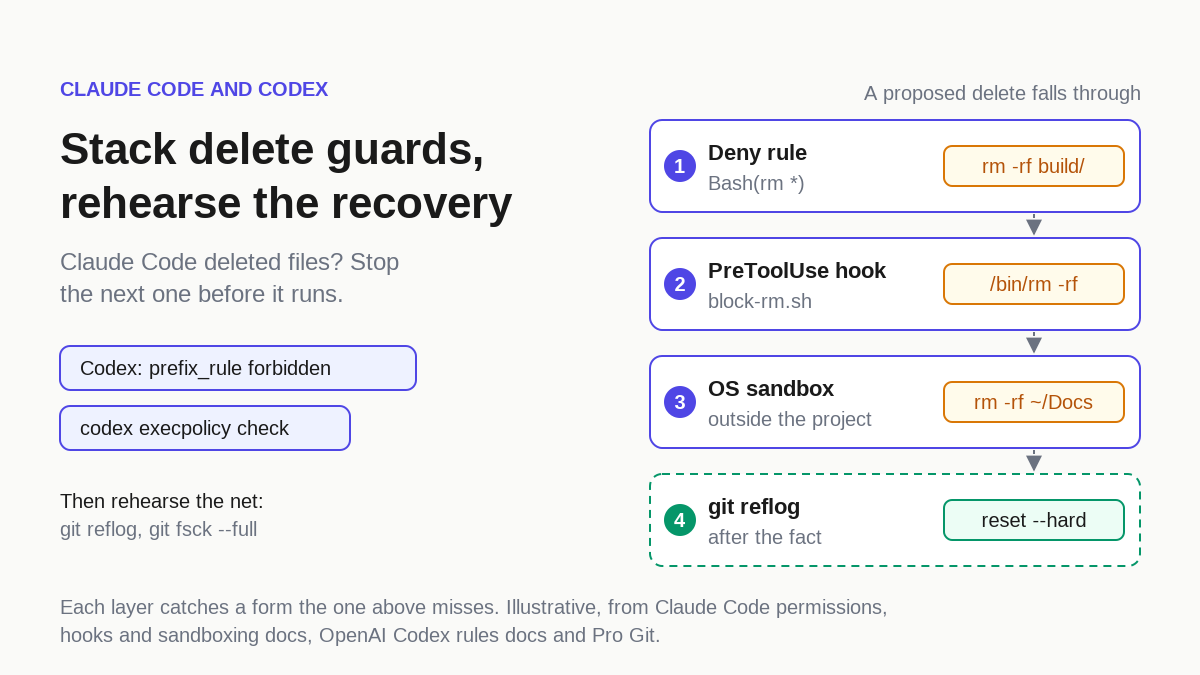
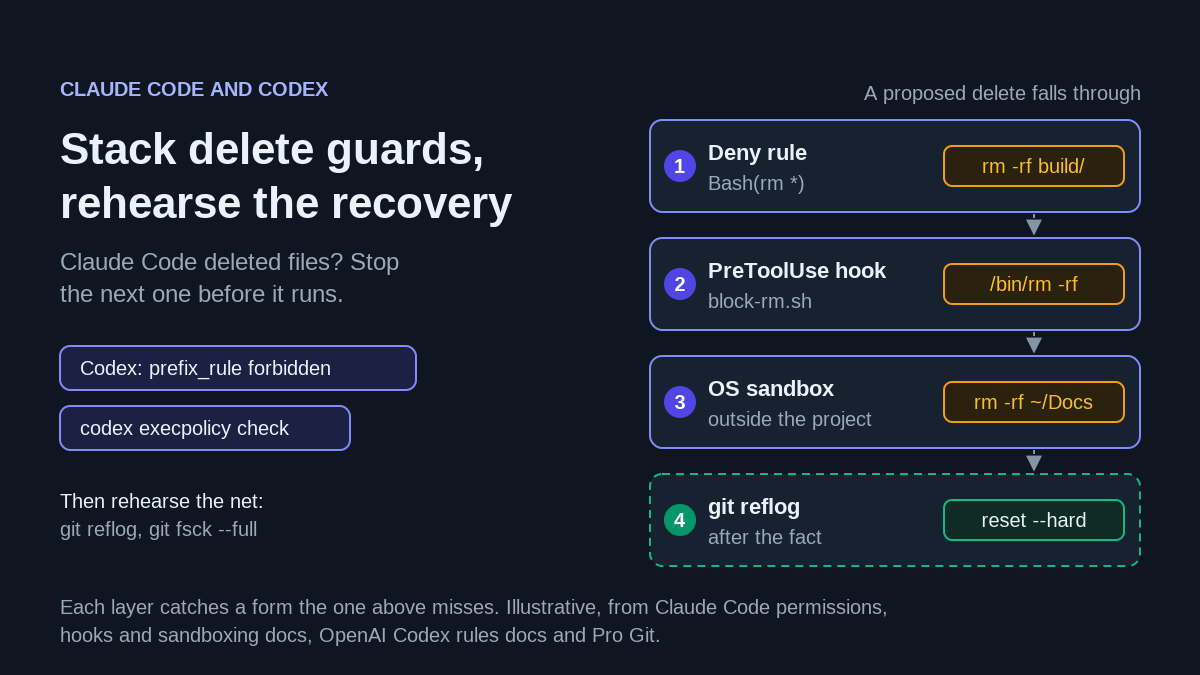
Claude Code deleted files you needed, or a Codex session cleaned out a directory you had not committed yet. The two incidents look different, but they have the same cause. The agent was allowed to run a delete, and nothing between the model’s proposal and the shell understood what the command would destroy. This tutorial is for a developer who runs Claude Code, Codex CLI or both against their own repositories on macOS or Linux, with notes for Windows PowerShell. You will finish with four guards and one rehearsed recovery: Claude Code deny rules, a PreToolUse hook that reads the whole command, the OS-level sandbox, Codex forbidden rules checked with codex execpolicy check, and a git reflog and fsck drill you have already run on a throwaway clone.
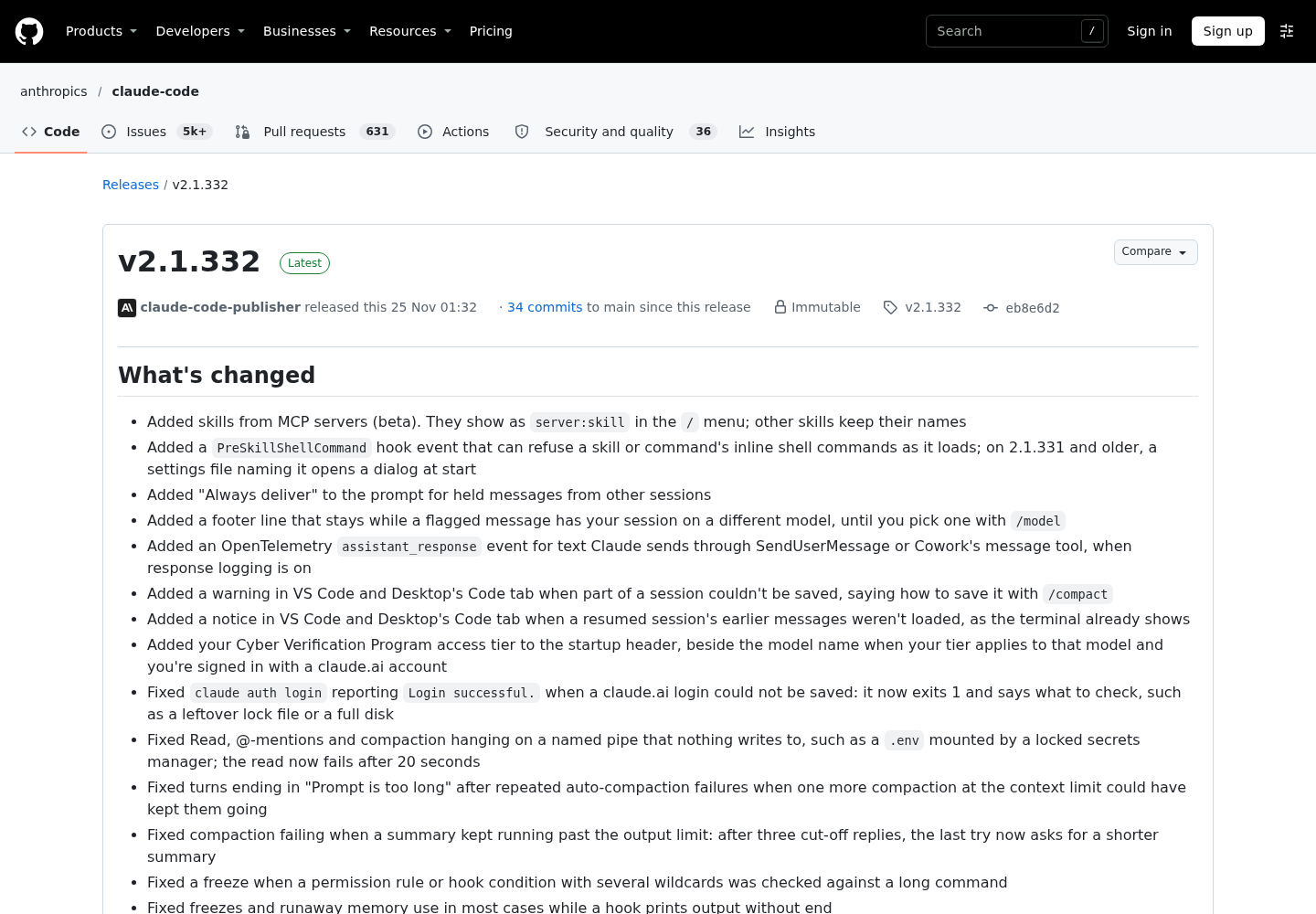
The reason to do this now is Anthropic’s Claude Code v2.1.332 release, published on GitHub on November 25, 2026. Among dozens of changes, it improved /permissions “to refuse a rule that would be skipped at the next start, such as rm -rf with no tool name, and to show the reason.” It also fixed a freeze when a permission rule or hook condition with several wildcards was checked against a long command, and it fixed a bug that hid a PreToolUse hook’s reason for asking on Read, Grep, Glob, Edit and Write prompts. The first item teaches something that stays true after the version number stops mattering: a deny entry written as rm -rf, not Bash(rm -rf *), never protected anything. Our news report on Claude Code 2.1.330 making destructive rm ask first covers the default that came just before. Everything else in this guide works on any current release.
What you need before you start
- [ ] Claude Code at v2.1.332 or later, so
/permissionsflags malformed rules and a multi-wildcard rule cannot freeze a long command check. - [ ] Write access to your project’s
.claude/settings.json. Project hooks load from the.claude/folder of the directory you start in, with no parent-directory fallback, so start Claude Code from the repository root. - [ ]
jqon your PATH. The hooks guide installs it withbrew install jqon macOS orapt-get install jqon Debian and Ubuntu. - [ ] On Linux or WSL2, the
bubblewrapandsocatpackages for the sandbox (sudo apt-get install bubblewrap socaton Ubuntu or Debian). macOS uses its built-in Seatbelt framework. - [ ] Codex CLI, and a
~/.codex/rules/directory you can write to. - [ ] A git repository with some uncommitted work, plus a throwaway clone of it for the recovery drill. The drill destroys history on purpose, so it never runs in your only copy.
Of these, the last item is the one to take seriously. Every destructive step in this guide happens in a clone you can delete afterwards. You type those steps yourself, because the guards you are about to install would refuse them if an agent asked.
Why one guard is never enough
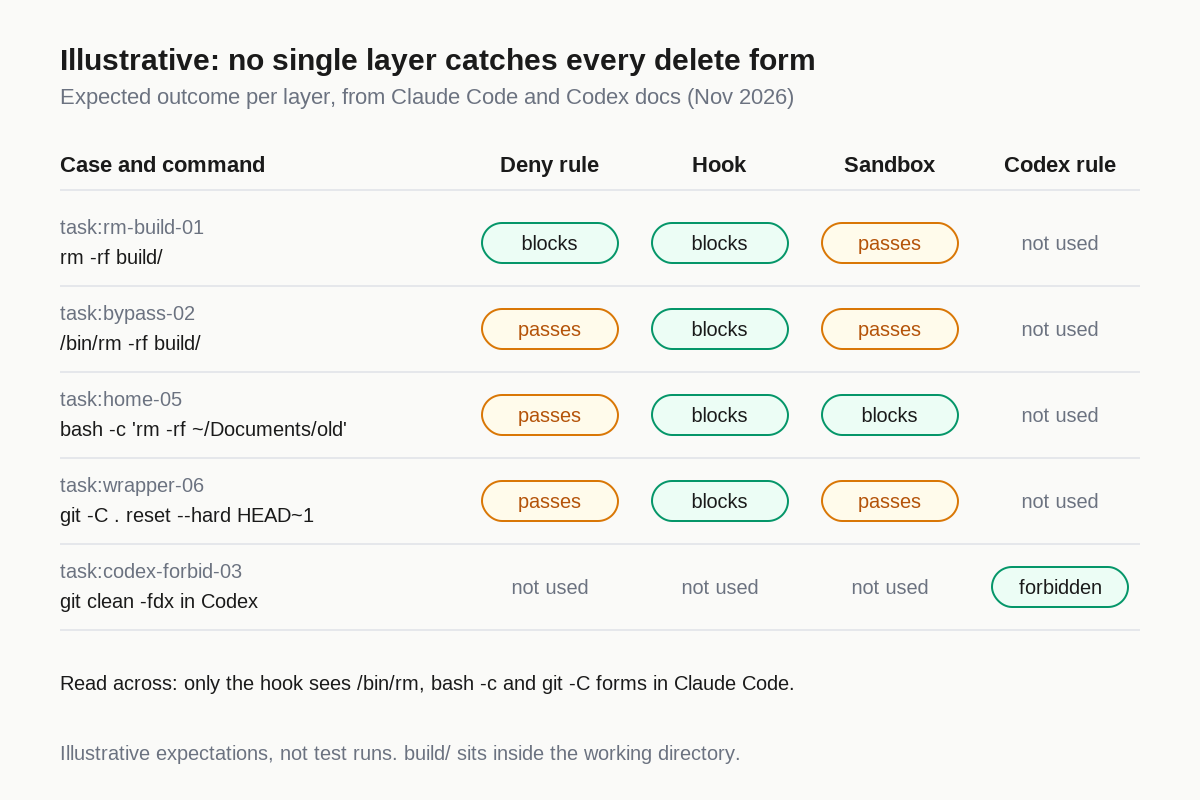
Each layer sees the command differently. A Claude Code permission rule compares the command text Claude wrote against a pattern, after splitting compound commands and stripping a fixed set of wrappers. The permissions documentation states the limit directly: Bash(rm *) in deny stops rm -rf build/ but not /bin/rm -rf build/ or bash -c 'rm -rf build/', so “a deny or ask rule covers the invocation Claude usually produces and isn’t a security boundary around the program.” The same page names two complements: sandboxing for “enforcement that doesn’t depend on the command text”, and a PreToolUse hook “to inspect the full command text with your own logic before it runs.”
The sandbox has its own blind spot. According to the sandboxing documentation, a sandboxed command can write to the working directory, a per-user temp directory and any directories you added. That stops an agent from wiping your home folder. It does not stop rm -rf build/ inside the project, because the project is exactly where the sandbox lets commands write. When the text dodges the rule, the hook you write is the only layer that can refuse a delete inside the project.
And when every guard fails, you can only recover work that git has already recorded. That is why the last layer is a habit and a drill rather than a setting.
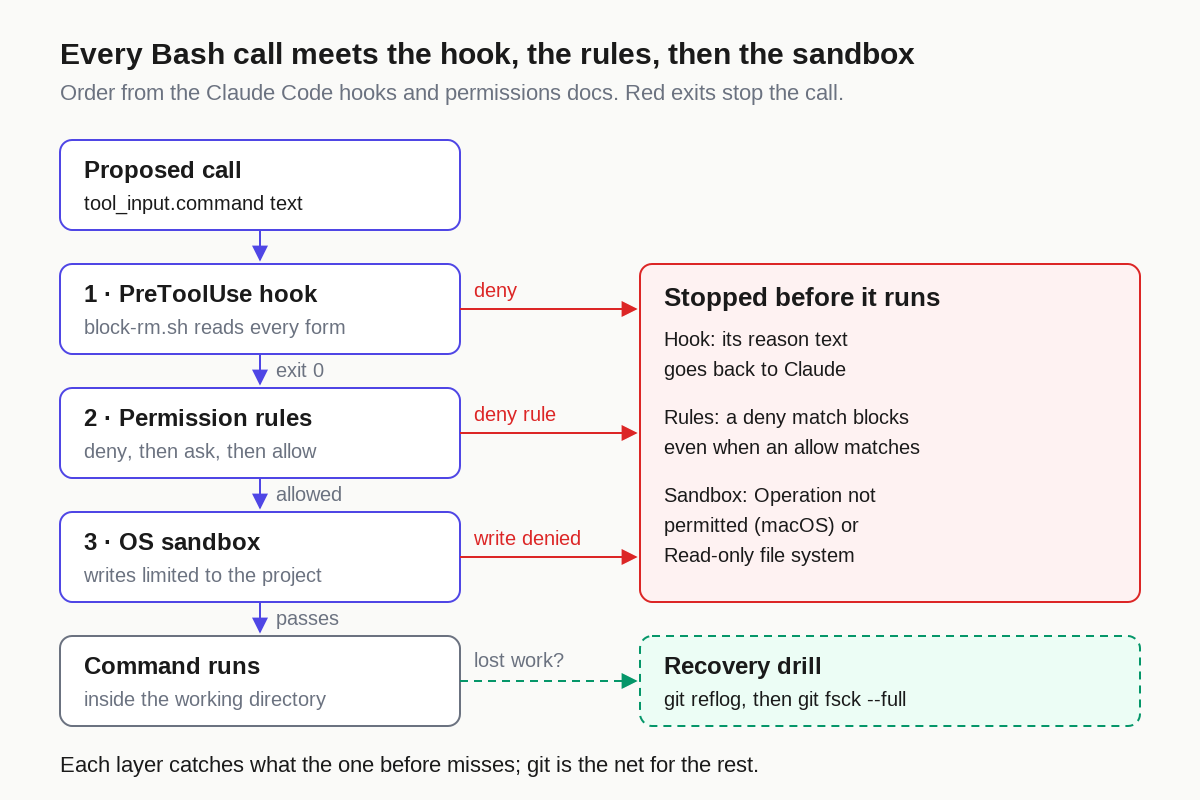
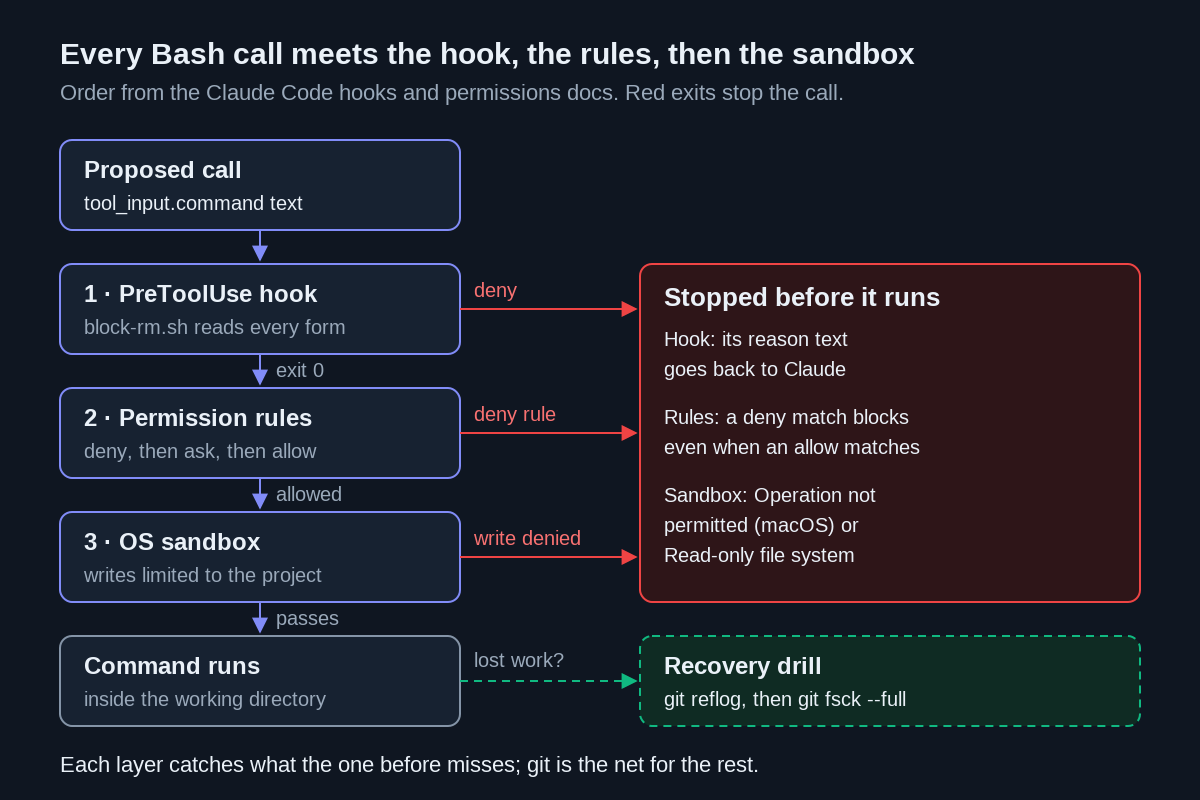
The order in that diagram comes from the hooks guide. PreToolUse hooks fire before any permission-mode check, and a hook that returns deny blocks the tool “even in bypassPermissions mode or with --dangerously-skip-permissions.” Permission rules then apply whatever the hook said, so a hook’s allow never overrides a matching deny rule. The sandbox acts last, on the running process.
Write Claude Code deny rules that match how commands are written
Start with the cheapest layer. Put this complete block in .claude/settings.json at the repository root. It holds the deny rules, the registration for the hook you will create in the next section and the sandbox settings for the section after that, so a single committed file puts the whole Claude Code side under version control.
{
  "permissions": {
    "deny": [
      "Bash(rm *)",
      "Bash(git reset --hard *)",
      "Bash(git clean *)",
      "Bash(git worktree remove *)",
      "Bash(git branch -D *)"
    ],
    "ask": [
      "Bash(dangerouslyDisableSandbox:true)"
    ]
  },
  "hooks": {
    "PreToolUse": [
      {
        "matcher": "Bash",
        "hooks": [
          {
            "type": "command",
            "command": "\"$CLAUDE_PROJECT_DIR\"/.claude/hooks/block-rm.sh"
          }
        ]
      }
    ]
  },
  "sandbox": {
    "enabled": true,
    "allowUnsandboxedCommands": false
  }
}
Each of the five rule choices in that block does a specific job.
- Every rule names its tool. Write
Bash(rm *), neverrm *orrm -rf. A rule without a tool name is exactly what v2.1.332 now refuses in/permissions. In older settings files it was silently useless. Bash(rm *)is broad on purpose. A narrowBash(rm -rf *)missesrm -r -f,rm -frandrm build -rf. The broad form also denies a harmlessrm notes.txt. If that is too strict for your work, move the line toaskso you approve each delete instead.- A trailing space and
*also covers the bare command. The permissions page shows thatBash(git log *)matches a plaingit log, soBash(git reset --hard *)stops a baregit reset --hardas well. - Deny wins over allow everywhere. Rules are evaluated deny, then ask, then allow, and “an allow rule can’t carve an exception out of a deny rule.” A deny at any settings scope also blocks an allow at another scope.
- The ask rule is a backstop.
Bash(dangerouslyDisableSandbox:true)is the parameter rule the sandboxing page documents for prompting on unsandboxed retries. With strict sandbox mode on, it should never fire. It is there in case someone later turns that setting off.
Next, see what those rules do and do not catch. This table restates the documented matching behavior for the deny list above.
| Command Claude writes | Caught by the deny list? | Documented reason |
|---|---|---|
rm -rf build/ |
Yes | Matches Bash(rm *) as written |
cd /tmp && rm -rf scratch |
Yes | Deny rules apply when any subcommand matches |
FOO=bar rm -rf tmp/ |
Yes | Deny rules match past any leading variable assignment |
timeout 30 rm -rf dist |
Yes | timeout is one of the stripped wrappers |
/bin/rm -rf build/ |
No | Same program, different form |
bash -c 'rm -rf build/' |
No | The rule sees bash, not rm |
xargs -n1 rm -rf |
No | xargs with flags is matched as an xargs command |
git -C . reset --hard |
No | Same gap as the documented git -C . push example |
Open /permissions after you save. The dialog lists every rule and the settings file it came from, and an edit takes effect from Claude’s next tool call. Don’t try Bash(command:rm *). The permissions page says Claude Code ignores a parameter rule on Bash’s primary command field and prints a startup warning, because a compound command could bypass it.
On Windows with the PowerShell tool, the same approach uses PowerShell rules. The docs show the form "deny": ["PowerShell(Remove-Item *)"]. Common aliases are canonicalized before matching, so a rule for the cmdlet name also covers its common aliases. Treat the Bash list above as covering Git Bash and WSL sessions only.
Add a PreToolUse hook that reads the whole command
In its example of combining hooks, the hooks guide registers a script named block-rm-rf.sh, but it never prints the script. The version below is ours. It follows the documented contract: Claude Code passes JSON on stdin with the shell command in tool_input.command, and a hook that exits 0 and prints a hookSpecificOutput object with permissionDecision: "deny" cancels the call and sends permissionDecisionReason back to Claude.
Save it as .claude/hooks/block-rm.sh:
#!/usr/bin/env bash
# .claude/hooks/block-rm.sh
# PreToolUse guard for Claude Code: deny recursive or forced deletes and git
# commands that throw work away, however the command is spelled.

if ! command -v jq >/dev/null 2>&1; then
  echo "block-rm.sh: jq is not installed, so this guard cannot read the command. Install jq." >&2
  exit 2  # fail closed: block the call instead of letting it through unchecked
fi

CMD=$(jq -r '.tool_input.command // empty')
[ -z "$CMD" ] && exit 0

deny() {
  jq -n --arg reason "$1" '{hookSpecificOutput: {hookEventName: "PreToolUse", permissionDecision: "deny", permissionDecisionReason: $reason}}'
  exit 0
}

matches() { printf '%s\n' "$CMD" | grep -Eq -- "$1"; }

# A command word starts at line start or after any character that is not part of a name,
# so /bin/rm, bash -c 'rm ...', xargs rm and ;rm all count.
B='(^|[^[:alnum:]_.-])'
# git, then any number of -C <path> or -c <key=value> options, then the subcommand.
GIT="${B}git([[:space:]]+-[cC][[:space:]]+[^[:space:]]+)*[[:space:]]+"

matches "${B}rm[[:space:]]+([^;&|]*[[:space:]])?(-[[:alnum:]]*[rRf]|--recursive|--force)" &&
  deny "Blocked by block-rm.sh: recursive or forced rm. List the paths and ask the user to delete them."
matches "${GIT}reset([[:space:]].*)?[[:space:]]--hard" &&
  deny "Blocked by block-rm.sh: git reset --hard discards uncommitted work. Ask the user to commit first."
matches "${GIT}clean([[:space:]].*)?[[:space:]](-[[:alnum:]]*f|--force)" &&
  deny "Blocked by block-rm.sh: git clean -f deletes untracked files. Ask the user to review them first."
matches "${GIT}worktree[[:space:]]+remove" &&
  deny "Blocked by block-rm.sh: git worktree remove can drop uncommitted work in that worktree. Ask the user."
matches "${GIT}branch([[:space:]].*)?[[:space:]](-D|--delete[[:space:]]+--force)" &&
  deny "Blocked by block-rm.sh: force-deleting a branch can orphan commits. Ask the user."
matches "${B}find[[:space:]].*[[:space:]]-delete" &&
  deny "Blocked by block-rm.sh: find -delete removes files in bulk. Ask the user."

exit 0
Install it and test it before Claude ever runs it:
- Make it executable with
chmod +x .claude/hooks/block-rm.sh. The hooks guide notes that hook scripts must be executable on macOS and Linux. - Check that the registration in
.claude/settings.jsonuses theBashmatcher and the quoted$CLAUDE_PROJECT_DIRpath, so the script resolves from any subdirectory. - Pipe sample input through the script, as the guide’s troubleshooting section recommends:
echo '{"tool_name":"Bash","tool_input":{"command":"/bin/rm -rf build/"}}' | .claude/hooks/block-rm.sh; echo "exit=$?"
echo '{"tool_name":"Bash","tool_input":{"command":"ls build/"}}' | .claude/hooks/block-rm.sh; echo "exit=$?"
- Type
/hooksat the Claude Code prompt and confirm the entry appears under PreToolUse. - Ask Claude to “delete the build directory with /bin/rm”, then press Ctrl+O to open the transcript view, where a blocked call shows its reason text.
Illustrative expected observation, not a test we ran: the first pipe prints a JSON object containing "permissionDecision": "deny" and the rm reason, followed by exit=0. The second prints nothing and exit=0, which means no objection, and the call goes through the normal permission flow.
Why it is built this way:
- No
iffilter. The hooks guide’siffield accepts permission-rule syntax, but a pattern such asBash(rm *)would skip/bin/rmjust as the deny rule does, and the guide itself calls that filter best-effort. The script runs on every Bash call and does its own matching. - It fails closed. Without
jqthe script cannot read the command, so it exits 2. That blocks the call and shows the stderr text. Every Bash call failing with “jq is not installed” is loud and easy to fix. A guard that silently lets everything through is neither. - One output style per decision. The guide says to use either exit 2 with stderr or exit 0 with JSON for a given decision, not both. The missing-jq path uses exit 2, and every deny uses JSON.
- The boundary class does the real work.
(^|[^[:alnum:]_.-])letsrmmatch after a slash, a quote, a space or a semicolon. That is how/bin/rm,bash -c 'rm ...'andxargs -0 rmget caught. It also meansgit rm -rand evenecho "rm -rf"trip the guard. Some false positives are the deliberate cost of reading text. - It handles
git -Candgit -c. TheGITprefix skips any number of those options before the subcommand, which closes the gap the permissions page documents forgit -C . push.
A hook’s deny holds in every permission mode. The hooks guide also says that when several hooks match, the most restrictive decision wins, so adding a logging hook next to this one cannot weaken it.
Turn on the sandbox for writes outside the project
The sandbox doesn’t care how a command is spelled. It is off by default. The sandbox block in the settings file above turns it on, and allowUnsandboxedCommands: false turns on what the docs call strict sandbox mode: Claude can no longer retry a failed command outside the sandbox through the dangerouslyDisableSandbox parameter. For a fuller setup walk-through and fixes for tools that break inside the sandbox, see our Claude Code sandbox setup and troubleshooting guide.
- Restart Claude Code after installing the Linux packages, because the dependency check runs at startup.
- Run
/sandbox. If the panel shows only a Dependencies tab, the sandbox cannot start, so install whatever it lists. The Overrides tab should show strict sandbox mode. - Ask Claude to run
touch ~/sandbox-probe. Don’t type it at the shell-mode prompt yourself: commands you type there usually run outside the sandbox, so that proves nothing. - Read the result. Inside the sandbox the command fails with “Operation not permitted” on macOS or “Read-only file system” on Linux and WSL2. If it succeeds, delete
~/sandbox-probeand check/sandboxagain. - Optionally, add
"failIfUnavailable": trueto thesandboxblock. Claude Code then exits at startup instead of quietly running commands unsandboxed when the platform or a dependency is missing.
Two facts from the sandboxing page define what this layer gives you. First, it protects the files that configure your guards. Inside writable directories it still denies writes to .claude settings files, the .claude/hooks directory, and the hooks and config inside .git, so a sandboxed command cannot edit block-rm.sh or your deny list. Second, its coverage has limits. It wraps Bash, PowerShell and Monitor commands and their child processes, but hooks, MCP servers and Claude’s own Edit and Write tools run outside it. On native Windows, Claude Code runs commands unsandboxed, and the docs point you to WSL2. Even in auto-allow mode, rm or rmdir commands recognized as targeting a critical path still go through the regular permission flow. If you want a single boundary around the whole process instead, our Docker Sandboxes guide covers that route.
To sandbox every project, not just this one, put the same sandbox block in ~/.claude/settings.json. A false for allowUnsandboxedCommands in user settings holds even when a project’s settings set it to true.
Forbid the same commands in Codex and check them with execpolicy
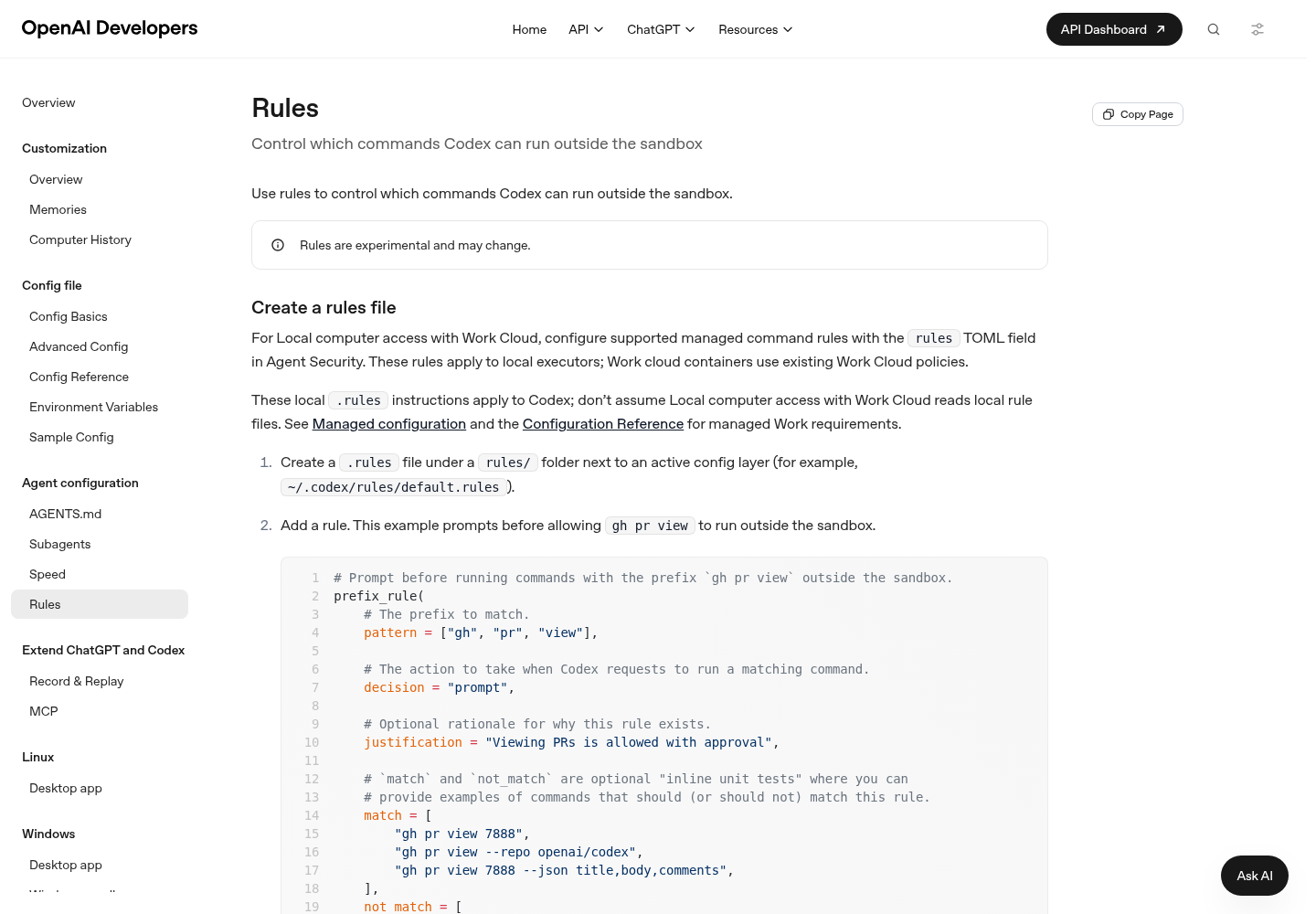
Codex has its own rules engine. The Codex rules documentation describes .rules files written in Starlark and loaded from a rules/ folder next to each active config layer. Each rule is a prefix_rule() with a pattern, a decision of allow, prompt or forbidden, an optional justification, and match and not_match examples that Codex validates when it loads the file. When several rules match, the most restrictive decision wins, ranked forbidden, then prompt, then allow. The page labels rules as experimental.
Save this as ~/.codex/rules/default.rules:
# ~/.codex/rules/default.rules
# Destructive commands Codex must never run. Restart Codex after editing.

prefix_rule(
    pattern = [["rm", "/bin/rm", "/usr/bin/rm"], ["-r", "-R", "-f", "-rf", "-fr", "-Rf", "-rF"]],
    decision = "forbidden",
    justification = "Recursive or forced rm is blocked. List the paths and ask the user to delete them.",
    match = ["rm -rf build/", "/bin/rm -rf build/", "rm -r -f dist"],
    not_match = ["rm notes.txt", "rmdir empty-dir"],
)

prefix_rule(
    pattern = ["git", "reset", "--hard"],
    decision = "forbidden",
    justification = "git reset --hard discards uncommitted work. Ask the user to commit first.",
    match = ["git reset --hard", "git reset --hard HEAD~1"],
    not_match = ["git reset --soft HEAD~1"],
)

prefix_rule(
    pattern = ["git", "clean"],
    decision = "forbidden",
    justification = "git clean deletes untracked files. Ask the user to review them first.",
    match = ["git clean -fdx", "git clean -n"],
    not_match = ["git status"],
)

prefix_rule(
    pattern = ["git", "worktree", "remove"],
    decision = "forbidden",
    justification = "Removing a worktree can drop its uncommitted work. Ask the user.",
    match = ["git worktree remove --force ../feature-x"],
)

prefix_rule(
    pattern = ["git", "branch", "-D"],
    decision = "forbidden",
    justification = "Force-deleting a branch can orphan commits. Ask the user.",
    match = ["git branch -D spike"],
    not_match = ["git branch -d merged-branch"],
)
Then load it and verify it:
- Keep the file in the user layer at
~/.codex/rules/. Project-local rules under<repo>/.codex/rules/load only when the project’s.codex/layer is trusted, and that is the most common reason a rule seems to do nothing. - Restart Codex, which scans the
rules/folders at startup. - Check a blocked command and a harmless one against the file:
codex execpolicy check --pretty --rules ~/.codex/rules/default.rules -- git clean -fdx
codex execpolicy check --pretty --rules ~/.codex/rules/default.rules -- git status
- Run Codex in the workspace-write sandbox with on-request approvals, either with
codex --sandbox workspace-write --ask-for-approval on-requestor in~/.codex/config.toml:
# ~/.codex/config.toml
sandbox_mode    = "workspace-write"
approval_policy = "on-request"
Illustrative expected observation: the git clean -fdx check prints JSON that names forbidden as the strictest decision and lists the git clean rule with its justification, and the git status check reports no matching rule. The docs describe the output as JSON showing “the strictest decision and any matching rules” without listing every field name, so read what your version prints and don’t script against a guessed layout.
A prefix rule has blind spots. It compares the command’s argument list with the pattern, starting from the first word, so rm build -rf and git -C . reset --hard slip past the rules above. For bash -lc and similar wrappers, Codex splits a script into separate commands only when it is a linear chain of plain words joined by &&, ||, ; or |. A script containing $VAR, a redirect, a glob or control flow is judged as a single bash -lc invocation, so bash -lc 'rm -rf "$OUT"' does not match the rm rule.
The rules page also describes rules mainly in terms of which commands Codex can run outside the sandbox, which makes the sandbox itself the second Codex guard. The Codex approvals and security page says workspace-write limits writes to the active workspace, keeps network access off by default, and protects <writable_root>/.git and .codex as read-only. A git reset --hard has to move refs inside .git, so it needs an escalation, and an escalation request is exactly what a forbidden rule blocks. A git clean -fdx, by contrast, only touches working files inside the workspace. The docs do not say outright whether a forbidden rule also stops a command the sandbox would allow on its own, so for that case the commit habit below is your real protection. Our Codex approval modes and sandbox guide explains the modes in depth, and one house dialect for permission modes maps Claude Code and Codex settings onto shared terms. Keep --sandbox danger-full-access and --yolo for disposable containers.
On Windows, the security page names MXC as the preferred native sandbox, and WSL2 as the way to get the Linux sandbox behavior.
Run the worked example: seven cases, expected outcomes
This is the filled worksheet. The repository is an illustrative ~/src/shop with an untracked build/ folder, and the drill clone lives at ~/drill/shop. Every result is an illustrative expected observation derived from the documentation cited above, not a test we ran. Run each case yourself and compare what you see.
| Input | Action | Expected result |
|---|---|---|
task:rm-build-01: session in ~/src/shop, prompt “clear the stale build”, Claude proposes rm -rf build/ |
Claude Code evaluates the call with the settings file and block-rm.sh in place |
Illustrative expected observation: the call does not run. Claude receives the hook’s reason, “recursive or forced rm”, and Bash(rm *) would deny it even without the hook. build/ is still there. |
task:bypass-02: same session, Claude retries with /bin/rm -rf build/ |
The deny rule, the hook and the sandbox all see the call | Illustrative expected observation: Bash(rm *) does not match the path form, and the sandbox allows writes inside the project, but block-rm.sh matches rm after the slash and denies the call with the same reason. |
task:codex-forbid-03: terminal, codex execpolicy check --pretty --rules ~/.codex/rules/default.rules -- git clean -fdx |
Run the check, then repeat it with -- git status |
Illustrative expected observation: JSON naming forbidden, with the git clean rule and its justification. The git status check shows no matching rule. |
task:recover-04: drill clone ~/drill/shop, commit “add retry backoff”, then you type git reset --hard HEAD~1 |
git reflog -5, then git branch recover/reset-04 HEAD@{1} |
Illustrative expected observation: the top reflog line reads reset: moving to HEAD~1 and the next reads commit: add retry backoff. git log --oneline -3 recover/reset-04 lists that commit first. |
task:home-05: Claude proposes bash -c 'rm -rf ~/Documents/old', with the hook entry removed for this case to isolate the sandbox |
The command runs inside the sandbox in strict mode | Illustrative expected observation: no deny rule matches. The command fails with “Operation not permitted” on macOS or “Read-only file system” on Linux, and no unsandboxed retry is offered. ~/Documents/old is untouched. |
task:wrapper-06: Claude proposes git -C . reset --hard HEAD~1 |
Bash(git reset --hard *) and the hook’s GIT prefix both check it |
Illustrative expected observation: the rule misses the -C form. The hook skips -C ., matches reset ... --hard and denies with “git reset --hard discards uncommitted work”. |
task:fsck-07: same drill clone after git branch -D recover/reset-04 and removing .git/logs/ |
git fsck --full, then git branch recover/fsck-07 <sha> |
Illustrative expected observation: a dangling commit <sha> line appears. The new branch shows “add retry backoff” at the top of its log. |
Read the table by layer, not just by case. The deny rule stops only task:rm-build-01 on its own. The hook stops every Claude Code case, but only because you maintain its regex. Of the Claude Code layers, the sandbox is the only one that stops task:home-05 without reading the text, and it would stop that command even if both other layers were missing. The recovery cases, task:recover-04 and task:fsck-07, work only because the work was committed first.
Commit before any agent cleanup
Reflog and fsck recover commits. A file that was never added to git does not exist in the repository’s object database, and no git command brings it back after rm. The Codex security page’s version-control advice is to keep git status clean before delegating and to commit frequently. Turn that into a checklist you run before any prompt that contains words like clean, reset, remove or start over:
- [ ] Run
git statusand read the untracked list as well as the modified list. - [ ] Commit everything, untracked files included, as a work-in-progress commit:
git add -A && git commit -m "wip: checkpoint before agent cleanup". - [ ] Mark that point with a branch you won’t reuse:
git branch safety/pre-cleanup. - [ ] For generated folders you really do want gone, read the list and delete them yourself rather than handing the job to the agent.
- [ ] Before you let an agent remove a worktree, open it and repeat the commit step there. Uncommitted work in a removed worktree goes with it.
If you don’t want the WIP commit afterwards, a git reset --soft HEAD~1 removes it. That is far cheaper than any recovery.
Rehearse recovery with git reflog and git fsck
The maintenance and data recovery chapter of Pro Git walks through the exact case an agent creates: a hard reset that abandons commits. Rehearse it once in the drill clone so the commands feel familiar when you need them. Type them in your own terminal, because your Claude Code guards would refuse them.
# Drill only: a throwaway clone, never your working copy
git clone ~/src/shop ~/drill/shop && cd ~/drill/shop
echo "retry backoff" >> NOTES.md && git add NOTES.md && git commit -m "add retry backoff"
git log --oneline -3
git reset --hard HEAD~1                 # simulate the agent's mistake
git reflog -5                           # find the lost commit
git branch recover/reset-04 HEAD@{1}
git log --oneline -3 recover/reset-04

# Harder path: no reflog to lean on (drill clone only)
git branch -D recover/reset-04
rm -Rf .git/logs/
git fsck --full                         # look for "dangling commit <sha>"
git branch recover/fsck-07 <sha>
git log --oneline -3 recover/fsck-07
- Record the top commit, then reset hard to simulate the agent’s mistake.
- Run
git reflog. The git-reflog manual explains that reflogs record when branch tips and other references were updated in the local repository, and thatHEAD@{2}means where HEAD was two moves ago. The top entry is the reset, and the next one is the commit you lost. - Create a branch at it with
git branch recover/reset-04 HEAD@{1}. Pro Git does the same thing with a SHA. - Confirm with
git log --oneline -3 recover/reset-04that the lost commit is on top. - Now rehearse the harder path. Pro Git simulates a missing reflog by deleting the branch and the
.git/logs/directory. Do this in the drill clone only. - Run
git fsck --full. It lists objects that nothing points to, and your commit appears after the words “dangling commit”. - Create a branch at that SHA and check it with
git log, as before.
Move quickly in a real incident. By default, reflog entries that are not reachable from the current tip expire after 30 days (gc.reflogExpireUnreachable) and reachable ones after 90 days (gc.reflogExpire), and Pro Git describes git gc removing unreachable objects that are a few months old. Do not run git gc or git prune --expire now while you are recovering.
Two more safety nets sit outside git. Claude Code checkpoints and /rewind undo Claude’s own file edits, but as our checkpoints and rewind guide explains, they don’t track files a shell command deleted. OS snapshots and backups are the last resort for untracked files. Check what yours actually cover before you need them, because this guide’s sources don’t describe them.
When a guard does not fire
| Symptom | Likely cause | Fix |
|---|---|---|
| The hook never runs | /hooks doesn’t list it, the matcher reads bash instead of Bash (matchers are case-sensitive), or Claude Code started outside the repository root |
Fix the matcher, start from the root, and make sure the JSON has no trailing commas or comments |
| “PreToolUse hook error” with “command not found” | A relative script path or a missing execute bit | Use the quoted $CLAUDE_PROJECT_DIR path and run chmod +x |
| Every Bash call is blocked with “jq is not installed” | The script’s fail-closed branch | Install jq, then try the call again |
| The hook prints JSON but nothing is denied | Shell profile output lands before the JSON, or permissionDecision sits outside hookSpecificOutput |
Start claude --debug and search the log for “Hook output does not start with {” or “Hook JSON output had unrecognized keys”; wrap profile echo lines in an interactive-shell check |
/permissions refuses your new rule |
The rule has no tool name, such as a bare rm -rf |
Write it as Bash(rm *) or Bash(rm -rf *) |
Startup warning about Bash(command:rm *) |
Parameter rules on Bash’s primary field are ignored | Use Bash(rm *) |
rm -rf build/ ran even though the sandbox is on |
The working directory is writable by design | Rely on the deny rule and the hook for deletes inside the project |
| The sandbox is silently off on Linux | Missing bubblewrap or socat, or Ubuntu’s AppArmor restriction on user namespaces | Read the /sandbox Dependencies tab, and set failIfUnavailable |
| A call your hook blocked was approved anyway | A mod approved it. Without managed settings, a managed-mcp.json file or a Team or Enterprise login, the permissions page says a mod can approve a call a PreToolUse hook blocked, and some calls a deny rule refuses | Review the mods you have installed, and use managed settings for an organization |
| A Codex rule has no effect | The rule lives in an untrusted project .codex/ layer, or Codex was not restarted |
Move it to ~/.codex/rules/ and restart Codex |
| Codex flags a rule when it loads | A match or not_match example contradicts the pattern |
Fix the example. Catching that mismatch is what the examples are for |
| Codex ran a wrapped delete | A bash -lc script using $VAR is not split into separate commands |
Rely on the commit habit and the read-only .git protection, not on rules alone |
Roll back the setup
- Remove the
PreToolUseentry from.claude/settings.jsonand delete.claude/hooks/block-rm.sh. To run a single session without hooks, the permissions page shows--settings '{"disableAllHooks": true}'. Setting it only in user settings isn’t enough, because project settings can override it. - Open
/permissionsand remove the deny rules, or delete the lines from the file. The change applies from the next tool call. - Turn the sandbox off with
/sandbox, or set"enabled": false. - Delete the
prefix_ruleblocks from~/.codex/rules/default.rulesand restart Codex. - Delete the drill clone and, once you are sure you won’t need them, the
recover/*andsafety/*branches. Your own deny rule stops Claude from runninggit branch -D, so run that yourself.
For a team, commit the settings file so every clone gets the same guards, and consider moving the deny list into managed settings, where users cannot override it. Claude Code permission modes as fleet policy covers that rollout.
Sources
- Release v2.1.332, anthropics/claude-code on GitHub (Anthropic, November 25, 2026)
- Configure permissions, Claude Code Docs (Anthropic)
- Configure the sandboxed Bash tool, Claude Code Docs (Anthropic)
- Automate actions with hooks, Claude Code Docs (Anthropic)
- Rules, Codex documentation (OpenAI)
- Agent approvals and security, Codex documentation (OpenAI)
- Git Internals: Maintenance and Data Recovery, Pro Git (git-scm.com)
- git-reflog documentation (git-scm.com)