Verify vLLM Tool Calling Before Connecting a Coding Agent
Verify vLLM tool calling on ERNIE 5.5 Flash Preview with a plain chat baseline, paired auto and none requests, and an exact check of the returned order ID.

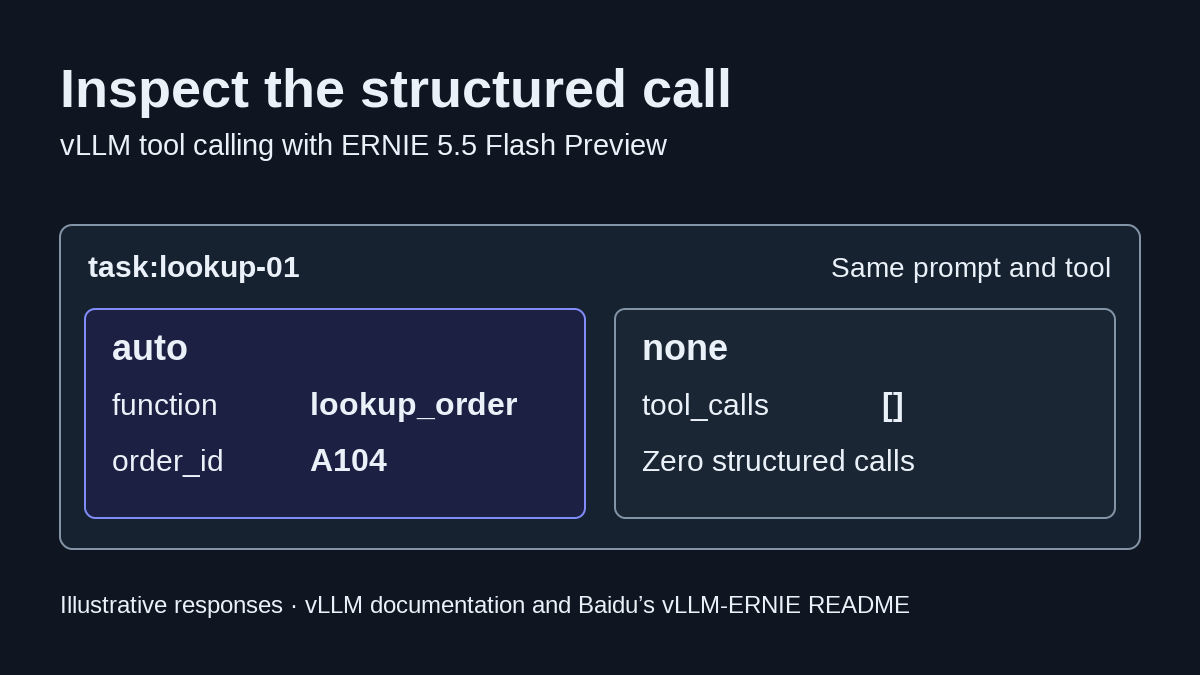
Your new vLLM endpoint answers a chat prompt, but a coding agent needs a response it can dispatch. If the model writes “I’ll look up order A104” in its reply, inspect the API response to see whether it contains an actual call. Verify vLLM tool calling directly against the endpoint before changing the agent’s configuration. This tutorial uses three requests and a synthetic order so you can inspect exactly what the server hands back.
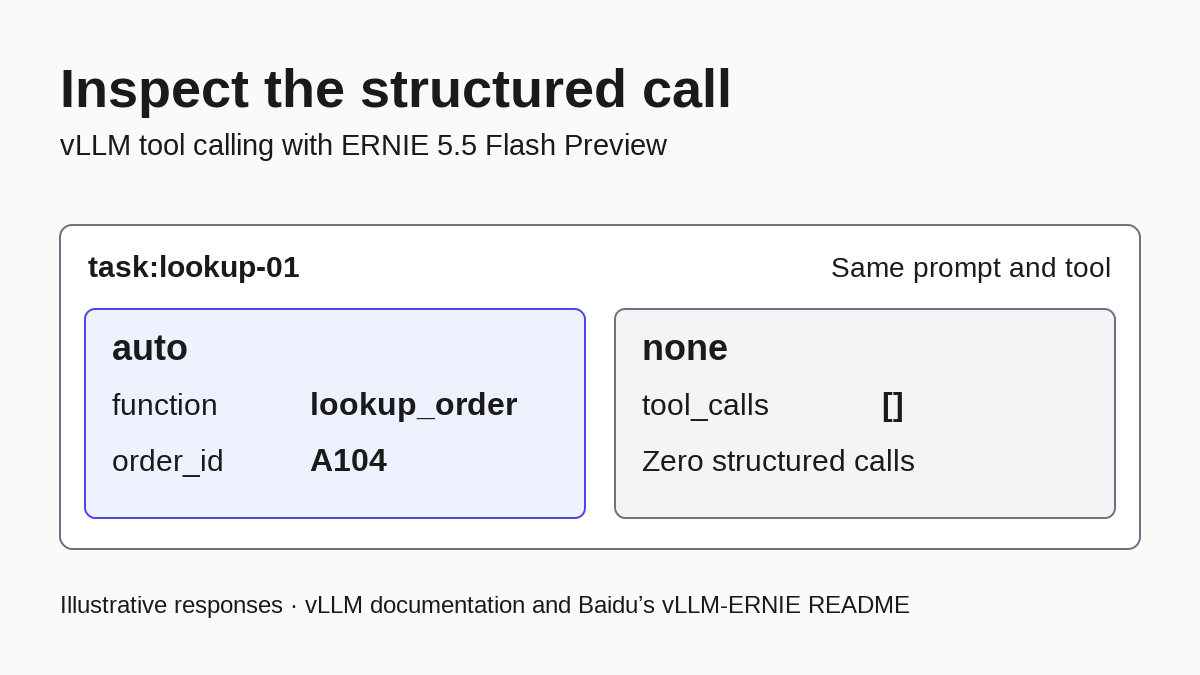
The worked case is task:lookup-01. You’ll start ERNIE 5.5 Flash Preview on a dedicated four-GPU test node, validate plain chat with a simple arithmetic prompt, and send the same order prompt with tool_choice set to auto and then none. A passing run returns lookup_order with the decoded order_id A104 in the automatic response and zero structured calls in the disabled response. The script reads one local fixture record after validating the automatic response. The outputs below are illustrative expected observations. The example was assembled from publisher documentation and has not been run for this article.
Prepare the four-GPU test node
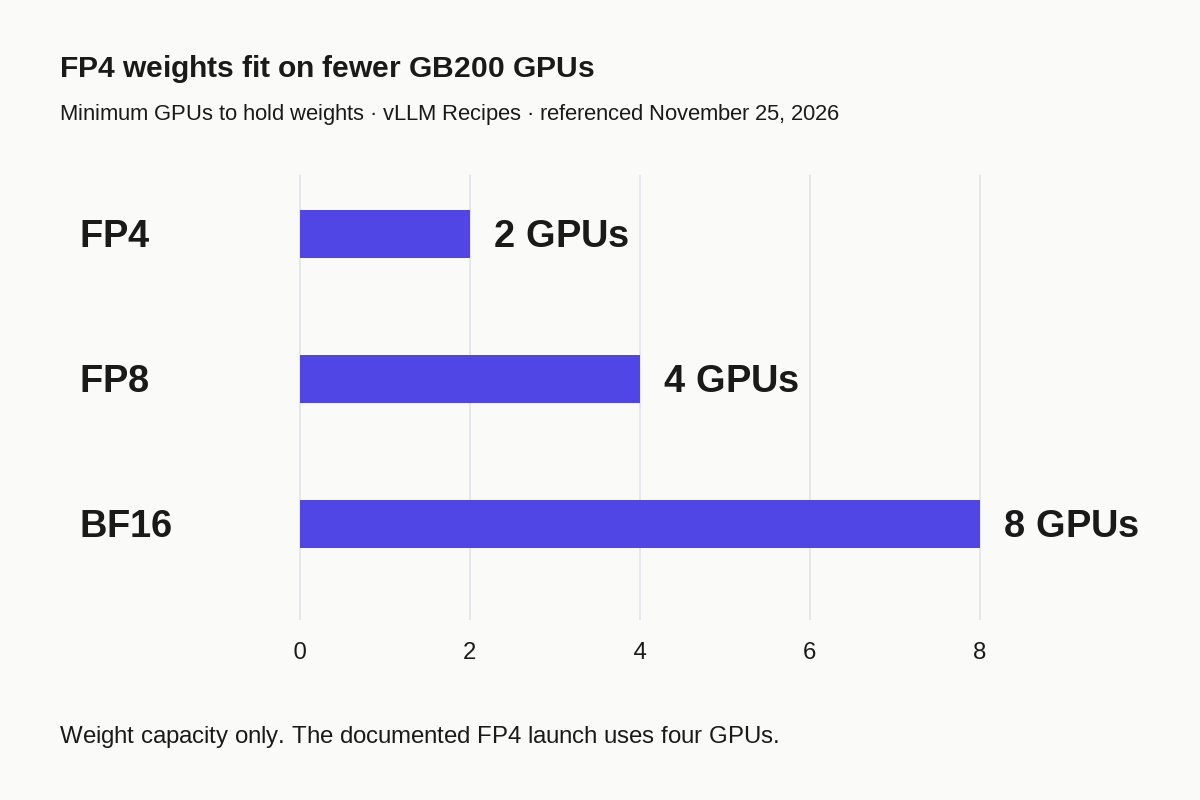
- Use one NVIDIA GB200 tray with four available GPUs for the command below. The vLLM recipe documents that configuration for the FP4 Preview checkpoint with data-parallel attention and expert parallelism. It lists about 155 GB of FP4 weights. Allow disk space for the checkpoint and working room for package installation. Use a node with working NVIDIA drivers and access to download the checkpoint and install the published packages. vLLM deployment recipe
- Check the checkpoint name before downloading anything. The example uses
baidu/ERNIE-5.5-Flash-Preview, with no precision suffix. Baidu’s repository listsconfig.json, Python encoding and decoding files, and sharded safetensors under that name. You’ll pass the same model identifier to the server and the client. Compare the two values first if the API reports that it cannot find the requested model. Baidu checkpoint files - Open two terminals on that node. Run Bash and
uvin the first terminal and keep the server in the foreground there. Use the second terminal for the Python client. Reserve port 8000 on loopback for the exercise. If another service already uses it, choose a free port and change the launch command and the script together before testing. An HTTP response from an unrelated service would give you the wrong baseline.
In the recipe’s GB200 weight-capacity table, FP4 occupies two GPUs and FP8 occupies four. The BF16 entry specifies two trays of four GPUs each, for eight GPUs total. The tested FP4 serving configuration uses the whole four-GPU tray. The weight-capacity numbers describe where the checkpoint weights fit. The launch also needs space for runtime allocations and caches. If you substitute a checkpoint because it looks similar in the model list, you change the memory requirement and may have to diagnose a load failure before you can test tool calling. vLLM deployment recipe
Baidu lists tool calling for the Preview chat checkpoint and documents a separate Base checkpoint for text completion. The plain baseline below uses /v1/chat/completions with the Preview model and omits the tool definition. Both probes after it use the same route and model. Starting the baseline with the Base model or using /v1/completions introduces a second serving path, which gives you less information about where the eventual tool response came from. vLLM-ERNIE README
Start the Preview server on loopback
- In the server terminal, start from a new scratch directory where
.venvdoes not already exist. Run the first four lines below. Keep the environment active for the launch. The wheel and plugin go together because the server discovers the plugin from the environment it actually runs in. - In that same terminal, run the remaining lines. Use the default Python frontend. The recipe identifies
VLLM_USE_RUST_FRONTEND=1as incompatible with this model’s renderer and parsers. Its troubleshooting notes also identifyVLLM_PLUGINSas a filter that can excludeernie. The example clears those overrides in this test terminal. vLLM deployment recipe - Keep the startup output visible until the server is ready to accept requests. If the command exits, read the first specific error before running the client. A client-side connection error tells you it could not reach the listener. The server terminal is where you can distinguish a rejected architecture, a missing parser and an engine that failed during initialization.
uv venv --python 3.12
source .venv/bin/activate
uv pip install vllm==0.32.0
uv pip install git+https://github.com/baidu/vLLM-ERNIE.git

unset VLLM_PLUGINS VLLM_USE_RUST_FRONTEND
export VLLM_ENGINE_READY_TIMEOUT_S=3600
vllm serve baidu/ERNIE-5.5-Flash-Preview \
  --host 127.0.0.1 \
  --port 8000 \
  --trust-remote-code \
  --data-parallel-size 4 \
  --enable-expert-parallel \
  --kv-cache-dtype fp8 \
  --max-model-len 131072 \
  --reasoning-parser ernie5 \
  --tool-call-parser ernie5 \
  --enable-auto-tool-choice \
  --attention-config '{"indexer_kv_dtype":"mxfp4"}' \
  --speculative-config '{"method":"dspark","num_speculative_tokens":7,"draft_sample_method":"probabilistic"}'
The November 24, 2026 deployment post from vLLM and the Baidu ERNIE team pairs the released vllm==0.32.0 wheel with the standalone plugin. It describes automatic discovery through the vllm.general_plugins entry point. The plugin registers the model architecture as well as the ERNIE chat renderer and the two parsers. This installation follows the publisher’s Git install command, which selects the repository’s current default branch at install time. For a repeat comparison, keep the successfully installed environment or record the resolved plugin commit alongside the checkpoint revision and wheel version. A wheel pin by itself identifies only one component of this serving setup. vLLM and Baidu deployment post
The serving command keeps the recipe’s context cap of 131,072 tokens and its four-way parallel configuration. Preserve those settings for the initial run even though the test prompt is short. The --kv-cache-dtype fp8 setting covers the KV cache, while --attention-config sets the sparse indexer’s query and key cache to MXFP4. The recipe restricts that indexer setting to supported Blackwell data-center GPUs with default context parallel sizes. Its note about dropping the indexer override on other hardware concerns the indexer, so check the recipe for the whole checkpoint and hardware combination before reusing the rest of the command. The recipe enables DSpark speculative decoding using the Preview checkpoint’s bundled draft. Keep that setting fixed for the initial comparison and record it with the result. vLLM deployment recipe
The command binds the HTTP listener to 127.0.0.1 for a client on the same test node. The Preview recipe requires --trust-remote-code, which permits code from the model source when loading the model or tokenizer. Use a test node where that code and the plugin are approved. The reasoning parser surfaces reasoning separately, while the tool parser converts generated calls into the API format. Keep --enable-auto-tool-choice with --tool-call-parser ernie5 because vLLM uses that switch to load the selected tool parser and handle automatic tool choice. vLLM serve CLI reference · vLLM tool calling documentation
Run the three requests for task:lookup-01
- In the second terminal, save the script as
verify_lookup.pyin the scratch directory. Runpython3 verify_lookup.pyon the same node after the foreground server is ready. The script uses Python’s standard library and sends non-streaming JSON requests. It sets a 180-second client timeout on the HTTP connection for each request. If a request times out, look at the server terminal to see whether the request reached vLLM. - Read the three verdicts together. The plain chat baseline asks for 15 percent of 240, with
36as its expected observation. The automatic and disabled requests share the same prompt, model, settings and function definition. Onlytool_choicechanges between them. This holds the synthetic order and the available tool constant while testing how the API exposes the result. - Keep the request pair intact when you make a correction to the serving configuration. Run the script again from the baseline. If you change the prompt or tool schema at the same time as the parser flags, a new passing result cannot establish which change mattered.
| Input | Action | Expected result |
|---|---|---|
task:lookup-01 baseline, 15 percent of 240 |
Run python3 verify_lookup.py. The baseline request sends the arithmetic message with no tool definition. |
Illustrative PASS baseline reports an answer containing 36 and verifies zero structured calls. |
task:lookup-01 automatic mode, synthetic order A104 |
In the same script run, auto sends lookup_order and the order prompt with tool_choice set to auto. |
Illustrative PASS auto reports one structured lookup_order call with decoded order_id A104. The local fixture read prints status packed. |
task:lookup-01 disabled mode, the same prompt and tool for A104 |
In the same script run, none sends the same request fields and changes tool_choice to none. |
Illustrative PASS none reports zero structured calls. The script makes no fixture read for this response. |
import json
import re
import sys
from urllib.error import HTTPError, URLError
from urllib.request import ProxyHandler, Request, build_opener

URL = "http://127.0.0.1:8000/v1/chat/completions"
MODEL = "baidu/ERNIE-5.5-Flash-Preview"
CASE = "task:lookup-01"
ORDER_ID = "A104"
FIXTURE = {ORDER_ID: {"order_id": ORDER_ID, "status": "packed"}}
HTTP = build_opener(ProxyHandler({}))

COMMON = {
    "model": MODEL,
    "stream": False,
    "temperature": 0,
    "max_tokens": 4096,
    "chat_template_kwargs": {"enable_thinking": False},
}
TOOL_REQUEST = {
    "messages": [{
        "role": "user",
        "content": (
            "Look up the status of order A104. Use lookup_order if you can "
            "call it. If you cannot call it, say the status is unavailable."
        ),
    }],
    "tools": [{
        "type": "function",
        "function": {
            "name": "lookup_order",
            "description": "Read the status of one order from a test fixture.",
            "parameters": {
                "type": "object",
                "properties": {"order_id": {"type": "string"}},
                "required": ["order_id"],
            },
        },
    }],
    "parallel_tool_calls": False,
}


def post(fields):
    request = Request(
        URL,
        data=json.dumps({**COMMON, **fields}).encode("utf-8"),
        headers={"Content-Type": "application/json"},
        method="POST",
    )
    with HTTP.open(request, timeout=180) as response:
        result = json.load(response)
    choice = result["choices"][0]
    message = choice["message"]
    calls = message.get("tool_calls")
    if calls is None:
        calls = []
    if not isinstance(calls, list):
        raise ValueError("message.tool_calls must be a list when present and non-null")
    return choice, message, calls


def check(label, fields):
    try:
        choice, message, calls = post(fields)
        content = message.get("content")
        summary = {
            "finish_reason": choice.get("finish_reason"),
            "content": content,
            "tool_calls": calls,
        }
        print(f"{label} response: {json.dumps(summary)}")
        if label == "auto":
            if len(calls) != 1:
                raise ValueError(f"expected one structured call, got {len(calls)}")
            call = calls[0]
            if call["type"] != "function":
                raise ValueError("call type must be function")
            function = call["function"]
            if function["name"] != "lookup_order":
                raise ValueError(f"unexpected function: {function['name']!r}")
            arguments = json.loads(function["arguments"])
            if arguments != {"order_id": ORDER_ID}:
                raise ValueError(f"expected exactly order_id A104, got {arguments!r}")
            print("PASS auto: lookup_order order_id=A104")
            print(f"{CASE} fixture: {json.dumps(FIXTURE[arguments['order_id']])}")
        else:
            if calls:
                raise ValueError(f"expected zero structured calls, got {len(calls)}")
            if label == "baseline":
                if not isinstance(content, str) or not re.search(r"\b36\b", content):
                    raise ValueError("expected assistant content containing 36")
                print("PASS baseline: content contains 36, zero structured calls")
            else:
                print("PASS none: zero structured calls")
        return True
    except HTTPError as error:
        body = error.read().decode("utf-8", errors="replace")
        print(f"FAIL {label}: HTTP {error.code}: {body}", file=sys.stderr)
    except (URLError, TimeoutError, ValueError, TypeError, KeyError, IndexError, AttributeError) as error:
        print(f"FAIL {label}: {error}", file=sys.stderr)
    return False


def main():
    print(CASE)
    baseline = check("baseline", {
        "messages": [{"role": "user", "content": "What is 15% of 240?"}],
    })
    if not baseline:
        return 1
    auto = check("auto", {**TOOL_REQUEST, "tool_choice": "auto"})
    none = check("none", {**TOOL_REQUEST, "tool_choice": "none"})
    return 0 if auto and none else 1


if __name__ == "__main__":
    sys.exit(main())
The request offers the model a function name, a description and a schema. The function needs only a string ID. The script owns the actual data and reads it only after validating the automatic response. The model never sees packed in the prompt. If it guesses packed in its own text, the check still requires the call and the exact argument. The fixture read happens in the client process and the result is printed locally. A tool definition tells the server what can be proposed, and the caller handles the resulting call in application logic. vLLM tool calling documentation
The script turns thinking off for all three requests via chat_template_kwargs and passes parallel_tool_calls: false on both tool requests. Baidu documents both options for Preview and identifies message.tool_calls as the structured response field. The example fixes temperature at zero to remove the checkpoint’s sampling temperature default from the comparison. The baseline looks for the answer token 36 and prints the full content so you can check that the model actually gave it as the answer. Exact matching matters on the tool side because a valid JSON string with A140 would point at a different order. vLLM-ERNIE README · vLLM deployment recipe
Read the response at the API boundary
- Check
choices[0].message.tool_callsin the automatic result. The script prints the call list for each response. It checks that the array has one function call and that its name is exactlylookup_order. The function’sargumentsfield is itself a JSON string within the HTTP response. Decode it once, then compare the resulting object with{"order_id":"A104"}. Different whitespace and escaping in the outer response are ordinary serialization details. - In the disabled response, check the same field for zero calls. The script treats an omitted or null field and an empty array as equivalent for this check. Under
none, vLLM documents text-only output even with tools in the request. Its defaults can still include the tool definition in the rendered prompt, so a text reply that mentionslookup_orderis compatible with the disabled check. vLLM tool calling documentation - Use the script’s exit status as the result of the whole case. Zero means the baseline and both tool requests met the script’s criteria. A nonzero status means at least one check failed. If the baseline passes and the automatic check fails, the script still sends the disabled control so you can see whether the two requests fail in the same way.
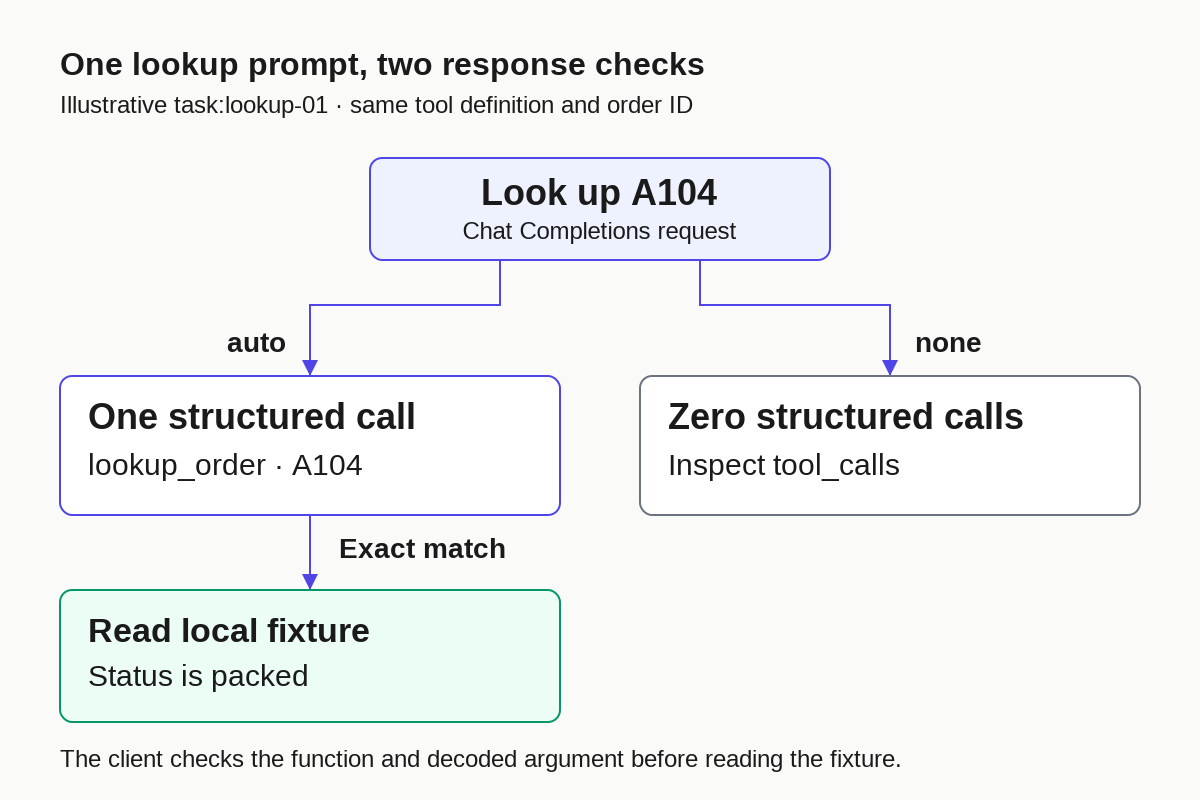
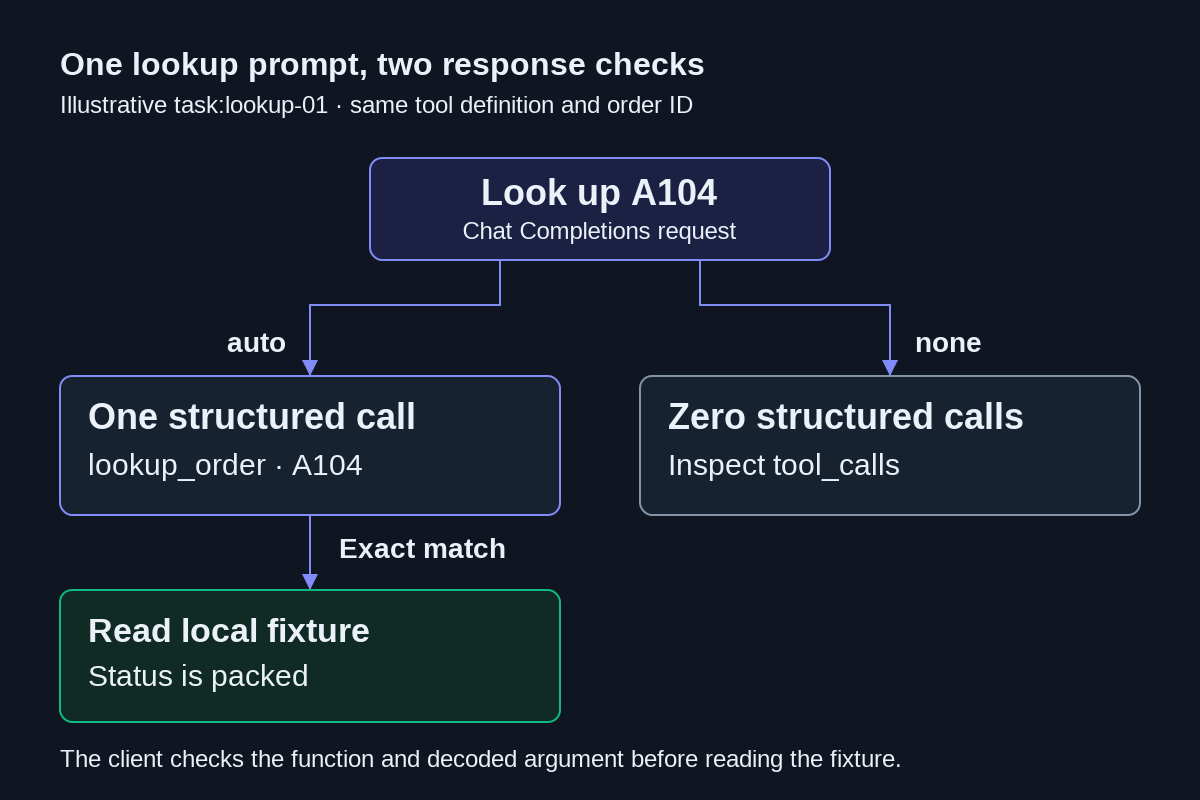
These are the verdict lines from an illustrative passing run. The script also prints a response summary immediately before each verdict so you can check the actual returned fields. The literal packed line comes from the fixture dictionary. A variable call ID and differences in the disabled reply’s wording are compatible with this case.
task:lookup-01
PASS baseline: content contains 36, zero structured calls
PASS auto: lookup_order order_id=A104
task:lookup-01 fixture: {"order_id": "A104", "status": "packed"}
PASS none: zero structured calls
An automatic reply with prose and an empty call array is a valid possibility under auto, because the model may choose to answer without a call. It still fails task:lookup-01. HTTP success, a mention of the right function, and even JSON printed in content leave the client without a structured call to dispatch. If a structured call contains the wrong argument, the server did expose a call and you can investigate argument selection or extraction. Preserve the actual decoded value when diagnosing that case. vLLM tool calling documentation
For example, a response summary with content set to “I’ll look up order A104” and tool_calls set to [] should produce FAIL auto: expected one structured call, got 0. A call containing {"order_id":"A140"} decodes successfully but fails the equality check. In either case the absence of a fixture line follows directly from the failure, since the client reaches the dictionary only after both checks. A passing disabled control in that same run confirms that the server returned zero structured calls when asked to disable them. Record the automatic failure separately because it identifies the part of the test that still needs investigation.
Isolate startup failures from response failures
| Observation | What to check next |
|---|---|
Startup rejects architecture Ernie5_5_MoeForCausalLM |
Check that both install commands completed inside the active .venv and that the launch shell has no VLLM_PLUGINS filter excluding ernie. Rerun the launch command from that environment. |
Startup reports that parser ernie5 is unregistered |
Verify both packages are in the launch environment and check for an inherited VLLM_USE_RUST_FRONTEND=1. Relaunch with the default Python frontend as shown above. |
| Startup gets to model loading, then reports a missing shard, a device memory error or an engine timeout | Start with the earliest specific error. Check checkpoint access and storage for missing files, free GPU capacity and the documented hardware combination for allocation errors, and loading or warmup progress for a timeout. |
Baseline succeeds, but auto returns prose and an empty call list |
Confirm the tool request reached the same server and contains both tools and tool_choice: auto. Verify the two launch flags for automatic tool calling and reproduce with the fixed prompt before involving an agent client. |
auto returns a structured call with bad JSON or another ID |
Keep the response summary. A JSON decode error indicates unusable arguments, while A140 in valid JSON indicates the wrong value. Both fail before the fixture read. |
none returns an HTTP error or a nonempty call list |
Use the error body or call list to check the outgoing choice and confirm that the client reached the intended vLLM listener. The exercise passes when the disabled request succeeds with zero calls and the other two checks pass. |
Baidu maps the unsupported architecture error to plugin installation and filtering. The recipe separately documents the missing parser in the Rust frontend and calls out kernel warmup and weight loading as reasons for a longer engine-ready timeout. A timeout message alone cannot establish which stage caused the failure. If the server first reports a missing file or failed memory allocation, fix that specific problem before changing the timeout. If logs keep showing progress but startup runs out of time, confirm the server inherited VLLM_ENGINE_READY_TIMEOUT_S=3600 from the launch shell. vLLM-ERNIE README · vLLM deployment recipe
Baidu’s README says to drop --speculative-config to serve without a draft. If startup reports an error specific to DSpark, use that documented option to isolate draft initialization in this exercise. Stop the failed test process if it is still running, remove the --speculative-config line and remove the trailing continuation backslash from the --attention-config line. Keep the model, host, parser and tool-choice settings intact. If startup and the three requests succeed on that run, record the result against the command with speculative decoding disabled. Restore the original flag and rerun before making any claim about the original configuration. vLLM-ERNIE README
A clean startup and successful baseline put the next investigation in the request and response path. If you get raw call-like text under content, keep that text and the launch configuration together. The response alone cannot tell you whether the model emitted syntax the parser did not recognize or decided to answer in prose. If the response ended at its token limit, investigate truncation before deciding that the parser dropped an otherwise complete call. Keep the client reading the structured field throughout. Scraping prose or switching to a forced function selection changes the behavior this exercise measures. vLLM tool calling documentation
Record the result and remove the test environment
- Save the command, script output and component revisions with the case label
task:lookup-01. A passing result applies to this non-streaming request pair and this checkpoint and parser configuration. If an agent later fails while the raw endpoint still passes, inspect the client’s outgoing tool schema and its handling of the response. A client that streams needs a separate check of how it reconstructs calls from streamed chunks. LLM Streaming Parity Tests - Stop the foreground server with Ctrl+C in the launch terminal and wait for it to return to the shell. Confirm the test listener has stopped and that the test workers have released their GPU allocations before handing the node back. If an allocation remains, identify which process owns it before taking action. On a shared node, another process may already have an allocation unrelated to the test.
- Run
deactivateif the test environment is still active, then close the test shell to discard its exported startup setting. From the scratch directory, remove only the.venvcreated for this exercise. You can inspect the path and remove that single directory with your file manager or runrm -r -- .venvafter confirming the working directory. Model weights may live in the model hub’s separate cache. The vLLM CLI reference describes a separate download directory and a default Hugging Face cache location. Leave shared cache data available to its other users. vLLM serve CLI reference
The local fixture exercised name and argument handling. When you test an integrated harness, inspect the record it actually reads and the answer it delivers to the user. If an integrated order lookup regresses, compare the dispatched argument from the recorded trace with the order in the request and the status in the answer. A correct server response paired with a different dispatched ID gives you a concrete reason to inspect the client’s decoding or dispatch logic. LangSmith Backtesting for a Wrong Order Lookup
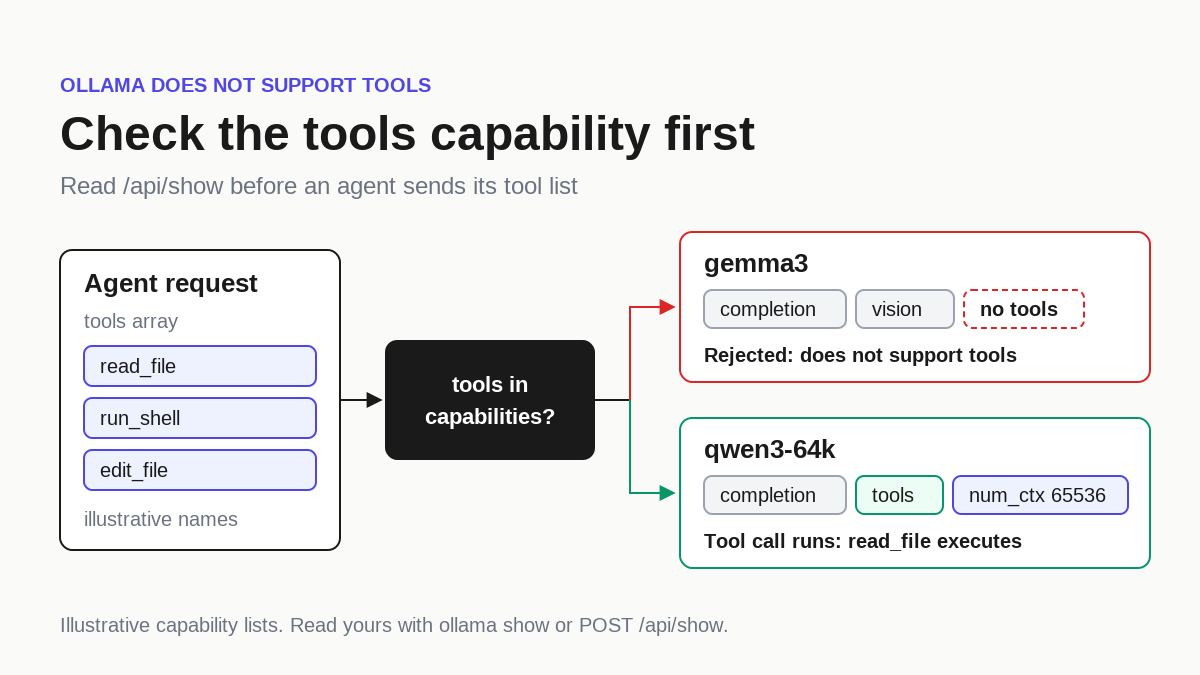
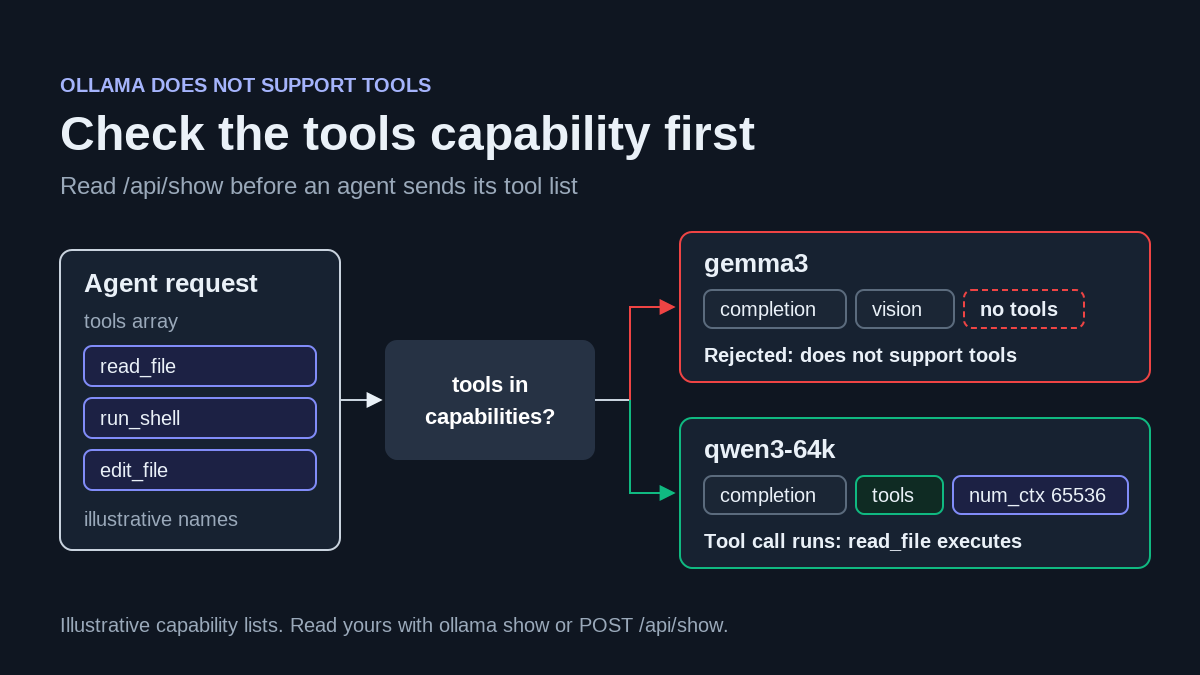
If you evaluate another local backend, check its documented compatibility and the selected model’s tool capabilities before carrying over the request. The Ollama troubleshooting guide covers that model capability check. If you need to decide where to keep the response validation as you change runtimes, the agent stack guide places serving, protocols and orchestration in their respective layers. Ollama tool support troubleshooting · The Open-Source AI Agent Stack
If colleagues report different behavior from the same agent interface, retain the direct endpoint result and the client’s request together. That gives you the body the server accepted during your check and the body the client actually sent. Compare the tool name, required argument and tool choice first. The fleet replay guide covers preserving the evidence around an agent session so you can return to the actual invocation after the test node has been released. Fleet replay