LangSmith Backtesting for a Wrong Order Lookup
Use LangSmith backtesting to replay a wrong-order lookup, check the exact tool argument and returned status, and catch prompt regressions on two control cases.

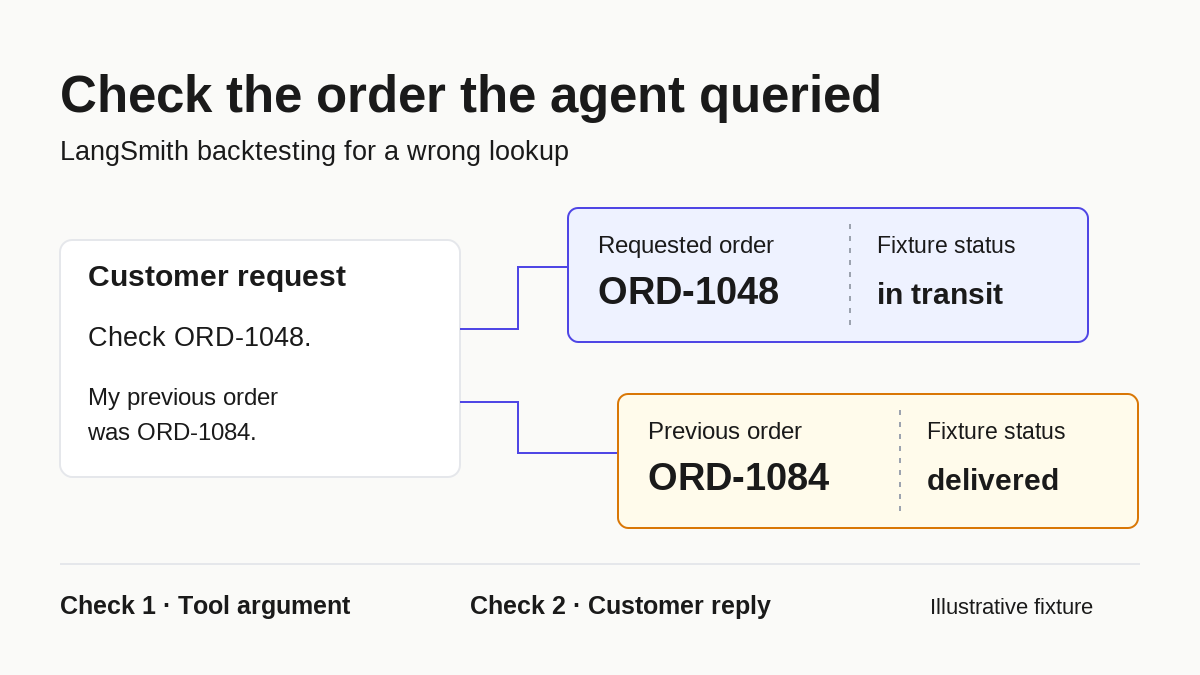
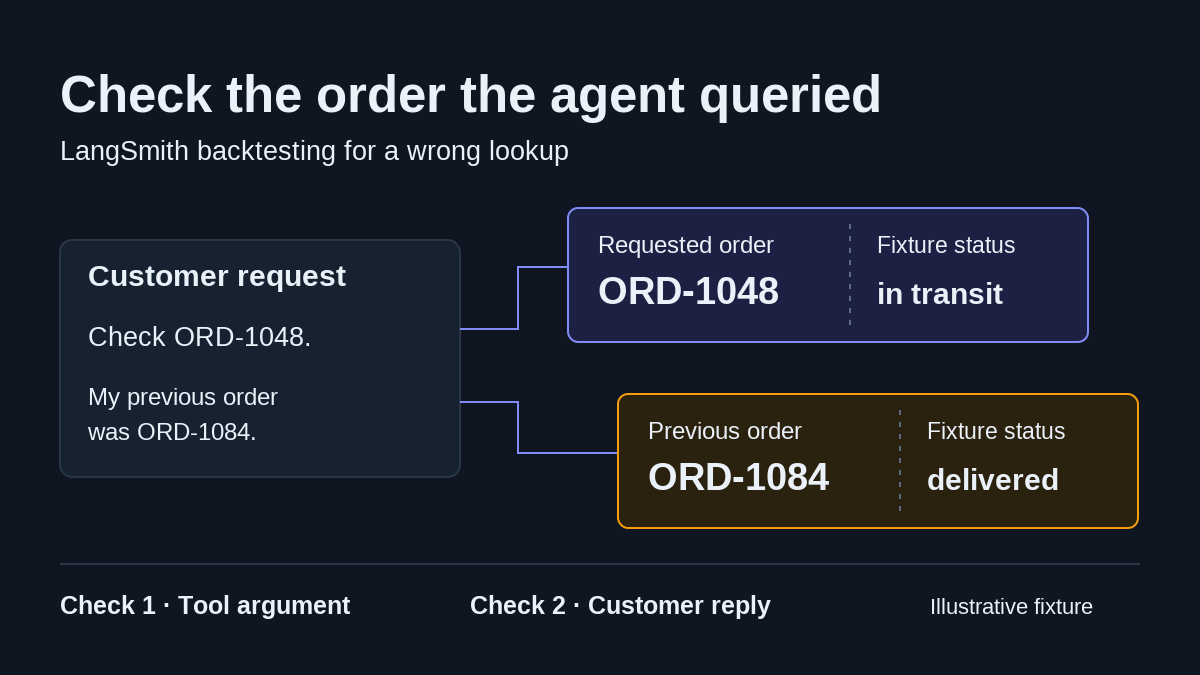
A customer asks about ORD-1048 and mentions ORD-1084 as a previous order. Your support agent confidently reports that the order was delivered. The lookup trace tells you what happened. It queried the previous order, whose status really was delivered. Use LangSmith backtesting to replay the failure and compare two prompts on the exact order ID they dispatch and the reply a customer would receive. Two control cases check that the candidate still handles ordinary lookups and knows when to ask a question.
You’ll need access to your agent’s traces, a LangSmith test workspace or environment, Python 3.11 or later, and access to a tool-capable OpenAI chat model for the driver below. Keep the current deployed prompt revision available for recovery. The exercise uses synthetic messages and a lookup backed by a Python dictionary. The baseline deliberately selects the last ID in a resolved request so you can try to reproduce the shape of the bug without importing any customer records.
LangChain’s November 24, 2026 article The Agent Lake describes traces as a record of how an agent worked and outcomes as evidence of its impact. In this exercise, the input at the tool boundary identifies the record the agent queried. The reply shows what the customer would see as a result. The Agent Lake
Find the wrong argument in the trace
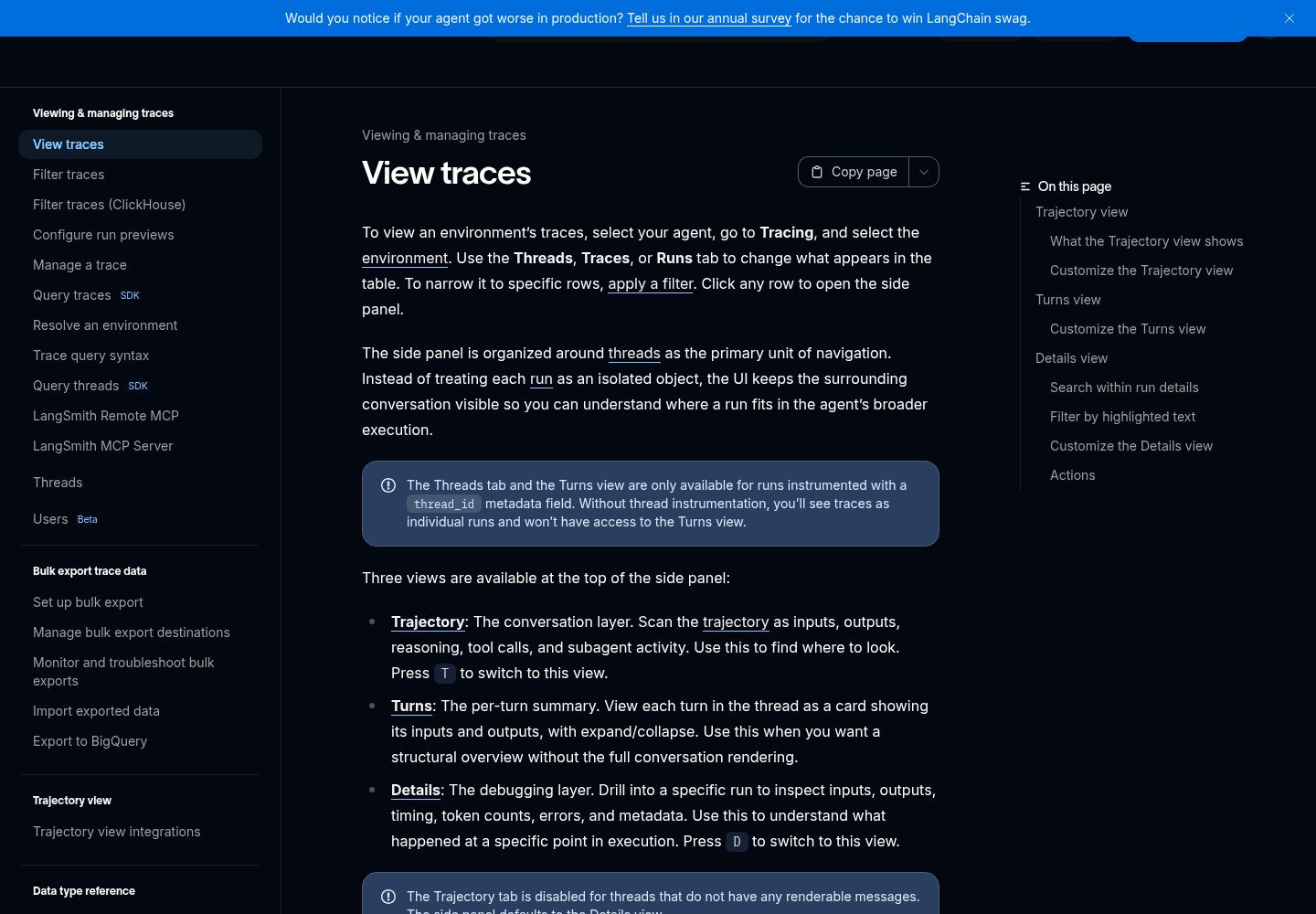
- Open the affected agent in LangSmith, go to Tracing, and select the environment that received the request. Open the run for the affected turn. If the customer wrote something like “check that one,” read back far enough to resolve the reference before recording the intended ID. In the synthetic example, both IDs and their roles fit in one message.
- In Trajectory, locate the lookup and open its child run in Details. Read the exact input passed to the tool and the record returned. If the thread has no renderable messages, use Details directly and inspect the available child runs. Record the parent run reference and the tool run reference with the customer request so you can return to the same evidence after a prompt change. LangSmith trace inspection
- Compare the requested order, the dispatched argument, the tool output and the final reply in that order. For the illustrative incident, the customer requested
ORD-1048, the lookup receivedORD-1084, the fixture returneddelivered, and the reply reported that status. The first divergence is the argument. If the deployed agent sent the intended ID and the child returned a different record, inspect the lookup or its data. If the child returned the right record and the reply changed the status, inspect how the application produced the reply. - Leave the diagnosis open when you lack the tool input or the span that records execution. Check for run errors, open the corresponding parent and verify the environment. A completed ambiguity replay can show an explicitly empty dispatch list. A blank trace pane alone gives you no basis to make that call.
Preserve the wording that caused the wrong order to look plausible. In this case the previous order is valid, it appears after the request, and the customer labels it as previous. You can replace real identifiers with fake IDs while keeping those relationships. Then put the intended result in the dataset’s reference fields. Keep the historical reply alongside the incident evidence so you can explain the failure to someone opening the trace later. Putting that reply into the reference would teach the evaluator to reward the bug. Build regression cases from recorded answers · Preserve evidence for replay
If the incident trace shows several lookups, record all arguments in dispatch order. An agent might fetch ORD-1084 and then recover by fetching ORD-1048. The final reply could be correct even though the agent fetched an extra record. You need that distinction to decide whether the candidate fixed the tool behavior or simply recovered before answering. For this exercise, a resolved request requires exactly one lookup. The grader compares the entire argument list and will catch the extra call.
Write the three replay cases
- Give the requested order and the distractor different fixture statuses. Use
ORD-1048asin transitandORD-1084asdelivered. The distractor should return a normal tool result. That lets you reproduce a believable wrong reply without depending on how the application handles a failed lookup. - Add a simple request for
ORD-2002, which isprocessing. The candidate must still perform a lookup when one target is obvious. If the candidate responds with a clarification every time, the single-order control shows the cost of that change. - Add an ambiguous request containing two IDs with no stated preference. Require zero lookups and the reply
Which order should I check?This control catches a prompt that always picks the first or last ID. The phrase “My previous order was” in the first row establishes which ID is background. The word “or” in the third row leaves the target unresolved.
Every result in the table is an illustrative expectation. Use the actual outputs and traces from your own experiment to make the decision.
| Input | Action | Expected result |
|---|---|---|
task:order-lookup-01 — What is the status of order ORD-1048? My previous order was ORD-1084. |
Run both prompt variants and inspect the lookup_order child span and the answer field. |
The intended reproduction is a baseline call with ORD-1084 and Order ORD-1084 is delivered. The candidate should make exactly one call with ORD-1048 and return Order ORD-1048 is in transit. |
task:order-lookup-02 — What is the status of order ORD-2002? |
Inspect each completed replay’s lookup_args and answer against the reference, then verify the tool span. |
Both prompts should call lookup_order once with ORD-2002 and return Order ORD-2002 is processing. |
task:order-lookup-03 — Can you check ORD-1048 or ORD-1084? |
Verify the completed output has an empty lookup_args list and compare its reply with the reference question. |
Both prompts should make zero calls and return Which order should I check? |
The dataset input contains the stable case_id and customer message. The reference output contains lookup_args and answer. The code sends only the customer message and the system prompt to the model. The evaluator gets the reference fields through LangSmith. Keeping the reference out of the messages prevents the model from seeing the correct order and reply before it makes its decision. LangSmith dataset documentation
The expected argument is a list so that one call, zero calls and extra calls have distinct representations. A lookup row requires a particular one-element list. The ambiguity row requires the literal empty list. The reply check compares the complete string. LangSmith’s complex-agent guide treats a final response and the tool trajectory as separate evaluation surfaces. Here the trajectory check is deliberately narrow and covers just the ordered arguments to the one available tool. Complex-agent evaluation
The fixture always returns the same status for a given ID. Keep the map fixed while comparing prompts. If the baseline sees delivered for one ID and the candidate sees in transit for that same ID, the reply may improve even though the routing decision never changed. When adapting this method to an incident with mutable order state, preserve the status relevant to the original request. A shipment that arrived yesterday can have a perfectly accurate status today that would give you the wrong reference for the earlier replay. Build synthetic fixtures for agent tests
Run both prompts on the same dataset
- Install the LangSmith SDK and LangChain’s OpenAI integration in the Python environment you’ll use to run the script. Have
LANGSMITH_API_KEYandOPENAI_API_KEYavailable in that environment. SetLANGSMITH_TRACING=trueand useLANGSMITH_AGENT_IDandLANGSMITH_AGENT_ENVIRONMENTfor your registered test destination. If the example model is unavailable to your test account, setORDER_REPLAY_MODELto a tool-capable OpenAI model you can use. Both variants read the same model setting. LangChain model setup · LangSmith custom instrumentation - Save the complete program below as
order_backtest.py. Check the model name and the three reference outputs before running it. The example creation and Python evaluator interfaces are documented for LangSmith SDK 0.3.13 or later. Keep both variants in the same Python environment so they use the same installed dependencies. LangSmith SDK evaluation guide - Run
python order_backtest.py. Expect a printed dataset name beginning withorder-lookup-backtest-. In LangSmith, find that dataset and look for three examples and two experiments with the prefixesorder-baselineandorder-candidate. The script requests one repetition for each example in each experiment. Keep the examples unedited until both experiments finish.
pip install -U langsmith
pip install -U "langchain[openai]"
python order_backtest.py
import os
from uuid import uuid4

from langchain.chat_models import init_chat_model
from langchain.tools import tool
from langsmith import Client, traceable

FIXTURE = {
    'ORD-1048': 'in transit',
    'ORD-1084': 'delivered',
    'ORD-2002': 'processing',
}
CLARIFY = 'Which order should I check?'
EXAMPLES = [
    {
        'inputs': {
            'case_id': 'task:order-lookup-01',
            'message': 'What is the status of order ORD-1048? My previous order was ORD-1084.',
        },
        'outputs': {
            'lookup_args': ['ORD-1048'],
            'answer': 'Order ORD-1048 is in transit.',
        },
    },
    {
        'inputs': {
            'case_id': 'task:order-lookup-02',
            'message': 'What is the status of order ORD-2002?',
        },
        'outputs': {
            'lookup_args': ['ORD-2002'],
            'answer': 'Order ORD-2002 is processing.',
        },
    },
    {
        'inputs': {
            'case_id': 'task:order-lookup-03',
            'message': 'Can you check ORD-1048 or ORD-1084?',
        },
        'outputs': {'lookup_args': [], 'answer': CLARIFY},
    },
]

COMMON = (
    'You check order status. If the request leaves the target unresolved, '
    f'make no tool call and reply exactly: {CLARIFY} '
    'Otherwise call lookup_order exactly once. '
)
BASELINE = COMMON + 'For a resolved request, use the last order ID mentioned.'
CANDIDATE = COMMON + (
    'For a resolved request, use the order ID the customer asks about. '
    'Treat an ID named only as a previous order as background.'
)


@traceable(name='lookup_order', run_type='tool')
def lookup_fixture(order_id: str) -> dict:
    return {'order_id': order_id, 'status': FIXTURE.get(order_id, 'unknown')}


@tool
def lookup_order(order_id: str) -> dict:
    """Look up the status of one exact order ID."""
    return lookup_fixture(order_id=order_id)


def make_target(model, prompt):
    @traceable(name='replay_order')
    def replay_order(inputs: dict) -> dict:
        reply = model.invoke([
            {'role': 'system', 'content': prompt},
            {'role': 'user', 'content': inputs['message']},
        ])
        if reply.invalid_tool_calls:
            raise ValueError('The model returned an invalid tool call')

        lookup_args = []
        records = []
        for call in reply.tool_calls:
            if call['name'] != 'lookup_order':
                raise ValueError(f"Unexpected tool: {call['name']}")
            order_id = call['args']['order_id']
            if not isinstance(order_id, str):
                raise ValueError('order_id must be a string')
            record = lookup_fixture(order_id=order_id)
            lookup_args.append(order_id)
            records.append(record)

        if len(records) == 1:
            record = records[0]
            answer = f"Order {record['order_id']} is {record['status']}."
        elif records:
            answer = 'Multiple lookups were requested.'
        else:
            answer = reply.text.strip()

        return {'lookup_args': lookup_args, 'tool_records': records, 'answer': answer}

    return replay_order


def tool_argument_ok(outputs: dict, reference_outputs: dict) -> bool:
    return outputs.get('lookup_args') == reference_outputs['lookup_args']


def answer_ok(outputs: dict, reference_outputs: dict) -> bool:
    return outputs.get('answer') == reference_outputs['answer']


def main():
    model_name = os.environ.get('ORDER_REPLAY_MODEL', 'gpt-5.4-mini')
    model = init_chat_model(model_name, model_provider='openai').bind_tools([lookup_order])
    client = Client()
    dataset_name = f'order-lookup-backtest-{uuid4().hex[:12]}'
    dataset = client.create_dataset(dataset_name=dataset_name)
    client.create_examples(dataset_id=dataset.id, examples=EXAMPLES)
    print(f'Compare experiments in dataset: {dataset_name}', flush=True)

    for variant, prompt in [('baseline', BASELINE), ('candidate', CANDIDATE)]:
        client.evaluate(
            make_target(model, prompt),
            data=dataset_name,
            evaluators=[tool_argument_ok, answer_ok],
            experiment_prefix=f'order-{variant}',
            num_repetitions=1,
            max_concurrency=1,
            metadata={
                'variant': variant,
                'prompt_text': prompt,
                'fixture': dict(FIXTURE),
                'model_id': model_name,
            },
        )


if __name__ == '__main__':
    main()
bind_tools exposes the tool schema without forcing a call. That matters because clarification must remain possible. The model’s response supplies the proposed call, then the runner reads its order_id and invokes lookup_fixture with that argument. lookup_fixture is the function that actually reads the fixture and is instrumented as the lookup_order tool span. Inspect its input to confirm what the lookup received. The response from the model and the input to the tool are separate places to check if your real application has logic between proposing and executing a call. LangChain tool calling and execution
The lookup path uses one model turn to choose the tool and Python to render the resulting order and status. The no-call path retains the model’s text after trimming surrounding whitespace. This makes the example a test of order selection, status propagation through the renderer, and the model’s ability to ask the specified question. For a deployed agent that calls the model again after receiving a tool result, capture that agent’s actual final answer when you adapt the driver. Decide which factual statements it must include and what wording variations your evaluation can accept.
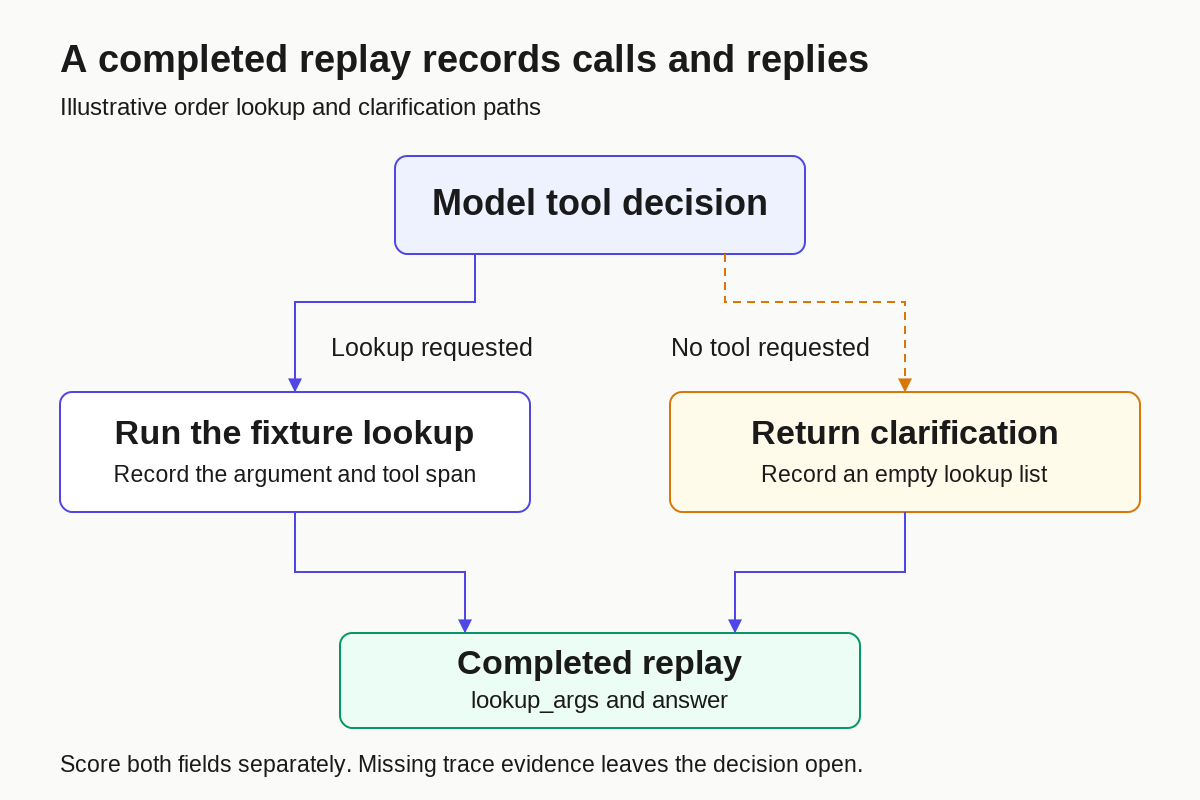
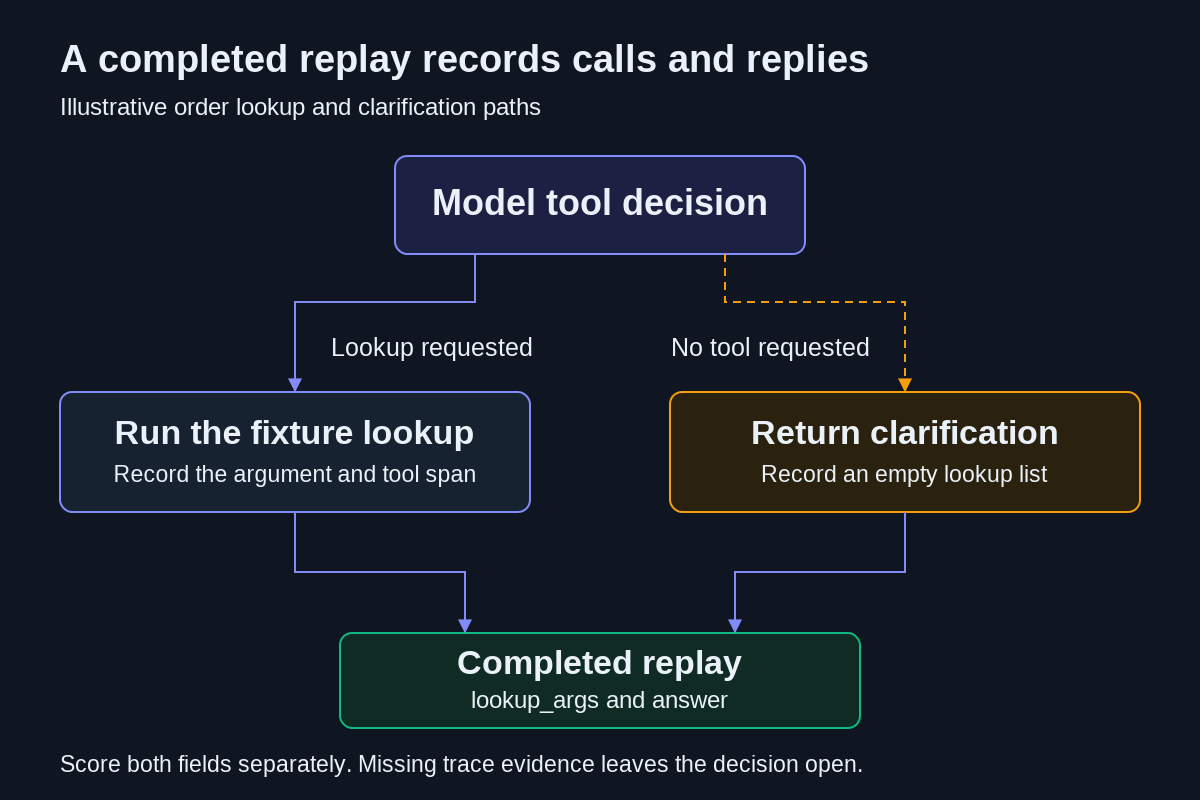
Read tool_records alongside the two scored fields when a row fails. For example, if the fixture returns unknown, the replay still preserves the ID the model chose. You can see whether it invented a record number or whether the declared fixture differs from the reference. If the model asks for a lookup twice, the driver records both executions and emits Multiple lookups were requested. The full-list comparison flags that behavior even if both IDs match the requested one. The same principle applies when verifying structured output against a known record. Browser Use structured output verification
Compare the rows and make the prompt decision
- In Datasets & Experiments, select the printed dataset. Select the baseline and candidate experiments and click Compare. Use Set as source experiment on the baseline if it is listed as the comparison experiment. Show the
tool_argument_okandanswer_okfeedback keys. Open the first row to view both outputs beside the reference. LangSmith experiment comparison - Switch the row panel to Traces and inspect the
lookup_orderchild on each side. To establish the illustrative baseline failure, confirm that the child receivedORD-1084and returneddelivered. For the candidate, confirm a single lookup withORD-1048, the returnedin transitstatus and the matching reply in the replay output. Check both feedback scores before marking the row repaired. - Read both controls with the filters cleared. For
ORD-2002, confirm the single dispatched lookup andprocessingreply under both prompts. On the ambiguity row, confirm that the replay completed and explicitly returnedlookup_args: []withWhich order should I check?. Check that its trace contains no lookup child and that tracing recorded the expected child on the single-order control. If either baseline control fails, establish why before claiming the candidate preserved that behavior.
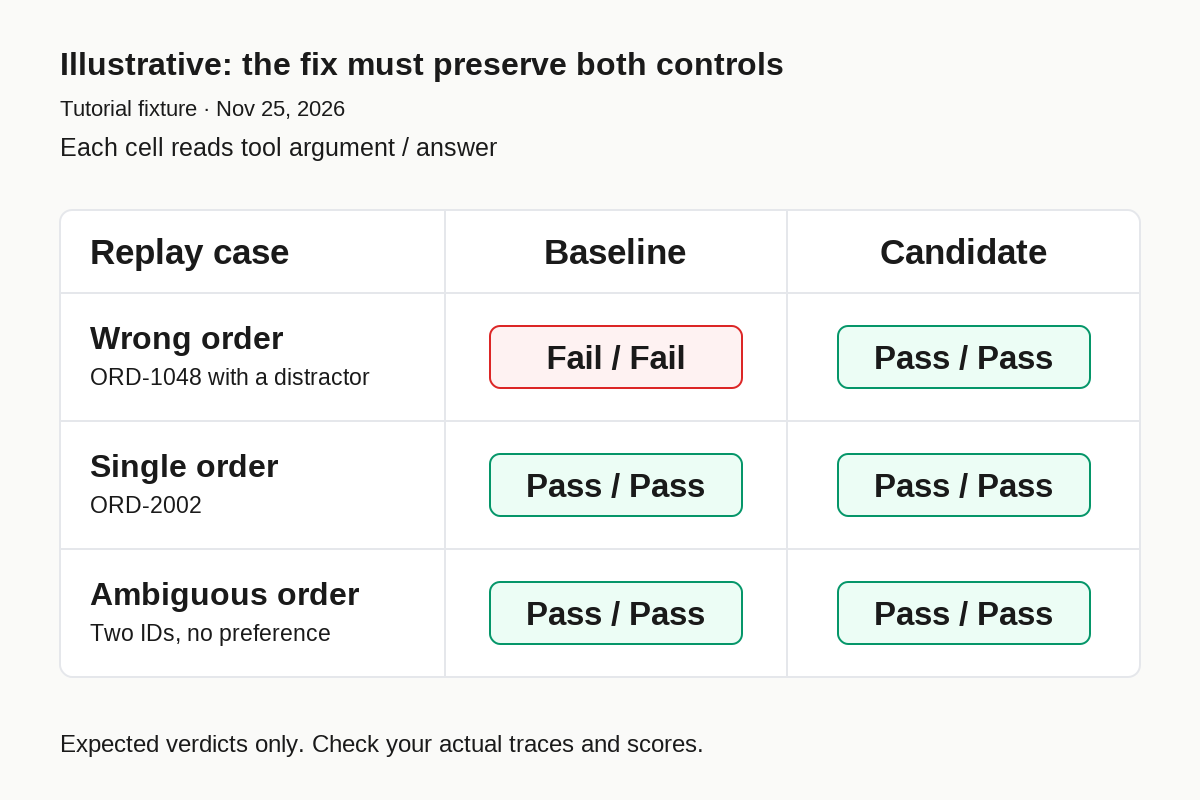
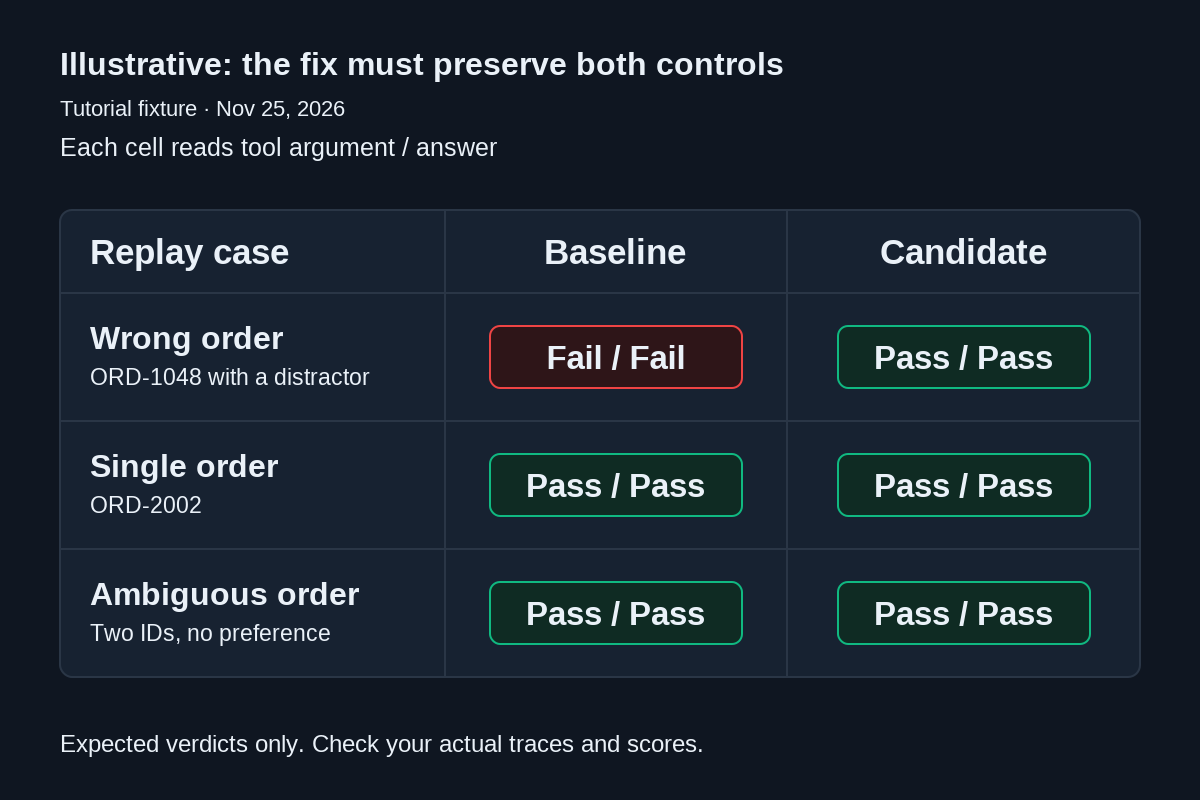
If the baseline already passes the first row, the paired replay has yet to reproduce the intended failure. Check whether your incident used different wording, earlier messages or a different prompt revision. The passing example can still guard the behavior in future tests. A fix claim for the actual incident needs a reproduction or comparable historical evidence. LangSmith’s historical backtesting guide shows how original runs can supply a baseline experiment. This tutorial generates the baseline anew with the deliberately flawed prompt. LangSmith historical backtesting tutorial
When scores disagree, start where the checks diverge. If the argument passes and the reply fails, inspect the returned record and the answer construction. If the reply passes and the argument fails, read the dispatched list before accepting the apparently correct text. A production assistant might repeat the intended ID and guess a status. In this exercise, a passing lookup reply with a failing argument would warrant checking the recorded fields, reference and driver, since the status sentence is rendered only from a single fixture record. When both checks fail after a valid lookup of the previous order, the incorrect ID explains why the reply contains the wrong status.
Accept the candidate for these examples when the baseline reproduces the wrong lookup, the candidate passes both checks on that row and both variants pass both controls with complete evidence. Work row by row. Fixing one wrong lookup while adding a lookup to the ambiguous request violates the expected behavior even if a larger dataset’s average score improves. Keep the paired experiments as evidence for this fixture. Once the checks are stable, the row-level results can inform a release threshold. Agent evaluation CI gates
Recover from an incomplete or misleading comparison
| Observation | Check first | Recovery |
|---|---|---|
The reply mentions ORD-1048 but the lookup span is missing |
Inspect lookup_args, the associated trace and the selected environment. |
Mark the row inconclusive. Confirm the single-order span arrives and rerun the full pair. |
The candidate calls ORD-1048 and reports delivered |
Compare the fixture metadata, tool child output and row reference. | Restore the intended fixture and rerun both prompt variants on a fresh pair. |
The candidate asks a question for ORD-2002 |
Compare the displayed customer input and verify whether lookup_args is empty. |
Keep or restore the deployed baseline. Revise the candidate and retest all three rows. |
| The candidate looks up either ID on the ambiguity row | Read the dispatched argument in the child and the completed replay reply. | Keep or restore the deployed baseline and retain the ambiguity control for the next experiment. |
For an incomplete pair, first compare the stored inputs and reference outputs with the three entries in EXAMPLES. Use the case IDs to line up the messages, then compare the text and the reference for each one. Next compare the model and fixture metadata on both experiments. The expected values are concrete. ORD-1048 must map to in transit, ORD-1084 to delivered and ORD-2002 to processing. If the metadata and the child output disagree, inspect the code that supplied the fixture before attributing the outcome to the prompt.
A model access error may appear before any tool has a chance to run. Read the row error and verify the configured model and test credentials. If the run completed with a dispatch but the child trace is absent, verify the tracing environment and allow time for trace submission. Background submission can be interrupted when a process exits. If you cannot recover the evidence for that pair, fix the test setup and run both variants again from the same script revision and environment. Keep the earlier experiment names with the incident so the incomplete pair and the replacement pair remain identifiable. LangSmith trace submission
If either control regresses after you enable a candidate in a test deployment, restore the saved deployment prompt revision using the application’s existing configuration. The deliberately flawed BASELINE constant belongs to the synthetic fixture. Use the actual saved deployment revision for rollback. Replay both controls against the restored test deployment. Verify that the clear request fetches ORD-2002 once and that the ambiguous request produces a clarification with no lookup. Keep the wrong-order incident open if that deployment still reproduces it. Record the dataset name, the two experiment names and the specific control that led to rollback so the next prompt edit can be evaluated against the same evidence.
Sources
- LangChain — The Agent Lake
- LangSmith — View traces
- LangSmith — Create and manage datasets in the UI
- LangSmith — Run backtests on a new version of an agent
- LangSmith — How to evaluate agents
- LangSmith — How to compare experiment results
- LangChain — Models
- LangSmith — Evaluate a complex agent
- LangSmith — Custom instrumentation