Test a README Fix With Hurdle Agent Evals
Use Hurdle agent evals to test one SDK README correction with Claude Code. Compare two runs and verify the saved timeout setting and an unchanged SDK file.

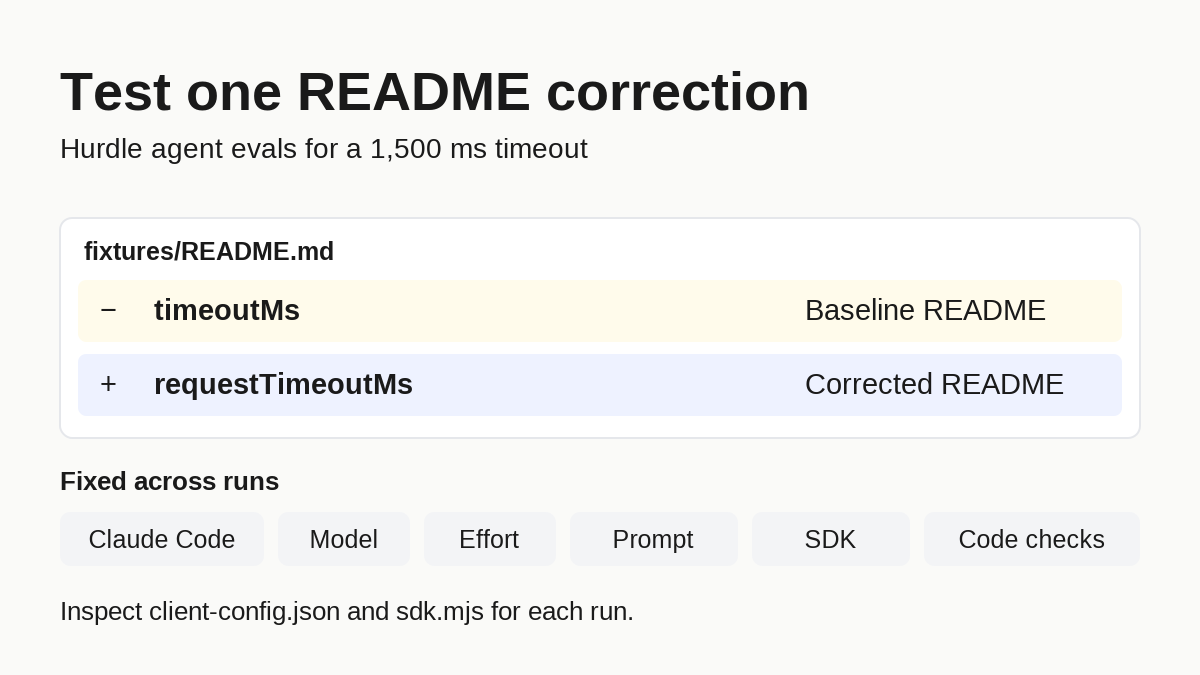
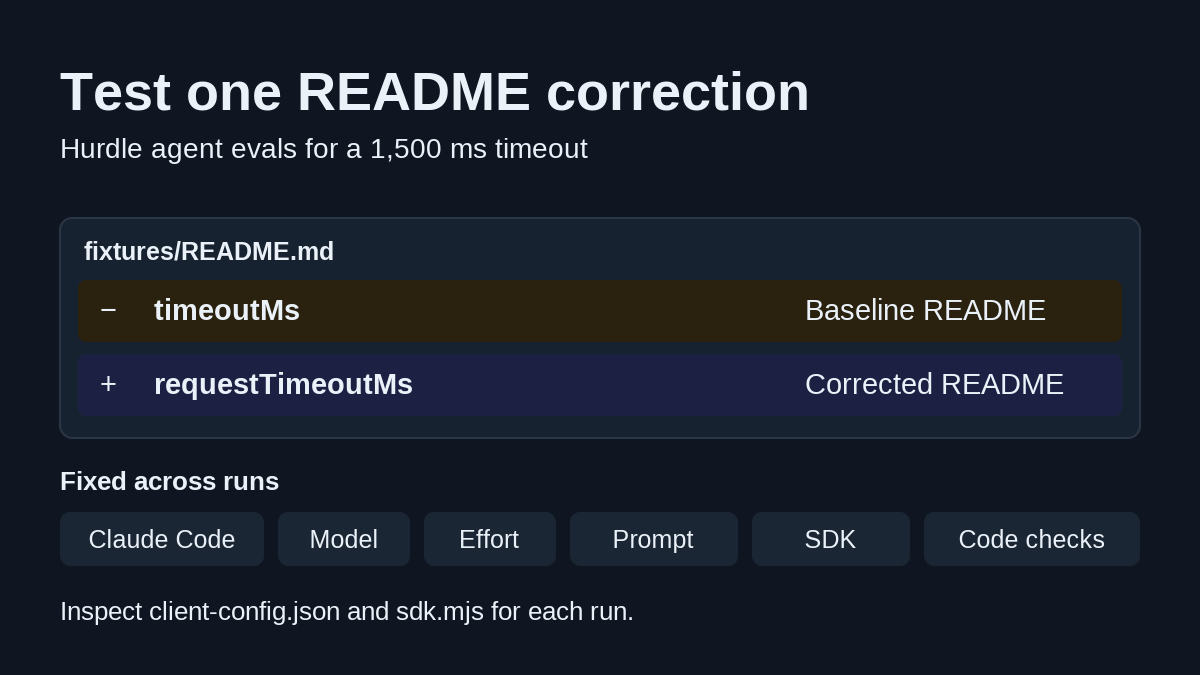
Your SDK README names the wrong timeout option. You can fix the spelling in seconds, but a coding agent might already recover by inspecting the SDK, or it might confidently save a setting the SDK silently ignores. Use Hurdle agent evals to find out which happened. Run the same Claude Code task twice with the same grader. Swap one README line between runs, then inspect the saved configuration and the transcript for each attempt.
This tutorial is for a developer-experience engineer who can run a supported Claude Code CLI with an authorized model credential and has a disposable environment for trusted synthetic inputs. You’ll build task:client-timeout-01, a small case with a 1,500 ms target and a 5,000 ms SDK default. You’ll finish with two labeled Hurdle runs, a grader that can distinguish a wrong key from a missing file, and a way to rerun the original README after you edit it.
Together AI open-sourced Hurdle on November 25, 2026. The launch describes running coding agents from different starting contexts and inspecting the checks and transcript after each run. The fixture and outcomes below form an illustrative experiment. Use the expected observations to interpret what your own runs produce. Together AI’s launch announcement
Build a timeout case with one editable line
- Start in a new disposable project directory on a machine or test environment you’re authorized to use for local agent execution. Use Node.js 22.18 or later and a supported
claudeexecutable on your path. Install Hurdle into the project so your suite and grader can import it from the local dependency tree. - Create the directory layout below. Keep the archived README versions in
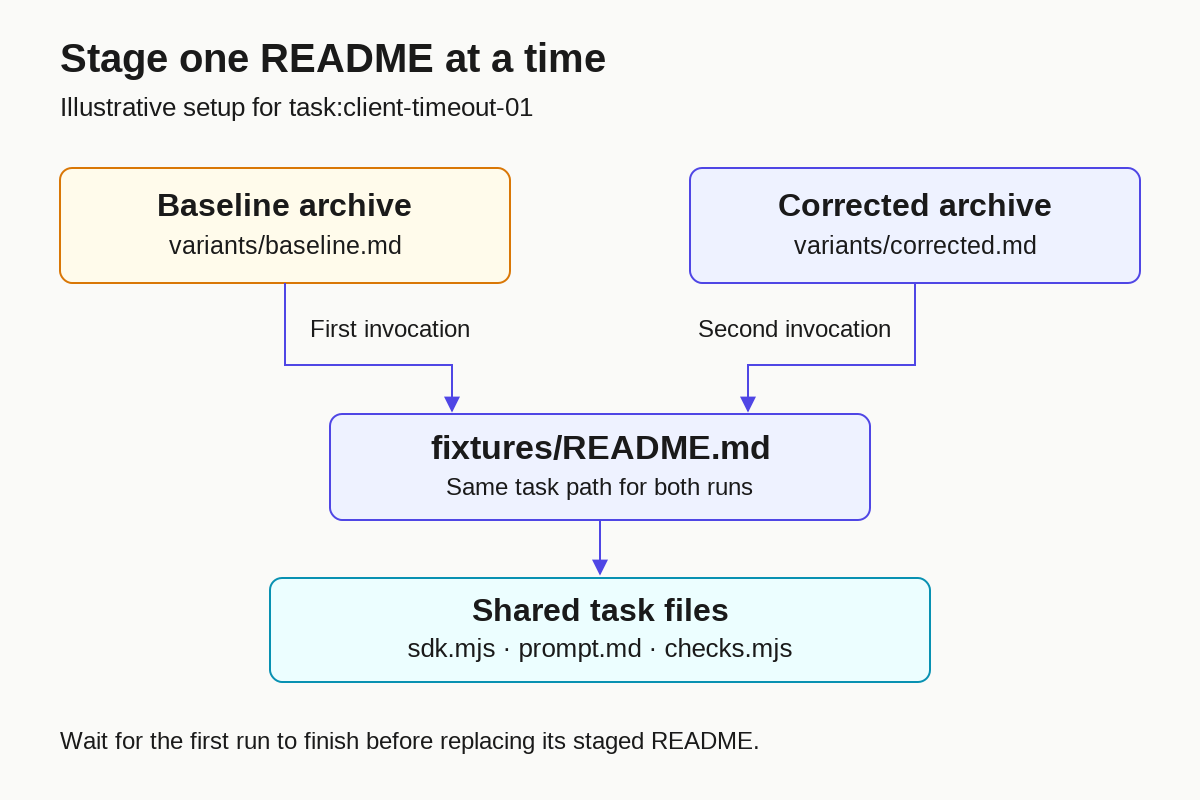
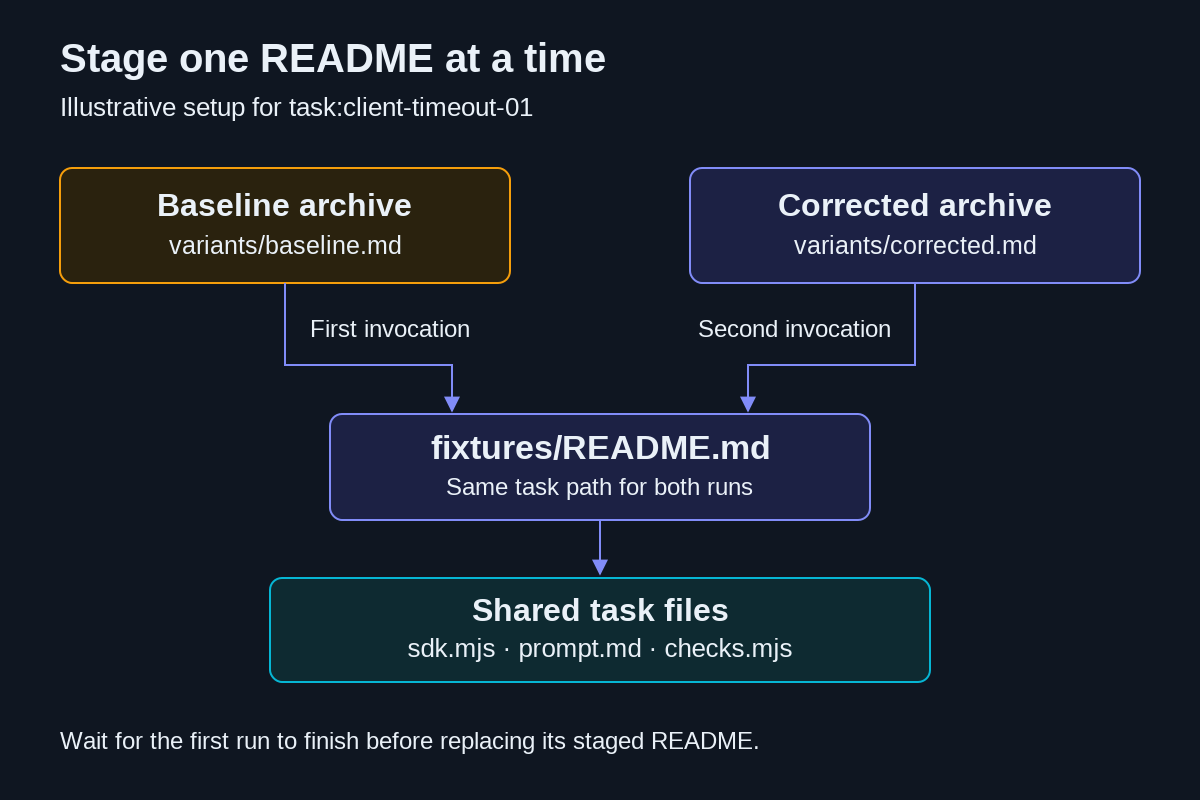
variants/. Place exactly one active copy underfixtures/README.mdbefore each invocation. Save the text files as UTF-8 with LF line endings and a final newline. - Give the agent the SDK source and one README. Keep the task prompt identical between runs and check that the only difference between the archived README versions is the option name.
From the empty directory, set up the project and stage the task directories. The package manifest in the upstream repository identifies Hurdle 0.5.0 and declares the minimum Node version. The repository README supplies the supported local Claude Code path. npm’s command reference explains how npx resolves a project-local package and passes flags after the package name to its executable. Hurdle package manifest · Hurdle repository · npm command reference
npm init -y
npm install --save-exact hurdle@0.5.0
mkdir -p variants tasks/client-timeout-01/fixtures tasks/client-timeout-01/workspace
Check that the installation created a local Hurdle dependency at the requested version before continuing. Keep the dependency lockfile with the example if you save or share the project. This lets a colleague recreate the same installation later. The .mjs files below contain ordinary JavaScript and use ES modules directly. Node.js module-system notes
Use an authorized ANTHROPIC_API_KEY or CLAUDE_CODE_OAUTH_TOKEN in the project’s .env.local. Keep that file outside the staged directories and exclude .env.local and .hurdle/ from version control. Hurdle uses isolated agent configuration and requires explicit credentials even if you already have an interactive CLI login. If both credential variables are set, Hurdle gives a nonblank API key precedence. The suite uses Local execution in a new project without a saved Runtime. Local execution gives the agent the host user’s access, so use an environment containing only the material and model credential it needs. The synthetic SDK runs entirely in memory. Live model requests may be billed. Hurdle authoring guide
example.suite.mjs
variants/
  baseline.md
  corrected.md
tasks/
  client-timeout-01/
    prompt.md
    checks.mjs
    fixtures/
      README.md
    workspace/
      sdk.mjs
Save the baseline as variants/baseline.md.
# Demo Client

Set `timeoutMs` in `client-config.json`. The value is an integer in milliseconds.
Save the corrected version as variants/corrected.md.
# Demo Client

Set `requestTimeoutMs` in `client-config.json`. The value is an integer in milliseconds.
Save the implementation as tasks/client-timeout-01/workspace/sdk.mjs.
export function createClient(options = {}) {
  return { requestTimeoutMs: options.requestTimeoutMs ?? 5000 };
}
The SDK returns the effective timeout as a plain object. With { "timeoutMs": 1500 }, the recognized option is absent and the function returns 5,000 ms. With { "requestTimeoutMs": 1500 }, it returns 1,500 ms. You can infer the effective timeout from the two values without waiting for a timer or sending a request. That makes a silent fallback observable without introducing delays, external state, or another credential.
The README uses the same path, units, and wording in both versions, down to the last period. Avoid improving the wording around the fixed key or adding a second example during this comparison. Either would change what the experiment can tell you. With one changed token, a reader can point to the literal difference in the starting files. An agent can still choose to inspect the SDK and work around the baseline line. That is part of the behavior this task is designed to observe.
Save this as tasks/client-timeout-01/prompt.md.
Configure the supplied Demo Client with a request timeout of 1,500 milliseconds.
Start with fixtures/README.md. The SDK implementation is in sdk.mjs.
Create client-config.json in the workspace root as a JSON object containing the
option and its numeric value. Leave sdk.mjs and fixtures/README.md unchanged.
Use only the supplied files and local tools. No external service is required.
Hurdle places the contents of workspace/ at the run workspace root and stages the contents of fixtures/ under fixtures/. The separate variants/ directory is for the experiment author. Only the staged README is part of the task’s starting files. The prompt gives the agent the goal, units and destination, while leaving the option name for the agent to discover. Including the correct key in the prompt would answer the exact question you want the README to help the agent resolve. Hurdle task layout
Leave client-config.json out of both workspace/ and fixtures/. The check should find a file the agent produced during the attempt. If you put your own expected configuration in the workspace to try out the SDK, remove it from the staged inputs before the live run. Otherwise a correct artifact could already exist when the agent starts, and you would need the transcript to tell whether the agent did any work.
Score the configuration and SDK independently
- Save the grader below as
tasks/client-timeout-01/checks.mjs. It declares the paths it needs Hurdle to capture and grades only the captured results. - Use the worked observations under the code to trace a correct result, a wrong key, and an absent or uncaptured output before spending a live run.
- Keep the grader and its expected SDK text identical across both README versions. If you revise a check after seeing the initial results, rerun both versions under the revised grader so they have the same scoring rules.
import { defineChecks } from "hurdle";

const expectedSdk = [
  "export function createClient(options = {}) {",
  "  return { requestTimeoutMs: options.requestTimeoutMs ?? 5000 };",
  "}",
  "",
].join("\n");

export default defineChecks((run) => {
  run.expect.completed();
  run.expect.artifact({
    id: "client-config",
    path: "client-config.json",
    format: "json",
    maxBytes: 1024,
  });
  run.expect.artifact({
    id: "sdk-file",
    path: "sdk.mjs",
    format: "text",
    maxBytes: 1024,
  });

  const config = run.artifacts.json("client-config.json");
  const sdk = run.artifacts.text("sdk.mjs");

  run.check({
    id: "correct-timeout",
    passed: config == null
      ? null
      : typeof config === "object" && !Array.isArray(config) &&
        Object.keys(config).length === 1 && config.requestTimeoutMs === 1500,
    summary: "client-config.json must contain only the numeric requestTimeoutMs value 1500.",
  });
  run.check({
    id: "sdk-unchanged",
    passed: sdk == null ? null : sdk === expectedSdk,
    summary: "Captured sdk.mjs text must match the supplied SDK, including its final newline.",
  });
});
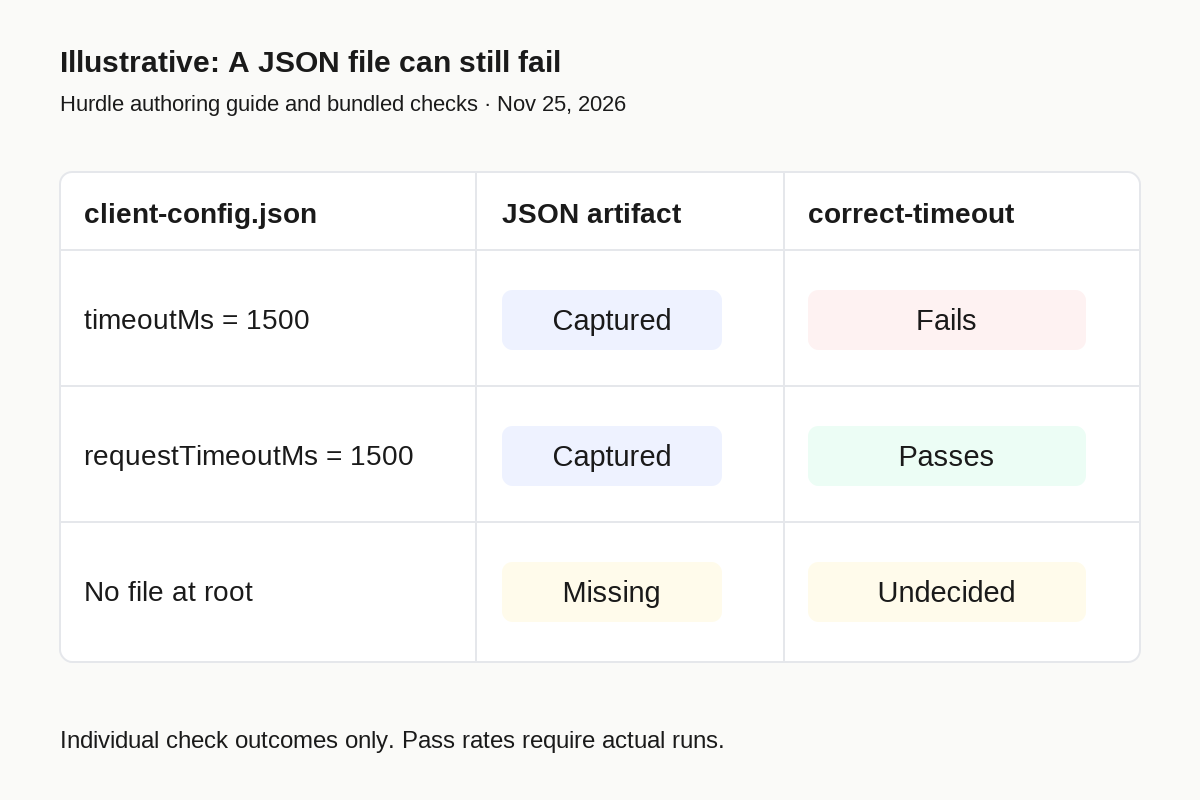
The artifact declaration and the value check answer separate questions. First, did Hurdle obtain a small, readable JSON artifact from the requested path? Then, if a JSON object is available, does it contain just the supported key and the requested number? Using one key keeps the answer unambiguous. It rules out a file that contains both spellings, even if this particular SDK would happen to honor the correct one. Whitespace and JSON formatting are free to vary. A string such as "1500" fails because the task explicitly asks for a number. The JSON parsing and exact-value pattern come from Hurdle’s bundled order-total task. Publisher’s order-total checks
The SDK check compares captured text to the original so the agent can’t pass by changing the SDK to accept the stale option or by changing the default. It checks the final snapshot of sdk.mjs, including line endings. A file changed and then restored can pass this comparison. The README is staged as a fixture and the prompt asks the agent to leave it alone. This grader makes an independent assertion about the SDK file only. Use the transcript if you need to investigate an intermediate edit, and keep the result claim scoped to what the grader actually inspects.
When a helper has no usable value, the corresponding content check returns null. That records that the content check cannot decide. Read the required artifact result alongside it. A missing file, a file over the capture limit and an unreadable JSON document can each leave you without usable content. The overall verdict depends on the required artifact result and run evidence. A parsed JSON null also supplies no object to compare. Treat that as unusable configuration even if you can see the literal null in the captured artifact. The bundled oversized-report task demonstrates the separate case where its artifact is optional and a required check returning null leaves the run incomplete. Publisher’s oversized-report checks · Kitchen-sink verdict examples
The 1 KB ceiling is ample for both files in this example. If the configuration artifact fails, look first for client-config.json at the run workspace root. An agent that writes fixtures/client-config.json put the output at a different path. A response containing a JSON code block with no file leaves the workspace without the requested artifact. A file containing Markdown fences can have the right path and still be invalid JSON. Diagnosing these as separate observations helps you decide whether the agent followed the docs, followed the file-writing instructions, or ran into a capture problem.
The number check deliberately accepts equivalent numeric JSON spellings. For example, 1500.0 parses to the same number as 1500 and passes when the rest of the object is correct. By comparison, { "requestTimeoutMs": 1.5 } fails even if the agent describes it as 1.5 seconds in its reply. The contract specifies milliseconds, and the SDK uses the value it receives. If this result appears in a run, inspect the transcript for a unit conversion before calling it a documentation-key problem.
| Input | Action | Expected result |
|---|---|---|
task:client-timeout-01 with the baseline README and an agent that copies its documented key into {"timeoutMs":1500} |
Stage variants/baseline.md at tasks/client-timeout-01/fixtures/README.md and run npx hurdle run --experiment-version baseline-readme |
Illustrative observation if the agent saves that file at the root. The JSON artifact is present, correct-timeout fails, and an unchanged SDK would fall back to 5,000 ms. |
task:client-timeout-01 with the corrected README and {"requestTimeoutMs":1500} at the workspace root |
Stage variants/corrected.md at the same path and run npx hurdle run --experiment-version corrected-readme |
Illustrative observation if the run completes and the SDK capture matches. correct-timeout and sdk-unchanged pass, and the SDK would use 1,500 ms. |
task:client-timeout-01 with the baseline README and a transcript showing the agent consulting sdk.mjs and saving {"requestTimeoutMs":1500} |
Run npx hurdle view and open the baseline-readme attempt after both invocations |
Illustrative observation. A passing file with a trace showing recovery is evidence that this agent worked around the stale README on this attempt. |
Run both README versions with fixed settings
- Save the suite at
example.suite.mjs. Confirm your installed Claude Code and authorized credential can use the configured model and effort. If you need to choose a supported alternative, make that change before either run and keep that selection for both. - Stage the baseline, validate the definition, check runtime readiness, then run the baseline under its own label. Wait for that invocation to finish before changing the README.
- Replace the active README with the corrected copy. Validate again, run it under a second label, and reopen the viewer from the project root.
import { defineSuite } from "hurdle";

export default defineSuite({
  tasks: ["./tasks/client-timeout-01"],
  agents: [{
    runner: "claude-code",
    model: "claude-opus-5-5",
    effort: "medium",
  }],
  repeats: 1,
  concurrency: 1,
  verdict: "code",
});
The model and effort follow Hurdle’s documented Claude Code starter. verdict: "code" lets deterministic checks decide the outcome without a second model acting as judge. One repeat and one agent produce one scheduled evaluation cell per invocation. These are two labeled invocations of the same suite, each using Hurdle’s implicit baseline condition. The experiment labels identify the active README, even though the Hurdle condition name is the same. The authored condition interface selects skills and MCP servers, so keep this README swap in the documented task fixture. Hurdle suite and experiment configuration
Run these from the project root after saving every file. Proceed through the lines in order and stop at any error before replacing the staged README. From this new project, Hurdle selects the root example.suite.mjs when you omit the suite argument. If you later add an evals/example.suite.mjs, Hurdle gives that file precedence. Pass ./example.suite.mjs as the suite argument to validate and run if the project layout changes and you want to keep running this case. Hurdle suite selection
cp variants/baseline.md tasks/client-timeout-01/fixtures/README.md
# Expected: the offline command checks the staged suite definition.
npx hurdle validate --offline
npx hurdle validate
npx hurdle run --experiment-version baseline-readme
validate --offline checks the evaluation definition. Hurdle must already be installed if you want the invocation to avoid npm fetching the executable. A validation error about paths or definitions is a reason to check filenames, task placement and the local package installation before making a model call. Plain validate additionally checks local executables and required credentials and can check API-key authentication through read-only provider endpoints. A subscription token can remain unverified at this stage. A clean readiness check still leaves model access and billing readiness to be established by the run itself. Hurdle validation behavior · npm package resolution and caching
cp variants/corrected.md tasks/client-timeout-01/fixtures/README.md
npx hurdle validate --offline
npx hurdle run --experiment-version corrected-readme
# Expected after a completed pair: both experiment labels have saved results.
npx hurdle view
The run command repeats readiness checks before opening a result store or launching an agent. If the command gets through execution and grading, look in the terminal for individual check results and summaries. The viewer reads results saved under .hurdle/ for this local filesystem setup. If the normal viewer port is busy, the repository documents npx hurdle view --port 3001 as a way to reopen it on another port. Hurdle authoring guide · Hurdle repository quick start
Open the individual runs under their respective labels and inspect the same check IDs. Hurdle’s Compare view requires compatible saved evaluation definitions. If changing fixture text makes Compare decline this pair, the individual runs still give you the transcript, artifacts and check results to compare manually. Use the labels to locate the runs and the saved configuration to verify the actual settings. Hurdle comparison documentation
Read the transcript when the verdict is ambiguous
- Start with the command output and look for evidence of a launched attempt. If readiness stopped it, use the reported executable, definition or credential problem to get both sides ready before drawing a conclusion about the docs.
- For each launched attempt, open the run’s checks and artifacts. Match
client-config,correct-timeoutandsdk-unchangedto the saved files and the overall result. - Read the transcript around the README and SDK reads. Write down what evidence connects the README to the file the agent produced. If the trace does not establish that connection, record the result without assigning a cause.
A failed check attached to a launched attempt offers different evidence from a startup error. If the credential is rejected before the agent starts, the README had no opportunity to affect that invocation. An older result visible in the viewer can be misleading here. Confirm the label and the attempt you just ran before reading a transcript. If the failure happened after launch and Hurdle has partial or unavailable evidence, inspect the execution and capture details. The saved verdict can be incomplete when required execution or evidence is unavailable. Hurdle scoring and validation
When the baseline saves {"timeoutMs":1500} and the corrected run saves {"requestTimeoutMs":1500}, the first thing to check is whether the agent read each intended README. Then check that the SDK passed unchanged in both attempts. If the transcript connects the old key to the baseline README and the corrected key to the new line, you have a concrete example consistent with the docs influencing this run pair. You can show the two artifact values and the two relevant points in the transcript so a colleague can assess that explanation independently.
If both attempts pass, look for the point where each agent settles on the key. A baseline transcript that shows the agent noticing the stale key and then confirming the correct name in sdk.mjs documents a recovery. If it consulted the SDK first, the pass can instead show that this route to the answer bypassed the problematic line. Together AI’s report on its own evaluations describes inspecting successful runs to see how agents worked around confusing responses. Its historical snapshots used different models and tasks. This example holds those choices fixed. Together AI’s evaluation case studies
A corrected run can still fail. If its output contains a quoted number, find out whether the agent overlooked the integer requirement or copied a value from somewhere else. If it prints correct JSON in chat without saving it, the suite has surfaced a deliverable problem. If sdk-unchanged fails, open the captured SDK and check the difference. A mismatched final newline in both runs points first to how you saved the source file. An agent edit in one run is a task violation under the published prompt. In either case, the SDK check tells you which file to inspect before you attribute a verdict to the README.
For example, suppose the baseline transcript shows the agent writing timeoutMs, then reading sdk.mjs and overwriting the config with requestTimeoutMs. Suppose the corrected attempt reads the README and writes the right key on its first try. Both final files pass. You can record a specific difference in the work performed on those two attempts, including the second write in the baseline. If the transcript only shows the final write, record which key was saved and leave the reason open. This keeps an observation about the path to a passing result separate from a claim about how often the documentation will help.
A recorded production mistake can motivate the task, as in LangSmith Backtesting for a Wrong Order Lookup. A richer synthetic domain can supply known ground truth for additional cases, as in Build a Simulated Company for AI Agent Testing. This timeout case needs just enough source code for an agent to recover, and just enough JSON for a deterministic grader to tell whether it did.
Restore the baseline and repeat the pair
- Restore the archived baseline at the task’s fixture path. Use the first
cmpcommand below to confirm the complete file matches thetimeoutMsarchive before validating and running the new baseline label. - After that invocation returns, stage the corrected archive. Use the second
cmpcommand to confirm the complete file matches therequestTimeoutMsarchive, then run the matched corrected attempt and reopen the viewer. - Keep the prior results for comparison. To leave the project with the baseline staged, repeat the first
cpandcmpafter the corrected invocation finishes.
cp variants/baseline.md tasks/client-timeout-01/fixtures/README.md
cmp variants/baseline.md tasks/client-timeout-01/fixtures/README.md
npx hurdle validate --offline
npx hurdle run --experiment-version baseline-readme-rerun
cp variants/corrected.md tasks/client-timeout-01/fixtures/README.md
cmp variants/corrected.md tasks/client-timeout-01/fixtures/README.md
npx hurdle validate --offline
npx hurdle run --experiment-version corrected-readme-rerun
npx hurdle view
Run these commands one line at a time and stop at any failure. On matching files, cmp exits successfully with no output. If it reports a difference or a missing file, check that you are in the project root, inspect the named archive against the example above, and repeat the copy and comparison before validating. The comparison checks the entire staged file against its archive, including line endings and any extra text. If you have edited an archive since the original pair, recover the original text before using it to verify a rerun.
Restoring the baseline is a fixture rollback. It puts the original text back at the path Hurdle stages for the agent, and it lets you reproduce the same prompt without changing the SDK or grader. If a rerun surfaces a different result, keep both attempts. An agent might read the stale README and follow it on one attempt, then inspect the SDK on another. Both observations matter to the DX engineer who wants to understand when the typo costs the agent a retry or produces an unnoticed fallback.
One completed pair shows what happened on those attempts. For more evidence, set the same repeats count before starting a new comparison and rerun both versions with that count, leaving the other suite fields fixed. Record startup and incomplete outcomes separately in your notes so a provider or capture problem stays visible. If your SDK, prompt or model changes, give the new comparison its own labels and rerun both README versions. A transcript that shows exactly where the agent found the option helps explain a difference in the results. Hurdle repeats and saved run settings
Keep the exact prompt, fixture version, artifact and relevant transcript excerpt together when reporting the result. The operating problem that creates is the subject of You Can’t Replay What You Can’t See. If you adapt the case to check a second surface, LLM Streaming Parity Tests offers a worked example of holding an input steady while verifying two outputs against shared expectations. If the pair grows into a collection of tests, The Test Harness, Reinvented covers the broader QA design question. For this case, the handoff is the one-line README correction and two labeled attempts someone else can reopen and inspect.
Sources
- Together AI’s Hurdle launch announcement
- Hurdle repository and quick start
- Hurdle authoring guide
- Together AI’s evaluation case studies
- npm command reference
- Node.js v22.18.0 module-system notes
- Hurdle kitchen-sink verdict examples
- Publisher’s oversized-report checks
- Publisher’s order-total checks
- Hurdle package manifest