Claude Code MCP Timeout and Codex tool_timeout_sec: Set Startup, Tool-Call and Idle Timeouts and Fix Hanging MCP Tool Calls
Fix a Claude Code MCP timeout: tell startup, per-call, remote first-byte and idle timers apart, set them per server, and match Codex tool_timeout_sec settings.

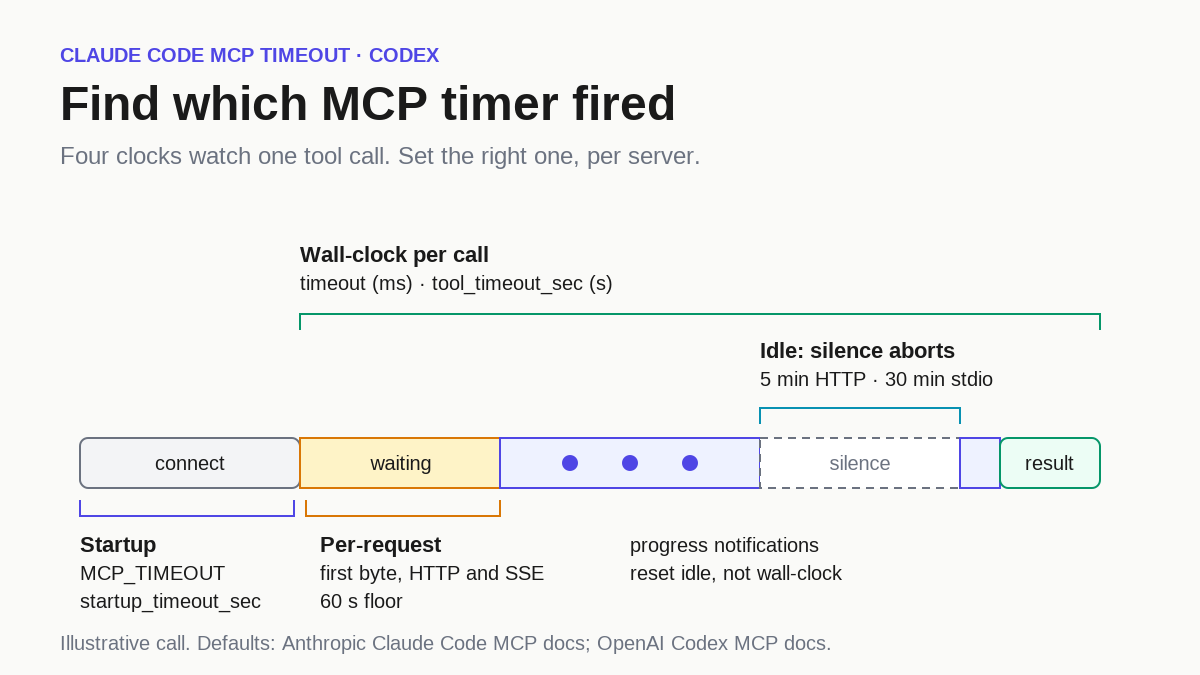
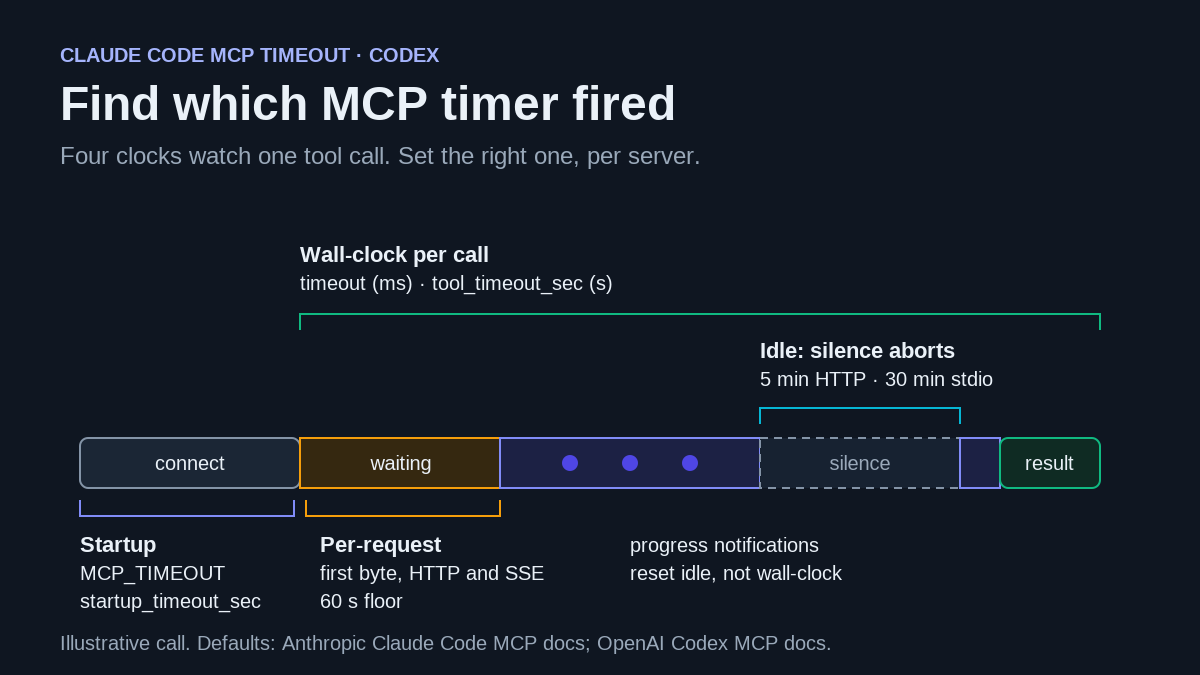
Your run_report tool scans a month of orders and takes about four minutes. Through a remote connection it dies near the one-minute mark. Run as a local process it usually finishes, except on the days the server prints a debug line and the whole session locks up. In Codex it fails at 60 seconds every time. That is not one Claude Code MCP timeout misbehaving. It is up to four separate clocks, two clients that use different units, and one transport rule that looks exactly like a timeout when it breaks.
This troubleshooting guide shows you how to tell those clocks apart, set the right one on the right server instead of raising everything globally, and reshape slow tools so they stop needing enormous limits. Every timing in the worked example is illustrative. The timer names, defaults and syntax come from Anthropic’s Claude Code documentation, OpenAI’s Codex documentation and the Model Context Protocol specification.
The question is current. In a reply on X dated November 21, 2026, Diego Sala asked for per-tool timeouts. One of their MCP tools waits for a human answer, sometimes for hours, so it runs on its own server with what they describe as the highest timeout Claude Code accepts in .mcp.json, about 24.8 days. That workaround shows exactly how the documented controls are scoped, and where a different tool design serves better. We answer their question near the end.
Before you start, have these in place:
- Claude Code, the Codex CLI or both, with at least one MCP server already registered. If you still need to add one, start with Claude Code MCP setup and scopes or Codex MCP setup with config.toml. This guide picks up where those leave off.
- Write access to
.mcp.json(or~/.claude.json),~/.codex/config.tomland your shell environment. - For the server-side fixes, access to the server’s source code.
Which MCP timer fired? Match the symptom first
Every fix here starts with one observation: at what moment did the call break, and what did the client show? Raising every limit at once can make a symptom vanish while hiding its cause, and on a shared project it changes behavior for every other server too. Find your row, then go to the section for that timer.
| What you saw | Client | What fired | Control to change |
|---|---|---|---|
claude mcp list shows ✘ Failed to connect, or the server’s tools never appear in /mcp |
Claude Code | Startup timer | MCP_TIMEOUT, in milliseconds |
| An optional server’s tools are missing from the first prompt | Codex | Startup grace window | mcp_optional_startup_grace_ms, then startup_timeout_sec |
| A remote HTTP or SSE call fails close to 60 seconds having returned nothing | Claude Code | Per-request (first byte) timer | Per-server timeout, MCP_TOOL_TIMEOUT or MCP_TIMEOUT |
| Any tool call fails at 60 seconds | Codex | Tool-call timer | tool_timeout_sec, in seconds |
| A call that went quiet aborts after 5 minutes (remote) or 30 minutes (stdio) | Claude Code | Idle timer | Progress notifications, or CLAUDE_CODE_MCP_TOOL_IDLE_TIMEOUT |
| A call fails at exactly the limit you configured | Claude Code | Wall-clock timer | Per-server timeout or MCP_TOOL_TIMEOUT, or redesign the tool |
| The timeout you set has no visible effect | Claude Code | Usually nothing | Check the value is at least 1000 and that no higher-precedence scope defines the same server |
| The session freezes or the server drops when it logs | Either | Nothing: stdout pollution | Send every log line to stderr |
| The call leaves the conversation after two minutes and reports later | Claude Code | Nothing: automatic backgrounding | CLAUDE_CODE_MCP_AUTO_BACKGROUND_MS |
Two rows are traps. Stdout pollution is not a timer at all, yet a frozen session looks exactly like one. Automatic backgrounding is not a failure either: Claude Code hands a slow call to a background task and the limits keep running underneath it.
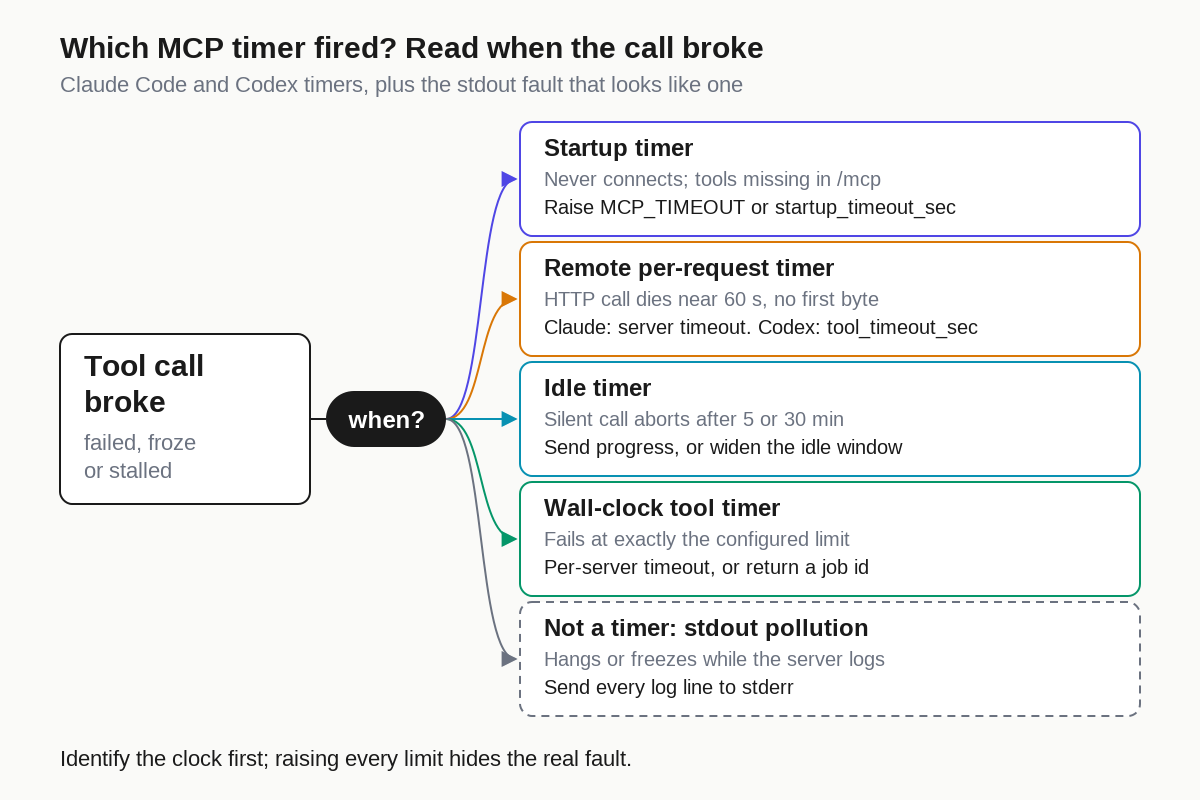
Read the diagram left to right. Classify the failure by when it happened, then change only the control on that branch. If you change two controls at once, you will not know which one mattered, and the next person to touch the configuration will inherit a limit nobody can justify.
How each timer works in Claude Code
Claude Code’s MCP reference documents four clocks with different scopes. The table is the map; the subsections cover the behavior that catches people.
| Timer | What it measures | Default | How to change it | Applies to |
|---|---|---|---|---|
| Startup | Connecting the server | 30 seconds, per the quickstart | MCP_TIMEOUT (ms) |
All servers |
| Wall-clock | One tool call, start to finish | About 28 hours when MCP_TOOL_TIMEOUT is unset |
Per-server timeout (ms); MCP_TOOL_TIMEOUT (ms) across servers |
All servers |
| Per-request | Each request until the server’s first response byte | Greatest of 60 seconds, the server’s tool timeout and MCP_TIMEOUT |
Raise the tool timeout or MCP_TIMEOUT |
HTTP, SSE and claude.ai connector servers |
| Idle | Time with no response and no progress notification | 5 minutes for HTTP, SSE, WebSocket and connectors; 30 minutes for stdio | CLAUDE_CODE_MCP_TOOL_IDLE_TIMEOUT (ms); 0 disables it |
Every type except IDE and SDK in-process servers |
Startup: MCP_TIMEOUT
The reference gives MCP_TIMEOUT=10000 claude as a 10-second example. The MCP quickstart names a default 30-second startup timeout and points at the usual culprit: a stdio server’s first run while npx downloads the package. It also gives the PowerShell form, $env:MCP_TIMEOUT = "60000"; claude, and warns that before v2.1.299 some HTTP connections timed out at startup regardless of MCP_TIMEOUT. If raising the value changes nothing on an older version, update first.
One exception has its own cap. A server with alwaysLoad: true makes startup wait for its tools, capped at the standard 5-second connect timeout, because those tools must be present when the first prompt is built. Other servers connect in the background by default.
If a stdio server still will not connect with a generous limit, the command is usually the problem, not the clock. Run it directly in a terminal: a working stdio server starts and waits silently for input. The MATLAB MCP server guide walks the same diagnosis for a slow-starting binary.
Wall-clock: the per-server timeout and MCP_TOOL_TIMEOUT
To cap one server, add a timeout field in milliseconds to its configuration entry; the docs use 600000 for ten minutes. That value overrides MCP_TOOL_TIMEOUT for that server only. It is a hard wall-clock limit per tool call, and progress notifications from the server do not extend it.
Two traps make an override silently disappear. The first is units. Values below 1000 are ignored and fall through to MCP_TOOL_TIMEOUT, or to its default of about 28 hours when that variable is unset. Someone used to Codex who writes "timeout": 600 meaning ten minutes gets no override at all, not a 600-millisecond one.
The second is scope. When the same server name is defined in more than one scope, Claude Code connects once using the entire entry from the highest-precedence source, in the order local, project, user, plugin, connector. Fields are not merged. A local-scope reports-db entry without a timeout therefore shadows the project .mcp.json entry that has one. Run claude mcp get reports-db to see which scope holds the definition that loads.
This also answers the per-tool question from the X thread. Both documented Claude Code limits are per server or global; no per-tool timeout field is documented. Moving the slow tool to its own server, as the poster did, is the documented way to give one tool a different wall-clock limit.
Per-request: the 60-second floor on remote servers
For HTTP, SSE and claude.ai connector servers there is a second timer covering each request through to the server’s first response byte. Claude Code sets it to the greatest of three values: 60 seconds, the tool timeout that applies to the server, and MCP_TIMEOUT. Work it out for any remote server in four steps:
- List the candidates: 60 seconds, the server’s
timeoutfield (orMCP_TOOL_TIMEOUTif the server has none), andMCP_TIMEOUT. - Drop the 28-hour default. When
MCP_TOOL_TIMEOUTis unset, its default does not enter the comparison. - Take the largest. With no
timeoutfield, noMCP_TOOL_TIMEOUTandMCP_TIMEOUT=60000, the answer is still 60 seconds. - Add
"timeout": 600000to the server and the timer becomes 600 seconds.
That is why a remote tool which thinks for three minutes before sending anything fails at one minute until you give it a tool timeout. A value below 60 seconds never shortens the timer. Stdio and WebSocket servers have no per-request timer at all, which explains the classic report that a tool works locally and fails remotely.
Idle: silence, not slowness
A tool call that sends no response and no progress notification for the idle window aborts with an error instead of waiting for the wall-clock limit. The window defaults to five minutes for HTTP, SSE, WebSocket and claude.ai connector servers and 30 minutes for stdio servers. Set CLAUDE_CODE_MCP_TOOL_IDLE_TIMEOUT in milliseconds to change it, or to 0 to disable the check. A per-server timeout of at least 1000 also acts as a floor: Claude Code never aborts that server’s calls for idleness sooner than its per-server timeout.
The practical difference from the wall-clock timer is that the server controls it. A server that reports progress keeps an otherwise long call alive; a server that goes silent loses it.
Automatic backgrounding is not a timeout
An MCP tool call in the main conversation that is still running after two minutes moves to a background task. Claude receives a task ID and keeps working, the call appears in /tasks, and the result arrives as a task notification. The wall-clock and idle limits still apply in the background. CLAUDE_CODE_MCP_AUTO_BACKGROUND_MS changes the threshold and 0 turns it off. Calls from subagents, calls to IDE servers and non-interactive calls do not move unless CLAUDE_AUTO_BACKGROUND_TASKS is set to 1; the headless mode guide covers that claude -p behavior.
Codex: startup_timeout_sec, tool_timeout_sec and the startup grace window
Codex keeps MCP settings in ~/.codex/config.toml, or a project .codex/config.toml for trusted projects, according to OpenAI’s Codex MCP documentation. Its per-server timers are in seconds; its grace window is in milliseconds.
| Setting | Where it goes | Unit | Default | What it does |
|---|---|---|---|---|
startup_timeout_sec |
[mcp_servers.<name>] |
seconds | 10 | Time allowed for the server to start |
tool_timeout_sec |
[mcp_servers.<name>] |
seconds | 60 | Time allowed for the server to run a tool |
mcp_optional_startup_grace_ms |
top level | milliseconds | 1000 | How long Codex waits for optional servers when building the initial tool catalog; 0 waits for each server’s startup_timeout_sec |
required |
[mcp_servers.<name>] |
boolean | not set | true makes startup fail if this enabled server is not ready |
startup_readiness |
[mcp_servers.<name>] |
string | connection |
catalog lets a valid cached tool catalog satisfy a required server |
features.mcp_lazy_stdio_startup |
features | boolean | lazy | false starts stdio servers with the thread |
Two behaviors explain the missing-tools symptom. With the 1000-millisecond default grace, an optional server that takes three seconds to start is not waited for while Codex builds the first catalog. Required servers ignore the grace and use their own startup timeouts. And Codex can delay starting an optional stdio server until its first tool call when it already holds a usable cached tool list; without a cache it starts the server when the thread starts.
The Codex page documents no idle timer and no separate first-byte timer, and it does not say whether progress notifications extend tool_timeout_sec. Treat tool_timeout_sec as the whole budget for a call.
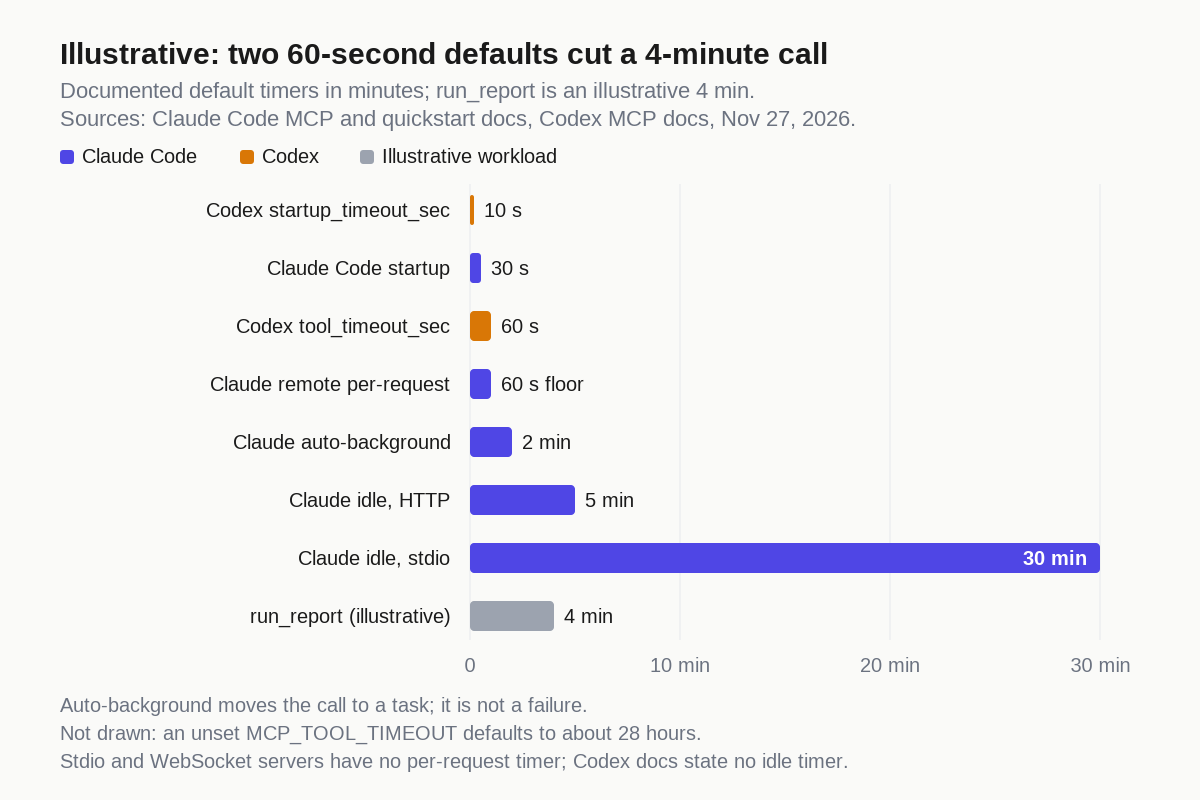
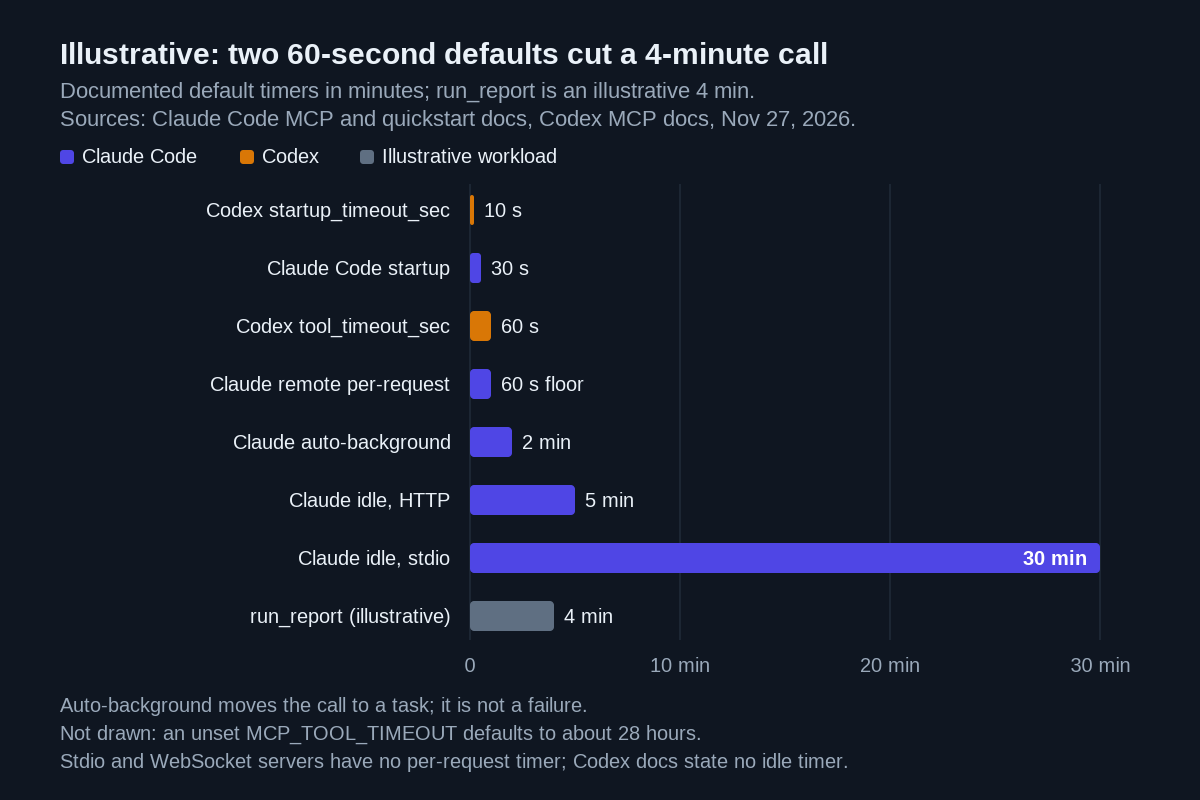
The chart makes the core mismatch visible. A 4-minute tool outlives two separate 60-second defaults, one in each client, while sitting comfortably inside both idle windows.
Worked example: reports-db and a remote warehouse server
The illustrative setup has two servers. reports-db is a local stdio server, a Node script at /opt/reports-db/server.js, exposing run_report (about four minutes for a monthly report) and list_reports (instant). warehouse is a remote Streamable HTTP server at https://warehouse.example.com/mcp whose export_table tool spends about three minutes before sending its first byte. Both numbers are illustrative.
Step 1: give each slow server its own Claude Code timeout
Project scope keeps the limits in version control next to the code that needs them. Put this in .mcp.json at the project root:
{
  "mcpServers": {
    "reports-db": {
      "type": "stdio",
      "command": "node",
      "args": ["/opt/reports-db/server.js"],
      "env": { "REPORTS_DSN": "${REPORTS_DSN}" },
      "timeout": 600000
    },
    "warehouse": {
      "type": "http",
      "url": "https://warehouse.example.com/mcp",
      "headers": { "Authorization": "Bearer ${WAREHOUSE_API_KEY}" },
      "timeout": 600000
    }
  }
}
Why these choices work:
600000is ten minutes, 2.5 times the illustrative four-minute run. Enough headroom for a slow day, small enough that a runaway query still fails within the hour.- The value is per server, so a fast GitHub or docs server elsewhere in the session keeps its own behavior.
- On
warehouse, the same field lifts the per-request timer from 60 to 600 seconds and sets a 10-minute idle floor, which fixes the first-byte failure without touching any other remote server. ${REPORTS_DSN}and${WAREHOUSE_API_KEY}use the documented environment variable expansion, so no secret lands in the committed file. Ifwarehouseanswers 401, check the documented list of credential variable names that read as empty in remote headers.
For a personal, uncommitted setup the same entry works at local scope: claude mcp add-json reports-db '{"type":"stdio","command":"node","args":["/opt/reports-db/server.js"],"timeout":600000}'. Remember that this local entry then shadows any project entry of the same name.
Step 2: set the session-wide timers at launch
The environment variables apply across every server. The Claude Code environment variables guide covers where else they can live; here they are set in the shell for one launch. Bash, zsh or WSL:
# Illustrative values, all in milliseconds
export MCP_TIMEOUT=60000                         # startup: 60 s for slow first launches
export MCP_TOOL_TIMEOUT=300000                   # wall-clock cap for servers without their own timeout
export CLAUDE_CODE_MCP_TOOL_IDLE_TIMEOUT=600000  # idle window for every server type
claude
PowerShell:
$env:MCP_TIMEOUT = "60000"
$env:MCP_TOOL_TIMEOUT = "300000"
$env:CLAUDE_CODE_MCP_TOOL_IDLE_TIMEOUT = "600000"
claude
Each line has a consequence beyond its name. MCP_TOOL_TIMEOUT=300000 replaces the 28-hour default with a 5-minute cap for servers that have no timeout field, and because it is now the tool timeout that applies to them, it also raises their per-request timer to 300 seconds. CLAUDE_CODE_MCP_TOOL_IDLE_TIMEOUT=600000 raises the remote idle window from 5 to 10 minutes but lowers stdio from 30 to 10. If your stdio servers legitimately go silent for longer, leave this variable unset.
The resulting timers, worked out from the documented rules:
| Server | Startup | Wall-clock per call | Per-request (first byte) | Idle |
|---|---|---|---|---|
| reports-db (stdio) | 60 s | 600 s, own timeout |
None: stdio has no per-request timer | 10 min |
| warehouse (HTTP) | 60 s | 600 s, own timeout |
600 s, the greatest of 60, 600 and 60 | 10 min |
| Any other HTTP server | 60 s | 300 s, MCP_TOOL_TIMEOUT |
300 s | 10 min |
Step 3: mirror the limits in Codex
Codex needs the same intent in seconds. Edit ~/.codex/config.toml:
# Top-level keys must come before the first table
mcp_optional_startup_grace_ms = 5000

[mcp_servers.reports-db]
command = "node"
args = ["/opt/reports-db/server.js"]
env_vars = ["REPORTS_DSN"]
startup_timeout_sec = 30
tool_timeout_sec = 600
required = true

[mcp_servers.warehouse]
url = "https://warehouse.example.com/mcp"
bearer_token_env_var = "WAREHOUSE_API_KEY"
startup_timeout_sec = 20
tool_timeout_sec = 600
tool_timeout_sec = 600 matches the Claude Code ten minutes. startup_timeout_sec = 30 gives the Node server time to connect to its database. The 5000-millisecond grace lets an optional server like warehouse join the first catalog if it starts within five seconds, and required = true on reports-db turns a silent omission into a loud startup failure, which is what you want for a server the work depends on. env_vars forwards REPORTS_DSN from your local environment.
Step 4: restart and confirm the configuration loaded
- Exit Claude Code and start it again; it reads
.mcp.jsonat session start. Approve the project servers if prompted. - Run
claude mcp listfrom the shell. Both servers should show ✔ Connected. A ⏸ Pending approval status means you have not yet approved them interactively. - Run
claude mcp get warehouseand check the definition comes from the scope you edited, with noIssue:line. - Start a new Codex session, run
codex mcp list, then/mcpin the TUI to see the active servers.
Symptom-by-symptom fixes for reports-db and warehouse
Each row is one illustrative case with concrete values, the supported action, and what you should expect to observe. None of these were run for this article; they show the documented behavior applied to the example.
| Input | Action | Expected result |
|---|---|---|
case:startup-01 First launch of reports-db while npx is still fetching dependencies; claude mcp list shows ✘ Failed to connect |
Exit, relaunch with MCP_TIMEOUT=60000 claude (PowerShell: $env:MCP_TIMEOUT = "60000"; claude), then run claude mcp list again |
Illustrative expected observation: reports-db shows ✔ Connected and /mcp lists run_report and list_reports with a tool count |
case:codex-catalog-02 reports-db is optional in Codex and needs about 3 seconds to start, so the first prompt has no reports-db tools |
Add mcp_optional_startup_grace_ms = 5000 at the top of config.toml, or set required = true on the server, then start a new session |
Illustrative expected observation: run_report is in the initial tool catalog; with required = true, startup instead fails loudly if the server is not ready |
case:remote-60s-03 warehouse over HTTP with no timeout field and MCP_TOOL_TIMEOUT unset; export_table sends nothing for 3 minutes |
Add "timeout": 600000 to the warehouse entry and restart; in Codex set tool_timeout_sec = 600 under [mcp_servers.warehouse] |
Illustrative expected observation: the per-request timer becomes 600 s and export_table returns after about 3 minutes instead of failing near 60 s |
case:silent-04 A crawler HTTP server with no per-server timeout and MCP_TOOL_TIMEOUT unset answers quickly, then goes quiet for 7 minutes |
Have the server send notifications/progress every 30 s on the request’s progressToken; if you cannot change it, launch with CLAUDE_CODE_MCP_TOOL_IDLE_TIMEOUT=900000 |
Illustrative expected observation: the call survives the quiet stretch instead of aborting at 5 minutes, and /tasks shows the latest progress message |
case:stdout-05 reports-db calls console.log("connected to reports DB") at startup and the stdout check prints a BAD line |
Replace it with console.error(...) or a logger bound to stderr, restart, and rerun the stdout check below |
Illustrative expected observation: the check prints only OK lines, the log appears in the stderr file, and tool calls return normally |
case:wallclock-06 Month-end run_report grows to 12 minutes and fails at exactly 600 s, the configured per-server limit |
Stop raising the limit: change run_report to return a job id and add get_report_status, as in the design section |
Illustrative expected observation: run_report returns in under a second and polling get_report_status delivers the report when the job completes |
Interpret a result that does not match before changing anything else. If case 3 still fails at about 60 seconds, the override is not loading: confirm the value is 1000 or more and that claude mcp get warehouse shows the entry you edited. If case 4 still aborts at exactly 5 minutes, the server is not sending progress on the token it received, or the client request carried no token. If case 1 still fails after a minute, run the stdio command by hand; a missing runtime or a typo in args will not be fixed by any timer.
Stop stdout pollution in a stdio server
The stdio rules in the MCP transports specification are strict. The client launches the server as a subprocess. They exchange newline-delimited JSON-RPC messages over stdin and stdout, and messages must not contain embedded newlines. The server may write UTF-8 to stderr for any logging, and the client should not assume stderr output means an error. The server must not write anything to its stdout that is not a valid MCP message.
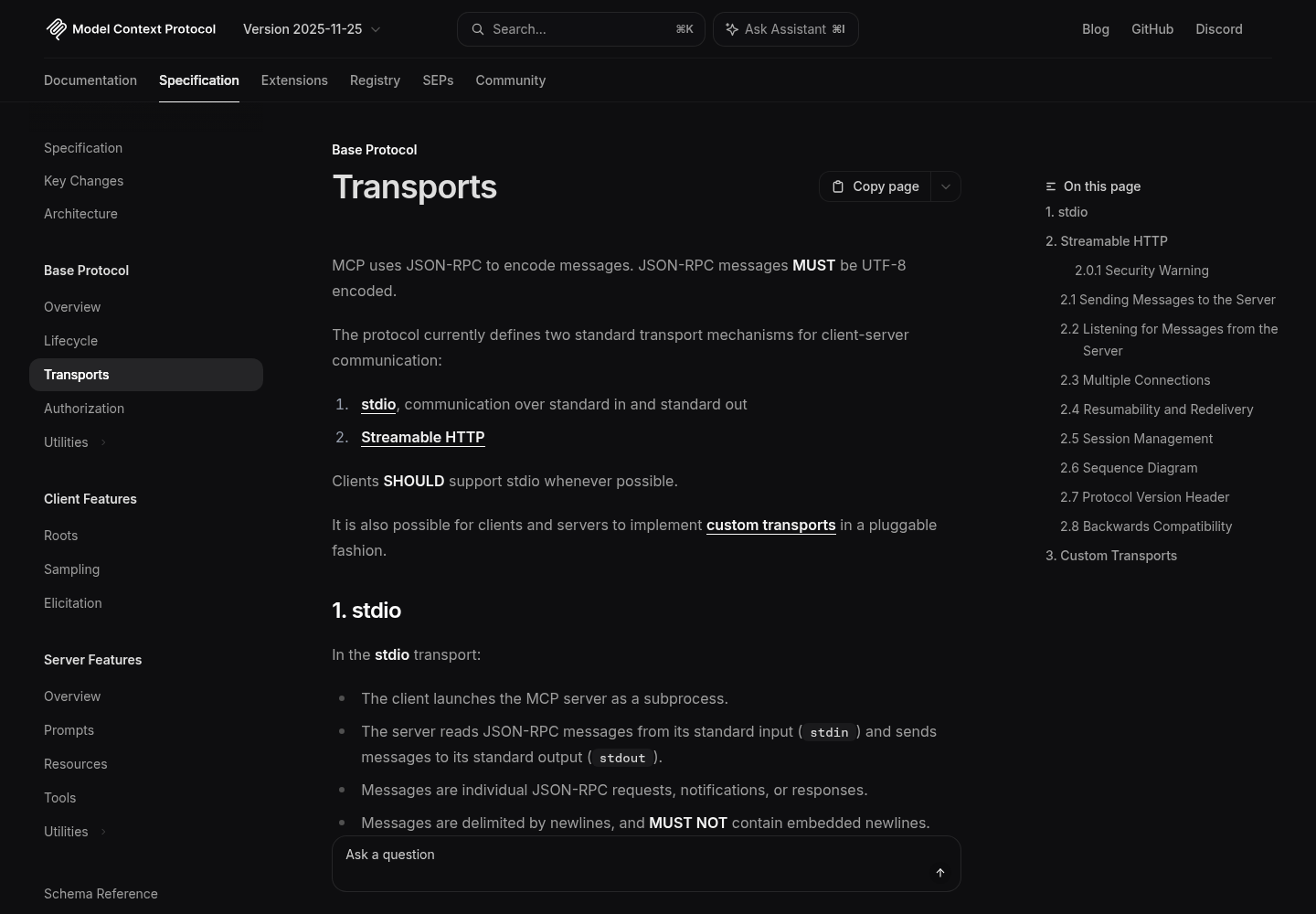
A stray print() or console.log() breaks that contract, because the client is reading stdout as a message stream. How each client reacts is implementation detail that the cited documentation does not spell out, but the result tends to look like a stalled call, a dropped server or a frozen session. That is why it lands in timeout bug reports, and why no timer setting fixes it.
Work through this checklist on every stdio server you maintain:
- [ ] No
print,console.logor equivalent writes to stdout outside the MCP SDK’s transport. - [ ] The logging library is configured with a stderr handler, including in dependencies that log on import.
- [ ] Child processes the server spawns have their stdout captured or redirected, not inherited.
- [ ] Progress bars, banners and colour codes are disabled or sent to stderr.
- [ ] Every JSON message the server writes is a single line.
In Python, the fix is one line of logging setup:
import logging
import sys

logging.basicConfig(stream=sys.stderr, level=logging.INFO)
log = logging.getLogger("reports-db")
log.info("connected to reports DB")  # stderr, never stdout
In Node, replace console.log with console.error, which writes to stderr.
To test it, send one initialize request, shaped like the example in the MCP lifecycle specification, and check that every line the server writes to stdout parses as JSON. This script is illustrative; run it from your shell, not inside an agent session. It needs timeout from GNU coreutils and python3:
INIT='{"jsonrpc":"2.0","id":1,"method":"initialize","params":{"protocolVersion":"2025-11-25","capabilities":{},"clientInfo":{"name":"stdout-check","version":"0.1.0"}}}'
{ printf '%s\n' "$INIT"; sleep 5; } |
  timeout 15 node /opt/reports-db/server.js 2>/tmp/reports-db.stderr |
  python3 -c '
import json, sys
for n, line in enumerate(sys.stdin, 1):
    try:
        json.loads(line)
        print("OK  line", n, line[:70].rstrip())
    except ValueError:
        print("BAD line", n, line[:70].rstrip())
'
echo "stderr lines: $(wc -l < /tmp/reports-db.stderr)"
Expected observations: one OK line carrying the initialize result with a protocolVersion, and your log lines counted in the stderr file. Any BAD line shows the exact text polluting stdout. No output at all usually means the server needs longer to start; raise the sleep. For interactive debugging outside any client, MCP Inspector gives you the same view with a UI.
Design slow tools to return early
A limit you keep raising is a design signal. Long work fits MCP better when the tool call ends quickly and the work carries on elsewhere. Apply these in order, stopping when the problem is solved:
- Report progress while you work. If the
tools/callrequest carriesparams._meta.progressToken, the MCP progress utility lets the server sendnotifications/progresswith that token, a progress value that must increase every time, an optional total and an optional human-readable message. Send them only for tokens from an active request, stop after completion, and rate-limit them. In Claude Code, progress resets the idle timer and appears in/tasks, but it never extends the per-server wall-clock limit. - Return a job id, then poll. Split
run_reportinto a starter and a reader. The starter queues the work and returns at once; the reader is cheap and safe to call repeatedly. No single call comes near any timer. - Answer with an MCP task where supported. On Claude Code v2.1.304 or later, a server connected on protocol revision 2026-07-28 that supports the tasks extension can answer
tools/callwith a task object, which Claude Code then follows withtasks/get. On an HTTP server the task answer must start within the per-request timer, so accept the job, answer, then do the work. Outside cloud sessions, a background task has no Claude Code time limit by default; the call limits apply until the server answers with the task. - Honor cancellation. The lifecycle specification says a sender whose request times out should send a cancellation notification and stop waiting. Under the MCP cancellation utility,
notifications/cancelledcarries therequestIdand an optional reason, and the receiver should stop processing, free resources and send no response. A cancellation can arrive after the work finished, so handle that race. Task-augmented requests usetasks/cancelinstead.
The progress notification for step 1, sent while scanning eight partitions:
{
  "jsonrpc": "2.0",
  "method": "notifications/progress",
  "params": {
    "progressToken": "abc123",
    "progress": 3,
    "total": 8,
    "message": "Scanned partition 3 of 8"
  }
}
The two tools/list entries for step 2:
[
  {
    "name": "run_report",
    "description": "Starts a monthly report job and returns a job_id within a second. Poll get_report_status for the result.",
    "inputSchema": {
      "type": "object",
      "properties": { "month": { "type": "string", "description": "YYYY-MM" } },
      "required": ["month"]
    }
  },
  {
    "name": "get_report_status",
    "description": "Returns status, progress and, when finished, the report for a job_id.",
    "inputSchema": {
      "type": "object",
      "properties": { "job_id": { "type": "string" } },
      "required": ["job_id"]
    },
    "annotations": { "readOnlyHint": true }
  }
]
readOnlyHint: true tells Claude Code the status tool changes nothing, so it can repeat a pending call on a new HTTP connection and run it in parallel with other read-only calls. If run_report returns the existing job when asked for a month already in progress, idempotentHint: true makes the starter safe to repeat as well. The description says how to use the pair, because the model reads it.
Now the human-wait tool from the X thread. A tool that blocks for hours on a person is the clearest case for this section. Elicitation lets a server ask the user for input mid-call, and Claude Code does not move a call to the background while its elicitation dialog is open. For waits measured in hours, an MCP task in the input_required state routes elicitation/create to a person in interactive terminal sessions, and the background task carries no Claude Code time limit by default. That is the documented route, rather than a multi-week timeout. Note that claude -p runs and Agent SDK sessions ask the server to cancel a task that asks a question.
Verify the fix
Work through this list after any change, on the same machine and session type where the failure happened:
- [ ]
claude mcp listshows ✔ Connected forreports-dbandwarehouse. - [ ]
claude mcp get warehouseshows the definition from the scope you edited and noIssue:line. - [ ]
/mcpshows a tool count for each server. - [ ] A four-minute
run_reportcompletes. After two minutes it appears in/tasksand the result arrives as a task notification. - [ ]
export_tableonwarehousereturns after its first-byte delay instead of failing near 60 seconds. - [ ]
codex mcp listlists both servers and the first Codex prompt can callrun_report. - [ ] The stdout check prints only OK lines.
- [ ] The chosen values are committed or documented next to the server, with the reason for each.
If you run many servers across several machines, keep these settings with the rest of your fleet configuration so the next timeout investigation starts from known values; the AgentOps guide covers that operating layer.
Roll back and make failures loud
If a change makes things worse, return to documented defaults first, then reapply one control at a time:
- Remove the
"timeout"fields from.mcp.jsonand restart Claude Code, which reads the file at session start. - Clear the session variables. Bash:
unset MCP_TIMEOUT MCP_TOOL_TIMEOUT CLAUDE_CODE_MCP_TOOL_IDLE_TIMEOUT. PowerShell:Remove-Item Env:MCP_TIMEOUT, Env:MCP_TOOL_TIMEOUT, Env:CLAUDE_CODE_MCP_TOOL_IDLE_TIMEOUT. - In Codex, delete
startup_timeout_sec,tool_timeout_secandmcp_optional_startup_grace_msto return to 10 seconds, 60 seconds and 1000 milliseconds. - To take a misbehaving server out of service without losing its configuration, set
enabled = falsein Codex, or toggle it off in the Claude Code/mcppanel. - Make critical servers fail loudly. In Codex,
required = truestops startup when the server is not ready. Inclaude -pruns a server whose first connection fails is simply absent, so checkclaude mcp listbefore an unattended job. - Before rerunning a stopped or timed-out call, check what the server already did. Stopping a call does not guarantee the server stops, and a second run may repeat the work.
What the documentation does not settle
A few questions remain open in the cited sources. Treat these as things to test on your own version rather than facts:
- The maximum per-server timeout. The docs publish no ceiling. The 24.8-day figure in the X post matches 2,147,483,647 milliseconds, the largest signed 32-bit integer, but that is arithmetic, not a documented limit.
- What counts as a first byte. The transports specification says a server opening an SSE stream should send a priming event immediately. Whether that event satisfies Claude Code’s per-request timer is not stated; test your server.
- Idle behavior during an elicitation dialog. The docs say such calls are not backgrounded while the dialog is open, not whether the idle clock pauses.
- Codex progress handling. The Codex page documents no idle timer and does not say whether progress affects
tool_timeout_sec. - Per-tool limits. Neither client documents a per-tool timeout, so per-server isolation remains the tool for that job.
Sources
- Diego Sala on X, reply dated November 21, 2026, asking for per-tool MCP timeouts
- Anthropic: Connect Claude Code to tools via MCP
- OpenAI: Codex Model Context Protocol documentation
- Model Context Protocol specification 2025-11-25: Transports
- Model Context Protocol specification 2025-11-25: Lifecycle
- Model Context Protocol specification 2025-11-25: Progress
- Model Context Protocol specification 2025-11-25: Cancellation
- Anthropic: Connect to MCP servers (Claude Code quickstart)