Microsoft APM Setup: Pin Agent Skills and MCP Servers in apm.yml, Lock Them, and Review Dependabot Update PRs
Microsoft APM tutorial: pin a skill package and MCP server in apm.yml, commit a SHA lockfile, gate CI with --frozen and audit, then review Dependabot PRs.

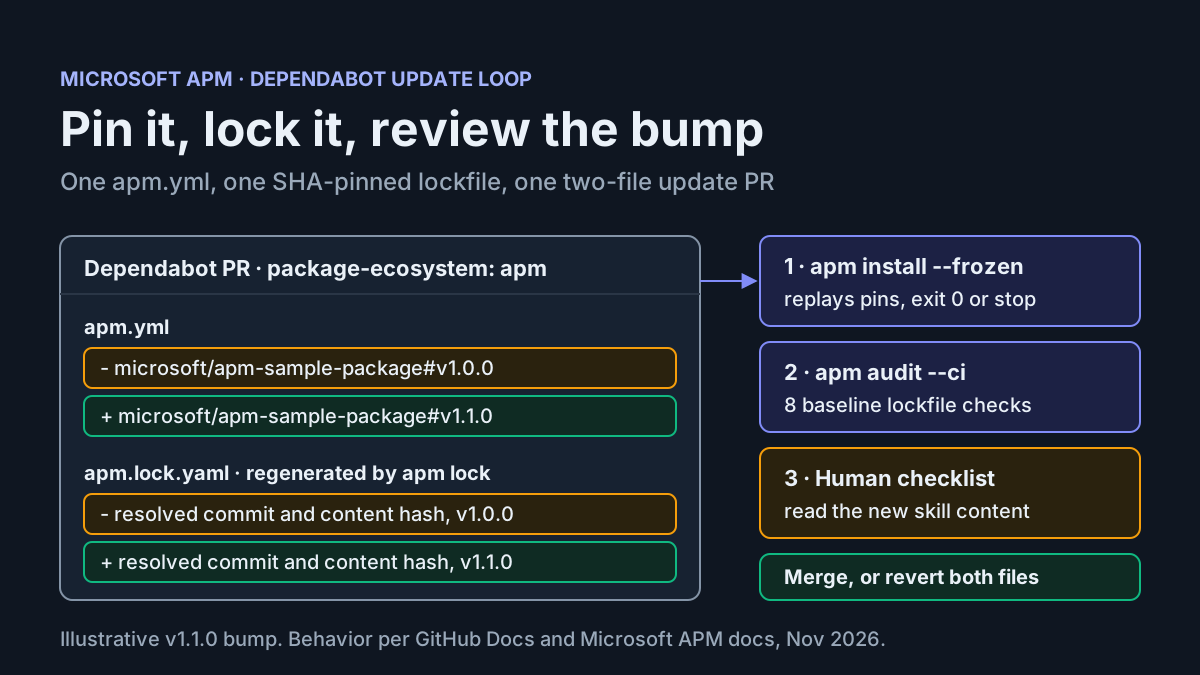
Your team keeps a code-review skill in one repository, a security instructions file in a chat thread, and three slightly different MCP configurations on three laptops. New hires copy folders and hope they got the current ones. Microsoft APM, the Agent Package Manager published under the microsoft GitHub organization, replaces the copying with a manifest. You declare skills, prompts, instructions, plugins and MCP servers in one apm.yml. Any teammate then runs apm install, and each harness receives the primitives it supports, according to the APM documentation.
This tutorial takes one small repository, repo:team-skills-01, from an empty folder to four committed artifacts. The first is a manifest with a tag-pinned skill package and one MCP server. Then comes a lockfile with commit-SHA pins, a CI job that fails on drift, and a weekly Dependabot configuration. Last, a simulated update pull request goes through review, merge and rollback. If you have been fighting rotting AGENTS.md files and pasted gists, this is the package-manager version of the fix.
The news is short. On November 3, 2026, GitHub’s changelog announced Dependabot version updates for APM. Dependabot now opens pull requests for supported git dependencies declared in apm.yml and regenerates apm.lock.yaml when one exists. It covers version updates, not security updates. It is generally available on github.com for all plans, and GitHub says it will reach GitHub Enterprise Server in 3.24. Our news write-up has the announcement itself. The rest of this guide is setup, and you would want it even without Dependabot. Dependabot just closes the loop.
A note on honesty. Nothing in this guide was run for this article. Commands, flags and messages come from the official references linked in each section. Every outcome below is an expected observation, not a captured result.
What you need, and what you will have at the end
The reader here is a developer or platform lead who shares agent context across harnesses and wants a single, reviewable source of truth for it. The examples target Claude Code and GitHub Copilot. APM writes documented project MCP files for both: .mcp.json for Claude Code and .github/mcp.json for Copilot CLI, according to Install MCP servers. If your harness is Cursor or Codex, use cursor or codex instead. Their project config is written only when .cursor/ or .codex/ already exists.
Prerequisites:
- [ ] A GitHub repository you can push to, including
.github/dependabot.ymland.github/workflows/. - [ ] Permission to make a status check required on the default branch.
- [ ] The APM CLI on your PATH (next section).
- [ ] At least one target harness. This example uses
claudeandcopilot. - [ ] Node.js with
npxon any machine that will start the example MCP server. APM writes the server config, but the harness launches the process.
What you will have when you finish:
| Artifact | Purpose | Committed? |
|---|---|---|
apm.yml |
Declares the skill package, the MCP server and the targets | Yes |
apm.lock.yaml |
Records resolved commits, content hashes and deployed files | Yes |
.github/workflows/apm.yml |
Runs apm install --frozen and apm audit --ci on every PR |
Yes |
.github/dependabot.yml |
Schedules weekly apm version-update PRs |
Yes |
apm_modules/, .apm-local/ |
Downloaded packages and local install identity | No |
Install the APM CLI and check which harnesses it sees
The APM home page lists three official install routes. Homebrew is optional, and no custom tap is needed.
- On macOS with Homebrew, run
brew install apm. Later, update it withbrew upgrade apm. - On Linux or macOS without Homebrew, run
curl -sSL https://aka.ms/apm-unix | sh. If the current terminal cannot findapm, follow the PATH guidance the installer prints for your shell. - On Windows PowerShell, run
irm https://aka.ms/apm-windows | iex. - Run
apm --versionand write down the version. You will pin CI to that number later, because the governance guide tells you to pin a specific APM version before relying on it as a gate. - From the repository root, run
apm targets. It prints the harnesses APM detects in the current directory.
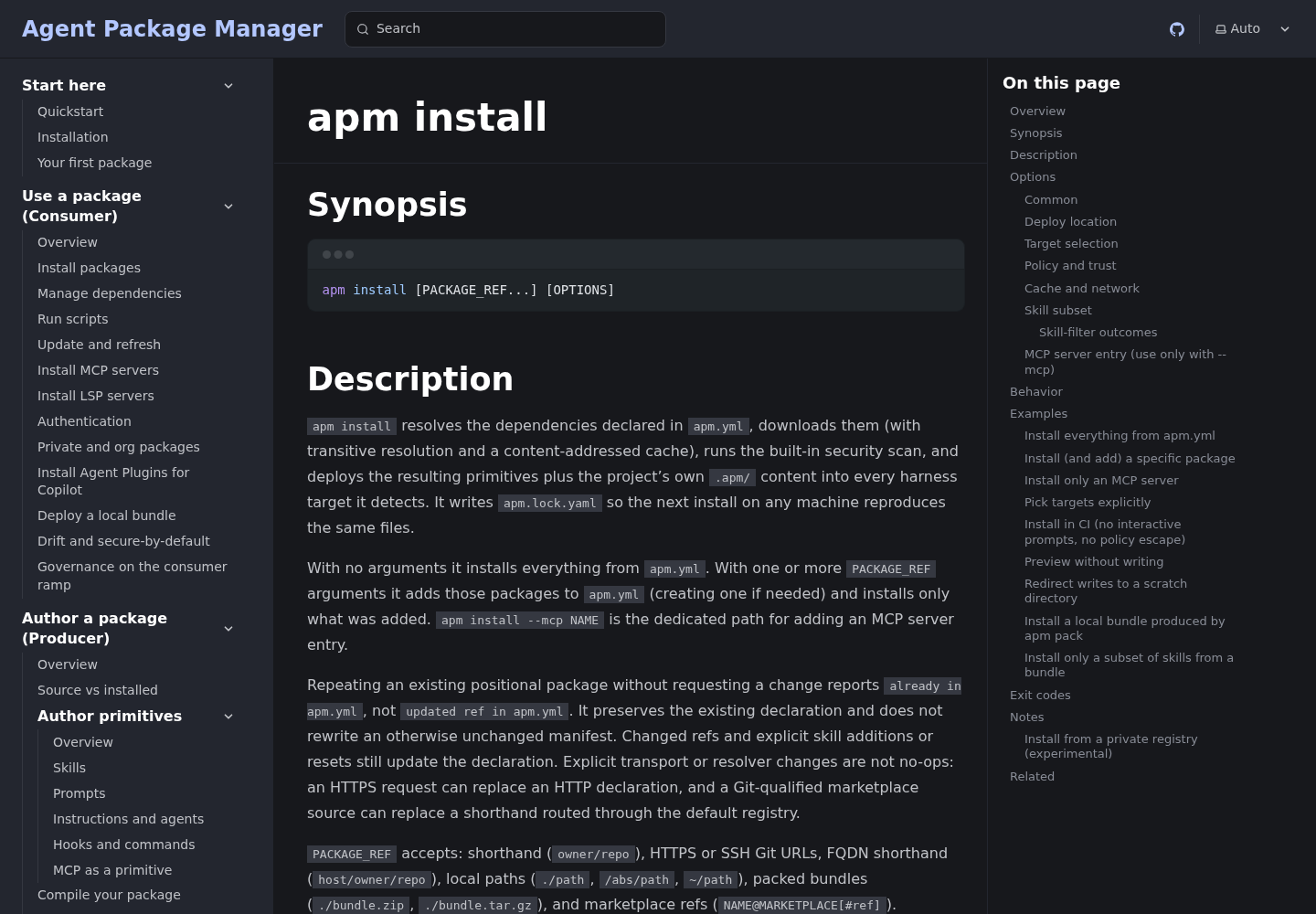
Step 5 matters more than it looks. When nothing points APM at a target (no --target flag, no targets: in apm.yml, no saved default, no harness signal in the project), apm install exits with code 2 and prints a teaching message. A fresh CI runner has no harness signals at all. That is why the manifest below declares its targets explicitly.
brew install apm          # or the curl / irm installer above
apm --version             # record this for CI
apm targets               # which harnesses does APM detect here?
Create apm.yml with a tag-pinned skill package
The apm install reference documents a bootstrap path: apm install <pkg> with no apm.yml creates a minimal manifest. Its name comes from the current directory. If you pass --target when bootstrapping, those targets are saved to the new manifest’s targets: field. APM also has an apm init command, but the sources for this guide do not document its flags, so the worked example uses the bootstrap path instead.
- Change into the repository root of
repo:team-skills-01. - Run the bootstrap command with a pinned tag and explicit targets:
apm install microsoft/apm-sample-package#v1.0.0 --target claude,copilot
- Open
apm.yml. Make it match the block below, and addversionby hand if the bootstrap left it out. The Manage dependencies page says thedependencies.apmmapping is required. A flat top-level list is rejected. - Run the same install command again. The reference says repeating an unchanged positional package reports
already in apm.ymland leaves the manifest untouched. That is how you confirm the declaration stuck.
# apm.yml for repo:team-skills-01 (expected shape; field order may differ)
name: team-skills-01
version: 1.0.0
targets:
  - claude
  - copilot
dependencies:
  apm:
    - microsoft/apm-sample-package#v1.0.0
Why a tag? The manage-dependencies page puts it bluntly: branches move, tags and SHAs do not. The lockfile pins the resolved commit either way, so two clones get the same bytes. The difference shows up when the dependency is refreshed. A branch ref resolves to a new commit on the next update.
Pick your pin style before Dependabot runs, because the updater treats each style differently:
| Pin style | Example | Use it when |
|---|---|---|
| SemVer tag | microsoft/apm-sample-package#v1.0.0 |
You want readable diffs and the publisher tags releases |
| Full commit SHA | owner/repo#<40-character SHA> |
You need immutability even if a tag were moved |
| Branch | owner/repo#main |
Only for packages your own team publishes |
| No ref | owner/repo |
Never for third-party code; Dependabot cannot update it |
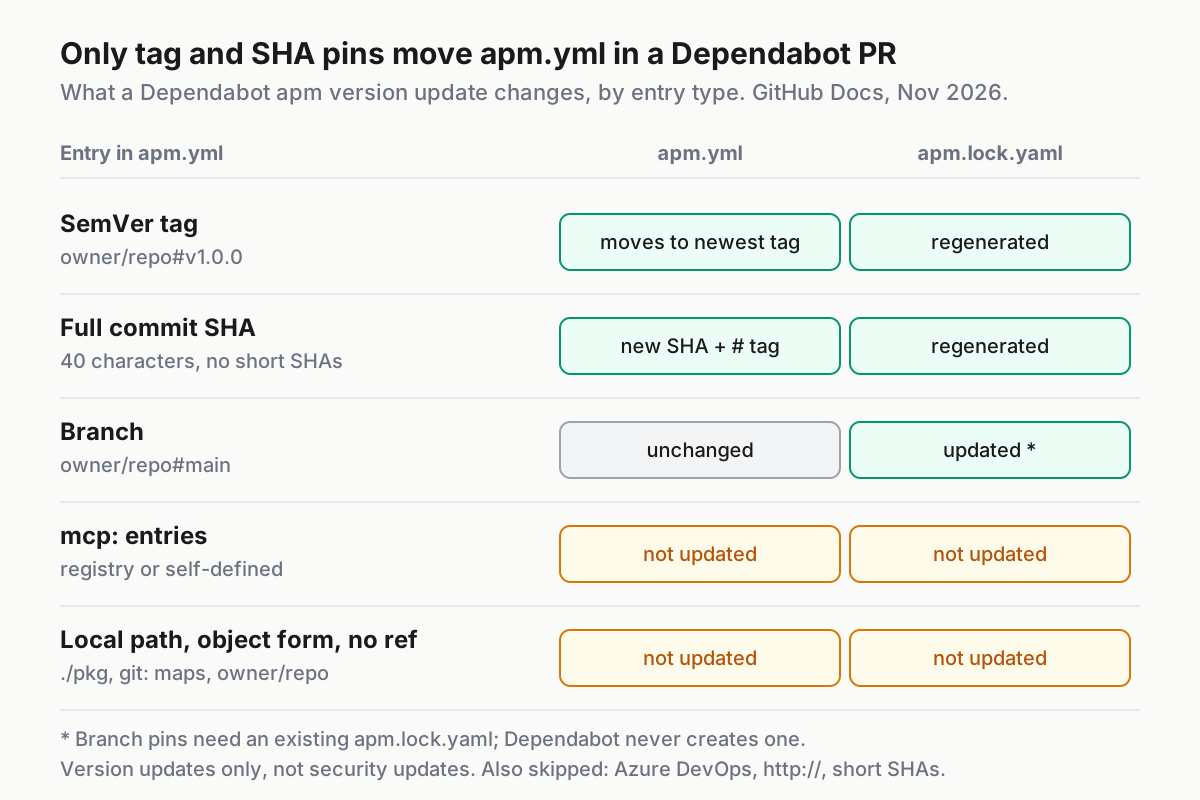
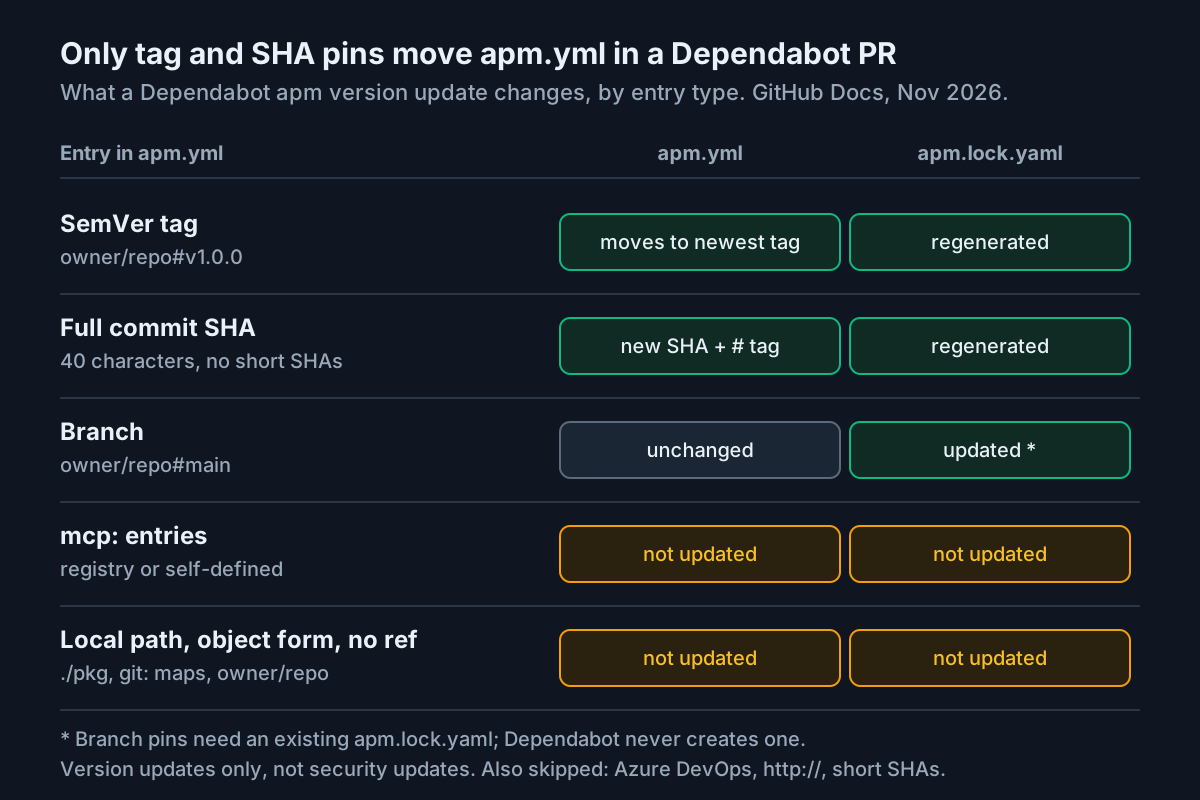
A SemVer tag can be plain (v1.4.0) or package-scoped (review-v1.4.0), and the scoped prefix must match the package name, per GitHub’s supported ecosystems reference. Do not use short SHAs. Dependabot skips abbreviated SHAs, and APM requires a short SHA pin to match the prefix of the recorded full commit.
Add one MCP server to the same manifest
MCP servers live under dependencies.mcp, next to packages. apm install --mcp NAME is the dedicated command for adding one. For a self-defined stdio server, everything after -- is the command that launches it. This example uses the filesystem server from the MCP install guide:
apm install --mcp filesystem -- npx -y @modelcontextprotocol/server-filesystem /workspace
Before you run it, replace /workspace with the absolute path you actually want the agent to read. Stdio servers do not go through a shell, so $VAR and backticks in the arguments are passed through literally. Do not expect $HOME to expand.
- Run the command above with your path.
- Open
apm.ymland confirm the new entry underdependencies.mcp. - Open
.mcp.jsonand.github/mcp.json. Each should now contain afilesystemserver, because bothclaudeandcopilotare in the active target set. - If you see a line such as
[i] Skipped MCP config for ..., a runtime fell outside the active targets. The message names which targets were active.
# apm.yml after adding the MCP server
name: team-skills-01
version: 1.0.0
targets:
  - claude
  - copilot
dependencies:
  apm:
    - microsoft/apm-sample-package#v1.0.0
  mcp:
    - name: filesystem
      registry: false
      transport: stdio
      command: npx
      args: ["-y", "@modelcontextprotocol/server-filesystem", "/workspace"]
If you would rather use a registry server, apm install --mcp io.github.github/github-mcp-server adds a bare-string registry entry. For that server, APM picks a token from GITHUB_COPILOT_PAT, GITHUB_TOKEN, GITHUB_APM_PAT or GITHUB_PERSONAL_ACCESS_TOKEN, first non-empty wins. On targets that support runtime substitution, it writes a reference to the variable rather than the secret. For Claude-specific scopes outside APM, see our Claude Code MCP setup guide.
One consequence shapes the rest of this guide. Dependabot does not update mcp: entries. The lockfile records your MCP declaration, but the server version that npx resolves is not something the apm updater will ever bump. If the server version matters, put it in the package argument yourself and review it on your own schedule. Our MCP server inventory ritual is a good cadence for that.
Read the lockfile and decide what to commit
According to the manage-dependencies page, apm.lock.yaml records three things for every direct and transitive dependency: the resolved git commit SHA, a SHA-256 content hash of the package, and the exact files deployed to your tree with per-file hashes. It follows three rules: commit it, never hand-edit it, and inspect it freely.
Verify the lockfile before your first commit:
- Open
apm.lock.yamland find the entry formicrosoft/apm-sample-package. Confirm it carries a full 40-character commit, not the tag text alone. - Confirm the entry lists deployed files and their hashes. These are the paths content-integrity checks re-hash later.
- Run
apm install --verboseonce. It shows per-file paths in the diagnostic summary, so you can see exactly where primitives landed for each target. - Run
apm installagain with no changes. The reference says a satisfied lockfile prints[i] Run 'apm update' to check for newer versions.That is a no-op, not a missed refresh.
Then decide what goes into git. The governance guide describes apm.lock.yaml as the git-tracked record of what was deployed, so its history is your deployment log. The install reference calls .apm-local/ and ~/.apm/deployment-receipts/ local state that you should neither commit nor share.
| Path | Decision for this example | Reason |
|---|---|---|
apm.yml |
Commit | The declaration reviewers approve |
apm.lock.yaml |
Commit | Same bytes on every clone; Dependabot regenerates it |
apm_modules/ |
Ignore | Downloaded package copies, rebuilt by install |
.apm-local/ |
Ignore | Machine-local install identity |
| Deployed harness files | Treat as generated | Every clone and CI job runs apm install, so update PRs stay to two files |
A community checklist on X recommends committing the generated agent files as well. That works, with one cost: a Dependabot PR changes only the manifest and lockfile, so someone has to run apm install and commit the redeployed files in a follow-up. This guide keeps them out of git so the update PR is the whole change. Note that APM can write .gitignore entries itself (the --root documentation lists .gitignore among its writes), so check the file before editing it.
# .gitignore additions for repo:team-skills-01
apm_modules/
.apm-local/
# Generated harness output: add the paths `apm install --verbose` reported,
# for example .mcp.json and .github/mcp.json in this example.
.mcp.json
.github/mcp.json
Commit with git add apm.yml apm.lock.yaml .gitignore and a message such as Add APM manifest and lockfile.
Gate every pull request with apm install --frozen and apm audit --ci
The CI gate uses two commands that check different things. The install reference describes --frozen this way: it requires apm.lock.yaml, replays its pins and never rewrites it. Changed refs, missing direct dependencies and MCP declaration mismatches fail before the pipeline runs. If the install would deploy files the lockfile does not record, it exits 1 and names those paths. apm audit --ci is the on-disk content check. The governance guide lists its eight baseline lockfile checks: lockfile presence, ref consistency, deployed files present, no orphaned packages, skill-subset consistency, MCP config consistency, content integrity and includes consent. They run regardless of policy.
The microsoft/apm-action repository documents a setup-only mode. It installs the CLI, puts it on PATH and exits without running an install, which lets you call --frozen yourself.
# .github/workflows/apm.yml
name: apm-frozen-gate
on:
  pull_request:
  push:
    branches: [main]
permissions:
  contents: read
jobs:
  apm:
    runs-on: ubuntu-latest
    steps:
      - uses: actions/checkout@v4
      - uses: microsoft/apm-action@v1
        with:
          setup-only: 'true'
          # apm-version: set this to the version `apm --version` printed locally
      - name: Replay the lockfile without rewriting it
        run: apm install --frozen
      - name: Baseline lockfile and content checks
        run: apm audit --ci
- Save the file, push it on a branch and open a PR. On a clean tree, expect both steps to exit 0.
- Uncomment
apm-versionand set it to the version you recorded. - Make the
apmjob a required status check onmain. The governance guide says this is what turns the baseline checks into an enforced boundary. - For private packages,
setup-onlydoes not run an install, so give the install step its own credential:env: GITHUB_APM_PAT: ${{ secrets.APM_PAT }}. The action’s README notes that GitHub forbids secret names with theGITHUB_prefix, which is why the secret is calledAPM_PAT. - Optionally, emit SARIF for Code Scanning with
apm audit --ci -f sarif --output apm-audit.sarifand an upload step, as shown in the governance guide.
Three limits keep this gate honest. --frozen is not a network freshness check, because it replays pins without asking whether upstream moved. An uncached runner still needs network access, and credentials for any private pinned source. And never add --force, --no-policy or --trust-transitive-mcp to this workflow. The governance guide suggests a pre-merge grep that fails any PR introducing those flags into .github/workflows/.
Turn on Dependabot for the apm ecosystem
The Dependabot options reference lists apm as a package-ecosystem value. The required keys are version: 2, updates, package-ecosystem, directory and schedule.interval. The changelog’s get-started note matches: add an apm entry, point it at the directory that contains apm.yml, and choose a schedule.
# .github/dependabot.yml
version: 2
updates:
  - package-ecosystem: "apm"
    directory: "/"
    schedule:
      interval: "weekly"
      day: "monday"
      time: "09:00"
      timezone: "America/New_York"
    open-pull-requests-limit: 5
    cooldown:
      default-days: 7
    labels:
      - "agent-context"
    commit-message:
      prefix: "apm"
Each choice, in order:
directory: "/"becauseapm.ymlsits at the repository root. Usedirectoriesto list several manifest folders.weeklywith an explicitday,timeandtimezone. Without them, Dependabot assigns a random time. Weekly review is a cadence a person can keep.open-pull-requests-limit: 5matches the default and is written down so nobody wonders what it is.cooldown.default-days: 7waits a week after a new tag before proposing it. The default is three days, even whencooldownis not configured. APM is listed among the ecosystems that support cooldown.labelsreplaces the defaultdependencieslabel. A label that does not exist in the repository is ignored, so createagent-contextfirst.commit-message.prefixmakes these PRs easy to filter. Dependabot inserts the colon after a prefix that ends in a letter.
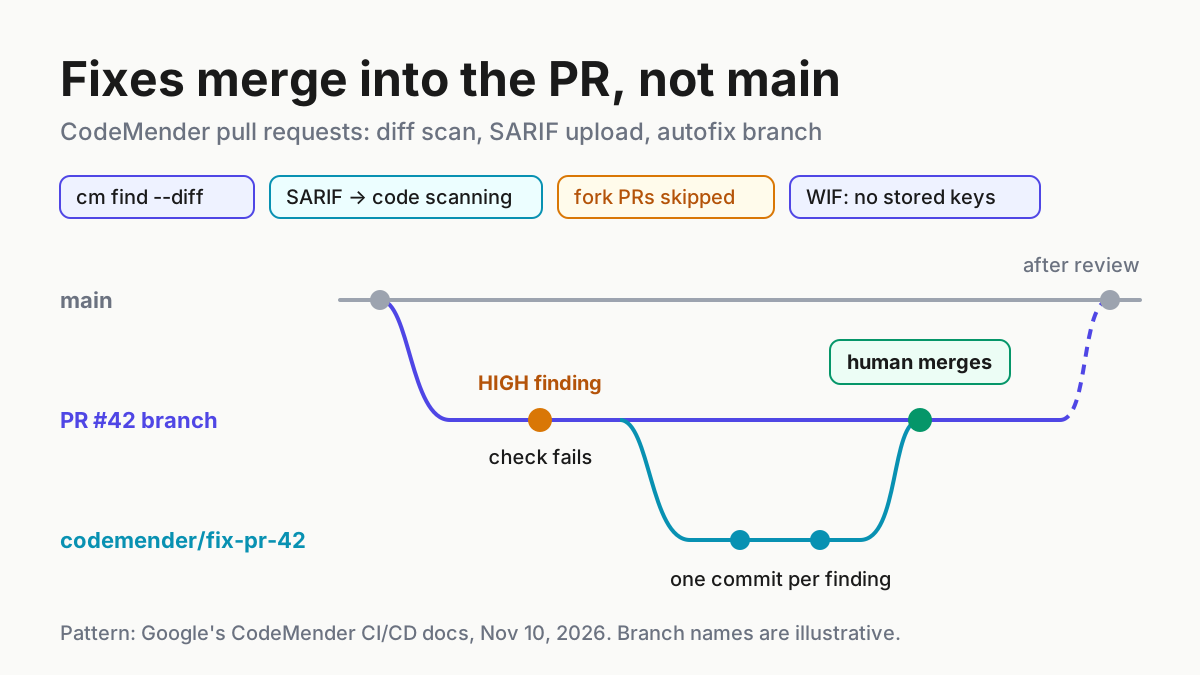
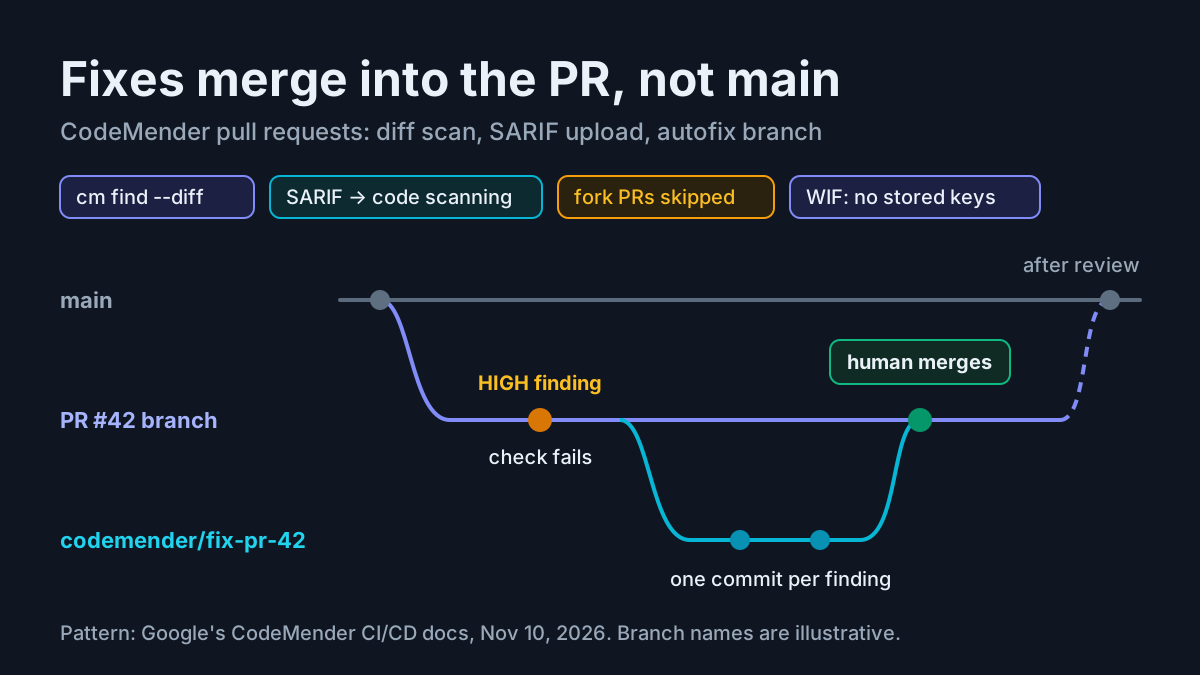
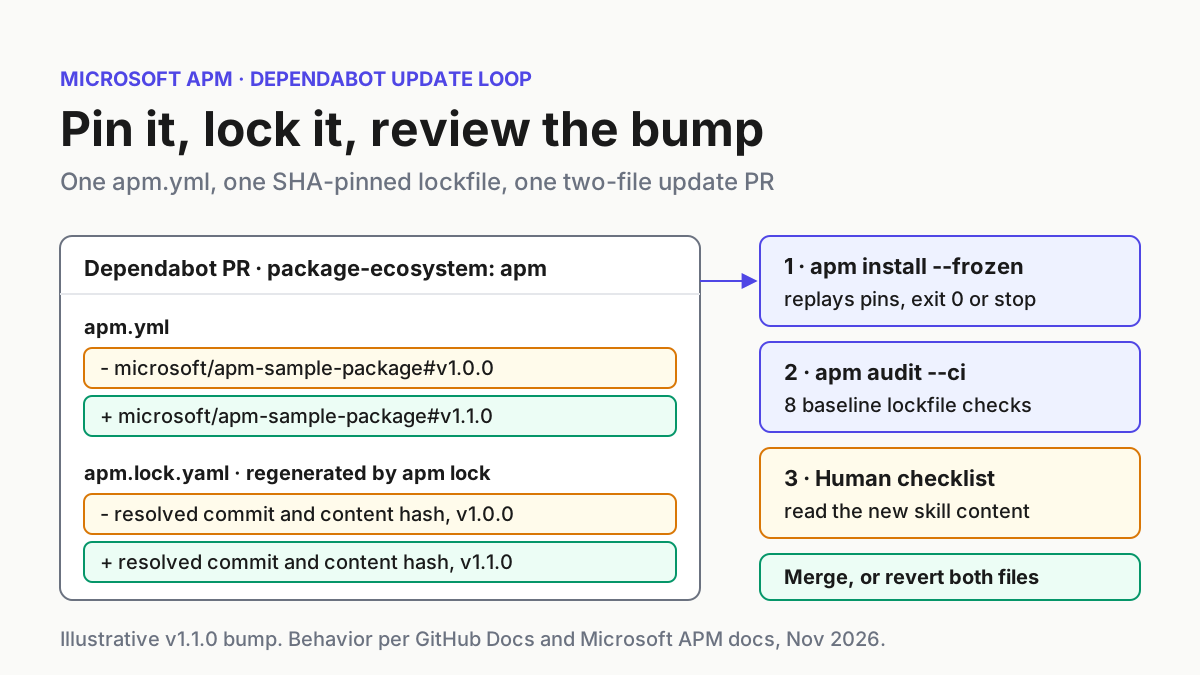
Once Dependabot is running, here is what each entry type does, taken from the supported-ecosystems page. A SemVer tag moves to the newest SemVer tag. A full commit SHA moves to the commit of the latest annotated, non-prerelease release tag, and the tag name is added as a comment such as # v1.4.0. A branch pin only changes the lockfile and requires an existing apm.lock.yaml. Entries under both dependencies.apm and devDependencies.apm are updated. Dependabot runs apm lock to regenerate the lockfile, and it never creates one.
If an editor plugin or third-party schema validator rejects package-ecosystem: "apm", believe the official reference over the validator, and update or disable that schema. The APM home page carries a similar warning in the other direction: older published apm.yml schemas reject the Git-plus-path dependency form.
Worked example: repo:team-skills-01 from first install to rollback
This table is the whole lifecycle in one place. Rows 7 to 9 simulate a publisher tagging v1.1.0. That tag is illustrative, so check the real package for its current tags. Every expected result restates documented behavior. None was captured from a live run.
| Input | Action | Expected result |
|---|---|---|
repo:team-skills-01, empty repo, no apm.yml |
apm install |
Exits with a hint to run apm init or apm install <org/repo>; no manifest or lockfile is written |
repo:team-skills-01, package microsoft/apm-sample-package#v1.0.0, targets claude,copilot |
apm install microsoft/apm-sample-package#v1.0.0 --target claude,copilot |
apm.yml created with the dependency and targets:; apm.lock.yaml written with a full commit SHA; exit 0 |
Same repo, stdio server filesystem |
apm install --mcp filesystem -- npx -y @modelcontextprotocol/server-filesystem /workspace |
Entry appended under dependencies.mcp; .mcp.json and .github/mcp.json gain filesystem; lockfile records the MCP config and targets |
Fresh CI checkout of team-skills-01@main, nothing cached |
apm install --frozen then apm audit --ci |
Pinned content is downloaded and deployed; both commands exit 0; apm.yml and apm.lock.yaml bytes unchanged |
Drift: a teammate edits apm.yml to #v1.1.0 by hand and pushes without re-locking |
CI runs apm install --frozen |
Fails before the pipeline on the changed ref, exit 1; fix by running apm install locally and committing the new lockfile |
Drift: a new primitive is added under the project’s .apm/ folder without re-locking |
apm install --frozen |
Exit 1, naming the deployed paths the lockfile does not record; files are on disk but the lockfile write is withheld |
Illustrative: publisher tags v1.1.0, seven-day cooldown has passed |
Monday Dependabot run | A PR labelled agent-context changes #v1.0.0 to #v1.1.0 in apm.yml and regenerates apm.lock.yaml; no other files in the diff |
The v1.1.0 PR branch from the previous row |
CI gate, then the third-party skill review checklist below | Both CI steps exit 0; the reviewer compares v1.0.0 and v1.1.0 content before approving |
Merged v1.1.0 PR, regression found two days later |
git revert -m 1 <merge-commit>, push, then apm install on each machine |
Revert restores both files; CI replays the v1.0.0 pins; each local install re-downloads the changed ref and removes stale files whose hashes match |
| A package version containing a critical hidden-Unicode finding | apm install |
Exit 1 and the package is blocked; fix or report the source; never add --force in CI |
The two drift rows test different halves of the guarantee. The first is structural: the manifest and lockfile disagree, and that is caught before anything runs. The second runs after the pipeline. The deployed files are already on disk, and only the lockfile write was held back. That is why the reference pairs --frozen with apm audit --ci for on-disk content checks. Recovery is the same for both: run apm install without --frozen and commit the updated lockfile.
Review a Dependabot APM pull request before merging
Green CI tells you two things: the lockfile is consistent, and the deployed bytes match their recorded hashes. It does not tell you whether the new skill is safe to put in front of your agents. The governance guide is explicit here. APM scans for hidden Unicode, but it does not do LLM-based prompt review, prompt-injection detection or semantic safety review. Reading the content is still a person’s job, and our marketplace hygiene guide explains why that matters for third-party packages.
Use this third-party skill review checklist on every APM update PR:
- [ ] The diff touches only
apm.ymlandapm.lock.yaml. Anything else means the PR was edited after Dependabot opened it. - [ ] For a tag pin, the new ref is a release you expected, not a prerelease. For a SHA pin, the trailing comment names an annotated release tag.
- [ ] The lockfile’s new commit belongs to the publisher repository and matches the tag. Our pin-and-verify guide explains why pinning without verifying is theater.
- [ ] You compared the package between the old and new tags (for example
git diff v1.0.0 v1.1.0in a clone of the publisher repo) and read every changed instruction, prompt and skill file. - [ ] The new version declares no new MCP servers you have not approved. APM blocks transitive MCP servers unless they are declared or trusted, so a newly declared server will surface. Do not accept it by adding
--trust-transitive-mcp. - [ ] No new
bin/executables or hooks appear without a reason. In non-interactive and--frozenruns, the install reference says the default behaves like--no-trust-bin. - [ ] The cooldown has passed and the release has had time to collect public reports.
- [ ] After merging, each machine needs to run
apm install. Tell the team, or put it in your pull-based setup notes.
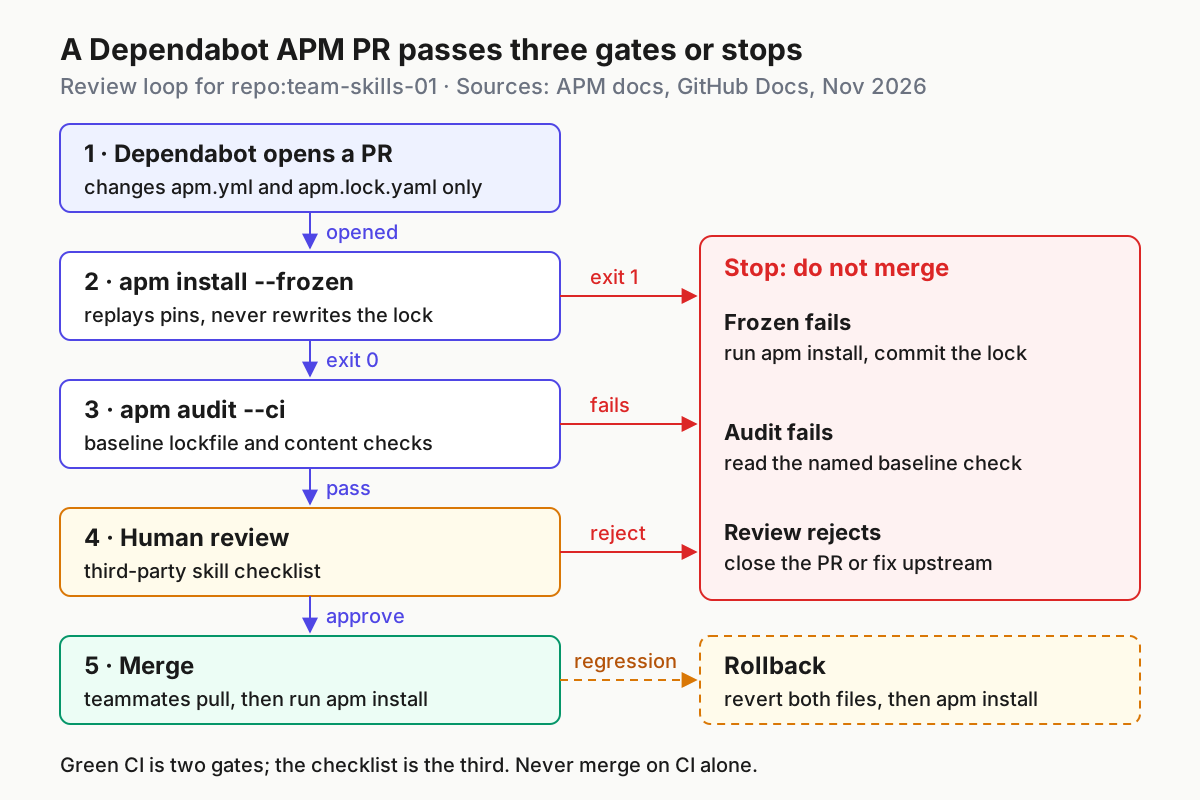
If the checklist fails, close the PR. If you need Dependabot to stop proposing a specific version, the options reference documents an ignore key with dependency-name and versions. Confirm the dependency name Dependabot uses for APM entries against the PR title before relying on it.
Roll back an update that misbehaves
Rollback is cheap because the whole change lives in two files that APM treats as the source of truth.
- Find the merge commit of the Dependabot PR in
main’s history. - Run
git revert -m 1 <merge-commit>. This restores bothapm.ymlandapm.lock.yamlto their previous bytes in one commit. Do not edit the lockfile by hand. The manage-dependencies page says manual changes are overwritten, or tripapm auditfor hash fields. - Push the revert as a PR. The CI gate replays the old pins with
apm install --frozenand should exit 0, because manifest and lockfile agree again. - Merge, then have each teammate pull and run
apm install. The reference says packages whose ref changed inapm.ymlare re-downloaded automatically. Files the package no longer produces are removed only when their recorded hashes match. Files someone edited by hand are kept, with a warning. - Close the next Dependabot PR for the same version, or add an
ignorerule as described above, until the publisher ships a fix.
The install reference describes --update and --refresh as transactional. Replacements are staged and validated, and a failed download leaves the previous package active. That protects you during an update. It does not protect you from a bad version that installed cleanly, which is exactly the case this rollback handles.
Troubleshoot the failures you will actually hit
Most failures name their cause in the diagnostic summary at the end of the run. Add --verbose to see per-file paths.
| Symptom | Likely cause | Fix |
|---|---|---|
Bare apm install prints a hint about apm init |
No apm.yml in the current directory |
Run the bootstrap install with a package ref, or cd to the manifest’s folder |
| Install exits 2 with a teaching message | No detectable target (common on CI runners) | Add targets: to apm.yml, or pass --target |
--frozen exits 1 and mentions a missing lockfile |
apm.lock.yaml was never committed |
Run normal apm install, commit the lockfile |
--frozen exits 1 and names unrecorded paths |
Install deployed files the lockfile does not claim | Run apm install without --frozen, review, commit the lockfile |
--frozen rejected outright |
Combined with --update, a package argument or --mcp |
These are mutually exclusive; frozen never mutates apm.yml |
| Install exits 1 on a critical security finding | Hidden Unicode or bidi characters in the package | Fix or report the source; use --force only after independent review, never in CI |
| Dependabot never opens a PR for an entry | Entry is mcp:, a local path, object form, ref-less, Azure DevOps, http://, a short SHA, or shorthand under registries.default |
Change to a supported string form with a ref, or update it by hand |
| A branch-pinned dependency gets no PR | Branch updates need an existing apm.lock.yaml |
Commit the lockfile |
| Lockfile has merge-conflict markers | Two lockfile changes collided | Required readers exit 1 and never rewrite the bytes; let Dependabot rebase its PR instead of hand-merging |
| Claude or Codex MCP install exits 1 on a name collision | A personal connection with the same name differs from APM’s | Rename or remove only your personal entry, then rerun the same install |
The options reference says Dependabot rebases its own PR when it conflicts with the target branch after a push. That is why the conflict row tells you not to resolve lockfile conflicts by hand. Regenerated lockfiles are cheaper than reasoned-about ones.
One last operating habit. Treat the APM lockfile history like any other deployment log. When an agent behaves strangely, git log -p apm.lock.yaml answers what was installed and when. For the wider practice of running many agents from one place, see our AgentOps guide. If your team also writes its own skills, our Codex SKILL.md setup guide covers authoring the files that APM then distributes.
Sources
- GitHub Changelog, Dependabot version updates support Agent Package Manager, November 3, 2026.
- Microsoft APM, apm install reference.
- Microsoft APM, Agent Package Manager home and install options.
- Microsoft APM, Manage dependencies.
- Microsoft APM, Install MCP servers.
- Microsoft APM, Governance deep-dive.
- GitHub Docs, Dependabot options reference.
- GitHub Docs, Dependabot supported ecosystems and repositories.
- Microsoft, microsoft/apm-action README.
- @HUNHOfamilyTH on X, APM setup checklist post, November 9, 2026.