CodeMender Pull Requests Setup: Scan the Diff, Upload SARIF and Review the Autofix PR
Set up CodeMender pull requests in GitHub Actions: Workload Identity Federation, cm find --diff, SARIF upload, an autofix PR, troubleshooting and rollback.

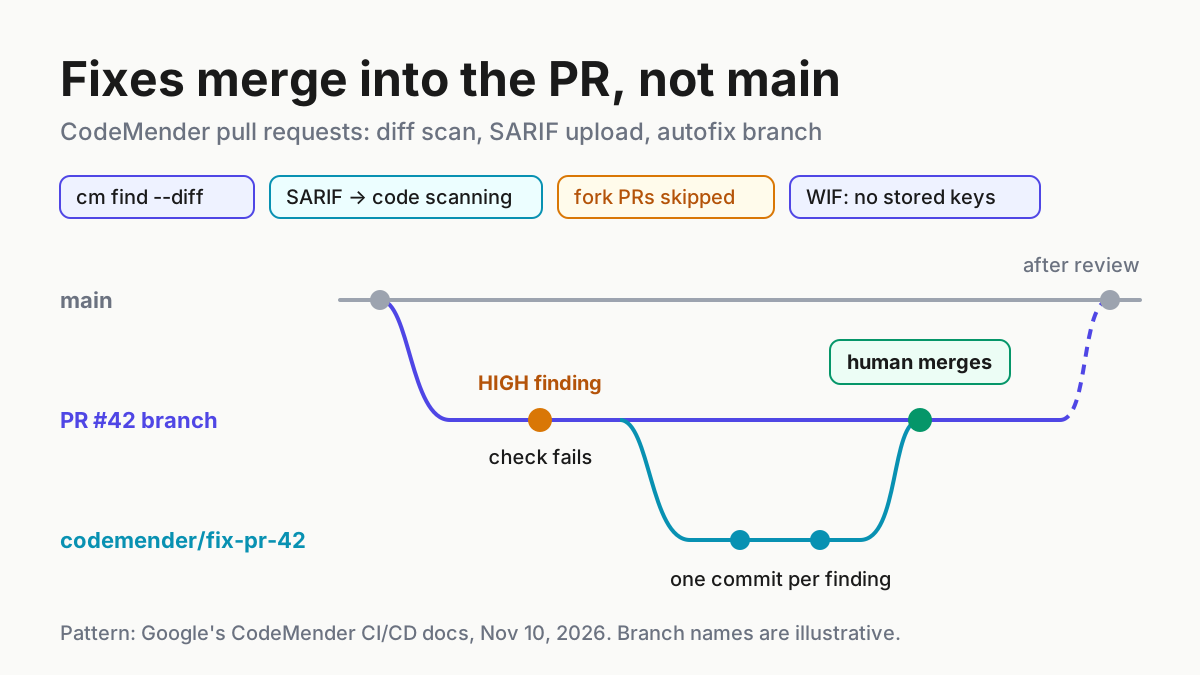
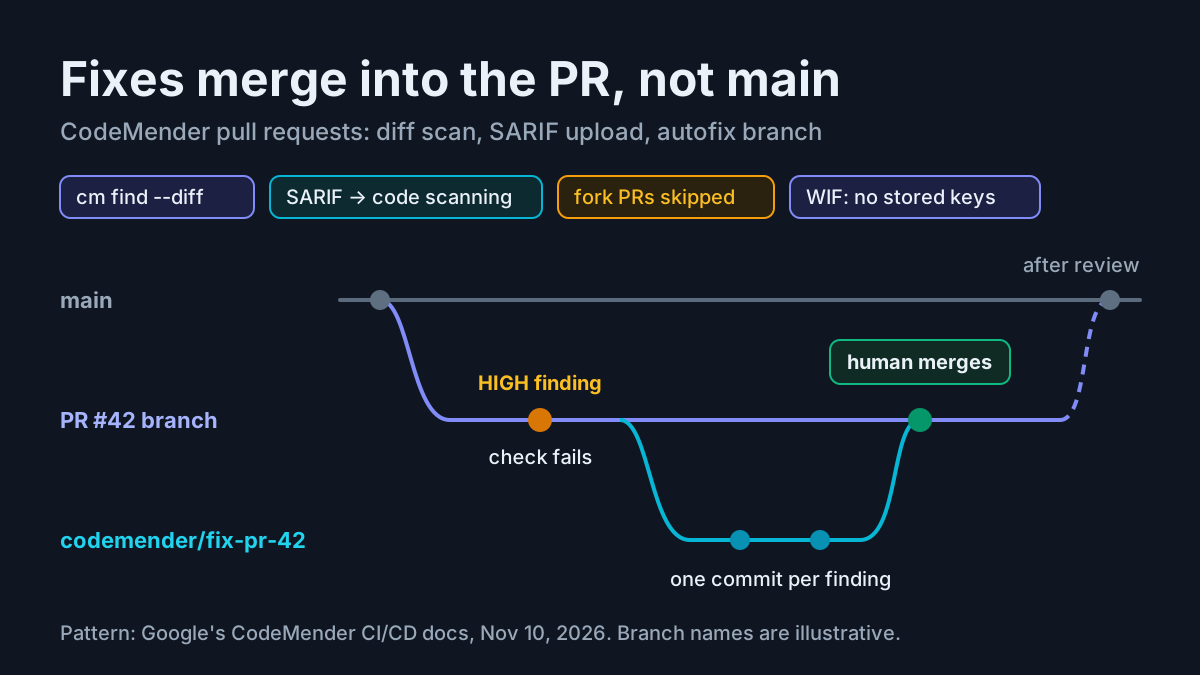
A pull request adds one helper that builds a SQL string from a session ID. The diff is small, the reviewer is busy, and the bug ships. CodeMender pull requests scanning is meant to catch that change while the PR is still open. Google’s AI code-security agent compares the branch with its base and fails the check when the change introduces a CRITICAL or HIGH finding. It publishes results to GitHub code scanning and can open a separate fix pull request into the author’s branch for a person to review. This tutorial sets that up for one GitHub repository, from a local dry run to a committed workflow, and ends with a rollback procedure.
The news behind it is a Google Cloud Blog post from November 10, 2026, Don’t just flag it, fix it: How to run CodeMender in your pull requests. It describes a Cloud Run reference architecture where developers reply /verify, /fix and /approve in the PR timeline. That design is worth reading, but it needs a hosted service. This guide follows the simpler two-job GitHub Actions workflow in Google’s Integrate with CI/CD documentation, which needs a workflow file, one service account and three repository secrets.
Who this is for: a platform or security engineer who owns a GitHub repository and wants an AI security agent to scan every same-repo pull request and propose fixes, without giving the agent merge rights or any secret a fork could reach. By the end you will have a committed .github/workflows/codemender.yml that runs cm find --diff against the base branch, uploads SARIF to code scanning, and opens a codemender/fix-pr-<number> pull request that only a person can merge. One illustrative case, labelled task:pr-scan-01, runs through every step so you can compare what you see with what you should expect. Every expected output in this guide is illustrative; none of it was executed for this article.
Before you start: access, roles and the preview terms
CodeMender is in Public Preview for a limited set of customers, according to the CodeMender overview. You get access through your Google Cloud sales team, and nothing below works until you have it. The preview terms also shape how you should use this setup. Google says pre-GA CodeMender is offered for limited testing and evaluation, should be closely supervised, and may not be used for commercial or production purposes. Treat the workflow in this guide as an evaluation on a repository you own or are authorized to analyze, not as your production merge gate.
One more term matters for CI. The workflow passes --yes and --bypass-warning, which switch off the prompts that ask a human to confirm agent commands and file writes. The CI/CD documentation says the customer is responsible for disabling human confirmation under the Service Specific Terms. Read that paragraph before you commit the file, and decide who in your team owns that call.
Work through this checklist first:
- [ ] A Google Cloud project with CodeMender access, billing enabled, and the Agent Platform API and Cloud Resource Manager API turned on.
- [ ] For your own user: Service Account Admin (
roles/iam.serviceAccountAdmin), Project IAM Admin (roles/resourcemanager.projectIamAdmin) and Workload Identity Pool Admin (roles/iam.workloadIdentityPoolAdmin). - [ ] A plan for one CI service account that receives Agent Platform User (
roles/aiplatform.user) on the project and nothing else for this pipeline. - [ ] Admin access to the GitHub repository’s secrets and Actions settings. In an organization, the pull request creation setting is inherited from the organization, so you may need an organization owner.
- [ ] GitHub code scanning available for the repository. Private and internal repositories need GitHub Code Security for it.
- [ ] The Google Cloud CLI installed and initialized, and the CodeMender
cmCLI installed locally for the dry run. - [ ] GitHub-hosted runners such as
ubuntu-24.04. Google’s docs say not to use self-hosted runners that are reused between jobs.
How a diff scan decides what blocks the merge
The whole integration rests on one command, cm find . --diff=origin/main. The CI/CD documentation describes three things it does. It compares the PR branch with the base branch and scans the modified files plus the files that directly depend on them, such as callers and importers. It separates new findings the PR introduces or exposes from findings that were already there, and labels the old ones [LEGACY / UNTOUCHED]. And it exits with status 1 when a finding caused by the PR matches a severity in --fail-on, which defaults to CRITICAL,HIGH.
That legacy label is what makes a PR gate tolerable on an old codebase. In Google’s codelab on securing a CI/CD pipeline, a baseline scan of OWASP Juice Shop reports 28 pre-existing findings, and a later PR that adds a command injection fails only on the new one. Legacy findings still appear in the SARIF report, so you see them in code scanning, but they do not fail the check and the workflow does not try to fix them.
The CodeMender find modes page explains why the diff mode is the right one for a PR. A diff scan typically finishes in under two minutes. A deep scan audits files one by one, takes longer and spends more tokens, and Google says not to use it as a synchronous check that blocks pull requests. The two modes cannot be mixed: --diff cannot be combined with --deep or --quick. This changed recently. The Agent Platform release notes record that CodeMender v0.16.0, on October 21, 2026, made a plain cm find run a deep scan by default. If an older script calls cm find . without --diff, it now runs the slow, expensive mode.
Scanning is a judgment by a model, not a pattern match. cm find returns a confidence score, and the blog notes that when confidence is below 100% you can run cm verify, which builds and runs a proof-of-concept exploit in a sandbox, as the Scan and verify page describes. The documented PR workflow does not run cm verify; the Cloud Run architecture in the blog adds it. If you add verification later, take the blog’s warning with you: a harness that only looks for a successful exploit string can mark a real flaw safe when a mock server crashes, so treat a failed run as inconclusive, never as clean.
Step 1: Dry-run the diff scan locally on task:pr-scan-01
Run the scan on your own machine before CI touches it. A local run uses your own credentials, keeps CodeMender’s default sandbox on, and shows you the report you will later see in code scanning. The CI/CD docs say that cm find with the default OS-level sandbox and default network isolation mounts the workspace read-only and skips command prompts by itself, so you do not need --sandbox=false on your laptop.
The fixture for task:pr-scan-01 is a branch named feature/session-lookup that adds one function to src/auth/session_manager.py. It was written for this guide and builds a query by string formatting on purpose:
# src/auth/session_manager.py  (illustrative fixture for task:pr-scan-01)
import sqlite3


def load_session(conn: sqlite3.Connection, session_id: str):
    # Builds SQL from caller-supplied input: the flaw the scan should catch.
    query = f"SELECT user_id, expires_at FROM sessions WHERE id = '{session_id}'"
    return conn.execute(query).fetchone()
Then run the dry run from the repository root:
# 1. Confirm your CLI release supports pull request scans
cm find --help | grep -- '--diff'
cm update            # only if the flag is missing

# 2. Authenticate and choose the project that has CodeMender access
gcloud auth application-default login
export GOOGLE_CLOUD_PROJECT="my-codemender-eval"

# 3. Initialize the workspace and check readiness
cm init
cm health --strict

# 4. Make sure the base branch exists locally, then scan the diff
git fetch origin main
git switch feature/session-lookup
cm find . --diff=origin/main \
  --fail-on=CRITICAL,HIGH \
  --format=sarif \
  --output=codemender.sarif
echo "cm find exit status: $?"

# 5. Read the findings in a human-friendly format
cm report --status=OPEN --format=md

# 6. Keep CodeMender's tracking file out of commits
echo .cm_project >> .gitignore
Read the results in this order:
- If the
grepprints nothing, your CLI predates pull request scans. The release notes show--diffarrived in v0.10.0 on September 24, 2026. Runcm updateand check again. cm health --strictchecks credentials, configuration, network reachability and project IAM before you spend model quota. The CI/CD docs map exit code 10 to credentials, 20 to configuration, 30 to reachability and 40 to IAM permissions. Fix any non-zero result before you scan.- Expected observation for task:pr-scan-01 (illustrative):
cm findexits with status 1,codemender.sarifexists, and the Markdown report lists one SQL injection finding insrc/auth/session_manager.pyat CRITICAL or HIGH with an eight-character finding ID. The exact title, severity and ID come from CodeMender, not from this guide. - If a finding in a file you did not touch shows up with a title starting
[LEGACY / UNTOUCHED], that is expected. It does not affect the exit status. - If the scan exits 0 with no finding, do not reach for a deep scan inside the PR flow. You can pass extra guidance with
-cor--context, which the find modes page lists as a flag for all modes, and you can choose a model with--model. The default is Gemini 3.8 Flash, and the November 11, 2026 release note adds Gemini 4 Carbon as an option.
If you want the same check before each commit, Google documents a pre-commit hook that runs cm find . --diff --staged --fail-on=CRITICAL,HIGH --yes --bypass-warning. Developers can skip it with git commit --no-verify, so it supplements CI and never replaces it.
Step 2: Create the keyless Workload Identity Federation trust
The workflow authenticates with Workload Identity Federation, so no service account key is stored in GitHub. GitHub Actions mints a short-lived OIDC token and Google exchanges it for temporary credentials. The blog puts the reason plainly: this agent needs access to your source, and a long-lived credential in a secret store is exactly what you do not want waiting to leak. These commands are from the CI/CD documentation, with the task:pr-scan-01 values filled in:
PROJECT_ID="my-codemender-eval"
GITHUB_ORG="acme-eng"
REPO="acme-eng/session-service"

gcloud services enable iam.googleapis.com \
    cloudresourcemanager.googleapis.com iamcredentials.googleapis.com \
    sts.googleapis.com --project="${PROJECT_ID}"

gcloud iam service-accounts create codemender-ci \
    --project="${PROJECT_ID}" \
    --display-name="CodeMender CI"

gcloud projects add-iam-policy-binding "${PROJECT_ID}" \
    --member="serviceAccount:codemender-ci@${PROJECT_ID}.iam.gserviceaccount.com" \
    --role="roles/aiplatform.user"

gcloud iam workload-identity-pools create github \
    --project="${PROJECT_ID}" \
    --location="global" \
    --display-name="GitHub Actions"

gcloud iam workload-identity-pools providers create-oidc codemender \
    --project="${PROJECT_ID}" \
    --location="global" \
    --workload-identity-pool="github" \
    --display-name="CodeMender" \
    --attribute-mapping="google.subject=assertion.sub,attribute.repository=assertion.repository,attribute.repository_owner=assertion.repository_owner" \
    --attribute-condition="assertion.repository_owner == '${GITHUB_ORG}'" \
    --issuer-uri="https://token.actions.githubusercontent.com"

POOL_ID=$(gcloud iam workload-identity-pools describe github \
    --project="${PROJECT_ID}" \
    --location="global" \
    --format="value(name)")

gcloud iam service-accounts add-iam-policy-binding \
    "codemender-ci@${PROJECT_ID}.iam.gserviceaccount.com" \
    --project="${PROJECT_ID}" \
    --role="roles/iam.workloadIdentityUser" \
    --member="principalSet://iam.googleapis.com/${POOL_ID}/attribute.repository/${REPO}"

# Prints the value for the GCP_WIF_PROVIDER secret, for example:
# projects/123456789/locations/global/workloadIdentityPools/github/providers/codemender
gcloud iam workload-identity-pools providers describe codemender \
    --project="${PROJECT_ID}" \
    --location="global" \
    --workload-identity-pool="github" \
    --format="value(name)"

# Confirm the binding the codelab recommends checking
gcloud iam service-accounts get-iam-policy \
    "codemender-ci@${PROJECT_ID}.iam.gserviceaccount.com" \
    --project="${PROJECT_ID}" \
    --flatten="bindings[].members" \
    --filter="bindings.role=roles/iam.workloadIdentityUser"
What each layer does, and the choices worth making on purpose:
- The provider’s attribute condition decides which GitHub tokens Google accepts at all. The docs sample accepts tokens from any repository
acme-engowns. The codelab narrows it to one repository withassertion.repository == 'owner/repo'. Narrow is safer if this pool exists only for this repository. - The
principalSetbinding decides which repository may impersonatecodemender-ci. Here onlyacme-eng/session-servicecan, even though the condition admits the whole organization. - The blog adds a caution about names. Every GitHub Actions workflow shares the same issuer URL, so validating the issuer proves nothing; the condition does the work. Repository names can be renamed or claimed by someone else after you release them, while
repository_idandrepository_owner_idare immutable, which is why Google recommends mapping those. The blog’s exact expression did not render in the copy fetched for this guide, so confirm the syntax in Google’s Workload Identity Federation guide for deployment pipelines before you switch. - If you already have a pool for GitHub Actions, skip the pool creation and use its ID instead of
github. - Expect delay. IAM and Workload Identity Federation changes can take up to 5 minutes to take effect, so a 403 in the first minutes may only be propagation.
Step 3: Add the secrets and the pull request permission
The workflow reads three repository secrets. Add them under Settings > Secrets and variables > Actions:
| Secret | Value for task:pr-scan-01 | Where it comes from |
|---|---|---|
GCP_PROJECT_ID |
my-codemender-eval |
The project with CodeMender access |
GCP_WIF_PROVIDER |
projects/123456789/locations/global/workloadIdentityPools/github/providers/codemender |
Output of the provider describe command in Step 2 |
GCP_WIF_SERVICE_ACCOUNT |
codemender-ci@my-codemender-eval.iam.gserviceaccount.com |
The service account created in Step 2 |
None of these values is a credential on its own; the trust lives in Google’s provider and binding. They are still secrets for a practical reason the docs spell out: workflows for fork and Dependabot pull requests cannot read them, so they cannot authenticate to Google Cloud.
Then change two repository settings:
- Go to Settings > Actions > General. Under Workflow permissions, select Allow GitHub Actions to create and approve pull requests, then Save. The autofix job needs this to open the fix PR. Skip it if you will not use autofix.
- Confirm code scanning is available. If it is not, and you cannot enable GitHub Code Security, delete the Upload results to code scanning step and the
security-eventsandactionspermissions from the scan job. Otherwise the upload fails and takes the scan job with it. - If you script the first setting, read the codelab’s command carefully. Its
gh apicall against/actions/permissions/workflowalso setsdefault_workflow_permissionstowrite. Google’s documented workflow declares permissions per job, so it does not need a write default. Avoid broadening the token for every other workflow in the repository by accident.
Step 4: Commit the workflow file
Commit this file as .github/workflows/codemender.yml. It is Google’s documented workflow with one deliberate change, the branches: [main] filter on the trigger, which is explained after the file.
name: CodeMender

on:
  pull_request:
    branches: [main]

permissions: {}

defaults:
  run:
    shell: bash

env:
  CM_DOWNLOAD_URL: https://artifactregistry.googleapis.com/download/v1/projects/cmoc-prod/locations/us/repositories/codemender-cli-production/files/cm%3Astable%3Acm-linux-amd64.zip:download?alt=media

jobs:
  scan:
    name: CodeMender scan
    # Workflows for fork and Dependabot pull requests can't read this
    # repository's secrets, so they can't authenticate to Google Cloud.
    if: >-
      github.event.pull_request.head.repo.full_name == github.repository &&
      github.actor != 'dependabot[bot]'
    runs-on: ubuntu-24.04
    timeout-minutes: 15
    permissions:
      contents: read
      id-token: write         # Workload Identity Federation
      security-events: write  # Upload SARIF to code scanning
      actions: read           # Upload SARIF from a private repository
    outputs:
      findings: ${{ steps.scan.outputs.findings }}
    steps:
      - uses: actions/checkout@v7
        with:
          fetch-depth: 0  # cm needs the base branch history
          persist-credentials: false

      - uses: google-github-actions/auth@v3
        with:
          project_id: ${{ secrets.GCP_PROJECT_ID }}
          workload_identity_provider: ${{ secrets.GCP_WIF_PROVIDER }}
          service_account: ${{ secrets.GCP_WIF_SERVICE_ACCOUNT }}

      - name: Install the CodeMender CLI
        run: |
          curl -fsSL -o "$RUNNER_TEMP/cm.zip" "$CM_DOWNLOAD_URL"
          unzip -q -o "$RUNNER_TEMP/cm.zip" -d "$RUNNER_TEMP/cm"
          echo "$RUNNER_TEMP/cm" >> "$GITHUB_PATH"

      - name: Scan the pull request
        id: scan
        env:
          BASE_REF: ${{ github.base_ref }}
          FAIL_ON: CRITICAL,HIGH
        run: |
          cm init
          status=0
          cm find . \
            --diff="origin/$BASE_REF" \
            --diff-workers=16 \
            --fail-on="$FAIL_ON" \
            --format=sarif \
            --output=codemender.sarif \
            --sandbox=false \
            --yes \
            --bypass-warning || status=$?

          # Save the findings that failed the scan for the autofix job. Like the
          # CI gate, skip findings labeled [LEGACY / UNTOUCHED]: they're in code
          # that the pull request didn't change.
          echo '[]' > "$RUNNER_TEMP/codemender-findings.json"
          if [ "$status" -ne 0 ]; then
            cm report --format=json --status=OPEN \
              | jq --arg fail_on "$FAIL_ON" '
                  ($fail_on | ascii_upcase | split(",")) as $severities
                  | [.[]
                     | select(.title | startswith("[LEGACY / UNTOUCHED]") | not)
                     | select(.severity | ascii_upcase | IN($severities[]))]' \
              > "$RUNNER_TEMP/codemender-findings.json"
          fi
          echo "findings=$(jq length "$RUNNER_TEMP/codemender-findings.json")" >> "$GITHUB_OUTPUT"
          exit "$status"

      - name: Upload results to code scanning
        if: ${{ !cancelled() && hashFiles('codemender.sarif') != '' }}
        uses: github/codeql-action/upload-sarif@v4
        with:
          sarif_file: codemender.sarif
          category: codemender

      - name: Save findings for autofix
        if: ${{ !cancelled() && steps.scan.outputs.findings > 0 }}
        uses: actions/upload-artifact@v7
        with:
          name: codemender-findings
          path: ${{ runner.temp }}/codemender-findings.json
          retention-days: 1

  autofix:
    name: CodeMender autofix
    needs: scan
    if: ${{ !cancelled() && needs.scan.outputs.findings > 0 }}
    runs-on: ubuntu-24.04
    timeout-minutes: 60
    permissions:
      contents: write        # Push the fix branch
      pull-requests: write   # Open the fix pull request
      id-token: write        # Workload Identity Federation
    steps:
      - uses: actions/checkout@v7
        with:
          ref: ${{ github.head_ref }}
          persist-credentials: false

      - uses: google-github-actions/auth@v3
        with:
          project_id: ${{ secrets.GCP_PROJECT_ID }}
          workload_identity_provider: ${{ secrets.GCP_WIF_PROVIDER }}
          service_account: ${{ secrets.GCP_WIF_SERVICE_ACCOUNT }}

      - name: Install the CodeMender CLI
        run: |
          curl -fsSL -o "$RUNNER_TEMP/cm.zip" "$CM_DOWNLOAD_URL"
          unzip -q -o "$RUNNER_TEMP/cm.zip" -d "$RUNNER_TEMP/cm"
          echo "$RUNNER_TEMP/cm" >> "$GITHUB_PATH"

      - uses: actions/download-artifact@v8
        with:
          name: codemender-findings
          path: ${{ runner.temp }}/codemender

      - name: Fix findings
        run: |
          # Keep CodeMender state and the auth action's credentials file out of
          # the commits, and out of the `git clean` that cm fix runs.
          printf '%s\n' .cm_project 'gha-creds-*.json' >> .git/info/exclude

          cm init
          # Fix in the repository root instead of each file's directory.
          printf 'project_paths:\n  - "%s"\n' "$GITHUB_WORKSPACE" \
            >> ~/.codemender/config.yaml
          cm report import -f "$RUNNER_TEMP/codemender/codemender-findings.json"

          git config user.name "github-actions[bot]"
          git config user.email \
            "41898282+github-actions[bot]@users.noreply.github.com"

          cm report --format=json --status=OPEN \
            | jq -r '.[] | [.finding_id, .title] | @tsv' \
            > "$RUNNER_TEMP/findings.tsv"
          while IFS=$'\t' read -r id title; do
            # cm fix exits 0 when it makes no edits, so also check for changes.
            if cm fix "$id" \
                 --sandbox=false --yes --bypass-warning < /dev/null &&
               ! git diff --quiet; then
              git commit -q -a -m "Fix $title" -m "CodeMender finding $id"
            else
              echo "::warning::CodeMender didn't fix \"$title\" ($id)."
            fi
            # Discard files the fix agent created, such as test output.
            git reset -q --hard
            git clean -q -fd
          done < "$RUNNER_TEMP/findings.tsv"

      - uses: peter-evans/create-pull-request@v8
        with:
          branch: codemender/fix-pr-${{ github.event.pull_request.number }}
          base: ${{ github.head_ref }}
          title: "CodeMender fixes for #${{ github.event.pull_request.number }}"
          body: |
            CodeMender generated these fixes for findings in #${{ github.event.pull_request.number }}.
            Review each commit before you merge this pull request into `${{ github.head_ref }}`.
The one change from Google’s file is a choice you should make deliberately:
- Without a branches filter, the workflow triggers on every pull request, including the fix PRs CodeMender opens. GitHub does not automatically run workflows for pull requests a workflow creates with
GITHUB_TOKEN, so someone with write access must click Approve workflows to run on each fix PR before it is scanned. - With
branches: [main], the docs say fix PRs are not scanned, because their base is a PR branch, notmain. The check happens later instead: merging the fix PR changes the original PR’s branch, and the workflow scans the original PR again. - For task:pr-scan-01 the filter is the better default. The agent’s output is judged by the rescan of the human’s PR, and an approved scan of a fix PR cannot start a second autofix cycle that opens a fix PR against the fix branch. That is the loop pattern described in CI failure to fix loops that don’t thrash.
- If you want CI on fix PRs anyway, the codelab says to pass a GitHub App token or a PAT to
create-pull-request. That gives the agent’s PR a credential that can trigger workflows, so weigh it against the trigger allowlist guidance for agent identities first. - Optional additions the docs support: run
cm health --strictbefore the scan to fail fast on exit codes 10 to 40, addCM_PLAIN: "true"toenvfor ASCII-only logs, or setFAIL_ON: ""to report without failing, which also turns autofix off.
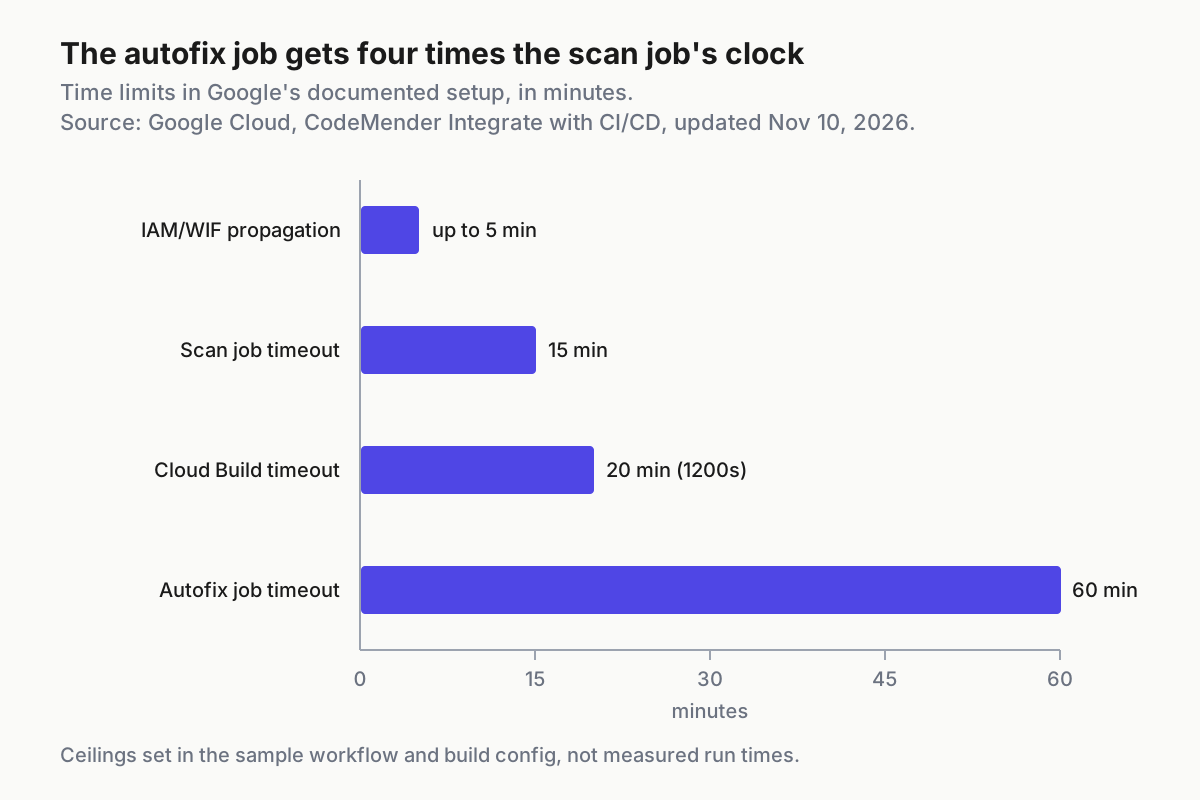
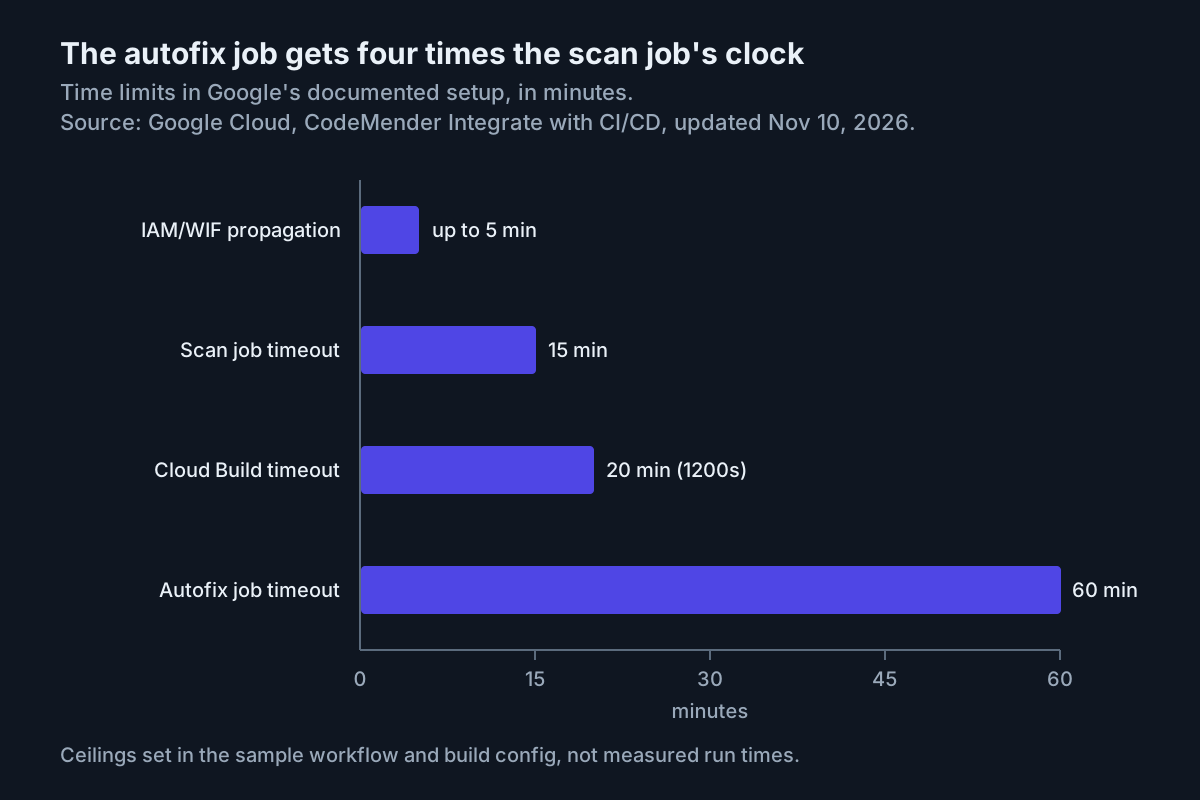
The two jobs run on very different clocks. The scan job’s timeout-minutes: 15 is generous for a mode Google says typically finishes in under two minutes. The autofix job gets timeout-minutes: 60 because it runs cm fix once per finding and each fix may build and test. If it reaches 60 minutes, no fix PR opens. The Cloud Build variant in the same docs sets timeout: 1200s.
What each permission and step protects
The workflow is short, but most lines exist to keep a bounded agent bounded. Before you trim anything, check this table:
| Line in the workflow | Why it is there | What happens if you change it |
|---|---|---|
permissions: {} at the top |
Each job starts with no token permissions and gets only what its own block grants | Remove it and the jobs no longer rely solely on the grants written in this file |
if: same repository and not dependabot[bot] |
Fork and Dependabot runs cannot read secrets; only users with write access can create same-repo branches, which limits untrusted text that tries to steer the agent | Removing it turns skips into authentication failures; it does not make fork code safe to hand to the agent |
id-token: write |
Lets the job request the OIDC token that Workload Identity Federation exchanges | The auth step fails and nothing reaches Google Cloud |
security-events: write, actions: read |
Uploading SARIF, and uploading it from a private repository | Delete both together with the upload step if code scanning is unavailable |
fetch-depth: 0 |
cm needs the base branch history to compute the diff |
The scan fails with an ambiguous argument error for origin/main |
persist-credentials: false |
Keeps the checkout from leaving the job token in the local git configuration | Commands the agent runs would find a token they do not need |
--sandbox=false --yes --bypass-warning |
CI has no human at the prompt, and the Linux sandbox needs user namespaces some CI environments lack | Agent commands get the job’s credentials and network access; the path boundary and command_policy.yaml blocklist still apply unless you add --allow-all-paths or --allow-all-commands. If your runner supports the sandbox, remove --sandbox=false |
FAIL_ON: CRITICAL,HIGH |
Sets the gate. Valid values are CRITICAL, HIGH, MEDIUM and LOW, comma-separated without spaces | Adding MEDIUM blocks more PRs and sends more findings to autofix |
Upload step if: !cancelled() && hashFiles(...) |
Uploads the report even when the scan exits 1 | Without it, a failing scan would hide the finding you most need to see |
retention-days: 1 |
The findings artifact only has to survive until the autofix job reads it | Longer retention keeps vulnerability details around for no benefit |
contents: write, pull-requests: write on autofix only |
The scan job stays read-only; only the fix job can push a branch and open a PR | Granting these to the scan job widens what the scanning agent can do |
.git/info/exclude, git reset --hard, git clean -fd |
Keeps .cm_project, gha-creds-*.json and files the agent created out of the commits |
The fix PR could carry CodeMender state, credential files or test output |
These runs are unattended, which puts them in a different trust tier from an interactive session. The reasoning is in headless modes as a separate trust tier.
Worked example: task:pr-scan-01 from push to fix PR
Here is the whole flow for the illustrative repository acme-eng/session-service, with PR #42 as the author’s change and #43 as the fix PR. Every result is an expected observation based on Google’s documented behavior, not a recorded run.
| Input | Action | Expected result (illustrative) |
|---|---|---|
task:pr-scan-01 local: branch feature/session-lookup, new load_session() in src/auth/session_manager.py that builds SQL with an f-string |
cm find . --diff=origin/main --fail-on=CRITICAL,HIGH --format=sarif --output=codemender.sarif |
Exit status 1; codemender.sarif written; cm report --status=OPEN --format=md lists one SQL injection finding in that file at CRITICAL or HIGH |
task:pr-scan-01 pushed: PR #42 from feature/session-lookup into main in the same repository |
The pull_request event starts the CodeMender scan job |
Auth through Workload Identity Federation succeeds; cm find --diff exits 1; the CodeMender scan check shows as failed; the job output is findings=1 |
task:pr-scan-01: PR #42 with codemender.sarif present after the failed scan |
Upload results to code scanning runs with category: codemender |
Upload succeeds; the finding appears in PR #42’s checks because all of its lines are inside the diff |
task:pr-scan-01: artifact codemender-findings holding one non-legacy finding |
The CodeMender autofix job runs cm report import, then cm fix <id> |
One commit titled Fix plus the finding title; a PR titled CodeMender fixes for #42 from codemender/fix-pr-42 into feature/session-lookup |
task:pr-scan-01: fix PR #43 whose base is feature/session-lookup |
No run: the branches: [main] filter excludes it |
No CodeMender check on #43; a reviewer reads the commit and runs the tests |
task:pr-scan-01: reviewer merges #43 into feature/session-lookup |
PR #42’s branch changes, so the scan runs again on #42 | A new scan on #42, expected to pass if the query now uses parameters; no new fix PR |
task:pr-scan-01-fork: PR #44 opened from a fork, contrib/session-service |
The pull_request event fires |
The scan job is skipped and GitHub reports it as successful; a maintainer reviews it or runs cm find --diff locally |
For the fix in row four, the shape a reviewer should expect is a parameterized query, for example conn.execute("SELECT user_id, expires_at FROM sessions WHERE id = ?", (session_id,)). That line is our illustration of a correct remediation, not CodeMender output. The codelab shows the same pattern in its Juice Shop example, where the remediated routes/login.ts replaces string interpolation with Sequelize replacements.
Review the codemender/fix-pr-42 pull request before it merges
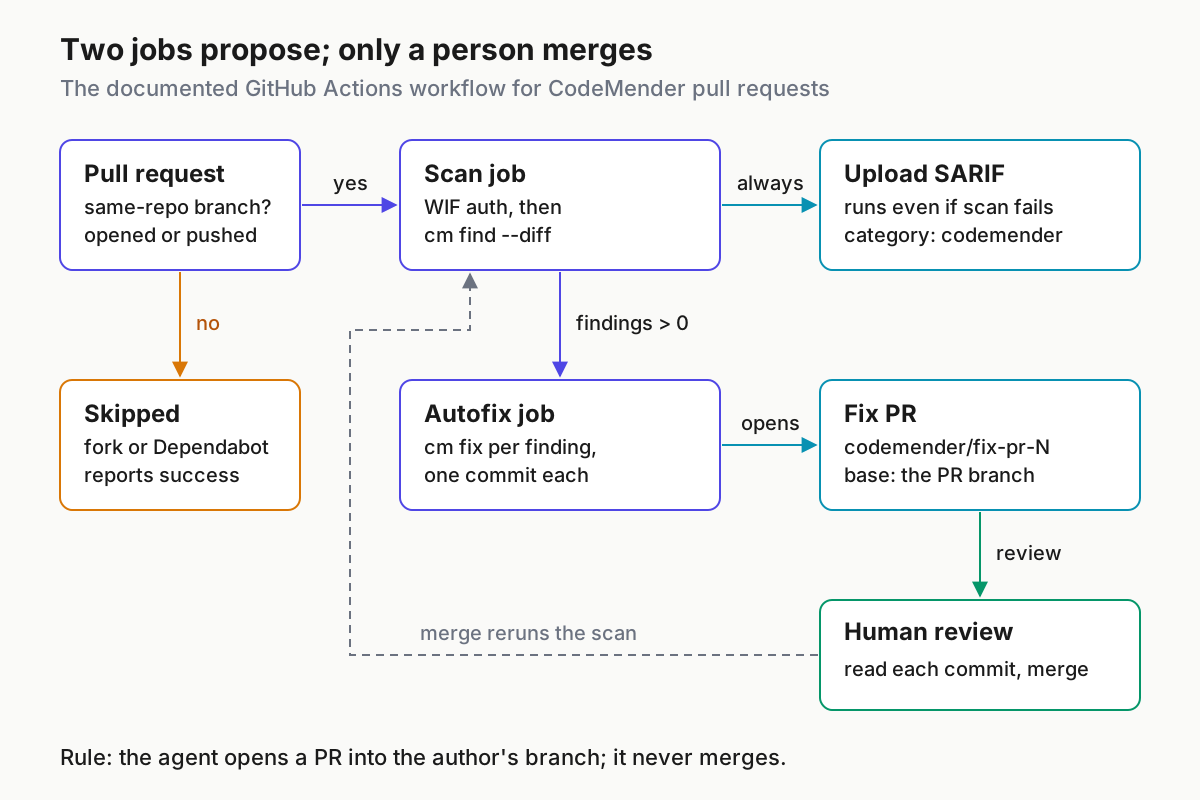
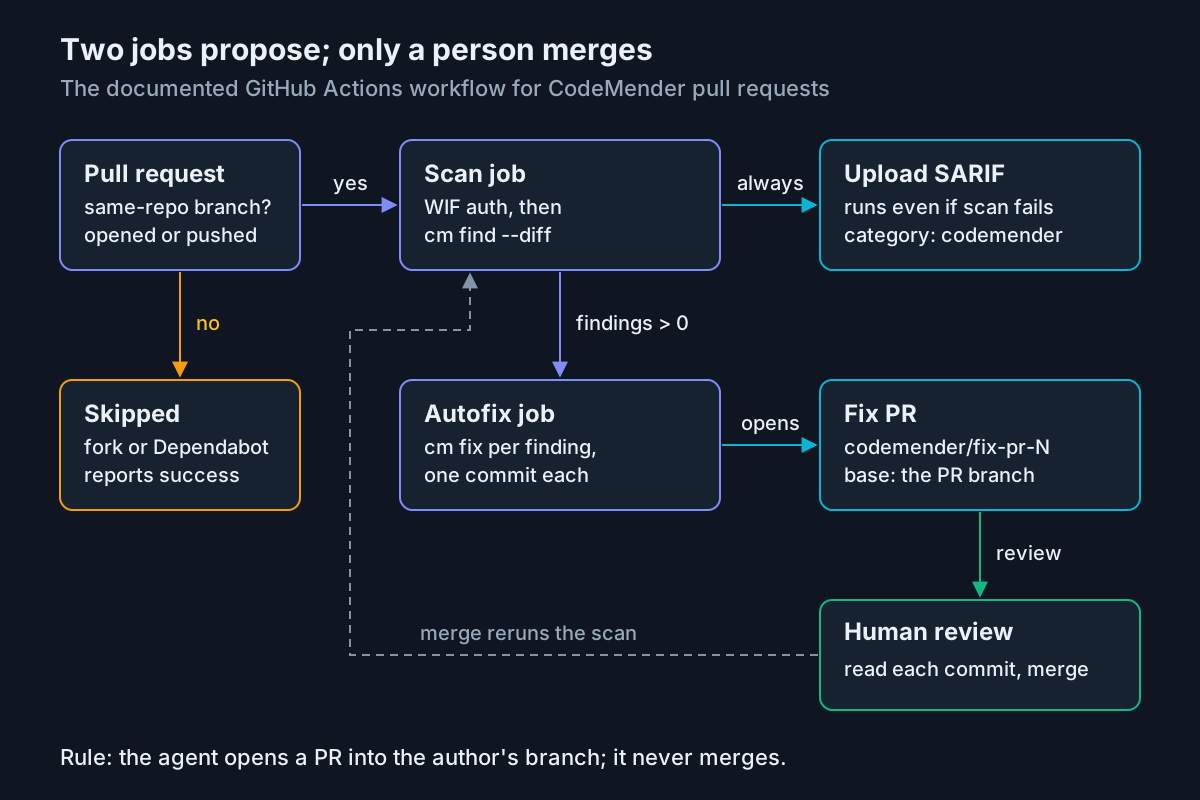
The docs are blunt: CodeMender fixes are AI-generated, so review each commit and confirm your tests pass before you merge the fix PR. The agent never merges anything in this design. It proposes into the author’s branch, and a person decides. That is the same split argued in AI PR review agents propose, humans merge.
Use this review order for codemender/fix-pr-42:
- Check the base. It must be
feature/session-lookup, the PR branch, nevermain. If it targetsmain, the workflow was edited. - Read each commit on its own. The workflow commits one fix per finding, with the message Fix plus the finding title and a second line naming the CodeMender finding ID. Match each ID to the code scanning alert on PR #42.
- Look at Files changed. The job commits only changes to files already in the repository and discards files the agent created, so a new file in the diff means something unusual happened.
- Run the tests. With the branches filter, CodeMender will not scan #43 itself, so run your suite locally or in your normal CI. Without the filter, click Approve workflows to run on #43.
- Merge #43 into
feature/session-lookuponly when the change is correct. The original PR is then scanned again. - Merge PR #42 into
mainthrough your normal review once the rescan passes.
Two cautions about gating. First, the blog notes that a status only blocks merges when branch protection makes it required; without that, the gate is advisory. If you are moving to rulesets, migrating branch protection to rulesets covers where that requirement lives. Second, the docs warn that GitHub reports a skipped job as successful, so a required CodeMender check does not block fork or Dependabot PRs. Review those yourself or scan them locally.
Troubleshooting: symptom, cause, fix
Most failures show up in the scan job log. Match the exact text first, then work outward:
| Symptom in the log | Likely cause | Fix |
|---|---|---|
start session failed: StartSession failed with HTTP 403 Forbidden, sometimes with Permission 'aiplatform.interactions.create' denied |
The project lacks CodeMender access, the service account lacks roles/aiplatform.user, the Agent Platform API is off, or GCP_PROJECT_ID points at the wrong project |
Check all four; run cm health --strict to see whether it reports credentials (10), configuration (20), reachability (30) or IAM (40) |
| A 403 in the first runs after setup | IAM and Workload Identity Federation changes can take up to 5 minutes to take effect | Wait, then rerun the failed job |
Error: unknown flag: --diff |
The CLI release predates pull request scans | Run cm update; the workflow itself always downloads the latest stable release |
fatal: ambiguous argument 'origin/main': unknown revision or path not in the working tree |
The base branch is not in the checkout | Set fetch-depth: 0 in actions/checkout; locally, git fetch origin main |
A script combining --diff with --deep or --quick fails |
The modes cannot be combined | Keep --diff alone for PRs; since v0.16.0 a bare cm find already means a deep scan |
Resource setup has just started. Please try again shortly. |
CodeMender is provisioning resources for your project | Wait a few minutes and run the job again |
[1/1] ❌ src/app.py: start session failed |
That file was not scanned | Read the error on the line and rerun; since v0.16.0 multi-file diff scans report INCOMPLETE when a file scan fails |
| Autofix fails at the create-pull-request step | Allow GitHub Actions to create and approve pull requests is off | Turn it on in Settings > Actions > General, or ask an organization owner |
| Autofix succeeds but no PR appears | CodeMender fixed nothing, or the job hit its 60-minute timeout | Read the warning logged for each unfixed finding and fix by hand |
GitHub Code Security or GitHub Advanced Security must be enabled for this repository to use code scanning |
Code scanning is unavailable on a private repository | Enable GitHub Code Security, or delete the upload step and its two permissions |
warning not acknowledged. Please run interactively once to acknowledge or pass --bypass-warning |
A non-interactive run needs a confirmation it cannot ask for | Add --bypass-warning after reading the preview terms |
| A change touches many callers and some seem unchecked | Neighbor discovery stops at --diff-max-neighbors, which defaults to 10 |
Add --fail-on-truncation so the check fails instead of quietly capping; Google’s docs give no recommended PR size, so split very wide changes |
The v0.20.0 release on November 10, 2026 also fixed a case where unreadable directories reported zero findings instead of a permission denied error. If an older run reported a suspiciously clean result on a repository with restricted paths, rerun it on the current CLI.
Rollback: remove the integration in reverse order
Remove things in the reverse order you added them, so nothing is left half-trusted. If CodeMender is a required check, take it out of your branch rules first so open PRs are not left waiting on a check that will never report.
- Remove the CodeMender scan from required status checks in your branch protection or ruleset.
- Disable the workflow so no new run starts.
- Close any open fix PRs and delete their
codemender/fix-pr-*branches. - Delete the three repository secrets.
- Under Settings > Actions > General, clear Allow GitHub Actions to create and approve pull requests, unless another workflow needs it.
- Disable the Workload Identity Federation provider. This stops token exchange at once without deleting anything.
- When you are sure, run the full teardown and delete the workflow file in a commit.
REPO="acme-eng/session-service"
PROJECT_ID="my-codemender-eval"

# 2. Stop new runs
gh workflow disable codemender.yml --repo "${REPO}"

# 3. Close the fix PR and delete its branch
gh pr close 43 --repo "${REPO}" --delete-branch

# 4. Remove the repository secrets
gh secret delete GCP_PROJECT_ID --repo "${REPO}"
gh secret delete GCP_WIF_PROVIDER --repo "${REPO}"
gh secret delete GCP_WIF_SERVICE_ACCOUNT --repo "${REPO}"

# 6. Pause token exchange
gcloud iam workload-identity-pools providers update-oidc codemender \
    --workload-identity-pool="github" \
    --location="global" \
    --disabled \
    --project="${PROJECT_ID}"

# 7. Full teardown (skip the pool delete if other workflows share it)
gcloud iam workload-identity-pools providers delete codemender \
    --workload-identity-pool="github" --location="global" \
    --project="${PROJECT_ID}" --quiet
gcloud iam workload-identity-pools delete github \
    --location="global" --project="${PROJECT_ID}" --quiet
gcloud iam service-accounts delete \
    "codemender-ci@${PROJECT_ID}.iam.gserviceaccount.com" \
    --project="${PROJECT_ID}" --quiet
Recovery is the same path forward. If you only paused, re-enable the provider with update-oidc and --no-disabled, as the codelab does, then re-add the secrets and re-enable the workflow. The codelab also notes that deleted pools and providers stay soft-deleted for 30 days, which blocks creating a new one with the same ID during that time; restore them with undelete instead of renaming.
Where this fits with your review-bot policy
This guide covers one tool’s setup. The policy questions around it are covered elsewhere and are worth settling before the workflow becomes routine. Where review bots run, what they see and what a verdict proves is the right frame for the --sandbox=false choice: on a GitHub-hosted runner the agent’s commands share the job’s Google Cloud credentials for the life of that VM, and a red or green check is evidence about one diff, not a security certificate.
The structure here holds up because each piece has a single job. The scan job can read and report. The autofix job can push one branch and open one PR. A person merges. Forks are skipped rather than trusted. Keep that shape when you add the blog’s /verify and /fix slash commands or move to the Cloud Run architecture, and log which identity did what. For running several agents like this across repositories, AgentOps for running a fleet of AI agents describes the operating layer that keeps them visible.
Sources
- Google Cloud Blog, Don’t just flag it, fix it: How to run CodeMender in your pull requests, November 10, 2026.
- Google Cloud documentation, Integrate with CI/CD (CodeMender), last updated November 10, 2026.
- Google Cloud documentation, CodeMender overview, last updated November 10, 2026.
- Google Cloud documentation, Scan and verify code vulnerabilities, last updated November 10, 2026.
- Google Cloud documentation, CodeMender find modes, last updated November 10, 2026.
- Google Codelabs, Secure Your CI/CD Pipeline with CodeMender.
- Google Cloud documentation, Gemini Enterprise Agent Platform release notes, entries through November 11, 2026.