Migrate Branch Protection to Rulesets Without Opening a Gap for Your Coding Agents
Migrate branch protection to rulesets safely: snapshot classic rules, import in Evaluate or Disabled, map bypass lists, probe agent apps, then delete them.

Go deeper. Build your own.
Your repository now has three kinds of writers. A coding agent works through a GitHub App and opens pull requests. A release bot pushes version commits to release branches. Humans review and merge. Classic branch protection is what stops that agent from pushing straight to main, and when you migrate branch protection to rulesets you are rebuilding that fence while the agent is still running. GitHub has made the rebuild a single click, which is convenient and a little dangerous: a careless import can change who may push, which checks gate a merge and who bypasses everything, and nothing will error to tell you.
The trigger is GitHub’s changelog entry of October 20, 2026, which added an Import branch protection rules button that converts every eligible classic rule in a repository at once. It extends the single-rule Convert to ruleset flow from the August 11, 2026 changelog, which described GitHub mapping required reviews, status checks and push restrictions into equivalent ruleset rules. The button is not the lesson. The lesson is proving that the new rulesets are at least as strict as the old rules for every identity that touches the repository, and knowing how to back out when they are not.
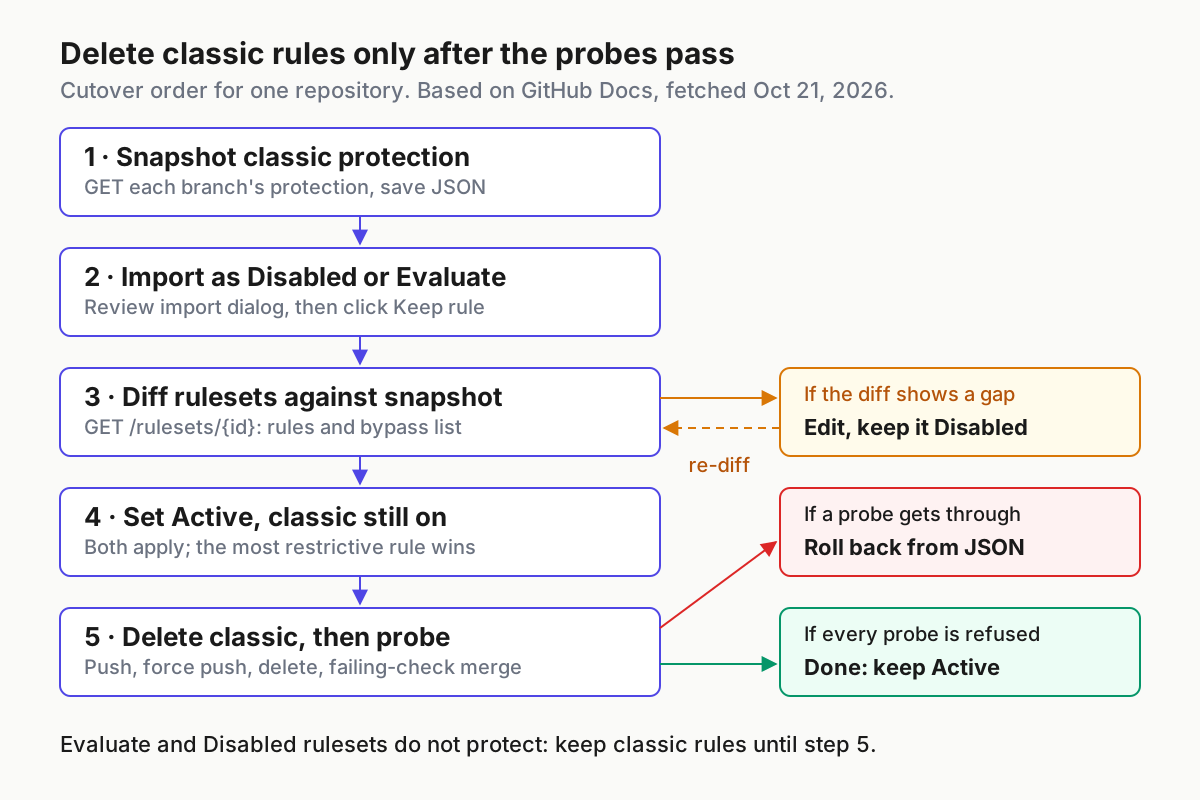
By the end you will have JSON snapshots of every classic rule, rulesets created in a non-enforcing state, a rule-by-rule diff, a probe table run from your agent’s and bot’s own credentials, classic rules deleted only after the probes pass, and a rollback you wrote before you needed it. The worked example uses one repository with two classic rules; the same procedure applies to any repository, one at a time.
For the concepts behind branch protection, merge queues and required checks once machines commit, read Agentic CI/CD. This guide stays on the migration itself.
What you need before you touch the import button
The import takes about a minute. The preparation decides whether you can prove anything afterwards, so collect these first.
- [ ] Admin access to the repository, or a custom role with the “edit repository rules” permission. GitHub’s conversion guide names those as the people who can create, edit and delete rulesets.
- [ ] A plan where rulesets exist for this repository. The same guide lists public repositories on GitHub Free and Free for organizations, and public and private repositories on Pro, Team and Enterprise Cloud.
- [ ] A fine-grained token for the REST calls. Reading classic protection needs the “Administration” repository permission at read level; changing a ruleset’s enforcement or recreating classic protection needs Administration at write level. Listing rulesets and branch rules needs only “Metadata” read.
- [ ]
curlandjqon the machine that will hold the snapshot. The calls follow GitHub’s documented REST syntax;jqis only a local filter for reading the output. - [ ] A written inventory of every identity that acts on the repository: each GitHub App’s slug and numeric ID, each team slug, and who holds admin. If you have not yet decided which workflows an agent identity may trigger, settle that first with the Actions trigger allowlist, because a migration is a bad moment to discover an app nobody remembers installing.
- [ ] Your plan tier. The REST reference for rules says the evaluate enforcement level “is only available with GitHub Enterprise.” Everyone else chooses between Active and Disabled.
- [ ] A cutover window of about thirty minutes in which you can pause the agent’s scheduled runs and the release bot’s jobs.
None of the commands in this guide were executed for this article. They are documented syntax with illustrative names, IDs and values. Each expected observation describes what GitHub’s documentation says should happen; record what you actually see next to it, because that record is your evidence when someone asks later why the classic rules were safe to delete.
The worked example: two classic rules, five identities
The example repository is acme/payments-api, and every name in it is illustrative. Five identities touch it:
| Identity | Type | What it does today |
|---|---|---|
acme-coder |
GitHub App, coding agent | Opens pull requests from agent/* branches; never merges |
acme-release-bot |
GitHub App, CI bot | Pushes version commits to release/* and creates tags |
payments-maintainers |
Team, code owners | Review and merge pull requests into main |
release-managers |
Team | Cut and patch release branches by hand |
| Repository admins | Role | Break-glass changes |
Two classic branch protection rules protect it:
| Classic setting | Rule for main |
Rule for release/* |
|---|---|---|
| Require a pull request before merging | Yes, 1 approval | No |
| Require review from code owners | Yes | No |
| Dismiss stale approvals on new commits | Yes | No |
| Required status checks | build-and-test, branch must be up to date |
None |
| Restrict who can push | No | acme-release-bot app, release-managers team |
| Include administrators | No | No |
| Allow force pushes | No | No |
| Allow deletions | No | No |
Two rows deserve a second look. Include administrators is off on both rules, so repository admins can push past classic protection today. The migration has to represent that somehow, and you should choose whether to keep it rather than inherit it by accident.
Second, nothing here protects tags. The release bot creates tags such as v2.4.0, and classic branch protection never covered them. Rulesets can target tags, but an import of branch protection rules has nothing to import for them. Write that down now so that, in Step 6, you do not mistake a gap you already had for a regression you caused.
Step 1: Snapshot every classic rule to JSON
Before anything changes, capture exactly what is enforced. The REST endpoints for protected branches return a rule’s full configuration, but their branch parameter “cannot contain wildcard characters.” You therefore snapshot concrete branches: main, plus every branch that release/* matches today. Pair each one with a baseline from the branch-rules endpoint, which returns rules from active rulesets at any level, so you know whether an organization ruleset already applies before you add your own.
# Documented REST syntax; owner, repo and branch names are illustrative.
export OWNER=acme REPO=payments-api
API="https://api.github.com/repos/$OWNER/$REPO"
HDR=(-H "Accept: application/vnd.github+json" \
     -H "Authorization: Bearer $GITHUB_TOKEN" \
     -H "X-GitHub-Api-Version: 2026-03-10")
mkdir -p snapshot

for BRANCH in main release/2.4 release/2.5; do
  FILE="snapshot/$(echo "$BRANCH" | tr / _)"
  # Classic protection for this exact branch (Administration: read)
  curl -sL "${HDR[@]}" "$API/branches/$BRANCH/protection" > "$FILE.protection.json"
  # Active ruleset rules for the same branch, before the import (Metadata: read)
  curl -sL "${HDR[@]}" "$API/rules/branches/$BRANCH" > "$FILE.rules-before.json"
done

# Local summary of the fields this migration must preserve
jq '{file: input_filename,
     checks: .required_status_checks,
     admins: .enforce_admins.enabled,
     reviews: ((.required_pull_request_reviews // {}) |
       {required_approving_review_count, require_code_owner_reviews, dismiss_stale_reviews}),
     push_apps: [.restrictions.apps[]?.slug],
     push_teams: [.restrictions.teams[]?.slug],
     force: .allow_force_pushes.enabled,
     delete: .allow_deletions.enabled}' snapshot/*.protection.json
What to expect, based on the documented response shape: for main, a required_status_checks object with strict: true and build-and-test among its contexts, enforce_admins.enabled: false, a required_pull_request_reviews block with one required approval and code owner reviews on, and allow_force_pushes and allow_deletions both reporting enabled: false. For each release branch, expect a restrictions object listing the release bot under apps and the release team under teams, and no review block.
The rules-before files should be empty arrays unless an organization or existing repository ruleset already applies. If they are not empty, note each entry’s ruleset_source_type and ruleset_id. Those rules will keep layering on top of whatever you build, and they explain behavior you would otherwise blame on the import.
A 404 from the protection endpoint is documented as “Resource not found.” In practice it means one of three things: no classic rule covers that branch, the branch name is wrong, or your token cannot read administration settings. Do not continue until every file has the content you expected.
- Export a token with Administration read and Metadata read for this repository, then set
OWNERandREPO. - List the branches each pattern rule matches today and put all of them in the loop, not only the newest release branch.
- Run the loop and the
jqsummary. - Compare the summary with the before-state table. Any difference means your table is wrong, and the table is what you will diff against later, so correct it now.
- Store the snapshot directory with the change ticket, outside the repository being migrated.
Step 2: Run the import and read the Review import dialog
The conversion guide describes the bulk flow. Follow it, but treat every screen as evidence to record rather than a form to get through.
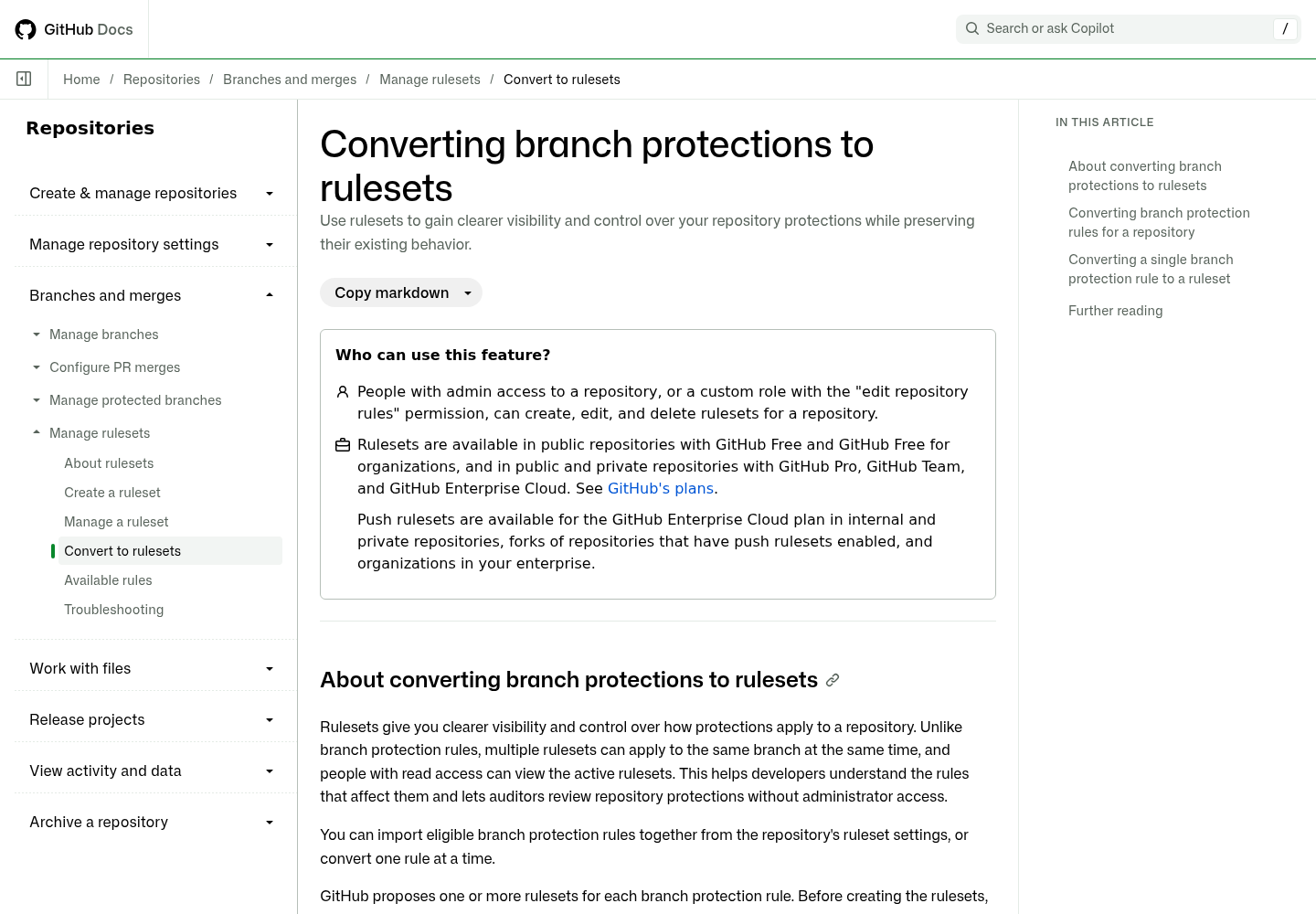
- On the repository, open Settings. In the left sidebar under “Code, planning, and automation,” open Rules, then Rulesets.
- At the top of the Rulesets page, click Import branch protection rules.
- In the Review import dialog, read the list of proposed rulesets. If a protection is labelled “Already covered by an existing ruleset,” the import will not create another ruleset for it. Open that existing ruleset afterwards and check its bypass list against Step 4: the label speaks to rules, and your concern is also who can skip them.
- Read every warning about new behavior and copy the text verbatim into the ticket. GitHub says one branch protection rule can produce multiple rulesets “when its protections cannot be represented in a single ruleset.” The docs do not list the triggers, so the warning text is your only explanation of a split.
- From the Enforcement status dropdown, choose Evaluate if you are on GitHub Enterprise, otherwise Disabled. Do not choose Active yet; Step 3 explains why.
- Select the checkbox for every proposed ruleset that belongs to a classic rule you are migrating. If one rule produced two rulesets, create both. Creating one of a pair gives you half of the original behavior.
- Click Create rulesets.
- In the “Creating ruleset” dialog that follows, click Keep rule. The guide says to delete originals only when the new rulesets are Active and confirmed, and adds that “Evaluate and Disabled rulesets do not provide active protection.”
If you prefer one rule at a time, the older flow lives under Settings, then Branches: find the rule, click Convert to ruleset, name each resulting ruleset, read the “New behavior” section and pick an enforcement status. When a conversion produces more than one ruleset the button says so, for example Create 2 rulesets. Everything after this step applies unchanged.
Expected observation after Step 2: the Rulesets page lists the new rulesets with the status you chose, and the Branches page still lists both classic rules. Nothing about how pushes and merges behave has changed yet, and that is the point.
Step 3: Choose an enforcement status you can observe
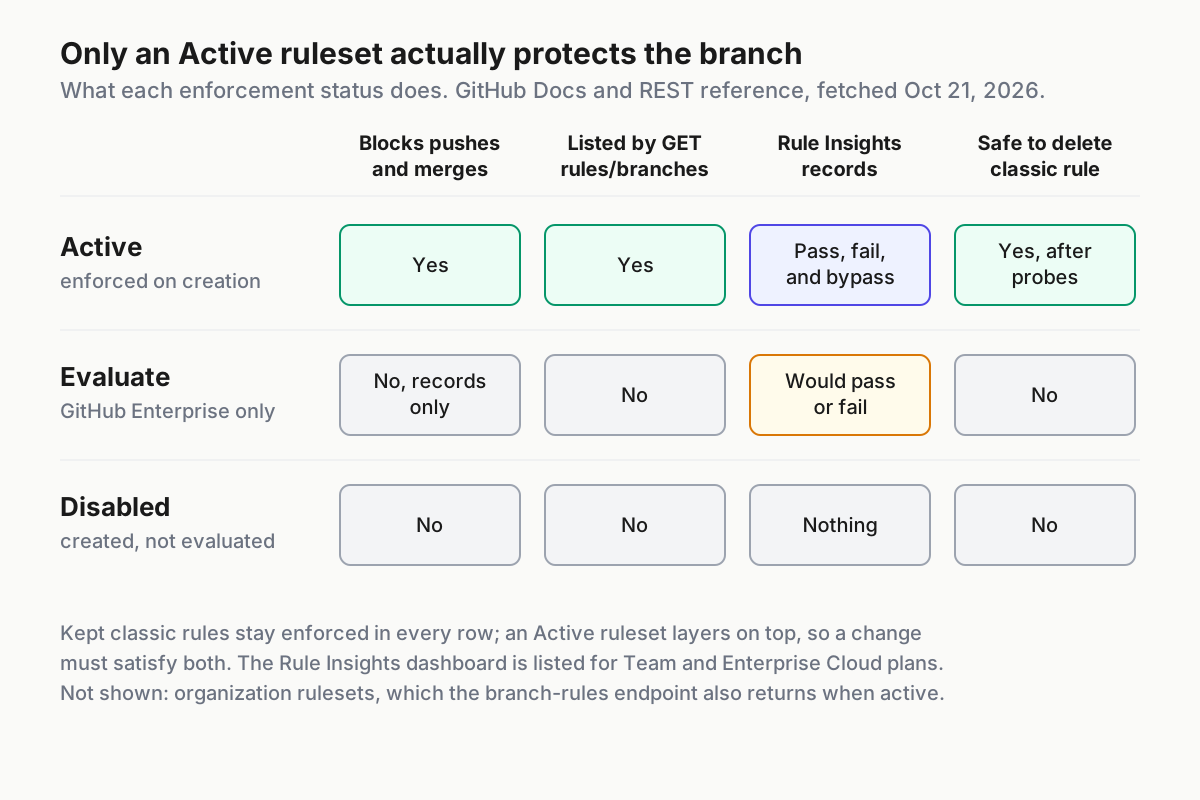
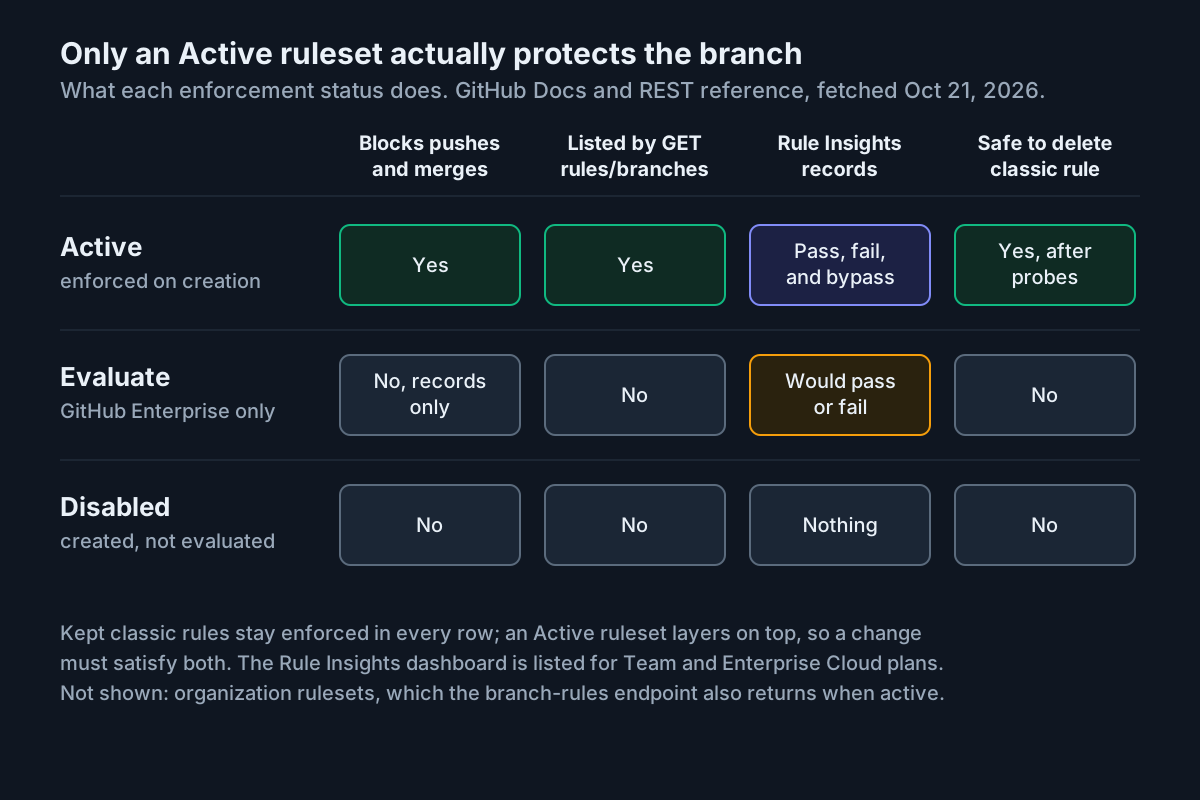
A migration can fail in two directions. It can be looser than before, so the agent can do something it could not do yesterday. That is a gap, and it is silent. Or it can be stricter, so the release bot or your reviewers get blocked. That is a lockout, and it is loud. Each enforcement status shows you a different slice of those failures, and none of them shows both.
The complication is layering. GitHub’s rulesets overview says rulesets and branch protection rules “work alongside each other, and all applicable rules are enforced,” and that where the same rule is defined differently, “the most restrictive version of the rule applies.” While you keep the classic rules, a looser ruleset is invisible: the classic rule still blocks the agent, so every probe you run passes. That is why gap-hunting happens on paper in Step 5, and why the probes that matter run after the classic rules are gone.
| Your situation | Import status | Classic rules | How you catch a lockout | How you catch a gap |
|---|---|---|---|---|
| GitHub Enterprise, first migration | Evaluate | Keep | Rule Insights lists actions that would have failed | Step 5 diff, then Step 6 probes after deletion |
| Team, Pro or Free | Disabled | Keep | Layered Active phase in Step 6 surfaces new blocks | Step 5 diff, then Step 6 probes after deletion |
| Identical repositories already migrated and diffed | Active | Keep | New blocks appear immediately | Step 5 diff, then Step 6 probes after deletion |
On Enterprise, Evaluate earns its keep. The guide to managing rulesets says that for a ruleset in Evaluate mode, Rule Insights shows “actions that would have passed or failed if the ruleset had been active.” A would-fail entry on a release bot push is a lockout you found before it happened.
Whichever row you pick, remember what the REST reference says about the Get rules for a branch endpoint: “Rules in rulesets with ‘evaluate’ or ‘disabled’ enforcement statuses are not returned.” An empty response after the import is exactly what an unenforced ruleset looks like.
Step 4: Map each classic setting to a rule and a bypass decision
The import proposes rules; you decide whether they are right. Use the available rules reference to translate each classic setting, and treat the last column as the value Step 5 must find.
| Classic setting (example value) | Ruleset rule in the UI | REST rule type and field | Must equal |
|---|---|---|---|
| Require a pull request, 1 approval | Require a pull request before merging | pull_request, required_approving_review_count |
1 |
| Require review from code owners | Same rule, code owner option | pull_request, require_code_owner_review |
true |
| Dismiss stale approvals | Same rule, dismiss stale option | pull_request, dismiss_stale_reviews_on_push |
true |
| Required check, branch up to date | Require status checks to pass | required_status_checks, strict_required_status_checks_policy and context |
true, build-and-test |
| Check must come from the CI app | Expected source on the check | required_status_checks[].integration_id |
Your CI app’s ID |
| No force pushes | Block force pushes | non_fast_forward |
Present |
| No deletions | Restrict deletions | deletion |
Present |
Restrict who can push (release/*) |
Restrict updates | update, plus the bypass list |
Present; bot and team on bypass |
| Include administrators off | No rule; a bypass entry | bypass_actors with RepositoryRole |
Your decision below |
Rules decide what is checked. Bypass lists decide who skips the checks, and that is where agent safety is won or lost:
| Identity | main ruleset |
release/* ruleset |
Reason |
|---|---|---|---|
acme-coder |
None | None | Agents propose; humans merge |
acme-release-bot |
None | Always allow | The only automated writer to release branches today |
release-managers |
None | Always allow | Mirrors the classic push restriction |
payments-maintainers |
None | None | They merge through review like everyone else |
| Repository admin role | For pull requests only | None | A break-glass path that leaves a pull request trail |
Why the agent gets nothing, not even the gentler option: the ruleset creation guide explains that an actor granted For pull requests only is “required to open a pull request” and “can then choose to bypass any branch protections and merge that pull request.” For a human admin that is a reasonable emergency path with an audit trail. For a coding agent’s app it means the agent can open a pull request and merge it past review and failing checks, which is the opposite of the agents propose, humans merge policy. Leave agent apps off every bypass list, and treat each bypass entry as a standing privilege in the sense of treating agents as privileged users.
If you manage rulesets as code, watch for a third mode the UI choice above does not name. The REST reference documents bypass_mode: exempt, under which “rules will not be run for that actor and a bypass audit entry will not be created.” Reject any change that sets it on an app.
The admin row is a judgment call. Copying “Include administrators off” exactly would mean the Repository admin role with Always allow. The table chooses For pull requests only, which is stricter. Either is defensible. Leaving admins off entirely is the choice that bites, because the rules reference notes that when force pushes are blocked, organization owners and repository administrators “will be unable to change or rename the default branch unless they are authorized to bypass the ruleset.”
The status check source matters more for agents than for people. Classic protection pins a check quietly: the protected-branches reference says that if a check was recently set by a particular app, it will be “required to come from that app in future.” In a ruleset the expected source is explicit, and the selected app “must be installed in the repository with the statuses:write permission, must have recently submitted a check run,” and if anyone else sets the status, merging is blocked. Pin build-and-test to your CI app. Choosing any source would let any integration with write permissions post a green status, including an agent you once gave status access. Overnight merge gates covers which checks should define done; this step only makes sure nobody else can satisfy them.
One stricter behavior arrives with any ruleset. The rules reference describes “Require an additional approval for unattributed Copilot pull requests,” in public preview and enabled by default for new and existing rulesets: when Copilot opens a pull request under its own app identity rather than on behalf of a person, a ruleset requiring one approval requires two. If your coding agent is Copilot, expect that in Step 6 instead of filing it as a bug, and clear it only if a second human approval is genuinely not what you want.
Step 5: Diff the new rulesets against the snapshot
With the rulesets created but not enforcing, compare them to the snapshot field by field. This is the only step that can find a gap while the classic rules still mask it.
mkdir -p after
# All branch rulesets, including ones inherited from the organization
curl -sL "${HDR[@]}" "$API/rulesets?targets=branch" > after/rulesets.json
jq -r '.[] | [.id, .source_type, .enforcement, .name] | @tsv' after/rulesets.json

# Full definition of each repository-level ruleset
for ID in $(jq -r '.[] | select(.source_type == "Repository") | .id' after/rulesets.json); do
  curl -sL "${HDR[@]}" "$API/rulesets/$ID" > "after/ruleset-$ID.json"
done

# Material for the mapping table
jq '{name, enforcement, include: .conditions.ref_name.include,
     bypass: .bypass_actors, rules: [.rules[] | {type, parameters}]}' after/ruleset-*.json
The target state for main, after your Step 4 edits, looks like this. It is an illustrative shape built from the documented fields; 999 and 111111 are placeholders for your admin role and CI app IDs.
{
  "name": "main",
  "target": "branch",
  "source_type": "Repository",
  "enforcement": "disabled",
  "bypass_actors": [
    {"actor_id": 999, "actor_type": "RepositoryRole", "bypass_mode": "pull_request"}
  ],
  "conditions": {"ref_name": {"include": ["refs/heads/main"], "exclude": []}},
  "rules": [
    {"type": "deletion"},
    {"type": "non_fast_forward"},
    {"type": "pull_request", "parameters": {
      "required_approving_review_count": 1,
      "require_code_owner_review": true,
      "dismiss_stale_reviews_on_push": true,
      "require_last_push_approval": false,
      "required_review_thread_resolution": false}},
    {"type": "required_status_checks", "parameters": {
      "strict_required_status_checks_policy": true,
      "required_status_checks": [{"context": "build-and-test", "integration_id": 111111}]}}
  ]
}
The release/* ruleset should include refs/heads/release/*, carry update, deletion and non_fast_forward rules, and list exactly two bypass actors: the release bot as Integration and the release team as Team, both with bypass_mode: always.
- Confirm the list matches the Review import dialog: the same number of rulesets, the same names, and
evaluateordisabledas the enforcement of each new one. Rows whosesource_typeisOrganizationare inherited; leave them alone but keep them in mind. - Check each ruleset’s
conditions.ref_name.includeagainst the classic pattern. The ruleset creation guide explains that*does not match/, sorelease/*matchesrelease/2.4but notrelease/2.4/hotfix;**crosses slashes. - Walk the mapping table row by row and mark each row match, stricter or looser.
- Check
bypass_actorsagainst the bypass table. If the field is missing entirely, your token is the problem: the reference says it “is only returned if the user making the API request has write access to the ruleset.” - For any looser row, edit the ruleset while it is still Evaluate or Disabled, then rerun this step. Stop only when no row is marked looser.
- Record the version you approved. The ruleset history endpoint,
GET /repos/{owner}/{repo}/rulesets/{ruleset_id}/history, lists each saved version with its actor and time, which gives you a reference point if someone edits the ruleset later.
Expected observation: the branch-rules endpoint is still quiet. Calling $API/rules/branches/main now returns what the rules-before file held, because unenforced rulesets are not returned. A quiet result here is the expected state, not evidence of protection.
Step 6: Layer, cut over and probe as your agents
The order matters more than any single setting. Activate first, live with both layers, then delete and probe in one short window.
- Set each new ruleset to Active while keeping the classic rules. In the UI, open the ruleset, change its status and click Save changes. Through the API, send
PUT $API/rulesets/$IDwith the body{"enforcement":"active"}. - Rerun the branch-rules call for
mainand one release branch. Formain, expect entries of typepull_request,required_status_checks,non_fast_forwardanddeletioncarrying the newruleset_id. Forrelease/2.4, expectupdate,deletionandnon_fast_forward. - Stay in this layered state for at least one normal working day. The agent opens pull requests, reviewers merge, the release bot pushes. Anything newly blocked is the stricter direction: fix the ruleset, not the workflow. Rule Insights, under Settings, Rules, Insights, shows passed, failed and bypassed actions.
- Open the cutover window: pause the agent’s scheduled runs and the release bot’s jobs.
- On the Branches settings page, a classic rule that the new rulesets fully cover shows “This rule is fully covered by rulesets and can be safely deleted” and a Delete button. Delete both classic rules. If the message does not appear for a rule, stop and find out why before deleting it.
- Run the probe table immediately, from each identity’s own environment.
- If every row matches, unpause the jobs and close the window. If any row that should be refused succeeds, go straight to the rollback section.
Run each probe with the credentials that identity already uses, from where it already runs: a one-off job on the agent’s runner, a manual run of the release bot’s workflow. Do not mint fresh credentials just for a test, because then you are testing a different identity. Use throwaway commits and a probe tag so that a probe which wrongly succeeds is easy to revert.
| # | Identity | Action | How (illustrative) | Expected after cutover |
|---|---|---|---|---|
| P1 | acme-coder |
Push a commit straight to main |
git push origin HEAD:main |
Refused: pull request and status check rules, no bypass |
| P2 | acme-coder |
Force push main |
git push --force origin HEAD:main |
Refused: block force pushes |
| P3 | acme-coder |
Push to release/2.4 |
git push origin HEAD:release/2.4 |
Refused: restrict updates, not on the bypass list |
| P4 | acme-coder |
Delete release/2.4 |
git push origin --delete release/2.4 |
Refused: restrict deletions |
| P5 | Maintainer | Merge a pull request whose build-and-test failed |
Merge box | Blocked |
| P6 | acme-coder, then maintainer |
Agent opens a pull request, code owner approves, check passes, maintainer merges | Normal flow | Merges; two approvals if Copilot is the unattributed author |
| P7 | acme-release-bot |
Push a version commit to release/2.4 |
Its normal job | Succeeds through bypass |
| P8 | acme-coder |
Delete a probe tag v0.0.0-probe |
git push origin --delete v0.0.0-probe |
Succeeds unless you add a tag ruleset; classic rules never covered tags |
Read the results in three groups. P1 to P5 are gap probes, and every one must be refused or blocked. A refused push prints a remote error naming the violated rules; the exact wording is not in the documentation used here, so paste what you see into the ticket. P6 and P7 are lockout probes, and both must succeed, otherwise a legitimate actor has lost a path it had yesterday. P8 is a reminder probe: success there is the tag gap you noted in the worked example, not a migration regression. If tags matter to you, create a tag ruleset next, as its own change with its own probe.
Troubleshooting the failures you are most likely to hit
Most problems show up either in the Step 5 diff or in the layered day of Step 6. Match the symptom, not the step you were on.
| Symptom | Likely cause | Fix |
|---|---|---|
| Review import proposes two rulesets for one classic rule | GitHub splits a rule it cannot represent in one ruleset | Create every ruleset of the set, read its warning, diff each one in Step 5 |
Merges to main stay blocked though build-and-test is green |
Check pinned to a different app, or the expected app has not recently submitted a check run | Point the check at the app that actually runs it; confirm it is installed with statuses:write |
| Agent pull requests suddenly need more approvals | Layering, where the stricter count wins, or the unattributed Copilot approval rule | Correct the ruleset value, or accept the stricter rule deliberately and record why |
| An admin cannot rename the default branch or push a hotfix | Empty bypass list while force pushes are blocked | Add the Repository admin role, preferably For pull requests only |
GET /rules/branches/main returns [] after the import |
Rulesets are Evaluate or Disabled, which the endpoint never returns | Expected until Step 6; never read it as protection |
bypass_actors is missing from ruleset JSON |
The token lacks write access to the ruleset | Repeat the diff with a token that has write access |
Evaluate is missing or the API rejects "evaluate" |
Evaluate is available only with GitHub Enterprise | Use Disabled and rely on the layered phase |
| Branches page never shows “fully covered” for a classic rule | Part of that rule is not represented in the new rulesets | Do not delete it; find the missing setting, add it, rediff |
The most expensive mistake on this list is the quiet one. A ruleset left in Evaluate or Disabled after someone deleted the classic rule looks tidy on the settings page and protects nothing, which is why Step 6 ties deletion and probing into a single window.
Rollback: a fast exit and a slow exit
Which exit you take depends on whether the classic rules still exist when you notice the problem.
The fast exit applies during the layered phase. If an Active ruleset causes a lockout while the classic rules are still in place, set that ruleset to Disabled. The managing rulesets guide recommends exactly this when you want to stop a ruleset without deleting it, and the classic rules keep protecting the branch while you fix it.
# Stop enforcing one ruleset without deleting it (Administration: write)
curl -sL -X PUT "${HDR[@]}" "$API/rulesets/$ID" -d '{"enforcement":"disabled"}'
The slow exit applies after deletion, when a probe has found a gap. Recreate the classic protection from the snapshot. The update body does not have the same shape as the snapshot: the GET response wraps settings in objects with url and enabled fields and returns full app and team records, while the PUT body takes booleans and lists of slugs. Translate by hand.
# Recreate classic protection on main from snapshot/main.protection.json.
# Values mirror the worked example; 111111 is a placeholder for the CI app ID.
curl -sL -X PUT "${HDR[@]}" "$API/branches/main/protection" -d '{
  "required_status_checks": {"strict": true,
    "checks": [{"context": "build-and-test", "app_id": 111111}]},
  "enforce_admins": null,
  "required_pull_request_reviews": {"dismiss_stale_reviews": true,
    "require_code_owner_reviews": true, "required_approving_review_count": 1},
  "restrictions": null,
  "allow_force_pushes": false,
  "allow_deletions": false
}'
- Decide which failure you have. For a gap, leave the rulesets Active, because layering only adds restrictions, and recreate the classic rule. For a lockout, set the offending ruleset to Disabled first.
- For
main, send the PUT above with the values from your own snapshot. The reference documentsenforce_adminsasnullto disable andallow_force_pushesasfalseto block force pushes. - For
release/*, remember that this endpoint rejects wildcards: a PUT onrelease/2.4would protect only that branch. Recreate the pattern rule under Settings, Branches, or through the GraphQL API that the reference points to for wildcard names. The restriction lists take slugs, so useacme-release-botunder apps andrelease-managersunder teams. - Rerun the Step 1 loop into a new directory and compare it with the original snapshot. Apart from URL fields, it should match.
- Rerun P1 to P8. Once they match the table, fix the ruleset while it is Disabled and return to Step 5 for the next attempt.
When the probes pass and the classic rules are gone, the migration is complete, but the evidence is worth keeping. File the snapshot, the ruleset IDs and versions, the warning text from Review import and the probe results with the change ticket. Then repeat P1 to P7 whenever someone edits a bypass list or installs a new app on the repository. That short re-probe is the same habit running an agent fleet asks for everywhere else: verify controls against the identities that actually act, not against how the settings page looks.
Sources
- GitHub Changelog: Bulk migrate branch protections to rulesets for a repository (October 20, 2026)
- GitHub Docs: Converting branch protections to rulesets
- GitHub Docs: About rulesets
- GitHub Docs: Available rules for rulesets
- GitHub Docs: Managing rulesets for a repository
- GitHub Docs: Creating rulesets for a repository
- GitHub Docs: REST API endpoints for rules
- GitHub Docs: REST API endpoints for protected branches
- GitHub Changelog: Automatically migrate branch protection rules to repository rulesets (August 11, 2026)