Claude Code VBA Setup (and Codex): Export Excel Macros to Plain Files, Edit Them in Git and Re-Import Safely
Claude Code VBA setup for Excel: export macro modules to .bas and .cls files, let Claude Code or Codex edit them in git, then re-import into a tested copy.

Can Claude read VBA? On Nov 12, 2026 an X user posted that exact question, followed by “I need help” (post by @Rixviv). For anyone attempting a Claude Code VBA setup, the short answer is yes. Visual Basic for Applications is ordinary source code, and Claude Code and Codex read it the same way they read Python or SQL. The real obstacle is where the code lives. Your macros sit inside an .xlsm workbook, and a coding agent has no business opening that binary file.
This guide is for the finance, operations or office user who maintains a legacy Excel macro workbook on Windows, and for the developer who supports them. You will move the macro code out of the workbook into plain .bas and .cls files, keep those files in git, and have Claude Code or Codex explain and fix them under written rules. Then you push one reviewed module back into a test copy, compile it, and check the result against a total you worked out by hand. Production is touched last, using the same tested steps.
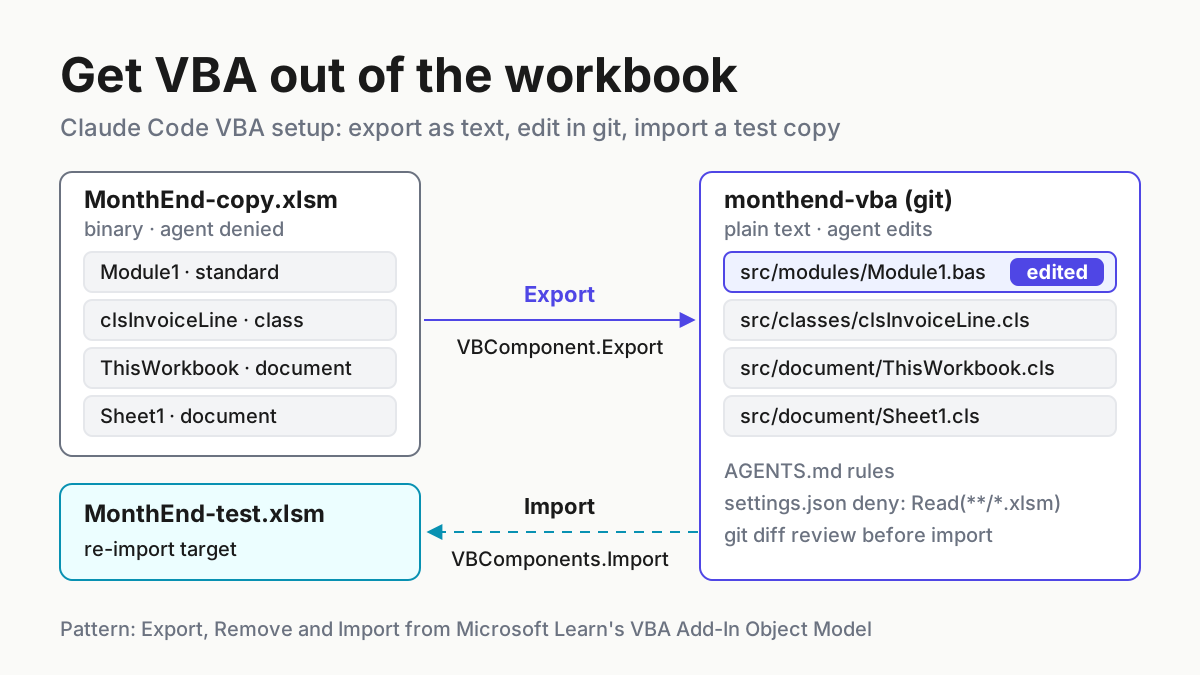
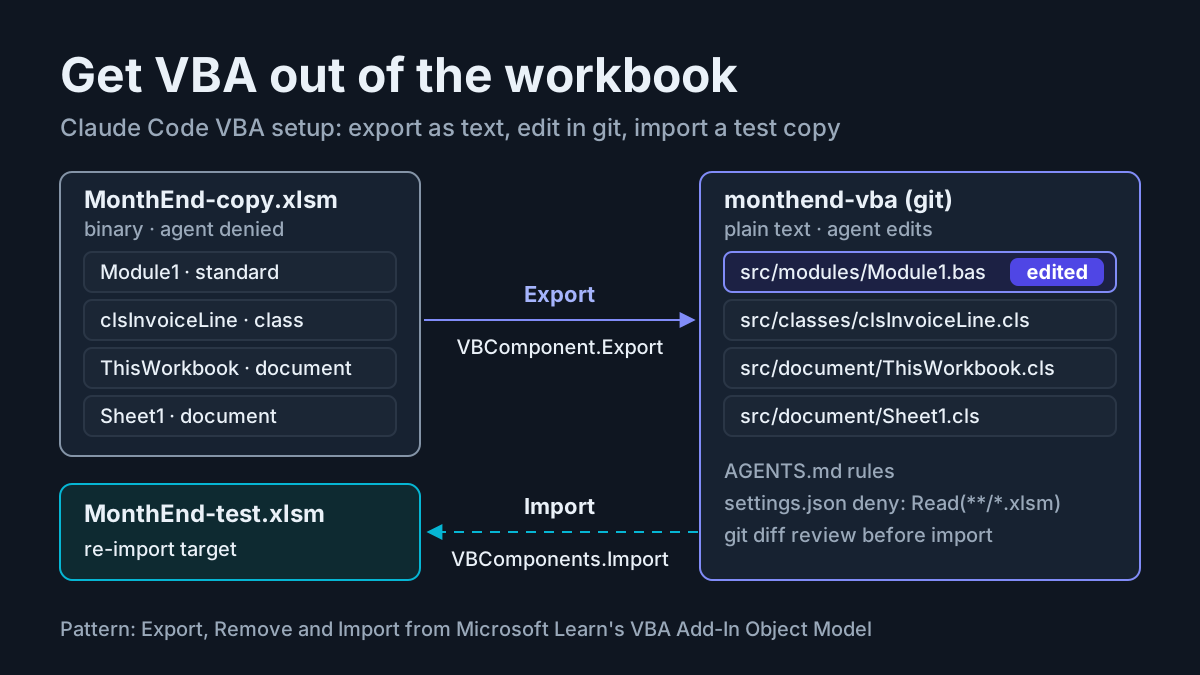
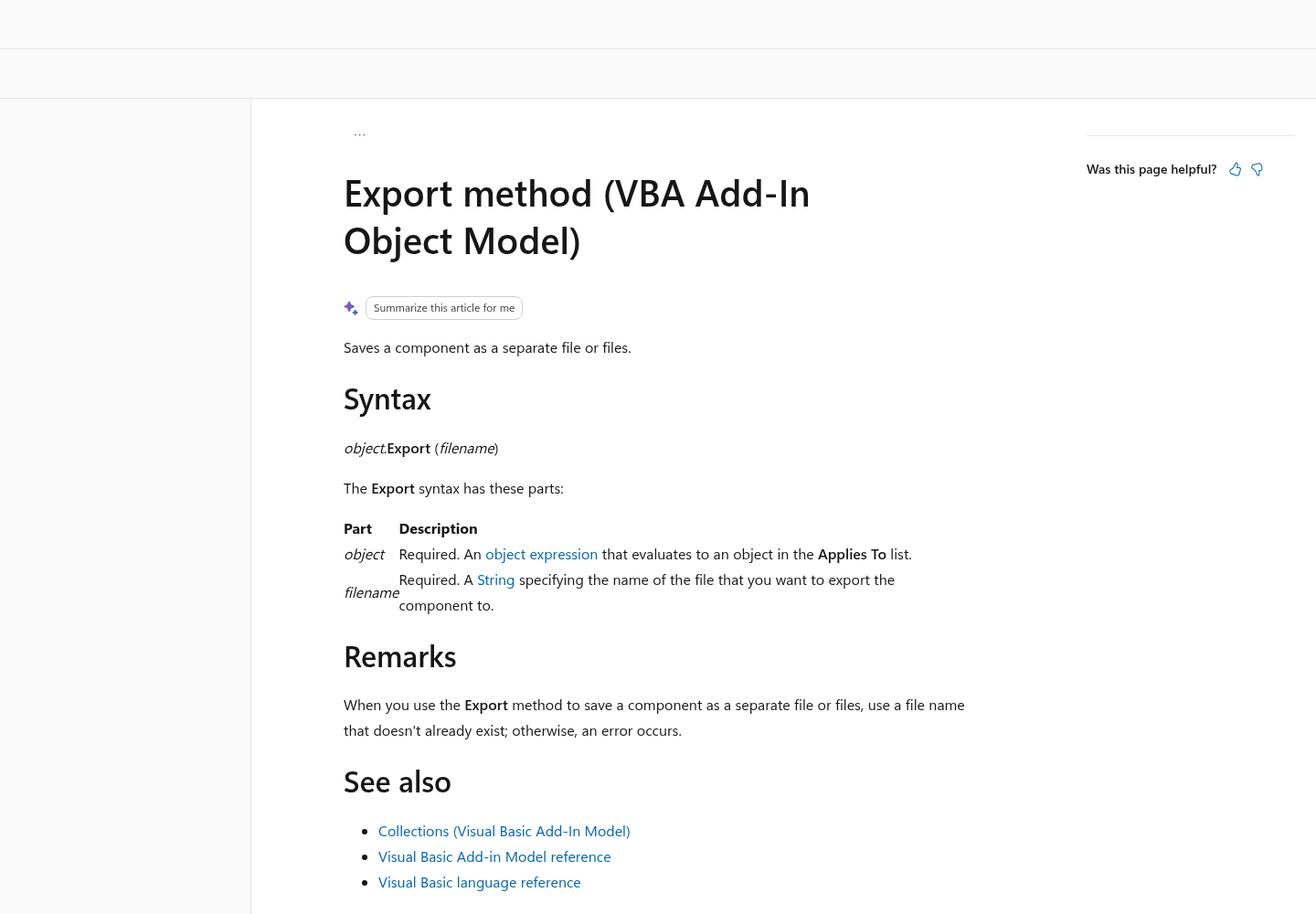
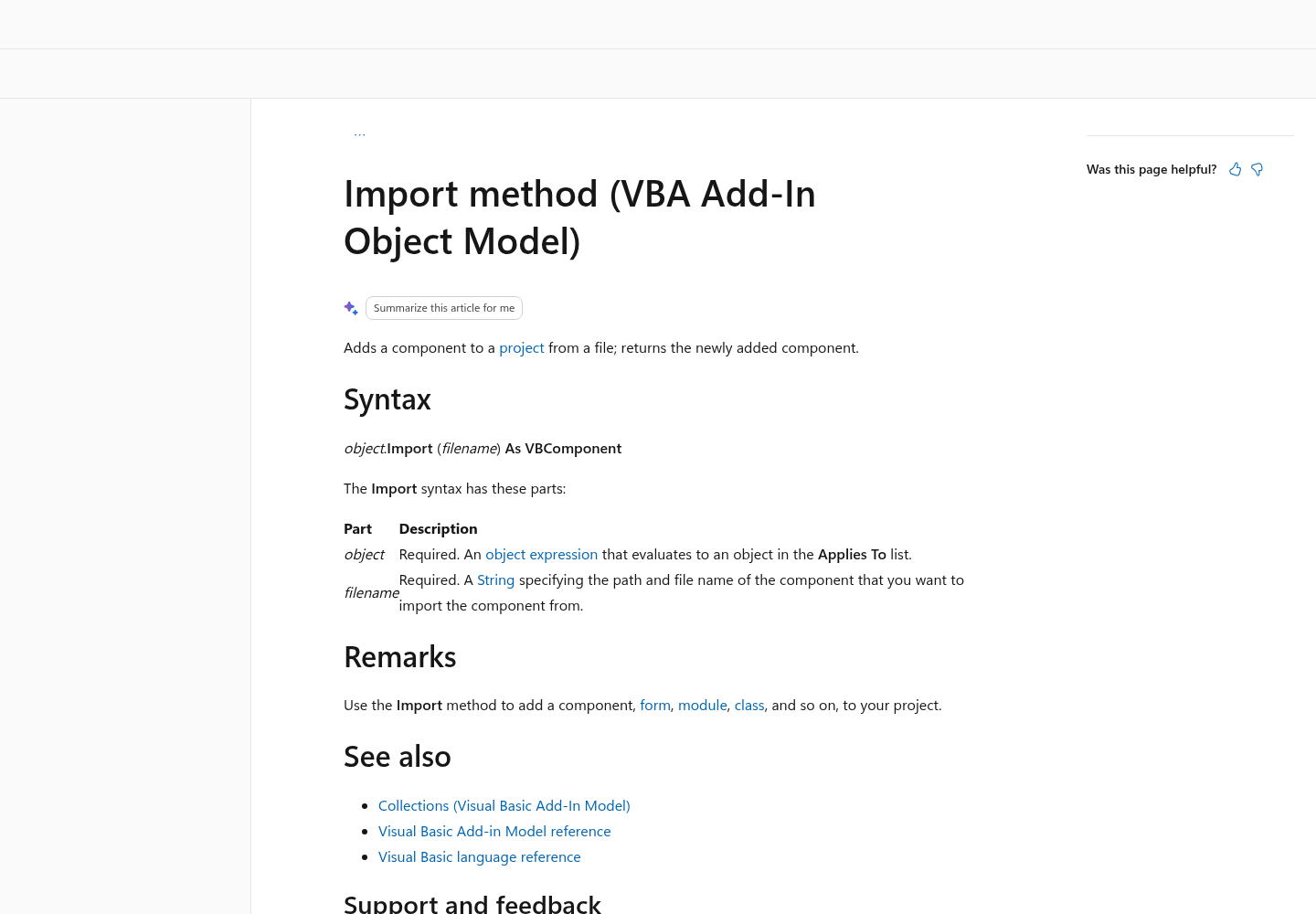
Two documented methods in Microsoft’s VBA Add-In Object Model do most of the work. VBComponent.Export “saves a component as a separate file or files”. VBComponents.Import “adds a component to a project from a file” and returns the component it created. Between those two calls the code is plain text, and git and coding agents both handle text well.
How the round trip works
The whole guide follows one illustrative case, labelled task:vba-export-01. The workbook is MonthEnd.xlsm. Its VBA project has four components:
- Module1, a standard module that holds a function called
SumInvoices. - clsInvoiceLine, a class module.
- ThisWorkbook, the document module behind the workbook itself.
- Sheet1, the document module behind a worksheet named Data.
The complaint is concrete. Five invoice rows on the Data sheet add up to 12,450.00 by hand, but SumInvoices reports 10,200.00. Every value in this example is illustrative. The procedure is the real deliverable, and the numbers only give you something to check against.
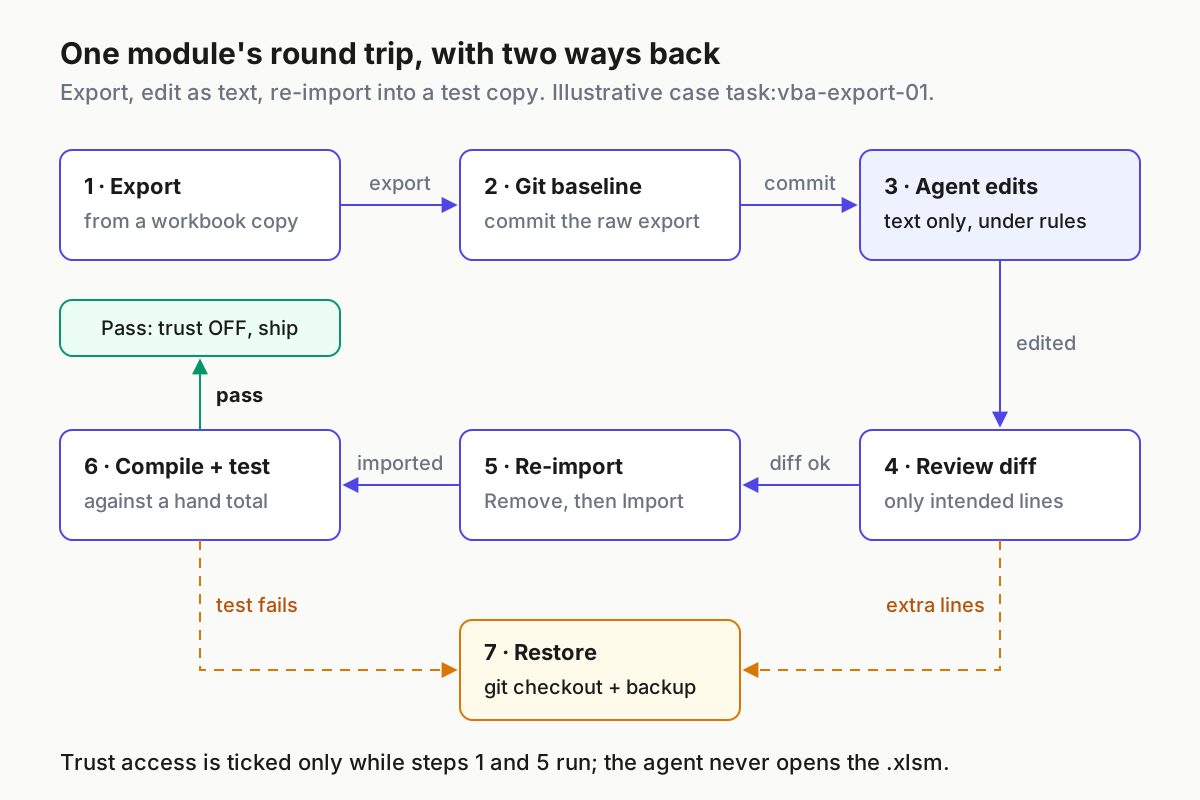
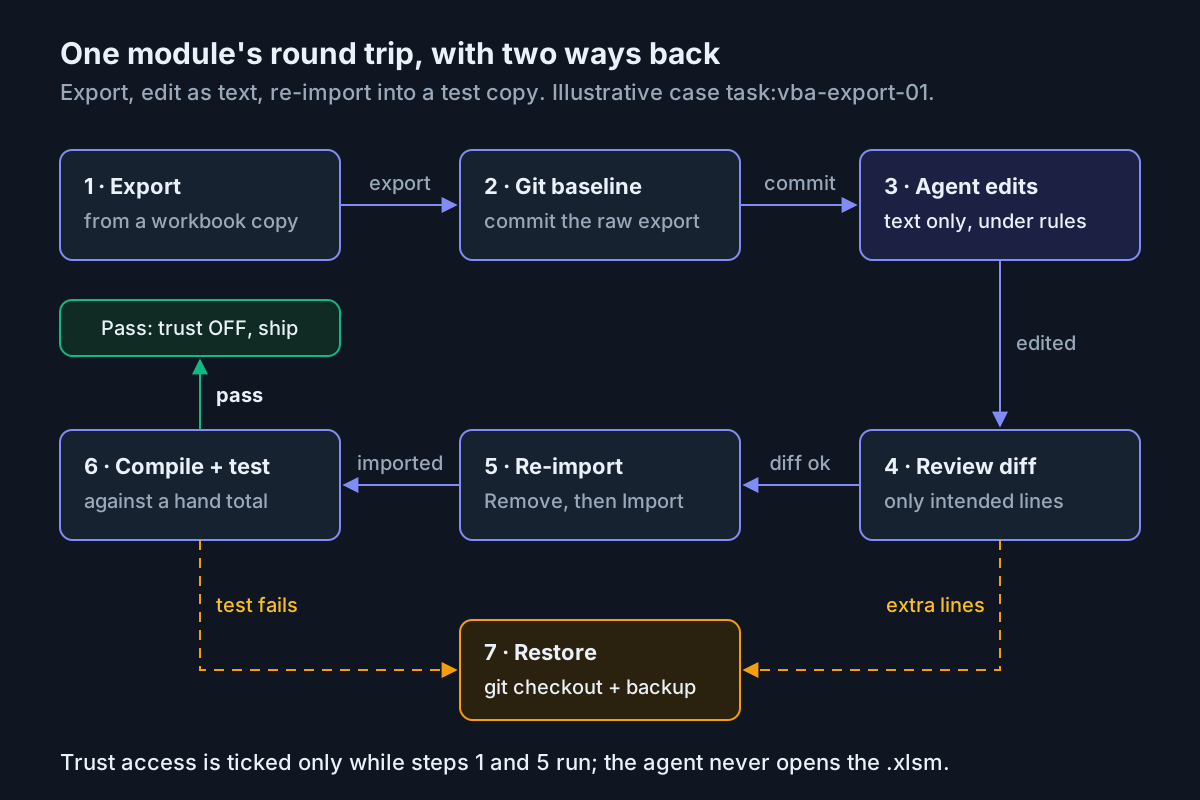
Read the diagram as a loop with two ways back. The agent only ever touches step 3, and only on text files. Two checks stand between its edit and any workbook: the git diff review at step 4, and the compile-and-total test at step 6. If either one fails, you restore. Git gives you the baseline text, and the untouched backup gives you the original workbook. You never have to repair a half-edited binary.
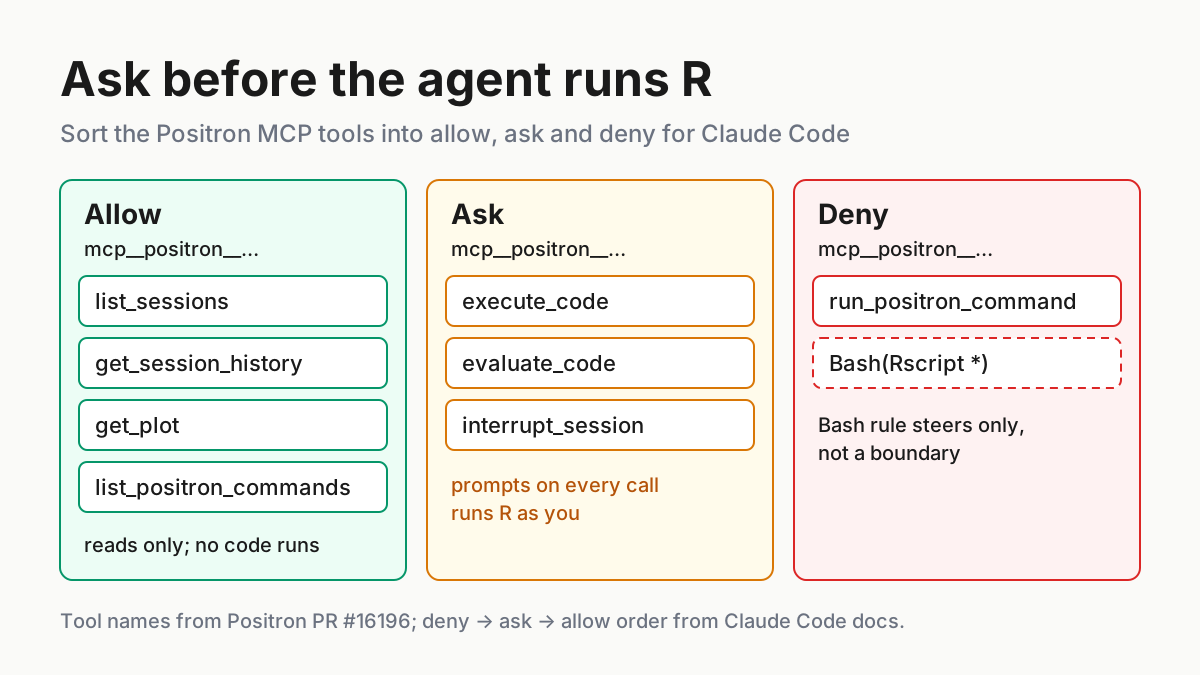
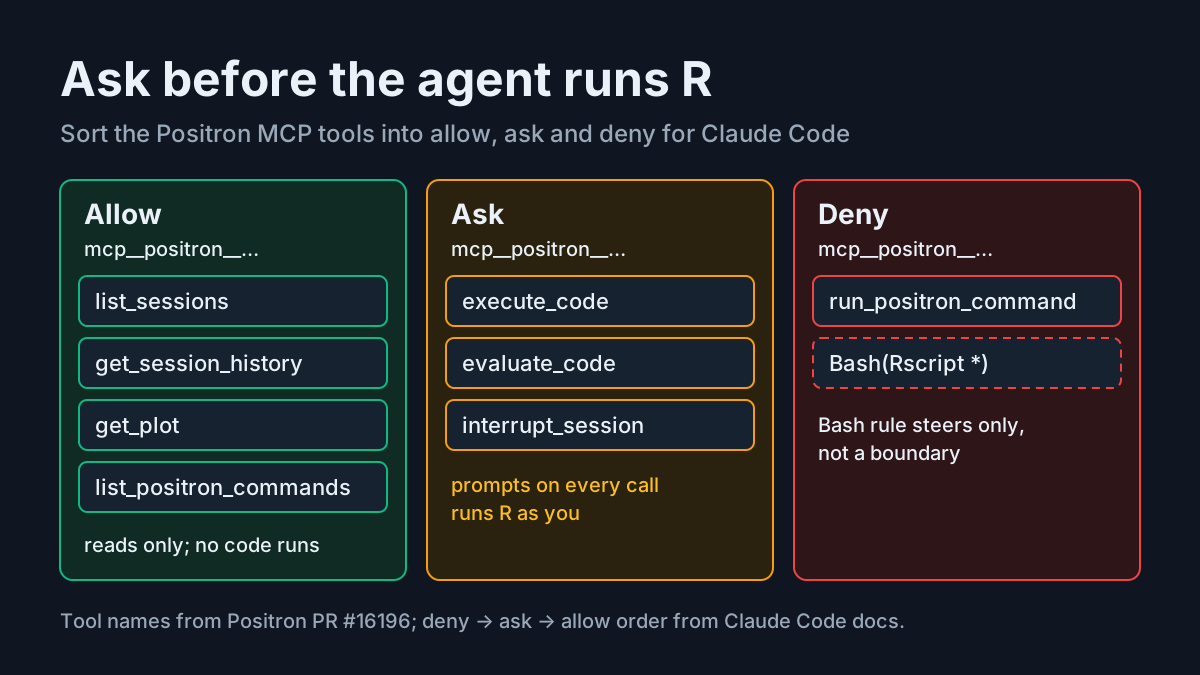
Two separate layers keep the agent away from the workbook, and they do different jobs. The rules file (AGENTS.md, imported by CLAUDE.md) tells the agent what you expect. Anthropic’s memory documentation is blunt that Claude treats these files “as context, not enforced configuration”. The deny rules in .claude/settings.json are what actually block an action. The permissions documentation says permission rules “are enforced by Claude Code, not by the model”. You want both: the rules file shapes the edit, and the deny list stops the accident.
What you need before you start
Go through this list before you change any setting. Most failures later in the guide trace back to an item skipped here.
- [ ] Windows desktop Excel with the VBA editor. The object model calls in this guide are written for Windows. Mac differences are covered at the end.
- [ ] Permission to change one Trust Center setting. Microsoft’s macro settings article warns that on a device managed by your work or school, an administrator may prevent anyone from changing these settings. Ask IT before you plan the afternoon around this.
- [ ] git, and a terminal you are comfortable typing in.
- [ ] Claude Code or Codex, installed and signed in.
- [ ] A copy of the workbook. Never point any step of this guide at the file people use for month-end.
- [ ] The project password, if the VBA project is locked. A locked project cannot be exported this way, and you should not try to get around the lock.
- [ ] A hand-checked expected result for one macro, such as a total you added up yourself on a small set of test rows. Without it, “the macro runs” is the only test you have, and that is not a test.
Set up the folders and copies for task:vba-export-01
The layout keeps every workbook outside the folder the agent works in. Claude Code reads files inside its working directory without asking, but a read outside the working directory needs your approval (see the tool table in the permissions documentation). Putting the binaries one level up means a stray read turns into a prompt you can refuse, not a silent read.
- Create
C:\vba-work\and copy the production workbook into it three times:MonthEnd-backup-2026-11-14.xlsm,MonthEnd-copy.xlsmand, later,MonthEnd-test.xlsm. - Right-click the backup, open Properties and tick Read-only. This file is your last resort, and nothing in this guide writes to it.
- Create a new macro-enabled workbook called
VbaTools.xlsmin the same folder. It will hold the export and import macros. Keep this tooling out of MonthEnd: if the export macro lived in MonthEnd-copy, it would export itself into the agent’s source tree and could be re-imported by accident. - In VbaTools, open the VBA editor and go to Tools > References. Tick the Microsoft Visual Basic for Applications Extensibility library. That lets the code use Microsoft’s named constants, such as
vbext_ct_StdModule, in place of bare numbers. - Create the repository folder and its empty
srcfolder:C:\vba-work\monthend-vba\src\. The export macro creates the four subfolders itself.
When you finish, the tree should look like this:
C:\vba-work\
├── MonthEnd-backup-2026-11-14.xlsm   read-only safety copy
├── MonthEnd-copy.xlsm                export source
├── MonthEnd-test.xlsm                re-import target (made later)
├── VbaTools.xlsm                     export and import macros
└── monthend-vba\                     git repo = the agent's working directory
    ├── AGENTS.md
    ├── CLAUDE.md
    ├── .claude\settings.json
    └── src\
        ├── modules\    standard modules (.bas)
        ├── classes\    class modules (.cls)
        ├── forms\      UserForms (.frm, may write extra files)
        └── document\   ThisWorkbook and sheet modules (.cls, read only)
Turn on trust access only for the export run
Code that drives the VBA editor needs one specific Trust Center permission. Microsoft’s macro settings article describes Trust access to the VBA project object model as a per-user, per-application setting that denies access by default, “hindering unauthorized programs from building harmful self-replicating code”. In other words, this checkbox lets code rewrite code. Treat it as a switch you flip for a minute, not a preference you set once.
Microsoft’s security notes for Office solution developers give the timing rule directly: check the box “only for the duration of a macro that accesses the Visual Basic object model”, then clear it after the macro has finished. The steps follow that rule.
- Open
VbaTools.xlsm. If a security warning bar appears, select Enable Content so its macros can run. Microsoft’s macro article describes this trusted-document flow. Do not enable content on a workbook from someone you don’t know. - Open
MonthEnd-copy.xlsm. You do not need to enable its macros, because the export only reads its project. - Go to File > Options > Trust Center > Trust Center Settings > Macro Settings.
- Tick Trust access to the VBA project object model, then select OK.
- Run the export macro from the next section.
- Go back to the same screen immediately and clear the box.
The setting applies only to the Office app you change it in, so ticking it in Excel does not open the door in Word.
The export macro, line by line
Paste this into a standard module in VbaTools.xlsm. It walks every component in MonthEnd-copy, picks a folder and file extension from the component’s type, and refuses to overwrite earlier exports.
Option Explicit

' VbaTools.xlsm > modExport
' Needs: Tools > References > Microsoft Visual Basic for Applications Extensibility
' Needs: Trust access to the VBA project object model, ticked only while this runs.

Private Const SOURCE_BOOK As String = "MonthEnd-copy.xlsm"
Private Const EXPORT_ROOT As String = "C:\vba-work\monthend-vba\src\"

Public Sub ExportAllComponents()
    Dim wb As Workbook
    Dim comp As VBIDE.VBComponent
    Dim folder As String, ext As String, target As String
    Dim exported As Long, skipped As Long, collisions As Long

    Set wb = Workbooks(SOURCE_BOOK)

    If wb.VBProject.Protection = vbext_pp_locked Then
        MsgBox "The VBA project is locked. Unlock it first; nothing was exported.", vbCritical
        Exit Sub
    End If

    For Each comp In wb.VBProject.VBComponents
        Select Case comp.Type
            Case vbext_ct_StdModule:   folder = "modules\":  ext = ".bas"
            Case vbext_ct_ClassModule: folder = "classes\":  ext = ".cls"
            Case vbext_ct_MSForm:      folder = "forms\":    ext = ".frm"
            Case vbext_ct_Document:    folder = "document\": ext = ".cls"
            Case Else:                 folder = ""
        End Select

        If folder = "" Then
            Debug.Print "SKIP    type " & comp.Type & "  " & comp.Name
            skipped = skipped + 1
        Else
            EnsureFolder EXPORT_ROOT & folder
            target = EXPORT_ROOT & folder & comp.Name & ext
            If Len(Dir(EXPORT_ROOT & folder & comp.Name & ".*")) > 0 Then
                Debug.Print "EXISTS  " & target & "  (not overwritten)"
                collisions = collisions + 1
            Else
                comp.Export target
                Debug.Print "OK      " & target
                exported = exported + 1
            End If
        End If
    Next comp

    Debug.Print "Components: " & wb.VBProject.VBComponents.Count & _
                "  exported: " & exported & "  skipped: " & skipped & _
                "  collisions: " & collisions
End Sub

Private Sub EnsureFolder(ByVal path As String)
    If Len(Dir(path, vbDirectory)) = 0 Then MkDir path
End Sub
Each choice in the macro is there to make one failure loud instead of silent:
- The lock check comes first. Microsoft’s Add-In Model properties reference documents a
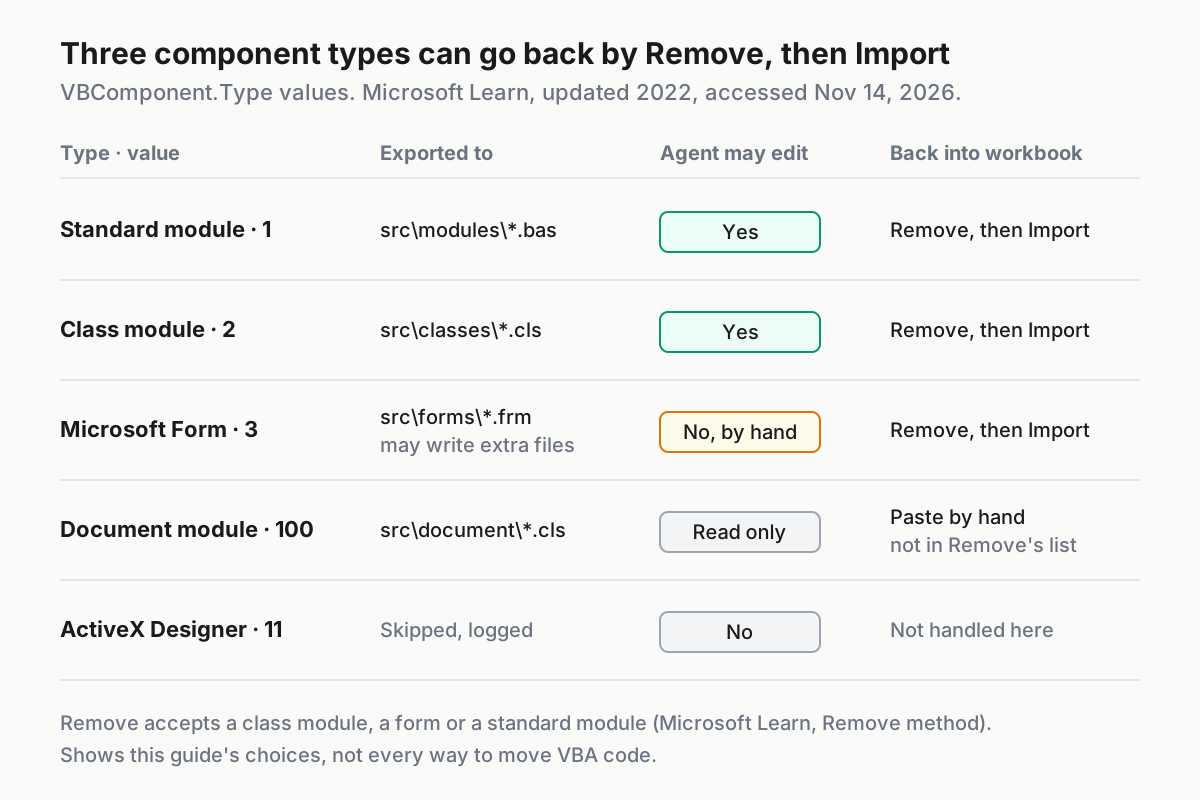
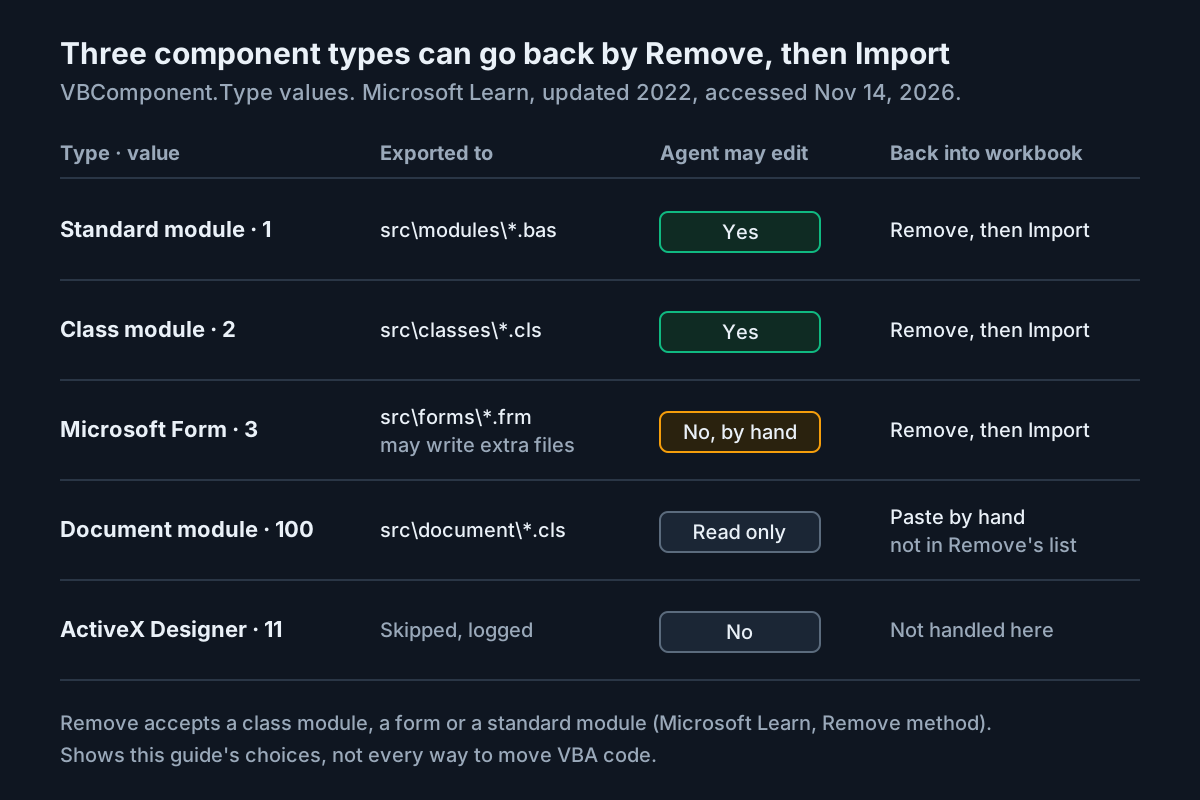
Protectionproperty that reportsvbext_pp_lockedorvbext_pp_none. Stopping with a clear message beats a half-finished export folder. - The folder comes from the component’s Type. The same reference lists the values: standard module 1, class module 2, Microsoft Form 3, ActiveX Designer 11 and document module 100. The macro maps the first four to folders and extensions, and logs anything else as SKIP so a surprise type shows up in the count.
- Document modules get their own folder. ThisWorkbook and sheet modules export as text you can read and diff, but they follow a different path back into the workbook, as the matrix below shows.
- Collisions are counted, never overwritten. The Export reference says to “use a file name that doesn’t already exist; otherwise, an error occurs.” The macro checks first, using a wildcard on the base name because a form may export as more than one file, and logs EXISTS instead of deleting anything. To refresh an export, empty the folder yourself (git still holds the old copy), then run the macro again.
- The summary line is your first success check.
Componentscomes from the collection’sCountproperty, and exported plus skipped plus collisions must equal it.
Open the Immediate window (Ctrl+G in the editor) before you run the macro with Alt+F8. For task:vba-export-01 the illustrative expected output is four OK lines and Components: 4 exported: 4 skipped: 0 collisions: 0. Then clear the Trust Center box.
Commit the untouched export as your baseline
Commit the raw export before any agent sees it. That commit is the text version of your backup workbook, and every later rollback points at it.
cd C:\vba-work\monthend-vba
git init
git add src
git commit -m "Baseline: raw export of MonthEnd-copy.xlsm, 2026-11-14"
git ls-files src
git log --oneline
Compare what git lists against the summary line. The illustrative expected result for task:vba-export-01:
| File git lists | Component | Type value | Agent may edit |
|---|---|---|---|
| src/modules/Module1.bas | Module1 | 1 | Yes |
| src/classes/clsInvoiceLine.cls | clsInvoiceLine | 2 | Yes |
| src/document/ThisWorkbook.cls | ThisWorkbook | 100 | No, read only |
| src/document/Sheet1.cls | Sheet1 | 100 | No, read only |
If git lists fewer files than the export summary reported, stop and find the gap before going further. Note the hash that git log --oneline prints next to the baseline message. You will use it if you need to restore.
Write the rules file and the deny rules
You will write one set of instructions that both agents read, plus a Claude Code settings file that enforces the parts that matter most. Start with AGENTS.md in the repository root:
# MonthEnd VBA: rules for coding agents

## What this repo is
- src/ holds VBA exported from MonthEnd-copy.xlsm by VbaTools.xlsm.
- No workbook is in this repo. Never look for, open or request an .xlsm, .xls or .accdb file.

## Files you may edit
- src/modules/*.bas and src/classes/*.cls only.
- src/document/ and src/forms/ are read-only reference. Propose changes in chat; a human pastes them.

## VBA rules
- Every module starts with Option Explicit. Declare every variable with a type.
- Never rely on ActiveSheet, ActiveWorkbook, Selection, .Select or .Activate.
  Use ThisWorkbook.Worksheets("Data") and fully qualified ranges.
- Keep sheet names, named ranges, module names and public procedure names exactly as they are.
- Do not add Shell, Kill, RmDir, SendKeys or any code that deletes or moves files.
- Do not add Declare statements (Windows API calls).
- Leave any header or Attribute lines above Option Explicit unchanged. Keep existing line endings.
- Change one procedure per request unless asked otherwise.

## How changes are checked
- A human reviews git diff, re-imports the module into a test copy, runs Debug > Compile and a test.
- You cannot run VBA here. Never claim a change was compiled or tested.
Every line has a reason. The file and folder lines stop the agent from wandering. Banning ActiveSheet removes the most common way old macros break, which is running against whichever sheet happens to be in front. The ban on Declare statements follows Microsoft’s security notes, which warn that incorrectly calling Windows API functions can cause invalid page faults and other unexpected behavior. The final rule keeps the agent honest about what it cannot do.
Next, make Claude Code read the same file. Per the memory documentation, Claude reads AGENTS.md directly only when there is no CLAUDE.md in your working directory or above it. On Windows the documentation recommends an @AGENTS.md import over a symlink, because git can check a symlink out as a plain text file. Create CLAUDE.md:
@AGENTS.md

## Claude Code
- Binary workbooks are denied in .claude/settings.json. Do not try to work around a denied read.
Then create .claude/settings.json:
{
  "permissions": {
    "deny": [
      "Read(**/*.xlsm)",
      "Read(**/*.xls)",
      "Read(**/*.xlsb)",
      "Read(**/*.accdb)",
      "Read(**/*.mdb)",
      "Edit(/src/document/**)",
      "Edit(/src/forms/**)",
      "PowerShell(Remove-Item *)",
      "Bash(rm *)"
    ]
  }
}
Several documented behaviors in the permissions reference make these rules work:
- Deny rules are evaluated before ask and allow rules, so no allow rule can carve an exception out of them.
- A Read deny rule also blocks the Edit and Write tools on the same path, so one rule per binary type is enough.
- A pattern that starts with
/in project settings anchors at the project’s primary working directory. That is whyEdit(/src/document/**)means this repo’s document folder and nothing else. PowerShell(Remove-Item *)andBash(rm *)block the usual way an agent deletes files. The documentation is clear that a Bash rule is not a security boundary, though:/bin/rmorsh -cforms are not matched. Read and Edit deny rules also don’t cover a script that opens files on its own. If you need OS-level enforcement, pair the rules with sandboxing.
To check your setup, start claude in the repo and run /context all. CLAUDE.md should appear under Memory files. Then run /permissions and confirm the nine deny rules are listed with .claude/settings.json as their source. For a live test, save an empty text file as probe.xlsm in the repo and ask Claude to read it. The read should be refused with a reference to the rule. Delete the probe afterwards.
For Codex, the AGENTS.md guide says Codex reads AGENTS.md before doing any work, walking from the project root down to your current directory. Its documented check is codex --ask-for-approval never "Summarize the current instructions.", and the expected result is that Codex quotes your rules back. The selected Codex documentation does not describe a per-path deny list like Claude Code’s, so for Codex the folder layout is the main protection: no workbook sits inside the repo. Choose an approval mode deliberately, using our Codex approval modes and sandbox guide.
Commit the three files with git add AGENTS.md CLAUDE.md .claude/settings.json followed by git commit -m "Agent rules and deny list".
Ask for an explanation first, then one targeted fix
Start with a read-only question. It shows you whether the agent understands the macro before it changes anything, and it gives you documentation worth keeping.
- Send the explanation prompt:
Read src/modules/Module1.bas and src/classes/clsInvoiceLine.cls.
Explain what SumInvoices does, step by step, for a finance reader.
List every sheet, column, range and named range it depends on.
Do not edit any file.
- Check the answer against the code yourself. An illustrative good answer for task:vba-export-01 says that
SumInvoicesreads column C of whatever sheet is active, finds the last used row, and loops from row 2 to one row before the last. That means it skips the final invoice, and it returns a wrong figure when someone runs it from the wrong sheet. - Run
git status. It should report a clean working tree. If any file changed after a do-not-edit prompt, revert it withgit checkout -- .and tighten your wording. - Send the fix prompt. Name the symptom, the expected number and the scope:
In src/modules/Module1.bas, SumInvoices returns 10200 for rows 2-6 of the Data sheet,
but the hand-checked total is 12450. Find the cause and fix only SumInvoices.
Follow AGENTS.md. Show the diff and tell me what to test.
Here is the illustrative code before the fix:
Public Function SumInvoices() As Double
    lastRow = ActiveSheet.Cells(ActiveSheet.Rows.Count, "C").End(xlUp).Row
    total = 0
    For r = 2 To lastRow - 1
        total = total + ActiveSheet.Cells(r, "C").Value
    Next r
    SumInvoices = total
End Function
And a fix that follows the rules file:
Option Explicit

Public Function SumInvoices() As Double
    Dim ws As Worksheet
    Dim lastRow As Long
    Dim r As Long
    Dim total As Double

    Set ws = ThisWorkbook.Worksheets("Data")
    lastRow = ws.Cells(ws.Rows.Count, "C").End(xlUp).Row
    total = 0
    For r = 2 To lastRow
        total = total + ws.Cells(r, "C").Value
    Next r
    SumInvoices = total
End Function
The fix works for three separate reasons. The loop now includes the last row, which restores the missing 2,250.00. Naming the Data sheet means the result no longer depends on which tab is open. And Option Explicit with typed declarations means a misspelled variable becomes a compile error, not a silent zero. If the agent’s version does more than this, such as renaming the function, touching another procedure or reformatting the whole module, reject it and ask again with a narrower scope.
With the files as plain text, the habits from our other agent guides carry over unchanged. The Power BI PBIP guide uses the same idea of turning a binary model into reviewable text, and the Python setup guide shows how far you can push test feedback once a project has a real check to run.
Read the diff like a reviewer
Git is your only view of what changed, so read it before anything goes near a workbook.
git diff --stat
git diff src/modules/Module1.bas
The illustrative expected --stat line is a single file, src/modules/Module1.bas, with a handful of insertions and deletions. The full diff should show only the lines from the fix above. Work through this checklist:
- [ ] Exactly one file changed, and it is in
src/modules/orsrc/classes/. - [ ]
Option Explicitis present, and every new variable has a type. - [ ] The sheet name in the code (
Data) matches the real tab name in MonthEnd-copy. - [ ] No
Shell,Kill,Declare,SendKeysor file-path strings were added. - [ ] Header or Attribute lines above
Option Explicit, if your export has them, are unchanged. - [ ] The diff does not mark every line as changed. If it does, the agent changed line endings or encoding, not just logic.
If the diff passes, commit it: git commit -am "Fix SumInvoices: include last row, use Data sheet". If it fails, discard it with git checkout -- src/modules/Module1.bas and prompt again, adding “preserve the file’s existing line endings and characters” when encoding was the problem. Claude Code’s own checkpoints and rewind can undo an edit inside a session, but here the git commit is the record the workbook steps rely on.
Re-import into a test copy, compile and prove the total
Now the reviewed text goes back into a workbook, but never the one you exported from, and never production. Add a second module to VbaTools.xlsm:
Option Explicit

' VbaTools.xlsm > modImport
Private Const TARGET_BOOK As String = "MonthEnd-test.xlsm"
Private Const COMP_NAME As String = "Module1"
Private Const SOURCE_FILE As String = "C:\vba-work\monthend-vba\src\modules\Module1.bas"

Public Sub RemoveForReimport()
    Dim wb As Workbook
    Dim comp As VBIDE.VBComponent

    Set wb = Workbooks(TARGET_BOOK)
    Set comp = wb.VBProject.VBComponents(COMP_NAME)

    If comp.Type = vbext_ct_Document Then
        MsgBox COMP_NAME & " is a document module. Paste its code by hand.", vbExclamation
        Exit Sub
    End If

    wb.VBProject.VBComponents.Remove comp
    Debug.Print "Removed " & COMP_NAME & " from " & TARGET_BOOK & _
                ". Check the Project window, then run ImportEdited."
End Sub

Public Sub ImportEdited()
    Dim wb As Workbook
    Dim existing As VBIDE.VBComponent
    Dim added As VBIDE.VBComponent

    Set wb = Workbooks(TARGET_BOOK)

    On Error Resume Next
    Set existing = wb.VBProject.VBComponents(COMP_NAME)
    On Error GoTo 0
    If Not existing Is Nothing Then
        MsgBox COMP_NAME & " is still in the project. Run RemoveForReimport first.", vbCritical
        Exit Sub
    End If

    Set added = wb.VBProject.VBComponents.Import(SOURCE_FILE)
    Debug.Print "Imported " & added.Name & " (" & added.CodeModule.CountOfLines & " lines)"

    If added.Name <> COMP_NAME Then
        MsgBox "Imported as " & added.Name & ", not " & COMP_NAME & ". Close without saving.", vbCritical
    End If
End Sub
The macro is split into two on purpose. Microsoft’s Remove method reference says the VBComponents collection removes “a class module, a form, or a standard module”. Document modules are not on that list, so the remove step refuses them and you paste that code by hand. Running the removal on its own also lets you look at the Project window and confirm Module1 is gone before anything is imported. The import step then uses the fact that Import returns the newly added component. It prints that component’s name and line count, and flags any mismatch.
- Copy
MonthEnd-copy.xlsmtoMonthEnd-test.xlsm, and enter the five test rows on the Data sheet if they are not already there. - Open VbaTools and MonthEnd-test, enabling content on the test copy so its macros can run.
- Tick Trust access to the VBA project object model.
- Run
RemoveForReimport. Check that Module1 has disappeared from the test project in the Project window. - Run
ImportEdited. The illustrative expected output isImported Module1 (16 lines)with no warning box. - Clear the Trust Center box.
- In the test project, choose Debug > Compile VBAProject. A clean compile shows no error dialog.
- In the Immediate window, type
? SumInvoices()and press Enter. The illustrative expected result is12450, which matches the hand total. Before the fix, the same call returned10200. - Save MonthEnd-test, then repeat steps 1 to 8 on a fresh copy of production at a quiet time. Keep the dated backup until the next month-end run has finished cleanly.
The worked example from start to finish
This table is the full illustrative run of task:vba-export-01. Use it as a checklist: each row has one input, one action and the observation that tells you the step worked. None of these results were produced by us running Excel. They are the outputs the code above is written to print.
| Input | Action | Expected result |
|---|---|---|
| task:vba-export-01 · MonthEnd-copy.xlsm open beside VbaTools.xlsm, trust access ticked | Run ExportAllComponents with Alt+F8, then clear trust access |
Immediate window shows four OK lines and Components: 4 exported: 4 skipped: 0 collisions: 0 (illustrative) |
| task:vba-export-01 · four exported files in an empty repo | git add src, git commit -m "Baseline...", then git ls-files src |
Git lists Module1.bas, clsInvoiceLine.cls, ThisWorkbook.cls and Sheet1.cls, matching the summary count |
task:vba-export-01 · AGENTS.md, CLAUDE.md containing @AGENTS.md, nine deny rules |
Start claude, run /context all, then ask it to read a dummy probe.xlsm |
CLAUDE.md appears under Memory files, and the probe read is refused by the Read(**/*.xlsm) rule |
| task:vba-export-01 · Codex in the same repo | codex --ask-for-approval never "Summarize the current instructions." |
Codex repeats the AGENTS.md rules, including the editable folders and the ActiveSheet ban |
task:vba-export-01 · Module1.bas with the loop ending at lastRow - 1 |
Send the explanation prompt, then run git status |
The answer names ActiveSheet, column C and the skipped last row, and git status reports a clean tree |
| task:vba-export-01 · hand total 12450 vs reported 10200 | Send the fix prompt, then run git diff --stat |
One file changed, src/modules/Module1.bas, with only SumInvoices lines touched (illustrative) |
| task:vba-export-01 · fresh MonthEnd-test.xlsm, trust access ticked | Run RemoveForReimport, check the Project window, then run ImportEdited |
Module1 disappears, then returns, and the log prints Imported Module1 (16 lines) with no name warning |
| task:vba-export-01 · imported Module1, test rows 2-6 on Data | Debug > Compile VBAProject, then ? SumInvoices() in the Immediate window |
No compile error dialog, and the call returns 12450, matching the hand-checked total (illustrative) |
| task:vba-export-01 · trust access cleared after the run | Run ExportAllComponents once more as a check |
Excel reports that programmatic access to the Visual Basic project is not trusted, which proves the switch is off |
When it goes wrong: symptoms, causes and recovery
Most problems show up at a known step with a known message. Find the symptom, then apply the recovery that matches it.
| Symptom | Likely cause | Recovery |
|---|---|---|
| Run-time error saying programmatic access to the Visual Basic project is not trusted | Trust access is off. Microsoft’s security notes name this exact message | Tick the box for this run only, then clear it |
| The trust access checkbox is greyed out | Device managed by your organization | Ask IT for a supervised window. Do not edit the registry yourself |
Compile error “Variable not defined” on vbext_ct_StdModule |
The Extensibility reference is missing in VbaTools | Tools > References, tick the library, run again |
| Export stops with “The VBA project is locked” | Project protection is set | Get the password from the owner and unlock it. Never bypass the lock |
| Summary shows collisions greater than 0 | Earlier export files are still in the folder | Empty that folder (git keeps the history), then run again |
| Summary count does not match the files git lists | A SKIP type, or a form that wrote extra files | Read the SKIP lines and check src/forms before committing |
git diff marks every line in the file as changed |
Line endings or encoding were rewritten | git checkout -- <file>, then re-prompt asking the agent to preserve line endings |
| Import warns “Imported as Module11” | The old component still existed when Import ran | Close the test copy without saving, start from a fresh copy, remove, confirm, then import |
| Compile error after import | A bad edit got past review | Close without saving, then git checkout <baseline-hash> -- src/modules/Module1.bas |
| Claude reads a workbook without asking | The workbook sits inside the repo, or a deny pattern has a typo | Move binaries out of the repo, then check /permissions |
If something goes badly wrong, recover in this order. Close any test workbook without saving. Restore the text with git checkout <baseline-hash> -- src. If a workbook copy itself is damaged, make a new copy from MonthEnd-backup-2026-11-14.xlsm, which nothing in this guide ever writes to. Finally, confirm that trust access is cleared. If you want an agent working in this repo with fewer prompts, read our Claude Code sandbox guide before you loosen anything, and treat the restricted settings as policy, as the restricted-mode fleet policy guide argues.
Access, Mac and protected projects: where this guide stops
The worked example is Excel on Windows, and that limit is deliberate. Three neighboring cases need their own checks before you adapt anything.
- Access. Microsoft’s macro settings article states that Microsoft Access has no Trust access option at all, so step 4 of the trust section does not apply. The export macro also reaches the project through Excel’s workbook object, and the Microsoft pages selected for this guide do not document the equivalent route in Access. An .accdb also holds tables, queries and form layouts that are not code components, and this export does not capture them. Confirm Access’s own VBA reference before you adapt the macro, and keep the
Read(**/*.accdb)deny rule regardless. - Mac. Microsoft’s Add-In Model properties reference notes that several window-related members raise run-time errors on the Macintosh. Treat the Mac as untested for this procedure, and test any adaptation on a throwaway copy first.
- Protected projects. A locked project stays locked. The macro stops on purpose, and the right fix is the owner’s password, not a workaround.
- Documents, not macros. If your real question is getting an agent to read the spreadsheet’s contents rather than its code, that is a different job. Our guide to reading PDFs and documents is the better starting point.
The pattern holds beyond MonthEnd. Get the code out as text, give the agent rules plus enforced limits, read the diff, and prove every change against a number a person checked. Once that loop exists, “Can Claude read VBA?” becomes the easy part.
Sources
- Vivianne (@Rixviv) on X: “Can Claude read VBA? I need help”, Nov 12, 2026
- Microsoft Learn: Export method (VBA Add-In Object Model)
- Microsoft Learn: Import method (VBA Add-In Object Model)
- Microsoft Learn: Security notes for Office solution developers
- Microsoft Support: Enable or disable macros in Microsoft 365 files
- Claude Code Docs: How Claude remembers your project
- Claude Code Docs: Configure permissions
- OpenAI: Custom instructions with AGENTS.md (Codex)
- Microsoft Learn: Properties (Visual Basic Add-In Model), including Type and Protection
- Microsoft Learn: Remove method (VBA Add-In Object Model)