Fast vs Slow AI Coding Model: Route Each Task to Live Steering or a Handoff
Fast serving tiers turned coding agents into something you steer mid-sentence. Route each task to steer or hand off, and meter tool time before buying speed.

Go deeper. Build your own.
Somewhere above 300 tokens a second, the waiting in a coding session changes hands. The model finishes its turn before you finish reading the last one, and the slow part of the loop becomes you, the build and the git hook.
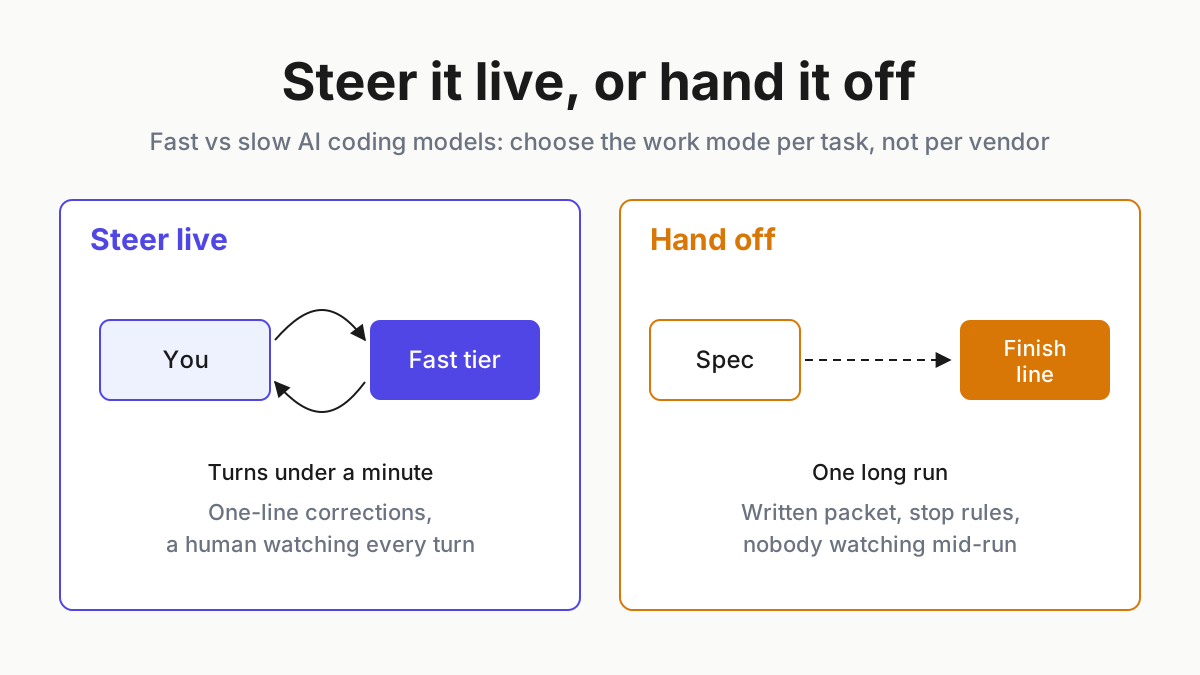
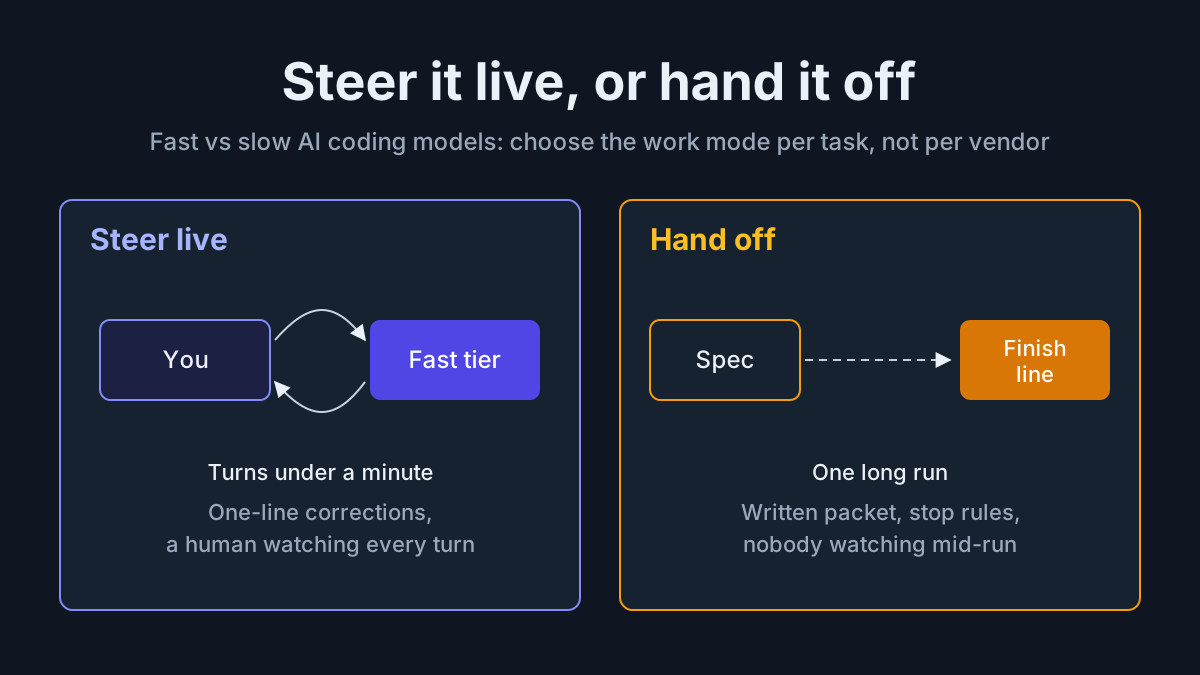
That is the real content of the fast vs slow AI coding models argument. Speed does not make a model better or worse; it makes a different way of working possible. A slow, deep turn rewards a long written spec and a closed laptop. A fast turn rewards a person sitting there, correcting in one-liners, the way you would with a pair-programming partner who types very quickly.
So the useful decision is per task, not per vendor: steer it live, or hand it off. This piece gives you a steer-or-handoff decision table with every column filled, a tool-latency meter that tells you when buying a faster tier is the wrong fix, and the control rule that keeps a fast tier from becoming everyone’s default by accident.
Theo Browne’s Ultrafast test and what the vendors document
On Oct 6, 2026, Theo Browne published “I love Ultrafast (it’s unusable)” on his Theo - t3.gg channel. The subject is OpenAI’s Ultrafast tier for GPT-6 Astra in Codex, which OpenAI’s Sep 30 post on its developer forum, “Build Ultrafast with Astra in Codex and the API”, describes as a “premium speed tier” offering “up to 8x faster token generation (300 tokens per second) in Codex and up to 6x in the API.” The Decoder covered the DevDay launch on Sep 29. The same post says Ultrafast for GPT-6.1 Sol is “coming soon”; as of Oct 8, OpenAI’s pricing page lists no Ultrafast rate for it.
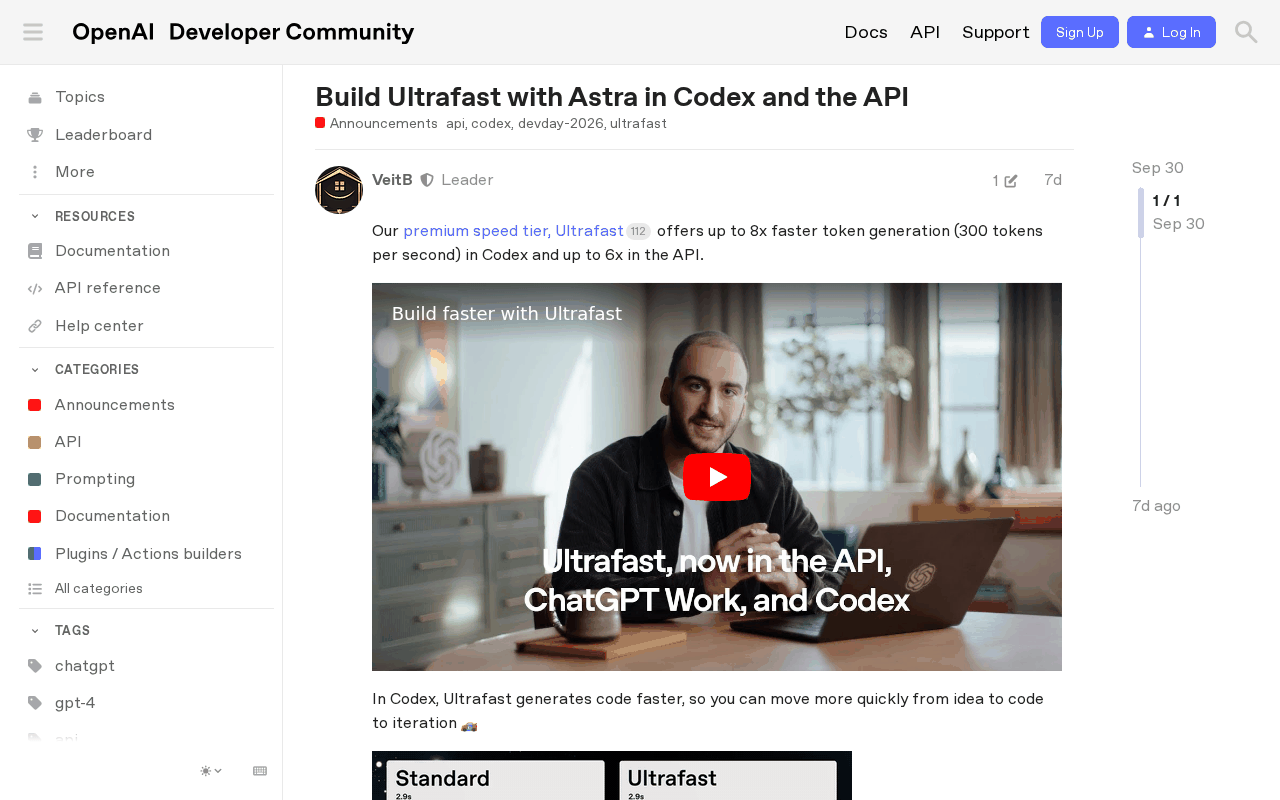 Screenshot: OpenAI Developer Community, “Build Ultrafast with Astra in Codex and the API - Announcements - OpenAI Developer Community” (Sep 30, 2026), captured Oct 7, 2026.
The numbers from the video reach us through summaries, not a transcript, so treat them as Theo’s own measurements as reported. Per BigGo’s summary and daily.dev’s listing, he measured roughly 30 tokens a second on standard Astra, about 60 on the Fast setting and 320 to 340 on Ultrafast. Per BigGo, he split the screen between the app and the agent and sent prompts while the model was still answering, more than 50 messages in one thread, with replies under a minute and some in 18 seconds. The Yii Chen roundup reports a first working draft in about a minute and a half against roughly 15 with Opus 5.5, his usual slower model.
Two observations from the video carry this article, and both are Theo’s take, not vendor guidance or a study. First, the split between modes: per BigGo, with a slow model his habit was to write about 20 changes into one list and wait anywhere from five minutes to two hours; with a fast one he steers.
Second, the bottleneck moves. Per BigGo, once the model is that fast, a 30-second build or git operation doubles a turn, so he told the agent to stay out of the preview browser and change code only when asked. His verdict, per the summaries, is that it is worth trying and not worth it for most people at current prices.
Anthropic's [Claude Code fast mode docs](https://code.claude.com/docs/en/fast-mode) draw the same line from the other side. Fast mode makes Claude Opus "up to 2.5x faster," is "not a different model," and is in research preview as of Oct 8. The docs recommend it for "rapid iteration" and "live debugging," and recommend standard speed for "long autonomous tasks" and "batch processing or CI/CD pipelines."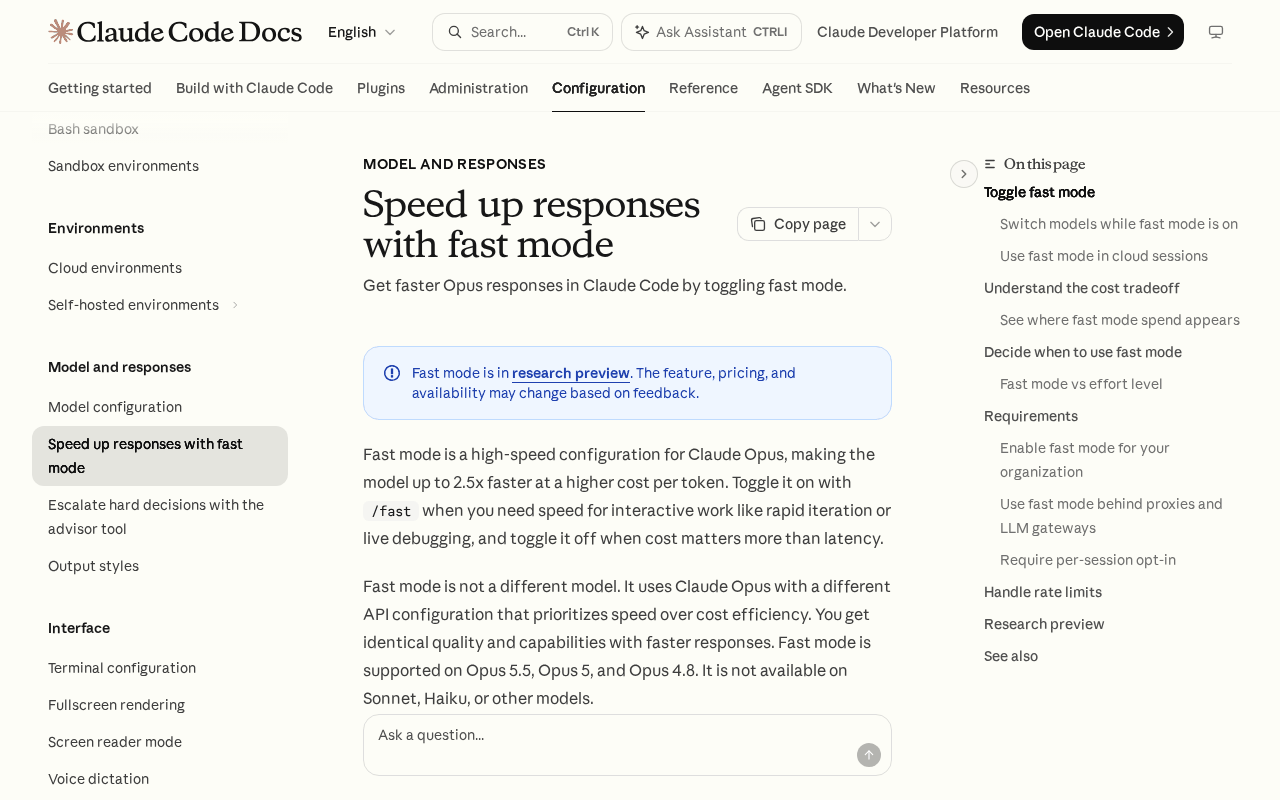 Screenshot: Claude Code Docs, “Speed up responses with fast mode - Claude Code Docs” (undated docs page), captured Oct 7, 2026.
Keep one distinction straight before the table. Both examples above are fast tiers: the same model, served faster. A fast model is a different, smaller model, such as GPT-6 Luna, which aggregators such as LLM Gateway list as released Sep 22; OpenAI’s model page gives no release date.
A fast tier changes how you work with the same judgment. A fast model changes the judgment, and that trade is what the fast-worker lane contract governs. Neither vendor example here is a recommendation; they are the two clearest documented illustrations of the pattern.
The steer-or-handoff decision table for coding agents
Live steering and handoff differ in four things you can write down: who is watching, how long one turn may run, what stops the run without a human, and which tools the agent may touch unprompted. Fill these in per task type, and the speed choice falls out of the table instead of out of habit.
| Task type | Mode | Who watches | Max turn length | Auto-stop condition | Builds, git, browser unprompted? | Fast tier allowed? |
|---|---|---|---|---|---|---|
| UI or visual iteration | Live-steer | The developer, eyes on the running app | 2 min | Developer idle 10 min, or the diff leaves the component folder | Incremental build yes; git no; browser no (the human looks) | Yes, per-session opt-in |
| One-line fixes while watching | Live-steer | The developer at the keyboard | 1 min | Three failed attempts at the same fix | Targeted test only; git no; browser no | Yes, per-session opt-in |
| Long-horizon multi-file refactor | Hand off | The reviewer at the finish line; nobody mid-run | 20 min per checkpoint | Finish-line test green, turn or budget cap hit, or the same test fails three times | Build and test yes; git commit to the task branch only, never push; browser no | No |
| CI or batch job | Hand off | Pipeline owner, through alerts | The pipeline’s job timeout | Job timeout or non-zero exit | Builds yes, inside CI; git read-only; browser no | No |
| Unattended overnight run | Hand off | Nobody live; a named morning reviewer | 30 min per turn, 8 h wall clock | Finish line met, budget cap, or no new passing test in 45 min | Build and test in the sandbox; git branch only; headless browser only if the spec says so | No |
Read the last column as the policy, not a preference. A fast tier earns its keep when a human is close enough to catch a wrong turn within seconds. In a handoff, nobody is there to use the speed, so you pay for latency nobody experiences.
Step 1: Classify the task before you pick a speed
Ask three questions, in order, at the moment you start the session:
- Will you watch every turn? If not, it is a handoff, whatever the task.
- Can you judge each turn’s result in under a minute? A visual change, a failing test turning green, a one-line diff: yes. A schema migration across 40 files: no. No means handoff.
- Is the blast radius local? A component, a stylesheet, one module behind a test. If the change can reach shared state, data or another team’s code, hand it off with a finish line.
Three yeses make it a steering task. Any no makes it a handoff. A typical day splits unevenly: many small steering sessions in the afternoon, a handful of long handoffs started before lunch or before leaving.
Step 2: Write the per-mode contract once, in the repo
The table becomes enforceable when each mode has a short contract file, say work-modes.yaml, that the harness and the humans both read. Illustrative shape; adapt the names to your harness:
steer:
  watcher: session owner, present
  max_turn_seconds: 120
  auto_stop:
    idle_minutes: 10
    path_outside: ["src/components/**", "src/styles/**"]
    same_fix_failures: 3
  unprompted_tools:
    build: incremental_only
    git: deny
    preview_browser: deny
  serving: fast_tier_allowed
handoff:
  watcher: named reviewer at finish line
  max_turn_minutes: 30
  max_wall_clock_hours: 8
  auto_stop:
    finish_line: "tests/refactor/*.spec pass"
    same_test_failures: 3
    no_progress_minutes: 45
  unprompted_tools:
    build: allow
    git: commit_task_branch_only
    preview_browser: headless_if_spec
  serving: standard
Note what the steer mode denies. The agent may not run git or open the preview browser on its own; the browser half is the instruction Theo reportedly gave his agent. In steering mode, you are the browser.
Step 3: Give every handoff a packet with a finish line
A handoff is only as good as what you hand over. The 20-change list from the video is the right instinct with one missing piece: a test that says when the list is done. The packet should carry the goal in one sentence, the change list, the files in and out of scope, the finish-line check, the stop conditions from the contract, and what evidence the agent must leave behind. What that evidence must prove is already set out in the finish-line and transcript-proof piece, so the packet points to it rather than inventing a second standard.
A handoff without a finish line is the slow model’s version of the runaway loop. It will not burn tokens as fast, but it will run for two hours on a misread requirement with nobody looking.
Step 4: Steer with interrupts the harness actually honors
Steering means sending a prompt while the model is still answering. That only works if the harness treats the new message as a redirect, not as a queued follow-up that runs after the wrong change lands. Test it before you rely on it: start a turn that edits three files, interrupt after the first with “stop, only change the header,” and check the diff. If all three files changed, your harness queues instead of redirecting, and live steering will cost you cleanup.
The semantics to look for, pause, redirect and cancel, are covered in interruptible coordinators.
Step 5: Run the tool-latency meter for one week
The second half of Theo’s point is the one most teams skip: when the model gets fast, the tools become the turn. Measure it before you argue about it. For every turn, log two numbers, model time (first token to last token, plus any thinking) and tool time (build, test, git, browser, package install), and the tool that dominated. A week of steering sessions is enough.
An illustrative slice of one UI session’s log:
turn  mode   model_s  tool_s  tool breakdown               verdict
11    steer      9      31    build 28, git 3              tool-bound
12    steer      8      47    build 29, browser 15, git 3  tool-bound
13    steer     11       6    test 6                       model-bound
14    steer      9      44    install 41, build 3          tool-bound
15    steer     10      30    build 30                     tool-bound
The rule that comes out of the log: when tool time exceeds model time on most turns, fix the tools before you buy speed. A faster tier on that session shaves seconds off a turn that is mostly waiting on a build.
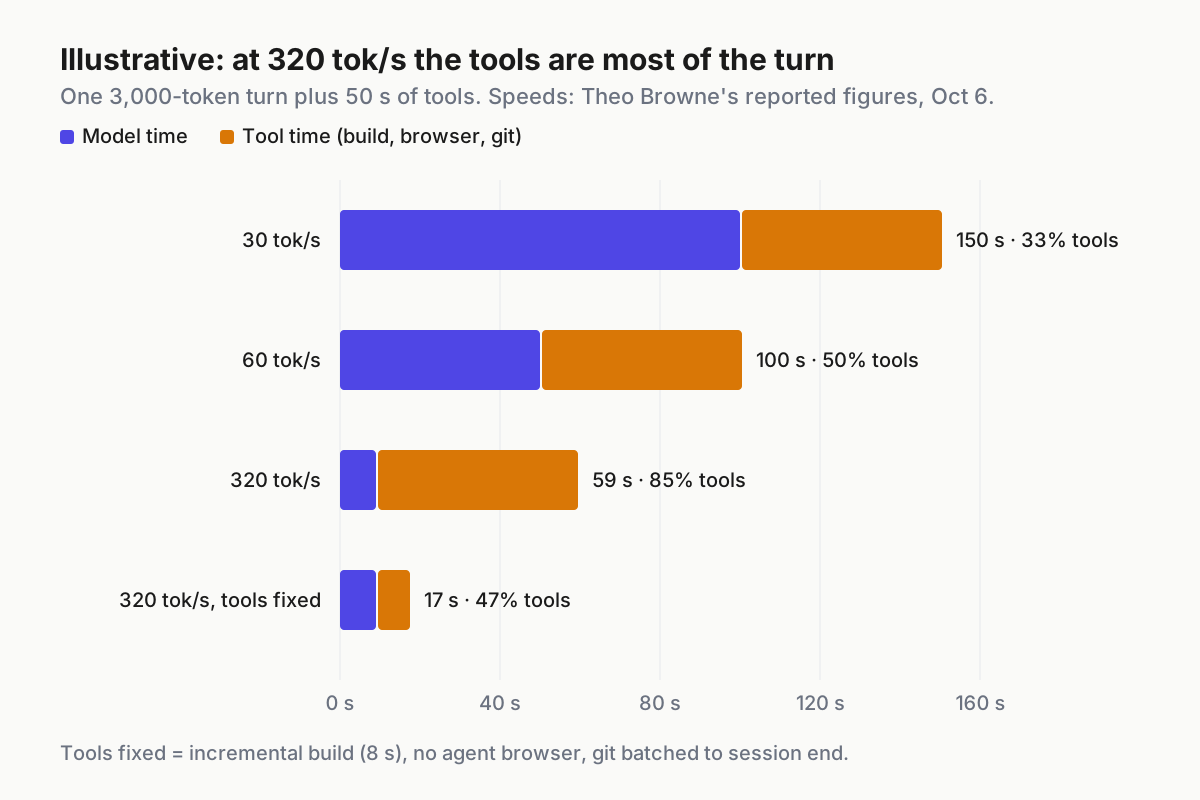
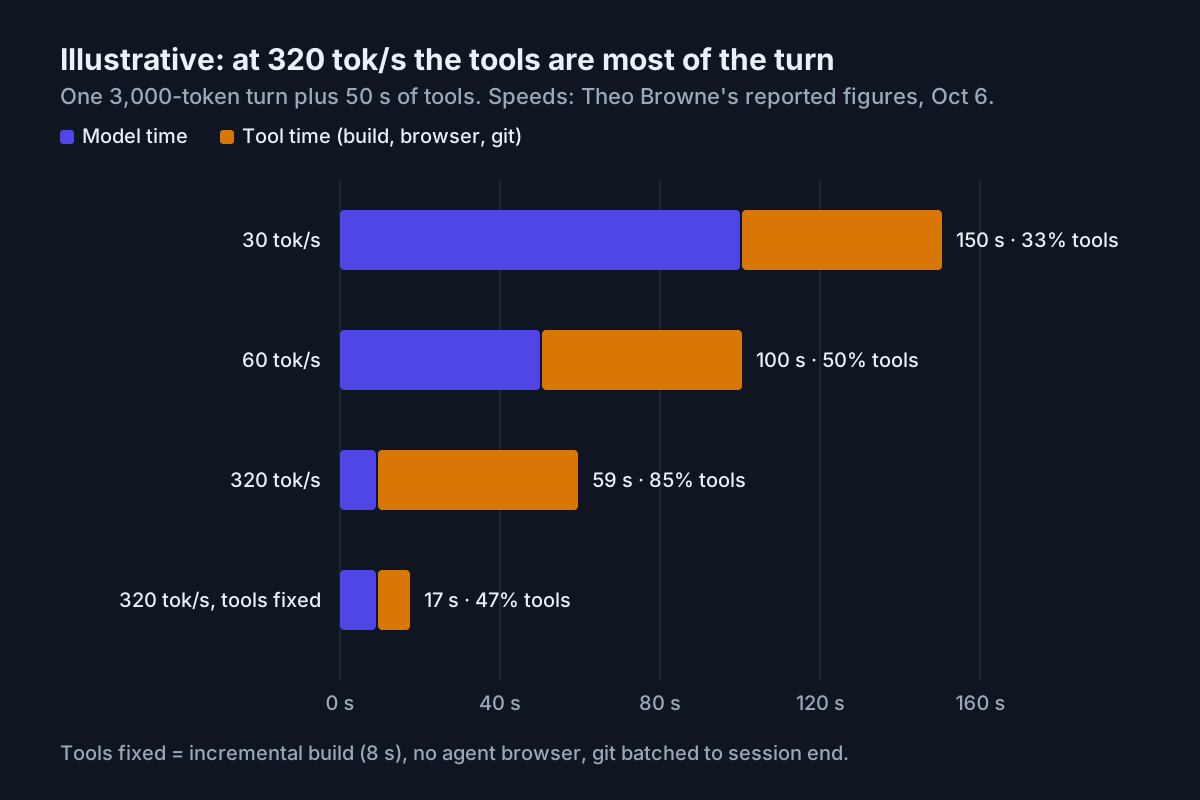 Illustrative: one 3,000-token turn plus 50 seconds of tool time at three serving speeds, and the fastest again with the tools fixed. Speeds are Theo Browne’s reported measurements; the token count and tool times are modeled.
Step 6: The worked scenario, one turn at three speeds
Take one steering turn on a front-end task, with every number illustrative except the serving speeds. The agent writes about 3,000 tokens of code and explanation, then the turn spends 50 seconds in tools: a 30-second full build, a 15-second preview-browser screenshot and 5 seconds of git.
- At 30 tokens a second, the model takes 100 seconds and the tools 50. The turn is 150 seconds, a third of it tools. Speed would help.
- At 60 tokens a second, the model takes 50 seconds and the tools 50. The turn is 100 seconds, half of it tools.
- At 320 tokens a second, the model takes about 9 seconds and the tools still take 50. The turn is 59 seconds, and 85% of it is waiting on tools.
Now fix the tools instead: an incremental build that takes 8 seconds, no agent-driven browser because you are watching the app yourself, and git batched to the end of the session. Tool time per turn drops to about 8 seconds, and the fast-tier turn falls to roughly 17 seconds. The same fixes cut the 60-tokens-a-second turn from 100 seconds to 58, which for many teams is the better trade. Pricing for the tier itself belongs to the speed-budget piece, which treats speed as a meter; this scenario only says where the seconds go.
Step 7: Fix the tools in this order
Work down the list until tool time drops below model time on most turns:
- Incremental builds. Rebuild the module that changed, not the app. This is usually the largest single win.
- A warm dev server. Keep it running across turns and let hot reload do the work; a cold start per turn is pure waste.
- No preview-browser access in steering mode. You are looking at the app already. An agent screenshotting it adds a tool call and tells you nothing new.
- Batched git. Commit at checkpoints or at the end of a session, not after every turn; hooks that run linters on each commit multiply this.
- CI off the laptop. A full local suite that saturates the machine slows the agent’s next build too. Run the targeted test locally and the full suite remotely.
Re-run the meter after each fix. The point is to see the tool column shrink, not to trust that it did.
Step 8: Give the fast tier its own allowlist entry and kill switch
A fast tier tends to spread quietly, because it feels good and nobody turns it off. Treat it like any other model choice: a named entry in your allowlist, a scope, an owner and an off switch you can flip for everyone. An illustrative entry:
entry: fast-tier/same-model
modes_allowed: [steer]
modes_denied: [handoff, ci, overnight]
enablement: org owner approves; users opt in per session
kill_switch: one environment variable or policy flag, fleet-wide
fallback: standard speed, same model
review: monthly, against the tool-latency meter
One vendor documents all four controls for its fast mode: owner enablement for Team and Enterprise organizations, a per-session opt-in setting (fastModePerSessionOptIn), a disable variable (CLAUDE_CODE_DISABLE_FAST_MODE=1) and a model allowlist (availableModels), per the fast mode docs. The same page describes a separate rate-limit pool that falls back to standard speed. Whatever your vendor calls them, map each control to a line in your entry, and check that the kill switch works by flipping it during a steering session and confirming the next turn runs at standard speed.
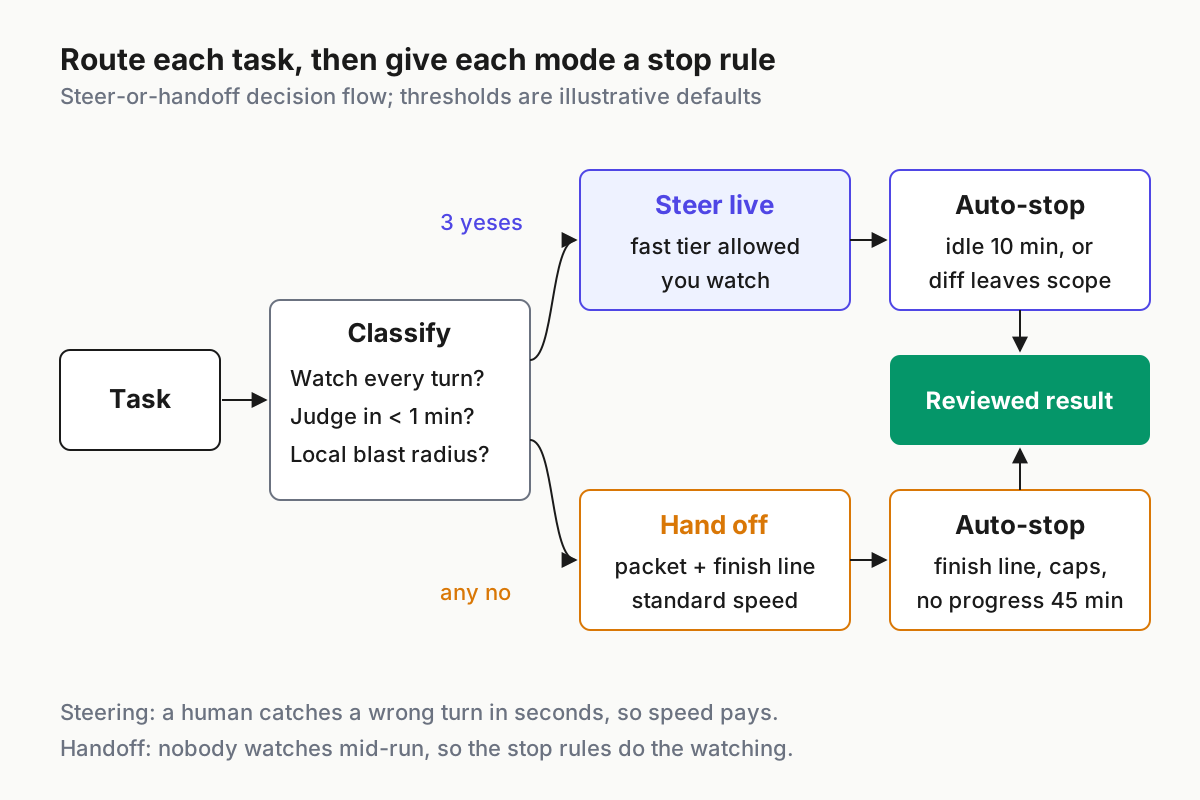
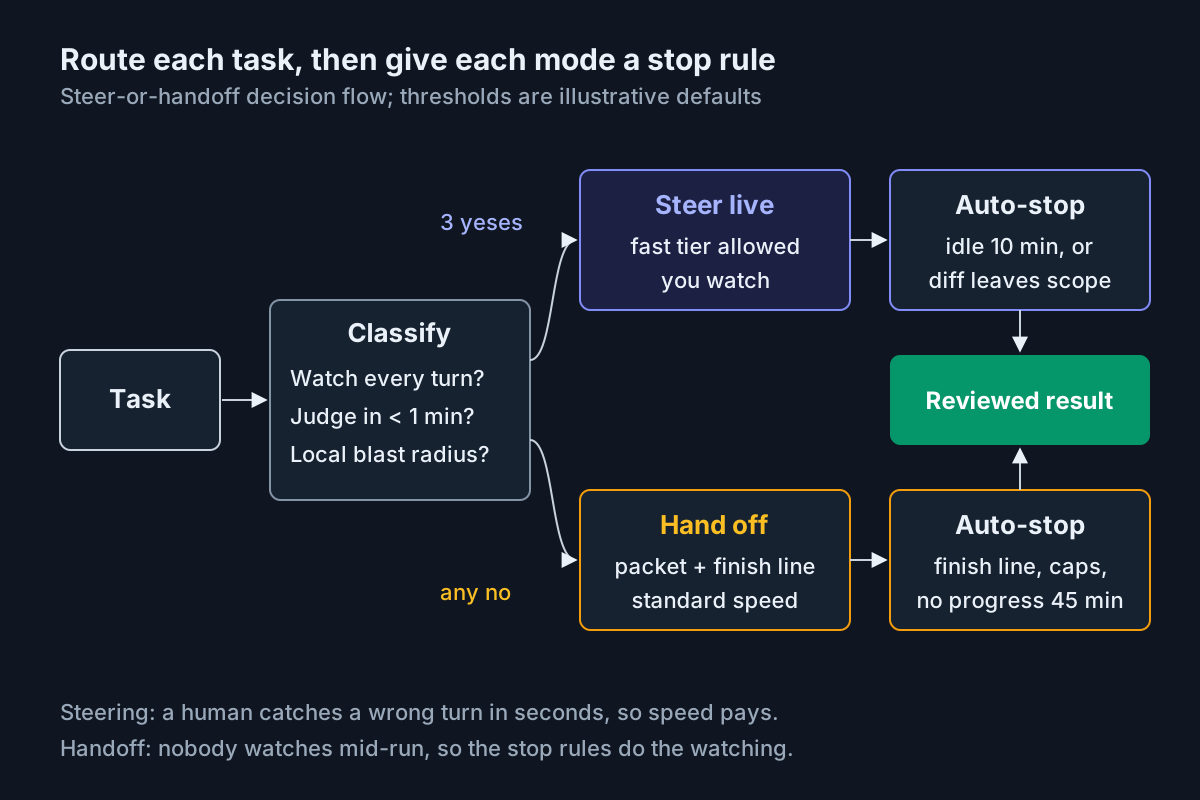 The routing in one picture: classify the task, pick the mode, and make sure each mode has a stop condition that works without you.
Where steer-or-handoff routing breaks
| What breaks | Signal you would see | First action |
|---|---|---|
| Steering session left running unwatched | Turns keep landing after the developer’s last message is 15 minutes old | Enforce the idle auto-stop; end the session and reopen it as a handoff with a packet |
| Fast tier used on a handoff | Overnight or CI transcripts show the fast tier on long autonomous turns | Remove handoff modes from the fast-tier allowlist entry; flip the kill switch for those lanes |
| Interrupts queue instead of redirecting | A redirect arrives after the wrong change is already in the diff | Run the three-file interrupt test; steer only on harnesses that pass it |
| Tool time dominates every turn | Meter shows tool seconds above model seconds on most turns | Apply the tool fixes in order before any speed upgrade; re-meter |
| Handoff with no finish line | Run ends on the wall-clock cap with “mostly done” and no passing check | Write the finish-line test first; restart from the packet, not the half-done branch |
| Agent drives the preview browser while you watch | Browser screenshots appear in the tool log of a steering session | Deny browser in the steer contract; you are the visual check |
| Steering creep into shared code | A steering diff touches files outside the component path | Trip the path auto-stop; re-classify the work as a handoff |
A fleet runs both speeds at once
On a real team, the two modes run side by side all day. One developer is steering a stylesheet on a fast tier, a refactor handed off before lunch is grinding on standard speed, and an overnight run is queued for six. The operator’s question is not “which model is fastest” but “which mode is each live session in, and is that mode’s contract being honored.” That is a fleet view, and it belongs in a command center for multiple agents, where a handoff that has gone quiet and a steering session nobody is steering both show up as states, not surprises.
Two neighbors in this batch handle the questions this one leaves alone. Which models each agent mode may call at all is the mode-to-model assignment table, and what a builder can still defend when agents iterate this fast is the clone-test moat register. Speed changes the human’s job from writing specs to steering live; the table above is how you decide, task by task, which job you are doing.
FAQ
Are fast AI coding models worse than slow ones?
Not necessarily, because the fastest options are often the same model served faster. OpenAI’s Ultrafast and Claude Code’s fast mode are speed tiers of the same model. A smaller fast model is a different trade. Choose by work mode: fast tiers suit watched, short loops; standard speed suits long unattended handoffs.
What is an async coding agent handoff?
It is a task given to a coding agent to finish without someone watching each turn. A good handoff packet carries the goal, the change list, files in and out of scope, a finish-line test, stop conditions and the evidence the agent must leave, so a reviewer can accept or reject the result later.
When is Claude Code fast mode worth turning on?
Anthropic’s docs point it at rapid iteration and live debugging, and point long autonomous tasks and CI at standard speed. Turn it on for watched steering sessions, after a tool-latency check shows model time dominating your turns. If builds or git dominate, fix those first; the faster tier barely changes the turn.
Sources
- OpenAI Developer Community: Build Ultrafast with Astra in Codex and the API (Sep 30, 2026)
- Claude Code Docs: Speed up responses with fast mode
- Theo - t3.gg on YouTube: I love Ultrafast (it’s unusable) (Oct 6, 2026)
- BigGo: summary of Theo Browne’s Ultrafast video (Oct 6, 2026)
- daily.dev: I love Ultrafast (it’s unusable) (Oct 6, 2026)
- Yii Chen: weekly agent roundup (Oct 6, 2026)
- The Decoder: OpenAI expands Codex and its API at DevDay (Sep 29, 2026)