Stagehand Browser Reconnect: Hand Off Tabs Between Workers
Implement a Stagehand browser reconnect between two TypeScript workers, verify the same session and retained page marker, then close the live browser session.

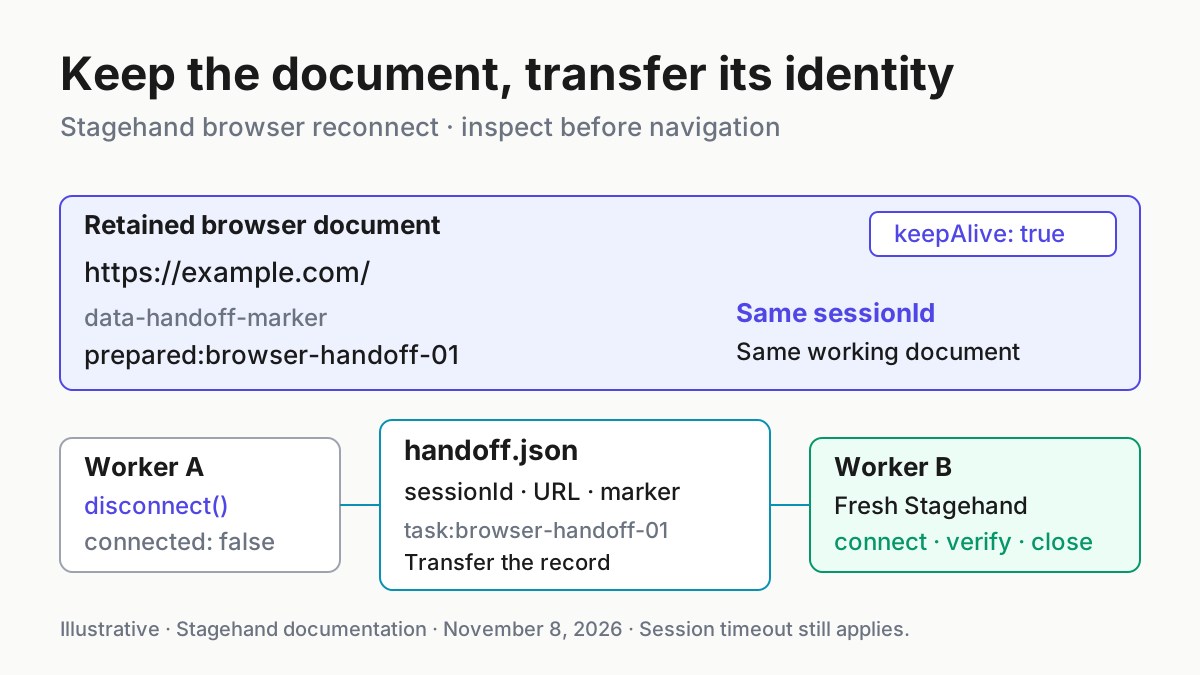
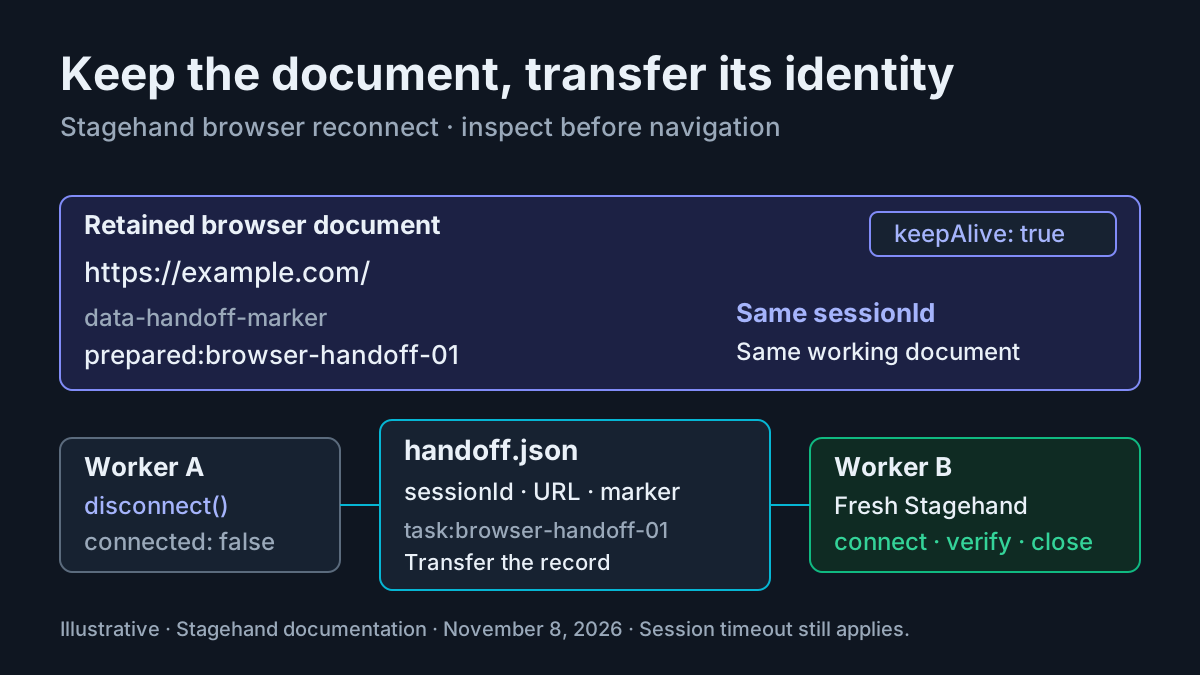
A worker has opened the right tab and prepared its page state. Now that process needs to exit, while another process continues the job. A Stagehand browser reconnect should preserve that browser, and the receiving worker should prove what it inherited before doing anything consequential. Reopening the same URL is not sufficient proof.
This tutorial is for TypeScript developers implementing that handoff. You will create two complete programs: one launches a Browserbase browser, marks an example page and disconnects; the other reconnects using the recorded session ID, checks the marker and closes the session. The concrete fixture is task:browser-handoff-01. All output below is illustrative expected output; these programs were not executed for this article.
Browserbase’s Stagehand 4.4 announcement, dated November 5, 2026, documents browser.disconnect(), reconnection across processes and crash cleanup. Those lifecycle operations supply the mechanism. The useful result is independent of the announcement: a handoff that distinguishes a retained browser from a newly created replacement.
Choose the browser identity you will transfer
- Use a Browserbase
sessionIdfor the cloud example below. - Use a local browser’s CDP address when attaching to an existing local Chromium process.
- Transfer ordinary task metadata separately from either connection identity.
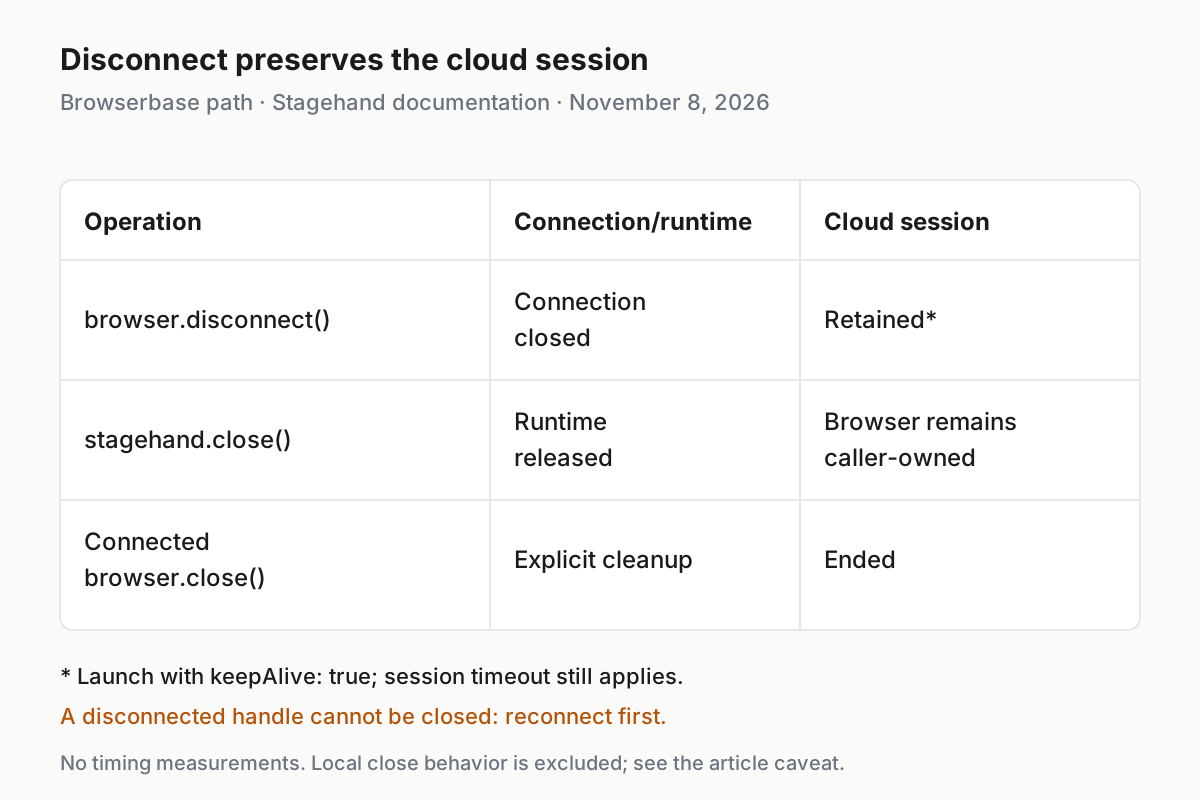
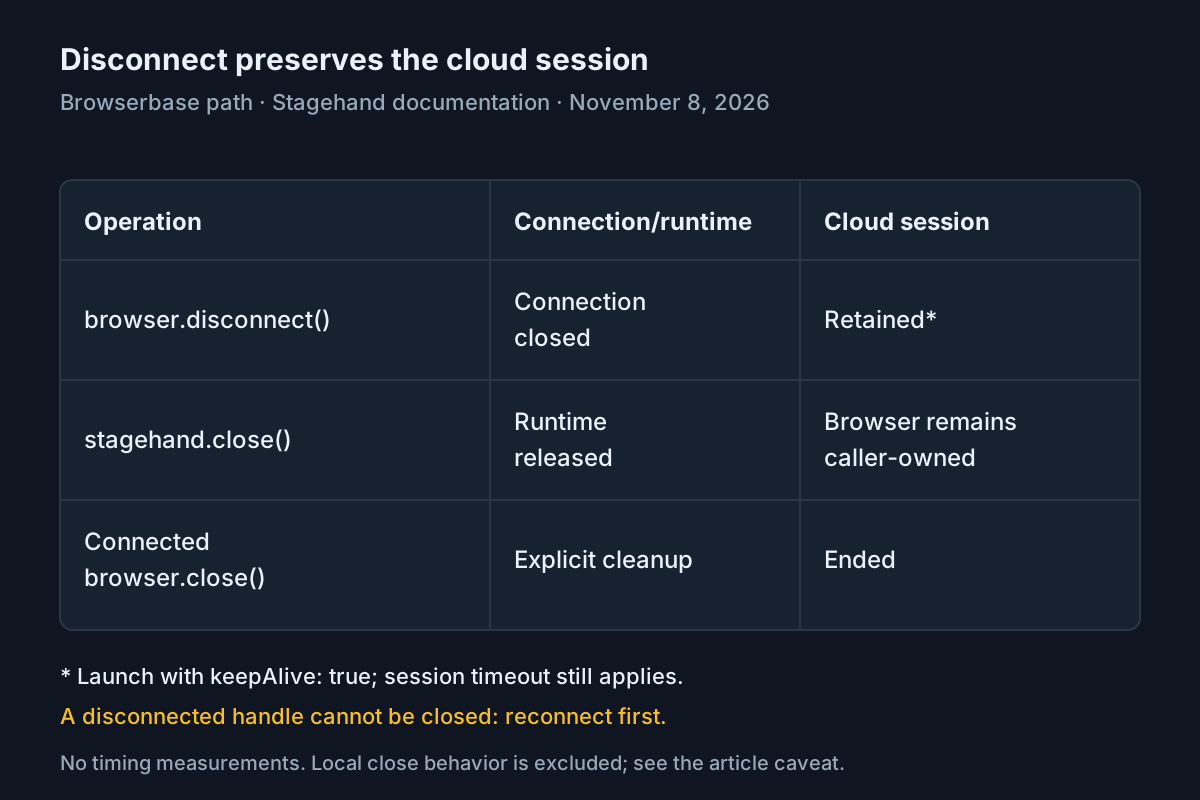
A browser session, a browser handle and a Stagehand instance have different lifetimes. The session contains the live tabs. The handle is your SDK process’s connection to that browser. The Stagehand instance attaches its runtime to a handle. When the first process disconnects, its JavaScript objects do not become transferable objects that another process can reuse.
The Stagehand reference says each handle can back only one Stagehand instance and that Stagehand.create() returns an initialized instance. Accordingly, worker B creates a new handle and a new Stagehand instance. It retrieves the existing pages through that new handle. It never tries to serialize worker A’s page object.
For Browserbase, browserbase.connect({ sessionId }) preserves the Browserbase session identity. For local Chrome, localBrowser.connect({ cdpUrl }) identifies the running browser through its DevTools endpoint. The browser configuration documentation explicitly directs Browserbase clients to connect by session ID, with the Stagehand extension already installed. Launching through browserbase.launch() handles the extension upload and initial session configuration.
The example therefore starts with the Stagehand factory rather than assembling a Browserbase session through a second SDK. That removes an unnecessary extension-installation prerequisite. It also keeps the transfer record small: the task label, the session ID, the expected URL and the marker. The API key remains in the receiving process’s existing environment, rather than being copied into that record.
If your problem is choosing an MCP connection mode instead, use the separate Chrome DevTools MCP connection guide. That guide and this one solve different connection problems.
Prepare an existing TypeScript application
- Use Node.js 22.18 or later and an existing application directory with its package manifest.
- Install the documented Stagehand dependencies.
- Make the existing Browserbase API key available to both processes through your normal environment handling.
- Confirm that the existing account supports keep-alive sessions before launching this cloud fixture.
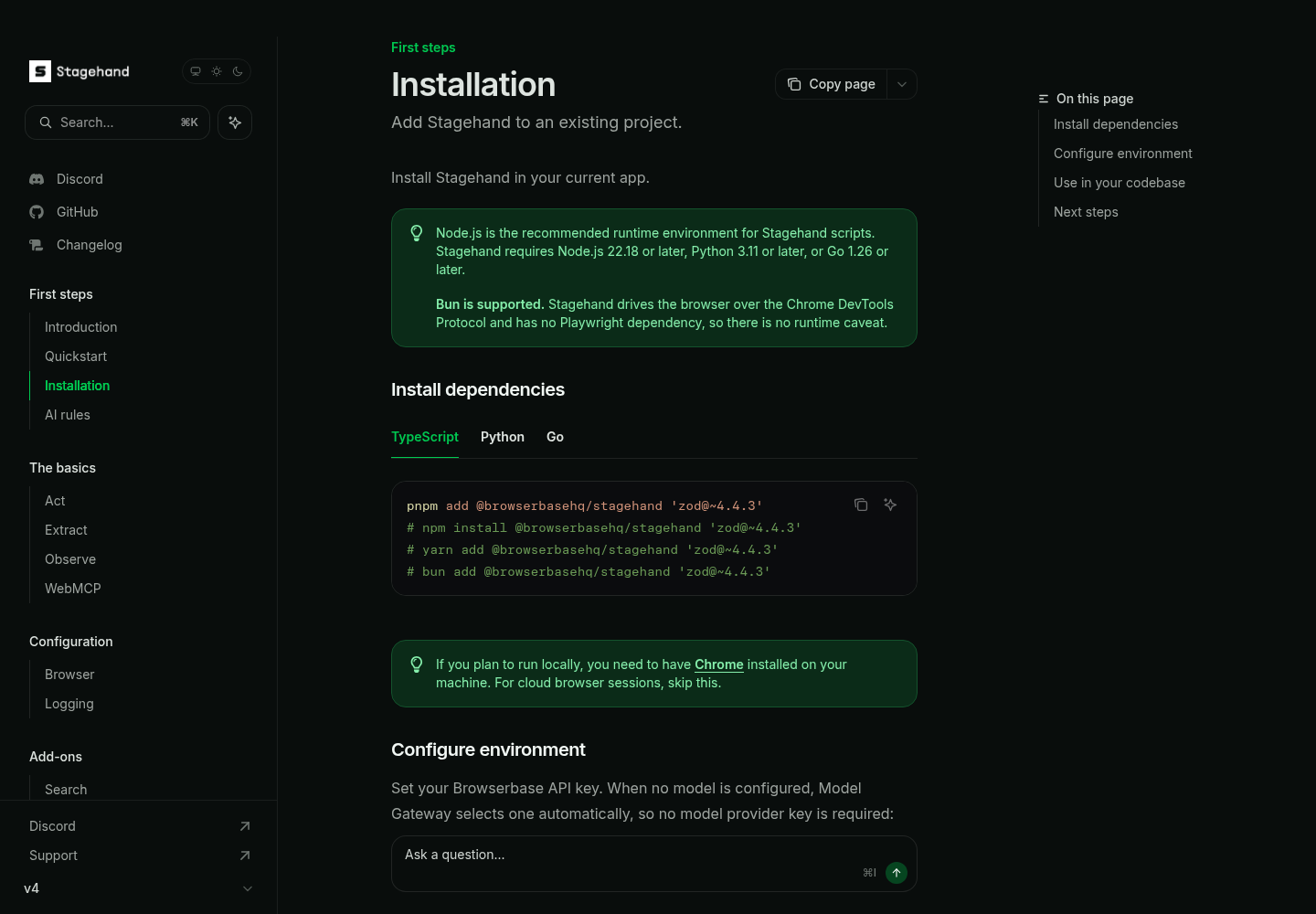
The installation guide recommends Node.js and gives the following dependency command. Run it in your application, using the package manager already established there:
pnpm add @browserbasehq/stagehand 'zod@~4.4.3'
The equivalent documented npm command is:
npm install @browserbasehq/stagehand 'zod@~4.4.3'
Use one installation command, not both. The fixture itself does not call a model or use a Zod schema, but retaining the installation guide’s dependency combination avoids inventing a different setup recipe. Keep the resulting lockfile so both workers use the same installed SDK. The examples require the documented v4 lifecycle API, including disconnect(). An older installed version that lacks that method cannot run this handoff unchanged.
Stagehand does not automatically read environment variables or load an environment file. Each program below explicitly reads process.env.BROWSERBASE_API_KEY and passes the result to the factory. Supply that value through your established runtime configuration. Neither file contains a secret, and neither asks you to change service endpoints.
Browser configuration documents cloud keep-alive as available on the Startup plan and above. Treat that as a prerequisite of this cloud path. If your assigned account lacks the capability, stop this example there; changing spending settings or buying access is outside this procedure. Local Chrome offers a separate documented path discussed later.
Save the programs as launch-disconnect.mts and reconnect-cleanup.mts. They use erasable TypeScript syntax and standard Node imports. Use your application’s established TypeScript execution setup; the invocation examples below assume its Node runtime supports direct execution of these files. Run them from the same directory so the small handoff file has the same location in both processes. For workers on different machines, your application must transport that file’s contents through its existing trusted task channel.
Launch, mark the page and disconnect
- Save the complete first program below.
- Run
node launch-disconnect.mtsusing the runtime setup described above. - Confirm that it prints a session ID, the marker and
connected: falseafter disconnecting. - Leave the browser session available for the receiving worker.
// launch-disconnect.mts
import { writeFile } from 'node:fs/promises';
import { browserbase, Stagehand } from '@browserbasehq/stagehand';

async function main() {
  const apiKey = process.env.BROWSERBASE_API_KEY;
  if (!apiKey) throw new Error('Missing BROWSERBASE_API_KEY');

  const task = 'task:browser-handoff-01';
  const url = 'https://example.com/';
  const marker = 'prepared:browser-handoff-01';
  const browser = await browserbase.launch({ apiKey, keepAlive: true });
  let detached = false;

  try {
    await Stagehand.create({ browser });
    const sessionId = browser.sessionId;
    if (!sessionId) throw new Error('Launch returned no session ID');

    const page = await browser.context.newPage();
    await page.goto(url);
    await page.evaluate((value) => {
      document.documentElement.setAttribute('data-handoff-marker', value);
    }, marker);

    const before = await page.evaluate(() => ({
      url: location.href,
      marker: document.documentElement.getAttribute('data-handoff-marker'),
    }));
    if (before.url !== url || before.marker !== marker) {
      throw new Error('Fixture verification failed before disconnect');
    }

    await writeFile('handoff.json', JSON.stringify({
      task, sessionId, url, marker,
    }, null, 2), { mode: 0o600 });

    await browser.disconnect();
    detached = true;
    console.log(JSON.stringify({
      task, sessionId, before, connected: browser.connected,
    }, null, 2));
  } finally {
    // A disconnected handle cannot be closed.
    if (!detached && browser.connected) await browser.close();
  }
}

main().catch((error) => {
  console.error(error);
  process.exitCode = 1;
});
The retained marker is a DOM attribute on the document, written through the documented page.evaluate() API. It is deliberately more discriminating than the page title. A fresh visit to the same URL will not contain an attribute inserted by the previous worker. Conversely, a reload of the original tab can remove it. That makes the marker a useful check of document continuity, with a clear limitation.
Creating a new page makes the fixture independent of whatever blank page a session initially exposes. The receiving program searches all pages for the marker; it does not assume the fixture is tab zero or the active tab. The URL check guards against accidentally marking a different destination. No login, form submission or external data mutation is involved.
The handoff file is written before disconnecting. If creating the fixture or writing the record fails, the first program closes its still-connected handle. If disconnect succeeds, the detached flag prevents cleanup from calling close() on that obsolete handle. Browserbase explicitly documents that closing a disconnected handle throws. A generic unconditional browser cleanup block would be wrong at this boundary.
The file mode is an illustrative application choice for POSIX systems, not a Stagehand permission feature. Apply your platform’s usual file protections and keep the record out of version control. A session ID is operational connection metadata; it should travel only to the intended receiving worker.
Illustrative expected output has this shape; the real session ID is supplied by Browserbase. The program emits JSON, while this abbreviated display names the fields to inspect:
task: task:browser-handoff-01
sessionId: the actual ID returned by launch
before.url: https://example.com/
before.marker: prepared:browser-handoff-01
connected: false
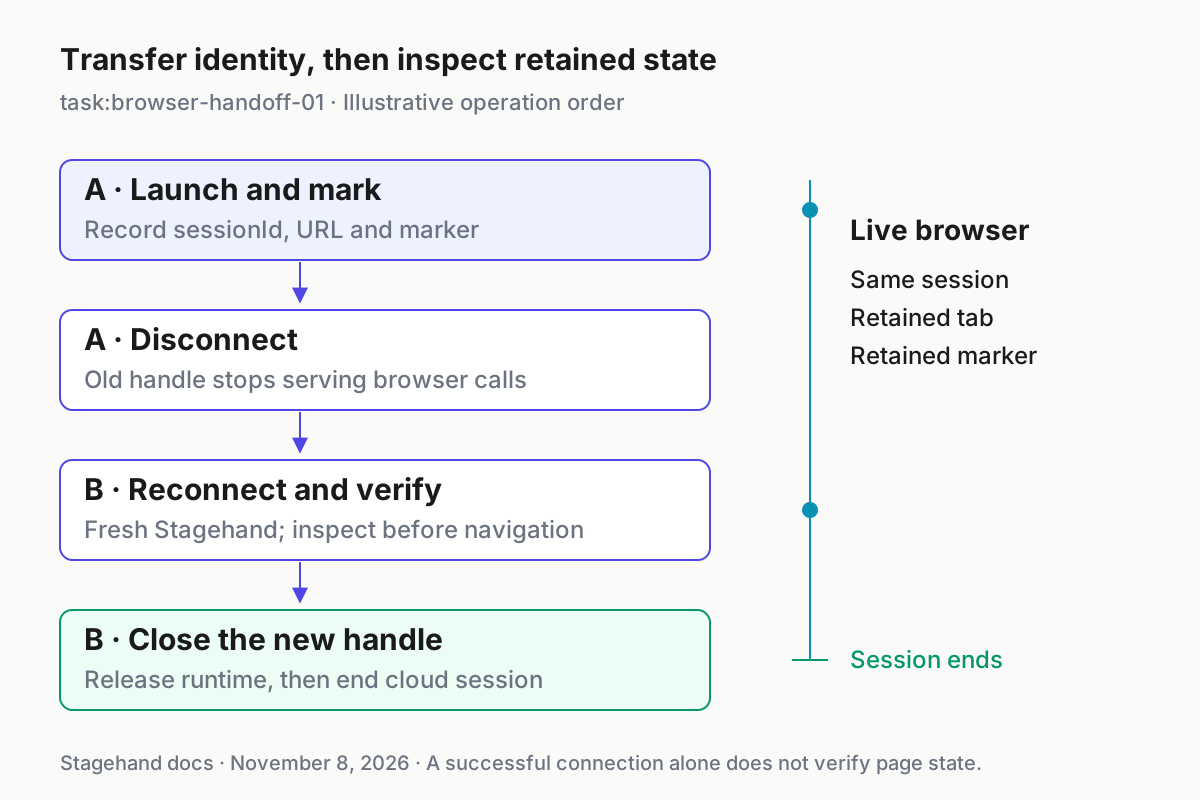
The false connection flag describes worker A’s handle. It does not prove that the remote session still exists. Worker B’s successful attachment and retained-state checks provide that next piece of evidence.
Do not start a second launch merely because the first process has finished. The intended intermediate result is an absent worker connection with a surviving browser. A second launch creates another session and overwrites the handoff record, which changes the experiment. Keep the first program’s output until the receiver has compared the session identity.
Reconnect, verify the inherited document and close
- Save the complete receiving program below.
- Run
node reconnect-cleanup.mtsafter the first program finishes. - Compare its session ID with the first program’s ID.
- Require the matching URL and marker before accepting the handoff.
- Let the cleanup block close Stagehand and then the newly connected browser handle.
// reconnect-cleanup.mts
import { readFile } from 'node:fs/promises';
import { browserbase, Stagehand } from '@browserbasehq/stagehand';

async function main() {
  const apiKey = process.env.BROWSERBASE_API_KEY;
  if (!apiKey) throw new Error('Missing BROWSERBASE_API_KEY');

  const record = JSON.parse(await readFile('handoff.json', 'utf8'));
  if (!record || record.task !== 'task:browser-handoff-01' ||
      typeof record.sessionId !== 'string' || !record.sessionId ||
      record.url !== 'https://example.com/' ||
      record.marker !== 'prepared:browser-handoff-01') {
    throw new Error('Invalid handoff record');
  }

  const browser = await browserbase.connect({
    apiKey, sessionId: record.sessionId,
  });

  try {
    const stagehand = await Stagehand.create({ browser });
    try {
      if (browser.sessionId !== record.sessionId) {
        throw new Error('Session identity mismatch');
      }

      const matches = [];
      for (const page of await browser.context.pages()) {
        const state = await page.evaluate(() => ({
          url: location.href,
          marker: document.documentElement.getAttribute('data-handoff-marker'),
        }));
        if (state.url === record.url && state.marker === record.marker) {
          matches.push(state);
        }
      }
      if (matches.length !== 1) {
        throw new Error('Expected exactly one retained fixture document');
      }

      console.log(JSON.stringify({
        task: record.task,
        sessionId: browser.sessionId,
        retained: matches[0],
        verified: true,
      }, null, 2));
    } finally {
      await stagehand.close();
    }
  } finally {
    await browser.close();
  }
  console.log('Session cleanup completed');
}

main().catch((error) => {
  console.error(error);
  process.exitCode = 1;
});
This receiver intentionally performs no navigation. Calling goto() before inspecting the inherited document would destroy the very DOM evidence being checked. It also performs no action that could recreate the marker. The expected result is therefore attributable to state retained across disconnect, rather than state reconstructed by the second program.
The receiving worker validates the record before opening a connection. It then checks session identity and reads each page through newly obtained SDK objects. Requiring exactly one match catches an ambiguous fixture as well as a missing one. If a page cannot be inspected, the program fails rather than silently treating partial inspection as verification.
Cleanup occurs on verification failure too. This is a disposable fixture, and worker B owns its deliberate end. The browser configuration example specifically shows a reconnected Browserbase handle ending the session through browser2.close(). The Stagehand reference separately explains that stagehand.close() releases runtime resources while leaving the browser handle caller-owned. The nested finally blocks preserve both responsibilities even if runtime cleanup fails.
One resource caveat remains: the browser documentation says closing a reconnected handle does not delete the extension upload created by the original launch. Ending this session is therefore not a claim that every associated uploaded resource was deleted. For repeated application use, follow the documented reusable-extension approach or separately manage upload deletion using the relevant official API. This tutorial does not invent a deletion command.
Run the receiver only once for the normal success case. After its final cleanup, another invocation with the same record should not be treated as another valid handoff attempt: the previous invocation deliberately ended that session. Retaining the file is useful for comparing identifiers, but the file does not keep the browser alive or reverse cleanup.
Before transporting the record to another machine, compare its four fields with the successful launch output. Preserve the session identifier exactly, including its case. A copied record from an earlier fixture can be valid JSON and still identify the wrong browser; parsing alone cannot establish that it belongs to the current handoff.
Read the worked case as a set of checks
The following populated table is the fixture’s acceptance record. Every expected observation is illustrative, not a test result obtained during reporting.
| Input | Action | Expected result |
|---|---|---|
task:browser-handoff-01; URL https://example.com/; marker prepared:browser-handoff-01 |
Worker A launches with keepAlive: true, creates a page, navigates and sets data-handoff-marker through page.evaluate() |
Before disconnect, the page reports the exact URL and marker, and the handoff record contains the actual Browserbase session ID. |
| The same task and recorded session ID | Worker A calls browser.disconnect(); worker B calls browserbase.connect({ apiKey, sessionId }) and creates fresh Stagehand |
Worker A’s handle reports disconnected; worker B reports the identical session ID and finds exactly one matching retained document without navigating. |
| Verified retained document in worker B | Run stagehand.close() and then browser.close() in the receiver’s cleanup blocks |
Cleanup calls complete without an error; the fixture is deliberately finished rather than left awaiting another worker. |
A matching session ID alone is weaker than a matching session ID plus retained document state. The former confirms the connection’s identity; the latter confirms that the particular working document survived. Neither proves that an application’s server-side transaction completed. If you later adapt the pattern to a business workflow, inspect the application’s own transaction status before continuing.
Do not interpret the printed verified: true as the final cleanup result. The receiver prints that value before leaving its verification block. The later Session cleanup completed message appears only after both cleanup awaits complete. If cleanup throws, the process reports an error and that final message is absent. Those two observations answer different questions.
For a larger coordinator, keep the browser’s identity distinct from the worker’s task identity. The Deep Agents background-worker guide addresses responsive orchestration; the lifecycle code here supplies a browser resource that such orchestration may hand off. The AgentOps operating model provides broader context for assigning responsibility for live resources.
When reading the output, compare values rather than the order of log messages from different processes. The launch record establishes which session was prepared. The receiver establishes which session it attached to and what document it found. Neither a matching task label nor a familiar page title can substitute for those comparisons. This distinction becomes especially useful when several harmless fixture runs exist in development at once.
Recover according to the failed boundary
| Observation | Interpretation | Next action |
|---|---|---|
| Missing API-key error before launch or connect | The process lacks the required input | Correct that worker’s existing environment configuration, then rerun the appropriate program. |
| Launch rejects keep-alive capability | The cloud prerequisite is unmet | Stop the cloud fixture; use an already supported environment rather than changing account spending settings. |
| Reconnection fails | The connection is unavailable, unauthorized, expired or closed; the error determines which | Check the actual service error and session status before deciding whether another attachment is possible. |
| Reconnection succeeds but no marker matches | The original document was reloaded, navigated, closed or otherwise changed | Fail the handoff, close this disposable fixture and prepare a fresh one. |
| Multiple documents match | The marker no longer identifies one fixture | Fail verification and repeat with a clean session. |
| Verification prints successfully but cleanup errors | State transfer worked, termination remains unresolved | Resolve access to the same session and deliberately close a fresh connected handle if the session still exists. |
The documents do not specify one universal reconnection error string or guarantee a particular error code for every expired session. Preserve the actual error instead of matching against an invented message. A network failure also does not establish that the browser has disappeared. Inspect the existing session through your normal Browserbase session tooling before starting replacement work.
If the session still exists, recovery can attach a new handle using its recorded ID. If it has ended, the ID cannot resurrect its old tabs. Start launch-disconnect.mts again to build a fresh harmless fixture, then run the receiver using the newly written record. An old handoff.json left after a failed launch is not proof of a current session; always compare the new launch output and record.
This receiver closes the fixture after any post-connection verification failure. A production application might instead preserve a failed handoff for investigation, but that requires a deliberate ownership and cleanup design. Do not casually remove the cleanup blocks and assume keep-alive is a complete recovery policy. Someone must still end the browser.
The release also describes crash cleanup: an extension-side watchdog requires Chrome 137 or later. A local browser launched without keep-alive shuts down after SDK-process death, while a keep-alive browser or Browserbase session releases its connection so another client can attach. That is a recovery aid, not evidence that your task reached its intended checkpoint before crashing.
When adapting this technique to payments, submissions or record changes, never repair uncertainty by replaying the last consequential action. First read the application’s authoritative state. The broader interruptible coordinator guide discusses the distinction between stopping execution and knowing what completed; fleet replay explains why preserving the record matters when reconstructing a run.
If disconnect itself fails, distinguish that failure from the normal detached path. The first program marks itself detached only after the disconnect await resolves. Its cleanup then checks whether its handle still reports connected before attempting closure. A service or transport error can still leave an uncertain remote outcome; keep the recorded identity and investigate that same session rather than assuming an exception guarantees deletion.
Keep local reconnection separate from saved login
- For a local attachment, retain the documented CDP address of the live Chrome process.
- Create a new local handle and Stagehand instance after disconnecting.
- For login reuse after a browser has ended, choose profile or context persistence instead of live-session handoff.
The release documents this local attachment sequence:
import { localBrowser, Stagehand } from '@browserbasehq/stagehand';

let browser = await localBrowser.connect({
  cdpUrl: 'http://127.0.0.1:9222',
});
let stagehand = await Stagehand.create({ browser });
await browser.disconnect();

browser = await localBrowser.connect({
  cdpUrl: 'http://127.0.0.1:9222',
});
stagehand = await Stagehand.create({ browser });
That snippet assumes Chrome is already running with the needed DevTools access. Local attachment discovers an installed Stagehand extension or loads the bundled extension where supported; loading requires a shared filesystem. A CDP address that works for one worker may be unreachable from another machine. In particular, loopback identifies the receiving machine’s own network environment.
The supplied browser page contains conflicting descriptions of close() for attached local browsers: one passage says it leaves an externally launched browser running, while the keep-alive behavior table says local connect() closes the browser. This tutorial therefore uses Browserbase for its complete termination example. Confirm local close behavior against the installed SDK before relying on it to kill an externally owned Chrome process.
Finally, a live tab and a persisted login are different deliverables. The persisted-login cookbook uses a Browserbase context with persistence enabled, closes the browser, then verifies authentication in a subsequent session. Its protected-page marker proves access; it does not preserve the original live document. Our DOM attribute instead checks continuity of the document within a surviving browser.
Use the former when tomorrow’s new browser should inherit authentication. Use this handoff when another worker should inherit today’s still-open tabs. After the fixture verifies and its receiver closes the session, the practical result is complete: the browser survived one process boundary, the receiver checked its retained state, and ownership ended with explicit cleanup.