Copy and Verify a Live SQLite Snapshot with sqlite3_rsync
Use sqlite3_rsync to pull a live SQLite database over SSH, verify its structure and expected rows, and keep a known-good snapshot available if a refresh fails.

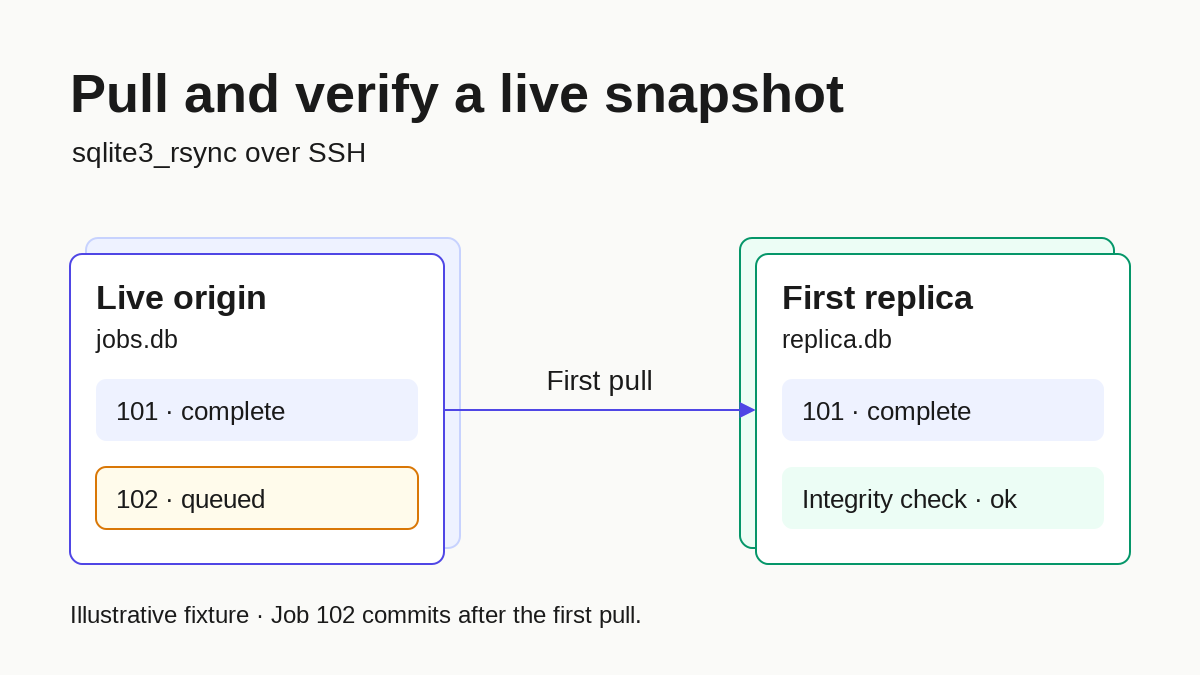
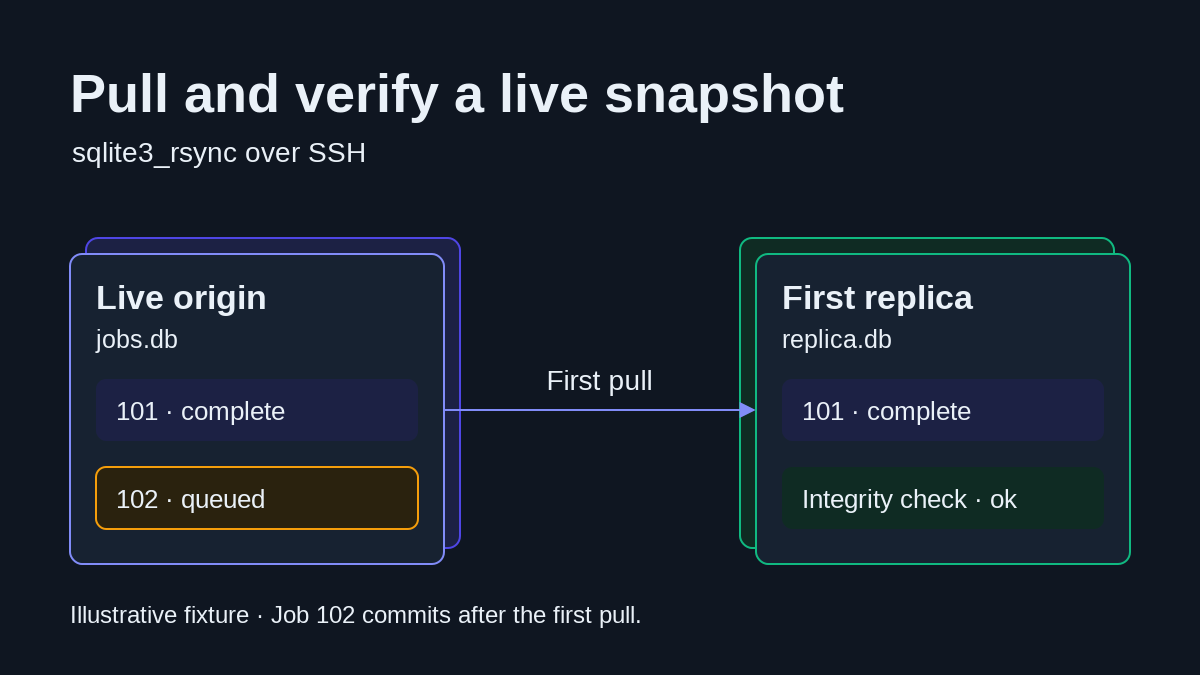
When a Linux host has too little free space to stage a copy of its SQLite job log, run sqlite3_rsync from a second machine. The utility pulls the live database over SSH and writes the replica on the destination. Check that the file is structurally sound and contains the records your investigation needs before you open it for analysis.
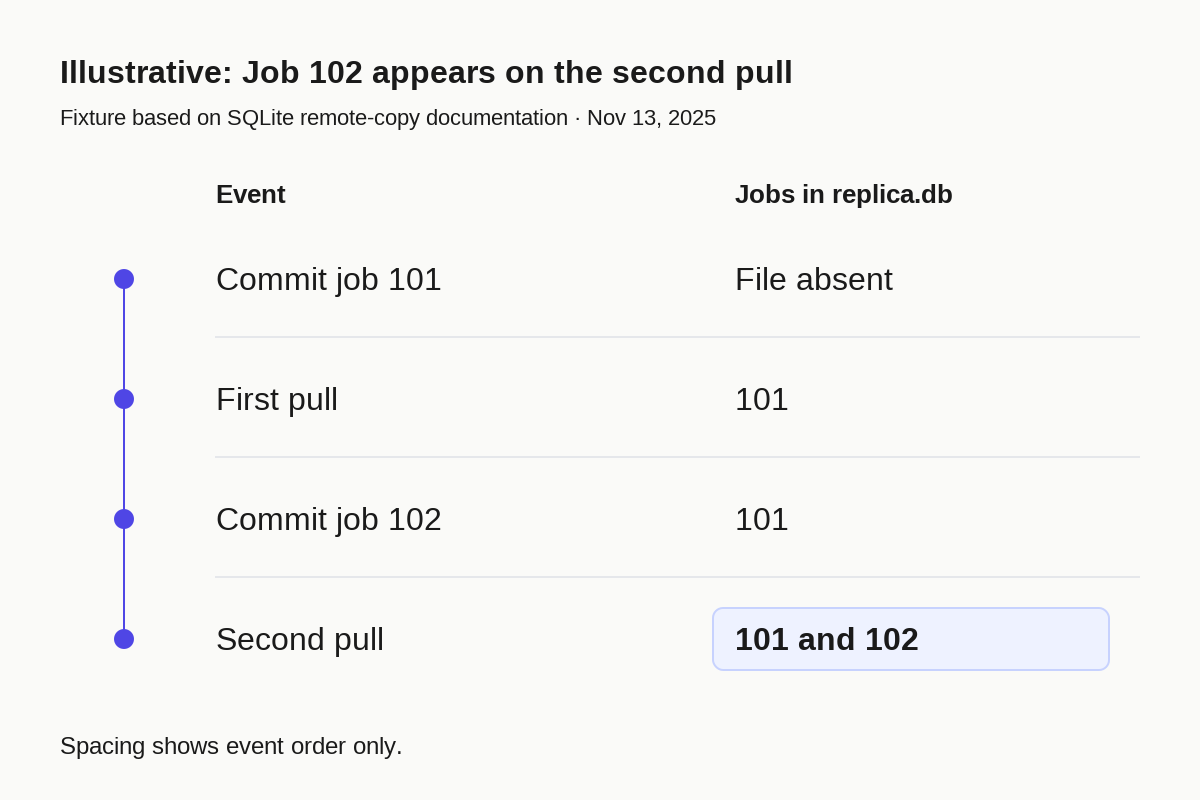
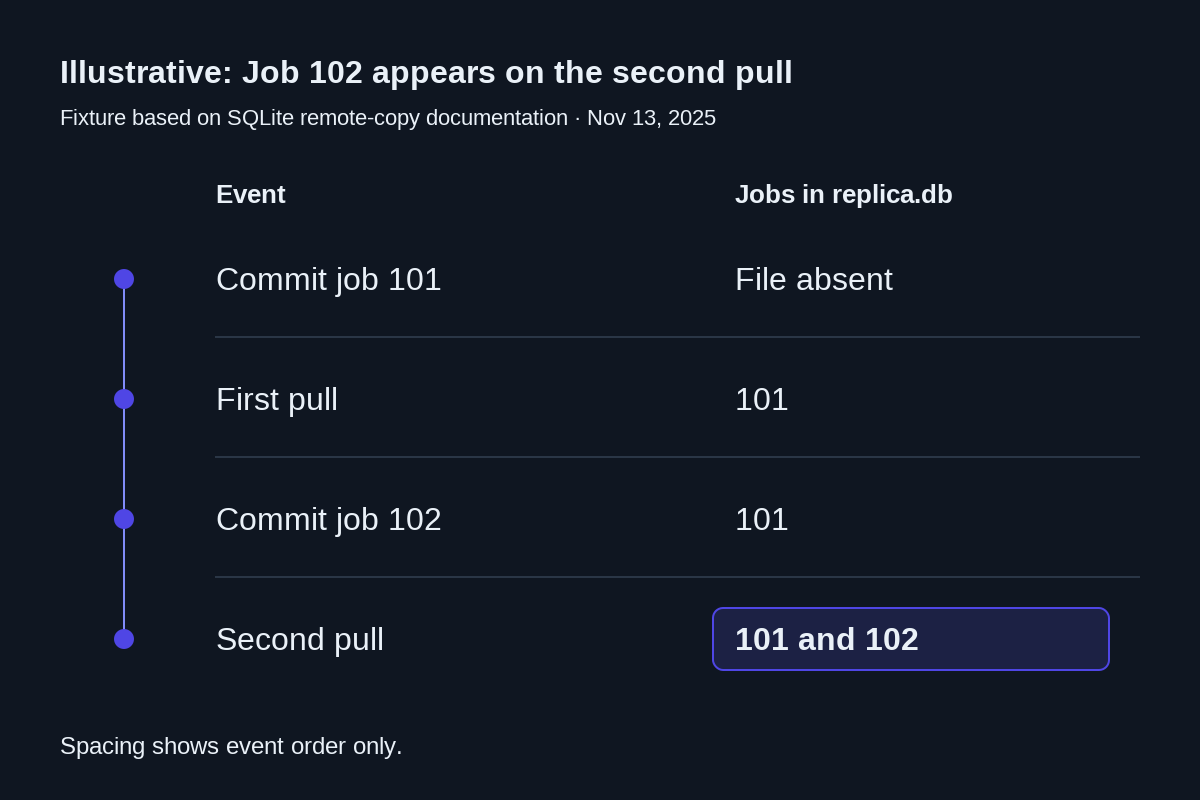
The exercise uses a synthetic jobs table. You’ll commit job 101, pull and verify a first snapshot, then commit job 102 on the origin. The existing replica should still show only job 101. After a second pull, it should show both jobs in order. A separately verified baseline.db lets you reproduce the first result or keep working if the refresh fails. All outputs below are illustrative expectations for this fixture.
Simon Willison highlighted the direct SSH copy in his November 26, 2026 note. SQLite documents that the completed replica reflects the origin at the start of synchronization. The origin can continue accepting writes during the transfer. Commits made during the transfer belong to a later snapshot. Willison’s note · SQLite remote-copy documentation
Set up the origin and destination
- Choose two Linux hosts you are authorized to use. The origin holds the fixture and the destination receives it. Open a terminal on each host. Use an SSH login or alias that already connects from the destination to the origin.
- Confirm that
sqlite3_rsyncis installed on both hosts. Check each executable’s package or build record and use version 3.50.0 or later at both ends, preferably current builds. Make thesqlite3CLI available on both machines. Use Bash on the destination for the prompts and verification function below. - Pick private local storage on both hosts. Allow room on the destination for the working replica, the baseline and a separate recovery copy if needed. Use the same authorized origin account to create the scratch database and serve it over SSH.
The two SQLite executables have different jobs. sqlite3 runs the SQL that creates and checks the fixture. sqlite3_rsync transfers the snapshot. The SQL shell’s version identifies the SQL shell, so check the transfer utility separately. sqlite3_rsync --help shows the available transfer options on the machine where you run it. For the origin, check the binary in the SSH command environment too. That environment can have a different executable search path from an interactive login. SQLite CLI reference · SQLite utility installation and options
Keep the exercise on local filesystems. SSH carries the synchronization protocol between hosts, and each side opens its database on its own machine. In ordinary write-ahead logging mode, or WAL, SQLite’s connections use a shared-memory index on the same host. A remote filesystem mount adds a different dependency and is unsuitable for this WAL fixture. Using the same account for the fixture and the SSH copy also avoids changing the permissions on a service database just to try the tool. SQLite WAL documentation
The disk constraint is about where the full output lands. The SQLite Online Backup API copies into a destination database, and VACUUM INTO writes a separate compacted database. If you create either output on the origin and then upload it, the origin needs room for that output. With the SSH pull, the replica lands on the destination during the transfer. Leave room on the origin for the running application and its journal. For a busy WAL database, a long-lived reader can limit checkpoint progress while the application continues writing, so consider possible WAL growth before starting a large pull on a nearly full volume. An incremental refresh can save network traffic even though the destination still stores a complete database. SQLite Backup API · SQLite VACUUM documentation · SQLite WAL checkpoint behavior · SQLite network bandwidth documentation
Commit job 101 on the origin
- Create a private scratch directory on the origin and launch the SQLite CLI on a new file. Save the printed absolute path to
jobs.dbfor the destination prompt. - Paste the SQL into the origin’s SQLite prompt. Confirm that journal mode reports
waland that the ordered query shows job 101 with statecomplete. - Leave the SQLite prompt open. Wait until the first pull and baseline checks finish before using it to commit the second job.
Run this in the origin shell.
origin_dir=$(mktemp -d) &&
  printf '%s\n' "$origin_dir/jobs.db" &&
  sqlite3 -bail -list -noheader -separator '|' "$origin_dir/jobs.db"
Run this at the origin SQLite prompt.
PRAGMA journal_mode=WAL;
BEGIN;
CREATE TABLE jobs (
  job_id INTEGER PRIMARY KEY,
  state TEXT NOT NULL
);
INSERT INTO jobs (job_id, state) VALUES (101, 'complete');
COMMIT;
SELECT job_id, state FROM jobs ORDER BY job_id;
Expect wal and 101|complete on separate lines, alongside the shell’s prompts and any startup text. A result such as delete means SQLite could not make the requested journal mode change. Resolve the scratch filesystem or SQLite setup before continuing with the WAL fixture. Use WAL here to model a common live job log. SQLite removed the remote-copy utility’s WAL and matching-page-size requirements in 3.50.0, so the procedure can use a real origin’s existing journal mode when both transfer utilities are current. SQLite journal mode reference · SQLite WAL setup · SQLite remote-copy compatibility
Creating the table and inserting the first row in one transaction gives the exercise a known committed starting point. The integer key distinguishes the records, and the two different state values catch a wrong value even if both IDs are present. The transaction finishes at COMMIT, so you can leave the connection open with the fixture ready for the first pull. Use two separate commits so you can establish where the snapshot boundary falls without racing the transfer.
A committed WAL page can still reside in the write-ahead log. A SQLite connection reads the relevant committed WAL state when it opens jobs.db. Copying the main file alone can miss that state. Ordinary rsync can also read different parts of a live database across different transactions. Pass the database path to sqlite3_rsync and leave the origin sidecars with the database. SQLite WAL file documentation · SQLite comparison with ordinary rsync
Pull and verify the first snapshot
- Run the setup block on the destination. Enter the authorized SSH alias or
USER@HOSTand the absolute path printed by the origin. Keep this Bash session open for later destination commands. - Pull into
replica.db. Proceed when the transfer completes successfully and the verification output matches both expected lines. - Copy the first replica to
baseline.dbon the destination and check it independently. Keep the baseline out of subsequent refresh commands.
read -r -p 'Origin SSH alias or USER@HOST: ' origin_host
read -r -p 'Absolute path printed on the origin: ' origin_db
scratch=$(mktemp -d) && printf 'Destination directory: %s\n' "$scratch"
Continue only after the setup prints a destination directory and both prompt values are set. If directory creation fails, use private writable storage with enough headroom. Use the origin path exactly as printed. The copy’s destination is a file inside the local scratch directory. Using that explicit path keeps the exercise’s replica distinct from a working database elsewhere on the destination.
verify_jobs() {
  sqlite3 -readonly -ifexists -bail -list -noheader -separator '|' "$1" \
    'PRAGMA integrity_check;' \
    'SELECT job_id, state FROM jobs ORDER BY job_id;'
}

sqlite3_rsync -v "$origin_host:$origin_db" "$scratch/replica.db" &&
  verify_jobs "$scratch/replica.db"
Read the two positional arguments from left to right. The first is the origin, and the HOST:PATH form puts it on the SSH host. The second is the replica, which the utility creates if absent. Putting a remote path on the right makes it the destination of the copy. Check the argument order again before substituting a live application path. The -v flag asks the utility for more transfer output. The shell runs verify_jobs only after the transfer exits successfully. SQLite remote-copy syntax
The verification function opens an existing file read-only. -ifexists makes a missing path an error, and -bail stops SQL processing if a command fails. SQLite evaluates the two SQL arguments in order. List mode, suppressed headings and an explicit separator give each job one comparable output line. ORDER BY job_id fixes the row order independently of the query plan. SQLite CLI options · SQLite PRAGMA reference
After the first pull, expect these two lines from verification.
ok
101|complete
PRAGMA integrity_check covers structural and consistency problems such as missing pages and mismatches between indexes and tables. It returns one ok row on success or diagnostic rows when it finds problems. Read the output even if the CLI ran both statements. The second line supplies evidence about the application state. An unrelated SQLite file can return ok, and a healthy earlier copy can contain an older state. If the query reports a missing jobs table, check that the transfer and the query refer to the expected files. For an application schema that relies on foreign keys, run PRAGMA foreign_key_check; as a separate check and investigate any returned rows. The fixture has no foreign keys. SQLite integrity and foreign-key checks
Make the baseline only after you have matched the first result.
sqlite3_rsync "$scratch/replica.db" "$scratch/baseline.db" &&
  verify_jobs "$scratch/baseline.db"
The baseline should independently return ok and 101|complete. This invocation uses SQLite’s documented local-to-local mode. Both files live on the destination. If you see an error or different rows, keep replica.db available and fix the baseline problem before refreshing the replica. The independent baseline lets you reopen the earlier state directly from a verified file, even after replacing the contents of the working replica. SQLite remote-copy documentation
Commit job 102 and read the replica again
- Return to the open origin SQLite prompt and run the second transaction. Confirm that the origin’s ordered query shows both jobs.
- Read
replica.dbagain on the destination before starting a new transfer. Expectokand only job 101. - Pull into the same replica path. Verify that job 102 now appears with the expected state, then check that the baseline still gives the first result.
Run the second transaction at the origin SQLite prompt.
BEGIN;
INSERT INTO jobs (job_id, state) VALUES (102, 'queued');
COMMIT;
SELECT job_id, state FROM jobs ORDER BY job_id;
The origin should show 101|complete followed by 102|queued. Because you waited for the first pull and baseline checks before making this commit, job 102 falls clearly outside the first snapshot. Open a new CLI connection on the destination to read the existing replica. An open WAL read transaction can retain an earlier view for its own lifetime. Starting a fresh connection makes this observation about the current contents of the replica. SQLite WAL snapshot behavior
verify_jobs "$scratch/replica.db"
Expect ok and 101|complete. Seeing exactly those lines after confirming 102|queued on the origin shows that a completed sqlite3_rsync invocation leaves a point-in-time copy. To incorporate the later commit, run a new pull on the destination.
sqlite3_rsync -v "$origin_host:$origin_db" "$scratch/replica.db" &&
  verify_jobs "$scratch/replica.db"
ok
101|complete
102|queued
Now check the saved file independently.
verify_jobs "$scratch/baseline.db"
The baseline should give ok and 101|complete. A baseline that passes is available for the earlier investigation even if the second transfer failed. Use the second replica for questions about job 102 only after checking the transfer result and the two rows printed by that replica.
| Input | Action | Expected result |
|---|---|---|
| jobs:pull-01 with job 101 committed as complete and no local replica.db | Run sqlite3_rsync -v "$origin_host:$origin_db" "$scratch/replica.db" and, after success, run verify_jobs "$scratch/replica.db". |
The integrity check prints ok. The ordered query returns job 101 alone, in state complete. |
| jobs:between-pulls with job 102 committed as queued on the origin | Run verify_jobs "$scratch/replica.db" before the second transfer. |
The integrity check prints ok. The existing replica still returns only job 101 in state complete. |
| jobs:pull-02 with jobs 101 and 102 committed on the origin and the first replica on the destination | Run sqlite3_rsync -v "$origin_host:$origin_db" "$scratch/replica.db" and, after success, run verify_jobs "$scratch/replica.db". |
The integrity check prints ok. The ordered rows show job 101 complete, then job 102 queued. |
| jobs:baseline-01 with baseline.db saved after the first pull | Run verify_jobs "$scratch/baseline.db" after the second transfer. |
The integrity check prints ok. The saved copy still returns only job 101 in state complete. |
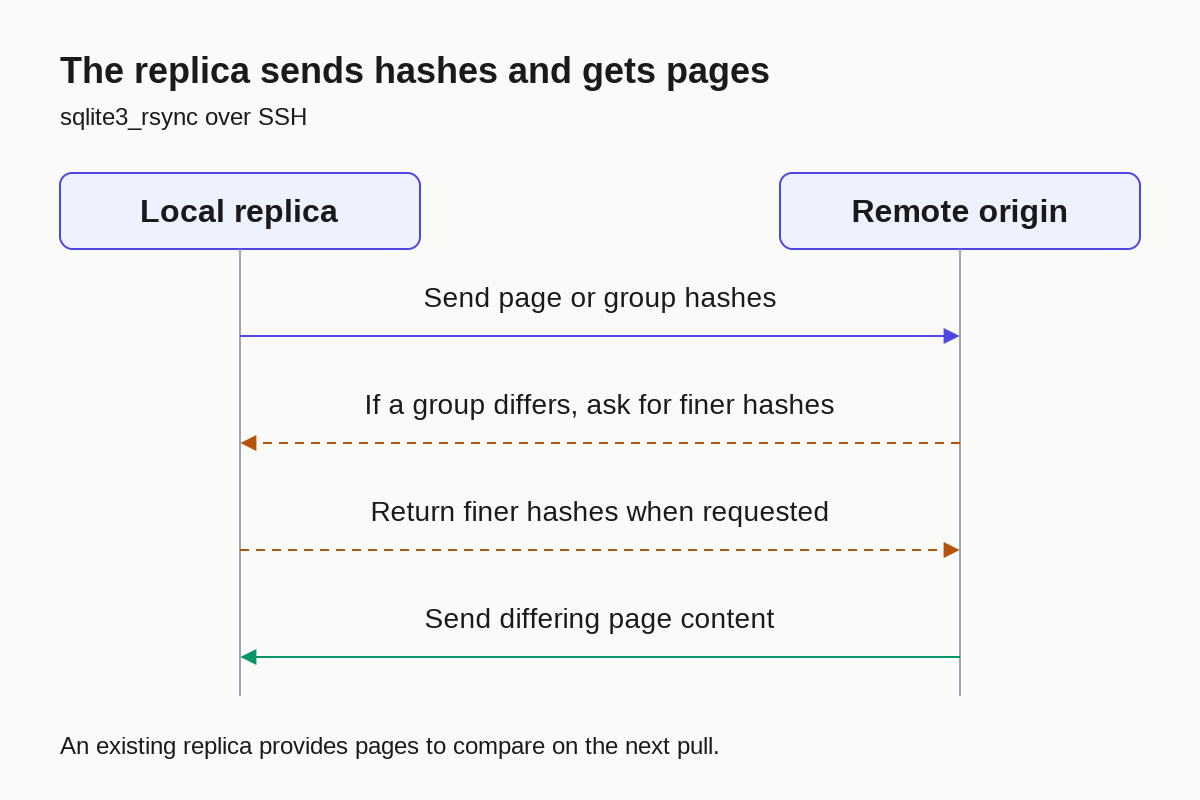
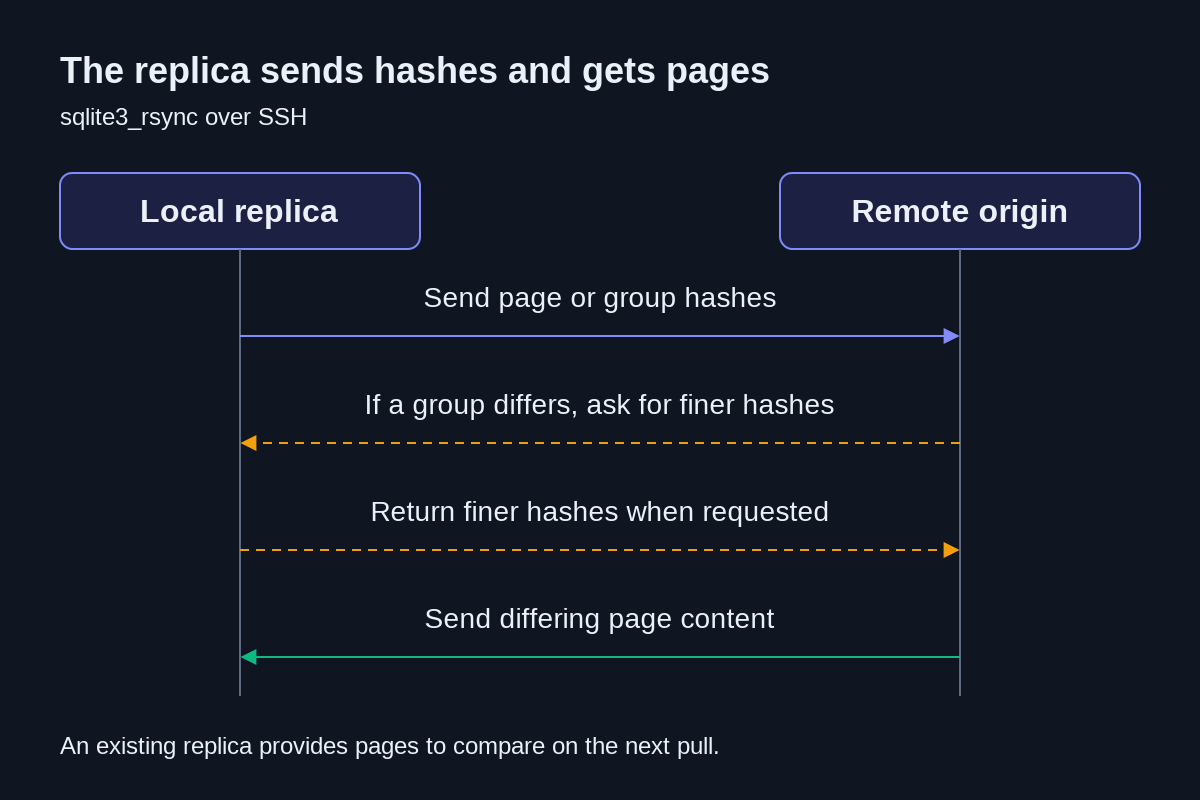
Reusing the replica gives the utility pages to compare against the origin. The replica sends page or group hashes. If a group differs, the origin can ask for finer hashes. The origin sends differing page content back to the replica. Adding job 102 is one logical row change. The protocol exchanges database pages, so how much network traffic the second pull uses depends on which pages differ and the cost of comparing them. Use the exercise to verify which rows became visible. SQLite’s documentation describes how similarity between the origin and replica affects bandwidth. SQLite network bandwidth documentation
If the second replica returns only job 101, confirm the origin query showed both rows after COMMIT. Check that the transfer used the same origin path and that verification opened replica.db. In a busy application, an expected row is most useful when you can establish that it was committed before synchronization started. Observing it on the origin after the transfer finishes leaves the timing ambiguous. Comparing whole-file hashes also has limits here. SQLite documents that the replica’s header fields can differ from the origin’s even when table and index contents match. SQLite snapshot and header documentation
Recover without overwriting the saved baseline
| Symptom | Next check | What to do |
|---|---|---|
| SSH fails before the utility starts | Try the same authorized login separately and confirm the host identity. | Resolve the connection problem before running another transfer. |
| SSH works and the remote executable cannot be found | Locate the installed binary and check whether SSH’s command environment can find it. | Use a verified absolute remote path with --exe when necessary. |
| Startup stalls with mixed versions | Look for 3.50.0 or later locally and 3.49.1 or earlier remotely. | Prefer updating both ends. For a compatible legacy pair, SQLite documents --protocol 1 as a workaround. |
| The transfer fails or is interrupted | Check whether it reached the source and whether the destination could write the file. | Correct the failure and retry to a fresh path. Keep the baseline available. |
| The transfer succeeds but verification fails | Inspect integrity diagnostics, the selected database path and the expected committed rows. | Continue using the baseline for earlier-state questions until a retry passes both checks. |
When the SSH session opens but the utility cannot start remotely, check the executable’s location on the origin. The remote invocation uses SSH’s executable search path. If you verified /opt/bin/sqlite3_rsync as the remote binary, run the following on the destination. --exe selects that remote path, and the command still launches the destination’s local transfer utility to start the pull. SQLite remote executable documentation
retry_dir=$(mktemp -d) &&
  sqlite3_rsync -v "$origin_host:$origin_db" "$retry_dir/retry.db" \
    --exe /opt/bin/sqlite3_rsync &&
  verify_jobs "$retry_dir/retry.db"
SQLite documents a startup negotiation bug when a local utility at 3.50.0 or later talks to a remote utility at 3.49.1 or earlier. Check this version pairing if SSH works and the remote executable is available but the transfer appears stuck at startup. Updating both ends lets the utility negotiate normally. If you must use the documented --protocol 1 workaround, first confirm that the legacy pair can operate with the databases’ journal modes and page sizes. The fresh-destination exercise assumes modern versions at both ends. SQLite backwards-compatibility issues
For a failed or interrupted transfer with normal executable lookup, run this on the destination after correcting the cause.
retry_dir=$(mktemp -d) &&
  sqlite3_rsync -v "$origin_host:$origin_db" "$retry_dir/retry.db" &&
  verify_jobs "$retry_dir/retry.db"
When both fixture jobs were committed before retrying, the expected result is ok, 101|complete and 102|queued on separate lines. A fresh path keeps the retry independent of the file left by the failed attempt. It requires space for another full database. If the destination filesystem filled up, place the new scratch directory on private storage with enough room for the replica and any SQLite sidecars. For a busy error, check that the transfer and other connections to the scratch file have finished. For a read-only WAL open error, check whether the existing sidecars are readable or whether SQLite can create them in the containing directory. Keep any existing WAL with its database. SQLite read-only WAL and busy behavior
To resume the first investigation while troubleshooting, reopen the baseline with verify_jobs "$scratch/baseline.db". The earlier result should still be ok and job 101 alone. Record which file you used so a colleague can tell which commits your analysis covers. If the question requires job 102, wait for a verified replica.db or retry.db with both rows. To recover the analysis, change the local file you query and leave the origin serving the application.
Use the verified copy for analysis
- Pick the verified file by the state your question requires. Use
baseline.dbfor the original one-job view or the verified second replica for both jobs. - Keep that path stable throughout the investigation. For a real job log, record the origin path, approximate start of the pull and any known committed records you checked against the copy.
- Open the chosen file read-only and run the investigation query. Once you have the results you need, exit the fixture’s SQLite prompt with
.quitand retain the copies required for reproducibility.
On the destination, after a successful second pull and verification, look up job 102 explicitly.
sqlite3 -readonly -ifexists -bail -list -noheader -separator '|' \
  "$scratch/replica.db" \
  'SELECT job_id, state FROM jobs WHERE job_id = 102;'
Expect 102|queued. If you recovered to retry.db, use the verified retry path in that command. The same query against baseline.db should print no row because that snapshot predates the second commit. Keep the working file away from further refreshes once someone starts relying on its results. For an actual job log, pick a query that matches your question, such as a completed batch’s run ID and final outcome. Use a value you independently saw committed before the pull as your expectation. SQLite CLI reference
If the analysis ends in a Datasette chart, use the same verified snapshot for both the chart and the hand-run comparison query. When their results differ, confirm the file path first, then compare the query and filters. Verify Datasette Charts Against the SQL Behind Them
For an agent incident, keep the job ID and snapshot identity alongside the session evidence so a later reader can match the database row to the run that produced it. This matters when several assistants contribute to the same investigation or when the original session history might rotate. You Can’t Replay What You Can’t See · AI Agent Incident Evidence Before the Session Rotates
If an agent will inspect the saved copy, expose the verified file through a read-only access path. Start with a query small enough to reproduce by hand. The job 102 lookup has a single input and a concrete expected row. Ask for the selected path alongside the result so you can compare both the file and the returned value. MCP Filesystem Server: Share One Folder Read-Only · Grafana MCP: Inspect a Dashboard and Verify a Bounded Query