Share build files with Lambda MicroVM sessions and verify cleanup
Use Lambda MicroVM sessions to pass a build file between tasks, prove an independent job starts clean, and verify that each recorded worker has terminated.

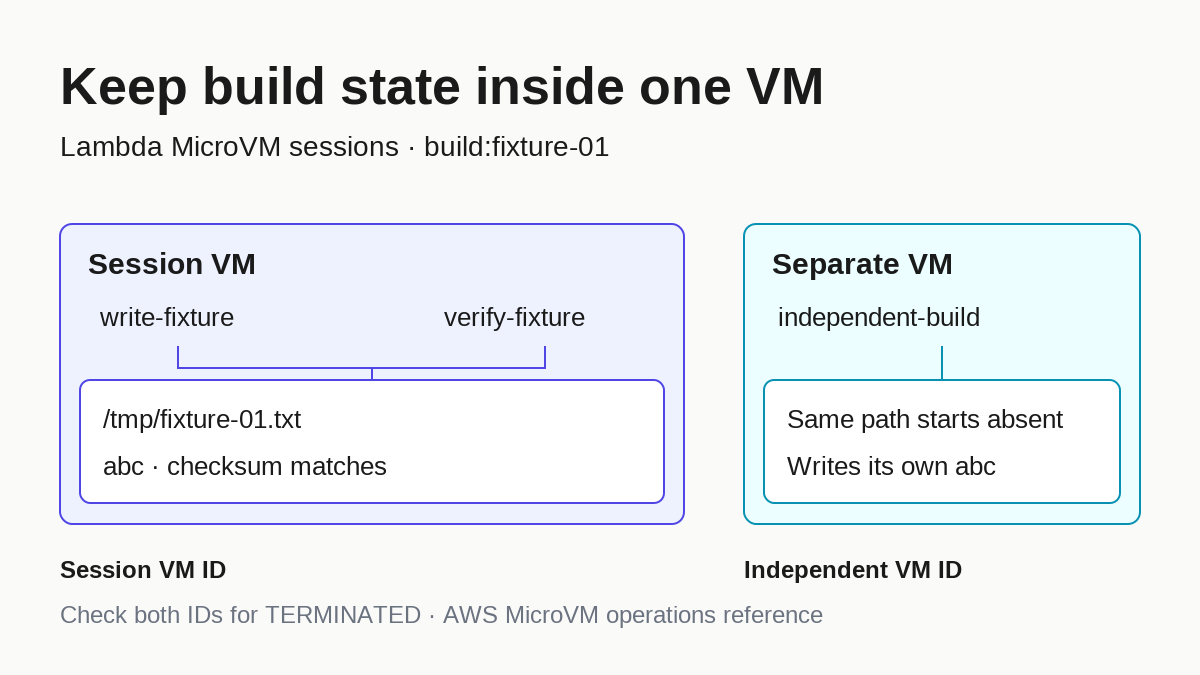
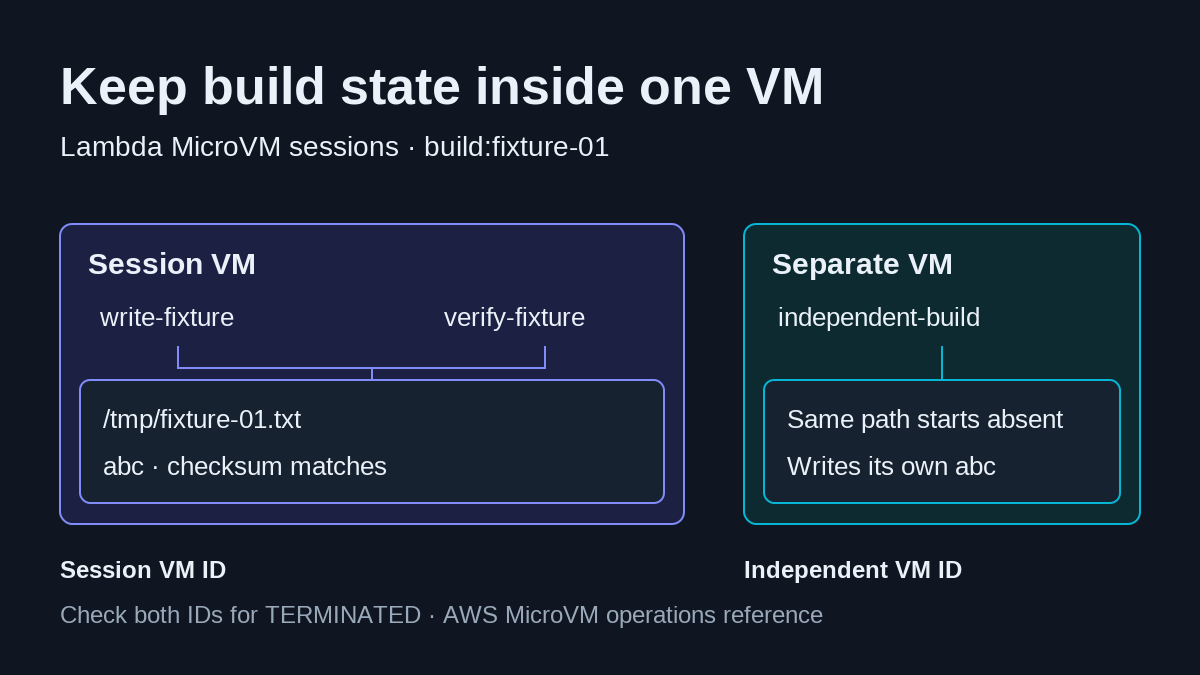
A build step writes a file, a verification step needs its exact bytes, and an independent build needs a clean workspace. Lambda MicroVM sessions let a platform engineer put the first two steps on one filesystem while giving the independent build its own VM. Verify all three parts of that decision with one fixture. Compare the checksum and the worker IDs, check that the independent VM starts without the file, then confirm that each recorded VM reaches TERMINATED.
Use a nonproduction AWS sandbox with a ready MicroVM image project, an existing durable function, an established way to invoke its published version or alias, and AWS CLI access to the test resources. The fixture uses three bytes and a fixed path. The results throughout are illustrative expectations derived from the example and AWS’s documented behavior.
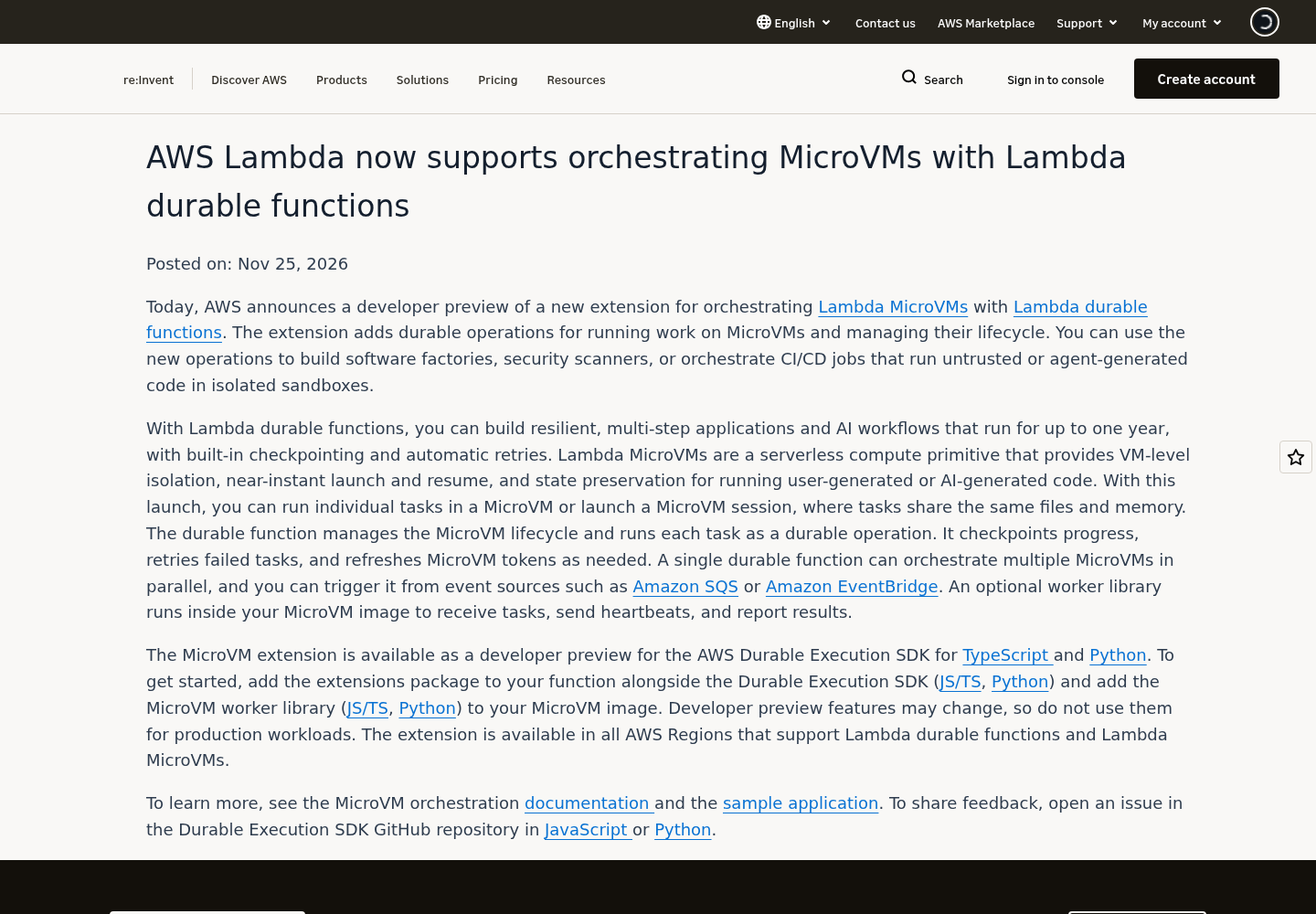
AWS announced the durable execution extension for MicroVM orchestration on November 25, 2026. The extension is a developer preview for TypeScript and Python, and AWS advises against production use. This example uses the JavaScript SDK and a Node.js worker. AWS announcement
Decide which jobs share a filesystem
- Put the writer and verifier in one
microvmSession. The verifier depends on/tmp/fixture-01.txt, which the writer creates after launch. Await the writer before invoking the verifier so the second job reads a completed file. - Run
independent-buildusingmicrovm. Start it after verification and before the session handler returns. It checks the same path while the original session is still open, then writes and checks its own copy. Both operations use the same image configuration. - Record which VM served each job, then look up its state separately. If an expected VM ID is missing, keep cleanup open while you reconcile the launch history.
| Input | Action | Expected result |
|---|---|---|
build:fixture-01, mode normal, bytes abc at /tmp/fixture-01.txt |
Await vm.invoke(ctx, 'write-fixture', { action: 'write' }, job), then await vm.invoke(ctx, 'verify-fixture', { action: 'verify' }, job) in the same session. |
Both callbacks report the same microvmId. The verifier reports ba7816bf8f01cfea414140de5dae2223b00361a396177a9cb410ff61f20015ad. |
build:fixture-01, mode normal, same image and path |
Await microvm(ctx, 'independent-build', { action: 'independent' }, { ...config, ...job }) while the session handler is still open. |
The job reports a different microvmId, startedClean: true, and the same digest after writing its own copy. |
build:fixture-01, mode missing, same image with the fixture path absent from the snapshot |
Skip write-fixture and run verify-fixture in a fresh session. |
The verification callback fails with the message Missing fixture: /tmp/fixture-01.txt. Inspect the session VM separately. |
build:fixture-01, mode stop, session write finished |
Stop the execution during the three-minute ctx.wait after the write. Inspect history and then the state of the recorded session VM. |
History shows ExecutionStopped if the stop lands during the wait. Cleanup closes when get-microvm reports TERMINATED for that VM. |
The AWS operations reference defines the boundary in terms of physical resources. microvmSession launches a VM and sends multiple jobs to it over HTTP. microvm launches a separate VM for a single job. Calling the second operation from inside the first operation’s handler gives it a place in the durable execution tree and its own VM. Pass the handler’s child context ctx to both SDK operations inside the handler. MicroVM operations reference
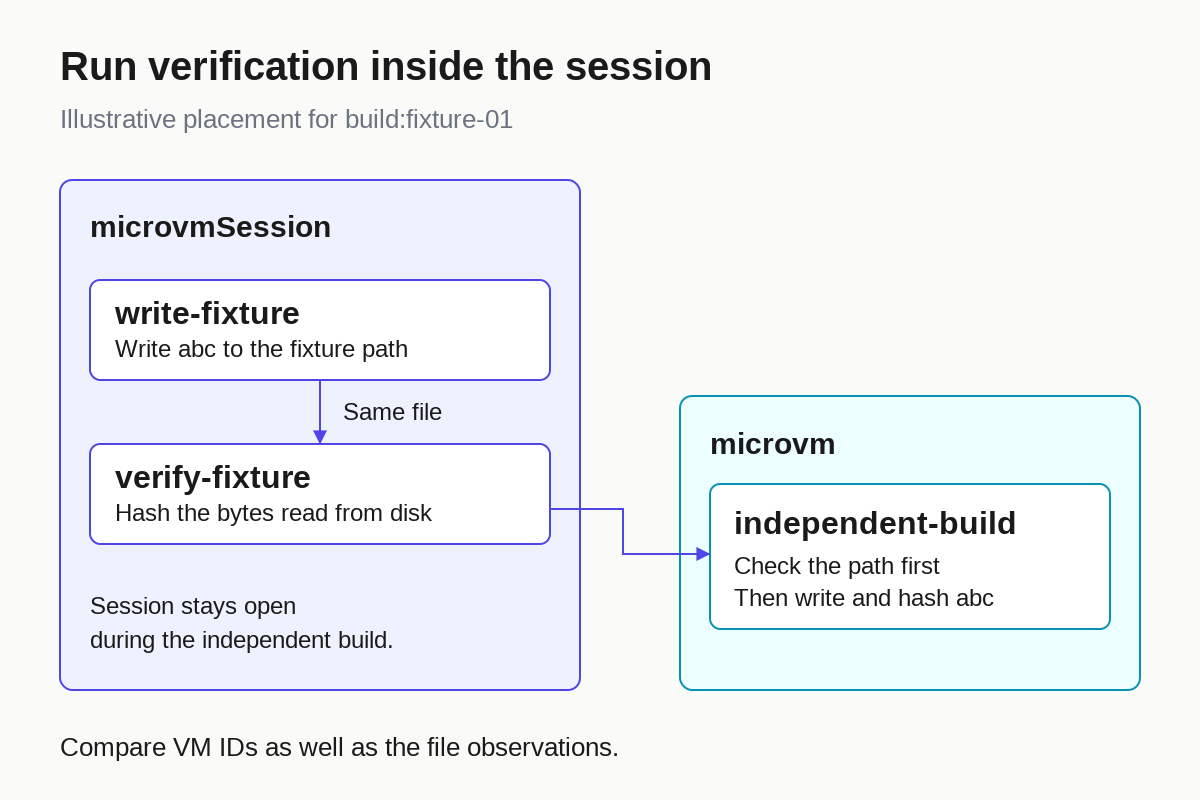
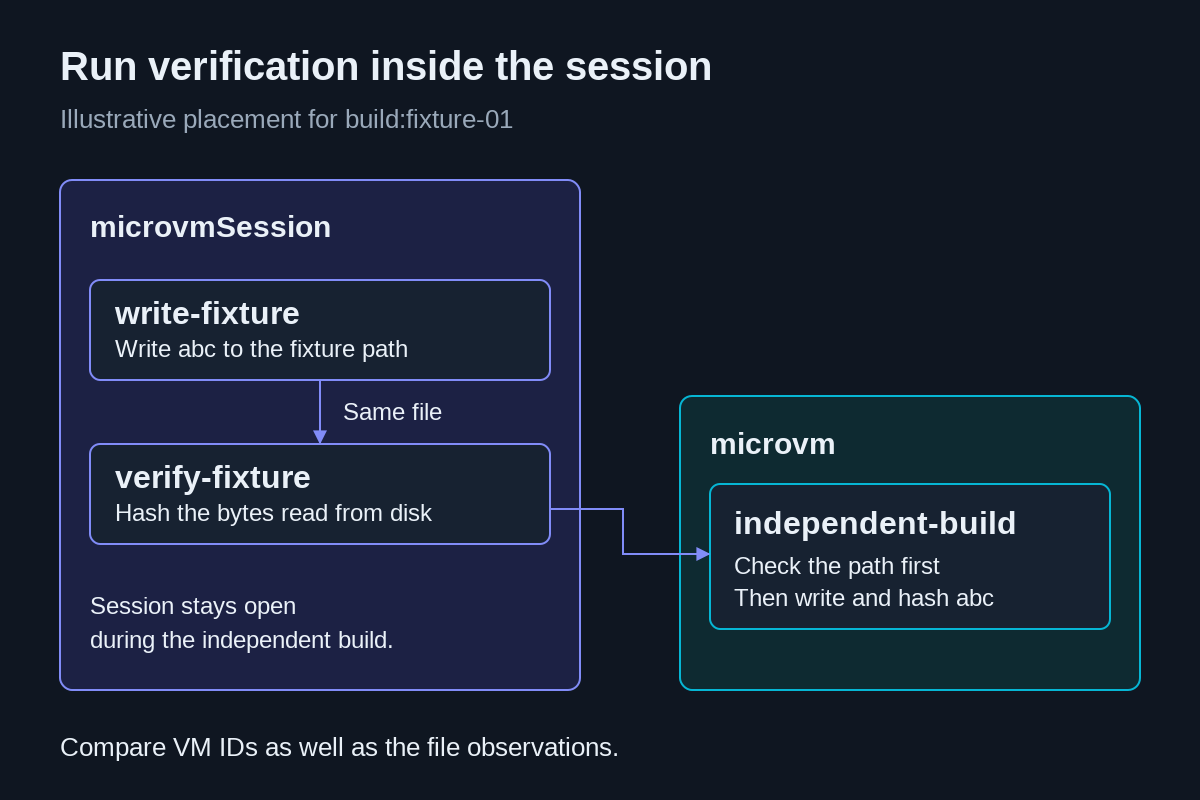
A fresh VM restores the image snapshot, including initialized disk and memory. Check that the image build and startup code leave the fixture path absent. A stray copy in the snapshot can let the verifier read and hash the file in missing mode, or make the independent job report a dirty start even when AWS assigned distinct VM IDs. Starting from the same image makes that baseline mistake easier to spot. For real builds, put toolchains and common dependencies in the image, then write per-build outputs after launch. AWS MicroVM core concepts
For a larger pipeline, draw the dependency around what the next step actually reads. A compiler and a test harness that need the same checkout and generated files can share a session. A second build that consumes only a commit identifier can build in its own VM. If a later consumer needs the bytes after the original VM is gone, give the artifact an explicit external destination and pass a reference. A durable checkpoint can retain a path as a string after the disk it referred to has disappeared. The local integration testing guide covers checks you can run before reaching the hosted VM boundary. Local AWS integration testing
Prepare the image and deploy the fixture
- In your existing Node.js image project, install
@aws/durable-execution-sdk-js-compute-workerand set the image startup program tonode worker.mjs. Use theCreateMicrovmImagehooks configuration below in your existing image request. Build the image with the worker already listening when Lambda captures the ready snapshot. - In your existing durable function project, install the three orchestrator packages shown below and use the exported function as the handler in your normal deployment. Set
MICROVM_IMAGE_ARNto the ready fixture image ARN andMICROVM_ROLE_ARNto its runtime role ARN. Set the function invocation timeout to 120 seconds for this example. Leave enough time in the durable execution deadline for launch, the three-minute cancellation exercise and subsequent jobs if the wait completes. Publish a function version for the experiment and select that version or an alias pinned to it. - Confirm the function and worker roles before invoking. The function needs
lambda:RunMicrovm,lambda:TerminateMicrovm,lambda:CreateMicrovmAuthToken,lambda:GetMicrovm,lambda:PassNetworkConnectorfor the connectors in use, andiam:PassRolefor the VM role. The VM role needslambda:SendDurableExecutionCallbackSuccess,lambda:SendDurableExecutionCallbackFailure, andlambda:SendDurableExecutionCallbackHeartbeatscoped to the durable function ARN patternarn:aws:lambda:<region>:<account>:function:<name>:*. Your operator identity needs authority to read execution history and VM details and to stop or terminate the specific sandbox resources used in the exercise. MicroVM operations reference
Merge this hooks member into the existing CreateMicrovmImage request. Port 8080 matches the worker’s default. The run hook delivers the independent job and initializes the worker for session jobs sent over HTTP. The ready hook is required when a lifecycle hook is enabled. The block includes the worker README’s recommended terminate hook with its 10-second timeout. Resume and suspend hooks are relevant to sessions configured to suspend. This fixture leaves suspension off. AWS SDK compute worker README
{
  "hooks": {
    "port": 8080,
    "microvmHooks": {
      "run": "ENABLED",
      "runTimeoutInSeconds": 10,
      "terminate": "ENABLED",
      "terminateTimeoutInSeconds": 10
    },
    "microvmImageHooks": {
      "ready": "ENABLED"
    }
  }
}
The function and image have different dependencies. The function creates durable operations. The worker receives jobs and reports their callbacks. The core JavaScript SDK must be at least 2.6.0 according to the extension README. The separate AWS SDK client is an optional peer dependency required by the MicroVM import. Use your existing packaging and lockfile process for both projects. AWS SDK extensions README
# In the image's Node.js project
npm install @aws/durable-execution-sdk-js-compute-worker

# In the durable function project
npm install @aws/durable-execution-sdk-js @aws/durable-execution-sdk-js-extensions @aws-sdk/client-lambda-microvms
Use this complete worker module as worker.mjs. It accepts a fixed set of fixture actions and a fixed path. The verifier receives only the action, so it must read the actual bytes from disk. The independent writer checks that same path before writing. It treats only ENOENT as evidence that the fixture is absent and surfaces other read errors.
import { createHash } from 'node:crypto';
import { readFile, writeFile } from 'node:fs/promises';
import { startMicrovmWorker } from '@aws/durable-execution-sdk-js-compute-worker/microvm';

const path = '/tmp/fixture-01.txt';
const expected = 'ba7816bf8f01cfea414140de5dae2223b00361a396177a9cb410ff61f20015ad';

async function verifyFile() {
  let bytes;
  try {
    bytes = await readFile(path);
  } catch (error) {
    if (error.code === 'ENOENT') throw new Error(`Missing fixture: ${path}`);
    throw error;
  }
  const sha256 = createHash('sha256').update(bytes).digest('hex');
  if (sha256 !== expected) throw new Error(`Wrong fixture checksum: ${sha256}`);
  return sha256;
}

await startMicrovmWorker({
  handler: async (input, context) => {
    const { action } = input;
    const { microvmId } = context;
    const result = { action, microvmId, path };
    context.logger.info('fixture job', { action, microvmId });

    switch (action) {
      case 'write':
        await writeFile(path, 'abc');
        return { ...result, bytesWritten: 3 };
      case 'verify':
        return { ...result, sha256: await verifyFile() };
      case 'independent': {
        let exists = true;
        try {
          await readFile(path);
        } catch (error) {
          if (error.code !== 'ENOENT') throw error;
          exists = false;
        }
        if (exists) throw new Error(`Independent build started with ${path}`);
        await writeFile(path, 'abc');
        return { ...result, startedClean: true, sha256: await verifyFile() };
      }
      default:
        throw new Error('Unknown fixture action');
    }
  }
});
The worker starts with the image entry point and reports the resolved JSON result to microvm or vm.invoke. A rejected handler reports a failure with its error name and message. The per-job microvmId comes from the worker context. The application log records the ID before touching the file so even a failed read can leave a correlation point when logging is available. Keep callback IDs and endpoint tokens out of your own logs and copied test records. AWS SDK compute worker README
Use this function module as index.mjs. The mode is part of the invocation, which lets the same published code run all three cases. The independent operation leaves request unset. The extension uses run-hook delivery when the full launch payload fits the 4,096-code-point limit and there is no custom path. Session jobs always go over HTTP. The worker’s default handler supports both delivery forms. MicroVM operations reference
import { withDurableExecution } from '@aws/durable-execution-sdk-js';
import { microvm, microvmSession } from '@aws/durable-execution-sdk-js-extensions/compute/microvm';

export const handler = withDurableExecution(async (event, context) => {
  const mode = event.mode;
  if (mode !== 'normal' && mode !== 'missing' && mode !== 'stop') {
    throw new Error('Choose normal, missing, or stop');
  }

  const imageIdentifier = process.env.MICROVM_IMAGE_ARN;
  const executionRoleArn = process.env.MICROVM_ROLE_ARN;
  if (!imageIdentifier || !executionRoleArn) {
    throw new Error('Set MICROVM_IMAGE_ARN and MICROVM_ROLE_ARN');
  }

  const config = { imageIdentifier, executionRoleArn };
  const job = { timeout: { minutes: 5 }, heartbeatTimeout: { minutes: 3 } };

  return microvmSession(context, 'fixture-session', {
    ...config, timeout: { minutes: 10 }
  }, async (vm, ctx) => {
    const write = mode === 'missing' ? null :
      await vm.invoke(ctx, 'write-fixture', { action: 'write' }, job);

    if (mode === 'stop') await ctx.wait({ minutes: 3 });

    const verified = await vm.invoke(ctx, 'verify-fixture', { action: 'verify' }, job);
    if (!write?.microvmId || write.microvmId !== verified.microvmId) {
      throw new Error('Writer and verifier must report the same VM ID');
    }

    const isolated = await microvm(ctx, 'independent-build', { action: 'independent' }, {
      ...config, ...job
    });
    if (!isolated.microvmId || isolated.microvmId === verified.microvmId ||
        isolated.startedClean !== true || isolated.sha256 !== verified.sha256) {
      throw new Error('Independent build did not prove a clean, separate VM');
    }
    return { case: 'build:fixture-01', write, verified, isolated };
  });
});
Keep the session jobs sequential. By the time the write callback completes, the file write has completed, and the verifier can read without racing it. The independent build starts while the outer session is open, so its empty path tests the VM boundary while the writer’s workspace still exists under normal operation. The three-minute durable wait gives you an opportunity to retrieve the ID before stopping the execution. Keep the image version used by the fixture stable across all three modes. The launch guide documents that the image version defaults to the latest active one, so avoid changing the active version between runs. AWS guide to running and terminating MicroVMs
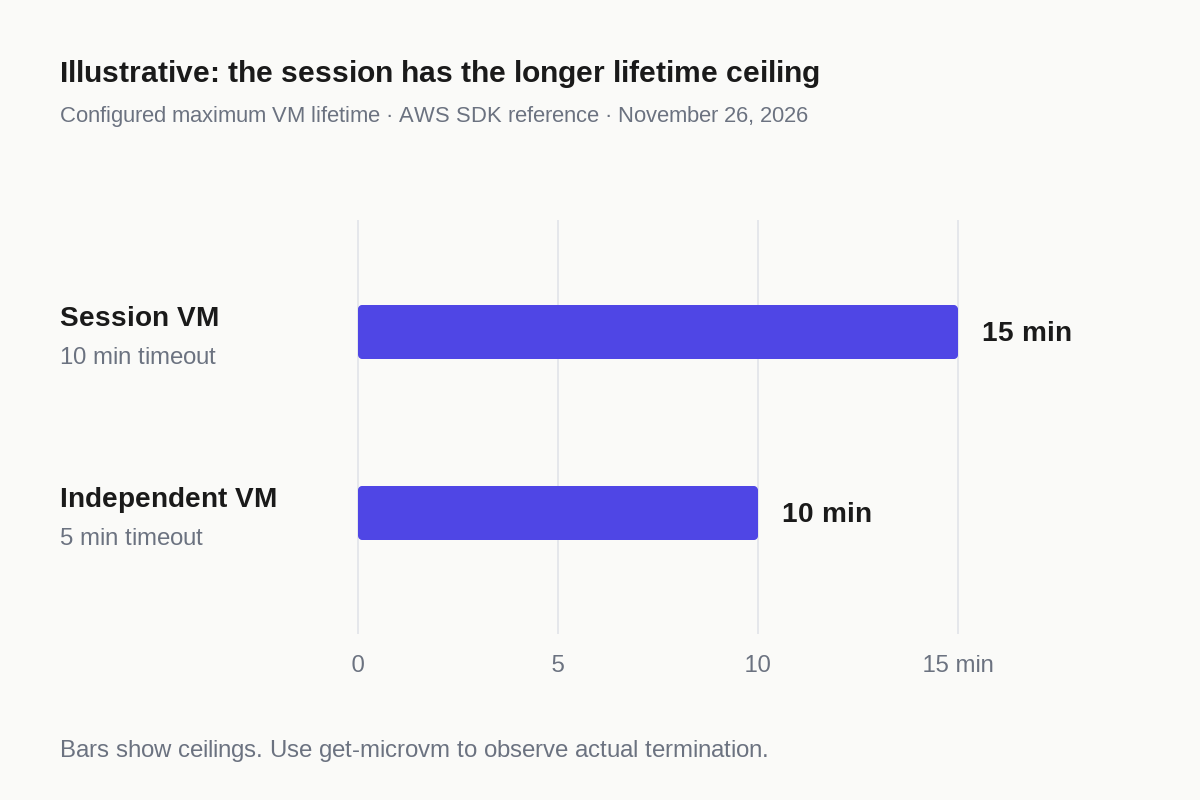
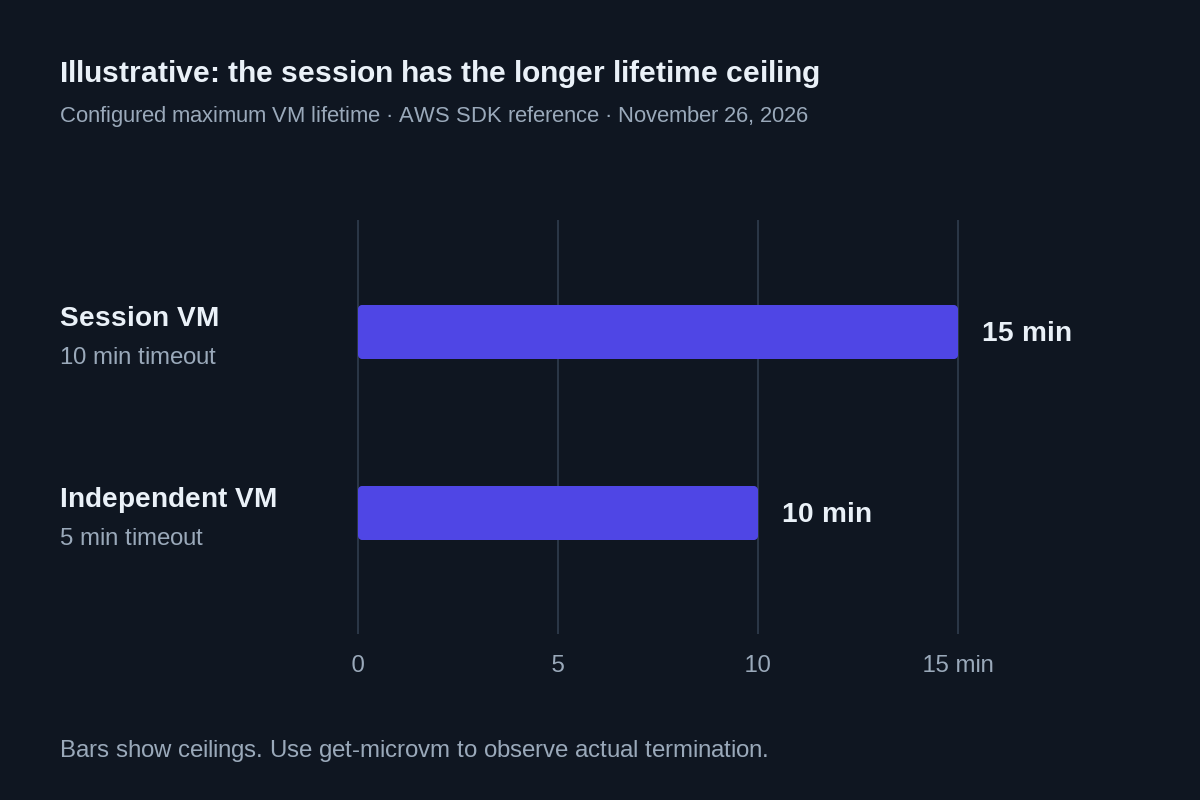
The five-minute job timeout bounds the wait for a result. The heartbeat timeout bounds a period without worker progress signals, and its first interval also includes time before delivery. The ten-minute session timeout sets the session VM’s lifetime with the SDK’s five-minute service allowance. That ceiling applies to the VM itself. The individual job timeouts still apply to callbacks. The 120-second function invocation timeout leaves room for the default 60-second HTTP retry window and some preceding work within an invocation. A slow launch or retries can consume that room. MicroVM operations reference
Verify the checksum and the clean start
- Send
{"mode":"normal"}as the event input to the version or alias you selected. Use your existing durable invocation method. For invocation syntax, follow the link titled “Invoking Lambda durable functions” in the SDK reference’s “Deploys and versions” section. Save the resulting durable execution ARN from your invocation path or its execution record. Use the same sandbox account and Region for the commands below and setEXECUTION_ARNto the actual ARN for this invocation. MicroVM operations reference - Read history with execution data. Find the completion payloads for the writer, verifier and independent build, or read their results together in the execution success event. Compare the two session job IDs, then compare the independent job ID. Check the exact digest and
startedCleanfrom the result. - Copy the distinct VM IDs into the lifecycle checks in the next section. If the execution fails before producing a final result, inspect the launch steps and available worker logs to recover the IDs already associated with the execution.
# Expected in normal mode after completion: ExecutionSucceeded with the fixture result.
aws lambda get-durable-execution-history \
  --durable-execution-arn "$EXECUTION_ARN" \
  --include-execution-data --output json
Read by operation name and parent context. fixture-session.launch belongs to the session. independent-build.launch belongs to the one-job operation. The SDK reference identifies those as MicrovmLaunch steps. The CLI exposes successful step results as StepSucceededDetails.Result.Payload, callback results as CallbackSucceededDetails.Result.Payload, and the execution result as ExecutionSucceededDetails.Result.Payload. Read the payload contents and check the truncation flags. A recorded launch can identify provisioned work even when its worker never completes. A job callback identifies which VM ran an action when the result carries the ID. Keep pagination enabled to read the full history. AWS CLI execution history reference
In the normal case, the verifier opens the chosen path and computes a digest from the bytes it reads. Compare the result with the worksheet’s expected digest and the writer’s VM ID. The independent job does a different check before producing its digest. It gets ENOENT at that path, writes its own file and reads it back. The worker writes abc without a trailing newline. A newline introduced during a manual reproduction changes the bytes and produces a checksum error even when both tasks use the correct VM.
Treat a repeated VM ID in the independent result as a placement failure. If the independent ID differs and the worker still finds the file, inspect the image build and startup process for an eager write. If verification reports an unexpected digest on the expected session ID, inspect any code writing the path and confirm which worker version the image contains. Where an actual build starts from a repository fixture, resolving the checkout and verifying the bytes on disk are separate checks. Git LFS fixture verification
Check each VM after success, failure, or stop
- Set
SESSION_VM_IDand, when the independent job launched,INDEPENDENT_VM_IDto the IDs you correlated with this execution. Read each VM state using the commands below. RecordmicrovmId,state,maximumDurationInSeconds, andterminatedAtif returned. Check the image and start time when reconciling ambiguous records. - For the deliberate worker failure, send
{"mode":"missing"}as the event input for a fresh execution. ExpectCallbackFailedforverify-fixture.callbackwith the missing-path error. Use the new execution ARN and recover its session VM ID. The thrown verifier error ends the session handler, which gives the extension its normal opportunity to request termination. The absence of an independent launch is expected in this case. - For the stop drill, send
{"mode":"stop"}for another new execution. Read history until you see the write callback complete andWaitStartedfor the three-minute wait. Capture the session VM ID from the write result or correlated launch record before issuing the stop. Check the wait’sScheduledEndTimestampand the latest history for a completed wait or terminal execution event. After stopping, refresh history and look forExecutionStopped. Inspect and, if necessary, terminate the recorded VM from outside the execution. AWS CLI execution history reference
# Expected after cleanup: state is TERMINATED for each recorded ID.
aws lambda-microvms get-microvm --microvm-identifier "$SESSION_VM_ID" --output json

# Run only when the independent operation launched and you have its ID.
aws lambda-microvms get-microvm --microvm-identifier "$INDEPENDENT_VM_ID" --output json
The CLI documents eventual consistency for state. If the state still reads TERMINATING, allow it time to settle and query again. SUSPENDED preserves disk and memory and can return to service, so a suspended VM still needs a terminal check for this exercise. Preserve the actual terminal observation for each recorded ID. Inspect stateReason on unexpected termination and compare the timestamps with the job history. AWS CLI MicroVM lookup reference
Use the following stop command against the stop-mode execution ARN. A stop is permanent and Lambda ceases invoking the function for that execution. The stop leaves completed side effects in place. If the wait ends before your stop takes effect, check history for additional launches and reconcile their VMs. Use a separate stop-mode execution to repeat the planned drill. AWS guide to managing durable executions
aws lambda stop-durable-execution --durable-execution-arn "$EXECUTION_ARN"

# Expected for a successful stop: an ExecutionStopped event in history.
aws lambda get-durable-execution-history \
  --durable-execution-arn "$EXECUTION_ARN" \
  --include-execution-data --output json
Stopping the execution while the session is waiting can bypass the extension’s terminate step. An attempted termination can also fail while the operation retains its successful job result. Look for a step with subtype MicrovmTerminate and inspect the function log for termination errors. Use the VM API to resolve final state in either case. When the VM is confirmed to belong to this exercise and is still running or suspended after the execution has ended, request termination explicitly. The maximum lifetime provides a fallback when ordinary cleanup fails. MicroVM operations reference · AWS guide to running and terminating MicroVMs
# Set VM_ID to the specific confirmed ID that still needs cleanup.
aws lambda-microvms terminate-microvm --microvm-identifier "$VM_ID"

# Expected after the transition settles: state is TERMINATED for this ID.
aws lambda-microvms get-microvm --microvm-identifier "$VM_ID" --output json
A launch that loses its response can provision a VM without leaving a usable ID in the launch step. Check available worker logs and run aws lambda-microvms list-microvms in the same Region to reconcile candidates against the fixture image and run window. Run these exercises one at a time with an image dedicated to the fixture so the candidate set stays small. Confirm ownership before terminating a candidate. A denied lookup, a missing history payload that prevents identification, or an unresolved candidate leaves cleanup unverified. Record the last successful observation and the configured duration ceiling, then continue reconciliation with the sandbox owner. The distinction between ending a workflow and resolving outstanding work also applies to agent coordinators. AgentOps · Interruptible agent coordinators
Recover from the first failing observation
| First observation | Next action | What would explain it |
|---|---|---|
verify-fixture reports the missing path in normal mode |
Check the write callback, job order and both worker IDs where available. Inspect the deployed file path in both actions. | A missing or failed writer, different VM IDs, or a path mismatch can produce a missing fixture. |
| The request fails before a job callback | Inspect the request step and function configuration. Confirm the worker listens on the configured hook port and the session has HTTP ingress and the required function permissions. | A request starting with fewer than 11 seconds of invocation time left cannot make the documented HTTP attempt. Delivery can also fail before the handler sees a job. |
| The worker logs a start, then the callback times out | Check worker logs, the worker role’s callback permissions and access to the Lambda API. | The worker can receive and even finish a job while the function still waits for its reported outcome. |
| The terminate call was denied | Have the sandbox owner resolve the explicit termination permission, terminate the confirmed VM and query it again. | The job result can survive a terminate failure. The state read establishes whether the worker was released. |
Keep the fixture’s write safe to repeat. It overwrites one small file with the same bytes. The worker deduplicates by callback ID, and AWS documents that the durable function can send equivalent work under a new callback ID. For the independent job, a repeated delivery under a new ID on a VM where the file is now present intentionally fails the clean-start check. Reconcile that execution before trying again as a fresh sample. In a real build, decide which writes can be repeated with the same inputs and which side effects require you to investigate a duplicate before continuing. AWS SDK compute worker README
When you fix a handler or replace the worker image, publish a new function version with the intended settings. Send fresh test invocations to that version. If the change fails, route future sandbox invocations back to your previous known-good version. Resolve each earlier execution and its VMs using its own record. Check the history while its retained data are available and keep a small record with the execution ARN, mode, VM IDs and observed terminal states. This gives another operator the event sequence needed to reconstruct an earlier decision. Fleet replay guide
Your acceptance record for the normal case contains one MicroVM ID shared by the writer and verifier, a different MicroVM ID for the independent build, the expected SHA-256 on both verifying reads, startedClean: true, and TERMINATED for both VMs. Record the failed checksum or missing-file diagnosis independently from cleanup on failed runs. For the stopped run, record which operations actually began before the stop and keep checking each recorded VM until its state is terminal. A later reviewer can use those observations to determine whether the build behaved correctly and whether you released the resources it used.
Sources
- AWS Lambda MicroVM orchestration preview announcement
- AWS Lambda MicroVM core concepts
- AWS guide to running and terminating MicroVMs
- AWS guide to managing durable executions
- AWS SDK extensions README
- AWS SDK compute worker README
- AWS CLI MicroVM lookup reference
- AWS SDK MicroVM operations reference
- AWS CLI execution history reference