AWS Emulator for Coding Agents: Run AWS Integration Tests Locally Without Touching Your Real Account
Point Claude Code or Codex tests at AWS Emulator on 127.0.0.1:9297 with a guard script that refuses real AWS, an agent rule, a CI script and TLS and S3 fixes.

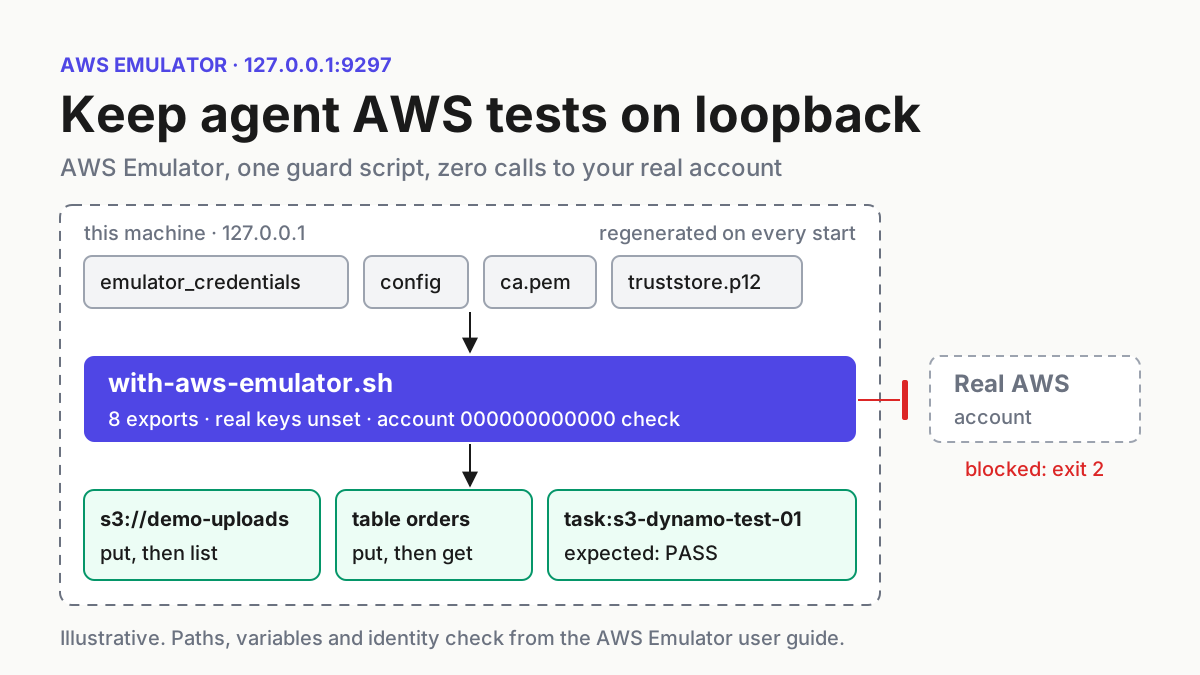
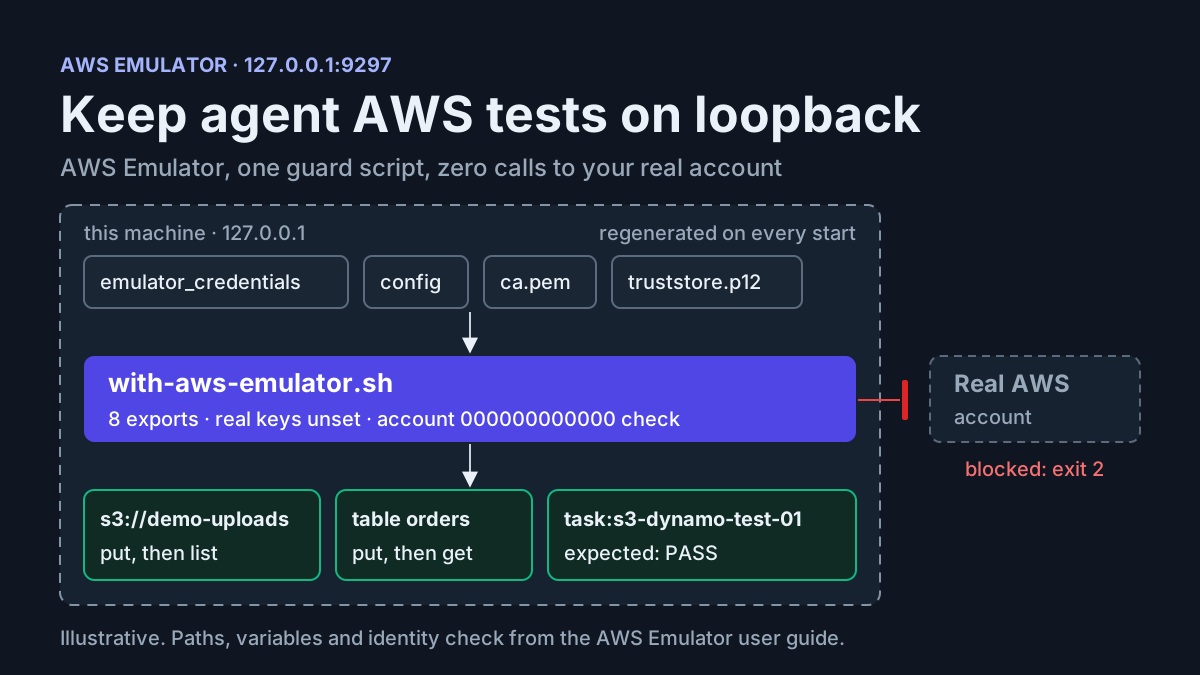
Your coding agent has just written a function that uploads a receipt to Amazon S3 and records the order in DynamoDB, and now it wants to run the integration test. In most repositories one of two things happens next. The test gets skipped, or it runs against a shared sandbox account using whatever credentials are already in the shell. This guide gives you a third option. You run the agent’s AWS tests against AWS Emulator, a local process that answers AWS CLI and SDK calls on https://127.0.0.1:9297, and you put a wrapper in front of it that refuses to run while any setting could still send a call to a real account.
This guide is for developers and platform engineers who let Claude Code or Codex write and run tests for code that touches S3, DynamoDB or SQS. You finish with four artifacts:
- a wrapper script,
scripts/with-aws-emulator.sh, that starts the emulator, exports the variables AWS documents and checks that it is talking to the emulator before running anything - a small test for one illustrative case,
task:s3-dynamo-test-01, using a bucket nameddemo-uploadsand a table namedorders - a rule for
AGENTS.mdorCLAUDE.mdthat sends every AWS test through the wrapper - a CI script built on the Linux package
Every command comes from AWS documentation. The expected observations are what that documentation says you should see. We did not run them to produce these results.
How the emulator stands in for AWS
AWS made the emulator generally available on November 11, 2026 (AWS What’s New). According to the announcement, your existing SDK and CLI calls go to the emulator and come back in milliseconds, with no deployment and no AWS account. For the operations it supports, it returns the same results as AWS for valid calls and the same errors for invalid ones. That covers the news. The rest of this guide is about the wiring.
Five properties determine how you build around it:
- A new identity on every start. When it starts, the emulator writes new credentials, a config file and a certificate to
~/.aws/emulator/9297/(AWS News Blog). Its access key IDs begin withEMULATOR, and it rejects requests signed with any other key. - One fake account. It uses a single account,
000000000000. That number is your proof of where a call went. - Memory only. Resources live in memory and are deleted when the emulator stops (What is AWS Emulator?). Restarting is how you get a clean state.
- Visible gaps. Operations it doesn’t implement yet return HTTP 501 Not Implemented. The test fails right away instead of passing against a stub.
- Isolation by copy. Each copy you start gets its own port, keys and in-memory state, so agents, test suites and CI jobs never see each other’s resources.
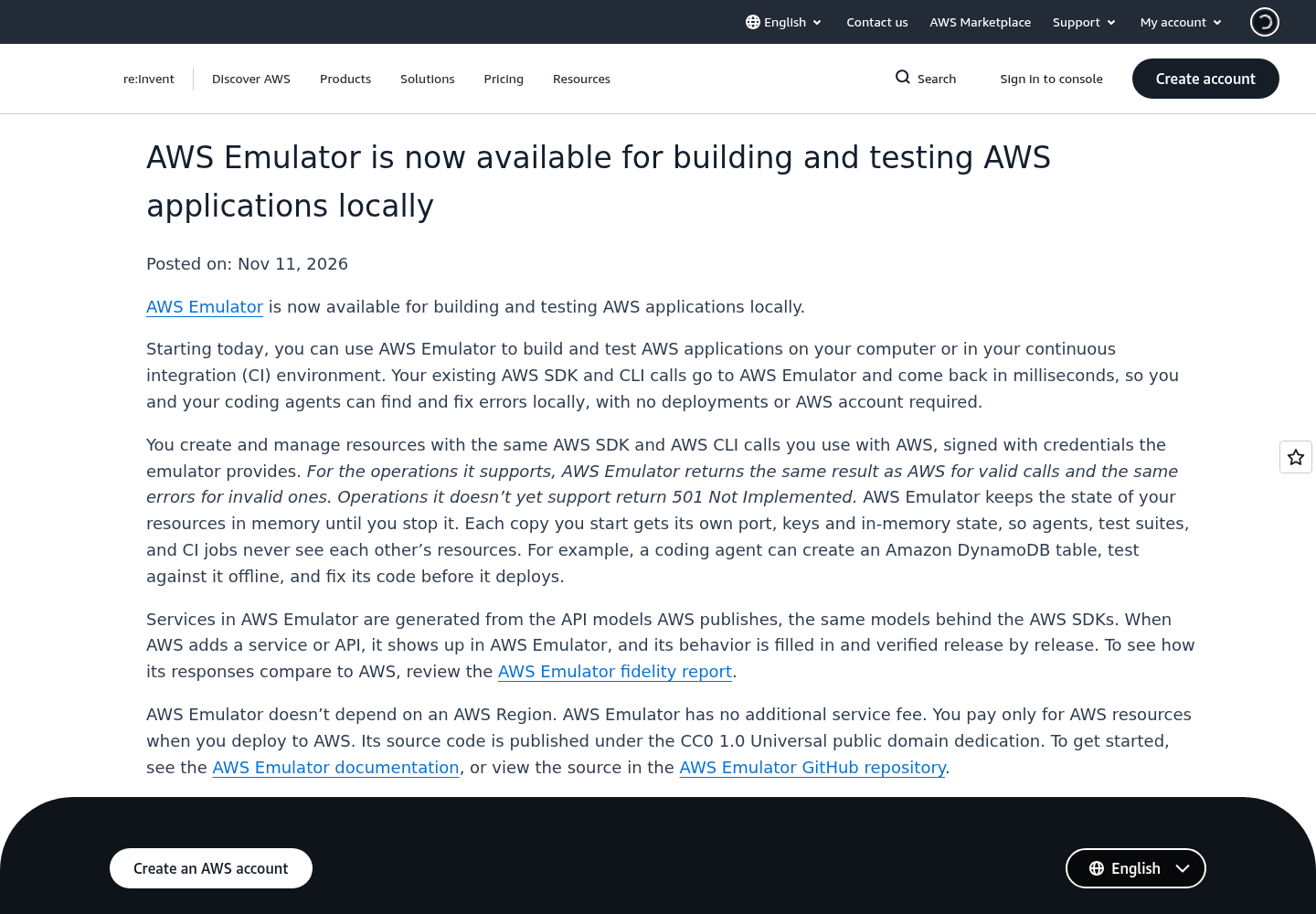
AWS’s launch announcement, posted November 11, 2026. Source: Amazon Web Services.
Two more facts don’t change the setup, but they affect your planning. The emulator is written and maintained by autonomous agents working from the published AWS API models, and each change has to pass fidelity tests verified against real AWS before it ships (About Amazon). The user guide says it updates many times a day, so expect behavior to change. On macOS and Windows it currently runs only in Docker, from an image you build yourself. Simon Willison pointed to that on launch day as the main obstacle for cross-platform test suites (Simon Willison).
This guide uses server mode, the local HTTPS process, because it works with the AWS CLI and every SDK. Rust projects can embed the emulator inside the test process instead. The aws-emulator README explains that mode and its build cost, including at least 100 GB of free disk for target/.
Prerequisites and the result you can verify
Check these before you write anything:
- [ ] A Linux host where you can install an RPM or Debian package (x86_64 or aarch64), or Docker on macOS or Windows.
- [ ] AWS CLI version 2 on the path. The emulator also works with any AWS SDK once the variables are set.
- [ ] curl, which the health check uses.
- [ ] A repository with an existing test runner. The example is a shell test so that every call is an AWS CLI command from the docs, but the wrapper can run pytest, Jest or Gradle the same way.
- [ ] Test data only. AWS asks you not to put customer or production data in the emulator.
- [ ] Your current staging-account test path, still written down. It is your rollback.
Here is what success looks like. Inside the wrapper, aws sts get-caller-identity reports account 000000000000. The test prints PASS task:s3-dynamo-test-01, and no command in the run was signed with a key that works against AWS. A failure is a nonzero exit from the wrapper with a refusing: message, which means the guard did its job.
The agent process itself still runs with your user’s permissions. If you also want the agent sandboxed, combine this guide with Docker Sandboxes for coding agents. The emulator keeps API calls local. A sandbox limits what the agent can touch on disk.
Step 1: Install AWS Emulator and confirm it answers
- Install the package. AWS’s launch walkthrough on Amazon Linux 2023 uses the RPM, which puts
aws-emulatorin/usr/bin/:
PKG=https://downloads.aws.com/aws-emulator/packages/aws-emulator/LTS/latest
sudo dnf install -y $PKG/aws-emulator-x86_64.rpm
aws-emulator -v
- On Debian or Ubuntu, install the Debian package listed on the Getting started on Linux page. Its exact file name isn’t in the pages this guide cites, so copy it from that page rather than guessing. On macOS and Windows, build the image from the Dockerfile in the documentation (AWS doesn’t publish a ready-made image) and publish its ports on
127.0.0.1only, as the security page requires. - Start the emulator with telemetry off:
aws-emulator --telemetry off
- Read the startup log. The emulator serves HTTPS on
127.0.0.1:9297and writes JSON log lines with the address, the config file and the certificate file. Telemetry is on by default. The README says it never includes request or response content, code or credentials.--telemetry offturns it off for one process.EMULATOR_TELEMETRY=offturns it off for every emulator started from that shell, and[telemetry]withenabled = falsein~/.aws/emulator/config.tomlturns it off for every run on the machine. - From a second terminal, check that it is ready:
curl --cacert ~/.aws/emulator/9297/ca.pem https://127.0.0.1:9297/__admin/health
The documented response is HTTP 200 with the body ok.
- List the generated files with
ls ~/.aws/emulator/9297/. You should seeemulator_credentials,config,ca.pemandtruststore.p12, which is the Java copy of the certificate.
The user guide says the emulator hasn’t been tested for long-running use. Start it for a test run and stop it afterwards, or set --idle-timeout so it stops by itself. The value format for that option is in the CLI reference, which isn’t among the pages cited here. Leave this emulator running if you like: the wrapper reuses a healthy one and starts its own if none is running.
Step 2: Write the wrapper that refuses real AWS
The security page states the risk directly: if AWS_ENDPOINT_URL isn’t set in the shell that runs your tests, your code calls AWS with whatever credentials it finds. An agent that opens a new shell, or a test runner that loads modules before the environment is set, can hit exactly that case. AWS’s advice is to set the variables in the same script that runs the tests. The wrapper does that, then checks the result before running your command.
#!/usr/bin/env bash
# scripts/with-aws-emulator.sh
# Run one command against a local AWS Emulator, never against a real AWS account.
# Usage: scripts/with-aws-emulator.sh <command> [args...]
set -euo pipefail

PORT=9297
DIR="$HOME/.aws/emulator/$PORT"
STARTED_PID=""

refuse() { echo "refusing: $1" >&2; exit "$2"; }

# 1. Endpoint settings that outrank or cancel AWS_ENDPOINT_URL.
OVERRIDES="$(env | grep '^AWS_ENDPOINT_URL_' || true)"
[ -z "$OVERRIDES" ] || refuse "service-specific endpoint set: $OVERRIDES" 2
unset AWS_IGNORE_CONFIGURED_ENDPOINT_URLS AWS_USE_FIPS_ENDPOINT AWS_USE_DUALSTACK_ENDPOINT

# 2. Anything that can supply real credentials.
unset AWS_ACCESS_KEY_ID AWS_SECRET_ACCESS_KEY AWS_SESSION_TOKEN AWS_PROFILE

# 3. The variables from the AWS Emulator user guide.
export AWS_ENDPOINT_URL="https://127.0.0.1:$PORT"
export AWS_SHARED_CREDENTIALS_FILE="$DIR/emulator_credentials"
export AWS_CONFIG_FILE="$DIR/config"
export AWS_CA_BUNDLE="$DIR/ca.pem"
export AWS_EC2_METADATA_DISABLED=true
export AWS_DISABLE_HOST_PREFIX_INJECTION=true
export AWS_REGION=us-east-1
export AWS_DEFAULT_REGION=us-east-1
export NODE_EXTRA_CA_CERTS="$DIR/ca.pem"   # Node.js test suites

health() { curl -sf --cacert "$DIR/ca.pem" "https://127.0.0.1:$PORT/__admin/health" >/dev/null 2>&1; }

# 4. Start a fresh emulator unless one already answers on this port.
if health; then
  echo "note: reusing the emulator on :$PORT; its in-memory state is kept" >&2
else
  aws-emulator --telemetry off > "${TMPDIR:-/tmp}/aws-emulator-$PORT.log" 2>&1 &
  STARTED_PID=$!
  trap '[ -n "$STARTED_PID" ] && kill "$STARTED_PID" 2>/dev/null || true' EXIT
  for i in $(seq 30); do health && break; sleep 1; done
  health || refuse "emulator not healthy after 30s, see ${TMPDIR:-/tmp}/aws-emulator-$PORT.log" 3
fi

# 5. Prove the target before running anything.
grep -q EMULATOR "$AWS_SHARED_CREDENTIALS_FILE" || refuse "credentials file holds no EMULATOR key" 4
ID="$(aws sts get-caller-identity 2>&1)" || refuse "identity call failed: $ID" 5
case "$ID" in
  *000000000000*) ;;
  *) refuse "caller identity is not account 000000000000: $ID" 5 ;;
esac

"$@"
What each block does, and why:
- It refuses service-specific endpoints and clears the ignore switch. The AWS CLI endpoint guide puts
AWS_ENDPOINT_URL_<SERVICE>aboveAWS_ENDPOINT_URLin precedence, so a leftoverAWS_ENDPOINT_URL_DYNAMODBfrom another project would take over without any warning.AWS_IGNORE_CONFIGURED_ENDPOINT_URLS=trueis worse, because it makes the CLI ignore configured endpoints, including the one you just exported. The FIPS and dual-stack switches sit at the same precedence level asAWS_ENDPOINT_URL, so the wrapper clears them too. - It unsets credential variables. Environment variables take precedence over the credentials file. The user guide warns that if they stay set, your SDK signs requests with your real keys and the emulator rejects them. A rejection is better than reaching AWS, but removing the variables avoids both.
- It exports the eight documented variables, plus one for Node.js.
AWS_EC2_METADATA_DISABLEDmatters on CI runners hosted on EC2, because it stops the SDK from asking instance metadata for real credentials.AWS_DISABLE_HOST_PREFIX_INJECTIONstops the CLI and Boto3 from adding prefixes such asdata-to the host name. - It starts a fresh emulator when none is running. It waits up to 30 seconds using AWS’s documented loop, then stops the emulator on exit so the next run starts empty. The docs say a clean stop deletes the files for that port, including the credentials file. They don’t say which signals count as a clean stop, so after your first run, check whether
~/.aws/emulator/9297/is gone. - It proves the target. The user guide gives
aws sts get-caller-identityas the check. Through the emulator, it shows account000000000000and the ARNarn:aws:iam::000000000000:user/emulator. If you see your own account ID, your requests are going to AWS.
One side effect of AWS_CONFIG_FILE deserves a warning. It replaces your own config file for that shell, so retry or S3 settings you keep there stop applying. The emulator rewrites its config file on every start. If you need extra settings, copy the file, edit the copy and point AWS_CONFIG_FILE at the copy.
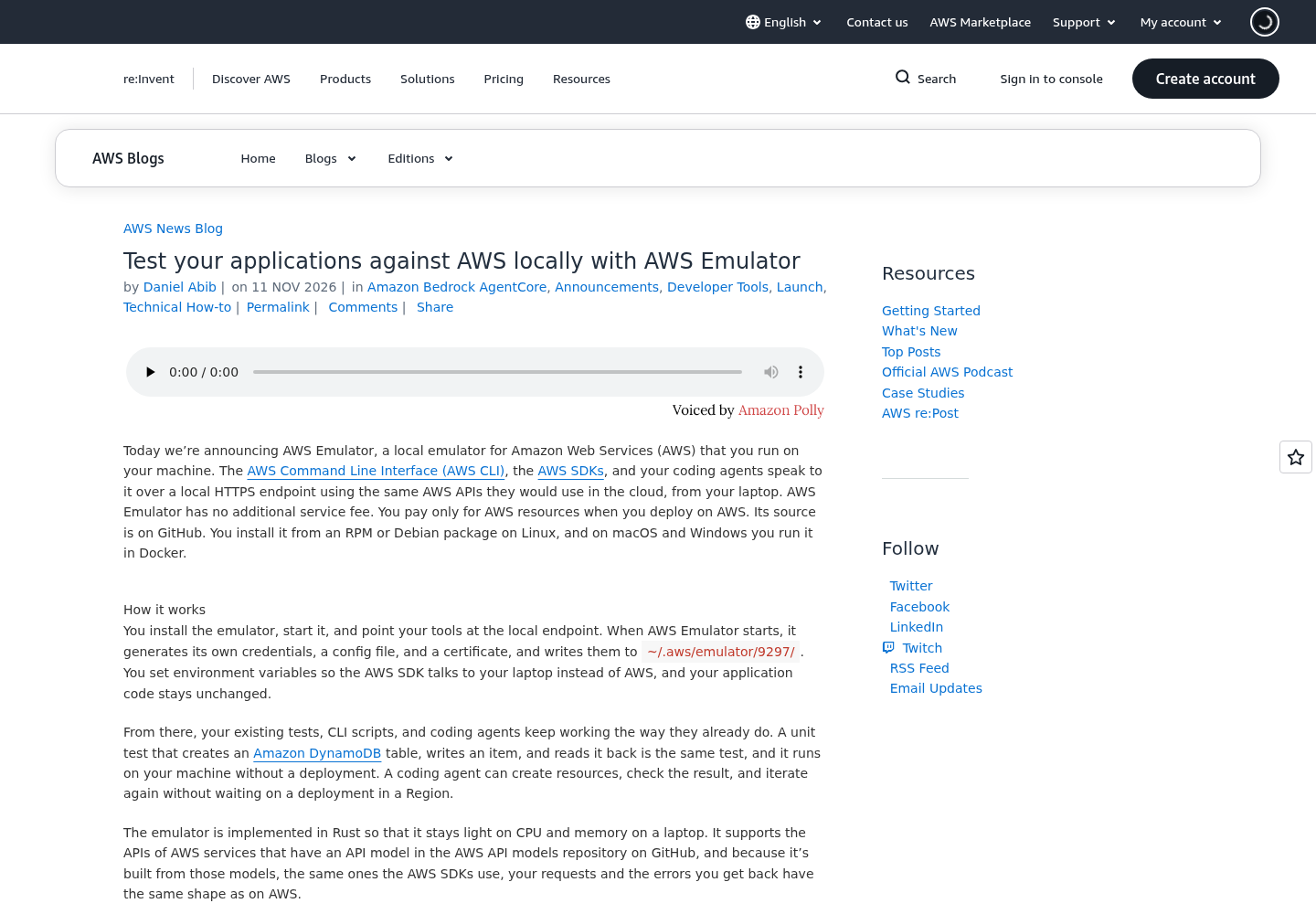
The AWS News Blog launch post, whose walkthrough covers the install, the environment variables and the identity check that the wrapper automates. Source: Amazon Web Services.
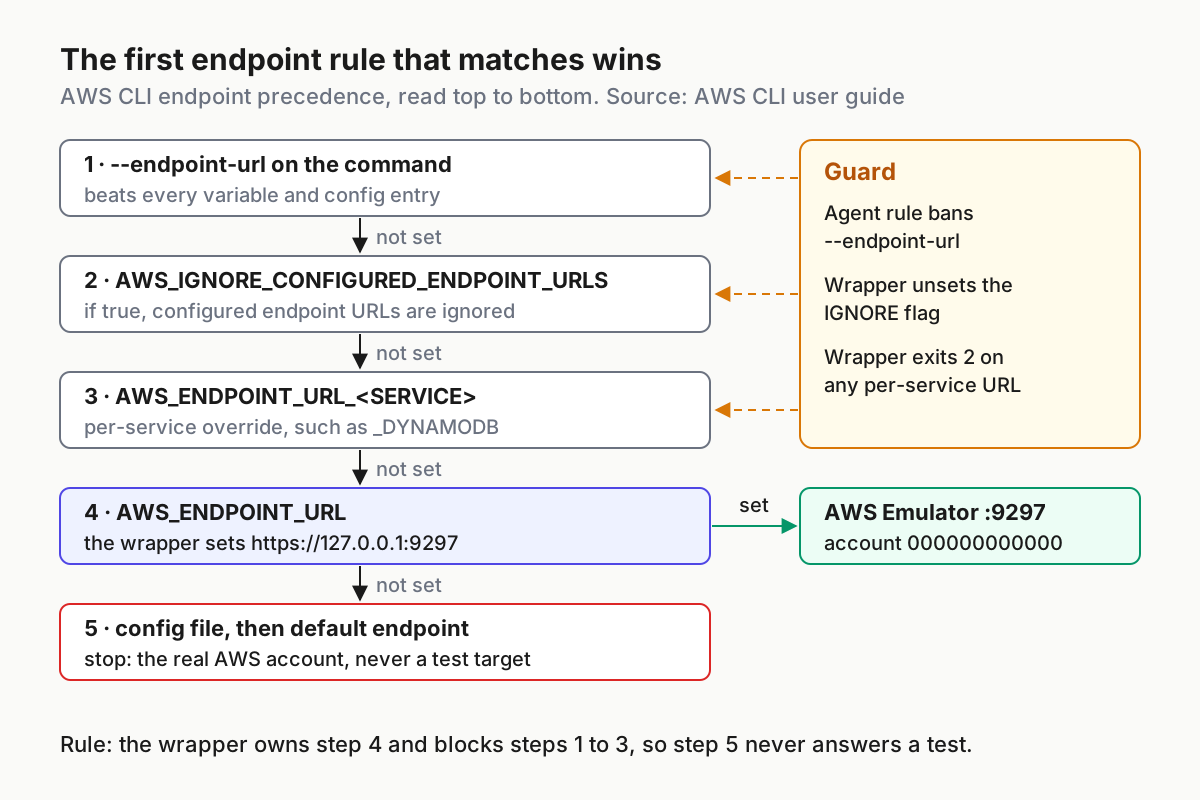
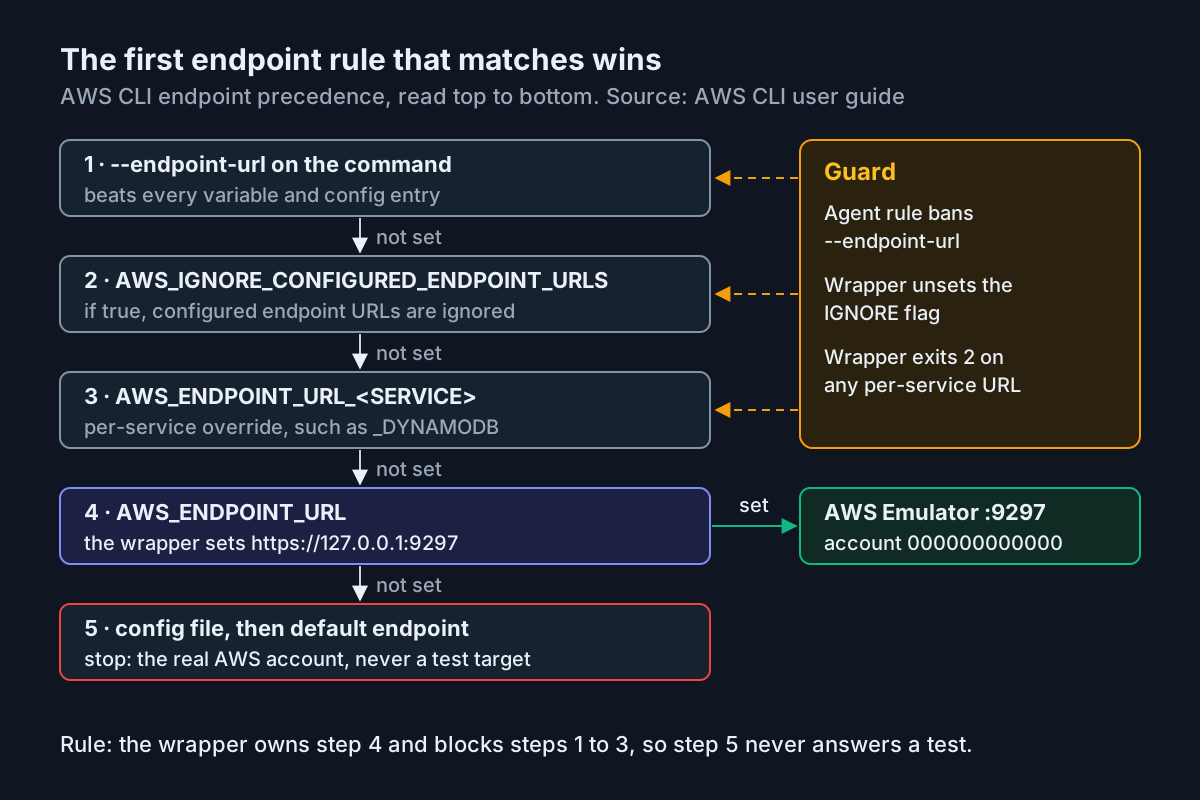
The first matching endpoint rule wins. The wrapper sets AWS_ENDPOINT_URL and blocks the rules above it, so the default endpoint never answers a test. Source: AWS CLI user guide, endpoint precedence.
The diagram also shows the one gap a script can’t close: --endpoint-url on a single command overrides every variable. Step 4 puts that into the agent rule.
Step 3: Run task:s3-dynamo-test-01 and read the results
The test creates the bucket and table, writes one receipt and one order, reads both back and checks for one documented validation error. It has its own guard, so it refuses to run when someone calls it directly without the wrapper.
#!/usr/bin/env bash
# tests/aws/s3_dynamo_test.sh  (task:s3-dynamo-test-01)
set -euo pipefail

case "${AWS_ENDPOINT_URL:-}" in
  https://127.0.0.1:*) ;;
  *) echo "FAIL: AWS_ENDPOINT_URL is '${AWS_ENDPOINT_URL:-unset}'; run via scripts/with-aws-emulator.sh" >&2
     exit 2 ;;
esac

BUCKET=demo-uploads
TABLE=orders
WORK="$(mktemp -d)"

# S3: create, upload, list
aws s3 mb "s3://$BUCKET"
echo "order 1001 receipt" > "$WORK/receipt-1001.txt"
aws s3 cp "$WORK/receipt-1001.txt" "s3://$BUCKET/"
LISTING="$(aws s3 ls "s3://$BUCKET/")"
case "$LISTING" in *receipt-1001.txt*) ;; *) echo "FAIL: receipt not listed" >&2; exit 1 ;; esac

# DynamoDB: create, put, get
aws dynamodb create-table --table-name "$TABLE" \
  --attribute-definitions AttributeName=id,AttributeType=S \
  --key-schema AttributeName=id,KeyType=HASH \
  --billing-mode PAY_PER_REQUEST
aws dynamodb put-item --table-name "$TABLE" \
  --item '{"id": {"S": "order-1001"}, "receipt": {"S": "s3://demo-uploads/receipt-1001.txt"}}'
ITEM="$(aws dynamodb get-item --table-name "$TABLE" --key '{"id": {"S": "order-1001"}}')"
case "$ITEM" in *receipt-1001.txt*) ;; *) echo "FAIL: order item not returned" >&2; exit 1 ;; esac

# Fidelity check: the same validation error AWS returns
if aws dynamodb create-table --table-name ab \
     --attribute-definitions AttributeName=id,AttributeType=S \
     --key-schema AttributeName=id,KeyType=HASH \
     --billing-mode PAY_PER_REQUEST 2> "$WORK/err.txt"; then
  echo "FAIL: table name 'ab' was accepted" >&2; exit 1
fi
grep -q ValidationException "$WORK/err.txt"

echo "PASS task:s3-dynamo-test-01"
Run it with scripts/with-aws-emulator.sh tests/aws/s3_dynamo_test.sh. The last check uses the documented example in which the emulator rejects the DynamoDB table name ab with the same ValidationException as AWS (What is AWS Emulator?). It confirms you are testing real validation and not a permissive mock.
The table shows the observations to expect for this case, including the failure paths. These are illustrative expected observations taken from AWS documentation and the scripts above, not output from a run we performed.
| Input | Action | Expected result |
|---|---|---|
| task:s3-dynamo-test-01, emulator just started on port 9297 | curl --cacert ~/.aws/emulator/9297/ca.pem https://127.0.0.1:9297/__admin/health |
HTTP 200 with body ok; the wrapper’s 30-second wait loop exits early |
| task:s3-dynamo-test-01, wrapper environment with real keys unset | scripts/with-aws-emulator.sh aws sts get-caller-identity |
Account is 000000000000 and Arn is arn:aws:iam::000000000000:user/emulator |
task:s3-dynamo-test-01, bucket demo-uploads, file receipt-1001.txt, table orders, item order-1001 |
scripts/with-aws-emulator.sh tests/aws/s3_dynamo_test.sh |
make_bucket: demo-uploads, an upload: line for the receipt, the create-table JSON, then PASS task:s3-dynamo-test-01 |
task:s3-dynamo-test-01, invalid table name ab inside the same test |
aws dynamodb create-table --table-name ab with the same schema flags |
ValidationException saying tableName must have length greater than or equal to 3; the test treats it as the expected error |
task:s3-dynamo-test-01, endpoint changed to https://localhost:9297 with a JavaScript, Java or Go SDK client |
Upload the receipt to demo-uploads from that client |
The SDK puts the bucket name in the host name and the request never reaches the emulator; with 127.0.0.1 restored, S3 stays path-style, for example "Location": "/demo-uploads" from s3api create-bucket |
| task:s3-dynamo-test-01, emulator stopped and started again | scripts/with-aws-emulator.sh aws s3api list-buckets --query 'Buckets[].Name' |
[] because state is gone; emulator_credentials holds a new EMULATOR key; ca.pem is new, so path references still work and copied certificates do not |
| task:s3-dynamo-test-01, agent runs the test outside the wrapper | env -u AWS_ENDPOINT_URL tests/aws/s3_dynamo_test.sh |
FAIL: AWS_ENDPOINT_URL is 'unset'; run via scripts/with-aws-emulator.sh and exit 2 before any aws command runs |
| task:s3-dynamo-test-01, a follow-up test calls an operation the emulator has not implemented | Run that test through the wrapper | HTTP 501 Not Implemented and the test fails at that call; check issues/things-that-do-not-work/ in the repository and move the case to the real-account run |
How to read the table. The first two rows tell you whether you reached the emulator at all. If the third row fails at make_bucket, look at endpoints and credentials before you look at your code. A failure in the fourth row would be a fidelity regression worth reporting on GitHub. The restart row explains why the wrapper starts a fresh emulator by default: a reused emulator still holds the bucket and table from the previous run, and whether a duplicate create fails depends on the operation. Tests that depend on leftovers are hard to reason about, so start clean.
Step 4: Give Claude Code and Codex one rule for AWS tests
The wrapper only protects runs that go through it. Agents follow repository instructions, so put the route in writing. Add this block to AGENTS.md, which Codex reads, and the same text to CLAUDE.md, which Claude Code reads:
## AWS integration tests (task:s3-dynamo-test-01 and every AWS test)

- Run AWS tests only as: scripts/with-aws-emulator.sh <test command>
  Example: scripts/with-aws-emulator.sh tests/aws/s3_dynamo_test.sh
- Never run aws, boto3 or any SDK code against AWS outside that wrapper.
- Never add --endpoint-url, AWS_ENDPOINT_URL_<SERVICE>, AWS_PROFILE or access keys
  to commands, tests or config files.
- If the wrapper prints "refusing:", stop and report the message. Do not work around it.
- An HTTP 501 Not Implemented means the emulator lacks that operation. Report the
  operation name; do not retry and do not switch to a real account.
- Create only test data: bucket demo-uploads, table orders, items like order-1001.
Why each line is there:
- One entry point. The agent never has to remember eight variables. It has to remember one script name.
- No
--endpoint-url. This is the only override the wrapper can’t see, because it sits on the individual command and beats every variable. - Stop on
refusing:. An agent that is trying to make a test pass may try to unset or override the guard. The rule tells it the refusal is the result to report. - No retries on 501. A missing operation won’t fix itself. The same reasoning appears in guarding agent CI fix loops: a deterministic failure should leave the loop, not burn turns.
- Named test data. Fixed names make leftovers easy to spot, and they keep the agent away from realistic-looking customer records.
The instruction file asks. Permissions enforce. If your fleet already uses deny rules for shell commands, add one for running aws without the wrapper, following the approach in permission modes as fleet policy. If you would rather set the variables in Claude Code’s own settings than in a script, Claude Code environment variables covers where each setting takes effect. Keep the wrapper anyway, because it is also what checks the identity before every run.
AWS also ships an aws-emulator skill for coding agents that installs, starts and connects the emulator. It needs AWS CLI 2.35.0 or later and is added with aws agent-toolkit add-skill --skill-name aws-emulator --region us-east-1 (README). It can sit alongside this setup, but it doesn’t replace a guard you can read and test in your own repository.
Step 5: Run the same suite in CI on the Linux package
CI is where a fallthrough would do the most damage, because nobody is watching. Use the same wrapper and the same test so CI and the agent’s laptop exercise the same path:
#!/usr/bin/env bash
# ci/aws-emulator-ci.sh  (run on an RPM-based image such as Amazon Linux 2023)
set -euo pipefail

PKG=https://downloads.aws.com/aws-emulator/packages/aws-emulator/LTS/latest
sudo dnf install -y "$PKG/aws-emulator-x86_64.rpm"
aws-emulator -v

export EMULATOR_TELEMETRY=off
scripts/with-aws-emulator.sh tests/aws/s3_dynamo_test.sh
Set up the job in this order:
- Choose an RPM-based Linux image with AWS CLI v2 and curl installed. For Debian-based runners, swap in the Debian package named on the Getting started on Linux page. On aarch64 runners, use the aarch64 package from the same page.
- Call
ci/aws-emulator-ci.shas the job’s test step. The job definition syntax depends on your CI product and isn’t covered here. The script has everything the job needs. - Give the job no AWS secrets. The security page says to keep real credentials out of the environment of your test jobs. A job that has none can’t fall through to AWS even if every other guard fails.
- Treat a nonzero exit as a failed build, including the wrapper’s exits 2 through 5. Those exits mean the environment was unsafe, not that the code is wrong.
- Pin the emulator version you test with and record
aws-emulator -vin the log. AWS publishes security fixes only in the latest release, so schedule upgrades rather than freezing indefinitely.
If you already gate agent pull requests on regression checks, this job fits in as one more required check. Agent evaluation CI gates shows how to make a check like this block the merge.
Make each SDK trust the emulator certificate
The emulator serves HTTPS with its own certificate, which it regenerates on every start. Settings that point to the path of ca.pem keep working across restarts. If you copied or imported the certificate, repeat that step after each start (user guide).
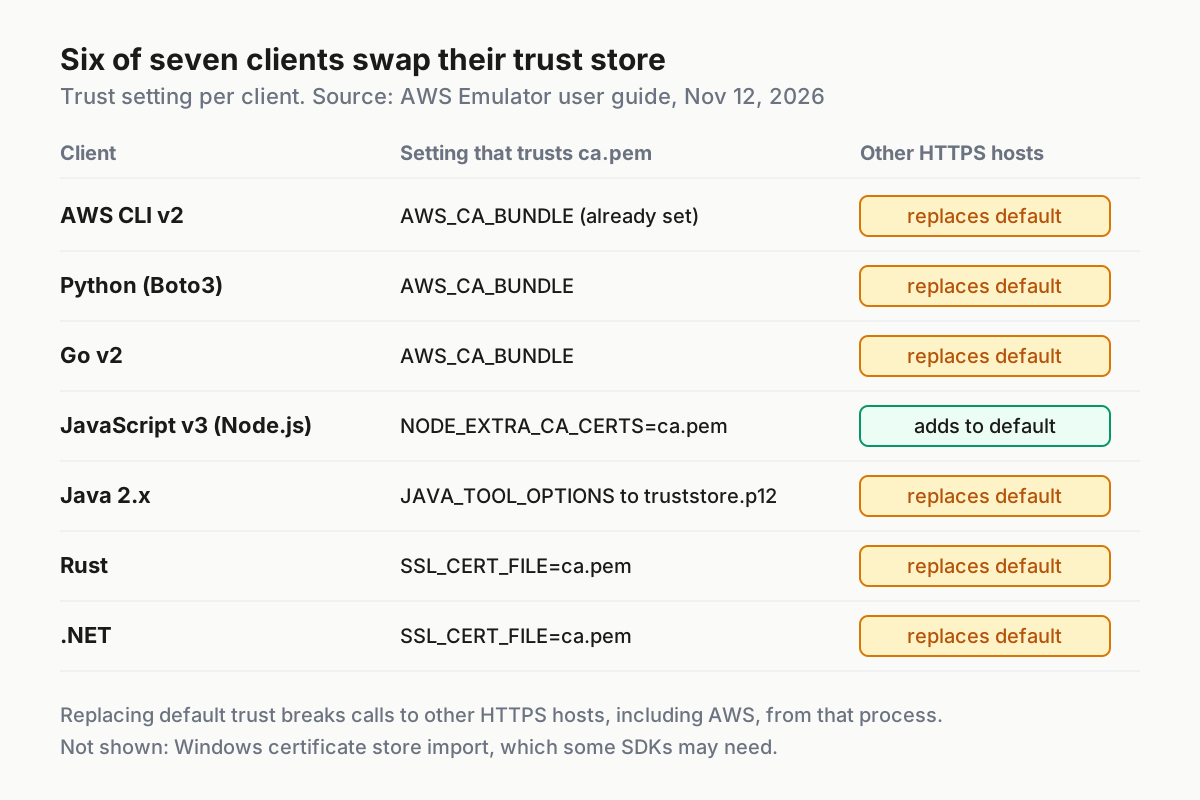
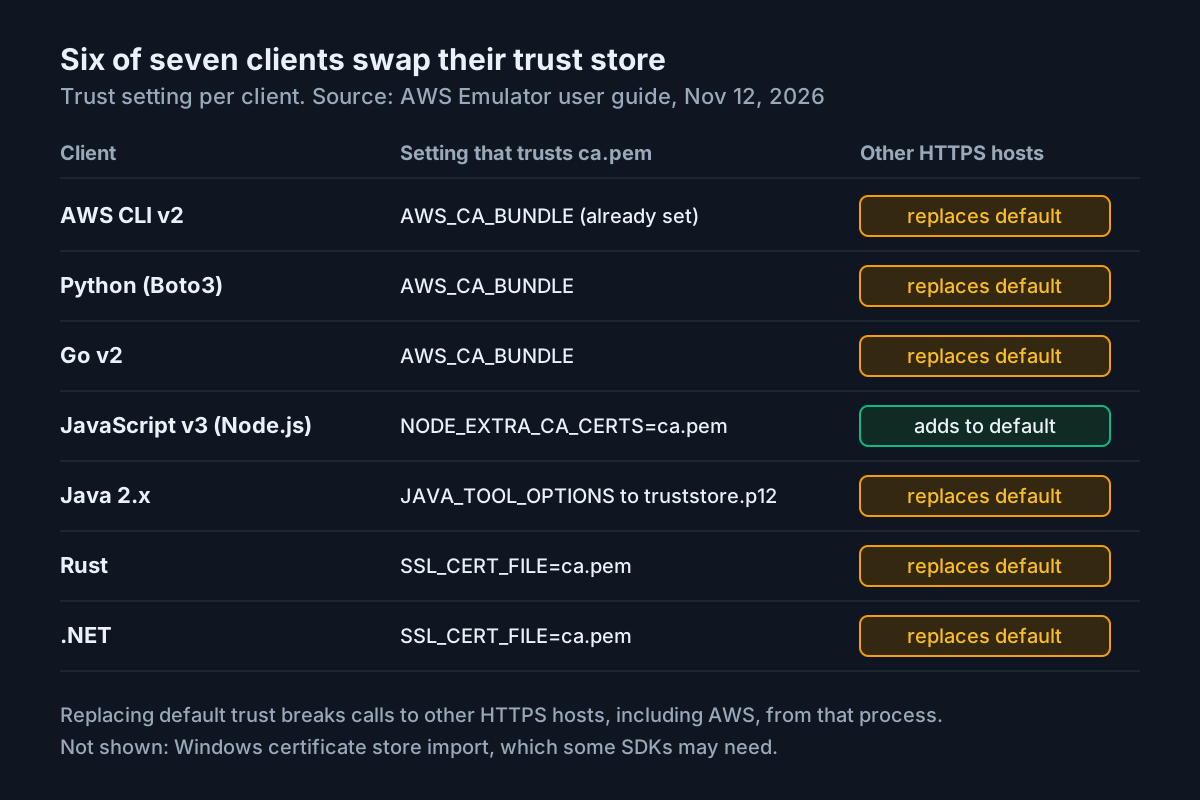
Six of the seven documented clients replace their default trust store when you point them at ca.pem. Only Node.js adds to it. Source: AWS Emulator user guide, read November 12, 2026.
| Client | Setting that trusts the emulator | What it does to other HTTPS hosts |
|---|---|---|
| AWS CLI v2 | AWS_CA_BUNDLE (already set by the wrapper) |
Replaces default trust |
| Python (Boto3) | AWS_CA_BUNDLE |
Replaces default trust |
| Go v2 | AWS_CA_BUNDLE |
Replaces default trust |
| JavaScript v3 (Node.js) | NODE_EXTRA_CA_CERTS=~/.aws/emulator/9297/ca.pem |
Adds to default trust |
| Java 2.x | JAVA_TOOL_OPTIONS pointing at truststore.p12, type PKCS12 |
Replaces default trust |
| Rust | SSL_CERT_FILE=~/.aws/emulator/9297/ca.pem |
Replaces default trust |
| .NET | SSL_CERT_FILE=~/.aws/emulator/9297/ca.pem |
Replaces default trust |
For Java, the documented setting is:
export JAVA_TOOL_OPTIONS="-Djavax.net.ssl.trustStore=$HOME/.aws/emulator/9297/truststore.p12 -Djavax.net.ssl.trustStoreType=PKCS12"
Every JVM started from that shell reads JAVA_TOOL_OPTIONS, including Gradle and Maven. To limit it to tests, pass the same options through jvmArgs in a Gradle test task or argLine in the Maven Surefire plugin. The “replaces” column matters when a test process also has to reach another HTTPS server. In that case, build a bundle that holds your system certificates plus ca.pem, and rebuild it after every emulator start. On Windows, some SDKs may also need ca.pem imported into the Windows certificate store.
Troubleshooting by symptom
| Symptom | Likely cause | Fix |
|---|---|---|
| Certificate errors from the CLI, Boto3 or Go after a restart | You copied or imported an old ca.pem; the emulator issues a new certificate on every start |
Reference the path ~/.aws/emulator/9297/ca.pem directly, or repeat the import after each start |
| Node.js tests fail the TLS handshake | NODE_EXTRA_CA_CERTS isn’t set in the test process |
Run the tests through the wrapper, which sets it |
Java tests reach the emulator, but other HTTPS calls fail with PKIX path building failed |
truststore.p12 replaced the JVM’s default trust store |
Pass the options only to the test JVM, or build a JDK trust store copy that also contains ca.pem |
get-caller-identity shows your own account ID |
The endpoint was unset or overridden, so requests go to AWS | Stop, run inside the wrapper, and check for --endpoint-url or AWS_ENDPOINT_URL_<SERVICE> |
| The emulator rejects requests that look correctly signed | Real credentials in AWS_ACCESS_KEY_ID or AWS_PROFILE override the emulator’s credentials file |
Unset them; the wrapper does this in block 2 |
Could not connect to the endpoint URL: "https://data-127.0.0.1:9297/" |
The SDK added a host prefix | CLI and Boto3: AWS_DISABLE_HOST_PREFIX_INJECTION=true; JavaScript v3: disableHostPrefix: true; Java 2.x: SdkAdvancedClientOption.DISABLE_HOST_PREFIX_INJECTION |
| S3 calls from JavaScript, Java or Go never arrive | localhost in the endpoint makes those SDKs put the bucket name in the host name |
Keep 127.0.0.1 in AWS_ENDPOINT_URL |
| S3 Control calls never arrive | The SDK always puts the account ID in the host name, such as 000000000000.127.0.0.1 |
This can’t be fixed locally; cover S3 Control in the real-account run |
| Resources appear in the wrong Region or overlap | The emulator doesn’t keep resources separate by Region or account | Use one Region per emulator; for several Regions, run one emulator per Region on its own port |
| Startup notice warns about telemetry | EMULATOR_TELEMETRY has a value outside the accepted set, which also turns telemetry off |
Use off, false or 0 |
| Retry or S3 settings from your config are ignored | AWS_CONFIG_FILE now points at the emulator’s config |
Copy that file, add your settings, point the variable at the copy |
The identity check is the most important diagnostic in this table. Run it whenever a symptom doesn’t match any row.
Limits to plan around
A green emulator run tells you a lot about request shapes, validation and data flow. It tells you nothing about some things that matter in production. Keep these limits in mind when you decide what the agent is allowed to treat as done:
- No real IAM. The emulator never denies a request signed with its own key. It doesn’t evaluate bucket policies or AWS KMS key policies. A request AWS would deny can succeed locally, and the reverse can happen too. Never use these runs as security tests.
- One account, no cross-Region behavior. Cross-account and cross-Region access can’t be tested here.
- Verified in one Region. AWS checks emulator behavior against us-west-2, and against us-east-1 for global services. Differences in Regional availability aren’t reflected.
- Fidelity varies by service. Check the fidelity scores published with each release, and the
issues/directory in the repository, for the services you depend on. - Code runs as you. When the emulator runs code for you, such as function code, it doesn’t isolate that code from your machine. Agent-written function code then runs with your user’s permissions.
- Keep it private. Other users and programs on the same machine can reach its ports, and ports for resources with their own endpoints don’t check request signatures. Run it on a machine only you use. Keep
--auth offfor tools that can’t sign requests, and only on such a machine.
For diagnostics that need real account state, the read/write split for AWS MCP Lambda triage shows how to give an agent read access without deploy rights. For whole fake environments beyond AWS APIs, see simulated companies for agent testing.
Rollback and the periodic real-account run
If the emulator path causes trouble, back it out in this order:
- Stop the emulator. Press Ctrl+C in its terminal, or let the wrapper’s exit trap stop the copy it started. A clean stop deletes the files for its port, including
emulator_credentials, and all in-memory resources. - In any shell where you exported the variables by hand, remove them:
unset AWS_ENDPOINT_URL AWS_SHARED_CREDENTIALS_FILE AWS_CONFIG_FILE AWS_CA_BUNDLE AWS_DISABLE_HOST_PREFIX_INJECTION NODE_EXTRA_CA_CERTS JAVA_TOOL_OPTIONS. - Run
aws sts get-caller-identityand confirm it shows the staging account you expect, not000000000000. That confirms your normal configuration is back. - Change the AWS section in
AGENTS.mdandCLAUDE.mdback to your previous staging-account instructions so the agent doesn’t keep calling a wrapper that no longer applies. - Re-enable the staging CI job and leave
ci/aws-emulator-ci.shin the repository, disabled, for the next attempt.
Even with everything working, keep a scheduled run against a real sandbox account. The emulator doesn’t match every AWS behavior, and both the launch post and the user guide say to test security settings and the whole application on AWS before production. A weekly job that runs the same tests/aws/ suite against the sandbox account catches fidelity gaps, IAM denials and S3 Control paths that the local run can’t reach. Run that job without the wrapper, and make sure AWS_DISABLE_HOST_PREFIX_INJECTION is not set. On real AWS, operations that use a host prefix fail when it’s set; Cloud Map DiscoverInstances, for example, returns UnknownOperationException.
This guide sits underneath any multi-agent setup. If several agents run tests on one machine at once, give each its own emulator copy on its own port and adjust PORT in the wrapper. The port option itself is in the CLI reference. Each copy keeps its own keys and state, so lanes can’t see each other’s buckets.
Sources
- AWS Emulator is now available for building and testing AWS applications locally (AWS What’s New, Nov 11, 2026)
- Test your applications against AWS locally with AWS Emulator (AWS News Blog)
- Pointing your AWS SDK at AWS Emulator (AWS Emulator User Guide)
- What is AWS Emulator? (AWS Emulator User Guide)
- Security in AWS Emulator (AWS Emulator User Guide)
- aws/aws-emulator README (GitHub)
- Using endpoints in the AWS CLI (AWS CLI User Guide)
- AWS Emulator: a local emulator built 100% by autonomous AI agents (About Amazon)
- aws-emulator (Simon Willison’s Weblog, Nov 11, 2026)