Copilot Seat Management API With an Enterprise GitHub App: Install It, Mint a Token, Add and Remove One User, Verify
Use the Copilot seat management API with an enterprise GitHub App: one permission, a JWT, a one-hour token, then add, remove and verify seats without a PAT.

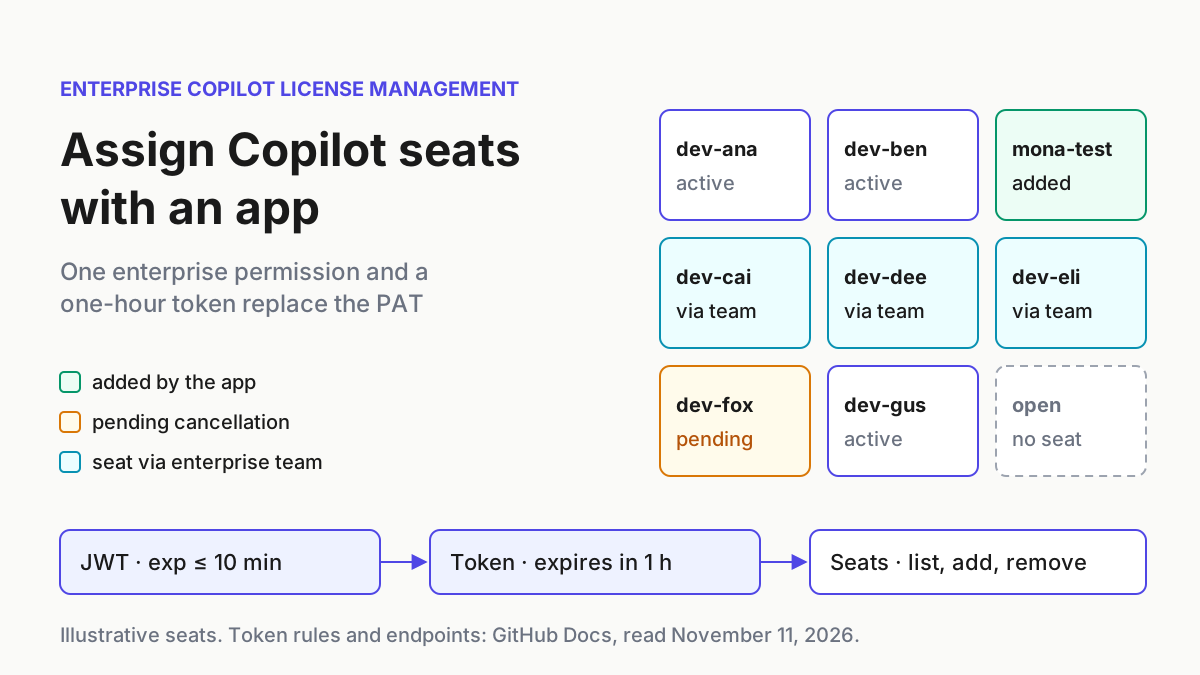
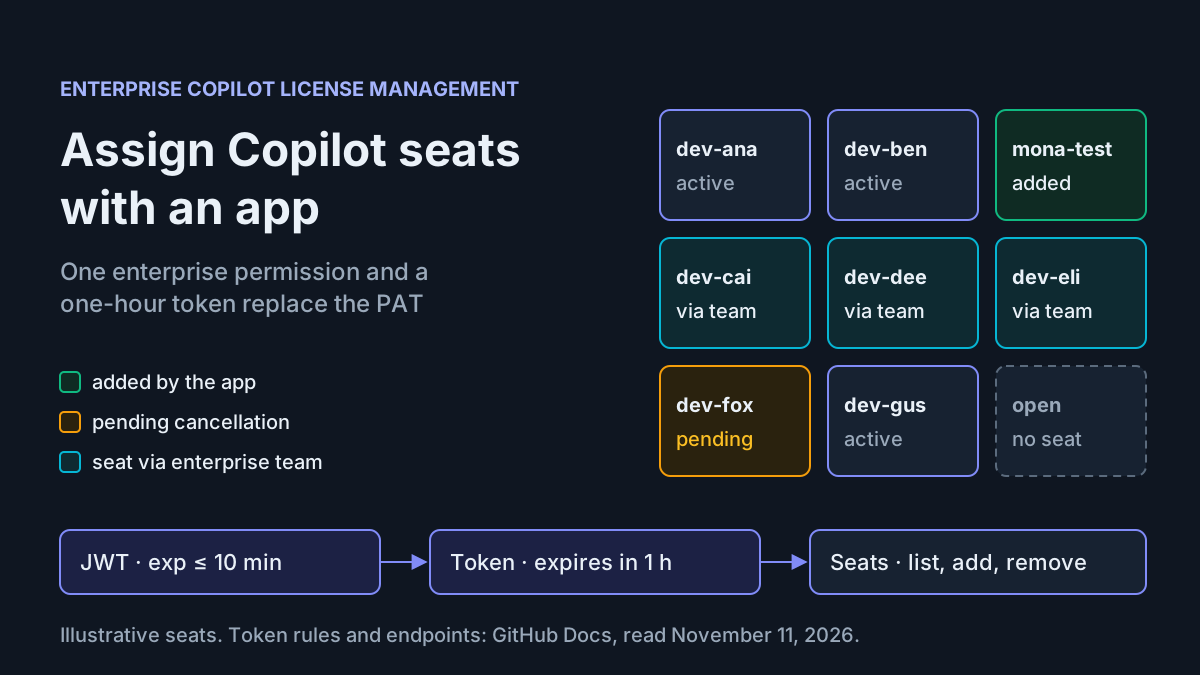
Your Copilot onboarding script probably works. It seats new hires on Monday, cancels leavers on Friday, and it signs every call with a classic personal access token that carries manage_billing:copilot and belongs to one enterprise owner. When that person changes teams, the job either breaks or keeps running on a long-lived credential nobody reviews. The enterprise-level Copilot seat management API now accepts tokens from an enterprise-installed GitHub App, so the same job can run on a credential that expires within an hour and belongs to an app instead of a person.
This tutorial is for the GitHub Enterprise Cloud owner or platform engineer who maintains that script. By the end you will have one app that requests a single enterprise permission, an installation on your enterprise, a complete Bash script that mints its own short-lived tokens, and a filled worked example showing what a user add, a team add, a removal and the common failures look like. You will also have a plan for retiring the old token without a gap in coverage.
The background takes one paragraph. The GitHub Changelog entry, dated November 10, 2026 on the page itself and timestamped 00:10 UTC on November 11 in the feed we read, says enterprise GitHub Apps can now call the enterprise-level Copilot seat management APIs to control which users and enterprise teams are assigned seats, through a new fine-grained enterprise permission called Enterprise Copilot license management. Everything after this point is about how the identity, the token exchange and the seat state actually behave, which stays useful long after the announcement is old.
What you need before you start
Gather these before registering anything. Most failed first runs trace back to a missing item on this list rather than to the code.
- [ ] Enterprise owner rights. The GitHub Docs page on installing apps on an enterprise states that enterprise owners can install apps at the enterprise level and that app managers cannot.
- [ ] An enterprise on Copilot Business or Copilot Enterprise with billing set up and a public code suggestions policy chosen. The add and remove endpoints return 422 when those are missing.
- [ ] Copilot access configured for selected members. The user endpoints also return 422 when the enterprise Copilot access setting enables Copilot for all users or is unconfigured, because there is nothing to assign.
- [ ] One enterprise member with no seat to use as a test case. This guide calls that account
mona-test. - [ ] One small enterprise team you are willing to seat. This guide uses
eng-pilotwith three members. - [ ]
bash,openssl,curlandjq1.6 or later (the script uses$ARGS.positional). If you adopt the Actions example, its runner needscurl7.76 or later for--fail-with-body. - [ ] A home for a private key: a secrets manager, or an encrypted Actions secret if you plan to run from a workflow.
- [ ] The existing PAT script, untouched. You will run it in parallel before you retire it.
Why bother switching when the PAT works? The GitHub guide to automating app installations describes app tokens as temporary, scoped to specific accounts and permissions, and associated with the app’s identity rather than a user account. Those three properties are what you are buying. The broader case for keeping automation identities separate from humans is made in agent identity as a service principal and treating every agent as a privileged user; this guide is the concrete implementation for one billing job.
Register the app with one enterprise permission
The Copilot user management REST reference lists two permission sets that satisfy each enterprise seat endpoint: Enterprise Copilot license management, and Enterprise administration. Choose the first and only the first.
The reason is specific to enterprise installations. The installation access token documentation says installation tokens for enterprises cannot be scoped down: they only have the enterprise permissions they were granted and always receive all of them. On a repository installation you could request a narrower token at mint time. Here you cannot, so the permission list you choose at registration is your only least-privilege control. If you request Enterprise administration just in case, every token this app ever mints carries it.
Follow these steps from the enterprise account.
- Open your enterprise account settings, click GitHub Apps in the left sidebar, then New GitHub App. This is the path the automation guide documents for enterprise-owned apps.
- Give it a name that describes the job, for example
octo-copilot-seats, and set a homepage URL. The GitHub guide useshttps://github.comas a placeholder. - Deselect Expire user authorization tokens and, under Webhook, deselect Active. Enterprise installations do not currently receive webhooks, so an active webhook only adds a URL you have to secure.
- Under Enterprise permissions, set Enterprise Copilot license management to read and write. Listing seats needs read; the four add and remove calls need write.
- Leave every repository, organization and account permission at no access. The GitHub page on choosing app permissions notes that apps start with no permissions and that you should select the minimum required.
- If the form asks who can install the app, keep it to your enterprise. The same page says an app with enterprise permissions must be public or internal to be installed on an enterprise account, and that an internal app can only be installed by the enterprise that owns it or the enterprise of the organization that owns it.
- Create the app, copy the Client ID, and click Generate a private key. Move the downloaded
.pemfile into your secret store and delete the local copy.
The matrix below summarizes what each enterprise seat call requires, so you can confirm that one permission at the right level covers the whole script.
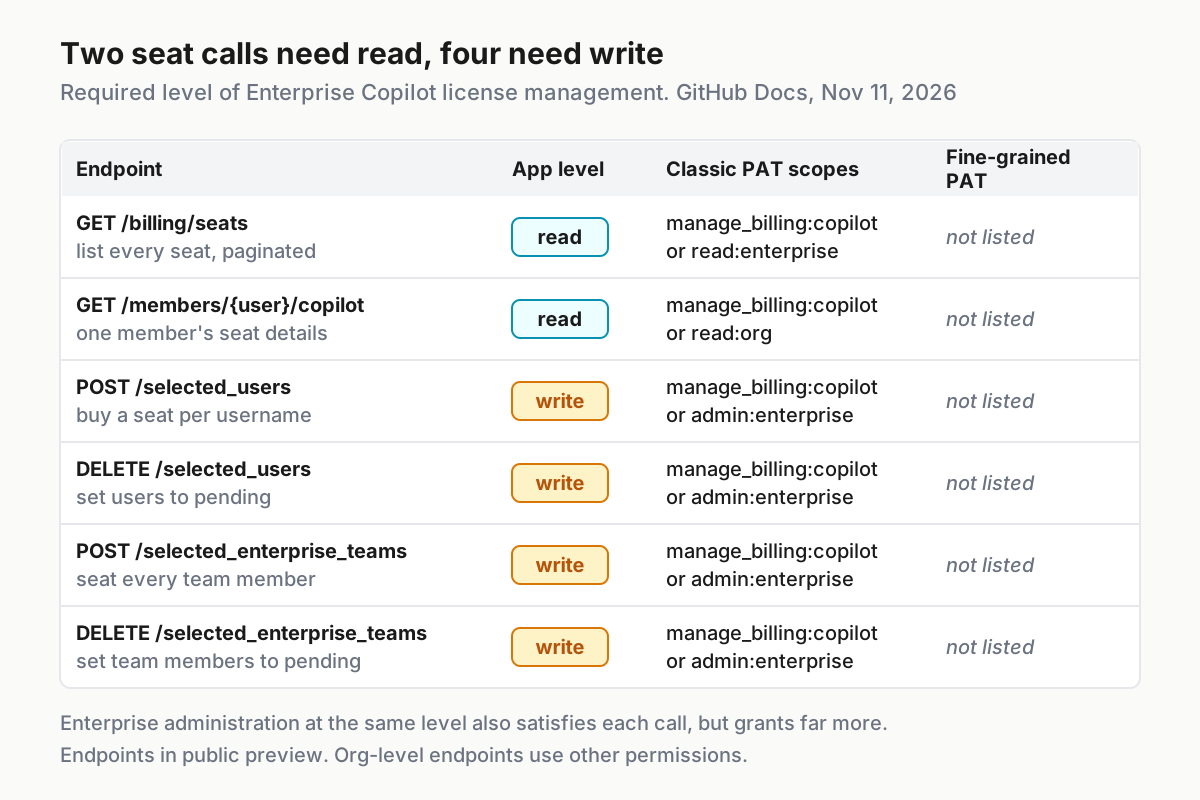
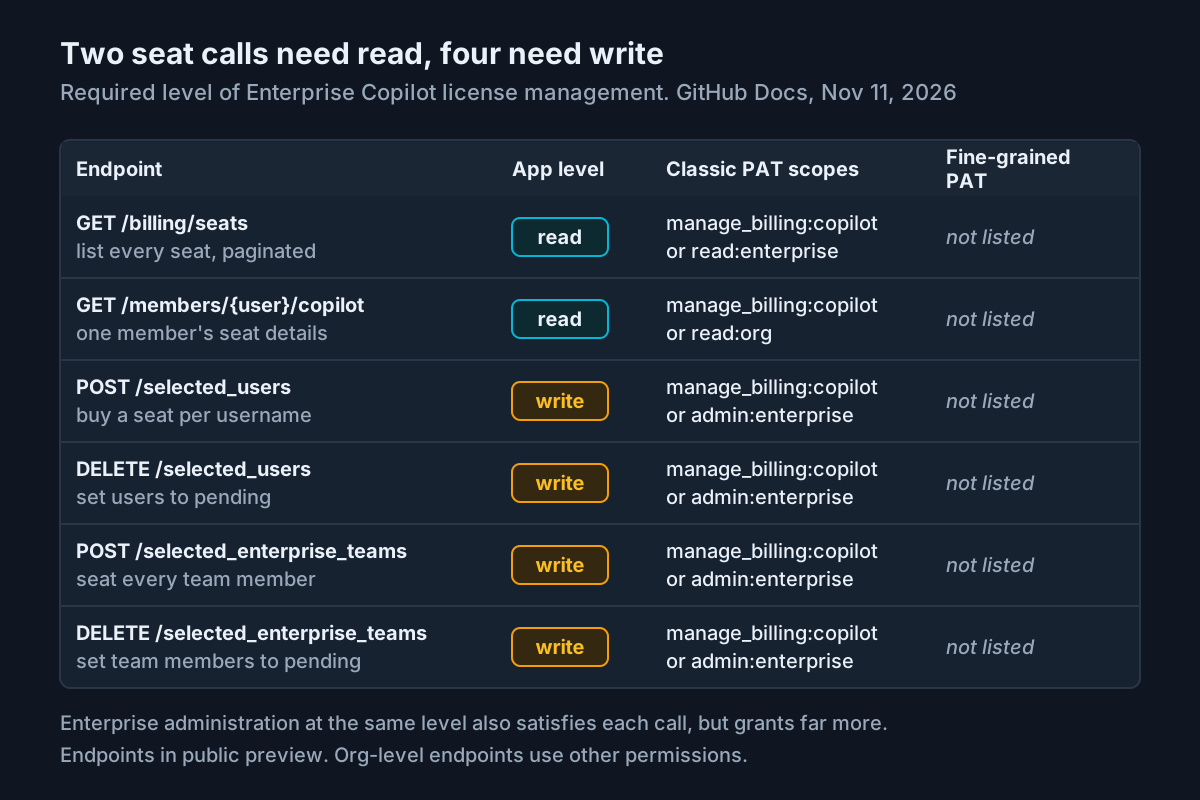
One detail in that matrix is easy to miss: fine-grained personal access tokens are not listed for the enterprise endpoints, although the organization-level seat endpoints on the same page do accept them. If someone suggests replacing the classic PAT with a fine-grained one instead of an app, check the live page first.
Install it on the enterprise and record three values
Registration creates the app; installation grants it permissions on an account. Do these steps as an enterprise owner.
- In the app’s settings, click Install app in the left sidebar. The installation page has the form
https://github.com/apps/APP-NAME/installations/new, and your enterprise appears in the list of locations when the app can be installed there. - Select the enterprise. The permissions documentation says that when someone installs an app on an enterprise, they see and grant only the enterprise permissions it requested. You should see exactly one line: Enterprise Copilot license management.
- After installing, read the installation ID from the browser address bar. It is the number at the end of
/enterprises/ENTERPRISE/settings/installations/ID. - Record the enterprise slug from the same URL.
- Optionally cross-check with the API. The installation token documentation says
GET /app/installations, called with a JWT, is the endpoint required to find installations on an enterprise account.
Keep the three values together with the key location:
| Variable | Illustrative value | Where it comes from |
|---|---|---|
APP_CLIENT_ID |
Iv23liEXAMPLE0001 |
App settings page, Client ID |
APP_INSTALLATION_ID |
12345678 |
End of the enterprise installation settings URL |
ENTERPRISE |
octo-enterprise |
Enterprise slug in the same URL |
APP_PRIVATE_KEY_PATH |
/run/secrets/octo-copilot-seats.pem |
Wherever your secret store mounts the key |
Two properties of this installation are worth knowing now. First, the enterprise install page says enterprise installations get no access to organizations or repositories, so this app cannot read code even if someone later adds a repository permission to the registration; that would need a separate organization install. Second, the same page says the installation token for an enterprise-installed app has the same rate limit as a GitHub Enterprise Cloud organization, counted per installation, which is ample for seat jobs.
Mint a JWT and a one-hour installation token
The app authenticates in two hops. It signs a JSON Web Token with its private key, then exchanges that JWT for an installation access token. The GitHub JWT documentation defines the claims:
| Claim | Value to use | Why |
|---|---|---|
alg |
RS256 |
GitHub requires RS256 signatures |
iat |
now minus 60 seconds | GitHub recommends 60 seconds in the past to absorb clock drift |
exp |
no more than 10 minutes ahead | After this the JWT cannot request an installation token |
iss |
the app’s Client ID | Client ID or app ID both work; GitHub recommends the Client ID |
The JWT must travel as Authorization: Bearer; the token scheme works for many tokens but not for JWTs. The installation token it buys expires after one hour.
Prove the exchange by hand before you run anything that changes seats.
- Save GitHub’s Bash JWT example from the JWT page as
~/gen-jwt.shand runchmod +x ~/gen-jwt.sh, as the automation guide does. It takes the Client ID and the key path as arguments and printsJWT:followed by the token. - Export the values from the table above.
- Run the exchange below and print everything except the token itself.
- Read the response: GitHub documents that it includes the token, its expiry time and the permissions it carries. Expect the expiry about an hour out and, in the permissions, only the Copilot license permission.
- If the call fails, the error body is printed instead, because a failed exchange returns no token to hide. Jump to the troubleshooting table before changing code.
export APP_CLIENT_ID='Iv23liEXAMPLE0001'          # illustrative
export APP_PRIVATE_KEY_PATH="$HOME/octo-copilot-seats.pem"
export APP_INSTALLATION_ID='12345678'             # illustrative

JWT=$(~/gen-jwt.sh "$APP_CLIENT_ID" "$APP_PRIVATE_KEY_PATH" | sed 's/^JWT: //')

curl -sS -X POST \
  -H "Accept: application/vnd.github+json" \
  -H "Authorization: Bearer $JWT" \
  -H "X-GitHub-Api-Version: 2026-03-10" \
  "https://api.github.com/app/installations/$APP_INSTALLATION_ID/access_tokens" \
  | jq 'del(.token)'
One more constraint shapes the script. The installation token page notes that since April 27, 2026, GitHub has been rolling out a stateless format, ghs_APPID_JWT, for newly minted installation tokens, and that code expecting tokens to be exactly 40 characters long may mishandle it. Any wrapper, secret scanner rule or database column in your pipeline that validates token length needs to change before the app takes over. Check the ghs_ prefix instead.
The complete seat script
This is the artifact. Save it as copilot-seats.sh, make it executable, and keep it in a repository with branch protection. It mints a fresh token on every run and holds it only briefly: the successful mint response lands in a temporary file that the script blanks as soon as it has read the token and deletes on exit, so after normal cleanup nothing retains the token. It never writes the token to the audit log or to stdout, and it prints GitHub’s status, error message and permission hint on any failure. It was written against the endpoint descriptions in the GitHub reference; it is not a captured run.
#!/usr/bin/env bash
# copilot-seats.sh: manage enterprise Copilot seats with an enterprise-installed GitHub App.
# Usage:
#   copilot-seats.sh list
#   copilot-seats.sh get-user USERNAME
#   copilot-seats.sh add-users USER [USER...]
#   copilot-seats.sh remove-users USER [USER...]
#   copilot-seats.sh add-teams TEAM [TEAM...]
#   copilot-seats.sh remove-teams TEAM [TEAM...]
set -euo pipefail

: "${APP_CLIENT_ID:?set APP_CLIENT_ID to the app Client ID}"
: "${APP_PRIVATE_KEY_PATH:?set APP_PRIVATE_KEY_PATH to the .pem file}"
: "${APP_INSTALLATION_ID:?set APP_INSTALLATION_ID to the enterprise installation ID}"
: "${ENTERPRISE:?set ENTERPRISE to the enterprise slug}"
API="${GITHUB_API_URL:-https://api.github.com}"   # GHE.com: https://api.SUBDOMAIN.ghe.com
API_VERSION="2026-03-10"
AUDIT_LOG="${AUDIT_LOG:-./copilot-seats-audit.log}"

HDRS=$(mktemp); OUT=$(mktemp); SEATS=$(mktemp)
trap 'rm -f "$HDRS" "$OUT" "$SEATS"' EXIT

b64url() { openssl base64 | tr -d '=' | tr '/+' '_-' | tr -d '\n'; }

make_jwt() {
  local now iat exp header payload signature
  now=$(date +%s)
  iat=$((now - 60))    # 60 s in the past for clock drift
  exp=$((now + 540))   # 9 minutes ahead; GitHub's ceiling is 10
  header=$(printf '%s' '{"typ":"JWT","alg":"RS256"}' | b64url)
  payload=$(printf '{"iat":%d,"exp":%d,"iss":"%s"}' "$iat" "$exp" "$APP_CLIENT_ID" | b64url)
  signature=$(printf '%s' "${header}.${payload}" \
    | openssl dgst -sha256 -sign "$APP_PRIVATE_KEY_PATH" | b64url)
  printf '%s.%s.%s' "$header" "$payload" "$signature"
}

mint_token() {
  local path="/app/installations/${APP_INSTALLATION_ID}/access_tokens" status
  # Capture status and body separately so a failure is reported before the script exits.
  status=$(curl -sS -X POST -o "$OUT" -w '%{http_code}' \
    -H "Accept: application/vnd.github+json" \
    -H "Authorization: Bearer $(make_jwt)" \
    -H "X-GitHub-Api-Version: ${API_VERSION}" \
    "${API}${path}") || { echo "token request failed before any HTTP response" >&2; exit 1; }
  printf '%s POST %s %s\n' "$(date -u +%FT%TZ)" "$path" "$status" >> "$AUDIT_LOG"
  if (( status >= 400 )); then
    echo "HTTP $status from POST $path" >&2
    jq -r '.message // "no message field in response"' "$OUT" >&2 || echo "non-JSON error body" >&2
    exit 1
  fi
  TOKEN=$(jq -r '.token' "$OUT"); : > "$OUT"   # read the token, then blank the temp file
  # Check the prefix, never the length: stateless ghs_ tokens are not 40 characters.
  if [[ "$TOKEN" != ghs_* ]]; then echo "unexpected token shape" >&2; exit 1; fi
}

api() {  # api METHOD PATH [JSON_BODY]
  local method=$1 path=$2 data=${3:-}
  local args=(-sS -X "$method" -D "$HDRS" -o "$OUT" -w '%{http_code}'
    -H "Accept: application/vnd.github+json"
    -H "Authorization: Bearer ${TOKEN}"
    -H "X-GitHub-Api-Version: ${API_VERSION}")
  if [[ -n "$data" ]]; then args+=(-d "$data"); fi
  STATUS=$(curl "${args[@]}" "${API}${path}")
  printf '%s %s %s %s\n' "$(date -u +%FT%TZ)" "$method" "$path" "$STATUS" >> "$AUDIT_LOG"
  if (( STATUS >= 400 )); then
    echo "HTTP $STATUS from $method $path" >&2
    grep -i '^x-accepted-github-permissions' "$HDRS" >&2 || true
    cat "$OUT" >&2; echo >&2
    return 1
  fi
}

body() {  # body KEY VALUE... -> {"KEY":["VALUE",...]}
  local key=$1; shift
  jq -cn --arg k "$key" '{($k): $ARGS.positional}' --args "$@"
}

list_seats() {
  local page=1 per_page=100 n
  : > "$SEATS"
  while :; do
    api GET "/enterprises/${ENTERPRISE}/copilot/billing/seats?per_page=${per_page}&page=${page}"
    if (( page == 1 )); then echo "total_seats: $(jq '.total_seats' "$OUT")"; fi
    jq -c '.seats[]' "$OUT" >> "$SEATS"
    n=$(jq '.seats | length' "$OUT")
    if (( n < per_page )); then break; fi
    page=$((page + 1))
  done
  jq -r '[.assignee.login, (.assigning_team.name // "direct"),
          (.pending_cancellation_date // "-")] | @tsv' "$SEATS" | sort
}

show_user() {  # accept a single seat object or a {total_seats, seats[]} wrapper
  jq --arg u "$1" '(if has("seats") then .seats[] else . end)
    | select(.assignee.login == $u)
    | {login: .assignee.login, team: (.assigning_team.name // "direct"),
       pending_cancellation_date}' "$OUT"
}

E="/enterprises/${ENTERPRISE}"
cmd=${1:-}; shift || true
case "$cmd" in
  list|get-user|add-users|remove-users|add-teams|remove-teams) ;;
  *) sed -n '2,9p' "$0"; exit 2 ;;
esac
mint_token
case "$cmd" in
  list)         list_seats ;;
  get-user)     api GET "${E}/members/$1/copilot"; show_user "$1" ;;
  add-users)    api POST   "${E}/copilot/billing/selected_users" "$(body selected_usernames "$@")"; jq . "$OUT" ;;
  remove-users) api DELETE "${E}/copilot/billing/selected_users" "$(body selected_usernames "$@")"; jq . "$OUT" ;;
  add-teams)    api POST   "${E}/copilot/billing/selected_enterprise_teams" "$(body selected_enterprise_teams "$@")"; jq . "$OUT" ;;
  remove-teams) api DELETE "${E}/copilot/billing/selected_enterprise_teams" "$(body selected_enterprise_teams "$@")"; jq . "$OUT" ;;
esac
Each consequential choice in that file has a reason.
- Nine-minute expiry. The ceiling is ten minutes. Leaving a minute of margin keeps a slightly fast host clock from producing a JWT GitHub refuses.
- A fresh token per run. Tokens last an hour, and a seat job finishes in seconds. Minting each time means no long-lived credential sits on disk: the token touches the temporary
$OUTfile only between the mint and the next line, which truncates it, and the exit trap removes the file. A stolen audit log holds no credential. - Explicit status capture on the mint. A tempting shortcut is
body=$(curl --fail-with-body ...). Underset -e, a failed request makes that assignment exit the script immediately, so the error body sits in a variable nobody prints. The script instead writes the body to a temp file, captures the status with-w '%{http_code}', and on any status of 400 or above prints the status line and GitHub’smessagefield to stderr before exiting with code 1. A failed exchange carries no token, so printing the message leaks nothing. - Prefix check instead of length check. This is the stateless-format lesson applied directly: the script refuses a response that is not an installation token without assuming a size.
- Permission hint on failure. The permissions documentation says a REST call with insufficient permissions returns 403 and that the
X-Accepted-GitHub-Permissionsresponse header names what the endpoint needs. Printing that header turns a vague 403 into a one-line diagnosis. - Pagination at 100. The list endpoint defaults to 50 results per page with a maximum of 100. The loop keeps fetching until a page comes back short, so large enterprises get a complete baseline.
- Bodies built by
jq. Usernames and team names arrive from HR exports and ticket fields. Building JSON withjq --argsavoids quoting bugs and stops a crafted name from changing the request. - An audit line per call. The log records time, method, path and status for the mint and every seat call, never the token. That gives you a local trail to compare with the enterprise audit log during the parallel run.
- A shape-tolerant
get-user. The reference’s response example for the enterprise get-user endpoint is a wrapper withtotal_seatsand aseatsarray, while the organization version shows a single seat object.show_useraccepts either and prints only the entry whoseassignee.loginmatches, so your check does not depend on which shape the live endpoint returns. - API host and version as variables. The reference notes that enterprises on GHE.com replace
api.github.comwithapi.SUBDOMAIN.ghe.com;GITHUB_API_URLcovers that without editing the file.API_VERSIONsits in one place so you can update it deliberately after reading the reference.
Worked example: add a user, add a team, remove, verify
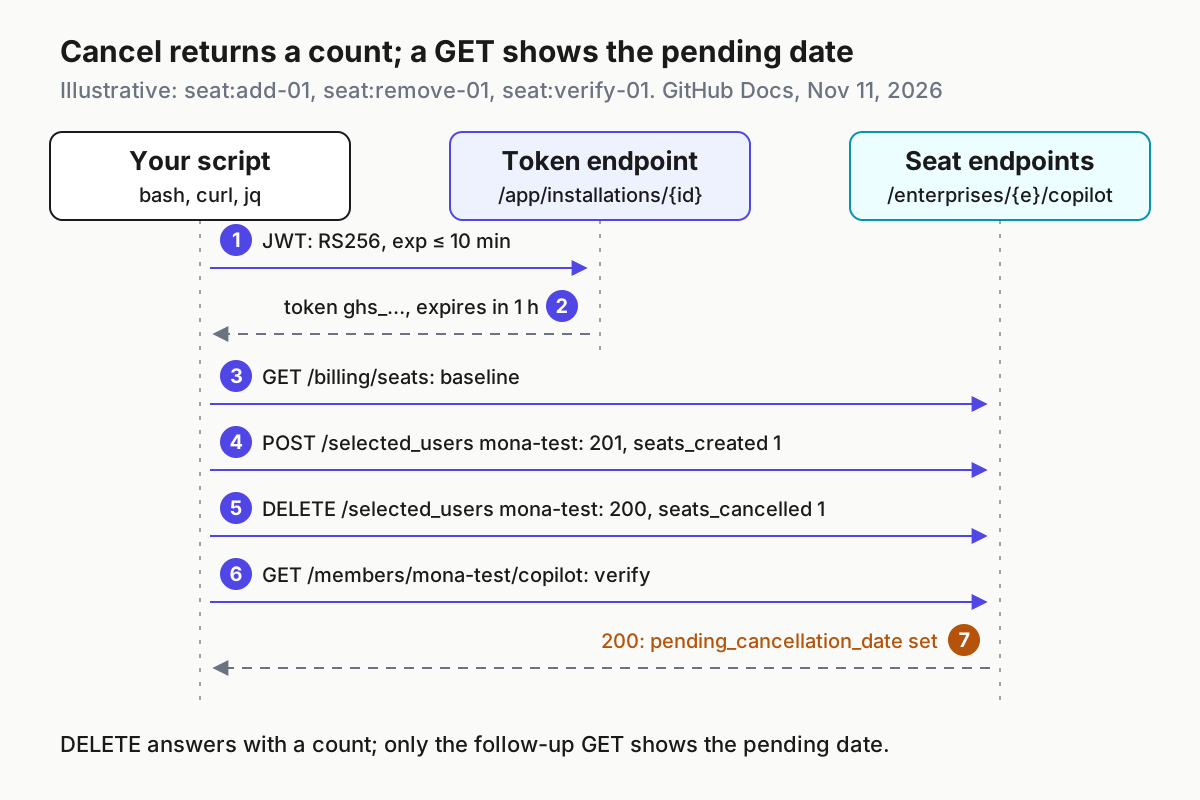
The cases below use the illustrative enterprise octo-enterprise, the test member mona-test and the three-person enterprise team eng-pilot. Status codes and response field names come from the GitHub reference; the seat counts are illustrative expected observations, not results from a recorded run. Your numbers will differ, but the shape of each observation should match.
Run them in this order so each case starts from the state the previous one left:
export ENTERPRISE=octo-enterprise
./copilot-seats.sh list > baseline.tsv           # seat:baseline-00
./copilot-seats.sh add-users mona-test           # seat:add-01
./copilot-seats.sh add-teams eng-pilot           # seat:team-01
./copilot-seats.sh remove-users mona-test        # seat:remove-01
./copilot-seats.sh get-user mona-test            # seat:verify-01
./copilot-seats.sh list > after.tsv
diff baseline.tsv after.tsv
| Input | Action | Expected result |
|---|---|---|
seat:baseline-00: enterprise octo-enterprise, no changes yet |
./copilot-seats.sh list > baseline.tsv |
Illustrative: first line total_seats: 40, then one tab-separated row per seat object with login, direct or a team name, and - where no cancellation is pending. Keep this file. |
seat:add-01: member mona-test, no current seat |
./copilot-seats.sh add-users mona-test |
HTTP 201 with {"seats_created": 1}. A follow-up list shows mona-test direct - and total_seats: 41 (illustrative). |
seat:team-01: enterprise team eng-pilot, three members, none seated |
./copilot-seats.sh add-teams eng-pilot |
HTTP 201 with {"seats_created": 3} (illustrative). Three new rows show eng-pilot as the assigning team. The count includes refreshed existing seats, so it can exceed the net change in total_seats. |
seat:remove-01: mona-test, seated directly in seat:add-01 |
./copilot-seats.sh remove-users mona-test |
HTTP 200 with {"seats_cancelled": 1}. That count is the whole response; it does not show a date. The seat does not disappear: list still shows mona-test with a date in the third column, and total_seats stays at 44 (illustrative). |
seat:verify-01: mona-test after the removal |
./copilot-seats.sh get-user mona-test |
HTTP 200. show_user prints one object, {"login": "mona-test", "team": "direct", "pending_cancellation_date": "..."}, with a non-null date (illustrative). Access ends at the close of the billing cycle. |
seat:403-01: app registered with the permission at read only, or a new permission not yet approved |
./copilot-seats.sh add-users mona-test |
HTTP 403 Forbidden. Stderr prints the X-Accepted-GitHub-Permissions header naming the write permission. The audit log records 403 and no seat changes. |
seat:401-01: host clock 15 minutes slow, so the signed exp (9 minutes after the host’s time) is already about 6 minutes in the past by GitHub’s clock |
./copilot-seats.sh list |
Illustrative: the token mint is refused. Stderr shows HTTP 401 from POST /app/installations/12345678/access_tokens followed by GitHub’s message text, the audit log gets the same line, and the script exits 1 before any seat call. Fix time sync, then rerun. |
seat:401-02: a token exported from a run more than one hour ago and reused by a custom wrapper |
curl to /enterprises/octo-enterprise/copilot/billing/seats with that token |
HTTP 401 Requires authentication. Mint a new token; never cache one past its hour. |
seat:len-01: a downstream check [ ${#TOKEN} -eq 40 ] left over from the PAT era |
Run mint_token on an installation receiving the stateless ghs_ format |
The length check rejects a valid token. Replace it with the prefix test the script uses; the API calls then succeed. |
seat:404-01: ENTERPRISE=octo-enterprse (typo) |
./copilot-seats.sh list |
HTTP 404 Resource not found on the seats call even though the token mint succeeded, because the token is fine and the path is wrong. |
seat:422-01: enterprise Copilot access set to enable Copilot for all users |
./copilot-seats.sh add-users mona-test |
HTTP 422 citing the access setting, billing, policy or enablement. Nothing to assign until access is set to selected members. |
A clock that runs fast fails differently from seat:401-01. Fifteen minutes fast puts iat about 14 minutes and exp about 24 minutes into GitHub’s future, which breaks the documented rule that exp be no more than 10 minutes ahead. Expect the mint to be refused in that case too, with the same stderr pattern; the fix is the same time sync.
Success looks like this: the diff between baseline.tsv and after.tsv contains exactly the rows predicted by the add, team and remove cases; get-user shows a non-null pending date for mona-test; the audit log shows one 201, one 201, one 200 and the mint and read calls as successes; and the install page for the app still lists one enterprise permission and nothing else. If any of those disagree, stop and read the troubleshooting table before retrying, because a retried add is a purchase.
Reading the seat list after a removal
The most common surprise in seat automation is that a removed user is still in the list. That is the documented behavior, and your verification logic has to expect it.
- [ ] Removal is a state change, not a delete. The reference says the remove endpoints set seats to pending cancellation, and users lose access at the end of the current billing cycle. The list endpoint returns seats currently being billed, so a pending seat stays visible with
pending_cancellation_datefilled in. - [ ] The DELETE response is only a count. The documented body is
seats_cancelled. Confirm the date with a separateget-userorlistcall, asseat:verify-01does. - [ ] Other grants survive. Removing a user directly does not stop access they hold through an enterprise team or organization membership. For a true offboarding, also remove them from the teams that seat them, then rerun
get-user. - [ ] Counts and rows measure different things.
total_seatscounts each user once even with access through several organizations or teams, but theseatsarray holds one object per organization or team granting access. A login can appear on more than one row while adding one to the total, andshow_usercan print more than one object for the same reason. - [ ]
assigning_teamtells you why. When a seat comes from a team, the object includes anassigning_team; the script prints its name, otherwisedirect. - [ ] Activity fields need telemetry.
last_activity_atreflects IDE activity only when the user has telemetry enabled. Do not build an inactivity-based offboarding rule on that field without accounting for blanks. - [ ] Compare sorted output. The script sorts rows so a plain
diffbetween two runs shows only real changes.
If your old PAT script treated a still-present login as a failed removal and retried, delete that logic. Retrying a removal is harmless; misreading a pending seat as a failure and alerting an on-call engineer every Friday is not.
Troubleshooting 401, 403, 404 and 422
Work from the status code. The script prints it with the failing method and path, plus GitHub’s message or response body and, for seat calls, the permission header. That is usually enough to pick a row.
| Symptom | What it usually means | Check | Fix |
|---|---|---|---|
HTTP 401 from POST /app/installations/{id}/access_tokens |
The JWT is expired, exp is more than 10 minutes out, iss is wrong, the key does not match, or the JWT was sent with the token scheme |
Read the message line under the status; compare date -u with a trusted clock in both directions; confirm the Client ID and key belong to the same app |
Sync time, keep exp at 9 minutes, send Authorization: Bearer |
| 401 on a seat endpoint | Installation token older than one hour, or truncated by a length check | Search wrappers for 40-character assumptions | Mint per run; validate the ghs_ prefix only |
| 403 Forbidden | Permission missing, set to read where write is needed, or a changed permission not yet approved on the installation | Read X-Accepted-GitHub-Permissions in stderr; open the enterprise installation settings |
Set read and write; have an enterprise owner approve the update |
| 404 Resource not found | Wrong enterprise slug, an installation ID from a different account, or the wrong API host for GHE.com | Slug and ID from the installation URL; GITHUB_API_URL |
Correct the variable and rerun list |
| 422 on user add or remove | Copilot not enabled, billing not set up, no public code suggestions policy, or access set to all users or unconfigured | Enterprise Copilot settings | Configure selected-member access, billing and policy |
| 422 on team add or remove | Copilot Business not enabled, billing not set up, or no public code suggestions policy | Enterprise Copilot settings | Same as above |
| Removed user still listed | Expected pending cancellation | get-user prints the user’s entry with a non-null pending_cancellation_date |
Nothing; verify the date instead |
get-user prints nothing after HTTP 200 |
No seat entry matched that login in the response | Run list and look for the login; check the spelling and whether the seat is held through a team |
Correct the login or inspect the team grant |
The 403 row deserves emphasis. The permissions documentation says that when you modify an app’s permissions, each installation owner is prompted to approve, and an installation keeps the old permissions until they do. If you registered at read only, then changed to read and write, the script will fail with 403 until an enterprise owner accepts the update. The create-github-app-token README makes the same point from the other side: installation permissions can differ from the app’s registered permissions.
A 404 that appears right after a successful mint is a useful signal. The token step proves the key, Client ID and installation ID agree, so a 404 on the seat path almost always points at the slug or host.
Where the documentation drifts
The feature is new and the endpoints are in public preview, so pages disagree in small ways. These were the mismatches in the copies read on November 11, 2026. Confirm each against the live pages before you rely on it.
- The enterprise install page does not list Copilot seats. Its section on what enterprise-installed apps can do names organizations, users, app installations, custom properties, billing, credential authorization and SCIM. Copilot seat management is absent. The page itself says to check the changelog for new APIs and permissions, which is where this one appeared first.
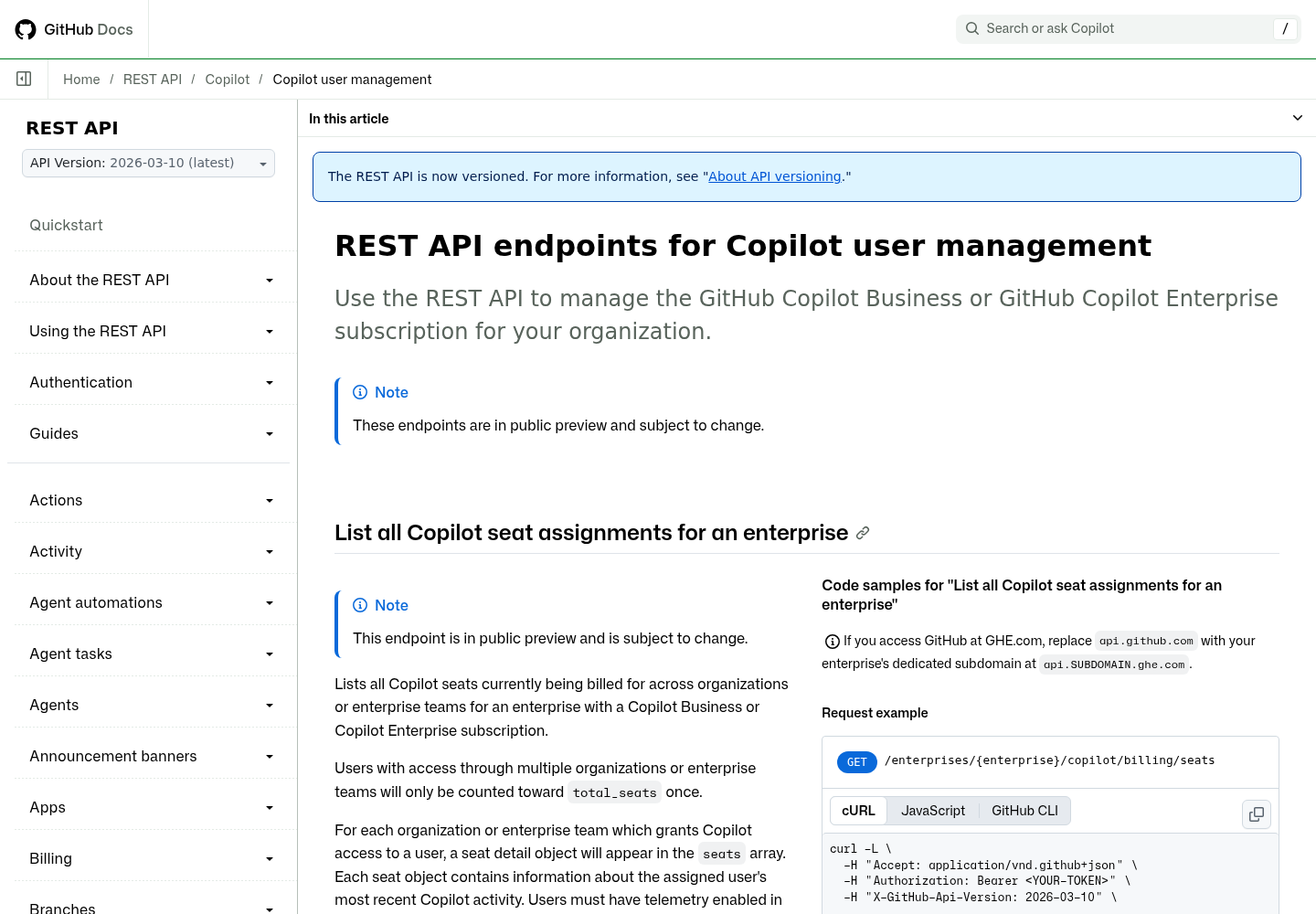
- The REST page now lists app tokens, but older copies may not. On the reference page we read, each enterprise seat endpoint has a fine-grained access tokens block naming GitHub App user access tokens and installation access tokens. If an internal wiki, cached page or earlier documentation version tells you the enterprise seat endpoints work only with classic PATs, it predates this change. Trust the per-endpoint block on the live page and the
X-Accepted-GitHub-Permissionsheader from a real response. - The REST page introduction says organization. Its opening sentence describes managing the Copilot subscription for your organization, although the page also documents the enterprise endpoints used here.
- The enterprise get-user example looks like a list. Its description says it returns one member’s seat details, but its response example contains
total_seatsand aseatsarray. The organization version shows a single object. The script’sshow_userfilter handles both, so do not hard-code either shape. - Fine-grained PATs differ by level. Organization seat endpoints list fine-grained personal access tokens; the enterprise ones do not.
- JWT examples disagree on
iat. The claims table recommends 60 seconds in the past. The Python example on the same page uses the current time and the PowerShell example uses ten seconds back. The script follows the table. - Preview means change, whatever the version header says. Every endpoint carries a note that it is in public preview and subject to change. The script sends
X-GitHub-Api-Version: 2026-03-10, the version shown in GitHub’s examples, so your requests name the documented version explicitly. That header selects a version; the reference does not say it freezes preview behavior. Keep runningliston a schedule, compare its fields with the live reference after any related changelog entry, and stop writes if a response no longer matches.
Running it from GitHub Actions
Many teams trigger offboarding from a workflow instead of a cron host. The actions/create-github-app-token README documents an enterprise input for exactly this case. Store the Client ID as a repository variable and the private key as a secret, then mint inside the job.
name: copilot-offboard
on:
  workflow_dispatch:
    inputs:
      username:
        description: Enterprise member to remove from Copilot
        required: true
jobs:
  remove-seat:
    runs-on: ubuntu-latest
    steps:
      - uses: actions/create-github-app-token@v3
        id: app-token
        with:
          client-id: ${{ vars.COPILOT_SEATS_CLIENT_ID }}
          private-key: ${{ secrets.COPILOT_SEATS_PRIVATE_KEY }}
          enterprise: octo-enterprise
      - name: Remove the seat
        env:
          GH_TOKEN: ${{ steps.app-token.outputs.token }}
          USERNAME: ${{ inputs.username }}
        run: |
          body=$(jq -cn --arg u "$USERNAME" '{selected_usernames: [$u]}')
          curl -sS --fail-with-body -X DELETE \
            -H "Accept: application/vnd.github+json" \
            -H "Authorization: Bearer $GH_TOKEN" \
            -H "X-GitHub-Api-Version: 2026-03-10" \
            https://api.github.com/enterprises/octo-enterprise/copilot/billing/selected_users \
            -d "$body"
What the action does, and what to configure around it:
- The
enterpriseinput takes the enterprise slug and is mutually exclusive withownerandrepositories. The README states enterprise installation tokens can call enterprise APIs but grant no organization or repository access. - Leave the
permission-*inputs off. Enterprise tokens always carry every granted enterprise permission and cannot be scoped down, and the README warns that requesting a permission the installation lacks causes an error. - The token is masked in logs and revoked in the action’s post step unless
skip-token-revokeis true, so it cannot be passed to another job. Do the work in the same job. - Here
curl --fail-with-bodyis not inside a command substitution, so the error body reaches the job log and the step fails with a nonzero exit. - The username flows through
env, not inline${{ }}interpolation in the script body, so a crafted input cannot become shell code. - Limit who can dispatch the workflow. A repository write permission should not double as a seat-cancellation button; the trigger allowlist guide covers that pattern, and rulesets on the workflow branch stop someone from editing the step to target everyone.
Retire the PAT without a gap
The goal is to revoke the classic token, but only after the app has proven it sees and does the same things. Revoking first and debugging second leaves leavers holding seats for a week.
- Run both readers in parallel. For five working days, run
./copilot-seats.sh listand the old script’s list call against the same enterprise, sort both anddiffthem. Any difference other than timing stops the migration. - Move one write path. Switch offboarding first, since a missed cancellation is cheaper to notice than a missed purchase. Keep onboarding on the PAT for one billing cycle.
- Move the rest. Switch onboarding and team grants once a full cycle of removals shows the expected pending dates.
- Revoke the PAT. Have its owner revoke it, then confirm the old script fails with 401. Do not just remove it from the scheduler; a token that still works is still a liability.
- Confirm the app’s scope. Open the enterprise installation and check that it holds one enterprise permission and no organization or repository permissions.
- Write it into your inventory. Record the app name, permission, installation ID, key location, owner and the audit log path. The key migration drill has a template for running this kind of cutover across several credentials at once.
If you also automate other Copilot administration, apply the same split there: the Copilot code review GraphQL settings guide shows how much policy can move through APIs, and every one of those jobs deserves its own narrowly permissioned identity.
Rollback and recovery
Seat changes are billing changes, so plan the undo before the first write.
| Situation | Action | Confirm |
|---|---|---|
Wrong user cancelled (a seat:remove-01 mistake) |
Run add-users LOGIN before the billing cycle ends; the add endpoint documents that it creates new seats and refreshes existing ones |
get-user LOGIN prints the user’s entry; expect pending_cancellation_date back to null, and verify that on your enterprise |
| Wrong enterprise team cancelled | Run add-teams TEAM |
Team rows in list lose their pending dates |
| Duplicate or unwanted add | Run remove-users or remove-teams; the seat goes pending rather than vanishing |
Pending date present in list and get-user |
| Private key possibly exposed | Uninstall the app from the enterprise, which GitHub’s automation guide says revokes all tokens associated with it, and switch the job back to the PAT script if you still have it. Generating a new key does not, in any page cited here, invalidate the old one, so leave the app uninstalled until the exposed key has been removed from the app registration under GitHub’s private key management instructions | Before resuming: reinstall, record the new installation ID, then attempt one mint with the old key and require a refusal; mint with the new key and run list |
| 403 after a permission edit | Have an enterprise owner approve the updated permissions; until then the installation keeps the old set | add-users on a test member succeeds |
| Preview endpoint behavior changes | Stop writes, keep running list, compare responses with the live reference before resuming |
list and get-user output still contains the fields the script reads, matched against the live reference rather than assumed from the version header |
The key row is deliberately conservative. The pages selected for this guide document what uninstalling does to tokens, not how key removal works, so the procedure treats the old key as live until you have removed it and watched a mint with it fail. Do not reinstall on the assumption that a fresh key replaced the old one.
The automation guide adds a stricter option for security-sensitive enterprises: install the app at the start of each run and uninstall it at the end, so an exposed private key is useless between runs. For a weekly offboarding job that trade is often worth it; for daily onboarding it is usually too much friction.
Treat the app as part of your automation fleet rather than as a one-off script. The AgentOps guide covers the surrounding practice: an owner for each identity, a known way to stop it, and evidence you can replay when a seat count looks wrong.
Sources
- GitHub Changelog: GitHub App support for Enterprise Copilot seat management, dated November 10, 2026 on the page (feed timestamp 00:10 UTC, November 11, 2026).
- GitHub Docs: REST API endpoints for Copilot user management
- GitHub Docs: Installing a GitHub App on your enterprise
- GitHub Docs: Choosing permissions for a GitHub App
- GitHub Docs: Generating a JSON Web Token (JWT) for a GitHub App
- GitHub Docs: Generating an installation access token for a GitHub App
- GitHub Docs: Automating app installations in your enterprise’s organizations
- actions/create-github-app-token README