Cognito Token Exchange for MCP Servers: Downscope a User's Token, Record the Agent in the act Claim, and Verify It at the API
Use Cognito token exchange so an MCP server trades a user's token for a read-only, single-audience token with an act claim, then make your API reject the rest.

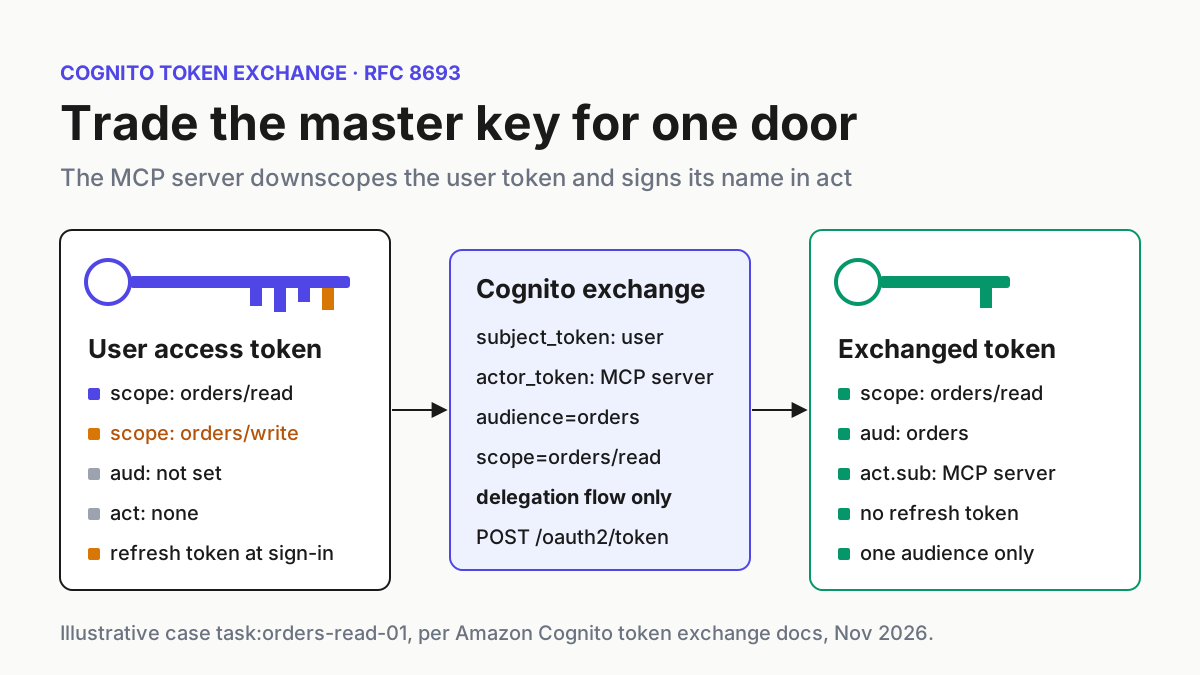
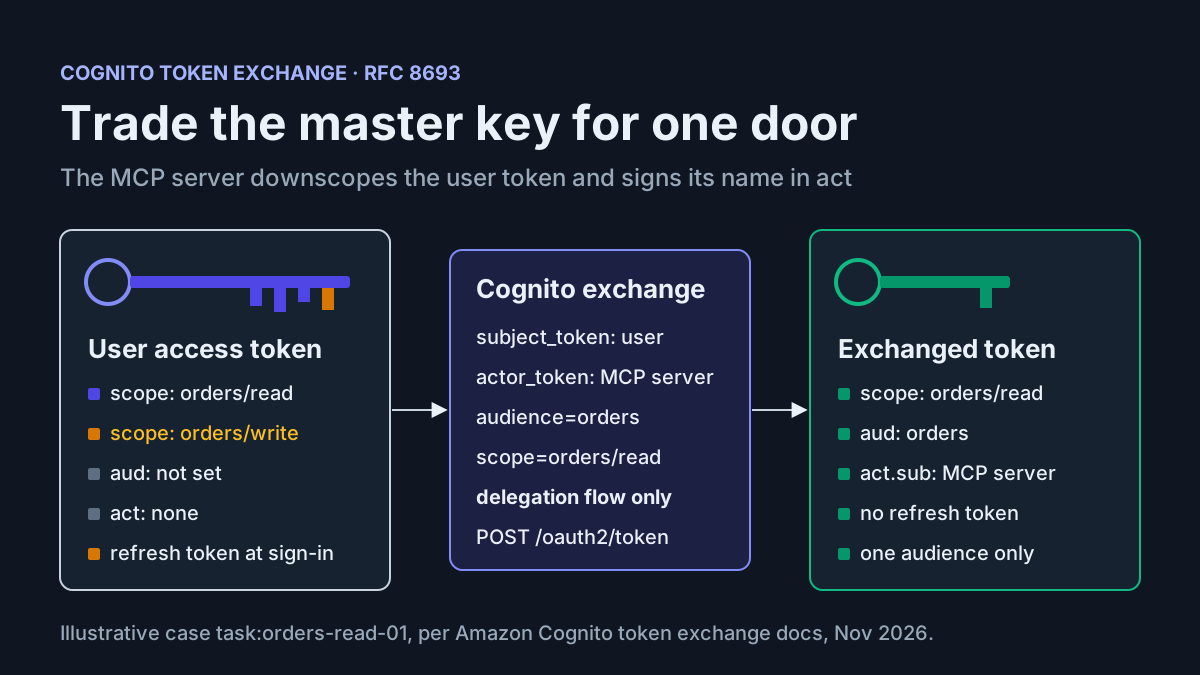
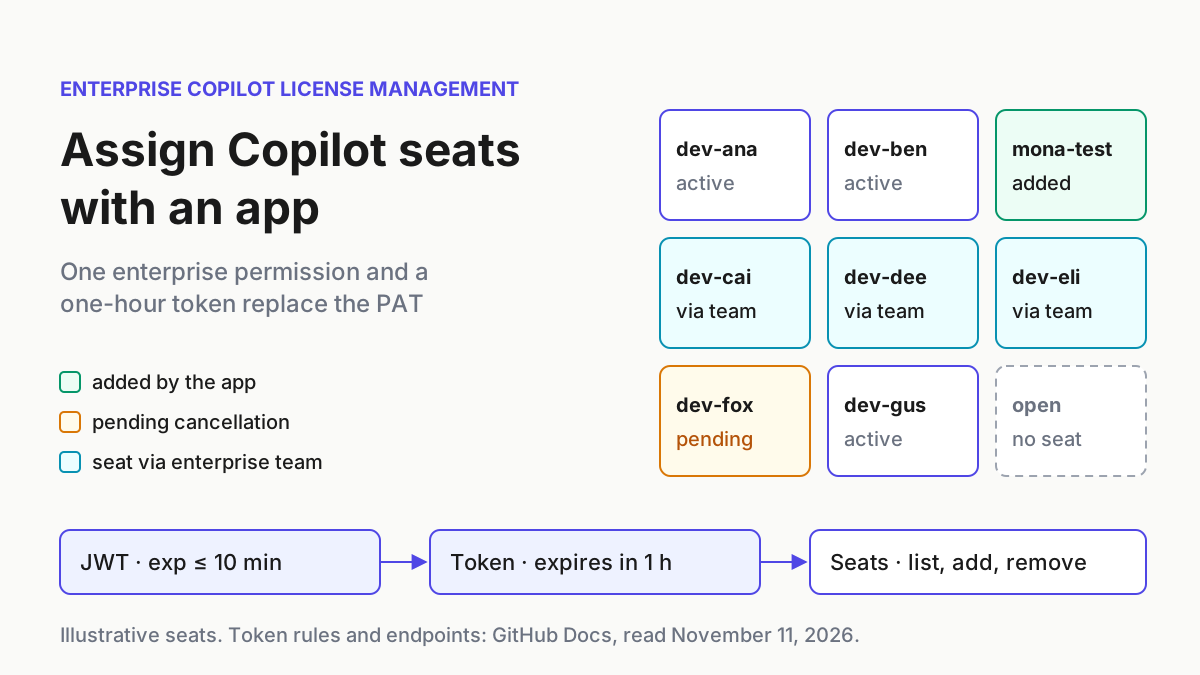
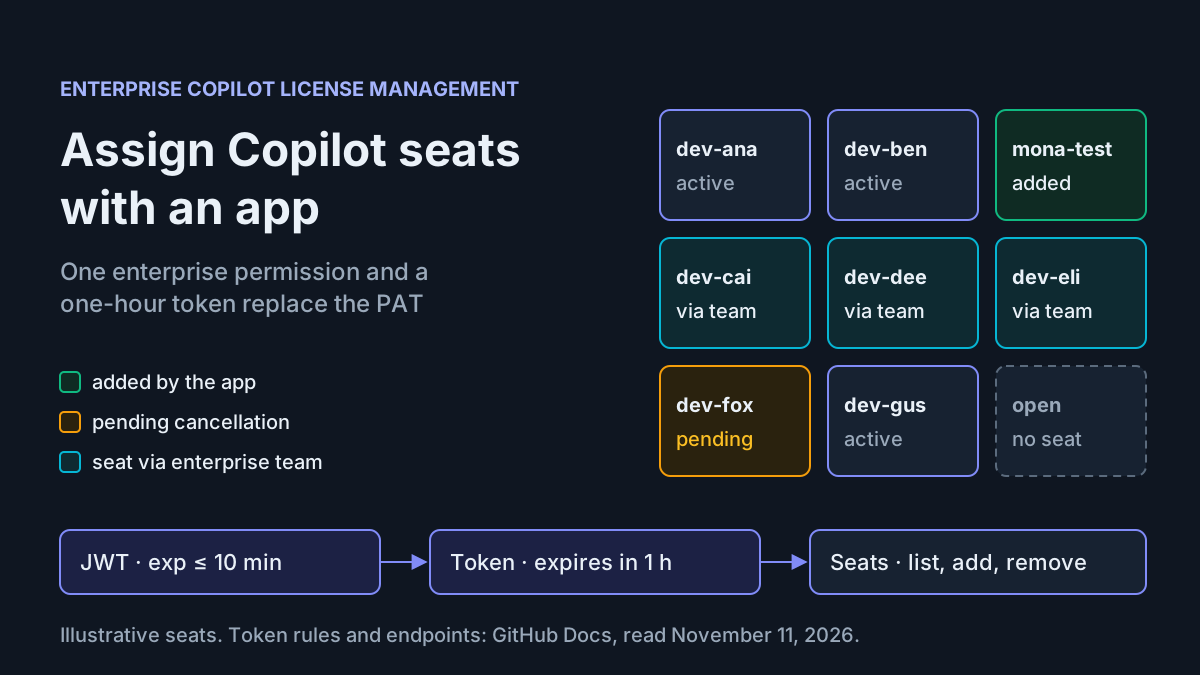
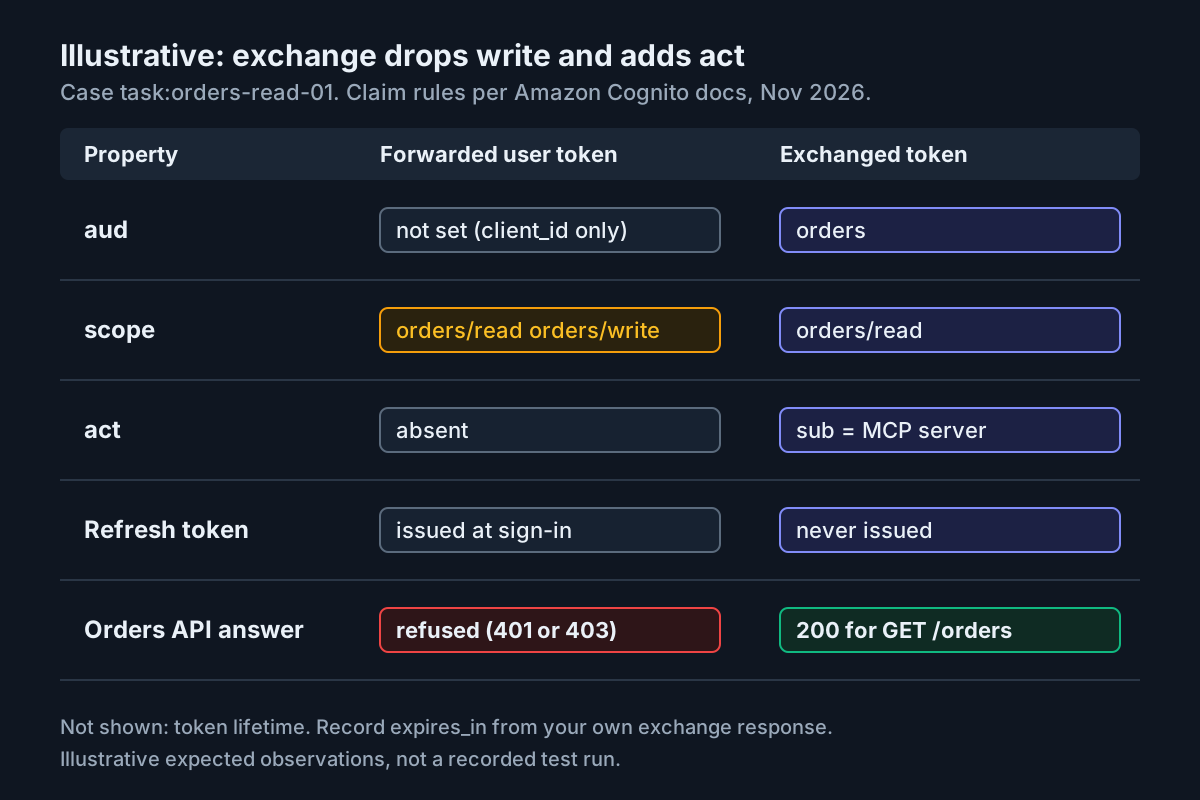
Your MCP server already knows who the user is. The MCP client sends a Cognito access token with every tool call, and the server hands that same token to your orders API. It works. It also means a read-only tool call carries the user’s write scope, the API cannot tell a request the agent made from one the person made, and anyone who lifts a token off the MCP host holds everything the user holds. Cognito token exchange fixes this at the identity provider. The MCP server trades the user’s token for a new one that is narrower, bound to a single audience, issued without a refresh token and stamped with an act claim that names the server.
AWS announced the capability on November 12, 2026. Cognito user pools now implement OAuth 2.0 token exchange from RFC 8693. You can reach it through the token endpoint or the new GetDerivedToken API, on the Essentials and Plus feature plans, in every Region where Cognito runs. The announcement’s own example is the scenario in this guide: an MCP server calling a backend API on a user’s behalf. The steps below don’t depend on the announcement; they depend on how the feature behaves.
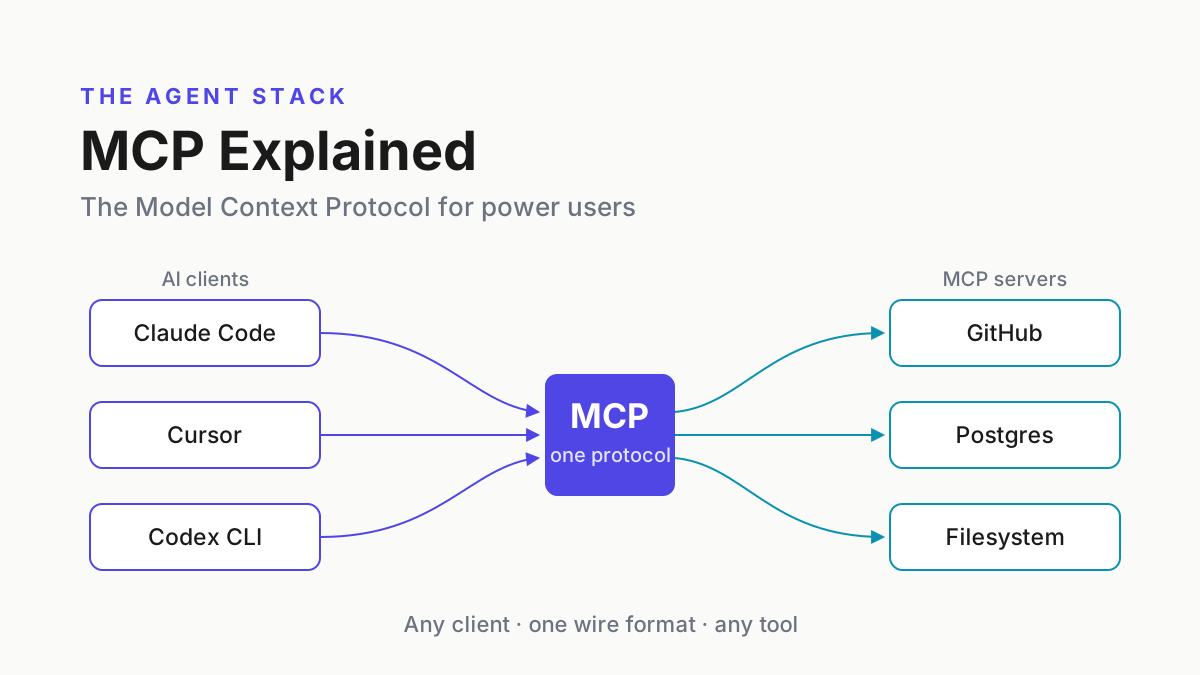
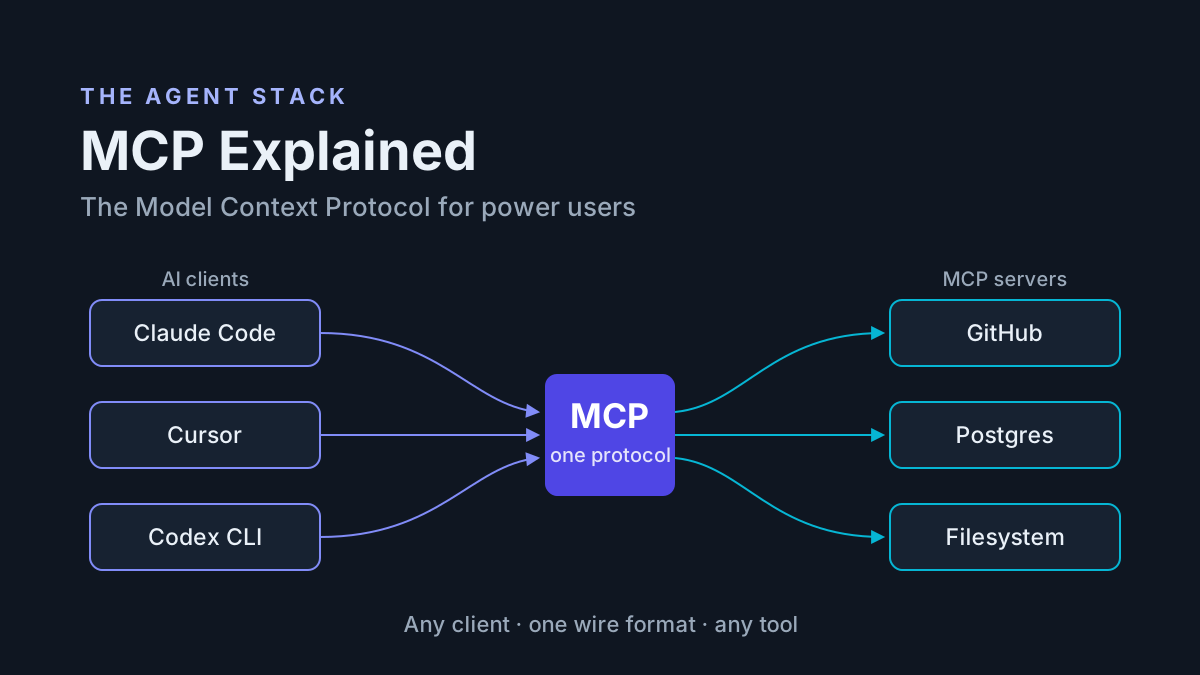
The tutorial follows one illustrative case, task:orders-read-01, from start to finish. A signed-in user holds an access token with orders/read and orders/write. The MCP server needs to list that user’s orders and nothing else. You will configure the identities, capture a real user token from your app’s existing sign-in, send the exchange, compare the decoded result with a filled expectation table, and run a small orders API that refuses anything that isn’t the exchanged shape. The worked values are expected observations taken from the AWS documentation, not output from a run we recorded. Your IDs, sub values and lifetimes will differ, and each step says where to read your own. If you are new to how MCP servers sit between clients and tools, the MCP explainer covers the protocol side.
What you will build and what you need
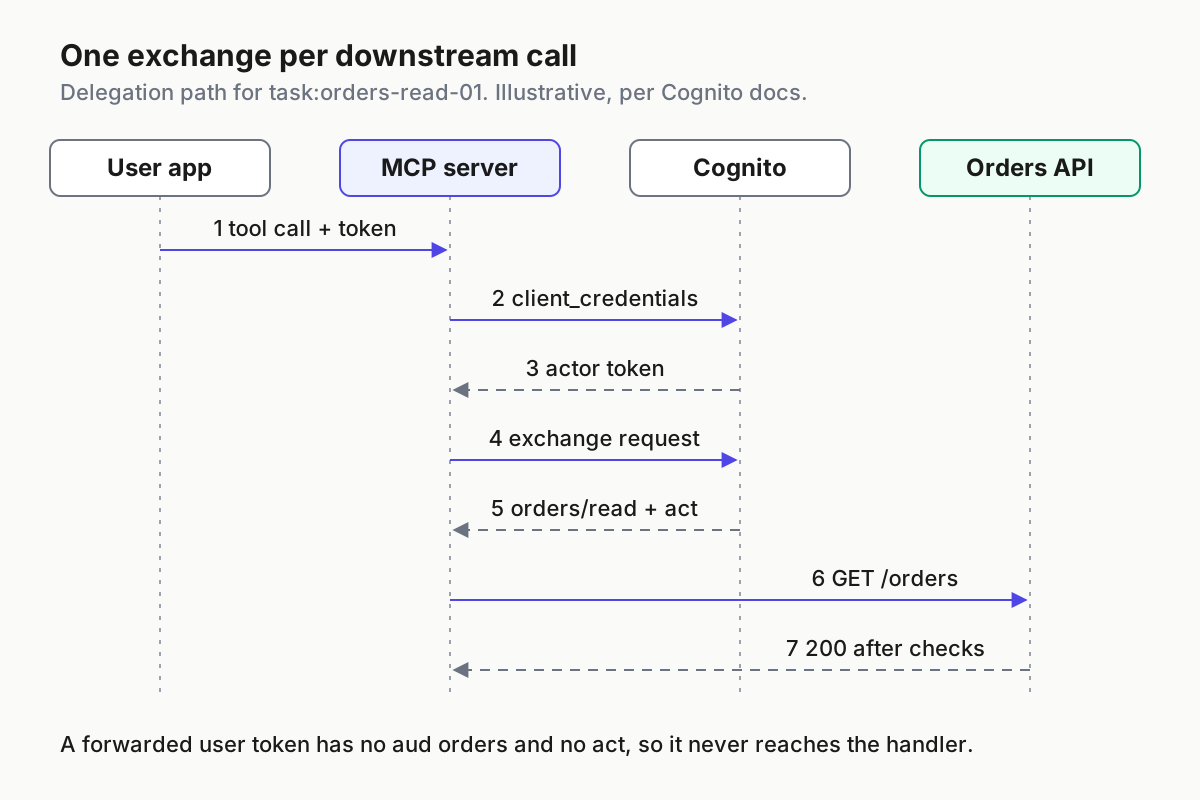
This guide is for a backend or platform developer who runs an MCP server, or any agent service, in front of their own API, with users who sign in through Cognito. At the end, the MCP server holds two credentials of its own: a client secret, and a short-lived actor token it fetches with the client credentials grant. It never sends the user’s token downstream. For each tool call it asks Cognito for a derived token. The orders API accepts only tokens that carry exactly one audience, orders, an act claim naming an actor your infrastructure records list, and no scope beyond orders/read.
Check each prerequisite before you start:
- [ ] The user pool is on the Essentials or Plus feature plan. Token exchange is not available on Lite. The feature plan page explains that a plan applies to the whole pool, not to individual app clients, and that new pools default to Essentials.
- [ ] The pool has a domain. You need it for
/oauth2/token, which handles both your app’s sign-in redemption and the exchange. Only the SDK path throughGetDerivedTokenworks without one. - [ ] Your user-facing app already signs users in with the authorization code grant on its own app client, and that client allows
openid,orders/readandorders/write. This guide does not rebuild that sign-in; it uses the access token it produces. - [ ] You can see the access token your app receives for a test user, for example in a debug build or in the
Authorizationheader the MCP client sends during a test session. - [ ] You can create a confidential app client, with a client secret, for the MCP server.
- [ ] You can add two resource servers:
orderswith scopesreadandwrite, andmcpwith the scopeactor. - [ ] You have a shell with curl and jq, and Node.js 18 or later with the aws-jwt-verify library for the API side.
- [ ] You have a test user,
orders-test@example.com, in a test pool. Don’t run fixture commands against production identities.
The list hides two design decisions. First, the MCP server gets its own app client instead of borrowing the user app’s client. That is the principle behind giving agents service principals instead of shared human SSO: if you can’t name an agent, you can’t audit it. Second, the actor token gets its own scope, mcp/actor, on a separate resource server, so the token the server presents as its identity carries no orders permission.
That second choice has a limit you should understand before you rely on it. The MCP client must be allowed orders/read, because the exchange issues only scopes the client may issue. The same client also has the client credentials grant, and the token endpoint reference says that grant can request any custom scope enabled on the client. So the MCP server can mint an orders/read machine token with no user behind it. Cognito configuration does not prevent that. The orders API does: a client credentials token never went through a delegation exchange, so it has no act claim, and the verifier in Step 5 refuses any token without one. Step 6 tests that refusal directly.
How Cognito decides what the exchanged token carries
An exchange takes a subject token, the credential that represents the user, and an optional actor token that represents the service doing the exchange. According to the Cognito token exchange guide, Cognito validates the subject token’s signature and expiry, checks it for revocation such as a global sign-out, and requires the user to be enabled and confirmed. It then issues a standard Cognito access token or ID token, which your API validates the same way it validates any other user pool token.
Five documented rules decide what comes back. Each one becomes a check in Step 4, so learn them before you send a request.
| Rule | What Cognito documents | What it means for task:orders-read-01 |
|---|---|---|
| Down-scoping only | Issued scopes are the intersection of requested scopes, the subject token’s scopes and the scopes the app client may issue | A request for orders/read from a client allowed orders/read yields orders/read, and orders/write can’t appear |
| No refresh token | An exchange never returns one | When the token expires, the MCP server exchanges again instead of refreshing |
| One audience or one resource | Audiences and Resources each take at most one item, can’t be combined, and must match a registered resource server |
audience=orders works; a second audience or an unregistered name doesn’t |
| Delegation versus impersonation | An actor token adds act; without one, the token looks as if the user called directly |
The API can require act, which turns act-less tokens into refusals |
No may_act |
Cognito doesn’t issue or evaluate the RFC 8693 may_act claim |
Who may act is decided by app client flows and the API’s actor allowlist, not by a claim in the user’s token |
The limits on audience, resource and scope count come from the GetDerivedToken API reference. That reference also says that if you request no scopes, the issued token carries the same scopes as the subject token. That default works against this guide’s goal, so always name the scope.
The RFC describes the difference between the two modes in one line: with delegation, the actor “still has its own identity” separate from the user, while impersonation makes the actor indistinguishable from the user. For an MCP server, delegation is almost always correct, because the whole point is that your logs and your API can tell the agent apart from the person. The RFC also defines nested act claims for chains of delegation. The outermost act is the current actor; nested ones are history. The RFC says access control must consider only the top-level claims and the current actor, and treat prior actors as informational only. Your API should follow that rule.
If you built a stopgap before launch, compare it with the native shape. The aws-samples token exchange sample assembled exchange from custom authentication Lambda triggers, an API Gateway endpoint and secrets kept in Parameter Store. Its tokens put the service in sub and moved the user to custom:original_sub. Native exchange reverses that: sub stays the user and the agent goes in act. Any downstream code that reads custom:original_sub has to change when you migrate.
One more component can take part in an exchange. If your pool has a pre token generation Lambda trigger, the exchange invokes it with the trigger source TokenGeneration_TokenExchange. Your function can add, suppress or override claims, suppress scopes, or deny the exchange by returning an error. It can’t add scopes, and it receives the resolved user’s attributes rather than the raw subject or actor tokens. The pre token generation reference covers event versions and the claims you can’t touch, such as sub and client_id. A common use is denying exchanges for users in a suspended group, so the agent path closes even while the user’s own session is still valid.
Step 1: Set up the resource servers and the MCP server’s app client
These actions build the identities that task:orders-read-01 relies on. Do them in a test pool first.
- Confirm the feature plan. In the Cognito console, open User Pools, choose the pool, open Settings and review the Feature plans tab. If the pool is on Lite, choose Switch to Essentials and confirm. Through the API, the plan is the
UserPoolTierparameter ofCreateUserPoolandUpdateUserPool. - Create a resource server with the identifier
ordersand the scopesreadandwrite. Cognito writes custom scopes as identifier slash scope, so they appear asorders/readandorders/write. The identifierordersis also the value you will pass as the audience. - Create a second resource server with the identifier
mcpand one scope,actor. Only the MCP server’s own machine token uses it. - Create the MCP server’s app client with a client secret. Enable the client credentials grant and allow two custom scopes,
orders/readandmcp/actor. Don’t alloworders/write. That omission is what keeps write scope out of every token this client can obtain, whatever the subject token holds. - Add
ALLOW_TOKEN_EXCHANGE_DELEGATIONto the client’s explicit authentication flows. LeaveALLOW_TOKEN_EXCHANGE_IMPERSONATIONoff. - Record the client ID from the create response or your infrastructure-as-code output in a reviewed configuration file, together with the pool ID, pool domain and Region. That record, not anything you later read from a token, is the source for the API’s settings and actor allowlist in Step 6. Store the client secret in the MCP server’s secret store.
The two settings that matter on the MCP server’s client look like this in API terms. It’s a fragment, not a complete request:
{
  "ExplicitAuthFlows": ["ALLOW_TOKEN_EXCHANGE_DELEGATION"],
  "AllowedOAuthFlows": ["client_credentials"]
}
Three choices in this step are easy to get wrong.
The client credentials grant goes through the hosted domain, in AllowedOAuthFlows. The token endpoint reference describes a domainless alternative, ALLOW_CLIENT_TOKEN_AUTH, but says it must be the client’s only authentication flow. That rules it out for a client that also needs a token exchange flow.
Delegation-only is deliberate. The API reference says the requesting client must have the impersonation flow or the delegation flow, depending on whether the request includes an actor token, or the request fails. With impersonation off, a code path that forgets the actor token can’t quietly produce a token with no act claim. It fails loudly instead.
When you edit an existing client through the API, read its current configuration first and send it back whole. The pre token generation page warns that, for user pool updates, any parameter you omit falls back to its default. Assume client updates work the same way until you’ve confirmed otherwise.
The token exchange guide also lists an account-level prerequisite: token exchange must be enabled for your account, or calls return OperationNotEnabledException. If you see that error on a pool already on Essentials or Plus, that line is why.
Step 2: Capture a subject token from your app’s sign-in
The subject token must actually carry orders/read and orders/write, or the rest of the test plan proves nothing. That rules out the quick aws cognito-idp initiate-auth route. The pre token generation reference states that an access token from Cognito user pools API authentication is assigned only the aws.cognito.signin.user.admin scope. Custom resource-server scopes come from the OAuth authorization code grant, the flow the token endpoint reference recommends, with PKCE, for user sign-in.
This guide treats that sign-in as a prerequisite rather than rebuilding it. Your user-facing app already runs it; what you need here is the access token it produces for the test user.
- Sign in to your user app as
orders-test@example.comin the test pool, the same way a real user would, so the app requestsopenid,orders/readandorders/write. - Copy the access token from the app’s debug output, or from the
Authorization: Bearerheader the MCP client sends to the MCP server in a test session. - Export it in your working shell as
USER_TOKEN, define a small decode helper, and confirm the token’s shape.
USER_TOKEN='paste-the-test-user-access-token-here'

decode() { node -e 'const p=process.argv[1].split(".")[1]; console.log(Buffer.from(p,"base64url").toString())' "$1"; }

decode "$USER_TOKEN" | jq '{sub, client_id, scope, token_use, aud}'
The helper prints the payload locally, so you never paste a live token into a website. For reference, when your app’s backend redeems the code itself, its request follows the token endpoint reference’s PKCE example. The code and code_verifier come from your app’s own authorize step, which is why this guide does not generate them:
curl -s -X POST "https://$POOL_DOMAIN/oauth2/token" \
  -H "Content-Type: application/x-www-form-urlencoded" \
  --data-urlencode "grant_type=authorization_code" \
  --data-urlencode "client_id=$USER_APP_CLIENT_ID" \
  --data-urlencode "code=$AUTH_CODE_FROM_YOUR_APP" \
  --data-urlencode "code_verifier=$CODE_VERIFIER_FROM_YOUR_APP" \
  --data-urlencode "redirect_uri=$REDIRECT_URI_REGISTERED_ON_THE_CLIENT"
A public client with no secret sends client_id in the body, as above; a client with a secret sends it with -u instead.
Expected observation for task:orders-read-01: token_use is access; scope lists openid, orders/read and orders/write in some order; client_id is the user app’s client ID; aud is null. The JWT verification guide explains the last one: Cognito access tokens carry client_id and no aud unless the token is bound to a resource server. The full sign-in response also contains a refresh_token, because the token endpoint returns one whenever the grant is authorization_code. Note the sub value. The exchanged token must carry the same one.
If scope shows only aws.cognito.signin.user.admin, the token came from an API sign-in path, not the authorization code grant. If scope lacks orders/write, the user app client isn’t allowed that scope or your app didn’t request it; fix that before you continue, because row 2 of the test plan needs it.
Step 3: Fetch the actor token and send the exchange for task:orders-read-01
The actor token is the MCP server’s own access token. The exchange request then carries both tokens.
- Fetch the actor token with a client credentials grant for
mcp/actoronly. - Decode it and confirm it carries
mcp/actorand nothing else. - Send the exchange with the subject token, the actor token,
audience=ordersandscope=orders/read. - Confirm the response has no
refresh_tokenkey.
ACTOR_TOKEN=$(curl -s -X POST "https://$POOL_DOMAIN/oauth2/token" \
  -u "$MCP_CLIENT_ID:$MCP_CLIENT_SECRET" \
  -H "Content-Type: application/x-www-form-urlencoded" \
  --data-urlencode "grant_type=client_credentials" \
  --data-urlencode "scope=mcp/actor" | jq -r .access_token)

decode "$ACTOR_TOKEN" | jq '{sub, client_id, scope, token_use}'
The -u flag sends the client ID and secret as client_secret_basic, one of the two client authentication methods the token endpoint supports. Expect an access token with scope mcp/actor; the token endpoint documentation says client credentials grants return only access tokens. If the response contains an error field instead, go to the troubleshooting table before you continue.
This is the request the MCP server makes on every tool call that touches orders. It follows the request format in the token exchange guide, with the delegation parameters added:
RESP=$(curl -s -X POST "https://$POOL_DOMAIN/oauth2/token" \
  -u "$MCP_CLIENT_ID:$MCP_CLIENT_SECRET" \
  -H "Content-Type: application/x-www-form-urlencoded" \
  --data-urlencode "grant_type=urn:ietf:params:oauth:grant-type:token-exchange" \
  --data-urlencode "subject_token=$USER_TOKEN" \
  --data-urlencode "subject_token_type=urn:ietf:params:oauth:token-type:access_token" \
  --data-urlencode "actor_token=$ACTOR_TOKEN" \
  --data-urlencode "actor_token_type=urn:ietf:params:oauth:token-type:access_token" \
  --data-urlencode "audience=orders" \
  --data-urlencode "scope=orders/read")

echo "$RESP" | jq '{issued_token_type, token_type, expires_in, has_refresh: has("refresh_token")}'
Here is what each parameter does:
grant_typeis the token-exchange URN from RFC 8693. URL-encode it;--data-urlencodedoes that for you.subject_tokenandsubject_token_typeidentify the user. The type is the RFC access-token URN because the subject is a Cognito access token. For a subject token from an external OIDC or SAML provider registered on the pool, Cognito adds asubject_token_provider_nameparameter, which is an Amazon extension rather than part of the RFC. That user must already exist as a linked user, because exchange doesn’t create users.actor_tokenandactor_token_typeturn the request into delegation. Leave them out and the request fails on this client, which is the point of Step 1.audience=ordersbinds the token to theordersresource server. To bind to a resource URL you’d use the resource form instead, never both.scope=orders/readnames the narrowed scope, so the result doesn’t inherit everything the subject token carried.
Expected observation: HTTP 200 and a body shaped like the response example in the Cognito guide, with no refresh_token key:
{
  "access_token": "eyJra...",
  "issued_token_type": "urn:ietf:params:oauth:token-type:access_token",
  "token_type": "Bearer",
  "expires_in": 3600
}
The 3600 comes from the documentation example. Record the expires_in your pool actually returns and size the MCP server’s token cache to it.
If your MCP server runs in AWS with IAM credentials, or you’d rather not depend on the pool domain for the exchange, send the same exchange through GetDerivedToken with your SDK. The request body uses the fields from the API reference:
{
  "ClientId": "MCP_CLIENT_ID",
  "ClientSecret": "MCP_CLIENT_SECRET",
  "SubjectToken": "USER_ACCESS_TOKEN",
  "SubjectTokenType": "ACCESS_TOKEN",
  "ActorToken": "MCP_ACTOR_ACCESS_TOKEN",
  "ActorTokenType": "ACCESS_TOKEN",
  "Audiences": ["orders"],
  "Scopes": ["orders/read"],
  "RequestedTokenType": "ACCESS_TOKEN"
}
The response returns IssuedToken, IssuedTokenType, ExpiresIn, TokenType and the granted Scopes. That last field is handy: your MCP server can assert that Scopes equals ["orders/read"] before it uses the token, with no decoding.
Step 4: Decode the result and compare it with the expectation table
Pull the issued token out of the response and compare the two claims the verifier will pin against the client ID you recorded in Step 1:
EXCHANGED=$(echo "$RESP" | jq -r .access_token)
decode "$EXCHANGED" | jq --arg mcp "$MCP_CLIENT_ID" \
  '{sub, token_use, scope, aud, act, client_id, exp,
    client_matches: (.client_id == $mcp), actor_matches: (.act.sub == $mcp)}'
Compare the output with the delegation example in the Cognito guide, adjusted to this case:
{
  "sub": "SAME-SUB-AS-THE-USER-TOKEN",
  "token_use": "access",
  "scope": "orders/read",
  "aud": "orders",
  "act": { "sub": "MCP-CLIENT-ID-FROM-STEP-1" }
}
In the documentation example, act.sub is a client identifier, service-a-client-id, and RFC 8693 defines client_id as the client that requested the token, which here is the MCP client. The Cognito example payload doesn’t show client_id, though, so treat both as expectations to confirm, not facts. Use this gate before you build the API:
- [ ]
client_matchesistrue. The verifier in Step 5 pinsclient_idto the MCP client ID. - [ ]
actor_matchesistrue. The verifier’s actor allowlist comes from your Step 1 record, so it only works ifact.subequals that recorded ID. - [ ]
scopeis exactlyorders/readandaudisorders. - [ ] If either match is
falseor the claim is missing, stop. Don’t loosen the pin and don’t paste a value from the token into the allowlist. The verifier is designed to refuse such tokens, so this guide’s enforcement path doesn’t apply to your pool yet; check the token exchange guide for updated payload documentation.
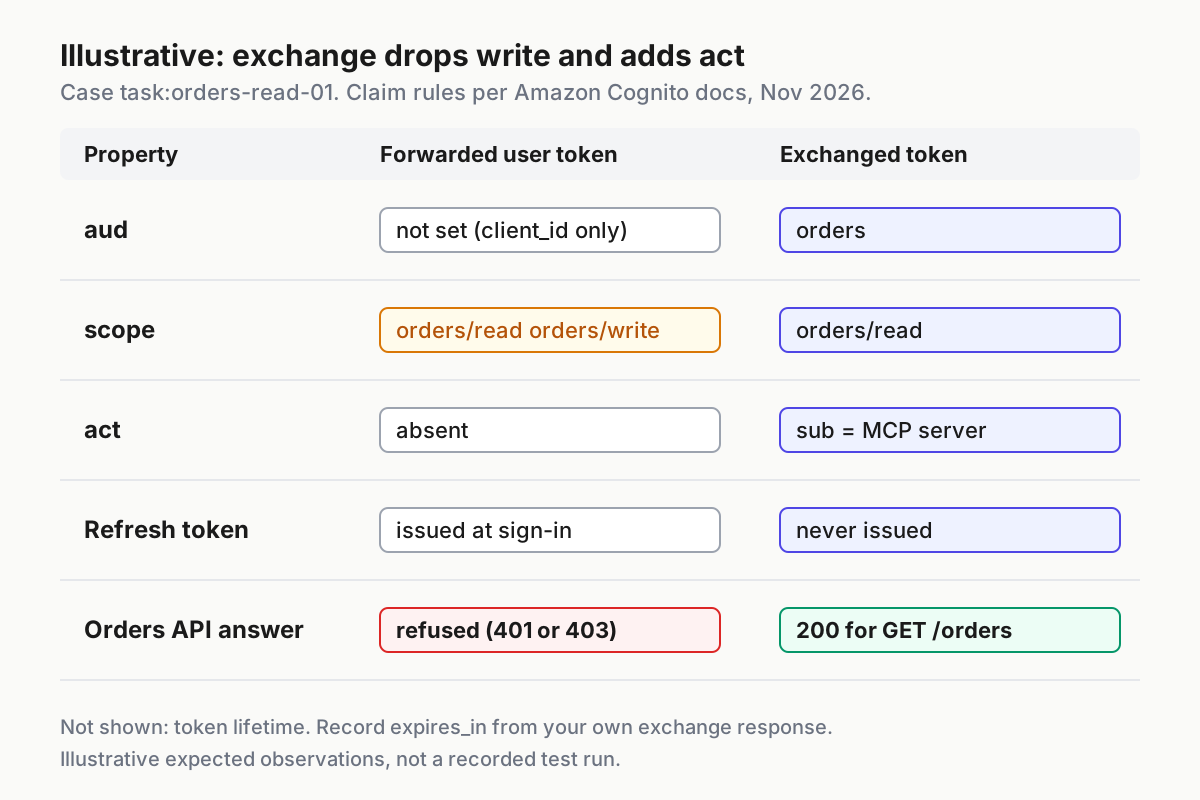
The filled table below is the test plan for this guide. Every expected result is an illustrative observation based on the cited documentation, not a recorded run. Run each row in your test pool and mark it pass or fail. Rows 5 to 9 use the API from Steps 5 and 6.
| Input | Action | Expected result |
|---|---|---|
task:orders-read-01 delegation: subject token with scope openid orders/read orders/write, actor token from the MCP server client, audience orders, scope orders/read |
POST /oauth2/token with the token-exchange grant, both tokens and Basic auth using the MCP client secret |
HTTP 200; issued_token_type is the access-token URN; no refresh_token key; decoded scope is exactly orders/read; aud is orders; act present; sub equals the user token’s sub |
task:orders-read-01 write attempt: same subject and actor tokens, scope orders/write |
Same exchange request with only the scope changed | No token carrying orders/write. The client isn’t allowed that scope, so either the documented intersection removes it or the endpoint refuses the request with a scope error such as invalid_grant. A token that contains orders/write is a failure |
| task:orders-read-01 no actor: same subject token, actor parameters removed | Same exchange request without actor_token and actor_token_type |
Request fails because the client has the delegation flow but not the impersonation flow; no act-less token is issued |
| task:orders-read-01 bad secret: valid tokens, MCP client secret with one character changed | Same exchange request | HTTP 400 with error set to invalid_client |
task:orders-read-01 forwarded original: raw USER_TOKEN from Step 2 |
curl GET http://localhost:3000/orders with Authorization: Bearer $USER_TOKEN |
HTTP 401; log reason names the client_id check, because the token’s client_id is the user app, not the MCP client |
task:orders-read-01 machine token: client credentials token from the MCP client with scope orders/read |
curl GET /orders with that token |
HTTP 403; log reason is token not bound to orders alone or missing or unknown actor, because no delegation exchange added act |
| task:orders-read-01 read call: the exchanged token from row 1 | curl GET /orders with $EXCHANGED |
HTTP 200; server log shows the user’s sub as principal and the MCP client ID as actor |
| task:orders-read-01 write call: the exchanged token from row 1 | curl POST /orders with $EXCHANGED |
HTTP 403 with reason scope does not cover route |
task:orders-read-01 excess-scope fixture: claims with scope orders/read orders/write, aud orders, valid act |
node --test orders-api/policy.test.js |
The fixture test passes because checkClaims returns 403 with reason scope exceeds actor ceiling for GET /orders |
Rows 2, 3 and 6 are the ones teams skip, and they matter most. Row 2 proves the MCP server can’t escalate by asking for more. Row 3 proves a code path that drops the actor can’t produce a token your API would mistake for the user acting alone. Row 6 proves the machine credential the MCP server legitimately holds is useless against the orders API on its own.
Step 5: Make the orders API accept only the exchanged shape
Token exchange only helps if the downstream API insists on it. Otherwise the MCP server, or anyone who copies a user token, can skip the exchange and forward the original. The code splits into two files. policy.js is a pure function over decoded claims, so you can test it without minting tokens. authorize.js validates configuration at startup, verifies the signature with aws-jwt-verify, which the verification guide recommends for Node.js, and then applies the policy.
The policy checks scope twice, in a fixed order. First the ceiling: every scope in the token must belong to the set this delegation path may ever hold, so a broader token is refused outright, even on a read route. Only then does it look up the one scope the route requires.
// orders-api/policy.js: claim checks that run after signature verification
const EXPECTED_AUD = 'orders';
// Ceiling for tokens that arrive through the MCP delegation path.
const ACTOR_SCOPE_CEILING = new Set(['orders/read']);
const SCOPE_FOR_ROUTE = {
  'GET /orders': 'orders/read',
  'POST /orders': 'orders/write',
};

function checkClaims(claims, route, allowedActors) {
  const aud = Array.isArray(claims.aud) ? claims.aud : [claims.aud];
  if (aud.length !== 1 || aud[0] !== EXPECTED_AUD) {
    return { status: 403, reason: 'token not bound to orders alone' };
  }
  const actor = claims.act && typeof claims.act.sub === 'string' ? claims.act.sub : '';
  if (actor === '' || !allowedActors.has(actor)) {
    return { status: 403, reason: 'missing or unknown actor' };
  }
  const granted = String(claims.scope || '').split(' ').filter(Boolean);
  // Ceiling first: any scope outside the delegation ceiling refuses the token.
  const excess = granted.filter((s) => !ACTOR_SCOPE_CEILING.has(s));
  if (granted.length === 0 || excess.length > 0) {
    return { status: 403, reason: 'scope exceeds actor ceiling' };
  }
  // Then the route: an unmapped route is refused, a mapped one needs its scope.
  const required = SCOPE_FOR_ROUTE[route];
  if (required === undefined) {
    return { status: 403, reason: 'no scope mapped for route' };
  }
  if (granted.indexOf(required) === -1) {
    return { status: 403, reason: 'scope does not cover route' };
  }
  return { status: 200, user: claims.sub, actor };
}

module.exports = { checkClaims };
// orders-api/authorize.js: startup validation, signature check, then policy
const { CognitoJwtVerifier } = require('aws-jwt-verify');
const { checkClaims } = require('./policy');

function requireSetting(name) {
  const value = process.env[name];
  if (typeof value !== 'string' || value.trim() === '') {
    throw new Error(`missing required setting ${name}; refusing to start`);
  }
  return value.trim();
}

const USER_POOL_ID = requireSetting('USER_POOL_ID');
const MCP_CLIENT_ID = requireSetting('MCP_CLIENT_ID');
// Actor IDs come from your reviewed Step 1 records, never from a token.
const ALLOWED_ACTORS = new Set(
  requireSetting('ALLOWED_ACTOR_IDS').split(',').map((s) => s.trim()).filter(Boolean)
);
if (ALLOWED_ACTORS.size === 0) {
  throw new Error('ALLOWED_ACTOR_IDS has no usable entries; refusing to start');
}

const verifier = CognitoJwtVerifier.create({
  userPoolId: USER_POOL_ID,
  tokenUse: 'access',
  clientId: MCP_CLIENT_ID, // tokens without this client_id fail here, closed
});

async function authorize(route, authorizationHeader) {
  const match = /^Bearer ([A-Za-z0-9._-]+)$/.exec(authorizationHeader || '');
  if (!match) {
    return { status: 401, reason: 'no bearer token' };
  }
  let claims;
  try {
    claims = await verifier.verify(match[1]);
  } catch {
    return { status: 401, reason: 'signature, issuer, expiry, token_use or client_id check failed' };
  }
  return checkClaims(claims, route, ALLOWED_ACTORS);
}

module.exports = { authorize };
Why each check is there:
- [ ] Missing settings stop the process at startup. An empty
ALLOWED_ACTOR_IDScan never become a set that matches anactobject with nosub, and the policy also treats a missing or non-stringact.subas an empty string that never matches. - [ ] Signature,
iss,exp,token_useandclient_idcome from the verifier. The guide notes that a token from the wrong pool or Region fails with aParameterValidationError, so a misconfigureduserPoolIdfails closed. If an exchanged token lacksclient_id, it fails here too; Step 4’s gate catches that before you enforce. - [ ]
audmust be a single value,orders. An array with a second audience is refused even if it containsorders. - [ ]
actmust exist andact.submust be on the allowlist. That turns the delegation decision from Step 1 into an API rule and refuses client credentials tokens. Ignore nestedactvalues for decisions, as the RFC requires, but log them. - [ ] Every scope must sit under the actor ceiling. A token carrying
orders/read orders/writeis refused even on GET, because nothing on the MCP path should ever hold write. If a future agent needs write, give it its own route, actor and ceiling. - [ ] Every route must be mapped to exactly one required scope, and that scope must be in
scope. An unmapped route is refused rather than allowed by default, and the read-only ceiling means POST/ordersis unreachable through this path by design. - [ ] Authorization on data uses
sub, the user, never the actor. The actor answers who acted;subanswers whose orders these are. - [ ] Logs record
sub,act.sub,audandjtiif present, never the raw bearer string. The AWS AgentCore on-behalf-of post puts it plainly: a leaked log line holding a live token is a credential disclosure for that token’s lifetime. - [ ] Token lifetimes stay short. The verification guide warns that offline checks can’t detect revocation. An exchanged token can’t be refreshed, so a short lifetime caps its value if it leaks.
Note the order of refusals for a forwarded user token. Its client_id names the user app, so the verifier rejects it with a 401 before the audience check ever runs. That ordering matters again during rollout.
The policy test exercises the negative cases you can’t easily mint, such as a broader token with a valid actor. Save it beside policy.js:
// orders-api/policy.test.js
const test = require('node:test');
const assert = require('node:assert');
const { checkClaims } = require('./policy');

const actors = new Set(['mcp-client-id-from-step-1']);
const exchanged = {
  sub: 'user-sub', token_use: 'access', aud: 'orders', scope: 'orders/read',
  act: { sub: 'mcp-client-id-from-step-1' },
};
const reason = (claims, route) => checkClaims(claims, route, actors).reason;

test('exchanged read token passes GET', () => {
  assert.strictEqual(checkClaims(exchanged, 'GET /orders', actors).status, 200);
});
test('excess scope is refused on GET', () => {
  assert.strictEqual(reason({ ...exchanged, scope: 'orders/read orders/write' }, 'GET /orders'), 'scope exceeds actor ceiling');
});
test('a second audience is refused', () => {
  assert.strictEqual(reason({ ...exchanged, aud: ['orders', 'billing'] }, 'GET /orders'), 'token not bound to orders alone');
});
test('missing act and act without sub are refused', () => {
  assert.strictEqual(reason({ ...exchanged, act: undefined }, 'GET /orders'), 'missing or unknown actor');
  assert.strictEqual(reason({ ...exchanged, act: {} }, 'GET /orders'), 'missing or unknown actor');
});
test('read token cannot POST', () => {
  assert.strictEqual(reason(exchanged, 'POST /orders'), 'scope does not cover route');
});
Run node --test orders-api/policy.test.js. The expected observation is five passing tests and none failing. Any failure means the policy file differs from the one above.
If an API Gateway HTTP API sits in front of the service, its JWT authorizer can do the audience check before your code runs. The verification guide explains that an access token bound to a resource server carries that resource identifier in aud, and that you then configure the identifier, not the app client ID, as the authorizer’s audience. The AgentCore post describes the same arrangement as one of three layers of audience enforcement: the token request, the authorization server and the API’s authorizer. Keep the act and scope checks in code either way; an audience match alone doesn’t prove an agent acted for a user.
Step 6: Run the API and send the four test calls
The adapter below is the smallest HTTP server that turns authorize decisions into status codes before any handler runs. The orders handler is a stub that echoes the owner; your real data access, querying orders where the owner equals sub, stays an existing prerequisite you plug in where the comment says.
// orders-api/server.js: minimal HTTP adapter around authorize()
const http = require('node:http');
const { authorize } = require('./authorize');

const server = http.createServer(async (req, res) => {
  const path = new URL(req.url, 'http://localhost').pathname;
  const route = `${req.method} ${path}`;
  const send = (status, body) => {
    res.writeHead(status, { 'Content-Type': 'application/json' });
    res.end(JSON.stringify(body));
  };
  const decision = await authorize(route, req.headers.authorization);
  if (decision.status !== 200) {
    console.log(JSON.stringify({ route, status: decision.status, reason: decision.reason }));
    return send(decision.status, { error: decision.reason });
  }
  console.log(JSON.stringify({ route, status: 200, principal: decision.user, actor: decision.actor }));
  if (route === 'GET /orders') {
    return send(200, { owner: decision.user, orders: [] }); // replace with: orders WHERE owner = sub
  }
  return send(404, { error: 'no handler' });
});

server.listen(3000, () => console.log('orders API on http://localhost:3000'));
- Install the verifier library in the
orders-apifolder withnpm install aws-jwt-verify. - Open a new terminal for the server. It does not inherit the variables from your working shell, so set the three settings explicitly from the Step 1 record before you start the server, as in the first block below. Use the pool ID and MCP client ID exactly as recorded, not values copied out of a token.
- In the working shell that holds the Step 2 and Step 3 variables, mint a client credentials token with
orders/readfor the machine-token test. - Send the four calls and compare each status with rows 5 to 8 of the expectation table.
# Server terminal. Replace both values with the ones in your Step 1 record.
cd orders-api
export USER_POOL_ID='us-east-1_EXAMPLE'
export MCP_CLIENT_ID='mcp-client-id-from-step-1'
export ALLOWED_ACTOR_IDS="$MCP_CLIENT_ID"
node server.js
Expected observation: the terminal prints orders API on http://localhost:3000. If it instead exits with missing required setting, one of the exports is empty; set it and start again.
# Working shell from Steps 2 to 4.
MACHINE=$(curl -s -X POST "https://$POOL_DOMAIN/oauth2/token" \
  -u "$MCP_CLIENT_ID:$MCP_CLIENT_SECRET" \
  -H "Content-Type: application/x-www-form-urlencoded" \
  --data-urlencode "grant_type=client_credentials" \
  --data-urlencode "scope=orders/read" | jq -r .access_token)

API=http://localhost:3000/orders
hit() { curl -s -o /dev/null -w '%{http_code}\n' "$@"; }

hit -H "Authorization: Bearer $USER_TOKEN" "$API"          # forwarded original: expect 401
hit -H "Authorization: Bearer $MACHINE" "$API"             # machine token: expect 403
hit -H "Authorization: Bearer $EXCHANGED" "$API"           # exchanged read: expect 200
hit -X POST -H "Authorization: Bearer $EXCHANGED" "$API"   # exchanged write: expect 403
Read the server terminal alongside the status codes. The expected log for the exchanged read is one line with "status":200, the user’s sub as principal and the MCP client ID as actor. The forwarded original logs the client_id check failed reason. The machine token logs either token not bound to orders alone or missing or unknown actor, depending on whether Cognito puts an aud in client credentials tokens, which the selected documentation doesn’t state. Either way it is refused. If the exchanged read returns 401, go back to the Step 4 gate: the token’s client_id does not match the pin.
The broader guidance on treating agents as privileged users applies here as well. The MCP server’s client secret is now the credential that can turn any valid user token into an orders token, so give it the rotation, storage and monitoring you’d give a privileged service account. The MCP hardening playbook covers the host side.
Troubleshooting failed exchanges and rejected calls
Most failures map to a single configuration item. Work down the table from the top. The error strings for the token endpoint come from its reference page, and the exception names come from the GetDerivedToken reference.
| What you see | Likely cause | What to do |
|---|---|---|
OperationNotEnabledException from GetDerivedToken |
Token exchange isn’t enabled for the account, or the pool’s configuration doesn’t support it, for example a Lite pool | Check the Feature plans tab; switch to Essentials or Plus; confirm the account-level prerequisite in the token exchange guide |
User token scope is only aws.cognito.signin.user.admin |
The token came from an API sign-in such as initiate-auth |
Capture the token from your app’s authorization code sign-in, as in Step 2 |
invalid_grant when your app redeems the authorization code |
Code already used or expired | Have the test user sign in again; a code works once |
unauthorized_client with invalid_redirect |
redirect_uri in the redemption differs from the authorize request or isn’t registered |
Send the identical redirect_uri value and register it on the user app client |
HTTP 400 invalid_client |
Wrong client ID or secret, or the secret sent both in the header and the body | Send it once, with -u for client_secret_basic or with client_id and client_secret in the body for client_secret_post |
HTTP 400 unsupported_grant_type |
Typo in the grant URN, or a request sent to a pool or Region you didn’t intend | Copy the URN exactly. The general token endpoint page still lists only three grant types, so treat the token exchange guide as the authority for this grant |
| Exchange fails when the actor is omitted | The client has delegation but not impersonation, by design | Fix the code path that dropped the actor token; don’t enable impersonation to make the error go away |
HTTP 400 invalid_grant or invalid_scope naming a scope |
The scope isn’t allowed for the MCP client, or the resource server or scope doesn’t exist | Ask only for scopes the client is allowed; check the identifier spelling, such as orders/read versus order/read |
| Audience refused | orders isn’t a registered resource server, or you sent both audience and resource |
Register the resource server; send one or the other |
| Exchange fails for a user who could sign in earlier | Subject token expired or revoked by global sign-out, or the user is disabled or unconfirmed | Have the client re-authenticate; check the user’s status |
| External IdP subject token refused | Missing subject_token_provider_name, or no linked user in the pool |
Add the provider name; link the user first, because exchange doesn’t create users |
InvalidLambdaResponseException or UserLambdaValidationException |
The pre token generation trigger failed or denied the exchange | Inspect the function’s logs for TokenGeneration_TokenExchange events |
Server exits with missing required setting |
An environment variable is empty or unset in the server terminal | Export USER_POOL_ID, MCP_CLIENT_ID and ALLOWED_ACTOR_IDS from your Step 1 records in that terminal |
| API returns 401 for every exchanged token | The exchanged token’s client_id is absent or isn’t the MCP client |
Rerun the Step 4 gate; if it fails, stay in report mode and don’t remove the pin |
API returns 403 missing or unknown actor for an exchanged token |
act.sub doesn’t equal the recorded MCP client ID |
Rerun the Step 4 gate; never copy act.sub from a rejected token into the allowlist |
API returns 403 no scope mapped for route |
The request path or method isn’t in SCOPE_FOR_ROUTE |
Add the route with its single required scope after review; don’t add a wildcard |
One pattern shows up in fleets that run several MCP servers: each server gets its own app client, and the allowlist grows one reviewed client ID at a time. That’s the intended shape. A single shared client for every server would make act useless for audit, which is the problem running a fleet of agents keeps returning to.
Roll out in three moves and roll back in reverse
Don’t switch the API to strict mode on the same day the MCP server starts exchanging. In report mode, your existing authorization still decides every request, so you also know which caller sent it. Log that caller identity next to every authorize decision; it is the only way to attribute a refusal, because a token the verifier rejects yields no trusted claims.
Use this order:
- Deploy the verifier in report mode. Call
authorizefrom your existing middleware on every request, keep serving requests through your current authorization, and log the route, the decision status, the reason and the caller your current authorization identified. You’ll learn which callers still forward originals. - Ship the MCP server’s exchange path behind a flag. Turn it on for the test pool, run every row of the expectation table, then enable it in production. Review the report-mode lines for requests whose caller is the MCP server, using the table below to read each refusal.
- Switch the API to enforce only when the completion rule below holds. From then on, the adapter’s refusals are final.
| Report-mode decision for an MCP-server request | What it means | What to do |
|---|---|---|
401 signature, issuer, expiry, token_use or client_id check failed |
Most often a forwarded original: its client_id is the user app, so the verifier rejects it before the audience check. An expired token or one from another pool gives the same reason |
Treat it as a skipped exchange until the caller and flag state prove otherwise; find the code path that sent the user token |
401 no bearer token |
The request carried no token at all | Fix the MCP server’s request construction |
403 token not bound to orders alone or missing or unknown actor |
A token from your pool passed the verifier but wasn’t the exchanged shape, such as a machine token | Make that code path exchange instead of using the server’s own credential |
403 scope exceeds actor ceiling or scope does not cover route |
The exchange asked for, or the route needs, more than orders/read |
Fix the requested scope or the route mapping after review |
| 200 | The exchanged shape, accepted | Nothing; this is the target |
Completion rule: over a review window you choose, at least one full token lifetime long, every report-mode decision for requests from the MCP server is a 200, with no 401 and no 403 of any reason. Counting only the audience reason would miss forwarded originals entirely, because this implementation refuses them earlier, at the client_id pin.
To roll back, reverse the order. The exchange has no refresh tokens, so there’s nothing long-lived to clean up:
- Put the API back into report mode so it accepts the previous token shape.
- Turn off the MCP server’s exchange flag so it uses its previous flow.
- Remove
ALLOW_TOKEN_EXCHANGE_DELEGATIONfrom the MCP server’s app client, which disables its permission to exchange. Send the client’s full configuration back, not just this field. - Wait one token lifetime. Exchanged tokens already issued expire on their own, and none of them can be refreshed.
If the rollback is a response to a suspected leak of the MCP client secret, rotate the secret before step 3 and treat every exchanged token issued since the leak as compromised until it expires. The agent security overview covers the rest of the incident path.
This guide covers your own MCP server reaching your own API. If the agent belongs to a customer or a third party and arrives at your front door, the scope decision runs the other way; the guide to scoping inbound personal agents covers that side. For how another identity provider and Bedrock AgentCore split agent permissions from user authority, see the AWS and Okta delegation coverage.
What the documentation does not settle yet
The feature is new, and a few details your production design needs aren’t in the current documentation. Confirm each one in your test pool and check the linked pages for updates:
- Whether an exchanged access token carries
client_id, and which client it names. The verifier refuses the token if it doesn’t match the MCP client, so this decides whether Step 5 works as written. - The exact
act.subvalue for an actor token from a client credentials grant. The example shows a client identifier; Step 4 checks yours against the recorded client ID. - Whether client credentials tokens carry an
audclaim. The API refuses them either way, but the logged reason differs. - Whether a disallowed requested scope is silently dropped by the intersection or rejected with
invalid_grant, as the general token endpoint does for other grants. - How to configure the lifetime of exchanged tokens. The example shows
expires_inof 3600. - Which pre token generation event version the
TokenGeneration_TokenExchangesource requires, and the exact error returned when a Lite pool attempts an exchange. - Support for
may_act, which Cognito currently neither issues nor evaluates.
None of these gaps changes the design. The exchange narrows the token, act names the agent, and the API refuses anything else. Where a gap blocks the enforcement path, the verifier fails closed and the guide tells you to stop rather than loosen it.
Sources
- AWS What’s New: Amazon Cognito now supports OAuth 2.0 token exchange, November 12, 2026.
- Amazon Cognito Developer Guide: Exchanging tokens for downstream services.
- Amazon Cognito User Pools API Reference: GetDerivedToken.
- Amazon Cognito Developer Guide: The token endpoint.
- IETF: RFC 8693, OAuth 2.0 Token Exchange, January 2020.
- Amazon Cognito Developer Guide: User pool feature plans.
- Amazon Cognito Developer Guide: Verifying JSON web tokens.
- Amazon Cognito Developer Guide: Pre token generation Lambda trigger.
- aws-samples on GitHub: OAuth 2.0 Token Exchange with Amazon Cognito.
- AWS Machine Learning Blog: Implement on-behalf-of token exchange for multi-tenant agents with Amazon Bedrock AgentCore Gateway.