Verify a Project’s Effective Bedrock Trusted Access Enrollment
Use the AWS CLI to compare stored and effective Bedrock Trusted Access enrollment, diagnose missing offers, and hold a rollout when zero retention is required.

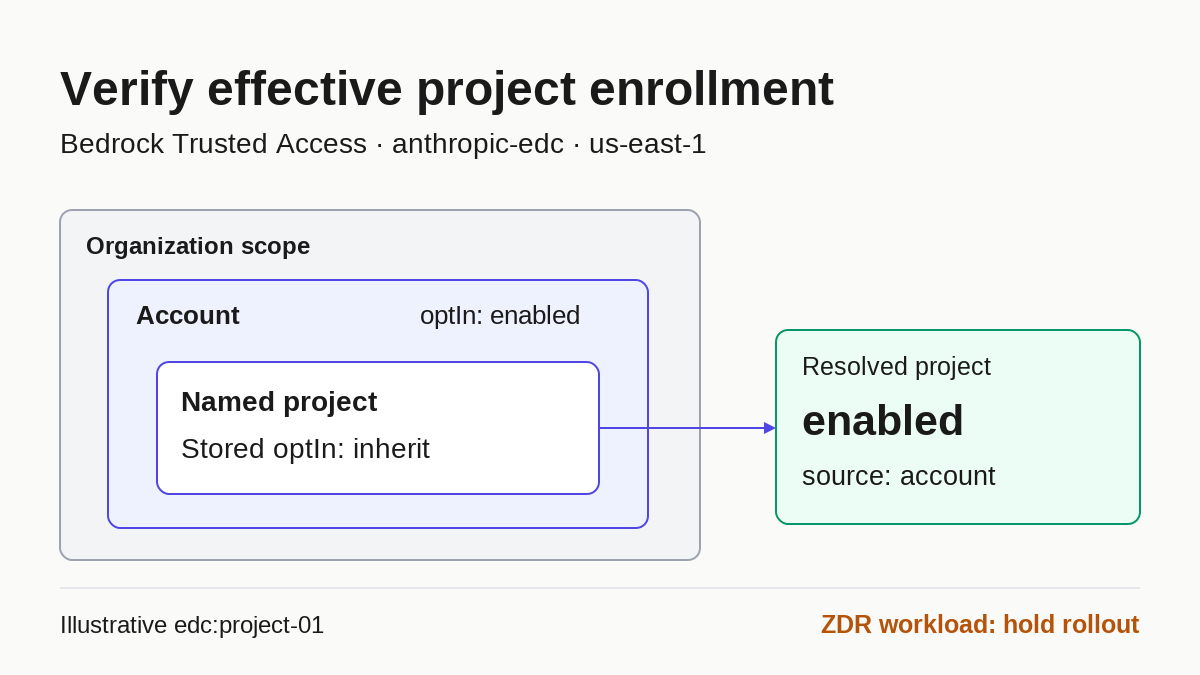
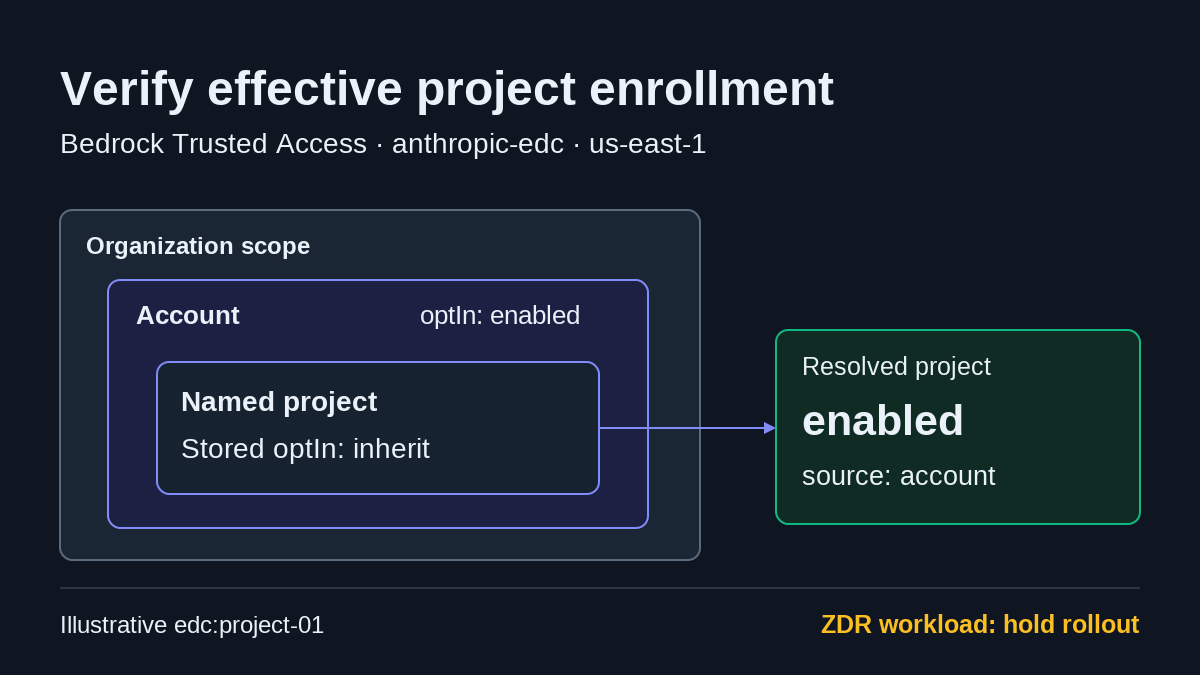
Your release ticket says a Bedrock test project inherits its Enterprise Data Controls setting. The application owner reads inherit as permission to send data that requires zero data retention (ZDR). Before opening that route, use Bedrock Trusted Access to check whether Anthropic Enterprise Data Controls (EDC) actually applies to the named project. In the worked case, the project read returns inherit, the resolved project status is enabled, and the rollout stays on hold.
You need AWS CLI v2.42.0 or later, an existing named project in a test account, and an authorized read identity. The commands use the Bedrock control plane and send zero model requests. The project, profile, and responses below are illustrative. By the end, you can identify the project’s participation status, explain which scope determined it, and record whether the workload can use that route.
AWS announced general availability of the Trusted Access API on November 23, 2026, alongside public preview of Anthropic Enterprise Frontier Safeguards and Enterprise Data Controls. The API exposes program participation. The EDC preview has its own retention terms and test-only guidance. AWS launch announcement
Pin the project and verify the read identity
- Take the intended project ARN from the deployment configuration or the project owner’s record. Copy the full ARN so the account and Region travel with the project ID. For
edc:project-01, the illustrative target is account111122223333, Regionus-east-1, and projectproj_abcdefghijklmnopqrst. The application under review is expected to name this project when it sends requests. If the deployment omits a project, use the account result to investigate that route because unnamed requests use account and organization settings. - Use a local profile already assigned to read the test account. The example calls it
bedrock-test-read. Run the version and identity commands first. Check that the version meets the minimum andAccountis the account embedded in the project ARN. Check thatArnidentifies the principal you expect to use for these reads. When either identity detail differs, pause and correct the local profile selection before interpreting anything from Bedrock. AWS EFS and EDC preview guide - Confirm the identity can list offers and read the program and project resources. An account list authorizes the trusted access program wildcard. A project-scoped list also authorizes the project. A get for one program authorizes the program ARN, plus the project ARN for a project-scoped call. An account-scoped get can therefore succeed while the project read is still denied. Bedrock Trusted Access User Guide
PROFILE=bedrock-test-read
REGION=us-east-1
PROGRAM=anthropic-edc
PROJECT_ARN=arn:aws:bedrock:us-east-1:111122223333:project/proj_abcdefghijklmnopqrst

# Expected: AWS CLI version 2.42.0 or later.
aws --version
# Expected: Account 111122223333 and the Arn of the authorized test principal in the illustrative environment.
aws sts get-caller-identity --profile "$PROFILE" --region "$REGION"
Set the four variables in the shell where you will run the rest of the example. Replace the illustrative profile and ARN with your authorized test values. Change REGION to match the ARN if your own project lives elsewhere. Keep PROGRAM=anthropic-edc when diagnosing Enterprise Data Controls. AWS lists anthropic-efs as a distinct program with its own participation result. Bedrock Trusted Access User Guide
A full ARN makes a common mix-up easier to diagnose. The CLI documents that a project ARN from a different account, Region, or partition returns ValidationException. A bare project ID leaves those coordinates implicit, so a request addressed to the wrong context can send you looking for a missing project. Record the complete target internally even if someone first reported the symptom using only a display name. AWS CLI project enrollment reference
Read the offer, stored preference, and effective status
- Run the list command for the calling account. Scan
programSummariesfor the exactprogramIdofanthropic-edc. A successful list answers whether the offer is visible. An EDC entry can be visible with a status such asrequestableoreligible, so carry the exact status forward when deciding whether the program applies. AWS CLI list reference - Run the project enrollment get. Read the top-level
optInand note whetherupdatedAtexists. This is the preference at the addressed scope. A missing enrollment returnsinheritwithoutupdatedAt. An explicitly storedinheritincludes a timestamp. Both cases send you to the resolved project read to determine participation. AWS CLI project enrollment reference - Run the program get with the project ARN. Check
programId, then matchresolvedFor.accountIdandresolvedFor.projectArnto the deployment target. Readstatusas the participation answer and retainsource,eligibilityScope, and the resolvedoptInto explain it. Each field answers a different question about the same resolution. AWS CLI program get reference - Repeat the program get with the same profile and Region and omit the project flag. This is the account comparison with organization inheritance included. Verify that
resolvedForcontains the intended account and omits the project ARN. Use the account result to explain inheritance and the project result to make the decision for the named workload.
Run these individually in order after the identity check. If the offer is absent or a command returns an error, use the troubleshooting table before drawing a conclusion from any later output. Each comment describes the expected observation for the illustrative case.
# Expected: programSummaries includes anthropic-edc with account status enabled.
aws bedrock list-trusted-access-programs --profile "$PROFILE" --region "$REGION" --output json --no-cli-pager

# Expected: optIn is inherit and updatedAt is absent.
aws bedrock get-trusted-access-program-project-enrollment --program-identifier "$PROGRAM" --project-identifier "$PROJECT_ARN" --profile "$PROFILE" --region "$REGION" --output json --no-cli-pager

# Expected: resolvedFor.projectArn matches PROJECT_ARN, status is enabled and source is account.
aws bedrock get-trusted-access-program --program-identifier "$PROGRAM" --project-identifier "$PROJECT_ARN" --profile "$PROFILE" --region "$REGION" --output json --no-cli-pager

# Expected: status is enabled with source account and resolvedFor omits projectArn.
aws bedrock get-trusted-access-program --program-identifier "$PROGRAM" --profile "$PROFILE" --region "$REGION" --output json --no-cli-pager
The four commands keep the Region and identity fixed. The comparison changes only one input between the last two calls, the presence of --project-identifier. That makes it possible to tell which answer included the named project. An unscoped JSON excerpt with status: enabled is easy to paste into a ticket and hard to interpret later. Keep resolvedFor attached to the result you cite.
Start with whole JSON responses so you can see optional fields and match them to the request. A filtered line containing enabled can refer to either status or optIn. It can also hide the scope and the reason for a revocation. The single-program get returns a flat summary, while the list puts summaries inside programSummaries. If you read a field from the wrong level, an apparently missing value may come from how you read the JSON. Read the field in the full response before escalating.
Amazon Web Services’ CLI reference for the stored project enrollment command used in the example.
Explain why inherit resolves to enabled
| Input | Action | Expected result |
|---|---|---|
| Case edc:project-01 uses profile bedrock-test-read, account 111122223333, Region us-east-1 and program anthropic-edc. | aws bedrock list-trusted-access-programs --profile bedrock-test-read --region us-east-1 --output json --no-cli-pager |
Illustrative expected observation. The list contains an anthropic-edc summary with account participation status enabled. |
| Case edc:project-01 targets arn:aws:bedrock:us-east-1:111122223333:project/proj_abcdefghijklmnopqrst and program anthropic-edc. | aws bedrock get-trusted-access-program-project-enrollment --program-identifier anthropic-edc --project-identifier arn:aws:bedrock:us-east-1:111122223333:project/proj_abcdefghijklmnopqrst --profile bedrock-test-read --region us-east-1 --output json --no-cli-pager |
Illustrative expected observation. The project preference is inherit and the updatedAt field is absent, consistent with no project enrollment row. |
| Case edc:project-01 targets ARN arn:aws:bedrock:us-east-1:111122223333:project/proj_abcdefghijklmnopqrst for the resolved read. | aws bedrock get-trusted-access-program --program-identifier anthropic-edc --project-identifier arn:aws:bedrock:us-east-1:111122223333:project/proj_abcdefghijklmnopqrst --profile bedrock-test-read --region us-east-1 --output json --no-cli-pager |
Illustrative expected observation. The returned ARN matches the target. Status and resolved optIn are enabled. Source and eligibilityScope are account. |
| Case edc:project-01 compares the owning account 111122223333 in us-east-1 for anthropic-edc. | aws bedrock get-trusted-access-program --program-identifier anthropic-edc --profile bedrock-test-read --region us-east-1 --output json --no-cli-pager |
Illustrative expected observation. Status is enabled, source is account, and resolvedFor contains accountId with no projectArn. |
The stored project response in this example contains optIn: inherit. The resolved project response has an enabled status, an enabled preference, an account source, and account eligibility. Those observations fit together because there is no local project override and the account supplies both the enabled preference and the applicable approval in this case. The account comparison is also enabled. Together, the reads explain why the workload’s named project participates even though its local preference does not explicitly opt in.
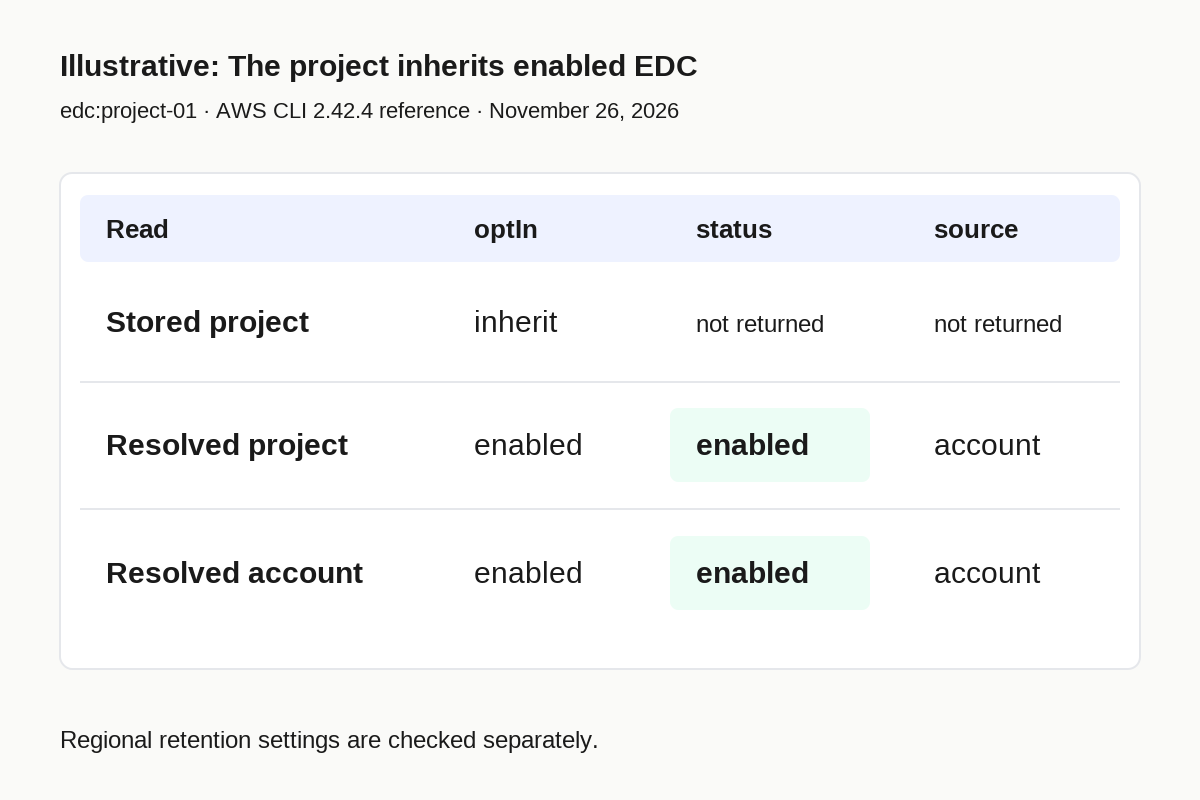
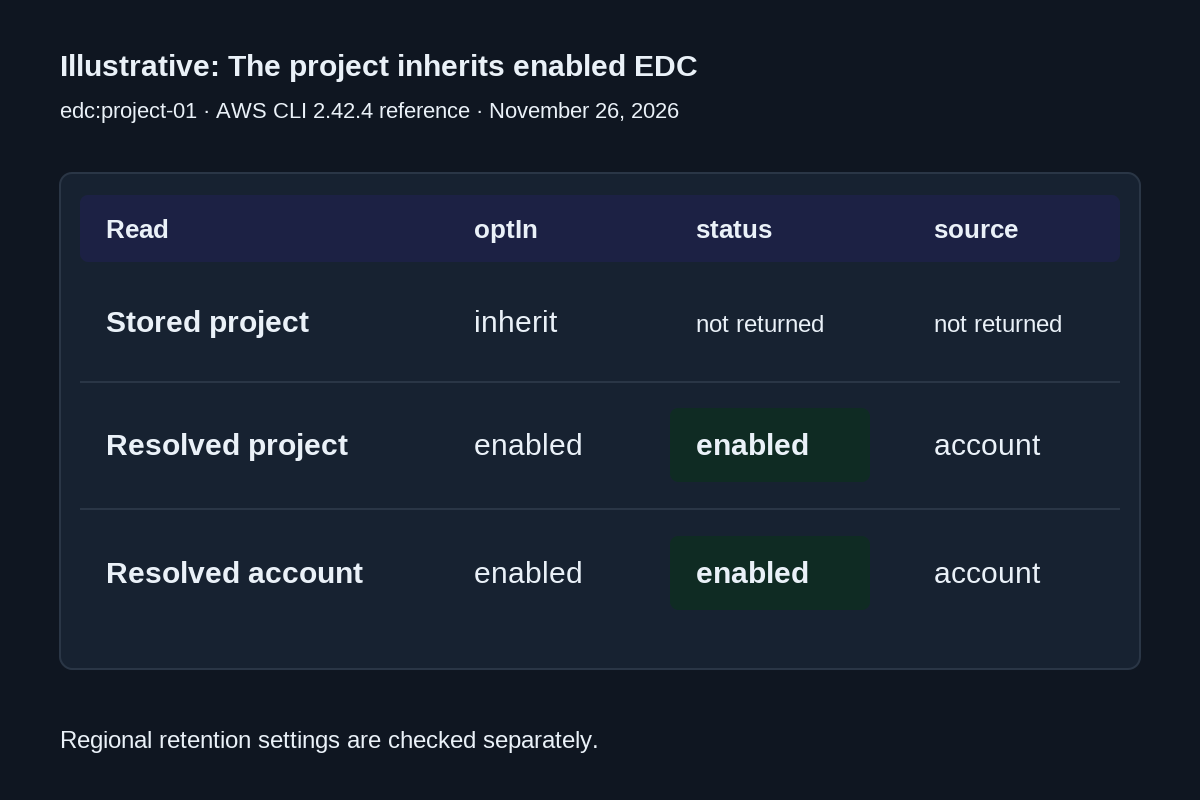
Illustrative edc:project-01. Only the resolved reads return participation status. In this case the named project follows the enabled account. Based on the AWS CLI references.
Enrollment precedence starts with the most specific scope. A project setting takes precedence over an account setting, and an account setting takes precedence over an organization setting. Inheritance delegates that choice to the broader scope. If your account read shows source: organization, the account comparison has already resolved an organization influence. You can use the resolved project result without obtaining organization administrator privileges for a separate enrollment read. Bedrock Trusted Access User Guide
Approval is a separate input to the resolved status. AWS documents that approval at a broader scope can cover narrower scopes and that an applicable revocation takes precedence over approval. Treat source as the scope that decided the status. eligibilityScope identifies the scope supplying applicable approval or revocation when present. The resolved updatedAt, when present, dates the enrollment that supplied the preference. It can therefore represent a different event from what decided the current status. For example, a project may have a saved enabled preference while a revocation makes the program ineffective. Record revoked as the status and capture the reason returned by the service. AWS CLI program get reference
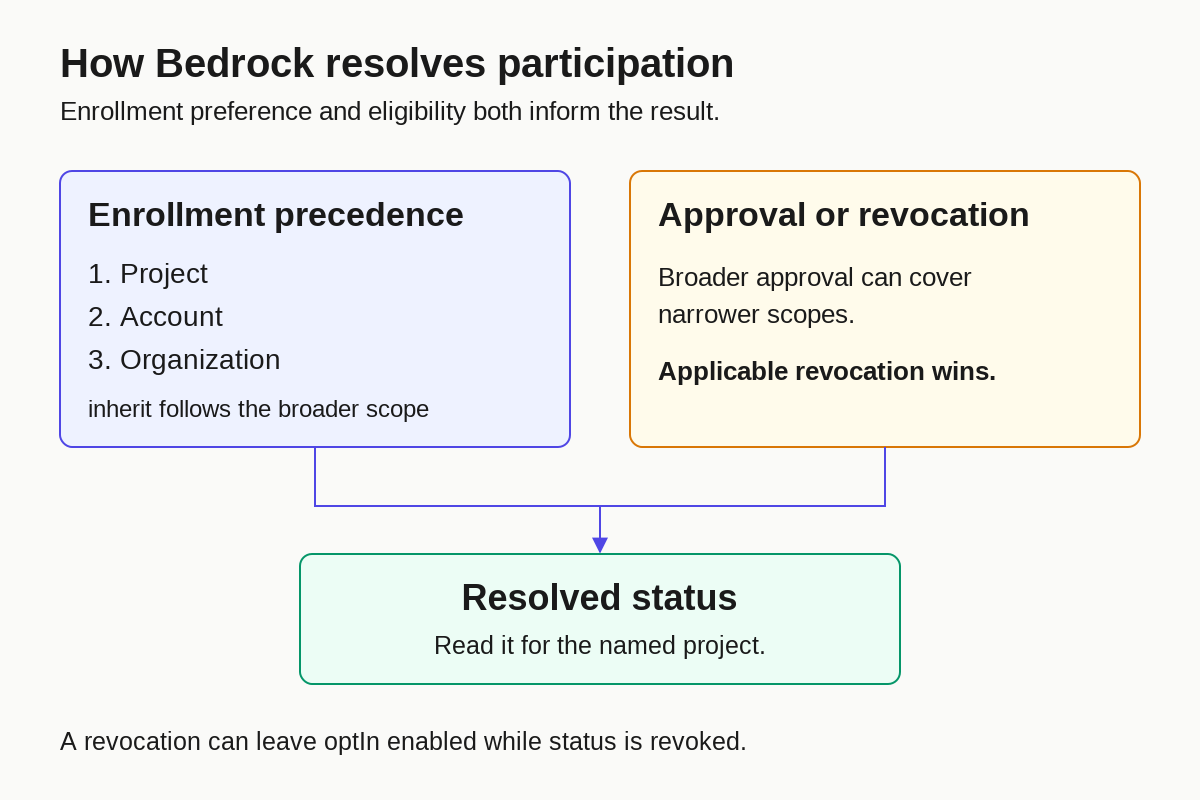
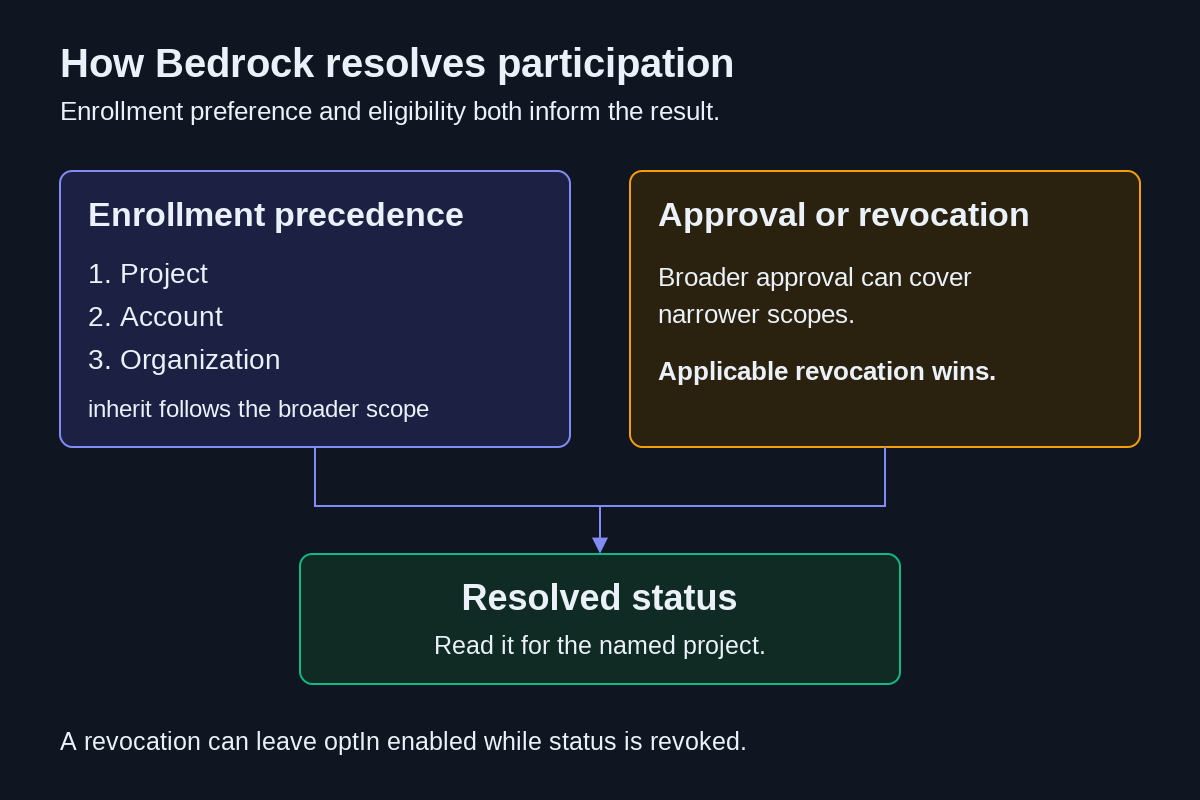
Bedrock resolves the preference across project, account and organization. Approval or revocation can change the status even when the resolved preference remains enabled. Based on the AWS Bedrock User Guide.
Isolate missing offers, scope errors, and denied reads
| What you see | Next read or check | What the observation supports |
|---|---|---|
Successful account list without anthropic-edc |
Verify the profile and input, then run the account program get for anthropic-edc in the intended Region. |
An absent or invisible offer returns ResourceNotFoundException on the direct get. With the account confirmed, ask AWS about offer visibility. |
Account program get succeeds and the named project get returns ValidationException |
Match the ARN’s account, Region and partition to the caller and request. Retry with the verified named target and matching Region. | The us-east-1 ARN in this guide passed with --region us-west-2 is a Region mismatch. A successful corrected read identifies the intended ARN in resolvedFor. |
Account get succeeds and the named project get returns ResourceNotFoundException |
Confirm the exact project ARN and existence with the project owner. Check whether an archived project has expired. | The account can read the offer. The failed project read leaves participation for that target unresolved. Archived projects are readable until expiry. |
| Account get succeeds but a project read is denied | Ask the IAM owner to check the action against both the program and project resources and check applicable service control policies. Retry the same read after the grant is confirmed. | You have verified the account view. The project-scoped authorization failure leaves project status unresolved. |
| A command is unavailable in the installed CLI | Check aws --version in the same shell. Use an AWS CLI build that meets the documented 2.42.0 minimum, then rerun the preflight. |
The diagnostic stopped before obtaining the required offer or enrollment result. |
When both visibility and project existence are in question, isolate them in that order. An account get without the project flag can confirm visibility of the exact program independently of project resolution. A missing-resource error from a project call alone leaves both possibilities open. If the list succeeds and returns only EFS, preserve that detail when asking about EDC. It gives AWS a more specific question about which offer the test account can see. AWS CLI list reference · AWS CLI program get reference
For denied reads, hand the IAM owner the failing command name, principal, Region, and intended scope. For the stored project read the relevant action is bedrock:GetTrustedAccessProgramProjectEnrollment. For the effective read it is bedrock:GetTrustedAccessProgram. Both project forms authorize the program and project. In the example those resources are arn:aws:bedrock::aws:trusted-access-program/anthropic-edc and the supplied project ARN. The program ARN has an empty Region field and aws in the account field. If the list itself is denied, inspect bedrock:ListTrustedAccessPrograms against the documented trusted-access-program/* resource pattern. Ask for the missing read permission before rerunning the diagnostic. Bedrock Trusted Access User Guide
If results appear to conflict immediately after a change, capture the call times and ask which scope changed. AWS says account and organization enrollment changes can take several minutes to reach every supported Region. Repeat the same set of reads in the project’s own Region after allowing for propagation. If the results still disagree with the expected configuration, retain both snapshots with the scope and timestamp attached. A CloudTrail record can identify a principal who changed an enrollment setting. Use program status to investigate a provider or AWS approval or revocation. Bedrock Trusted Access User Guide
Hold the route and recover the ZDR requirement
- In
edc:project-01, mark effective EDC participation verified and hold the planned ZDR workload. The documented preview turns off ZDR for the accounts or projects added, and EDC uses Amazon-managed storage for retained content. AWS also directs preview participants to use a test account, send only test traffic, and keep regulated data out. Keep the retention requirement open for AWS confirmation before routing the workload. AWS EFS and EDC preview guide - Send the scoped read evidence through your usual AWS account-team channel. Ask AWS to restore ZDR for the affected scope and confirm the project, Region, and intended model use it covers. The preview guide directs customers to their AWS account representatives to move accounts or projects back to ZDR. Keep the planned traffic paused or on its already approved route while that request is pending.
- After AWS confirms restoration, repeat the reads and compare them against your earlier record. Ask AWS to resolve any continuing discrepancy between its confirmation and current status before reopening the route. Have the application owner confirm that the deployment still names the project in the AWS confirmation. For the illustrative case, release requires both a matching AWS confirmation for the intended use and an approved deployment target.
Use the following handoff as the completed decision for the worked case. Substitute your actual observations and call times for a real escalation. Include the project ARN because the owning account can cover multiple workloads, including preview participants that the team still wants to keep active.
Illustrative escalation record — edc:project-01
Scope: named project in account 111122223333, us-east-1
Project: arn:aws:bedrock:us-east-1:111122223333:project/proj_abcdefghijklmnopqrst
Program: anthropic-edc
Stored project preference: inherit, no updatedAt
Resolved project: enabled, source account, eligibilityScope account
Account comparison: enabled, source account
Workload requirement: zero data retention for the covered model route
Decision: hold rollout to this project, no model requests in this check
Ask AWS: restore ZDR for this project if eligible and confirm the applicable scope and model use
Release condition: AWS confirmation reviewed against the exact deployment target
If the status is requestable, read statusReason and use it to decide whom to ask about approval. If it is eligible, approval covers the scope and participation is still pending opt-in. If disabled, the documented meaning is that approval covers the scope and it opted out. If revoked, capture the reason and contact the AWS account team. Treat an unfamiliar status as unresolved and preserve the full response for clarification. To establish ZDR after preview enrollment, ask AWS to confirm restoration for the workload’s scope. AWS documents program settings and Regional retention settings separately. Bedrock Trusted Access User Guide · AWS EFS and EDC preview guide
The diagnostic uses read operations, so recovery starts with the traffic decision. If someone previously changed enrollment, coordinate any recovery with the owner of that scope and AWS. Project opt-out changes program participation. AWS representatives handle restoration of ZDR. An organization-level opt-out also leaves independently enabled member accounts or projects enrolled. Keep the project evidence in the change ticket and ask AWS to address the specific scope that needs ZDR. Bedrock Trusted Access User Guide · AWS EFS and EDC preview guide
For a workload authorized to stay in the preview, the same reads can close the enrollment check when they match the intended project and show enabled. Verify the runtime configuration and Regional data retention setup under AWS’s preview instructions. For the ZDR case here, stop at the hold decision and the AWS handoff. A model response can confirm that inference succeeded. Sending the proposed workload’s real content would cross the boundary before the retention question is settled.
Apply the result to the workload’s data path
- Compare the deployment’s model and project identity with the AWS scope before anyone queues test requests. If the workload is a coding agent configured through an AWS profile, trace which account and model the client actually uses. The setup walkthrough shows where to verify the client’s selection. Claude Code Bedrock and Vertex AI setup
- Review each data store the workload uses even if AWS restores ZDR. The enrollment reads cover a Bedrock program. Application transcripts and agent memory have their own retention controls. Zero Data Retention AI Agents
- Write the decision into the route’s approval record before releasing traffic. For this case, record a hold on the named Bedrock destination. Put the CLI evidence next to the configuration review that controls whether the next request can take that route. Pre-action gates for AI agents
When the same application can call multiple providers, preserve the evidence for the actual destination. Trace any fallback that would receive the same input and apply its own approval. If a fallback sends requests to Bedrock without the named project, use the account and organization view for that request path. Treat a later change to the destination or project identifier as a reason to check the new path before using it for the same data. Your Vendor Lane May Not Be the Last Hop
The operational record should let the next engineer tell which component read the status, which destination was checked, and who can release the hold. In this example, the AWS CLI supplied the status and the deployment review owns the traffic decision. Record the time of the final read alongside that decision so a later operator can distinguish the original observation from any status they see after another change. AgentOps
Sources
- AWS announcement of the Bedrock Trusted Access API and Anthropic EFS and EDC preview
- AWS Bedrock User Guide for trusted access programs
- AWS Bedrock preview guide for Anthropic EFS and EDC
- AWS CLI reference for list-trusted-access-programs
- AWS CLI reference for get-trusted-access-program
- AWS CLI reference for get-trusted-access-program-project-enrollment