
Microsoft Foundry's Browser Automation Tool Is GA: Agents Get a Managed Browser for the Web That Has No API
Browser automation tool is GA in Microsoft Foundry: managed Playwright browsers, MCP toolboxes, private-network reach and human takeover for sites with no API.
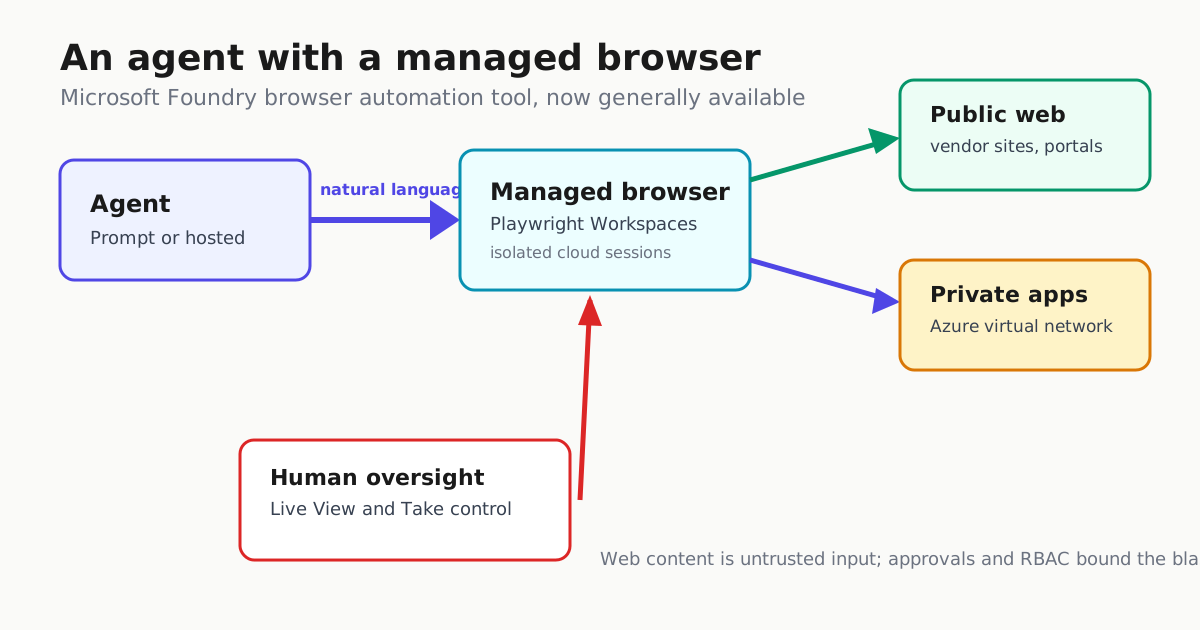
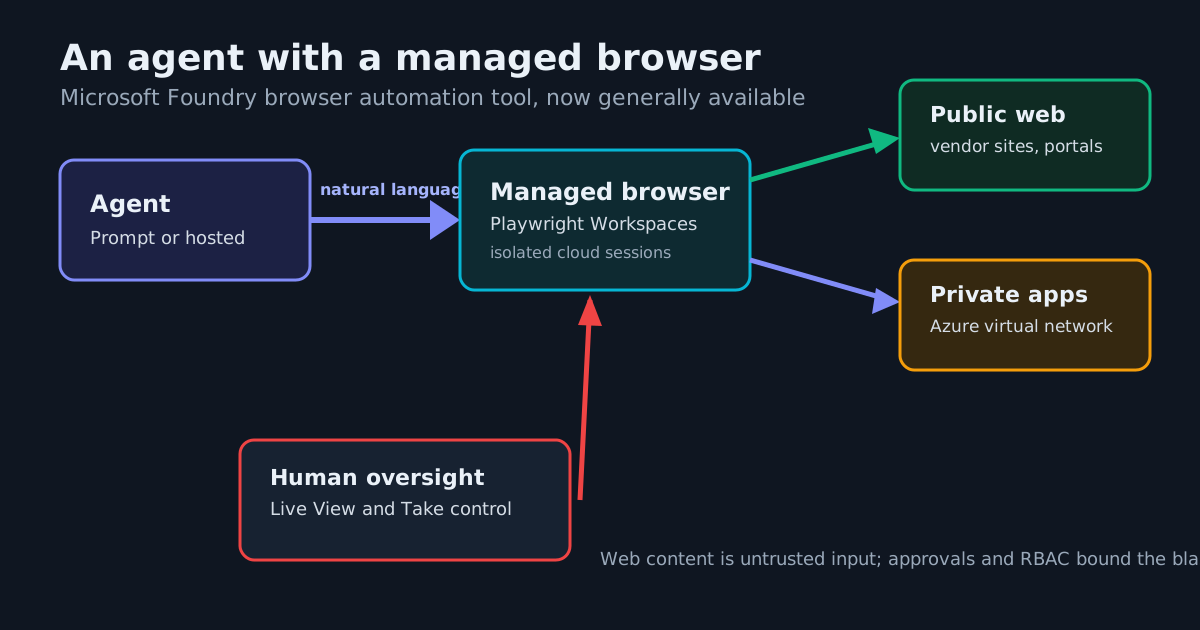
Most business processes never finished moving to APIs. They live in internal portals, admin consoles, vendor sites and legacy dashboards — and an agent that can reason and call tools still stalls the moment a workflow hits a web form. Microsoft’s answer, the browser automation tool in Microsoft Foundry, is now generally available. It gives agents a managed browser that can navigate real websites, inspect content, fill forms and run multistep browser workflows from natural-language instructions.
What shipped
The tool is powered by Playwright Workspaces, which provisions and manages isolated cloud browser sessions on demand. Nothing browser-shaped needs to be installed or operated inside the agent environment; the Playwright Workspace is a separate Azure resource you provision first, and it carries the scaling, connectivity and observability burden.
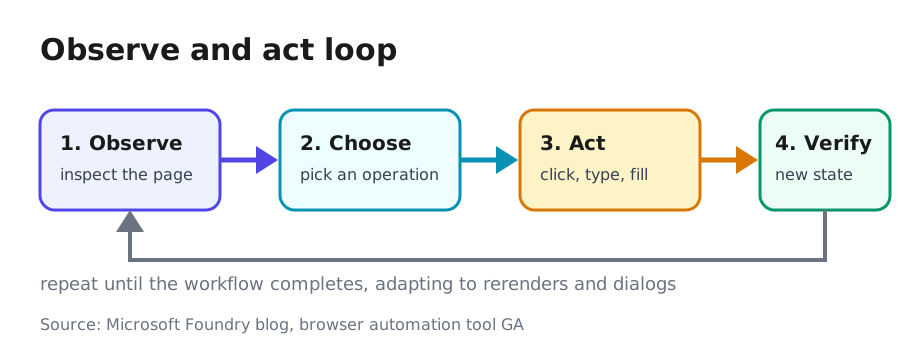
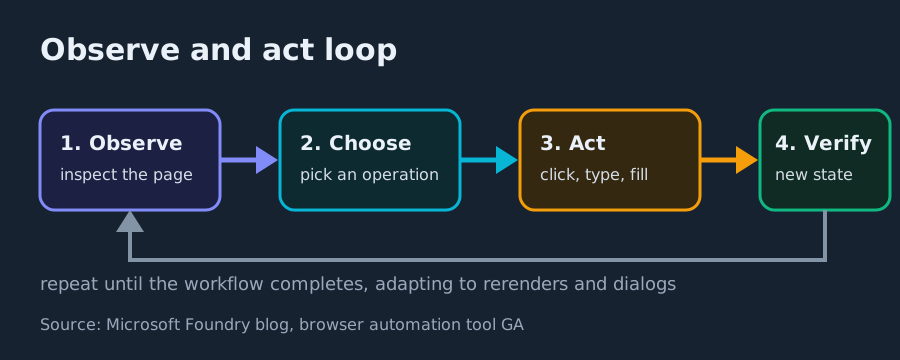
Agents drive pages through an observe-and-act loop: inspect the current page, choose the right browser operation, perform it, verify the resulting state, then continue. Microsoft says this helps agents cope with dynamic content, rerenders, dialogs and shifting application flows — the things that break naive scripted scraping, and the same failure class we examined in Agentic Browsers in 2026: Atlas, Comet, and the Injection Problem That Won’t Die.
It works across the three ways people build agents in Foundry: Prompt agents (configure instructions, model and tools — the fastest path), Hosted agents (combine browser automation with your own orchestration via Microsoft Agent Framework or another framework), and a GitHub Copilot harness lane for long-running agents.
The part that matters for enterprises: private networks
Public-site automation is table stakes. The consequential feature is that agents can reach applications behind an Azure virtual network in the same workflow as public sites, using Playwright Workspaces private network connectivity (added at provisioning time). Microsoft’s scenario list reads like an enterprise backlog:
- Processing information across internal and external business portals
- Automating employee onboarding and IT administration
- Pulling data from vendor sites into private applications
- Investigating customer issues across public experiences and internal support tools
- Automating legacy systems that never got a modern API
Access is scoped with Microsoft Entra identities and Azure role-based access control, so an agent gets only the permissions its workload needs — a least-privilege posture rather than a shared admin login, the same discipline behind AI Agent Identity: Treat Every Agent as a Privileged User.
Wiring it in: Toolboxes and MCP
The recommended integration is through Toolboxes. You add the browser automation tool to a toolbox, publish it, and connect it to Prompt or Hosted agents through an MCP-compatible endpoint — the same protocol shift covered in MCP Goes Stateless: What the 2026-07-28 Spec Changes for Builders. Here is the core of Microsoft’s published Python sample, as an excerpt:
# Excerpt of Microsoft's published sample; the full sample also defines
# project (AIProjectClient), credential, PROJECT_ENDPOINT and
# BROWSER_CONNECTION_ID before this point.
from azure.ai.projects.models import (
    BrowserAutomationToolboxTool,
    BrowserAutomationToolParameters,
    BrowserAutomationToolConnectionParameters,
)

tool = BrowserAutomationToolboxTool(
    browser_automation=BrowserAutomationToolParameters(
        connection=BrowserAutomationToolConnectionParameters(
            project_connection_id=BROWSER_CONNECTION_ID,
        )
    )
)

toolbox = project.toolboxes.create_version(
    name="browser-automation-toolbox",
    description="Toolbox with the Browser Automation tool",
    tools=[tool],
)

TOOLBOX_MCP_URL = (
    f"{PROJECT_ENDPOINT}/toolboxes/{toolbox.name}"
    f"/versions/{toolbox.version}/mcp?api-version=v1"
)
That gives you a managed remote browser with no local install, standard MCP tool discovery, reusable configuration across agents, centralized identity and connection management, tool allow lists, approval controls, and tracing in Foundry. Microsoft’s guidance is to start with navigation and page-inspection tools and enable state-changing actions (clicking, typing, form filling, file upload) only when the scenario demands them — a sensible escalation ladder that mirrors the Fetch Before You Drive: Web to Markdown for AI Agents on Research Jobs rule: use the cheapest surface that completes the job.
Human oversight: Live View and Take control
Browser workflows hit ambiguous states and judgment calls. Live View lets developers and operators watch an active session in real time — where the agent went, why it is blocked — without reproducing the run. Take control lets a person temporarily grab the browser, resolve an unexpected page state or finish a supervised step, then hand control back to the agent. That is the right shape for a tool pointed at systems that matter.
The operator checklist
Microsoft is unusually direct about the risk surface: browser actions affect real systems, and web content is untrusted input. The controls worth writing into your deployment plan:
| Control | What to configure |
|---|---|
| Approvals | Require human approval before sensitive or state-changing operations |
| Tool scope | Limit agents to the browser tools a task needs; start read-only |
| Isolation | One isolated browser session per workflow |
| Identity | Managed identities plus Azure RBAC; least privilege per workload |
| Oversight | Live View review and Take control for supervised steps |
| Traces | Foundry traces can contain prompts and tool results; review the guidance on routing sensitive content to the AppGenAIContent table with deny-by-default access (documented as preview) |
Keep system policies strictly separate from page content, validate destinations before consequential actions, and treat any agent-facing page as a potential prompt-injection channel — the same discipline we lay out in our guide to Securing AI Agents.
Why this is more than an RPA rebrand
Foundry already positions itself as the control plane for enterprise agents, with 1400+ pre-built connectors to systems like SAP and Salesforce plus custom MCP tools. Browser automation fills the gap those connectors can’t: the long tail of internal and vendor web apps with no API at all. And unlike classic RPA bots with brittle selectors, the observe-and-act loop plus MCP-based governance puts this inside the same agent tooling, identity and tracing stack as everything else your agents do. If your agent roadmap has a “…and then someone logs into the portal” step, this is the piece that removes the human from that loop — under approval gates, with someone watching.
Getting started is three steps: create or select a Playwright Workspace, connect browser automation tool to a toolbox, and attach the toolbox to your agent.