Own the Loop, Rent the Model: An AI Agent Harness Portability Register
Routers now rent shells, batches and key controls. Build a loop-ownership register, swap-test every part, and label what you rent before it quietly locks in.

Go deeper. Build your own.
OpenRouter now bills a hosted Linux container at $0.0001 per second of sandbox time, inside the same request that buys the tokens. The price is trivial. The shift is not: the router that sat between your harness and a model now offers to run part of the harness, and the labs make the same offer from the other side.
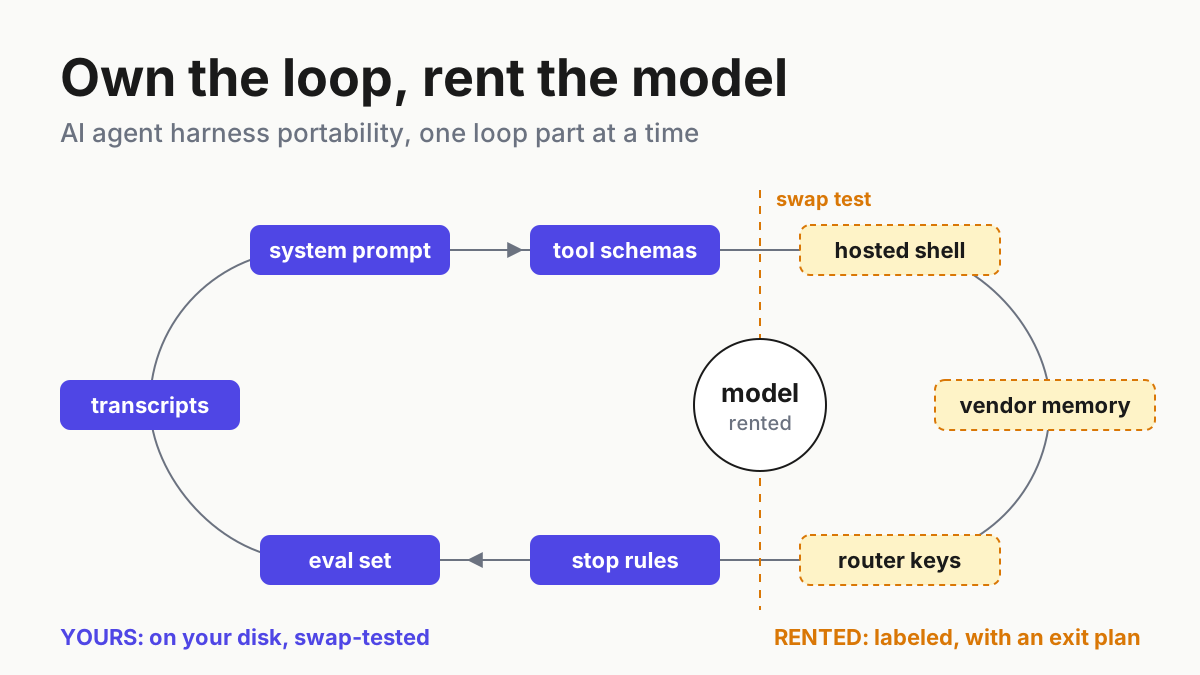
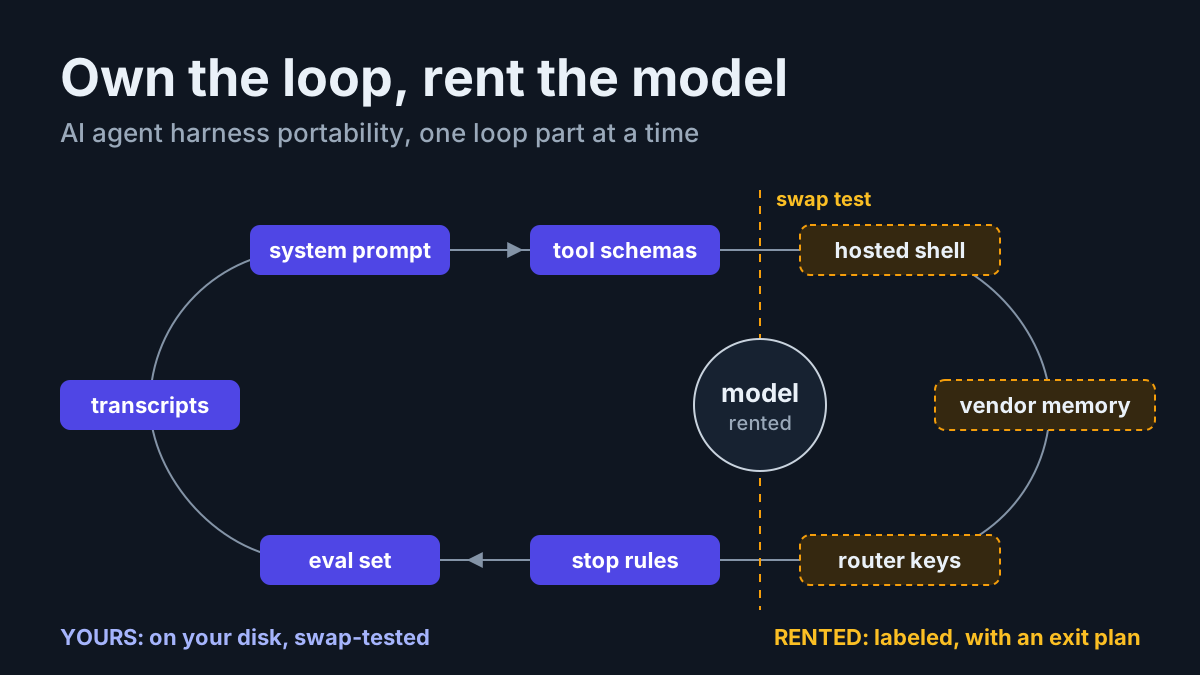
That changes what AI agent harness portability means. The old test asked whether your client could point at a different model ID and keep working, and it is now the easy half. An acting agent accumulates state wherever it executes, so the hard half is knowing which loop parts live on your disk and which you rent: system prompt, tool schemas, tool execution, transcripts, eval set, stop rules and budgets, memory, keys.
The artifact for this is a loop-ownership register: one row per loop part, with where it lives, its export format and the date it last passed a swap test. A part that fails the swap test is rented. Label it, give it an owner and an exit plan, and stop calling the stack portable until the register agrees.
OpenRouter’s server tools, batches and key controls, Aug 19 to Oct 2
On Aug 19, 2026, OpenRouter announced it is joining Stripe, citing 10+ trillion tokens a day across 400+ models and promising “If you build on OpenRouter today, nothing about your integration changes.” Deal terms are not in the announcement; the reported price is press-only.
Three weeks later the product reached into the loop. On Sep 8 OpenRouter shipped the Shell server tool and the Files API, both in beta, so that “any model on OpenRouter can now run commands in a hosted Linux container.” Sandbox time is billed at $0.0001 per active second, with a 30-second minimum on cold containers, inside the request. The sentence that matters here comes next: “Shell and Files join our growing list of server tools, enabling you to create server-side agentic behaviors you can swap across models.”
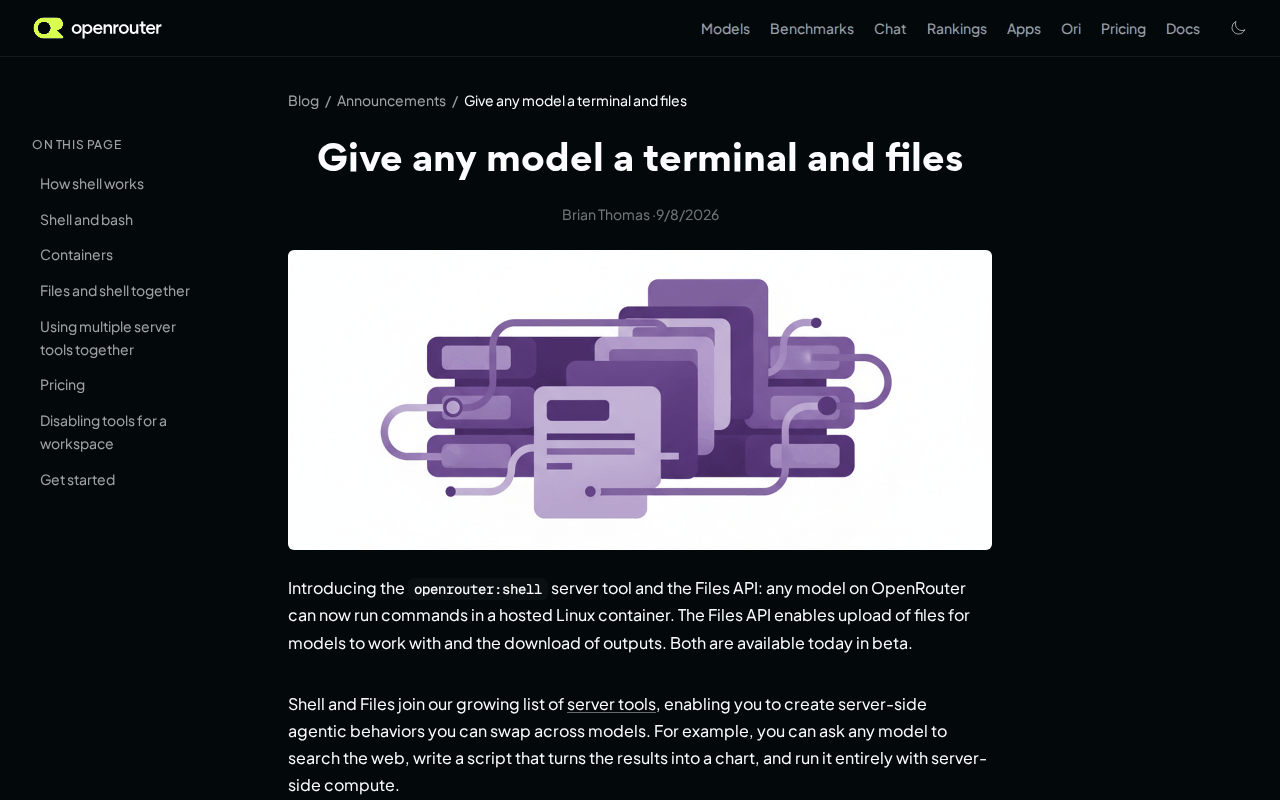 Screenshot: OpenRouter blog, “Give any model a terminal and files” (Sep 8, 2026), captured Oct 5, 2026.
The behaviors on screen swap across models. Nothing says they swap across routers, so the portability question moved up a layer. The rest of the window filled in around it:
- Sep 10: OpenAI’s Agents API rents a managed Codex harness with hosted, self-hosted or partner sandboxes and state kept across long sessions, at no fee beyond tokens and tools. The failover drill for that rental already lives in the Agents API continuity piece.
- Sep 22: the Batch API prices work that can wait at typically 50% off per-token rates, with a window of up to 24 hours across 70+ models. Each batch runs on one provider, chosen by cost plus your allowlist, data-policy and BYOK settings.
- Sep 28: the Security Center shows every API key across workspaces in one view, with risk scoring, bulk disable, archive and cap, and IP allowlisting. Its line worth keeping: “If a leak does happen, setting a cap and expiration contains the blast radius.”
- Oct 2: Model Router Benchmarks score five routers (Auto Router, Jev Router, Pareto, Fugu, Switchyard) against single models on six benchmarks, with a Router Index weighted 60 quality, 20 speed, 20 cost.
OpenRouter also documents an Agent SDK (no launch date on the page) that keeps the loop on the client. One vendor now sells both shapes: a loop you run, and pieces of a loop it runs for you.
The rankings page shows who is buying. For the week of Sep 28, the top four apps by weekly tokens were harnesses (Hermes Agent, Kilo Code, Claude Code, Cline), and the top model was a stealth listing, Space Bunny Alpha, with no maker disclosed. Those are the Oct 5 numbers from a live table that moves every week.
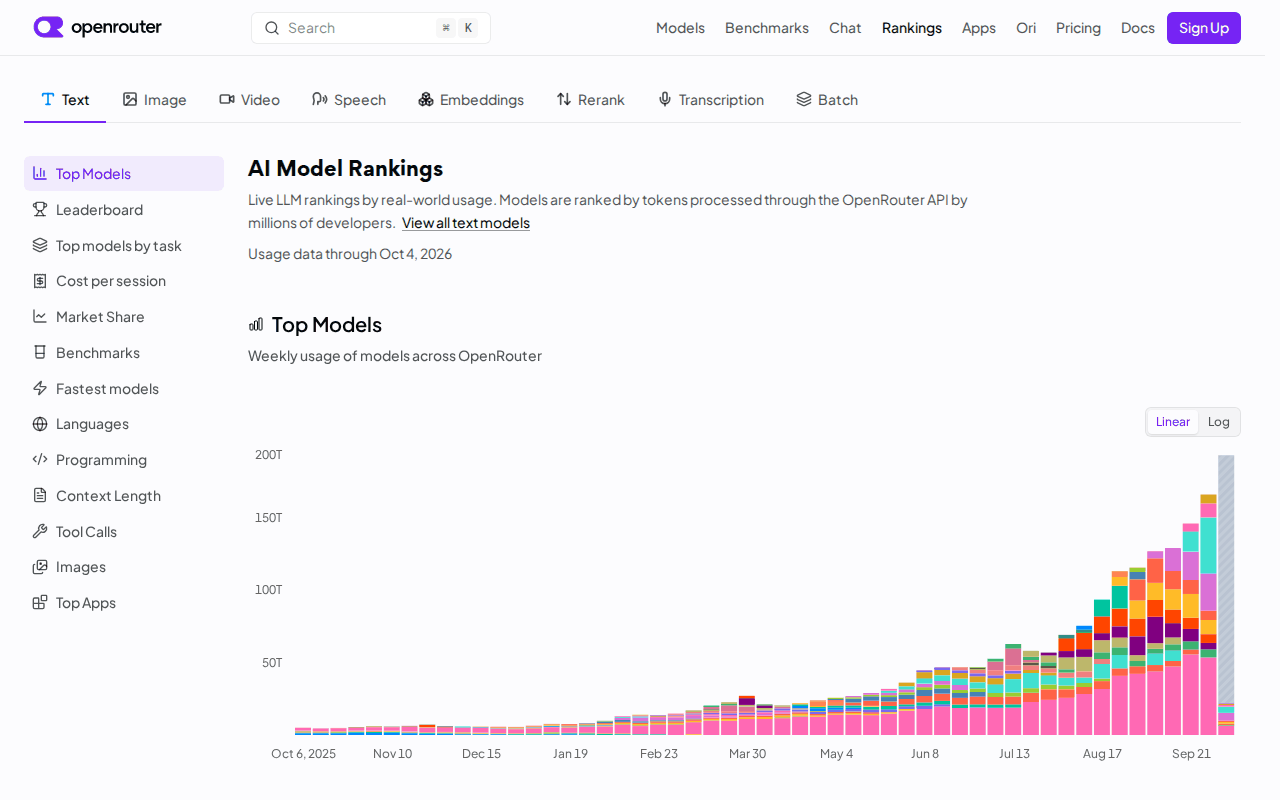 Screenshot: OpenRouter, “LLM Rankings” (usage data through Oct 4, 2026), captured Oct 5, 2026.
Build the loop-ownership register
Renting execution is often the right call: a disposable container for a one-off data script beats keeping your own sandbox warm. The failure is renting without writing it down, then learning during a vendor change or an acquisition closing that the loop you called yours depends on a container you cannot export. The register exists so that never happens quietly.
Borrow the denominator from cost per completed task and the subsystem list from harness engineering. The register adds the two columns those pieces leave open: where each part lives, and the date it last moved to a second provider and still worked.
| Loop part | Lives where | Export format | Swap test | Starting status |
|---|---|---|---|---|
| System prompt and instructions | Repo file, versioned | Markdown in git | Same file runs unchanged on provider B | Yours |
| Tool schemas | Repo, one file per tool | JSON Schema | Provider B accepts every schema, zero rejections | Yours |
| Tool execution | Local sandbox, or a hosted server tool | Container image, or a script that rebuilds it | Same task completes with execution moved local | Rented when hosted |
| Transcripts and tool-call logs | Local JSONL written by the client | JSONL, one line per turn | One session replays from the local file alone | Yours if written first |
| Eval set | Repo: tasks, graders, expected outputs | JSONL plus grader scripts | Scores comparable on two providers | Yours |
| Stop rules and budgets | Client config | YAML or TOML | Client stops a run with every vendor timeout ignored | Yours if client-side |
| Memory | Local files, or a vendor store | Markdown or JSON | Fresh session on provider B loads and uses it | Depends |
| Keys | Vendor-issued | Inventory: name, owner, lane, cap, expiry | Revoke and replace inside 15 minutes | Rented, governed |
The starting status is a guess. The swap test is the verdict.
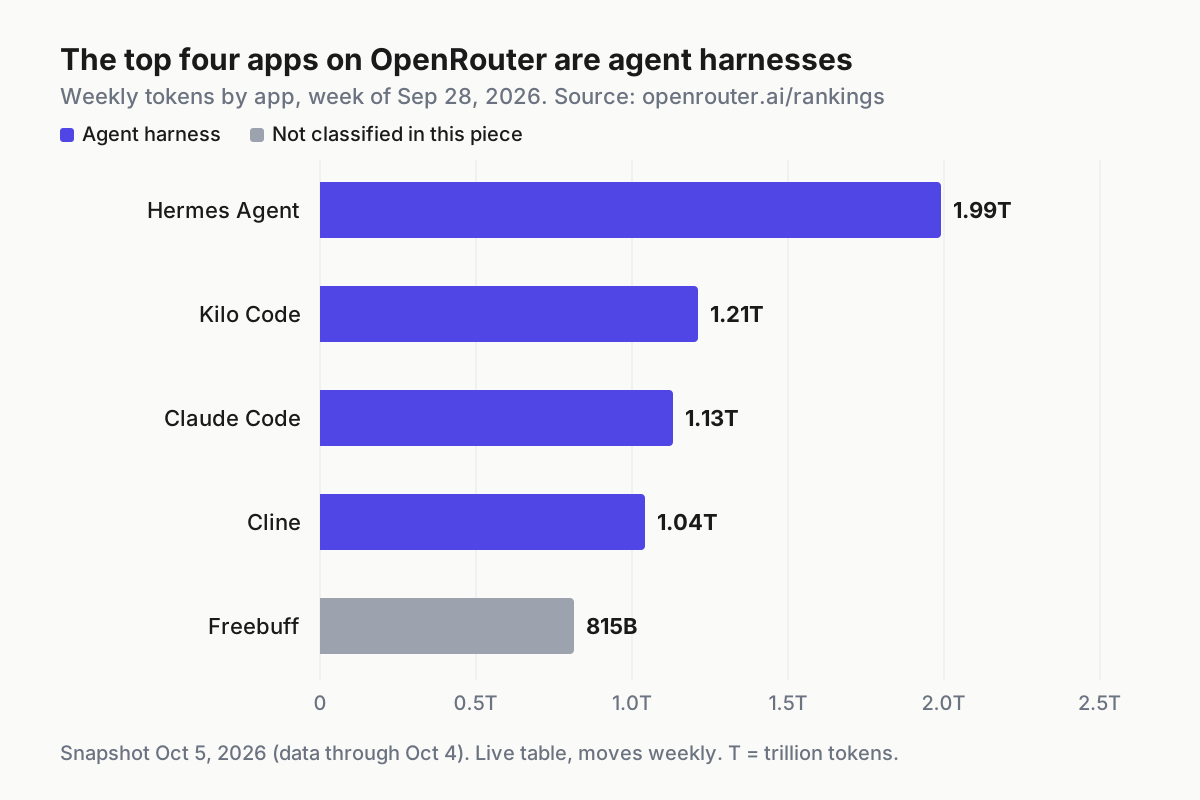
 The four biggest token consumers on the router that week were agent harnesses their users install and run. Snapshot of a live table, week of Sep 28, 2026.
Read the chart as the state of play. The loops that burn the most router tokens are written and run by someone other than the router. Server tools are an offer to change that balance one part at a time, which is fine as long as each part you hand over shows up in a register row.
Step 1: Fill one row per loop part, per lane, this week
Copy the table into your own repo, under ops/loop-register.md or wherever runbooks live, and fill it per lane rather than per company. A triage lane and a refactor lane on the same router can own very different parts. For each row, record four facts:
- Lives where: a path on disk or a vendor product name. “The vendor dashboard” is a valid answer; write it down.
- Export format: the file type you would hand a second provider. If there is no export, the cell says “none” and the row is rented, whatever else is true.
- Owner: a named person, not a team alias.
- Swap test passed: a date, or blank.
Blank is the honest default. Most registers start with five or six blanks, and that is the useful finding.
Step 2: Run the swap test on prompts and tool schemas
The swap test runs the same system prompt and the same tool schemas against two providers through one client loop, then scores both on your eval set. One client loop is the whole point. If provider B needs a different harness, you tested two harnesses, not portability.
Build the swap set from your own history, not a public benchmark. Twenty tasks is enough to start: a handful of routine ones, several that lean hard on tool calls, two or three long multi-step tasks, and every task that appears in a past incident note. Commit the graders with the tasks, so a rerun next quarter scores the same way.
A minimal lane config, illustrative; the field names belong to your client, not to any vendor:
lane: triage   # illustrative swap-test lane; adapt names to your client
assets:
  system_prompt: prompts/triage.md
  tool_schemas: tools/triage/*.json
  eval_set: evals/triage-swap.jsonl   # 20 tasks with graders
transcripts:
  path: runs/{date}/{session}.jsonl
  write_before_send: true
stop:
  max_turns: 40
  max_usd_per_task: 3.00
  max_wall_clock_min: 20
providers:
  a: { endpoint: "<router endpoint>", model: "<pinned model id>" }
  b: { endpoint: "<second provider endpoint>", model: "<pinned model id>" }
pass_if:
  schema_rejections: 0
  task_success_delta_max: 0.05
Set the pass criteria before the run. Zero schema rejections, task success on B within a tolerance you chose in advance, and cost per completed task on B recorded even when it is worse. A schema that only works with one provider’s strict-mode extension fails its row. So does a prompt that needs a provider-specific fork: two prompt files means one of them is rented.
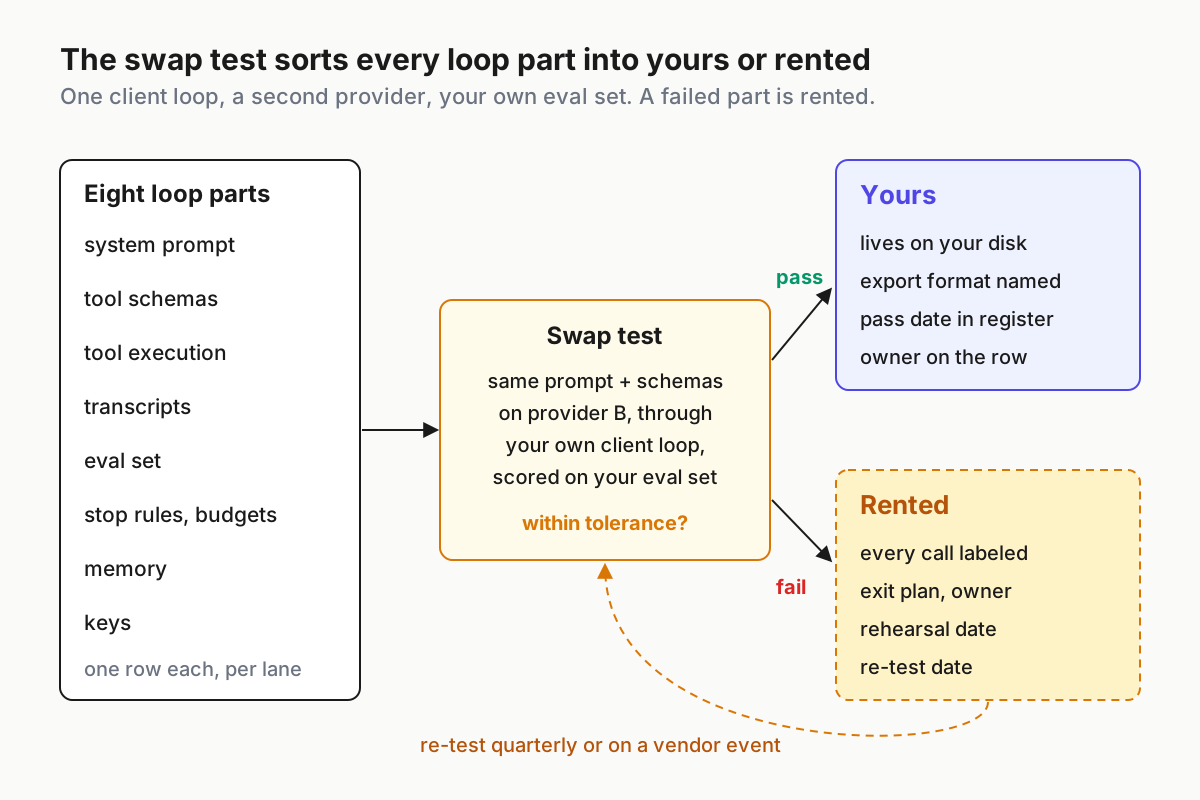
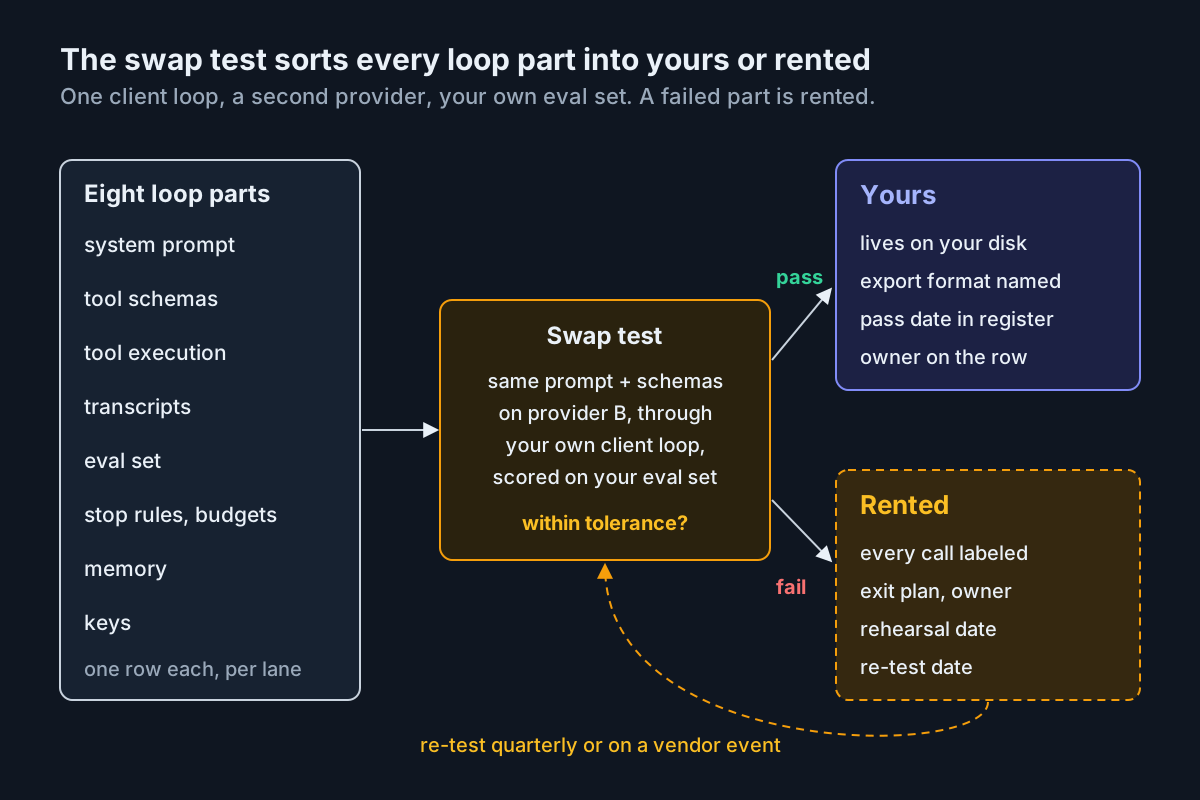 The swap test is the only sorting rule for harness portability. A part that fails is rented, and the register says so with a date.
Step 3: Write transcripts locally before any vendor log
Have the client write the JSONL line for a turn before it forwards the request, and write the response line before it acts on the result. The vendor’s logs are a second copy. If replaying a session requires signing in to a dashboard, the transcript row is rented, however good the dashboard is.
Check it bluntly: take yesterday’s longest session and replay it from the local file with the network off. Tool calls, arguments, outputs and the served model ID should all be there. That file is also the record an incident review starts from, which is why fleet replay treats it as the evidence of record.
Step 4: Enforce stop rules in the client
Server tools bring their own limits, and a cold container’s 30-second minimum is a billing floor, not a stop rule. Keep turn caps, per-task dollar caps, wall-clock limits and tool-call ceilings in the client, where they apply whichever provider or server tool answers.
Test it by setting a budget of one turn and confirming the client stops the run itself, with a stop reason written to the transcript, before any vendor timeout could fire. If the only thing that ever stopped a runaway task was the vendor’s cap, the stop-rules row is rented.
Step 5: Label every hosted server-tool call as rented
When a lane calls a hosted shell, a files store or any other server tool, tag the call in the transcript, for example execution: rented/router-shell, and give the register row an exit plan with three parts:
- A container image or script in the repo that runs the same commands locally.
- Inputs that exist in the repo before upload, so the hosted store holds copies, never originals.
- Outputs downloaded at the end of each task and written next to the transcript.
The exit plan also names an owner and a rehearsal date. An exit plan nobody has run is a hope, so move one task per quarter from the hosted tool to the local image and note in the register whether it finished.
Batch lanes get one more field. Because each OpenRouter batch runs on one provider chosen by cost and your allowlist, data-policy and BYOK settings, record the provider that actually served each batch. A lane is only portable if you know where it ran.
Step 6: Export memory in a format a second provider can load
Memory is the row most likely to read “depends”. Local Markdown or JSON files a harness reads at session start are yours. A vendor-side memory store, or state a managed harness keeps across long sessions, is rented until you can export it on a schedule into the repo.
The swap test for memory is concrete: start a fresh session on provider B, load the latest export, and run three tasks that only succeed if the remembered facts arrive intact. If the vendor offers no export, record “none” and treat what lives there as cache, never as the record.
Step 7: Cap and expire every key
Keys are the one part you always rent, because the vendor issues them. What you own is the inventory. For each key, record name, owner, lane, monthly cap, expiry and last-used date, and set the cap and expiry in the vendor console on the day the key is created.
OpenRouter put caps, expiry and IP allowlists in one view on Sep 28. Whatever router you use, the keys row should pass one drill: revoke a key and issue its replacement inside 15 minutes without a lane staying dark longer than that. Keys with no owner row get disabled, not discussed.
Step 8: Re-run the swap test on a calendar and on vendor events
Put a quarterly date on every row, and add event triggers that force an early re-test:
- An acquisition or ownership change at a router or harness vendor closes.
- A lane starts using a server tool it did not use before.
- A pinned model is deprecated or rerouted.
- Someone proposes routing by a vendor’s published benchmark.
The last trigger needs care. A router vendor that scores routers, its own Auto Router among them, has published useful data, and you should still rerun the comparison on your own swap set before changing a lane. Operators should verify on their own tasks; the acceptance tests in routers you can’t see inside frame that check well.
The first afternoon: a ten-line checklist
- Register file committed, eight rows per lane, every row with a named owner.
- Offline replay of yesterday’s longest session succeeds from the local transcript.
- One-turn budget test stops a run in the client, with the stop reason logged.
- Every hosted server-tool call tagged as rented in the transcript.
- Exit plan written for every rented row, with a rehearsal date.
- Every router key has a cap, an expiry and an owner.
- Twenty-task swap set and graders committed.
- First swap test run on prompts and tool schemas, date recorded.
- Memory export path recorded, or “none” written in the cell.
- Quarterly re-test dates on the team calendar.
Where loop ownership leaks, and the signal for each
Leaks rarely announce themselves. Each one below has a signal you can check in under a minute, and each maps to a register row whose status flips from yours to rented, with a date.
- The hosted shell became the workspace. Signal: a task cannot be rerun without a container ID, or its outputs exist only in the vendor’s file store.
- The dashboard became the transcript. Signal: an incident review starts with “who has console access” instead of a file path.
- The vendor timeout became the stop rule. Signal: the first alert about a runaway task is a vendor cap email or the invoice, not your client.
- Prompts forked by provider. Signal:
prompts/holdstriage.vendor-a.mdandtriage.vendor-b.md, and nobody knows which one the eval set last ran. - Schemas drifted into one dialect. Signal: provider B rejects tool definitions that provider A accepts.
- Keys outlived their owners. Signal: keys with no owner row, no expiry, or no use in 30 days.
- A vendor benchmark replaced your eval set. Signal: a routing change cites someone’s index and no run of your swap set.
The one leak with no quick signal is the stealth model. A lane routed to a model whose maker is not disclosed has rented the part you most need to name. Pin a disclosed model for any lane whose transcripts you might have to explain.
Loop ownership is a fleet property, not a per-repo choice
One register per lane is manageable. A fleet multiplies it: Claude Code in one repo, a Cline lane in another, a batch job on a router, a managed harness behind a customer workflow. The question an operator asks on a bad morning is fleet-wide: which sessions ran on rented execution, which keys they used, and where their transcripts sit. That view belongs where you already watch every session, the command center for multiple agents, not in each vendor’s console.
The register also sets scope for two neighbors in this batch. A bridge in front of a coding CLI is a rented part with its own breakage list, covered in the bridge register, and a cheap worker model is a rented part you swap by contract, covered in the fast-worker lane contract. When a single rental fails outright, the drill is in the managed agents failover matrix.
FAQ
What is AI agent harness portability?
It is the ability to move each part of an agent loop to another provider without rewriting the harness: prompts, tool schemas, tool execution, transcripts, evals, stop rules, memory and keys. Model portability is only one of those parts. Test each part with a dated swap test instead of assuming it moves.
Does OpenRouter’s shell tool lock you in?
Only when it goes unlabeled. A hosted shell is rented execution, and it suits disposable work when inputs already live in your repo, outputs are downloaded after every task, and a local container can run the same commands. Without those three, the workspace and its only evidence stay in the vendor’s container.
Sources
- OpenRouter: OpenRouter is joining Stripe (Aug 19, 2026)
- OpenRouter: Shell server tool and Files API (Sep 8, 2026)
- OpenAI: Introducing the Agents API (Sep 10, 2026)
- OpenRouter: Batch API (Sep 22, 2026)
- OpenRouter: Security Center (Sep 28, 2026)
- OpenRouter: Model Router Benchmarks (Oct 2, 2026)
- OpenRouter: LLM Rankings (usage data through Oct 4, 2026)
- OpenRouter: Agent SDK documentation (undated)