Meta Conversions API for Desktop App Install Attribution: A Four-Row Event Ledger
Meta's Conversions API has no slot for a desktop app install. Build a four-row event ledger with a consent gate, a 7-day send rule and a reconcile you own.

Go deeper. Build your own.
Meta’s Conversions API accepts nine values for action_source, and none of them describes an installer finishing on a Windows laptop. The nearest, app, is defined as a conversion made “on your mobile app”, and the payload behind it wants an extinfo block versioned a2 for Android or i2 for iOS. So every Meta Conversions API desktop app install setup starts with a decision the docs won’t make for you: what you send on purpose, under which consent, and when you send nothing.
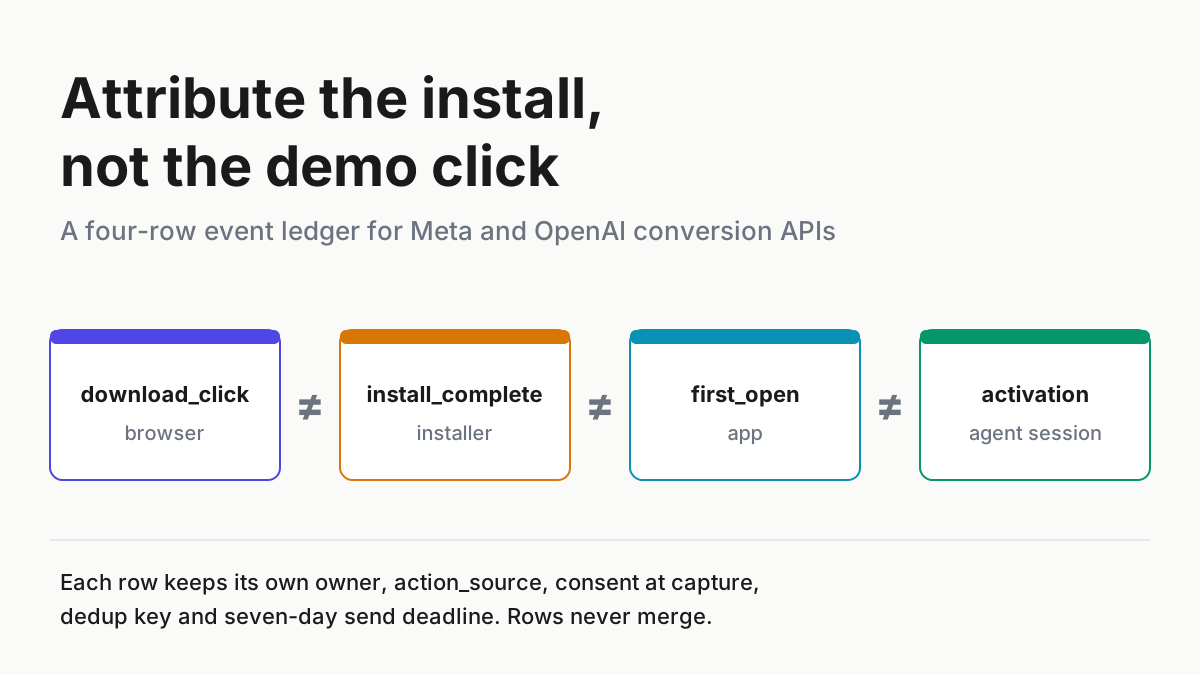
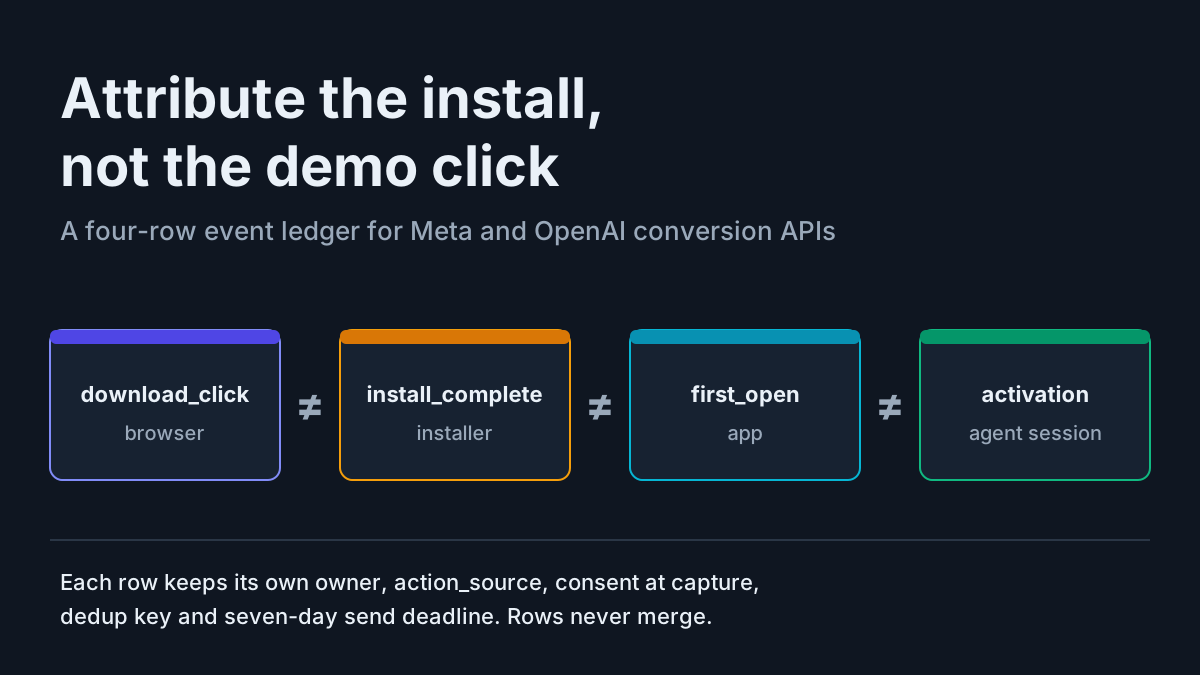
This playbook turns that decision into a ledger. Four rows never merge: download_click, install_complete, first_open and activation. Each row carries its owner system, the action_source it gets at each ad platform, the consent state captured with it, a dedup key, a seven-day send deadline and one rule (send, send with Limited Data Use, or drop).
A gate in front of every server-side send drops any record that lacks an ad-consent flag. Once a week you reconcile the four counts from your own telemetry, never from a platform’s modelled numbers.
It fits a tray app, a CLI companion or a full desktop workspace. Where we map a desktop event to a field the platform’s docs never mention, we say it is our reading.
What Meta’s and OpenAI’s conversion docs say about app installs (October 2026)
Nothing changed at Meta this autumn; the constraint has sat in the docs all year. Meta’s Marketing API changelog lists v25.0, released Feb 18, 2026, as current, and the one-click “Meta-enabled” Conversions API Meta announced on Apr 15 mirrors Pixel web events only (Meta Business News).
On the server event parameters page, fetched Oct 5, action_source is required. app reads “Conversion was made on your mobile app”. system_generated is illustrated with “a subscription renewal that’s set to auto-pay each month”. other is “Conversion happened in a way that is not listed”.
The same page sets the rules your sender lives under. An event_time “can be up to 7 days before you send an event”, and if any event in a request is older, Meta returns “an error for the entire request”. “The event_source_url is required for website events.” Deduplication runs on a pair: “The event_id and event_name parameters are used to deduplicate events sent by both web (via the Meta Pixel) or app (via SDK or App Events API) and the Conversions API.” The customer information parameters page adds that client_user_agent is required for website events and that fbc and fbp, both first-party browser cookies, must not be hashed. Behind a working cookie banner, those cookies exist only if the visitor accepted ad cookies.
The App Events page is where desktop falls out. It requires advertiser_tracking_enabled, application_tracking_enabled and an extinfo whose version “must be a2 for Android” or “i2 for iOS”, on a dataset linked to an app. The only desktop trace is a legacy optional windows_attribution_id, an “Attribution token used for Windows 10”. And on consent, the Pixel consent page documents fbq('consent', 'revoke') to pause Pixel fires and says nothing about server events.
OpenAI’s Ads Conversions API is stricter. Conversion-optimized ChatGPT campaigns, which need OpenAI’s Pixel or this API, opened in early June 2026, per Search Engine Roundtable. Its lifecycle events are app_installed and app_opened, and “The value must be mobile_app for app_installed and app_opened events”. The page also says one failed event fails a whole batch of up to 1,000, and on its first-party click cookie: “If the user revokes consent, stop sending it.”
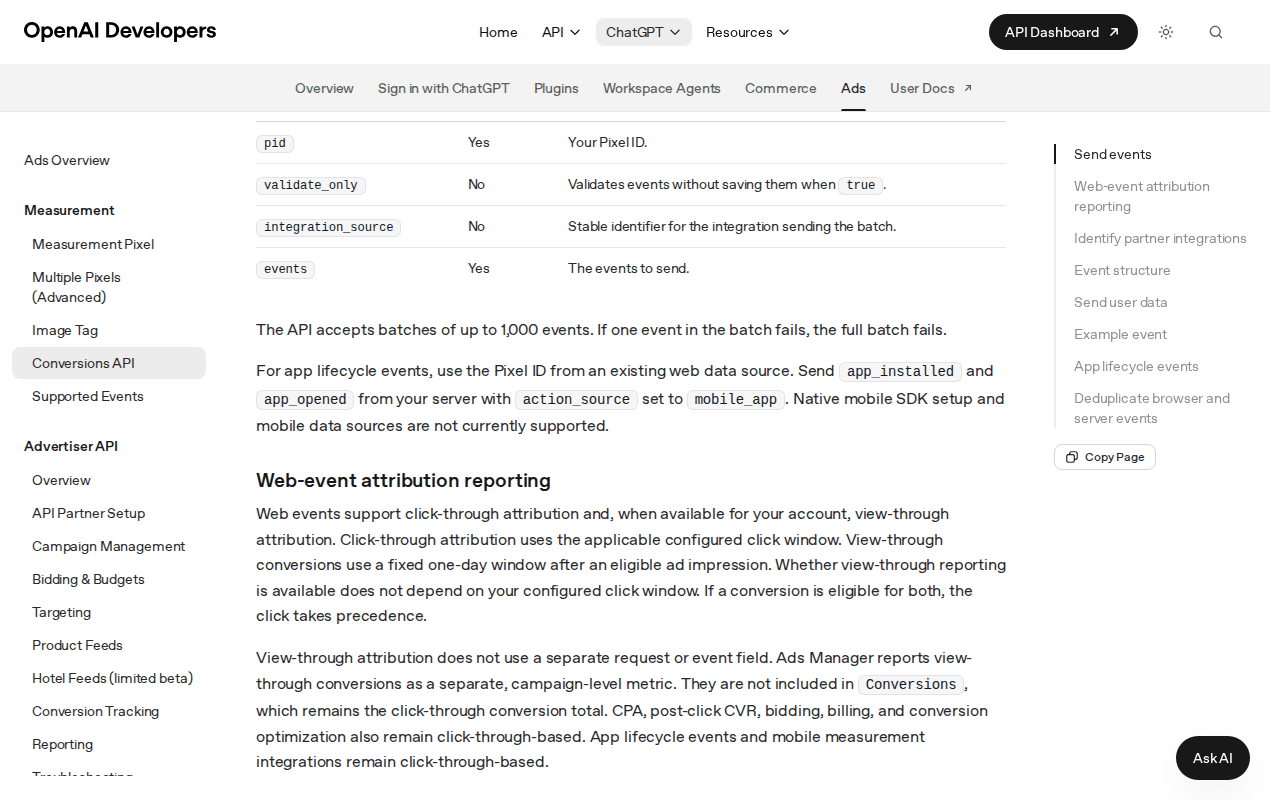 Screenshot: OpenAI Developers, “Conversions API – Ads | OpenAI Developers” (undated docs page), captured Oct 5, 2026.
One dated change sits on top. On Oct 1, 2026, Search Engine Journal reported that Gemini had started appending UTM parameters to outbound links, undocumented, with Google’s John Mueller replying “Nice. I see it too.” Referral attribution is shifting under you, which is one more reason to own the join between a click and an install yourself.
Why a desktop agent install has four owners, not one
A phone install has a store, an SDK and a measurement partner stitching click to open. A desktop agent has none of that. The click happens in a browser that may hold _fbc and _fbp cookies under your domain; the install happens in an OS installer that has never seen them; first open happens in your app, often before sign-in. Activation, for an agent product, is the first real session: an agent connected and a task watched to the end.
Four processes, four owners, four clocks. Merge any two and the numbers move in a direction you will mistake for marketing performance, on top of the noise agent products already carry: launch-week demo clicks that never install, IT-pushed installs that never had a click. Consent gates the join, not only the Pixel, because the identifiers that make an install attributable exist only when the ad cookie was accepted.
The runbook: build the four-row install ledger
Work through the steps in order. Each one leaves an artifact in the repo that owns your telemetry, reviewed like code.
Step 1: Freeze four event definitions
Write the definitions down before you touch a payload. A row fires once, from one system, with one kind of proof.
| Row | Fires when | Owner system | Proof it happened | Never counts as |
|---|---|---|---|---|
download_click |
A visitor clicks a download button on your site | Web server and Pixel | Server log of the redirect to the binary, with an event_id |
An install |
install_complete |
The installer exits with success | Installer or updater backend | Installer callback carrying the install token | A first open |
first_open |
The app process starts for the first time on that machine | App telemetry backend | First heartbeat with install token and app version | Activation |
activation |
The first real agent session completes (your written definition) | Product telemetry | Session record: agent connected, task watched to the end | Revenue |
- Give each row its own
event_name, so platform dedup can never fold an install into a click. - Never backfill one row from another. An install with no first open stays an install.
- Version the definitions. A changed activation rule gets a date in the file and a note on every chart that crosses it.
- Keep failed and cancelled installs as their own counts in your telemetry; they are diagnosis, not conversions.
Step 2: Map each row to each destination, and say which mappings are yours
Meta’s docs do not address desktop installs. Mapping the click to website follows them directly, because a download click is a website event with a URL and a user agent. Mapping install and first open to other is our honest reading of Meta’s catch-all definition, not a Meta statement.
system_generated does not fit, since Meta’s own example is an auto-renewal. app does not fit either: it needs a dataset linked to an app and mobile extinfo.
| Row | Meta Conversions API | OpenAI Ads Conversions API | Your telemetry |
|---|---|---|---|
download_click |
website with event_source_url, client_user_agent, event_id shared with the Pixel |
web event, deduped on pixel ID, event name and event ID | Always, consent-scoped |
install_complete |
other, or not sent |
Never app_installed; a custom event with custom_event_name and other, or not sent |
Always |
first_open |
other, or not sent |
Never app_opened; a custom event with other, or not sent |
Always |
activation |
other only if you optimize on it |
Same rule | Always |
OpenAI leaves no room for interpretation. Its doc text requires mobile_app for app_installed and app_opened, so a Windows or macOS agent must not fire either. Its action_source list includes other, and a non-mobile install can only travel as an event of type custom, which requires a custom_event_name of 1–64 letters, digits, underscores or hyphens.
“Not sent” is a legitimate column value. If your campaigns optimize on the download click, keep installs and first opens in your own ledger and give the platforms nothing they can misread. If you later add a third ad platform, add its column only after you have read its own source list; neither platform checked for this piece documents a desktop install slot.
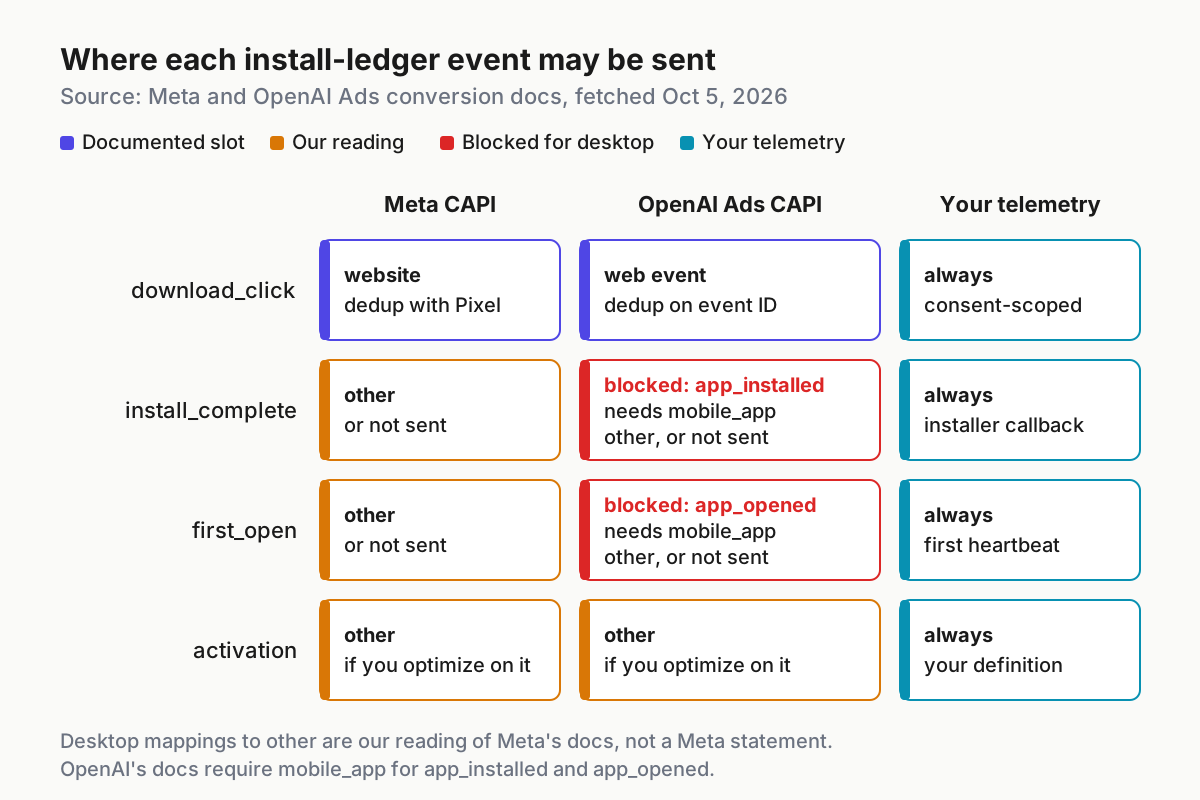
 Where each ledger row may go. Click mappings follow the docs; install and first-open mappings to
 other are our reading.
Step 3: Carry the join across the installer only when consent allows
The click and the install happen in different processes, so you need a first-party join. Issue an opaque token on your server at the moment of the download click and store it with that click’s event_id and consent state. Pass it to the installer the way your build already passes metadata, then have the installer and the first heartbeat report it back. The mechanism is yours; label it in the ledger so a reviewer can find it.
- Make the token random, single-use and expired after seven days. It identifies a download, not a person.
- Copy
fbcandfbponto the click record only when those cookies existed, which means the ad cookie was accepted. Send them unhashed, as Meta specifies. Hash email or phone with SHA-256 if you send them at all. - Record consent at capture. A click captured without ad consent stays unsendable even if the user later grants consent inside the app.
- When analytics consent allowed the click to be logged but ad consent was refused, the join still works in your ledger. The record simply carries
ad_consent: falseand no platform identifiers.
Every row, whatever its type, lands in the same record shape. These are the fields the gate in Step 4 reads:
| Field | Example | Set by | Read by |
|---|---|---|---|
row |
install_complete |
Owner system | Gate, reconcile |
event_name / event_id |
DesktopInstallComplete / inst_7f3c9a2e |
Owner system | Platform dedup |
captured_at |
2026-10-05T11:33:20Z |
Owner system | Age check |
ad_consent |
granted, declined, revoked, unknown |
Consent store at capture | Gate |
consent_source |
banner, GPC header, in-app setting | Consent store | Audit |
region |
US-CA |
Server-side lookup | LDU rule |
install_token |
opaque, single-use | Click handler | Join |
fbc / fbp |
present only when ad_consent was granted |
Browser cookie at click | Meta payload |
send_deadline |
captured_at plus 160 hours |
Owner system | Batch builder |
outcome |
sent, sent_ldu, dropped:<reason> |
Gate | Reconcile |
Step 4: Put a consent gate in front of every server-side send
fbq('consent', 'revoke') pauses the Pixel and nothing else, and OpenAI’s instruction is to stop sending. Your server is therefore the only thing that can honor a refusal for server events, so the gate lives in the sender, not in a tag manager.
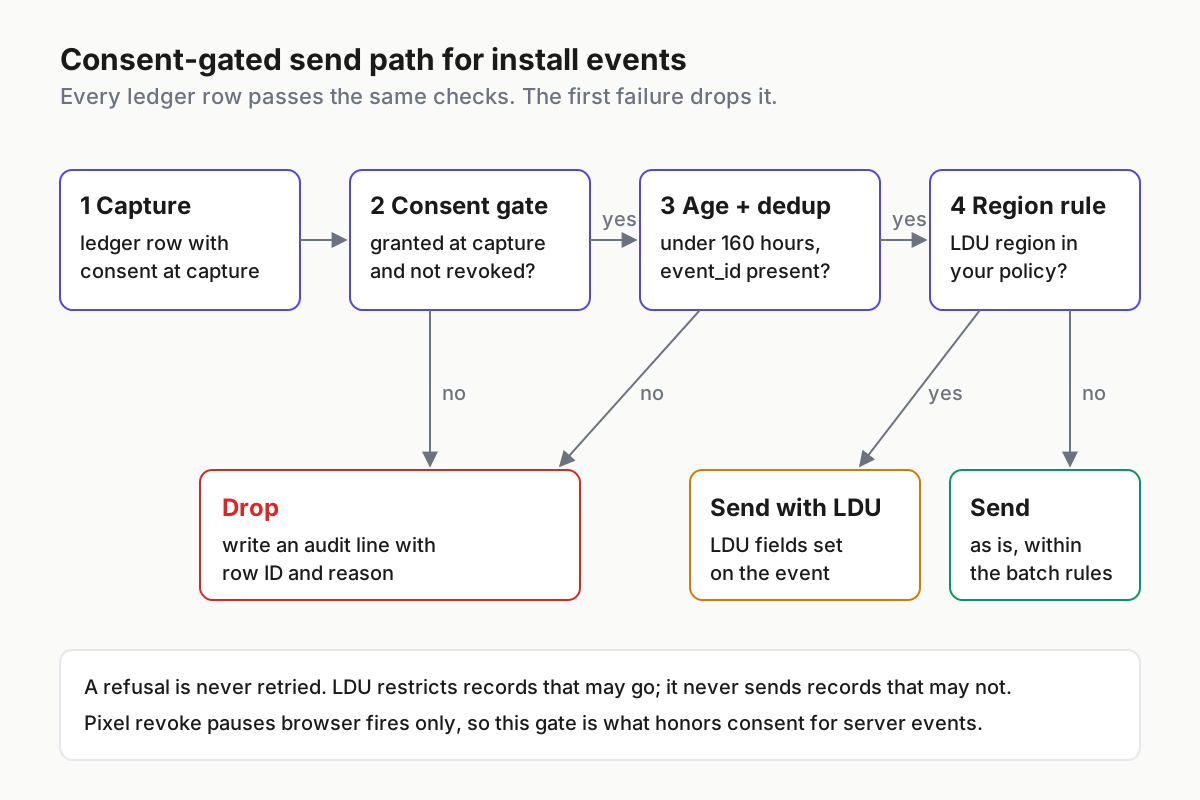
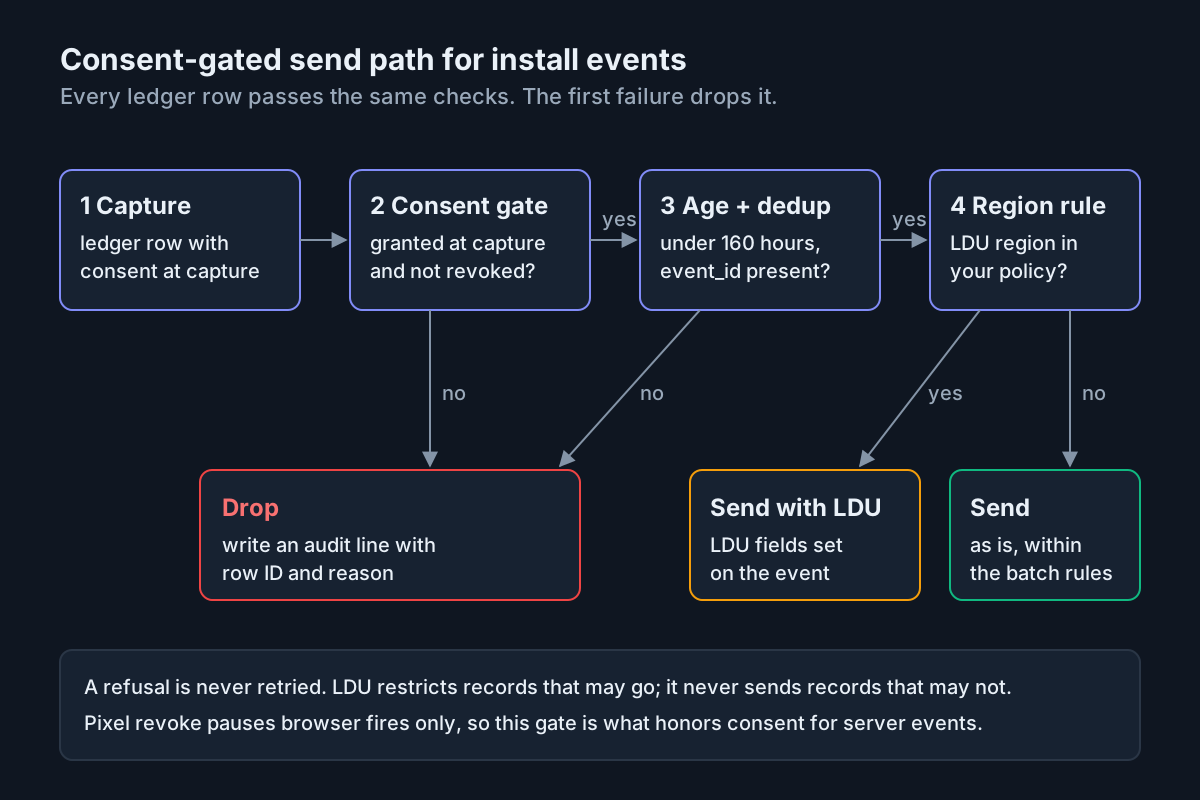 Every row passes the same gate. Drops are logged with a reason, never retried silently.
Run the checks in this order and stop at the first failure:
- Consent at capture. No ad-consent flag on the record, or a flag that reads anything but granted: drop and write an audit line.
- Revocation since capture. The user revoked after the click: drop, and stop sending identifiers for that user.
- Age. Older than your ceiling, set below seven days: drop. Meta rejects the whole request otherwise.
- Dedup key. No
event_id, or anevent_namethat doesn’t match the row: drop. A guessable key is worse than none. - Region rule. Allowed to go and from a region where your policy calls for Meta’s Limited Data Use: send with the LDU fields. Otherwise send as is.
Use LDU as a restriction on records that are allowed to go, never as a way to send records that aren’t. Meta’s data processing options page lists the covered states (California, Colorado, Connecticut, Florida, Texas, Oregon, Montana) and the fields; it does not say whether to suppress events on an opt-out. Drop them. An illustrative gate config:
gate:                               # illustrative, not a vendor schema
  require_ad_consent: true
  drop_if_revoked_since_capture: true
  max_event_age_hours: 160          # under the 7-day platform limit
  require_event_id: true
  ldu_regions: [US-CA, US-CO, US-CT, US-FL, US-TX, US-OR, US-MT]
  meta_ldu_fields:
    data_processing_options: ["LDU"]
    data_processing_options_country: 0   # 0 and 0 let Meta geolocate
    data_processing_options_state: 0
  on_drop: write_audit_line
Meta documents the explicit California pair as country 1 and state 1000; the zeros hand geolocation to Meta. Pick one approach and write it in the ledger.
Step 5: Send the click as a website event and everything else as yours
The click is the one row that matches a documented slot cleanly. Here is an illustrative Meta payload; identifiers are fake.
{
  "data": [{
    "event_name": "DownloadClick",
    "event_time": 1791200000,
    "event_id": "dl_7f3c9a2e",
    "action_source": "website",
    "event_source_url": "https://example.com/download",
    "user_data": {
      "client_user_agent": "Mozilla/5.0 (Windows NT 10.0; Win64; x64)",
      "client_ip_address": "203.0.113.7",
      "fbc": "fb.1.1791199000000.AbCdEfGh",
      "fbp": "fb.1.1791198000000.1234567890"
    }
  }]
}
The browser Pixel fires the same event_name with the same event_id, so Meta keeps one. If you choose to send installs, they go as other with a distinct name, an event_id derived from the install token, and only the identifiers the click record was allowed to keep. If your activation definition changes, rename the event rather than redefining it in place.
Step 6: Respect the seven-day clock and whole-batch failure
Both platforms punish one bad row by rejecting its neighbours: Meta errors “the entire request” on a stale event_time, and OpenAI fails a full batch when one event fails. Build batches defensively.
- Filter stale rows before you build a batch, with a ceiling under seven days to absorb queue delay and clock skew.
- Send one row type per batch, so a malformed install never sinks a day of clicks.
- On a rejected batch, find and drop the offender, then resend once. No blind retries.
- Alert when the oldest queued row passes five days; a weekend backlog is the usual cause.
An illustrative batch builder, in Python-shaped pseudocode:
def build_batches(queue, now, max_age_h=160, size=500):
    # illustrative only: one row type per batch, stale rows dropped first
    by_type = {}
    for rec in queue:
        if rec.outcome is not None:
            continue
        if (now - rec.captured_at).total_seconds() > max_age_h * 3600:
            rec.outcome = "dropped:stale"
            audit(rec)
            continue
        by_type.setdefault(rec.row, []).append(rec)
    for row, recs in by_type.items():
        for i in range(0, len(recs), size):
            yield row, recs[i:i + size]
Step 7: Reconcile weekly from your own telemetry
Platform numbers are attributed under the platform’s windows; OpenAI’s page notes, for example, that view-through conversions use a fixed one-day window and are reported separately. Your ledger counts events. Keep both, compare them, and never overwrite one with the other.
| Check | Source | Pass rule |
|---|---|---|
| Click → install → first open → activation, by channel | Your ledger | Ratios move only with a known cause |
Server sends vs ledger rows with ad_consent: true |
Sender log against ledger | Sends never exceed eligible rows |
| Drops by reason | Gate audit log | Every drop has a reason; “unknown consent” trends down |
| Installs with a null token | Installer callbacks | Below the threshold you set, flat week over week |
New utm_source values |
Web analytics | Each gets a channel mapping before it counts |
| Platform-reported conversions | Meta and OpenAI dashboards | Read and noted; never copied into the ledger |
Assign one owner for the reconcile and one for the gate, and keep their outputs in the same folder as the definitions from Step 1.
The ledger checklist
- Four event names, four owners, definitions versioned in the repo.
- Destination map with “our reading” marked on every
otherrow. - No
app,app_installedorapp_openedanywhere in a desktop sender. - Install token issued at click time, single-use, seven-day expiry.
- Consent captured with the click; gate drops anything not granted.
- Age ceiling under seven days; one row type per batch.
- Audit line for every drop, with reason and row ID.
- Weekly reconcile signed by a named owner.
Where desktop install attribution lies, and the signal for each
Merged rows. Someone defines an install as “a click that got a 200”. Signal: installs track clicks almost one to one, or first opens exceed installs.
Mobile slot on a desktop event. A developer reaches for app or app_installed because the name fits. Signal: Meta errors about app_data or extinfo, or a code review finding mobile_app in a desktop repo. Grep for it in CI.
Stale batch. A queue backs up over a long weekend and Monday’s flush carries one eight-day-old row. Signal: whole-request rejections clustered on Monday mornings, with clicks from Friday missing.
Consent leak. The Pixel stops after a revoke, but the server keeps sending because nobody wired the gate to the revocation store. Signal: server sends exceed ledger rows with ad_consent: true.
Double count. The browser and server use different event_id formats, so both survive. Signal: platform clicks running near double your ledger’s clicks.
Join loss. An installer update stops passing the token through. Signal: the null-token share of installs jumps the week of a release.
Referral drift. Gemini’s new UTM tags move traffic from “direct” to a referral bucket overnight. Signal: source mix shifts with no campaign change; map the new values before you report the swing as growth.
One ledger, many senders: the fleet habit applied to the funnel
Teams that run agent fleets already know this shape. Spend reconciliation works only when client estimate, gateway meter and provider invoice share one ledger, the argument of reconcile before you charge back, and a ticked task needs a receipt a verifier can re-run, as in TASKS.md with receipts. The install ledger points that discipline at marketing events: one record per thing that happened, one owner per record.
The operating layer rests on the rule behind replaying a session you can actually see: if your own records can’t reconstruct it, you don’t know it happened. The funnel starts upstream, with whether directories and answer engines classify your agent product as AI, and ends in the consent states your agents obey at runtime, covered in the fail-closed consent test matrix. For the wider practice, start with AgentOps.
FAQ
Can the Meta Conversions API track a desktop app install?
It can receive one, but not as an app event. Meta’s app source means a mobile app and requires Android or iOS extinfo. Our reading of the docs is that a desktop install fits Meta’s catch-all other, or stays out of Meta entirely. Meta does not address desktop installs, so treat that mapping as yours.
What action_source should a software download use in Meta CAPI?
Use website for the download click. It happens on your site, so send event_source_url and client_user_agent, and share the event_id and event_name with the Pixel so Meta deduplicates the pair. Send it within seven days, because one stale event fails the entire request. The install itself is a separate row.
Does fbq consent revoke stop Conversions API events?
No. Meta documents fbq('consent', 'revoke') as pausing Pixel fires, and its consent page says nothing about server events. Your sender has to check consent itself before every send and drop records without a granted ad-consent flag. OpenAI’s Ads documentation is explicit: if the user revokes consent, stop sending.
Sources
- Meta: Conversions API server event parameters (current docs, fetched Oct 5, 2026)
- Meta: Conversions API customer information parameters (current docs)
- Meta: Conversions API for App Events (current docs)
- Meta: Data Processing Options for US users (Limited Data Use) (current docs)
- Meta Pixel: consent and GDPR implementation (current docs)
- Meta: Marketing API changelog (v25.0, Feb 18, 2026)
- Meta Business News: Pixel and Conversions API updates (Apr 15, 2026)
- OpenAI Developers: Ads Conversions API (current docs, captured Oct 5, 2026)
- Search Engine Roundtable: ChatGPT Ads conversion-optimized campaigns (May 28, 2026)
- Search Engine Journal: Google Gemini adds UTM parameters for referral attribution (Oct 1, 2026)